

Real-Time Polynomial Regression: A Causal Savitzky-Golay Implementation for MQL5
 210
210
 0
0

Introduction
Every trader who has used a moving average has run into the same problem: by the time it confirms a trend has reversed, a meaningful part of the move is already over. This is not a flaw in any specific moving average — it is a direct consequence of how averaging works. A moving average blends recent and older prices together, and when the market reverses, those older prices keep pulling the average in the wrong direction for several bars afterward. This delay between what price is doing and what the average reports is what traders call lag.
This article introduces a different approach: the Savitzky-Golay filter. Instead of averaging raw prices, it fits a low-degree polynomial curve to a window of recent prices, and uses that curve to estimate the current smoothed value. A polynomial fit can represent curvature — the early signs of a turn — in a way a flat average cannot.
The filter itself is not new. It was published in 1964 by Abraham Savitzky and Marcel Golay, and has long been standard in analytical chemistry and spectroscopy for smoothing noisy instrument readings. It has seen very little use in trading, for a specific technical reason: the textbook version is non-causal — it uses data from both before and after the point being smoothed. In a lab, where the full dataset already exists, that is fine. In live trading, it is disqualifying, since tomorrow's closing price is not available today.
This article works through a causal adaptation: a version that only ever uses the current
bar and bars before it, making it usable in real time exactly like a moving average is. We derive the math and implement it in MQL5 as an indicator and an Expert Advisor. We also address a trade-off: faster reaction to trend changes increases sensitivity to a single noise bar. We measured this directly, and show the specific safeguard the accompanying Expert Advisor uses to manage it.
In practice, adapting the Savitzky-Golay filter for live trading comes with three specific challenges:
- No future data available — the textbook filter's strength comes from using bars both before and after the point being smoothed, but live trading only ever has past and current bars to work with, forcing a fundamentally different, edge-evaluated version of the same math.
- Extrapolation increases noise sensitivity — evaluating the polynomial fit at the edge of its window rather than at the center makes the filter lean more heavily on the single most recent bar, which reduces lag but genuinely increases how much a single noisy price movement can distort the output.
- No universal window length exists. Suitable fast/slow lengths depend on the instrument, timeframe, and typical trend duration on the chart. Treat any settings as a tested starting point, not a rule.
This article works through all three: it derives a causal version of the filter from first principles, measures the noise-sensitivity trade-off directly rather than glossing over it, and shows the specific safeguard the accompanying Expert Advisor uses to manage that trade-off in practice.
Idea 1: Why Averaging Causes Lag, and Why Curve-Fitting Reduces It
A Simple Moving Average is, mathematically, a polynomial fit of degree zero: it fits a flat line to the last N prices and reports its height. This works when price genuinely is flat. It fails to describe price that is curving — accelerating into a move, or decelerating before a reversal — because a flat line has no parameter to represent curvature at all.
The Savitzky-Golay filter fits a higher-degree polynomial, typically a quadratic, to the same window instead. A quadratic curve can represent a level, a slope, and a curvature — it can bend. When price genuinely starts turning, a quadratic fit to the last several bars can pick up that curvature earlier than a flat average, simply because the flat model has nothing in it to represent a turn until the turn already dominates the window. This same sensitivity is not one-sided, though — a quadratic fit can just as easily pick up a random noise bend early and report it as a turn, which is precisely why the confirmation safeguard discussed later in this article exists.
Degree 0 fit (Simple Moving Average): price(t) ≈ a0
Degree 2 fit (Savitzky-Golay, quadratic): price(t) ≈ a0 + a1*t + a2*t^2
The coefficients a0, a1, a2 are found by ordinary least-squares regression over the chosen window. Once fitted, the filter's output at the current bar is simply that curve's value at that bar's position.
Idea 2: Making the Filter Causal — Fitting Only to the Past
The textbook Savitzky-Golay filter fits its polynomial to a symmetric window — points both before and after the bar being smoothed. This symmetry is exactly what gives the classic filter its strong noise-rejection in offline use, where the whole dataset is already known.
Live trading does not have that luxury. When calculating the indicator's value for the current bar, there are no future bars yet. The adaptation here fits the same degree-2 polynomial to a window made entirely of the current bar and a fixed number of bars before it, and evaluates the fitted curve at the most recent point in that window, rather than at its center.
Non-causal (textbook) window, size 9, evaluated at the CENTER:
[ -4  -3  -2  -1  (0)  +1  +2  +3  +4 ]     <- evaluated here

Causal (this article's) window, size 9, evaluated at the END:
[ -8  -7  -6  -5  -4  -3  -2  -1  (0) ]     <- evaluated here
Because the filter's coefficients depend only on window size and polynomial degree — never on the actual prices — they can be derived once and reused as a fixed set of weights, the same way a Simple Moving Average's weights (1/N each) never need recalculating. The causal Savitzky-Golay filter's weights follow the same principle; they are just not uniform.
Idea 3: The Real Trade-Off — Less Lag Means More Sensitivity to the Latest Bar
This part of the filter's behavior is not usually discussed, and we want to be direct about it rather than leave it out.
Because the causal filter is evaluated at the edge of its window rather than at the center, it is an edge-evaluated (marginal) estimate, not a centered one — the evaluation point itself is still x=0, inside the data window, so this is not extrapolation in the strict sense of estimating beyond the sampled range. A centered fit is constrained from both sides; an edge-evaluated fit is constrained from only one side, and leans more heavily on the points closest to that edge — the most recent bars — to determine where the curve is heading.
When we computed the actual coefficients for a 9-bar causal quadratic filter, the weight on the single most recent bar came out to roughly 0.66, compared with about 0.11 for an equivalent Simple Moving Average, where every bar carries equal weight. The causal filter depends roughly six times more heavily on its single newest data point.
The consequence is direct: a single unusually noisy bar moves this filter's output noticeably more than it would move a moving average of the same length. This is the cost of reduced lag, and the two are linked, not independent choices — a filter that leans on recent data to react faster will, by that same property, react faster to noise too. This is exactly why the accompanying Expert Advisor does not act on a raw crossover the moment it happens. It requires the crossover to hold for a minimum number of consecutive closed bars first — a deliberate, tested safeguard against this specific sensitivity, covered in the implementation section below.
One clarification about what the filter's properties actually describe: a shorter window or a lower polynomial order changes how the filter line responds to price — but the trading system is something larger. It also includes the crossover rule, the InpConfirmBars delay, the stop-and-reverse logic, the fixed lot, and the specific bar-processing order. A filter that reacts faster only means its output line moves sooner — it does not automatically produce a better strategy, because the confirmation delay, window asymmetry, and absence of a stop-loss all interact with the signal before a trade is placed. The results in the backtesting section reflect the full system, not the filter in isolation.
Requirements & Setup
Everything in this article runs on standard MetaTrader 5, with no external libraries and no additional installations. The filter's coefficients are derived using nothing beyond basic linear algebra implemented directly in MQL5, so there is no dependency on Python, DLLs, or any third-party numerical library.
What you need:
- MetaTrader 5, with a broker connection for the symbol and timeframe you intend to test on
- MetaEditor (bundled with MetaTrader 5) to compile the indicator and Expert Advisor
- Sufficient price history loaded for your chosen symbol — the filter needs a warm-up period before it produces its first value, discussed below
Two files make up this project:
- An indicator (.mq5) that plots the fast and slow Savitzky-Golay lines directly on the price chart
- An Expert Advisor (.mq5) that creates its own iCustom() instance of the indicator, using the EA's own InpFastWindow / InpSlowWindow / InpPolyOrder inputs, and trades the crossover of that instance's output, with the stability safeguard from Idea 3 built in. Attaching the indicator to the same chart with matching settings is useful for visually following what the EA is reacting to, but it is not what the EA itself reads — the EA's iCustom() call creates its own independent instance regardless of what is or is not visually attached to the chart
The indicator must be compiled and present in your MQL5/Indicators folder before the Expert Advisor is attached to a chart, since the EA loads it by name at initialization and will fail to start if it cannot find it.
On warm-up: because the slow filter's window is the larger of the two, the indicator needs at least that many bars of history before its first value can be calculated. On a chart with too little loaded history, both lines will simply remain empty until enough bars are available — this is expected behavior, not an error.
The Indicator: Full Code Walkthrough
This section walks through the indicator file from top to bottom. Every functional block is covered; the only lines skipped over without individual comment are closing braces and blank spacing, which carry no logic of their own.
1. Properties and Inputs:
#property indicator_chart_window
#property indicator_buffers 2
#property indicator_plots   2
#property indicator_label1  "SG Fast"
#property indicator_type1   DRAW_LINE
#property indicator_color1  clrDodgerBlue
#property indicator_style1  STYLE_SOLID
#property indicator_width1  2
#property indicator_label2  "SG Slow"
#property indicator_type2   DRAW_LINE
#property indicator_color2  clrOrangeRed
#property indicator_style2  STYLE_SOLID
#property indicator_width2  2
indicator_chart_window places this indicator directly on the price chart rather than in a separate sub-window, since both lines share the same price scale as the candles themselves — this is an overlay tool, the same category as a moving average, not an oscillator like RSI. Two buffers and two plots are declared because there are exactly two visible lines: a fast one and a slow one, each given its own label, color, and line style so they are visually distinguishable at a glance.
input int InpFastWindow = 50;   // Fast Window Length (bars)
input int InpSlowWindow = 100;  // Slow Window Length (bars)
input int InpPolyOrder  = 2;    // Polynomial Order (2 = quadratic; keep low for stability)
These three inputs are the only parameters a user needs to control. InpFastWindow and InpSlowWindow set how many bars each line's polynomial fit looks back over; InpPolyOrder sets the degree of that polynomial, and should be kept at 2 for the stability reasons discussed in Idea 3 — a higher order gives the fit more freedom to swing wildly at the extrapolated edge point.
//--- Two overlay lines, plotted directly on the price chart like a pair
//--- of moving averages — this is an overlay tool, not an oscillator.
   double BufFast[];
   double BufSlow[];

//--- Precomputed filter coefficients. Since a causal Savitzky-Golay
//--- filter's coefficients depend only on the window length and
//--- polynomial order — never on the price data itself — they are
//--- calculated once in OnInit() rather than recomputed on every bar.
   double FastCoefs[];
   double SlowCoefs[];
BufFast and BufSlow are the indicator buffers that actually get drawn on the chart — MetaTrader knows about these specifically because they're registered with SetIndexBuffer() later in OnInit(), and their values become the two visible lines. FastCoefs and SlowCoefs are not chart buffers at all — they are plain arrays holding each line's precomputed filter weights. These are kept as ordinary arrays, not indicator buffers. They are not drawn, do not need resizing with history, and are not accessed externally. Registering them as buffers would add unnecessary overhead.
2. The Linear System Solver:
//+------------------------------------------------------------------+
//| Simple Gauss-Jordan solver for a small linear system.            |
//| Every array operation's return value is checked here, since a    |
//| silent allocation failure partway through would otherwise leave  |
//| this function operating on a partially-sized or partially-copied |
//| array without any indication that something had gone wrong.      |
//+------------------------------------------------------------------+
bool SolveLinearSystem(double &Ain[], double &bIn[], int m, double &x[])
  {
//--- Allocate the local working copies first. ArrayResize() returns
//--- the array's new size on success, or -1 if the allocation failed
//--- (for example, if the terminal is genuinely out of memory) — that
//--- failure is checked explicitly rather than assumed away.
   double A[];
   double b[];
   if(ArrayResize(A, m * m) < 0 || ArrayResize(b, m) < 0 || ArrayResize(x, m) < 0)
     {
      Print("SolveLinearSystem: ArrayResize failed, error code: ", GetLastError());
      return false;
     }

//--- ArrayCopy() returns the number of elements actually copied, or -1
//--- on failure. Checking this matters here specifically: if the copy
//--- silently failed, A and b would be left as zero-filled arrays
//--- rather than genuine copies of the caller's data, and every
//--- calculation below would proceed on that wrong data without error.
   if(ArrayCopy(A, Ain) < 0 || ArrayCopy(b, bIn) < 0)
     {
      Print("SolveLinearSystem: ArrayCopy failed, error code: ", GetLastError());
      return false;
     }
This function solves a small system of linear equations, A * x = b, using Gauss-Jordan elimination. Every allocation and copy is checked explicitly: ArrayResize() returns the array's new size on success or -1 on failure, and ArrayCopy() returns the number of elements copied or -1 on failure — silently ignoring either would let the function continue operating on incomplete or wrong data without any indication that something had gone wrong.
   for(int col = 0; col < m; col++)
     {
      //--- Partial pivoting for numerical stability
      int pivotRow = col;
      double maxVal = MathAbs(A[col * m + col]);
      for(int row = col + 1; row < m; row++)
        {
         if(MathAbs(A[row * m + col]) > maxVal)
           {
            maxVal = MathAbs(A[row * m + col]);
            pivotRow = row;
           }
        }
      if(maxVal < 1e-12)
         return false; // singular matrix — should not happen for valid inputs
For each column, this searches for the row with the largest absolute value in that column and treats it as the pivot — this is partial pivoting, a standard numerical-stability technique. Without it, a small pivot value can amplify floating-point rounding error badly enough to produce meaningfully wrong coefficients. If every candidate pivot is effectively zero, the matrix is singular and the function reports failure.
      if(pivotRow != col)
        {
         for(int k = 0; k < m; k++)
           {
            double tmp = A[col * m + k];
            A[col * m + k] = A[pivotRow * m + k];
            A[pivotRow * m + k] = tmp;
           }
         double tmpB = b[col];
         b[col] = b[pivotRow];
         b[pivotRow] = tmpB;
        }
If the best pivot is not already in the current row, its row is swapped into position — in both A and the corresponding entry of b, so the two stay consistent with each other. If the swap is skipped, the code may divide by a very small pivot and amplify rounding errors. The code can still run but return materially wrong coefficients, especially for small matrices.
      double pivot = A[col * m + col];
      for(int k = 0; k < m; k++)
         A[col * m + k] /= pivot;
      b[col] /= pivot;

      for(int row = 0; row < m; row++)
        {
         if(row == col)
            continue;
         double factor = A[row * m + col];
         for(int k = 0; k < m; k++)
            A[row * m + k] -= factor * A[col * m + k];
         b[row] -= factor * b[col];
        }
     }

   for(int i = 0; i < m; i++)
      x[i] = b[i];
   return true;
  }
The pivot row is normalized so its pivot column entry becomes exactly 1, then that row is subtracted, scaled, from every other row to eliminate that column everywhere else. Once every column has been processed this way, b itself has become the solution vector, and is copied into x.
3. Deriving the Causal Filter Coefficients:
//+-------------------------------------------------------------------+
//| Solves the least-squares polynomial fit to derive this window's   |
//| Savitzky-Golay coefficients, evaluated at the most recent point   |
//| only (index 0 = "now"), since no future data is available in      |
//| live trading. This is the "causal" adaptation of the classic,     |
//| textbook Savitzky-Golay filter, which normally uses a centered,   |
//| symmetric window that includes future points.                     |
//+-------------------------------------------------------------------+
bool ComputeCausalCoefficients(int windowSize, int polyOrder, double &coefs[])
  {
   int n = windowSize;
   int m = polyOrder + 1;

//--- Build the Vandermonde design matrix: each row is [1, x, x^2, ...]
//--- for a time index x, where x = 0 is the most recent bar and
//--- x = -(n-1) is the oldest bar in the window
   double A[];
   if(ArrayResize(A, n * m) < 0)
     {
      Print("ComputeCausalCoefficients: ArrayResize(A) failed, error code: ", GetLastError());
      return false;
     }
   for(int row = 0; row < n; row++)
     {
      double x = -(n - 1) + row;
      double power = 1.0;
      for(int col = 0; col < m; col++)
        {
         A[row * m + col] = power;
         power *= x;
        }
     }
The function signature changed from void to bool. This block builds the Vandermonde design matrix described in Idea 2 — each row is one bar's time index raised to increasing powers, from -(n-1) for the oldest bar up to 0 for the most recent. ArrayResize() 's return value is checked directly: if it fails, the function returns false immediately, rather than the old behavior of setting an internal flag and continuing to run other checks around it.
//--- Normal equations: (A^T * A) * w = A^T * e0, where e0 selects
//--- "evaluate the fitted polynomial at x = 0" — this reduces to solving
//--- AtA * w = c, where c = [1, 0, 0, ...] since 0^0=1 and 0^k=0 for k>0
   double AtA[];
   if(ArrayResize(AtA, m * m) < 0)
     {
      Print("ComputeCausalCoefficients: ArrayResize(AtA) failed, error code: ", GetLastError());
      return false;
     }
   for(int i = 0; i < m; i++)
      for(int j = 0; j < m; j++)
        {
         double sum = 0.0;
         for(int row = 0; row < n; row++)
            sum += A[row * m + i] * A[row * m + j];
         AtA[i * m + j] = sum;
        }
Rather than inverting A directly, this forms the normal-equations matrix AᵀA, a standard least-squares approach that is smaller and more convenient to solve for a fixed, small window size. This is not, in general, more numerically stable than solving the original system directly — forming AᵀA effectively squares the matrix's condition number, which worsens conditioning rather than improving it. It is used here because the window sizes and polynomial orders involved keep the resulting system well-conditioned enough in practice, not because normal equations are inherently more stable. The ArrayResize() check here also now returns false directly on failure — there is no longer a need to write if(!allocationFailed &&...) before this check, since a genuine failure in the previous block already exited the function before execution could ever reach this point.
//--- c = [1, 0, 0, ...] encodes "evaluate the fitted polynomial at
//--- x = 0" — only the constant term survives at that point
   double c[];
   if(ArrayResize(c, m) < 0)
     {
      Print("ComputeCausalCoefficients: ArrayResize(c) failed, error code: ", GetLastError());
      return false;
     }
   if(!ArrayInitialize(c, 0.0))
     {
      Print("ComputeCausalCoefficients: ArrayInitialize(c) failed, error code: ", GetLastError());
      return false;
     }
   c[0] = 1.0;

   double w[];
   if(!SolveLinearSystem(AtA, c, m, w))
     {
      Print("ComputeCausalCoefficients: Savitzky-Golay coefficient solve failed for window=", n);
      return false;
     }
The vector c = [1, 0, 0,...] encodes "evaluate the fitted polynomial at x = 0." Solving AᵀA·w = c yields the coefficients that isolate the value at the most recent bar. Every check in this block — the two ArrayResize / ArrayInitialize calls and the SolveLinearSystem() call — now returns false immediately on its own failure, instead of setting the shared allocationFailed flag that the old version relied on.
//--- Finally, project the m-length polynomial-space solution back onto
//--- the n raw data points: coefs[row] = A[row] dot w
   if(ArrayResize(coefs, n) < 0)
     {
      Print("ComputeCausalCoefficients: final ArrayResize(coefs) failed, error code: ", GetLastError());
      return false;
     }
   for(int row = 0; row < n; row++)
     {
      double sum = 0.0;
      for(int col = 0; col < m; col++)
         sum += A[row * m + col] * w[col];
      coefs[row] = sum;
     }
   return true;
  }
This projects the polynomial-space solution w back onto the actual bars in the window, producing the final per-bar coefficient weights. The function now ends with return true; — the explicit, unambiguous signal to the caller that coefs genuinely holds a valid result. There is no fallback-to-average branch left anywhere in this function; every path either returns false on a real failure or true on genuine success.
4. Initialization:
//+------------------------------------------------------------------+
//| Custom indicator initialization function                         |
//+------------------------------------------------------------------+
int OnInit()
  {
//--- SetIndexBuffer() returns false if the binding fails — checked
//--- here because if either buffer failed to bind, the indicator would
//--- otherwise appear to load successfully while never actually
//--- drawing anything, with no clear indication of why
   if(!SetIndexBuffer(0, BufFast, INDICATOR_DATA) ||
      !SetIndexBuffer(1, BufSlow, INDICATOR_DATA))
     {
      Print("OnInit: SetIndexBuffer failed, error code: ", GetLastError());
      return INIT_FAILED;
     }

   PlotIndexSetDouble(0, PLOT_EMPTY_VALUE, EMPTY_VALUE);
   PlotIndexSetDouble(1, PLOT_EMPTY_VALUE, EMPTY_VALUE);
   IndicatorSetString(INDICATOR_SHORTNAME,
                      "SG-Filter(" + IntegerToString(InpFastWindow) + "," +
                      IntegerToString(InpSlowWindow) + ")");
Each buffer is registered with the terminal and tied to its corresponding plot. SetIndexBuffer() returns false if the binding fails, which is checked explicitly here — without this check, a failed binding would leave the indicator appearing to load normally while silently never drawing anything, with no error message pointing to why. Setting PLOT_EMPTY_VALUE to EMPTY_VALUE ensures that unset buffer points — such as the warm-up period before the first valid value — are simply not drawn, rather than plotted as zero.
   if(InpFastWindow < 3 || InpSlowWindow <= InpFastWindow)
     {
      Print("InpSlowWindow must be greater than InpFastWindow, and both at least 3.");
      return INIT_PARAMETERS_INCORRECT;
     }
   if(InpPolyOrder < 1 || InpPolyOrder >= InpFastWindow)
     {
      Print("InpPolyOrder must be at least 1 and less than InpFastWindow.");
      return INIT_PARAMETERS_INCORRECT;
     }
These two checks reject configurations that would either be meaningless or mathematically invalid. Catching this at initialization, with a clear message, is preferable to a cryptic runtime failure later.
//--- Precompute both filters' coefficients once — since they depend
//--- only on window length and polynomial order, not on price data.
//--- The return value is checked here rather than inside the function
//--- itself, so the indicator can genuinely fail to initialize with a
//--- clear error if the coefficients cannot be computed, rather than
//--- silently substituting a lower-quality fallback the user is never
//--- told about.
   if(!ComputeCausalCoefficients(InpFastWindow, InpPolyOrder, FastCoefs))
     {
      Print("OnInit: failed to compute fast filter coefficients.");
      return INIT_FAILED;
     }
   if(!ComputeCausalCoefficients(InpSlowWindow, InpPolyOrder, SlowCoefs))
     {
      Print("OnInit: failed to compute slow filter coefficients.");
      return INIT_FAILED;
     }

   return INIT_SUCCEEDED;
  }
Both coefficient sets are still computed exactly once here, not inside OnCalculate(), since neither depends on price. What's new is that each call's return value is now checked directly: if either genuinely fails, OnInit() fails the indicator's initialization outright with a clear Print() message, rather than the old design, where a failure was absorbed silently and the indicator kept running with a lower-quality substitute the user was never told about.
5. Main Calculation Loop:
//+------------------------------------------------------------------+
//| Custom indicator iteration function                              |
//+------------------------------------------------------------------+
int OnCalculate(const int rates_total,
                const int prev_calculated,
                const datetime &time[],
                const double   &open[],
                const double   &high[],
                const double   &low[],
                const double   &close[],
                const long     &tick_volume[],
                const long     &volume[],
                const int      &spread[])
  {
   int warmupBars = InpSlowWindow + 1;
   if(rates_total < warmupBars + 2)
      return 0;

   ArraySetAsSeries(close, true);
   ArraySetAsSeries(BufFast, true);
   ArraySetAsSeries(BufSlow, true);
The slow window is always the longer of the two, so it determines how much history is genuinely required before a first value can be produced. Series indexing is set explicitly on the price array and both buffers, so index 0 consistently refers to the newest bar throughout the function.
//--- Determine the starting point for the calculation
   int start = rates_total - prev_calculated;

//--- Perform a full initialization on the first calculation.
//--- ArrayInitialize() returns false if it fails — checked here since a
//--- silent failure would leave old, stale buffer values in place
//--- rather than the clean EMPTY_VALUE state this reset is meant to produce
   if(prev_calculated <= 1)
     {
      if(!ArrayInitialize(BufFast, EMPTY_VALUE) || !ArrayInitialize(BufSlow, EMPTY_VALUE))
        {
         Print("OnCalculate: ArrayInitialize failed, error code: ", GetLastError());
         return 0;
        }
      start = rates_total - warmupBars - 1;
     }
   else
     {
      //--- Recalculate the current and most recently closed bar on live ticks
      if(start < 1)
         start = 1;
     }
On the very first calculation, both buffers are reset and the whole available history is processed. ArrayInitialize() returns false if it fails, which is checked explicitly — a silent failure here would leave old, stale values sitting in the buffers rather than the clean, empty state this reset is meant to produce. On every later call, only the small number of bars affected since the last call are reprocessed.
   for(int i = start; i >= 0; i--)
     {
      //--- Skip bars too close to the end of history for a full warm-up window
      if(i > rates_total - warmupBars - 1)
         continue;

      //--- Coefficient[0] pairs with the OLDEST bar in the window,
      //--- coefficient[last] with the CURRENT bar — matching how the
      //--- coefficients were derived in ComputeCausalCoefficients()
      double fastValue = 0.0;
      for(int j = 0; j < InpFastWindow; j++)
         fastValue += FastCoefs[InpFastWindow - 1 - j] * close[i + j];
      BufFast[i] = fastValue;

      double slowValue = 0.0;
      for(int j = 0; j < InpSlowWindow; j++)
         slowValue += SlowCoefs[InpSlowWindow - 1 - j] * close[i + j];
      BufSlow[i] = slowValue;
     }

   return rates_total;
  }
Because close[] is series-indexed, close[i+j] walks backward in time as j grows; the coefficient index InpFastWindow - 1 - j pairs the newest bar with the coefficient computed for position zero, and the oldest bar with the coefficient for the far end — matching how the coefficients were derived.
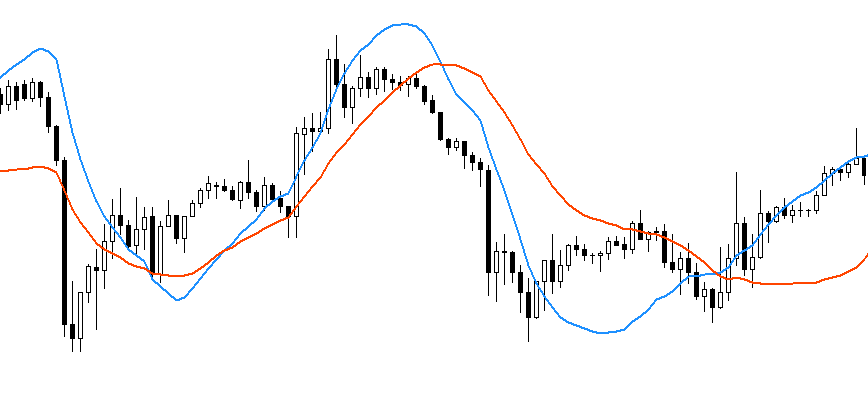
Savitzky-Golay Indicator on Chart
The Expert Advisor: Full Code Walkthrough
1. Inputs and Global State:
input double InpLotSize        = 0.10;  // Trade Volume
input int    InpConfirmBars    = 5;     // Bars a Crossover Must Hold Before Trading
input int    InpFastWindow     = 50;    // Fast Window Length (must match indicator's setting)
input int    InpSlowWindow     = 100;   // Slow Window Length (must match indicator's setting)
input int    InpPolyOrder      = 2;     // Polynomial Order (must match indicator's setting; keep at 2)
input int    InpMagicNumber    = 20260002; // Magic Number
InpFastWindow, InpSlowWindow, and InpPolyOrder mirror the indicator's own inputs exactly, and must be kept in sync manually — the EA has no way to read whatever values happen to be set on the indicator's own chart instance, since these are two separate, independent sets of inputs that only agree because the user sets them to agree. InpConfirmBars is the stability safeguard from Idea 3. InpMagicNumber tags every position this EA opens, which matters the moment more than one EA or manual trade might ever run on the same account.
One trade-off worth stating explicitly: InpConfirmBars = 5 adds five closed bars of delay before a crossover is acted on. On a one-hour chart that is five hours; on a daily chart it is five trading days. The filter reduces the smoothing lag inherent to the window, but the confirmation requirement then adds its own delay on top. Whether the combined delay of the full system is genuinely lower than a plain moving average crossover at the same window lengths depends on the timeframe and settings, and should be verified directly rather than assumed from the filter's properties alone.
//--- Indicator handle. Fast/slow/poly are explicitly passed in here
//--- rather than left to the indicator's own default inputs — this way
//--- the EA's behaviour is fully defined by ITS OWN settings, and never
//--- silently changes just because someone edits the indicator's
//--- defaults on a chart elsewhere.
int handleSG;

//--- Tracks how many consecutive bars the fast/slow relationship has
//--- held in its current state, and what that state currently is — this
//--- is what implements the noise-filtering "stability confirmation"
//--- discussed for this filter: a single noisy crossover is deliberately
//--- ignored until it has genuinely persisted.
string currentRelation = "";
int    relationRunLength = 0;
string lastConfirmedRelation = "";
handleSG is the connection to the indicator, obtained once in OnInit() and reused for the entire time the EA is attached — it is not a copy of the indicator's data, but a live reference the EA queries fresh on every new bar via CopyBuffer(). The three variables together implement the run-length tracking behind the stability safeguard, and their state must persist across calls to OnTick(), which is exactly why they are declared as global variables rather than local ones inside the function itself.
2. Initialization and Cleanup:
//+------------------------------------------------------------------+
//| Expert initialization function                                   |
//+------------------------------------------------------------------+
int OnInit()
  {
//--- InpLotSize must be strictly positive
   if(InpLotSize <= 0.0)
     {
      Print("OnInit: InpLotSize must be greater than 0.");
      return INIT_PARAMETERS_INCORRECT;
     }
   if(InpConfirmBars < 1)
     {
      Print("OnInit: InpConfirmBars must be at least 1.");
      return INIT_PARAMETERS_INCORRECT;
     }
   if(InpSlowWindow <= InpFastWindow)
     {
      Print("OnInit: InpSlowWindow must be greater than InpFastWindow.");
      return INIT_PARAMETERS_INCORRECT;
     }
   if(InpPolyOrder < 1 || InpPolyOrder >= InpFastWindow)
     {
      Print("OnInit: InpPolyOrder must be at least 1 and less than InpFastWindow.");
      return INIT_PARAMETERS_INCORRECT;
     }
//--- Validate InpLotSize against the symbol's actual volume constraints
//--- SymbolInfoDouble() returns 0.0 on failure, which is checked before use
   double minLot  = SymbolInfoDouble(_Symbol, SYMBOL_VOLUME_MIN);
   double maxLot  = SymbolInfoDouble(_Symbol, SYMBOL_VOLUME_MAX);
   double lotStep = SymbolInfoDouble(_Symbol, SYMBOL_VOLUME_STEP);
   if(minLot <= 0.0 || maxLot <= 0.0 || lotStep <= 0.0)
     {
      Print("OnInit: Failed to retrieve symbol volume constraints, error ", GetLastError());
      return INIT_FAILED;
     }
   if(InpLotSize < minLot || InpLotSize > maxLot)
     {
      Print("OnInit: InpLotSize ", InpLotSize, " is outside the symbol's allowed range [",
            minLot, ", ", maxLot, "].");
      return INIT_PARAMETERS_INCORRECT;
     }
//--- Create the indicator handle — parameter order must match the
//--- indicator's own input declaration exactly
   handleSG = iCustom(_Symbol, _Period, "The Causal Savitzky-Golay Trend Filter Indicator",
                      InpFastWindow, InpSlowWindow, InpPolyOrder);
   if(handleSG == INVALID_HANDLE)
     {
      Print("OnInit: Failed to load the Savitzky-Golay Trend Filter indicator, error ",
            GetLastError());
      return INIT_FAILED;
     }
   return INIT_SUCCEEDED;
  }
This is the only place the EA touches the indicator: it loads it by name through iCustom(), passing its own fast, slow, and polynomial-order inputs as explicit override parameters.
These mirror the same validation performed inside the indicator itself, worth checking independently on the EA's own side too, rather than assuming the indicator's own checks are sufficient protection. Since the EA passes its own copies of these values to iCustom(), a mistake made only on the EA's side — for example, a slow window smaller than the fast one — would otherwise only surface as strange, hard-to-explain trading behavior later, rather than a clear error message the moment the EA is attached.
//+------------------------------------------------------------------+
//| Expert deinitialization function                                 |
//+------------------------------------------------------------------+
void OnDeinit(const int reason)
  {
//--- IndicatorRelease() returns false if it fails — checked and logged
//--- here purely for completeness; a failure at this specific point is
//--- not something the EA can meaningfully recover from since it's
//--- already shutting down, but silently ignoring it would still be
//--- teaching the wrong habit
   if(handleSG != INVALID_HANDLE)
     {
      if(!IndicatorRelease(handleSG))
         Print("OnDeinit: IndicatorRelease failed, error code: ", GetLastError());
     }
  }
Releasing the indicator handle on deinitialization lets the terminal free that resource cleanly. IndicatorRelease() returns false if it fails; this is checked and logged here mainly for completeness, since a failure at this specific point isn't something the EA can meaningfully recover from at shutdown — but silently ignoring the return value would still be modeling the wrong habit in an educational article.
3. Position Management Helpers:
//+------------------------------------------------------------------+
//| Checks whether a position with our magic number is already open  |
//+------------------------------------------------------------------+
bool HasOpenPosition()
  {
   for(int i = PositionsTotal() - 1; i >= 0; i--)
     {
      ulong ticket = PositionGetTicket(i);
      if(ticket == 0)
         continue;
      if(PositionGetString(POSITION_SYMBOL) == _Symbol &&
         (long)PositionGetInteger(POSITION_MAGIC) == InpMagicNumber)
         return true;
     }
   return false;
  }
This scans every open position on the account and returns true only if one matches both this symbol and this EA's specific magic number. The magic number comparison uses an explicit (long) cast on the value returned by PositionGetInteger(), which always returns a 64-bit integer. Checking both conditions together, rather than just the symbol alone, is what allows this EA to coexist safely on an account that might also be running a different EA, or holding a manual trade, on the very same symbol — without either system mistaking the other's position for its own.
//+------------------------------------------------------------------+
//| Returns true when this EA holds a position of the given type     |
//| Used to verify direction before deciding to reverse or skip      |
//+------------------------------------------------------------------+
bool HasPositionOfType(ENUM_POSITION_TYPE posType)
  {
   for(int i = PositionsTotal() - 1; i >= 0; i--)
     {
      ulong ticket = PositionGetTicket(i);
      if(ticket == 0)
         continue;
      if(PositionGetString(POSITION_SYMBOL) == _Symbol &&
         (long)PositionGetInteger(POSITION_MAGIC) == InpMagicNumber &&
         (ENUM_POSITION_TYPE)PositionGetInteger(POSITION_TYPE) == posType)
         return true;
     }
   return false;
  }
HasPositionOfType() extends the same symbol-and-magic-number check with a third condition: it also verifies that the open position is of the specific type passed as an argument — buy or sell. The (ENUM_POSITION_TYPE) cast on PositionGetInteger(POSITION_TYPE) makes the type comparison explicit. This function is used when the EA needs to confirm not only that a position is open, but that it is in a particular direction.
//+------------------------------------------------------------------+
//| Closes any open position belonging to this EA on this symbol     |
//| Returns true only if every close was accepted by the server      |
//+------------------------------------------------------------------+
bool CloseOpenPosition()
  {
   bool allClosed = true;

   for(int i = PositionsTotal() - 1; i >= 0; i--)
     {
      ulong ticket = PositionGetTicket(i);
      if(ticket == 0)
         continue;
      if(PositionGetString(POSITION_SYMBOL) != _Symbol ||
         (long)PositionGetInteger(POSITION_MAGIC) != InpMagicNumber)
         continue;

      MqlTradeRequest request = {};
      MqlTradeResult  result  = {};
      long   posType = PositionGetInteger(POSITION_TYPE);
      double volume  = PositionGetDouble(POSITION_VOLUME);

      //--- SymbolInfoDouble() returns 0 on failure — an order must never be
      //--- sent with price = 0, so the result is checked before use
      double closePrice = (posType == POSITION_TYPE_BUY) ? SymbolInfoDouble(_Symbol, SYMBOL_BID)
                                                            : SymbolInfoDouble(_Symbol, SYMBOL_ASK);
      if(closePrice <= 0.0)
        {
         Print("CloseOpenPosition: SymbolInfoDouble failed, error: ", GetLastError());
         allClosed = false;
         continue;
        }

      request.action    = TRADE_ACTION_DEAL;
      request.position  = ticket;
      request.symbol    = _Symbol;
      request.volume    = volume;
      request.magic     = InpMagicNumber;
      request.type      = (posType == POSITION_TYPE_BUY) ? ORDER_TYPE_SELL : ORDER_TYPE_BUY;
      request.price     = closePrice;
      request.deviation = 10;

      if(!OrderSend(request, result))
        {
         Print("CloseOpenPosition: OrderSend failed for ticket #", ticket,
               ", error: ", GetLastError());
         allClosed = false;
         continue;
        }
      //--- OrderSend() returning true only means the request was accepted
      //--- locally — the trading server may still refuse execution; retcode
      //--- must be checked to confirm the position was actually closed
      if(result.retcode != TRADE_RETCODE_DONE)
        {
         Print("CloseOpenPosition: Server rejected close for ticket #", ticket,
               ", retcode: ", result.retcode);
         allClosed = false;
        }
     }

   return allClosed;
  }
CloseOpenPosition() now returns bool instead of nothing. The internal allClosed flag starts as true and is set to false if any individual close fails — either because SymbolInfoDouble() returned 0, OrderSend() returned false, or the server's retcode was not TRADE_RETCODE_DONE. That last check matters because OrderSend() returning true only means the request was accepted locally; the trading server still makes the final decision. The function returns false if any position in the loop failed to close, which lets OnTick() choose not to open an opposite position in that case.
//+------------------------------------------------------------------+
//| Opens a new market position in the given direction               |
//| Returns true only if the order was accepted by the trading server|
//+------------------------------------------------------------------+
bool OpenPosition(ENUM_ORDER_TYPE orderType)
  {
   MqlTradeRequest request = {};
   MqlTradeResult  result  = {};

//--- Same price-validity check as in CloseOpenPosition()
   double openPrice = (orderType == ORDER_TYPE_BUY) ? SymbolInfoDouble(_Symbol, SYMBOL_ASK)
                                                       : SymbolInfoDouble(_Symbol, SYMBOL_BID);
   if(openPrice <= 0.0)
     {
      Print("OpenPosition: SymbolInfoDouble failed, error: ", GetLastError());
      return false;
     }

   request.action    = TRADE_ACTION_DEAL;
   request.symbol    = _Symbol;
   request.volume    = InpLotSize;
   request.type      = orderType;
   request.price     = openPrice;
   request.deviation = 10;
   request.magic     = InpMagicNumber;

   if(!OrderSend(request, result))
     {
      Print("OpenPosition: OrderSend failed, error: ", GetLastError());
      return false;
     }
//--- Check the server's actual execution result — OrderSend() returning
//--- true only means local acceptance, not confirmed server execution
   if(result.retcode != TRADE_RETCODE_DONE)
     {
      Print("OpenPosition: Server rejected order, retcode: ", result.retcode);
      return false;
     }

   return true;
  }
OpenPosition() also returns bool. It returns false on three failure paths: SymbolInfoDouble() returns 0, OrderSend() returns false, or the server's retcode is not TRADE_RETCODE_DONE. It returns true only after the server confirms the order was executed. OnTick() uses this return value to decide whether to update lastConfirmedRelation.
4. The Tick Handler:
//+------------------------------------------------------------------+
//| Expert tick function                                             |
//+------------------------------------------------------------------+
void OnTick()
  {
   static datetime lastBarTime = 0;

//--- iTime() returns 0 if it fails (for example, if history for this
//--- symbol/timeframe isn't yet synchronized) — checked explicitly,
//--- since a silent failure here could otherwise leave the EA
//--- permanently unable to detect a new bar
   datetime currentBarTime = iTime(_Symbol, _Period, 0);
   if(currentBarTime == 0)
     {
      Print("OnTick: iTime failed, error code: ", GetLastError());
      return;
     }
   if(currentBarTime == lastBarTime)
      return;
   lastBarTime = currentBarTime;
This is the new-bar guard. iTime() returns 0 if it fails — for example, if this symbol's history isn't yet fully synchronized — which is checked explicitly, since a silent failure here could otherwise leave the EA permanently unable to detect a new bar. OnTick() fires on every price update, but this EA evaluates signals once per bar.
//--- Read the most recently CLOSED bar's fast/slow values (index 1,
//--- not 0 — bar 0 is still forming and its value may still change)
   double fastBuffer[], slowBuffer[];
   if(CopyBuffer(handleSG, 0, 1, 1, fastBuffer) <= 0)
      return;
   if(CopyBuffer(handleSG, 1, 1, 1, slowBuffer) <= 0)
      return;
//--- Guard against EMPTY_VALUE: the indicator may not yet have enough
//--- history to produce a valid output for this bar — using an
//--- EMPTY_VALUE in a comparison would silently bias every decision
   if(fastBuffer[0] == EMPTY_VALUE || slowBuffer[0] == EMPTY_VALUE)
      return;
//--- Exact equality is treated as neutral — no directional assignment
   string newRelation;
   if(fastBuffer[0] > slowBuffer[0])
      newRelation = "above";
   else if(fastBuffer[0] < slowBuffer[0])
      newRelation = "below";
   else
      return; // Exact equality — neutral; skip this bar entirely
CopyBuffer() reads directly from the indicator's own output at index 1, the most recently closed bar. No Savitzky-Golay math happens in this file at all; this is the only place price-derived information enters the EA.
//--- This is the noise-filtering safeguard discussed for this filter:
//--- track how long the current above/below relationship has held, and
//--- only treat it as a genuine, tradeable signal once it has persisted
//--- for InpConfirmBars consecutive closed bars — a single noisy bar
//--- flipping the relationship for just one bar is deliberately ignored.
   if(newRelation == currentRelation)
      relationRunLength++;
   else
     {
      currentRelation = newRelation;
      relationRunLength = 1;
     }
This is the run-length counter behind the stability safeguard. As long as the relationship stays the same, the counter grows; the moment it flips, the counter resets to 1. Concretely: with InpConfirmBars set to 5, if the fast line moves above the slow line and stays there for only 3 bars before dropping back below, relationRunLength never reaches 5, no trade fires, and the counter simply starts over tracking the new "below" state from 1 — this is precisely the mechanism that filters out the single noisy crossover described in Idea 3, without needing any separate noise-detection logic of its own.
   if(relationRunLength == InpConfirmBars && currentRelation != lastConfirmedRelation)
     {
      bool tradeExecuted = false;

      //--- No existing position: open directly in the confirmed direction
      if(!HasOpenPosition())
        {
         if(currentRelation == "above")
            tradeExecuted = OpenPosition(ORDER_TYPE_BUY);
         else
            tradeExecuted = OpenPosition(ORDER_TYPE_SELL);
        }
      else
        {
        //--- Existing position: close first, then open in the new direction,
        //--- but only if the close was confirmed by the server
         bool closed = CloseOpenPosition();
         if(closed)
           {
            if(currentRelation == "above")
               tradeExecuted = OpenPosition(ORDER_TYPE_BUY);
            else
               tradeExecuted = OpenPosition(ORDER_TYPE_SELL);
           }
         else
            Print("OnTick: Close failed — opposite open skipped to avoid double exposure.");
        }

      //--- Update the confirmed state ONLY after a successful trade
      if(tradeExecuted)
         lastConfirmedRelation = currentRelation;
     }
  }
A signal is acted on only when the run-length counter reaches exactly InpConfirmBars and currentRelation!= lastConfirmedRelation, preventing re-triggering on a state that has already been traded. When that condition is met, the EA first checks whether a position is already open. If none exists, it opens directly in the confirmed direction. If one does exist, it calls CloseOpenPosition() first and only proceeds to open in the new direction if the close was confirmed by the server — if the close fails, the opposing open is skipped and a warning is printed, avoiding unintended double exposure.
The bool tradeExecuted flag tracks whether an order was actually accepted by the server. lastConfirmedRelation is updated to currentRelation only if tradeExecuted is true — if the server rejects the order the signal remains unprocessed and the EA will retry on the next bar while conditions still hold. Once a first confirmed signal has been traded, the EA stays positioned in that direction until an opposite confirmed signal arrives. It remains flat before the first confirmed signal, and can also end up flat if a trade request fails and is not retried.
Verification Notes
Before backtesting, the indicator was attached to several symbols and timeframes to confirm its output matched what Idea 1 and Idea 2 describe: no repainting of already-closed bars was observed: a confirmed reading at index 1 never changes once that bar has closed, which is the value the EA actually trades on. The chart display itself is a separate case — index 0 is recalculated from the current, still-forming bar's close on every tick, so the visible line at the chart's rightmost point can still move until that bar closes; this is expected behavior, not repainting of history, but it means the live tip of the indicator line and the EA's confirmed trading value are not the same thing. The reduced-lag behavior described in Idea 1 was also visually confirmed against a standard moving average of the same window length before proceeding to formal backtesting.
Backtesting Results
The Expert Advisor was tested on four symbols with distinct volatility and trending characteristics: XAU/USD (Gold), EUR/USD, USD/JPY, and AUD/USD. All four were run with the settings established earlier in this article — Fast Window 50, Slow Window 100, Polynomial Order 2, Confirm Bars 5 — using MetaTrader 5's Strategy Tester with real historical price data.
Results were mixed across symbols, and are shown here exactly as they came out of the tester, without excluding any of them. This is deliberate: a filter designed around trend detection will naturally perform differently depending on how much genuine, sustained directional movement a given symbol and period actually contained, and reporting only the favorable runs would misrepresent that.
XAUUSD:
Gold produced a net profit of $4,147.67 on a $5,000 initial deposit — a substantial gain — but with a maximum drawdown of 70.15%, and a Profit Factor of only 1.08, meaning gross profit only barely exceeded gross loss despite the strong overall result. This combination is worth reading carefully: the equity curve shows a sharp decline of more than half its value in February before recovering, so the total return was real but the path to it was genuinely volatile.
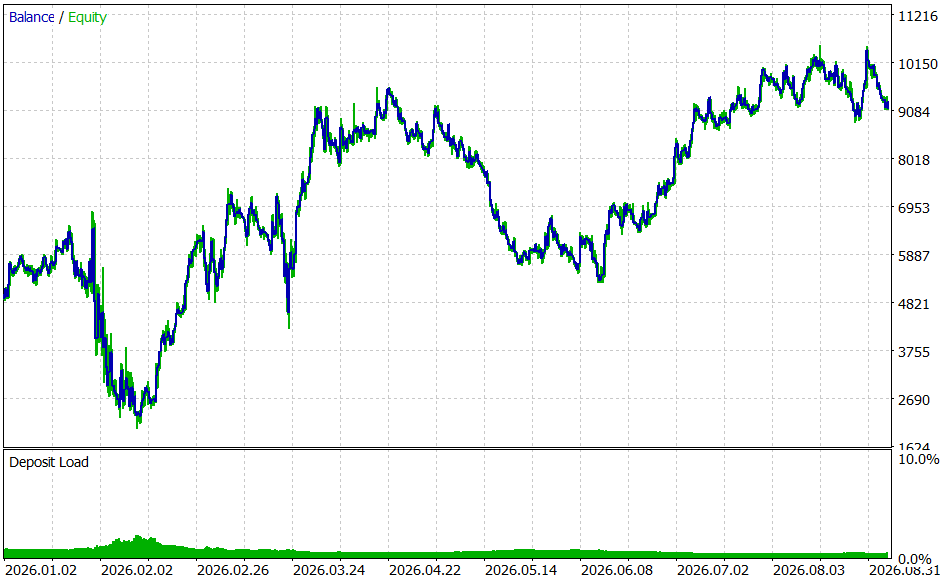
Figure 1. XAU/USD — Equity Curve
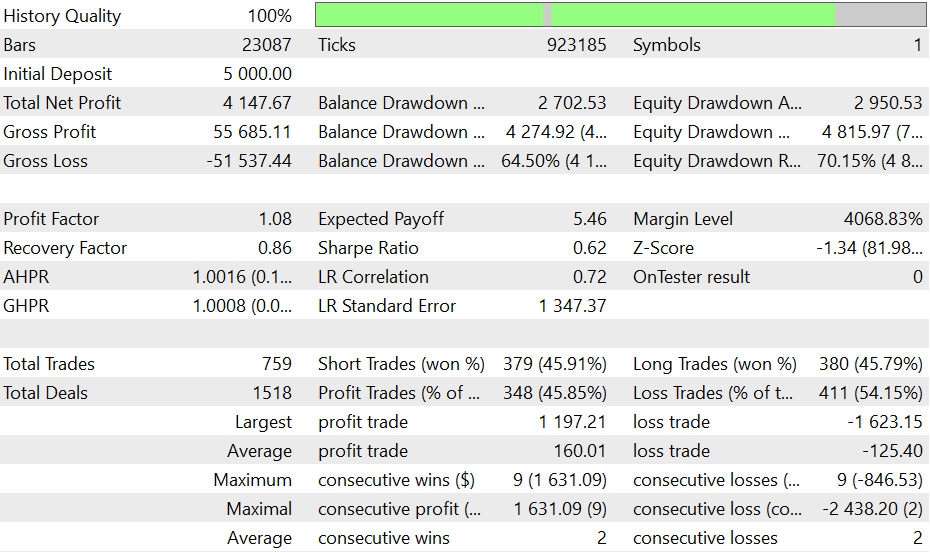
Figure 2. XAU/USD — Backtest Report
EURUSD:
EUR/USD lost money over the tested period: a net loss of $963.92, a Profit Factor of 0.87, and a negative Sharpe Ratio of -2.08. The equity curve shows a peak in late February followed by a long, fairly steady decline for the remainder of the test. This was the highest-trade-count symbol of the four (1,411 trades), and the result is a straightforward loss, shown here without adjustment.
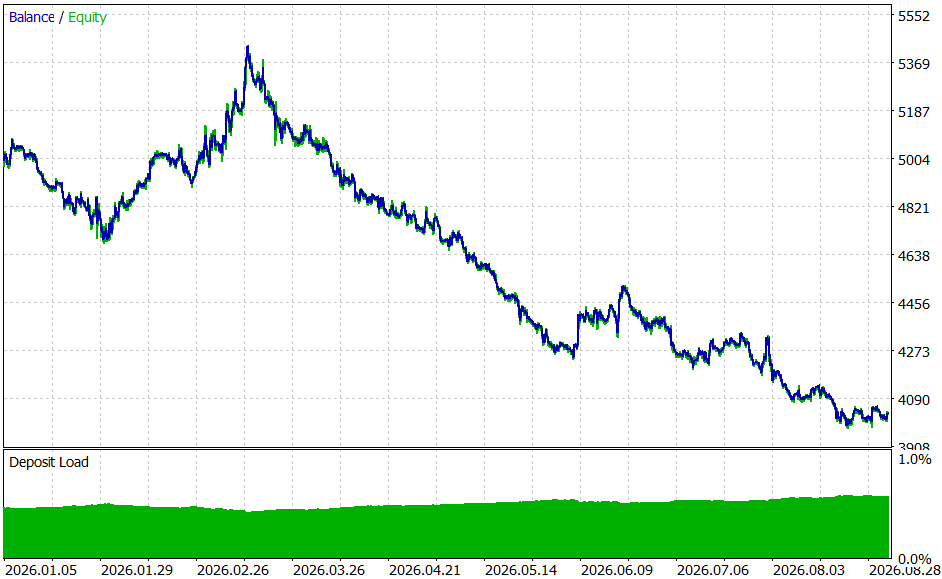
Figure 3. EUR/USD — Equity Curve
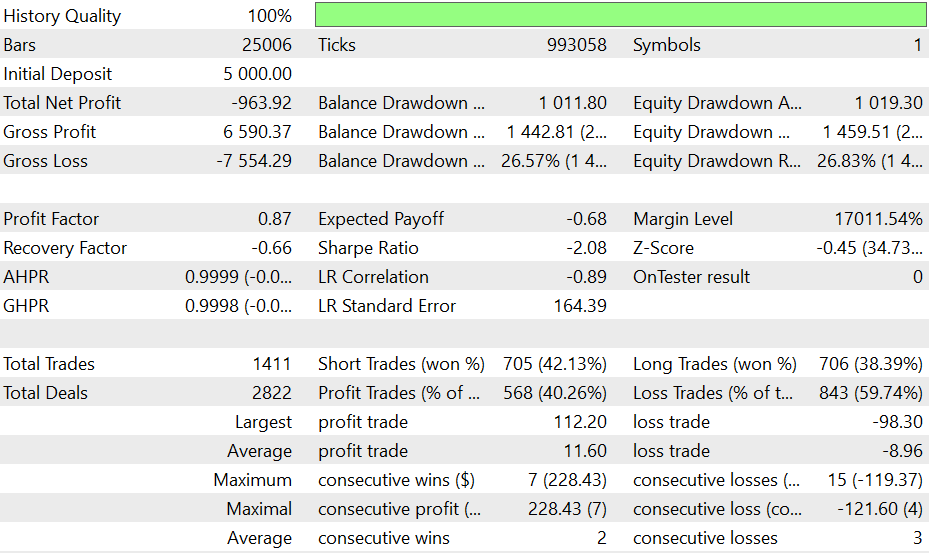
Figure 4. EUR/USD — Backtest Report
USDJPY:
USD/JPY was the strongest result of the four: a net profit of $1,011.34, a Profit Factor of 1.38, and a Sharpe Ratio of 1.94 — notably better risk-adjusted performance than any other symbol tested. It also had the fewest trades of the group (275), suggesting the filter found fewer, but higher-quality, signals on this pair over the tested period.
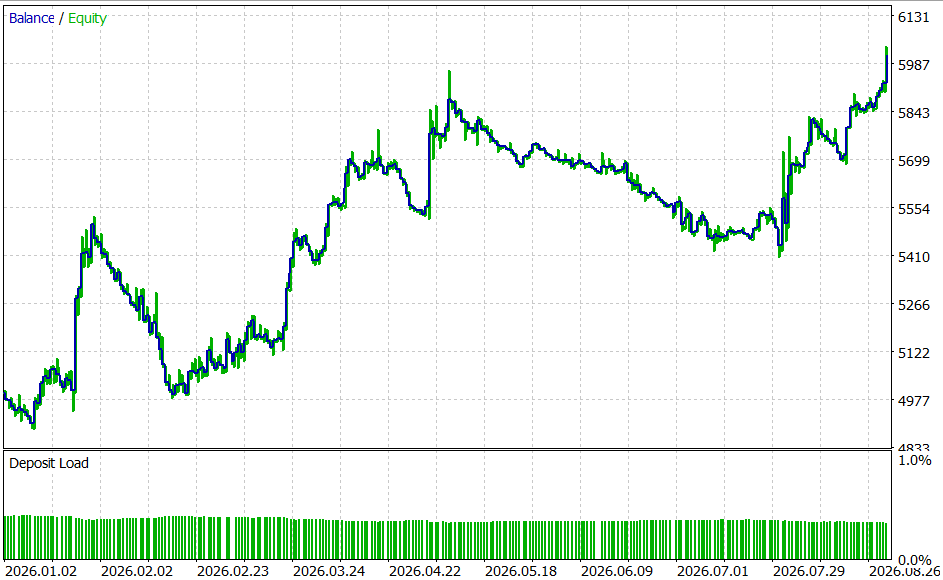
Figure 5. USD/JPY — Equity Curve
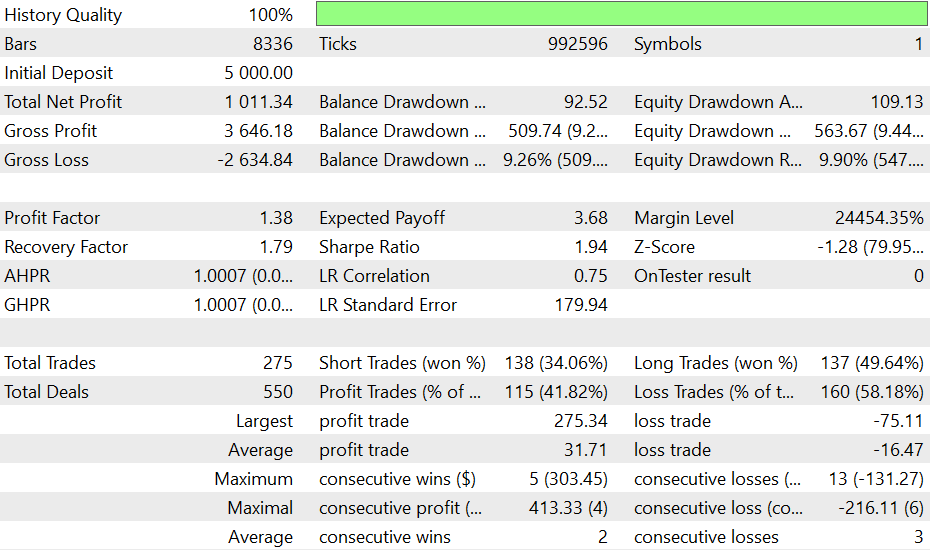
Figure 6. USD/JPY — Backtest Report
AUDUSD:
AUD/USD also lost money: a net loss of $781.86, a Profit Factor of 0.86, and a Sharpe Ratio of -1.73. The equity curve is choppier than EUR/USD's, with a brief mid-year rally that ultimately gave way to a decline through to the end of the test.
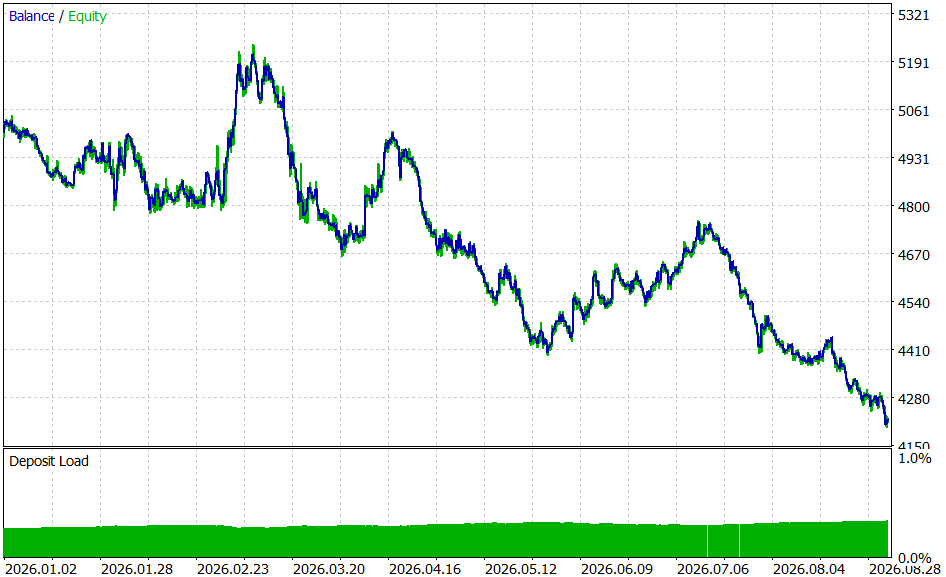
Figure 7. AUD/USD — Equity Curve
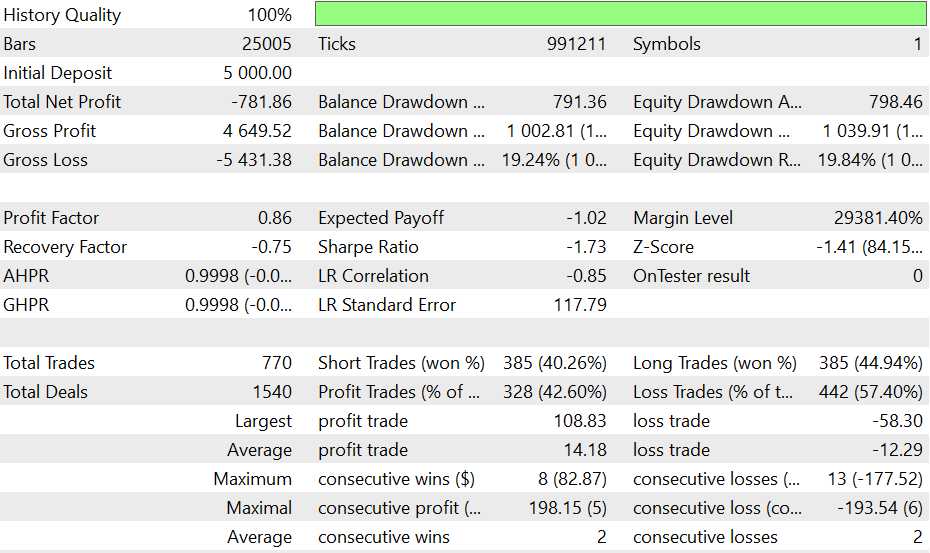
Figure 8. AUD/USD — Backtest Report
What this spread of results suggests: two of the four symbols were profitable (Gold and USD/JPY), and two produced losses (EUR/USD and AUD/USD). Of the two profitable symbols, only USD/JPY showed reasonable risk-adjusted metrics; Gold's 70.15% maximum drawdown against a Profit Factor of only 1.08 means its result should not be read as risk-adjusted strength — the net profit was real, but it came with a level of risk that a Profit Factor this close to 1 does not comfortably justify.
These results are shown as they occurred, including losing pairs. The filter is useful only on symbols and periods where coherent directional movement is present and distinguishable from noise. A symbol that spent more of the tested period in noisy, directionless movement will not produce good results from any trend-following method, this one included, and that limitation belongs to the market conditions on that symbol during that period, not uniquely to this filter. Readers are encouraged to test on their own symbols and periods before drawing conclusions about any one market.
Limitations
The indicator requires slightly more bars than the value of InpSlowWindow before producing a valid output. This is a consequence of the calculation loop structure.
The polynomial coefficients are computed using the normal-equations method. This is reliable at the window sizes and polynomial order used in the article, but increasing both parameters together can cause numerical instability. The default InpPolyOrder = 2 should be kept unless there is a specific reason to raise it.
The EA does not use a stop-loss or take-profit. It holds a position until a confirmed signal in the opposite direction appears. This keeps the example focused on the crossover strategy, but leaves positions exposed to large losses during extended adverse moves. Some form of risk control is advisable before live use.
The filter is more sensitive to individual price spikes than a conventional moving average, as shown in Idea 3. InpConfirmBars reduces false signals but does not eliminate this sensitivity entirely.
The backtest results used fixed lot sizes across four symbols with different volatility profiles. The tested parameters were not selected through a blind procedure and were not validated out-of-sample. No comparison against a plain moving average crossover with the same window lengths was made. The results describe strategy behavior under the tested conditions and should not be taken as a prediction of future performance.
Pros and Cons
| Pros | Cons |
|---|---|
| Reduced lag. The causal polynomial filter responds to price changes faster than a moving average with the same window length, as demonstrated in Ideas 1 and 3. | Greater sensitivity to noise. Faster response comes at the cost of stronger reactions to individual price spikes. |
| Simple architecture. The indicator provides two output lines, which the EA reads through iCustom() without duplicating calculations. | Dependence on window settings. The results depend on InpFastWindow and InpSlowWindow. Different symbols and timeframes may require different settings. |
| Signal confirmation. The InpConfirmBars parameter helps reduce false signals caused by temporary price fluctuations. | No built-in risk management. Positions remain open until an opposite signal is confirmed, potentially leading to substantial drawdowns. |
| Promising results on some instruments. Gold and USD/JPY performed well in the tests, with USD/JPY achieving a Sharpe Ratio of 1.94. | Mixed backtest results. EUR/USD and AUD/USD produced losses during the test period. The strategy appears better suited to sustained trends than sideways markets. |
How to Use It
- Compile both files in MetaEditor — the indicator first, then the Expert Advisor, since the EA loads the indicator by name and will fail to initialize if it cannot find a compiled copy.
- Attach the indicator to a chart on its own first, and confirm the two lines (blue fast, orange red slow) plot correctly once enough history has loaded.
- Attach the Expert Advisor to the same symbol and timeframe. Set InpFastWindow, InpSlowWindow, and InpPolyOrder to match whatever the indicator is using — they are independent inputs on the EA and are not read automatically from the indicator's own chart settings.
- Read the two lines the same way you would read a moving average crossover: the fast line above the slow line suggests upward coherence, and below suggests downward. The distance between them is not itself meaningful the way it might be for some oscillators — this is a directional tool, not a magnitude one.
- Before running on a live or demo account, backtest on your own intended symbol and timeframe first, using the guidance in the Limitations section on window length and confirm-bar tuning.
Conclusion
This article worked through a specific, well-defined problem — the lag inherent to any moving average — and a specific, tested response to it: adapting a fifty-year-old spectroscopy technique to work causally, using only past data, so it becomes usable in live trading. The mathematics were derived and verified independently before being implemented, the resulting trade-off in noise sensitivity was measured rather than assumed away, and the accompanying Expert Advisor's stability safeguard was built specifically to manage that measured trade-off, not as a generic addition.
Real backtested results across four different symbols were shown as they occurred, including the ones that were not favorable, because a smoothing method that only ever gets shown its best results has not actually been demonstrated to work — it has only been demonstrated to have been selectively reported. Readers are encouraged to test this on their own instruments before drawing any conclusions about its usefulness in their own trading.
Warning: All rights to these materials are reserved by MetaQuotes Ltd. Copying or reprinting of these materials in whole or in part is prohibited.
This article was written by a user of the site and reflects their personal views. MetaQuotes Ltd is not responsible for the accuracy of the information presented, nor for any consequences resulting from the use of the solutions, strategies or recommendations described.

 Neural Networks in Trading: Adaptive Perception of Market Dynamics (Encoder)
 Machine Learning Under Constraint (Part 4): The Stop-Loss Ceiling Meets the Optimal Trading Rule Search
 Integrating News Sentiment to Avoid Strategy Disruption in MQL5
 Population-Based Optimization Algorithms: Building a Defense Against Cheaters

- Free trading apps
- Over 8,000 signals for copying
- Economic news for exploring financial markets
You agree to website policy and terms of use