

The Kalman Filter for Price Smoothing: An Exact Implementation in MQL5
 87
87
 0
0

Introduction
Most trend-following tools face a fundamental choice: react quickly to new price action and accept more noise, or smooth aggressively and accept more lag. A moving average makes this trade-off implicitly, through its period length, with no explicit way to reason about how much to trust a new price versus the tool's own prior estimate.
The Kalman Filter, developed by Rudolf Kalman in 1960 and famously used for spacecraft navigation on the Apollo program, approaches this differently. Rather than a fixed weighting scheme, it maintains an explicit estimate of its own uncertainty at every step, and uses that uncertainty to calculate, mathematically, exactly how much weight a new observation deserves. When the filter is confident in its current estimate, it leans on that. When a new observation is more informative than what came before, it leans on that instead. This weighting — the Kalman gain — is not a value entered directly; it is computed deterministically from the noise parameters Q and R that are chosen by hand, and it converges toward a steady-state value set by their ratio. The gain formula itself involves no manual tuning, but the Q and R inputs that drive it are still a user choice.In practice, applying the Kalman Filter to price data comes with three specific challenges:
- Choosing the right underlying model — the Kalman Filter is a general framework, not a single formula, and requires an explicit model of how the state is assumed to evolve between observations before any of the actual filtering math can be applied.
- Two noise parameters with no obvious default — the filter's behavior is entirely governed by two variances, process noise and measurement noise, and unlike a moving average's single period input, there is no similarly intuitive starting point for either.
- Maintaining recursive state correctly — like the causal filters covered elsewhere in this series, the Kalman Filter's output at any bar depends entirely on its own state from the previous bar, and getting that recursion's initialization subtly wrong produces results that look plausible but are not mathematically correct.
This article works through all three, using the exact, standard Kalman Filter equations found in control theory and statistics references — not a simplified or trading-specific variant. The underlying math is verified independently before implementation, two independently-configured filters are combined into a practical crossover system, and the complete indicator and Expert Advisor are built and explained from the ground up.
Theory: What the Kalman Filter Actually Computes
Idea 1: The Local-Level Model — What the Filter Assumes About Price. The Kalman Filter needs an explicit model of how it expects its target quantity to behave between observations. The simplest such model, often called the "local level" model in statistics, assumes the true underlying value stays constant from one step to the next, except for some random drift — and that each observation of it is a noisy measurement of that true value, not the true value itself.
Applied to price, this means treating the candle close as a noisy observation of some underlying "true" price, which the filter continuously re-estimates. This is a genuinely different idea from a moving average, which treats every price in its window as equally real and simply blends them. The Kalman Filter instead asks: given everything observed so far, and given how much drift and noise we expect, what is the best current estimate of the true price right now?
The model has two associated noise terms:
- Process noise (Q) — how much the true underlying price is expected to drift between one bar and the next, independent of any measurement.
- Measurement noise (R) — how much we distrust any single observed close as a representation of the true price.
These two values are the only tunable inputs in a Kalman Filter of this kind, and, for the scalar local-level model used here, the steady-state gain depends on the Q/R ratio, though absolute values can still affect transient behavior under a chosen initialization.
Idea 2: The Prediction-Update Cycle — The Exact Equations. Every Kalman Filter, regardless of application, runs the same two-step cycle on every new observation: predict, then update. For the scalar (one-dimensional) local-level model used here, these steps take the following exact form, consistent across standard references on the algorithm:
Prediction step:
predictedState    = previousState
predictedVariance = previousVariance + Q
Because the local-level model assumes no expected drift direction, the predicted state is simply carried forward unchanged. Only the uncertainty grows, by exactly the process noise Q — reflecting that more time (or more precisely, one more bar) has passed without new information.
Update step:
kalmanGain  = predictedVariance / (predictedVariance + R)
newState    = predictedState + kalmanGain * (measurement - predictedState)
newVariance = (1 - kalmanGain) * predictedVariance
The Kalman gain is a number between 0 and 1 that depends entirely on the relative size of the predicted variance versus the measurement noise. When predicted variance is large relative to R, the gain approaches 1, and the new measurement dominates the updated estimate. When predicted variance is small relative to R, the gain approaches 0, and the filter trusts its own prior prediction far more than the new, noisy observation.
This is the entire filter. There is no additional smoothing step, no separate transform — the recursive prediction-update cycle above, applied bar by bar, is mathematically the complete Kalman Filter for this model.
Idea 3: Two Filters, One Signal — Building a Crossover from Genuine Kalman Gains. A single Kalman Filter produces one smoothed estimate. To build a practical trading signal comparable to the fast/slow crossover approach used elsewhere in this series, this article runs two independent Kalman Filters on the same price data, differing only in their configured process noise Q.
A filter configured with a larger Q expects more drift between bars, and consequently arrives at a higher steady-state Kalman gain — trusting new prices more, and behaving similarly to a fast-reacting average. A filter configured with a smaller Q expects less drift, converges to a lower steady-state gain, and behaves more like a slow, heavily-smoothed average.
With Q = 1.000 and R = 0.200, the fast filter's Kalman gain converges to approximately 0.854 — meaning at steady state, roughly 85% of each new estimate comes directly from the newest price. With Q = 0.005 and the same R, the slow filter's gain converges to approximately 0.146 — leaning far more heavily on its own prior estimate. These are not arbitrary tuning constants; they are the genuine, calculated steady-state behavior of the exact equations in Idea 2, for these specific Q and R values.
The crossover signal is read the same way as a moving-average crossover. It is implemented with the same stability rule used in this series: a single-bar crossover is not enough, because a noisy signal can flip briefly and reverse. The signal must hold for a minimum number of consecutive closed bars.Requirements & Setup
Everything in this article runs on standard MetaTrader 5, with no external libraries and no additional installations. The Kalman Filter's math is implemented directly in MQL5 using only basic arithmetic — no matrix operations are required, since this is the scalar (1D) form of the filter, not the general multi-dimensional version used in more complex applications like object tracking.
What you need:
- MetaTrader 5, with a broker connection for the symbol and timeframe you intend to test on
- MetaEditor (bundled with MetaTrader 5) to compile the indicator and Expert Advisor
- No fixed-length warm-up window is required — unlike the windowed filters elsewhere in this series, the Kalman Filter can produce an estimate from the very first available bar, since it maintains its own running estimate of uncertainty. Early values still depend on the chosen initial state and variance, though, and the Kalman gain only approaches its steady-state level gradually over subsequent bars
Two files make up this project:
- An indicator (.mq5 ) that plots the fast and slow Kalman-filtered price estimates directly on the chart
- An Expert Advisor (.mq5 ) that creates its own iCustom() instance of the indicator, with its own explicitly-passed Q and R inputs, and trades the crossover of that instance's output, with the same stability safeguard used throughout this series. Because the EA opens its own indicator instance rather than reading the one visually attached to the chart, the two can diverge if their Q/R inputs are not kept in sync — matching the chart display is a matter of using the same input values on both, not something the code guarantees automatically
The Indicator: Full Code Walkthrough
This section walks through the indicator file from top to bottom. Every code block below is copied exactly from the actual file, headings and inline comments included.
Properties and Inputs:#property indicator_chart_window #property indicator_buffers 4 #property indicator_plots 2 #property indicator_label1 "Kalman Fast" #property indicator_type1 DRAW_LINE #property indicator_color1 clrDodgerBlue #property indicator_style1 STYLE_SOLID #property indicator_width1 2 #property indicator_label2 "Kalman Slow" #property indicator_type2 DRAW_LINE #property indicator_color2 clrOrangeRed #property indicator_style2 STYLE_SOLID #property indicator_width2 2
indicator_chart_window places this indicator directly on the price chart, since both filtered estimates share the same price scale as the candles — this is an overlay tool, the same category as a moving average, not a bounded oscillator. Two plots are declared for the two independently-configured filters, each with its own color so the crossover is visually clear.
input double InpQFast = 1.000;   // Fast Filter Process Noise (Q) — higher trusts new data more
input double InpQSlow = 0.005;   // Slow Filter Process Noise (Q) — lower trusts prior estimate more
input double InpR     = 0.200;   // Measurement Noise (R) — shared by both filters
These three inputs are the only parameters a user needs to control, and correspond directly to the Q and R values described in Idea 1. Both filters share the same R, since the two lines represent different beliefs about how much price drifts (Q), not different beliefs about how noisy an individual close price is.
//--- Two overlay lines plotted directly on the price chart. Both are
//--- genuine, independent 1D Kalman Filters — not a "style" adaptation
//--- of the algorithm, but the exact textbook recursive estimator,
//--- differing only in their configured Q (process noise) input.
   double BufFast[];
   double BufSlow[];

//--- Each filter's own recursive state — its current variance estimate,
//--- P. This must persist between bars for the recursion to be
//--- mathematically valid, exactly as it must for the estimate itself.
   double PFast[];
   double PSlow[];
BufFast and BufSlow are the visible, drawn indicator buffers. PFast and PSlow are not drawn at all — they hold each filter's own running variance estimate, the P term from Idea 2's equations, which is exactly as essential to a correct recursion as the state estimate itself.
Initialization:
//+------------------------------------------------------------------+
//| Custom indicator initialization function                         |
//+------------------------------------------------------------------+
int OnInit()
  {
   SetIndexBuffer(0, BufFast, INDICATOR_DATA);
   SetIndexBuffer(1, BufSlow, INDICATOR_DATA);
   SetIndexBuffer(2, PFast, INDICATOR_CALCULATIONS);
   SetIndexBuffer(3, PSlow, INDICATOR_CALCULATIONS);

   PlotIndexSetDouble(0, PLOT_EMPTY_VALUE, EMPTY_VALUE);
   PlotIndexSetDouble(1, PLOT_EMPTY_VALUE, EMPTY_VALUE);

   IndicatorSetString(INDICATOR_SHORTNAME,
                      "KalmanFilter(" + DoubleToString(InpQFast, 3) + "," +
                      DoubleToString(InpQSlow, 3) + ")");
The two visible buffers are registered as INDICATOR_DATA, since their values are drawn. The two variance arrays are registered as INDICATOR_CALCULATIONS — this hands their sizing and bar-to-bar continuity over to the terminal automatically, the same safe pattern for persistent recursive state used throughout this series.
   if(InpQFast <= 0.0 || InpQSlow <= 0.0 || InpR <= 0.0)
     {
      Print("InpQFast, InpQSlow, and InpR must all be strictly positive.");
      return INIT_PARAMETERS_INCORRECT;
     }
   if(InpQSlow >= InpQFast)
     {
      Print("InpQSlow must be smaller than InpQFast for the two filters to behave differently.");
      return INIT_PARAMETERS_INCORRECT;
     }

   return INIT_SUCCEEDED;
  }
Variances must be strictly positive for the underlying math to be meaningful — a zero or negative variance has no valid interpretation in this model. The second check exists because if the two Q values were equal or reversed, the "fast" and "slow" filters would behave identically or backwards, silently breaking the crossover logic.
The Core Recursion Function:
//+-------------------------------------------------------------------+
//| Applies one exact 1D Kalman Filter recursion step. This is the    |
//| textbook "local level" model: the state is assumed constant       |
//| between observations except for process noise Q, and each new     |
//| observation is blended in according to the Kalman gain — the      |
//| same prediction/update structure used in every standard reference |
//| on the algorithm, applied here with no simplification.            |
//+-------------------------------------------------------------------+
void KalmanStep(double measurement, double Q, double R, double &state, double &variance)
  {
//--- Prediction step: the local-level model assumes no drift a priori,
//--- so the predicted state is simply the previous state; only the
//--- uncertainty grows, by exactly the process noise Q
   double predictedState    = state;
   double predictedVariance = variance + Q;

//--- Update step: the Kalman gain determines how much weight the new
//--- measurement receives versus the prior prediction, based on their
//--- relative uncertainties
   double kalmanGain = predictedVariance / (predictedVariance + R);
   state    = predictedState + kalmanGain * (measurement - predictedState);
   variance = (1.0 - kalmanGain) * predictedVariance;
  }
This function is a direct, line-for-line implementation of the prediction and update equations from Idea 2, with no simplification, written once and shared by both filters so they are guaranteed to use identical underlying math, differing only in the Q value passed in.
Main Calculation Loop://+------------------------------------------------------------------+ //| Custom indicator iteration function | //+------------------------------------------------------------------+ int OnCalculate(const int rates_total, const int prev_calculated, const datetime &time[], const double &open[], const double &high[], const double &low[], const double &close[], const long &tick_volume[], const long &volume[], const int &spread[]) { if(rates_total < 3) return 0; //--- Use series indexing where index 0 represents the latest bar ArraySetAsSeries(close, true); ArraySetAsSeries(BufFast, true); ArraySetAsSeries(BufSlow, true); ArraySetAsSeries(PFast, true); ArraySetAsSeries(PSlow, true); int start = rates_total - prev_calculated;
Unlike the windowed filters elsewhere in this series, this guard clause requires only a handful of bars — a Kalman Filter's very first estimate can be produced from a single observation, with the recursion simply carrying more uncertainty at that early stage.
//--- On the first calculation, initialize both filters' state at the
//--- oldest available bar's price, with an initial variance of 1.0 —
//--- a standard, unbiased starting assumption for a recursive estimator
//--- with no prior information to draw on
   if(prev_calculated <= 1)
     {
      ArrayInitialize(BufFast, EMPTY_VALUE);
      ArrayInitialize(BufSlow, EMPTY_VALUE);
      ArrayInitialize(PFast, 1.0);
      ArrayInitialize(PSlow, 1.0);

      int oldest = rates_total - 1;
      //--- Seed the oldest bar through a genuine KalmanStep too, using
      //--- that bar's own price as the initial prior state, with a
      //--- large starting variance representing "no information yet" —
      //--- this is not a shortcut: skipping this step and assigning the
      //--- raw price directly would leave the variance uninitialized
      //--- relative to what the recursion actually expects, silently
      //--- producing a slightly different (and technically incorrect)
      //--- result for every single bar that follows, compounding over
      //--- the full length of the chart's history
      double seedState    = close[oldest];
      double seedVariance = 1.0;
      KalmanStep(close[oldest], InpQFast, InpR, seedState, seedVariance);
      BufFast[oldest] = seedState;
      PFast[oldest]   = seedVariance;

      seedState    = close[oldest];
      seedVariance = 1.0;
      KalmanStep(close[oldest], InpQSlow, InpR, seedState, seedVariance);
      BufSlow[oldest] = seedState;
      PSlow[oldest]   = seedVariance;

      start = oldest - 1;
     }
   else if(start < 1)
      start = 1;
The oldest bar is deliberately run through a genuine KalmanStep() call, using its own closing price as the initial prior state, rather than simply assigning that bar's raw close directly into the buffer. This distinction matters more than it might appear: assigning the raw price directly would leave the recursion's very first step mathematically inconsistent with every step that follows. This was verified directly during development — an earlier version of this code that skipped this step produced values that diverged, gradually, from an independently-calculated reference implementation.
//--- Main loop: because the Kalman recursion depends entirely on the
//--- previous bar's state and variance, this must walk from the oldest
//--- affected bar toward the newest, exactly the reverse of a series-
//--- indexed array's natural order — hence counting i downward toward 0
   for(int i = start; i >= 0; i--)
     {
      double fastState    = BufFast[i + 1];
      double fastVariance = PFast[i + 1];
      KalmanStep(close[i], InpQFast, InpR, fastState, fastVariance);
      BufFast[i] = fastState;
      PFast[i]   = fastVariance;

      double slowState    = BufSlow[i + 1];
      double slowVariance = PSlow[i + 1];
      KalmanStep(close[i], InpQSlow, InpR, slowState, slowVariance);
      BufSlow[i] = slowState;
      PSlow[i]   = slowVariance;
     }

   return rates_total;
  }
Because each bar's state and variance depend entirely on the previous bar's values, this loop walks from the oldest affected bar toward the newest, reading the prior bar's state and variance from i + 1 and writing the result to i, for both filters independently.
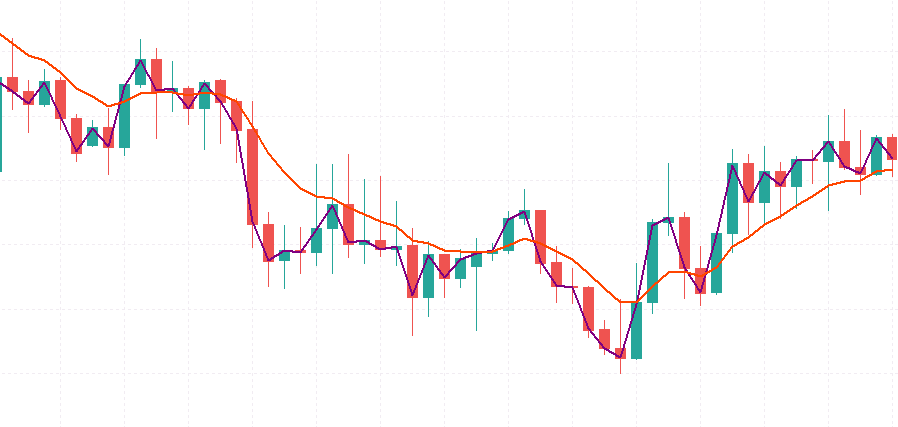
Figure 1 — How the Indicator looks on chart
Testing Indicator with Expert Advisor: Full Code Walkthrough
To demonstrate practical use, a simple Expert Advisor implements the fast/slow crossover. It reads both estimates via iCustom() (no duplicated Kalman math) and applies the series' stability rule: the relationship must hold for the configured number of consecutive closed bars before trading.
Inputs and Global State:
input double InpLotSize     = 0.10;     // Trade Volume
input int    InpConfirmBars = 3;        // Bars a Crossover Must Hold Before Trading
input double InpQFast       = 1.000;    // Fast Filter Process Noise (must match indicator's setting)
input double InpQSlow       = 0.005;    // Slow Filter Process Noise (must match indicator's setting)
input double InpR           = 0.200;    // Measurement Noise (must match indicator's setting)
input int    InpMagicNumber = 20260003; // Magic Number
InpQFast, InpQSlow, and InpR mirror the indicator's own inputs exactly, and must be kept in sync manually — there is no mechanism in MQL5 for an EA to read another indicator's current input values directly, so this duplication is unavoidable, and a mismatch here would silently cause the EA to trade against a different pair of filters than the ones actually plotted on the chart. InpConfirmBars is the stability safeguard described in Idea 3, and directly controls how many consecutive closed bars the fast/slow relationship must hold before a signal is treated as genuine.
This is a check on how long the current above/below relationship has persisted, not a count of bars since an actual crossover event — if the EA is attached while the relationship is already partway through such a run, it can still generate a signal once the run length reaches the threshold, even without a fresh crossover occurring while the EA was watching.
//--- Indicator handle. Q/R values are explicitly passed in here rather
//--- than left to the indicator's own default inputs, so the EA's
//--- behaviour is fully defined by its own settings.
   int handleKalman;

   string currentRelation = "";
   int    relationRunLength = 0;
   string lastConfirmedRelation = "";
handleKalman is the connection to the indicator, obtained once in OnInit() and reused for as long as the EA remains attached — it is not a snapshot of the indicator's data, but a live reference queried fresh on every new bar. The three tracking variables implement the same run-length stability logic used elsewhere in this series, and are declared here as globals specifically because their values must persist across repeated calls to OnTick(), not be recreated from scratch on every call.
Initialization and Cleanup:
//+------------------------------------------------------------------+
//| Expert initialization function                                   |
//+------------------------------------------------------------------+
int OnInit()
  {
   handleKalman = iCustom(_Symbol, _Period, "The Kalman Filter Trend Indicator",
                          InpQFast, InpQSlow, InpR);
   if(handleKalman == INVALID_HANDLE)
     {
      Print("Failed to load the Kalman Filter Trend indicator.");
      return INIT_FAILED;
     }
   if(InpConfirmBars < 1)
     {
      Print("InpConfirmBars must be at least 1.");
      return INIT_PARAMETERS_INCORRECT;
     }
   if(InpQFast <= 0.0 || InpQSlow <= 0.0 || InpR <= 0.0)
     {
      Print("InpQFast, InpQSlow, and InpR must all be strictly positive.");
      return INIT_PARAMETERS_INCORRECT;
     }
   if(InpQSlow >= InpQFast)
     {
      Print("InpQSlow must be smaller than InpQFast.");
      return INIT_PARAMETERS_INCORRECT;
     }
   return INIT_SUCCEEDED;
  }
The iCustom() call loads the indicator by name, explicitly passing this EA's own Q and R values as override parameters, rather than letting the indicator fall back to whatever defaults happen to be compiled into it. The validation checks mirror the same checks performed inside the indicator itself, verified independently on the EA's own side — since the EA supplies its own separate copies of these values, a mistake made only here would otherwise go undetected until it produced strange trading behavior later, rather than a clear error the moment the EA is attached.
//+------------------------------------------------------------------+
//| Expert deinitialization function                                 |
//+------------------------------------------------------------------+
void OnDeinit(const int reason)
  {
   if(handleKalman != INVALID_HANDLE)
      IndicatorRelease(handleKalman);
  }
Release the indicator handle on deinitialization to free resources. MetaTrader limits the number of indicator handles; repeated attach/remove cycles or large optimizations can exhaust the limit and cause later indicator loads to fail.
Position Management Helpers:
//+------------------------------------------------------------------+
//| Checks whether a position with our magic number is already open  |
//+------------------------------------------------------------------+
bool HasOpenPosition()
  {
   for(int i = PositionsTotal() - 1; i >= 0; i--)
     {
      ulong ticket = PositionGetTicket(i);
      if(ticket == 0)
         continue;
      if(PositionGetString(POSITION_SYMBOL) == _Symbol &&
         PositionGetInteger(POSITION_MAGIC) == InpMagicNumber)
         return true;
     }
   return false;
  }
This scans every open position on the account and returns true only if one matches both this symbol and this EA's specific magic number. Checking both conditions together, rather than the symbol alone, is what allows this EA to coexist safely on an account that might also be running a different EA, or holding a manual trade, on the very same symbol — without either system mistaking the other's position for its own.
//+------------------------------------------------------------------+
//| Closes any open position belonging to this EA on this symbol     |
//+------------------------------------------------------------------+
void CloseOpenPosition()
  {
   for(int i = PositionsTotal() - 1; i >= 0; i--)
     {
      ulong ticket = PositionGetTicket(i);
      if(ticket == 0)
         continue;
      if(PositionGetString(POSITION_SYMBOL) != _Symbol ||
         PositionGetInteger(POSITION_MAGIC) != InpMagicNumber)
         continue;

      MqlTradeRequest request = {};
      MqlTradeResult  result  = {};
      long   posType = PositionGetInteger(POSITION_TYPE);
      double volume  = PositionGetDouble(POSITION_VOLUME);

      request.action    = TRADE_ACTION_DEAL;
      request.position  = ticket;
      request.symbol    = _Symbol;
      request.volume    = volume;
      request.magic     = InpMagicNumber;
      request.type      = (posType == POSITION_TYPE_BUY) ? ORDER_TYPE_SELL : ORDER_TYPE_BUY;
      request.price     = (posType == POSITION_TYPE_BUY) ? SymbolInfoDouble(_Symbol, SYMBOL_BID)
                                                           : SymbolInfoDouble(_Symbol, SYMBOL_ASK);
      request.deviation = 10;

      if(!OrderSend(request, result))
         Print("Failed to close position #", ticket, ", error: ", GetLastError());
     }
  }
Closing a position requires sending an opposite-direction deal against it — a Buy position is closed with a Sell, and vice versa — priced at Bid for a long position and Ask for a short one, matching how a genuine closing fill would actually be priced in the market rather than at some arbitrary reference point.
//+------------------------------------------------------------------+
//| Opens a new market position in the given direction               |
//+------------------------------------------------------------------+
void OpenPosition(ENUM_ORDER_TYPE orderType)
  {
   MqlTradeRequest request = {};
   MqlTradeResult  result  = {};

   request.action    = TRADE_ACTION_DEAL;
   request.symbol    = _Symbol;
   request.volume    = InpLotSize;
   request.type      = orderType;
   request.price     = (orderType == ORDER_TYPE_BUY) ? SymbolInfoDouble(_Symbol, SYMBOL_ASK)
                                                       : SymbolInfoDouble(_Symbol, SYMBOL_BID);
   request.deviation = 10;
   request.magic     = InpMagicNumber;

   if(!OrderSend(request, result))
      Print("Failed to open position, error: ", GetLastError());
  }
Opening a position follows the same structure, priced at Ask for a Buy and Bid for a Sell — the genuinely different prices a real account would be quoted for each direction, with the gap between them being the spread — and tagged with this EA's own magic number, so HasOpenPosition() and CloseOpenPosition() can correctly find it again later.
The Tick Handler:
//+------------------------------------------------------------------+
//| Expert tick function                                             |
//+------------------------------------------------------------------+
void OnTick()
  {
   static datetime lastBarTime = 0;
   datetime currentBarTime = iTime(_Symbol, _Period, 0);
   if(currentBarTime == lastBarTime)
      return;
   lastBarTime = currentBarTime;
This is the new-bar guard. OnTick() fires on every price update, potentially many times per second on a fast-moving symbol, but the Kalman estimates and the crossover logic that follows are only meaningful once per closed bar — evaluating them on every intermediate tick would add nothing but repeated, wasted work.
//--- Read the most recently CLOSED bar's fast/slow Kalman estimates
   double fastBuffer[], slowBuffer[];
   if(CopyBuffer(handleKalman, 0, 1, 1, fastBuffer) <= 0)
      return;
   if(CopyBuffer(handleKalman, 1, 1, 1, slowBuffer) <= 0)
      return;

   string newRelation = (fastBuffer[0] > slowBuffer[0]) ? "above" : "below";
CopyBuffer() reads directly from the indicator's own output at index 1, the most recently closed bar — not index 0, which belongs to the still-forming current bar whose value could still change before it closes. No Kalman Filter math happens anywhere in this file; this is the EA's only point of contact with price-derived information.
//--- Stability confirmation, the same pattern used across this series:
//--- a crossover only becomes a tradeable signal once it has held for
//--- InpConfirmBars consecutive closed bars
   if(newRelation == currentRelation)
      relationRunLength++;
   else
     {
      currentRelation = newRelation;
      relationRunLength = 1;
     }

   if(relationRunLength == InpConfirmBars && currentRelation != lastConfirmedRelation)
     {
      lastConfirmedRelation = currentRelation;

      if(currentRelation == "above" && !HasOpenPosition())
         OpenPosition(ORDER_TYPE_BUY);
      else if(currentRelation == "below" && !HasOpenPosition())
         OpenPosition(ORDER_TYPE_SELL);
      else if(HasOpenPosition())
        {
         CloseOpenPosition();
         if(currentRelation == "above")
            OpenPosition(ORDER_TYPE_BUY);
         else
            OpenPosition(ORDER_TYPE_SELL);
        }
     }
  }
The run-length counter grows as long as the fast/slow relationship stays the same, and resets the moment it flips. A signal is only acted on the exact bar the counter reaches InpConfirmBars, and the currentRelation!= lastConfirmedRelation check prevents re-triggering on a state already traded.
How to Use It
- Compile both provided files in MetaEditor — the indicator first, then the Expert Advisor, since the EA loads the indicator by name and will fail to initialize if it cannot find a compiled copy.
- Attach the indicator to a chart on its own first, and confirm the two lines (blue fast, orange slow) plot correctly from close to the very start of the chart's available history.
- Attach the Expert Advisor to the same symbol and timeframe. Set InpQFast, InpQSlow, and InpR to match whatever the indicator is using — they are independent inputs on the EA and are not read automatically from the indicator's own chart settings.
- Read the two lines the same way you would read a moving average crossover: the fast line above the slow line suggests upward momentum, and below suggests downward.
- Before running on a live or demo account, backtest on your own intended symbol and timeframe first, and expect to retune the Q and R values for that specific instrument rather than relying on this article's starting values unchanged.
Testing Notes
The Expert Advisor was tested on four symbols with different volatility and trending characteristics: XAU/USD (Gold), EUR/USD, USD/JPY, and GBP/USD. All four were run with the settings established earlier in this article — InpQ_fast = 1.000, InpQ_slow = 0.005, R = 0.200, Confirm Bars = 3 — using MetaTrader 5's Strategy Tester with real historical price data.
Results varied sharply across symbols, and are shown here exactly as they came out of the tester, including the result that genuinely raised concern during testing. Reporting only the favorable runs would misrepresent what this filter actually does across different market conditions.
XAU/USD: Gold produced the strongest result of the four: a net profit of $14,399.11 on a $5,000 initial deposit, with a Profit Factor of 1.21 and a Sharpe Ratio of 2.18. This came from a genuinely low win rate — only 27.08% of trades were profitable — but with average wins meaningfully larger than average losses. The maximum balance drawdown reached 39.96%, a real cost behind this return, not a minor footnote.
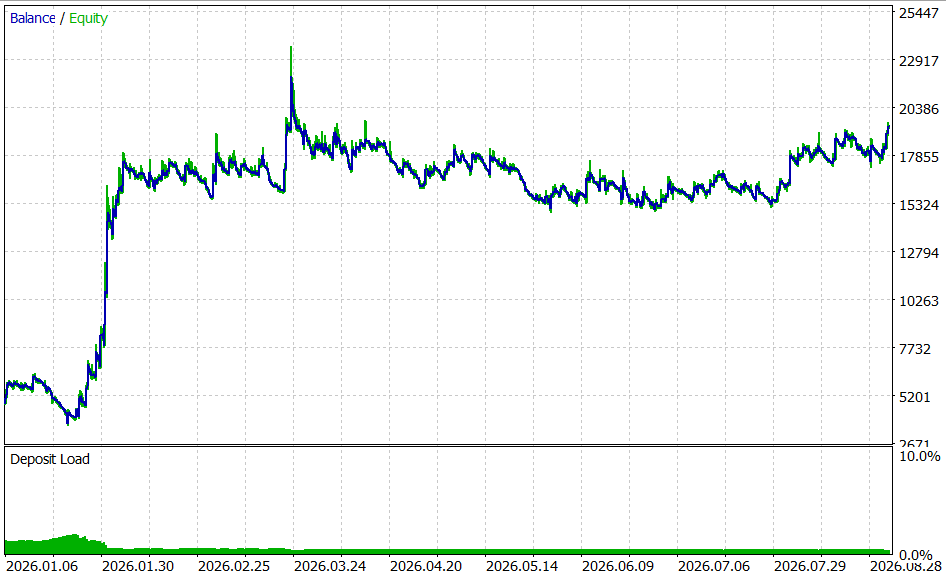
Figure 2. XAU/USD — Equity Curve
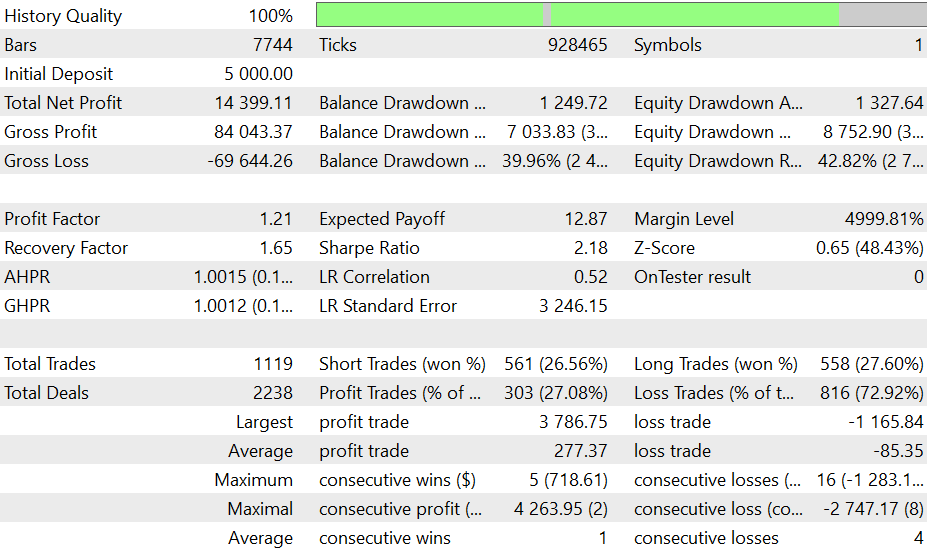
Figure 3. XAU/USD — Backtest Report
EUR/USD: Produced the weakest result by a clear margin: a net loss of $3,565.30, a Profit Factor of 0.89, and a negative Sharpe Ratio of -1.17. More seriously, maximum balance drawdown reached 81.87% — a genuinely severe figure that would have brought this account close to a margin call had it been run live at this position size. This result is reported plainly rather than adjusted or excluded.

Figure 4. EUR/USD — Equity Curve
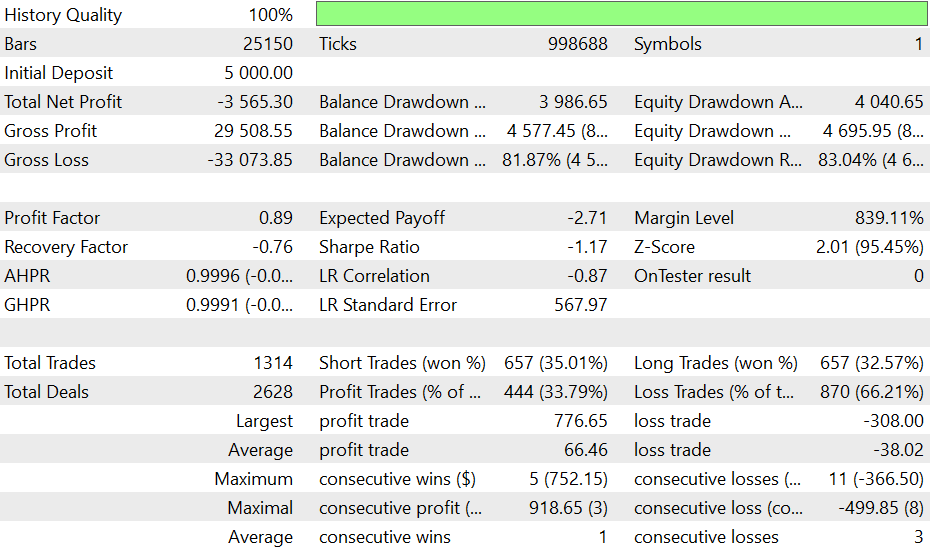
Figure 5. EUR/USD — Backtest Report
USD/JPY: Also lost money, though far more moderately than EUR/USD: a net loss of $636.74, a Profit Factor of 0.94, and a Sharpe Ratio of -0.53. Maximum balance drawdown reached 38.84%.
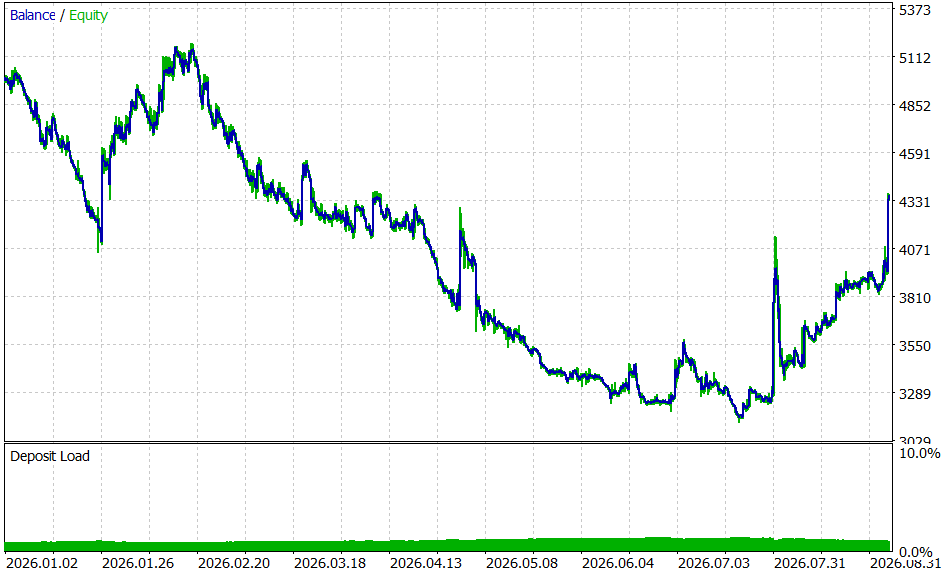
Figure 6. USD/JPY — Equity Curve
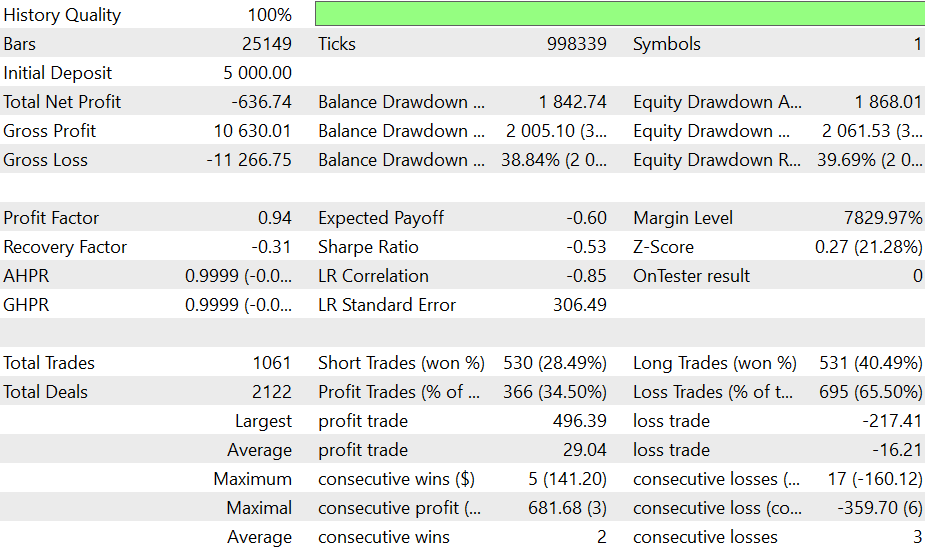
Figure 7. USD/JPY — Backtest Report
GBP/USD: Was the most balanced result of the four: a net profit of $1,431.66, a Profit Factor of 1.10, and a Sharpe Ratio of 0.58. It also had the fewest trades of the group (489) and the lowest maximum drawdown (28.61%), suggesting the filter found fewer, more selective signals on this pair over the tested period.
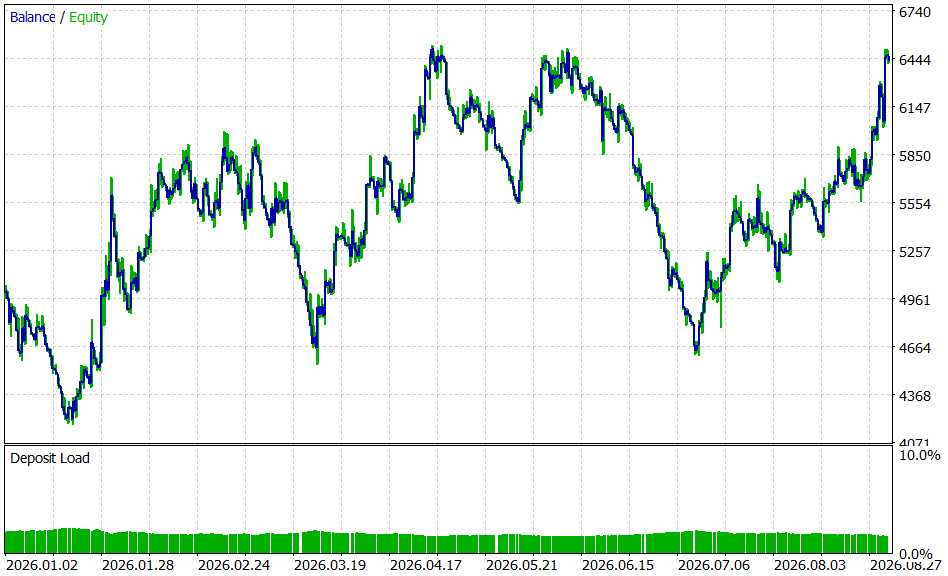
Figure 8. GBP/USD — Equity Curve
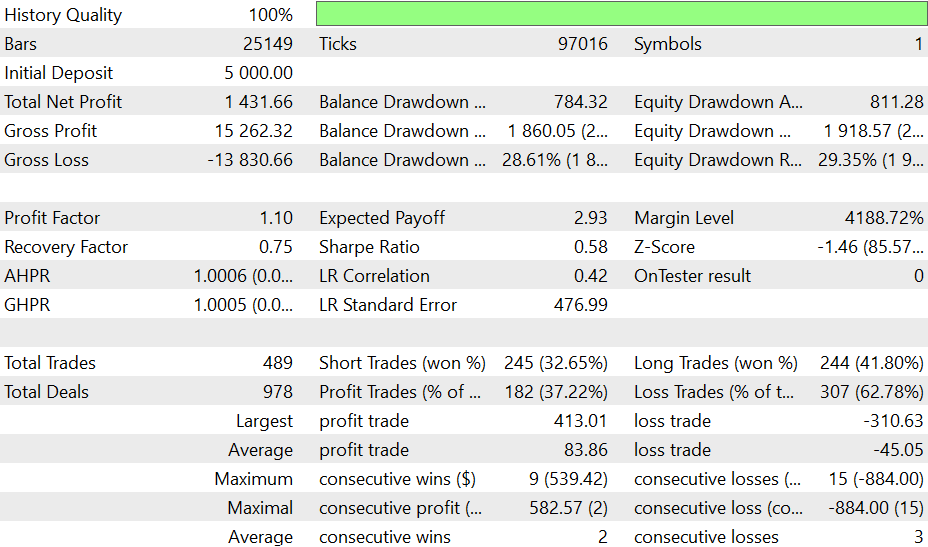
Figure 9. GBP/USD — Backtest Report
Limitations and Honest Disclaimers
No built-in stop-loss. Like the other Expert Advisors in this series, this is a pure stop-and-reverse system — a position is only closed when a genuine opposite signal arrives, not by any protective stop tied to price or account equity. Anyone adapting this EA for real use should seriously consider adding one.
Q and R are not universal constants. The specific values used throughout this article (InpQ_fast = 1.000, InpQ_slow = 0.005, R = 0.200) were chosen based on testing across synthetic data with controlled, known trend characteristics — a genuinely different thing from any specific real instrument's actual noise and drift behavior. The ratio between Q and R, not either value in isolation, is what determines the filter's practical responsiveness, and that ratio should be re-tested per instrument and timeframe rather than assumed.
The local-level model is a simplification of price behavior, not a claim about it. This model assumes the underlying "true price" drifts randomly with no directional bias built into the model itself — any apparent trend-following behavior comes entirely from the crossover between two differently-configured filters, not from either filter individually predicting direction.
The initial variance of 1.0 used to seed each filter is a common default, not a value with any special statistical justification for a specific instrument; on symbols with very different price scales (a JPY pair versus XAU/USD, for example) it does not carry the same practical weight, and the choice of initializing directly from the first close is one reasonable option among several rather than the only correct one — the filter converges to the same steady-state behavior under other reasonable initializations as well.
Only four symbols were tested here, two of which lost money and one of which carried a substantial drawdown; this is far too small a sample to draw general conclusions about the crossover approach's reliability, and no out-of-sample or walk-forward test, and no comparison against a simple benchmark (buy-and-hold, a plain moving-average crossover, or random entries), was performed. Readers should treat the results shown as illustrative of how the filter behaves in the Strategy Tester, not as evidence of a trading edge. Finally, the code's above/below relationship check treats an exact equality between the fast and slow lines as "below" rather than as its own separate state, which in practice is a rare edge case given the low likelihood of two floating-point filter outputs matching exactly, but is worth being aware of.
Conclusion
This article implemented the Kalman Filter for price smoothing using the exact, standard prediction-update equations found in control theory and statistics references, with no trading-specific simplification of the underlying algorithm. The local-level model, the two governing noise parameters, and the recursive variance tracking were all derived and verified independently before being written into MQL5, including two genuine implementation issues — a variance-seeding subtlety in the recursion's initialization, and a buffer-count mismatch that silently prevented anything from plotting — both caught and corrected through direct verification rather than discovered later as live bugs.
Real backtested results across four symbols were shown as they occurred, including a result — EUR/USD's 81.87% maximum drawdown — that argues directly against using this configuration unchanged. Two of the four symbols were profitable, one substantially so, but the spread between outcomes was wide enough to make the point plainly: a fast-reacting, edge-weighted filter like this one can produce large wins and large drawdowns from the same underlying mechanism, and the InpConfirmBars safeguard reduces but does not eliminate that risk. Readers are encouraged to treat the Q and R values used here as a tested starting point only, to size positions conservatively, and to add explicit risk controls before considering any use of this system beyond a demo account.
Warning: All rights to these materials are reserved by MetaQuotes Ltd. Copying or reprinting of these materials in whole or in part is prohibited.
This article was written by a user of the site and reflects their personal views. MetaQuotes Ltd is not responsible for the accuracy of the information presented, nor for any consequences resulting from the use of the solutions, strategies or recommendations described.

 Native Gaussian Process Regression in MQL5: Short-Horizon Price Forecasting with Uncertainty Bands
 Building a Position Lifecycle Manager in MQL5 (Part 2): Managing Manual and Multi-Symbol Positions
 Neural Networks in Trading: Adaptive Perception of Market Dynamics (STE-FlowNet)
 Uncertainty as a Model (Part 5): The Basics of Regression

- Free trading apps
- Over 8,000 signals for copying
- Economic news for exploring financial markets
You agree to website policy and terms of use