Hedge Position AI Engine
- Experten
- Version: 5.81
- Aktivierungen: 5

Deutsch + English below!
Hedge Execution AI Engine + VPS nötig!!(!)
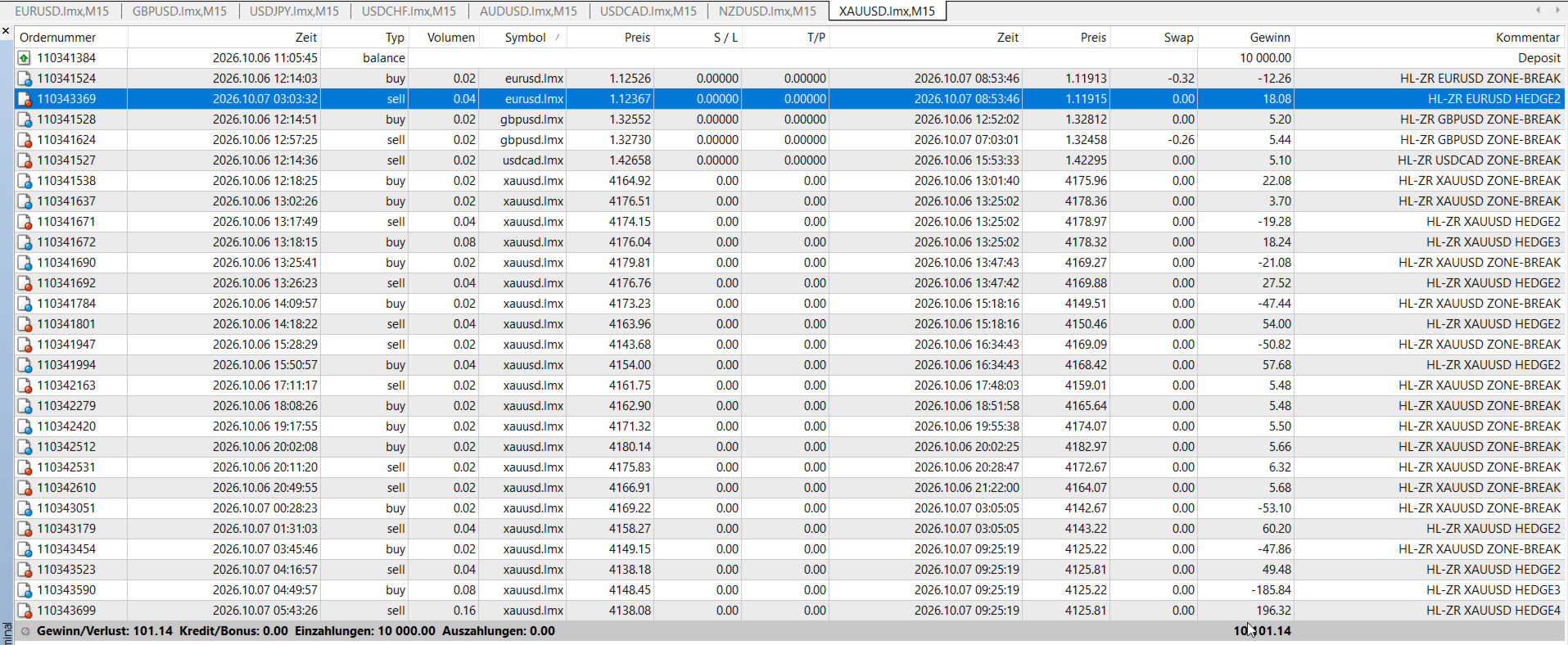
Zone-Recovery für MetaTrader 4. Ein Chart, ein Symbol, ein Korb. Die erste Order startet den Zyklus. Läuft der Kurs gegen diese Seite aus der weißen Zone, kommt die Gegenposition. Das wiederholt sich bis zum Ziel oder bis ein Limit greift.
Zwei Arbeitsweisen
Diskretionär: keine automatischen Einstiege. ZONE setzt die Linien, BUY oder SELL startet. Der Hedge danach läuft von selbst.
Vollautomatisch: der EA sucht den Einstieg. Vier Modi: nur manuell, Zone-Break, Breakout über N Kerzen, Major-Scan. Optional nur mit dem Trend.
Sechs Lot-Methoden
Klassische Recovery-Formel, Soft-Multiplikator, Verdoppeln (x2), additives Delta, Fibonacci, feste Leiter. Max Lot, Max Basket und Max Steps begrenzen die Staffel. Notaus in Geld und in Prozent Equity.
Zehn Paare, jedes für sich
EURUSD, GBPUSD, USDJPY, USDCHF, AUDUSD, USDCAD, NZDUSD, XAUUSD, XAGUSD, XTIUSD. Ein Chart handelt nur sein Symbol. CHARTS öffnet die angehakten Charts und legt das Template auf. Schon offene Charts werden übersprungen.
Linien
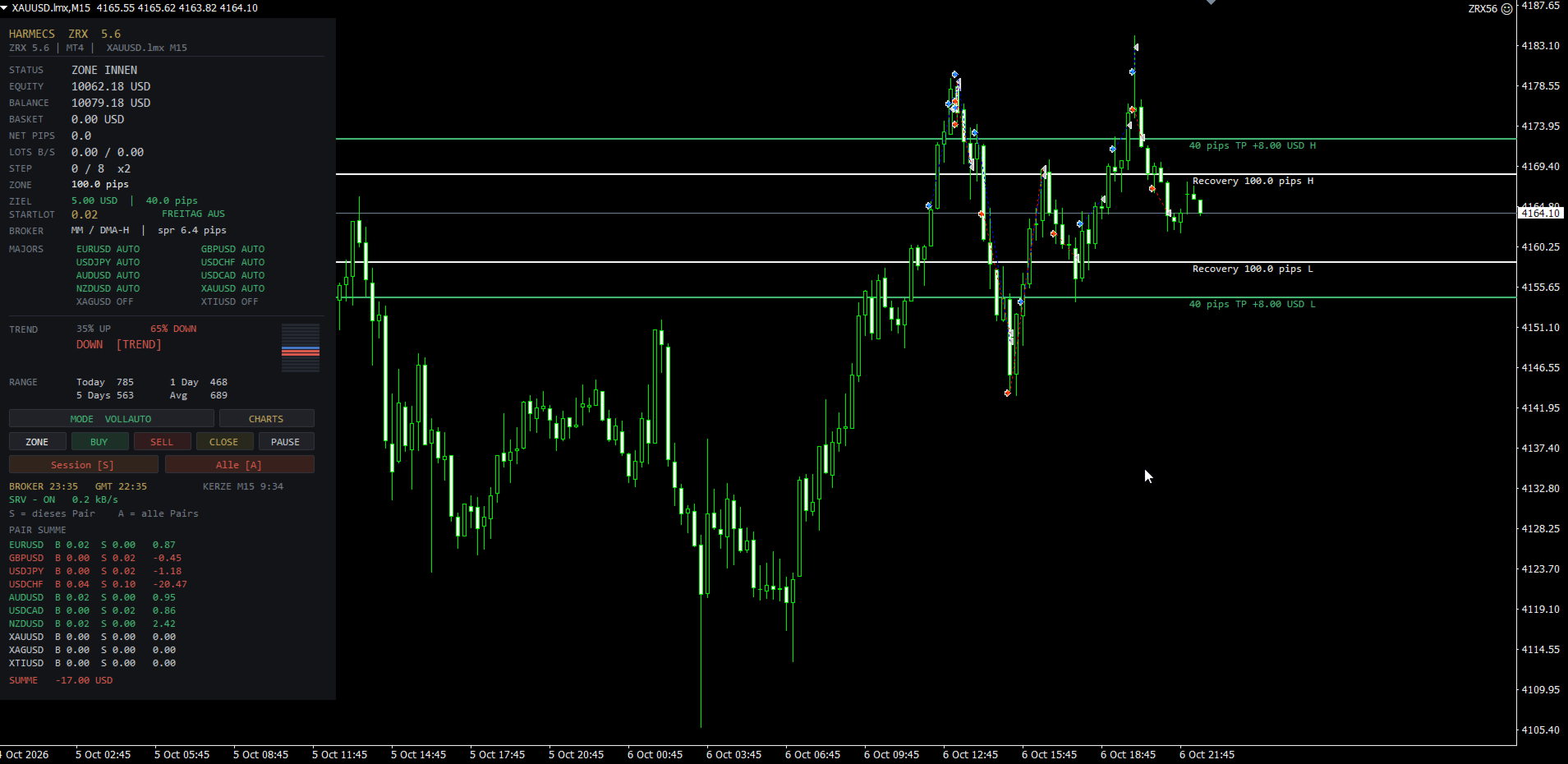
Weiß: Recovery-Zone. Grün: Pip-Ziel, mit Korbwert an diesem Kurs. Lila gestrichelt: Kurs, an dem der Korb das Geldziel erreicht. Linien lassen sich ziehen. ZONE legt sie neu um den Kurs.
Panel
Status, Equity, Balance, Hebel, Basket, Nettopips, Lots Buy/Sell, Step, Zone, Ziel, Startlot, Freitag-Filter, Spread-Hinweis. Majors mit AUTO, DISK oder OFF, per Klick umschaltbar. Trend und Tagesrange. Brokerzeit, GMT, Kerzenrest, Serverstatus.
Unten PAIR SUMME: je Pair Buy, Sell, Ergebnis und Gesamtlot. Darunter die Summe aller Pairs.
Tasten
MODE, CHARTS, ZONE, BUY, SELL, CLOSE, PAUSE. Session [S] schließt dieses Pair. Alle [A] schließt jede Order dieser Magic.
Schluss
Geldziel, Pip-Ziel, oder das erste von beiden. Zusätzlich an den grünen Linien, wenn der Korb dort nicht im Minus ist.
Hinweis
Recovery vergrößert die Position, wenn der Kurs gegen den Start läuft. Das ist kein Kapitalschutz und kein Gewinnversprechen. Zuerst auf Demo. Das vollständige Handbuch liegt dem Kauf bei.
English
Hedge Position AI Engine
Zone recovery for MetaTrader 4. One chart, one symbol, one basket. The first order starts the cycle. If price leaves the white zone against that side, a hedge is added. This repeats until the target or a limit.
Two ways to work
Discretionary: no automatic entries. ZONE places the lines, BUY or SELL starts. The hedge after that runs on its own.
Full auto: the EA looks for the entry. Four modes: manual only, zone break, breakout over N candles, major scan. Optional trend filter.
Six lot methods
Classic recovery formula, soft multiplier, double (x2), additive delta, Fibonacci, fixed ladder. Max lot, max basket and max steps cap the sequence. Emergency exit in money and in percent of equity.
Ten pairs, each on its own
EURUSD, GBPUSD, USDJPY, USDCHF, AUDUSD, USDCAD, NZDUSD, XAUUSD, XAGUSD, XTIUSD. A chart trades only its symbol. CHARTS opens the ticked charts and applies the template. Charts already open are skipped.
Lines
White: recovery zone. Green: pip target, with the basket value at that price. Violet dashed: price where the basket reaches the money target. Lines can be dragged. ZONE places them again around price.
Panel
Status, equity, balance, leverage, basket, net pips, buy/sell lots, step, zone, target, start lot, Friday filter, spread hint. Majors as AUTO, DISK or OFF, toggled by click. Trend and daily range. Broker time, GMT, candle time left, server status.
PAIR SUM at the bottom: per pair, buy, sell, result and total lots. Below that, the sum of all pairs.
Buttons
MODE, CHARTS, ZONE, BUY, SELL, CLOSE, PAUSE. Session [S] closes this pair. All [A] closes every order of this magic.
Exit
Money target, pip target, or whichever comes first. Also at the green lines, if the basket is not negative there.
Note
Recovery increases size when price runs against the first trade. It is not capital protection and not a profit claim. Test on a demo first. The full manual is included with the purchase.