SSL Channel Scanner Dashboard Multi Pair Timeframe
- 指标
- 版本: 1.0
- 激活: 5

⭐⭐⭐⭐⭐ ULTIMATE SSL CHANNEL SCANNER DASHBOARD PRO MT5 - THE MOST ADVANCED MULTI-PAIR, MULTI-TIMEFRAME & MULTI-FILTER TREND SYSTEM FOR METATRADER 5 ⭐⭐⭐⭐⭐
Are you completely exhausted from staring at dozens of charts all day, desperately switching between timeframes, and still missing the most highly profitable trend entries? Do you find yourself entering trades too late because you couldn't analyze the market fast enough?
Welcome to the ULTIMATE SSL CHANNEL SCANNER DASHBOARD PRO MT5. This is not just a standard trading indicator; it is a complete, all-in-one institutional-grade algorithmic trading workstation. It is meticulously designed to find, filter, and alert you to the highest probability trend reversals and trend continuations across the entire financial market in real-time.
By combining the legendary trend-following power of the SSL (Semaphore Signal Level) Channel with an advanced multi-symbol scanner and 16 built-in technical filters, this dashboard completely automates your market analysis. It does the heavy lifting of a professional quantitative analyst, directly on your MT5 terminal.
════════════════════════════════════════════════
📌 CORE PRODUCT INFORMATION & SPECIFICATIONS
════════════════════════════════════════════════
► Product Type: Advanced Indicator / Auto-Scanner Dashboard Screener
► Platform Required: MetaTrader 5 (MT5)
► Trading Category: Trend Following, Reversals, Multi-Timeframe (MTF), Multi-Symbol Analysis
► Suitable Trading Styles: Day Trading, Scalping, Swing Trading, Position Trading
► Supported Assets: Forex Currency Pairs, Cryptocurrencies (Bitcoin, Ethereum, etc.), Indices (US30, NAS100), Metals (Gold/XAUUSD, Silver), Commodities, and Stocks. (Works with ANY symbol offered by your broker).
► Repaint Status: 100% STRICTLY NON-REPAINTING. The algorithm calculates signals solely on closed bars to guarantee that once a signal is generated, it will never disappear or shift.
► Execution Speed: Extremely lightweight and highly optimized C++ (MQL5) code ensures your MT5 terminal remains lightning-fast, even when scanning massive amounts of market tick data.
════════════════════════════════════════════════
💎 THE CORE VALUE PROPOSITION: WHY YOU NEED THIS TOOL
════════════════════════════════════════════════
The traditional SSL Channel is widely respected by professional traders as a fantastic trend-following indicator. It utilizes dual moving averages (calculated on the Highs and Lows) to create a dynamic channel. When the price closes outside this channel, a trend shift is confirmed.
However, manual monitoring of the SSL channel is practically impossible if you want to trade a diversified portfolio.
Consider this: If you trade 20 currency pairs across 9 different timeframes, that equals 180 individual charts you need to monitor simultaneously. No human can do this without experiencing severe screen fatigue and making emotional mistakes.
This Dashboard Pro version solves that problem forever:
★ Ultimate Time-Saver: It scans up to 20+ pairs across 9 different timeframes simultaneously in the background.
★ Perfect Confluence: It doesn't just give you raw SSL signals. It filters them through 16 different institutional-grade indicators (MACD, RSI, ADX, Ichimoku, Fibonacci, Support/Resistance, etc.) to isolate only "A+ Grade" setups. You will never fall for fake-outs again.
★ Automated Risk Management: It instantly calculates Average True Range (ATR) based Stop Loss levels and dynamic Take Profit targets (TP1 and TP2 based on your desired Risk:Reward ratios) the exact millisecond a signal occurs.
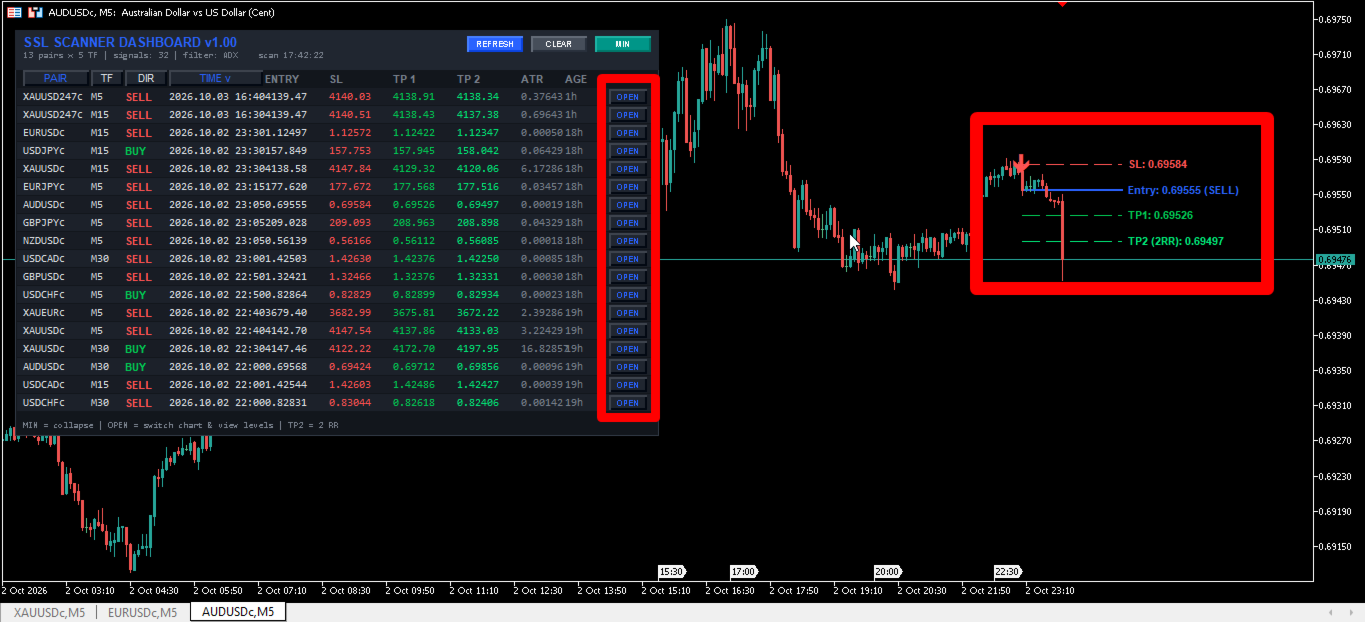
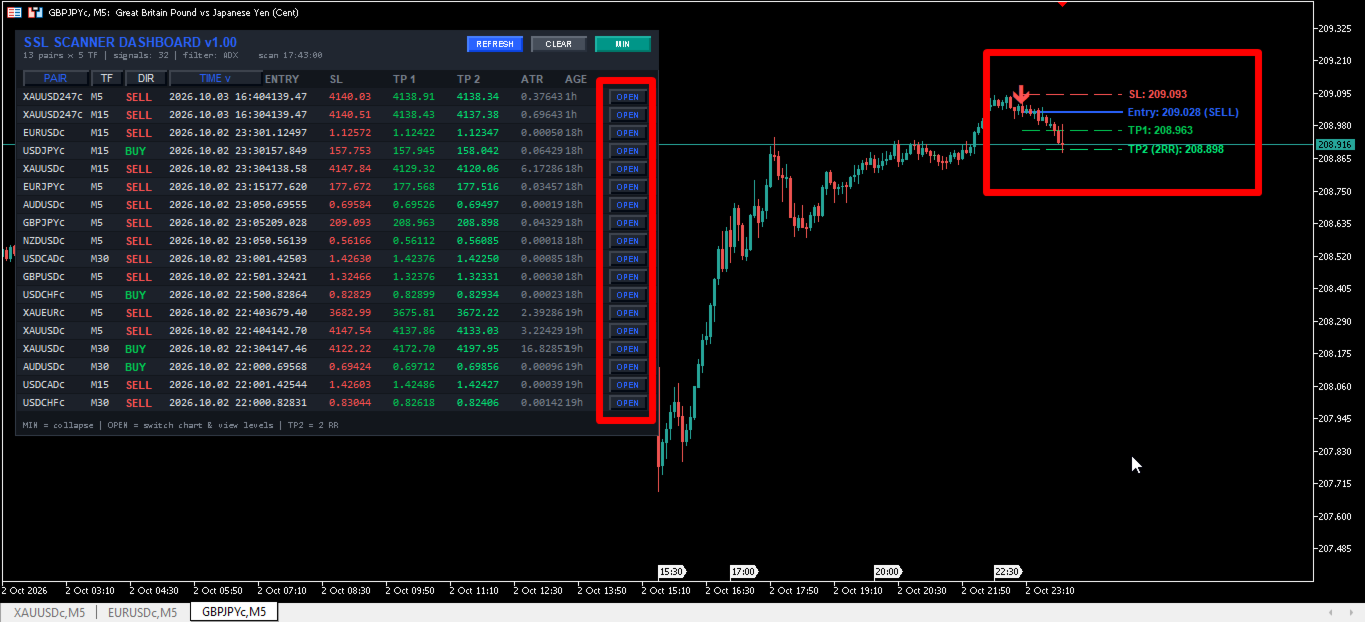
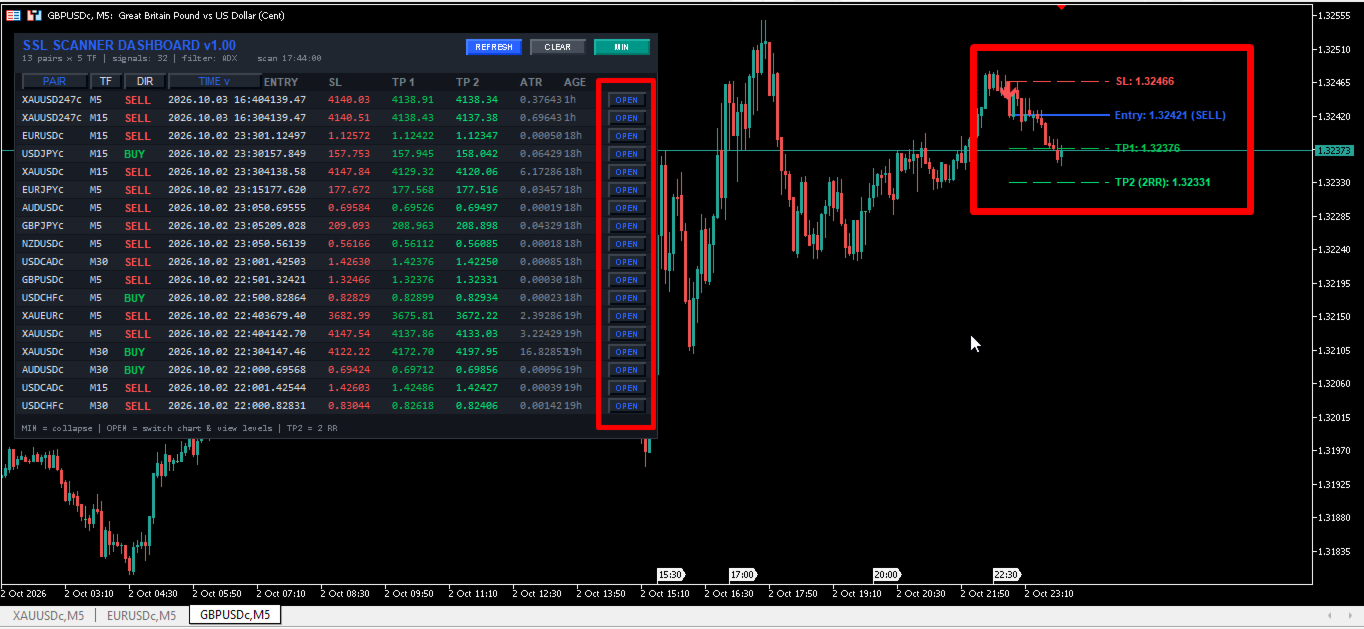
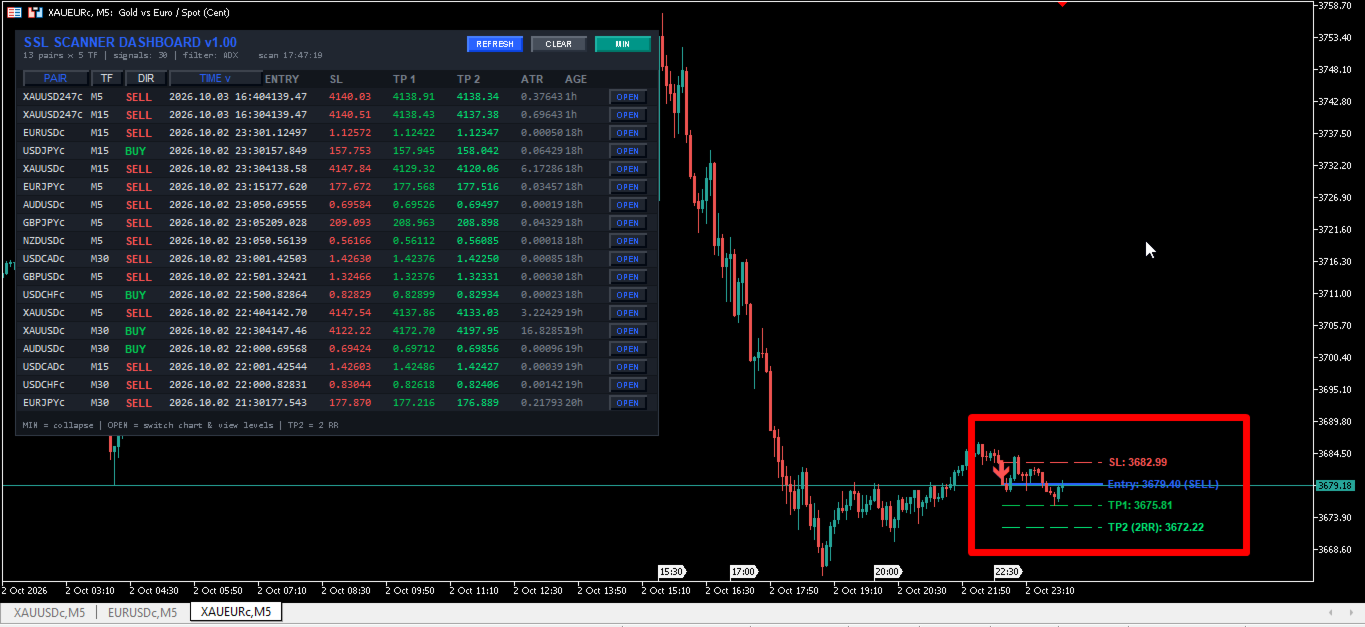
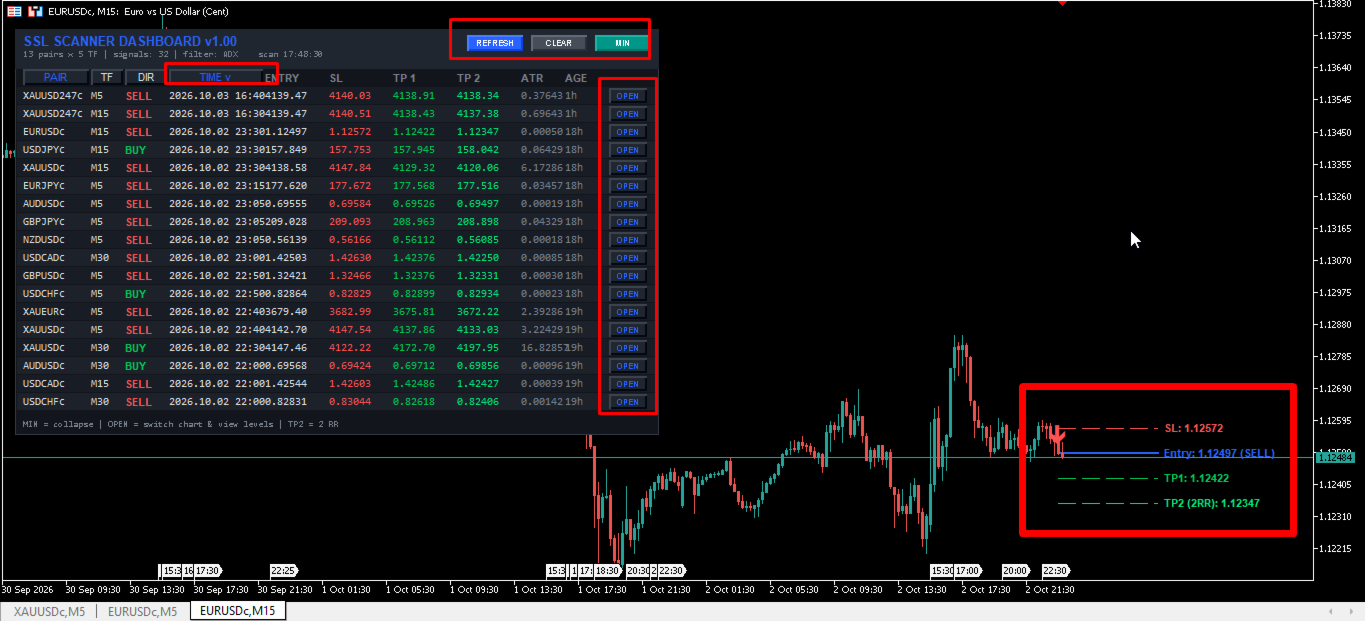
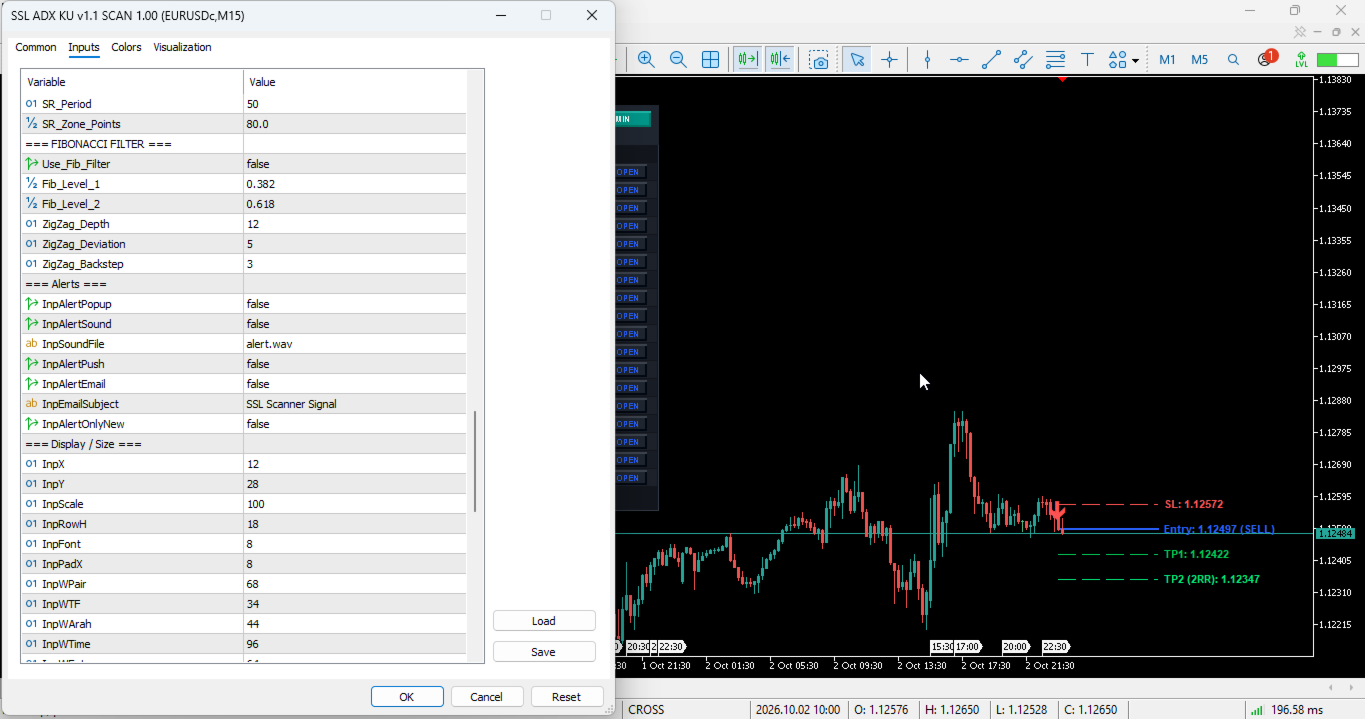
★ Interactive One-Click Charting: See a promising signal on the dashboard? Simply click the "OPEN" button next to the signal. The indicator will instantly switch your current chart to that specific pair and timeframe, automatically plotting the exact Entry, Stop Loss, and Take Profit lines directly on your chart for immediate execution.
════════════════════════════════════════════════
🚀 KEY FEATURES & THEIR MASSIVE TRADING BENEFITS
════════════════════════════════════════════════
1. MASSIVE MULTI-SYMBOL & MULTI-TIMEFRAME ENGINE
[The Benefit]: Gives you a God's-eye view of the entire global market. By spotting trends aligning across the M15, H1, and H4 timeframes simultaneously, you can trade perfectly in sync with institutional momentum, drastically increasing your overall win rate.
2. DYNAMIC ATR VOLATILITY RISK MANAGEMENT
[The Benefit]: Static, fixed-pip Stop Losses destroy trading accounts because market volatility changes every single day (e.g., GBPJPY moves much faster than EURCHF). Our scanner uses a built-in ATR (Average True Range) algorithm to calculate dynamic Stop Loss distances. This gives your trades enough room to breathe without getting prematurely stopped out by random market noise and spread widening.
3. SMART ONE-CLICK INTERFACE & CHART OVERLAYS
[The Benefit]: Eliminates the frustrating friction of manual chart setup. The dashboard is fully draggable, collapsible (minimize/maximize), and highly interactive. Clicking a signal draws visual lines for your exact entry and exit parameters.
4. REAL-TIME MULTI-CHANNEL ALERTS
[The Benefit]: You no longer need to be chained to your desk, staring at a monitor for 12 hours a day. Receive instant Popup Alerts, Audio Sound notifications, Push Notifications directly to your MT5 mobile phone app, and Email alerts the exact second a high-probability setup forms. Go enjoy your life; the dashboard will call you when the money is ready to be made.
════════════════════════════════════════════════
📊 DECODING THE DASHBOARD COMPONENTS
════════════════════════════════════════════════
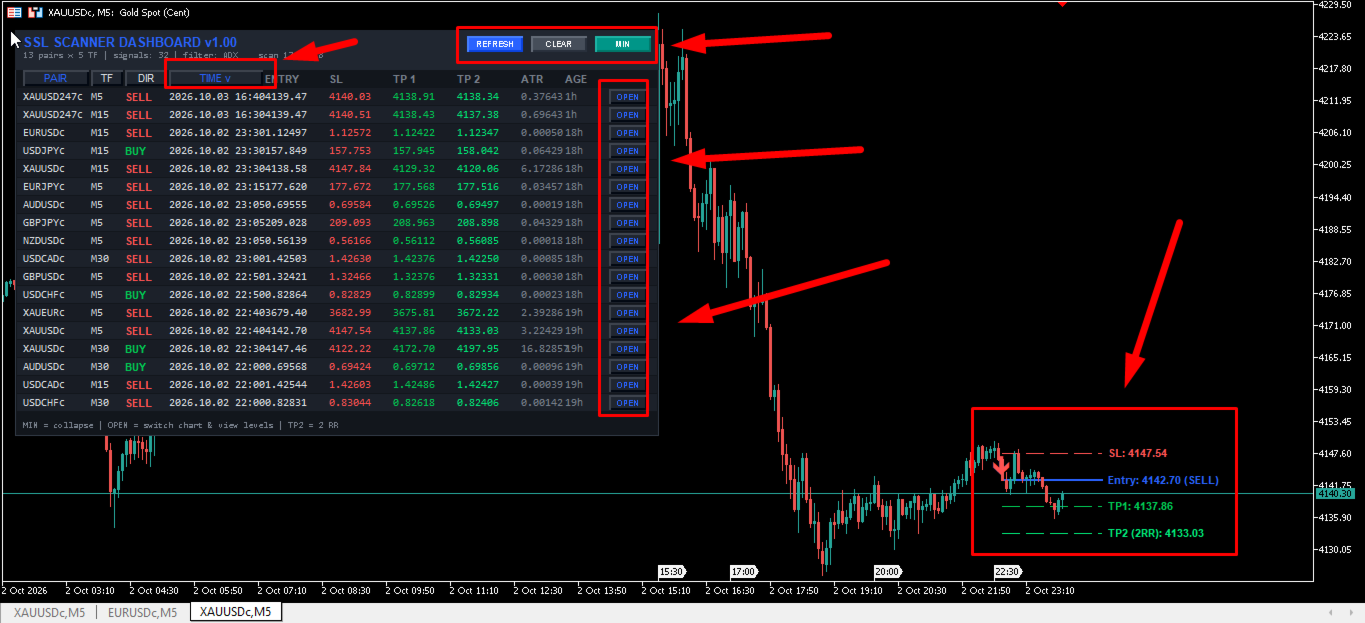
When you attach the indicator to your chart, a sleek, modern, dark-mode dashboard will appear. Here is exactly what every column represents:
► PAIR: The financial instrument generating the signal (e.g., EURUSD, XAUUSD, BTCUSD). You can sort the dashboard alphabetically by clicking this header.
► TF: The Timeframe where the SSL Cross occurred (e.g., M15, H1, H4).
► DIR: The Direction of the trade. It will display a bright Green "BUY" or a bold Red "SELL".
► TIME: The exact broker server timestamp of the signal candle.
► ENTRY: The exact closing price of the signal candle, which is your optimal entry point.
► SL: Your automatically calculated Stop Loss price based on the current ATR volatility.
► TP 1: Take Profit 1. Your first target, automatically calculated based on your Risk:Reward input (e.g., 1:1 RR).
► TP 2: Take Profit 2. Your extended target for maximizing trend runners (e.g., 1:2 or 1:3 RR).
► ATR: The current Average True Range numerical value at the time of the signal, so you know exactly how volatile the market is.
► AGE: How much real-time has passed since the signal was generated (e.g., 45s, 5m, 2h, 1d). This helps you avoid entering stale, outdated setups.
► OPEN: The interactive execution button. Click this to instantly switch your current visual chart to view the setup, fully mapped out with horizontal entry and exit lines.
════════════════════════════════════════════════
⚙️ COMPREHENSIVE INPUT PARAMETERS & USER GUIDE
════════════════════════════════════════════════
This is a highly customizable and flexible quantitative tool. Below is a detailed explanation of every single input variable so you can tailor the scanner exactly to your unique trading strategy, whether you are an aggressive scalper or a conservative swing trader.
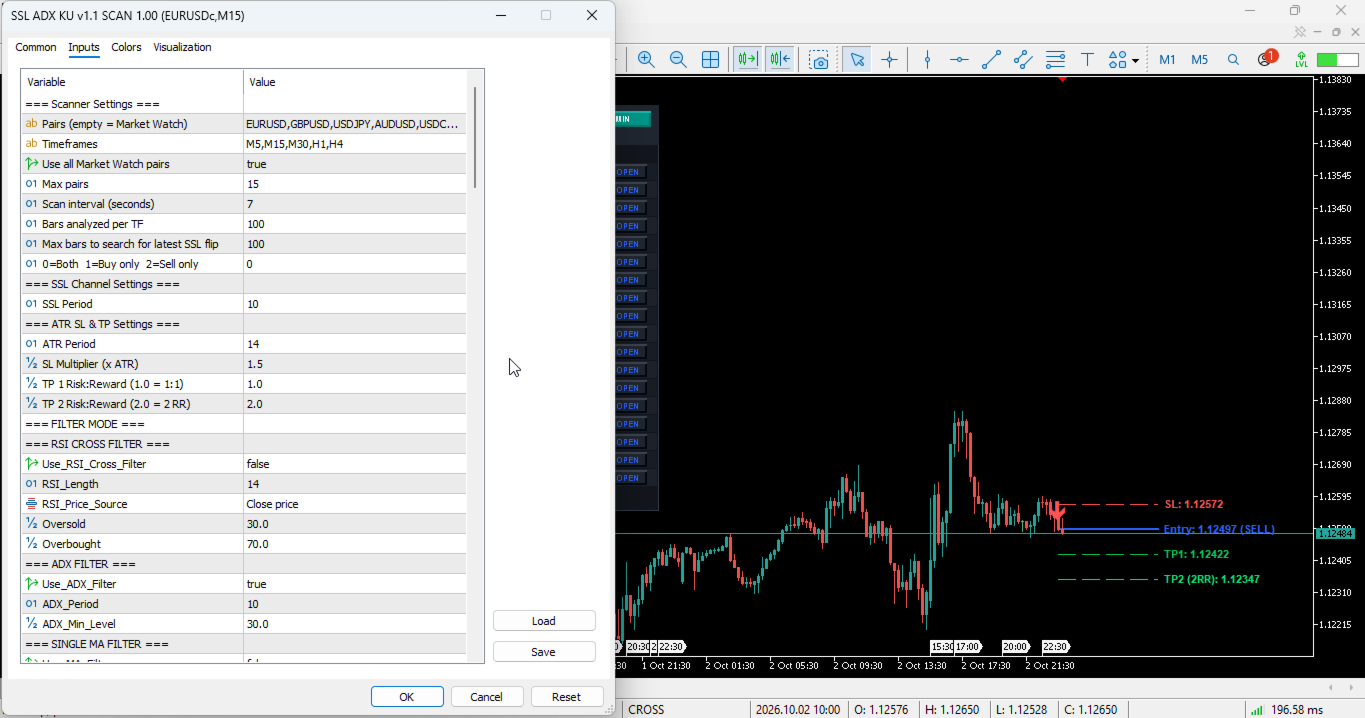
█ [=== Scanner Settings ===]
• InpSymbols: Type the exact names of the pairs you want to scan, separated by commas (e.g., EURUSD,GBPUSD,USDJPY,XAUUSD). Leave this completely blank if you are using the "InpUseWatch" feature.
• InpTimeframes: The specific timeframes you want the engine to scan (e.g., M5,M15,M30,H1,H4,D1). Must use standard MT5 notation.
• InpUseWatch: (True/False) If set to True, the indicator completely ignores the 'InpSymbols' list and automatically scans all pairs currently visible in your MT5 Market Watch window.
• InpMaxSymbols: The absolute maximum number of pairs to scan. This is a safety feature to prevent terminal lag on older computers. (Recommended: 10 to 30 pairs maximum).
• InpScanSec: How often the scanner refreshes its data in seconds. (Default: 7 seconds). Lower to 3 seconds if you are scalping the M1 chart.
• InpBarsCopy: The amount of historical bars loaded into the memory for calculations. (Default: 200). Keep this low to ensure blazing fast performance.
• InpLookback: How many bars back into history the dashboard should search to find the most recent valid SSL signal. (Default: 100).
• InpDirection: Directional bias control. 0 = Scan Both Buy & Sell signals, 1 = Scan Buy Signals Only (Useful if you are in a macro bull market), 2 = Scan Sell Signals Only.
█ [=== SSL Channel Settings ===]
• SSL_Period: The lookback period for the core SSL High/Low Moving Averages. Default is 10. Higher numbers (e.g., 20 or 50) will provide slower, longer-term macroeconomic signals with fewer fake-outs. Lower numbers (e.g., 5 or 8) will provide highly aggressive, early entry signals for scalpers.
█ [=== ATR SL & TP Settings (Money Management) ===]
• InpATRPeriod: The period for the Average True Range volatility calculation. Default is 14.
• InpATRMultSL: Stop Loss distance multiplier. For example, a value of 1.5 means your Stop Loss is placed 1.5 times the current ATR value away from your exact entry price. A value of 2.0 provides a wider, safer stop.
• InpTP1_RR: Risk-to-Reward ratio for Take Profit 1. (e.g., 1.0 means a 1:1 risk-reward, risking $10 to make $10).
• InpTP2_RR: Risk-to-Reward ratio for Take Profit 2. (e.g., 2.0 means a 1:2 risk-reward, risking $10 to make $20).
════════════════════════════════════════════════
🛡️ THE 16 INSTITUTIONAL FILTERS EXPLAINED
════════════════════════════════════════════════
You can activate one, two, or multiple filters simultaneously to create an impenetrable, high-win-rate strategy. Only signals that pass ALL activated filters will be pushed to your dashboard.
► 1. RSI CROSS FILTER
• Logic: Requires the Relative Strength Index (RSI) to cross out of Overbought/Oversold exhaustion zones at the exact time of the SSL signal. This catches massive reversal momentum.
• Variables: RSI_Length (Default 14), Oversold level (Default 30), Overbought level (Default 70).
► 2. ADX (AVERAGE DIRECTIONAL INDEX) FILTER
• Logic: ADX measures trend strength, regardless of direction. This filter ensures there is strong market momentum before taking an SSL signal. If the ADX is too low, the market is chopping sideways, and signals are smartly ignored.
• Variables: ADX_Period (Default 10), ADX_Min_Level (Default 20.0 - adjust to 25.0 for stricter filtering).
► 3. SINGLE MA (MOVING AVERAGE) FILTER
• Logic: The golden rule of trading: "The trend is your friend." This filter ensures you only trade in the direction of a dominant, higher-timeframe Moving Average. It only allows Buys if the price is above the MA, and Sells if below.
• Variables: MA_Period (E.g., 50 or 200), MA_Method (SMA/EMA), MA_Applied_Price.
► 4. ICHIMOKU SENKOU SPAN B FILTER
• Logic: Uses the thickest, most reliable part of the Ichimoku Kinko Hyo cloud (Senkou Span B) as a master trend filter. Only takes Buys above the Cloud and Sells below it. Excellent for long-term swing traders.
• Variables: Ichimoku_SenkouB (Default 52), Ichimoku_Kijun (Default 26).
► 5. RSI 75 MACRO FILTER
• Logic: Uses a very slow, macro RSI (Period 75) as a fundamental trend filter. Buys are only permitted if the macro RSI is > 50 (Bullish territory), Sells only if RSI < 50 (Bearish territory).
► 6. DOUBLE MA (GOLDEN CROSS) FILTER
• Logic: Uses a fast and slow Moving Average crossover system as a secondary trend filter (e.g., 30 EMA vs 140 EMA). Buys are only valid if the Fast MA is strictly above the Slow MA.
• Variables: Fast MA (MA_A) and Slow MA (MA_B) configurations, including Shift and Method.
► 7. AWESOME OSCILLATOR (AO) FILTER
• Logic: Utilizes Bill Williams' legendary Awesome Oscillator to measure market momentum acceleration.
• Options: You can filter by Minimum/Maximum Volume thresholds, by AO Color (Buy only if AO is Green/Rising), or by Zero-Line crossing (Buy only if AO is positive > 0).
► 8. PARABOLIC SAR FILTER
• Logic: Aligns the SSL breakout signal with the Parabolic Stop and Reverse (SAR) dot direction to ensure immediate momentum is on your side.
► 9. HEIKEN ASHI CANDLE FILTER
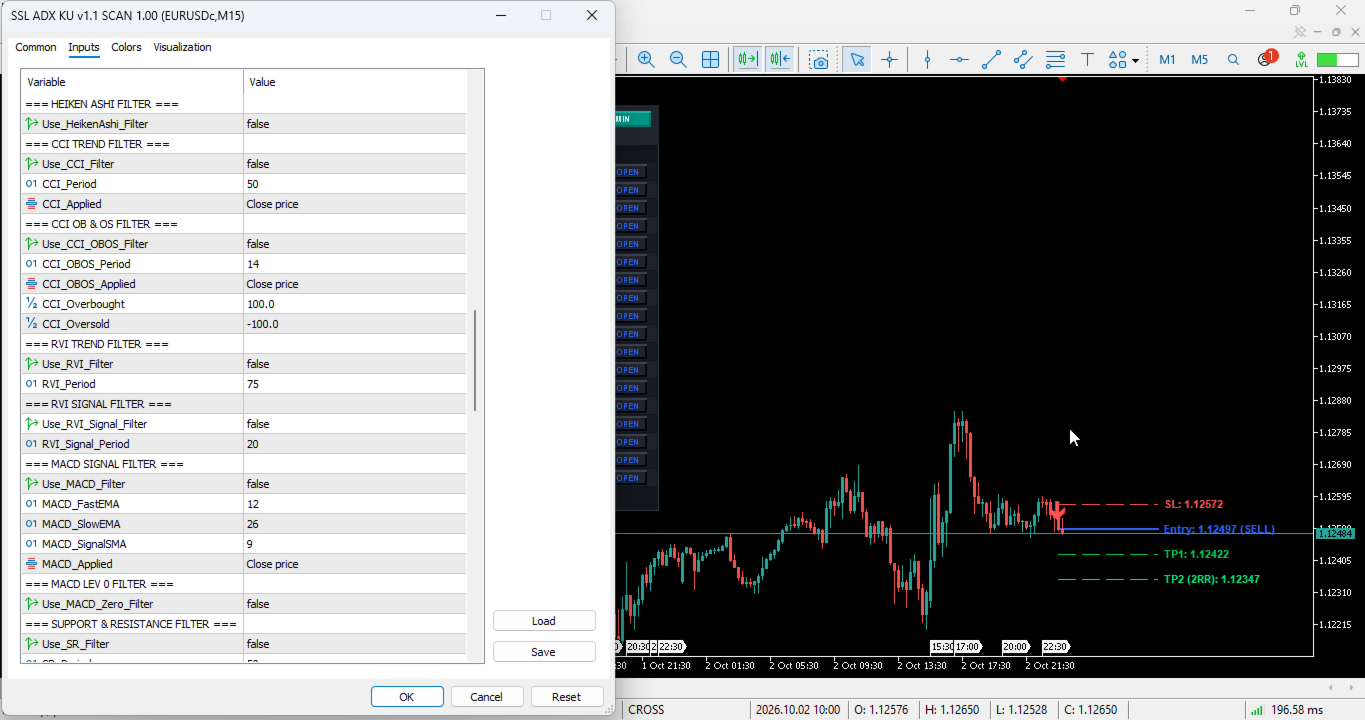
• Logic: Traditional Japanese candlesticks can be noisy. This filter calculates synthetic Heiken Ashi candles in the background and requires the Heiken Ashi trend color to match the SSL signal direction, eliminating false price action spikes.
► 10. CCI (COMMODITY CHANNEL INDEX) TREND FILTER
• Logic: A classic momentum oscillator. Allows Buys only if CCI is > 0, and Sells only if CCI is < 0.
► 11. CCI OB/OS EXHAUSTION FILTER
• Logic: Designed for mean-reversion traders. Buys are validated only if CCI drops from extreme Overbought levels (> 100), predicting a reversal down.
► 12. RVI (RELATIVE VIGOR INDEX) TREND FILTER
• Logic: Filters based on whether the closing price is higher than the opening price on average (RVI > 0).
► 13. RVI SIGNAL LINE FILTER
• Logic: Filters setups based on the RVI main line actively crossing its signal line for immediate momentum confirmation.
► 14. MACD HISTOGRAM FILTER
• Logic: The industry standard. Trade Buys only if the MACD Histogram (Main minus Signal) is expanding upwards > 0.
► 15. MACD ZERO LINE FILTER
• Logic: Trade Buys only if the MACD Main line is in positive territory above the zero line.
► 16. SUPPORT & RESISTANCE (S&R) ZONE FILTER
• Logic: Highly advanced algorithmic geometry! The system calculates dynamic Support and Resistance zones using internal ZigZag swing highs and lows. It only validates SSL signals that occur exactly near a rejection from these key liquidity zones.
• Variables: SR_Period (lookback), SR_Zone_Points (how wide the rejection zone is in points).
► 17. FIBONACCI GOLDEN ZONE FILTER
• Logic: Automatically draws internal Fibonacci retracements based on recent market swings. It only validates SSL signals that occur precisely at the 0.382 or 0.618 Golden Retracement levels.
█ [=== Alerts Configuration ===]
• InpAlertPopup: (True/False) Enables standard MT5 box popup alerts.
• InpAlertSound: (True/False) Enables audio alerts so you can hear setups from across the room.
• InpSoundFile: Name of the .wav audio file.
• InpAlertPush: (True/False) Pushes alerts directly to your MetaTrader mobile app. Trade on the go!
• InpAlertEmail: (True/False) Sends alerts to your registered email address.
• InpAlertOnlyNew: (True/False) CRITICAL FEATURE. If True, it will only alert you exactly when the candle closes and a brand-new signal is permanently formed.
█ [=== Display / Size & Sorting UI ===]
• InpX / InpY: Base X and Y coordinates to position the dashboard anywhere on your chart.
• InpScale: Adjust dashboard size seamlessly (100 = default, 130 = larger for 4K UHD monitors, 70 = compact for laptops).
• InpRowH / InpFont: Adjust individual row heights and font sizes for perfect visual clarity.
• InpWPair, InpWTF...: Custom pixel width controls for every single column.
• InpShowEmpty: Show pairs/TFs on the dashboard even if they have no current valid signal (useful for tracking).
• InpSortBy / InpSortNewest: Fully interactive UI. Click the headers on the dashboard to sort the data by Time, Pair name, Timeframe, or Trade Direction.
█ [=== Draw Signal on Chart Overlay ===]
• InpDrawOnChart: Master toggle to draw visual aids when you click the "OPEN" button on the dashboard.
• InpShowArrow: Draws the beautiful entry indicator arrow on the signal candle.
• InpShowLevels: Draws the Stop Loss, TP1, and TP2 dashed horizontal lines with exact price labels on the right side of the chart.
• InpExtendBars: How many bars into the future the SL/TP lines should be drawn.
• InpArrowDistance: Distance in points of the signal arrow away from the candle wick.
█ [=== Custom Colors ===]
• Fully customizable User Interface. Change the background color (InpColBg), headers, text, bullish/bearish colors, and SL/TP line colors to perfectly match your exact MT5 chart template (Supports both Light Mode and Dark Mode aesthetics).
════════════════════════════════════════════════
🏆 3 PROVEN TRADING BLUEPRINTS & TEMPLATES
════════════════════════════════════════════════
Don't know where to start? Use these 3 optimized setups designed by professional traders to get maximum results from this dashboard.
STRATEGY 1: THE HFT SCALPER (M1 & M5 Timeframes)
• Best For: Fast-paced traders who want to be in and out of the market in minutes.
• SSL_Period: 8 (Faster reaction).
• Timeframes: M1, M5.
• Activated Filter: Use_MA_Filter = True (MA_Period = 200, EMA).
• Activated Filter: Use_AO_Color_Filter = True.
• Risk Management: InpATRPeriod = 7, InpATRMultSL = 1.0, TP1_RR = 1.0.
• Execution: Only take Buy signals if the price is above the 200 EMA and the AO is green. Take quick 1:1 RR profits.
STRATEGY 2: THE INTRADAY TREND RIDER (M15 & H1 Timeframes)
• Best For: Day traders looking for 1 to 3 solid, high-probability setups per day.
• SSL_Period: 14.
• Timeframes: M15, M30, H1.
• Activated Filter: Use_ADX_Filter = True (Level 25) to ensure you only trade when the market is moving fast.
• Activated Filter: Use_MACD_Filter = True.
• Risk Management: InpATRPeriod = 14, InpATRMultSL = 1.5, TP1_RR = 1.5, TP2_RR = 3.0.
• Execution: Wait for London or New York session volume. Let the ADX filter out the Asian session chop.
STRATEGY 3: THE SWING TRADING INVESTOR (H4 & D1 Timeframes)
• Best For: People with full-time jobs who only want to check the market once a day.
• SSL_Period: 21.
• Timeframes: H4, D1.
• Activated Filter: Use_Ichimoku_Filter = True.
• Activated Filter: Use_SR_Filter = True.
• Risk Management: InpATRPeriod = 14, InpATRMultSL = 2.0 (Wide stop to survive daily wicks), TP1_RR = 2.0, TP2_RR = 5.0.
• Execution: Catch massive multi-week macroeconomic trends. Let the trade run for days.
════════════════════════════════════════════════
🛠️ STEP-BY-STEP INSTALLATION GUIDE
════════════════════════════════════════════════
1. Purchase and download the indicator from the MQL5 Market.
2. Open your MetaTrader 5 terminal.
3. Open an empty chart of any pair (e.g., EURUSD on the H1 timeframe).
4. Go to the "Navigator" panel on the left side (Press CTRL+N if hidden).
5. Open the "Indicators" -> "Market" folder.
6. Drag and drop the "SSL Channel Scanner Dashboard Pro" onto your empty chart.
7. The settings window will pop up. Configure your desired Pairs, Timeframes, and Filters.
8. Click "OK". Allow 5-10 seconds for the dashboard to download historical data for all pairs and calculate the initial signals.
9. Done! The dashboard will now automatically scan the market and alert you.
*PRO TIP:* To ensure the dashboard loads instantly, make sure your MT5 has downloaded history data for the pairs you want to scan. You can do this quickly by pressing F2 in MT5 or simply opening the charts manually once. Keep your Market Watch clean with your primary traded assets (20-30 pairs is highly optimal).
════════════════════════════════════════════════
❓ FREQUENTLY ASKED QUESTIONS (FAQ)
════════════════════════════════════════════════
Q: Does this indicator repaint?
A: Absolutely NOT. The algorithm is strictly coded to calculate signals only on CLOSED candlesticks (rates_total - 2 logic). Once a signal arrow and dashboard alert are generated, they are permanently printed on the chart.
Q: Can I use this for Prop Firm trading (FTMO, MFF, etc.)?
A: Yes! Because this is a manual trading assistant (Indicator) and not a fully automated Expert Advisor (EA), it is 100% compliant with all Prop Firm rules. In fact, the built-in ATR Stop Loss feature will help you strictly manage your risk and avoid drawdown violations.
Q: Will it slow down my computer?
A: The core engine is built using highly optimized array processing and handle-release management. However, if you try to scan 100 pairs on 9 timeframes on a 10-year-old laptop, you will experience lag. We recommend scanning 15-25 pairs on 3-4 timeframes for optimal, buttery-smooth performance.
Q: Do I need to be an expert to use this?
A: Not at all. The dashboard is designed to be incredibly visual and intuitive. Green means Buy, Red means Sell. The "OPEN" button visually draws exactly where your Stop Loss and Take Profit should go. It acts as an incredible educational tool to help beginners understand market structure.
Q: Can I use custom templates with the "OPEN" button?
A: Yes! When you click the "OPEN" button, it opens the chart using your terminal's "Default.tpl" template. Simply customize a chart exactly how you like it (colors, background), save it as "Default.tpl", and the dashboard will use that exact design every time you open a trade!
════════════════════════════════════════════════
🙏 CONCLUSION & THANK YOU
════════════════════════════════════════════════
Your trading success, psychological well-being, and profitability are our highest priorities. By utilizing the SSL Scanner Dashboard Pro, you are upgrading your trading setup from a stressful, manual guessing game into an automated, highly calculated, and professional quantitative business.
Stop missing trades while you sleep. Stop taking low-quality setups out of boredom. Let the algorithms do the hard work, while you simply execute the high-probability setups.
If you love the indicator and it helps you pass a prop firm challenge or grow your personal account, a 5-Star Review would be incredibly appreciated! It motivates us to continue building and updating world-class tools for this amazing community.
May the trends be ever in your favor! Happy, Safe, and Profitable Trading! 📈💎🎯