SSL Channel Scanner Dashboard Multi Pair Timeframe
- Indicatori
- Versione: 1.0
- Attivazioni: 5

Overview
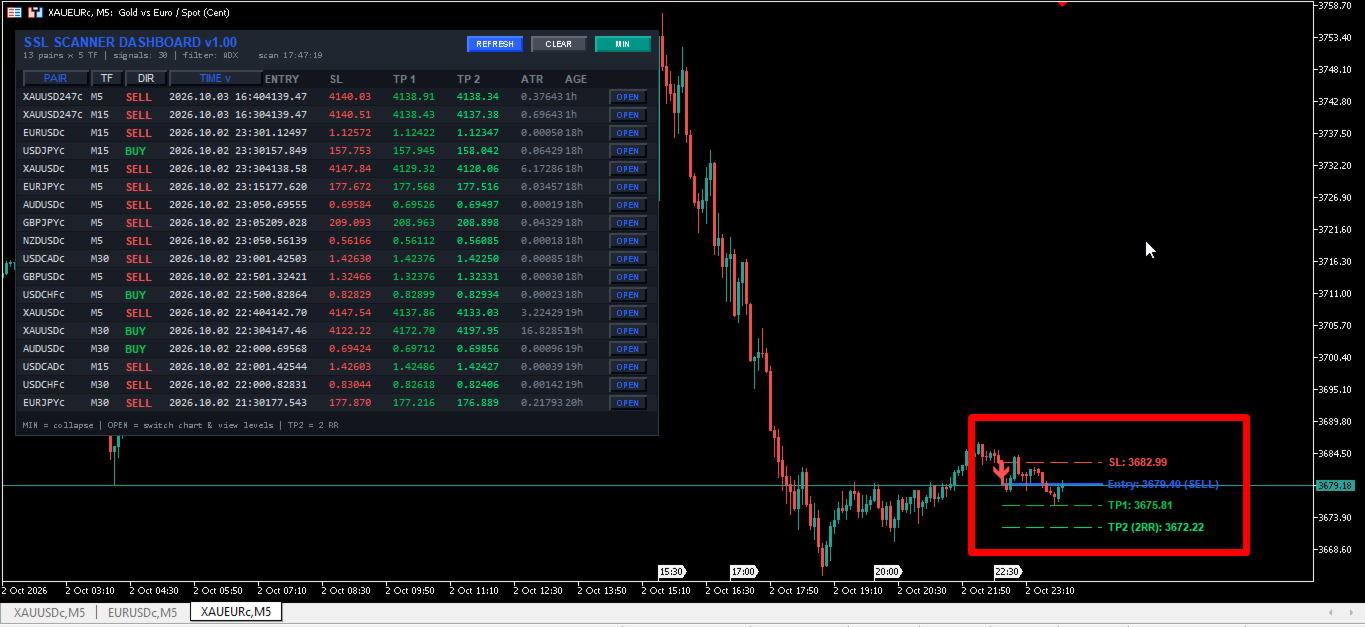
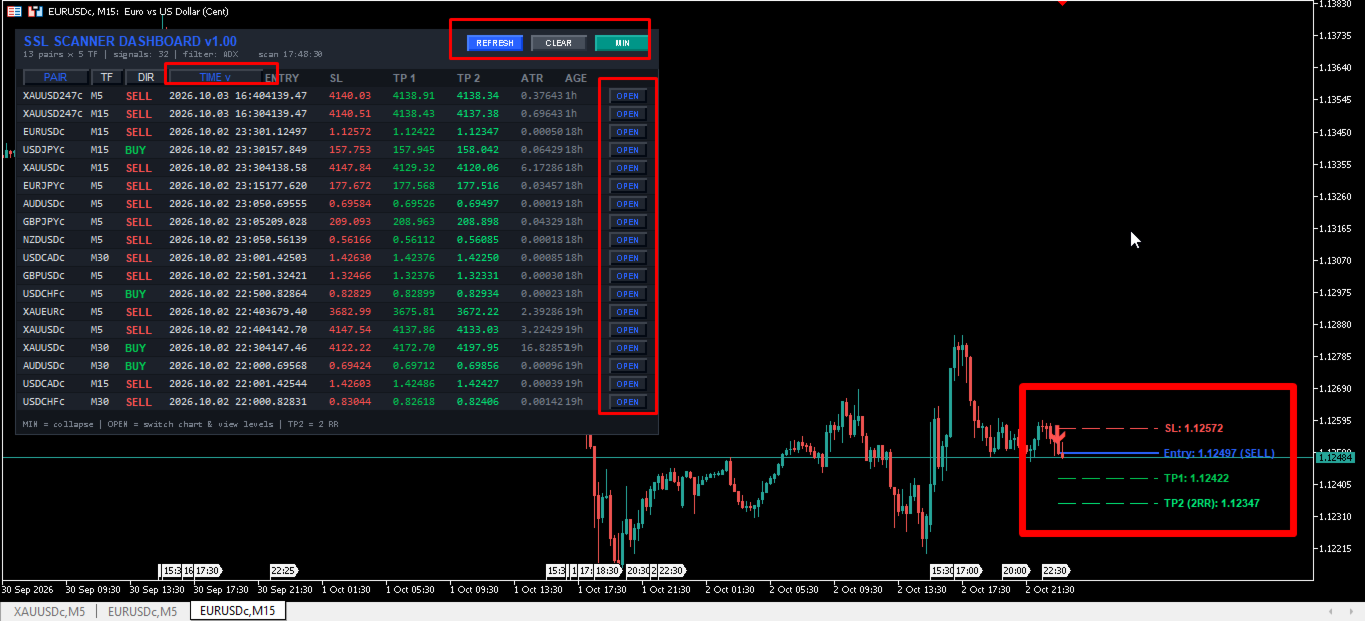
The SSL Channel Multi-Filter Dashboard is a comprehensive, multi-symbol, and multi-timeframe analytical scanner designed for the MetaTrader 5 terminal. Built for technical analysts and systematic traders, this utility continuously monitors price action across a customized list of financial instruments and timeframes, seeking baseline trend shifts based on the SSL (Semaphore Signal Level) Channel algorithm. To provide an extensive layer of technical validation, the dashboard integrates 17 distinct optional filtering algorithms, ranging from momentum oscillators (RSI, MACD, AO) to trend-following metrics (ADX, Ichimoku, Parabolic SAR) and dynamic price zones (Support/Resistance, Fibonacci). Instead of manually opening dozens of charts, traders can utilize this centralized graphical user interface (GUI) to scan the market, calculate Average True Range (ATR) based Stop Loss and Take Profit levels, and receive immediate alerts when all selected technical conditions align perfectly.
Operating Principle & Signal Logic
The core mathematical foundation of this scanner is the SSL Channel indicator. The SSL algorithm calculates two primary smoothed moving averages: a Simple Moving Average (SMA) applied to the High prices, and an SMA applied to the Low prices over a user-defined period. The foundational signal logic operates on closed price action strictly on Bar 1 (the first completed candlestick) to ensure non-repainting behavior. A Bullish baseline condition is triggered when the previous candle's close was below the SMA Low, and the current closed candle explicitly breaches and closes above the SMA High. Conversely, a Bearish baseline condition is triggered when the previous close was above the SMA High, and the current closed candle breaches and closes below the SMA Low. The scanner will traverse historical data backwards up to a defined limit (InpLookback) to find the most recent SSL flip. Once a baseline SSL cross is detected, the algorithm sequentially processes the specific closed bar through all activated technical filters. A final valid signal is generated and displayed on the dashboard only if the base SSL direction and all activated sub-filters independently confirm the same directional bias simultaneously.
Key Features
- Multi-Dimensional Scanning: Simultaneously scans up to 15 different currency pairs and unlimited timeframes.
- 17 Technical Verification Filters: Includes RSI, ADX, Single/Double MA, Ichimoku, AO, SAR, Heiken Ashi, CCI, RVI, MACD, Support/Resistance, and Fibonacci depth calculations.
- Dynamic Risk Management: Automatically calculates real-time Stop Loss distances utilizing the Average True Range (ATR) volatility metric.
- Automated Target Projection: Generates two Take Profit levels (TP1 and TP2) based on customizable Risk-to-Reward ratios relative to the ATR Stop Loss distance.
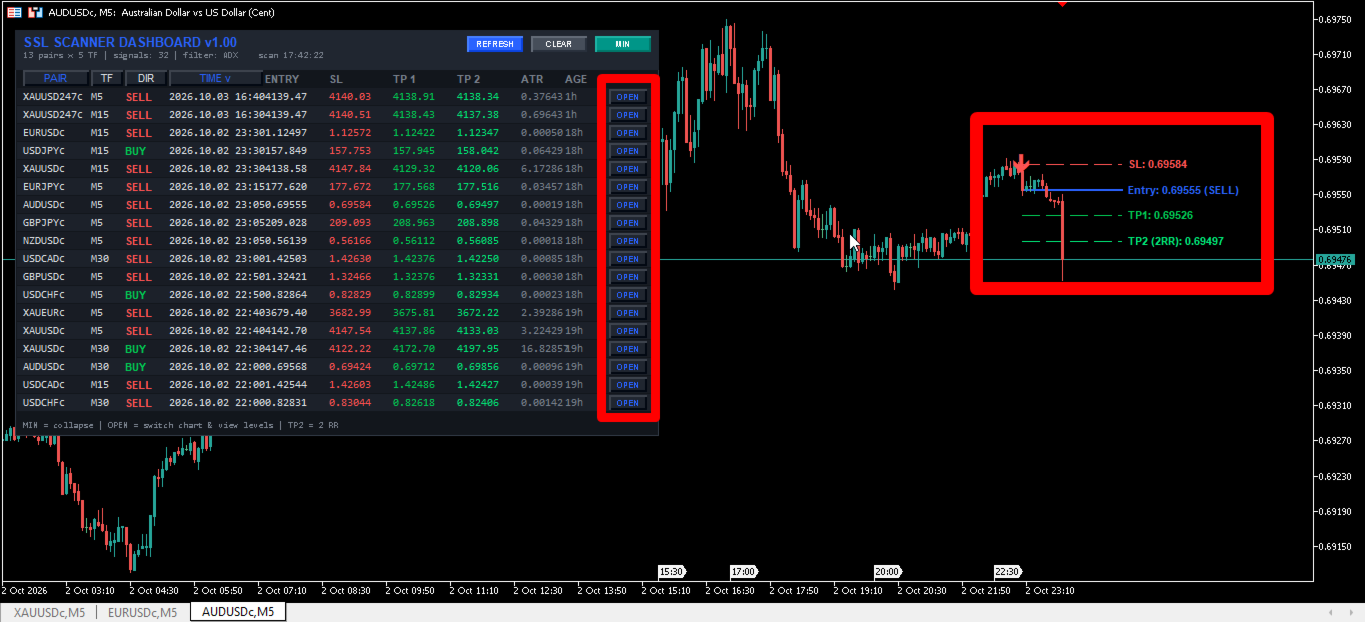
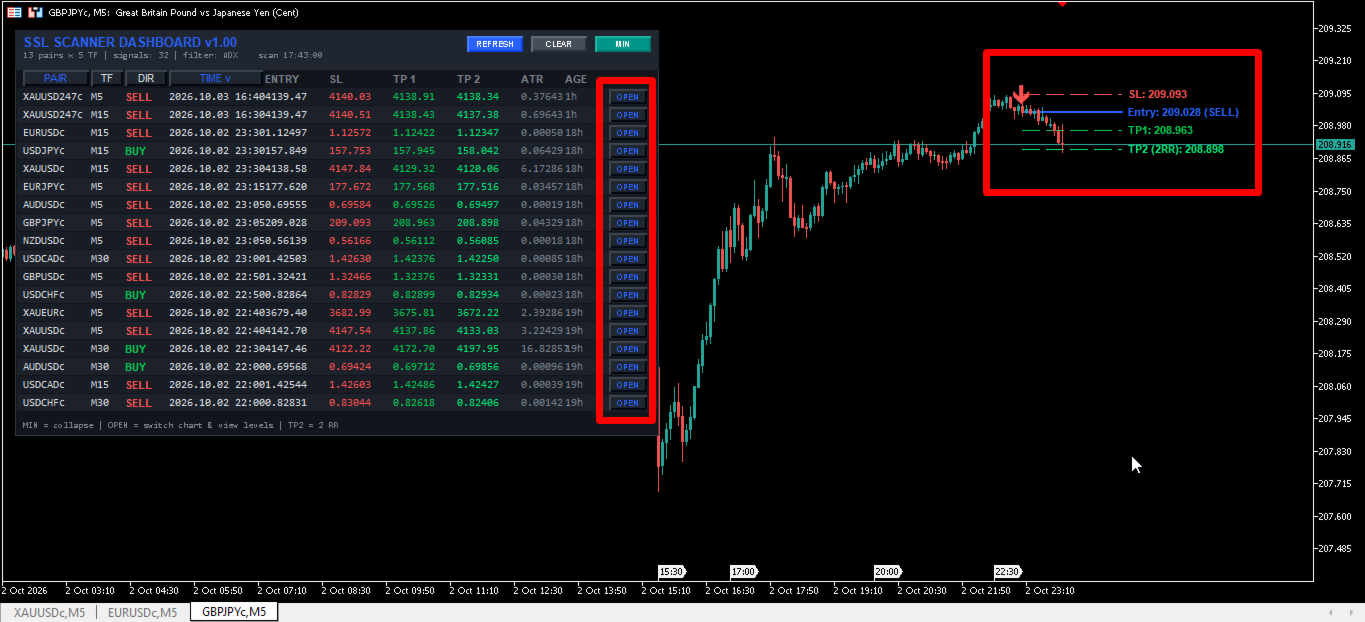
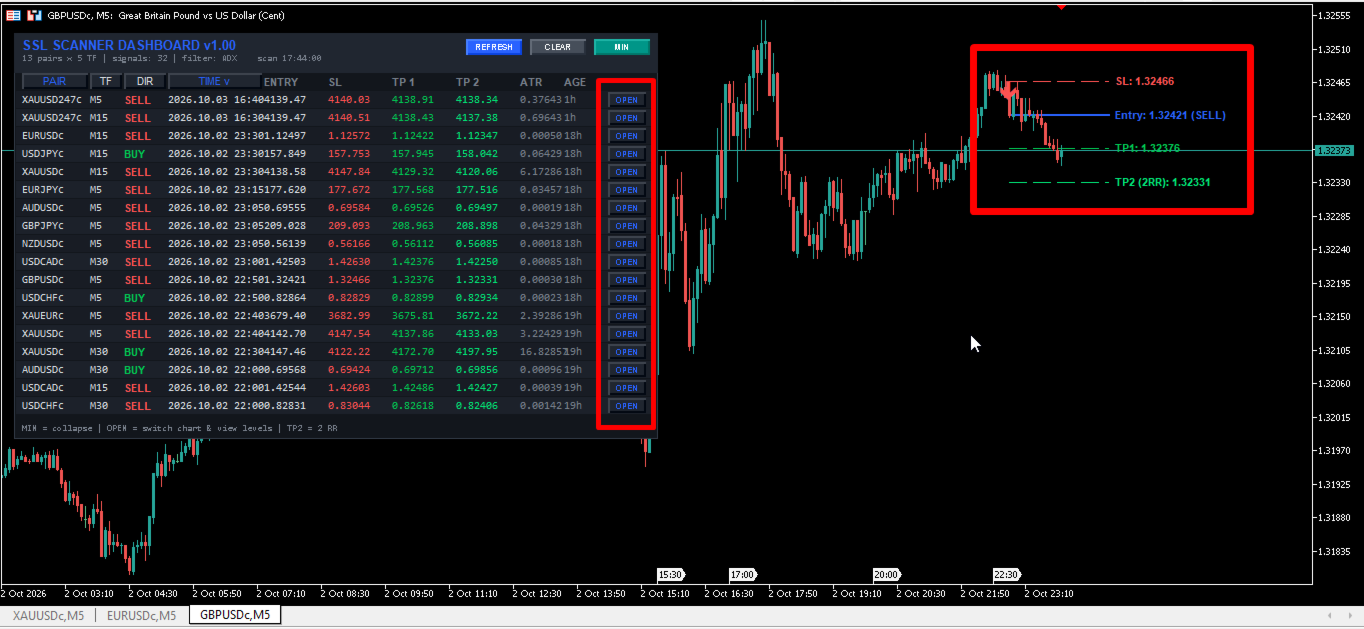
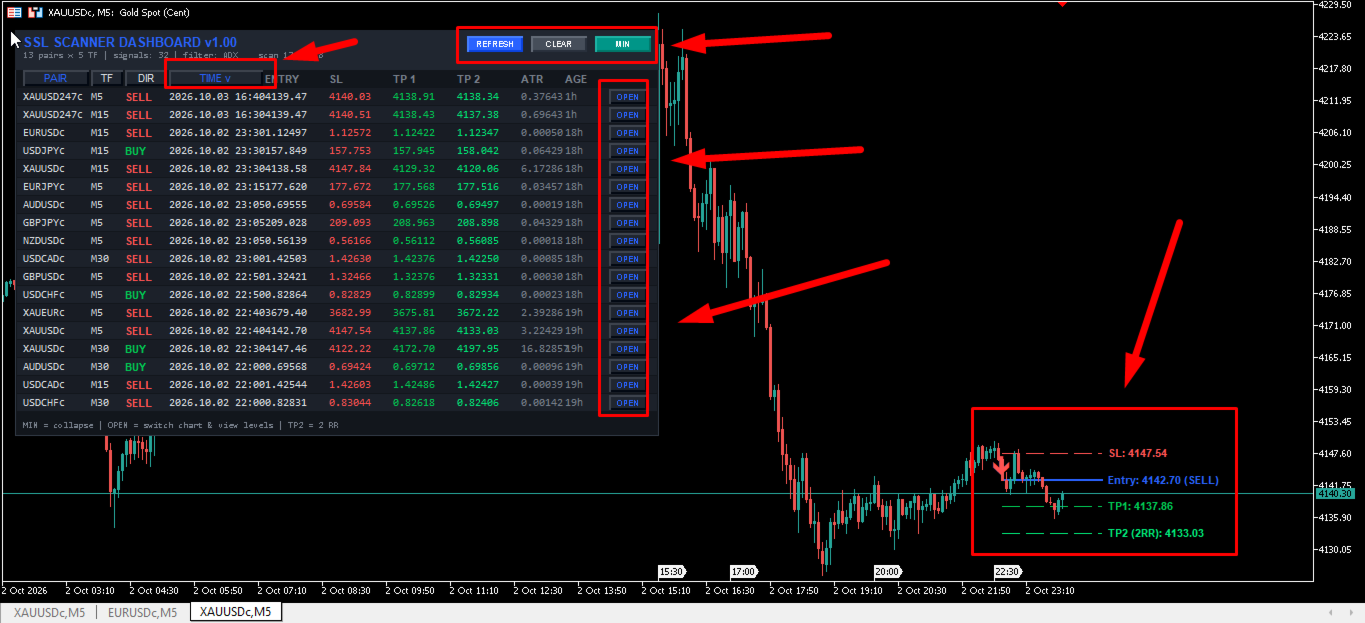
- Interactive User Interface: Features a fully clickable, drag-and-drop dashboard panel. Clicking the 'OPEN' button instantly switches the active chart to the specific symbol and timeframe of the valid signal.
- Visual Chart Projections: Optionally draws the exact Entry, Stop Loss, and Take Profit projection lines directly onto the chart for visual confirmation.
- Comprehensive Alert Protocol: Delivers real-time notifications via terminal pop-ups, audible sound files, mobile push notifications, and SMTP email delivery.
Operation & Setup Recommendations
- Supported Instruments: Applicable to all major, minor, and exotic currency pairs, as well as commodities and indices with sufficient liquidity.
- Recommended Timeframes: H1, H4, and D1 are recommended for broader trend stability, though the scanner supports all standard MT5 timeframes including M5 and M15 for intraday analysis.
- Account Requirements: Compatible with both Hedging and Netting account structures. A low latency VPS is recommended if utilizing the push notification features extensively across multiple timeframes.
- CPU & Memory Optimization: As a multi-currency scanner, performance depends on terminal limitations. Adjust the InpMaxSymbols and InpBarsCopy parameters to lower values if operating on hardware with limited processing power.
Detailed Filter Mechanics
1. RSI Cross Filter: Validates momentum by requiring the RSI to have recently crossed up from the Oversold level for long signals, or crossed down from the Overbought level for short signals.
2. ADX Filter: Confirms overall trend strength by requiring the main Average Directional Movement Index line to remain strictly above a specified threshold value.
3. Single MA Filter: Ensures price trades consistently above (for longs) or below (for shorts) a specified main Simple or Exponential Moving Average.
4. Ichimoku Senkou Span B Filter: Evaluates long-term equilibrium by validating if the closing price resides favorably above or below the 52-period Senkou Span B projection.
5. RSI 75 Filter: Measures macro directional momentum by requiring a longer-period RSI to maintain a level above 50 (bullish) or below 50 (bearish).
6. Double MA Filter: Requires a standard fast and slow Moving Average crossover alignment corresponding to the primary SSL signal direction.
7. Awesome Oscillator (AO) Filter: Assesses immediate momentum through a 34-period and 5-period SMA differential. Includes optional volume threshold requirements, consecutive histogram color tracking, and absolute zero-line confirmation.
8. Parabolic SAR Filter: Confirms the ongoing trend phase by ensuring price trades above or below the acceleration dots of the Stop and Reverse indicator.
9. Heiken Ashi Filter: Re-calculates standard OHLC rates into modified Heiken Ashi smoothed formulas, requiring the modified close to exceed the modified open for long validations.
10. CCI Trend Filter: Measures deviation from the statistical mean, requiring the Commodity Channel Index to remain above zero (long) or below zero (short).
11. CCI OB/OS Filter: A reversal-based filter requiring extreme CCI readings above a defined overbought ceiling or below an oversold floor.
12. RVI Trend Filter: Validates the Relative Vigor Index structural phase relative to the absolute zero line.
13. RVI Signal Filter: Requires the RVI main calculation line to successfully cross and remain above or below its integrated signal line.
14. MACD Signal Filter: Analyzes the Moving Average Convergence Divergence histogram, ensuring the main line correctly leads the 9-period SMA signal line.
15. MACD Zero Filter: A strict trend filter requiring the absolute MACD main value to reside positively or negatively across the baseline zero mark.
16. Support & Resistance Filter: Scans historical swing highs and lows over a specified period to establish dynamic zones, requiring the price to trigger near these calculated mathematical boundaries.
17. Fibonacci Filter: Integrates a standard ZigZag depth algorithm to find significant swing nodes, calculating the 38.2% and 61.8% retracement zones and confirming price interaction within this designated technical pocket.
Input Parameters List
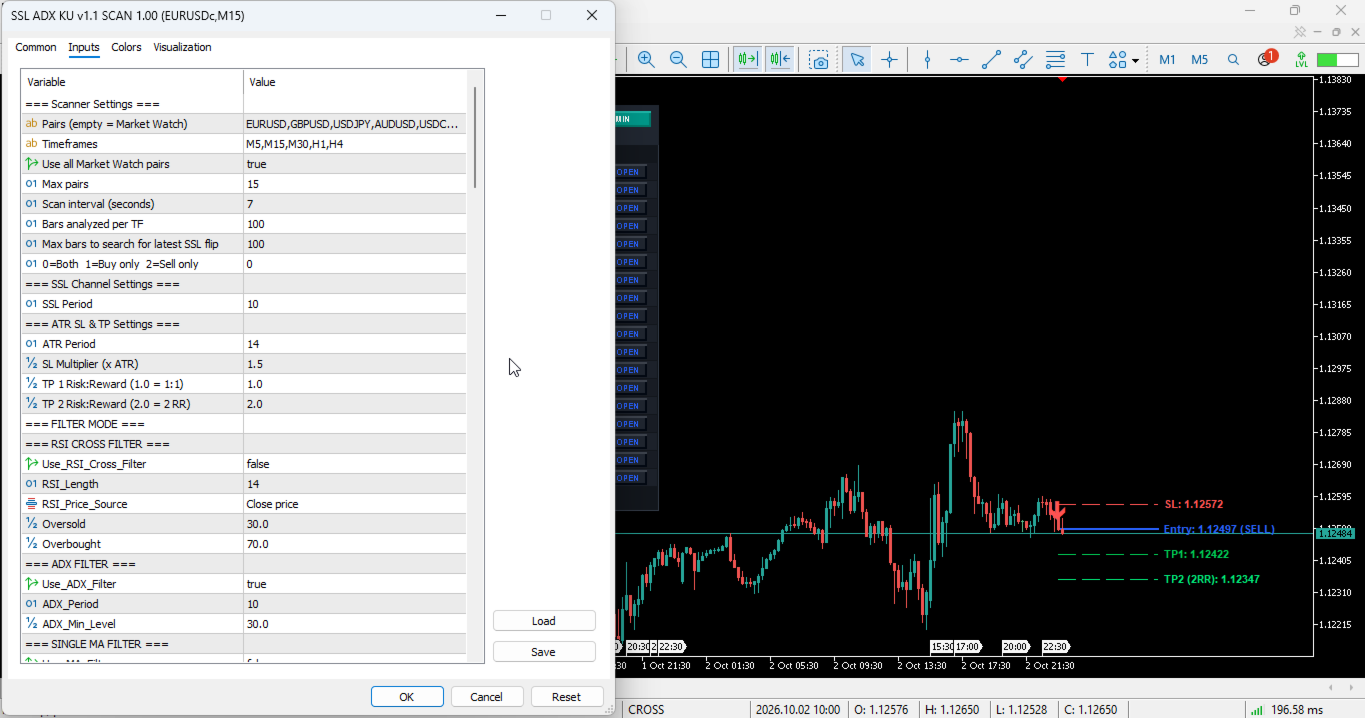
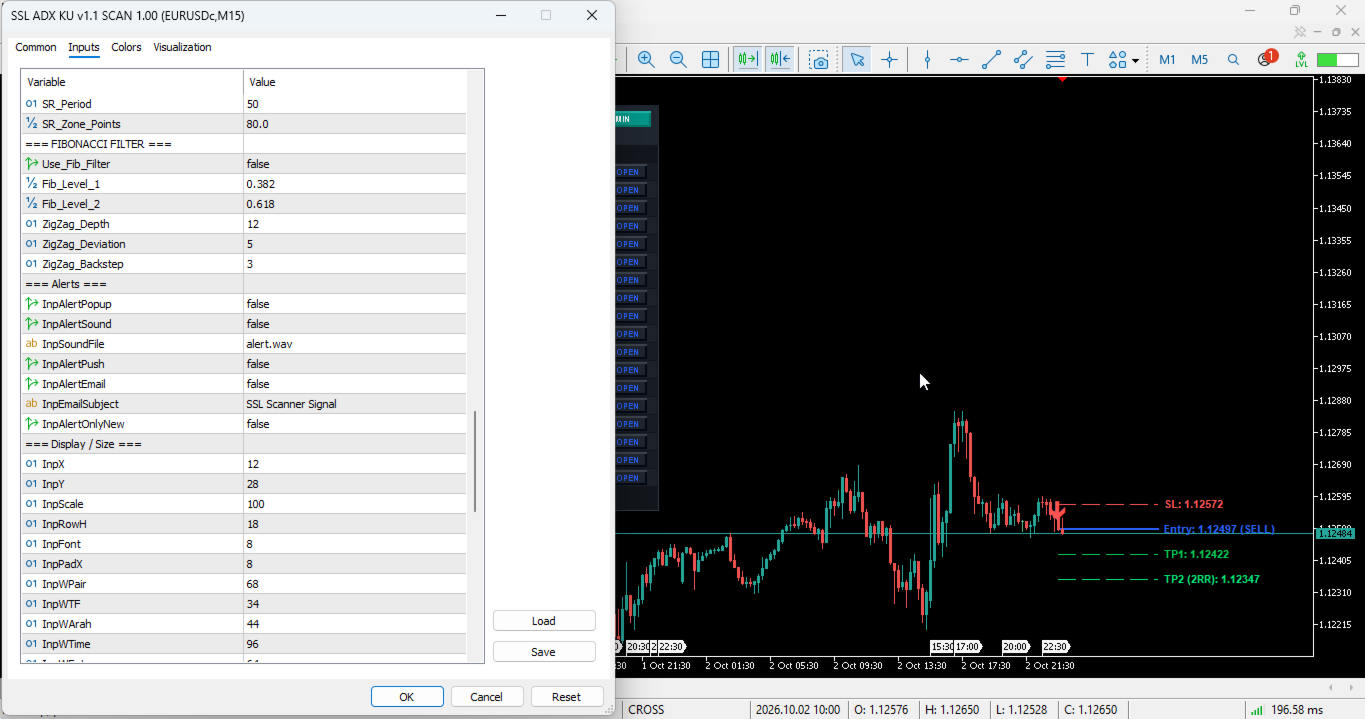
- InpSymbols (Default: EURUSD,GBPUSD...) -> A comma-separated list of symbols to scan. Leave blank to process the active Market Watch list.
- InpTimeframes (Default: M5,M15,M30,H1,H4) -> A comma-separated string of the required timeframes to process for each symbol.
- InpUseWatch (Default: true) -> Boolean toggle to force the scanner to utilize all symbols currently visible in the MT5 Market Watch window.
- InpMaxSymbols (Default: 15) -> Hard limit on the maximum number of symbols to scan concurrently to manage CPU overhead.
- InpScanSec (Default: 7) -> The interval frequency, in seconds, at which the internal timer re-evaluates all calculations.
- InpBarsCopy (Default: 100) -> The specific volume of historical bars loaded per symbol/timeframe for indicator calculations.
- InpLookback (Default: 100) -> The maximum amount of bars the algorithm will look backward to locate the most recent SSL crossover event.
- InpDirection (Default: 0) -> Directional restriction toggle (0 = Both, 1 = Buy signals only, 2 = Sell signals only).
- SSL_Period (Default: 10) -> The lookback period applied to the High and Low Simple Moving Averages forming the SSL Channel.
- InpATRPeriod (Default: 14) -> The calculation period for the Average True Range used in volatility tracking.
- InpATRMultSL (Default: 1.5) -> The multiplier applied to the raw ATR value to establish the physical Stop Loss distance.
- InpTP1_RR (Default: 1.0) -> The risk-to-reward ratio defining the distance of Take Profit 1 relative to the Stop Loss.
- InpTP2_RR (Default: 2.0) -> The risk-to-reward ratio defining the distance of Take Profit 2 relative to the Stop Loss.
- Use_RSI_Cross_Filter (Default: false) -> Activates the RSI zone crossing validation filter.
- RSI_Length (Default: 14) -> The calculation period for the primary RSI cross filter.
- RSI_Price_Source (Default: PRICE_CLOSE) -> The specific candlestick data point applied to the RSI formula.
- Oversold (Default: 30.0) -> The lower boundary threshold for bullish RSI cross validations.
- Overbought (Default: 70.0) -> The upper boundary threshold for bearish RSI cross validations.
- Use_ADX_Filter (Default: true) -> Activates the Average Directional Index trend strength filter.
- ADX_Period (Default: 10) -> The calculation period for the ADX filter.
- ADX_Min_Level (Default: 30.0) -> The minimum value the ADX line must achieve to permit signal generation.
- Use_MA_Filter (Default: false) -> Activates the single moving average price relation filter.
- MA_Period (Default: 50) -> The calculation length of the single MA filter.
- MA_Method (Default: MODE_SMA) -> The smoothing algorithm applied (SMA, EMA, SMMA, LWMA).
- MA_Applied (Default: PRICE_CLOSE) -> The price data parameter for MA calculation.
- MA_Shift (Default: 0) -> The forward or backward bar shift applied to the MA.
- Use_Ichimoku_Filter (Default: false) -> Activates the Senkou Span B equilibrium filter.
- Ichimoku_SenkouB (Default: 52) -> The period length defining the Ichimoku Senkou Span B line.
- Ichimoku_Kijun (Default: 26) -> The baseline period for internal Ichimoku calculations.
- Use_RSI75_Filter (Default: false) -> Activates the macro RSI baseline filter.
- RSI_Filter_Period (Default: 75) -> The extended period length for the macro RSI measurement.
- RSI_Filter_Price (Default: PRICE_CLOSE) -> The applied price configuration for the macro RSI.
- Use_DoubleMA_Filter (Default: false) -> Activates the dual moving average alignment filter.
- MA_A_Period (Default: 30) -> The calculation length for the fast moving average.
- MA_A_Method (Default: MODE_EMA) -> The smoothing type for the fast moving average.
- MA_A_Applied (Default: PRICE_CLOSE) -> The applied price for the fast moving average.
- MA_A_Shift (Default: 0) -> The visual shift parameter for the fast MA.
- MA_B_Period (Default: 140) -> The calculation length for the slow moving average.
- MA_B_Method (Default: MODE_EMA) -> The smoothing type for the slow moving average.
- MA_B_Applied (Default: PRICE_CLOSE) -> The applied price for the slow moving average.
- MA_B_Shift (Default: 0) -> The visual shift parameter for the slow MA.
- Use_AO_Filter (Default: false) -> Activates the primary Awesome Oscillator evaluation.
- Use_AO_Volume_Filter (Default: false) -> Enforces a minimum volume/size threshold on the AO histogram.
- AO_Buy_Min (Default: 4.0) -> The minimum positive AO threshold required for long trades.
- AO_Sell_Max (Default: -4.0) -> The maximum negative AO threshold required for short trades.
- Use_AO_Color_Filter (Default: false) -> Restricts signals strictly to rising (green) or falling (red) AO histogram bars.
- Use_AO_Zero_Filter (Default: false) -> Requires the AO to reside completely above zero for longs, and below zero for shorts.
- Use_SAR_Filter (Default: false) -> Activates the Parabolic SAR trend filter.
- SAR_Step (Default: 0.02) -> The acceleration step increment for the SAR formula.
- SAR_Maximum (Default: 0.2) -> The absolute maximum acceleration ceiling for the SAR tracking.
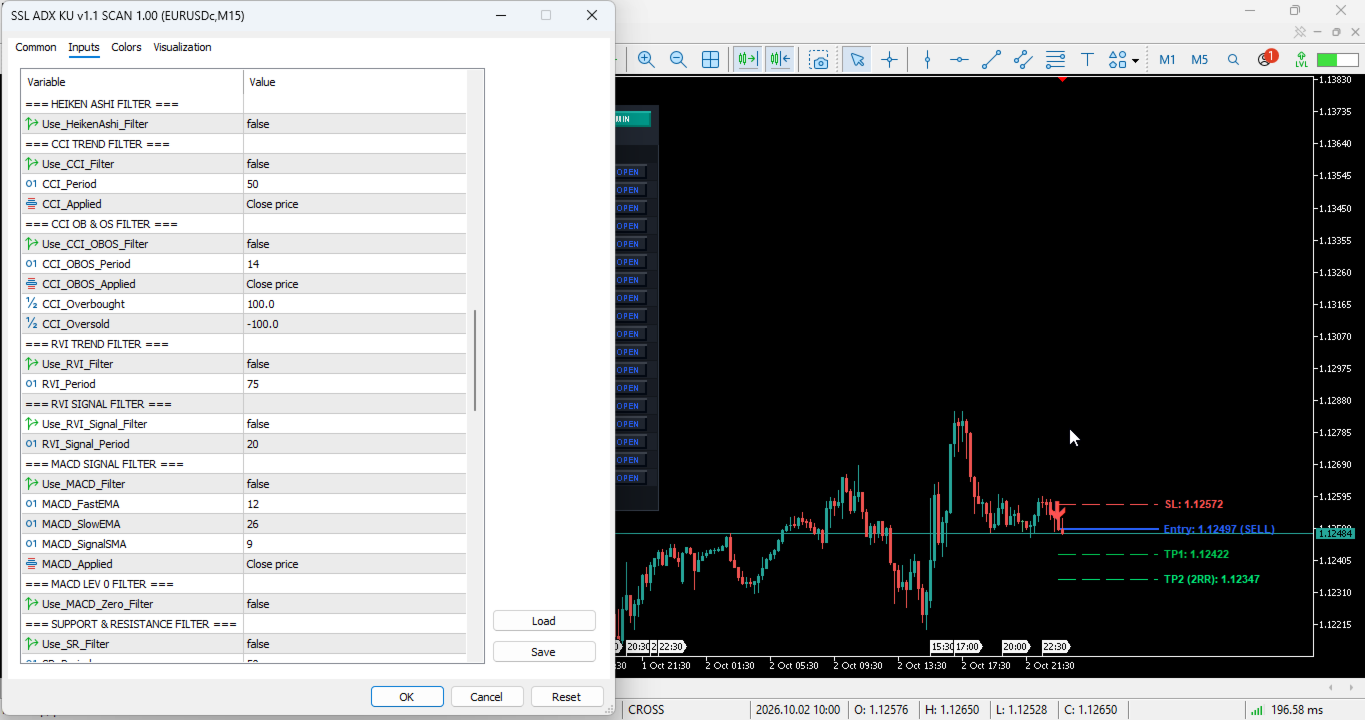
- Use_HeikenAshi_Filter (Default: false) -> Activates internal OHLC conversion to Heiken Ashi directionality.
- Use_CCI_Filter (Default: false) -> Activates the standard Commodity Channel Index trend filter.
- CCI_Period (Default: 50) -> The calculation period for the baseline CCI filter.
- CCI_Applied (Default: PRICE_CLOSE) -> The price array applied to the CCI calculation.
- Use_CCI_OBOS_Filter (Default: false) -> Activates the extreme overbought/oversold CCI variance filter.
- CCI_OBOS_Period (Default: 14) -> The calculation period for the extreme CCI filter.
- CCI_OBOS_Applied (Default: PRICE_CLOSE) -> The price data targeted for the extreme CCI evaluation.
- CCI_Overbought (Default: 100.0) -> The numerical ceiling for extreme CCI short validations.
- CCI_Oversold (Default: -100.0) -> The numerical floor for extreme CCI long validations.
- Use_RVI_Filter (Default: false) -> Activates the Relative Vigor Index absolute phase filter.
- RVI_Period (Default: 75) -> The period applied to the RVI phase calculation.
- Use_RVI_Signal_Filter (Default: false) -> Activates the RVI crossover mechanics.
- RVI_Signal_Period (Default: 20) -> The calculation period for the RVI and its integrated signal line.
- Use_MACD_Filter (Default: false) -> Activates the MACD histogram confirmation filter.
- MACD_FastEMA (Default: 12) -> The fast Exponential Moving Average for the MACD formula.
- MACD_SlowEMA (Default: 26) -> The slow Exponential Moving Average for the MACD formula.
- MACD_SignalSMA (Default: 9) -> The signal line Simple Moving Average for the MACD.
- MACD_Applied (Default: PRICE_CLOSE) -> The price origin for MACD baseline data.
- Use_MACD_Zero_Filter (Default: false) -> Restricts valid MACD conditions strictly relative to the zero level.
- Use_SR_Filter (Default: false) -> Activates dynamic Support and Resistance zone mapping.
- SR_Period (Default: 50) -> The historical bar lookback to locate extreme highs and lows for zone creation.
- SR_Zone_Points (Default: 80) -> The mathematical buffer size in points to create the interactable SR zone.
- Use_Fib_Filter (Default: false) -> Activates the internal ZigZag Fibonacci retracement confirmation.
- Fib_Level_1 (Default: 0.382) -> The primary internal Fibonacci retracement boundary limit.
- Fib_Level_2 (Default: 0.618) -> The secondary internal Fibonacci retracement boundary limit.
- ZigZag_Depth (Default: 12) -> The structural depth parameter for finding ZigZag extreme swings.
- ZigZag_Deviation (Default: 5) -> The point deviation filter for the internal ZigZag map.
- ZigZag_Backstep (Default: 3) -> The bar step parameter to secure ZigZag structural nodes.
- InpAlertPopup (Default: false) -> Enables standard MT5 window popup dialogue alerts upon signal generation.
- InpAlertSound (Default: false) -> Enables terminal audio file playback upon signal generation.
- InpSoundFile (Default: alert.wav) -> The exact filename of the audio sound to be played.
- InpAlertPush (Default: false) -> Transmits a direct push notification to the MetaQuotes mobile application.
- InpAlertEmail (Default: false) -> Transmits a formatted SMTP email containing signal data to the configured address.
- InpEmailSubject (Default: SSL Scanner Signal) -> The customized subject header line for email notifications.
- InpAlertOnlyNew (Default: false) -> Restricts the alert engine to exclusively broadcast the very first instance of a new signal.
- InpX (Default: 12) -> The initial horizontal X-axis anchor coordinate for rendering the dashboard panel.
- InpY (Default: 28) -> The initial vertical Y-axis anchor coordinate for rendering the dashboard panel.
- InpScale (Default: 100) -> The global DPI scaling percentage for expanding or shrinking the user interface.
- InpRowH (Default: 18) -> The precise vertical pixel height allocated to each individual table row.
- InpFont (Default: 8) -> The global font size applied to the text within the data tables.
- InpPadX (Default: 8) -> The horizontal padding distance mapped inside the dashboard bounding box.
- InpWPair (Default: 68) -> Pixel width constraint for the 'Symbol/Pair' data column.
- InpWTF (Default: 34) -> Pixel width constraint for the 'Timeframe' data column.
- InpWArah (Default: 44) -> Pixel width constraint for the 'Direction' data column.
- InpWTime (Default: 96) -> Pixel width constraint for the 'Timestamp' data column.
- InpWEntry (Default: 64) -> Pixel width constraint for the 'Entry Price' data column.
- InpWSL (Default: 64) -> Pixel width constraint for the 'Stop Loss' data column.
- InpWTP1 (Default: 64) -> Pixel width constraint for the 'Take Profit 1' data column.
- InpWTP2 (Default: 64) -> Pixel width constraint for the 'Take Profit 2' data column.
- InpWATR (Default: 44) -> Pixel width constraint for the 'ATR Value' data column.
- InpWUmur (Default: 42) -> Pixel width constraint for the 'Signal Age' data column.
- InpWOpen (Default: 44) -> Pixel width constraint for the interactive 'OPEN Chart' button column.
- InpShowEmpty (Default: false) -> Forces the dashboard to render blank table rows when no signals are currently valid.
- InpMaxRows (Default: 18) -> The absolute maximum amount of signal rows permitted to display concurrently.
- InpSortBy (Default: SORT_TIME) -> Establishes the default sorting hierarchy behavior (Time, Pair, Timeframe, or Direction).
- InpSortNewest (Default: true) -> Dictates whether the sorting array displays the most recent data at the top.
- InpDrawOnChart (Default: true) -> Toggles the automatic drafting of graphical elements on the current chart space.
- InpShowArrow (Default: true) -> Renders directional wingding arrows exactly at the entry bar timestamp.
- InpShowLevels (Default: true) -> Renders horizontal threshold lines detailing SL and TP exact parameters.
- InpExtendBars (Default: 25) -> The numerical count of bars into the future the projection lines will be drawn.
- InpArrowCodeBuy (Default: 233) -> The Wingdings font code assigned to represent bullish signal markers.
- InpArrowCodeSell (Default: 234) -> The Wingdings font code assigned to represent bearish signal markers.
- InpArrowSize (Default: 2) -> The visual thickness footprint of the rendered arrows on the chart.
- InpArrowDistance (Default: 15) -> The pixel gap distance separating the arrow object from the candlestick extremes.
- InpColBg (Default: C'18,22,28') -> Hexadecimal RGB code establishing the dashboard background color profile.
- InpColHead (Default: C'32,38,48') -> Hexadecimal RGB code establishing the dashboard header section color.
- InpColRow (Default: C'24,28,36') -> Hexadecimal RGB code establishing the primary alternating row color.
- InpColRow2 (Default: C'28,33,42') -> Hexadecimal RGB code establishing the secondary alternating row color.
- InpColText (Default: C'220,225,230') -> Hexadecimal RGB code establishing the standard text typography color.
- InpColBull (Default: C'0,200,83') -> Hexadecimal RGB code assigned strictly to bullish directional indicators.
- InpColBear (Default: C'255,82,82') -> Hexadecimal RGB code assigned strictly to bearish directional indicators.
- InpColMute (Default: C'120,128,140') -> Hexadecimal RGB code representing deactivated or neutral interface elements.
- InpColAccent (Default: C'41,98,255') -> Hexadecimal RGB code utilized for interactive buttons and highlighted headers.
- InpColArrowBuy (Default: C'0,230,118') -> The dedicated chart color assigned to long condition arrows.
- InpColArrowSell (Default: C'255,82,82') -> The dedicated chart color assigned to short condition arrows.
- InpColEntry (Default: C'41,98,255') -> The chart color of the horizontal entry price projection line.
- InpColSL (Default: C'255,82,82') -> The chart color of the horizontal Stop Loss projection line.
- InpColTP1 (Default: C'0,200,83') -> The chart color of the horizontal Take Profit 1 projection line.
- InpColTP2 (Default: C'0,230,118') -> The chart color of the horizontal Take Profit 2 projection line.
Risk Disclaimer:
Trading foreign exchange, commodities, and other financial instruments involves significant risk and may not be suitable for all investors. Past performance does not guarantee future results. This software is an analytical and operational tool designed to assist traders in technical analysis; it does not guarantee financial profit. Always thoroughly test the product on a demo account to understand its operational behavior before considering deployment in live trading environments.