MT5 To Interactivebrokers Copier

5

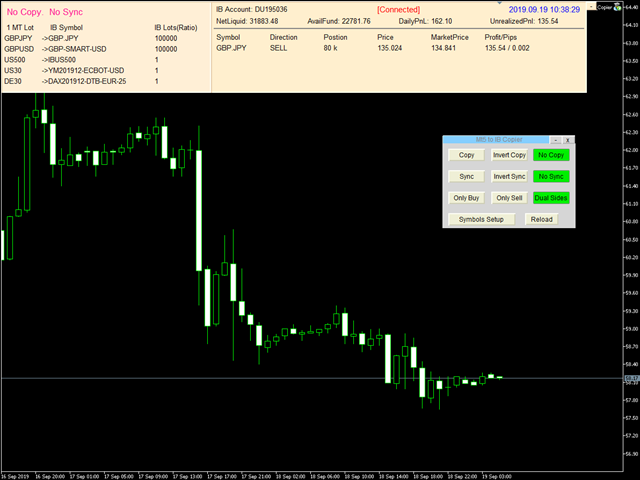
Mt5 To InterativeBrokers Copier allows you to copy deals from MT5 account to Interactive Brokers. With this, you can run your EA strategy on a MT5 Demo/Real Account, then copy all the deals to Interactive Brokers account real time.

Features:

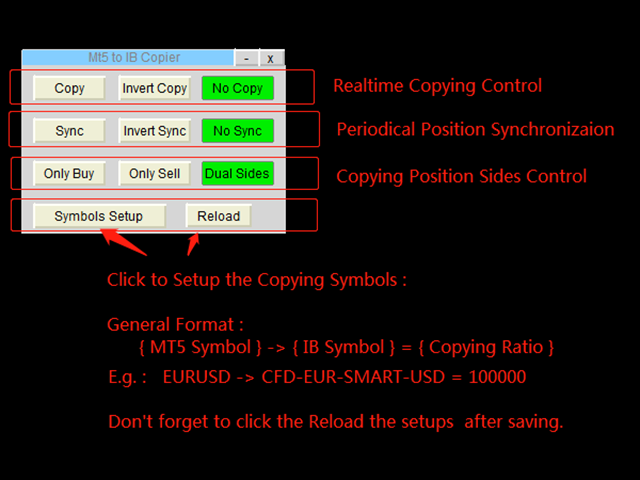
1. Copy or Invert-Copy deals Realtime from MT5 to IB Account.
2. Synchronizing positions of both accounts periodicaly, in case any missing copying.
3. You can choose only Buy position or Sell position.

Symbols Setup:

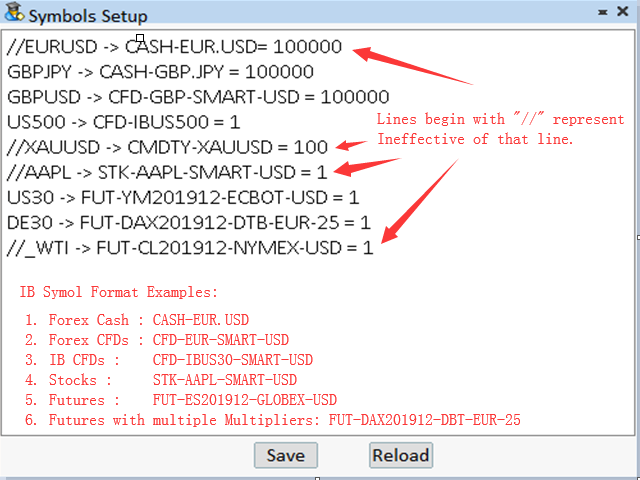
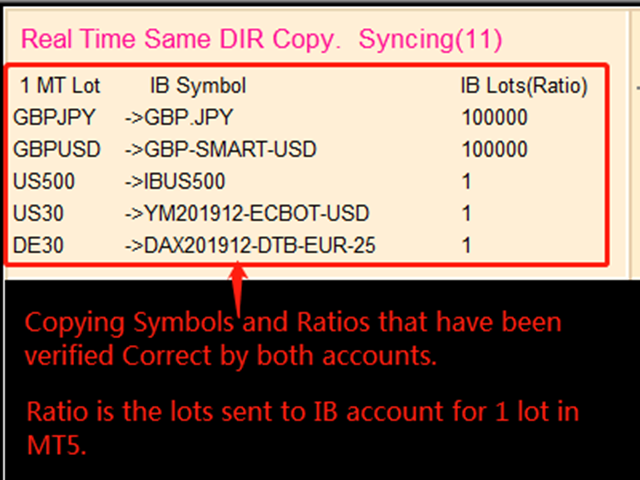
General Format:  {MT Symbol} -> {IB Symbol} = {Copying Ratio}

while IB Symbols should be formated as below: 

  1. Spot Forex: CASH - [Local Symbol], e.g. CASH - EUR.USD
  2. CFDs:          CFD - [Symbol] - [Exchange] - [Currency],  e.g.  CFD-GBP-SMART-USD,   CFD-IBUS30-SMART-USD
  3. Stocks:        STK - [Symbol] - [Exchange] - [Currency],  e.g.  STK-AAPL-SMART-USD
  4. Futures:      FUT - [Symbol][YearMonth] - [Exchange] - [Currency] - [Multiplier], while [Multiplier] is only used for symbols that have multiple Contract Multiplier.
    e.g.  FUT-MES201912-CME-USD,   FUT-DAX201912-EUREX-EUR-25

Besides, Copying Ratio is the lots sent to IB account for 1 lot of MT5 account
In the symbols setup editor, lines begin with "//" represent ineffective of that line.

Configuration

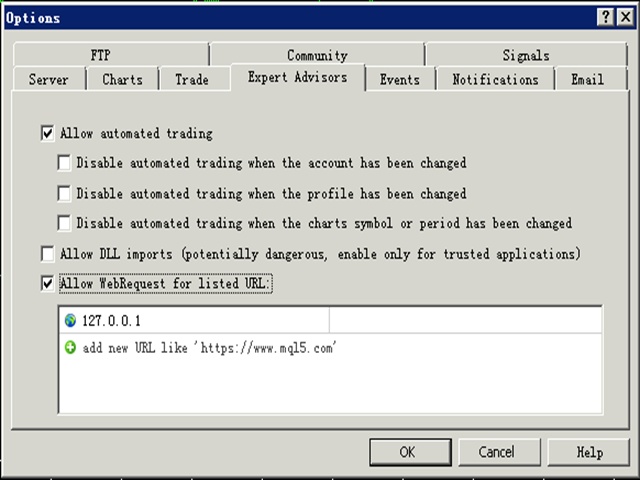
1. MT5 : Put the TWS Socket IP Address(Defaut: 127.0.0.1) to the allowed URLs in "Tools->Options->Expert Advisors". 

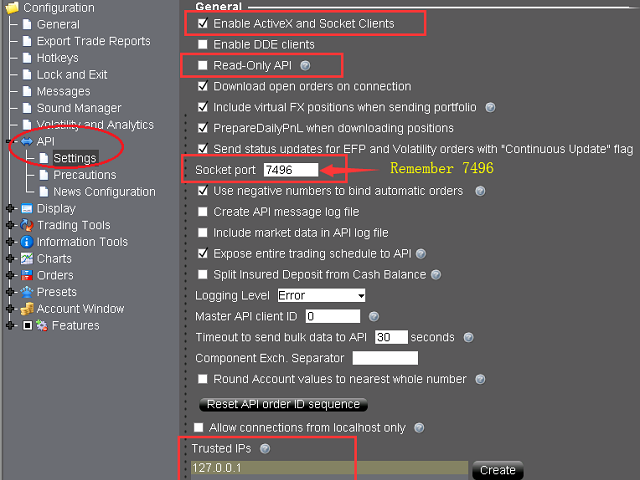
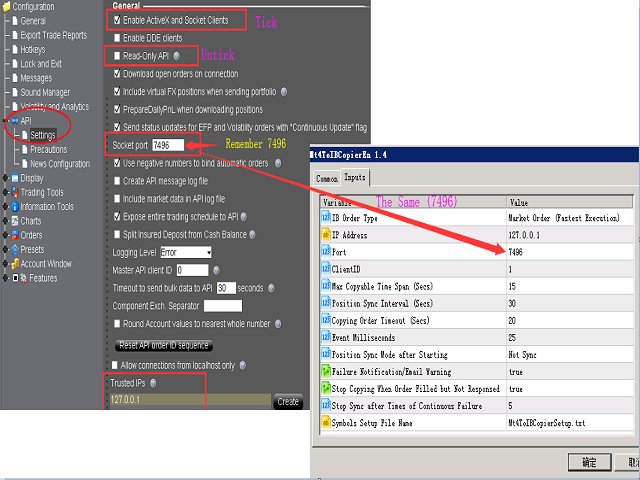
2. IB TWS : API should be enable in TWS. Open “Global Configuration” in file menu, find “API” -> “Setting”, Tick “Enable ActiveX and Socket Clients” and untick “Read-Only API”. Optionally, it is sugguested you add “127.0.0.1″  to “Trusted IPs” box, tha can avoid manually confirmation very time when connected via API.

Parameters

Parameter Explaination
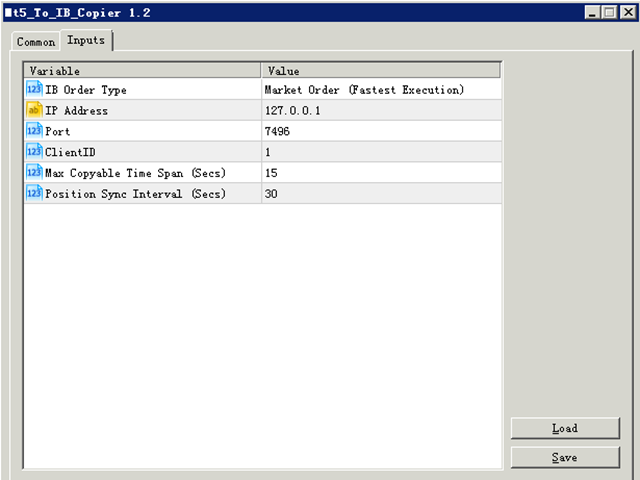
IB Order Type Order type of the order placed to Interacive Brokers(IB).
IP Address TWS  API services started IP address. “127.0.0.1″ should be filled if TWS run in local computer.
Port Socket port of TWS API. You can find in TWS at “Global Configuration” -> “API” -> “Setting”.
ClientID Client connection unique id. It can be any Integer.
Max Copyable Time Span(Secs) If trade copying failed, program will repeatedly try to copy until this time span slip. Default: 15 seconds
Position Sync Interval (Secs) Periodical time for both account to synchronize. Default: 30 seconds.
Copying Order Timeout (Secs) Time out seconds for sending orders to IB account
Event Milliseconds Periodical timer to process the program. It is used to set parameter of MT4 functoin "EventSetMillisecondTimer".
Please refer to https://www.mql5.com/en/docs/eventfunctions/eventsetmillisecondtimer
Position Sync Mode after Starting Set the sync feature whether to use last setting or not open when the bridge tool start.
Failure Notification/Email Warning Set to send specific Email Address or MT5 Notification when copying failure occurred.
Users can use setup the email address at the menu "Tools -> Option ->Email", and notifications at "Tools -> Options -> Notification".
Besides, users can set the trades SMS Alerts through Account management(from IBKR website).
Stop Copying When Order Filled but Not Responsed When an order filled but not responsed to client normally, it is probably abnormal for some connections.
Copying can be set stop in order to avoid repeated copying. Users should restart the bridge and TWS/IBGateway if this occurred. 

Besides, a global variable of MT4 named "IBTwsFilledAbnormal" will be set to "1" if this error occurrs.
Stop Sync after Times of Continuous Failure When sync sent, IB position should be changed afterwards. If continous sync-failure (may caused by internet problem, market closed, lack of liquidity, ect..) more than 5 (by defaut) times, Sync will can set to stop.
Symbols Setup File Name Users can set the bridge with different symbol mapping file if needed, such as copying to different to IB account simultanously.
Font Size  Change the font size if the controls in the chart screen can not be shown properly.


More information please download the MT5 To Interactivebrokers Copier User Manual.

评分 2
hunterdawe
20
hunterdawe 2022.09.10 10:24 
 

Very good utility. Ver. 1.61 is very useful. I also recommend this utility to other traders. Thank you for this utility.

推荐产品
Comprehensive on chart trade panel with the unique ability to be controllable from mobile as well. Plus has a library of downloadable configuration, e.g. exit rules, extra panel buttons, pending order setup and more. Please see our product video. Works with all symbols not just currency pairs. Features On chart panel plus controllable from free app for Windows, iPhone and Android Built-in script engine with library of downloadable configuration, e.g. add 'Close All Trades in Profit' button, exit

该智能交易顾问(EA)会在 MetaTrader 5 中监控所有交易品种上的所有持仓。一旦在任意持仓上 手动设置或调整 了止损(SL)或止盈(TP),EA 会将该值 自动应用于其他所有未平仓头寸 ,无论是买单还是卖单、哪个交易品种。这确保整个账户的 SL 和 TP 水平始终保持同步。 非常适合通过平板或智能手机进行移动交易!    ......................................................................................................................................................
Time saving and fast execution Whether you’re traveling or sleeping, always know that Telegram To MT5 performs the trades for you. In other words, Our   Telegram MT5 Signal Trader  will analyze the trading signals you receive on your selected Telegram channels and execute them to your Telegram to MT5 account. Reduce The Risk Telegram To Mt5   defines the whole experience of copying signals from   Telegram signal copier to MT5 platforms. Users not only can follow all instructions from the signal
️ EquityShield is your automated risk management guardian for MetaTrader 5. If you've ever exceeded your daily loss limit, struggled to enforce your own trading rules during volatile markets, or wanted to automatically lock in profits when you hit your targets, EquityShield is built for you. This is not a trading strategy - it's a safety system that watches your account 24/7, automatically closes positions when your risk limits are breached, and helps you maintain consistent trading discipline
Overview Breakout Meter is a price action tool that identifies key breakout zones based on recent daily price activity. It highlights areas where momentum is likely to trigger, helping traders anticipate breakouts or reversals with minimal configuration. How It Works The EA analyzes a user-defined number of recent daily candles and marks high and low zones where price has shown strong reactions. It automatically updates levels with new data and removes outdated zones to keep charts clear. Users
Telegram ChartSnap MT5 is an utility tool to bridge your MetaTrader 5 activities to your Telegram chat/group/channel. It will screen shot your MetaTrader 5 chart and send it to your dedicated Telegram chat/group/channel through a Telegram bot. The whole process will keep repeating based on a time cycle that predetermined by the user. It is a convenient tool for those who like to get access to their favorite system/dashboard that only available at MetaTrader Desktop. Beside that, trader can easi
TradingX Hotkeys
Johannes Stephanus Lombard
Inputs Available Lotsizes Partial Close % You can change lotsizes as you require On an open chart click once to select chart to be able to use hotkeys on specific chart. All Pairs can be used with this expert We created this expert to be able to still trade C300 with a 0.06 Lotsize If you enter a 0.6 lot and close 0.90% you can trade with 0.06 Lot Keys to be used: B -Buy S -Sell C -Close Profitable D -Breakeven (Note if stoploss is set it won't break even) P -Partial close X -Close all
这个QuickCloseMT5帮助您一键即可立即关闭所有订单,其工作非常快。您可以选择您想要的符号或关闭所有符号,因此它将有助于您在交易中更快地管理交易。该EA可以通过选定的符号或总数快速关闭所有买入和卖出订单和删除全部挂单。此SymbolButton专为关闭订单而设计。有手动和自动关闭功能。自动关闭功能将根据参数关闭订单。 SymbolButton有两种类型的自动关闭参数:利润:当前货币利润或全部货币利润等于或高于预设值时,订单将被关闭. 输入参数 ALLPROFIT:30.00 全部货币利润等于或高于预设利润率时,订单将被关闭。 PROFIT:25.00 一个货币对利润等于或高于预设利润率时,订单将被关闭。 关于作者 作者:dayingcao,我是一个具有丰富经验的软件工程师.
One Click Trader  is a tool designed for MetaTrader 4 platform, which enables you to take your trading to the next level. It enables you to open, manage and close your trades in simple an efficient way by just one click of your mouse button. "-"   ,  "+"  change OCT window size  Up arrow minimizes the OCT panel Down arrow maximizes the OCT panel Right arrow displays the next panel with additional features Left arrow hides the panel with additional features Red  SELL  button enables you to open s
Flow – Hotkey Tool for Discretionary Traders Take full control of MT5 with your keyboard and mouse. Flow is a powerful hotkey-based assistant designed specifically for discretionary traders who want to place orders, draw tools, and operate charts with speed and precision. No more right-click menus or wasting time. Just trade. Key Features Order Execution Place pending Buy/Sell orders (limit or stop) instantly with just a mouse click. Stop Loss and Take Profit lines are automatically attac
Общие сведения Данная торговая панель предназначена для быстрой и удобной торговли в один клик. Создавался продукт для частичной автоматизации своей личной ручной торговли  https://www.mql5.com/ru/signals/1040299?source=Site+Profile+Seller Советник имеет ряд возможностей, а именно: Открытие BUY или SELL ордеров. SL выставляется ниже (выше)  минимальной (максимальной) цены, задаваемых в параметрах количества свечей. Размер TP рассчитывается в соотношении от размера SL (по умолчанию 0.618). Выстав
多品种一键开仓与平仓的操盘面板 点击   开仓(OPEN)   按钮,则为选择的品种开仓。 点击   平仓(CLOSE)   按钮,则为选择的品种平仓。 开仓手数就是用户输入的数,正数开多单,负数开空单。 点击 平仓(CLOSE)   按钮,平掉的是整个单子,而不是部分平仓,所以平仓与后面输入的手数无关。 把参数Magic设置为0,则可以用本EA来帮助你同时平掉多个手工单。 把参数Magic设置为其他EA的magic,则可用用本EA来同时平掉其他EA的多个单子。 一键开三角对冲单。 交易品种可以定制: 从市场窗口(Market Watch),或者用户输入. 参数设置: Magic - 本EA的Magic Number MaxLots - 最大手数设置参数,如果用户在操盘面板上输入的手数大于这个设定参数,则以这个设置参数为开仓手数。 StopLoss - 止损点数,以Point计算(即报价最后一位)。 TakePofit - 止盈点数,以Point计算(即报价最后一位)。 File Name-  保存图形界面GUI的文件名,如果为空,EA将自动使用文件名,类似于 "MTP-账号.品
The Comeback Kid Manger is half EA and half trade manager. It's capable of keeping the trader profitable on complete auto-pilot. You can also use the onscreen buttons to intervene with the EA to achieve a creative manual/algo collaboration. It's also capable of recovering losing trades by managing them into a small profit or break even. The user has a lot of control on how and when they would like to increase profit on good trades and recovery bad or losing trades.  Highlights  Includes one of
Visit our all-new   Stein Investments Welcome Page   to get the latest information, updates and trading strategies. Do you want to become a constantly profitable 5-star forex trader? Then  get our Stein Investments trading tools  and send us a screenshot to get your personal invitation to our exclusive trading chat with 500+ members. Crosshair is a fantastic tool that simplifies our chart analysis by bringing the price candles perfectly in line with the indicator values in the subwindows. Yo
Long Grid Remaining Candle Time
Carlos Pascual Perez Maturano
Long Grid Remaining Candle Time – Professional XAUUSD H1 EA FREE for LATAM!   Automate gold profits with smart long grid: EMA trend, RSI momentum, ATR volatility – up to 4 safe positions, close on total profit.   $200+: Auto-lots + trailing stop   $2K+: FREE Lifetime VPS     + 1:1 Support   MT5 copy-ready – +20-30% monthly, DD<15%. DM "GOLD" for FREE SET! Get in touch to learn more about the free download and free VPS.
Blue GAIA MT5
Duc Anh Le
5 (1)
| Seamless portfolio of trading systems in your palm - Powered by ONNX Neural network | Built by a grid trader >> for grid traders.  This is MT5 version, click  here  for  Blue GAIA MT4  (settings and logics are same in both versions)     Real monitoring signal  --> Cosmic 2 | GAIA Intro Blue GAIA EA   (' GAIA ') - is the latest edition of BlueAlgos family, uniting all the best algos and features under one-roof. Its is the true 4xMulti Systems: +------------------------------------------------
Hola Traders. By popular demand from my fellow traders, I am excited to announce the release of my newly developed tool for placing pending order grids. Many of you have already benefited from this tool, and several have requested a version for MT5. Now, it is available for everyone! This automatic grid trading placement tool is convenient, easy to use, and fast. It also includes quick action buttons for closing profits, losses, and pending orders. No matter how many pending orders you have, jus
Risk management settings Automatic lot size calculation based on risk Open Buy and Sell positions with one click based on settings Open positions graphically (Buy Limit – Buy Stop – Sell Limit – Sell Stop) Risk-free open positions Open new trades with TP and SL from previous open trades Close all open trades with one click Setting to close open positions based on Sell or Buy positions Save 50% and 80% of open trades' profit Find supply and demand zones and update them automatically in real-time
Wolseley Panel MT5 FREE
Walter Wolseley Pessoa Batista De Lima
WOLSELEY's Trading Panel - BASIC - - Feel free to contact me at instagram   @walter_robos  or whatsapp/telegram +5592981173937 View your history in a structured and detailed manner, with efficiency rate and profit rate separated by day, week, month and total, as well as asset details, server time and positions&orders in progress. This panel was created looking on HEDGE-type accounts, but it can be used on NETTING-type accounts without any problems. In the PREMIUM version of this Panel you have
The Expert Advisor will send notifications via Discord when orders are opened/modified/closed on your MetaTrader 5 account. - Send message and screenshot to Discord group/channel.  - Easy to customize message.  - Support custom message for all languages - Support full Emoji.  Parameters - Discord url Webhook - create webhook on your Discord channel. - Magic number filter - default all, or input magic number to notify with comma, like: 111,222,333. - Symbol filter - default all, or input symbol
关于本交易机器人 PowerTrend Institutional EA 是一款自动交易专家顾问,采用机构级逻辑构建,结合趋势分析、波动性识别、量能评估以及经典K线形态信号。它兼容 hedge 与 netting 类型账户,适用于所有交易品种(外汇、贵金属、指数等),并可动态适配每个品种的交易参数,有效避免因手数无效、止损错误或资金不足而导致的订单失败。 EA 内置验证机制,可在 MQL5 市场测试环境中执行最小交易,确保通过自动审核。 ️ 工作原理 使用 EMA 和 RSI 判定趋势方向 通过 ATR 和布林带宽度判断市场波动性 结合 K 线形态信号(吞没形态、锤形、射击之星)进行进场确认 当前成交量与历史平均成交量比对,识别机构成交波 根据账户余额与风险参数自动计算下单手数 检查所设止损是否满足交易品种的最小距离要求 自动管理移动止损与保本保护机制 若无有效信号,系统将触发安全下单逻辑以确保测试正常完成 产品优势 不受品种、账户类型或使用时长限制 支持 hedge 和 netting 模式 自动适配交易品种的最小手数与最小止损间距 不依赖 DLL 或外部文件,部署轻便
The Utilitarian Platform is designed to quickly open a position with established orders, as well as the ability to automatically hedge or shift an order to close a position when losses are stopped. Automatic Increase of a profit taking order when hedging a position. It is possible to enable the automatic increase of the corridor when hedging a position. There is a built-in panel for placing orders to open positions. The order size, step tracking are established in paras.
如果产品有任何问题或者您需要在此产品上添加功能,请联系我 Contact/message me if you encounter any issue using the product or need extra feature to add on the base version. There is a demo version of this panel Dashboard Trading Made Simple Demo in my product list, please try it out to get familiar with all functionalities free, LINK . This system basically utilizes TDI as the main indicator to generate trading signal mainly on H1 and H4 time-frame. The signal will be further filtered and trimmed. Stochastic; Heiken Ashi ca
Features 1️⃣ Flexible Grid Order Configuration Set price levels and spacing between orders. Customize order sizes and maximum number of positions for better risk control. 2️⃣ Hedge and Netting Modes Hedge Mode : Allows simultaneous long and short positions , ideal for advanced strategies. Netting Mode : Consolidates positions for easier balance management. 3️⃣ Supported Order Types Limit Orders : Buy and sell at predetermined prices. Market Orders : Instant execution. Integrated Take-Profit : Wi
With this script you can open or close multiple charts with just one click. Please follow the instructions below; Set your desired symbols in the market watch window. Open one chart. Attach the script to the chart In the input values just select the time frame of your chart. Set open chart value to true. Click ok. To close the charts follow step 3 and 7. In input values set open chart value to false and close chart value to true
Hello, Every one  This is "Close All Button" future 2 A script to manage order and close all market positions and/or pending orders. ----------------------------------------------------------------------------------- This is Close All  Market positions and/or pending orders button You can close all or manage orders in 1 second by one click  ------------------------------------------------------------------------------------ Download for Demo Account: Demo version:  Close 1s manage v1.7 DEMO F
Pro Scalping Tool
Mohammad Nazmul Hassan
### **ProScalpingToolEA.mq5 Analysis & Description** **Overview:**   The `ProScalpingToolEA.mq5` script is an Expert Advisor (EA) for MetaTrader 5, designed to assist with automated trading. It includes features for placing, managing, and monitoring trades. --- ### **Key Functionalities:** 1. **Trade Execution & Management:**    - Uses the `CTrade` class from `Trade.mqh` to manage trading operations.    - Allows placing buy and sell orders with a configurable lot size.    - Trades are iden
Telegram Notify MT5 Telegram Notify MT5 is an utility tool to bridge your MetaTrader 5 activities to your Telegram chat/channel. It is useful for monitoring your MetaTrader 5 account by sending a notification to your particular Telegram chat/channel when someone/EA is placing trades, modifying order's TP/SL, closing trades and etc. This EA does not place any trade for your account. This EA also could be a convenient tool for monitoring other's EA trading activities or a tool for publishing your
This utility shows various types of information on chart, controlled by many filters and option for each of them. If you want any custom feature or want to remove something from this product for your personal use. Please send me a personal message, I'll be happy to do so for you. Inputs and features explained: BG Color - Background color of the Dashboard Text Color - Color of text info on the Dashboard Border Color - Color of Border of the Dashboard Set Color on +/- Text - True/False option wh
Are you the type that likes to protect your trades by moving the stop loss to the entry point and also using trail stop? Cool! This EA will help you with that. What's more, it also partially closes the trade when the trail stop is activated. That's it! Beyond all this it shows the stop loss projection (which you can move)   and notify you when it is activated. EA can be used by configuring the default window or by using a custom window , which makes it easy to change settings. You can test
该产品的买家也购买
YuClusters
Yury Kulikov
4.93 (41)
Attention: You can view the program operation in the free version  YuClusters DEMO .  YuClusters is a professional market analysis system. The trader has unique opportunities to analyze the flow of orders, trade volumes, price movements using various charts, profiles, indicators, and graphical objects. YuClusters operates on data based on Time&Sales or ticks information, depending on what is available in the quotes of a financial instrument. YuClusters allows you to build graphs by combining da
Mentfx Mmanage mt5
Anton Jere Calmes
4.25 (8)
The added video will showcase all functionality, effectiveness, and uses of the trade manager. Drag and Drop Trade Manager. Draw your entry and have the tool calculate the rest. Advanced targeting and close portions of a trade directly available in tool (manage trades while you sleep). Market order or limit order on either side with factored spread. Just draw the entry, the tool does the rest. Hotkey setup to make it simple. Draw where you want to enter, and the stop loss, the tool calculates al
The  Easy Strategy Builder (ESB)  is a " Do It Yourself " solution that allows you to create a wide range of the automated trading strategies without any line of codes. This is the world’s easiest method to automate your strategies that can be used in STP, ECN and FIFO brokers. No drag and drop is needed. Just by set conditions of your trading strategy and change settings on desired values and let it work in your account. ESB has hundreds of modules to define unlimited possibilities of strategi
HINN Lazy Trader
ALGOFLOW OÜ
5 (2)
Lazy Trader is your personal risk management assistant that independently finds the best market entries, manages positions, and helps you extract maximum profit from every trading idea! It monitors charts from M1 to W1 , finds optimal entry points based on your parameters, and manages trades without your involvement: - Got an idea on the daily chart? No need to wait for lower timeframes to form a signal — Lazy Trader will check everything and open all necessary positions while you live your lif
Crystal Trade Manager – Advanced MT5 Risk and Trade Control Utility Overview Crystal Trade Manager (CTM) is a professional MetaTrader 5 utility designed for risk management, trade automation, and instant execution control. It provides traders with an integrated system for protecting equity, managing daily drawdowns, controlling lot sizes, and applying automation features such as automatic SL/TP, break-even, and trailing stop. The tool is suitable for manual traders, prop-firm challenge particip
Best Renko Chart Generator
Mohammad Taher Halimi Tabrizi
5 (1)
This is the Best Renko chart generator ever in the market you can set the box sizes based on ATR or Fixed Size: 1. Fixed Box Size 2. Current ATR Size 3. ATR size of the Chart Start Time. also you can set the Renko chart cut of date and time to start as reference of creating renko charts. you need to attach to a symbol chart that want the renko chart of it, then immediately a new chart will be opened which is based on renko, you can use this generated chart and attach your EA to trade on or you e
I present to your attention a powerful utility for predicting the future movement of an asset based on W.D. Ganna’s law of vibration. This utility analyzes the selected market model and provides codes for future possible market movement patterns. If you enter the selected code into the appropriate box, you will receive a forecast of the potential market movement. The utility has the ability to display several potential forecast models. The forecast is not yet tied to time and price and gives th
Trading Chaos Expert
Gennadiy Stanilevych
5 (11)
世界上没有本软件的同等产品,它代表一个覆盖交易信号的通用交易 "控制台",自动入场,设置止损和止盈,还有在单一窗口里同时进行多交易尾随终止。EA 的 "三次点击" 直观控制,确保在不同计算机上全方位使用所有功能,包括平板电脑。 与附加的信号指标交互来标记图标,给出实际市场的全貌,EA 令您做出正确的选择,以及在大多数情况下成为胜者一方。内置资金管理算法, 还有自动计算手数, 虚拟订单交易, 以及一些其它从崩溃账户里挽救交易者的 "诀窍"。它不是一个 "黑盒子"。而是一个深思熟虑的交易员的不可或缺的助理, 至少要尝试一次它的动作。 注,在面板上形成的 EA 不能在策略测试员中测试。可以在您的模拟账户里以实时模式检查它, 您可以下载本 EA 的免费版 - 混沌交易 EA 演示 。 EA 表现为一个面板,带有内置功能的交易机器人的,自动基于交易者可直观检查的交易信号入场,完全按照比尔·威廉姆斯的策略“混沌交易:第二版”和“新贸易维度”。在单独的窗口里,EA 识别价格走势的导向,用于指定品种和时间帧的全自动交易模式,也可以多品种并发。 它同时分析 MetaTrader 5“市场观察”窗口中显示
ClusterSecond
Rafil Nurmukhametov
4.78 (32)
该工具允许绘制不同类型的图表。 秒图从1秒到86400秒 从1滴答开始的滴答图 成交量图 三角洲图 仁科图 范围图 用于体积分析的内置指标。 该工具的演示版 https://www.mql5.com/ru/channels/clustersecond 每日市场概况和所选时间框架的市场概况。 集群搜索。 不平衡。 VWAP。 动态POC、VAH、VAL 价格窗口简介 具有不同表现形式的垂直体积。 δ,有不同的可视化选项。 当前的和高的时间框架极 地下室指标烛台显示 也可以从图表中进行交易。 注意:该工具是为具有真实(交换)量的市场设计的。 它不适合外汇市场。它在VPS上不起作用。它在策略测试器中不起作用。 为了控制该图表,我们使用了 鼠标左键 - 移动图表,在设置中选择不同的模式,调用位于屏幕左下角带螺丝刀的钥匙图标下的主设置窗口。 鼠标右键 - 用于输入位于屏幕左上角图标下的图形结构的设置,以及绘制垂直、水平、趋势线和矩形的单独设置。 在图表区域旋转鼠标滚轮--左右移动图表,按住Ctrl键--上下移动图表,在价格比例区域--按价格比例,在时间轴区域--按时间比例。 H键--在
GRat Crypto
Ivan Titov
4.5 (2)
Trade on crypto exchanges in MT5! GRat_Crypto is a tool for manual and automated trading , including ANY available EA, ANY  cryptocurrency  on most popular crypto exchanges in the familiar MT5 environment 24/7. Features 1. ALL instruments of the 9 most popular crypto exchanges are available: Binance, BingX, Bybit, Coinbase, CoinEx, Kraken,   KuCoin, MEXC and OKX . 2. The ability to place ANY type of order available in MT5, both market and pending, to modify orders and positions, to delete order
FTMO Protector 8
Vyacheslav Izvarin
PROTECT YOUR FTMO Account in a simplest way Must-Have Account Protector for any Prop-trading Account and Challenge MT4 / MT5 Expert Advisor that protects your Forex Prop Trading account from an unexpected drawdown! FTMO Protector  is a Tool that lets you manage trades and control your profit and loss across multiple Robots and currency pairs using a simple parameters and settings. Use as many EAs and Instruments you need, the Protector will: 1.   Calculate your midnight (01:00 System time) Balan
Professional-Grade Chart Analysis – AI-Powered & Visually Enhanced The AInalyzer is an Expert Advisor for MetaTrader 5 that leverages artificial intelligence to analyze market structures and automatically places visual objects directly on your charts. Instead of spending hours manually examining charts, you'll get a clear overview of support levels, resistance zones, trend structures, and potential trading opportunities in no time – all logically presented, visually marked, and available at you
Unlimited Trade Copier Pro MT5 is a tool to copy trade remotely to multiple MT4, MT5 and cTrader accounts at different computers/locations over internet. This is an ideal solution for you if you are a signal provider and want to copy your trades to other receivers globally on your own rules. One provider can copy trades to multiple receivers and one receiver can get trade from multiple providers as well. The provider can even set the subscription expiry for each receiver, so that receiver will n
Fly With Gold – Scenario Dashboard PRO Advanced Trend & Range Analyzer for MT4/MT5 Fly With Gold Dashboard PRO is a professional indicator designed to identify Trend , Range (Lateral Market) , and overall market conditions in real time — perfect for manual trading, semi-automated systems, and Expert Advisors. This is the most advanced version ever released: ️ New Trend Engine ️ Ultra-accurate Range Detection ️ Clean Premium Dashboard ️ Push Notifications + Alerts ️ Full EA Compatibility
CRT Pro Trading EA Ultimate v10 - 专业模式扫描器 概述 CRT Pro Trading EA Ultimate v10 是由 Helios Technologies 开发的高级多品种专家顾问,专门检测和交易 CRT(盘整-操纵-分配)模式,并具有智能趋势对齐功能。该 EA 将机构交易概念与智能信号管理相结合,在多个市场提供高概率交易机会。 主要功能 趋势对齐信号生成 智能趋势分析:仅生成与主导市场趋势一致的信号 多时间框架确认:使用更高时间框架分析来过滤低概率设置 自适应信号方向:看涨趋势 = 仅买入信号,看跌趋势 = 仅卖出信号,中性趋势 = 允许双向 多品种市场扫描器 支持 12+ 种工具:监控 EURUSD、GBPUSD、USDJPY、USDCHF、AUDUSD、USDCAD、EURGBP、XAUUSD、US30、GER40、US100、UK100 实时模式检测:持续扫描所有配置品种的 CRT 模式 经纪商品种自动检测:自动适应不同经纪商的品种命名约定 智能信号管理 止损冷却系统:通过可配置的冷却期防止报复性交易(默认:30 分钟)
Autogrids
Guilherme Emiliao Ferreira
5 (3)
Autogrids Autogrids EA is a cutting-edge trading automation tool designed to give Forex traders an unparalleled edge in the market. Built on a powerful quantitative strategy, it analyzes the frequency distribution of daily price movements, leveraging historical data to create a highly optimized operational grid. ️ Key Features Dual Strategy Mode: Quantitative or Manual Grid: Choose between the Quantitative Mode, which automatically generates grids based on the statistical distribution of d
GT Trade Manager
Alexander Martin Koenig
This Utility is designed for price action strategies, trading flags and retests, such as Guerrilla Trading and similar strategies It allows to: place pending orders for retests (on the Retest line or x PIPs away from the retest line) place orders for flag formations calculate lotsizes based on account size, currency pair and risk percentage split trades and place multiple trades if lot size exceeds max lot size given by broker manage trades with a trailing SL/TP behind the most recent highs/lows
Wouldn't it be great if AI had a second look at your trading data — graphics, indicators, and beyond? Introducing AI Trading Station , a revolutionary utility seamlessly integrated with the MetaTrader platform. Powered by the advanced intelligence of OpenAI's ChatGPT, this complete solution covers every step of your trading journey, from data gathering to trade execution. The Complete Trading Process. Reinvented Data Gathering & Visualization: Collect and display vital market data on intuitive
FiboPlusWaves MT5
Sergey Malysh
5 (1)
FiboPlusWave Series products Ready-made trading system based on Elliott waves and Fibonacci retracement levels . It is simple and affordable. Display of the marking of Elliott waves (main or alternative option) on the chart. Construction of horizontal levels, support and resistance lines, a channel. Superposition of Fibonacci levels on waves 1, 3, 5, A Alert system (on-screen, E-Mail, Push notifications).    Features: without delving into the Elliott wave theory, you can immediately open one of
This is a multipurpose indicator and has the following indicators in it with dashboard ( scanner) and chart indicator on multi time frames . Divergent Bar Market Profile  ( Daily Weekly Monthly Intraday and Custom Period , Market Profile Day type ) Order Block Inside Bars  Higher High Higher Close and Lower Low and Lower Close  Imbalance Finder Scalping Currency Strength Meter Momentum candles VSA Setups Much more  See for your self Who am I? - https://www.linkedin.com/in/adnanreh
News Trader Pro is a unique robot that allows you to trade the news by your predefined strategy. It loads every piece of news from several popular Forex websites. You can choose any news and preset the strategy to trade it, and then News Trader Pro will trade that news by selected strategy automatically when the news comes. News release gives opportunity to have pips since the price usually has big move at that time. Now, with this tool, trading news becomes easier, more flexible and more exciti
If you wish to draw Support and Resistance lines, view: daily market opening, classical pivot levels, Fibonacci pivot levels, trend lines, Fibonacci levels, the remaining time to candle closing, and current spread. If you seek to place your orders with the exact lot that meets your desired stop loss risk. If you wish to do all this and more with just one click, then this is the perfect tool to use. This tool will allow you to feel more relaxed when deciding to open orders, as well as predicting
The new version of  MirrorSoftware 2021  has been completely rewriten and optimized.  This version requires to be loaded only on a single chart because  it can detect all actions on every symbol and not only the actions of symbol where it is loaded. Even the  graphics and the configuration mode  have been completely redesigned. The MirrorSoftware is composed of two components (all components are required to work):  MirrorController  (free indicator): This component must be loaded into the MASTER
The script displays info about the share's corporate reports and dividends. The data is downloaded from   investing.com : Report date Profit per share (EPS) Revenue Market capitalization Amount of dividends Date of payment of dividends Dividend income The product cannot be tested in the tester (since it is not possible to receive data from the Internet). Before launching:  Add 2   URL   https://ru.investing.com/earnings-calendar/Service/getCalendarFilteredData  and   https://ru.investing.com/di
快捷操作,快速买,卖,清空操作。 提供三个按钮:Buy,Sell,清空。 Buy:点击后快速下多单,默认1手,盈利点和止损点都是110点,下单成功后可手动修改。 Sell:点击后快速下空单,默认1手,盈利点和止损点都是110点,下单成功后可手动修改。 清空:快速全部订单清仓,包括买,卖订单。 提供快速操作,默认大小,盈利点和止损点都可以单独找我,定制开发。    图表可以自行设定品种,时间周期。 快捷操作,快速买,卖,清空操作。 提供三个按钮:Buy,Sell,清空。 Buy:点击后快速下多单,默认1手,盈利点和止损点都是110点,下单成功后可手动修改。 Sell:点击后快速下空单,默认1手,盈利点和止损点都是110点,下单成功后可手动修改。 清空:快速全部订单清仓,包括买,卖订单。 
1.   记录每一个Tick交易的价格数据。     数据文件内容:“Tick时间”、“ASK价格”、“BID价格”、“SPREAD价差”、“Tick报价数量”。 2.   同时,生成一个1分钟周期的报价数据文件。     1min数据文件内容:“ASK时间”、“ ASK OPEN价格 ”、“ASK HIGH 价格”、“ASK LOW 价格”、“ASK CLOSE 价格”、 “ BID 时间”、“BID OPEN价格 ”、“ BID HIGH 价格”、“ BID LOW 价格”、“ BID CLOSE 价格”、 “Tick报价数量”。 3. 每天将所有报价数据保存在一个文件中,方便使用者进行数据分析和数据整理。 4.这个EA程序,任何时刻加载到MT5图表中,就可以直接开始价格数据的记录。确保记录下市场中出现的每一个报价。 5.文件存储位置:MQL4/Files/
Mt5BridgeBinary
Leandro Sanchez Marino
我自动其商业策略的使用二进制 MT5 和我们 Mt5BridgeBinary 我发送的命令其二进制账户和我名单: 开始使用这种方式容易! 专家顾问也容易形成、优化和实现抗寒试验; 还在测试中我们可以预测其长期盈利能力,所以我们创造了 Mt5BridgeBinary 连接其最佳战略二进制文件。 特点: 它可以使用很多战略如我所愿。 (专家顾问)。 他不需要额外的程序。 随函附上我方- EA 没有导入的时限。 它可以想象所有的公开行动。 他只需要执行我们 EA 只在一个图形采取所有的订单。 -它不需要复杂的配置,以使我们的就业工作。 输入参数: 电子邮件: 有关其电子邮件帐户的二进制文件。 -标记: 代码访问它生成的二进制来操作。 -数量操作: 该合同价值。 位置警报: 会启用/禁用警报作业时开放。 -小组菲尔斯滕: 它显示所有打开的行动。 注: -期限的合同: 请参阅《资产指数来了解这笔总额中,最小和最大期限的合同。 - Volatile 性质指标不能在德国、法国、西班牙、新加坡、澳大利亚、意大利和卢森堡。
AnaliTick
Aleksandr Prozorov
AnaliTIck is a financial instrument analysis and testing program based on the Metatrader5 platform. The object of analysis is the sequence of changes in the prices of Bid and Ask - ticks. The program may be useful to developers of scalping advisers and strategies, those who work on the news. When the program is loaded, an array of ticks for the financial instrument, on the chart of which the program is installed, is filled for the current period. The analyzed period is 4 trading days. On this pe
Xrade EA
Yao Maxime Kayi
Xrade EA is an expert advisor as technical indicator. For short period trade it's the best for next previsions of the trend of the market. +--------------------------------------------------------------------------------------- Very Important Our robot(data anylizer) does'nt take a trade procedure. If using only our robot you must take positions by yoursels +--------------------------------------------------------------------------------------- The technical indiator provide for a given sma
Market Screener
Andrey Khatimlianskii
5 (1)
Professional tool for professional traders It allows you to browse all available financial instruments and select best ones to trade with lightning speed. Fastest market screening ever Move your mouse over the instruments and instantly see 3 charts with selected timeframes and predefined indicators! Click on the symbol name to hold it. Use UP and DOWN keys to select previous /  next instrument. Ultimate charting Smooth scale, automatic indicator lines width, smart grid and much more. You'll li
作者的更多信息
Features   With MT5 to Interactive Brokers(IB) Trader, you can: 1. Load chart data from IB to MT5, and Analyze with all standard or customer Indicators. 2. Place Orders to IB Account Directly in MT5. 3. Make your Own EAs upon IB Securities by only making minus changes of the trading function. Usage 1) Installation Copy the "Mt5ToIBTraderEn.ex4" and sample files to [MT5 Data Folder]->MQL5->Experts.  2)  MT5 Settings Add the IP Address to the MT5 Allowed URLs in 'Tools->Options->Expert Adviso
筛选:
hunterdawe
20
hunterdawe 2022.09.10 10:24 
 

Very good utility. Ver. 1.61 is very useful. I also recommend this utility to other traders. Thank you for this utility.

Shaoping Kuang
818
来自开发人员的回复 Shaoping Kuang 2022.09.11 13:01
Thank you very much for your comments.
[删除] 2022.05.12 22:55 
 

用户没有留下任何评级信息

Shaoping Kuang
818
来自开发人员的回复 Shaoping Kuang 2022.05.26 04:41
Sorry! I did not login this account these days for some reasons. I will fix this problem as soon as possible.
回复评论