Two steps

探索“两步”交易世界!

您是梦想实现财务独立的新手吗?还是寻找优化交易策略的资深交易员?“两步”就是专门为您打造的程序!

我们知道,市场永远不会停滞。它不断变化,提供无数赚取利润的机会。而“两步”正是基于这种动态开发的。

“两步”有何独特之处?

  • 简单直观。 忘掉复杂的设置和混乱的界面吧。使用“两步”,您只需一键即可开始交易!
  • 快速开仓。 点击按钮,程序会同时自动下两个订单:一个买单(Buy),一个卖单(Sell)。这样您就能随时应对市场行情,无论是上涨还是下跌。
  • 完全由您掌控。 我们相信,您才是自己交易的最佳专家。因此,“两步”将所有后续操作的控制权交到您的手中。您可以根据自己的交易策略和当前市场情况,自行决定何时平掉哪个订单。
  • 适合所有水平的交易者。
    • 新手。 从一个简单又高效的工具开始您的交易之旅。“两步”能帮助您理解市场动态,学习如何做出决策,同时最大限度地降低风险。
    • 资深交易员。 使用“两步”快速开仓、测试新策略,并及时应对市场变化。这是一个强大的工具,能为您的交易工具箱增添一翼。

想象一下:市场上涨,您平掉买单并获利。随后市场反转,您再平掉卖单,再次获利!“两步”让您从每一次波动中获益,将市场的变化转化为稳定的收入来源。

不要错过这个机会!加入已经体验过“两步”强大功能与简便操作的交易社区。今天就开启您的财务自由之旅!

“两步”——您的稳赚交易钥匙。

该面板旨在让您的交易更快、更直观。以下是主要功能的使用方法:

该面板经过专门设计,以简化开仓和监控收益的流程。下面是主要按钮及订单管理逻辑说明。

  1. “ENTRY”按钮(Buy & Sell)。
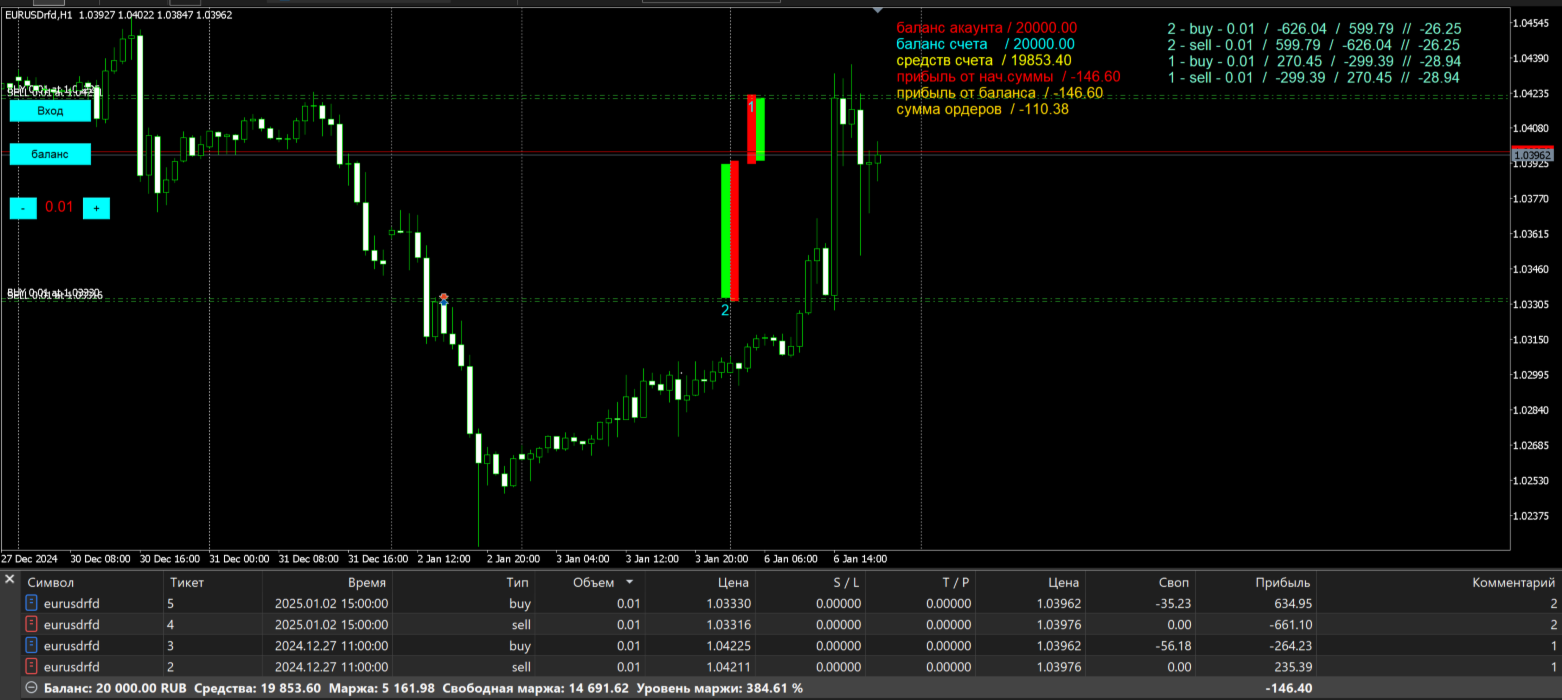
    点击该按钮后,交易终端会立即开启两个方向相反的订单:一个做多(Buy),一个做空(Sell)。
    实用场景: 在高波动行情或“区间交易”中非常有用。当您希望同时在两个方向都建立头寸时,可以先开仓,之后择机平掉较不理想的订单,或等待突破点。

  2. “BALANCE”按钮。
    这个按钮是您的“基准点”。
    工作原理: 点击后,系统会记录您账户的当前状态。从此刻开始,面板会以此数值为基准,统计盈亏。
    作用: 方便您快速评估某一交易会话或一笔交易的效果,无需手动计算差额。

  3. 订单管理(手动模式)。
    我们保留了全部控制权给您:系统不会自动平仓。
    如何平仓: 您可以使用交易终端的标准界面手动平掉任意订单。
    识别方法: 为避免混淆,请参考图表上显示的订单编号以及开仓时系统添加的备注。这样您就能准确判断需要平掉的是哪笔订单。

使用建议:

  • 在点击“ENTRY”按钮前,请确认面板参数中的仓位手数(lot size)已设置正确。
  • 建议在开始新的一轮交易系列前先点击“BALANCE”按钮,这样统计数据才会更加准确。
推荐产品
TradingX Hotkeys
Johannes Stephanus Lombard
Inputs Available Lotsizes Partial Close % You can change lotsizes as you require On an open chart click once to select chart to be able to use hotkeys on specific chart. All Pairs can be used with this expert We created this expert to be able to still trade C300 with a 0.06 Lotsize If you enter a 0.6 lot and close 0.90% you can trade with 0.06 Lot Keys to be used: B -Buy S -Sell C -Close Profitable D -Breakeven (Note if stoploss is set it won't break even) P -Partial close X -Close all
大家好 在人们眼中,投资被认为是一件困难且有风险的事情。 但如果你通过获取知识和技能进行投资,市场永远不会伤害你。 资本市场的过滤写作是该领域专业人士为提高生产力和节省时间而采取的行动之一。 由于大量符号的活动,存储的信息和数据量非常大。 活跃在这个市场的人们有时需要一系列信息,由于事情的敏感性,他们应该尽快获得。 这些信息通常可以帮助他们预测市场的未来,并且非常重要。 通过我们的命令写入 Fitler 将找到符合请求条件的共享! 过滤我们选择的功能将搜索所有可交易股票并显示合适的股票。 资本市场上的每个人都有特定的交易策略,通过过滤很容易按照策略进行; 之后,他可以看到他的策略在不同时间范围内的结果。 过滤的优点 1-高速:每个股的信息都会根据您选择的特点,在最快的时间内提供给您。 2- 各种各样的功能和命令:您可以按照您想要的任何方式对共享进行分类和查看。 此过滤器检查所有市场观察交易品种、具有以下 5 个条件之一的 RSI 指标,并显示适用所选条件的交易品种:    1- 从第一个指定数字开始划线    2- 从下面第一个指定数字开始划线    3- 大于第一个指定

TradesManger
Ali Abdalrasool Ai-sayyd Sobai
Ultimate Manager is the ultimate Expert Advisor (EA) for MetaTrader5, empowering traders with seamless control over every aspect of their trades. This powerful tool manages lot sizes, stop losses, trailing stops, trade durations, and trailing activation thresholds with precision. Featuring intuitive buttons, you can execute two trades simultaneously, close all positions, close buys only, close sells only, or close profitable trades in an instant. Designed for efficiency and risk management, Ulti
# Higher-Lower Pending Bot - Advanced Multi-Pending Orders System ## Revolutionize Your Trading with Smart Pending Order Automation Welcome to the **Higher-Lower Pending Bot** - the most sophisticated pending order management system available on MQL5. Designed for traders who want to maximize opportunities while minimizing manual effort, this EA combines intelligent order placement with comprehensive profit tracking in one powerful package. ## What Makes Our Bot Unique? ### Smart D
"Support or Resistance Alert Broken" is a simple and very intuitive tool that allows you to create or eliminate horizontal and trend supports and / or resistances with a simple click. When the support or resistance line is broken by the closing price at the end of the current candle, the "Support or Resistance Alert Broken" tool will send an alert with sound, as well as a notification to the MT4 or MT5 mobile application. This tool can send alerts from multiple pairs at the same time. Utility
Simple Risk Tool
Larry Alan Navilys
Simple Risk Tool — trade with a FIXED money risk, always. Stop calculating lot sizes by hand. Type the amount you accept to lose, place your BUY or SELL lines, drag your Stop Loss anywhere on the chart — the lot size recalculates instantly while your money risk never changes. HOW IT WORKS — 3 STEPS 1. Set the amount you want to risk (in your account currency). 2. Select your direction: BUY LINES or SELL LINES instantly draws draggable Stop Loss / Entry / Take Profit lines at the current char
GDS RiskLab TradeDesk Renko Pro - Professional Manual Trading Panel for Renko Traders in MetaTrader 5 GDS RiskLab TradeDesk Renko Pro is a professional manual trading panel for MetaTrader 5, designed for traders who use Renko charts and want a more controlled workflow for execution, position awareness and risk discipline. This is not an automated trading strategy and not a signal system. The trader remains fully responsible for market analysis, risk decisions and execution. TradeDesk Renko Pro i
Ping-Monitor — Never Miss a Tick Again! Do you run EAs and worry about silent chart freezes or data feed stalls ?  This utility is your ultimate watchdog, alerting you the moment your charts stop receiving updates. Ping-Monitor is designed to detect when a chart freezes or the data feed stalls, even if MT5 still shows that the connection is active. It works by tracking the time of the last incoming tick. Every time the chart receives a new price update, the EA records the timestamp. Then, on a
Script for quick updates (synchronization) up-to-date data in the SQLite database. Saves open positions and orders, current quotes. Take advantage of SQLite's capabilities for intermediate data storage, analytics, and integrations of the MetaTrader platform. Keep all your data in one place. Use the saved data in SQL analytical queries, from Python and other languages, to build dashboards Parameters useDefaults true - use default parameters. Save data to the COMMON hierarchy, to the db/ram/{s
FREE
Session panel
Timo Mario Hoffmann
Session Panel for MT5 Session Panel is a free MT5 indicator that gives you a fast and convenient live overview of the major trading sessions directly from the chart. Monitor Tokyo, London, and New York session times, see which session is currently active, track countdowns to the next session, and view session overlap information in one compact dashboard. Built for traders who want better market timing, clearer session awareness, and a cleaner chart workflow in live market conditions. Session Pan
FREE
标题:MT5交易助手 交易助手 — 下单前即可查看风险 可视化风险管理器是一款适用于MetaTrader 5的图表实用工具,专为希望以清晰直观的方式控制仓位大小的自主交易者而设计。您可以直接在图表上设置入场点、止损点和止盈点。面板会显示手数、风险金额、目标盈利金额以及盈亏比——这些数据会随着您移动这些线条而更新。 您将获得以下优势   : 更快的决策 : - 根据设定的风险自动计算交易量/手数。 更稳定的风险 : - 可以选择“账户余额百分比”或“固定金额”进行单笔交易。 更少的执行意外 : - 实时点差成本(往返,每手)和经纪商佣金或费用可以计入仓位大小(可选)。 一键交易 : - 当几何图形符合您的预期时,点击“买入”或“卖出”按钮。如果您的入场点偏离当前价格,该工具会根据入场点相对于买卖价的位置(突破型入场或回撤型入场)发送“市价单”、“限价单”或“止损单”。 更简洁的图表工作流程 : - “跟随”模式可使入场点与市场价格保持一致(可选择同时移动止损/止盈);“隐藏线条”模式可使图表更简洁,并提供可最小化的面板。 保持逻辑清晰的几何结构 : - 买入/卖出设置切换;如果您以与当
FREE
Rectangle line Trade Execution Assistant Rectangle Line Trade Assistant EA  Semi-Automated Trading Assistant       IMPORTANT :   On the main/purchased program a user can click on the Rectangle line and move/ drag it around the chart, by double clicking on it. Please keep in mind that this option is not available on demo version, due to some restrictions/limitations of Strategy Tester, some Object related operations are not available in the Strategy Tester. But, it will not prevent you from Test
The Trade Panel Dashboard is a powerful, user-friendly interface designed to streamline and enhance your trading experience. This centralized hub provides real-time data visualization, advanced analytics, and seamless execution tools, empowering traders to make informed decisions with precision and speed. Key Features: Real-Time Market Data Access live price feeds,  market trends for multiple assets (stocks, cryptocurrencies, forex, commodities, etc.) in one consolidated view. Order Management
The new version of  MirrorSoftware 2021  has been completely rewriten and optimized.  This version requires to be loaded only on a single chart because  it can detect all actions on every symbol and not only the actions of symbol where it is loaded. Even the  graphics and the configuration mode  have been completely redesigned. The MirrorSoftware is composed of two components (all components are required to work):  MirrorController  (free indicator): This component must be loaded into the MASTER
ProTrading Panel — 专业的智能手动交易面板 使用 ProTrading Panel 大幅提升您的手动交易体验。本智能交易系统(EA)专为极速执行订单而设计,拥有优雅、舒适的垂直分栏界面,能完美融入您的图表,绝不占用多余的活动空间。无论您喜欢在屏幕上点击鼠标,还是习惯利用键盘快捷键以闪电般的速度执行交易,这款工具都是您的不二之选。 核心功能: 精准风险管理: 支持以点数(Points)设置止损(Stop Loss),并根据您期望的风险回报比(R:R)自动计算出对应的止盈(Take Profit)位置。 高级移动止损: 自动锁定您的交易利润。您可以随时开启或关闭移动止损功能,并能以点数为单位自由调整追踪启动点、追踪步长和追踪距离。 实时盈亏追踪: 直接在面板上直观地监测您当日的总体盈亏( Today's P/L = 已平仓盈亏 + 当前浮动盈亏)以及当前的浮动盈亏( Floating P/L = 当前所有持仓木子的盈亏)。 灵活位置调整: 自由选择将控制面板固定在图表的左侧或右侧。 快捷键与一键交易: 支持通过鼠标点击或键盘快捷键瞬间执行交易指令。 按键与键盘快捷键说明:
Checklist Indicator
Okeene Rajae Chambers
This indicator displays a customizable checklist directly on your chart, helping you stay disciplined and organized during trading. You can define your own list of tasks, position it anywhere on the screen, and adjust the appearance to match your setup. It’s ideal for pre-trade routines, strategy rules, or reminders to follow your trading plan. The indicator automatically manages and cleans up its text labels, ensuring no leftover objects remain when it is removed or updated.
FREE
Trend Risk Monitor
Kenneth Michael Chambers
TREND RISK MONITOR EA - USER GUIDE ---------------------------------------------------- 1. OVERVIEW The Trend Risk Monitor is not a trading robot that opens new positions. Instead, it is a sophisticated risk management utility designed to work alongside another Expert Advisor (EA) on your trading account. Its primary purpose is to actively monitor trades opened by a specific EA (identified by a "Magic Number") and provide a real-time assessment of the market risk associated with each open posit
控制您的外匯投資組合。立即查看您的站立位置、工作原理以及導致您疼痛的原因! 此處提供 MT4 版本: https://www.mql5.com/en/market/product/58375 交易經理儀表板旨在讓您一目了然地顯示您當前在外匯市場中的每個頭寸,並使風險管理和貨幣敞口更易於理解。 對於通過多個頭寸或交易網格和籃子策略逐漸進入市場的交易者,這是需要查看的關鍵信息。監控終端中的多個位置通常很難管理。 過度槓桿化和使用低風險:回報是新交易者和一些經驗豐富的交易者面臨的主要問題,交易經理向您展示您對每種貨幣的風險敞口,確保您不會同時進行雙向交易。 特徵: 未平倉交易 - 查看您當前按貨幣對排序的所有未平倉交易。您不僅可以在該貨幣對上看到您的方向偏差,還可以在該貨幣對上運行的每筆交易或頭寸上看到您的方向偏差。 回撤和利潤信息 - 立即查看您交易活躍的貨幣對的回撤或盈利情況。輕鬆識別需要管理的交易。 手數大小 - 查看您在每個貨幣對上的手數以及您進行的交易數量。 風險敞口 - 查看您對每種貨幣的方向偏差,以確保您不會在另一個入場時以相反的方向交易。另請查看您在該貨幣中使用不同貨
Free automatic Fibonacci is an indicator that automatically plots a Fibonacci retracement based on the number of bars you select on the BarsToScan setting in the indicator. The Fibonacci is automatically updated in real time as new highest and lowest values appears amongst the selected bars. You can select which level values to be displayed in the indicator settings. You can also select the color of the levels thus enabling the trader to be able to attach the indicator several times with differe
FREE
Donchian Breakout And Rsi
Mattia Impicciatore
4.5 (2)
概述 本指标是经典 Donchian 通道 的增强版,增加了多种实用的交易功能。 除了标准的三条线(最高、最低和中线),系统能够检测 突破 ,并在图表上用箭头进行可视化标记,同时只显示 与当前趋势方向相反的那条线 ,让图表更加简洁。 功能包括: 可视化信号 :突破时在图表上绘制彩色箭头 自动通知 :弹窗、Push 推送和 Email 邮件 RSI 过滤 :根据市场相对强弱验证信号 个性化设置 :颜色、线条粗细、箭头符号、RSI 阈值等 工作原理 Donchian 通道计算: 上轨线 :最近 N 根已收盘 K 线的最高价 下轨线 :最近 N 根已收盘 K 线的最低价 中线 :最高价和最低价的平均值 看涨突破 :收盘价高于上轨线 看跌突破 :收盘价低于下轨线 指标会: 绘制三条 Donchian 通道线 仅在 方向变化后的首次突破 绘制箭头 隐藏顺应趋势方向的那条线(上涨趋势: 只显示红色下轨线;下跌趋势: 只显示绿色上轨线) 可选用 RSI 过滤突破信号,减少虚假突破 支持实时发送通知 参数说明 Donchian 通道设置 indPeriod :计算通道高低点的已收盘 K 线数量 Lin
FREE
Tele Notify
Tuan Nghia Phan
Tele Notify can help you send notifications for opened & closed trades to a Telegram channel or your personal Telegram. (see Master Notify for full options of notifications/alerts: indicator data, price, news, etc. Get more EAs  here ) Update: Now you can check your account info anytime from your Telegram by simple command: /check. This option is only valid when you use your Telegram User ID on EA inputs *******************************************************************************************
FREE
Trade Mirror Master
Nguyen Thanh Cong
5 (1)
Advanced Trade Mirror   is a powerful Forex tool designed for traders who need instant, seamless trade replication across multiple terminals on the same machine. With lightning-fast execution, it ensures zero lag in copying trades, maintaining precision and efficiency in high-speed trading environments. Get the Trade Mirror Follower here:  https://www.mql5.com/en/market/product/133890 Specification: Master ID: Identity value of master terminal, please use a unique value to prevent duplicated mas
FREE
This EA help trader to manage his pending orders, when you place many Pending Orders this utility monitor them and when of them get filed (executed) the EA cancel and delete all rest of pending orders, to avoid  opening of all of pending orders at the same time , and lose your risk management. this utility is very useful for trader when he /she is not available on the desk.
Trade2Telegram
Strifor (Mauritius) Ltd
5 (8)
Trade2Telegram — 一个用于将MetaTrader交易自动通知发送到Telegram的插件。 该工具适用于管理资金的交易者、运营信号频道的人员或领导教育社区的人。该插件会将终端中的所有交易操作复制并发布到选定的Telegram聊天、群组或频道中。 当开仓或平仓、止损或止盈水平变动、挂单触发或部分平仓时,消息会自动发送。 您可以自定义消息格式,包括:交易品种、交易方向、交易手数、开仓和平仓价格、止损/止盈水平,以及点数和金额的结果。它还支持添加标签和备注,并可选择服务器时间或本地时间。 该插件直接通过Telegram Bot API工作,无需任何第三方服务。连接方式非常简单,只需提供您的Bot令牌和目标聊天或频道的ID即可。 主要优势: 完全自动化的交易通知; 灵活的消息格式和发送频率; 支持所有订单类型; 可维护公开或私人的交易统计。 该插件非常适合信号频道、私募交易办公室、团队交易日志以及透明的实时交易跟踪。
FREE
GDS Renko Pip ST Chart - Pip-Based Renko Chart Indicator for MetaTrader 5 GDS Renko Pip ST Chart is a pip-based Renko chart indicator for MetaTrader 5. It helps traders build and study cleaner Renko price movement using a practical fixed pip or point-based brick structure. This tool is designed as a Renko chart foundation for manual analysis. It does not predict the market, does not generate buy or sell signals and does not decide whether a trade should be opened. What Pip ST Chart Does Renko ch
FREE
1.系统简介 它是一种三维便捷交易和信号指示按钮,功能不仅包括:买、卖 、平亏损仓、平盈利仓 、买平仓 (可选1/5~1仓位) 、卖平仓(可选1/5~1仓位)、 清仓(清除所有物体、所有持仓以及所有挂单) 、买反手 (可选1~5倍反手) 、卖反手(可选1~5倍反手)、全部反手 (可选1~5倍反手) ,还能通过三维按钮闪烁提供当前账户的单一品种和所有品种的获利信号。 2.系统设置 2.1 lot:买入或卖出仓位 2.2 cbuytimes:买平仓倍数 2.3 cselltimes: 卖平仓倍数 2.4 bbuytimes:买入反手倍数 2.5 bselltimes:卖出反手倍数 2.6 backatimes: 所有仓位反手倍数 2.7 closepl:选择平掉全部盈利、亏损仓位; 2.8 buttonstyle:按钮样式。 2.9 buttonsize:按钮大小样式。 2.10  buttoncorner:按钮位置。 2.11 buttonname:按钮名称;用户可以自定义名称。 2.12 buttoncolor:按钮颜色,用户可以按照RGB值自定义颜色。 3.交易按钮功能 3.1
FREE
PZ Trade Pad MT5
PZ TRADING SLU
4.46 (24)
This simple visual expert advisor allows you to trade easily from the chart. It handles risk management for you and can perform several useful tasks with your existing trades, saving time and making risk-management for each individual trade easier.  [ Installation Guide | Update Guide | Troubleshooting | FAQ | All Products  |  Get Help ] Trade easily from the chart Trade with precise risk management, hassle free Trade pending order with drag and drop price selection Set SL and TP levels with d
FREE
This script is designed to download a long history of cryptocurrency quotes from the Binance exchange. You will find it perfectly suitable if you want once to download the history of cryptocurrencies for charts analyzing, collecting statistics or testing trading robots in the MetaTrader 5 strategy tester, or if you need to update the history not very frequently (for example, once a day or once a week). After running the script, you will have fully featured (but not automatically updated) cryptoc
一键保本保护工具 手动开仓后,只需点击一个按钮,即可将所有盈利持仓的止损瞬间移动至开仓价格,立即消除获利仓位的亏损风险,同时自动跳过所有亏损仓位,不干扰您的交易策略。 使用方法 按照您平时的方式正常开仓。面板会实时显示盈利仓位和亏损仓位的数量。当您准备保护盈利时,点击"SET SL TO ENTRY"按钮。所有盈利仓位的止损将立即移动至各自的开仓价格。亏损仓位将被自动跳过,不受任何影响。 主要功能 面板默认显示在图表右侧,不遮挡价格轴和K线图。面板可自由拖动,按住蓝色标题栏即可将面板移动至图表任意位置。仅对盈利仓位触发保本保护,亏损仓位自动跳过。单次点击最多可同时处理100个持仓。面板实时显示算法交易状态,绿色表示就绪,红色提示需要开启。每2秒自动更新盈利、亏损及总持仓数量显示。操作成功后播放提示音。适用于所有手动开仓的持仓,不限交易品种、魔术号或手数大小。自动适应经纪商最小止损距离和冻结价位限制。兼容所有经纪商及所有交易品种,包括黄金、比特币、外汇等。 重要说明 使用前请确保MT5已开启算法交易功能。面板上会实时显示算法交易状态,方便您随时确认工具是否就绪。本工具为面
Hybrid Assisted Trading Engine Manual Trading. Machine Discipline. The Hybrid Assisted Trading Engine is an institutional-grade manual trade management system designed to protect traders from emotional mistakes — without taking control away from them. You decide when to enter . The engine decides how the trade is managed . What It Does This system continuously monitors your manual trades and enforces professional-level trade management rules in real time: Smart Breakeven logic R-based trai
该产品的买家也购买
Power Candles 策略扫描器——自优化多符号设置查找器 Power Candles策略扫描器 采用与Power Candles指标相同的自优化引擎,可同时扫描您“市场观察”中的所有交易品种。一个面板即可显示当前哪些品种在统计上具备交易价值、每种策略的最佳应用方向、最优止损/止盈组合,并在新信号触发时立即向您发送提醒。 本工具是 Stein Investments 生态系统的一部分 - 18+ 款工具,加上 Max,您的一对一 AI 交易导师。  随时在线,深入了解每一款指标,在您需要梳理思路的那一刻就在那里。  立即认识他: https://stein.investments 您的全面市场监控。每个交易品种超过3,000次自动优化。2种警报类型。一键切换图表并采取行动。 为何您需要此工具 大多数多标的扫描器仅展示价格 波动 。每只股票的波动率、百分比变化、RSI。您仍需自行摸索正确的策略、合适的止损位以及理想的入场阈值。Power Candles策略扫描器针对每只股票自动解答这些问题,仅在数学验证过的交易设置中触发实际入场信号时才会向您发出提示。这就是全部卖点。 自动
Farmed Hedge Yield Farming | All Markets (Manual - Hybrid - Semi/Automated EA) MULTI-ASSET SUPPORT Trade any asset available on your broker - Forex: Major, Minor, Exotic pairs - Crypto: BTC, ETH, XRP, SOL, BNB - Stocks: Apple, Tesla, Amazon, Google, etc. - Commodities: Gold, Silver, Oil, Gas - Indices: US30, NAS100, SPX500, DAX40 - Any CFD your broker offers VERIFIED TRADING RESULTS - Farmed Hedge Yield Axi Copy:  https://www.mql5.com/en/signals/2356376 - Farmed Hedge Yield Exn Copy:   https:/
EasyInsight AIO MT5
Alain Verleyen
4.92 (12)
EASY Insight AIO – 全能智能交易一站式解决方案 概述 想象一下,您可以在几秒钟内扫描整个市场——外汇、黄金、加密货币、指数,甚至股票——无需手动筛选图表、繁琐安装或配置指标。 EASY Insight AIO 是您专为 AI 交易打造的即装即用数据导出工具。它将整个市场快照一次性输出为简洁的 CSV 文件,直接支持 ChatGPT、Claude、Gemini、Perplexity 等各类 AI 平台的即时分析。 无需窗口切换,无需图表叠加,也没有任何杂乱。只需纯净、结构化的数据自动导出,让您专注于基于数据的高效决策,无需再盯盘耗时。 为什么选择 EASY Insight AIO? 真正的一体化 • 无需设置,无需安装指标,无图表叠加。只需安装、运行并导出——就是这么简单。 多资产全覆盖 • 扫描分析外汇、金属、加密货币、指数、股票——您的券商所能提供的一切市场。 AI 专属数据导出 • 高度结构化、针对 AI 优化的 CSV 文件,直接适配主流智能工具和平台。 完整导出内容: • 三个可选周期的货币强度分析 • 净多头头寸变化体现市场情绪 • 成交量变化、
Quant AI Agents
Ho Tuan Thang
5 (1)
Quant AI Agents are independent trading Expert Advisors. Instead of trading using a fixed strategy like other conventional EAs, Quant AI Agents   is a   multi-agent AI trading framework   that turns natural-language strategy prompts into live.  WANT THE SAME RESULTS AS MY LIVE SIGNAL?   Use the exact same brokers I do:   IC MARKETS , IC TRADING   .  Unlike the centralized stock market, Forex has no single, unified price feed.  Every broker sources liquidity from different providers, creating un
Premium Trade Manager - 内置交易导师的图表面板 Premium Trade Manager 将一位交易导师嵌入您的图表,并在其下搭载完整的执行引擎。像往常一样建立交易,然后让您的 AI 交易导师 Max 读取这笔具体的交易,结合您的实时账户给出直接判断,再由您决定是否下单:止损是否符合纪律化交易的要求、风险规模是否合理、高影响新闻事件是否即将发布、您是否接近资金盘限额。其下是完整的执行引擎,负责点击之后的一切:一键按风险下单、您在图表上拖动规划且交易进行中仍可随时调整的计划、最多四个分批止盈级别、七种移动止损方式、实时资金盘合规检查、新闻屏蔽保护,以及对自身成本进行评级的点差功能。决策由您做出。Max 给出第二次审视。面板负责此后的一切。 购买前先亲手体验。 直接在浏览器中点击实时面板,这是在购买前感受其工作方式的最快途径。 stein.investments/products/premium-trade-manager Max 是您的一对一 AI 交易导师,他直接内置于面板之中。  他了解您的账户、您的设置和您的规则,用您自己的语言回答,并在每笔交易下单前进
The product will copy all telegram signal to MT5 ( which you are member) , also it can work as remote copier.  Easy to set up, copy order instant, can work with almost signal formats, image signal,  s upport to translate other language to English Work with all type of channel or group, even channel have "Restrict Saving Content", work with  multi channel, multi MT5 Work as remote copier: with signal have ticket number, it will copy exactly via ticket number. Support to backtest signal. How to s
HINN Lazy Trader
ALGOFLOW OÜ
5 (1)
LIMITED SUMMER SALE -40% ! ONLY $470 insead of $790!  Maximum real discount! The core idea: using the user interface, you configure the parameters the chart must meet before entering a position (or positions), choose which entry models to use, and set the rules for when trading and planning should end. Lazy Trader  handles the rest: it  takes over all the routine chart watching and execution! full description  :: 3 key videos [1] ->  [2]   ->  [3] What can it do? - Understands Larry Williams
================================================================================ POC BREAKOUT - V20.72. Full Professional Grade Toolkit ================================================================================ POC Breakout is a full MetaTrader 5 trading dashboard for discretionary traders who want breakout signals, Point of Control (POC) context, volume profiles, order flow, market structure, news, alerts, and advanced trade planning in one professional workspace. Attached directly to you
YuClusters
Yury Kulikov
4.93 (43)
Attention: You can view the program operation in the free version  YuClusters DEMO .  YuClusters is a professional market analysis system. The trader has unique opportunities to analyze the flow of orders, trade volumes, price movements using various charts, profiles, indicators, and graphical objects. YuClusters operates on data based on Time&Sales or ticks information, depending on what is available in the quotes of a financial instrument. YuClusters allows you to build graphs by combining da
FUTURES ORDERFLOW FOOTPRINT CHART Professional OrderFlow EA for MetaTrader 5 Version 1.01| Professional tool for real traders | Institutional-Grade Visualization STRATEGY TESTER USERS - PLEASE SELECT EVERY REAL TICK WHEN TESTING AND YOU HAVE DOWNLOADED HISTORICAL DATA. IF YOU SEE A WAITING SCREEN AND IT IS NOT DOWNLOADING, IT MEANS YOU HAVE LOW HISTORICAL DATA. TRY 1 MIN AND 5 MIN FIRST ON 1 DAY DATA. ONE DAY DATA SHOULD BE THE NEWEST AND MOST CURRENT DATE. PLEASE WAIT UNTIL THE MARKET HAS ROL
Footprint Chart Pro — Professional OrderFlow EA for MetaTrader 5 Version 6.34 | Professional tool for real traders | Institutional-Grade Visualization DEMO USERS - PLEASE SELECT EVERY TICK / REAL TICK WHEN TESTING AND YOU HAVE DOWNLOADED HISTORICAL DATA. IF YOU SEE A WAITING SCREEN AND IT IS NOT DOWNLOADING, IT MEANS YOU HAVE LOW HISTORICAL DATA. TRY 1 MIN AND 5 MIN FIRST ON 1 DAY DATA. ONE DAY DATA SHOULD BE THE NEWEST AND MOST CURRENT DATE. PLEASE WAIT UNTIL THE MARKET HAS ROLLED OVER PERIOD.
Telegram To MT5 Receiver
Levi Dane Benjamin
4.53 (15)
将信号从您所属的任何渠道(包括私人和受限渠道)直接复制到您的 MT5。 该工具在设计时充分考虑了用户的需求,同时提供了管理和监控交易所需的许多功能。 该产品采用易于使用且具有视觉吸引力的图形界面。 自定义您的设置并在几分钟内开始使用该产品! 用户指南 + 演示  |   MT4版本  |   不和谐版本 如果您想尝试演示,请参阅用户指南。 Telegram To MT5 接收器在策略测试器中不起作用! Telegram 至 MT5 功能 一次复制多个通道的信号 从私人和受限频道复制信号 不需要机器人令牌或聊天 ID(如果出于某种原因需要,您仍然可以使用这些) 使用风险百分比或固定手数进行交易 排除特定符号 选择复制所有信号或自定义要复制的信号 配置单词和短语以识别所有信号(默认值应适用于 99% 的信号提供商) 配置时间和日期设置以仅在需要时复制信号 设置一次打开的最大交易量 交易和头寸管理 使用信号或自动设置的管理 通过设置每月、每周、每天、每小时或每分钟的最大交易次数,停止过度交易和报复性交易。 支持市价订单和挂单 每日最大利润目标(以美元为单位)以确保头寸并停止过度交易 确
AI Agent Supervisor is NOT an Expert Advisor. AI Agent Supervisor   is a   multi-agent AI risk & portfolio supervisor   that watches every EA on your account and intervenes in real time.  WANT AN AI PORTFOLIO MANAGER WATCHING YOUR FLEET 24/7?   Run your fleet on the same brokers I do:   IC MARKETS , IC TRADING   .  Unlike the centralized stock market, Forex has no single, unified price feed.  Every broker sources liquidity from different providers, creating unique data streams. The Supervisor r
Telegram to mt5 pro
Janet Abu Khalil
4 (4)
Telegram to MT5 Pro — 高级 Telegram 信号复制器(Auto-Fix,多TP,风险控制,完整交易管理) Telegram to MT5 Pro — 专业 Telegram 信号复制系统 Telegram to MT5 Pro 可将来自 Telegram 的交易信号实时复制到您的 MetaTrader 5 账户,并提供完整的风险控制、执行管理与交易管理功能。 系统由两个组件组成: • 运行在 MetaTrader 5 内的 Expert Advisor(EA) • 连接 Telegram 并将信号发送到 EA 的桌面桥接程序 两个组件必须在同一台电脑运行。由于 MQL5 限制,EA 无法直接连接 Telegram。 支持与安装 提供完整 PDF 安装指南。 支持内容: • 完整 PDF 使用手册 • 分步安装指导 • 在线聊天支持 • 交易商设置帮助(前缀、后缀、符号映射) 功能说明 • 读取任意 Telegram 群组或频道信号 • 自动解析交易品种、方向、入场、止损、止盈 • 秒级执行交易 • 管理交易(移动止损、保本、部分平仓) • 支持多账户与多信号
# 如果您有任何其他需求或對合作感興趣,請聯繫 zion.quantech.london@gmail.com。 Flash Trade (FT) 最友善的手動交易工具。 使用最直觀的操作來確保您的資金。 FT的特點 點擊任意位置快速交易 FT支持市場訂單和掛單 兩次點擊完成訂單並設置SL和TP 三次點擊完成掛單並設置SL和TP 自動將每個訂單的止損金額設置為您設置的餘額百分比或固定金額 下訂單時實時預估利潤 超簡單的界面和操作 支持拆分訂單 使用方式 市場訂單: 點擊圖表決定止損價位 點擊Buy或是Sell鈕 掛單: 點擊圖表決定入場價位 選擇掛單類型 點擊圖表決定止損價位 暫停FT: 點擊右上方的"On/Off"按鈕來切換開關 當按鈕從綠(On)變為紅(Off),代表FT已被停止 點擊"Off"按鈕再次開啟FT 如果有任何疑問、改善建議或是bug回報都可以聯繫e50310@gmail.com或留下評論 功能將持續於未來的版本推出
QCML Assistant
Maxime Turcotte-lafreniere
QCML Assistant MT5 Your Trading. Our Assistant. Your Edge. Looking for a tool that completely transforms your experience on MetaTrader 5? QCML Assistant is the all-in-one solution built by traders, for traders. Just one tool installed on your chart, and you get access to an ultra-complete, ultra-fast, and ultra-simple trading platform. No more hours wasted setting up your workspace. No more complicated trade entries. With QCML Assistant, everything becomes simple, smooth, and efficient right fro
Ultimate Extractor
Clifton Creath
5 (8)
Ultimate Extractor - Professional Trading Analytics for MT5 *****this is the local HTML version of Ultimate Extractor. !!!!!it is not compatible with Cloud!!!! For the online version please reach out to me directly****** Ultimate EA manager also now available when you use cloud pro and above for free!! Ultimate Extractor transforms your MetaTrader 5 trading history into actionable insights with comprehensive analytics, interactive charts, and real-time performance tracking. What It Does Automa
Royal Copier
Janet Abu Khalil
5 (1)
Royal Copier — 专业版 MT5 交易复制器 Royal Copier 是一款适用于 MetaTrader 5 的专业本地实时交易复制器。 现在它已将两种功能整合到一个 MT5 Expert Advisor 中。 您只需在参数中选择 EA 运行于 Master 模式 或 Client 模式 。 这意味着同一个 EA 既可用于源账户,也可用于接收账户,同时保留原有复制器的运行逻辑。 Royal Copier 支持以下常见账户复制方式: MT5 到 MT5 MT5 到 MT4 MT4 到 MT4 MT4 到 MT5 如需与 MT4 进行复制,请使用 MT4_Copier 。 工作原理 Royal Copier 是一个本地复制器,通过同一台 Windows 电脑上的共享文件运行。 当 EA 设置为 Master 模式 时,它会监控源账户并将所有交易活动写入共享文件。 当 EA 设置为 Client 模式 时,它会读取该文件,并在接收账户上镜像执行相同操作。 复制器可以同步以下内容: 市价单 挂单 交易平仓 部分平仓 止损和止盈修改 挂单更新和删除 两个终端必须运行在同一台 Win
VOLUME BUBBLES ORDERFLOW FOOTPRINT PROFESSIONAL Expert Advisor for MetaTrader 5 Complete Feature Documentation Introduction: Volume Bubbles OrderFlow Footprint Professional is an advanced order flow visualization tool designed for the MetaTrader 5 platform. It provides institutional-grade market analysis through real-time volume bubbles visualization, volume profiling, and sophisticated order flow analysis. This Expert Advisor transforms raw market data into actionable trading intelligence, hel
Double X Trade
Gayathiri Gopalakrishnan
5 (2)
DOUBLE X TRADE  SIGNAL MULTIPLIER DOUBLE X TRADE is a MetaTrader 5 Expert Advisor designed to operate alongside existing Expert Advisors and provide additional trade-management functionality. The EA can monitor trading activity on the account and perform actions according to user-defined settings, risk parameters, and operating mode configuration. DOUBLE X TRADE is intended for traders who want an additional management layer while continuing to use their existing Expert Advisors. The product doe
Custom Alerts AIO:多市场智能监控,一键启动,无需设置 概述 Custom Alerts AIO 是一款“开箱即用”的高级市场扫描工具,无需额外安装任何其他指标或进行复杂设置。它内置了 Stein Investments 的所有核心指标(FX Power、FX Volume、FX Dynamic、FX Levels 和 IX Power),可帮助您轻松监控所有主要资产类别,如外汇、黄金、指数和加密货币。如果您的经纪商支持股票,您也可以手动添加个股进行监控。 1. 为什么选择 Custom Alerts AIO? 无需额外购买任何指标 • 所有关键指标均已内置,开箱即用。 • 专注于实时预警,不包含任何图形元素,性能高效,界面简洁。 全面覆盖所有主要市场 • 支持监控外汇、金属、加密货币和指数市场。 • 无需手动输入任何交易品种,只需在设置中勾选资产类别即可启用。 • 股票并不属于默认类别,如有需要可手动通过参数输入添加。 高效、专业、便捷 • 无需图表模板和手动加载,适合自动化或远程交易环境。 • 非常适合 VPS 上长期运行,或作为后台市场预警工具使用。 2
Gamma Edge Pro MT5 — GexBot Classic API Integration Gamma Edge Pro   brings institutional-grade   Gamma Exposure (GEX) data   directly onto your MetaTrader 5 chart — the same data used by professional options traders to anticipate price magnets, hedging flows, and dealer positioning. Powered by the   GexBot Classic API , this indicator automatically maps options market data from US-listed instruments onto any   MT5 CFD instrument   — Forex pairs, Gold, indices, and more — with intelligent price
Prop Firm Os
Gayathiri Gopalakrishnan
5 (1)
PROP FIRM OS Structured Trading Assistant for MetaTrader 5 PROP FIRM OS is a structured trading assistant designed for MetaTrader 5 users who prefer rule-based market analysis and organized trading workflows. The Expert Advisor combines market analysis tools, scanner functions, dashboard monitoring, alerts, risk-control settings, and trade management features inside one system. PROP FIRM OS is designed to help traders follow selected rules, filters, and monitoring conditions during trading activ
ManHedger MT5
Peter Mueller
4.83 (6)
THIS EA IS A SEMI-AUTO EA, IT NEEDS USER INPUT. Manual & Test Version Please TEST this product before BUYING  and watch my video about it. The price of the ManHedger will increase to 250$ after 20 copies sold. Contact me for user support or bug reports or if you want the MT4 version! MT4 Version  I do not guarantee any profits or financial success using this EA. With this Expert Advisor, you can: Implement your own Zone Recovery strategy to capitalize on trending markets. Create Grid trading s
Bots Builder Pro MT5
Andrey Barinov
4.17 (6)
This is exactly what the name says. Visual strategy builder . One of a kind. Turn your trading strategies and ideas into Expert Advisors without writing single line of code. Generate mql source code files with a few clicks and get your fully functional Expert Advisors, which are ready for live execution, strategy tester and cloud optimization. There are very few options for those who have no programming skills and can not create their trading solutions in the MQL language. Now, with Bots Builde
Discord Signal Notifications — это мощный инструмент для трейдеров, проповодов и управляющих счетами, который автоматически отправляет все ваши торговые события в канал или чат Discord. Главное преимущество — Глобальный мониторинг. Вам не нужно устанавливать советник на каждый график. Достаточно запустить одну копию утилиты на одном любом окне, и она будет отслеживать действия по всем инструментам и всем счетам в вашем терминале одновременно. Основные возможности Глобальный мониторинг счёта Ути
Crystal Trade Manager – Advanced MT5 Risk and Trade Control Utility Overview Crystal Trade Manager (CTM) is a professional MetaTrader 5 utility designed for risk management, trade automation, and instant execution control. It provides traders with an integrated system for protecting equity, managing daily drawdowns, controlling lot sizes, and applying automation features such as automatic SL/TP, break-even, and trailing stop. The tool is suitable for manual traders, prop-firm challenge particip
Global Investing FX Terminal
Santiago Nicolas Pla Casuriaga
Global Investing FX Terminal 在 MetaTrader 5 中以单一画布叠加层呈现十三个分析面板——央行政策利率、CFTC COT 持仓、利差排名、经济意外指数、期权偏斜、散户情绪与相关性——每 10 秒从单个挂载 EA 刷新一次,无需任何外部软件。 专业外汇分析需要同时调取通常分散在不同平台的数据:利率衍生品、政府数据门户、券商掉期规格、期权台。此 EA 将所有这些整合到交易终端内的单一界面中,在您执行决策的地方完成分析。 画布上显示的内容 市场概览 外汇对列表 — 所有 28 个 G10 货币对,加上当券商 Market Watch 中存在 NOK/SEK 交叉盘时显示的交叉盘——最多共 36 个货币对——的实时买卖价。每行显示点差、日度与周度变化、以点数表示的绝对区间,以及 ADR%——当前交易时段区间占 14 日平均日区间的百分比。ADR 达到 95% 的货币对已消耗其统计日内延伸空间;伦敦盘中场 ADR 仅 25% 的货币对仍有运行余地。颜色逐 Tick 实时更新。 货币对详情 — 点击列表中的任意行,即可打开该货币对的完整分析叠加窗口。居中弹出窗
RiskGuard Management
MONTORIO MICHELE
5 (22)
注意 :要获取免费试用版,请访问我的网站。 使用手册 用户手册 RiskGuard Management — 您进行无妥协交易的终极盟友。 Lot Calculator — 自动计算手数。 Quantum — 自动风险控制,最大化利润并减少回撤。 Automatic Journal — 包含并可从我的网站免费下载。 Automatic Screenshot — 两张截图:开仓时一张,平仓时一张。 Partial Profit — 智能管理的部分平仓功能。 Smartphone Trading — 可通过手机下单,自动管理。 Stop Loss & DD Block — 每日资金的全面保护。 Automatic Break-Even — 轻松降低风险。 Closing Time — 精准控制交易时间。 Automatic Spread — 实时正确设置止损和止盈。 详细的多语言文档以及意大利语和英语的视频教程,可在我的网站上获取。
MT5 Trading Deck
Manuel Michiels
5 (2)
One button. One trade. MT5 Trading Deck is a hotkey trading panel for MetaTrader 5 that turns the platform into a keyboard-driven execution cockpit. Stop loss, take profit and lot size are pre-calculated for every key; the moment you press, a market order is live on the broker. A complete technical user manual is attached in the product Comments section. It documents every input parameter, the full hotkey map, the recommended Stream Deck XL layout, and the advanced workflows for Pre-Limit orders
筛选:
无评论
回复评论