Two steps
- Utilitários
- Versão: 1.0
- Ativações: 20

Discover the world of trading with “Two Steps”!
Are you a beginner dreaming of financial independence? Or an experienced trader looking for a tool to optimize your strategy? “Two Steps” is the program designed especially for you!
We know the market never stands still. It’s constantly moving, offering countless opportunities to make a profit. And it’s precisely this dynamic that we leveraged when creating “Two Steps”.
What makes “Two Steps” unique?
- Simplicity and intuitiveness. Forget about complicated settings and confusing interfaces. With “Two Steps”, you can start trading literally with one click!
- Instant position opening. Press the button, and the program automatically places two orders — a Buy and a Sell — simultaneously. This lets you be ready for any market move, whether it’s an upward or downward trend.
- Full control in your hands. We believe you are the best expert for your own trades. That’s why “Two Steps” gives you complete control over further actions. You decide when and which orders to close, based on your strategy and the current market situation.
- Perfect for any skill level.
- Beginners. Start your trading journey with a simple and effective tool. “Two Steps” will help you understand market dynamics and learn to make decisions while minimizing risks.
- Experienced traders. Use “Two Steps” to quickly open positions, test new strategies, and react promptly to market changes. It’s a powerful tool that will complement your trading arsenal.
Imagine this: the market moves up, and you close the Buy order with a profit. Then it reverses, and you close the Sell order, making a profit again! “Two Steps” lets you benefit from every fluctuation, turning market movement into a steady source of income.
Don’t miss your chance! Join the community of traders who have already discovered the power and simplicity of “Two Steps”. Start your journey to financial freedom today!
“Two Steps” — your key to profitable trading.
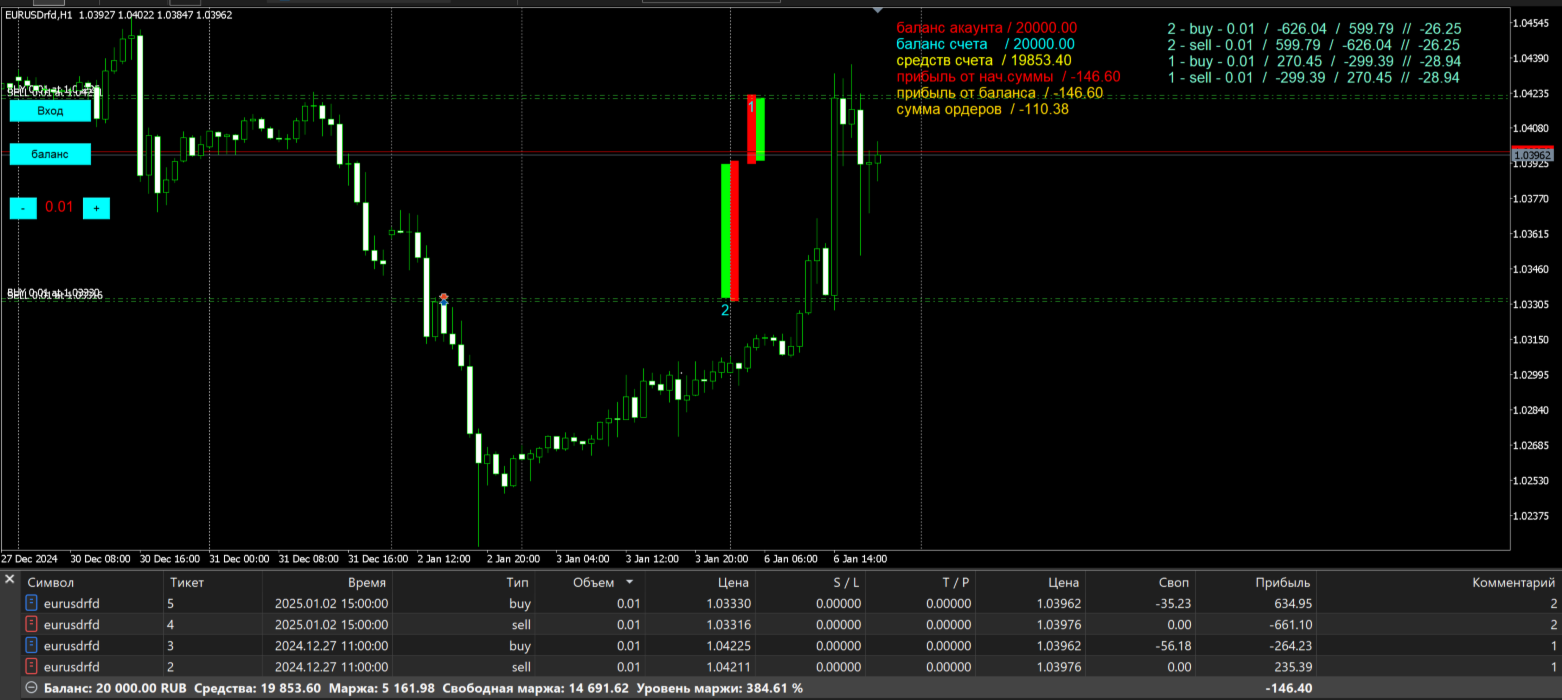
This panel is designed to make your trading faster and more visual. Here’s how to use the main features:
This panel was developed to simplify the process of opening positions and monitoring profitability. Below is a description of the main buttons and the logic for managing orders.
-
The “ENTRY” button (Buy & Sell).
When you click this button, the terminal instantly opens two opposing orders: one to buy (Buy) and one to sell (Sell).
Why it’s useful: This tool is handy during periods of high volatility or when trading “in a channel”, when you want to take positions on both sides simultaneously — so you can later close the less profitable one or wait for a breakout. -
The “BALANCE” button.
This button serves as your “reference point”.
How it works: When you click it, the system records the current state of your account. From that moment on, the panel starts tracking profit or loss relative to this initial value.
Purpose: This lets you quickly assess the effectiveness of your trading for a specific session or trade, without having to calculate the difference manually. -
Order management (Manual mode).
We’ve kept full control in your hands: there’s no automatic order closure.
How to close a trade: You can manually close any order using the terminal’s standard interface.
Identification: To avoid confusion among trades, refer to the order number displayed on the chart and the comment assigned to the trade when it was opened. This will help you identify exactly which order you want to close at any given moment.
Usage recommendations:
- Before clicking the “ENTRY” button, make sure the lot size is set in the panel’s parameters.
- It’s recommended to press the “BALANCE” button before starting a new trading series so that the statistics are as accurate as possible.