AI Powered Buy Sell Signal QCL Indicator MT5
- 指标
-
Shujah Amin
 My journey into algorithmic trading was born from the same frustration many traders face: the battle against emotions and the risks of human error. Determined to master the markets, I transitioned from manual trading to deep-level MQL5 development, focusing on the volatility of Gold (XAUUSD).
- 版本: 11.10
- 更新: 6 十一月 2026
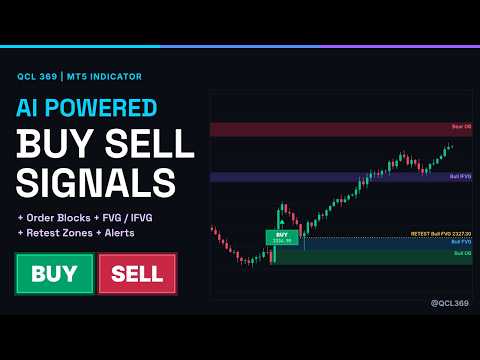
AI Powered Buy Sell Signals QCL MT5 is a signal indicator that combines BUY and SELL signals with price zones on one chart. The signals show when a new move may be starting, and the zones show where a better entry area may be, so you can wait for a retest instead of entering late.
The indicator detects breakout moves with a volatility-based method. A signal is printed only after the candle closes, near a valid Order Block, and it does not change afterwards. After each signal, the indicator marks the nearest valid Order Block and Fair Value Gap under it as retest levels. The dashboard then shows whether price is still waiting for the retest, has retested the zone, or has invalidated it.
Main features:
- BUY and SELL labels with the signal price
- Signals confirmed on closed candles only
- Bullish and bearish Order Blocks
- Fair Value Gaps (FVG) and Inversion FVG (IFVG): a gap that price closes through flips into a new support or resistance zone
- Retest levels for the latest signal
- Dashboard with trend, volatility, today's signals, last signal details and the status of each retest zone
- Pop-up and mobile push alerts for new signals and for zone retests
- Optional dark chart theme and automatic chart shift; your chart settings are restored when the indicator is removed
- Works on Forex, Gold, Indices and Crypto, on any timeframe
How to use it:
1. Attach the indicator to a chart. The default settings work without changes.
2. Wait for a BUY or SELL label on a closed candle.
3. Check the retest zones listed on the dashboard.
4. Wait for price to return to the zone. The retest alert can notify you.
5. Look for a reaction inside the zone and place your stop beyond the far side of the zone.
6. Use the next opposing zone as a possible target. Skip setups marked INVALIDATED.
Input parameters:
- Signal labels: show labels, show signal price, maximum labels on chart, label distance from arrow
- Smart zones: show Order Blocks, FVG and IFVG, maximum zones per type, hide zones older than a set number of bars, highlight retest levels
- Dashboard: show dashboard, position top left or top right
- Chart theme: apply dark theme, automatic chart shift
- Alerts: pop-up alert, mobile push notification, retest alert
For mobile alerts, enable push notifications in MetaTrader 5 under Tools, Options, Notifications and enter your MetaQuotes ID.
Limitations: no indicator is right every time. Signals can fail, zones can be broken, and results depend on market conditions, spread and your own risk management. Test the indicator on a demo account before using it on a live account.
Risk warning: trading Forex, Gold, CFDs, indices and cryptocurrencies on margin carries a high level of risk. This indicator is an analysis tool. It is not financial advice and does not guarantee profit.
Questions and feedback are welcome in the comments section of this product page.
The indicator detects breakout moves with a volatility-based method. A signal is printed only after the candle closes, near a valid Order Block, and it does not change afterwards. After each signal, the indicator marks the nearest valid Order Block and Fair Value Gap under it as retest levels. The dashboard then shows whether price is still waiting for the retest, has retested the zone, or has invalidated it.
Main features:
- BUY and SELL labels with the signal price
- Signals confirmed on closed candles only
- Bullish and bearish Order Blocks
- Fair Value Gaps (FVG) and Inversion FVG (IFVG): a gap that price closes through flips into a new support or resistance zone
- Retest levels for the latest signal
- Dashboard with trend, volatility, today's signals, last signal details and the status of each retest zone
- Pop-up and mobile push alerts for new signals and for zone retests
- Optional dark chart theme and automatic chart shift; your chart settings are restored when the indicator is removed
- Works on Forex, Gold, Indices and Crypto, on any timeframe
How to use it:
1. Attach the indicator to a chart. The default settings work without changes.
2. Wait for a BUY or SELL label on a closed candle.
3. Check the retest zones listed on the dashboard.
4. Wait for price to return to the zone. The retest alert can notify you.
5. Look for a reaction inside the zone and place your stop beyond the far side of the zone.
6. Use the next opposing zone as a possible target. Skip setups marked INVALIDATED.
Input parameters:
- Signal labels: show labels, show signal price, maximum labels on chart, label distance from arrow
- Smart zones: show Order Blocks, FVG and IFVG, maximum zones per type, hide zones older than a set number of bars, highlight retest levels
- Dashboard: show dashboard, position top left or top right
- Chart theme: apply dark theme, automatic chart shift
- Alerts: pop-up alert, mobile push notification, retest alert
For mobile alerts, enable push notifications in MetaTrader 5 under Tools, Options, Notifications and enter your MetaQuotes ID.
Limitations: no indicator is right every time. Signals can fail, zones can be broken, and results depend on market conditions, spread and your own risk management. Test the indicator on a demo account before using it on a live account.
Risk warning: trading Forex, Gold, CFDs, indices and cryptocurrencies on margin carries a high level of risk. This indicator is an analysis tool. It is not financial advice and does not guarantee profit.
Questions and feedback are welcome in the comments section of this product page.