MT5 Trade Manager Pro

Product Description

Introduction

Trade Manager Pro is a comprehensive, all-in-one trade management dashboard for MetaTrader 5 that puts every essential trading tool at your fingertips. Designed for both beginners and experienced traders, this professional-grade indicator transforms your chart into a powerful command center where you can execute trades, manage positions, monitor risk, and analyze your performance — all from a single, elegantly designed panel.

Unlike cluttered, feature-heavy tools that overwhelm you with unnecessary complexity, Trade Manager Pro focuses on what truly matters: speed, precision, and control. Every feature has been carefully engineered to help you make faster decisions, protect your capital with intelligent risk management, and maintain full visibility over your trading activity across multiple symbols and sessions. Whether you are scalping on the M1 timeframe or swing trading on H4, this tool adapts to your style seamlessly.

Key Features at a Glance

The following table provides a high-level overview of the core feature categories included in Trade Manager Pro. Each section is accessible via the tabbed navigation panel and has been designed for rapid interaction with minimal clicks.

Category

Capabilities

Trade Execution

One-click Buy/Sell, custom lot sizes, SL/TP in pips, comment field, smart 

Trade Manager Pro  |  Product Description

Category

Capabilities

lot calculator, trade confirmation dialog, pending order management (Buy Stop, Sell Stop, Buy Limit, Sell Limit)

Position Management

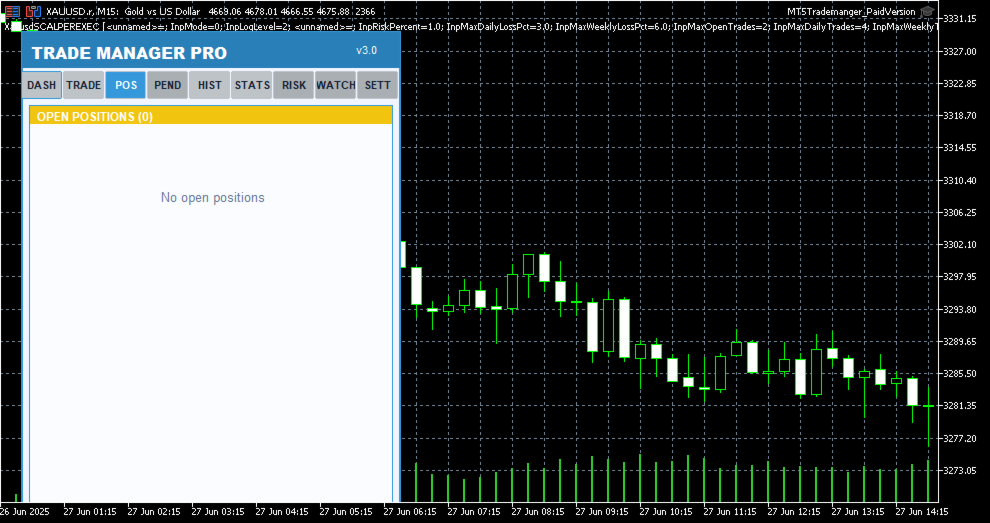
Real-time position list with ticket tracking, floating P/L display, individual close, partial close, close all, scroll through positions, position type badges

Risk Management

Trailing stop automation, break-even automation, daily loss limit, max spread protection, trade execution blocking during high spread, max open positions limit

Session Analytics

Asian/London/New York session P/L breakdown, daily P/L tracking, floating P/L summary, win rate calculation, total trade count

Watchlist

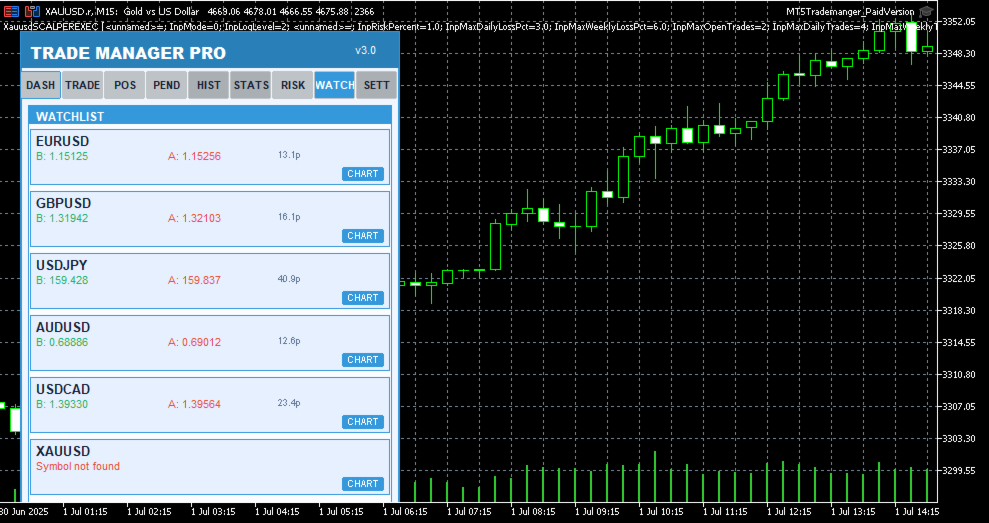
Multi-symbol price monitoring (6 symbols), one-click chart switching, real-time bid/ask display, spread visualization

Performance Stats

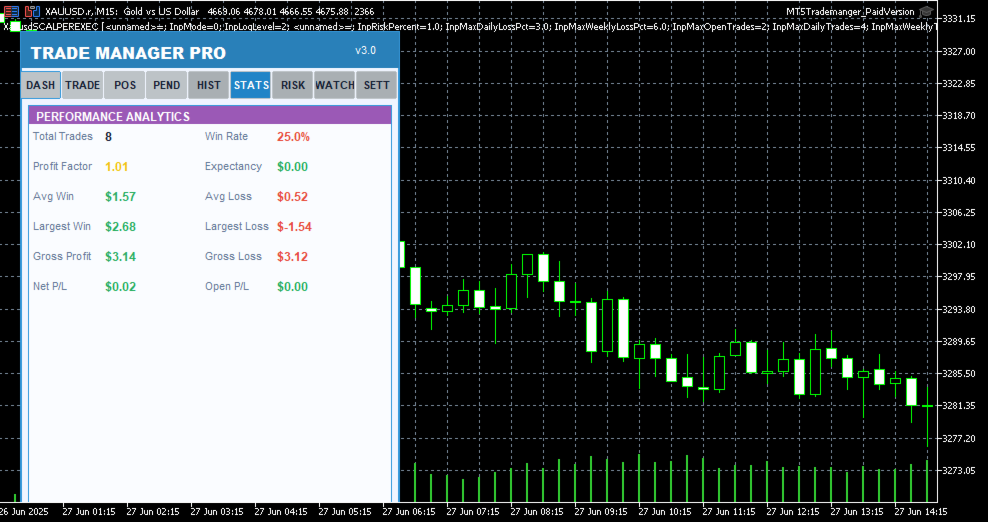
Win rate, total trades, winning trades, profit factor tracking, floating P/L across all positions

Trading Schedule

Customizable trading hours per day, weekday selection, auto block trades outside schedule, visual market closed indicator

UI / Themes

4 color themes (Light, Dark, Midnight, Forest), draggable panel, resizable layout, card-based sections, confirmation dialogs, status bar alerts

Table 1: Core Feature Categories

Detailed Feature Breakdown

One-Click Trade Execution

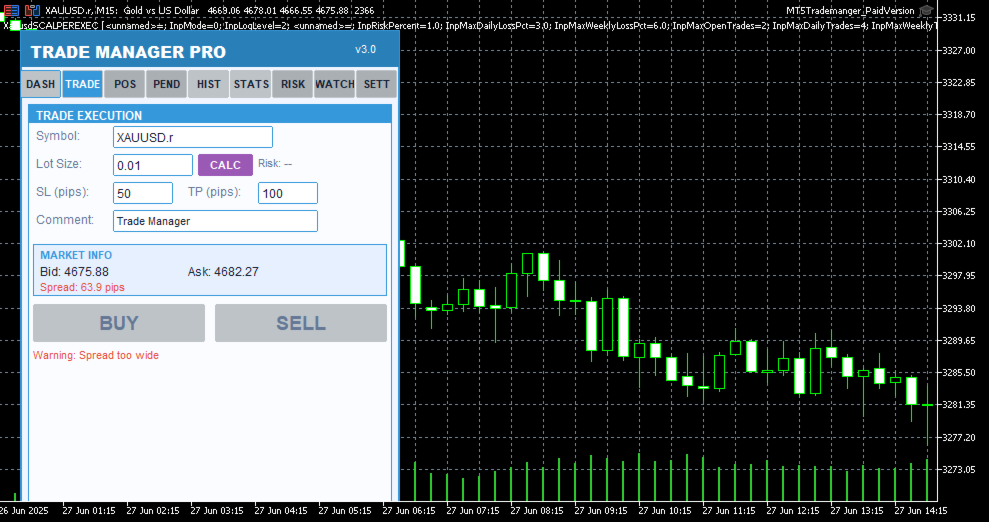
The Trade Execution page provides everything you need to open and manage trades rapidly. Enter your symbol, lot size, stop-loss in pips, take-profit in pips, and an optional comment — then hit Buy or Sell with a single click. The built-in smart lot calculator automatically determines the optimal lot size based on your risk percentage, account equity, and stop-loss distance, ensuring you never risk more than you intend to on any single trade. Before every execution, a confirmation dialog displays the trade details so you can verify your parameters before committing capital.

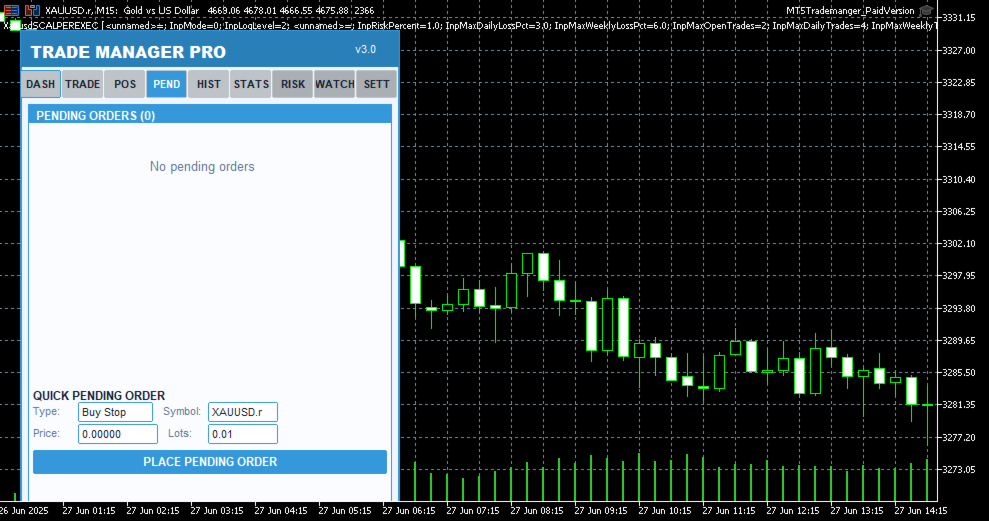
Pending order support is also included, allowing you to set up Buy Stop, Sell Stop, Buy Limit, and Sell Limit orders directly from the panel. Each pending order appears in a dedicated tab where you can monitor its status, view entry price, SL/TP levels, and delete orders that are no longer needed. The 

Trade Manager Pro  |  Product Description

real-time market info section shows current bid, ask, and spread values so you always have full context before placing a trade.

Intelligent Risk Management

Risk management is the cornerstone of consistent profitability, and Trade Manager Pro delivers a comprehensive suite of automated risk controls that work silently in the background to protect your account. The trailing stop feature automatically adjusts your stop-loss as the market moves in your favor, locking in profits while giving your trades room to breathe. You configure the trigger distance and step size, and the system handles the rest on every tick.

The break-even automation moves your stop-loss to the entry price (plus a configurable profit buffer) once the price reaches your specified trigger level, effectively eliminating risk on the trade. The daily loss limit automatically blocks all new trade executions once your cumulative daily losses exceed your predefined threshold, preventing emotional revenge trading. Additionally, the spread monitor warns you when the current spread exceeds your maximum allowed level and can block trade execution entirely during periods of high spread, protecting you from entering trades with unfavorable execution conditions.

All risk management features can be toggled on or off individually via the Settings page, and your preferences are saved across sessions using GlobalVariables. This means your configuration persists even after restarting MetaTrader or switching between charts.

Session-Based Analytics

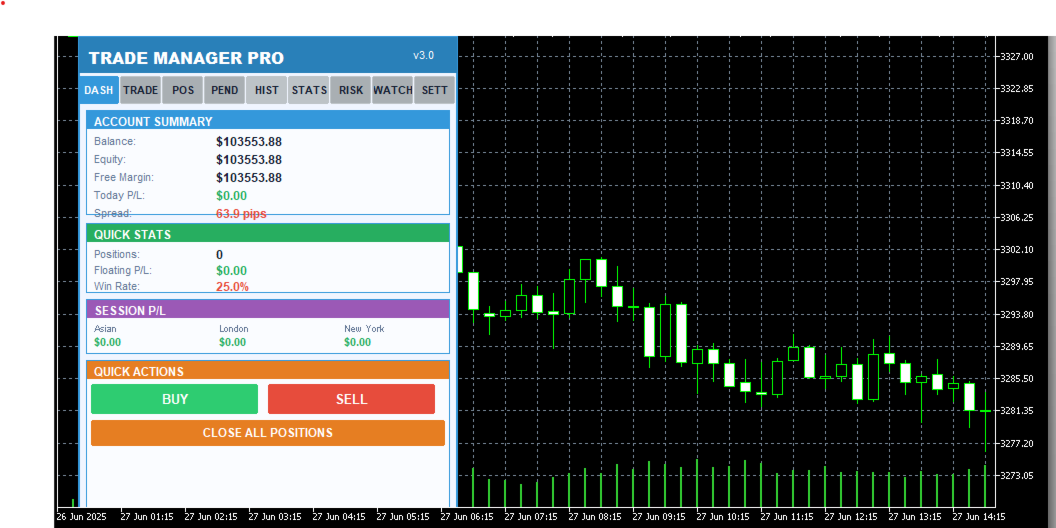
Understanding which trading sessions are most profitable for your strategy is essential for long-term improvement. Trade Manager Pro automatically tracks your closed-trade profit and loss across three major forex sessions: Asian (00:00–08:00 server time), London (08:00–16:00), and New York (13:00–22:00). The session P/L breakdown is displayed on the Dashboard page, giving you an instant snapshot of where your edge lies.

The dashboard also displays your account balance, equity, free margin, daily P/L, total open positions, floating P/L, and win rate. All values update in real time, providing you with a comprehensive overview of your account health without needing to switch between multiple terminal windows or external tools.

Multi-Symbol Watchlist

The Watchlist page lets you monitor up to six symbols simultaneously, displaying real-time bid and ask prices along with the current spread for each instrument. One-click chart switching allows you to instantly navigate to any watched symbol on your current chart, eliminating the need to manually search through the Market Watch window. Default symbols include EURUSD, GBPUSD, USDJPY, AUDUSD, USDCAD, and XAUUSD, covering the most popular forex pairs and gold.

Professional Themes & UI

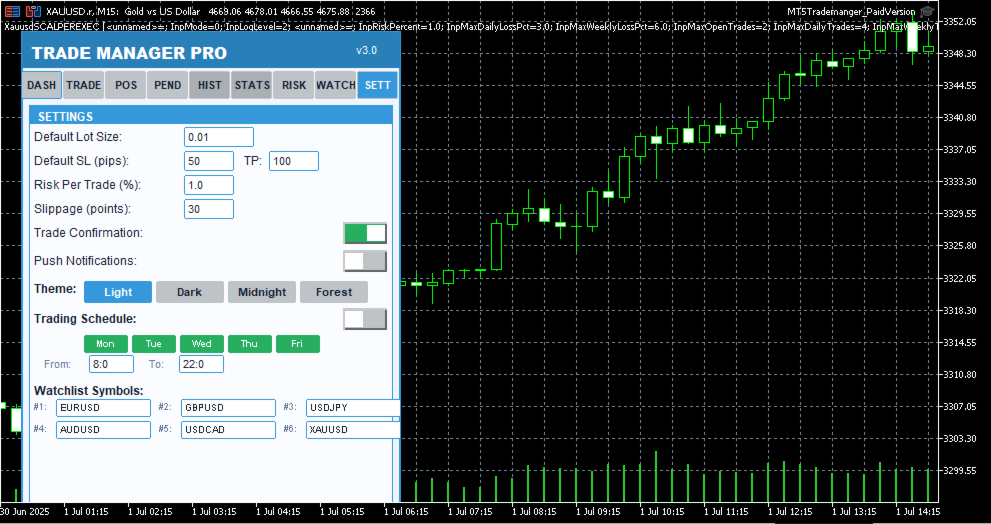
Trade Manager Pro includes four professionally designed color themes that you can switch between instantly from the Settings page: Light (clean blue tones for daytime trading), Dark (low-contrast dark theme to reduce eye strain during extended sessions), Midnight (deep navy tones inspired by 

Trade Manager Pro  |  Product Description

nighttime charting), and Forest (green-toned natural palette). Your theme preference is saved across sessions and applies to every element of the panel, including cards, buttons, labels, and status indicators.

The panel is fully draggable — click and drag the header to reposition it anywhere on your chart. All UI elements use card-based layouts with color-coded sections, making it easy to scan information at a glance. The status bar at the bottom provides real-time feedback for every action, including trade confirmations, error messages, and risk alerts, with color-coded messages that fade after five seconds to keep your workspace clean.

Why Traders Choose Trade Manager Pro

There are many trade management tools available on the MetaTrader Market, but Trade Manager Pro stands out for several reasons that directly impact your trading performance and daily workflow:

Everything in One Panel: No more juggling between multiple indicators, EAs, and scripts. Trade Manager Pro consolidates trade execution, position management, risk controls, analytics, and watchlist monitoring into a single, compact dashboard that sits cleanly on your chart. This reduces cognitive load and decision latency, especially during fast-moving market conditions where every second counts.

Battle-Tested Risk Controls: The automated trailing stop, break-even, daily loss limit, and spread monitor work together to create a safety net around your account. These features are not theoretical — they are the exact same risk management tools used by professional fund managers and proprietary trading desks, now accessible to retail traders in a simple, configurable interface.

Zero Learning Curve: Despite its extensive feature set, Trade Manager Pro is designed for immediate usability. The tabbed interface is intuitive, every button is clearly labeled, and all settings come pre-configured with sensible defaults. You can be up and running in under two minutes, and the confirmation dialogs ensure you never execute a trade by accident.

Session-Persistent Settings: Your theme preference, risk management toggles, trailing stop parameters, break-even settings, and daily loss limits are all saved using MetaTrader GlobalVariables. This means your configuration survives chart restarts, terminal restarts, and even computer reboots. Set it up once, and it stays configured until you decide to change it.

Lightweight & Non-Intrusive: Trade Manager Pro runs as an indicator (not an Expert Advisor), which means it does not interfere with your existing EAs, does not require special execution permissions, and uses minimal CPU and memory resources. The panel occupies a fixed, compact area on your chart and can be repositioned by dragging the header.

How to Get Started

Getting started with Trade Manager Pro takes less than two minutes. Follow these simple steps to 

Trade Manager Pro  |  Product Description

begin using the panel on your charts:

Purchase and download Trade Manager Pro from the MetaTrader Market. The file will be automatically installed to your MetaTrader 5 terminal.

Open any chart in MetaTrader 5. From the Navigator panel, find Trade Manager Pro under the Indicators section and drag it onto your chart.

Configure your input parameters when prompted: set your default lot size, SL/TP in pips, magic number, risk percentage, and preferred theme. All values come pre-configured with sensible defaults.

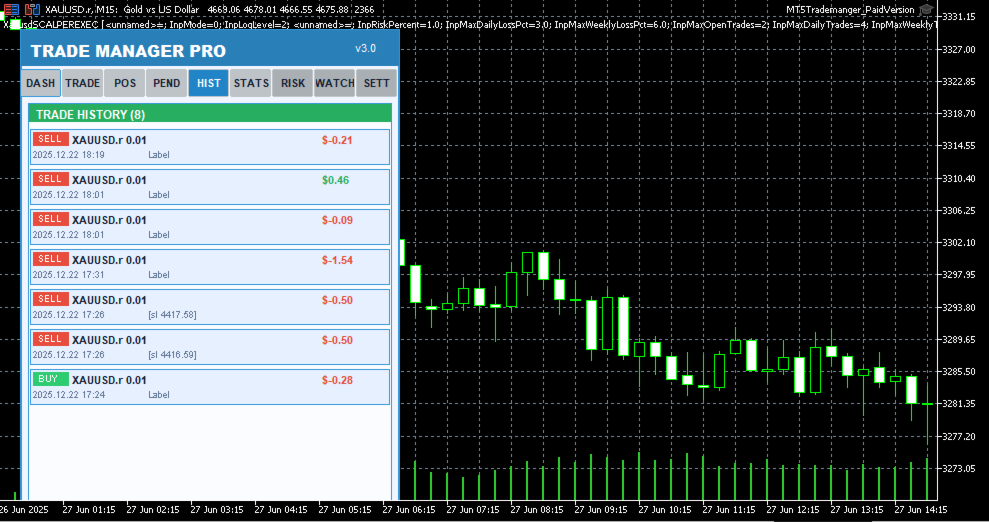
The Trade Manager Pro panel will appear on your chart. Use the tabbed navigation to access Dashboard, Trade, Positions, Pending, History, Stats, Risk, Watchlist, and Settings pages.

Customize your risk management settings on the Settings page and toggle features on or off as needed. Your preferences are saved automatically.

Start trading! Use the one-click Buy/Sell buttons, manage positions from the Positions tab, and monitor your performance from the Dashboard.

Input Parameters

Trade Manager Pro provides a comprehensive set of input parameters organized into logical groups. The following table lists all configurable options along with their default values and descriptions. All runtime-changeable settings (risk toggles, theme, schedule) can also be modified via the Settings page without needing to reattach the indicator.

Parameter

Default

Description

DefaultLotSize

0.01

Default lot size for trade execution

DefaultSL

50

Default stop-loss in pips

DefaultTP

100

Default take-profit in pips

Slippage

30

Maximum allowed slippage in points

MagicNumber

123456

Expert advisor magic number for position filtering

RiskPercentPerTrade

1.0

Risk percentage per trade for smart lot calculator

UseAutoStopLoss

true

Automatically set stop-loss on trade execution

UseAutoTakeProfit

true

Automatically set take-profit on trade execution

UseTrailingStop

false

Enable automated trailing stop management

TrailingStopDistance

30

Trailing stop activation distance in pips

Trade Manager Pro  |  Product Description

Parameter

Default

Description

TrailingStopStep

10

Trailing stop step size in pips

UseBreakEven

true

Enable break-even automation

BreakEvenTrigger

30

Break-even trigger distance in pips

BreakEvenProfit

10

Break-even profit buffer in pips

UseMaxDailyLoss

true

Enable daily loss limit protection

MaxDailyLoss

500.0

Maximum allowed daily loss in account currency

MaxSpreadPips

30.0

Maximum allowed spread in pips (execution blocked above)

MaxOpenPositions

20

Maximum number of simultaneous open positions

StartTheme

THEME_LIGHT

Initial color theme (Light/Dark/Midnight/Forest)

PanelCorner

0

Panel anchor corner (0=top-left, 1=top-right, etc.)

PanelOffsetX

20

Horizontal offset from anchor corner in pixels

PanelOffsetY

30

Vertical offset from anchor corner in pixels

Table 2: Input Parameters Reference

System Requirements

Trade Manager Pro has been designed to run on any system that supports MetaTrader 5. The following are the minimum requirements for smooth operation:

MetaTrader 5 build 2361 or higher (recommended: latest build)

Windows 7 / 8 / 10 / 11, or MetaTrader 5 for macOS / Linux

Any internet connection sufficient for trading (trade execution requires broker connectivity)

Minimum screen resolution of 1280x720 (recommended: 1920x1080 or higher for optimal panel visibility)

Allow DLL imports and automated trading enabled in terminal settings

Version History

Trade Manager Pro  |  Product Description

Trade Manager Pro is actively maintained and updated based on trader feedback. Below is the changelog for recent versions:
推荐产品
Key Features: 200+ Fully Implemented Patterns   across all categories Advanced Market Structure Analysis Smart Money Integration   (Wyckoff, Order Blocks, Liquidity) Professional Risk Management Multi-Timeframe Analysis AI-Powered Confidence Scoring Advanced Visualization Real-time Alerts Pattern Categories: Single Candle Patterns (Hammer, Doji, Marubozu, etc.) Multi-Candle Patterns (Engulfing, Stars, Harami, etc.) Chart Patterns (Head & Shoulders, Cup & Handle, Triangles, etc.) Harmonic Pattern
FREE
Grid Manual MT5
Alfiya Fazylova
4.9 (21)
Grid Manual是一个交易面板,用于处理订单网格。 该实用程序是通用的,具有灵活的设置和直观的界面。 它不仅可以在亏损方向上设置订单网格,还可以在盈利方向上设置订单网格。 交易者不需要创建和维护订单网格,实用程序会这样做。 打开一个订单就足够了,Grid manual会自动为它创建一个订单网格,并伴随它直到非常关闭。 完整说明和演示版 此處 。 该实用程序的主要特性和功能: 伴隨以任何方式打開的訂單,包括從移動終端打開的訂單。 適用於兩種類型的網格:“限制”和“停止”。 使用兩種方法計算網格間距:固定和動態(基於 ATR 指標)。 允許您更改未結訂單網格的設置。 顯示圖表上每個網格的盈虧平衡水平。 顯示每個網格的利潤率。 允許您一鍵關閉網格中的盈利訂單。 讓您一鍵關閉每個訂單網格。 允許您對訂單網格應用追踪止損功能。 允許您在訂單網格上應用將訂單網格的止損轉移到盈虧平衡水平的功能。 相對於訂單網格的盈虧平衡水平自動重新排列止盈(僅在限價網格模式下,距離取決於所選的計算類型:“保守”或“激進”)。 最多可管理 20 個訂單網格,每個網格最多可包含 100 個訂單。 計算初始手數時,
Bneu Trade Manager Pro
Marvinson Salavia Caballero
**Bneu Trade Manager Pro** is an advanced trading utility Expert Advisor for MetaTrader 5 that extends the functionality of the free version with automated trade management features, risk protection systems, and compliance tools for proprietary trading firm challenges. **All Free Version Features Included** All features from the free version are included in the PRO version. This includes visual trade management with drag-and-drop lines, risk-based position sizing, one-click order execution, p
Advanced MT5 Indicator: Precision-Powered with Pivot Points, MAs & Multi-Timeframe Logic Unlock the full potential of your trading strategy with this precision-engineered MetaTrader 5 indicator —an advanced tool that intelligently blends Pivot Points , Adaptive Moving Averages , and Multi-Timeframe Analysis to generate real-time Buy and Sell signals with high accuracy.    If you want to test on Real Market, Let me know. I will give the Demo file to run on Real Account.    Whether you're a scal
The only EA for TRADING PSYCHOLOGY:Discipline, Mindset Training & Risk Control  Checklist-Enforced Trading (No trades allowed until  strategy checklist is met)  1-Click Revenge Trade Blocker (Auto-freezes account after losses)  Overtrading Circuit Breaker (Hard daily trade limits enforced)  Neuroplasticity Training (Rewires retail habits into institutional discipline)  Institutional Risk Protocols (Auto SL/TP, position sizing, daily loss cutoffs)  Prop Firm  and account Safeguard (Preve
Ever took a trade and when you come back to the termainal to check on the status of the position, you realized the market has gone so far in the opposite direction or it has hit your stoploss. Well this system is here to help manage those moments price doesn't go in your desired direction. Consider this to be the insurance your account needs for your trading business. This tool manages manual trades and e.a. triggered trades. However be aware that some e.a.s are programmed to override other e.a.
Panha Scalping EA MT5
Huy Phanna
2.75 (4)
PANHA SCALPING EA MT5 PANHA SCALPING EA MT5 is a professional automated scalping system designed to trade fast-moving forex markets using real-time market direction and advanced position control. The EA focuses on precise entries, controlled exposure, and intelligent basket-level profit and risk management, making it suitable for traders who want structured, automated scalping without complex configuration. Strategy Overview Market-direction based scalping Designed for fast-moving forex symbo
FREE
Hello friends. I wrote this utility specifically for use in my profile with a large number of Expert Advisors and sets ("Joint_profiles_from_grid_sets"   https://www.mql5.com/en/blogs/post/747929 ). Now, in order to limit losses on the account, there is no need to change the "Close_positions_at_percentage_of_loss" parameter on each chart. Just open   one   additional chart, attach this utility and set the desired percentage for closing all trades on the account. The utility has the following fu
AurumAlert
Samuel Yip Jing Han
AurumAlert — CCI Gold Swing EA v6 A fully automated MetaTrader 5 Expert Advisor for swing trading XAUUSD (Gold) on the H1 timeframe . AurumAlert combines a dual-CCI crossover system with divergence detection, an ADX trend filter, and an H1 RSI confirmation layer to identify high-probability trend-following entries on Gold. The ATR trailing stop rides extended moves and locks in profit progressively. Technical support is provided for XAUUSD H1 only. Hedging account required.Full documentation fil
Imagine flying a real aircraft without ever stepping into a flight simulator. That's what trading is like. You have to simulate your strategy before you can take it to a live market. It is good if you can simulate things speedily before even stepping into any live market, or before coming up with an automated system.  People don't have all day to stare at a higher timeframe chart until the entry signal finally arrives. That's why I built this so that you can simulate your strategy with speed. Th

FREE
Bober Real MT5
Arnold Bobrinskii
4.76 (17)
Bober Real MT5 是一个全自动的外汇交易智能交易系统(EA)。该机器人创建于 2014 年 ,在此期间完成了大量盈利交易,在我的个人账户上实现了超过 7000% 的收益增长 。经过多次更新, 2019 年版本 是最稳定、最优秀的。机器人可用于任何交易品种,但在 EURGBP、GBPUSD(M5 周期) 上表现最佳。使用错误的参数会导致较差结果。 真实账户的 set 文件仅提供给购买者。 ️ 主要优势 无马丁格尔、无对冲、无加仓,始终使用 SL/TP 。 高速测试与优化。 可选 Dynamic Take-Profit ,自动适应价格通道高低点。 内置 新闻日历过滤器 ,自动避开重大事件。 自动检测 GMT 偏移 。 针对实盘交易长期优化,结果稳定。 设置后可自动运行,无需干预。 参数说明 Core / Trading type_order — 订单执行类型 (默认 ORDER_FILLING_FOK)。 ReverseTrade — 反转交易方向。 ToolEnter — 入场工具 (RSI 或 None)。 RSI304 / NoRSIbars — RSI 周期与
按价格设置TP和SL – MT5自动订单修改器 自动为任意交易设置精确的TP和SL价格 ️ 适用于所有货币对和EA,可按符号或魔术号筛选 此EA允许您通过直接价格值(例如EURUSD的1.12345)来设置和应用精确的止盈(TP)和止损(SL)水平。无需点数或Pips。为所有订单或按图表/魔术号筛选实现干净、精准的交易管理。 主要功能: 通过精确价格即时修改TP和SL 应用于所有订单、当前图表或特定魔术号 ️ 输入0以移除TP或SL 连接到任意图表后自动运行 兼容所有交易品种 适用于: 想快速控制TP/SL的手动交易者 需要覆盖默认退出逻辑的EA用户 管理多订单或复杂头寸的交易者 有问题或建议吗? 请留言提出您的问题或功能想法。 您的反馈将帮助我们改进未来版本。 Keywords: 按价格设置TP SL, MT5 TP SL管理, 自动SL TP MT5, 修改SL TP MT5, 交易管理EA, 专家顾问SL TP, 设置止盈价格, 设置止损价格, 应用TP SL MT5, MT5工具EA, SL TP覆盖,
SPECIAL LAUNCH OFFER: $30 (1-Month Rent) Limited time offer to build our community and gather feedback! AmbM GOLD Institutional Scalper A high-precision M5 algorithm for XAUUSD (Gold) , engineered to trade exclusively at Institutional Liquidity Levels ($5/$10 psychological marks). PERFORMANCE DATA (BUY ONLY) • Win Rate: 87.09%. • Safe Growth: +$4,113 profit on $10k (13.75% Max Drawdown). • Extreme Stress Test: Successfully generated +$22,997 in a 5-year stress test (2020-2026), proving
PROMO: ONLY 10 LEFT AT $90! Next price:        $199 Price will be kept high to limit number of users for this strategy. This EA starts trading at the open of   London (UK) Session . It is based on analysis of advanced statistical distributions combined with short to medium term reversal patterns which have mean-reversion attributes. The EA includes several smart features and allows you to trade with a fixed or automatic lot size. The EA is not sensitive to spreads but can be backtested on both
SL TP Manager Utility MT5
AL MOOSAWI ABDULLAH JAFFER BAQER
SL-TP Manager Utility for MT5 - Professional Risk Management Tool Advanced Position Protection & Profit Management SL-TP Manager Utility is a powerful, intuitive tool designed for traders who want precise control over their risk management. This utility provides a sleek interface for setting, modifying, and managing your Stop Loss, Take Profit, and Trailing Stop levels with just a few clicks. Key Features: Dual Mode Operation: Set values in pips or absolute price with a simple toggle Independent
Talents ATR Scalper Utility (MT5) The Talents ATR Scalper Utility is a professional-grade trade execution and management tool built for MetaTrader 5. Inspired by the Biblical Parable of the Talents , this utility is designed to help traders multiply their potential with precision risk control, one-click simplicity, and advanced automation. Whether you’re scalping forex, gold, or indices, this tool delivers speed, consistency, and confidence. Key Features One-Click Trade Preview Click below price
Fuzzy Predictor EA
Renato Takahashi
Fuzzy Predictor EA is based on fuzzy logic strategy based on candlestick analysis , according to number of consecutives long or short candles, percent of long or short candles on a fixed candlestick sample, percent of shadow on this sample or upper and lower shadows on reversal candlesticks for reversal analysis. When the EA analysis all this parameters, it decides, based on its fuzzy strategy, which trade will be better: trend or reversal. Takeprofit and Stoploss is based on candlesticks sample
This PORTFOLIO of 3 strategies has been developed, tested and traded live on DAX H1 timeframe. Multiple EAs traded together will lead to a BIGGER PROFITS and SMOOTHER EQUITY CURVE. 3 not correlated EAs logics for DAX H1 timeframe merged to a single strategy. Very SIMPLE STRATEGIES with only FEW PARAMETERS.  Every trade has his own logic for STOP LOSS. To catch the profits every strategy uses different approach - some has TAKE PROFIT, some uses TIME BASED EXITS or PROFIT TRAILING. EA has been b
This PORTFOLIO of 3 strategies has been developed, tested and traded live on DAX M30 timeframe. Multiple EAs traded together will lead to a BIGGER PROFITS and SMOOTHER EQUITY CURVE. 3 not correlated EAs logics for DAX M30 timeframe merged to a single strategy. Very SIMPLE STRATEGIES with only FEW PARAMETERS.  Every trade has his own logic for STOP LOSS. To catch the profits every strategy uses different approach - some has TAKE PROFIT, some uses TIME BASED EXITS or PROFIT TRAILING. EA has been
This is the HFT Flame Ea....This is a complex Expert Advisor that basically pick trades from price movements, it is also a none-martingale mechanism with netting strategy that makes this Ea more interested and profitable throughout your trading journey. The HFT Flame EA can be super consistent on profits depending on the inputs selected for your style of trading. This is a hand free trading robot that can trade your way to success while you are away from the charts, another perfect advantage abo
It Will Close Your All Trade   in Half of second  no matter you open 100 plus trade open it will close all trade half of second  . it good work for 1 -5 min scalping   this Ea have  many function see the pic i uploaded   there  . ea that have function close all trade , close all lossing trade , close all profit trade . also have lot system where you can put your  expected lot and buy sell button and it can close 100 trade in 1 second  
BTC Master Pro
Farzad Saadatinia
4.58 (12)
BTC Master Pro —— 您值得信赖的比特币纪律化交易伙伴。 全新版本现已集成 OpenAI 人工智能技术 ,在高波动的加密市场环境中,实现更智能的执行与更精准的交易过滤。 本专业级交易机器人专为 Bitcoin (BTCUSD) 在 MetaTrader 5 平台上的交易而设计,专注于结构化执行、风险暴露控制以及智能化风险管理。 当前价格: $499  →  下一阶段: $699  →  最终价格: $999 LIVE SIGNAL HERE 基于 OpenAI 的执行过滤系统 最新版本集成 OpenAI 技术,用于实时分析市场环境并过滤低质量或弱势交易信号。 AI 安全层(AI Safety Layer): 人工智能模块作为交易执行前的第二层审核机制。其功能严格限定为执行过滤工具(而非市场预测工具)。每一笔交易都必须通过结构化逻辑与智能验证流程,以减少不必要的回撤并避免低质量入场。 为什么选择 BTC Master Pro? 加密货币市场——尤其是比特币——具有高度波动性。情绪化决策往往导致不稳定的交易结果。本系统旨在帮助交易者在快速市场变化中保持结构化、纪律性与
Fractal Trend Master 是市场上最强大且最复杂的智能交易系统之一,旨在保护交易者的资金,同时最大化盈利机会。基于 比尔·威廉姆斯 的著名方法论,该EA使用三种重要的技术分析工具: 鳄鱼指标 、 分形 和 Gator振荡器 ,为识别和跟随市场趋势创建了一个强大而精准的框架。 该EA专注于 高级风险管理 和 资金保护 ,提供对交易和亏损的有效控制。通过选择 固定或动态手数 ,设定每日 盈亏限额 (P/L) 并执行 经过验证的策略 ,Fractal Trend Master适合保守和激进的交易者。 主要特点: 高级风险管理 :在固定或动态手数之间进行选择,并设定每日盈亏限额以保护您的资金。 基于比尔·威廉姆斯的策略 :该EA采用基于鳄鱼指标和分形的三种策略,并通过Gator振荡器确认趋势。 全自动化 :EA自动管理开仓和平仓,用户可以调整止损、止盈和移动止损等参数。 多时间框架 :适用于任何时间框架,在较大的时间框架(H4及以上)中表现最佳,同时在较小的时间框架中提供较高的交易频率。 优化范围  PARAMETER START STEP END JAW PERIOD  1
Exclusive EA for FOREX HEDGE account The EA (FuzzyLogicTrendEA) is based on fuzzy logic strategies based on the analysis of a set of 5 indicators and filters. Each indicator and filter has a weight in the calculation and, when the fuzzy logic result reaches the value defined in the EA parameter, a negotiation is opened seeking a pre-defined gain. As additional functions it is possible to define maximum spread, stop loss and so on . Recommended Symbol: EURUSD, AUDUSD, GBPUSD, NZDUSD, USDCAD, AUD
Neopips Engine EA
Md Billal Hossain
NeoPips Engine EA – 终极交易革命已然到来! “交易的真正力量在于洞察他人所忽略的。NeoPips Engine 不随波逐流,而是掌控市场。” 关于 NeoPips Engine EA:您的智能交易盟友 NeoPips Engine EA 并非普通的交易机器人。它是一款多维度、AI 优化的专家顾问,专为追求精准度、适应性和长期表现的交易者打造。 与那些规则僵化的过时机器人不同,NeoPips Engine 是一种动态策略——它会实时思考、学习并适应市场。 这不仅仅是自动化,更是一场持续的进化。 更上一层楼的智能:让您自由发挥的核心功能 人工智能决策 动态模式识别 预测趋势分析 基于实时数据的智能进出逻辑 多引擎策略核心 – 四种模式,同一个目标:赢。 NeoPips 引擎会根据实时信号自动切换引擎: 剥头皮模式 – 捕捉快速波动的爆发 波动模式 – 瞄准长期趋势阶段 突破模式 – 在重大经济新闻发布时激活 ️ 安全守护模式 – 在市场波动时介入 效果:无缝过渡,在所有市场阶段
PipFinite EA Trend PRO MT5
Karlo Wilson Vendiola
3.67 (9)
The Official Automated Version of the Powerful Indicator PipFinite Trend PRO EA Trend PRO trades the signal of PipFinite Trend PRO and manages the trade depending on the user's preference. The EA includes many customizable features that can further enhance the Trend PRO trading strategy. Features like Entry and Exit Filters, Higher Timeframe Filter, Stoploss, Takeprofit, Breakeven, Trailing Stop, News Filter and MORE! The Innovative Solution EA Trend PRO was created to make your trading more
Gold Crazy EA MT5
Nguyen Nghiem Duy
Gold Crazy EA   is an Expert Advisor designed specifically for trading Gold H1/ EU M15. It use some indicators to find the good Entry. And you can set SL or you can DCA if you want. It can be an Scalping or an Grid/ Martingale depend yours setting. This EA can Auto lot by Balance, set risk per trade. You also can set TP/ SL for earch trade or for basket of trade. - RSI_PERIOD - if = -1, then the default strategy works, if >0, then the RSI strategy works - MAX_ORDERS - to trade with only 1 order,
The Gold Scalping Auto Entry is an automated trading system developed specifically for the XAUUSD instrument. The Expert Advisor operates by analyzing structural price action, volume, and momentum across multiple timeframes to identify and execute trades. The system does not use grid or martingale strategies. Every trade is executed with a predefined stop loss and relies on calculated risk management parameters. The Expert Advisor is written in pure MQL5, contains no DLL calls, and requires no
FREE
SolarTrade Suite 金融机器人:LaunchPad 市场专家 - 专为开启交易而设计! 这是一个使用特殊创新和先进算法来计算其价值的交易机器人,是您在金融市场世界中的助手。 使用我们来自 SolarTrade Suite 系列的指标集来更好地选择启动此机器人的时机。 在描述底部查看我们来自 SolarTrade Suite 系列的其他产品。 您想自信地驾驭投资和金融市场的世界吗? SolarTrade Suite 金融机器人:LaunchPad 市场专家是一款创新软件,旨在帮助您做出明智的投资决策并增加您的利润。 SolarTrade Suite 金融机器人的优势:LaunchPad 市场专家: - 准确计算:我们的机器人使用先进的算法和分析方法来准确预测市场走势。 计算购买和出售资产的最佳时机。 - 用户友好界面:直观的界面将使您能够轻松掌握程序并在安装后立即开始享受其好处。 - 专家支持:我们的专业团队随时准备为您解答任何问题,并为您提供有关使用该程序的建议。 立即试用 SolarTrade Suite 金融机器人:LaunchPad Market
Fvg Edge
Ahmad Meftah Abdulsalam Alawwami
5 (2)
FVG智能区域 - 免费版 MetaTrader 5 (MT5) 公允价值缺口检测指标   您是否在寻找真正的交易工具,而不仅仅是另一个随机指标? FVG智能区域 - 免费版通过自动检测公允价值缺口(FVG)并在图表上直接高亮显示高概率交易区域,为您提供专业的市场洞察。   专为以下交易者打造: 聪明资金概念(SMC) ICT交易概念 价格行为 供需分析 机构交易策略 该指标帮助您专注于真正重要的事情:价格可能做出反应的区域。 主要特点: 智能区域检测: 自动检测看涨和看跌缺口 清晰、专业的视觉区域 智能过滤以消除弱相关或不相关的缺口 高级确认: 更高时间框架(HTF)汇合验证 当价格填补时智能移除无效区域 活动区域与已填补区域之间的清晰视觉区分 优化性能: 轻量快速 - 不会拖慢您的图表 兼容所有货币对和时间框架 真实交易条件下的平稳运行 完全自定义: 完全可调整的颜色和视觉风格 完美适用于外汇、黄金(XAUUSD)、指数和加密货币 适合日内交易、波段交易和剥头皮交易
FREE
该产品的买家也购买
Trade Assistant MT5
Evgeniy Kravchenko
4.42 (207)
它有助于计算每笔交易的风险,容易安装新的订单,具有部分关闭功能的订单管理, 7 种类型的追踪止损和其他有用的功能。   附加材料和说明 安装说明   -   应用程序说明   -   模拟账户应用程序的试用版 线条功能  - 在图表上显示开仓线、止损线、止盈线。 有了这个功能,就可以很容易地设置一个新的订单,并在开仓前看到它的附加特性。   风险管理  - 风险计算功能在考虑到设定的风险和止损单的大小的情况下,计算新订单的成交量。它允许你设置任何大小的止损,同时观察设定的风险。 批量计算按钮 - 启用 / 禁用风险计算。 在 " 风险 " 一栏中设置必要的风险值,从 0 到 100 的百分比或存款的货币。 在 " 设置 " 选项卡上选择风险计算的变量: $ 货币, % 余额, % 资产, % 自由保证金, % 自定义, %AB 前一天, %AB 前一周, %AB 前一个月。   R/TP 和 R/SL - 设置止盈和止损的关系。 这允许你设置相对于损失的利润大小。 例如, 1 : 1 - 这决定了 TP = SL 的大小。 2 : 1 - 这意味着 TP 是 SL 的两倍。 RR -
VERIFIED TRADING RESULTS - Farmed Hedge Yield Axi Copy:  https://www.mql5.com/en/signals/2356376 - Farmed Hedge Yield Exn Copy:   https://www.mql5.com/en/signals/2356404 - Farmed Hedge Yield V Copy:  https://www.mql5.com/en/signals/2357156 Contact me via private message to receive the User Manual and Setup. * Thai Lauguage Support Available Farmed Hedge Yield Farming - Professional Pair Trading Dashboard (Manual - Hybrid - Semi/Automated EA) VERSION 3 - WILD HARVEST UPDATE Trading Approac
HINN Lazy Trader
ALGOFLOW OÜ
5 (2)
The core idea: using the user interface, you configure the parameters the chart must meet before entering a position (or positions), choose which entry models to use, and set the rules for when trading and planning should end. Lazy Trader  handles the rest: it  takes over all the routine chart watching and execution! full description  :: 3 key videos [1] ->  [2]   ->  [3] What can it do? - Understands Larry Williams market structure - Understands swing market structure by Michael Huddleston
The product will copy all telegram signal to MT5 ( which you are member) , also it can work as remote copier.  Easy to set up, copy order instant, can work with almost signal formats, image signal,  s upport to translate other language to English Work with all type of channel or group, even channel have "Restrict Saving Content", work with  multi channel, multi MT5 Work as remote copier: with signal have ticket number, it will copy exactly via ticket number. Support to backtest signal. How to s
Crypto Charting
Rajesh Kumar Nait
5 (5)
Crypto Charting for MT5 – MetaTrader 5 加密货币图表集成工具 概述 Crypto Charting for MT5 通过 WebSocket 提供实时 OHLC 图表数据。支持多家交易所,并可在 MT5 中自动更新历史数据。 功能 实时 WebSocket 数据传输 自动历史数据同步 网络中断后的计划更新 兼容所有 MT5 时间周期 支持 OHLCV 数据格式 支持策略测试器 自动重新连接 支持的交易所 Binance, Bybit, OKX, KuCoin, MEXC, Gate.io, Bitget, XT.com 补充说明 如需获取 Tick 数据和深度数据,可查看名为 Crypto Ticks 的相关产品。 注意事项 不使用 DLL,适用于 VPS 环境。 Strategy Tester 不支持 WebRequest 功能。 如需试用版本,请通过 MQL5 私信联系作者。 Full Documentation & Setup Guide : Click Here
Footprint Chart Pro — Professional OrderFlow EA for MetaTrader 5 Version 6.34 | Professional tool for real traders | Institutional-Grade Visualization DEMO USERS - PLEASE SELECT EVERY TICK / REAL TICK WHEN TESTING AND YOU HAVE DOWNLOADED HISTORICAL DATA. IF YOU SEE A WAITING SCREEN AND IT IS NOT DOWNLOADING, IT MEANS YOU HAVE LOW HISTORICAL DATA. TRY 1 MIN AND 5 MIN FIRST ON 1 DAY DATA. ONE DAY DATA SHOULD BE THE NEWEST AND MOST CURRENT DATE. PLEASE WAIT UNTIL THE MARKET HAS ROLLED OVER PERIOD.
Ultimate Extractor
Clifton Creath
5 (9)
Ultimate Extractor - Professional Trading Analytics for MT5 *****this is the local HTML version of Ultimate Extractor. For the online version please reach out to me directly****** Ultimate Extractor transforms your MetaTrader 5 trading history into actionable insights with comprehensive analytics, interactive charts, and real-time performance tracking. What It Does Automatically analyzes your MT5 trading history across all Expert Advisors and generates detailed HTML reports with interactive vi
YuClusters
Yury Kulikov
4.93 (43)
Attention: You can view the program operation in the free version  YuClusters DEMO .  YuClusters is a professional market analysis system. The trader has unique opportunities to analyze the flow of orders, trade volumes, price movements using various charts, profiles, indicators, and graphical objects. YuClusters operates on data based on Time&Sales or ticks information, depending on what is available in the quotes of a financial instrument. YuClusters allows you to build graphs by combining da
Telegram To MT5 Receiver
Levi Dane Benjamin
4.31 (16)
将信号从您所属的任何渠道(包括私人和受限渠道)直接复制到您的 MT5。 该工具在设计时充分考虑了用户的需求,同时提供了管理和监控交易所需的许多功能。 该产品采用易于使用且具有视觉吸引力的图形界面。 自定义您的设置并在几分钟内开始使用该产品! 用户指南 + 演示  |   MT4版本  |   不和谐版本 如果您想尝试演示,请参阅用户指南。 Telegram To MT5 接收器在策略测试器中不起作用! Telegram 至 MT5 功能 一次复制多个通道的信号 从私人和受限频道复制信号 不需要机器人令牌或聊天 ID(如果出于某种原因需要,您仍然可以使用这些) 使用风险百分比或固定手数进行交易 排除特定符号 选择复制所有信号或自定义要复制的信号 配置单词和短语以识别所有信号(默认值应适用于 99% 的信号提供商) 配置时间和日期设置以仅在需要时复制信号 设置一次打开的最大交易量 交易和头寸管理 使用信号或自动设置的管理 通过设置每月、每周、每天、每小时或每分钟的最大交易次数,停止过度交易和报复性交易。 支持市价订单和挂单 每日最大利润目标(以美元为单位)以确保头寸并停止过度交易 确
Neowave Chart Plotter
Bahador Baradari
5 (1)
This Expert Advisor is applicable to plot wave charts as per the NeoWave  method (Neely Extension of Wave Theory).  NeoWave is a scientific, objective and revolutionary style of Elliott Wave Theory that was invented by Glenn Neely in 1990 in the “Mastering Elliott Wave” book. To start analyzing with this method, we need a particular chart called the Wave Chart or Cash Data chart . This is the first step for a good wave analysis. To draw this chart, Highs and Lows should be plotted in the order t
Custom Timeframe Manager Pro:MetaTrader 5 无限制时间框架 标准终端设置通常会隐藏价格波动的关键细节。如果仅局限于经典周期的分析,交易者可能会错过趋势的萌芽和真实的波动水平。 Custom Timeframe Manager Pro 是一款专业级解决方案,彻底解除了图表构建的任何限制。您可以创建任何自定义周期,包括分数周期和异形周期,它们会立即显示在便捷的控制面板中。 可用周期类型: 秒级 :S1 起的任何值(例如:S5, S15, S30)。 分数级 :独特周期,如 M1.5, H1.5 或 D1.2。 自定义 :多日(D2, D3)和多周(W2)图表。 核心技术优势: 基础设施化方案 (Custom Symbols) :该工具在终端数据库中创建真实的交易品种。这允许您在自定义图表上使用任何第三方指标进行深度分析。 实时混合引擎 (Zero-Lag) :小周期采用分时精度,大周期采用流聚合。图表价格变动无延迟。 Zero-Flicker 技术 :解决了指标“跳动”的问题。得益于 Delta Update 架构,振荡指标(RSI, MACD 等)
EasyInsight AIO MT5
Alain Verleyen
4.92 (12)
EASY Insight AIO – 全能智能交易一站式解决方案 概述 想象一下,您可以在几秒钟内扫描整个市场——外汇、黄金、加密货币、指数,甚至股票——无需手动筛选图表、繁琐安装或配置指标。 EASY Insight AIO 是您专为 AI 交易打造的即装即用数据导出工具。它将整个市场快照一次性输出为简洁的 CSV 文件,直接支持 ChatGPT、Claude、Gemini、Perplexity 等各类 AI 平台的即时分析。 无需窗口切换,无需图表叠加,也没有任何杂乱。只需纯净、结构化的数据自动导出,让您专注于基于数据的高效决策,无需再盯盘耗时。 为什么选择 EASY Insight AIO? 真正的一体化 • 无需设置,无需安装指标,无图表叠加。只需安装、运行并导出——就是这么简单。 多资产全覆盖 • 扫描分析外汇、金属、加密货币、指数、股票——您的券商所能提供的一切市场。 AI 专属数据导出 • 高度结构化、针对 AI 优化的 CSV 文件,直接适配主流智能工具和平台。 完整导出内容: • 三个可选周期的货币强度分析 • 净多头头寸变化体现市场情绪 • 成交量变化、
Signal TradingView to MT5 Pro Automator TradingView 与 MetaTrader 5 之间的即时专业执行 使用最强大的桥梁,将 TradingView 警报与 MT5 中的实际执行连接起来,实现交易策略的自动化。这款 Expert Advisor 专为要求速度、灵活性和完美风险管理的交易者设计,可将任何警报消息转化为精确的市价或限价订单。 优势与特点 通用解析引擎(专有): 先进技术,能够自动识别并提取任何警报格式中的数据。您不再受限于单一的死板格式;系统会自动理解交易品种(Symbol)、操作(Action)、价格(Price)、止损(SL)和止盈(TP)。 实时执行: 极速轮询技术(低于 1 秒),经过优化可将延迟降至最低。接收到信号后,订单将在毫秒内执行。 机构级风险管理: 基于以下方式自动精确计算手数: 净值/余额百分比(% of Equity/Balance): 每笔交易承担固定账户百分比的风险。 风险金额(Risk Amount): 设定在触发止损时损失的固定货币金额(例如:100 美元)。 固定手数(Static Lots)
Unlimited Trade Copier Pro MT5 is a tool to copy trade remotely to multiple MT4, MT5 and cTrader accounts at different computers/locations over internet. This is an ideal solution for you if you are a signal provider and want to copy your trades to other receivers globally on your own rules. One provider can copy trades to multiple receivers and one receiver can get trade from multiple providers as well. The provider can even set the subscription expiry for each receiver, so that receiver will n
ManHedger MT5
Peter Mueller
4.83 (6)
THIS EA IS A SEMI-AUTO EA, IT NEEDS USER INPUT. Manual & Test Version Please TEST this product before BUYING  and watch my video about it. The price of the ManHedger will increase to 250$ after 20 copies sold. Contact me for user support or bug reports or if you want the MT4 version! MT4 Version  I do not guarantee any profits or financial success using this EA. With this Expert Advisor, you can: Implement your own Zone Recovery strategy to capitalize on trending markets. Create Grid trading s
The product is used to trade base on any Alert signal in MT5 Easy to setup, simple format with custom keyword All option to management orders as trailing stop, breakeen, partial close, time filter, news filter ... Option to auto open grid orders How to setup and guide: Let read all details about setup and download indicator for auto get   Alert Signal   here Do not buy if you even can not install demo EA to your VPS ( some VPS block download EA from mql5 market) We always bring customers high q
Custom Alerts AIO:多市场智能监控,一键启动,无需设置 概述 Custom Alerts AIO 是一款“开箱即用”的高级市场扫描工具,无需额外安装任何其他指标或进行复杂设置。它内置了 Stein Investments 的所有核心指标(FX Power、FX Volume、FX Dynamic、FX Levels 和 IX Power),可帮助您轻松监控所有主要资产类别,如外汇、黄金、指数和加密货币。如果您的经纪商支持股票,您也可以手动添加个股进行监控。 1. 为什么选择 Custom Alerts AIO? 无需额外购买任何指标 • 所有关键指标均已内置,开箱即用。 • 专注于实时预警,不包含任何图形元素,性能高效,界面简洁。 全面覆盖所有主要市场 • 支持监控外汇、金属、加密货币和指数市场。 • 无需手动输入任何交易品种,只需在设置中勾选资产类别即可启用。 • 股票并不属于默认类别,如有需要可手动通过参数输入添加。 高效、专业、便捷 • 无需图表模板和手动加载,适合自动化或远程交易环境。 • 非常适合 VPS 上长期运行,或作为后台市场预警工具使用。 2
GRat Binance
Ivan Titov
1 (1)
Trade on Binance in MT5! GRat_Crypto is a tool for manual and automated trading , including ANY available EA, ANY  cryptocurrency  on most popular crypto exchange Binance in the familiar MT5 environment 24/7. Features 1. ALL instruments of the 5 most popular crypto exchange  Binance . 2. The ability to place ANY type of order available in MT5, both market and pending, to modify orders and positions, to delete orders and close positions (even partially), to set trailing stop and trailing profit.
Features   With MT5 to Interactive Brokers(IB) Trader, you can: 1. Load chart data from IB to MT5, and Analyze with all standard or customer Indicators. 2. Place Orders to IB Account Directly in MT5. 3. Make your Own EAs upon IB Securities by only making minus changes of the trading function. Usage 1) Installation Copy the "Mt5ToIBTraderEn.ex4" and sample files to [MT5 Data Folder]->MQL5->Experts.  2)  MT5 Settings Add the IP Address to the MT5 Allowed URLs in 'Tools->Options->Expert Adviso
******************************* ***************** ********************** ***************** ********************** ************************* GoldMine Train 是一款针对黄金的趋势交易策略 EA。 操作员确定主要趋势方向并指示Train前进。 Train 将在该方向连续买入/卖出, 手数取决于账户余额和预设的杠杆比率。 当操作员改变趋势方向时,Train将停止并锁定利润。 用户可以使用图表上的按钮轻松选择趋势方向。 ******************************* ***************** ********************** ***************** ********************** *************************
The Expert Advisor will help you forward all alert from  MetaTrader 5 to Telegram channel/ group.  All alert must save to folder <Data folder>MQL5\Files\Alerts\ , text file with format *.txt and screenshot with format *.gif or *.png. Parameters: - Telegram Bot Token: - create bot on Telegram and get token. - Telegram Chat ID:  - input your Telegram user ID,  group / channel ID - Forward Alert: - default true, to forward alert. - Send message as caption of Screenshot: - default false, set true t
FuturesGate
Laurent Xavier Richer
MT5 → Futures API Bridge Mirror your MT5 trades into an external futures platform in real time—perfect for running your favorite Expert Advisor (EA) on MT5 while executing on supported external futures accounts. NEW in v2.0: Multi-Symbol Support (Trade Nasdaq, S&P, and Dow from one chart), List-Based Filtering. Click here to read the Full Manual & Setup Guide Key Features Multi-Symbol Control: Manage trades for multiple instruments simultaneously from a single chart instance using the new "
Dynamic Fibonacci Grid
Tsvetan Tsvetanov
5 (1)
推出最新版本的 MT5 动态斐波那契网格仪表盘(Dynamic Fibonacci Grid Dashboard)。 全新版本配备了众多新功能,为您的交易体验带来彻底升级,并让您从全新的角度观察市场和价格行为。通过同时分析多个时间周期和多个交易品种,探索更多可能性。界面友好,支持手动交易和持仓管理,并大幅扩展了预设自动化策略的应用能力。此外,DFG 现在在策略测试器中可作为交易模拟器全面运行,您可以使用历史数据重现不同的交易环境。在可视化模式中练习手动交易,在高速模式中测试自动化策略。 主要功能 • 基于动态斐波那契通道(Dynamic Fibonacci Bands)的多周期、多品种高级技术分析。 通过我们的实时市场监控仪表盘,体验前所未有的高效分析能力。我们将来自 M1、M5、M15 和 H1 图表的复杂数据合成为易于理解的网格水平。这种独特呈现方式让交易者能够在同一个屏幕上监控 10 个不同品种的价格行为,而无需依赖传统图表。结果是更快速的决策过程,以及更简洁、不杂乱的交易环境。 • 可自定义且用户友好的界面,集成最重要的功能。 包括账户状态与信息、快捷手动交易与持仓管理按
The product will copy all  Discord  signal   to MT5   ( which you are member  ) , also it can work as remote copier.  Easy to set up. Work with almost signal formats, support to translate other language to English Work with multi channel, multi MT5. Work with Image signal. Copy order instant, auto detect symbol. Work as remote copier: with signal have ticket number, it will copy exactly via ticket number. How to setup and guide: Let read all details about setup and download Discord To MetaTrader
Mt5 To InterativeBrokers Copier allows you to copy deals from MT5 account to Interactive Brokers. With this, you can run your EA strategy on a MT5 Demo/Real Account, then copy all the deals to Interactive Brokers account real time. Features: 1. Copy or Invert-Copy deals Realtime from MT5 to IB Account. 2. Synchronizing positions of both accounts periodicaly, in case any missing copying. 3. You can choose only Buy position or Sell position. Symbols Setup: General Format:  {MT Symbol} -> {IB S
Mentfx Mmanage mt5
Anton Jere Calmes
4.25 (8)
The added video will showcase all functionality, effectiveness, and uses of the trade manager. Drag and Drop Trade Manager. Draw your entry and have the tool calculate the rest. Advanced targeting and close portions of a trade directly available in tool (manage trades while you sleep). Market order or limit order on either side with factored spread. Just draw the entry, the tool does the rest. Hotkey setup to make it simple. Draw where you want to enter, and the stop loss, the tool calculates al
Ultimate Trailing Stop EA MT5
BLAKE STEVEN RODGER
4.13 (8)
This EA Utility allows you to manage (with advanced filtering) unlimited open orders (manual or EA) with 16 trailing stop methods: fixed, percent, ATR Exit, Chandelier Exit, Moving Average, Candle High Low Exit, Bollinger Bands, Parabolic, Envelope, Fractal, Ichimoku Kijun-Sen, Alligator, Exit After X Minutes or Bars, RSI and Stochastic. The trailing stop can be either real or virtual, and you can exit fully or with a partial close percent on touch or bar close.  Moreover, you can add (override
Trade Copier Pro MT5 is a tool to copy trade remotely to multiple MT4, MT5 and cTradfer accounts at different computers/locations over internet. This is an ideal solution for you if you are a signal provider and want to copy your trades to other receivers globally on your own rules. One provider can copy trades to multiple receivers and one receiver can get trade from multiple providers as well. The provider can even set the subscription expiry for each receiver, so that receiver will not be abl
GRat Crypto
Ivan Titov
4.5 (2)
Trade on crypto exchanges in MT5! GRat_Crypto is a tool for manual and automated trading , including ANY available EA, ANY  cryptocurrency  on most popular crypto exchanges in the familiar MT5 environment 24/7. Features 1. ALL instruments of the 9 most popular crypto exchanges are available: Binance, BingX, Bybit, Coinbase, CoinEx, Kraken,   KuCoin, MEXC and OKX . 2. The ability to place ANY type of order available in MT5, both market and pending, to modify orders and positions, to delete order
PineChart
Muhammad Minhas Qamar
Developed by MMQ —  PineChart: Run PineScript Inside MT5 With A Modern Charting Experience An MQL5 Expert Advisor that runs Pine Script indicators and strategies directly inside MetaTrader 5. PineChart includes a full Pine Script interpreter so you can use your existing Pine Script v5/v6 source code without manually rewriting anything in MQL5. Links [  Website  |  Documentation  |  Demo ] NOTE: Downloading demo through MQL5 will give you limited functionality. To experience PineChart fully, dow
作者的更多信息
Ultimate Gold Breakout
Anthony Dewayne Wasome
Ultimate Gold Breakout Professional XAUUSD Breakout Expert Advisor Ultimate Gold Breakout is a systematic Expert Advisor designed to trade daily breakout movements on Gold (XAUUSD) using clearly defined price levels and structured risk management. It is built for ECN and prop trading environments where execution quality and capital protection are critical. Strategy Overview The EA identifies the previous day’s high and low and prepares trades for potential breakout moves from these levels. Trade
MT5 Trade Manager
Anthony Dewayne Wasome
MT5 Trade Manager - Multi-Page Dashboard Professional Trading Panel with Advanced Risk Management Transform your MetaTrader 5 trading experience with this comprehensive trade management system featuring a sleek, multi-page dashboard that gives you complete control while maintaining maximum chart visibility. Key Features 6 Interactive Pages DASHBOARD - Quick overview with real-time balance, equity, margin, and today's P/L. One-click BUY/SELL buttons and emergency close all positions. TRADE - Adva
FREE
筛选:
无评论
回复评论