MT5 Trade Manager Pro

Product Description

Introduction

Trade Manager Pro is a comprehensive, all-in-one trade management dashboard for MetaTrader 5 that puts every essential trading tool at your fingertips. Designed for both beginners and experienced traders, this professional-grade indicator transforms your chart into a powerful command center where you can execute trades, manage positions, monitor risk, and analyze your performance — all from a single, elegantly designed panel.


Unlike cluttered, feature-heavy tools that overwhelm you with unnecessary complexity, Trade Manager Pro focuses on what truly matters: speed, precision, and control. Every feature has been carefully engineered to help you make faster decisions, protect your capital with intelligent risk management, and maintain full visibility over your trading activity across multiple symbols and sessions. Whether you are scalping on the M1 timeframe or swing trading on H4, this tool adapts to your style seamlessly.

Key Features at a Glance

The following table provides a high-level overview of the core feature categories included in Trade Manager Pro. Each section is accessible via the tabbed navigation panel and has been designed for rapid interaction with minimal clicks.

Category

Capabilities

Trade Execution

One-click Buy/Sell, custom lot sizes, SL/TP in pips, comment field, smart 

Trade Manager Pro  |  Product Description

Category

Capabilities

lot calculator, trade confirmation dialog, pending order management (Buy Stop, Sell Stop, Buy Limit, Sell Limit)

Position Management

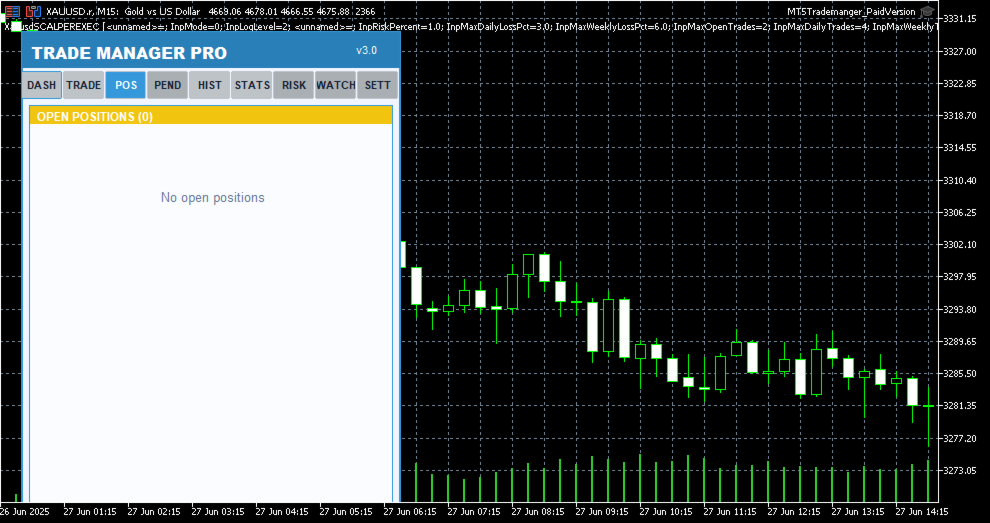
Real-time position list with ticket tracking, floating P/L display, individual close, partial close, close all, scroll through positions, position type badges

Risk Management

Trailing stop automation, break-even automation, daily loss limit, max spread protection, trade execution blocking during high spread, max open positions limit

Session Analytics

Asian/London/New York session P/L breakdown, daily P/L tracking, floating P/L summary, win rate calculation, total trade count

Watchlist

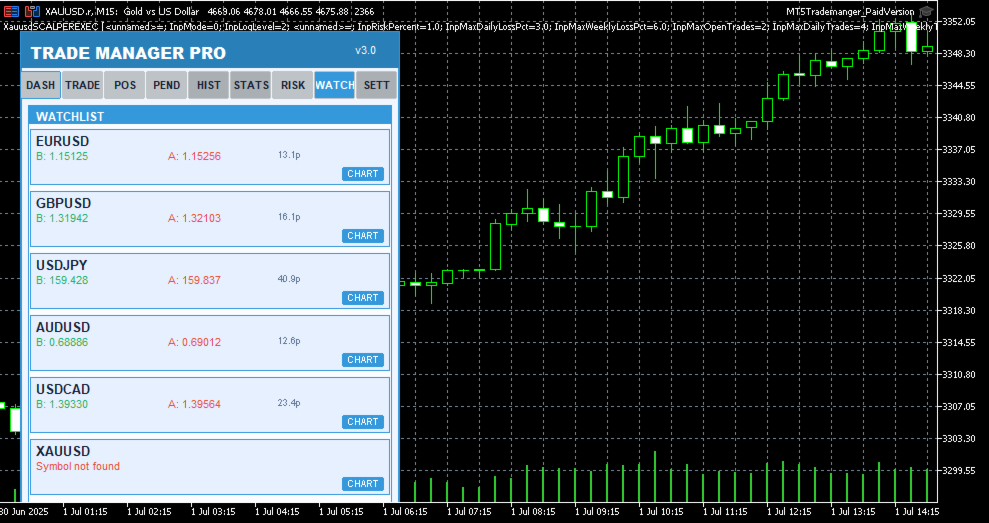
Multi-symbol price monitoring (6 symbols), one-click chart switching, real-time bid/ask display, spread visualization

Performance Stats

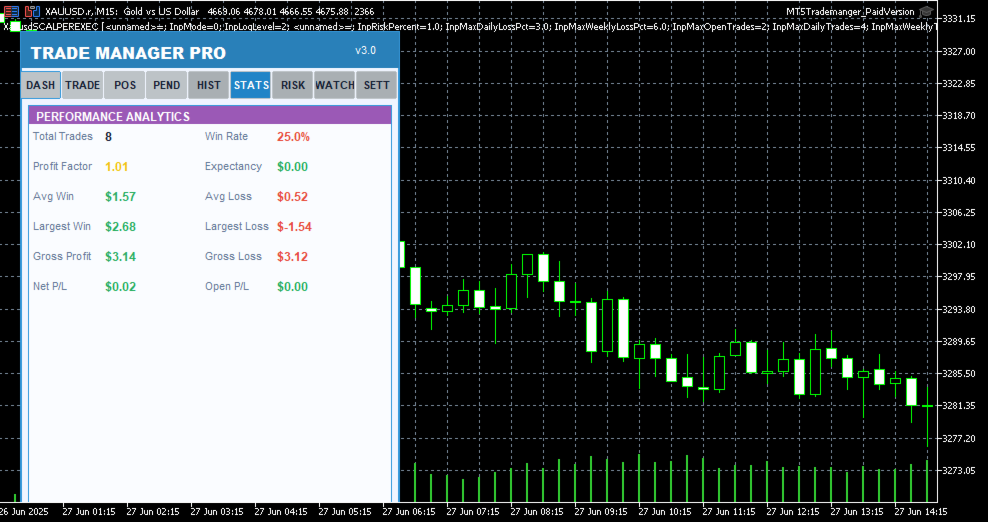
Win rate, total trades, winning trades, profit factor tracking, floating P/L across all positions

Trading Schedule

Customizable trading hours per day, weekday selection, auto block trades outside schedule, visual market closed indicator

UI / Themes

4 color themes (Light, Dark, Midnight, Forest), draggable panel, resizable layout, card-based sections, confirmation dialogs, status bar alerts

Table 1: Core Feature Categories

Detailed Feature Breakdown

One-Click Trade Execution

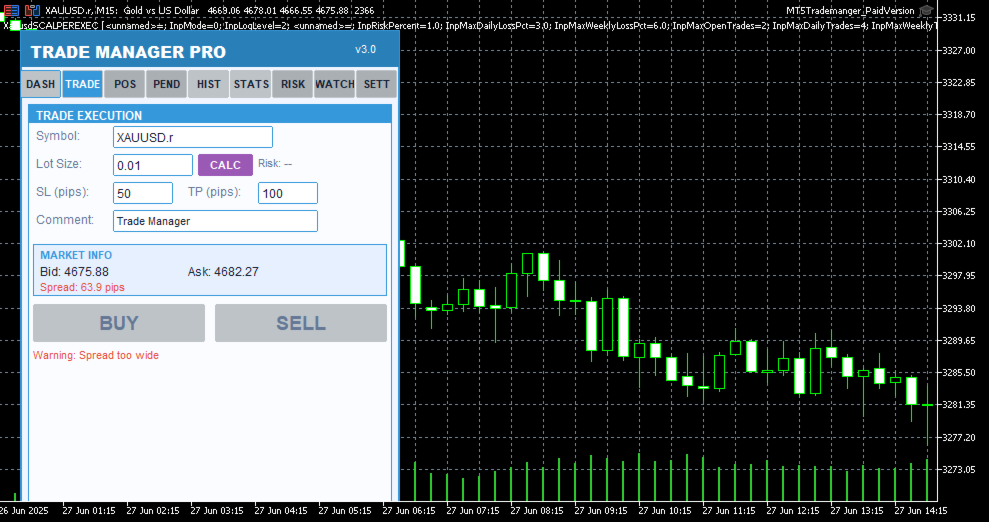
The Trade Execution page provides everything you need to open and manage trades rapidly. Enter your symbol, lot size, stop-loss in pips, take-profit in pips, and an optional comment — then hit Buy or Sell with a single click. The built-in smart lot calculator automatically determines the optimal lot size based on your risk percentage, account equity, and stop-loss distance, ensuring you never risk more than you intend to on any single trade. Before every execution, a confirmation dialog displays the trade details so you can verify your parameters before committing capital.

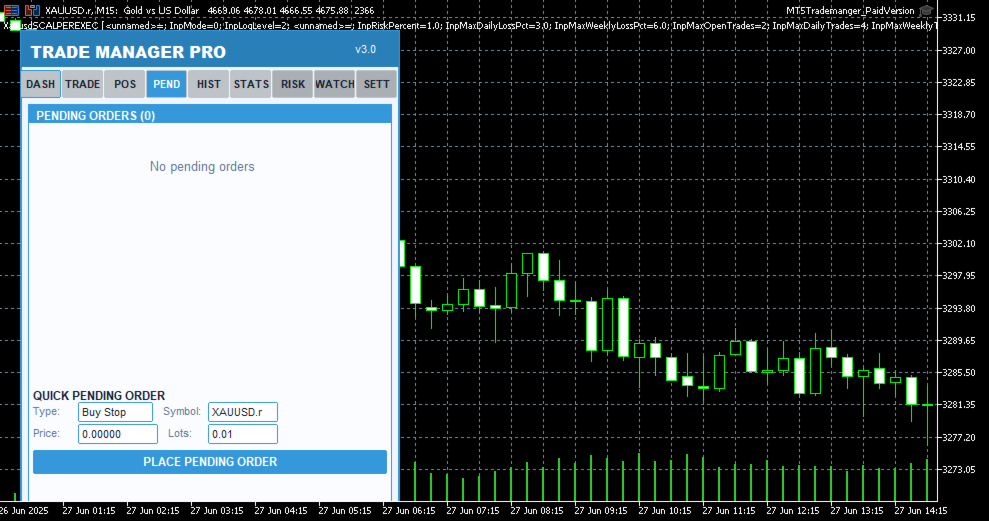
Pending order support is also included, allowing you to set up Buy Stop, Sell Stop, Buy Limit, and Sell Limit orders directly from the panel. Each pending order appears in a dedicated tab where you can monitor its status, view entry price, SL/TP levels, and delete orders that are no longer needed. The 

Trade Manager Pro  |  Product Description

real-time market info section shows current bid, ask, and spread values so you always have full context before placing a trade.

Intelligent Risk Management

Risk management is the cornerstone of consistent profitability, and Trade Manager Pro delivers a comprehensive suite of automated risk controls that work silently in the background to protect your account. The trailing stop feature automatically adjusts your stop-loss as the market moves in your favor, locking in profits while giving your trades room to breathe. You configure the trigger distance and step size, and the system handles the rest on every tick.

The break-even automation moves your stop-loss to the entry price (plus a configurable profit buffer) once the price reaches your specified trigger level, effectively eliminating risk on the trade. The daily loss limit automatically blocks all new trade executions once your cumulative daily losses exceed your predefined threshold, preventing emotional revenge trading. Additionally, the spread monitor warns you when the current spread exceeds your maximum allowed level and can block trade execution entirely during periods of high spread, protecting you from entering trades with unfavorable execution conditions.

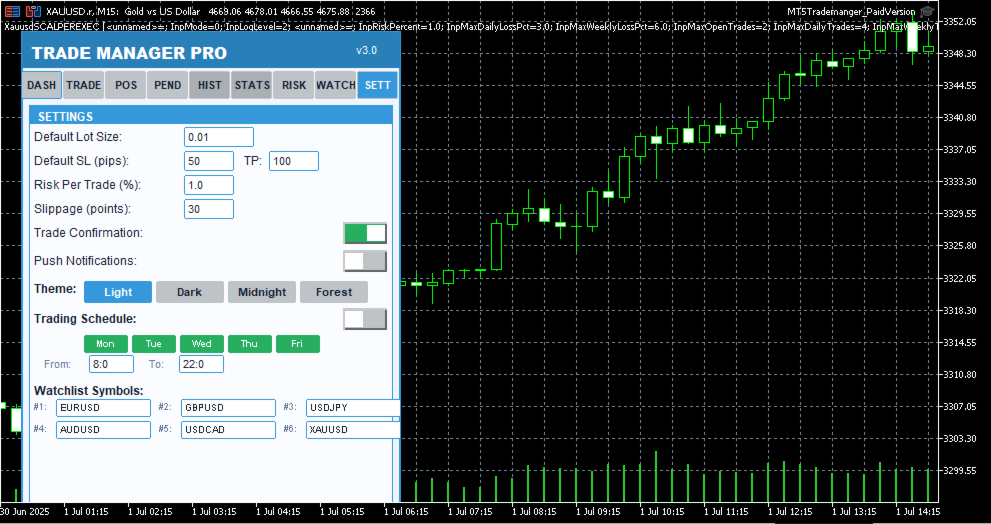
All risk management features can be toggled on or off individually via the Settings page, and your preferences are saved across sessions using GlobalVariables. This means your configuration persists even after restarting MetaTrader or switching between charts.

Session-Based Analytics

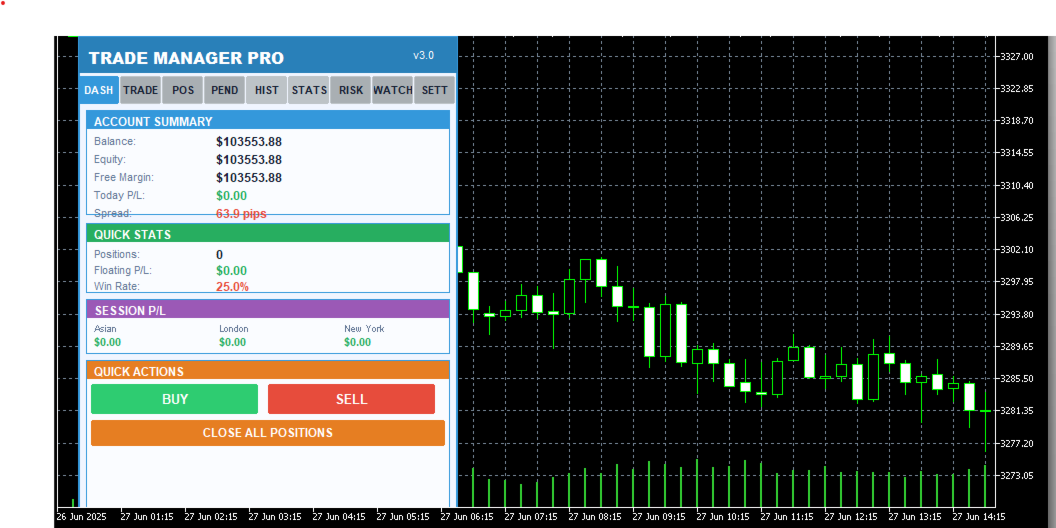
Understanding which trading sessions are most profitable for your strategy is essential for long-term improvement. Trade Manager Pro automatically tracks your closed-trade profit and loss across three major forex sessions: Asian (00:00–08:00 server time), London (08:00–16:00), and New York (13:00–22:00). The session P/L breakdown is displayed on the Dashboard page, giving you an instant snapshot of where your edge lies.

The dashboard also displays your account balance, equity, free margin, daily P/L, total open positions, floating P/L, and win rate. All values update in real time, providing you with a comprehensive overview of your account health without needing to switch between multiple terminal windows or external tools.

Multi-Symbol Watchlist

The Watchlist page lets you monitor up to six symbols simultaneously, displaying real-time bid and ask prices along with the current spread for each instrument. One-click chart switching allows you to instantly navigate to any watched symbol on your current chart, eliminating the need to manually search through the Market Watch window. Default symbols include EURUSD, GBPUSD, USDJPY, AUDUSD, USDCAD, and XAUUSD, covering the most popular forex pairs and gold.

Professional Themes & UI

Trade Manager Pro includes four professionally designed color themes that you can switch between instantly from the Settings page: Light (clean blue tones for daytime trading), Dark (low-contrast dark theme to reduce eye strain during extended sessions), Midnight (deep navy tones inspired by 

Trade Manager Pro  |  Product Description

nighttime charting), and Forest (green-toned natural palette). Your theme preference is saved across sessions and applies to every element of the panel, including cards, buttons, labels, and status indicators.

The panel is fully draggable — click and drag the header to reposition it anywhere on your chart. All UI elements use card-based layouts with color-coded sections, making it easy to scan information at a glance. The status bar at the bottom provides real-time feedback for every action, including trade confirmations, error messages, and risk alerts, with color-coded messages that fade after five seconds to keep your workspace clean.

Why Traders Choose Trade Manager Pro

There are many trade management tools available on the MetaTrader Market, but Trade Manager Pro stands out for several reasons that directly impact your trading performance and daily workflow:

Everything in One Panel: No more juggling between multiple indicators, EAs, and scripts. Trade Manager Pro consolidates trade execution, position management, risk controls, analytics, and watchlist monitoring into a single, compact dashboard that sits cleanly on your chart. This reduces cognitive load and decision latency, especially during fast-moving market conditions where every second counts.

Battle-Tested Risk Controls: The automated trailing stop, break-even, daily loss limit, and spread monitor work together to create a safety net around your account. These features are not theoretical — they are the exact same risk management tools used by professional fund managers and proprietary trading desks, now accessible to retail traders in a simple, configurable interface.

Zero Learning Curve: Despite its extensive feature set, Trade Manager Pro is designed for immediate usability. The tabbed interface is intuitive, every button is clearly labeled, and all settings come pre-configured with sensible defaults. You can be up and running in under two minutes, and the confirmation dialogs ensure you never execute a trade by accident.

Session-Persistent Settings: Your theme preference, risk management toggles, trailing stop parameters, break-even settings, and daily loss limits are all saved using MetaTrader GlobalVariables. This means your configuration survives chart restarts, terminal restarts, and even computer reboots. Set it up once, and it stays configured until you decide to change it.

Lightweight & Non-Intrusive: Trade Manager Pro runs as an indicator (not an Expert Advisor), which means it does not interfere with your existing EAs, does not require special execution permissions, and uses minimal CPU and memory resources. The panel occupies a fixed, compact area on your chart and can be repositioned by dragging the header.

How to Get Started

Getting started with Trade Manager Pro takes less than two minutes. Follow these simple steps to 

Trade Manager Pro  |  Product Description

begin using the panel on your charts:

Purchase and download Trade Manager Pro from the MetaTrader Market. The file will be automatically installed to your MetaTrader 5 terminal.

Open any chart in MetaTrader 5. From the Navigator panel, find Trade Manager Pro under the Indicators section and drag it onto your chart.

Configure your input parameters when prompted: set your default lot size, SL/TP in pips, magic number, risk percentage, and preferred theme. All values come pre-configured with sensible defaults.

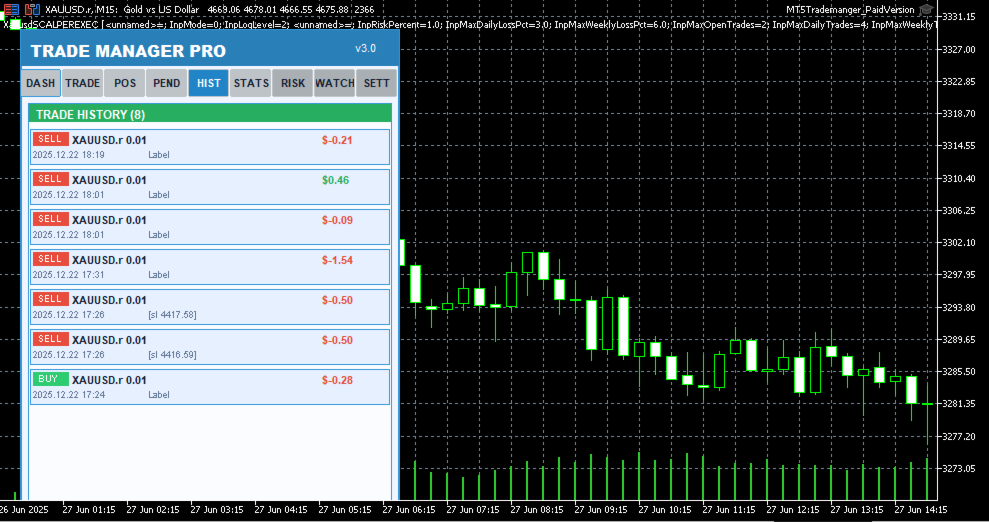
The Trade Manager Pro panel will appear on your chart. Use the tabbed navigation to access Dashboard, Trade, Positions, Pending, History, Stats, Risk, Watchlist, and Settings pages.

Customize your risk management settings on the Settings page and toggle features on or off as needed. Your preferences are saved automatically.

Start trading! Use the one-click Buy/Sell buttons, manage positions from the Positions tab, and monitor your performance from the Dashboard.

Input Parameters

Trade Manager Pro provides a comprehensive set of input parameters organized into logical groups. The following table lists all configurable options along with their default values and descriptions. All runtime-changeable settings (risk toggles, theme, schedule) can also be modified via the Settings page without needing to reattach the indicator.

Parameter

Default

Description

DefaultLotSize

0.01

Default lot size for trade execution

DefaultSL

50

Default stop-loss in pips

DefaultTP

100

Default take-profit in pips

Slippage

30

Maximum allowed slippage in points

MagicNumber

123456

Expert advisor magic number for position filtering

RiskPercentPerTrade

1.0

Risk percentage per trade for smart lot calculator

UseAutoStopLoss

true

Automatically set stop-loss on trade execution

UseAutoTakeProfit

true

Automatically set take-profit on trade execution

UseTrailingStop

false

Enable automated trailing stop management

TrailingStopDistance

30

Trailing stop activation distance in pips

Trade Manager Pro  |  Product Description

Parameter

Default

Description

TrailingStopStep

10

Trailing stop step size in pips

UseBreakEven

true

Enable break-even automation

BreakEvenTrigger

30

Break-even trigger distance in pips

BreakEvenProfit

10

Break-even profit buffer in pips

UseMaxDailyLoss

true

Enable daily loss limit protection

MaxDailyLoss

500.0

Maximum allowed daily loss in account currency

MaxSpreadPips

30.0

Maximum allowed spread in pips (execution blocked above)

MaxOpenPositions

20

Maximum number of simultaneous open positions

StartTheme

THEME_LIGHT

Initial color theme (Light/Dark/Midnight/Forest)

PanelCorner

0

Panel anchor corner (0=top-left, 1=top-right, etc.)

PanelOffsetX

20

Horizontal offset from anchor corner in pixels

PanelOffsetY

30

Vertical offset from anchor corner in pixels

Table 2: Input Parameters Reference

System Requirements

Trade Manager Pro has been designed to run on any system that supports MetaTrader 5. The following are the minimum requirements for smooth operation:

MetaTrader 5 build 2361 or higher (recommended: latest build)

Windows 7 / 8 / 10 / 11, or MetaTrader 5 for macOS / Linux

Any internet connection sufficient for trading (trade execution requires broker connectivity)

Minimum screen resolution of 1280x720 (recommended: 1920x1080 or higher for optimal panel visibility)

Allow DLL imports and automated trading enabled in terminal settings

Version History

Trade Manager Pro  |  Product Description

Trade Manager Pro is actively maintained and updated based on trader feedback. Below is the changelog for recent versions:
Produtos recomendados
Calculating the volume of orders every time you create an order is an extremely important thing in risk management Let this tool simplify your work! ----------------------------------------------------- How to use? Attach the indicator to the chart and set its parameters:  Risk size in %  or money and Risk Reward Ratio. Click on the ON button and locate the horizontal line to your would-be StopLoss level. Options: Click on the Pending/Instant button to locate the horizontal line  to your would-b
FREE
Descrição do SR Breakout Scalper SR Breakout Scalper: Capture o Mercado com Rompimentos Confirmados por Volume Você está procurando por pontos de entrada claros e de alta probabilidade, livres do ruído do mercado? O SR Breakout Scalper é um Expert Advisor de nova geração que automatiza completamente uma estratégia comprovada utilizada por traders profissionais: Rompimentos de Suporte e Resistência Confirmados por Volume. Em vez de focar apenas na ação do preço, este EA analisa o poder real (vol
FREE
Trend Catcher 101
Mohamed Abdulmohsen Mohamed Saeed Ali
https://www.mql5.com/en/market/product/125319 MT5 The   Trend Catcher 101 is a powerful and reliable Expert Advisor that can help you to catch  market trend movements after confirmation . This EA is based on the real market power movement method. it suppose to be under expert section but because some tricks causing the boot to avoid some trades when the market unstable so its unable to be validated , anyway the test showing a lot . The Trend Catcher   uses the market power to determine the opti
Rise of the Beasts
Bin Jumahat Johan
Rise of the Beasts – SuperTrend Auto-Trading EA Rise of the Beasts is a powerful, fully automated Expert Advisor that unleashes trend-following precision using the legendary SuperTrend indicator . Built for traders who want clean entries, smart exits, and consistent results, this EA dominates markets by identifying trend shifts with accuracy and acting instantly. Whether you trade forex, indices, metals, or crypto , Rise of the Beasts adapts to any market with strong risk control and volatili
FREE
Golden Square X
Huynh Tan Linh N
4.1 (10)
This is my latest Free version for Gold. With optimized parameters and user-friendly features, this version is likely very easy to use and highly effective. You can customize TP and SL parameters as you wish, but the default settings should work well for you without the need for further adjustments.  This version is designed for the M5. This version does not require a large capital investment; only $100-$200 is sufficient for Golden Square X to run and generate profits for you. Based on backtest
FREE
Risk Calculator EA – Utility for Precise Trade Sizing If you find this tool useful consider to  Buy me a coffee!   The Ultimate Risk Calculator is a lightweight in-chart Expert Advisor (EA) designed to help you easily and quickly calculate position size and set stop-loss / take-profit levels with full control over risk management directly on the chart. What it does? It turns manual risk decisions into fast, visual, and accurate calculations. You draw or adjust the Entry, Stop-Loss and Take-P
FREE
it's a fully built expert advisor with trading functionality with buy only or sell only or both options it's designed to be a tool that can be used for automate entry and exit in line with the overall Market Direction automatic  risk management parameters fully  comprehensive STRATEGY ANALYZER Section Total Trades: Shows the overall number of trades taken Win Rate: Displays percentage of winning trades (color-coded green if >50%, red if <50%) Total Profit/Loss: Shows absolute profit and loss v
FREE
Long Waiting
Aleksandr Davydov
Expert description Algorithm optimized for Nasdaq trading The Expert Advisor is based on the constant maintenance of long positions with daily profit taking, if there is any, and temporary interruption of work during the implementation of prolonged corrections The Expert Advisor's trading principle is based on the historical volatility of the traded asset. The values of the Correction Size (InpMaxMinusForMarginCallShort) and Maximum Fall (InpMaxMinusForMarginCallLong) are set manually. Recomm
FREE
RRM Risk Manager Pro   – Professional Trading, Perfect Precision! RRM Risk Manager   is a high-speed, intuitive risk management panel designed for professional traders. Stop wasting time with manual lot calculations and eliminate errors. Let RRM perform all calculations for you in milliseconds!   Why Choose RRM Risk Manager? In professional trading, speed is everything. With RRM, you can be sure you enter the market with the exact risk you intended, every single time. ️   Key Advantages
FREE
Main Features: Trading Panel: Quick on-chart buttons for Buy, Sell, Close Profit, and Close All. Risk Management: Built-in Auto Lot calculation based on your specified risk percentage. Visual Tools: Automatically draws Supply/Demand zones and Fibonacci levels on the current chart. Market Data: Displays real-time ATR (Volatility) and RSI values directly on the panel. Optional Auto Mode: A basic automated trading function using EMA crossover and ATR volatility filter. Parameters to Note: RiskPerce
FREE
PROMETHEUS TECHNICAN VERSION Free | By THE SONS A gift from The Sons — no strings, no trial, no expiry. Every trader deserves access to professional-grade market intelligence. That belief is why Prometheus Technical Version exists, and why it costs nothing. Consider it our handshake to the trading community. What You're Getting This is not a simplified tool dressed up as a gift. Prometheus Technican Version is a fully built, institutional-quality technical analysis indicator running a dual-model
FREE
IMPORTANT NOTE: This is a professional Trade Management Utility and on-chart assistant. It is NOT an automated trading robot. It does not open trades on its own. The UltraFast Trade Manager MT5 is the ultimate execution and risk-management suite designed to give you absolute control over your manual and algorithmic trades. When managing multiple positions, calculating complex net break-even points, or constantly monitoring the economic calendar, hesitation can lead to costly mistakes. This utili
FREE
Budget Golden Scalper M1 — Trial Edition Built for traders who are tired of hype and ready for transparency Let’s be honest. If you have explored automated trading before, you have probably seen systems that looked perfect in backtests but behaved very differently in live markets. Many traders today are understandably cautious — and rightly so. Budget Golden Scalper M1 was created with this reality in mind. This is not marketed as a “holy grail” or a get-rich-quick robot. Instead, it is a str
FREE
Trade assistant pro v8
Ahmed Mohammed Bakr Bakr
FREE FREE FREE Trade Assistant MT5 – Professional Trading & Risk Management Panel Trade Assistant MT5 is an advanced trading panel designed to help traders execute orders faster, safer, and more professionally . It simplifies manual trading by combining smart order management , precise risk control , and one-click execution , making it ideal for both beginners and advanced traders. This tool does not trade automatically . Instead, it empowers you with full control while applying professional-gra
FREE
TrendLine Manager
Mirel Daniel Gheonu
4.5 (2)
TrendLine Manager - Professional Trading Assistant TrendLine Manager is a smart trading tool that helps you manage your trades using trendlines drawn directly on your charts. Instead of manually watching every line you draw, this Expert Advisor does the monitoring for you. What it does: Converts any trendline you draw into an active trading trigger Automatically closes positions when price hits your stop loss or take profit lines Opens new trades when price crosses your entry lines Works with sl
FREE
SimpleTrade by Gioeste
Giovanni Scelzi
4 (3)
Discover the power of automated trading with **SimpleTradeGioeste**, an Expert Advisor (EA) designed to optimize your trading operations in the Forex market. This innovative EA combines advanced trading strategies with proven technical indicators, offering an unparalleled trading experience. video backtest :  https://youtu.be/OPqqIbu8d3k?si=xkMX6vwOdfmfsE-A ****Strengths**** - **Multi-Indicator Strategy**: SimpleTradeGioeste employs an integrated approach that combines four main technical ind
FREE
EasyTrading Panel Basic by Vexo EasyTrading Panel Basic is a free manual trade execution panel for MetaTrader 5. It provides a streamlined workflow for placing market orders with automatic risk-based lot sizing, stop loss, and take profit calculation. The panel works on any symbol and any timeframe. How It Works The panel displays on-chart with your account balance, current lot size, risk percentage, reward-to-risk ratio, and calculated stop loss. All values update in real time as you adjust par
FREE
GDS RiskLab TradeDesk Renko is a free MetaTrader 5 trading utility designed for traders who use Renko charts and want faster, cleaner, and more structured manual execution. The idea is simple: Trade directly from Renko structure. Instead of switching between order windows, calculators, and chart analysis, TradeDesk Renko brings execution control directly onto the chart. You can analyze Renko movement, read market structure, and manage trades from one clean visual workspace. This tool is design
FREE
Apresentamos o NAS100 Auto SL e TP Maker para MT5: Nunca mais perca a definição de StopLoss e TakeProfit com o nosso NAS100 Auto SL e TP Maker, um assistente indispensável para os traders que navegam no mercado Nasdaq 100 no MetaTrader 5. Esta ferramenta foi concebida para aqueles que procuram uma solução perfeita para automatizar a gestão dos níveis de StopLoss e TakeProfit. Caraterísticas principais: Automação sem esforço: Monitoriza automaticamente as transacções Nasdaq 100 sem StopLoss e/o
FREE
This indicator is especially for the binary trading. Time frame is 1 minutes and exp time 5 or 3 minutes only. You must be use martingale 3 step. So you must put lots size is 10 % at most. You should use Mt2 trading platform to connect with my indicator to get more signal without human working. This indicator wining rate is over 80% but you may get 100% of profit by using martingale 3 step. You should use MT2 Trading Platform to connect meta trader platform and binary platform . You can get mt2
FREE
This EA finds Fair Value Liquidity (FVL) on the chart, tracks when they get mitigated , and then looks for an inversion signal (price “fails” through the zone). When that inversion happens, it places a trade in the opposite direction of the original Liquidity gap (an Inverse FVG approach). It also lets you control when it trades using market sessions , and it can auto-close positions at New York open (all positions or profitable-only). Key advantages Clear, rule-based entries (no guessing): trad
FREE
Free automatic Fibonacci is an indicator that automatically plots a Fibonacci retracement based on the number of bars you select on the BarsToScan setting in the indicator. The Fibonacci is automatically updated in real time as new highest and lowest values appears amongst the selected bars. You can select which level values to be displayed in the indicator settings. You can also select the color of the levels thus enabling the trader to be able to attach the indicator several times with differe
FREE
Introduction Welcome to the world of Forex trading, where every tick of the market can be influenced by news events. Introducing our expert advisor for MetaTrader, your ultimate tool for navigating the complexities of news trading. This innovative advisor is specifically designed to automate your trading strategy during key macroeconomic releases, ensuring you never miss an opportunity.  When important indicators are announced, volatility often spikes, creating potential for profit. Our expert
FREE
Easy GOLD MT5
Franck Martin
3.91 (43)
Easy Gold is the latest addition to the BotGPT family. It is surprising and very powerful. It is ideal for beginners due to its simplicity.  There is absolutely nothing to do, it's 100% automated, simply indicate the percentage of risk you want to take per trade and the EA is ready. Whatever your capital, the EA takes care of everything. Optimized on (XAUUSD).  Unleash all the power with the professional version (AGI Gold) and its connection to the neural network, available in my store. My othe
FREE
Donchian Breakout And Rsi
Mattia Impicciatore
4.5 (2)
Descrição geral Este indicador é uma versão aprimorada do Canal Donchian clássico, enriquecida com funções práticas para o trading real. Além das três linhas padrão (máxima, mínima e linha do meio), o sistema detecta breakouts e os mostra visualmente com setas no gráfico, exibindo apenas a linha oposta à direção da tendência atual para uma leitura mais limpa. O indicador inclui: Sinais visuais : setas coloridas nos breakouts Notificações automáticas : alerta pop-up, push e e-mail Filtro RSI : pa
FREE
Short description : TheTrendHunterMax   is a LIMITED VERSION tool that can be used either as a trading robot for automated trading or just a signal provider for manual trading.  As an EA, it uses the techniques we usually employ in trading like determining the highs and lows on the trading chart. With this, it determines the trend convergence and divergence in the chart. Combined with the volatility, price movements, it analyzes the possible order type that can be most profitable. By default,
FREE
Babel Assistant
Iurii Bazhanov
4.33 (9)
Babel assistant 1     The MT5 netting “Babel_assistant_1” robot uses the ZigZag indicator to generate Fibonacci levels on M1, M5, M15, H1, H4, D1, W1  periods of the charts , calculates the strength of trends for buying and selling. It opens a position with "Lot for open a position" if the specified trend level 4.925 is exceeded. Then Babel places pending orders at the some Fibonacci levels and places specified Stop Loss , Take Profit. The screen displays current results of work on the position
FREE
Easy Correlations Indicator The Easy Correlations Indicator is designed to help traders analyze the relationship between two correlated instruments. By monitoring the distance between their Relative Strength Index (RSI) values, the indicator highlights situations where one instrument has moved significantly further than the other. This creates potential trading opportunities: Sell the stronger instrument (overstretched RSI) Buy the weaker instrument (lagging RSI) Because the positions are opened
FREE
Manual Trade Manager for XAUUSD (v1 – Always BreakEven) – FREE Take your manual gold trading to the next level with this lightweight yet powerful trade management tool. This Expert Advisor does not open trades in live trading — it is specifically designed to manage manually placed orders on XAUUSD , helping you automate risk control through smart break-even and trailing stop logic. Key Features: Break-even Stop Loss : Automatically adjusts SL to break even when a specified profit level is reache
FREE
NNFX D1 Aroon Kijun ATR EA is an automated strategy template for MetaTrader 5 that implements a rule-based daily timeframe workflow with ATR-based risk management, structured entries, and disciplined exits. The Expert Advisor is intended for end-of-day operation and processes signals only on the close of each new daily candle. The EA uses a baseline (Kijun), a confirmation signal (Aroon), and a volume/momentum filter (Jurik RSX) to determine trade direction and qualify entries. It opens two posi
FREE
Os compradores deste produto também adquirem
Trade Assistant MT5
Evgeniy Kravchenko
4.42 (210)
Ajuda a calcular o risco por comércio, a fácil instalação de uma nova encomenda, gestão de encomendas com funções de fecho parcial, trailing stop de 7 tipos e outras funções úteis. Materiais e instruções adicionais Instruções de instalação   -   Instruções para a aplicação   -   Versão de teste da aplicação para uma conta de demonstração Função de linha Mostra no gráfico a linha de Abertura, Stop Loss, Take Profit. Com esta função é fácil definir uma nova ordem e ver as suas características ad
Bem-vindo ao Trade Manager EA—uma ferramenta de gestão de risco criada para tornar o trading mais intuitivo, preciso e eficiente. Não é apenas uma ferramenta para executar ordens, mas uma solução abrangente para planejamento de operações, gerenciamento de posições e controle de risco. Seja você um iniciante, trader avançado ou scalper que precisa de execução rápida, o Trade Manager EA adapta-se às suas necessidades, oferecendo flexibilidade em todos os mercados, desde forex e índices até commodi
Local Trade Copier EA MT5
Juvenille Emperor Limited
4.96 (138)
Experimente uma cópia de negociação excepcionalmente rápida com o Local Trade Copier EA MT5 . Com sua fácil configuração de 1 minuto, este copiador de negociações permite que você copie negociações entre vários terminais MetaTrader no mesmo computador Windows ou em um Windows VPS com velocidades de cópia ultra rápidas de menos de 0.5 segundos. Seja você um trader iniciante ou profissional, o   Local Trade Copier EA MT5   oferece uma ampla gama de opções para personalizá-lo de acordo com suas ne
TradePanel MT5
Alfiya Fazylova
4.87 (154)
Trade Panel é um assistente de negociação multifuncional. O aplicativo contém mais de 50 funções de negociação para trading manual e permite automatizar a maioria das tarefas de negociação. Antes da compra, você pode testar a versão de demonstração em uma conta demo. Baixe a versão experimental do aplicativo para uma conta de demonstração: https://www.mql5.com/pt/blogs/post/762547 . Instruções completas aqui . Comércio. Permite realizar operações de negociação com um clique: Abrir ordens pendent
Quant AI Agents is NOT AN Expert Advisor. Quant AI Agents   is a   multi-agent AI trading framework   that turns natural-language strategy prompts into live.  WANT THE SAME RESULTS AS MY LIVE SIGNAL?   Use the exact same brokers I do:   IC MARKETS , IC TRADING   .  Unlike the centralized stock market, Forex has no single, unified price feed.  Every broker sources liquidity from different providers, creating unique data streams. Other brokers can only achieve trading performance equivalent to 60
Power Candles Strategy Scanner - Localizador de configurações multissímbolo com auto-otimização O Power Candles Strategy Scanner utiliza o mesmo motor de auto-otimização que alimenta o indicador Power Candles — em todos os símbolos da sua lista de observação, lado a lado. Um painel indica-lhe quais os símbolos que são estatisticamente negociáveis neste momento, qual a estratégia vencedora para cada um, o par ideal de Stop Loss / Take Profit, e avisa-o assim que um novo sinal é emitido. Esta ferr
Versão Beta O Telegram to MT5 Signal Trader está quase no lançamento oficial da versão alfa. Alguns recursos ainda estão em desenvolvimento e você pode encontrar pequenos erros. Se tiver problemas, por favor reporte, seu feedback ajuda a melhorar o software para todos. Telegram to MT5 Signal Trader é uma ferramenta poderosa que copia automaticamente sinais de trading de canais ou grupos do Telegram diretamente para sua conta MetaTrader 5 . Suporta canais públicos e privados do Telegram, e você
Farmed Hedge Yield Farming | All Markets (Manual - Hybrid - Semi/Automated EA) MULTI-ASSET SUPPORT Trade any asset available on your broker - Forex: Major, Minor, Exotic pairs - Crypto: BTC, ETH, XRP, SOL, BNB - Stocks: Apple, Tesla, Amazon, Google, etc. - Commodities: Gold, Silver, Oil, Gas - Indices: US30, NAS100, SPX500, DAX40 - Any CFD your broker offers VERIFIED TRADING RESULTS - Farmed Hedge Yield Axi Copy:  https://www.mql5.com/en/signals/2356376 - Farmed Hedge Yield Exn Copy:   https:/
Exp COPYLOT CLIENT for MT5
Vladislav Andruschenko
3.91 (33)
Copiador profissional de operações para MetaTrader 5 Um copiador de operações rápido, profissional e confiável para MetaTrader . COPYLOT permite copiar operações de Forex entre terminais MT4 e MT5 com suporte para contas Hedge e Netting . A versão MT5 do COPYLOT oferece suporte a: - MT5 Hedge → MT5 Hedge - MT5 Hedge → MT5 Netting - MT5 Netting → MT5 Hedge - MT5 Netting → MT5 Netting - MT4 → MT5 Hedge - MT4 → MT5 Netting Versão MT4 Descrição completa + DEMO + PDF Como comprar Como instalar Como
Trade Dashboard MT5
Fatemeh Ameri
4.94 (125)
Trade Dashboard simplifies how you open, manage, and control your trades, with built-in lot size calculation. It allows you to execute trades, manage risk, and control positions directly on the chart, with tools such as partial close, breakeven, and trailing stop. Designed to reduce manual work and help you stay focused on your trading decisions. A demo version is available for testing. Detailed explanations of features are provided within the MQL5 platform. Installation instructions are include
Trade copier MT5
Alfiya Fazylova
4.53 (43)
Trade Copier é um utilitário profissional projetado para copiar e sincronizar negociações entre contas de negociação. A cópia ocorre da conta / terminal do fornecedor para a conta / terminal do destinatário, instalada no mesmo computador ou vps. PROMOÇÃO - Se você já adquiriu o "Trade copier MT5", pode receber o "Trade copier MT4" gratuitamente (para cópia MT4 > MT5 e MT4 < MT5). Para obter informações mais detalhadas sobre os termos, por favor, entre em contato conosco através de mensagens priv
Premium Trade Manager - Gestão de operações rápida e disciplinada para MetaTrader 5 Premium Trade Manager é um painel rápido no gráfico para MetaTrader 5 que elimina o trabalho mecânico de cada operação. Você decide a direção, o símbolo e o timing - o painel calcula o tamanho da posição com base no seu risco, coloca a ordem com stop e alvo, reduz em parciais, move o stop e acompanha o calendário econômico por você. A inteligência de notícias integrada vai um passo além: pontua os próximos evento
YuClusters
Yury Kulikov
4.93 (43)
Atenção: A versão demo para revisão e teste está aqui . YuClusters é um sistema profissional de análise de mercado. O trader tem oportunidades únicas para analisar o fluxo de pedidos, volumes de negociação, movimentos de preços usando vários gráficos, perfis, indicadores e objetos gráficos. O YuClusters opera com base em dados de Tempos e Negócios ou informações de ticks, dependendo do que está disponível nas cotações de um instrumento financeiro. O YuClusters permite que você crie gráficos com
MT5 to Telegram Signal Provider é uma utilidade fácil de usar e totalmente personalizável que permite o envio de sinais especificados para o chat, canal ou grupo do Telegram, tornando sua conta um fornecedor de sinais . Ao contrário da maioria dos produtos concorrentes, ele não usa importações de DLL. [ Demonstração ] [ Manual ] [ Versão MT4 ] [ Versão Discord ] [ Canal do Telegram ]  New: [ Telegram To MT5 ] Configuração Um guia do usuário passo a passo está disponível. Não é necessário conhec
Seconds Chart MT5
Boris Sedov
4.59 (17)
Seconds Chart - uma ferramenta exclusiva para criar gráficos de segundos no MetaTrader 5 . Com o Seconds Chart , você pode criar gráficos com períodos definidos em segundos, proporcionando flexibilidade e precisão ideais para análise, indisponíveis em gráficos padrão de minutos ou horas. Por exemplo, o período S15 indica um gráfico com velas de 15 segundos. Você pode usar qualquer indicador ou Expert Advisor com suporte a símbolos personalizados. Trabalhar com eles é tão conveniente quanto negoc
AntiOverfit PRO MT5
Enrique Enguix
5 (5)
Antes de comprar um EA, verifique se ele realmente se sustenta ou se apenas teve sorte num backtest. A maioria dos robôs é vendida com um backtest bonito. Curva ascendente. Bom profit factor. Poucas dúvidas. E, ainda assim, muitos desses EAs desmoronam assim que o mercado deixa de se mover como nesse histórico. Porquê? Porque um backtest só prova uma coisa: que essa estratégia funcionou num percurso específico do preço. Não prova que vá aguentar outros percursos. Não prova que seja robusta. E mu
Copy Cat More Trade Copier MT5 (Gato Copiador MT5) é um copiador de negociações local e uma estrutura completa de gestão de riscos e execução projetada para os desafios comerciais de hoje. Desde desafios de prop firms até gestão de portfólio pessoal, ele se adapta a cada situação com uma combinação de execução robusta, proteção de capital, configuração flexível e manuseio avançado de negociações. O copiador funciona tanto no modo Master (remetente) quanto Slave (receptor), com sincronização em t
AXR Prop Guard
Stoyan Kirilov Karlov
AXR Prop Guard AXR Prop Guard é uma utilidade de proteção de risco para toda a conta no MetaTrader 5. Foi criada para traders de prop firms, funded-account challenges e proteção séria de contas privadas. Faz parte da linha de ferramentas AXR. Para atualizações e opções de contato, use as páginas oficiais da MQL5: AXR MQL5 Channel: atualizações do produto, notas de versão e novas ferramentas AXR Telegram: abrir o perfil do vendedor ; o contato do Telegram está indicado na descrição do perfil. Apó
HINN MagicEntry Extra
ALGOFLOW OÜ
4.71 (14)
HINN MAGIC ENTRY – the ultimate tool for entry and position management! Place orders by selecting a level directly on the chart! full description   ::  demo-version  :: 60-sec-video-description Key features: - Market, limit, and pending orders - Automatic lot size calculation - Automatic spread and commission accounting - Unlimited partitial take-profits  - Breakeven and trailing stop-loss and take-profit  functions - Invalidation leves - Intuitive, adaptive, and customizable interface - Works
Timeless Charts
Samuel Manoel De Souza
5 (5)
Timeless Charts é um utilitário de trading tudo-em-um para traders profissionais. Ele combina tipos de gráficos personalizados, como Gráficos por Segundos e Renko , com análise avançada de fluxo de ordens utilizando Footprints , Clusters , Perfis de Volume , estudos VWAP e ferramentas de análise ancorada para uma visão mais profunda do mercado. O gerenciamento de ordens e posições é realizado diretamente no gráfico por meio de um painel integrado de gerenciamento de operações , enquanto o Market
Custom Alerts AIO: Monitoramento inteligente de múltiplos mercados – pronto para uso, sem configuração Visão geral Custom Alerts AIO é uma ferramenta avançada de varredura de mercado que funciona imediatamente após a instalação — sem necessidade de configurar indicadores adicionais. Inclui internamente todos os principais indicadores da Stein Investments (FX Power, FX Volume, FX Dynamic, FX Levels e IX Power), permitindo que você monitore facilmente todas as principais classes de ativos: Forex
The Ultimate TradingView to MT5 Bridge Automation Pare com o trading manual e problemas de latência. TradingView to MT5 Copier PRO é a ponte mais rápida e confiável para executar seus alertas do TradingView diretamente no MetaTrader 5. Quer você use indicadores personalizados, scripts do Strategy Tester ou desenhos manuais, este EA (Expert Advisor) executa suas negociações instantaneamente usando tecnologia WebSocket de Alta Velocidade . Diferente de copiadores simples, esta versão PRO inclui Ar
Uber Trade Manager
Meelis Hynninen
4.88 (16)
O UTM Manager é uma ferramenta intuitiva e fácil de usar que oferece uma execução de negociação rápida e eficiente. Um dos recursos de destaque é o modo "Ignorar spread", que permite negociar ao preço das velas, ignorando completamente os spreads (por exemplo, permite negociar pares de spread mais alto em LTF, evitando ser retirado de negociações por spread). Outro aspecto importante do UTM Manager é sua copiadora comercial local exclusiva, permitindo a flexibilidade de executar diferentes estra
Anchor Trade Manager
Kalinskie Gilliam
5 (2)
Anchor: The EA Manager Run your full EA portfolio without conflicts, without stacked risk, and without watching every chart yourself. Anchor coordinates up to 64 Expert Advisors on a single account so only one trades at a time. Attach Anchor to any chart. Type your EA names and magic numbers in one line. Anchor handles the rest. Built for portfolios. Built for discipline. Built for prop firms. The Problem Running multiple EAs on the same account creates risk. Two gold EAs can open opposite posit
Footprint Chart Pro — Professional OrderFlow EA for MetaTrader 5 Version 6.34 | Professional tool for real traders | Institutional-Grade Visualization DEMO USERS - PLEASE SELECT EVERY TICK / REAL TICK WHEN TESTING AND YOU HAVE DOWNLOADED HISTORICAL DATA. IF YOU SEE A WAITING SCREEN AND IT IS NOT DOWNLOADING, IT MEANS YOU HAVE LOW HISTORICAL DATA. TRY 1 MIN AND 5 MIN FIRST ON 1 DAY DATA. ONE DAY DATA SHOULD BE THE NEWEST AND MOST CURRENT DATE. PLEASE WAIT UNTIL THE MARKET HAS ROLLED OVER PERIOD.
Bots Builder Pro MT5
Andrey Barinov
4.17 (6)
This is exactly what the name says. Visual strategy builder . One of a kind. Turn your trading strategies and ideas into Expert Advisors without writing single line of code. Generate mql source code files with a few clicks and get your fully functional Expert Advisors, which are ready for live execution, strategy tester and cloud optimization. There are very few options for those who have no programming skills and can not create their trading solutions in the MQL language. Now, with Bots Builde
Ultimate Extractor
Clifton Creath
5 (9)
Ultimate Extractor - Professional Trading Analytics for MT5 *****this is the local HTML version of Ultimate Extractor. !!!!!it is not compatible with Cloud!!!! For the online version please reach out to me directly****** Ultimate Extractor transforms your MetaTrader 5 trading history into actionable insights with comprehensive analytics, interactive charts, and real-time performance tracking. What It Does Automatically analyzes your MT5 trading history across all Expert Advisors and generates
Painel de Trading para MetaTrader 5 — controle profissional de trading em um clique a partir do gráfico e do teclado Um painel de trading avançado para traders ativos, criado para abrir, gerenciar e fechar operações muito mais rápido do que com a interface padrão do MetaTrader. Esta solução foi desenvolvida para quem deseja controlar posições, ordens pendentes, lucro total e execução em um único espaço de trabalho profissional. Não se trata apenas de mais um utilitário. É um verdadeiro cockpit
Advanced Dashboard Ultra
Mirel Daniel Gheonu
5 (2)
Stats Dashboard & Journal ULTRA para MT5 O Centro de Comando de Trading Completo: Analytics, Automação e Inteligência de Notícias. O Stats Dashboard ULTRA é a evolução definitiva da ferramenta de análise Pro. Ele transforma o MetaTrader 5 em uma estação de trading profissional, combinando análise de desempenho de nível institucional com proteção automatizada contra notícias e métricas psicológicas avançadas. Projetado para traders manuais e gestores de portfólio de EAs (robôs) que exigem control
AlgoRadar
Stephen J Martret
5 (4)
AlgoRadar is an on-chart analytics dashboard for MT5 that aggregates Expert Advisor performance across multiple accounts, brokers, and platforms, including both MT4 and MT5 data, into a single live view on your MT5 chart. All analysis runs from the chart interface, with no external applications or manual report processing required. EA Analysis and Ranking For traders running multiple Expert Advisors, AlgoRadar provides a consolidated view of each EA's performance across accounts. Active EAs a
Mais do autor
Ultimate Gold Breakout
Anthony Dewayne Wasome
Ultimate Gold Breakout Professional XAUUSD Breakout Expert Advisor Ultimate Gold Breakout is a systematic Expert Advisor designed to trade daily breakout movements on Gold (XAUUSD) using clearly defined price levels and structured risk management. It is built for ECN and prop trading environments where execution quality and capital protection are critical. Strategy Overview The EA identifies the previous day’s high and low and prepares trades for potential breakout moves from these levels. Tr
MT5 Trade Manager
Anthony Dewayne Wasome
MT5 Trade Manager - Multi-Page Dashboard Professional Trading Panel with Advanced Risk Management Transform your MetaTrader 5 trading experience with this comprehensive trade management system featuring a sleek, multi-page dashboard that gives you complete control while maintaining maximum chart visibility. Key Features 6 Interactive Pages DASHBOARD - Quick overview with real-time balance, equity, margin, and today's P/L. One-click BUY/SELL buttons and emergency close all positions. TRADE - Adva
FREE
Gold Liquidity Breakout MT5
Anthony Dewayne Wasome
Gold Liquidity Breakout MT5  is a high-precision XAUUSD Expert Advisor engineered to capture short-term liquidity bursts and rapid market inefficiencies with disciplined execution and strict risk control. Built for ECN and prop trading environments, it prioritizes capital preservation while maintaining consistent, scalable performance. The system operates using structured entry logic, combining liquidity-based triggers with optimized execution timing to reduce slippage impact and improve trade q
Filtro:
Sem comentários
Responder ao comentário