Risk to Rewa Ratio MT5

4.33
大家好

另一個為交易者提供的免費工具。

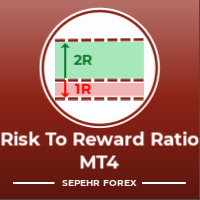
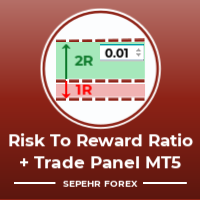
風險回報比:

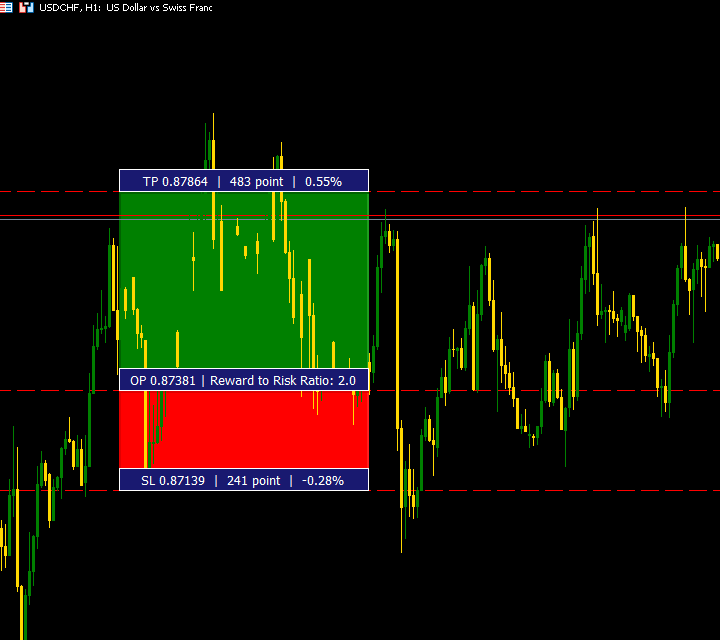
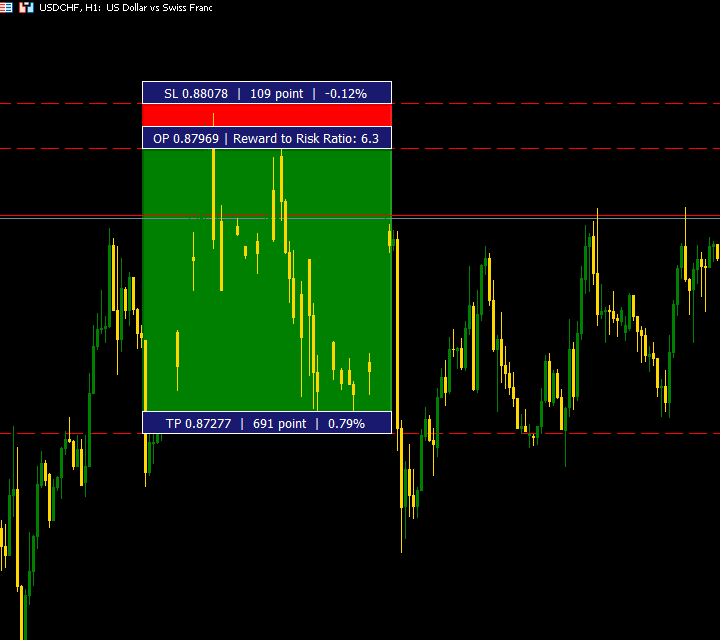
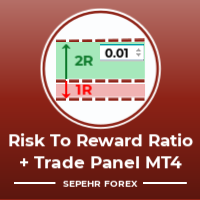
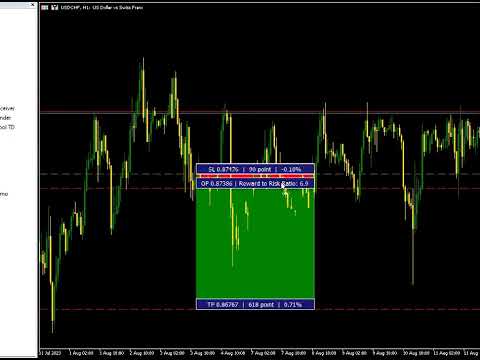
對於每個交易者來說,根據利潤的大小來計算損失的大小是很方便的,這樣他就可以判斷這是否是一筆好的交易。 此外,它還以點數和百分比顯示損失和利潤。

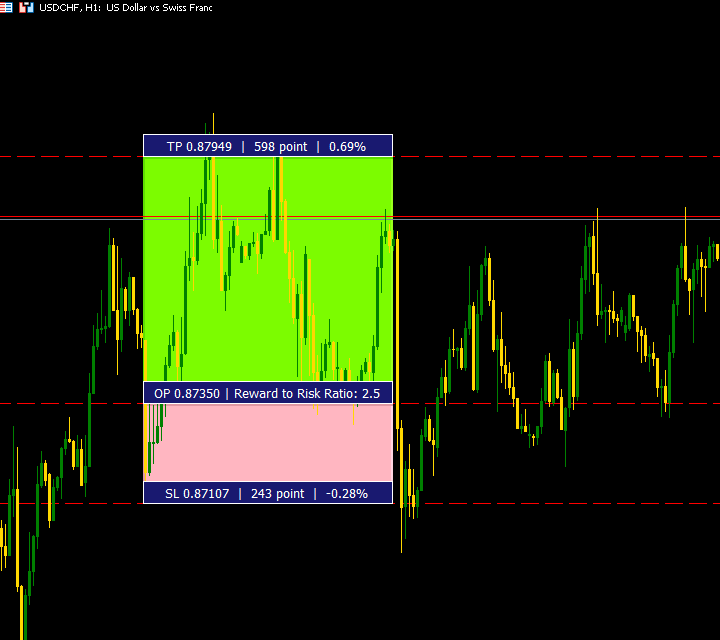
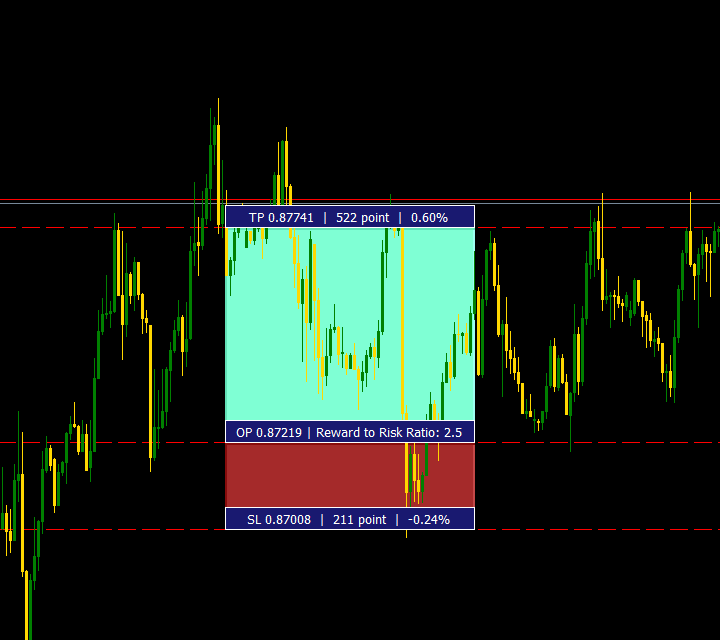
您可以設置您想要的每個部分的顏色。

如果你也可以用这个面板进行交易怎么办?! 请参阅下面的链接

Trader Assistant Mini MT5

您可以通過以下鏈接查看 MT4 版本:


您可以查看我的新產品,了解該工具的更專業版本。


希望能享受它;)

更多產品正在路上,請關注我以盡快了解。


終於:

我強烈鼓勵您分享您的想法和反饋。

提供您認為交易者可能需要的任何信息至關重要。

作者:

我是一名 MQL 語言程序員,三年來我一直在做各種項目。
我是一名電氣工程師,我喜歡解決難題。

Join My Group to Talk Together ;)

SEPEHR FOREX. MQL Group


评分 20
Benjamin Afedzie
4220
Benjamin Afedzie 2025.06.10 19:48 

great product

FourSeasons
90
FourSeasons 2025.05.21 17:59 

Could you share this code in CodeBase?

jackdil250
14
jackdil250 2025.05.20 09:34 

After the new version it works perfect. This is the best tool I have come across so far and it’s free. I have looked for other Risk to Reward tools but this one beats all other tool. So thank you very much

推荐产品
Free MetaTrader 5 indicator that displays "CALL IT A DAY" when London & New York sessions close. Customizable alerts, session tracking, and a guilt-free reminder to log off. Perfect for workaholic traders! Tired of staring at charts when the market’s already clocked out? Session Guardian   is your sassy trading assistant that slaps a giant   "CALL IT A DAY"   on your screen when both London   and   New York sessions are closed—because even traders deserve happy hour. Key Features:   Big, Bo
FREE
Risk Manager Lot Calculator tells you the exact lot size to trade so that a losing trade costs only the amount you decide, no more. You set your risk as a percentage of the account or as a fixed money amount, and you set your stop loss by pips, by price, or by dragging a line on the chart. The panel then shows the correct position size, the money at risk, the pip value and, when you add a take profit, the reward to risk ratio and the potential profit. Position sizing is the part of trading that
FREE
This is not an EA – it’s a simple and powerful MT5 indicator designed to help you manage trades quickly and easily.   Key Features: TP1 Auto-Set   – Fixed at 1RR TP2 Auto-Set   – Set at 2RR Fast Lot Calculation   – Calculates lot size based on SL in 1 second Quick Actions: Close All Trades Move to Breakeven Set TP at RR1 / RR2 User-Friendly   – No complex setup, just attach to chart and start using   Support: Telegram – @inForexVIP WhatsApp – +923118409597   MT4 Version Coming Soon W
FREE
Visual Order Sizer Indicator — Powerful Position Sizing Tool for MT5 Note: This indicator is converted from the Visual Order Sizer Trade Manager Tool EA into an indicator. All automatic calculations from the EA work exactly the same — Lot/Margin relationship, Risk/Reward, Commission, Spread display, etc. And it is offered completely free . Use it freely for all your position sizing calculations. The only limitation is that, because it is an indicator, it cannot place trades — this is due to MT5
FREE
Order Management Script MT5
Christianiel Robles Faustino
Stop Guessing Your Lot Size. Trade With Defined Risk. Order Management Script  is a FREE risk-management utility that automatically calculates your lot size, Entry, Stop Loss, and Take Profit based on your predefined trading rules. No manual position-size calculations. No repeated SL/TP calculations. Just define your risk and trading setup. KEY FEATURES Automatic Lot Size Calculation Calculate the correct position size using: • Fixed monetary risk • Percentage of account equity Multip
FREE
SmartRisk Trade Tool — One-Click Risk-Based Trade Panel SmartRisk Trade Tool is a manual trading panel for MetaTrader 5 built around position sizing and risk control rather than signal generation. It does not analyze the market or suggest trade direction — it exists so that every order sent from the chart already has a calculated lot size, stop loss, and take profit consistent with a risk value the trader chooses, removing the manual arithmetic that normally happens between deciding to trade and
FREE
As traders, we all know that risk management is the most important aspect of profitable trading. So, we need to determine the lot size, every time we need to open a new trade. The FX lot size calculator is a simple tool that will help you to determine your lot size easily without using any third-party service but you will be able to do that by your MetaTrader terminal. LIMITED TIME OFFER: 30$ FOR 10 ACTIVATION. Inputs: Maximum_Risk_Prc: To determine your preferred risk%. For example, if your ris
FREE
核心功能 智能交易管理 一键开仓平仓操作,支持自定义手数设置. 多种平仓模式:全部平仓、按方向平仓、按盈亏状态平仓. 专业风险控制控制风险 实时监控点差,避免高成本交易环境.可视化控制面板。 直观的图形界面所有功能一键操作. 实时显示仓位信息、盈亏状况、点差状态. 支持面板最小化、锁定功能,防止误操作 . 产品优势 高效便捷无需复杂设置,开箱即用 图形化操作,告别繁琐代码.实时数据更新,决策更及时. ️安全可靠点差监控,避免恶劣市场条件交易. 专业实用支持多种订单类型管理,灵活的手数配置 详细的仓位信息展示. 适用场景 手动交易者:提供专业的方便控制工具 效率追求者:一键式操作,提升交易效率.       如果你用的方便的话,记得分享给你的朋友!
FREE
Aura Lot Calculator – know your exact position size in one second. Stop guessing your lot size. Set your risk, place your stop loss, and Aura Lot Calculator instantly shows the correct lot – so every trade risks exactly what you planned, nothing more. HOW IT WORKS - Choose your risk: % of balance or a fixed money amount (one click to switch) - Enter your stop loss in points – or turn on the SL Line and simply drag it on the chart - The calculator detects BUY or SELL automatically from the lin
FREE
Short description Position sizing and margin calculator for MetaTrader 5 with separate BUY and SELL calculations. Full description QRM Risk Calculator is a position sizing and margin calculation utility for MetaTrader 5. It calculates BUY and SELL volume separately according to the selected percentage risk, stop-loss distance, account data, symbol specifications, and current Bid and Ask prices. The calculator displays the estimated monetary loss at the stop loss, theoretical reward at the take p
FREE
Auto TP SL in Pips
Suci Ridha Krismayanti
This utility automates Take Profit (TP) and Stop Loss (SL) levels for your trades, calculated in Pips . It ensures consistent risk management for all your positions. Crucial Note for Manual Traders: If you intend to use this utility on trades opened manually (without an Expert Advisor), you must change the 'Magic Number' setting to 0 (zero) . This allows the utility to correctly identify and manage your manual orders.
FREE
Collective TP SL Manager is a MetaTrader 5 utility that manages a combined take-profit and stop-loss across many open positions on one symbol. Instead of setting TP/SL per order, it watches the net profit or loss of all (or filtered) positions and closes the basket when your target is reached. Features Basket-level targets: one collective take-profit and one collective stop-loss for the whole group of positions. Net P/L monitoring: continuously sums the profit/loss of all selected positions in
FREE
Market Time
Kaan Caliskan
3 (1)
MarketTime - 专业多时区时钟和交易时段指标 再也不会错过交易时段 - 实时监控全球市场时间 MarketTime是一款专业级指标,可直接在您的MetaTrader 5图表上显示多个时区、实时时段倒计时和可视化交易时段区域。在外汇交易中,时机就是一切 - 了解主要金融中心何时活跃以及时段何时重叠可以显著影响您的交易成功。 这个综合工具消除了对多个浏览器标签或外部应用程序的需求。监控全球市场时间所需的一切都在您的图表上,实时更新,界面简洁可定制,不会使您的工作空间杂乱无章。 了解更多: 完整文档和设置指南 (English) 限时优惠: 前50次下载免费!之后此产品将收费。立即下载以获取免费副本。 主要功能 多时区显示: 同时显示本地时间、经纪商时间、伦敦、纽约、东京和自定义时区,实时更新 实时时段倒计时: 精确的倒计时器,显示伦敦、纽约和亚洲时段开盘或收盘的剩余时间 可视化时段区域: 在图表上绘制彩色矩形,突出显示活跃交易时段,颜色和透明度可自定义 时段重叠检测: 特殊区域突出显示多个主要时段同时活跃时的高流动性时期 商品交易时间: 实时显示当前商品的开盘/收盘状态以及下次开
FREE
A fast, clean on-chart trading panel for manual traders. Open market or pending grid orders directly from your chart, manage SL/TP, lot size, trailing, spread and margin — without using the order window. Technical Features One-click BUY / SELL Live Bid / Ask inside buttons SL / TP input (Pips & Points) + quick +/- adjustment Trailing Stop control Pending Grid (Buy/Sell Limit & Stop) Step distance (Pips/Points) Order count Lot multiplier Real-time margin estimate (uses account currency) Live spre
FREE
Breakeven Manager
Ibrahim Olalekan Ganiu
各位交易高手們,你們好!相信你們一定做得很好。你們有沒有遇過這樣的情況:市場最初走勢對你有利,或接近你的止盈目標,然後突然反轉,與你的部位方向相反?這種情況我遇過很多次,今天我決定反擊。 我向你們介紹一款交易管理器,它可以幫助你保護你的部位。這個項目可以幫助你將部位設定為損益平衡,當達到你指定的點數或止盈的一定百分比時,即可達到損益平衡,取決於你選擇的模式。 此外,這個專案還可以幫助你追蹤部位,當部位達到你指定的點數或止盈的一定百分比時,即可達到損益平衡,取決於你選擇的模式。 MT4: https://www.mql5.com/en/market/product/144196 使用方法 只需將 EA 應用於活躍貨幣對(例如 BTCUSD 或 XAUUSD),然後相應地設定損益平衡和交易參數即可。 注意: EA 不依賴價格變動。即使應用該功能的圖表沒有出現任何價格變動或價格波動,它也能管理您的所有部位。 祝您好運,交易順利。
FREE
Click Trading
Jawad Tauheed
5 (2)
One Click Trading – Auto TP SL Developer TraderLinkz Version 1.00 Category Utility What it does Adds missing TP and SL to your manual trades and pending orders Sets them once per ticket Lets you move TP and SL afterward Works on hedging and netting accounts Scans on every tick and reacts on trade events Why you want it You place faster entries You get consistent risk and exit targets You reduce fat finger errors You keep full manual control Quick start Attach the EA to any chart Keep TP and SL e
FREE
================================================================ MATRIX CONDITION MONITOR Live Trade Condition Panel for MetaTrader 5 Fully Automatic -- Works with ALL Matrix EAs ================================================================ NEVER MISS A TRADE SETUP AGAIN Matrix Condition Monitor is a free utility that attaches to any chart and automatically checks all 10 trade conditions in real time -- showing you exactly why a trade will or will not open, and alerting you the moment ever
FREE
PositionMap Pro — Account Overview Panel for MT5 A real-time panel that groups all open positions by symbol and shows Buy lots, Sell lots and net profit/loss directly on your chart — the whole account at a glance. Instead of counting lots symbol by symbol in the Terminal tab, PositionMap Pro groups everything automatically. You instantly see how much exposure you have on each symbol, split by direction. Panel example Symbol Buy Lot Sell Lot Net P/L EURUSD 0.50 — +12.30 XAUUSD — 1.00 −45.00 GBPUS
FREE
Middle Line
Oleksandr Kashyrnyi
Middle Line —— 管理交易的必备工具! 这款 MetaTrader 5 脚本可以帮助交易者计算两个平均价格水平: 总平均价格 :计算所有未平仓订单的平均入场点。 去掉最优订单后的平均价格 :帮助交易者判断如何调整仓位,降低风险。 功能展示 Middle Line 会直接在图表上显示计算结果: 实线 —— 显示所有订单的总平均价格。 虚线 —— 显示去掉最佳订单后的平均价格。 通过这些数据,您可以快速判断如何调整仓位,优化交易决策。 为什么选择 Middle Line? 省时高效 :自动计算结果,立即显示在图表上。 精确分析 :基于每笔订单的交易量,提供更精确的数据。 通用性强 :适用于各种交易工具和交易策略。 易用性高 :结果不仅显示在图表上,还会在终端窗口显示。 适合谁使用 Middle Line? 适合进行网格交易、加仓或对冲的交易者。 想快速看到关键入场点的交易者。 想省去繁琐计算时间,专注做出决策的交易者。 使用 Middle Line,帮助您更好地管理交易! Middle Line 的最新升级 Middle Line 是脚本 Seredina 的增强版 ( 链
FREE
Trade With Price is a powerful and user-friendly MetaTrader 5 Expert Advisor designed to simplify and accelerate your trading execution. This EA provides a smart one-click trading panel that allows traders to instantly place BUY, SELL, and pending orders directly at the current market price—eliminating the need to calculate distances in pips. Key Features One-click BUY & SELL execution Place pending orders based on market price instead of pips Clean and intuitive trading panel interface
FREE
FiT Panel Pro
Thonglak Janyakorn
Overview FiT Panel Pro is a professional-grade trade management panel designed for MetaTrader 5 traders who demand speed, precision, and full control over their trades. Built with a modern dark-theme UI, it combines one-click execution with advanced risk management, visual SL/TP drag lines, automatic Fibonacci-based levels, and comprehensive order management — all in a single, compact panel. Whether you are a scalper, day trader, or swing trader, FiT Panel Pro gives you the edge you need to exec
FREE
Trade assistant pro v8
Ahmed Mohammed Bakr Bakr
2 (1)
FREE FREE FREE Trade Assistant MT5 – Professional Trading & Risk Management Panel Trade Assistant MT5 is an advanced trading panel designed to help traders execute orders faster, safer, and more professionally . It simplifies manual trading by combining smart order management , precise risk control , and one-click execution , making it ideal for both beginners and advanced traders. This tool does not trade automatically . Instead, it empowers you with full control while applying professional-gra
FREE
Pump Liquidity Refueling
Konstantin Meshcheriakov
PUMP V3_0 Liquidity Refueling — Refueling Your BalanceWhat is "Liquidity Refueling"? Think of the Forex market as a highway and liquidity as the fuel.  When institutional players "pour" massive volume into the market, the price makes a sharp surge — an impulse or a "pump."  The PUMP V3_0 EA acts as a smart fueling station: it identifies moments of maximum market energy and "pumps" that momentum directly into your trading account.   Performance Metrics (Strategy Tester Data):Net Profit "Pumped"
FREE
Trader Toolkit Panel An all-in-one manual trading panel that helps you size, place, and manage your trades from a single window. It does not trade automatically and gives no buy/sell signals — you stay in full control. Think of it as a control panel for disciplined, manual trading. What it does Position Calculator — Enter your risk percentage and stop distance, and the panel instantly shows the correct lot size, your risk in account currency, and your reward-to-risk ratio. No more manual math or
FREE
Trade management panel for MetaTrader 5. It lets you place orders and manage open positions from a panel on the chart, without opening separate order windows. It works on any symbol and timeframe, on hedging and netting accounts. Layout and display The panel has two layouts. Single shows all controls in one view. Tabs splits the controls into separate tabs for a smaller footprint. You can hide the panel to see the chart behind it and restore it when needed. The panel scales with the screen res
FREE
When executing an order, whether through the Metatrader ticket on a computer or the Metatrader app on a mobile device, either manual or pending, Easy Trade will automatically set the take profit and stop loss levels, as well as a limit order with its respective take profit and stop loss levels. It follows the trading strategy for market open (US30, US100, US500), but it can be applied to any market asset.
FREE
Strifor Smart Lot Calculator eng version
Strifor (Mauritius) Ltd
5 (10)
Strifor Lot Calculator — 适用于 MetaTrader 5 的指标,帮助交易者根据设定的风险和止损计算最佳手数。 它可以让交易更有意识,管理风险,并节省手动计算时间。 优势 精确的风险控制 — 根据所选风险百分比自动计算手数。 两种工作模式 — 手动输入参数或基于图表线计算。 支持常用工具 — 外汇对、黄金 (XAUUSD)、原油 (USOIL/WTI)、指数 (US500 等)。 快速直观地在图表上规划交易。 根据实际账户余额计算手数。 输入参数 Deposit — 手动输入资金(或 0 = 使用当前账户余额)。 RiskPercent — 每笔交易的风险百分比。 StopLossPips — 止损点数(仅手动模式)。 Mode — true = 手动模式,false = 基于线模式。 工作模式 手动模式 输入资金、风险和止损,指标将计算最佳手数。 基于线模式 在图表上画两条水平线: 入场线 — 开仓水平 止损线 — 止损水平 指标将自动测量距离并计算手数。 注意事项 在真实账户使用前,建议先在模拟账户测试指标。 不同经纪商的 Tick Value 和合
FREE
AI Smart Risk Trade Manager is a professional trade-management utility panel for MetaTrader 5. It does not open trades on its own signal - instead it gives you a one-click, risk-based way to enter the market and then automatically manages every open position (yours or from any other EA) with breakeven, trailing and partial-close logic. Key features: One-click BUY / SELL panel buttons that size the position automatically from your chosen risk percent of account balance Automatic Stop Loss and Tak
FREE
Account Turbo Flip: The Ultimate Manual Trading & Management Assistant Trading successfully isn't just about finding the perfect entry—it is about how you manage the trade once you are in the market. Account Turbo Flip  is a streamlined utility Expert Advisor designed to take the emotion and hesitation out of trade management. Built for traders who prefer to maintain control over their own entries, it acts as your dedicated tactical assistant. You pull the trigger based on your own analysis, an
FREE
SignalXpert
Steve Rosenstock
5 (4)
点击此处查看我所有免费产品 SignalXpert 是我专为使用 RangeXpert 指标的交易者开发的一款强大的分析工具。 RangeXpert 作为系统的基础,可精确识别市场区域并提供数据, SignalXpert 会对这些数据进行实时分析,从而生成清晰且可执行的交易信号。 这使得系统能够在不同周期中同时监控多达 25 个不同的资产 ,并实时捕捉最重要的市场变化。得益于集成的提醒功能, 可以通过 alert、push 或 email 发送通知 ,确保你不会再错过任何交易机会。安装在 MetaTrader VPS 上后, SignalXpert 可 24/7 全天候运行,为你提供可靠的信号监控。无论你是在规划进场还是出场, SignalXpert 都能为你提供快速而精准的支持,帮助你在波动的市场中自信交易。 规格 与 RangeXpert 无缝集成 - 使用其数据对市场区域和区间进行实时分析。 同时监控多达 25 个资产 - 非常适合多资产和多周期分析。 兼容所有主要市场 - 外汇、货币、金属、股票和指数。 实时信号检测 - 自动识别突破、区间切换和趋势区域。 实时通知 -
FREE
该产品的买家也购买
Trade Assistant MT5
Evgeniy Kravchenko
4.43 (216)
它有助于计算每笔交易的风险,容易安装新的订单,具有部分关闭功能的订单管理, 7 种类型的追踪止损和其他有用的功能。   附加材料和说明 安装说明   -   应用程序说明 线条功能  - 在图表上显示开仓线、止损线、止盈线。 有了这个功能,就可以很容易地设置一个新的订单,并在开仓前看到它的附加特性。   风险管理  - 风险计算功能在考虑到设定的风险和止损单的大小的情况下,计算新订单的成交量。它允许你设置任何大小的止损,同时观察设定的风险。 批量计算按钮 - 启用 / 禁用风险计算。 在 " 风险 " 一栏中设置必要的风险值,从 0 到 100 的百分比或存款的货币。 在 " 设置 " 选项卡上选择风险计算的变量: $ 货币, % 余额, % 资产, % 自由保证金, % 自定义, %AB 前一天, %AB 前一周, %AB 前一个月。   R/TP 和 R/SL - 设置止盈和止损的关系。 这允许你设置相对于损失的利润大小。 例如, 1 : 1 - 这决定了 TP = SL 的大小。 2 : 1 - 这意味着 TP 是 SL 的两倍。 RR - 它禁用比率。   订单管理 该面板支
欢迎来到 Trade Manager EA——这是一个终极风险管理工具,旨在使交易变得更直观、精准和高效。它不仅仅是一个下单工具,而是一个用于无缝交易计划、仓位管理和风险控制的全面解决方案。不论您是新手交易员、资深交易员,还是需要快速执行的剥头皮交易员,Trade Manager EA 都可以满足您的需求,适用于外汇、指数、大宗商品、加密货币等各种市场。 借助 Trade Manager EA,复杂的计算已成过去。只需分析市场,在图表上用水平线标记入场、止损和止盈,设置您的风险水平,Trade Manager 就会立即计算出理想的头寸规模,并实时显示以点、账户货币计价的止损和止盈。每笔交易都得以轻松管理。 主要功能: 头寸规模计算器 :根据定义的风险瞬间确定交易规模。 简单的交易计划 :在图表上用可拖动的水平线直接计划交易,设置入场、止损和止盈。 实时显示 SL 和 TP :以账户货币、点或分显示止损和止盈,便于分析。 高级保护工具 盈亏平衡选项 : 基本盈亏平衡 :当您的交易达到设定水平时自动保护利润。 多级盈亏平衡 :设置多达 4 个级别以逐步保护利润。 尾随止损选项 : 基本尾随
Telegram to MT5 Multi-Channel Copier   可将您 Telegram 和 Discord 频道中的交易信号自动复制到 MetaTrader 5。无需机器人、无需浏览器扩展、无需手动复制。信号一到 Telegram 或 Discord,EA 几秒内就在您的终端开仓。 在复制某个频道之前,内置回测器还能告诉您该频道在您的账户上会有怎样的表现。 产品包含两个组件:一个监听您 Telegram 频道的 Windows 应用程序,以及在 MT5 终端执行信号的本 EA。同时提供 MT4 版本   点此 . 设置指南与应用下载:   https://www.mql5.com/en/blogs/post/768988 了解如何 回测任何 Telegram 信号频道 。 当前价格将来会上调。 工作原理 应用通过您自己的 Telegram 账号连接,因此能看到您关注的所有频道、群组、话题和机器人,包括私密和 VIP 频道。信号到达时,应用读取它,EA 按您的手数和设置在终端中开仓。 整个过程全自动,无需守在电脑前。专为 24/7 无人值守运行设计:Telegram 连接
Local Trade Copier EA MT5
Juvenille Emperor Limited
4.94 (149)
Local Trade Copier EA MT5 是一款快速、灵活的交易复制工具,用于在同一台 Windows 电脑或 Windows VPS 上的多个 MetaTrader 5 账户之间复制和管理交易。 它将本地交易同步与 Receiver 端的手数管理、风险管理、交易过滤、品种映射、交易管理和账户保护功能结合在一起。 只需约 1 分钟 即可完成 Transmitter 和 Receiver 终端的设置,并可在同一经纪商或不同经纪商的账户之间复制手动交易或 EA 交易。在合适的条件下,本地 MetaTrader 终端之间的交易信息可以在 0.5 秒以内 完成同步。实际交易执行速度取决于经纪商延迟、网络状况、电脑/VPS 性能以及终端负载。 购买前先试用免费演示版 您可以在 MT5 模拟账户上测试 功能完整的 Local Trade Copier EA MT5 免费演示版 ,每次可使用 4 小时 : 下载 Local Trade Copier EA MT5 免费演示版 将下载的文件放入: MT5 → 文件 → 打开数据文件夹 → MQL5 → Experts 然后重新启动 MT
Farmed Hedge Yield Farming | All Markets (Manual - Hybrid - Semi/Automated EA) VERIFIED TRADING RESULTS - Farmed Hedge Yield Axi Copy:  https://www.mql5.com/en/signals/2356376 - Farmed Hedge Yield Exn Copy:   https://www.mql5.com/en/signals/2356404 - Farmed Hedge Yield V Copy:  https://www.mql5.com/en/signals/2357156 IMPORTANT NOTICE: FarmedHedge is a MANUAL-FOCUSED TRADING UTILITY ,not a fully automated EA. Results shown on this Signal include manual trades and overall strategic management.
按照自己的交易规则复制 Telegram 信号 Telegram to MT5 Signal Trader 可将 Telegram 公开及私密频道和群组中的文字交易信号自动复制到 MetaTrader 5。通过一个桌面应用管理多个信号提供者和 MT5 账户,并为 每个提供者单独设置风险和交易参数 。 复制信号无需 Telegram 机器人,也无需配置 API。 只需通过手机号或二维码登录您自己的 Telegram 账户,然后选择您已加入的频道或群组。您无需创建机器人,也无需提供 Telegram API 令牌、API ID 或 API hash。 自行选择仓位大小,将平仓分配到多个止盈价位,并自动执行保本止损和移动止损。在跟随信号提供者的同时,掌握信号的实际交易方式。 本产品由这款 MT5 EA 和必须配合使用的 Windows 桌面应用组成。请参阅 安装指南及应用下载 。 管理多个信号提供者和账户 为每个提供者单独设置: 为每个频道设置专属的仓位计算方式、入场规则、止损、止盈和交易管理参数。 灵活分配至不同账户: 将同一提供者的信号复制到多个已连接的 MT5 账户,并为每个账户使用不
Strategy Ledger Pro
Abdullah Uygar Tuna
5 (14)
现已支持中文。 Strategy Ledger Pro 是一款适用于 MetaTrader 5 的只读账户分析面板。它按智能交易系统(EA)、策略、品种和魔术号拆分账户结果,让您看清每一个的真实贡献。 面板支持 11 种语言:English、Français、Deutsch、Español、Italiano、Português、Русский、Türkçe、中文、日本語 和 한국어。 下载演示版之前请注意。 Market 仅在策略测试器中运行任何付费产品的演示版。本面板分析的是您自己账户上的交易,而策略测试器中没有可读取的账户历史,因此演示版会打开一个空面板并加以说明。这是演示机制的工作方式,并非产品的限制。 本描述中的视频展示了面板在真实账户上的运行效果。 详细的 使用手册 (英文)介绍了每项功能, AureusAI Trading Suite 群组欢迎交流讨论并发布公告。 MetaTrader 对整个账户只显示一个余额。当多个 EA 同时交易时,这个余额无法说明每个 EA 的贡献。Strategy Ledger Pro 读取账户历史,重建已平仓头寸,将其归入各个策略,并在一个
TradePanel MT5
Alfiya Fazylova
4.88 (170)
交易面板是一款多功能交易助手。该应用包含超过50种手动交易功能,并允许您自动执行大多数交易任务。 应用程序说明 : https://www.mql5.com/zh/blogs/post/761102 用于模拟账户的应用程序试用版: https://www.mql5.com/zh/blogs/post/762579 如何安装应用程序: https://www.mql5.com/zh/blogs/post/762580 如何在可视化模式下测试应用程序: https://www.mql5.com/zh/blogs/post/770278 如何在VPS MetaTrader上安装应用程序: https://www.mql5.com/zh/blogs/post/770196 贸易. 只需单击一下即可执行交易操作: 打開掛單和頭寸,並自動計算風險。 一鍵打開多個訂單和頭寸。 打開訂單網格。 按組別關閉掛單和頭寸。 反轉頭寸方向(關閉買入>打開賣出,關閉賣出>打開買入)。 鎖定頭寸(通過開啟缺少的頭寸,使買入和賣出頭寸的數量相等)。 一鍵部分關閉所有頭寸。 將所有頭寸的止盈和止損設置在同一價格水平。
================================================================================ POC BREAKOUT - V20.72. Full Professional Grade Toolkit ================================================================================ POC Breakout is a full MetaTrader 5 trading dashboard for discretionary traders who want breakout signals, Point of Control (POC) context, volume profiles, order flow, market structure, news, alerts, and advanced trade planning in one professional workspace. Attached directly to you
MT5 to Telegram Signal Provider 是一个易于使用且完全可自定义的工具,它允许向 Telegram 的聊天室、频道或群组发送 指定 的信号,将您的账户变为一个 信号提供商 。 与大多数竞争产品不同,它不使用 DLL 导入。 [ 演示 ] [ 手册 ] [ MT4 版本 ] [ Discord 版本 ] [ Telegram 频道 ]  New: [ Telegram To MT5 ] 设置 提供了逐步的 用户指南 。 不需要了解 Telegram API;开发者提供了您所需的一切。 关键特性 能够自定义发送给订阅者的订单详情 您可以创建分层的订阅模型,例如铜、银、金。其中金订阅获得所有信号等。 通过 id、符号或评论过滤订单 包括执行订单的图表截图 在发送的截图上绘制已关闭的订单,以便额外核实 延迟发送新订单消息的可能性,以便在发送前对位置进行调整 订单详情完全透明: 新的市场订单*带截图 订单修改(止损、获利) 已关闭的订单*带截图 部分关闭的订单** 新的挂单 修改的挂单(进场价格) 挂单激活(作为新的市场订单附加) 已删除的挂单 历史订单报告
VirtualTradePad PRO SE MT5 — MetaTrader 5 专业交易控制中心 VirtualTradePad PRO SE 是一款基于图表的高级交易面板,也是适用于 MetaTrader 5 的交易管理工作区。它专为希望获得更快执行、更清晰持仓控制、结构化交易管理、可视化价位规划,以及直接在图表上完成专业交易流程的交易者而设计。 这不仅仅是一个 BUY / SELL 面板。PRO SE 将手动交易、挂单、持仓管理、部分平仓、篮子利润/亏损控制、加仓均价层级、ATM 规则、信号监控、实时市场信息、策略测试器 (Strategy Tester) 流程以及面向 VPS 的运行方式整合到一个互相关联的界面中。 MT4 版本 | 完整说明和截图 | 如何购买 | 如何安装 | 如何获取日志文件 | 如何测试与优化 | Expforex 的所有产品 为什么交易者会选择这套面板 图表一键交易 ,并支持键盘快速操作 快速完成开仓、平仓、修改、反转、锁仓与部分平仓 深度控制仓位、挂单、总利润与风控逻辑 自动参数计算,减少手动输入与重复劳动 为什么 PRO SE 比标准手动交易更高
Trade copier MT5
Alfiya Fazylova
4.61 (57)
Trade Copier 是一种专业实用程序,旨在复制和同步交易账户之间的交易。 复制发生从供应商的帐户/终端到收件人的帐户/终端,安装在同一台计算机或 vps 上。 在购买之前,您可以在演示帐户上测试演示版本。 演示 这里 。 完整说明 这里 。 主要功能和优点: 支持复制MT5>MT5、MT4>MT5、MT5>MT4,包括МТ5 netting账户。 供应商和收件人模式在同一产品中实现。 简单直观的界面,允许您直接从图表中实时控制复制。 连接中断或终端重新启动时不会丢失设置和位置。 允许您选择要复制的符号,也可以替换接收者的符号,例如 EURUSD> USDJPY。 允许为每个符号设置个性化的复制设置。 支持回拷贝。 能够仅复制某些订单。 允许您设置开仓交易价格的最大差异和最大时间延迟。 正确复制部分订单关闭的执行。 计算复制手数的几种方法。 同步止盈和止损。有几种方法可以计算它们的位置。 支持通过执行在“Market account”上工作,其中 SL / TP 仅在开仓后设置。 如何使用简单的设置复制交易 将供应商终端和接收终端安装在同一台计算机或 VPS 上。 在供应商终端上
Exp COPYLOT CLIENT for MT5
Vladislav Andruschenko
3.97 (35)
适用于 MetaTrader 5 的专业交易复制器 快速、专业、稳定可靠的 交易复制器 ,适用于 MetaTrader 。 COPYLOT 可在 MT4 和 MT5 终端之间复制 Forex 交易,并支持 Hedge 和 Netting 账户。 COPYLOT 的 MT5 版本支持: - MT5 Hedge → MT5 Hedge - MT5 Hedge → MT5 Netting - MT5 Netting → MT5 Hedge - MT5 Netting → MT5 Netting - MT4 → MT5 Hedge - MT4 → MT5 Netting MT4 版本 完整说明 + DEMO + PDF 如何购买 如何安装 如何获取日志文件 如何测试和优化 Expforex 的所有产品 您也可以将交易复制到 MT4 终端(MT4 → MT4,MT5 → MT4): COPYLOT CLIENT for MT4 COPYLOT 是一款专业的交易和持仓复制器,可同时与 2、3 甚至 10 个终端协同工作。 支持从 模拟账户和投资者账户 复制,也支持同时在多个终端上运行。 您可以使
News Trade EA MT5
Konstantin Kulikov
4.55 (11)
在此向大家介绍一款我本人使用多年的机器人。该产品支持半自动和全自动交易模式。 >>> Chat <<< 本程序包含基于经济日历新闻的灵活交易设置功能。不支持策略测试器检验。仅可进行实际操作。需在终端设置允许URL 列表中添加新闻网站。点击服务 > 设置 > 智能交易系统。选中“允许WebRequest对下列URL发出请求:”。添加下列(删除空格):https://  nfs.faireconomy.media 下載最新的設定檔: https://www.mql5.com/en/blogs/post/747929 訊號監控: https://www.mql5.com/en/signals/author/test-standart 请参考博客中各类参数说明自行实现个性化设置   : https://www.mql5.com/en/blogs/post/748545   。 主要默认设置说明 单一图表英镑/GBP(英镑美元/GBPUSD、欧元英镑/EURGBP、英镑日元/GBPJPY、英镑加拿大元/GBPCAD、英镑澳大利亚元/GBPAUD、英镑瑞士法郎/GBPCHF)货币对操作。英镑/
The Patch
Mian Rameez Ali
The Patch It never opens a trade. It walks behind the ones that did. Every open position, every pending order — checked twice a second for the one thing that's easy to forget: a stop, a target. Found bare, it doesn't ask. It writes the missing number in, measured in points from wherever the position began, and moves on to the next. No strategy, no opinion on direction. Just the quiet assumption that nothing should ever sit on the market unprotected — not because someone decided it shouldn't,
Telegram To MT5 Ultra
Mirel Daniel Gheonu
5 (5)
Telegram To MT5 — 信号复制器 将您的 Telegram 频道中的交易信号变成真实的 MT5 订单 — 自动执行,可用于任意数量的账户,风险与规则完全由您掌控。 Telegram To MT5 将您已在 Telegram 关注的 VIP / 信号频道连接到您的 MetaTrader 5 终端。一个免费的配套桌面应用读取消息(即使是禁止机器人的频道),而本 EA 在您的账户上执行这些信号 — 应用您自己的风险设置、品种映射、止盈处理、交易时段与新闻过滤。 它是一个信号复制器,而非黑箱策略:由您决定信任哪些频道,以及每笔交易如何计算手数和管理。 分步设置与配套应用安装指南 工作原理 [您的 Telegram 频道] -> [配套桌面应用] -> [MT5 + 本 EA] -> 订单 配套桌面应用(免费,已包含)使用您的 Telegram 账户登录并监视您所选择的频道。即使是禁止机器人的 VIP 频道也能正常工作,它通过一个私有、加密的本地桥接转发每条消息。 本 EA 挂在一个图表上,在 MT5 接收这些信号,并按照您的规则开仓 / 管理交易。 应用与 EA 之间的连接是位于
下一次更新 — 版本 2.52 即将推出![全新功能] 准备迎接 4 项重大新功能,全面提升您的市场分析能力与交易流程! 我们将通过 4 项全新功能,进一步提升市场分析水平,满足您的交易需求。现为您介绍: 1. TRADE OVERVIEW DASHBOARD 2. CONFLUENCE AT ZONE 3. STRONG & WEAK HIGH/LOW 4. OTE 1. TRADE OVERVIEW DASHBOARD 一个帮助您更轻松地了解整体市场状况的仪表盘,为您的交易决策提供参考指引,帮助您系统地分析市场并规划交易,所有信息尽在一个屏幕中。 多时间周期市场概览(Multi-Timeframe Market Overview) 更清晰地了解市场方向与价格结构 快速查看市场状况 为系统化市场分析和入场规划提供指引。 2. CONFLUENCE AT ZONE 当价格进入关键区域时……您将了解有多少项支持因素相互吻合。 关键区域是交易决策至关重要的地方。但仅仅是价格进入某个区域还不够。此功能可帮助您在入场交易前,识别相互吻合的因素,包括信号及其他相关因素,从而进行更全面的分析,并
Anchor Trade Manager
Kalinskie Gilliam
5 (8)
Your EAs cannot see each other, but Anchor can. Anchor gives you one place to coordinate your EAs, manage risk, and decide when trading is allowed. It works alongside the trading bots you already use without any changes to them. The Problem One EA opens a trade. Then another starts trading. The next thing you know, you wake up to multiple grids built across your account. Each EA may be doing exactly what it was designed to do, but together they can place far more risk on your account than you in
Trader Evolution
Siarhei Vashchylka
5 (7)
" Trader Evolution " - A utility designed for traders who use wave and technical analysis in their work. One tab of the utility is capable of money management and opening orders, and the other can help in making Elliott wave and technical analysis. Manual (Be sure to read before purchasing) | Version for MT4 Advantages 1. Trading in a few clicks. Immediate and pending orders are available in the panel 2. Money management. The program automatically selects the appropriate lot size 3. Simplifies
Grid Manual MT5
Alfiya Fazylova
4.73 (22)
Grid Manual是一个交易面板,用于处理订单网格。 该实用程序是通用的,具有灵活的设置和直观的界面。 它不仅可以在亏损方向上设置订单网格,还可以在盈利方向上设置订单网格。 交易者不需要创建和维护订单网格,实用程序会这样做。 打开一个订单就足够了,Grid manual会自动为它创建一个订单网格,并伴随它直到非常关闭。 完整说明和演示版 此處 。 该实用程序的主要特性和功能: 伴隨以任何方式打開的訂單,包括從移動終端打開的訂單。 適用於兩種類型的網格:“限制”和“停止”。 使用兩種方法計算網格間距:固定和動態(基於 ATR 指標)。 允許您更改未結訂單網格的設置。 顯示圖表上每個網格的盈虧平衡水平。 顯示每個網格的利潤率。 允許您一鍵關閉網格中的盈利訂單。 讓您一鍵關閉每個訂單網格。 允許您對訂單網格應用追踪止損功能。 允許您在訂單網格上應用將訂單網格的止損轉移到盈虧平衡水平的功能。 相對於訂單網格的盈虧平衡水平自動重新排列止盈(僅在限價網格模式下,距離取決於所選的計算類型:“保守”或“激進”)。 最多可管理 20 個訂單網格,每個網格最多可包含 100 個訂單。 計算初始手數時,
HINN MagicEntry Extra
ALGOFLOW OÜ
4.74 (19)
HINN MAGIC ENTRY – the ultimate tool for entry and position management! SIMPLE. FASTEST. INTUITIVE. MAX AUTOMATED. Place orders by selecting a level directly on the chart! full description   ::  demo-version  :: 60-sec-video-description Key features: - Market, limit, and pending orders - Automatic lot size calculation - Automatic spread and commission accounting - Unlimited partitial take-profits  - Breakeven and trailing stop-loss and take-profit  functions - Invalidation leves - Intuitive, a
The product will copy all telegram signal to MT5 ( which you are member) , also it can work as remote copier.  Easy to set up, copy order instant, can work with almost signal formats, image signal,  s upport to translate other language to English Work with all type of channel or group, even channel have "Restrict Saving Content", work with  multi channel, multi MT5 Work as remote copier: with signal have ticket number, it will copy exactly via ticket number. Support to backtest signal. How to s
RETAILBERG FOOTPRINT CHART PRO — Order-Flow Workspace for MetaTrader 5 Version 7.00  |  Professional System  |  31 tools  |  One chart A full 150-page illustrated User Manual is included. Please read the full manual to understand this feature packed footprint chart elements and ui. https://www.mql5.com/en/blogs/post/777982 DEMO / STRATEGY TESTER — PLEASE READ FIRST
Timeless Charts
Samuel Manoel De Souza
5 (9)
Timeless Charts is an all-in-one trading utility for professional traders. It combines custom chart types such as Seconds Charts and Renko with advanced order flow analysis using Footprints , Clusters , Volume Profiles , VWAP studies, and anchored analysis tools for deeper market insight. Trading and position management are handled directly from the chart through an integrated trade management panel , while Market Replay and Virtual Accounts provide environments for practicing trading skills and
Floor Watch
Syed Tauqeer Hussain Shah
Floor Watch One number, watched every thirty seconds: how far equity has fallen since the day began — or since its highest point, if it's told to trail the peak instead of the open. Cross the line and it doesn't argue. Every open position closes, every pending order vanishes, and anything that slips through afterward gets shut the moment it appears. Not asked. Removed. The floor holds until the clock turns 5 AM Pakistan time — then, and only then, does the day start over. One rule. No except
RS Trade Copier - 超快 本地跟单系统,配备 真正的 图形界面。别再手动输入账号了。告别200多个晦涩的参数设置。 一款可靠且灵活的工具,用于在 MT5 和 MT4 多个终端之间复制交易操作。适合专业交易员、信号服务商以及个人投资者使用。能够以高精度和低延迟将一个或多个信号源(Provider)的 交易操作同步 到一个或多个接收端(Client)。支持简单自动配置和高级手动设置。不会干扰手动或其他 EA 开的订单。完全 在 MT5 本地运行 ,无需第三方服务器。 RS Trade Copier 与其他解决方案的对比 RS Trade Copier 其他解决方案 设置 可视化分步向导。 设置大约需要 1 分钟。 200 多个晦涩的输入参数。 设置大约需要 20 分钟。 速度 异步交易操作。 批量平仓 50 个头寸仅需 ~1 秒。 缓慢的顺序执行。 批量平仓 50 个头寸需要约 25 秒。 界面 真正的图形界面,支持 11 种语言的工具提示。 无需手册即可上手。 EA 属性中“输入参数”选项卡下的长长参数列表。 需要阅读所有文档。 批量操作 完全支持。 接收端上的批量平仓瞬
Seconds Chart MT5
Boris Sedov
4.61 (18)
秒级图表 (Seconds Chart) - 一款专为 MetaTrader 5 设计的独特工具,用于创建秒级时间框架的图表。 通过 秒级图表 ,您可以构建以秒为单位的时间框架图表,获得标准分钟或小时图表无法提供的极致灵活性和分析精度。例如,时间框架 S15 表示每根蜡烛图持续15秒。您可以使用任何支持自定义交易品种的指标和EA交易系统。操作它们就像在标准图表上交易一样方便。 与标准工具不同, 秒级图表 让您能够在超短时间框架下进行高精度交易,无延迟干扰。 免费演示版: Seconds Chart v2.29 Demo.ex5 下载免费演示版,亲自体验: 功能齐全 - 所有功能均可使用 24小时测试 - 足够评估准确性和便利性 仅限模拟账户 - 大多数经纪商均可轻松开立 仅限GBPCAD图表 - 大多数终端均可使用 这些限制仅适用于演示版。完整版适用于任何账户类型(真实、演示、竞赛)和任何图表(XAUUSD、EURUSD 等),无任何限制。 如何安装演示版 通过上方链接下载演示文件 打开MetaTrader -> 文件 -> 打开数据文件夹 -> MQL5 -> Experts 将下
Power Candles 策略扫描器——自优化多符号设置查找器 Power Candles策略扫描器 采用与Power Candles指标相同的自优化引擎,可同时扫描您“市场观察”中的所有交易品种。一个面板即可显示当前哪些品种在统计上具备交易价值、每种策略的最佳应用方向、最优止损/止盈组合,并在新信号触发时立即向您发送提醒。 本工具是 Stein Investments 生态系统的一部分 - 18+ 款工具,加上 Max,您的一对一 AI 交易导师。  随时在线,深入了解每一款指标,在您需要梳理思路的那一刻就在那里。  立即认识他: https://stein.investments 您的全面市场监控。每个交易品种超过3,000次自动优化。2种警报类型。一键切换图表并采取行动。 为何您需要此工具 大多数多标的扫描器仅展示价格 波动 。每只股票的波动率、百分比变化、RSI。您仍需自行摸索正确的策略、合适的止损位以及理想的入场阈值。Power Candles策略扫描器针对每只股票自动解答这些问题,仅在数学验证过的交易设置中触发实际入场信号时才会向您发出提示。这就是全部卖点。 自动
EA Auditor
Stephen J Martret
5 (6)
EA Auditor is an independent analysis tool for traders evaluating Expert Advisors and trading signals on MetaTrader 5. It audits backtest reports, reviews posted developer signals, and cross-verifies the two against each other to help traders assess strategies before committing capital. The MQL5 market offers a wide range of Expert Advisors from many developers, with varying approaches, quality, and transparency. EA Auditor provides a consistent, data-driven framework for reviewing them, answer
Astro Trade MT5
Indra Maulana
5 (8)
25% discount on the release of the tool: only for the next 3 buyers Send a message to receive a demo version. AstroTrade Trading Assistant AstroTrade is a comprehensive multi-functional trading utility developed for the MetaTrader 5 platform. It integrates essential tools for trade execution, risk management, and technical monitoring into a single unified interface. The application is designed to assist traders in managing their daily operations through a visual and structured environment. Vi
作者的更多信息
Risk to Reward Ratio
Faran Ataeiraveshti
4 (5)
大家好 又一个免费! 交易者的工具。 风险回报比: 对于每个交易者来说,根据利润的大小来计算损失的大小是很有用的,这样他就可以判断这是否是一笔好的交易。 此外,它还以点数和百分比显示损失和利润。 您可以设置所需的每个部分的颜色以及文本的位置。 如果你也可以用这个面板进行交易怎么办?! 请参阅下面的链接 Trader Assistant Mini MT4 您可以通過以下鏈接查看 MT5 版本: Risk to Reward Ratio MT5 您可以查看我的新產品,了解該工具的更專業版本。 Pro Risk Management Panel MT5 希望能享受它;) 终于: 我强烈鼓励您分享您的想法和反馈。 提供您认为交易者可能需要的任何信息至关重要。 作者: 我是一名 MQL 语言程序员,三年来我一直在做各种项目。 我是一名电气工程师,我喜欢解决难题。 Join My Group to Talk Together ;) SEPEHR FOREX.   MQL Group Sepehr(Faran)
FREE
Trader Assistant MT5帮助每个交易者根据他的余额管理每笔交易的风险,并且它有一些方便的工具。 注意力。 该应用程序在策略测试器中不起作用。 如何下载演示。 交易助理: 它使用特殊的流畅面板 - 元交易平台上没有该面板。您可以在建立交易前查看盈利和亏损金额。它还具有一些方便的工具,如下所述。 风险回报率面板. 该面板类似于交易视图平台。 您可以将 RR Ratio 设置为固定数字,例如 1:2 或 1:3 或...。此外,您还可以将止损设置为固定的点数。 交易量计算. 交易量可以通过三种模式计算。 第一个是您可以批量设置的固定体积。第二种是基于固定现金止损。 第三个是基于您的止损余额/净值的百分比。 工具菜单. 它有每个交易者都需要的四个方便的工具。 规模修复。 只需单击一下,您就可以比平时放大图表。 蜡烛定时器。 它显示蜡烛关闭之前的剩余时间。 整数价格。 它显示了最接近的整数的 12 个价格水平。 世界交易时间会话。 该面板根据“您的当地时间”显示四个主要交易时段 - 纽约、伦敦、东京和悉尼。 重要的.   该 EA 将在未来版本中具有额外的功能特性,从而导致
MA Crosses Show
Faran Ataeiraveshti
Hello.  Another free indicator from Sepehr! ;) You can determine the trend with this tool. Using crosses of two Moving averages, you can say that the trend is going to be bullish or bearish; A fast-moving average and a slow one. When the fast-moving crosses up the slow-moving, it's going to be an uptrend and when it crosses down the slow-moving, it means that you are going to have a downtrend. That's easy ;) Hope to enjoy it Sepehr(Faran)
FREE
Background color panel
Faran Ataeiraveshti
Hello again This is a free indicator that provides you with a panel at the corner of your chart to change your background. If you want to hide it, you should click on the minimize button above the buttons. Let me know what other free indicators you need! If those are easy I will make them for you ;) Many other tools are in the row. So wait and look! Hope to Enjoy it Sepehr (Faran)
FREE
该软件工具旨在简化以您选择的五种可自定义颜色创建水平趋势线和矩形的过程。 在 MT5 中绘制精确的水平趋势线可能具有挑战性,但使用此指标,您可以轻松地以适合您偏好的颜色创建它们。 此外,我们的工具还可以清晰显示与您绘制的水平线相关的价格水平。 我们重视您的反馈,并希望您发现该工具成为满足您交易需求的宝贵资产。 请随时与我们分享您的想法。 .......................................................................................... ..........................................................................................
大家好 “Trader Assistant Mini”是一款方便的工具,可通过流畅的 R:R 面板计算每笔交易的风险。 风险回报率加上交易面板: 每个交易者都可以方便地根据利润大小计算损失大小,并管理每个交易者的风险,以便他可以判断这是否是一笔好交易。此外,它还以点数和百分比显示损失和利润以及损失和利润。 如何安装演示版+演示文件: Trader Assistant Mini MT4 Demo 您可以看到 “交易助手专业版”   。 专业风险管理面板 MT5 希望能享受其中。 终于: 我强烈鼓励您分享您的想法和反馈。 提供您认为交易者可能需要的任何信息至关重要。 作者: 我是一名 MQL 语言程序员,三年来我一直在做各种项目。 我是一名电气工程师,我喜欢解决难题。
Time Sessions MT4
Faran Ataeiraveshti
“Time Sessions MT4”是外汇交易者的另一个便捷工具,显示全球主要的四个交易时段。 时间场次: 该工具中的时间会根据您的当地时间自动设置。 它有一个移动时间标志,每秒向左移动并向您显示实时时间。 该面板包含漂亮的图形,引人注目。 此外,您可以将面板移动到图表上的任何位置。 更多解释... 希望能享受其中。 终于: 我强烈鼓励您分享您的想法和反馈。 提供您认为交易者可能需要的任何信息至关重要。 作者: 我是一名 MQL 语言程序员,三年来我一直在做各种项目。 我是一名电气工程师,我喜欢解决难题。 加入我的小组一起讨论;) 赛佩尔外汇。 微量润滑集团 .....................................
Trader Assistant MT4帮助每个交易者根据他的余额管理每笔交易的风险,并且它有一些方便的工具。 注意力。   该应用程序在策略测试器中不起作用。 如何下载演示。 交易助理: 它使用特殊的流畅面板 - 元交易平台上没有该面板。您可以在建立交易前查看盈利和亏损金额。它还具有一些方便的工具,如下所述。 风险回报率面板. 该面板类似于交易视图平台。 您可以将 RR Ratio 设置为固定数字,例如 1:2 或 1:3 或...。此外,您还可以将止损设置为固定的点数。 交易量计算. 交易量可以通过三种模式计算。 第一个是您可以批量设置的固定体积。第二种是基于固定现金止损。 第三个是基于您的止损余额/净值的百分比。 工具菜单. 它有每个交易者都需要的四个方便的工具。 规模修复。 只需单击一下,您就可以比平时放大图表。 蜡烛定时器。 它显示蜡烛关闭之前的剩余时间。 整数价格。 它显示了最接近的整数的 12 个价格水平。 世界交易时间会话。 该面板根据“您的当地时间”显示四个主要交易时段 - 纽约、伦敦、东京和悉尼。 重要的.   该 EA 将在未来版本中具有额外的功能特性,从而
HFT Prop Passer
Faran Ataeiraveshti
5 (1)
HFT Prop Passer 是一款 EA 交易程序,旨在传递一些自营(专有)公司的 HFT 挑战账户。 交易策略: 该 EA 交易在 1 分钟时间范围内处理道琼斯符号并执行高频交易。 该产品可以在很短的时间内(通常不到30分钟)通过HFT账户的挑战阶段。 回撤也非常低,适合自营公司账户条件。 ***目前该产品的前 5 名购买者价格仅为 150 美元。 购买5次后,价格将上涨最多200美元,所以不要错过这个机会。 EA 测试结果: 您可以在下图中查看回撤水平、利润以及获得利润的持续时间的示例。  根据这些结果,您可以评估我们团队设计的高频交易技术的威力。 如何回测? 点击此处查看如何在 mt4 策略测试器上回测演示版本。 购买产品后,请在“评论”部分留下评论,以便我向您发送设置文件。 拥有高频交易允许账户的道具公司: 您可以在下面查看提供高频交易账户的自营公司列表  < Click Here >. 笔记: 如果您不知道自营公司是什么、它们如何运作或高频交易账户是什么,建议不要购买此产品。 请务必研究上述道具公司并确保其可信度。 为此,您可以使用 Trustpilot 网站并
该软件工具旨在简化以您选择的五种可自定义颜色创建水平趋势线和矩形的过程。 在 MT5 中绘制精确的水平趋势线可能具有挑战性,但使用此指标,您可以轻松地以适合您偏好的颜色创建它们。 此外,我们的工具还可以清晰显示与您绘制的水平线相关的价格水平。 我们重视您的反馈,并希望您发现该工具成为满足您交易需求的宝贵资产。 请随时与我们分享您的想法。 .......................................................................................... ..........................................................................................
大家好 “Trader Assistant Mini”是一款方便的工具,可通过流畅的 R:R 面板计算每笔交易的风险。 风险回报率加上交易面板: 每个交易者都可以方便地根据利润大小计算损失大小,并管理每个交易者的风险,以便他可以判断这是否是一笔好交易。 此外,它还以点数和百分比显示损失和利润以及损失和利润。 How to install the demo version + Demo file: Trader Assistant Mini MT5 Demo 您可以看到“交易助手专业版”。 Pro Risk Management Panel MT5 希望能享受其中。 终于: 我强烈鼓励您分享您的想法和反馈。 提供您认为交易者可能需要的任何信息至关重要。 作者: 我是一名 MQL 语言程序员,三年来我一直在做各种项目。 我是一名电气工程师,我喜欢解决难题。 ..................
Time Sessions MT5
Faran Ataeiraveshti
“Time Sessions MT5”是外汇交易者的另一个便捷工具,显示全球主要的四个交易时段。 时间场次: 该工具中的时间会根据您的当地时间自动设置。 它有一个移动时间标志,每秒向左移动并向您显示实时时间。 该面板包含漂亮的图形,引人注目。 此外,您可以将面板移动到图表上的任何位置。 更多解释... 希望能享受其中。 终于: 我强烈鼓励您分享您的想法和反馈。 提供您认为交易者可能需要的任何信息至关重要。 作者: 我是一名 MQL 语言程序员,三年来我一直在做各种项目。 我是一名电气工程师,我喜欢解决难题。 加入我的小组一起讨论;) 赛佩尔外汇。 微量润滑集团 .....................................
筛选:
Oliver71trade
58
Oliver71trade 2026.01.12 18:11 

Any indicator is suitable for the tasks it was created to solve. Very clear. Thank you!

449026
134
449026 2025.12.15 12:09 

good indicator, thank you

Benjamin Afedzie
4220
Benjamin Afedzie 2025.06.10 19:48 

great product

FourSeasons
90
FourSeasons 2025.05.21 17:59 

Could you share this code in CodeBase?

jackdil250
14
jackdil250 2025.05.20 09:34 

After the new version it works perfect. This is the best tool I have come across so far and it’s free. I have looked for other Risk to Reward tools but this one beats all other tool. So thank you very much

andy kang
32
andy kang 2025.05.19 10:36 

用户没有留下任何评级信息

22487555
74
22487555 2025.04.01 02:52 

用户没有留下任何评级信息

odymt5
194
odymt5 2025.03.23 19:30 

Excellent tool

Marcio Da Silva Vicente
175
Marcio Da Silva Vicente 2024.12.22 14:53 

用户没有留下任何评级信息

Faran Ataeiraveshti
31072
来自开发人员的回复 Faran Ataeiraveshti 2024.12.23 14:41
thank you
michael
92
michael 2024.07.25 16:38 

用户没有留下任何评级信息

nisha
156
nisha 2024.06.14 16:23 

用户没有留下任何评级信息

Seth Tetteh
2850
Seth Tetteh 2024.04.24 12:39 

powerful

ceanbumo
39
ceanbumo 2024.03.12 01:22 

Muy Bueno.

Faran Ataeiraveshti
31072
来自开发人员的回复 Faran Ataeiraveshti 2024.03.12 11:16
Thank you for your review
fdavoudian
14
fdavoudian 2024.03.06 09:09 

i have installed this too but there is a problem. the frame is not showed completely and i can not see the risk to reward ratio how can i expand the frame?

Faran Ataeiraveshti
31072
来自开发人员的回复 Faran Ataeiraveshti 2024.03.06 09:23
Could you please send me a picture to see it?
claudiaburack
106
claudiaburack 2024.02.10 15:24 

Muito bom. Parabéns!

Faran Ataeiraveshti
31072
来自开发人员的回复 Faran Ataeiraveshti 2024.02.11 10:54
glad to here that
MOHAMED ADNAN
70
MOHAMED ADNAN 2024.02.05 18:32 

.

Faran Ataeiraveshti
31072
来自开发人员的回复 Faran Ataeiraveshti 2024.02.06 09:13
Thank you for your feedback
CVAS
34
CVAS 2024.01.05 01:33 

No me funciono , no activa ni desactiva , me quedo congelado ...

foystar1
29
foystar1 2023.10.07 16:56 

how do you take a trade with this tool on mt5 demo

Faran Ataeiraveshti
31072
来自开发人员的回复 Faran Ataeiraveshti 2023.10.07 16:59
Hello, foystar1. It can not trade, it just calculates the reward-to-risk ratio. The trading capability version is this one:
https://www.mql5.com/en/market/product/104025?source=Site+Market+Product+From+Author
Adeni Ferreira
221
Adeni Ferreira 2023.08.25 23:16 

Muito bom, falta só o ajuste para que os pontos no bra50 (atctivtrades) se dê de 5 em 5 pontos.

Faran Ataeiraveshti
31072
来自开发人员的回复 Faran Ataeiraveshti 2023.08.28 18:40
Thanks for your review dear Adeni. bra50 is stocks? and can you send me a picture of that problem? Thanks...
krisnara123
2210
krisnara123 2023.08.21 13:27 

Very Handy RR tool with nice measurements.

Faran Ataeiraveshti
31072
来自开发人员的回复 Faran Ataeiraveshti 2023.08.21 13:33
I'm happy to hear that.
回复评论