Trendscout MT5

Experience the ultimate trendline auto-trading solution! Our expert advisor/utility allows you to effortlessly place one or more trendlines from different timeframes - it places a trade in the breakout direction.

 1.    AUTO TRADING / MANUAL TRADING

Trendscout can place orders for you automatically. You have to enable “Auto trading” and also check the “Enable live trading” box at the parameter window. When price crosses a trend lines for the first time two massages are sent to your mobile phone or to your email as the case may be. One message is for line crossing notification while the other message is a trade notification. Trade or notification are executed only when the last bar of the execution frequency timeframe (say, M30) completes beyond the trendline.

To place orders manually you need to turn off either the "Auto Trading" button on the trading platform or disable (uncheck) the "Allow live trading" box at the "Common" tab of the parameter window. In this case only line crossing notification would be sent to your mobile phone. Be sure to enable the Trendscout network access before or after setting up the trendlines.

 3.  MULTIPLE OPEN POSITIONS

One position can be placed at a time per instrument via auto trading method. If you wish to place multiple open positions you can only do it manually.

 4.  CLOSING ALL OPEN TRADES

Use the “Close All” buttons to close all open trades in the account when “Auto trading” is enabled and also when the “Enable live trading” box at the parameter window is checked.

 5.  PUSH AND EMAIL NOTIFICATIONS

Trendscout can send push notification to your mobile phone when price crosses a trend line, be sure to enter your MetaQuote ID at the "Notification" tab of the "Option" settings of the "Tools" menu. Also, check the "Enable Push Notifications" box. Trendscout can also send email notification to your email address. All you need do is enter your email parameters at Menu\Tools\Options\Email. Also check the "Enable" check box.

6.  PARAMETER WINDOW'S SETTING

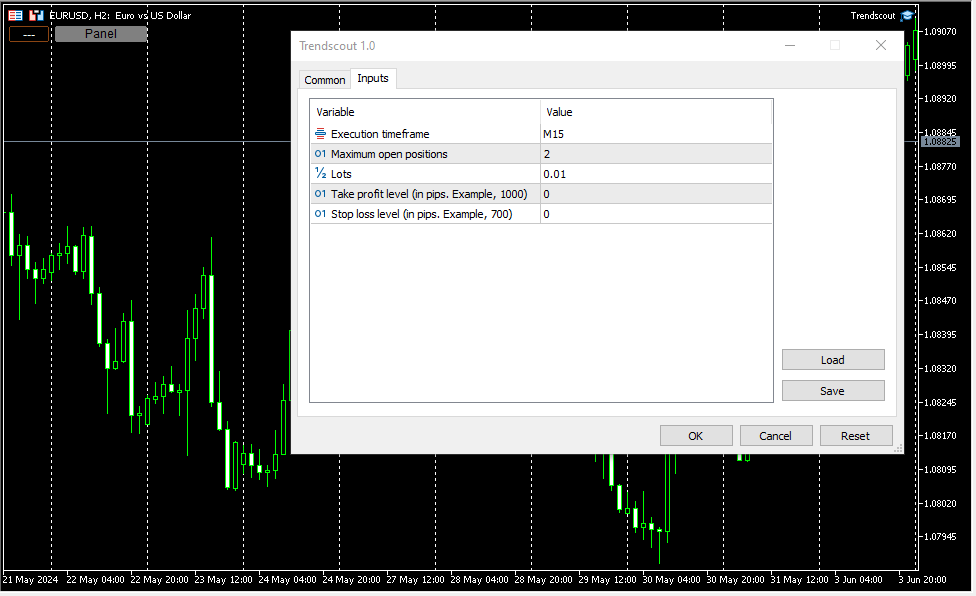
The following are the windows parameter settings available:

(i)    Execution frequency: This is the interval or duration of time in which Trendscout has to wait before searching for a breakout. Hence, the EA does not depend on the timeframe of the chart upon which it is attached. Popular execution frequencies are hourly, every thirty minutes and every fifteen minutes for intraday traders. Larger execution frequencies can be used for longer term traders.

(ii)   Maximum open trades: This is the maximum number of trades Trendscout can place during auto trading. The default number of open trades is 2. You can increase this value by entering a value of your choice.

(iii)   Lots: This is the lot size of a trade. The default lot size is 0.01. This value can be increased by entering the lot size of your choice directly.

(iv)   Take profit level (in pips): Set your desired take profit level in percentage in points. If you do not wish to set the take profit level enter zero in this field.

(v)    Stop loss level: (in pips): Set your desired stop loss level in percentage in points. If you do not wish to set the stop loss level enter zero in this field.

7.   PANEL/EXIT BUTTONS

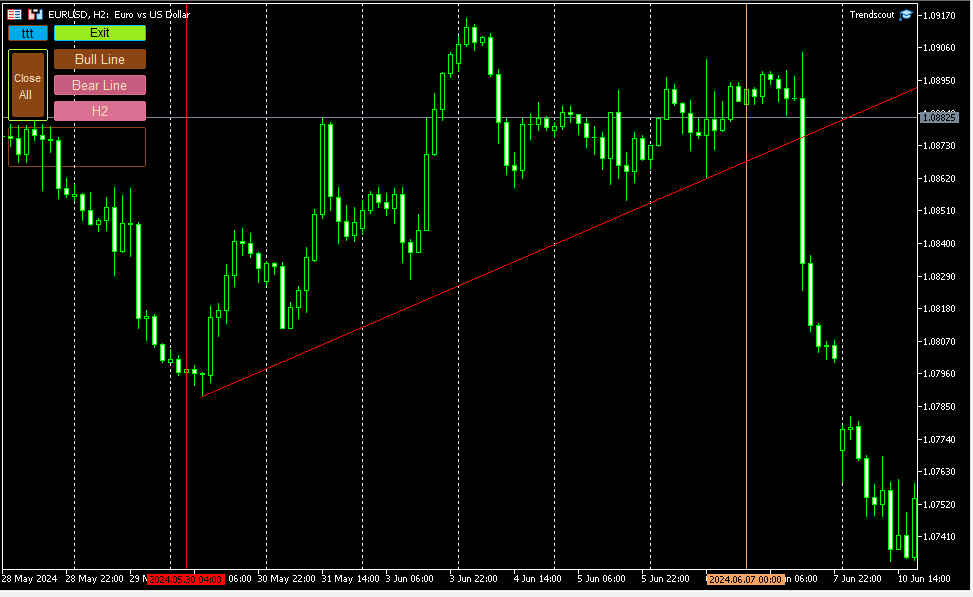
Click the panel button to display the operating buttons. Use the "Exit" button to clear all operating buttons.

8.    ATTACHING TRENDSCOUT TO MULTIPLE CHARTS

The Expert/utility can be attached to as many charts as are open on the trading platform. You can use the "ttt" ("---") button to block Trendscout from accessing network on the charts in which you are not ready to place trend lines at the moment. The symbol "ttt" indicates that network is accessible by Trendscout while "---" indicates that network is not accessible by Trendscout.

 9.    TREND LINE TYPES

Two types of trend lines are available based on the selected chart type. When using candlesticks or bar charts, the trend line will switch to price high/low mode automatically. When using line charts, the trend line will switch to close mode without additional action required.

 10.    ADDING MULTIPLE TRENDLINES IN THE SAME DIRECTION

To trigger a stronger trading opportunity you can require that price breaks two or more trend lines of different timeframes in the same direction. To do this navigate to the timeframe for which you want to add a trend line and click "Bull Line" or "Bear Line" button. Next, navigate to the timeframe for which you want to add the second trend line. Click on the "Bull Line" or "Bear Line" button twice. This will place the second trend line based on the current timeframe without deleting the first trend line. You can do this for as many timeframes as needed.

 A trading opportunity will be triggered or an order for the instrument will open only when price breaks all the trend lines in the direction they are placed. A trend line timeframe is identified by the name of the timeframe that appears on the tooltip of each trend line and its handles.

 11.    PLACING TWO OPPOSITE TRENDLINES FOR ONE TIMEFRAME SIMULTANEOUSELY

Use the "Trend Lines" button to place bull and bear trend lines to the current timeframe. This button does not append new trend lines to existing ones, even if you switch to another timeframe.

 12.    TIMEFRAME HOPPING (REVISITING A TIMEFRAME FOR TREND LINE READJUSTMENT)

If you have a trend line in one timeframe and switch to another timeframe, you can modify the trend line for the previous timeframe using the handles, only when you return to that timeframe. You can also delete and re-add it using the appropriate "Bull Line" or "Bear Line" button. In other words, you CANNOT modify the trend lines whose timeframe you are not currently on.

 13.    DELETING ALL TRENDLINES

To remove all placed trend lines on the chart simultaneously, click the "Trend Lines" button when the button caption displays a timeframe name.

 14.  USING THE DATE ANCHOR AND DATE ANCHOR BUTTON

The “Date Anchor” can be useful for the following reasons:

(i)     View the date, time and bar position on the “Date anchor button” as well as on the tooltip of the "Date anchor line".

(ii)    The date anchor time is in the trading server's time zone and also of type am/pm as against the server’s traditional 24 hour type. This is an added advantage.

(iii)   The date anchor of all charts are at synch with one another.

 (iv)   The date anchor allows you to compare and analyze data across multiple charts from a reference date/time.

N.B.: Trendscout works on live and demo accounts, but not on strategy tester.
推荐产品
Bober Real MT5
Arnold Bobrinskii
4.88 (16)
Bober Real MT5 是一个全自动的外汇交易智能交易系统(EA)。该机器人创建于 2014 年 ,在此期间完成了大量盈利交易,在我的个人账户上实现了超过 7000% 的收益增长 。经过多次更新, 2019 年版本 是最稳定、最优秀的。机器人可用于任何交易品种,但在 EURGBP、GBPUSD(M5 周期) 上表现最佳。使用错误的参数会导致较差结果。 真实账户的 set 文件仅提供给购买者。 ️ 主要优势 无马丁格尔、无对冲、无加仓,始终使用 SL/TP 。 高速测试与优化。 可选 Dynamic Take-Profit ,自动适应价格通道高低点。 内置 新闻日历过滤器 ,自动避开重大事件。 自动检测 GMT 偏移 。 针对实盘交易长期优化,结果稳定。 设置后可自动运行,无需干预。 参数说明 Core / Trading type_order — 订单执行类型 (默认 ORDER_FILLING_FOK)。 ReverseTrade — 反转交易方向。 ToolEnter — 入场工具 (RSI 或 None)。 RSI304 / NoRSIbars — RSI 周期与
SolarTrade Suite 金融机器人:LaunchPad 市场专家 - 专为开启交易而设计! 这是一个使用特殊创新和先进算法来计算其价值的交易机器人,是您在金融市场世界中的助手。 使用我们来自 SolarTrade Suite 系列的指标集来更好地选择启动此机器人的时机。 在描述底部查看我们来自 SolarTrade Suite 系列的其他产品。 您想自信地驾驭投资和金融市场的世界吗? SolarTrade Suite 金融机器人:LaunchPad 市场专家是一款创新软件,旨在帮助您做出明智的投资决策并增加您的利润。 SolarTrade Suite 金融机器人的优势:LaunchPad 市场专家: - 准确计算:我们的机器人使用先进的算法和分析方法来准确预测市场走势。 计算购买和出售资产的最佳时机。 - 用户友好界面:直观的界面将使您能够轻松掌握程序并在安装后立即开始享受其好处。 - 专家支持:我们的专业团队随时准备为您解答任何问题,并为您提供有关使用该程序的建议。 立即试用 SolarTrade Suite 金融机器人:LaunchPad Market
Perfect Trade EA Indicator 2026 for XAUUSD MT5 Премиальный многоуровневый самообучающийся индикатор с режимом автоторговли для XAUUSD Perfect Trade EA Indicator 2026 — это не просто индикатор и не обычный советник с примитивным входом по шаблону. Это премиальный торговый комплекс для MetaTrader 5, созданный для работы с XAUUSD, который объединяет в себе: - многоуровневый анализ рынка; - интеллектуальную фильтрацию сигналов; - режим автоматической торговли; - продвинутое сопровождение сделки;
VectorPrime EA MT5
Maxim Kurochkin
4.2 (15)
VectorPrime — 多层向量逻辑的算法系统 VectorPrime 是一款自主交易系统,专为在多时间框架市场条件下实现结构化执行而设计。其核心理念是 向量分析 ,通过将价格动态分解为方向性冲动和矩阵结构,构建市场的整体图景。系统并非将行情视作孤立信号,而是作为相互关联的向量网络进行解读。 VectorPrime 的核心模块: Vector Dynamics Engine(向量动态引擎) — 识别主导方向流,过滤短期噪音。 Prime Momentum Layer(主动能层) — 评估微观冲动的强度与持续性,使入场点适应不同波动阶段。 Matrix Vector Module(矩阵向量模块) — 基于矩阵方式解释价格行为,形成多维市场模型。 Adaptive Risk Protocol(自适应风险协议) — 通过结构化回撤阈值与头寸管理来控制风险暴露。 执行逻辑基于预定义的结构条件,不使用马丁格尔、网格策略或外部预测模型。每一笔交易由上下文触发因素驱动,例如波动性变化、方向性聚集和结构性突破,并以固定的止损和止盈水平形成可控的交易周期。 VectorPrime 不依赖新闻事件或概
Exclusive Imperium MT5 — 自动化交易系统 Exclusive Imperium MT5 是一款用于 MetaTrader 5 的智能交易顾问(EA),基于市场分析算法和风险管理。该顾问完全自动运行,几乎不需要交易者的干预。 注意!购买后请立即联系我 ,以获取安装和设置说明! 重要提示: 所有示例、截图和测试仅用于演示目的。如果某个货币对在某个经纪商处表现良好,并不意味着在其他经纪商处也会如此。每个经纪商都有自己的报价、点差和交易条件。因此, 每个货币对必须由用户自行优化 ,并且在真实账户上 只能以单一货币模式运行 —— 每个货币对单独运行。多货币模式的截图仅供参考。建议至少 每年优化一次 ,因为市场条件会发生变化。 重要信息: 顾问的演示版本仅供试用。未经优化的测试结果不能反映算法的真实表现。完整使用需要针对经纪商、资金和所选工具进行个性化优化。无论如何,优化必须由用户自行完成,并且至少 每年重复一次 。 请记住:最终结果直接取决于您的经验以及您在优化后设置的参数。 主要特点 分析算法: 指标与过滤器的组合,用于寻找交易机会。 灵活性: 可适应不断变化的市场条件
Precision TradePad PRO
Daniel Rafal Jaworski
Precision TradePad PRO is an advanced trading panel designed for traders who want full control, speed, and precision in every trade. This tool eliminates manual errors and simplifies the entire trading process. No more calculating lot sizes, forgetting stop losses, or managing trades manually. Everything is handled instantly and automatically. Main Features: Automatic Lot Calculation - Based on risk percentage - Based on fixed amount - Based on equity - Manual lot option Instant Stop Loss &
Introducing Neural Bitcoin Impulse - an innovative trading bot created using neural network training technology on voluminous market data sets. The built-in mathematical model of artificial intelligence searches for the potential impulse of each next market bar and uses the resulting patterns of divergence and convergence between the predictive indicators and the price to form high-precision reversal points for opening trading positions. The trading robot is based on the Neural Bar Impulse ind
| Fully-automated Smart Money Concept (ICT) inspired trading solution with multi-strategy capabilities | Built by a grid trader >> for grid traders.  This is MT5 version, click  here  for  Blue CARA MT4  (settings and logics are same in both versions)     Real monitoring signal  -->  Cara Gold Intro Blue CARA EA   ('CARA') - short for  C omprehensive  A lgorithmic   R esponsive   A dvisor is a next-gen  multi-currency    multi-timeframe  EA base on the widely known (and perhaps the most popul
ProTrade EA
Jim Ariel Camarce Ignao
Key Features   Automated Candle Pattern Recognition 10 Professional Patterns : Detects Bullish/Bearish Engulfing, Hammer/Shooting Star, Morning/Evening Star, Piercing/Dark Cloud, and 6 additional professional candlestick patterns Smart Filtering : Combine multiple patterns with configurable confirmation logic Volume Confirmation : Optional volume filter to validate pattern strength Multi-Timeframe Analysis : Separate execution and bias timeframes for better timing   Trading Dashboard Int
The Gold Buyer
Moses Aboliwen Aduboa
Ride the Gold Trend with a Simple Buy-Only EA The  EA is a fully automated Buy-Only Expert Advisor for MetaTrader 5. It is designed to capture upward market opportunities with safe risk management and seamless execution. Why Traders Choose It: Best performance on Gold (XAUUSD) – highly liquid and trending. Buy-Only EA – focuses purely on long positions. Plug & Play setup – attach and let it trade automatically. Built-in Stop Loss & Take Profit protection. Smart one-position contro
Phoenix Midas
Alvaro Albillos Gutierrez
Phoenix Midas is an order-flow Expert Advisor built specifically for XAUUSD (Gold) on the M15 timeframe. It reads market structure through synthetic order-flow analysis — volume delta, volume profile (POC / value area) and liquidity behaviour — to time entries on two complementary setups, and it manages every trade with a fixed, pre-defined risk. Built-in news filtering and prop-firm risk controls make it suitable for both personal accounts and funded-challenge environments. WHAT IT IS NOT
ID Trade_Bot BS - an effective tool for automated trading using RSI Trade_Bot BS is an efficient solution for automated trading based on RSI, allowing flexible parameter customization and risk management. Thanks to the ability to choose a trading mode, dynamic Stop-Loss and Take-Profit levels, and trading mode adjustment (buying, selling, or both), it is suitable for various trading strategies. Key Features: Uses the RSI indicator to determine market conditions. Automatically opens an
Viking Alpha DAX Ivar Edition
Valdeci Carlos Dos Passos Albuquerque
Viking Alpha DAX — Germany 40 Expert Advisor for MetaTrader 5 LAUNCH PROMO Only 10 copies at launch price. Price increases with each sale. Launch price: $297 Next price: $497 Final price: $997 Live Performance: FX Blue — Vikingtradingbots What Makes Viking Alpha DAX Different Most DAX robots fail for one simple reason: they treat the Germany 40 like a forex pair. It isn't. The DAX has a heartbeat — a specific rhythm tied to the Frankfurt Stock Exchange opening, the European session structure, an
Exclusive EA for FOREX HEDGE account The EA (FuzzyLogicTrendEA) is based on fuzzy logic strategies based on the analysis of a set of 5 indicators and filters. Each indicator and filter has a weight in the calculation and, when the fuzzy logic result reaches the value defined in the EA parameter, a negotiation is opened seeking a pre-defined gain. As additional functions it is possible to define maximum spread, stop loss and so on . Recommended Symbol: EURUSD, AUDUSD, GBPUSD, NZDUSD, USDCAD, AUD
Aurum Intraday EA
Rodrigo Leonardo Favreau Giuliodoro
Aurum Intraday EA – Advanced Gold Trading Algorithm The Aurum Intraday EA is a powerful automated trading system designed specifically for Gold (XAUUSD) traders who want to capture strong intraday movements while maintaining full control over risk and strategy configuration. Built with a robust algorithm and optimized for H1 and H4 timeframes (H4 recommended) , this Expert Advisor is capable of identifying high-probability opportunities in the gold market and executing trades with precision and
Smart M Quantum
Ignacio Agustin Mene Franco
Smart Money Quantum EA Smart Money Quantum is an advanced algorithmic trading Expert Advisor designed specifically to trade XAU/USD (gold) on the M15 timeframe. This system combines Smart Money Concepts (SMC) principles with institutional risk management to capture high-probability movements in the gold market. Key Features Trading Strategy SMC Methodology: Accurately identifies and trades institutional Order Blocks Break & Retest System: Confirms liquidity zones before executing trades RSI
By :ForextraderEanow   Green Mower 10.0                                                                                                                                                                                                                                                                                                        This EA is Famous Grid Strategy that open grid of trades with the same size (not martingale)  and make PROFIT even when the Forex price moves in the WRONG Direction
Smart Breakout Recovery EA Smart Breakout Recovery EA is an advanced automated trading system based on EMA trend filtering and Supply/Demand breakout logic. The EA identifies high-probability breakout and false-break opportunities, combined with a controlled recovery system to optimize trade management. Key Features: - Dual EMA trend confirmation (M15 + H1) - Breakout and False Break detection - Supply & Demand zone integration - Smart Recovery (Martingale-based) - Adjustable lot scaling
Aureus Edge Gold Trader
Craig Joshua Binnekamp
️ Aureus Edge Gold Trader (v2.10) The Specialist Engine for XAUUSD Aureus Edge is not a "jack-of-all-trades" bot. It is a high-precision Expert Advisor engineered strictly for Gold (XAUUSD) . While it includes stability protocols to pass global market validation, every line of logic is optimized for the unique volatility and liquidity of the Gold market . ️ Built for Professional Capital Preservation Unlike popular EAs that use dangerous recovery grids, Aureus Edge focuses on disciplined br
Cyclone Intraday
Mikhail Mitin
5 (1)
How the EA works (simple explanation) Trades on M5 timeframe Uses H1 timeframe to analyze global market context Analyzes 2 or 3 timeframes simultaneously On each timeframe: Checks price position relative to one or two Moving Averages Evaluates MA angle and distance between price and MA Entry logic is based on trend + volatility conditions , not on random signals The full algorithm is illustrated in the screenshots. Recommended usage Symbol: EURUSD Timeframe: M5 Trading style: Intraday
Aurelia Queen
Ludovic Herve Bodet
AURELIA QUEEN Advanced Mean-Reversion Trading for Gold (XAUUSD) AURELIA QUEEN  is an automated trading system designed specifically for Gold (XAUUSD). It combines a mean-reversion approach with intelligent position management to exploit temporary market overextensions and capture frequent recovery movements. The strategy seeks opportunities when price deviates significantly from its normal trading range. Rather than chasing trends, AURELIA QUEEN  focuses on identifying moments where the market m
XAUUSD H1 Gold Auto Trader – 5 Years Proven Performance (2021 to 2026 ) Fully Automated Gold Trading for MetaTrader 5 XAUUSD H1 Gold Auto Trader is a powerful and intelligent Expert Advisor designed specifically for XAUUSD (Gold) on the H1 timeframe. Built for precision, stability, and consistency, this EA uses a structured strategy combined with a static trailing stop system to protect profits and manage risk effectively. Whether you are a beginner or an experienced trader, this robot provides
MT5 To Telegram Copier
Levi Dane Benjamin
3 (2)
将完全可定制的信号从 MT5 发送到 Telegram,并成为信号提供商! 该产品采用易于使用且具有视觉吸引力的图形界面。 自定义您的设置并在几分钟内开始使用该产品! 用户指南 + 演示  | MT4版本 | 不和谐版本 如果您想尝试演示,请参阅用户指南。 MT5 电报发送器在策略测试器中不起作用。 MT5 转 Telegram 功能 通过大量选项根据您的喜好完全定制信号 在信号之前或之后添加您自己的自定义消息。 这可以是标签、链接、频道或其他任何内容 在信号中添加、删除、自定义表情符号。 或者您可以将它们全部删除。 按交易品种或幻数过滤要发送的交易 排除发送特定符号 排除发送特定幻数 自定义与信号一起发送的交易详细信息 发送带有信号的屏幕截图 自定义要发送的信号类型 发送信号性能的每日、每周、每月和自定义时间报告 我总是愿意改进产品,所以如果您有想要看到的功能,请发表评论或给我留言。
ConstellationFX Gold Scalper
Shaljan Areepattamannil
ConstellationFX – The Gold Scalper Built for Frequent Daily Trading Looking for a gold EA that does not remain inactive for days? ConstellationFX Gold Scalper is a fully automated MT5 Expert Advisor designed to trade XAUUSD frequently throughout each trading day. See performance, not promises.   The EA’s live performance can be monitored on myfxbook.com  (myfxbook.com/members/ConstellationFX/constellationfx-gold-scalper/12117867) Unlike many gold scalping EAs, it focuses on regular market parti
Quant Edge EA: Pro Scalper [Plug & Play] Welcome to the ultimate algorithmic scalping solution. Quant Edge EA is a highly calibrated, proprietary trading system designed to capture explosive market momentum. It operates flawlessly out of the box with its carefully optimized default settings—no complex set files or over-optimization required. Key Advantages & Transparency: Plug & Play: Built for ease of use. Just attach it to the chart and let it work immediately. Versatility: Capable of analyzin
US500 Scalper
Sergey Batudayev
标准普尔 500 剥头皮交易顾问是一款创新工具,专为希望成功交易标准普尔 500 指数的交易者而设计。该指数是美国股市最广泛使用、最负盛名的指标之一,涵盖了美国最大的 500 家公司。 特点: 自动交易解决方案:     该顾问基于先进的算法和技术分析,可以根据不断变化的市场条件自动调整策略。 多种方法:     该顾问结合了多种策略,包括了解指数趋势、振荡价格分析以及最大化利润和最小化风险的算法。 灵活性和可定制性:     交易者可以自定义 EA 设置以适合他们的交易目标、风险水平和交易策略偏好。 风险管理:     顾问不断监控市场并采取措施管理风险;您可以设置在达到某些损失水平时自动终止交易。 透明度和报告:     交易者可以访问详细的报告和分析来评估顾问的表现并做出明智的投资决策。 机器人策略: 机器人设置已准备好进行交易   标准普尔 500 指数,同时考虑到该指数的价格行为。 该策略包括不使用马丁格尔的平均法。 该顾问拥有 解决一系列亏损交易的智能算法 ,可让您减少存款负担并快速克服亏损。 优点: 通过领先的标准普尔 500 指数进入全球金融市场。 基于先进技术和算法的
RSI Master PRO – Professional Expert Advisor for MetaTrader 5 Overview: RSI Master PRO is an Expert Advisor (EA) developed for MT5, designed to trade automatically in the financial markets using the Relative Strength Index (RSI) as its core decision-making engine. Its modular design and fully customizable parameters make it a powerful and flexible tool for traders who base their strategy on this momentum indicator. ️ Key Technical Features: • RSI-Based Logic: Uses RSI readings to generate
探索我所有适用于 MetaTrader 4、MetaTrader 5 以及免费试用版的产品: https://www.mql5.com/es/users/urocio/seller 您可以选择两种 EA 版本: 完整版:支持无限交易品种和全部功能。 试用版(免费):用于测试 EA 的运行效果,仅在 EURUSD 上交易,连续执行 5 个周期,然后暂停 7 天后重新启动。 以完全的灵活性创建您自己的交易策略! 该专家顾问(EA)旨在支持多种交易方法,包括剥头皮交易(scalping)、网格系统(grid)、对冲(hedging)、马丁格尔(martingale)、反马丁格尔(anti-martingale)、新闻交易、挂单管理、套利、趋势跟随、突破策略(breakout)以及基于价格行为(price action)的交易。 它可应用于不同市场,如外汇(EURUSD、GBPUSD、USDJPY)、加密货币(BTC、Bitcoin)、指数(NAS100、US30、USA500、Dow Jones)以及贵金属(如黄金 XAUUSD)。 该 EA 兼容多种技术指标和交易概念,包括支撑与
Mt5 Classic BBSO
Olivier Nomblot
GUESS WHO'S BACK. THE LEGENDARY BLACK BOX SELF-OPTIMIZING EA — REBORN FOR 2026. Award-winning. Ranked top 20 overall for a DECADE on MT5. No. 1 in the world. Three times. The original self-optimizing multi-module engine traders still talk about today — now rebuilt from the ground up. BBSO – BlackBoxSelfOpt. Plug & Play. Self-Optimizing. Multi-Strategy. Trades currencies, metals, indexes. THE HONEST MACHINE While a generation of "money-printer" robots quietly stacked hidden grids and martingale b
该产品的买家也购买
Farmed Hedge Yield Farming | All Markets (Manual - Hybrid - Semi/Automated EA) MULTI-ASSET SUPPORT Trade any asset available on your broker - Forex: Major, Minor, Exotic pairs - Crypto: BTC, ETH, XRP, SOL, BNB - Stocks: Apple, Tesla, Amazon, Google, etc. - Commodities: Gold, Silver, Oil, Gas - Indices: US30, NAS100, SPX500, DAX40 - Any CFD your broker offers VERIFIED TRADING RESULTS - Farmed Hedge Yield Axi Copy:  https://www.mql5.com/en/signals/2356376 - Farmed Hedge Yield Exn Copy:   https:/
================================================================================ POC BREAKOUT - V20.72. Full Professional Grade Toolkit ================================================================================ POC Breakout is a full MetaTrader 5 trading dashboard for discretionary traders who want breakout signals, Point of Control (POC) context, volume profiles, order flow, market structure, news, alerts, and advanced trade planning in one professional workspace. Attached directly to you
Power Candles 策略扫描器——自优化多符号设置查找器 Power Candles策略扫描器 采用与Power Candles指标相同的自优化引擎,可同时扫描您“市场观察”中的所有交易品种。一个面板即可显示当前哪些品种在统计上具备交易价值、每种策略的最佳应用方向、最优止损/止盈组合,并在新信号触发时立即向您发送提醒。 本工具是 Stein Investments 生态系统的一部分 - 18+ 款工具,加上 Max,您的一对一 AI 交易导师。  随时在线,深入了解每一款指标,在您需要梳理思路的那一刻就在那里。  立即认识他: https://stein.investments 您的全面市场监控。每个交易品种超过3,000次自动优化。2种警报类型。一键切换图表并采取行动。 为何您需要此工具 大多数多标的扫描器仅展示价格 波动 。每只股票的波动率、百分比变化、RSI。您仍需自行摸索正确的策略、合适的止损位以及理想的入场阈值。Power Candles策略扫描器针对每只股票自动解答这些问题,仅在数学验证过的交易设置中触发实际入场信号时才会向您发出提示。这就是全部卖点。 自动
Footprint Chart Pro — Professional OrderFlow EA for MetaTrader 5 Version 6.34 | Professional tool for real traders | Institutional-Grade Visualization DEMO USERS - PLEASE SELECT EVERY TICK / REAL TICK WHEN TESTING AND YOU HAVE DOWNLOADED HISTORICAL DATA. IF YOU SEE A WAITING SCREEN AND IT IS NOT DOWNLOADING, IT MEANS YOU HAVE LOW HISTORICAL DATA. TRY 1 MIN AND 5 MIN FIRST ON 1 DAY DATA. ONE DAY DATA SHOULD BE THE NEWEST AND MOST CURRENT DATE. PLEASE WAIT UNTIL THE MARKET HAS ROLLED OVER PERIOD.
EasyInsight AIO MT5
Alain Verleyen
4.92 (12)
EASY Insight AIO – 全能智能交易一站式解决方案 概述 想象一下,您可以在几秒钟内扫描整个市场——外汇、黄金、加密货币、指数,甚至股票——无需手动筛选图表、繁琐安装或配置指标。 EASY Insight AIO 是您专为 AI 交易打造的即装即用数据导出工具。它将整个市场快照一次性输出为简洁的 CSV 文件,直接支持 ChatGPT、Claude、Gemini、Perplexity 等各类 AI 平台的即时分析。 无需窗口切换,无需图表叠加,也没有任何杂乱。只需纯净、结构化的数据自动导出,让您专注于基于数据的高效决策,无需再盯盘耗时。 为什么选择 EASY Insight AIO? 真正的一体化 • 无需设置,无需安装指标,无图表叠加。只需安装、运行并导出——就是这么简单。 多资产全覆盖 • 扫描分析外汇、金属、加密货币、指数、股票——您的券商所能提供的一切市场。 AI 专属数据导出 • 高度结构化、针对 AI 优化的 CSV 文件,直接适配主流智能工具和平台。 完整导出内容: • 三个可选周期的货币强度分析 • 净多头头寸变化体现市场情绪 • 成交量变化、
The product will copy all telegram signal to MT5 ( which you are member) , also it can work as remote copier.  Easy to set up, copy order instant, can work with almost signal formats, image signal,  s upport to translate other language to English Work with all type of channel or group, even channel have "Restrict Saving Content", work with  multi channel, multi MT5 Work as remote copier: with signal have ticket number, it will copy exactly via ticket number. Support to backtest signal. How to s

Premium Trade Manager - 内置交易导师的图表面板 Premium Trade Manager 将一位交易导师嵌入您的图表,并在其下搭载完整的执行引擎。像往常一样建立交易,然后让您的 AI 交易导师 Max 读取这笔具体的交易,结合您的实时账户给出直接判断,再由您决定是否下单:止损是否符合纪律化交易的要求、风险规模是否合理、高影响新闻事件是否即将发布、您是否接近资金盘限额。其下是完整的执行引擎,负责点击之后的一切:一键按风险下单、您在图表上拖动规划且交易进行中仍可随时调整的计划、最多四个分批止盈级别、七种移动止损方式、实时资金盘合规检查、新闻屏蔽保护,以及对自身成本进行评级的点差功能。决策由您做出。Max 给出第二次审视。面板负责此后的一切。 购买前先亲手体验。 直接在浏览器中点击实时面板,这是在购买前感受其工作方式的最快途径。 stein.investments/products/premium-trade-manager Max 是您的一对一 AI 交易导师,他直接内置于面板之中。  他了解您的账户、您的设置和您的规则,用您自己的语言回答,并在每笔交易下单前进
HINN Lazy Trader
ALGOFLOW OÜ
5 (1)
LIMITED SUMMER SALE -40% ! ONLY $470 insead of $790!  Maximum real discount! ONLY UNTIL 08/22 The core idea: using the user interface, you configure the parameters the chart must meet before entering a position (or positions), choose which entry models to use, and set the rules for when trading and planning should end. Lazy Trader  handles the rest: it  takes over all the routine chart watching and execution! full description  :: 3 key videos [1] ->  [2]   ->  [3] What can it do? - Understand
Quant AI Agents
Ho Tuan Thang
5 (1)
Quant AI Agents are independent trading Expert Advisors. Instead of trading using a fixed strategy like other conventional EAs, Quant AI Agents   is a   multi-agent AI trading framework   that turns natural-language strategy prompts into live.  WANT THE SAME RESULTS AS MY LIVE SIGNAL?   Use the exact same brokers I do:   IC MARKETS , IC TRADING   .  Unlike the centralized stock market, Forex has no single, unified price feed.  Every broker sources liquidity from different providers, creating un
YuClusters
Yury Kulikov
4.93 (43)
Attention: You can view the program operation in the free version  YuClusters DEMO .  YuClusters is a professional market analysis system. The trader has unique opportunities to analyze the flow of orders, trade volumes, price movements using various charts, profiles, indicators, and graphical objects. YuClusters operates on data based on Time&Sales or ticks information, depending on what is available in the quotes of a financial instrument. YuClusters allows you to build graphs by combining da
FUTURES ORDERFLOW FOOTPRINT CHART Professional OrderFlow EA for MetaTrader 5 Version 1.01| Professional tool for real traders | Institutional-Grade Visualization STRATEGY TESTER USERS - PLEASE SELECT EVERY REAL TICK WHEN TESTING AND YOU HAVE DOWNLOADED HISTORICAL DATA. IF YOU SEE A WAITING SCREEN AND IT IS NOT DOWNLOADING, IT MEANS YOU HAVE LOW HISTORICAL DATA. TRY 1 MIN AND 5 MIN FIRST ON 1 DAY DATA. ONE DAY DATA SHOULD BE THE NEWEST AND MOST CURRENT DATE. PLEASE WAIT UNTIL THE MARKET HAS ROL
Telegram To MT5 Receiver
Levi Dane Benjamin
4.53 (15)
将信号从您所属的任何渠道(包括私人和受限渠道)直接复制到您的 MT5。 该工具在设计时充分考虑了用户的需求,同时提供了管理和监控交易所需的许多功能。 该产品采用易于使用且具有视觉吸引力的图形界面。 自定义您的设置并在几分钟内开始使用该产品! 用户指南 + 演示  |   MT4版本  |   不和谐版本 如果您想尝试演示,请参阅用户指南。 Telegram To MT5 接收器在策略测试器中不起作用! Telegram 至 MT5 功能 一次复制多个通道的信号 从私人和受限频道复制信号 不需要机器人令牌或聊天 ID(如果出于某种原因需要,您仍然可以使用这些) 使用风险百分比或固定手数进行交易 排除特定符号 选择复制所有信号或自定义要复制的信号 配置单词和短语以识别所有信号(默认值应适用于 99% 的信号提供商) 配置时间和日期设置以仅在需要时复制信号 设置一次打开的最大交易量 交易和头寸管理 使用信号或自动设置的管理 通过设置每月、每周、每天、每小时或每分钟的最大交易次数,停止过度交易和报复性交易。 支持市价订单和挂单 每日最大利润目标(以美元为单位)以确保头寸并停止过度交易 确
AI Agent Supervisor is NOT an Expert Advisor. AI Agent Supervisor   is a   multi-agent AI risk & portfolio supervisor   that watches every EA on your account and intervenes in real time.  WANT AN AI PORTFOLIO MANAGER WATCHING YOUR FLEET 24/7?   Run your fleet on the same brokers I do:   IC MARKETS , IC TRADING   .  Unlike the centralized stock market, Forex has no single, unified price feed.  Every broker sources liquidity from different providers, creating unique data streams. The Supervisor r
Telegram to mt5 pro
Janet Abu Khalil
4 (4)
Telegram to MT5 Pro — 高级 Telegram 信号复制器(Auto-Fix,多TP,风险控制,完整交易管理) Telegram to MT5 Pro — 专业 Telegram 信号复制系统 Telegram to MT5 Pro 可将来自 Telegram 的交易信号实时复制到您的 MetaTrader 5 账户,并提供完整的风险控制、执行管理与交易管理功能。 系统由两个组件组成: • 运行在 MetaTrader 5 内的 Expert Advisor(EA) • 连接 Telegram 并将信号发送到 EA 的桌面桥接程序 两个组件必须在同一台电脑运行。由于 MQL5 限制,EA 无法直接连接 Telegram。 支持与安装 提供完整 PDF 安装指南。 支持内容: • 完整 PDF 使用手册 • 分步安装指导 • 在线聊天支持 • 交易商设置帮助(前缀、后缀、符号映射) 功能说明 • 读取任意 Telegram 群组或频道信号 • 自动解析交易品种、方向、入场、止损、止盈 • 秒级执行交易 • 管理交易(移动止损、保本、部分平仓) • 支持多账户与多信号
Ultimate Extractor
Clifton Creath
5 (8)
Ultimate Extractor - Professional Trading Analytics for MT5 *****this is the local HTML version of Ultimate Extractor. !!!!!it is not compatible with Cloud!!!! For the online version please reach out to me directly****** Ultimate EA manager also now available when you use cloud pro and above for free!! Ultimate Extractor transforms your MetaTrader 5 trading history into actionable insights with comprehensive analytics, interactive charts, and real-time performance tracking. What It Does Automa
Royal Copier
Janet Abu Khalil
5 (1)
Royal Copier — 专业版 MT5 交易复制器 Royal Copier 是一款适用于 MetaTrader 5 的专业本地实时交易复制器。 现在它已将两种功能整合到一个 MT5 Expert Advisor 中。 您只需在参数中选择 EA 运行于 Master 模式 或 Client 模式 。 这意味着同一个 EA 既可用于源账户,也可用于接收账户,同时保留原有复制器的运行逻辑。 Royal Copier 支持以下常见账户复制方式: MT5 到 MT5 MT5 到 MT4 MT4 到 MT4 MT4 到 MT5 如需与 MT4 进行复制,请使用 MT4_Copier 。 工作原理 Royal Copier 是一个本地复制器,通过同一台 Windows 电脑上的共享文件运行。 当 EA 设置为 Master 模式 时,它会监控源账户并将所有交易活动写入共享文件。 当 EA 设置为 Client 模式 时,它会读取该文件,并在接收账户上镜像执行相同操作。 复制器可以同步以下内容: 市价单 挂单 交易平仓 部分平仓 止损和止盈修改 挂单更新和删除 两个终端必须运行在同一台 Win
VOLUME BUBBLES ORDERFLOW FOOTPRINT PROFESSIONAL Expert Advisor for MetaTrader 5 Complete Feature Documentation Introduction: Volume Bubbles OrderFlow Footprint Professional is an advanced order flow visualization tool designed for the MetaTrader 5 platform. It provides institutional-grade market analysis through real-time volume bubbles visualization, volume profiling, and sophisticated order flow analysis. This Expert Advisor transforms raw market data into actionable trading intelligence, hel
Custom Alerts AIO:多市场智能监控,一键启动,无需设置 概述 Custom Alerts AIO 是一款“开箱即用”的高级市场扫描工具,无需额外安装任何其他指标或进行复杂设置。它内置了 Stein Investments 的所有核心指标(FX Power、FX Volume、FX Dynamic、FX Levels 和 IX Power),可帮助您轻松监控所有主要资产类别,如外汇、黄金、指数和加密货币。如果您的经纪商支持股票,您也可以手动添加个股进行监控。 1. 为什么选择 Custom Alerts AIO? 无需额外购买任何指标 • 所有关键指标均已内置,开箱即用。 • 专注于实时预警,不包含任何图形元素,性能高效,界面简洁。 全面覆盖所有主要市场 • 支持监控外汇、金属、加密货币和指数市场。 • 无需手动输入任何交易品种,只需在设置中勾选资产类别即可启用。 • 股票并不属于默认类别,如有需要可手动通过参数输入添加。 高效、专业、便捷 • 无需图表模板和手动加载,适合自动化或远程交易环境。 • 非常适合 VPS 上长期运行,或作为后台市场预警工具使用。 2
Prop Firm Os
Gayathiri Gopalakrishnan
5 (1)
PROP FIRM OS Structured Trading Assistant for MetaTrader 5 PROP FIRM OS is a structured trading assistant designed for MetaTrader 5 users who prefer rule-based market analysis and organized trading workflows. The Expert Advisor combines market analysis tools, scanner functions, dashboard monitoring, alerts, risk-control settings, and trade management features inside one system. PROP FIRM OS is designed to help traders follow selected rules, filters, and monitoring conditions during trading activ
QCML Assistant
Maxime Turcotte-lafreniere
QCML Assistant MT5 Your Trading. Our Assistant. Your Edge. Looking for a tool that completely transforms your experience on MetaTrader 5? QCML Assistant is the all-in-one solution built by traders, for traders. Just one tool installed on your chart, and you get access to an ultra-complete, ultra-fast, and ultra-simple trading platform. No more hours wasted setting up your workspace. No more complicated trade entries. With QCML Assistant, everything becomes simple, smooth, and efficient right fro
ManHedger MT5
Peter Mueller
4.83 (6)
THIS EA IS A SEMI-AUTO EA, IT NEEDS USER INPUT. Manual & Test Version Please TEST this product before BUYING  and watch my video about it. The price of the ManHedger will increase to 250$ after 20 copies sold. Contact me for user support or bug reports or if you want the MT4 version! MT4 Version  I do not guarantee any profits or financial success using this EA. With this Expert Advisor, you can: Implement your own Zone Recovery strategy to capitalize on trending markets. Create Grid trading s
Bots Builder Pro MT5
Andrey Barinov
4.17 (6)
This is exactly what the name says. Visual strategy builder . One of a kind. Turn your trading strategies and ideas into Expert Advisors without writing single line of code. Generate mql source code files with a few clicks and get your fully functional Expert Advisors, which are ready for live execution, strategy tester and cloud optimization. There are very few options for those who have no programming skills and can not create their trading solutions in the MQL language. Now, with Bots Builde
Discord Signal Notifications — это мощный инструмент для трейдеров, проповодов и управляющих счетами, который автоматически отправляет все ваши торговые события в канал или чат Discord. Главное преимущество — Глобальный мониторинг. Вам не нужно устанавливать советник на каждый график. Достаточно запустить одну копию утилиты на одном любом окне, и она будет отслеживать действия по всем инструментам и всем счетам в вашем терминале одновременно. Основные возможности Глобальный мониторинг счёта Ути
Crystal Trade Manager – Advanced MT5 Risk and Trade Control Utility Overview Crystal Trade Manager (CTM) is a professional MetaTrader 5 utility designed for risk management, trade automation, and instant execution control. It provides traders with an integrated system for protecting equity, managing daily drawdowns, controlling lot sizes, and applying automation features such as automatic SL/TP, break-even, and trailing stop. The tool is suitable for manual traders, prop-firm challenge particip
Global Investing FX Terminal
Santiago Nicolas Pla Casuriaga
Global Investing FX Terminal 是一款面向 MetaTrader 5 的一体化外汇仪表盘——涵盖央行政策利率、CFTC COT 持仓、利差排名、经济意外指数、期权偏斜、散户情绪与相关性,共十三个分析面板——以单一无闪烁画布呈现,每 10 秒从单个挂载 EA 刷新一次,无需任何外部软件。 专业外汇分析需要同时调取通常分散在不同平台的数据:利率衍生品、政府数据门户、券商掉期规格、期权台。此 EA 将所有这些整合到交易终端内的单一界面中,在您执行决策的地方完成分析。 仪表盘上显示的内容 市场概览 外汇对列表 — 所有 28 个 G10 货币对,加上当券商 Market Watch 中存在 NOK/SEK 交叉盘时显示的交叉盘——最多共 36 个货币对——的实时买卖价。每行显示点差、日度与周度变化、以点数表示的绝对区间,以及 ADR%——当前交易时段区间占 14 日平均日区间的百分比。ADR 达到 95% 的货币对已消耗其统计日内延伸空间;伦敦盘中场 ADR 仅 25% 的货币对仍有运行余地。颜色逐 Tick 实时更新。 货币对详情 — 点击列表中的任意行,即可打开该
RiskGuard Management
MONTORIO MICHELE
5 (22)
注意 :要获取免费试用版,请访问我的网站。 使用手册 用户手册 RiskGuard Management — 您进行无妥协交易的终极盟友。 Lot Calculator — 自动计算手数。 Quantum — 自动风险控制,最大化利润并减少回撤。 Automatic Journal — 包含并可从我的网站免费下载。 Automatic Screenshot — 两张截图:开仓时一张,平仓时一张。 Partial Profit — 智能管理的部分平仓功能。 Smartphone Trading — 可通过手机下单,自动管理。 Stop Loss & DD Block — 每日资金的全面保护。 Automatic Break-Even — 轻松降低风险。 Closing Time — 精准控制交易时间。 Automatic Spread — 实时正确设置止损和止盈。 详细的多语言文档以及意大利语和英语的视频教程,可在我的网站上获取。
Double X Trade
Gayathiri Gopalakrishnan
5 (2)
DOUBLE X TRADE  SIGNAL MULTIPLIER DOUBLE X TRADE is a MetaTrader 5 Expert Advisor designed to operate alongside existing Expert Advisors and provide additional trade-management functionality. The EA can monitor trading activity on the account and perform actions according to user-defined settings, risk parameters, and operating mode configuration. DOUBLE X TRADE is intended for traders who want an additional management layer while continuing to use their existing Expert Advisors. The product doe
MT5 Trading Deck
Manuel Michiels
5 (2)
One button. One trade. MT5 Trading Deck is a hotkey trading panel for MetaTrader 5 that turns the platform into a keyboard-driven execution cockpit. Stop loss, take profit and lot size are pre-calculated for every key; the moment you press, a market order is live on the broker. A complete technical user manual is attached in the product Comments section. It documents every input parameter, the full hotkey map, the recommended Stream Deck XL layout, and the advanced workflows for Pre-Limit orders
Gamma Edge Pro MT5 — GexBot Classic API Integration Gamma Edge Pro   brings institutional-grade   Gamma Exposure (GEX) data   directly onto your MetaTrader 5 chart — the same data used by professional options traders to anticipate price magnets, hedging flows, and dealer positioning. Powered by the   GexBot Classic API , this indicator automatically maps options market data from US-listed instruments onto any   MT5 CFD instrument   — Forex pairs, Gold, indices, and more — with intelligent price
Trade Copier Pro MT5
Vu Trung Kien
3.67 (3)
Trade Copier Pro MT5 is a tool to copy trade remotely to multiple MT4, MT5 and cTradfer accounts at different computers/locations over internet. This is an ideal solution for you if you are a signal provider and want to copy your trades to other receivers globally on your own rules. One provider can copy trades to multiple receivers and one receiver can get trade from multiple providers as well. The provider can even set the subscription expiry for each receiver, so that receiver will not be abl
作者的更多信息
Experience the ultimate trendline auto-trading solution! Our expert advisor/utility allows you to effortlessly place one or more trendlines from different timeframes - it places a trade in the breakout direction.   1.    AUTO TRADING / MANUAL TRADING Trendscout can place orders for you automatically. You have to enable “Auto trading” and also check the “Enable live trading” box at the parameter window. When price crosses a trend lines for the first time two massages are sent to your mobile phon
Receive notifications for multi-trendline or single trendline breakout. Yes! You heard us right!  You will be notified the moment price crosses any and all the timeframe trendlines that you have chosen.  1.    ADDING MULTIPLE OR SINGLE TRENDLINES IN THE SAME DIRECTION To trigger a stronger trading opportunity you can require that price breaks one or more trend lines of different timeframes in the same direction. To do this navigate to the timeframe for which you want to add a trendline and click
筛选:
无评论
回复评论