Trendscout MT5

Experience the ultimate trendline auto-trading solution! Our expert advisor/utility allows you to effortlessly place one or more trendlines from different timeframes - it places a trade in the breakout direction.

 1.    AUTO TRADING / MANUAL TRADING

Trendscout can place orders for you automatically. You have to enable “Auto trading” and also check the “Enable live trading” box at the parameter window. When price crosses a trend lines for the first time two massages are sent to your mobile phone or to your email as the case may be. One message is for line crossing notification while the other message is a trade notification. Trade or notification are executed only when the last bar of the execution frequency timeframe (say, M30) completes beyond the trendline.

To place orders manually you need to turn off either the "Auto Trading" button on the trading platform or disable (uncheck) the "Allow live trading" box at the "Common" tab of the parameter window. In this case only line crossing notification would be sent to your mobile phone. Be sure to enable the Trendscout network access before or after setting up the trendlines.

 3.  MULTIPLE OPEN POSITIONS

One position can be placed at a time per instrument via auto trading method. If you wish to place multiple open positions you can only do it manually.

 4.  CLOSING ALL OPEN TRADES

Use the “Close All” buttons to close all open trades in the account when “Auto trading” is enabled and also when the “Enable live trading” box at the parameter window is checked.

 5.  PUSH AND EMAIL NOTIFICATIONS

Trendscout can send push notification to your mobile phone when price crosses a trend line, be sure to enter your MetaQuote ID at the "Notification" tab of the "Option" settings of the "Tools" menu. Also, check the "Enable Push Notifications" box. Trendscout can also send email notification to your email address. All you need do is enter your email parameters at Menu\Tools\Options\Email. Also check the "Enable" check box.

6.  PARAMETER WINDOW'S SETTING

The following are the windows parameter settings available:

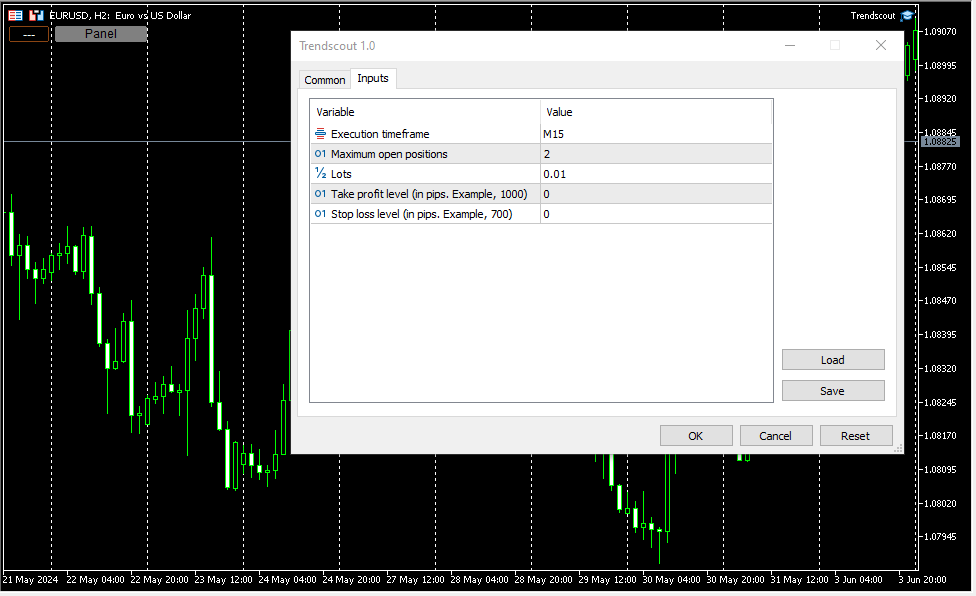
(i)    Execution frequency: This is the interval or duration of time in which Trendscout has to wait before searching for a breakout. Hence, the EA does not depend on the timeframe of the chart upon which it is attached. Popular execution frequencies are hourly, every thirty minutes and every fifteen minutes for intraday traders. Larger execution frequencies can be used for longer term traders.

(ii)   Maximum open trades: This is the maximum number of trades Trendscout can place during auto trading. The default number of open trades is 2. You can increase this value by entering a value of your choice.

(iii)   Lots: This is the lot size of a trade. The default lot size is 0.01. This value can be increased by entering the lot size of your choice directly.

(iv)   Take profit level (in pips): Set your desired take profit level in percentage in points. If you do not wish to set the take profit level enter zero in this field.

(v)    Stop loss level: (in pips): Set your desired stop loss level in percentage in points. If you do not wish to set the stop loss level enter zero in this field.

7.   PANEL/EXIT BUTTONS

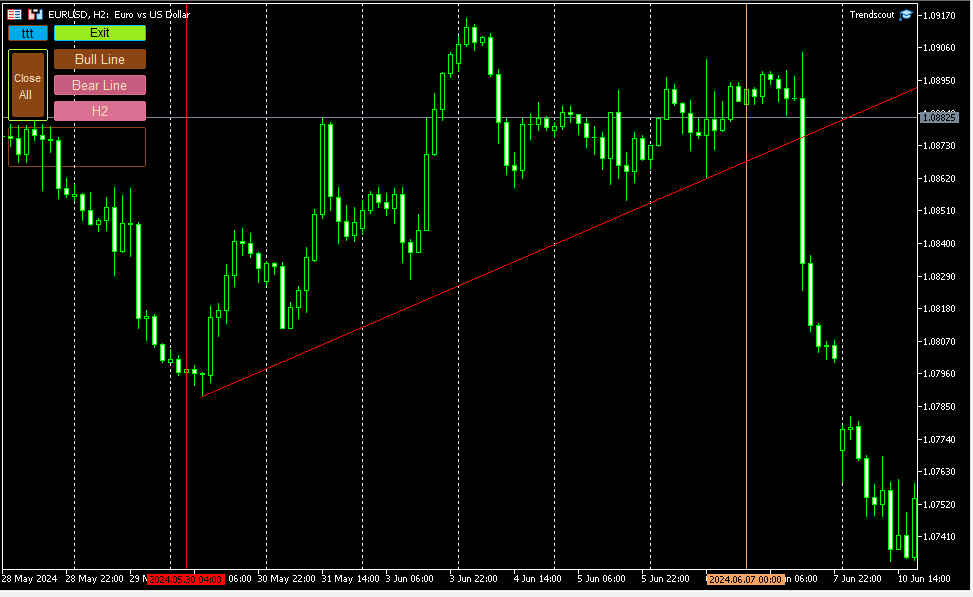
Click the panel button to display the operating buttons. Use the "Exit" button to clear all operating buttons.

8.    ATTACHING TRENDSCOUT TO MULTIPLE CHARTS

The Expert/utility can be attached to as many charts as are open on the trading platform. You can use the "ttt" ("---") button to block Trendscout from accessing network on the charts in which you are not ready to place trend lines at the moment. The symbol "ttt" indicates that network is accessible by Trendscout while "---" indicates that network is not accessible by Trendscout.

 9.    TREND LINE TYPES

Two types of trend lines are available based on the selected chart type. When using candlesticks or bar charts, the trend line will switch to price high/low mode automatically. When using line charts, the trend line will switch to close mode without additional action required.

 10.    ADDING MULTIPLE TRENDLINES IN THE SAME DIRECTION

To trigger a stronger trading opportunity you can require that price breaks two or more trend lines of different timeframes in the same direction. To do this navigate to the timeframe for which you want to add a trend line and click "Bull Line" or "Bear Line" button. Next, navigate to the timeframe for which you want to add the second trend line. Click on the "Bull Line" or "Bear Line" button twice. This will place the second trend line based on the current timeframe without deleting the first trend line. You can do this for as many timeframes as needed.

 A trading opportunity will be triggered or an order for the instrument will open only when price breaks all the trend lines in the direction they are placed. A trend line timeframe is identified by the name of the timeframe that appears on the tooltip of each trend line and its handles.

 11.    PLACING TWO OPPOSITE TRENDLINES FOR ONE TIMEFRAME SIMULTANEOUSELY

Use the "Trend Lines" button to place bull and bear trend lines to the current timeframe. This button does not append new trend lines to existing ones, even if you switch to another timeframe.

 12.    TIMEFRAME HOPPING (REVISITING A TIMEFRAME FOR TREND LINE READJUSTMENT)

If you have a trend line in one timeframe and switch to another timeframe, you can modify the trend line for the previous timeframe using the handles, only when you return to that timeframe. You can also delete and re-add it using the appropriate "Bull Line" or "Bear Line" button. In other words, you CANNOT modify the trend lines whose timeframe you are not currently on.

 13.    DELETING ALL TRENDLINES

To remove all placed trend lines on the chart simultaneously, click the "Trend Lines" button when the button caption displays a timeframe name.

 14.  USING THE DATE ANCHOR AND DATE ANCHOR BUTTON

The “Date Anchor” can be useful for the following reasons:

(i)     View the date, time and bar position on the “Date anchor button” as well as on the tooltip of the "Date anchor line".

(ii)    The date anchor time is in the trading server's time zone and also of type am/pm as against the server’s traditional 24 hour type. This is an added advantage.

(iii)   The date anchor of all charts are at synch with one another.

 (iv)   The date anchor allows you to compare and analyze data across multiple charts from a reference date/time.

N.B.: Trendscout works on live and demo accounts, but not on strategy tester.
Prodotti consigliati
Bober Real MT5
Arnold Bobrinskii
4.88 (16)
Bober Real MT5 is a fully automatic Forex trading Expert Advisor. This robot was made in 2014 year and did a lot of profitbale trades during this period. So far over 7000% growth on my personal account. There was many updates but 2019 update is the best one. The robot can run on any instrument, but the results are better with EURGBP, GBPUSD, on the M5 timeframe. Robot doesn't show good results in tester or live account if you run incorrect sets. Set files for Live accounts availible only for cu
SolarTrade Suite Financial Robot: LaunchPad Market Expert - progettato per aprire le negoziazioni! Questo è un robot di trading che utilizza speciali algoritmi innovativi e avanzati per calcolare i suoi valori, il tuo assistente nel mondo dei mercati finanziari. Utilizza il nostro set di indicatori della serie SolarTrade Suite per scegliere meglio il momento in cui lanciare questo robot. Dai un'occhiata agli altri nostri prodotti della serie SolarTrade Suite in fondo alla descrizione. Vuoi n
Perfect Trade EA Indicator 2026 for XAUUSD MT5 Премиальный многоуровневый самообучающийся индикатор с режимом автоторговли для XAUUSD Perfect Trade EA Indicator 2026 — это не просто индикатор и не обычный советник с примитивным входом по шаблону. Это премиальный торговый комплекс для MetaTrader 5, созданный для работы с XAUUSD, который объединяет в себе: - многоуровневый анализ рынка; - интеллектуальную фильтрацию сигналов; - режим автоматической торговли; - продвинутое сопровождение сделки;
VectorPrime EA MT5
Maxim Kurochkin
4.2 (15)
VectorPrime — Sistema algoritmico con logica vettoriale multilivello VectorPrime è un sistema di trading autonomo progettato per un’esecuzione strutturata in condizioni di mercato multi–timeframe. Il suo nucleo si basa sul concetto di analisi vettoriale , in cui la dinamica dei prezzi viene scomposta in impulsi direzionali e strutture matriciali. Il sistema interpreta il flusso del mercato non come segnali isolati, ma come vettori interconnessi che formano una mappa coerente. Moduli principali d
Gold Injection EA MT5
Muhammad Sharjeel Awan
5 (1)
EA di Trading Automatico sull’Oro per XAUUSD Gold Injection EA è un Expert Advisor MetaTrader 5 automatizzato, sviluppato per il trading di Oro XAUUSD . L’EA utilizza una logica di trading integrata con gestione del grid, calcolo automatico del lotto, filtro spread, controllo del drawdown, impostazioni del programma settimanale e impostazioni del filtro news. È progettato per trader che desiderano uno strumento automatizzato per il trading sull’oro con opzioni regolabili di rischio e gestione de
Exclusive Imperium MT5 — Sistema di Trading Automatizzato Exclusive Imperium MT5 è un Expert Advisor per MetaTrader 5, basato su algoritmi di analisi di mercato e gestione del rischio. L’EA funziona in modalità completamente automatica e richiede un intervento minimo da parte del trader. Attenzione! Contattami immediatamente dopo l’acquisto per ricevere le istruzioni di configurazione! IMPORTANTE: Tutti gli esempi, screenshot e test sono forniti esclusivamente a scopo dimostrativo. Se una determ
Introducing Neural Bitcoin Impulse - an innovative trading bot created using neural network training technology on voluminous market data sets. The built-in mathematical model of artificial intelligence searches for the potential impulse of each next market bar and uses the resulting patterns of divergence and convergence between the predictive indicators and the price to form high-precision reversal points for opening trading positions. The trading robot is based on the Neural Bar Impulse ind
| Fully-automated Smart Money Concept (ICT) inspired trading solution with multi-strategy capabilities | Built by a grid trader >> for grid traders.  This is MT5 version, click  here  for  Blue CARA MT4  (settings and logics are same in both versions)     Real monitoring signal  -->  Cara Gold Intro Blue CARA EA   ('CARA') - short for  C omprehensive  A lgorithmic   R esponsive   A dvisor is a next-gen  multi-currency    multi-timeframe  EA base on the widely known (and perhaps the most popul
CV QuantTrading Journal SuperEA Il  CV  QuantTrading Journal SuperEA   è un sistema professionale di analisi, journal e gestione del trading per MetaTrader 5, sviluppato per trader che desiderano analizzare e ottimizzare le proprie performance a livello istituzionale. Il software combina un moderno dashboard professionale con avanzate funzioni di statistica, replay e analisi per rendere le decisioni di trading più trasparenti ed efficienti. L’obiettivo principale è il monitoraggio delle performa
ProTrade EA
Jim Ariel Camarce Ignao
Key Features   Automated Candle Pattern Recognition 10 Professional Patterns : Detects Bullish/Bearish Engulfing, Hammer/Shooting Star, Morning/Evening Star, Piercing/Dark Cloud, and 6 additional professional candlestick patterns Smart Filtering : Combine multiple patterns with configurable confirmation logic Volume Confirmation : Optional volume filter to validate pattern strength Multi-Timeframe Analysis : Separate execution and bias timeframes for better timing   Trading Dashboard Int
The Gold Buyer
Moses Aboliwen Aduboa
Ride the Gold Trend with a Simple Buy-Only EA The  EA is a fully automated Buy-Only Expert Advisor for MetaTrader 5. It is designed to capture upward market opportunities with safe risk management and seamless execution. Why Traders Choose It: Best performance on Gold (XAUUSD) – highly liquid and trending. Buy-Only EA – focuses purely on long positions. Plug & Play setup – attach and let it trade automatically. Built-in Stop Loss & Take Profit protection. Smart one-position contro
ID Trade_Bot BS - an effective tool for automated trading using RSI Trade_Bot BS is an efficient solution for automated trading based on RSI, allowing flexible parameter customization and risk management. Thanks to the ability to choose a trading mode, dynamic Stop-Loss and Take-Profit levels, and trading mode adjustment (buying, selling, or both), it is suitable for various trading strategies. Key Features: Uses the RSI indicator to determine market conditions. Automatically opens an
Exclusive EA for FOREX HEDGE account The EA (FuzzyLogicTrendEA) is based on fuzzy logic strategies based on the analysis of a set of 5 indicators and filters. Each indicator and filter has a weight in the calculation and, when the fuzzy logic result reaches the value defined in the EA parameter, a negotiation is opened seeking a pre-defined gain. As additional functions it is possible to define maximum spread, stop loss and so on . Recommended Symbol: EURUSD, AUDUSD, GBPUSD, NZDUSD, USDCAD, AUD
Smart M Quantum
Ignacio Agustin Mene Franco
Smart Money Quantum EA Smart Money Quantum is an advanced algorithmic trading Expert Advisor designed specifically to trade XAU/USD (gold) on the M15 timeframe. This system combines Smart Money Concepts (SMC) principles with institutional risk management to capture high-probability movements in the gold market. Key Features Trading Strategy SMC Methodology: Accurately identifies and trades institutional Order Blocks Break & Retest System: Confirms liquidity zones before executing trades RSI
By :ForextraderEanow   Green Mower 10.0                                                                                                                                                                                                                                                                                                        This EA is Famous Grid Strategy that open grid of trades with the same size (not martingale)  and make PROFIT even when the Forex price moves in the WRONG Direction
Smart Breakout Recovery EA Smart Breakout Recovery EA is an advanced automated trading system based on EMA trend filtering and Supply/Demand breakout logic. The EA identifies high-probability breakout and false-break opportunities, combined with a controlled recovery system to optimize trade management. Key Features: - Dual EMA trend confirmation (M15 + H1) - Breakout and False Break detection - Supply & Demand zone integration - Smart Recovery (Martingale-based) - Adjustable lot scaling
Aureus Edge Gold Trader
Craig Joshua Binnekamp
️ Aureus Edge Gold Trader (v2.10) The Specialist Engine for XAUUSD Aureus Edge is not a "jack-of-all-trades" bot. It is a high-precision Expert Advisor engineered strictly for Gold (XAUUSD) . While it includes stability protocols to pass global market validation, every line of logic is optimized for the unique volatility and liquidity of the Gold market . ️ Built for Professional Capital Preservation Unlike popular EAs that use dangerous recovery grids, Aureus Edge focuses on disciplined br
Cyclone Intraday
Mikhail Mitin
5 (1)
How the EA works (simple explanation) Trades on M5 timeframe Uses H1 timeframe to analyze global market context Analyzes 2 or 3 timeframes simultaneously On each timeframe: Checks price position relative to one or two Moving Averages Evaluates MA angle and distance between price and MA Entry logic is based on trend + volatility conditions , not on random signals The full algorithm is illustrated in the screenshots. Recommended usage Symbol: EURUSD Timeframe: M5 Trading style: Intraday
XAUUSD H1 Gold Auto Trader – 5 Years Proven Performance (2021 to 2026 ) Fully Automated Gold Trading for MetaTrader 5 XAUUSD H1 Gold Auto Trader is a powerful and intelligent Expert Advisor designed specifically for XAUUSD (Gold) on the H1 timeframe. Built for precision, stability, and consistency, this EA uses a structured strategy combined with a static trailing stop system to protect profits and manage risk effectively. Whether you are a beginner or an experienced trader, this robot provides
MT5 To Telegram Copier
Levi Dane Benjamin
3 (2)
Invia segnali completamente personalizzabili da MT5 a Telegram e diventa un fornitore di segnali! Questo prodotto è presentato in un'interfaccia grafica facile da usare e visivamente attraente. Personalizza le tue impostazioni e inizia a utilizzare il prodotto in pochi minuti! Guida dell'utente + Demo  | Versione MT4  | Versione Discord Se desideri provare una demo, consulta la Guida dell'utente. Il mittente di MT5 a Telegram NON funziona nel tester di strategia. Funzionalità di MT5 a Telegram
Quant Edge EA: Pro Scalper [Plug & Play] Welcome to the ultimate algorithmic scalping solution. Quant Edge EA is a highly calibrated, proprietary trading system designed to capture explosive market momentum. It operates flawlessly out of the box with its carefully optimized default settings—no complex set files or over-optimization required. Key Advantages & Transparency: Plug & Play: Built for ease of use. Just attach it to the chart and let it work immediately. Versatility: Capable of analyzin
US500 Scalper
Sergey Batudayev
L'S&P 500 Scalper Advisor è uno strumento innovativo progettato per i trader che desiderano operare con successo sull'indice S&P 500. L'indice è uno degli indicatori più utilizzati e prestigiosi del mercato azionario americano, che comprende le 500 maggiori società degli Stati Uniti. Peculiarità: Soluzioni di trading automatizzate:       Il consulente si basa su algoritmi avanzati e analisi tecniche per adattare automaticamente la strategia alle mutevoli condizioni di mercato. Approccio versati
GoldKiller PRO
Vladimir Marinov
LIMITED LAUNCH OFFER — PROMOTIONAL PRICE GoldKiller PRO is currently available at a special introductory price for the first 10 users only. After the first 10 purchases, the price will automatically increase by $50 for every next group of 5 buyers until reaching its full market value of $999. This launch phase is designed to reward early supporters who join the project from the beginning. Real Tick Tested Built Specifically for XAU/USD Advanced Risk Control Clean Structured
RSI Master PRO – Professional Expert Advisor for MetaTrader 5 Overview: RSI Master PRO is an Expert Advisor (EA) developed for MT5, designed to trade automatically in the financial markets using the Relative Strength Index (RSI) as its core decision-making engine. Its modular design and fully customizable parameters make it a powerful and flexible tool for traders who base their strategy on this momentum indicator. ️ Key Technical Features: • RSI-Based Logic: Uses RSI readings to generate
Viking Alpha DAX Ivar Edition
Valdeci Carlos Dos Passos Albuquerque
Viking Alpha DAX — Germany 40 Expert Advisor for MetaTrader 5 LAUNCH PROMO Only 10 copies at launch price. Price increases with each sale. Launch price: $297 Next price: $497 Final price: $997 Live Performance: FX Blue — Vikingtradingbots What Makes Viking Alpha DAX Different Most DAX robots fail for one simple reason: they treat the Germany 40 like a forex pair. It isn't. The DAX has a heartbeat — a specific rhythm tied to the Frankfurt Stock Exchange opening, the European session structure, an
Esplora tutti i miei prodotti per MetaTrader 4, MetaTrader 5 e le versioni Trial gratuite: https://www.mql5.com/es/users/urocio/seller Hai due versioni dell’EA: Versione Full con simboli e funzionalità illimitate. Versione Trial (gratuita) per testare il funzionamento dell’EA: opera solo su EURUSD, esegue 5 cicli consecutivi e poi si mette in pausa per 7 giorni prima di riavviarsi. Crea le tue strategie di trading con la massima flessibilità! Questo Expert Advisor (EA) è progettato per supp
Magic Grid MT5
Aliaksandr Charkes
4.14 (7)
Magic Grid MT5 is a non-indicator Expert Advisor using a grid strategy (on a hedging account). The strategy is based on automatic reopening of grid pending orders, after closing their market positions (by Take-Profit, Stop-Loss or manually). Pending orders are placed with a specified step from the initial prices, which can be entered manually or generated automatically (once at the beginning of the trade).   The robot can trade on any timeframe, on any currency pair, on several currency pairs,
Scalping bot for the gold/dollar pair (XAU/USD) — a powerful and versatile solution for traders, designed to deliver maximum efficiency in a dynamic market. This bot is specifically engineered for scalping: it analyzes price changes and places trades even before significant market movements begin. This allows it to secure advantageous positions early and capitalize on even the smallest market fluctuations. Key Features: Flexibility: Adapts to any market conditions and suits your trading strategy
Yellowstone FX
Michael Prescott Burney
4 (5)
Yellowstone FX: Il robot di trading sull'oro più sicuro, piattaforma MT5 e grafico XAUUSD per la prima metà dell'anno. Gli effetti speciali di Yellowstone       Presenta un design complesso.       Il robot di trading sull'oro più sicuro per MT5       Questa soluzione è pensata per i trader che danno priorità alla conservazione del capitale, all'esecuzione sistematica delle operazioni e a livelli di rischio gestibili.       Il mercato XAUUSD   è specificamente progettato per i seguenti scopi...
Classic Market Surfer EA - A Timeless, Proven Strategy for Gold Trading For years, this powerful trading strategy has been hidden from the public-reserved for a select few. Now, for the first time, the Classic Market Surfer EA is available to traders like you.   Built on pure, time-tested trading principles, this EA doesn't rely on trendy gimmicks like AI or machine learning. Instead, it harnesses a classic, robust strategy that has consistently delivered results over the years. This is not a "g
Gli utenti di questo prodotto hanno anche acquistato
AI Agents Supervisor
Ho Tuan Thang
5 (1)
AI Agent Supervisor is NOT an Expert Advisor. AI Agent Supervisor   is a   multi-agent AI risk & portfolio supervisor   that watches every EA on your account and intervenes in real time.  WANT AN AI PORTFOLIO MANAGER WATCHING YOUR FLEET 24/7?   Run your fleet on the same brokers I do:   IC MARKETS , IC TRADING   .  Unlike the centralized stock market, Forex has no single, unified price feed.  Every broker sources liquidity from different providers, creating unique data streams. The Supervisor r
FarmedHedge Pair Trading Dashboard
Tanapisit Tepawarapruek
5 (3)
Farmed Hedge Yield Farming | All Markets (Manual - Hybrid - Semi/Automated EA) MULTI-ASSET SUPPORT Trade any asset available on your broker - Forex: Major, Minor, Exotic pairs - Crypto: BTC, ETH, XRP, SOL, BNB - Stocks: Apple, Tesla, Amazon, Google, etc. - Commodities: Gold, Silver, Oil, Gas - Indices: US30, NAS100, SPX500, DAX40 - Any CFD your broker offers VERIFIED TRADING RESULTS - Farmed Hedge Yield Axi Copy:  https://www.mql5.com/en/signals/2356376 - Farmed Hedge Yield Exn Copy:   https:/
Footprint Chart Pro — Professional OrderFlow EA for MetaTrader 5 Version 6.34 | Professional tool for real traders | Institutional-Grade Visualization DEMO USERS - PLEASE SELECT EVERY TICK / REAL TICK WHEN TESTING AND YOU HAVE DOWNLOADED HISTORICAL DATA. IF YOU SEE A WAITING SCREEN AND IT IS NOT DOWNLOADING, IT MEANS YOU HAVE LOW HISTORICAL DATA. TRY 1 MIN AND 5 MIN FIRST ON 1 DAY DATA. ONE DAY DATA SHOULD BE THE NEWEST AND MOST CURRENT DATE. PLEASE WAIT UNTIL THE MARKET HAS ROLLED OVER PERIOD.
Quant AI Agents
Ho Tuan Thang
5 (1)
Quant AI Agents are independent trading Expert Advisors. Instead of trading using a fixed strategy like other conventional EAs, Quant AI Agents   is a   multi-agent AI trading framework   that turns natural-language strategy prompts into live.  WANT THE SAME RESULTS AS MY LIVE SIGNAL?   Use the exact same brokers I do:   IC MARKETS , IC TRADING   .  Unlike the centralized stock market, Forex has no single, unified price feed.  Every broker sources liquidity from different providers, creating un
Prop Firm Os
Gayathiri Gopalakrishnan
5 (1)
PROP FIRM OS Structured Trading Assistant for MetaTrader 5 PROP FIRM OS is a structured trading assistant designed for MetaTrader 5 users who prefer rule-based market analysis and organized trading workflows. The Expert Advisor combines market analysis tools, scanner functions, dashboard monitoring, alerts, risk-control settings, and trade management features inside one system. PROP FIRM OS is designed to help traders follow selected rules, filters, and monitoring conditions during trading activ
Power Candles Strategy Scanner - Strumento di ricerca configurazioni multi-simbolo con ottimizzazione automatica Power Candles Strategy Scanner utilizza lo stesso motore di auto-ottimizzazione che alimenta l'indicatore Power Candles, applicandolo a tutti i simboli presenti nel tuo Market Watch, uno accanto all'altro. Un unico pannello ti indica quali simboli sono statisticamente negoziabili in questo momento, quale strategia è vincente su ciascuno di essi, la coppia ottimale di Stop Loss / Take
AntiOverfit PRO MT5
Enrique Enguix
5 (6)
Prima di comprare un EA, verifica se regge davvero oppure se in backtest è sembrato forte solo per fortuna. La maggior parte dei robot viene venduta con un backtest bello da vedere. Curva in crescita. Buon profit factor. Pochi dubbi. Eppure molti di questi EA crollano non appena il mercato smette di muoversi come in quello storico. Perché? Perché un backtest dimostra una cosa sola: che quella strategia ha funzionato su un percorso di prezzo ben preciso. Non dimostra che reggerà su percorsi diver
Custom Alerts AIO: Monitora tutti i mercati — senza alcuna configurazione Panoramica Custom Alerts AIO è una soluzione di monitoraggio dei mercati pronta all’uso che non richiede alcuna configurazione. Tutti gli indicatori necessari — FX Power, FX Volume, FX Dynamic, FX Levels, IX Power — sono integrati internamente. Non vengono mostrati grafici, rendendolo ideale per generare alert in tempo reale in modo discreto ed efficiente. Supporta tutte le classi di asset offerte dal tuo broker: Forex,
YuClusters
Yury Kulikov
4.93 (42)
Attention: You can view the program operation in the free version  YuClusters DEMO .  YuClusters is a professional market analysis system. The trader has unique opportunities to analyze the flow of orders, trade volumes, price movements using various charts, profiles, indicators, and graphical objects. YuClusters operates on data based on Time&Sales or ticks information, depending on what is available in the quotes of a financial instrument. YuClusters allows you to build graphs by combining da
The product will copy all telegram signal to MT5 ( which you are member) , also it can work as remote copier.  Easy to set up, copy order instant, can work with almost signal formats, image signal,  s upport to translate other language to English Work with all type of channel or group, even channel have "Restrict Saving Content", work with  multi channel, multi MT5 Work as remote copier: with signal have ticket number, it will copy exactly via ticket number. Support to backtest signal. How to s
Telegram To MT5 Receiver
Levi Dane Benjamin
4.31 (16)
Copia i segnali da qualsiasi canale di cui sei membro (compresi quelli privati e ristretti) direttamente sul tuo MT5.  Questo strumento è stato progettato con l'utente in mente offrendo molte funzionalità necessarie per gestire e monitorare gli scambi. Questo prodotto è presentato in un'interfaccia grafica facile da usare e visivamente accattivante. Personalizza le tue impostazioni e inizia ad utilizzare il prodotto in pochi minuti! Guida per l'utente + Demo  | Versione MT4 | Versione Discord
FUTURES ORDERFLOW FOOTPRINT CHART Professional OrderFlow EA for MetaTrader 5 Version 1.01| Professional tool for real traders | Institutional-Grade Visualization STRATEGY TESTER USERS - PLEASE SELECT EVERY REAL TICK WHEN TESTING AND YOU HAVE DOWNLOADED HISTORICAL DATA. IF YOU SEE A WAITING SCREEN AND IT IS NOT DOWNLOADING, IT MEANS YOU HAVE LOW HISTORICAL DATA. TRY 1 MIN AND 5 MIN FIRST ON 1 DAY DATA. ONE DAY DATA SHOULD BE THE NEWEST AND MOST CURRENT DATE. PLEASE WAIT UNTIL THE MARKET HAS ROL
ManHedger MT5
Peter Mueller
4.83 (6)
THIS EA IS A SEMI-AUTO EA, IT NEEDS USER INPUT. Manual & Test Version Please TEST this product before BUYING  and watch my video about it. The price of the ManHedger will increase to 250$ after 20 copies sold. Contact me for user support or bug reports or if you want the MT4 version! MT4 Version  I do not guarantee any profits or financial success using this EA. With this Expert Advisor, you can: Implement your own Zone Recovery strategy to capitalize on trending markets. Create Grid trading s
Telegram to mt5 pro
Janet Abu Khalil
3.67 (3)
Telegram to MT5 Pro — Advanced Telegram Signal Copier with Auto-Fix, Multi-TP, Risk Control and Full Trade Management Telegram to MT5 Pro — Copiatore di segnali Telegram professionale Telegram to MT5 Pro è un copiatore di trading ad alte prestazioni che esegue automaticamente i segnali da Telegram direttamente nel tuo account MetaTrader 5, con pieno controllo su rischio, esecuzione e gestione del trading. Il sistema è composto da due componenti: • L’Expert Advisor (EA) che gira all’interno di M
Ultimate Extractor
Clifton Creath
5 (8)
Ultimate Extractor - Professional Trading Analytics for MT5 *****this is the local HTML version of Ultimate Extractor. !!!!!it is not compatible with Cloud!!!! For the online version please reach out to me directly****** Ultimate Extractor transforms your MetaTrader 5 trading history into actionable insights with comprehensive analytics, interactive charts, and real-time performance tracking. What It Does Automatically analyzes your MT5 trading history across all Expert Advisors and generates
HINN Lazy Trader
ALGOFLOW OÜ
5 (2)
The core idea: using the user interface, you configure the parameters the chart must meet before entering a position (or positions), choose which entry models to use, and set the rules for when trading and planning should end. Lazy Trader  handles the rest: it  takes over all the routine chart watching and execution! full description  :: 3 key videos [1] ->  [2]   ->  [3] What can it do? - Understands Larry Williams market structure - Understands swing market structure by Michael Huddleston
Bots Builder Pro MT5
Andrey Barinov
4.17 (6)
This is exactly what the name says. Visual strategy builder . One of a kind. Turn your trading strategies and ideas into Expert Advisors without writing single line of code. Generate mql source code files with a few clicks and get your fully functional Expert Advisors, which are ready for live execution, strategy tester and cloud optimization. There are very few options for those who have no programming skills and can not create their trading solutions in the MQL language. Now, with Bots Builde
Neowave Chart Plotter
Bahador Baradari
5 (1)
This Expert Advisor is applicable to plot wave charts as per the NeoWave  method (Neely Extension of Wave Theory).  NeoWave is a scientific, objective and revolutionary style of Elliott Wave Theory that was invented by Glenn Neely in 1990 in the “Mastering Elliott Wave” book. To start analyzing with this method, we need a particular chart called the Wave Chart or Cash Data chart . This is the first step for a good wave analysis. To draw this chart, Highs and Lows should be plotted in the order t
MT5 Trading Deck
Manuel Michiels
5 (2)
One button. One trade. MT5 Trading Deck is a hotkey trading panel for MetaTrader 5 that turns the platform into a keyboard-driven execution cockpit. Stop loss, take profit and lot size are pre-calculated for every key; the moment you press, a market order is live on the broker. A complete technical user manual is attached in the product Comments section. It documents every input parameter, the full hotkey map, the recommended Stream Deck XL layout, and the advanced workflows for Pre-Limit orders
Trade Copier Pro MT5
Vu Trung Kien
4 (4)
Trade Copier Pro MT5 is a tool to copy trade remotely to multiple MT4, MT5 and cTradfer accounts at different computers/locations over internet. This is an ideal solution for you if you are a signal provider and want to copy your trades to other receivers globally on your own rules. One provider can copy trades to multiple receivers and one receiver can get trade from multiple providers as well. The provider can even set the subscription expiry for each receiver, so that receiver will not be abl
RiskGuard Management
MONTORIO MICHELE
5 (22)
ATTENZIONE  per una versione di prova gratuita visita il mio sito web. Manuale QUANTUM RiskGuard Management — Il tuo alleato definitivo per un trading senza compromessi. Lot Calculator — Calcolo automatico della size. Quantum — Rischio automatico per massimizzare i profitti e ridurre i drawdown. Automatic Journal — Incluso e scaricabile gratuitamente dal mio sito. Automatic Screenshot — Due screenshot: uno in apertura e uno in chiusura del trade. Partial Profit — Uscite parziali gestite in modo
Crypto Charting
Rajesh Kumar Nait
5 (5)
Crypto Charting for MT5 – Integrazione grafici criptovalute in MetaTrader 5 Panoramica Crypto Charting for MT5 offre dati OHLC in tempo reale tramite WebSocket. Supporta più exchange e aggiorna automaticamente i dati in MT5. Funzionalità Dati in tempo reale via WebSocket Aggiornamento automatico dei dati storici Sincronizzazione pianificata dopo interruzioni Compatibile con tutti i timeframe MT5 Dati OHLCV completi Supporto per il tester di strategia Riconnessione automatica Exchange supportati
EasyInsight AIO MT5
Alain Verleyen
4.92 (12)
EASY Insight AIO – La soluzione all-in-one per un trading intelligente e senza sforzo Panoramica Immagina di poter analizzare l’intero mercato — Forex, Oro, Cripto, Indici e persino Azioni — in pochi secondi, senza dover controllare manualmente i grafici, installare indicatori o affrontare configurazioni complicate. EASY Insight AIO è il tuo strumento definitivo di esportazione per il trading alimentato dall’IA, pronto all’uso. Offre una panoramica completa del mercato in un unico file CSV pul
The product will copy all  Discord  signal   to MT5   ( which you are member  ) , also it can work as remote copier.  Easy to set up. Work with almost signal formats, support to translate other language to English Work with multi channel, multi MT5. Work with Image signal. Copy order instant, auto detect symbol. Work as remote copier: with signal have ticket number, it will copy exactly via ticket number. How to setup and guide: Let read all details about setup and download Discord To MetaTrader
VOLUME BUBBLES ORDERFLOW FOOTPRINT PROFESSIONAL Expert Advisor for MetaTrader 5 Complete Feature Documentation Introduction: Volume Bubbles OrderFlow Footprint Professional is an advanced order flow visualization tool designed for the MetaTrader 5 platform. It provides institutional-grade market analysis through real-time volume bubbles visualization, volume profiling, and sophisticated order flow analysis. This Expert Advisor transforms raw market data into actionable trading intelligence, hel
Gamma Edge Pro MT5
Xuan Nam Diep
1 (1)
Gamma Edge Pro MT5 — GexBot Classic API Integration Gamma Edge Pro   brings institutional-grade   Gamma Exposure (GEX) data   directly onto your MetaTrader 5 chart — the same data used by professional options traders to anticipate price magnets, hedging flows, and dealer positioning. Powered by the   GexBot Classic API , this indicator automatically maps options market data from US-listed instruments onto any   MT5 CFD instrument   — Forex pairs, Gold, indices, and more — with intelligent price
Crypto Ticks and Depth
Rajesh Kumar Nait
5 (2)
Crypto Ticks per MetaTrader 5 – Dati in tempo reale e integrazione libro ordini per criptovalute Panoramica Crypto Ticks trasmette dati tick-by-tick e profondità del book ordini dalle principali borse di criptovalute direttamente su MetaTrader 5. Ideale per scalping, trading algoritmico e test di strategie. Exchange supportati Binance: Spot  e Futures  KuCoin: Spot e Futures Bybit: Futures e Inverse Futures XT.com: Spot e Futures Caratteristiche principali Streaming tick in tempo reale via WebS
Telegram To MT5 Ultra
Mirel Daniel Gheonu
Telegram To MT5 — Copiatore di segnali Trasforma le indicazioni di trading dei tuoi canali Telegram in veri ordini MT5 — automaticamente, su quanti account vuoi, con rischio e regole totalmente sotto il tuo controllo. Telegram To MT5 collega i canali VIP / di segnali che già segui su Telegram al tuo terminale MetaTrader 5. Un'app desktop companion gratuita legge i messaggi (anche dai canali che bloccano i bot), e questo Expert Advisor li esegue sul tuo conto — applicando le tue impostazioni di r
Unlimited Trade Copier Pro MT5 is a tool to copy trade remotely to multiple MT4, MT5 and cTrader accounts at different computers/locations over internet. This is an ideal solution for you if you are a signal provider and want to copy your trades to other receivers globally on your own rules. One provider can copy trades to multiple receivers and one receiver can get trade from multiple providers as well. The provider can even set the subscription expiry for each receiver, so that receiver will n
Trend Cue Basket Manager
Mohammadreza Faghanimakrani
5 (1)
Trend Cue Basket Manager is a semi-automatic basket management utility for MT5 hedging accounts. After purchase, please send me a message.  I will send you the bonus package and basic setup guidance. The idea is very simple: You open the first trade manually. Trend Cue Basket Manager manages the basket after entry. It does not give buy or sell signals by itself. It does not choose the market direction for you. It does not open the first trade automatically. The first decision is always yours. Af
Altri dall’autore
Trendscout
Chinedu Peter
Experience the ultimate trendline auto-trading solution! Our expert advisor/utility allows you to effortlessly place one or more trendlines from different timeframes - it places a trade in the breakout direction.   1.    AUTO TRADING / MANUAL TRADING Trendscout can place orders for you automatically. You have to enable “Auto trading” and also check the “Enable live trading” box at the parameter window. When price crosses a trend lines for the first time two massages are sent to your mobile phon
Receive notifications for multi-trendline or single trendline breakout. Yes! You heard us right!  You will be notified the moment price crosses any and all the timeframe trendlines that you have chosen.  1.    ADDING MULTIPLE OR SINGLE TRENDLINES IN THE SAME DIRECTION To trigger a stronger trading opportunity you can require that price breaks one or more trend lines of different timeframes in the same direction. To do this navigate to the timeframe for which you want to add a trendline and click
Filtro:
Nessuna recensione
Rispondi alla recensione