 MetaTrader 5
 专家
专家
 指标
指标
 程序库
程序库
 实用工具
实用工具
 窗口小部件
窗口小部件
 规则
规则
MetaTrader 5 交易实用工具 - 14
 以下是可在MetaTrader 5中简化交易的交易程序。将鼠标悬停在一个工具上,阅读它的描述和用途。
Chinese (中文) Close-All 是专为 MT5 平台设计的强大配置脚本,旨在帮助交易者快速、安全地批量关闭账户中的持仓平仓和/或挂单。无论您是需要紧急风控平仓、多品种对冲组合清仓,还是日常交易管理,这款脚本都能高效完成任务。 详细工作流程 :用户只需将脚本拖拽至任意图表,即弹出直观的参数设置对话框。支持全账户所有交易品种扫描,或仅针对当前图表品种进行精确操作。内置多重智能过滤器,包括盈利/亏损状态、买卖方向、挂单类型等精细筛选条件。脚本采用 FIFO 合规的票据收集机制,先收集符合条件的交易票据,再统一批量处理,确保美规经纪商兼容性。 核心技术优势 :自动检测交易时段、市场冻结水平,支持最多5次智能重试机制,失败时提供详细错误日志和重试间隔。成功关闭时播放"expert.wav"确认音,失败时播放"timeout.wav"提醒音。异步模式默认开启,大幅提升多单批量处理速度,同时保持终端响应流畅。 实用选项一览 : 范围 :全账户所有品种 / 当前图表品种 类型 :持仓平仓 / 挂单删除 / 两者同时 盈亏过滤 :全部 / 仅盈利 / 仅亏损 方向控制 :全部 /
FREE

Arixis Backtest Inspector — Go Beyond the Final Profit
Arixis Backtest Inspector is a professional MetaTrader 5 analysis tool designed to help traders understand the real structure behind historical trading results. Instead of focusing only on net profit, win rate or profit factor, it examines how results are distributed over time and how dependent a strategy may be on a small number of exceptional trades or trading days. The tool analyzes trade performance, winning and losing streaks, closed-e
FREE

One table with every open position of your account.
If you trade several symbols at the same time, you know the problem: you open the Trade window, scroll, and still do not know how much money you risk in total. Positions Dashboard puts everything on one chart panel and updates it every second. It is free.
WHAT THE TABLE SHOWS For every position (all symbols, not only the one on your chart): - Symbol and direction (BUY in green, SELL in red) - Lot size, entry price and current price - Profit
FREE

GDS RiskLab TradeDesk Free Manual Trading Desk and Risk-Control Utility for MetaTrader 5 GDS RiskLab TradeDesk is a free chart-based utility for traders who want a cleaner manual trading workspace in MetaTrader 5. It is designed as a simple execution-support and risk-control panel. The goal is to keep the trading process more organized: review the chart, plan the trade, keep risk visible and execute manually with more structure. This tool does not generate buy or sell signals. It does not predic
FREE

使用 FRATO Smart GEX,将您的交易提升至机构级别。它并非仅仅是基于移动平均线或滞后震荡指标的又一技术指标,而是一款量化智能工具,通过实时 GEX(Gamma 敞口)和未平仓合约 (OI) 分析,解读主要做市商的仓位。
了解大玩家如何推动价格走势,并识别普通 K 线图无法显示的支撑位和阻力位!
主要功能:
实时 GEX 分析:可视化看涨期权墙、看跌期权墙和 Gamma 翻转位,这些水平线如同磁石或障碍,有效吸引或阻碍价格上涨。
专属 0DTE 模块:专注于当日到期期权 (0DTE),完美适用于日内波动性较高的日内交易者。
交易商情绪:了解做市商的多空关系,并预测加速行情(Gamma 挤压)。
高级极简仪表盘:优雅的悬浮式仪表盘,可根据您的屏幕分辨率自动调整,并提供浅色和深色主题。
高级量化指标:可访问最大痛点、净 GEX 和成交量集中度数据。
原生多语言:全面支持英语、俄语、西班牙语和中文。
为什么选择 GEX 进行交易?在现代市场中,期权市场决定着现货市场(股票和指数)的走势。通过监控 Gamma 敞口 (GEX),您无需根据过去的图表模式

您知道过去三个月的交易让您付出了多少成本吗?不是您赚了或亏了多少,而是开仓和平仓本身花了您多少钱。这个工具读取您账户里已经平仓的历史记录,用金额告诉您:每一笔成交那一刻的报价点差、开仓和平仓的滑点、佣金和隔夜利息。事先不需要安装任何东西。它只读取,从不发送订单。
您看不见的那笔钱
每一笔交易都要向您收四样东西。两样会出现在对账单上。另外两样藏在结果里面,所以几乎没有人把它们加起来。
- 点差。您买入时比当下价格贵一点,卖出时便宜一点。每次都是。它从不显示为一笔支出,因为已经从结果里扣掉了。 - 滑点。您要一个价格,成交给您另一个。尤其是止损触发时,或者行情走得快的时候。 - 佣金。经纪商为交易收取的费用。这是大多数人唯一会算进去的一项。 - 隔夜利息。持仓过夜时向您收取、或者付给您的那部分。
如何运作
1. 把它拖到任意图表上。没有任何需要设置的东西。 2. 它读取您已经平仓的交易,并在报价历史中查出每一笔成交那一毫秒市场的报价。 3. 一分钟后报告就出来了:花了多少,钱去了哪里。
一个真实的例子
小账户,三个月交易黄金,76 笔完整交易。
留在账户里的:102
FREE

一款MT5实用工具,用于创建自定义符号以仅显示特定交易时段,过滤掉隔夜数据(Globex)和非交易时段的价格走势。它允许您严格基于Regular Trading Hours (RTH)或自定义时间段构建图表。 功能特点: 作为服务运行: 一次设置,永久使用。服务随MT5自动启动,在后台运行。无需保持源图表打开或附加指标。
真实数据过滤: 删除低成交量的隔夜数据,提供更清晰的缺口、成交量节点和时段高低点视图。 自动化工作流程: 自动下载M1历史数据,创建自定义符号,并实时路由实时tick数据。 智能时间路由: 完全支持标准日内时段(如09:30–16:00)和跨午夜时段(如London/Asia重叠或加密货币时段)。 性能优化: 高速tick处理,具有可配置的更新频率以节省CPU资源。 自动维护: 内置历史清理功能,通过删除超过指定历史深度的数据,确保您的终端保持快速运行。 应用场景: 过滤指数(US500、DE40等)的夜盘时段(Globex)。仅显示RTH时段。仅显示一个时段(London/NY或自定义时段)。
工作原理: 输入 源符号 (如US
FREE

PG Lot Calculator tells you the exact lot size for every trade, so you always risk the amount you planned. No spreadsheets, no guessing. It works on Forex, gold, silver, indices, crypto and stocks. HOW IT WORKS Choose how you risk: % of Balance, % of Equity or a fixed amount of money. Set your Stop Loss in pips (or drag the SL line on the chart). Read your lot size. Click BUY or SELL if you want to trade it. FEATURES Risk Three risk modes: % of Balance, % of Equity, fixed money. Quick risk butto
FREE
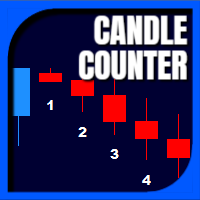
Candle Counter is a simple indicator that list the amout of candles in the day according to the current chart timeframe. It is specially useful for those teaching others how to trade, as it can draw attention to a specific candle of the day. Configuration:
Reverse mode - if on, the actual candle is the first one.
Position - Above or below the candles.
Vertical distance - Vertical distance from the candles in pipets/points.
Size - Font size. If you need help please don't hesitate to contact me.
FREE

Description: This utility automates Take Profit (TP) and Stop Loss (SL) levels for your trades, calculated in % of Balance. Example : if you type 1, it means 1% of your Balance . It ensures consistent risk management for all your positions. Crucial Note for Manual Traders: If you intend to use this utility on trades opened manually (without an Expert Advisor), you must change the 'Magic Number' setting to 0 (zero) . This allows the utility to correctly identify and manage your manual orders.
FREE
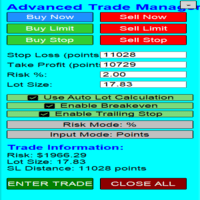
Overview Are you tired of complex manual calculations, emotional execution errors, and the constant fear of risking too much? The Advanced Trade Manager (ATM) is your all-in-one solution, a professional-grade Expert Advisor for MetaTrader 5 designed to give you institutional-level control over every aspect of your trade. From flawless risk calculation to intelligent, one-click execution, the ATM EA streamlines your entire trading process, allowing you to focus on your strategy, not the mechanics
FREE

FKG Trade Manager – 专业风控与订单管理专家顾问 (EA) FKG Trade Manager 是一款功能强大的多语言交易管理 EA,旨在帮助交易者全面掌控持仓、风险敞口和订单执行。它在图表上提供了一个简洁的深色主题可移动交互面板,助您告别情绪化交易,实现日常仓位管理自动化。 核心功能 快捷分批平仓按钮 (10%, 20%, 50%): 一键安全锁仓部分利润,实时显示每个档位的手数与浮动盈亏。 动态篮子盈亏追踪: 实时监控总盈亏(含隔夜费与佣金),带有直观的颜色状态提示。 高级保本 (Break-Even) 自动化: 当价格达到指定点数时自动移动止损以锁定利润,并可选择同时取消挂单。 隐形止损/止盈线 (Stealth): 使用图表虚拟显示的止损止盈水平,有效防止被对家或平台恶意扫损。 自动多级分批止盈 (PTP): 支持最多 5 个自定义距离/手数阶梯,实现全自动金字塔式减仓。 批量订单控制: 一键平掉所有仓位、仅平盈利仓位,或一键取消所有待处理挂单。 多语言界面: 原生支持 12 种全球主流语言。
FREE

MT5 全能交易仪表盘专业版 | 新闻、热力图、扫描器、SMC 工具、K线计时器
MT5 全能交易仪表盘专业版是一款功能强大的 MT5 交易工具,旨在将多种关键功能整合到一个简洁高效的仪表盘中。无需使用多个指标,该工具即可将您所需的一切直接呈现在图表上。
它专为追求更快决策、更敏锐的市场洞察力和更专业的交易设置的交易者而设计。
该仪表盘尤其适用于交易 XAUUSD(黄金)、外汇货币对、指数和加密货币,使其成为适合各种交易风格的多功能解决方案。
核心功能
K线计时器 (MT5)
实时倒计时显示当前K线
有助于精准入场和出场
支持所有时间周期
多时间周期分析工具
在当前图表旁显示更高时间周期
有助于确认趋势和判断汇合点
交易时段指标
自动检测东京、伦敦和纽约交易时段
突出显示活跃交易时段和重叠时段
日内交易和超短线交易策略的必备工具
交易时段倒计时计时器
显示交易时段的开盘和收盘时间
有助于在高波动时期制定交易计划
交易时段热力图 (MT5)
在图表上叠加显示历史交易时段
轻松识别高流动性区域
外汇新闻指标(内置面板)
显示高影响力和中等影响

Pulsar Terminal 是 Astralys LLC 旗下商标 Pulsar Technologies 的产品。
Pulsar Terminal是MetaTrader 5的实用工具插件。它是一个 可视化界面 ,结合了 配套应用程序 中的执行工具,通过 Expert Advisor 连接到您的MetaTrader 5账户。我们使用配套应用程序来最大化工具的功能,并提供比标准MT5面板更先进的可视化界面和工作流程。Pulsar Terminal不是独立应用程序,需要MetaTrader 5才能运行。EA与Pulsar Terminal配套应用程序 仅通过localhost 通信。配套应用程序的安装程序通过安装指南(MQL5博客文章)提供给购买者。
该界面允许您执行订单、管理风险、查看交易统计数据,以及通过连接到MetaTrader 5的配套应用程序中的高级图表工具直接进行图表分析。
安装指南(MQL5博客): 将在产品批准后发布 用户指南(MQL5博客) 重要 - 运行条件 1) MetaTrader 5必须在与配套应用程序相同的PC上打开(通过EA的仅限localhost连

The "Smart Partial TP & Daily Loss Limit Manager" is a versatile and powerful MQL5 indicator designed to help traders manage their trades more effectively. It combines two essential features that improve trading discipline and profitability: partial take-profit (TP) closing based on risk-reward ratios and a fixed daily loss limit to protect your capital. Key Features: Partial Take-Profit (TP) Close: This feature allows traders to set a percentage for partial TP closure (e.g., 50%). Once the pric
FREE

Drag Drop Lot Size Calculator Overview Drag Drop Lot Size Calculator is a chart-based risk and position sizing tool for MetaTrader 5. It calculates the appropriate lot size based on your account balance (or equity), the selected risk percentage, and the stop-loss distance defined by a single horizontal line on the chart. A compact on-chart panel displays the key values in real time. Key Features One-line workflow: uses a single horizontal line as the stop-loss level Real-time lot size calculatio
FREE

When executing an order, whether through the Metatrader ticket on a computer or the Metatrader app on a mobile device, either manual or pending,
Easy Trade will automatically set the take profit and stop loss levels, as well as a limit order with its respective take profit and stop loss levels. It follows the trading strategy for market open (US30, US100, US500), but it can be applied to any market asset.
FREE

Garner Risk Calculator for MetaTrader 5
## Visual trade planning, position sizing and manual order placement
Garner Risk Calculator is an MT5 Expert Advisor that brings trade planning and position sizing directly onto your chart. Position your Stop Loss and Take Profit, choose the amount you want to risk, and view the calculated lot size before placing an order.
The dark navy panel with blue accents provides a clear view of your proposed trade. It is a manually operated calculator and order-e
FREE

Actively developed: new features and improvements are added regularly. Found an issue or have a suggestion? Leave a comment and it will be fixed quickly.
Plan every trade like on TradingView: drag a Risk:Reward box on your MetaTrader 5 chart and see your exact lot size, risk and target instantly. Free. PLAN
- Click BUY or SELL, then click the chart - or double-click for a box at market price.
- Drag the stop loss, take profit, entry and box width directly on the chart.
- Lot size is calculat
FREE

Propfirm Metrics 是一款简单易用的只读账户监控工具,专为 Prop Firm 交易者设计,可直接在 MetaTrader 5 中查看重要的账户指标。
面板可以清晰显示当前账户状态,包括余额、净值、浮动盈亏、当日结果、剩余每日及总体回撤额度、一致性规则、交易天数以及利润目标进度。
只需输入你的 Prop Firm 账户规则,Propfirm Metrics 就会自动计算并在一个清晰的面板中显示相关数据。
主要功能:
• 每日和总体回撤监控 • 实时显示剩余回撤额度 • 当日利润和浮动盈亏 • 一致性规则监控 • 最佳交易日及满足一致性规则所需的利润 • 交易日、盈利日和合格交易日统计 • 利润目标进度 • 可自定义每日重置时间 • 可自定义 Prop Firm 限制 • 监控整个 MT5 账户,包括所有交易品种和 EA
Propfirm Metrics 为只读工具,不会开仓、平仓或修改任何交易。
它的目的是帮助交易者更容易理解和遵守 Prop Firm 的规则,无需手动计算所有数据。
重要提示:请始终根据你所使用的 Prop Firm 最新规则设置参数。所
FREE

Easy Trade Zone - Visual Order Panel
Draw your trade directly on the chart and drag it into place. Grab the Entry, Stop-Loss and the three Take-Profits individually with the mouse. The moment you move a line, everything recalculates live: the red risk box, the green reward box, the position size, and the exact profit/loss in your account currency. You see your risk in real money BEFORE you click - and never send an order without a stop by accident.
Features: - Drag every level individually: En
FREE

Risk Calculator Panel shows the correct lot size for your risk before you open a trade. Drag the Stop Loss line on the chart, and the panel updates immediately. What the panel shows Lot size for your risk, rounded down to the broker's lot step Money at risk and potential profit in account currency Stop loss and take profit distance in points Reward:risk ratio Required margin and free margin after the trade How to use Attach the indicator to any chart. Drag the red SL line (and the green TP line)
FREE

Complete Trade Manager (MT5)
Manages each open position individually Automate exit strategy (great for prop firm challenges) Use R: R based exit or Fixed Pips exit models Scale out of positions (3 x Targets possible) Breakeven after 1 st 2 nd or 3 rd partial take profit Trail Stop Loss Stop Break Even Fixed Target Exit (Without Partial Profit) Equity Target Based Exit Expect More features in the future Having a plan to exit with trades based on predefined set of rules provides consistency and
FREE

FX Monitor EA is a free utility that turns your raw MetaTrader account into a fully analyzed, monitored trading record. It reads your account's trading data — balance, equity, open positions, and closed trade history — and sends it securely over HTTPS to your FX Monitor account (fx-monitor.com), where it becomes the foundation for deep performance analytics. Once connected, you can monitor all your accounts online from any device and dig into your trading the way professionals do: profit factor,
FREE

Crystal Copycat – MT5 Trade Copier Pro (Local + Online) OVERVIEW
Crystal Copycat ULTIMATE HYBRID is a professional MT5 trade copier designed for prop accounts, money managers, and signal providers who need both ultra-fast local copying and flexible online distribution. It supports 2 engines in one EA: Local File Engine – copies trades between MT5 terminals on the same PC/VPS using the MT5 Common folder (no DLLs, no external web APIs). Online Telegram Engine – sends master trades to a Telegram b

Chinese (中文) MT5抛物线转向警报EA Parabolic SAR Cross Alert EA是一个简单的MetaTrader 5工具,当抛物线SAR指标翻转方向时通知您,提示潜在趋势反转。帮助交易者捕捉SAR穿越价格上方的牛市信号或下方的熊市信号,无需持续监控图表。 功能特点 检测抛物线SAR 穿越价格上方 (牛市信号) 检测抛物线SAR 穿越价格下方 (熊市信号) MetaTrader 5内直接弹出警报 支持经纪商提供的任何品种和时间框架 可自定义SAR step和maximum参数 轻量级,易于使用 工作原理
EA监控图表上的抛物线SAR指标。当SAR点在两个已完成K线之间翻转到价格相反侧时,MT5会直接弹出警报通知。
FREE
简体中文
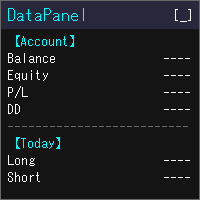
DataPanel 将账户状态集中显示在图表上的一个面板中。 它不会下任何订单,也不使用 DLL。 我最初用 Claude Code 开发它,是为了一眼看清运行着其他 EA 的账户情况。功能增加后信息变多了,但可以只显示需要的内容,请在设置中按需调整。 可查看的内容 余额、净值、浮动盈亏、保证金比例 余额和净值的回撤(最大值及发生时间)。入金、出金和赠金不计入回撤 今日、本周、本月、本年及全部时间的盈亏(多单/空单分开)和增长率 胜率、盈利因子、期望值、连胜/连败、平均持仓时间,以及隔夜利息、手续费等成本 按魔术号、按品种的盈亏,以及所交易品种的占比 持仓列表、盈亏平衡价、距强平的余量 经济日历(可选择国家和重要性)、当日假日、报价列表、货币强弱、市场时段 同一台电脑上所有 MT5 的真实账户盈亏合计(其他 MT5 也需要运行 DataPanel) 使用方式 金额可按所选货币显示(日元、美元、欧元等) 每个项目都可以显示或隐藏。隐藏的项目会停止更新,因此不占用资源 列数和字号会随图表大小自动调整 可用 [↑↓] 按钮调整项目顺序 显示语言跟随 MT5 的语言(共 17 种语
FREE

RiskFlow Pro 是一款 专为 MetaTrader 5 设计的专业手动交易面板 , 旨在消除手 动交易中三个最耗时的问题 : 正确 计算手数、入场后管理交易、以及遵守自营公司的风险规则。拖动、点击、交易 — 每个决定只需几秒 钟 , 而不是几分 钟。 仅限前 500 名免 费下载。手慢无。 它解决什么 问题 大多数手 动交易者亏损不是因为策略差 , 而是因 为小的操作失误 : 在非 标准合约 ( 黄金、指数、加密 货币 ) 上手数 计算错误 ; 在价格有利 时忘记将止损移至保本 ; 忙碌或分心 时错过部分获利机会 ; 在交易激烈 时突破自营公司日回撤限制。 RiskFlow Pro 在一个 紧凑的图表面板中解决所有这些问题。 即 时手数计算 输入止损价格 , 或直接在 图表上拖动线条 , 手数将根据您 选择的风险百分比、固定美元金额、净值百分比或可用保证金百分比即时计算。计算直接从经纪商读取每个品种的真实点值和点大小 , 因此 对外汇、黄金、白银、石油、美元指数、股指、加密货币差价合约和任何其他 MT5 品种都能正确工作。告 别 Excel 计算器。告别心算。
FREE

CopyTrader Pro FAST MT5 — FREE Real-Time Trade Copier | MT4 ↔ MT5 Cross-Platform | 20ms Latency CopyTrader Pro FAST is a professional trade copier Expert Advisor that copies trades between MetaTrader terminals in real time using a high-speed file-based communication system. No VPS, no network setup, no DLL — just attach and copy. FREE VERSION : Copies up to 1 trade at a time. Upgrade to the full version, Copy Trader Pro FAST MT5 , for unlimited copying. Key Features 20ms refresh rate — in
FREE

Daily P/L Risk Management is a MetaTrader 5 utility that watches your account's daily profit and loss and acts automatically when a limit is hit. It tracks both realized and unrealized P/L and can close positions, disable trading or alert you. It is a practical safety net for prop-firm challenges and disciplined day trading. Features Daily loss and profit limits, set by money amount or percent of balance/equity. Combined P/L tracking: counts both closed-trade (realized) and open-position (unreal
FREE
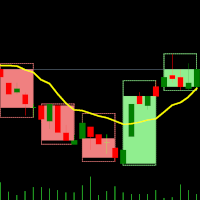
双时间框架指标 – 蜡烛嵌套蜡烛 概述 蜡烛嵌套蜡烛指标 是一款 多时间框架可视化工具 ,可在较低时间框架图表上叠加较高时间框架蜡烛图。无需频繁切换时间框架,交易者即可观察较小的蜡烛 如何嵌套在较大的蜡烛内 ,从而提升市场结构分析、趋势识别和交易精度。 该指标允许用户选择 基础(较低)时间框架 并应用 倍数 ,从而自动计算并绘制较高时间框架结构,使得交易者可以在一个图表上轻松分析多个时间周期。 指标工作原理 选择基础时间框架: 打开你希望使用的图表,例如 M1、M5、M10 等。 应用时间倍数: 设置一个倍数来确定较高的时间框架。 示例: M1 图表,倍数为 5 → 显示 M1 内嵌 M5 蜡烛。 M10 图表,倍数为 6 → 显示 M10 内嵌 H1 蜡烛。 绘制较高时间框架蜡烛: 指标将在较低时间框架图表上绘制较高时间框架蜡烛,并显示 开盘价、最高价、最低价、收盘价(OHLC) 。 每根 较高时间框架蜡烛 包括:
外部框 (High-Low): 代表该时间周期的最高价与最低价。
内部框 (Open-Close): 代表开盘价和收盘价。
实时更新: 当前蜡烛随着市场价格变
FREE

Trade Panel Manager — Master all trades in one dashboard Stop calculating volume manually, stop worrying about forgetting to set SL/TP. TTrade Panel Manager transforms MetaTrader 5 into a professional trading command center — drag and drop a few lines on the chart, the EA automatically calculates lot sizes according to your desired risk level, displaying SL/TP in pips and currency in real time, right before you press the button.
Why download now?
Accurate lot size calculation based on risk pe
FREE

ONE DRAG SETS THE LOT SIZE - RISK STAYS WITHIN YOUR LIMIT Risk-first position sizing for traders who protect their capital
Introductory offer — first 30 copies at $35, then $45. Early buyers keep the lower price forever!
Also available for MT4: https://www.mql5.com/en/market/product/185979 New on version 2.1: RR box Transparency Slider
Risk Sentinel is a risk-first position sizing and risk management tool for MT5, built for prop-firm evaluation and funded traders. Drag your stop-loss and t
Session Timers (MT5) Session Timers adds a clean ribbon at the bottom of the chart showing the time until open and time until close for major FX sessions. While a session is open, a progress bar fills in real time. Vertical separators also mark session open and close directly on the chart. This is a charting utility; it does not provide trading signals and does not guarantee any profit. Sessions covered Sydney Tokyo Frankfurt London New York Main functions Countdown to each session’s next open/
FREE

Professional Manual Trading Panel for MT5 TRDR Panel is a manual trade execution and management panel for MT5 , redesigned by TRADEWYZE .
Built on a proven open-source foundation and significantly refined, TRDR Panel delivers a clean, fast, and trader-focused interface designed for discretionary and semi-systematic traders. Optimized for high-volatility instruments, TRDR Panel allows precise order placement, rapid trade management, and instant risk control all directly from the chart.
Key Featu
FREE
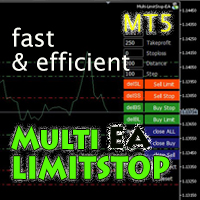
Multi LimitStop EA ( MT5 )
This EA is designed for automatic placing of pending orders (sell limit, buy limit, sell stop, buy stop) including Stop Loss & Take Profit levels (editable) with only one button click.
This EA can make order multi pending level / pending orders grid. So, with this EA placing pending orders will be faster , accurate and efficient .
Main Purposes Automation Pending orders grid style trading. Automation of the process of placing the Pending Orders: fast accurate effic

Crystal Profit Dashboard – Real-Time MT5 Account Performance Utility Overview
Crystal Profit Dashboard is a lightweight MetaTrader 5 utility that provides real-time profit and loss monitoring directly on the chart.
It offers a clean, modern dashboard interface that updates account performance without clutter, allowing traders to focus on execution while keeping essential metrics visible. Designed for scalpers, intraday traders, and swing traders, this tool provides accurate floating profit/los
FREE

工作逻辑
止损实用程序是一个简单但非常方便的指标,显示离止损水平还有多少点/
它的好处在于许多交易者为了追求利润而故意高估交易风险,最大限度地使用可用保证金,对于这种情况,了解经纪人可以在哪里强行平仓是非常重要的。
只需将指标放在图表上,根据买入或卖出的未平仓头寸,您将在图表上看到此交易价格的边界标记。
在您开仓之前,这条线在图表上是不可见的。 如果您没有在图表上看到这条线,这并不意味着该实用程序不起作用,很可能您交易的风险很小,而且存款很大,那么您需要寻找更高的止损线/ 低于交易,因为在当前风险下,您离止损还很远。 如果您有任何问题,可以在讨论部分写下来。 愉快的交易。 Recommended Robot Scalper - https://www.mql5.com/en/market/product/77108
变量
字体大小 - 标签中的字体大小
边缘缩进 - 从边缘缩进
线条颜色 - 线条颜色
文字颜色 - 文字颜色
FREE
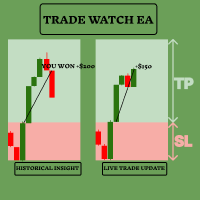
通过TradeWatch EA增强您的交易策略 TradeWatch EA是一款强大的工具,旨在为您提供实时的交易信息和控制,简化交易流程并改善风险管理。 主要功能: 交易可视化: 在图表上直接显示止损和止盈水平,便于监控。 可视化表示有助于快速决策和更好的风险管理。 位置索引: 通过设置位置索引编号来监控特定位置(索引从0开始)。 在同时处理多笔交易时,这个功能非常宝贵。 全面的交易概览: 在单一图表上查看您所有的交易,包括历史数据。 轻松访问详细的交易信息,有助于分析过去的表现并规划未来的策略。 实时盈亏跟踪: 即时反馈您的交易盈亏情况。 帮助您及时做出决策,以最大化收益和最小化损失。 用户友好的界面: 简单直观的设计使TradeWatch EA对所有经验水平的交易者都易于使用。 易用的设置确保快速配置和高效运行。 用户可以通过以下功能自定义EA: 为亏损区域选择颜色 为盈利区域选择颜色 为线条选择颜色 设置位置索引(索引从0开始) 输入"是"以显示历史记录 指定历史数据的日期范围(显示从此日期到此日期的历史记录) 为什么选择TradeWatch EA? TradeWatch EA
FREE

Symbol Switcher Pro
Symbol Switcher Pro 是一款适用于 MetaTrader 5 的免费实用面板,它允许您通过一个可拖动的界面切换多达 40 个交易品种,并实时显示每个交易对的盈亏情况,让您无需离开图表即可随时掌握交易动态。
概述 在 MetaTrader 5 中管理多个交易品种通常意味着需要在图表窗口之间频繁切换,容易丢失信息,浪费时间。Symbol Switcher 通过一个紧凑且可自定义的按钮面板解决了这个问题,该面板位于您的图表上。只需单击一下即可切换当前交易品种。每个交易对都会实时显示其当前的盈亏情况。面板可以放置在您需要的任何位置,并按照您想要的方式进行设置。
它是免费的,没有任何附加条件。
主要功能
多达 40 个交易品种 在一个面板中添加任意组合的外汇货币对、金属、指数或其他工具——最多可达 40 个交易品种。所有交易品种均由用户自定义,因此该面板适用于任何经纪商和任何市场。
每个交易品种的实时盈亏
每个交易品种按钮都会实时显示其当前的盈亏情况。一眼就能看出哪些仓位盈利,哪些仓位亏损,以及所有未平仓交易的整体情况——
FREE

Overview Simple Trade Panel EA is a clean, lightweight trade assistant designed for manual traders who want fast and visual order placement directly from the chart.
No more fiddling with order windows – place Market and Pending orders, adjust Stop Loss & Take Profit using draggable horizontal lines, and instantly see your risk/reward ratio, point distance, and dollar value.
The panel features a modern “dirty pastel” color scheme that perfectly fits light chart themes, and can be hidden with
FREE

Trade Analyzer & SL TP Optimizer MetaTrader 5 真实交易分析与止损 / 止盈优化工具 Trade Analyzer & SL TP Optimizer 是一款用于分析您真实历史交易表现的 MetaTrader 5 工具。 它不仅显示交易最终是盈利还是亏损,还会分析每笔交易在开仓之后的实际价格走势,帮助您了解交易过程中究竟发生了什么。 该工具可以分析手动交易,也可以分析由 Expert Advisor 执行的交易,并可使用 Magic Number 区分不同策略。 主要功能 Trade Analyzer & SL TP Optimizer 可以帮助您分析: 每笔交易的实际价格路径 价格在交易期间最大的不利移动 价格在交易期间最大的有利移动 实际获得的利润与潜在有利移动之间的关系 出场效率 未被利用的有利价格移动 胜率 Profit Factor 交易期望值 回撤 平均交易持续时间 Buy 和 Sell 交易的表现差异 不同交易品种的表现 不同星期的表现 不同入场时间的表现 不同交易持续时间的表现 不同平仓原因的表现 Stop Loss 和 T
FREE

JYPF Trade Panel 是一款專為 MT5 設計的高級動態互動式交易面板。一鍵觸發動態連動進場線( Entry)、止損線(SL)與止盈線(TP),首創「 單擊即刻拖拽」技術與防滑鼠遮擋的「趨勢線色彩區塊」視覺渲染, 在圖表上實時預估美金盈虧與風險回報比(R:R Ratio)。內建一鍵保本、50% 分批平倉、移動止損及全倉風控,是黃金(XAUUSD)、 外匯與指數短線極速刷單與波段交易的終極利器! 介紹短片: Part 1 https://youtu.be/xkLMOcrW42Y?si=ezHdoU0_OVeHQLkp Part 2 https://youtu.be/sA_qJ7R4fV0?si=dEMOxTdcMPDvCXNU 革命性的圖表互動掛單體驗 (Revolutionary Order Overlay) 傳統的 MT5 掛單需要頻繁手動輸入價格,或在繁瑣的雙擊解鎖中錯失良機。 JYPF Trade Panel 徹底打破這個僵局: 單擊即刻拖拽 (Instant Drag-and-Drop):按下 Pending BUY/SELL 後,進場線、SL線與TP線即刻以
FREE

TradeConsole — On-Chart Trading Dashboard with Smart Alerts TradeConsole is a lightweight on-chart utility designed to help traders keep essential market context in one place. It combines session tracking, an upcoming economic news panel, a currency strength view, a quick technical bias summary, trade statistics, and one-click control tools. The purpose of the dashboard is to improve chart awareness, reduce screen clutter, and support faster decision-making during live trading. Main Features On
FREE
Have you ever been in a situation when you could not control the chart conveniently or had to make additional clicks to be able to scroll the history or set the scale fix numbers manually to be able to stretch the chart? Features: Chart centering. Automatic scale fix. Automatic scroll control. This tool is one of many features included in "Trading Essentials" utility application, which can be found on mql5.com
FREE
Equity Balance Chart (Indicator Description) This is an advanced MQL5 indicator designed to track and display an account's performance directly on the chart. It plots the account's Equity (in lime green) and Balance (in orange) as two separate lines in a sub-window. Its two primary features are: Persistent History: The indicator saves the equity and balance data from each bar to a history file. When you restart MetaTrader 5 or reload the indicator, it automatically loads this file to redraw the
FREE

Crystal Copycat ULTIMATE v4.00 – 专业 MT5 交易复制工具 概述
Crystal Copycat ULTIMATE v4.00 是一款高性能 MetaTrader 5 交易复制器,可 实现不同账户与经纪商之间的超高速、可靠复制。系统通过 MT5 本地公共文件 夹运行,无需 DLL 或 API ,适合 VPS 与多 账户环境。 核心功能 双模式 : MASTER: 广播 订单、修改与关闭。 SLAVE: 即 时执行并带风险控制。 智能 仓位缩放 :固定手数、 资金比例、基于风险百分比。 风险管理 :最大回撤保 护、资金监控、单笔风险控制、基于 SL 的 计算。 订单覆盖 :市价、挂 单、修改、删除、 CLOSE_ALL 。 符号映射 :自 动 / 手 动支持(如 XAUUSD=XAUUSD.r )。 文件通信 :基于本地文件 夹,无需 DLL 和 API 。 可 视化面板 : 实时显示交易状态、风险、错误。 应用场景 多 终端复制交易。 Prop Firm 账户管理。 信号提供。 多 经纪商环境。 亮点 支持跨 经纪商复制。 支持市价与挂 单。 兼容
FREE

AutoRiskManage v2.3 — Documentation Expert Advisor — MetaTrader 4 & 5 AutoRisk Manage v2.3 Automated risk management EA with interactive graphical panel. Applies SL/TP, Break Even, Trailing Stop, and lot size calculation by risk percentage — for any instrument, any broker. MT4 / MT5 v2.3.0 MQL4 · MQL5 C2C + B2C Time Space Technology Overview AutoRiskManage is an Expert Advisor that acts as a risk management layer on top of any manually opened position. It does not generate trading signals — i
FREE

Custom Symbol Creator Overview Custom Symbol Creator is a utility for MetaTrader designed to create custom symbols based on historical market data. The utility prepares symbols that can be used for chart replay, manual backtesting, and market behavior analysis. This tool does not analyze price data, does not generate trading signals, and does not execute or manage trades. Purpose The purpose of this utility is to manage chart data by generating custom symbols that allow controlled historical pl
FREE

TradePanel — All-in-One Trading Panel for MT5 TradePanel is a compact, draggable on-chart control panel for fast manual trading. Open and close positions, read live price and P&L, and switch symbols — all without leaving the chart or opening an order ticket. Built on CTrade with retry logic on every close, size-step/min/max-aware lot handling, and per-chart position memory, it is designed to be a safe, reliable daily driver — not just a demo panel. Full step-by-step guide (every button explai
FREE

Advanced Risk Return Tool 是一款适用于 MetaTrader 5 的可视化风险/回报规划和管理工具。 该工具允许用户直接在图表上创建和管理 买入和卖出 结构,以可视化方式设置 入场、目标和止损 水平,并显示风险/回报比、点数距离、交易量以及相关的财务数值。 所有结构均可通过鼠标直接在图表上进行交互式调整。 主要功能 可视化风险/回报结构 通过工具面板直接创建 Buy 和 Sell 结构。 每个结构可显示: 入场水平 目标水平 止损水平 风险/回报比 点数距离 交易量 预计盈利 预计亏损 信息会根据图表上设置的水平自动更新。 图表交互式编辑 使用鼠标可以: 移动整个结构 调整入场水平 调整目标水平 调整止损水平 调整结构的水平长度 单独选择结构 在同一图表上使用多个结构 这样可以在无需频繁修改工具参数的情况下分析不同场景。 交易量控制 计算中使用的交易量可以通过结构上的控制功能直接调整。 显示的财务数值会根据所选交易量以及入场、目标和止损之间的距离重新计算。 订单和持仓集成 Advanced Risk Return Tool 可以跟踪当前交易品种相关的交易状态。
FREE

Local Trade Copier by RWBTradeLab
Local Trade Copier copies trades between MetaTrader 5 terminals that run on the same computer or VPS. One file is both sides: an input sets it to MASTER, which sends its trades, or to CLIENT, which copies them.
Overview
Attach the program to a chart on the account whose trades are to be copied and set the role to MASTER. Attach it to a chart on every account that should follow and set the role to CLIENT, each with its own Client ID. Give all of them the same
FREE

is an on-chart pre-trade planner for the symbol on that chart. It clears the price and time scales and fills the tab with a live reading of this account against this symbol: spread, pip value, point value, an ATR stop, three ATR targets, and ten lot sizes sized from a percent of balance. Targets are reduced by the live spread. The stop is increased by it. Commission and planned swap are then applied, so the money and percent figures are net of those costs before a buy or sell. It does not place
FREE

Spread Profile by Hour 根据你的经纪商自己的 tick 历史,为一个交易品种统计服务器日中每个小时的点差分布,并绘制成 24 根柱。柱的实心部分是该小时的点差中位数,颜色较浅的顶部延伸到第 90 百分位数。输入你常用的止损大小后,每根柱都会标注其点差中位数占该止损的比例,这样成本就与你的风险使用同一单位。 这是一个测量工具。它不下任何订单,不使用 DLL,也不使用 WebRequest,除了你开启的 CSV 导出之外,不写入任何文件。 为什么需要它:对于日内和剥头皮规则,决定优势能否保留下来的往往是点差,而不是入场信号。终端显示的是此刻的点差,而K线历史每根K线只保存一个点差值,这掩盖了一小时之内实际发生的情况。同样的规则可能在清淡时段有效,却在每日换日或交易时段开盘时亏损,原因仅仅是那时的点差要宽好几倍。本指标读取报价本身——通过 CopyTicksRange 读取最近 N 个日历日内的每一个卖价 (Bid) 和买价 (Ask) tick——并按服务器时间中一天里的小时将它们分组。 它为每个服务器小时计算以下内容,统计范围为最近 N 个日历日,不含今天,因此在你
FREE

Manual ATR Grid Manager is a manual trading system for gold (XAUUSD) that lets you choose your entry and then hands the ongoing trade management to the EA. Place a market buy or sell, or a buy/sell limit or stop order, directly from the chart. Set your lot size and entry price, with on-screen instructions guiding each step. Once the position opens, the EA manages its profit target. If price moves against you, an adjustable ATR-based grid can add positions at intervals that respond to market vola
FREE
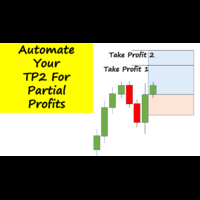
Have you ever been in a winning trade and wanted to close say half of position to lock in some profit. Well, this expert advisor does just that for you, and it's absolutely free. What you need to do is set what percentage of your trade you'd like closed and then set the price you like to close at. It that simple.
To get a better understanding of how it works, then watch the video below.
Note: The EA only works with one timeframe, changing timeframes will result in lose of all data by the EA i
FREE

EA Master Version any Follow Copy Account (Acc. Number) need a open MT Terminal, download multiple times Step1: Open Master MT5 Terminal = install master- Version (on any Symbol just one Time) Step2: Open Follower MT5 Terminal = install follower- Version (on any Symbol just one Time) Step3: all Trades from any Symbol or any Robot are copy now to follow- Terminal immediately for simple copy set on Chart and Start no optimization. This Robot is a Trade Copier for MT5 that automa
FREE

TimeToClose The "TimeToClose" indicator is an essential tool for traders who need to monitor the remaining time before a candle closes. This indicator displays the remaining time directly on the BID line, providing a clear and precise reference during real-time trading. Key Features: Displays the remaining time for the current candle to close. Direct integration on the BID line for better visualization. Simple and user-friendly configuration. Ideal for all types of traders, from beginners to pro
FREE

这个小工具可以帮助您通过在图表上拖动简单的线条来定义风险管理。它显示您直接在该行根据账户百分比或固定资金金额计算的实际手数。
您所要做的就是按键盘上的“t”键激活该线并将该线拖至止损点。就是这样。
在设置中,您可以定义线条和文本的颜色和宽度,还可以定义线条和右侧的文本间距,并且可以以帐户百分比或固定资金大小设置风险。
如果您有疑问或愿望,请随时询问。
这个小工具可以帮助您通过在图表上拖动简单的线条来定义风险管理。它显示您直接在该行根据账户百分比或固定资金金额计算的实际手数。
您所要做的就是按键盘上的“t”键激活该线并将该线拖至止损点。就是这样。
在设置中,您可以定义线条和文本的颜色和宽度,还可以定义线条和右侧的文本间距,并且可以以帐户百分比或固定资金大小设置风险。
如果您有疑问或愿望,请随时询问。
FREE

Smart Bulk SL Setter MT5 Script – Bulk Stop Loss Management Overview Smart Bulk SL Setter is a trade management script for MetaTrader 5 designed to modify the Stop Loss level of multiple existing open positions at once. The script executes once per attachment and applies a user-defined Stop Loss price based on selected filters.
It does not run in the background, does not open trades, and does not generate signals. Core Functionality The script allows setting a unified Stop Loss level for multip

Reward Multiplier is a semi-automatic trade manager based on pyramid trading that opens additional orders with the running profit of your trades to maximize return exponentially without increasing the risk.Unlike other similar EAs, this tool shows potential profit/loss and reward to risk ratio before even entering the first trade! Download full version here ( In the mini version. Starting lot is fixed at 0.01 (or minimum allowed lot size ) Guide + tips here MT4 version here You only open the
FREE

本指标的目的是判断点差和利率大小,以及按照存款货币每一个点的风险,设置从当前价位计算的止损距离。 本指标告知交易者有关金融工具在每个时段之间转换时可能的额外费用和利润。它还告知有关的点差和挂单的距离,从当前价位的尾随止损位。此外,指标告知交易者有关存款货币每一个点的风险。
信息被显示在图表下方的单独子窗口里。它可以避免图表被不同的信息塞满。点差和利率监控指标适合任何自定义模板。

This custom indicator enhances your MetaTrader 5 trading experience by adding an intuitive crosshair tool that follows your mouse's movement across the chart. Here's what it does:
1. **Real-Time Mouse Tracking**: As you move your mouse over the chart, the indicator dynamically draws a crosshair on the exact point your cursor is hovering over. This crosshair consists of two lines—a horizontal and a vertical line—that intersect at the current mouse position.
2. **Precise Data Reference**: The c
FREE

Risk Calculator Panel is a free on-chart utility that calculates the correct position size for every trade based on the risk you choose. Type your Stop Loss and Take Profit, pick your risk, and the panel instantly shows the exact lot size to use. One click on BUY or SELL opens the trade with the calculated lot, Stop Loss and Take Profit already set. It is a pure manual-trading assistant - it does not generate trading signals and has no restrictions.
Features: - Two risk modes: risk a percentag
FREE

Forex17 Clock 是一款适用于 MetaTrader 5 的轻量级、极简实用工具,用于在图表上显示经纪商服务器时间和/或用户自定义调整的时间。该产品旨在提供清晰、准确的时间信息,同时不干扰图表分析,保持图表整洁和高效。 该时钟直接以文本形式绘制在图表上,不使用面板、背景、边框或其他干扰性的视觉元素。这种设计方式确保了极低的资源占用率,与明亮和深色主题具有良好的兼容性,并完全尊重价格刻度和K线显示。该工具适合重视简洁性、视觉秩序和稳定性的交易者。 Forex17 Clock 允许用户选择文本显示的图表角落,调整字体大小和颜色,并设置相对于服务器时间的小时偏移。这使得用户可以直接在图表上方便、可靠地查看本地时间或不同时区的时间参考。 本产品不进行任何市场分析,不生成交易信号,不执行订单,也不与其他指标或专家顾问进行技术集成。它是一款独立运行的纯信息类工具,专注于在图表上显示时间。 该产品遵循 MQL5 的最佳开发实践,代码结构简洁,通过定时器进行轻量更新,强调稳定性和可预测性。Forex17 Clock 适合希望在 MetaTrader 5 中以低干扰方式监控时间的交易者。 由人
FREE

This indicator show the candle remaining time on the chart and/or in the corner of the window. It also display notificaton (popup and push) when a new candle is formed (optional). You configure the timer on candles and at chart corner. I don't need to explain the functions because are very simple. MT4 version: https://www.mql5.com/en/market/product/38677 Any doubt or suggestion please contact us. Enjoy!
This is a free indicator, but it took hours to develop. If you want to pay me a coffee, I a
FREE

UMNi-CMND MT5 Remote Command & Trade Control System UMNi-CMND turns Telegram into a full remote control panel for your MetaTrader terminal. Send commands from your phone to open trades, manage positions, query account status, and receive complete trade telemetry — all without touching the platform. KEY FEATURES Full remote trade execution via Telegram Open, close, and manage positions by command Move SL/TP, set breakeven, partial close Live status, account, and position q
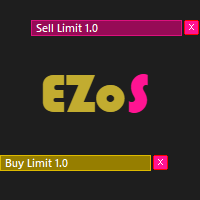
Easy Order Send help you to put your order on the chart using shortcuts keys like (SHIFT or CTRL). To send a order, hold CTRL or SHIFT and press left click mouse. It's a Beta version with features below: 1 - Send Buy and Sell order with SHIFT AND CTRL
2 - Cancel Button to your order
3 - Cancel Button to your position
4 - Move your order
5 - Monitor your Profit after trade on.
FREE

The Ultimate Real-Time Account Dashboard & Pro Stats Monitor AURA Trade Information Panel - Ultimate Edition Maximize your trading efficiency with the ultimate all-in-one on-chart dashboard. The AiO Trade Information Panel provides a comprehensive, real-time overview of your trading performance, essential market data, and vital technical indicators without cluttering your workspace. Designed for both day traders and scalpers, this panel helps you stay disciplined and make informed decisions in
FREE

MultiTP Trade Manager EA — Advanced Trade Management Made Effortless (MT5)
Limited Offer – First 100 Downloads FREE!
Be among the first 100 traders to download Trade Anchor Manager (MT4/MT5) completely free of charge. Hurry – once the limit is reached, the offer closes instantly! After trying it out, we’d love if you could leave a review and share your thoughts – your feedback helps us improve and lets other traders know what to expect.
Need this Trade Anchor Manager for MT4? http
FREE
MetaTrader市场是您可以下载免费模拟自动交易,用历史数据进行测试和优化的唯一商店。
阅读应用程序的概述和其他客户的评论,直接下载程序到您的程序端并且在购买之前测试一个自动交易。只有在MetaTrader市场可以完全免费测试应用程序。
