 MetaTrader 5
 专家
专家
 指标
指标
 程序库
程序库
 实用工具
实用工具
 窗口小部件
窗口小部件
 规则
规则
MetaTrader 5 交易实用工具 - 55
 以下是可在MetaTrader 5中简化交易的交易程序。将鼠标悬停在一个工具上,阅读它的描述和用途。
Salvest Immediate Gain Taker - 自动锁定您的收益! 利用专为MetaTrader 5设计的创新型专家顾问 Salvest Immediate Gain Taker ,释放您的交易策略潜力。该EA监控您的未平仓头寸,当您的总利润达到账户余额的指定百分比时,自动关闭所有交易。无需手动监控—让 Salvest Immediate Gain Taker 高效、有效地为您锁定收益。 主要功能: 利润目标平仓: 当达到指定的利润百分比时,自动关闭所有未平仓头寸。 包括亏损头寸: 关闭所有头寸,包括亏损的,以锁定总体利润。 自定义警报: 当您的利润达到预设水平时,接收通知。 交互式仪表板: 在图表上直接可视化您的余额、净值、利润和离目标的剩余利润。 用户友好界面: 易于设置并可根据您的交易偏好进行自定义。 通过 Salvest Immediate Gain Taker 提升您的交易体验,确保您不会错过任何锁定利润的机会!

Hedging Manager Pro for MT5 Take Control of Your Trades – The Ultimate Manual Hedging Solution! Hedging Manager Pro for MT5 is a powerful tool designed to empower traders with precision and speed in critical market situations. Unlike automated EAs, this tool gives you full manual control over your hedging actions, allowing you to safeguard your capital and manage your positions with ease and efficiency. Key Features and Benefits : Manual Hedging at Your Fingertips : Hedge your positions instantl

️ EA Close Order Time (Code by ThangTruong)
- Automatically close orders by time (day + hour) - Close orders by currency pair installed EA or all currency pairs - Close all BUY orders by time - Close all SELL orders by time - Close all PROFIT orders by time - Close all LOSS orders by time
Details at: https://discord.gg/J87vyRUJCj
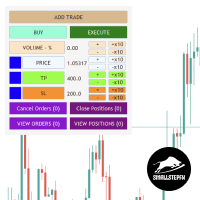
SSFx Manual Backtester EA 通过提供直观且功能丰富的界面,彻底改变了在 MQL5 策略测试器中手动测试策略的方式,使交易管理更加轻松。手动测试策略一向是一个繁琐的过程,而这个工具简化了操作,允许交易者通过历史数据模拟前瞻性测试,就像在实时交易中一样。 主要特点: 轻松添加交易: 点击“添加交易”按钮(Add Trade),临时暂停策略测试器,为您提供足够的时间进行交易。 调整交易参数: 修改进场价格、交易量(按百分比或手数)、止损和止盈。 可选择不使用止损或止盈。 设置止损和止盈线,以固定点数的距离追踪价格。 配置进场线,使其以特定距离跟随价格。( 注意:当前版本中,追踪仅适用于线条,而非订单。 ) 未来版本将支持订单和仓位的追踪功能。 简化交易管理: 一键关闭所有仓位或取消所有订单的按钮。 专门的表格用于管理未结订单和持仓,可精确修改或关闭单个交易。 高效模拟: 使用真实价格波动进行前瞻性测试,而无需受到未来市场行为已知信息的影响,非常适合制定客观的交易计划。 周末测试: 即使市场关闭,也能测试您的手动交易策略。 演示版本限制: 演示版本最多允许测试 5 笔交

This tool is designed to visualize the position and trades history and its information, such as the entry and exit points, sizes of the trades, Reward to risk ratio, Risk percent, Profit, Target and stop-loss on the chart. it makes showing trades on the chart more informative and easier to use. it's a strategic tool that enhances your trading experience on MT5 platforms. By providing a clear visual representation of your trades and customizable settings, it empowers traders to make informed deci

Breakout Strategy: Full Automated and Semi-Automated Trading Robot Starting with you, continuing with the robot. "After purchasing the bot, message me on WhatsApp or email, and you'll receive a powerful and highly useful indicator—perfect for trading the New York session—as a free gift!" Contact: WhatsApp How the Semi-Automated Robot Works Test is free : https://t.me/ForexAssistant The robot provides flexibility by allowing the user to define a specific area for price monitoring. Here's how
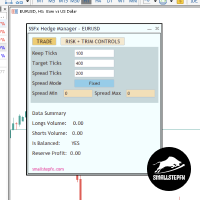
SSFx Hedge Manager 描述:
SSFx Hedge Manager 是一款专为 MT5 平台设计的强大交易管理工具。此 EA 使用智能对冲方法,通过利用盈利交易的利润逐步减少亏损交易,从而简化风险管理过程。 主要功能: 自动化交易管理: EA 会追踪所选货币对的所有交易,自动对冲未平衡的头寸,确保买入与卖出的平衡。 智能利润管理: 关闭盈利交易,保留部分利润,并将剩余利润用于减少亏损交易。 动态再平衡: 根据当前市场状况调整交易量和头寸,最大程度地降低风险并保持平衡。 特点: 单图表单货币对管理。如需管理其他货币对,需要在新图表上加载 EA。 帐户需支持对冲功能才能正常运行。 EA 无法在策略测试器中进行回测 ,因为它不负责开仓。用户可以结合 SSFx Manual Backtester 手动添加交易,EA 将实时管理这些交易。 这款 EA 非常适合希望自动化风险管理并将精力集中在交易决策上的交易者,而无需手动进行对冲操作。
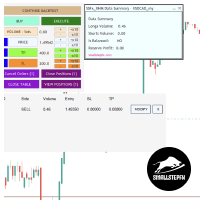
SSFx Ultimate Hedge Manager EA 产品描述:
SSFx Ultimate Hedge Manager EA 是MT5平台上最先进的交易管理工具。它将 SSFx Hedge Manager EA 的高级交易管理功能与 SSFx Manual Backtester 的全面回测功能相结合,为交易者提供了无与伦比的灵活性和优化交易策略的能力。 此EA采用基于对冲的风险管理方法,为交易者提供了替代止损的动态解决方案。凭借实时交易管理和回测模拟的双重功能, SSFx Ultimate Hedge Manager EA 是精确、高效风险控制的理想伴侣。 主要功能: 无缝回测集成:
在回测环境中测试您的交易策略,同时EA全自动处理交易管理,评估对冲策略的效果,而非依赖传统止损。 自动化交易管理:
EA动态监控并管理交易,利用盈利头寸逐步平仓亏损头寸,平衡买入和卖出订单。 盈利优化:
自动分配部分盈利交易的收益来抵消亏损交易,最大限度地减少账户回撤,同时保持整体盈利能力。 动态再平衡:
根据当前市场条件调整交易量和对冲策略,实现持续有效的交易管理。 产品优势: 测试

* Super Assistant is an useful management tool that helps traders perform management tasks on MT4/MT5 account remotely via Telegram such as: - Get info (account, details of positions, pending orders, floating PL, price, economic news, etc) - Open trade (open instantly with preset parameters) - Manage trade (set SLTP automatically, break-even mode, max risk, close time every day, etc) - Close trade (close all, buy, sell, win positions by one click, set awaiting close by PL, time) - Set up notifi

Hi Traders, Have you ever traded using the DCA (Dollar-Cost Averaging) method with limit orders and wanted to set up Take Profit automatically? This DCA Limit Auto TP Panel is the perfect tool to support your strategy. Key Features: Lot Size: Configure the lot size for your pending orders. Martingale: Automatically increase the lot size for subsequent pending orders. Take Profit: Set your profit target in points and activate automatic Take Profit. Stop Loss: Define your risk managem

这款 自动交易机器人 是一款强大而灵活的工具,专为希望在任何金融市场上以精准、安全和高效方式进行交易的交易者设计。凭借广泛的可配置功能,它允许您在完全控制进出场和风险管理的情况下执行复杂策略。 主要功能: 风险管理与紧急功能: 手动锁定敞口: 手动控制风险,在不实际亏损的情况下平衡未平仓头寸。 "紧急"按钮: 一旦启动,无法取消。用于保护资金的关键功能。 操作与平仓控制: 关闭所有头寸: 快速关闭所有未平仓单。 关闭盈利或亏损头寸: 灵活管理交易。 加仓与网格策略: 自动加仓: 根据预设条件增加头寸,扩大收益潜力。 顺势网格: 在固定间隔执行订单,结合趋势调整仓位。 自动止损移动与保护: 标准追踪止损与均价追踪止损: 根据市场变化调整止损。 自动保本: 达到安全利润后将止损移至入场点。 逐条K线追踪止损: 基于每根K线的高低点调整止损。 趋势策略与Soros策略: 分形分析: 使用移动平均线和ADX识别短期和长期趋势。 Soros策略: 逐步加大盈利,最大化收益。 时间管理与市场设置:

The best way to place and close trades using your keyboard. Perfect for Scalpers, sniper entries.
The default keys are as follows: 8= Buy (Lots set by user) 5= Sell (Lots set by user)
9= Closes All Buy Positions 6= Closes All Sell Positions 2= Opens a Sell and a Buy position instantly.
0= CLOSES All Positions //These are the default keys, can be changed upon request.

Local Trade Copiier is a professional utility designed to copy and synchronize trades between trading accounts. With its easy 1-minute setup, this trade copier allows you to copy trades between multiple MetaTrader terminals on the same Windows computer with lightning-fast copying speeds of under 0.5 seconds. Whether you're a beginner or a professional trader, the Local Trade Copiier MT5 offers a wide range of options to customize it to your specific needs. It's the ultimate solution for anyone l
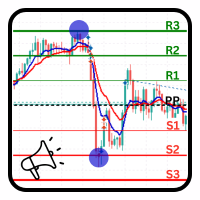
PivotPoint Notifier – Dynamic Pivot Point Tool with Alerts Description: The PivotPoint Notifier is a versatile and customizable MetaTrader 5 tool designed to dynamically calculate and display key support and resistance levels on your chart. It supports four different pivot point calculation methods— Standard , Woodie , Camarilla , and Fibonacci —allowing traders to select the one that best suits their trading strategy. This tool automatically plots the Pivot Point (PP) , Resistance levels (R1, R
Remote Trade Copier is an advanced tool designed for efficiently copying trades between accounts in both local and remote modes. It allows for lightning-fast order replication from a master account to a slave account. In local mode, trades are copied instantly, while in remote mode, the copying process takes less than 1 second. MT4 Version (Only Local)
MT5 Version (Only Local)
MT4 Full Version (Local & Remote) Local mode refers to both MetaTrader platforms being installed on the same system,

Take full control of your trading with the BalanceGuard Expert Advisor. This smart risk-management tool continuously tracks your account equity and activates a protective stop once your predefined drawdown limit is reached—so you never risk more than you’re comfortable with. Featuring adjustable drawdown settings and a clean, intuitive dashboard that displays essential account statistics, BalanceGuard empowers you to trade confidently while protecting your capital.
This tool automatically generates support and resistance based on calculations, thus eliminating any subjectivity when plotting support and resistance. Additionally, it allows to identify trend changes (when support and resistance are together), continuation of downtrend (when resistance is below support). Two standard deviations are also added, so that TP and SL zones can be identified. In its configuration it is possible to calculate quantitative support and resistance for timeframes of 1 wee

Hermes is a control panel that allows you to easily and effectively open market positions and place pending orders. In addition, thanks to its send and receive functions, Hermes can connect two or more terminals, copying the operations of one to the other or to the others.
The send and receive functions for orders and market positions are independent of each other, i.e. it is possible to send positions to be copied to one terminal and orders to another, or to copy positions from one terminal and

Ziwox Global Economy Tools What are the Ziwox Global Economy Tools? The Ziwox Global Economy Tool is a comprehensive solution for forex traders, providing historical economic data and index charts for the most critical countries in global trading. Designed to enhance trading decisions, this tool allows you to easily access, analyze, and visualize key economic indicators from countries like the EU, US, GB, CA, AU, NZ, JP, CH, CN, IT, DE, FR, BR, MX, ZA, SG, HK, IN, NO, KR, ES, and SE. Traders can

Virgilio is a multifunction control panel consisting of several panels, each of which performs one of the most useful functions used by traders.
Its aesthetic is unique, designed to blend into any working environment and offer a user experience that makes work even more enjoyable.
Its operativity is simple and intuitive, developed with attention to details to be as userfriendly as possible.
Its main panel displays all the basic account and chart data.
The first panel offers the user the possib

This tool highlights on the chart the areas of greatest interest to a trader with bands or lines of varying colour intensity indicating the levels on which the price on the chart in question has been stationary the longest.
It works in the classic mode, drawing a histogram on the right-hand side of the chart, or in a new mode consisting of bands of varying colour intensity, with the most intensely coloured ones representing the price levels with the most intense volumes.
Volumes are always calcu

Kronos is a multi-timer that displays local time, server time and the countdown of the current period. The programme is multilingual, with a choice of English, Italian and Spanish Language selectables in input.
Available in four colours and with the choise of five types of font to be used.
Like any other programme we have created, the graphic interface is developed to be non-invasive and intuitive.
At start-up, the three windows that make up the graphic interface of Kronos are closed on the left
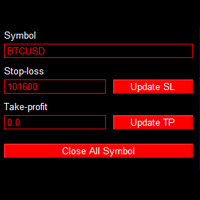
This is an EA that can help you set stop loss, take profit or close order for all open orders of any Symbol. Simply use it by entering the Symbol you are trading, then fill in the stop loss or take profit price and click the Update button.
Similar to the batch order closing function, just enter the symbol you want to close the order, then click the "Close All Symbol" button. Immediately your orders will be closed gradually until all orders are closed.
This tool is suitable for those of you wh

AlienTrader Pro – 未来已到来。 AlienTrader Pro 是一款手动交易工具,旨在简化您在 MetaTrader 4 和 5 上的操作。通过直观的快捷键、图表上的直接交互以及先进的可视化功能, AlienTrader Pro 能让您快速将想法转化为交易,并直接在图表上实现。 立即购买 | 免费演示 | 用户指南 | MT4 版本 | 联系我们 主要优势 快速: 一键下单,操作迅速。 精准: 直接从图表管理您的持仓。 清晰: 实时可视化交易区间、风险回报比(RR)以及收益。 个性化: 根据您的偏好调整手数大小、止损策略和显示主题。 可靠性: 减少操作失误,优化流程,专注于关键任务。
你的图表,你的规则 AlienTrader Pro 将您的图表转变为一个互动且清晰的操作空间。您可以立即查看持仓,直接在图表上执行订单,并根据您的偏好和交易风格享受灵活性。不论您喜欢短线交易还是长期交易, AlienTrader Pro 都能适应您的操作方式,使您的交易体验更加直观和个性化。
快捷键与光标:完美搭档 AlienTrader Pro 将快捷键的操作速度与图表上光标的精

Trade Master — 一款面向 MetaTrader 5 的专业交易面板,专为超快速且精准的手动交易而设计。交易和订单可视化、风险与利润计算、仓位开仓、平仓与修改、保本、移动止损、部分止损与止盈、按时间平仓、按净值止损与止盈 —— 所有这些功能都可以通过一次或多次点击、快捷键,或直接在图表上拖动价格水平轻松完成。直观易用的界面使您几乎可以立即测试所需的交易场景并开始使用本程序。 在快速波动的市场中,每一次延迟都意味着资金损失。专注于交易决策,而不是手动计算。使用 Trade Master,更快速、更高效地进行交易。 安装演示账户版本 | 用户指南 功能 - 市价单和挂单的下单功能。可视化显示即将下达的订单,通过在图表上拖动价格水平修改开仓价、止损和止盈。自动计算指定手数的风险与利润。自动根据指定风险计算交易手数。支持锁定价格、盈亏比以及与当前价格的距离。 - 保本功能。可设置触发条件(激活价格)以及受保护利润的大小。 - 移动止损。可设置触发条件(激活价格)、当前止损的移动步长,以及与当前价格的距离(以点数、小数点位或价格百分比表示)。 - 部分止损、部分止盈、按时间部分平仓。

Advanced Trailing Stop Loss Utility Optimize your trading strategy with the Advanced Trailing Stop Loss Utility , a powerful tool designed to dynamically protect your profits and minimize losses. Whether you're a beginner or an experienced trader, this utility ensures that your trades remain secure while maximizing potential gains. Key Features: Dynamic Stop Adjustment : Automatically adjusts the stop loss level as the market moves in your favor, locking in profits while allowing for market fluc
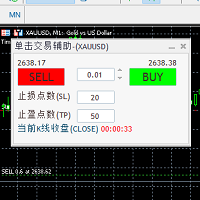
自带一键下单交易快捷键和K线收盘时间倒计时秒数的交易面板。 面板中可设置止盈止损点数;显示的倒计时秒数为图表周期中当前K线的收盘倒计时间; 自带一键下单交易快捷键和K线收盘时间倒计时秒数的交易面板。 自带一键下单交易快捷键和K线收盘时间倒计时秒数的交易面板。 自带一键下单交易快捷键和K线收盘时间倒计时秒数的交易面板。 自带一键下单交易快捷键和K线收盘时间倒计时秒数的交易面板。 自带一键下单交易快捷键和K线收盘时间倒计时秒数的交易面板。 自带一键下单交易快捷键和K线收盘时间倒计时秒数的交易面板。 自带一键下单交易快捷键和K线收盘时间倒计时秒数的交易面板。 自带一键下单交易快捷键和K线收盘时间倒计时秒数的交易面板。

Ruler is important but just a simple tool. Why people make it too complex? Easy Ruler makes it great again. Almost zero setup required, nothing annoying on chart, quick and accurate. Easy Ruler MT5 just help you measure 2 points on chart quickly and accurate. That's all!
To support you better, it has magnet mode to pick points more accurate and works on indicator windows too (38 indicators that provided by MT5 by default). This smart ruler provides these information right on chart in no time t

Fe el free to contact me for any extra features :) [SEE MT4 VERSION https://www.mql5.com/en/market/product/128848 ] The Local Copier EA is an Expert Advisor (EA) designed to synchronize trading positions between a master account and a slave account, operating in either Master or Slave mode. Key Features: Master Mode :
In Master mode , the EA monitors open positions and stores relevant trade details. These details include symbol, volume, stop loss, take profit, and position type, which are used

Expert Advisor that synchronizes positions between a Master and Slave account but with a twist: it reverses every trade . Master opens Buy → Slave opens Sell (same volume, SL/TP mirrored) Master opens Sell → Slave opens Buy (adjusted SL/TP) Continuous sync: positions closed on Master = closed on Slave, new positions are instantly reversed Perfect for hedging , contrary strategies , or testing directional bias across two accounts. For Support & Customization I’m here to ensure you get the most

Introducing our Expert Advisor (EA) that empowers you to create custom timeframes in MetaTrader 5, defined in seconds—from as short as 1 second. This EA generates a new symbol with your specified timeframe, updating with every tick. Utilize this symbol for real-time analysis, trading, and backtesting your strategies. Additionally, our EA allows you to adjust your chart's time zone independently of your broker's. Given that brokers operate across various time zones, their charts can differ. With
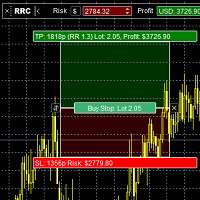
Risk Calculatorr Panel MT5
Professional trading assistant for MetaTrader 5.
Open trades faster, calculate precise risk instantly, and manage positions like a professional trader.
WHY TRADERS NEED THIS PANEL
Many traders lose money because they:
• use wrong lot size • risk too much per trade • enter too slowly • manage positions emotionally • open trades without clear RR ratio
This panel helps solve these problems in seconds.
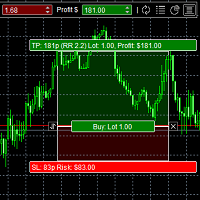
The panel was created to manage trading positions: to open new trades and close existing ones. To open new transactions, you can set the position volume, Stop Loss in points, risk in dollars or as a percentage, Take Profit in points or Profit in dollars, you can set the Profit/Risk parameter. It is possible to place a panel on the active chart to visually set the parameters of a new transaction, select a market order or a pending one. If you fix the RR parameter, then when Risk changes, Profit w

Swap Sort is an MQL5 script designed for traders and investors to streamline their decision-making process by efficiently analyzing and organizing swap fees for financial instruments. This tool is ideal for professionals who want to optimize their trading strategies by minimizing costs and maximizing profits.
Swap fees can significantly impact the success or failure of a trade, as high fees can erode profits over time, while favorable swaps can enhance returns for positions held overnigh.
Wit

Download DEMO here https://www.mql5.com/en/blogs/post/759772
An ultimate panel you've never seen before. Compact and nice Trade panel with large Total P/L and it's percentage display. Groups for trades summary available: Ticket, Symbol, Type, Category, and Magic. Average price field helps you know your trading average price and direction. Set magic and comment of your trading in a very easy way. Group closing by symbol, type, category or magic - only by one click. Close All button for a quick

An excellent assistant for those who trade using Sniper strategy, Price Action, Smart Money.
The Advisor finds and draws:
-Reversal Levels and Reversal Zones
-Continued Movement
-Current trend and trend
-6 Patterns of the Sniper trading system
-Draws a story for a set number of bars
All graphical constructions can be customized to your taste, and you can also prohibit the construction of
separate formations.

[FEEL FREE TO DM ME IF YOU NEED SUPPORT] MANotifier.mq5 - Moving Average Crossover Notification Utility The MANotifier.mq5 is a utility designed for MetaTrader 5 that monitors the crossover of two Moving Averages (MAs) and sends notifications based on the crossing events. The utility supports various notification types, including mobile notifications , email alerts , and on-screen pop-up alerts , making it ideal for traders who want to stay informed of key market events in real-time. Key Feature

The Nrp Suchin Smart DCA Assistant v2.2 is a versatile Expert Advisor (EA) designed to enhance trading strategies with a focus on DCA (Dollar-Cost Averaging). It is a comprehensive tool that offers support for automated trading systems, assists other EAs, and provides functionality for manual traders. This EA stands out by seamlessly integrating with diverse trading environments, enabling traders to optimize their strategies with precision and flexibility. Whether you rely on automated trading o

Product Description: OnePrice Click MultiTrade EA The OnePrice Click MultiTrade EA is a powerful tool for traders who seek precision and efficiency in managing multiple trades within the MetaTrader 5 platform. This automated trading solution allows users to open multiple trades simultaneously, either at a specific price level or with the click of a button. Designed with flexibility and user-friendliness in mind, the OnePrice Click MultiTrade EA is perfect for both novice and experienced traders

A trailing stop loss is a risk-management tool that automatically adjusts the sell trigger point for a financial instrument as its price rises or falls and by using this trailing sl program it insures that your trades will be risk free each and every time How it works A trailing stop loss is set at a fixed distance from the current market price, either as a percentage or a fixed dollar amount. When the price moves in a favorable direction, the stop price moves with it to maintain that distance

Mtf Candle Alert Telegram – A Reliable Tool for Market Analysis Analyze the market, identify trends, and refine your strategy. Mtf Candle is an advanced indicator designed for traders seeking a structured approach to market visualization. This tool enhances technical analysis by providing a clear and organized display of market trends. What Does Mtf Candle Offer? Comprehensive Bar Analysis – Monitor bars across multiple timeframes and assess market direction. Trend Statistics – Track the sequen

Autogrids Autogrids EA is a cutting-edge trading automation tool designed to give Forex traders an unparalleled edge in the market. Built on a powerful quantitative strategy, it analyzes the frequency distribution of daily price movements, leveraging historical data to create a highly optimized operational grid. ️ Key Features Dual Strategy Mode: Quantitative or Manual Grid: Choose between the Quantitative Mode, which automatically generates grids based on the statistical distribution of d
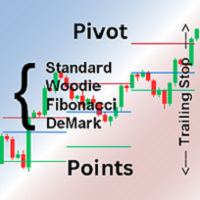
Pivot points are calculated based on the previous day's values - according to the most common formulas on the web - and serve as an important tool for many traders, especially in day trading.
They indicate possible resistance and support where increased buyer and seller interest can be expected.
This Pivot-Points-Trailing-Stop-Helper includes my Pivot Points Collection indicator and, based on your settings, gradually moves the SL to the corresponding pivot levels as soon as the current price

Equity Shield Pro 1.1
Equity Shield Pro 1.1 is a powerful utility EA designed to safeguard your trading account by actively monitoring and enforcing equity protection and profit management rules. Whether you’re trading personal accounts or working through proprietary firm challenges, this EA ensures strict adherence to risk and profit targets, enabling you to maintain discipline and consistency. Fully compatible with all challenge types, Equity Shield Pro 1.1 is specifically crafted to meet th

此實用程式適用於水平線: Prof1、Prof2、Loss1、Loss2 。 這些線具有嚴格固定的名稱,由交易者在其終端的任何圖表上獨立繪製。 可以選擇一次建立所有線路,也可以選擇四條線路中的任一條。 只要看一下這些線條的名稱,其用途就一目了然了。 Prof1 和 Prof2 線指示交易的獲利水平,但以視覺化形式呈現,使交易者更容易感知資訊。 Loss1 和 Loss2 線反映停損水平,清晰直觀地呈現風險。 因此,該工具有助於創建關鍵層級的清晰視覺化,使交易者能夠做出更明智的決策。 此實用程式的獨特之處在於,只需將其安裝在一張圖表上,您就可以使用任何終端圖表上的線條。 專家實用程式可自動偵測終端中的所有 Prof1、Prof2、Loss1、Loss2 線,並產生有關該工具上所有交易的資訊(利潤、損失、數量)。 連結至 MT4 版本 該實用程式的第一個目的是有關盈虧的資訊。 使用停損線和獲利線來關閉交易 = 僅供參考,線下方的 OFF 符號禁止關閉交易。 計算並在這些線下放置一條此類線:Prof1 OFF +584$/19 -396$/7 = +187$/26 說明:線路名稱,線路是否

Replay the past. Trade it by hand. Learn what really works.
Your broker's own history, candle by candle, with real spread, commission and swap. Multi-timeframe sync Prop-firm rules Journal and HTML report Never sends real orders 100% native MQL5, no DLLs Early adopter price: 79 USD
One-time purchase · All future updates included · No subscription
This introductory price is temporary and will increase. Why ChronoReplay Practising on live markets is slow and expensive, and the

An algorithm that uses artificial intelligence (AI) to analyze the best entry points in the market 24/7 typically operates following these steps: Real-Time Data Collection : The algorithm collects real-time data from various sources, such as market prices, trading volumes, technical indicators, economic news, and fundamental analysis. Data Processing : It uses data processing techniques like time series analysis, noise filtering, and feature extraction to identify relevant data that helps predi

Take full control of your trading with this cutting-edge panel for MetaTrader 5, designed to enhance efficiency and precision. Whether you're a seasoned trader or a beginner, TradeSphere offers robust features to simplify trade execution, manage risk effectively, and streamline your workflow. Key Features: Versatile Trade Execution Options
Execute trades seamlessly with support for stop, limit, and market orders. Our user-friendly panel ensures effortless trade management, saving you time and e

When executing an order, whether through the Metatrader ticket on a computer or the Metatrader app on a mobile device, either manual or pending,
Easy Trade will automatically set the take profit and stop loss levels, as well as a limit order with its respective take profit and stop loss levels. It follows the trading strategy for market open (US30, US100, US500), but it can be applied to any market asset.

By :Forex For Baby Ea. 1.0
This EA is Famous Grid Strategy that open positive grid of trades with money management risk size, first and smaller size after. It makes PROFIT when the Forex price moves in th
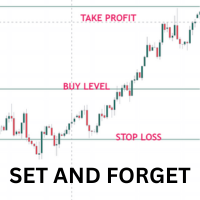
Once you have done your chart analysis there is no need to wait for the market to get to your levels. Just Set and Forget. The Ea will do this for you. How it works: - for buys. set the entry price, the stoploss and take profit. When price gets to entry price, It will wait till candle close above entry price, then when new candle opens and crosses above previous calndle high, the trade is triggered,
The reverse is true for sells. Other Ea setting incluse: - 1. trading days 2. trading time range

The Superior Remote Trade Copier is a comprehensive MT5 utility that copies trades remotely and privately via Telegram, eliminating the need for external VPS bridges or third-party web servers. The ecosystem consists of a Master EA, a free Desktop App, and a Client EA. Master (Transmitter) Trade Broadcasting: Transmits market orders, pending orders, position modifications, and partial/full closures directly via Telegram. UI Dashboard: Interactive on-chart panel for quick bulk actions (Close All,

Risk Manager for Synthetic Index Calculate the appropriate lot size using two lines and trade across 11 synthetic index: Boom 1000, Boom 500, Boom 300, Crash 1000, Crash 500, Crash 300, Step Index, Dex 600 Down, Dex 600 UP, Dex 900 DOWN, and Dex 900 UP. Technical Features: Calculation based on percentage risk (R%) or fixed amount (R$). Market and pending order execution. Adjustable panel that can be minimized/maximized to avoid obstructing the chart. Dynamic lot size update when modifying chart
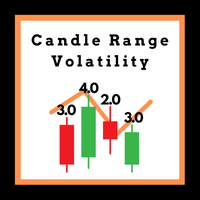
This Expert Advisor (EA) is designed to analyze and visualize the volatility levels of individual candles across any timeframe. By plotting and graphing the volatility data, it provides a clear and intuitive representation of market dynamics. The EA captures and displays volatility trends for each monthly period, making it an invaluable tool for traders who aim to understand market behavior over time. While it works on any timeframe, it is particularly optimized for the daily timeframe, where it

An algorithm that uses artificial intelligence (AI) to analyze the best entries in the market over the 24 hours generally works by following these steps:
Real-Time Data Collection: The algorithm collects real-time information from various sources such as market prices, trading volumes, technical indicators, economic news, and fundamental analysis.
Data Processing: It uses data processing techniques such as time series analysis, noise filtering, and extraction of relevant features that help pr

Stealth Mode TP/SL Manager with AI Protection This AI-powered tool manages Stop Loss and Take Profit dynamically using either price-based or profit-and-loss (PnL) calculations while hiding these levels from the market . Also the this tool is very important to PROP FIRMS accounts , so you can set your stoploss to not hitting the daily stop loss ! Key Features: Supports BUY, SELL, or both position types. Flexible symbol selection: Manage the current chart, all symbols, or specific symbols

Simple But,Good Signal ...Demo expire 1 /04/ 2025 Less functions, fewer problems, easy to use. Trading assistant for professional traders Position size can be calculated automatically by simply dragging the stoploss line to the desired position and automatically placing take profit based on the risk reward you set. You can choose to limit your risk by the amount of your capital or the percentage of your capital. Reduce the process of calculating position size in realtime, so you can Focus only

AI Moving Average Trend Brief Description An innovative trend indicator utilizing neural network technology for adaptive price movement analysis, perfect for medium and long-term traders working across various timeframes. Full Description Operating Principle The indicator employs a single-layer neural network to analyze price movements and construct an adaptive trend line. The algorithm combines classical moving average with machine learning for precise trend determination. Calculation Algorithm

For DEMO - please contact me and I will send you demo version to test the product.
BreakEven ProSync – Advanced Trade Management Tool for MetaTrader 5 Overview The BreakEven ProSync is a powerful utility designed to enhance trade management in MetaTrader 5 . It provides one-click break-even functionality , hotkey trading , position synchronization , and visual SL/TP tracking —all in a single, user-friendly tool. Perfect for manual traders who want faster execution and better r
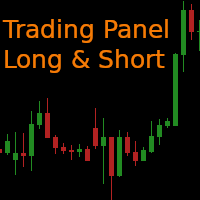
This is the Long Short NT-HDG Trading Panel , an Expert Advisor created with the function that will greatly facilitate Long & Short operations.
> With just one click, you can set up a position in two assets simultaneously, further accelerating your actions right after making a decision.
> With it, you can also operate in Hedge accounts, being able to set up a position in the same asset, for those who have strategies for this purpose.
> It can be used in several markets and assets.
> The new

实时 CRT 警报,助你更聪明地交易! CRT Alert EA 专为使用蜡烛区间理论(CRT)的交易者设计。该工具可监控多个时间周期的价格行为,并在第三根蜡烛形成时及时发送警报,助您把握交易时机。 主要功能:
实时警报
多时间框架监控(1分钟到月线)
自定义设置
支持 MT5 手机与桌面推送
更多功能即将上线 使用方式:
1️⃣ EA 根据 CRT 理论监测三根连续蜡烛
2️⃣ 当出现有效形态时,触发警报
3️⃣ 您会收到桌面与手机的通知 无自动交易,您拥有完全控制权! Telegram 联系我: @osteeen4x
自动交易功能即将推出,支持低周期 orderflow 触发。如需根据您自己的策略定制自动交易,请联系我。 关于 CRT 理论,可参考 X 上的: @Romeotpt

Close ALL OPEN TRADES on the dot! Set the exact day and time, click the START button and wait until it closes all trades. ========================================== INPUTS (Check screenshot for reference): Closing type: Set to specify if you wanted to close all of the trades on your account or just the trades under the current chart symbol. Magic number: Leave it to 0 if you want to close all trades. Set to specific magic number if you only want to close trades under that magic number. This

ImpulseShield EA is here to say NO to trading decisions made on Impulse
Have you ever placed a trade based on an impulsive decision and regretted your action? What if you could have been able to avoid taking the trade? ImpulseShield is here to help you to only when it is right. Link to MT4 Version https://www.mql5.com/en/market/product/131505 Key Settings and Their Role
The EA uses the inputs defined earlier to determine whether an open trade complies with the trader’s guidelines. Here’s how

Описание продукта: LotCalc Pro — это интуитивно понятная и мощная утилита для трейдеров, которая позволяет легко вычислять стоимость пунктов и оптимальный размер лота для торговых операций. Этот скрипт предоставляет трейдерам актуальную информацию о текущих ценах и помогает принимать обоснованные решения в управлении рисками.
Важное примечание: Несмотря на то что LotCalc Pro может отображаться в разделе "Советники" в MetaTrader, это действительно скрипт. Причина этого заключается в использова

• Please test the product in the Strategy Tester before purchasing to understand how it works.
• If you face any issues, contact me via private message—I’m always available to help.
• After purchase, send me a screenshot of your order to receive a FREE EA as a gift. Broker Analysis Utility – Your Ultimate Broker Performance Monitor! Get Full Transparency on Your Broker's Execution Quality! Are you a trader who values precision, transparency, and performance? Broker Analysis Utility is an es
• Please test the product in the Strategy Tester before purchasing to understand how it works.
• If you face any issues, contact me via private message—I’m always available to help.
• After purchase, send me a screenshot of your order to receive a FREE EA as a gift. Spread Analysis Utility MT5 – Monitor & Analyze Broker Spreads in Real Time! Do you want to track your broker's spread fluctuations with precision? Spread Analysis Utility MT5 gives you real-time insights into the spread behavio

• Please test the product in the Strategy Tester before purchasing to understand how it works.
• If you face any issues, contact me via private message—I’m always available to help.
• After purchase, send me a screenshot of your order to receive a FREE EA as a gift. Slippage Analyzer Utility – Gain Full Transparency Over Your Trades! What is Slippage, and Why Does It Matter? Slippage is the difference between the expected price of a trade and the actual price at which it gets executed. This

• Please test the product in the Strategy Tester before purchasing to understand how it works.
• If you face any issues, contact me via private message—I’m always available to help.
• After purchase, send me a screenshot of your order to receive a FREE EA as a gift. Broker Connection Monitor - Keep Your Trading Secure! Ensure Stable Trading with Real-time Broker Connection Monitoring! Are you tired of unexpected connection drops affecting your trades? Do you want to monitor your broker's co

GT Scalping Tool – The Ultimate Tool for Professional Scalping! Advanced Real-Time Position Management with Drag and Drop Control! GT Scalping Tool is a powerful companion designed specifically for scalpers and discretionary traders. It provides maximum control and flexibility directly from the MetaTrader 5 chart. This tool does not execute trades automatically – you decide when and how to enter the market! GT Scalping Tool enhances your position management with a dynamic, real-time interface
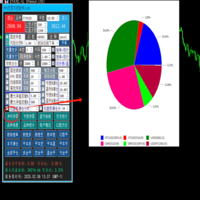
1,交易功能: (1)开仓:仓位计算,止损止盈点数、挂单、批量挂单 (2)顺势加仓,逆势加仓,加仓倍数,加仓间隔 (3)跟踪止损:均线突破、高低点突破、ATR、单品种净值比例回撤、单品种亏损金额、 时间止损 (4)平仓:分批平仓、盈利平仓、亏损平仓 (5)高低点和跟踪止损价格自动划线 (6)批量挂单 2,划线下单:仓位计算、止损止盈计算,挂单类型自动判断
3,统计:持仓统计、历史统计、magic统计、品种统计,盈亏曲线,净利润饼图,亏损饼图
4,账户风控:净值回撤比例报警、净值回撤比例平仓、亏损金额报警、亏损金额平仓, 盈利比例报警,盈利比例平仓、盈利金额报警,盈利金额平仓 时间平仓,持仓单数控制、总持仓量控制,magic平仓
MetaTrader市场是一个简单方便的网站,在这里开发者可以出售自己的交易应用程序。
我们将帮助您发布您的产品,并向您解释如何为市场准备您的产品描述。市场上所有的应用程序都是加密保护并且只能在买家的电脑上运行。非法拷贝是不可能的。
