 MetaTrader 5
 专家
专家
 指标
指标
 程序库
程序库
 实用工具
实用工具
 窗口小部件
窗口小部件
 规则
规则
免费的MetaTrader 5 交易实用工具 - 16
 以下是可在MetaTrader 5中简化交易的交易程序。将鼠标悬停在一个工具上,阅读它的描述和用途。
BlueEdge Trading Manager (MT5) BlueEdge Trading Manager is a clean, fast manual trade manager panel for MetaTrader 5. It helps you open trades quickly (BUY/SELL), manage up to 5 take-profits , and automatically handle partial closes while drawing clear SL/TP lines directly on the chart. This product is NOT a trading strategy and does not generate entry signals. It is a trade execution + position management tool for scalpers and manual traders. Main Features One-click BUY / SELL from a compact pa
FREE

K线终结者 - 精准把握每一秒的倒计时工具 核心摘要: 还在为不确定当前K线何时结束而焦虑吗?‘K线终结者’是您交易工具箱中不可或缺的利器!它通过一个清晰、直观的倒计时器,实时显示当前活跃K线剩余的精确时间,帮助您避免在K线转换的混乱时刻做出仓促决定,从而更从容地入场、离场或管理订单。 1. 产品概述 “K线终结者”是一款轻量级、高效率辅助指标。它的核心功能是 实时计算并显示当前周期下最后一根K线的剩余时间 。无论您是短线交易者、剥头皮高手还是波段操作者,这款工具都能为您提供至关重要的时间维度信息,让您的交易决策更加精准和自信。 它不仅是一个简单的倒计时器,它是一位无声的交易助手,是您提升交易精准度和专业度的秘密武器。在瞬息万变的市场中,每一秒都至关重要。 2. 主要功能与特点 实时精准倒计时: 在主图表上以清晰的大字体动态显示当前K线剩余的分钟和秒数,让您对时间流逝一目了然。 可定制化显示 :您可以随意将倒计时放到图表上任何不碍眼的位置。自定义字体尺寸、颜色,确保其与您的交易界面风格一致。 广泛兼容性: 支持所有时间周期,从1分钟图到月线图,适用于平台上的任何交易品种包括外汇、股票
FREE

NewsAlert是一个多功能的警报系统,旨在让交易员了解即将发生的重要市场新闻事件。当有新闻事件发生在指定的事件时间内时,EA将向您发送推送通知和电子邮件警报。 在我的YouTube(个人资料中的linktree中的链接)上有关于设置NewsAlert EA和配置推送通知&SMTP以进行电子邮件通知的详细教程。这些教程涵盖了从初始设置到高级功能的所有内容,以帮助您充分利用该产品。 购买NewsAlert后,您有机会成为一个活跃的Discord社区的一员(个人资料中的linktree中的链接)。参与热烈的讨论,从同行交易员的经验中学习,并获得您需要的支持,以充分利用NewsAlert。 我们还在MQL5市场上提供TradePadLite和TradePadPro产品。这些交易工具与NewsAlert集成,以提供更全面的交易解决方案。 免责声明 Trading Toolkit仅提供用于教育和信息目的的工具和资源。提供的工具和信息不应被解释为投资建议或对任何特定交易策略的背书。投资决策和投资方法完全由您自己决定。因此,Trading Toolkit对由于使用我们的工具或依赖任何提供的信息而产
FREE

First 10 Copies is Free
BuntuFx Copier Pro is a fast and reliable trade copier for synchronizing orders between Master and Slave accounts on MetaTrader 4 and MetaTrader 5. Main Features MT4 and MT5 cross-platform copying Market and pending order synchronization Automatic SL, TP, partial close, and order close copying Multiple lot modes: multiplier, fixed lot, risk percentage, and lot sequence Symbol mapping and suffix support Magic number, symbol, direction, and comment filters Reverse trading
FREE
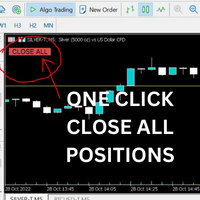
Just Attach to the Chart to be able to Click Button to Close all Open Positions in your Trading Account. Change Horizontal And Vertical Pixel based positioning for Button placement on chart. Appreciate your feedback and reviews. Note: All open positions on your trading account will be closed when button pressed.
If you need help with any simple utility happy to help.
FREE

Ghost Trail Pro is an intelligent Expert Advisor for MetaTrader 5 that manages the complete lifecycle of a gold (XAUUSD) trade. From detecting the setup and alerting your phone, to opening the trade, protecting profits and closing positions in stages, Ghost Trail Pro does the heavy lifting so you don't have to.
Built for gold traders and scalpers who want disciplined trade management, partial closes and profit protection, whether you are at your screen or away from it. Let it enter automaticall
FREE

Overview Copy Trades Master is a high-performance local signal broadcaster for MetaTrader 5. It tracks active positions on your master account in real time and streams execution data directly to one or multiple SlaveCopier terminals running on the same PC or local network via ultra-fast local file IPC ( FILE_COMMON ). https://www.mql5.com/en/market/product/189485 Key Features Local Common-File IPC: Uses local file streaming ( MQL5\Files ) for near-zero latency execution without requiring externa
FREE

批量止損止盈同步管理器 這是一款專為 MT5 多持倉交易者 設計的持倉管理工具。 當同一個商品、同一個方向同時有多張持倉時,只需要手動修改其中一張持倉的 Stop Loss(SL)或 Take Profit(TP) ,工具就會自動把該持倉目前完整的 SL / TP,同步到其他相同商品、相同方向的持倉。 例如: XAUUSD BUY #1 XAUUSD BUY #2 XAUUSD BUY #3 如果將 #1 修改為: SL = 3300 TP = 3500 其他 XAUUSD BUY 持倉會自動同步成相同設定。 主要功能 批量同步 Stop Loss 批量同步 Take Profit 可同時同步 SL + TP 支援將 SL 或 TP 設為 0,批量移除 BUY 與 SELL 分開管理 不同商品分開管理 新開持倉不會立即觸發整批同步 啟動時只記錄現有持倉,不會自動修改 平倉後自動移除內部紀錄 一個圖表即可管理帳戶中的多個商品 分組方式 工具以: 商品 + 交易方向 作為同步群組。 例如: XAUUSD BUY XAUUSD SELL EURUSD BUY EURUSD SELL 全部視
FREE

One-click breakeven management tool for manual traders.
FEATURES - Move all open positions to breakeven with one click - Close all positions instantly - Cancel all pending orders - Draggable dark-theme panel with collapse toggle - Configurable buffer in pips - Visual feedback on every action - Works with all symbols and account types
HOW TO USE 1. Attach to any chart 2. Panel appears with position count and buffer display 3. Click BREAKEVEN ALL to move SL to entry price plus buffer 4. Click C
FREE

在同一个账户上运行多个EA,会让人难以一眼分辨出究竟是哪种策略在实际提升或拖累您的权益。
Phoenix Magic Number Dashboard 会自动按魔术号码对您的持仓和平仓交易进行分组,因此您可以并排查看每个EA的实时和已平仓表现,并查看整个账户的总计数据。
它如何让多EA账户一目了然
- 自动检测活跃的魔术号码,或手动追踪列表
- 按EA显示持仓头寸、未平仓盈利、已平仓交易及已平仓盈利
- 可选的“交易品种数”列,显示每个EA正在交易的品种数量
- 包含汇总数据和最后更新时间的账户总览行
- 采用颜色编码的盈亏阈值
警报
当EA的业绩超过您设定的盈亏阈值时,系统将发出声音和推送通知。
使用Phoenix Magic Number Dashboard可:
- 查看当前究竟是哪只EA在推动账户业绩
- 在表现不佳的策略侵蚀其他EA的收益之前及时发现
- 通过单一视图全面掌握多EA账户状况,无需逐一检查持仓
使用方法
1. 附加到任意图表;系统将自动检测魔术号码。
2. 查看汇总行,了解您正在运行的所有EA的账户
FREE
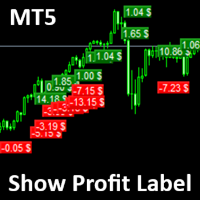
Show Label
Show your profit or loss next to the candle. This is a helpful tool if an EA don't have this feature build in. Support and questions via MQL5 product comments. For questions, updates, and to connect with other traders, join my official MQL5 group ForexEAandMore
Settings: Font color Background color for profits Background color for losses Font size Horizontal shift from candle (pixels) Vertical shift from candle high/low (pixels) Magic number filter (0 = all trades) Comment filter
FREE

SmartT AI Levels (MT5) is a professional utility that displays trading levels generated by SmartT’s autonomous AI Traders - fully independent algorithmic models, each with its own unique trading behavior, logic, and risk pattern.
Every AI Trader evaluates the market separately and produces its own Entry, SL, and TP levels.
This tool does not merge or combine models. It simply retrieves the selected AI Trader’s output and displays its exact levels on your MT5 chart.
This tool is not free and re
FREE

测试您的交易思路并查看它们在市场中的表现从未如此简单。只需在图表上点击4次,选择过去的任何"密码"模式,将其添加到回测列表中,完成!您将获得每个交易品种和时间框架的完整数据分析。
密码策略教程
请注意,机器人在策略测试器中不起作用 四次点击即可选择密码 自动调整止损和盈利目标水平 多种资金管理策略:每笔交易的风险百分比,固定金额交易,固定手数交易 验证密码策略以避免无效模式 通过选择过去的密码进行简单回测,并生成交易品种和时间框架的数据分析 分析包括交易数量,胜率,利润,目标命中率,平均收益与风险比率 适用于运行缓慢的计算机或虚拟专用服务器的特殊模式 未来更新将包括策略优化,更多统计数据(如最大回撤)和分析选项 。
FREE

Goal Tracker & Risk Guard Goal Tracker & Risk Guard is a professional on-chart dashboard and psychological assistant designed for every trader. It helps you maintain strict trading discipline, hit your profit targets, and protect your account from severe drawdowns and overtrading. Stop relying on emotions and let this indicator keep your risk in check! Key Features: Profit Targets: Set your custom Daily, Weekly, and Monthly profit targets (in %). The panel tracks your closed trades and fills a g
FREE

Axilgo Pip Piper CoPilot Elevate your trading game with the Axilgo Pip Piper CoPilot, the first in our revolutionary Pip Piper Series. This all-inclusive toolset is meticulously crafted for serious traders, focusing on key areas such as Risk Management, Trade Management, Prop Firm Rule Compliance, and Advanced Account Management . With CoPilot, you’re not just investing in a tool—you’re gaining a strategic partner in the intricate world of trading. Important Notice: To ensure you receive the fu
FREE

轻量级、实时的交易时段可视化工具,具备 Tick 级价格跟踪与零图表延迟。 Session Overlays Mastery Core 为您提供清晰、机构级的亚盘、伦盘和美盘交易时段视图,既不会打乱图表布局,也不会拖慢终端运行速度。 与在每个 K 线结束时不断删除、重绘和闪烁的传统时段指标不同,Session Overlays Mastery Core 对历史时段仅处理一次,并在每个 Tick 实时跟踪当前活跃的时段。即便在极端的市场波动或重磅新闻引发剧烈行情时,价格也绝不会突破活跃覆盖区的边界。 核心特性 实时 Tick 级价格包含: 动态活跃时段框能实时随价格波幅瞬间拉伸。K 线绝不会溢出当前覆盖区边界。 零闪烁架构: 历史时段框在加载时一次性生成并锁定。彻底消除终端延迟、CPU 占有率飙升以及令人烦躁的图表图元刷新。 高/低价开盘分段可视化: 在开盘价上方和下方显示不同的视觉区域,轻松识别开盘推动行情、价格拓展及关键价格水平。 自动识别市场引擎: 开箱即用,支持外汇开盘配对、黄金 (XAUUSD) 以及主要股指 (US30, NAS100, SPX500, DAX)。 内置时段警
FREE

A2 Trade Manager Finale EA is an EA that made for you that like SCALPING, HEDGING, or LONG TIME TRADING. FREE FOR DEMO ACCOUNT ONLY!!!!
Features : TRADING INFORMATION Total Equity information Running Total Profit / Loss information Margin Level information Running Profit / Loss each trade BUY and SELL (if Hedging) Total Lots information Current timeframe remaining Daily Profit / Loss information All time Profit / Loss information Local Currency conversion
TRADE MANAGER BUTTON Order Sell / Buy
FREE

GRInvest Breakeven Manager is an MT5 trade-management Expert Advisor designed to manage existing open positions after entry. Its purpose is to automate breakeven protection, staged partial closes, trailing stops and position management while still giving the trader full manual control over individual trades. The EA does not need to open trades itself . It can manage manual trades and trades opened by other Expert Advisors according to the selected symbol, direction and magic-number filters. The
FREE

QuantumFX Trade Manager Advanced Order & Risk Control Utility for MT5 QuantumFX Trade Manager is a powerful, professional-grade trade management utility designed for traders who want absolute control over execution, risk, and position handling — directly from an intuitive on-chart panel. Built for manual, semi-automated, and discretionary traders , QuantumFX transforms MetaTrader 5 into a precision trading workstation , allowing you to manage trades faster, safer, and smarter. What
FREE

Middle Line —— 管理交易的必备工具! 这款 MetaTrader 5 脚本可以帮助交易者计算两个平均价格水平: 总平均价格 :计算所有未平仓订单的平均入场点。 去掉最优订单后的平均价格 :帮助交易者判断如何调整仓位,降低风险。 功能展示 Middle Line 会直接在图表上显示计算结果: 实线 —— 显示所有订单的总平均价格。 虚线 —— 显示去掉最佳订单后的平均价格。 通过这些数据,您可以快速判断如何调整仓位,优化交易决策。 为什么选择 Middle Line? 省时高效 :自动计算结果,立即显示在图表上。 精确分析 :基于每笔订单的交易量,提供更精确的数据。 通用性强 :适用于各种交易工具和交易策略。 易用性高 :结果不仅显示在图表上,还会在终端窗口显示。 适合谁使用 Middle Line? 适合进行网格交易、加仓或对冲的交易者。 想快速看到关键入场点的交易者。 想省去繁琐计算时间,专注做出决策的交易者。 使用 Middle Line,帮助您更好地管理交易! Middle Line 的最新升级 Middle Line 是脚本 Seredina 的增强版 ( 链
FREE

Optimize your trading management with Breakeven Bot, the essential tool for active traders managing multiple positions at once. No more wasting time manually adjusting your stops—one click is all it takes to secure your profits! Main Feature:
️ "BREAKEVEN" Button – Instantly set all profitable positions to breakeven and protect your gains quickly. ️ Customization Options:
Set breakeven in pips or currency, depending on your preference.
Choose whether breakeven should be at the entr
FREE

Z TradeInfo — торговая панель с виртуальными TP/SL и линией безубытка Z TradeInfo — удобная торговая панель, которая совмещает контроль позиций, быструю торговлю одной кнопкой и наглядное управление рисками прямо на графике. Информационная панель Баланс и прибыль дня (рассчитывается по истории сделок за текущий день, включая комиссию и своп); Текущий спред и цена символа (цена окрашивается в зелёный/красный в зависимости от направления движения); Настраиваемые цвета, шрифт и прозрачность; Панель
FREE

历史订单统计 (Advanced History Collector Panel) MT5 版本 历史订单统计 是一款专为 MetaTrader 5 (MT5) 设计的高级账户分析与可视化工具。它能够深度复盘您的交易历史,将枯燥的成交数据转化为直观的图表与详细的统计报表。 核心功能: 多维度数据统计 :精准计算每日/周/月的盈亏、订单总量、多空对比及手数分布。 可视化图表系统 :内置盈亏折线图、净值曲线、持仓品种分布柱状图等多种统计视图,支持实时动态绘制。 深度风险分析 :自动统计最大浮盈、最大浮亏及账户余额变动,助您洞察资金管理中的薄弱环节。 高度自定义 UI :支持字体、颜色、面板尺寸及统计时间范围的完全自定义,适配各种分辨率屏幕。 数据自动化 :支持历史数据导出与自动加载,确保统计结果的连续性与实时更新。 无论是复盘交易策略还是日常资金监控,本指标都是您提升交易纪律、优化风控的得力助手。
FREE

The utility is a checklist where you can write all the rules of your trading system and keep it on the chart in front of your eyes. As a rule is executed, mark it with a tick. To the right of each rule, you can write the "strength" (percentage) of the rule. And if there is a tick next to the rule, then all "forces" are summed up in the "Total" line.
For the convenience of visual perception, you can set the color for displaying the “Total” value.
Panel options: Title - The title of the panel N
FREE

Free Slave Version – Remote Trade Receiver MT5.
This is the FREE Slave version of our professional Remote Trade Copier system. It allows you to receive trades from a Master account running our full Copy Trade solution. Designed for simplicity and reliability, this version is read-only and cannot send trades or operate independently.
Key Features: One-click setup – simply connect to the Master. Fast and accurate order copying. Supports all symbols, order types, and brokers. Minimal resource us
FREE

Quantum Simulator – Discover the Power of Quantum Dynamic Risk Quantum Simulator is an Expert Advisor designed to demonstrate the effectiveness of the Quantum function, fully integrated into the RiskGuard Management system. Through a simple interface, you can simulate an equity curve starting from a fixed balance of €100,000 , using your own custom statistics: Win Rate (%) Average Risk/Reward Ratio Number of Trades Maximum Allowed Drawdown (Optional) Minimum Accepted Drawdown The EA performs a
FREE

Minimalist Manager is a manual trade-management panel for traders who place their own entries and want precise, fast control over risk, stops, and targets directly on the chart.
It is a discretionary tool. You decide when to enter; Minimalist Manager handles the sizing, stop-loss, take-profit, break-even and trailing mechanics around your decision. Trading several accounts? Its Trade Copier places the same trade on all of them, each at its own risk.
Key features
Risk-based position sizing. Se
FREE
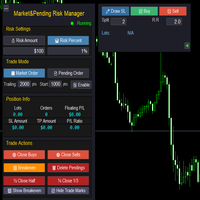
Market & Pending Risk Manager EA 操作说明书 Market & Pending Risk Manager 是一款专业的 MT5 交易面板 EA ,集成了市价交易、挂单交易、风险管理、移动止损等多项功能,为交易者提供完整的交易解决方案。 核心优势 智能双模式交易 市价交易模式 :一键买卖,快速执行 挂单交易模式 :精准入场,等待最佳时机 无缝切换 :点击即可在两种模式间自由切换 ️ 专业风险管理 固定金额风险 :设定每笔交易的最大亏损金额 百分比风险 :基于账户余额的风险比例控制 自动计算手数 :根据止损距离智能计算最优交易量 可视化交易线条 拖拽式操作 :直接在图表上拖动调整止损、止盈价格 实时计算 :动态显示盈亏比、手数、风险金额 彩色区域 :直观显示风险区域(红色)和盈利区域(绿色) 智能移动止损 自定义启动条件 :设定盈利多少点后启动移动止损 灵活止损距离 :可调整移动止损的跟踪距离 自动跟踪 :无需人工干预,自动保护利润 完整持仓管理 实时信息显示 :持仓手数、订单数量、浮动盈亏 一键
FREE

— 与专用图表指标 Super Fast Second Chart 完全联动的超短线AI判定系统 — 本产品是一套 与专用图表指标深度整合的自动AI判定系统 。 只需保存图表截图,AI即可在数秒内返回 多周期综合分析、方向判断、置信度、反转条件、下一机会 。 与专用图表指标配合使用时,AI还能读取 CSV数值数据(10–20根K线) , 获得图像无法提供的精确信息,使判定精度提升到“完全不同的层级”。 与专用图表指标的完全联动 指标向AI提供以下数据: 15秒~30分钟的多周期结构 ALMA(短期/长期) 自定义CCI MACD直方图 回归通道(reg_upper / reg_lower) 多项式回归(polyreg) ATR TrueTL趋势线 最近10根K线的统计(阳线/阴线/同值) CSV提供的精确OHLC、区间、实体大小、波动率 秒级波动与细微价格变化 AI整合所有数据后,将高精度返回 “当前5分钟K线剩余方向(阳/阴)” 。 与专用指标配合使用,可达到图像分析永远无法实现的精度。 AI输出示例 各周期的当前状态 趋势 / 位置结构 / 动能 最终方向判断(阳/阴)
FREE

The only drawdown guardian that stops your other EAs from digging you deeper. PropMarshal monitors your account equity in real time and instantly closes all positions the moment a drawdown or profit target threshold is breached. But it doesn't stop there — it closes every chart on your platform too, cutting off any other Expert Advisors before they can open new trades and compound the damage. The Problem PropMarshal Solves Most prop firm traders run multiple EAs across multiple charts. When a dr
FREE

Imagine what results you could achieve in your manual trading if you had a tool that notifies you of a possible price reversal for all the symbols you are interested in at the same time (futures, stocks, forex or cryptocurrency)?
VSA screener is just the right tool. It was created for traders who value their time and make their own trading decisions on opening or closing a position. The software monitors the presence of trading patterns on the preselected tickers under several timeframes (up to
FREE

Multi-TF Alert System - 专业多时间框架警报面板 描述 MetaTrader 5专业多时间框架警报面板 Multi-TF Alert System是一款综合监控工具,专为需要在不同时间框架上跟踪多个市场而无需不断切换图表的交易者设计。无论您交易外汇、黄金、指数还是加密货币,此面板都能提供清晰、有条理的视图,显示价格相对于近期高点和低点的位置。 系统在五个时间框架上同时监控多达十个品种:M15、M30、H1、H4和日线。对于每个组合,它计算可配置回溯期内的最高和最低价格,并跟踪当前价格与这些水平的接近程度。当价格达到或接近这些关键水平时,您将通过声音警报、弹出消息或移动设备推送通知等方式收到即时通知。 核心功能 多市场监控 系统提供全面的多市场监控,具有可自定义的时间框架分析和即时警报功能。跟踪外汇货币对、金属、指数或加密货币的任意组合,每个时间框架具有独立的回溯期。可视化面板显示近期范围内的当前价格位置,当达到水平时通过声音、弹出窗口或移动推送通知自动发出警报。 视觉清晰度 使这款工具与众不同的是其视觉清晰度。面板使用专业的颜色编码界面,立即向您显示哪些市场处于关
FREE

TimeBar TimeBar 是一個簡單的資訊指示器,顯示柱關閉之前的剩餘時間,以及柱打開以來經過的時間和當前時間。 為了便於感知,增加了兩種顯示方式:以圖形左上角註釋的形式,或以圖形物件的形式。
優點 字體選擇 字體大小。 您可以設定任何一項。 評論的時候太小了 您可以移動物體。 雙擊滑鼠可以選擇任何時間並移動到圖表上的任何位置,它將照常繼續更新 視覺警報。 您可以設定指定的秒數,直到目前柱關閉,達到該時間後,時間將變成設定中指定的警告顏色 設定 選擇顯示的時間 每次的顏色(對於圖形物件) 一則警報,通知您酒吧即將關閉 使用 TimeBar 指標作為您交易系統的補充
使用連結嘗試我在市場上的其他產品 https://www.mql5.com/ru/users/capitalplus/seller
FREE

Risk Rule Sentinel 是一款风险管理工具。它不开仓,也不预测行情。它监控您账户上已经持有的仓位,并对这些仓位强制执行四条规则,避免一次疏忽的点击演变成足以吞掉整个账户的亏损。
它强制执行什么
1. 最大手数。任何超过您设定上限的仓位都会被报告,或被平仓。 2. 单笔最大风险。依据该仓位真实的止损计算,以账户余额的百分比表示。 3. 强制止损。没有止损的仓位会被自动补上一个应急止损,距离由您设定,并且始终位于经纪商的最小止损距离和冻结价位之外。 4. 每日回撤上限。当当日亏损达到您设定的上限时,本工具会锁定当天,并可根据您的选择平掉仍持有的仓位。
图表面板
图表上的深色面板实时显示:当日盈亏、每日回撤使用进度条(接近上限时依次变为琥珀色和红色)、当前总持仓风险、持仓数量、当日已拦截的违规次数,以及当日已强制补入的止损数量。
两种模式
- 平仓模式:违规仓位将被平掉。 - 仅提醒模式:仅报告违规,不做任何操作。
说明
- 支持净额结算(netting)和对冲(hedging)账户。 - 支持任意品种、任意周期。挂在一个图表上即可:它监控的是整个账户,而不只
FREE

Mentoria Individual — Manual Trade Execution and Risk Management Mentoria Individual is a free manual trade execution and risk management tool for MetaTrader 5, developed by Gean Patrick. It combines lot size calculation, order preparation, visual Stop Loss and Take Profit adjustment, and position management in an interactive panel directly on the chart. The tool is designed for traders who want to maintain full control over their trading decisions. It does not provide trading signals or execut
FREE

This tool is designed to quickly calculate the lot depending on the Stop Loss.
The control is done by hot keys
By default:
1 - Limit order price level
2 - Stop Loss Level
3 - Take Profit Level
Space Bar - Open an order
Escape - Cancel All 9 - Open 2 orders
Market Order
To open a Market order, click (2) and set up Stop Loss with the mouse If you want to put Take Profit - click (3) and set up Take Profit with the mouse
FREE

Easy and simple tool which close all trades in defined point of time. It can also close all open trades when opened positions reach defined target profit or stop loss.
For all pairs, indexes etc. Works with all instruments.
All types of orders. All charts.
Users inputs:
- close time (hour,min,sec)
- take profit (in users currency)
- stop loss (in users currency)
Save & Load settings option.
Fast, simple and reliable.
Check out other tools provided by our team!
FREE

Rojeryo Trade Manager ATR is a MetaTrader 5 utility Expert Advisor designed to manage already opened trades.
The tool does not generate entry signals and does not open trades by itself. It is built for traders who prefer manual entries but want automatic trade management after the position is opened.
The EA can automatically set protective Stop Loss and Take Profit levels, move the Stop Loss to breakeven, close part of the position, and apply trailing stop management according to the selected
FREE

RealCost Gold Session Zones MT5 is an entry-level session map utility for gold traders using MetaTrader 5. It draws Asia, London and New York session zones on the chart and shows a compact live dashboard for current-session context.
The utility is designed for visual market timing, manual preparation and quick broker-condition checks. It does not trade, does not open or close positions, and does not provide buy or sell signals.
Main features: - Asia, London and New York session zones. - Config
FREE

RiskCompass Panel MT5 1. The Problem and the Approach You have a position idea, and the first real question is always the same: how much of this account am I about to put at risk, and can the account carry it. The information that answers that question is scattered across half a dozen windows. Balance is on one tab. Margin level is somewhere else. The spread you just paid is visible only if you look at the instrument row. The server day, which decides whether your daily loss limit has already be
FREE

Find Your Broker's GMT Offset - Free Tool Not sure what GMT offset your MT5 broker uses? FindBrokerGMTOffset is a free utility that helps you identify your broker's actual server time and GMT offset directly from your MetaTrader 5 terminal. No purchase, subscription, or complicated setup is required. How to use it: Download and install the FindBrokerGMTOffset script in your MT5 terminal. Attach the script to any chart and allow it to run. The tool will display your broker's current server time a
FREE

️ TradeGuard by Brian_Breyli_Vana Your Trading Co-Pilot for MetaTrader 5 TradeGuard is a professional manual trading assistant for MetaTrader 5, designed for traders who want to stay in control of every trading decision while letting the EA handle the repetitive, time-consuming, and error-prone parts of trade management. Built for Price Action, Support & Resistance, Breakout, Swing, and Day Trading, TradeGuard combines fast execution, visual risk management, automated protection, session-based
FREE
跟单->方便快捷的界面交互,用户上手即用 ->>>> 推荐在windows电脑,或者VPS Windows上使用 特色功能: 多样化个性跟单设置: 1.对不同的信号源可以设置不同的手数模式 2.不同的信号源分别设置正向反向跟单 3.信号分别设置注释 4.是否根据合约手数校准手数 多样化个性跟单设置2: 1.对不同的品种可以设置不同的手数模式 2.不同的品种分别设置正向反向跟单 3.信号分别设置注释 4.是否根据合约手数校准手数
注释过滤,MAGIC过滤,信号手数过滤,本地品种过滤 工作时间设置 反向同步接收端的平仓 订单绑定功能:任意订单可以绑定到设置信号源订单上(双击表格更改) 账户风险控制 基本功能: 跟单正常交互速度0.5s以下 自动检测信号源,并显示信号源账号列表 自动匹配品种,不同平台常用交易品种(后缀不同等特殊情况)95%自动匹配,基本无需手动设置,品种映射表可随意双击更改对应品种.(映射表具有快速搜索品种功能) 4种手数计算模式(1.倍率 2.固定手数 3.自适应资金风险 4.源账户资金比例风险) 特殊手数模式:可以根据止损资金风险反算手数(可能止损过小计算的
FREE
Introduction to Order Risk Management EA ORM EA is specially designed for fast and accurate market order execution to be used with our Price Action and Econometric Trading strategies listed below. ORM EA is fully automatic and ORM EA is also very easy to use. ORM EA is totally free of charge. You can also use this robust order execution feature of this ORM EA for any other your own trading strategy.
Trading Strategy Guide Order Risk Management EA provides the guide for the risk management for y
FREE

Protect your funded accounts and personal capital with military-grade precision. This utility continuously monitors your floating equity against your daily starting balance. The moment your custom drawdown threshold is breached, it instantly liquidates all open positions, deletes pending orders, and completely unloads from the chart. Stop revenge trading and never fail a prop firm evaluation due to a margin breach again.
FREE

如果您喜欢这款免费工具,请留下五星好评!非常感谢 :) “风险管理助手”专家顾问系列是一套全面的工具,旨在通过有效管理各种市场条件下的风险来增强交易策略。该系列包含三个关键组件:平均交易、切换交易和对冲交易专家顾问,每个组件都针对不同的交易场景提供独特的优势。
此 EA 是基于市场上标准风险管理策略的开发版本。
https://www.mql5.com/en/blogs/post/756961
1. “均线助手”EA: MT4: https://www.mql5.com/en/market/product/115468 MT5: https://www.mql5.com/en/market/product/115469 2. “切换助手”EA: MT4: https://www.mql5.com/en/market/product/115478 MT5: https://www.mql5.com/en/market/product/115428 3. “对冲助手”EA: MT4: https://www.mql5.com/en/market/product/115466 MT5
FREE

Backtesting PRO: Make a review of the market based on the available history of your broker. Practice your strategies and verify them in seconds. Remember to maintain excellent risk management, check your days and hours of operation. R emember to start it in the shortest period to operate. Any questions or suggestions can be sent to this email: autoeducacion0110@gmail.com
FREE

Setting a chart up exactly the way you like it takes a few minutes. Doing it twenty times takes an afternoon. Chart Cloner opens exact copies of the chart you drop it on. Symbol, timeframe, colours, scale and chart mode always carry across, because that is what makes a copy a copy. You decide whether the attached Expert Advisor, the indicators and the drawn objects come with them. Point it at your Market Watch instead of a copy count and it opens one chart per symbol, every pair wearing the same
FREE

Free for a limited time, grab it now! Please, if you like this utility, leave a review, it helps us build more tools like this.
Many retail traders fail because they enter trades when a market session is already "exhausted." Session Monitor gives you the context you need by comparing current price movement against historical session averages.
The utility calculates the absolute range (the distance between the highest and lowest price reached) during the session. It is a MT5 utility that trac
FREE

Tick Database — export of tick database from MT5 terminal to MT4. The utility provides access to the tick database in real time. This is necessary to generate synthetic charts in the MT4 terminal, which initially does not provide for loading a tick database. For example, you can organize permanent access to the tick database for the Seconds Chart utility. If the opening time of the current candle in the terminals is different, then you need to specify the time offset in hours. Example We open M1
FREE

Reflex Panel - 半自动交易的革命! 您是否厌倦了MT5笨拙的标准界面?告别频繁的窗口切换和复杂的计算! Reflex Panel 是一款新一代的专业交易面板,它将您的图表变成一个功能齐全的交易员指挥中心! 为什么选择 CHART REVOLUTION? 一切尽在同一屏幕 - 不再有多余的窗口
即时执行 - 一键开仓
智能风险计算 - 根据存款百分比自动计算手数
可视化控制 - 所有持仓水平直接显示在图表上
4种时尚主题 - 从赛博朋克到黑客帝国 核心功能 交易面板: 一键开设买入/卖出仓位 快速设置手数、止损和止盈 快速选择按钮 (0.01 - 1.00手) 预设止损/止盈水平 (25, 50, 100, 200 点) 平掉所有仓位 / 仅平掉盈利仓位 可折叠面板以节省空间 资金管理: 资金管理 - 基于风险自动计算手数 每日最大亏损 - 防止情绪失控 每日交易次数限制 - 控制交易活动 每笔交易风险 - 从存款的0.1%到10% 自动功能: 移动止损 (Trailing Stop) - 自动跟随利润 保本止损 (Br
FREE

TREND SCANNER Stay With the Trend. Trade With Confidence. Trend Scanner analyzes the market to determine trend direction and strength using a combination of technical indicators. The system combines EMA 150/365, EMA 9/21, RSI, MA to confirm market direction and filter out weak or sideways conditions. Key Features: Bullish and bearish trend detection; EMA 150/365 and EMA 9/21 analysis; RSI confirmation; MACD momentum analysis; ️ ADX ranging-market filter; Trend strength measur
FREE

TRADE PANEL MASTER — Know Your Risk Before You Click
Open your chart. See your panel. Trade with confidence.
Before you click Buy or Sell, Trade Panel Master shows you exactly what you risk, what you gain, and your R:R ratio — in real time. No mental math. No surprises.
FEATURES
- Lot sizing with real-time margin display - SL & TP in 3 modes: Points / Money / Price - Au
FREE

NINJA MT5 DOCTOR 概览 NINJA MT5 Doctor 是一款免费的只读型 MT5 实用工具,用于生成一次性的诊断快照,涵盖终端、账户、已打开的图表、所选历史数据以及当前挂载图表的交易品种。它采用 Expert Advisor 格式,但不是交易 EA,也不是指标。面板和输入参数名称均为英文。 检查内容 它会检查经纪商服务器连接、终端和账户的交易权限、Doctor 自身的权限、交易模式和经纪商公布的交易时段、报价新鲜度、点差、所选时间周期的同步状态和K线数量、交易量规则、参考保证金与可用保证金的对比,以及经纪商公布的交易品种属性。CHARTS 选项卡会列出每个已打开的图表,以及可读取到的已挂载 EA 名称。它无法检查其他 EA 的私有逻辑。 面板与状态 OVERVIEW 汇总检查结果,HISTORY 显示同步状态和已复制的K线数量,CHARTS 列出已打开的图表,SPECS 显示挂载图表中交易品种的设置。READY 表示在已实现的检查范围内,已完成的快照未发现警告或明确的阻断因素。WARNING 表示需要手动确认。BLOCKED 表示存在明确的环境阻断因素。这些状态不是
FREE

当每一秒都至关重要时的极速操作 这款交易面板最初就是为 自定义用户图表 而设计的,包括 秒级时间周期图表 。
它能够 自动识别自定义图表背后的真实交易品种 ,并直接对该真实品种执行交易—— 无需手动绑定,也不需要任何额外操作 。 这款面板只解决一个核心问题:
缩短“做出决定”和“执行操作”之间的距离。 没有多余的窗口
没有确认弹窗
不需要频繁切换界面 极速入场 面板将最关键的交易操作直接集成在图表上: Buy / Sell —— 一键市价开仓 LIMIT —— 无弹窗设置限价订单 点击按钮,操作立即执行。
无需在菜单中查找选项,也不会分散你对图表的注意力。 直接在图表上设置 SL / TP 设置止损或止盈非常直观: 只需点击开仓线,拖动出现的辅助线到目标位置,即可完成 SL / TP 设置。 无需手动输入数值。
你看到的价格位置,就是你设置的价格。 高效的限价订单操作 设置挂单只需两步: 点击 LIMIT 按钮 将出现的价格线拖动到目标水平 订单以 视觉化方式 完成设置,就像你在图表中规划交易一样自然。 在行情快速波动、来不及精确填写参数窗口时,这一点尤为重要。 画面干净,不干扰分析
FREE

Trading Co-Pilot for MetaTrader 5 专业级手动交易持仓管理助手 Trading Co-Pilot 是一款专为手动交易者设计的智能持仓管理工具,帮助您自动化控制风险与利润。 它不会开仓。
它只负责专业管理您的仓位。 您专注于入场,Co-Pilot 负责保护与优化出场。 工作原理 当您手动开仓后,Trading Co-Pilot 会自动: • 设置止损(Stop Loss)
• 设置止盈(Take Profit)
• 启用保本(Break Even)
• 启用移动止损(Trailing Stop) 您可以选择两种模式: • SMART 智能模式(基于市场结构计算)
• FIX 固定模式(基于预设点数) 每个模块都可以独立开启或关闭。
BUY 和 SELL 仓位分别独立管理。 核心优势 1. 专业风险控制 每一笔交易都按规则管理,而非情绪驱动。 2. 智能止损 根据所选时间周期的高低点自动计算止损位置。 3. 智能止盈 基于市场结构设定合理目标,而非随意设定。 4. 动态保本机制 当价格达到指定进度时自动移动至保本位。 5. 智能移动止损 随着价格朝有利方向运
FREE

LayerGuard Pro - Professional Trade Management EA for MetaTrader 5 Product Description LayerGuard Pro is a sophisticated Expert Advisor designed exclusively for MetaTrader 5 that provides professional-grade trade management automation for your existing positions. Unlike traditional EAs that generate signals or open trades, LayerGuard Pro focuses on one critical aspect of trading: intelligent, automated management of Take Profit and Stop Loss levels. Core Philosophy: Management, Not Generation La
FREE

手动交易助手 TP (Manual Helper TP) 此工具旨在帮助您保护利润并降低风险。 它会为您的交易设置止损 (Stop Loss),并管理追踪止损 (Trailing Stop)。 如何使用 将其附加到您交易品种的图表上,它将根据您的规则处理您的头寸。 所有设置均以点数 (points) 为单位。根据您的交易品种和策略进行调整非常重要。默认设置适用于黄金 (XAUUSD)。对于剥头皮交易 (scalping),最好使用较小的止损 (SL)、保本 (BE) 和止盈 (TP)。 此智能交易系统 (EA) 绝不会自行开设任何交易。 它唯一的工作是根据您的个性化设置来管理您现有交易的止损。它是您手动交易或管理其他 EA 所开交易的强大助手。 主要功能 初始止损: 如果开仓时没有设置止损,该工具将根据您的设置自动添加一个。 保本止损 (Secure Breakeven): 一旦交易朝对您有利的方向移动,它会自动移动您的止损以锁定少量利润。 高级双层追踪止损: 使用两个级别的追踪止损。开始时使用较宽的追踪距离让利润奔跑,之后随着趋势的增强使用较窄的追踪距离来保护您的收益。 适用于任何交
FREE
This Expert Advisor is used to send messages from the PCT Multi indicator to Telegram.
The EA has 5 settings: - Channel name: The name of the Telegram channel. - Token: Your bot's Token. - Entries: Entry messages will be sent. - Results: Entry results will be sent. - Alerts: Alerts will be sent.
How to set up: In the Tools -> Options menu, in the "Expert Advisors" tab: - Check the "Allow WebRequest for listed URL:" option. - Click "add new URL" and add " https://api.telegram.org " (without the
FREE

The Quick Style utility is designed for facilitation and acceleration of working with the properties of graphical objects. Left-click a graphical object while holding the Shift key to open the quick access window for configuring the object properties. In the window, you can change the color, style and line width with one click, including those of other graphical objects. All changes are displayed immediately. To close the Quick Style , simply click the free space on the chart. The utility is eas
FREE
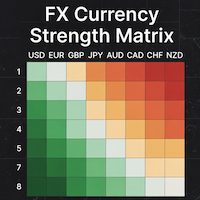
### MQL5 Marketplace Product Description FX Currency Strength Matrix – Professional MT5 Indicator
#### Overview The FX Currency Strength Matrix is a powerful, real-time visual tool that instantly reveals the true strength and weakness of all 8 major currencies in a clean, color-coded matrix format. No more guessing which currency is driving the pair – see the complete strength hierarchy at a glance and trade with institutional-level clarity.
#### Key Features - True 8×8 Currency
FREE

One Click Close Lite 是一款專為 MT5 手動交易者與多持倉使用者設計的簡易平倉工具。
當帳戶中同時存在多張交易持倉時,不需要再逐張點擊關閉,只需要透過圖表上的按鈕,即可快速執行批量平倉。
工具提供三個主要功能:
CLOSE ALL
一鍵關閉帳戶目前所有持倉。
例如帳戶中同時存在:
XAUUSD BUY EURUSD BUY GBPUSD SELL USDJPY BUY 按下:
CLOSE ALL
工具會依序嘗試關閉目前帳戶中的全部持倉。
---
CLOSE BUY
只關閉帳戶目前所有 BUY 持倉。
例如:
XAUUSD BUY EURUSD BUY GBPUSD SELL USDJPY BUY
按下:
CLOSE BUY
則會關閉:
XAUUSD BUY EURUSD BUY USDJPY BUY
而:
GBPUSD SELL
會保持不變。
CLOSE SELL
只關閉帳戶目前所有 SELL 持倉。
BUY 持倉不會受到影響。
---
即時持倉資訊
工具面板會顯示目前帳戶的基本持倉資訊,包括:
* 總持倉
FREE

Profit & Loss Display - MT5 Panel
On chart panel to display profit and loss per product over specified time period View P/L for EA trades only or also with manual trades Note this is a panel, not an indicator or algorithm, it simply displays profit and loss from account history
//---- Install ----// After download, attach indicator to chart from the markets folder which is in navigator window (Cntrl N)
//---- Study ----//
Set target profit for product per week/specified period Set loss limi
FREE

Backstop enforces the two rules that end funded accounts. A daily loss limit and a maximum loss limit, applied to everything on the account — every Expert Advisor, every symbol, and every trade you place by hand. Attach it to any one chart and it governs the whole terminal. It does not trade. It has no strategy, no signals and no opinion about the market. It is a governor. What it does Daily loss limit — measured from balance at the reset, equity at the reset, or a fixed account size. Firms diff
FREE

【產品簡介】將RSI 轉化為精準的順勢交易利器 您是否曾在強烈趨勢行情中,因傳統RSI 指標頻繁發出「超買/超賣」信號而過早反向進場,導致不必要的虧損? RSI Sniper Pro V5 不僅僅是一個震盪指標,它是一套整合了「趨勢判斷」、「動能過濾」與「K 棒行為學」的完整交易策略系統。我們旨在解決RSI 在趨勢行情中鈍化的痛點,協助交易者在正確的時機扣下板機。 本系統的核心理念是: 「順大勢,找回調,精準狙擊」 。它僅在趨勢明確且動能充足時,利用RSI 尋找高盈虧比的回調進場點,協助您避開高風險的盤整震盪與逆勢交易。 【核心策略邏輯:四大濾網機制】 本指標透過嚴謹的四重過濾機制,確保每個訊號都具備高品質與高勝率潛能: 趨勢過濾器(Trend Filter - EMA 200) 嚴格遵循順勢原則:僅在價格位於200 EMA 之上時尋找買點;在EMA 之下時尋找賣點,從根本上避免逆勢接刀的風險。 動能確認(Momentum Filter - ADX) 內置ADX 動能過濾器(預設值> 20),自動識別並避開無趨勢、低波動的「盤整區間」,確保進場時市場具備足夠的爆發力。 狙擊板機(Sni
FREE

Purse Guard v1.00 — User Manual 1. What Purse Guard Does Purse Guard is a trailing stop manager, Stop Loss manager, trade manager, and position-management utility for MetaTrader 5. It provides practical risk management for existing trades by managing Stop Loss on open positions with two conventional trailing methods: Points Trailing — a fixed-distance points trailing stop that follows price by a selected number of MetaTrader 5 points. Candle Trailing — a candle trailing stop that follows the st
FREE

One-Click Trade Manager for MetaTrader 5 The Close Manager Buttons EA is a powerful utility designed to give you full control of your open positions and pending orders with just one click.
Forget about manually closing trades one by one during fast market moves—this EA does it instantly, safely, and efficiently. Key Features Close All Trades – instantly close every open position Close Only Buy Trades – exit only BUY positions while keeping SELL trades running Close Only Sell Trades – exit only
FREE

All in one Multipurpose Telegram Trade Management , Manage and Copy Trades on the go From Telegram Pro Version MT5: www.mql5.com/en/market/product/95742 Pro Version MT4: www.mql5.com/en/market/product/85691
Execute Trades on mobile with fast execution When away from desktop MT5, or scalping the market with mobile device, or needed to copy trades from telegram groups while away, or doing some other activities, Telegram EA Manager is an effective tool to perform any trade operation with swift
FREE

TRADE WITH MAGIC – Professional One-Click Trading Panel
| Crystal AI Systems
Trade With Magic is a fast, lightweight, and highly efficient one-click trading panel designed for traders who require precise manual execution and full control over magic numbers, comments, and risk parameters. It is suitable for both manual trading and advanced EA testing environments where ac
FREE

非常抱歉,因为网络原因无法给大家提供服务,如果安装使用遇到任何问题,请联系:9048914@qq.com,谢谢。 币安是全球知名的加密数字货币交易所!为方便对加密数字货币行情进行实时数据分析,程序可自动将币安期货实时成交数据导入到MT5进行分析,主要功能有:
1、支持币安全部USD-M期货交易对自动创建,也可以单独设置基础货币。基础货币BaseCurrency为空表示所有货币,也可以单独设置BNB、ETC等任何币安支持的加密货币。 2、同步币安各货币的价格精度、交易量精度以及最大交易量等。
3、通过WebSocket链接币安,每一笔期货成交即可推送到Mt5更新行情。
4、支持所有期货品种同时更新,为提高实时数据效率,可自定义最大更新组(需要打开对应窗口更新),工具默认最大组数为4组,需要打开4个图表窗口,运行时分别设置RangNO为0,1,2,3(小于最大窗口数),以此类推。如果仅需要更新当前窗口的实时行情,可将RangNO设置为-1。
5、实时行情更新请使用代理地址,因此,必须将代理地址 trade.ctabot.com 添加到:MT5——工具——选项——EA——WebReq
FREE
MetaTrader市场是 出售自动交易和技术指标的最好地方。
您只需要以一个有吸引力的设计和良好的描述为MetaTrader平台开发应用程序。我们将为您解释如何在市场发布您的产品将它提供给数以百万计的MetaTrader用户。
