 MetaTrader 5
 Experts
 Indicatori
 librerie
 Utilità
 Widget
 Regole
Guarda i video tutorial del Market su YouTube
Come acquistare un Robot di Trading o un indicatore
Esegui il tuo EA
hosting virtuale
hosting virtuale
Prova un indicatore/robot di trading prima di acquistarlo
Vuoi guadagnare nel Market?
Come presentare un prodotto per venderlo con successo
Utilità di trading gratuite per MetaTrader 5 - 16
 Di seguito sono riportati i programmi di trading che semplificano il trading in MetaTrader 5. Passa il mouse su un'utilità per leggerne la descrizione e la sua funzione.
Close Positions on Candle Close This tool allows you to automatically close positions based on the last candle's closing price, helping confirm trade exits and avoiding unpredictable price movements. How It Works: The EA waits for a candle to close above or below the Stop Loss level before executing a position close. It eliminates the need to manually monitor trades and helps automate exit strategies. Settings: Order_Type: Select the types of orders or positions to be managed. CandleTimeFrame:
FREE

this is a Demo version of product. its limit of 3 trade at a time. when you buy full version try to click here https://www.mql5.com/en/market/product/170629
The Core Philosophy: Ultra-Fast Execution In the world of scalping, milliseconds matter. This configuration utilizes a Fixed Lot Size strategy combined with lightning-fast keyboard triggers to ensure you never miss a price level. CandleWise Trade Logic This feature restricts trade frequency to prevent "over-trading" during volatile
FREE

NinjaClose is the ultimate headless trading utility designed specifically for manual scalpers, price-action traders, and mobile traders. It operates completely silently in the background without any graphical user interface (GUI) panels, keeping your charts 100% clean. Whether you execute trades from your desktop terminal or the MetaTrader mobile app, NinjaClose detects your manual orders instantly and applies your pre-defined risk management rules at lightning speed. Key Features Mobile-Friendl
FREE

This EA generates custom Line Break charts on a separate symbol using the following input settings: 1. LineBreak input int LineBreak = 3; Use: Defines the number of lines required for a reversal (e.g., 3-line break chart). Set to 1: For 1-line break charts (more responsive). Higher values: Create smoother, trend-following charts. 2. StartDate input datetime StartDate = D'2025.03.01';s Use: Specifies the date from which historical data should be loaded and processed. 3. LineBreakTime input bool L
FREE

Introducing a powerful MetaTrader 5 Expert Advisor designed to enhance your trading strategy – the Auto Breakeven EA! This feature-rich EA is tailored to bring your stop-loss to breakeven, ensuring a risk-free trade once the market moves in your favor up to a specified price.
Explore the full potential of the Auto Breakeven EA. Download it for free now, and find the download link at the bottom of our page. Elevate your trading experience and take control of your risk management strategy. Happy
FREE

Having more expert advisors running on the same account , eventually leads us to the question , which one of them are winners , or which are dragging down the account ? With this in mind I created this simple utility for displaying profits or losses taken by each expert advisor over time . This utility can be run as an expert advisor and can display up to 9 magic number results . If the inputs are left to zero , the results displayed are from the manually placed orders . It also displays deposi
FREE

Il Confluence Timer Core è un indicatore multi-timeframe di livello istituzionale progettato per MetaTrader 5 (MT5) che calcola e visualizza timer di conto alla rovescia in tempo reale su timeframe sub-orari, intraday e macro (da M1 fino a MN1 mensile, dove i timeframe superiori — HTF — partono rigorosamente da H1 in poi). Supporta modalità di asset avanzate (Forex Standard, Gold Standard e una speciale modalità "Gold Shifted" con blocchi ancorati alle 01:00 e un rigido taglio di sessione alle 2
FREE

SmartT AI Levels (MT5) is a professional utility that displays trading levels generated by SmartT’s autonomous AI Traders - fully independent algorithmic models, each with its own unique trading behavior, logic, and risk pattern.
Every AI Trader evaluates the market separately and produces its own Entry, SL, and TP levels.
This tool does not merge or combine models. It simply retrieves the selected AI Trader’s output and displays its exact levels on your MT5 chart.
This tool is not free and re
FREE

Exact Countdown Timer — shows the remaining time before the current bar closes and a new bar forms. A fast and exact countdown timer will help you find the best moment to open a position. For example, it can be used on a seconds chart built using the Seconds Chart utility. Inputs Base corner — the chart corner to which an timer Is attached. X distance — the horizontal distance from the chart corner. Y distance — the vertical distance from the chart corner. Text font — font name Font size — font
FREE

G2 DASHBOARD PRO by Ida Bagus Putu Mahardika PROFESSIONAL TRADE EXECUTION & MANAGEMENT DASHBOARD G2 Dashboard Pro is a comprehensive trading management tool that revolutionizes how you place and manage orders. No more manual calculations or switching between windows – everything you need is in one interactive, draggable dashboard directly on your chart. KEY ADVANTAGES 1. CHART-BASED PENDING ORDER PLACEMENT Click on the chart to set your entry price visually Support for all order types: Bu
FREE

Bring sniper-like focus to your manual trading. Forest Sniper is a lightweight, razor-precise trading panel for MetaTrader 5 built for active traders who want effortless execution and tight risk control across any currency pair. Whether you scalp, swing, or manage multiple positions, Forest Sniper gives you the essential controls on-screen so you trade faster, cleaner, and with confidence. Key benefits Execute with speed: One-click buy, sell, and position close controls remove friction so you en
FREE

LIMITED TIME OFFER to download for FREE for Unlimited use license ================================================================
QuantView Analytics Master Advanced On-Chart Portfolio Diagnostics & Equity Forensics for MetaTrader 5 Standard MT5 history reports simply show you how much money was made or lost. QuantView Analytics Master is designed to answer the "Why" and the "How." By segmenting your trading history across four distinct analytical dimensions, this institutional-grade terminal
FREE

Your chart. One glance. Total clarity. Built by @Ash_TheTrader for traders who are tired of guessing, Extreme Trading Dashboard is a professional-grade heads-up display that sits quietly in the corner of your chart — dark charcoal, rounded, semi-transparent, and genuinely easy on the eyes — until the moment it matters. Dual Session Highlighter Shade up to two independent time windows directly on your chart — London, New York, or your own custom kill-zone. Each gets its own color, so overlapp
FREE

TRADE WITH MAGIC – Professional One-Click Trading Panel
| Crystal AI Systems
Trade With Magic is a fast, lightweight, and highly efficient one-click trading panel designed for traders who require precise manual execution and full control over magic numbers, comments, and risk parameters. It is suitable for both manual trading and advanced EA testing environments where ac
FREE

Displays the countdown to the current candle’s close and shows the live server time clearly on your chart, including the GMT. It is a fuss-free indicator, plug and play. Accurate Candle Timer is a simple and practical tool for traders who want to monitor candle timing without unnecessary clutter. It shows how much time is left before the current candle closes, helping you stay aware of when the next candle will begin. This is useful for traders who prefer to wait for candle close confirmation be
FREE

Tracking positions using trailing on the Parabolic SAR indicator. It is necessary to allow automated trading in the terminal settings. In testing mode, the utility opens Buy or Sell positions on the first ticks, which allows you to visually observe the given logic, changing the utility parameters. In real mode, the utility does not open positions. Discuss the complexities of Forex trading here: chat "Age of Expert Advisors" . Parameters Select_Magic - selection of magic numbers. Positions with
FREE

Blog di MQL5: https://www.mql5.com/en/blogs/post/765148 Versione MT4: https://www.mql5.com/en/market/product/154458 Versione MT5: https://www.mql5.com/en/market/product/154459
Gratis per un periodo limitato
Ordine Telegram [tambangEA] è un assistente di trading semi-manuale professionale, creato per i trader che desiderano un flusso di lavoro di esecuzione più rapido, pulito e controllato.
Questo prodotto è progettato per i trader che dispongono già di una propria analisi di mercato e necess
FREE

MSMO Lot Pilot è un calcolatore della dimensione della posizione e un pannello informativo pre-trade per MetaTrader 5. Aiuta a rispondere a una domanda pratica prima di un'operazione manuale: quale dimensione del lotto corrisponde al livello di rischio che hai scelto?
Imposta il Risk Percent, la distanza pianificata dello Stop Loss in punti del simbolo e l'Account Base. MSMO Lot Pilot calcola la dimensione del lotto utilizzando le specifiche del simbolo fornite dal broker e visualizza l'Actual
FREE

VolPulse Telegram Bridge forwards the alerts of the free VolPulse Volume Profile indicator to Telegram: market-state changes, touches of key levels (POC, VAH, VAL, naked POC) and new entry signals with stop and target. It does not trade. It does not read your positions, balance or account number. Setup (about 2 minutes) Install the free indicator "VolPulse Volume Profile" and attach it to your charts:
https://www.mql5.com/en/market/product/200141 Tools → Options → Expert Advisors → tick "Allow W
FREE

Overview The Expert Advisor sends notifications to a mobile phone, via e-mail or activates an audio alarm in case any changes are detected on the trading account: opening/closing positions, changing order parameters, balance or leverage. Also, the Expert Advisor can inform that Equity on the trading account has dropped below a specified value or Free Margin is small compared to Margin. The Expert does not trade, it only monitors your account and orders.
Launching the Expert Advisor You should a
FREE
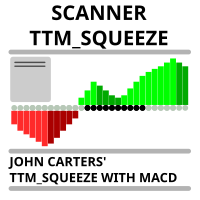
Market scanner based on the indicator published here Download the 'John Carters TTM Squeeze with MACD' Technical Indicator for MetaTrader 5 in MetaTrader Market (mql5.com) . Only the instruments that are in the Market Watch window are scanned. Maximum number of scanning tools up to 5000. The scan timeframe is selected from the timeframe panel of the terminal. To use it, open any chart and attach the Expert Advisor to the chart, the 'Search' button will appear in the upper left corner. When you
FREE

Most blown accounts don't come from not knowing the rules. They come from breaking them in the moment. Seven Sins is there for that moment.
It watches your MetaTrader 5 account. When you break one of your own rules, a "sin card" appears on your charts: what you did, which rule it broke, and a dry one-liner. If one trade breaks several rules, they appear together on one card, with one sound. Get through a whole trading day without a sin and your clean-day streak goes up by one. One sin resets i
FREE

Automated Timeframe cycling with Symbols centered. Force every timeframe onto one clock window, so the story you see on Daily is the same story you are slicing on H4, H1, and M1. Traders usually flip timeframes and lose the span. A Daily chart shows a few weeks, then M15 shows a few hours, and the eye treats them as different markets. This indicator locks the window to N bars of the highest enabled timeframe — default 10 Daily — and maps every lower timeframe to that same stretch. You stay ins
FREE

Use Day Trading Tracker to keep a record of your earnings across accounts. This indicator will show a dashboard in the Meta Trader chart to show for the profit or loss money in your account. It’s easy to see just how much money you’re making matched betting with the Forex Trading Profit Tracker. Key features: Track your profit over time Check out your stats. Track expected profits against actual profits. Export account history to Excel. MT4 version: https://www.mql5.com/en/market/product/39113
FREE

is an on-chart pre-trade planner for the symbol on that chart. It clears the price and time scales and fills the tab with a live reading of this account against this symbol: spread, pip value, point value, an ATR stop, three ATR targets, and ten lot sizes sized from a percent of balance. Targets are reduced by the live spread. The stop is increased by it. Commission and planned swap are then applied, so the money and percent figures are net of those costs before a buy or sell. It does not place
FREE

AJUSTAR TP SEGÚN LÍNEA DE TENDENCIA — Modificación Dinámica de Take Profit en MT5 Este script para MetaTrader 5 permite proyectar el precio actual de cualquier línea de tendencia presente en el gráfico y asignarlo automáticamente como Take Profit (TP) a las posiciones abiertas que cumplan con los criterios de filtrado seleccionados. Es una herramienta imprescindible para traders que proyectan sus objetivos de salida basándose en estructuras diagonales, canales de precio, directrices de tendencia
FREE

Tick Database — export of tick database from MT5 terminal to MT4. The utility provides access to the tick database in real time. This is necessary to generate synthetic charts in the MT4 terminal, which initially does not provide for loading a tick database. For example, you can organize permanent access to the tick database for the Seconds Chart utility. If the opening time of the current candle in the terminals is different, then you need to specify the time offset in hours. Example We open M1
FREE

Edgezone Strategy Monitor Edgezone Strategy Monitor è una soluzione professionale per l'analisi di portafogli, strategie e performance in MetaTrader 5. Lo strumento è stato sviluppato specificamente per trader che gestiscono più Expert Advisor, approcci di trading manuale o interi portafogli di strategie e desiderano monitorarne le performance in modo oggettivo. A differenza delle statistiche standard di MetaTrader, Strategy Monitor consente di assegnare con precisione le operazioni a singole st
FREE

Account Sentinel Pro - Monitor, Protect & Analyze Account Sentinel Pro is a professional all-in-one account intelligence EA for MetaTrader 5. It is built for traders who want a clean, full-screen control center to monitor account performance, understand real strategy behavior, evaluate execution quality, and assess drawdown risk with much more clarity than the standard terminal view. Instead of showing only raw trade history or a simple profit summary, Account Sentinel Pro organizes your trading
FREE

Automatically synchronise your MetaTrader 5 trading activity with your HybridTrader journal. HybridTrader AI Journal Sync is the official MetaTrader 5 companion utility for HybridTrader. It securely synchronises your trading activity with your HybridTrader journal, removing the need to enter every position manually. To use this utility, you must have an active HybridTrader.ai subscription or free trial. Your personal API key is generated from within your HybridTrader account and is required to c
FREE

Profit & Loss Display - MT5 Panel
On chart panel to display profit and loss per product over specified time period View P/L for EA trades only or also with manual trades Note this is a panel, not an indicator or algorithm, it simply displays profit and loss from account history
//---- Install ----// After download, attach indicator to chart from the markets folder which is in navigator window (Cntrl N)
//---- Study ----//
Set target profit for product per week/specified period Set loss limi
FREE

Multi-TF Alert System - Dashboard Professionale di Avvisi Multi-Timeframe DESCRIZIONE Dashboard Professionale di Avvisi Multi-Timeframe per MetaTrader 5 Il Multi-TF Alert System è uno strumento di monitoraggio completo progettato per i trader che necessitano di tracciare molteplici mercati su diversi timeframe senza cambiare costantemente tra i grafici. Che tu faccia trading su forex, oro, indici o criptovalute, questa dashboard fornisce una visione chiara e organizzata di dove si trova il prezz
FREE

Most lot size calculators assume one pip is worth ten dollars. That assumption is wrong on gold, wrong on indices, wrong on JPY crosses, and wrong on every account not denominated in USD - which is to say, wrong exactly where oversizing hurts. This one asks your server instead. It reads the tick value, tick size, point size, volume step and margin requirements actually published for the symbol on your chart, so the number it gives you is the number your account will accept. How it works Attach i
FREE

Multi Close Manager Multi Close Manager è un'utility di gestione delle operazioni per MetaTrader 5 progettata per gestire posizioni già esistenti senza aprire automaticamente nuovi trade. L'utility può essere utilizzata con posizioni aperte manualmente oppure con posizioni aperte da un altro Expert Advisor. Offre diversi metodi indipendenti di chiusura delle posizioni, gestione dello Stop Loss, gestione del Take Profit, notifiche Telegram, zone di protezione programmate e un pulsante di chiusura
FREE

PTS Smart Trader is a capital-management and fast trade-execution expert for MetaTrader 5. Fast Stop Loss and Entry point placement using draggable chart lines Risk selection as a percentage, a fixed money amount, or a fixed volume Profit target definition based on R-multiple, with trade Split Market or Pending Limit execution Drawing, managing, hiding/rebuilding of setups directly on the chart Live profit/loss display and group-closing via the Close button
FREE
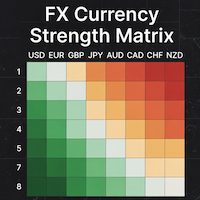
### MQL5 Marketplace Product Description FX Currency Strength Matrix – Professional MT5 Indicator
#### Overview The FX Currency Strength Matrix is a powerful, real-time visual tool that instantly reveals the true strength and weakness of all 8 major currencies in a clean, color-coded matrix format. No more guessing which currency is driving the pair – see the complete strength hierarchy at a glance and trade with institutional-level clarity.
#### Key Features - True 8×8 Currency
FREE

Trading Statistics Dashboard — Day / Week / Month / Year P&L, Drawdown & Session Timeline A clean, real-time statistics panel for MetaTrader 5 that gives you a complete overview of your account performance without opening the Account History tab. Runs in its own indicator sub-window (does not overlay your chart), split into two side-by-side panels: a Day/Week/Month/Year performance table and a live account/position summary. Key Features Performance Table (Today / Yesterday / N past days / Week /
FREE

È un'utilità per lavorare in tempo reale su Binance Futures Ticks Data e Real Time Binance Spot Ticks Data. È progettato per estrarre i dati più velocemente e rimanere entro i confini di Binance Future.
Logica di funzionamento: Global Variables registra le informazioni sull'ora che riceve da Binance Check Server Time.
In altri programmi, svolgono il loro lavoro in modo più rapido ed efficiente utilizzando queste informazioni temporali.
Dovresti consentire WebRequest dal menu Strumenti >> O
FREE

Rojeryo Trade Manager ATR is a MetaTrader 5 utility Expert Advisor designed to manage already opened trades.
The tool does not generate entry signals and does not open trades by itself. It is built for traders who prefer manual entries but want automatic trade management after the position is opened.
The EA can automatically set protective Stop Loss and Take Profit levels, move the Stop Loss to breakeven, close part of the position, and apply trailing stop management according to the selected
FREE

FTMO Max Daily Loss Guard is a simple MetaTrader 5 Expert Advisor designed to monitor the net profit and loss of all open positions. It checks the account every few seconds and automatically closes all open positions when the current net loss exceeds the defined daily loss limit minus the safety buffer.
The EA is built to help traders protect their capital, reduce risk and stay within strict risk-management rules such as the FTMO Max Daily Loss limit.
FREE
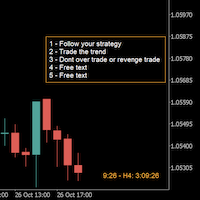
A good trader is a trader that respect his plan and keep the head cool. This indicator allow to display up to 5 lines of text for the things you always to see.
Congifuration 5 lines of text Text font, color, size Frame on/off, color, style, size Position of the text anchored Corners or anywhere on the screen Any questions or comments, send me a direct message here https://www.mql5.com/en/users/mvonline
FREE

AT Scalper Helps trader to place order seamlessly Close mulitple position at a time Place SL or TP for multiple position in a click Place hedge order same time with predefined SL and TP Place multi layer pending order in a click Place martingale layer Be informed about SL and TP in currency Get to know time remaining in current candle Get to know current spread View PnL, Balance, Equity on screen
FREE

Trade in the opposite directions with HedgeTerminal HedgeTerminal is a full-featured trading terminal inside MetaTrader 5. This is a graphic panel resembling MetaTrader 4 terminal. It allows you to track oppositely directed positions in the manner it is possible in MetaTrader 4. In other words, we can open unlimited number of positions on a single symbol even if positions are in complete or partial hedge (lock). Thus, you can maintain long and short positions simultaneously, which is impossible
FREE

PositionRelay Slave Subscriber legge le posizioni aperte dal vostro conto master PositionRelay e le rispecchia sul terminale MetaTrader 5 locale. Supporta lotto fisso, scalato e adattato al saldo, controlli per simbolo e auto-report periodici per la visibilità nella dashboard.
Prodotto complementare: PositionRelay Master Publisher (gratuito). Il conto master deve eseguire PositionRelay Master Publisher con lo stesso User ID prima che gli slave possano rispecchiare le posizioni.
Requisiti: - Ab
FREE

Mini Trader Nestor Glob – Manual Trading Panel for MT5 Follow me on social media and learn how to trade gold. Mini Trader Nestor Glob is a professional manual trading tool for MetaTrader 5 , designed to speed up and simplify trade execution and position management, especially for Gold (XAUUSD) trading. This product is not an automated trading robot .
All trades are executed only through user interaction using on-chart buttons. Main Features Manual trading panel with BUY / SELL / CLOSE buttons Au
FREE
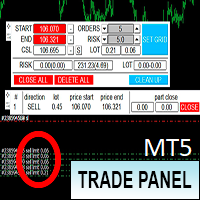
Торговая панель предназначена для установки сетки ордеров с различными параметрами. Добавлено все что есть у версии для МТ4. Предназначена для форекс счетов с хеджированием. Имеет несколько основных функций по установке ордеров в заданном диапазоне и с заданным риском, закрытию части ордеров из сетки, переносом в безубыток, закрытие части по профиту на определённом уровне, а также отображает информацию по текущему риску и отображает все сетки которые были выставлены по определённой паре при этом
FREE

AutoFindBestTrendLine — Detector Automático de Líneas de Tendencia Descripción general: AutoFindBestTrendLine es una utilidad para MetaTrader 5 que analiza el historial del gráfico y detecta automáticamente la mejor línea de tendencia posible, ya sea de máximos (resistencias), mínimos (soportes) o ambos. El script identifica los dos puntos más relevantes y dibuja una línea óptima basada en el número de toques reales sobre el precio. Ventajas principales: Detección automática de líneas de tendenc
FREE

This utility allows creating any amount of grid orders just by clicking with the mouse.
Instructions:
Trading mode
Deleting mode
Press ctrl and click with mouse to start drawing a grid While drawing, press shift to cancel Release buttons to send orders
Press shift and click with mouse to draw a removal line
Release buttons to confirm removal: EA deletes every pending order that the line touches
Inputs: - 3 options to calculate the grid sizing: Fixed points distance between grid level
FREE

NHS Risk Manager NHS Risk Manager is a streamlined trade-management and risk-control Expert Advisor for MetaTrader 5. It is built for traders who want a cleaner and faster execution workflow with practical protection tools directly on the chart. The EA focuses on the core elements of disciplined manual trading: planning the trade visually, sizing the position correctly, protecting the account with hard rules, and managing open exposure with more structure and consistency. It is suitable for trad
FREE

Description This is a utility tool for MT5 reminding traders of all the entry points by highlighting trading history. For those who just started to learn trading, one of the most efficient tips to improve their trading skill is to look back their own trading history. However, trade history arrow shown on MT5 chart is simply too small to find out, which will keep traders away from reviewing their trade, especially stupid mistakes like overtrading. By clearly showing their trade history and face i
FREE

Ritz Klik Trading Panel
In today’s fast-paced financial markets—ranging from highly volatile cryptocurrencies like BTCUSD to traditional forex pairs—execution speed, bulletproof risk management, and real-time capital awareness are the ultimate deciders of a trader's profitability. Ritz Klik Trading Panel is an institutional-grade, ultra-responsive One-Click Trading Dashboard designed exclusively for MetaTrader 5 (MT5). Built for scalpers, day traders, and aggressive layerers, this Expert Adviso
FREE

Elite Telegram Trade Copier & Community Manager (v3.94) Welcome to the ultimate solution for professional Telegram signal copying and community management. This Expert Advisor is not just a standard copier – it is a fully automated Trade Management Engine , a Signal Analytics Tool , and a Marketing Funnel for your own Telegram channels. Whether you want to automate trades from your favorite signal providers or manage your own VIP and Follower channels simultaneously, this EA handles everything:
FREE

Clean Trade Pro Most trade managers bury you in tabs, toggles and forty inputs you will never touch. Clean Trade Pro does the opposite. Drop it on any chart, drag three lines, and trade. Your setup is ready in under a minute. Clean Trade Pro is a focused, visual trade panel for discretionary traders who want speed and clarity , not a Swiss-army knife. Every position is built the same way: drag your Entry , Stop Loss and Take Profit lines on the chart, watch the lot size and risk calculate in rea
FREE

批量止損止盈同步管理器 這是一款專為 MT5 多持倉交易者 設計的持倉管理工具。 當同一個商品、同一個方向同時有多張持倉時,只需要手動修改其中一張持倉的 Stop Loss(SL)或 Take Profit(TP) ,工具就會自動把該持倉目前完整的 SL / TP,同步到其他相同商品、相同方向的持倉。 例如: XAUUSD BUY #1 XAUUSD BUY #2 XAUUSD BUY #3 如果將 #1 修改為: SL = 3300 TP = 3500 其他 XAUUSD BUY 持倉會自動同步成相同設定。 主要功能 批量同步 Stop Loss 批量同步 Take Profit 可同時同步 SL + TP 支援將 SL 或 TP 設為 0,批量移除 BUY 與 SELL 分開管理 不同商品分開管理 新開持倉不會立即觸發整批同步 啟動時只記錄現有持倉,不會自動修改 平倉後自動移除內部紀錄 一個圖表即可管理帳戶中的多個商品 分組方式 工具以: 商品 + 交易方向 作為同步群組。 例如: XAUUSD BUY XAUUSD SELL EURUSD BUY EURUSD SELL 全部視
FREE

input double MaxLossLevel = 500.0; // Max Loss Level in account currency input double SafetyBufferMoney = 10.0; // Safe Buffer. In this case Threshold be 500+10 = 510 input int CheckEverySeconds = 2; input bool is_debugged = false; // Print additional messages in the Terminal
It will checks every CheckEverySeconds. If the total Loss of the account Go below Threshold of MaxLossLevel + SafeBufferMoney, then start Heding: for each open Position, open a new reversed Position with
FREE

TradeFlow Dashboard MT5 rappresenta un cambio di paradigma nella gestione delle transazioni, offrendo una soluzione solida e versatile su misura per elevare le strategie di gestione del rischio e semplificare il processo decisionale all'interno della piattaforma Meta Trader 5. Con la sua interfaccia elegante e intuitiva, questo strumento trascende l'esperienza di trading convenzionale, rivolgendosi in particolare ai trader manuali che desiderano amplificare le proprie prestazioni.
Esaminiamo i
FREE

Ciò che uccide le challenge è il limite giornaliero, non l'obiettivo di profitto. Una notte di leva eccessiva, un pending dimenticato, un gap.
PropFirm Shield Essential è la guardia gratuita che vigila LA regola più importante — e blocca prima della violazione.
Su QUALSIASI grafico. Monitora tutto il conto — simboli, magic, manuali, copiatori, altri EA.
- DAILY LOSS GUARD — il tuo limite e la tua ora di reset. - LOCKDOWN — chiude posizioni, elimina pendenti, blocca il nuovo fino al reset. -
FREE

HM (horizontal Markup) è progettato per contrassegnare manualmente i livelli orizzontali. Il markup contiene il livello e il suo valore di prezzo. Lo spessore e il colore della linea e il valore del prezzo sono impostati nelle impostazioni. I livelli possono essere posizionati localmente su intervalli di tempo o impostati pubblicamente per tutti i periodi di tempo.
Il suo funzionamento è molto semplice:
1) - Premere il tasto impostato nelle impostazioni per contrassegnare il livello;
2) - p
FREE

The Calendar News Indicator is your essential tool for informed trading, offering real-time updates on economic events and financial news. Here’s what it brings to your trading strategy: Real-Time Updates: Stay ahead with immediate notifications of key economic indicators, central bank announcements, and geopolitical events that impact the markets. Global Coverage: Track economic events from markets around the world. Whether you’re trading forex, stocks, or commodities, you’ll get the global
FREE

Front Row Castlist Strategy Manager is a free utility for MetaTrader 5 that groups trading strategies by Magic Number. It brings strategy identity, historical performance, recent activity and saved management information into one overview. Castlist works independently and does not start or stop Expert Advisors, close positions or make trading decisions. Use the Castlist Quick Start Manual for installation and your first saved action. The Front Row User Guide 1.0 covers the Castlist, Spotlight an
FREE

Liquidity Seeker EA
Why You MUST Have This EA Unlock the power of ICT (Inner Circle Trader) methodology with the most advanced Smart Money Concept trading system available. This EA transforms complex institutional trading concepts into automated precision, giving you the unfair advantage that professional traders use to consistently profit from liquidity manipulation and market structure shifts. START trading WITH market makers using their own playbook. You don't need to do much other than to
FREE

All in one Multipurpose Telegram Trade Management , Manage and Copy Trades on the go From Telegram Pro Version MT5: www.mql5.com/en/market/product/95742 Pro Version MT4: www.mql5.com/en/market/product/85691
Execute Trades on mobile with fast execution When away from desktop MT5, or scalping the market with mobile device, or needed to copy trades from telegram groups while away, or doing some other activities, Telegram EA Manager is an effective tool to perform any trade operation with swift
FREE

A prop-firm account runs under a second rulebook MetaTrader 5 knows nothing about: a maximum loss measured from a fixed starting balance, a daily limit that resets at an hour the broker's clock does not agree with, a payout consistency ceiling, a minimum number of trading days, a news blackout, a Friday cutoff. Break the first rulebook and you lose a trade. Break the second and you lose the account. PropFirm Defense watches all of them at once, on any account, next to whatever else you are runni
FREE

SI Ruler A clean, one-click price ruler that shows points and exact dollar cost between any two levels on your chart. Every trader needs to quickly measure the distance between two price levels and know what it costs in real money. Most platforms make this harder than it should be. SI Ruler puts a single icon in the corner of your chart — click it, click your entry level, and drag to your stop or target. The label tells you instantly how many points that distance is and exactly what it costs in
FREE

Description TradeEcho Pro MT5 is a professional-grade utility designed to keep you instantly informed about every trading activity on your account. Whether you are at your desk or away, this tool acts as your personal trading assistant, providing real-time audio alerts and mobile push notifications for all trade events. Instead of generic terminal sounds, TradeEcho Pro MT5 gives you detailed feedback, including the event type, symbol, and net financial results for every closed position.
FREE
This indicator shows both GMT time and your broker's time on the chart.
Simply attach the indicator to a chart, and you will see the GMT time and your broker's time displayed in the top left corner, as shown in the screenshot. By using this indicator, you can always stay informed about your broker's time, which is especially useful during daylight saving changes.
You won't have to worry about whether your broker follows the US or EU schedule, as the indicator automatically adjusts to reflect any
FREE

AUTOTRAIL LM PRO MANAGER v3.30 Gestione professionale delle operazioni manuali su tutti i simboli Autotrail LM Pro Manager è un Expert Advisor per MetaTrader 5 progettato per gestire automaticamente tutte le operazioni aperte manualmente, anche su simboli diversi da quello del grafico su cui viene installato. Non è necessario caricare il programma su ogni grafico. Puoi installarlo, ad esempio, su un solo grafico XAUUSD e il manager controllerà contemporaneamente le operazioni manuali aperte su:
FREE
Demo version of the Virtual SL TP Trailing product for testing all functions https://www.mql5.com/ru/market/product/75210
ВНИМАНИЕ: ТОЛЬКО ДЛЯ ДЕМО-СЧЕТОВ !!!
Make Trailing Stop, Take Profit, Breakeven, Stop Loss levels invisible to the broker!
HIDDEN MODE (STEALTH MODE) Virtual Trailing Stop (Virtual Trailing Stop) Virtual Take Profit (Virtual Take Profit) Virtual Breakeven (Virtual Breakeven) Virtual Stop Loss (Virtual Stop Loss) Виртуальный 2-уровневый Трейлинг-стоп Virtual Tr
FREE

Market Regime Observer is a professional market state classification tool designed to help traders identify: Strong Trend Range Transition Chaos / High Volatility The system combines: ADX trend strength EMA50 / EMA100 expansion EMA200 macro bias ATR volatility expansion Wick / Body structure analysis to generate real-time regime analysis and probability-based market assessment. Perfect for: Trend-following traders ICT / Smart Money traders EA developers Quantitative systems Risk management frame
FREE

Position Manager Pro v1.0 (MT5) Dual Magic Number Independent Group Manager with Live P&L Dashboard Overview Position Manager Pro is a powerful trade management Expert Advisor for MetaTrader 5 that operates as an overlay manager — it does not open positions itself, but instead manages and monitors positions opened by other EAs or manually by the trader. The core concept is two fully independent groups , each identified by a unique Magic Number . Each group has its own Take Profit, Stop
FREE
Il MetaTrader Market è l'unico negozio online dove è possibile scaricare la versione demo gratuita di un robot di trading che consente di effettuare test e ottimizzazioni utilizzando dati statistici.
Leggi la descrizione dell'applicazione e le recensioni di altri clienti, scaricala direttamente sul tuo terminale e prova un robot di trading prima di acquistarlo. Solo sul MetaTrader Market è possibile testare un'applicazione in modo assolutamente gratuito.

Ti stai perdendo delle opportunità di trading:
- App di trading gratuite
- Oltre 8.000 segnali per il copy trading
- Notizie economiche per esplorare i mercati finanziari
Registrazione
Accedi
Accetti la politica del sito e le condizioni d’uso
Se non hai un account, registrati