 MetaTrader 5
 专家
专家
 指标
指标
 程序库
程序库
 实用工具
实用工具
 窗口小部件
窗口小部件
 规则
规则
免费的MetaTrader 5 交易实用工具 - 23
 以下是可在MetaTrader 5中简化交易的交易程序。将鼠标悬停在一个工具上,阅读它的描述和用途。
Simple And Unique Trade Journal The SAU Trade Journal is built for traders who take their performance seriously. At its core is a profit and loss calendar that lets users study their trading history day by day, identifying patterns in where they win, where they lose, and why. Alongside it sits the journal itself — clean, minimal, and designed to stay out of the way — giving traders a dedicated space to record their thoughts after each trade, building a personal record they can return to and lear
FREE

opnMAX Ponos: Utility Overview opnMAX Ponos is a highly interactive, institutional-grade risk management and trade execution utility designed for MetaTrader 5. It acts as an on-chart graphical dashboard that allows for precise, mathematically validated position sizing and one-click order execution. Instead of manually calculating risk thresholds before taking a trade, Ponos uses a reactive, omni-directional calculation matrix to handle the math in real-time. Key Functional Features Omni-Directio
FREE

Candle Momentum Alert R13 Free Candle Momentum Alert Utility for MetaTrader 5 Candle Momentum Alert R13 is a lightweight utility for MetaTrader 5 designed to help traders monitor candles with significant price movement based on a user-defined candle body size threshold. This tool is intended for monitoring and awareness purposes only and does not place, manage, or modify any trades. Key Features Candle momentum monitoring based on candle body size Multi-symbol monitoring (main chart + opti
FREE

FirstBlade Performance Analyzer is a non-trading MT5 utility. It is NOT a trading robot. It does not open, modify or close trades.
This product is a non-trading MT5 utility designed to analyze account trading performance using historical and current account data directly inside MetaTrader 5. Overview FirstBlade Performance Analyzer provides professional-grade performance analytics and visual diagnostics for MT5 accounts.
It helps traders understand profitability, drawdown behavior, timing effi
FREE

产品名称: StopAndTake — 精确且快速管理止损/止盈的简易脚本 产品描述: StopAndTake 是一款轻量化且直观的脚本,专为重视速度、准确性和可靠性的交易者设计。此工具可快速更新所选图表上所有仓位的 止损(Stop Loss) 和 止盈(Take Profit) 水平,操作简单方便。 优势与特点: 简单易用: 极简界面,新手也能轻松上手。 超快执行: 所有操作在几秒内完成。 精确无误: 止损和止盈水平精确到最后一个点位。 方便快捷: 只需将脚本拖动到图表上,它会自动完成所有操作。 安全可靠: 在修改前验证所有数据,避免错误或意外操作。 主要功能: 自动调整止损/止盈: 快速更新当前品种所有仓位的止损和止盈水平。 支持多种交易类型: 同时支持多头(BUY)和空头(SELL)仓位管理。 逻辑清晰: BUY 仓位止损设在当前价格下方,止盈设在上方;SELL 仓位逻辑相反。 操作直观: 无需复杂设置,只需启动脚本即可。 为什么选择 StopAndTake ? 如果您需要一款快速、精准、操作简便的工具, StopAndTake 是您的理想选择。无论您是交易新手还是经验丰富的专业
FREE

ProTrader Command Professional Trading Analytics & Risk Management System Transform your MetaTrader 5 into a professional trading platform with real-time analytics, automated risk management, and performance tracking. Core Features Real-Time Trading Dashboard Professional MT5 Interface Enhancement Live account metrics displayed directly on your chart Performance indicators with color-coded status alerts Position overview showing all trades at a glance Risk status monitoring with visual warnings
FREE

ActiveSnap 是一款专门为MetaTrader 5平台设计的智能吸附指标,它通过创建多个参考线并为用户拖动的对象提供"磁吸"效果,极大提高了技术分析的精确度和操作效率。
在MT5价差交易中的作用 1. 点差补偿交易 价差计算 :指标自动计算当前点差并加到价格上 真实成本考虑 :帮助交易者考虑到交易的实际成本(点差) 精确入场 :确保止损/止盈设置已包含点差因素 核心功能 1. 智能吸附系统 自动吸附 :当您拖动图表上的水平线时,指标会自动将其"吸附"到预设的关键价格位置 多类型吸附线 :提供三种不同类型的吸附参考线 精确控制 :可自定义吸附距离、位置偏移量和透明度 2. 三种吸附线类型 高价吸附线 位置 :每根K线的最高价 + 当前点差 + N个最小变动价格 用途 :识别阻力位、做空入场点 参数控制 : HighTickOffset 可调整N的值 低价吸附线 位置 :每根K线的最低价 + 当前点差 - N个最小变动价格 用途 :识别支撑位、做多入场点 参数控制 : LowTickOffset 可调整N的值 最低价吸附线 位置 :每
FREE

Funcionamento: O Painel Netting Panel RSJ funciona com qualquer ativo e em qualquer tempo gráfico . Ele funciona em contas do tipo " Netting " e " Hedge ", mas gerencia apenas uma posição por ativo, por isso o nome Netting. Se ele for executado em contas do tipo " Hedge ", ele fará o gerenciamento e proteção apenas da posição mais antiga , ou seja, da primeira posição que foi aberta por ele. Em contas " Netting " quando os botões " SELL " ou " BUY " forem pressionados, ocorrerá
FREE

Position Recovery Dashboard EA for MT5 Position Recovery Dashboard is a simple yet highly useful utility EA , originally developed for the author's own trading needs. Designed with practicality in mind, it provides a fast and intuitive way to manage open trades directly from the chart — making it ideal for active and manual traders . Its key feature in the recovery trading system , which helps traders recover from losing positions by automatically calculating profit from selected lots. This E
FREE

显示当前市场信息,每秒更新一次。 点差大小; 掉期大小: 多仓和空仓; 本地时间 (可选); 多功能工具 : 66+ 功能,包括此工具 | 联系我 如有任何问题 | MT4 版本 在指标设置中,您可以配置: 字体大小; 文本颜色; 选择位置: 图表的左/右角; 本地时间: 开/关; 程序文件应放在 " Indicators " 目录中。 多功能工具 : 66+ 功能,包括此工具 | 联系我 如有任何问题 | MT4 版本 多功能工具 : 66+ 功能,包括此工具 | 联系我 如有任何问题 | MT4 版本 多功能工具 : 66+ 功能,包括此工具 | 联系我 如有任何问题 | MT4 版本 多功能工具 : 66+ 功能,包括此工具 | 联系我 如有任何问题 | MT4 版本 多功能工具 : 66+ 功能,包括此工具 | 联系我 如有任何问题 | MT4 版本
FREE

使用 Isheguve Trend Scout 掌控您的市场分析! 厌倦了手动绘制趋势线并错过关键的市场转变吗? Isheguve Trend Scout 是一款 MQL5 实用程序应用程序,旨在通过在图表上自动识别和绘制趋势线来为您提供优势。 为什么选择 Isheguve Trend Scout? 轻松检测趋势: 停止猜测,让应用程序为您代劳。Trend Scout Pro 智能分析历史价格数据以寻找重要的波段点,并自动绘制准确的趋势线。 完全可定制: 根据您的交易风格量身定制应用程序。轻松启用或禁用上升和下降趋势线,并选择您喜欢的颜色以获得个性化的图表视图。 在当前时间周期上分析任何时间周期: 无论您是剥头皮交易者、日内交易者还是长期投资者,您都可以在首选时间周期上绘制趋势线,同时在当前时间周期上监控价格变动,从而即时洞察市场方向。 功能概览: TIMEFRAME (用于绘制趋势线):分析从 M1 到 MN1 的任何时间周期上的趋势。 LOOK BACK PERIOD:通过设置用于检测波段点的柱数来调整趋势线的灵敏度。
FREE

"Clean Pending Orders"
一键清除当前交易品种的所有挂单! 这个简单而高效的脚本专为重视速度和便利的交易者设计。只需运行脚本,它会立即删除当前品种的所有买入和卖出挂单。 优点: 快速清除: 所有挂单在数秒内删除。 专注当前品种: 不会影响其他交易品种。 简单易用: 一键操作,清理交易终端。 日志记录: 脚本会显示删除记录并提示任何错误。 如何操作? 确保当前品种有挂单。 在MetaTrader 5中运行脚本。 所有挂单将自动删除。 适合谁? 需要快速清除多个品种挂单的交易者。 寻求简单自动化交易工具的交易者。 想要清理终端后再开始新交易的用户。 立即免费下载,让您的交易更轻松! 我的其他工具: Clear All Stops and Takes on Current Symbol : 删除所选品种的所有止损和止盈单。 Clear All Stops and Takes on All Symbols : 一次性删除所有品种的止损和止盈单。 StopAndTake : 用于管理止损和止盈的工具,适合基础交易需求。 当前 品种 平均 成本 (精简 版) : 计算当
FREE

DF Fib Trader Pro DF Fib Trader Pro 是一款專為 MetaTrader 5 設計的自動交易系統。 它使用基於斐波那契的價格水平,結合趨勢和結構分析來定義入場點和出場點。此 EA 支援多頭和空頭部位,並內建風險管理參數。
核心功能: • 使用斐波那契回檔和擴展邏輯來繪製入場點、停損點和獲利點。 • 可設定交易手數和停損/獲利水平 • 可選擇 1 或 2 個入場點 • 根據市場情況支持固定或動態停損和獲利 • 適用於多種時間範圍和貨幣對 • 包含最大點差、滑點和交易頻率控制選項 • 自動交易管理:損益兩平、追蹤停損與部分平倉選項 • 如有需要,支持市價單。 輸入概覽: • 風險管理:交易手數、單筆交易風險、最大交易數量 • 入場條件:斐波那契水平選擇、趨勢過濾選項 • 出場管理:停損/停盈類型、追蹤停損設定、損益平衡參數 • 交易過濾:價差限制、滑點容忍度 基本規則 • 點擊“繪製斐波那契”,並根據您的需求繪製斐波那契框。 • 您選擇的斐波那契程度會顯示出來(完全可設定) • 點擊“執行斐波那契”,即可立即建立掛單以及停損和止盈 • 設定完畢後,讓PA
FREE

Pivot points have been a trading strategy for a long time, originally used by floor traders. Using this method, you can understand where the market is going in a day through a few simple calculations.
The pivot point in the pivot point method is the turning point of the market direction during the day. A series of points can be obtained by simply calculating the high, low and closing price of the previous day. These points may form key support and resistance lines. The pivot point, support and
FREE

Main Features Automatically closes open positions at a specified time. Symbol filter: close positions only for a selected instrument (or leave blank to affect all). Magic number filter: close only positions with the specified magic number (or all, if set to -1). Displays operational status and parameters directly on the chart . ...and many other interesting features
FREE

Overview The Dynamic Candle Timer is a lightweight and efficient utility designed for MetaTrader 5. Unlike traditional candle timers that remain static in the corner of the chart, this indicator dynamically attaches to the current Bid price line. This allows traders to monitor the remaining candle time directly at the point of action, enhancing focus during fast-paced market movements. It is highly suitable for day traders and scalpers operating on XAUUSD, Forex, Crypto, or Indices. Key Feature
FREE

As traders, we all know that risk management is the most important aspect of profitable trading. So, we need to determine the lot size, every time we need to open a new trade. The FX lot size calculator is a simple tool that will help you to determine your lot size easily without using any third-party service but you will be able to do that by your MetaTrader terminal. LIMITED TIME OFFER: 30$ FOR 10 ACTIVATION.
Inputs:
Maximum_Risk_Prc: To determine your preferred risk%. For example, if your ris
FREE

COS COPY TRADE EA: USER MANUAL It must be used in conjunction with the master file. Cos copy trade client | Buy Trading Utility for MetaTrader 5
1. System Overview & Architecture The COS Copy Trade system is a local, high-speed copying solution designed to replicate trades across accounts running on the same computer . It fully supports copying between different brokers and can mirror trades from an Investor Password account. 2. Installation & Setup Guide Step 1: Deploying the Mas
FREE

PositionsLimiter EA: Enforcing Trade Discipline with Position Limits The PositionsLimiter EA is a powerful risk management tool designed to help traders control the number of open positions at any given time. By allowing traders to set a maximum limit on simultaneous trades, this EA ensures that no additional trades exceed the specified threshold. If a trader or another automated system attempts to open a new position beyond the set limit, the EA will automatically close the excess trade, ensur
FREE

MAGIC PROTECTOR — Advanced Equity Protection EA Magic Protector is a utility built for traders who want better control over daily, weekly, or monthly risk exposure. The EA continuously monitors trading performance based on your selected protection period and helps prevent further losses or overtrading once your defined limits are reached. It can work with either the entire account or only trades belonging to a specific Magic Number, making it suitable for traders running multiple Expert Ad
FREE

The Expert Advisor "TimeLeft Display" shows the remaining time until the close of the current candle in a digital display. The time is displayed in days, hours, minutes, and seconds. Features: Time Calculation: Calculates the remaining time until the close of the current candle based on the current timeframe of the chart. Digital Display: Shows the remaining time in a digital format. Customizable Font and Size: Allows selection of the font (Arial, Arial Black, Aptos Display, Tahoma,
FREE

FREE

该脚本旨在评估各种窗口函数中的权重。基于这些窗口函数构建的指标可以在 https://www.mql5.com/ru/market/product/72159 下载 输入参数: iPeriod – 指标周期。 iPeriod >= 2 iCenter 是窗口函数中心所在的参考索引。默认情况下,此参数为 0 - 窗口中心与指标中心重合。当 1 <= iCenter <= iPeriod 时,窗口函数的中心将移动,因此指标的某些特征将发生变化。在图 1 中,您可以看到中心的选择如何影响窗口功能和指标的显示。此参数可以以 0.5 为增量进行更改。 Histogram width - 直方图的宽度。 Histogram color - 直方图的颜色。 Show duration - 显示持续时间。 Screenshot - 启用此选项时,图片将保存在 Files 文件夹中。 一些窗口函数使用附加参数 - ParameterA 和 ParameterB。它们会影响窗口权重。正因为如此,指标的特性发生了变化。该表显示了窗口函数和更改参数的限制(如果使用它们)。 Windo
FREE

Market Watch Bulk Loader 入门版:粘贴代码列表,一键将其添加到「市场报价」。每次最多加载 5 个代码。
从剪贴板批量添加代码到「市场报价」,不必再逐个手动输入。
这是 Market Watch Bulk Loader 的入门版。功能与完整版完全相同,只有一个限制:每次加载 5 个代码。您可以用它先确认本工具能否识别您所用经纪商的品种命名方式。
使用方法
1. 将代码列表复制到剪贴板(选股器、表格、聊天消息、纯文本,任何来源均可)。 2. 在 MetaTrader 5 中点击面板上的 TXT 按钮,出现输入框。 3. 粘贴列表(Ctrl+V 或右键粘贴)。 4. 点击 Copy。
工具会将每个代码与您经纪商实际提供的品种进行比对,并把匹配项添加到「市场报价」。前 5 个识别成功的代码会被加载,其余会在「智能交易系统」日志中提示。
为什么需要它
同一个品种在不同经纪商处名称各异。苹果公司可能是 AAPL、AAPL.US、US.AAPL、#AAPL 或 AAPL.cash。从选股器直接复制的列表与您经纪商的命名并不一致,MetaTrader 5 什么也
FREE

Trade Auditor 是一款只读的取证分析工具。它不会开仓,也不会改动任何东西。它扫描您账户自身的交易历史与持仓,用通俗的语言告诉您:这个账户的行为究竟像一支纪律严明的交易台,还是像一个正在爆仓的账户。 大多数交易者买了一个 EA 或跟单某个信号,却始终不真正了解它对账户做了什么,直到回撤到来。Trade Auditor 让您看清这一切,并能拿出证据。 它检查什么 马丁格尔。 亏损之后加大仓位——经典的账户杀手。经过账户余额归一化处理,因此基于风险的正常仓位增加不会被误标。 网格与逆势摊仓。 在前一笔仍未平仓时,于更差的价格再开一笔同方向的交易——这是形态,而非意图。有意的分批加仓(scale-in)或多次入场的突破策略,只要在更差价格加仓,同样计入,即使每笔都设了止损;顺势加仓(多头以更高价格加仓)则不计入。 无止损裸单。 入场订单中未在经纪商端附带止损的交易。由 EA 在内部维护的虚拟或隐藏止损在此视为裸单,因为只有挂在经纪商端的止损才能在终端、VPS 或网络连接中断时依然生效。如果此项被标记而您并未预料到,请询问您的 EA 或信号提供者的开发者是否使用了隐藏止损。 风险敞口
FREE

TradePulseMonitor for MetaTrader 4 & 5 Overview: TradePulseMonitor is a comprehensive, real-time dashboard indicator designed for MetaTrader 4 and MetaTrader 5. It provides traders with an at-a-glance overview of their account's financial health, risk exposure, position metrics, and historical performance. By consolidating critical data into a single, customizable on-chart dashboard, it eliminates the need to constantly check the Terminal window, allowing for faster and more informed trading de
FREE

别再猜测你的交易表现了!立即在图表上追踪你的盈亏! 作为交易者,准确、实时地掌握自身的心理状态和执行力是保持交易纪律的关键。DaBhoza 胜率追踪器是一款轻量级、直观且高度可视化的图表工具,旨在帮助您一键手动记录和监控交易结果。 无论您是在测试新的手动交易策略、在模拟账户上练习,还是追踪每日实时目标,此仪表盘都能清晰地显示您的关键统计数据。 主要功能 一键记录:使用醒目的高对比度按钮,即可立即记录盈亏。 实时统计:自动计算并显示您的胜率百分比、总盈利、总亏损和总交易次数。 图表上的便捷性:在瞬息万变的市场交易中,无需打开外部电子表格或交易日志。 即时重置:使用专用的重置按钮,即可立即清除当前交易时段的统计数据,为新的交易日或交易时段做好准备。 简洁流畅的用户界面:采用现代深色主题仪表盘,搭配简洁的字体,可与任何 MT5 图表布局完美融合。 进度保存:关闭 MT5 终端后,您当前的交易数据不会消失——您的进度会自动保存,并在您下次运行终端时继续。 为什么您需要这款工具? 手动回测和前瞻测试可能非常繁琐。在混乱的交易过程中,我们常常会忘记自己的实际胜率。DaBhoza 胜率追踪器弥补了这
FREE

SL Maestro - Forex Expert Advisor SL Maestro - Forex Expert Advisor with Advanced Stop-Loss Features Introducing SL Maestro , the ultimate Forex Expert Advisor (EA) designed to enhance your trading strategy by adding stop-losses to existing trades with precision and flexibility. SL Maestro is not just limited to simple pips-based stop-losses; it incorporates a variety of advanced techniques to ensure optimal protection for your trades. Key Features: Pips-Based Stop-Loss : Easily set a stop-loss
FREE

Black Volume By ZeeAM Khan
a Multi-Engine EA
Professional Multi-Timeframe Volume & Breakout Trading System Black Volume Multi-Engine EA is an advanced automated trading system that combines volume analysis, spread analysis, liquidity sweeps, support/resistance breakouts, and multi-basket trade management into one powerful Expert Advisor. The EA continuously scans higher-timeframe candles to identify significant market activity, automatically draws key support and resistance zones, and executes
FREE

Botti Tools features
1 - Automatically places Take Profit and Stop Loss values, previously defined, in Pending Orders and in Market Positions
2 - Based on the amount of Stop Loss points defined and the specified monetary value it calculates what volume should be used for that order.
3 - After X points he puts the order on breakeven
4 - It cancels the Take Profit at X points away from it and places the Stop Loss in such a way as to guarantee Y gain points
5 - If the fourth option is selecte
FREE

Assistant_for_Reopen - an Expert Advisor that helps to re-set pending orders. Many brokers force the order to expire at the end of the trading session or at the end of the trading day. Therefore, a trader has to restore all pending orders manually every time at the beginning of a new trading session. Assistant_for_Reopen frees the trader from this routine work. It controls expiration by the order expiration time and resets it if the trader ticked the checkbox. The maximum number of orders the EA
FREE

How to run the script in MT5. Open MetaTrader 5. Press Ctrl + N to open the "Navigator" window. Locate the "Scripts" folder. Drag and drop RR Control Pro onto the chart with the open trade.
How it works.
Automatic detection: Once you drag the script onto the chart, it automatically identifies the most recently opened position on your trading account. Direction detection: The script checks whether the trade is a BUY or a SELL to calculate distances correctly. Formula: The ratio is calculated a
FREE
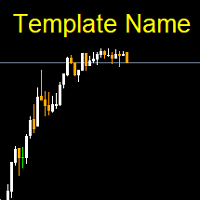
Template name allows you to write custom text that will show up on your charts. It allows you to position the text anywhere including selecting any color that you prefer. You can position the text at any of the 4 corners of your chart screen. This custom text can aid as a watermark for your screen shots. This text can act as a unique and true signature for your charts.
FREE

Simple script for Buy by Market Execution on all financial instruments.
Inputs Volume - default: 0.10 Deviation - default: 10 points Stoploss - default: 50 points Takeprofit - default: 50 points Comment - default: Order by Market Confirm - default: false
Inputs Details Type Order Buy Order is preset. Deviation Maximum deviation from quoted price in points. Stoploss & Takeprofit In points value, be careful that this value will be added to minimum stop allowed by the broker. For example if you s
FREE

Phone Notification
Send Information from VPS direct to Phone No TradingOperation only MessageNotification Send Information to your selected Time-Window Configure Time when want to receive the Message What will be send:-Bull/Bear Candle Bull: 0 Bear: 0 Level that get Touched by Price most Level: 00000.00 any Question or modification ex5 Code write me a Message
FREE

The Teaching T-INN utility was created to train architecture neural networks (T-INN) Target-IntelNeuroNet adapted to the currency market. The utility file must be placed in the scripts folder and run on the chart and timeframe on which you want to train the neural network. The result of the training will be recorded in a file, and the entire training process is displayed in the console on the chart and an additional log file. Before starting the script, it is necessary to download all the stori
FREE

This indicator allows to hide moving average (on all MT4 timeframes) from a date define by the user with a vertical line (Alone) or a panel (with "Hidden Candles"). Indicator Inputs: MA Period MA Shift MA Method MA Apply To Information on "Moving Average" indicator is available here: https://www.metatrader4.com/en/trading-platform/help/analytics/tech_indicators/moving_average ************************************************************* Hey traders!! Give me your feeds! We are a community h
FREE
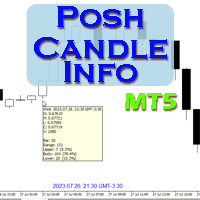
Show candle info with: Time in selected timezone Bar number Candle range points Upper wick points and percentage Body points and percentage Lower wick points and percentage Mark large/small candle body with customizable line. Settings group: Broker and local timezone. Lookback bars for candle marking. Large candle body Small candle body Date and time info with auto position or custom the x and y coordinate.
FREE

This utility allows creating any amount of grid orders just by clicking with the mouse.
Instructions:
Trading mode
Deleting mode
Press ctrl and click with mouse to start drawing a grid While drawing, press shift to cancel Release buttons to send orders
Press shift and click with mouse to draw a removal line
Release buttons to confirm removal: EA deletes every pending order that the line touches
Inputs: - 3 options to calculate the grid sizing: Fixed points distance between grid level
FREE

Break-Even Pro * 3 BE modes: - RewardRisk_Single for single trade (only valid for positions with SL) - Points_Single for single trade - Points_DCA for multiple DCA trade * Start Value: value of RR or # points to start SL moving * Offset: distance in points between BE level & entry * Symbol Filter: Select All or a specific symbol * Partial Close (%): Close % initial volume when moving SL to BE (0 for no partial close) Join my telegram channel here for more useful free EAs. Thank you!
FREE

This non-trading expert utilizes so called custom symbols feature to build custom charts based on history of real ticks of selected standard symbol. New charts imitate one of well-known graphic structures: Point-And-Figure (PnF) or Kagi. The result is not exactly PnF's X/O columns or rectangular waves of Kagi. Instead it consists of bars, calculated from and denoting stable unidirectional price moves (as multiples of the box size), which is equivalent to XO columns or polygonal lines. These Poi
FREE

Copy Trade PRO - Slave EA (FREE with Master EA) Receive Trades Automatically from Your Master Account Copy Trade PRO - Slave EA is a professional trade receiver designed for MetaTrader 5. It automatically mirrors trades from the Copy Trade PRO Master EA with fast execution, intelligent symbol matching, and flexible risk management. Telegram Support Link : @GoldBotXSupport Need help or have questions? Contact me on WhatsApp: https://wa.me/447378910922
This Slave EA is complete
FREE

TradeSync One MT5 El Copiador Local de Operaciones Ultra-Rápido para MetaTrader 5 TradeSync One es un copiador profesional de operaciones desarrollado completamente en MQL5 nativo , diseñado para traders profesionales, gestores de cuentas y usuarios de Prop Firms que necesitan máxima velocidad, estabilidad y precisión . A diferencia de los copiadores tradicionales que dependen de WebRequest, servidores externos o DLLs pesadas , TradeSync One utiliza un sistema de comunicación 100% local , op
FREE

清除所有止损和止盈 — 快速删除 SL/TP 水平的简单解决方案 只需一键即可删除所有止损和止盈水平! 清除所有止损和止盈 是一款便捷的脚本,专为希望快速高效地删除所有未平仓订单的 SL 和 TP 水平的交易者设计。 简单的操作和即时执行使其成为动态市场条件下不可或缺的工具。 主要优势: • 节省时间: 无需手动逐一编辑每个订单 — 一切自动完成。
• 多符号支持: 脚本可删除所有交易工具的水平。
• 易于使用: 只需将脚本拖到图表上 — 就完成了!
• 可靠性: 在执行前检查每个订单,确保操作准确无误。 使用方法: 将脚本拖到 MetaTrader 5 的图表上。 脚本会自动删除所有未平仓订单的 SL 和 TP 水平。 享受完全自由的交易控制! 适用人群: • 切换到没有固定风险水平新策略的交易者。
• 想快速重置所有订单 SL/TP 水平的人。
• 任何寻找简单可靠的风险管理工具的人。 简化您的交易!免费下载 Clear All Stops and Takes,完全掌控您的交易。
顺便提一下,删除 仅限选定符号 的所有止损和止盈的脚本目前可通过 此 链 接 免费下载。 别忘
FREE

!!ご自身の戦略と合っているのか必ず確認してください!!
※勝率重視の戦略に適しています プロップファームを経験した人なら、
一度はこう思ったことがあるはずです。 最大損失率に合わせてロット計算するのが面倒 扱う通貨ペアが増えるほど計算するのが面倒 ルール違反で失格するのが怖い 口座を失うたびに心が折れる 僕自身、まさにこのループに苦しんでいました。 「勝てるかどうか」よりも先に、
“どうやって生き残るか” が最大の課題だったんです。 その結果、
自分のために作り始めたのがこの ポジションサイジングEA でした。 ↓複数口座管理したいならこっちがお勧め Prop Sizing and Simple Copy EA https://www.mql5.com/ja/market/product/161254
このEAでできること プロップ基準の自動ロット計算 初期残高・最大損失率・一日損失率・最大負け回数を入力するだけ BUY/SELLボタンでSL/TPを同時設定 同時エントリー数にも対応 CALCボタンで最終使用可能額を即表示 許容スプレッド超過時はエントリーしない安全
FREE

SmartGuard Trading Journal helps MetaTrader 5 traders build an automatic local trading journal without manual input, external servers or trading actions.
The utility records account snapshots, risk metrics, open positions, pending orders, deal history and real-time trade transactions into local CSV files. These records help traders review equity changes, margin pressure, floating exposure, broker costs and real trading behavior over time.
SmartGuard Trading Journal does not open, close or modi
FREE

FOREX17 MOUSE TRADING ASSISTANT BASIC (F17MTA)
- Forex17 Mouse Trading Assistant Basic 是一款可通过鼠标和键盘在图表上手动下单的可视化工具 - 支持动态设置入场、止损和止盈,并实时显示 - Basic 为简化版本,是 F17MTA 生态系统的入门版本
====================== 重要提示 ======================
- 这是免费 Basic 版本
- Standard 版本提供更多高级功能(英文版本)
- 建议阅读英文完整说明
- 必须在 MT5 中启用 AutoTrading
====================== 主要功能 ======================
- 按住 B 进入买入模式 - 按住 S 进入卖出模式
- 按住时: - 移动鼠标设置价格 - 动态显示各级别
- 松开取消 - 点击发送订单
====================== 策略与执行 ======================
FREE

mBer is a non-repainting scalping indicator purpose-built for EURUSD on the M5 chart . Instead of relying on generic moving averages, mBer calculates rolling Upper Quartile (Upper Q) and Lower Quartile (Lower Q) levels from recent price data — statistical boundaries that mark where price is trading relative to its own short-term distribution. When price pushes toward the Upper Q, it signals a statistically stretched, potentially overbought zone; when price pushes toward the Lower Q, it signals a
FREE

A complete copy trading EA suite that automatically replicates trades across MT4 and MT5 platforms. Supports all four combinations — MT4→MT4, MT4→MT5, MT5→MT4, and MT5→MT5 — in a single package. Uses the FILE_COMMON shared folder method for fast, reliable signal delivery within the same PC or VPS.
Overview
CopyTrading EA Suite is a utility package that automatically replicates trades between MetaTrader 4 and MetaTrader 5 platforms. A single Sender EA can broadcast signals to multiple Receive
FREE

Trade Remote: Pocket Desk - Your MetaTrader Account, Now in Your Pocket
FEATURES Trade Remote: Pocket Desk turns your phone, tablet, or any web browser into a live trading remote control for your MetaTrader terminal. No app to install on your phone — just a 4-character code and any browser. Connects to your MT4 terminal in under 30 seconds using a unique, auto-generated 4-character CONNECT code. One-click BUY and SELL on any symbol in your Market Watch, with live bid/ask and spread shown befor
FREE

该面板具有每个初学者都可以处理的最直观的界面。
在 SLp 列中 - 您需要以点子为单位指定 SL 大小。如果该值变为灰色,同时 Bay / Sell 按钮也处于非活动状态,则您指定的 SL 值小于经纪商设置之前允许的值。
在 TP% 列中 - 您以帐户余额的百分比表示 TP。在设置中,您可以根据此指标的计算方式选择净值、余额或可用保证金。
在 R% 栏中,您可以设置交易的风险值。
插入按钮。 - 允许您立即使用设置的值打开订单,如果禁用,则您可以直接在图表上预设交易参数。
在顶部,您可以通过单击左上角的减号来最小化图表上的面板。 Pro Trading Panel - https://www.mql5.com/en/market/product/72256
还可以通过调整面板名称下方的 + 和 - 按钮来增加或减少面板本身的大小。
如果您还想开挂单和转移到BU,追踪止损,保存开单的各种设置,支持各种技术的定单,那么考虑一个功能更强大的EasyTradePad面板,您可以在我的产品中找到它。
FREE

Investment Castle Panel — Your Trades, At a Glance
The Panel puts the numbers that matter right on your chart: floating profit and loss, drawdown and more — for manual trades and for any Expert Advisor. A clean, movable dashboard so you always know exactly where you stand.
What it does for you Live P/L on the chart: floating profit/loss for the current symbol, for both buy and sell orders, in your base currency and in pips. Max drawdown at a glance: keep an eye on risk without digging through
FREE

Smart Target Script Smart Target Script is an advanced risk management utility designed to simplify complex trading scenarios. When managing multiple open positions on a single symbol, calculating the exact exit price for a specific combined profit or acceptable loss can be mathematically challenging. This script automates that process instantly. By analyzing your total buy and sell volumes, the script calculates the true weighted break-even price. It then translates your desired profit or risk
FREE

POTUSCalendar 白宫日程仪表板 - 不要错过影响市场的政治事件 POTUSCalendar 是一款专业的 MetaTrader 5 指标,可直接在您的交易图表上显示美国总统的公开日程。随时了解可能影响金融市场的白宫即将举行的活动,包括新闻发布会、官方声明、旅行计划和公开露面。 该指标自动从白宫官方公开日程获取实时数据,将所有活动时间转换为您的本地时区和经纪商时间,并在优雅、可自定义的面板中显示所有内容。无论您交易外汇、指数、商品还是加密货币,了解重大政治事件对于做出明智的交易决策至关重要。 阅读更多: 完整文档和设置指南 (English) 限时优惠: 前 50 次下载免费!之后,本产品将收费。立即下载以获取您的免费副本。 主要特点 实时白宫日程: 自动从官方来源获取并显示最新的总统活动 自动时区转换: 同时显示 ET(东部时间)、您的本地时间和经纪商服务器时间的活动时间 颜色编码的活动类型: 使用可自定义的彩色徽章立即识别活动重要性(官方日程、新闻发布会、媒体召集、旅行等) 实时倒计时计时器: 通过根据紧急程度改变颜色的动态倒计时准确了解活动何时发生(紧急为红色、临近为橙
FREE

Горячие клавиши плюс клик левой кнопки мыши на графике.
Советник открывает сделки, выставляет лимитные и стоповые ордера, удаляет ордера и закрывает позиции, также делает реверс открытых позиций, выставляет прописанные в настройках стоп лосс и тейк профит.
(реверс только на неттинговых счетах)
При запуске советника можно посмотреть подсказку как действует советник при нажатии клавиши + клик на графике.
Правее последнего бара, ниже цены Ctrl+ЛКМ - OpenSell
Правее последнего бара, выше
FREE

Overview Custom Logic for Trading MT5 Mini is the free version that designed to execute trades based on custom indicator signals, with robust position management features with break-even settings. This script allows traders to implement their strategies with high precision and flexibility, enhancing their trading efficiency and profitability. Input Parameters Indicator Settings indicator_name : Name of the custom indicator to be used for generating signals. buy_signal : Signal value indicating a
FREE

HB Trading Bot – Professional Risk & Trade Management for MT5 HB Trading Bot is a professional risk management and trade management Expert Advisor designed for MetaTrader 5 .
It does not open trades . Instead, it manages already opened positions with strict, rule-based logic to help traders protect their capital and remove emotional decision-making from trading. Most trading losses are caused by psychology, not poor analysis. HB Trading Bot was built to solve this problem by enforcing discipline
FREE

Guardian Shield EA - Risk & Profit Protection System ️ Ultimate Account Protection Guardian Shield is a specialized utility Expert Advisor designed to provide comprehensive risk management and profit protection for your trading account. It monitors all running positions in real-time and takes immediate action when predefined profit or loss thresholds are reached. Key Features Advanced Risk & Profit Guardian Real-time Monitoring : Continuously tracks total P&L across all positions Du
FREE

Minimalist and fully customizable info panel. It works on any chart and timeframe, with 2 - 4 digits brokers and with 3 - 5 digits ones. It can show: Current Spread in pips (1 decimal digit if you are on a 3 - 5 digits broker) ATR (Average True Range) in pips Current Server Time Current GMT Time Important Account Info: Current Leverage and Stop-out Level (%) Time left for the current bar. Very useful on 4 h charts All info labels have a tooltip with the same data Available customizations : Ena
FREE

Read-only analytics for accounts running several EAs. Groups your closed trades by magic number and measures how much of their combined risk actually cancels out. Free measurement edition. The monitoring and alerting edition is Portfolio Command Desk: https://www.mql5.com/en/market/product/188884 The problem You run five Expert Advisors. Each backtest looked fine on its own. But the account does not trade five systems, it trades one portfolio, and no report in MetaTrader tells you how those sys
FREE

概述
RealCost Spread Guard 是一款用于 MetaTrader 5 的点差监控工具。它不交易、不修改订单,也不会把数据发送到外部服务器。它会采样当前图表的点差,显示实时和历史点差统计,在点差超过用户设置的阈值时发出提醒,并可选择写入本地 CSV 文件,便于之后复盘。
该工具适合在手动进场、剥头皮策略、网格系统、跟单系统或任何对点差波动敏感的 EA 运行前使用。
典型使用场景
- 检查某个品种在交易时段内的点差是否稳定。 - 手动进场前观察点差变化。 - 运行 EA 或跟单系统前查看点差条件。 - 对比不同市场时段的点差变化。 - 将点差采样导出到 CSV,用于交易日志或之后复盘。
主要功能
- 显示当前图表点差,单位为 points。 - 统计平均点差、p95 点差和最大点差。 - 可配置点差提醒阈值。 - 弹窗提醒和可选手机推送。 - 可配置写入间隔的本地 CSV 导出。 - 紧凑的图表面板。 - 不执行交易动作。 - 不使用 DLL,不使用 WebRequest,不连接外部服务。
不包含的功能
- 不交易。 - 不修改持仓或订单。 - 不提供买入
FREE

You can send MetaTrader screenshot easily to your identified telegram channel via press the send button that on the chart. TelegramBotToken: Telegram API credentials. You can create API credentials on my.telegram.org web page ChatId: Your telegram chatId. Secreenshots will be sending this channel - Please do not press the button repeatedly. This may cause your bot or ip address to be blocked. - You have to add telegram api address ( https://api.telegram.org ) in Option > Expert Advisors > Allow
FREE

交易中的点差是市场上金融工具的购买价格和销售价格之间的差额。 点差是交易者为交易机会向经纪人支付的佣金。
每个经纪人都提供自己的交易条款,这已经不是什么秘密了。 价差的大小很重要。 有很多顾问(特别是黄牛)在不同的经纪人表现出不同的结果。 我们一再遇到这种情况。 因此,使用此实用程序,找出您的经纪人在特定工具期间提供的价差。
运行该实用程序几天。 检查日志中的屏幕上的消息,以及在数据文件(。.\MQL5\Files)。
实用程序输入参数:
type_account -账户类型的名称,所有经纪商可能有不同的缩写(ECN,PRO,VIP,RAW等。) actual_spread -仅为活动期间选择数据(这是从2-22小时) save_file_result -将数据保存到文本文件
FREE

Broker Quality Monitor is a free utility that measures the real quality of your broker for trading. What it measures: - Live spread (current, average, min and max) - Real slippage from your own fills, separated by BUY and SELL - Execution latency - Broker Quality Score (0-100) - Suitability verdict for gold scalping Features: - Live panel with all metrics and color-coded status - Per-session spread averages (Asia, London, London+NY, NY close) - Alerts when spread or slippage exceed your configur
FREE

Stop Loss Basic Et for MT5 — a simple and adaptive Stop Loss utility with automatic trailing.
Core Logic
Stop Loss performs two key functions:
• protects the position from loss
• trails and protects profit
The utility automatically sets a Stop Loss and manages it as the price moves.
Offset values are calculated in currency units.
Candle Classification (ET)
The utility can work independently or together with the
Candle Volatility ET Classifier indicator (free).
ET classification is a s
FREE

InstitutionalExec Suite — Expert Advisor for MetaTrader 5 InstitutionalExec Suite is an Expert Advisor designed to split and distribute order execution into parts, with the aim of obtaining an average entry price instead of executing the total volume at a single moment. Available execution modes Time-based TWAP. Divides the total order into equal parts and executes them at fixed time intervals configured by the user. Price movement TWAP. Executes each part when the price moves a defined number o
FREE

Utility for order reversal. Closes orders on the chart on which it is launched and opens orders with the opposite direction instead of them. Has a simple and intuitive graphical interface. It is also possible to automatically reverse newly opened orders. MT4 version of the utility- https://www.mql5.com/en/market/product/74771 If you like this utility, take a look at my other products - https://www.mql5.com/en/users/nina_yermolenko/seller
FREE

This is an EA designed to support manual trading. It can accurately calculate risk, automatically enter trades, set stop loss, and perform trailing stop loss using buttons on the chart. There are many features for risk calculation, setting stop loss, and trailing stop loss to suit various trading styles. It can also automatically manage prop firms by closing trades when reaching the target profit level or maximum daily loss. Additionally, it can perform manual backtesting using the strategy test
FREE

Simple spread update script for updating your backtesting data and getting them as close as possible to your broker trading spread. This step is often overlooked but very important to do if you want to have reliable backtests.
Import downloaded data into your MT5 (e.g. dukascopy data), load specific period of ticks (usual time of your trading) and compare the provided spread with your broker at your trading time. To update the spread, load custom symbol to your market watch, open chart window a
FREE

Trailer Is a reduced version of my EA bull scalper but will handle trailing loss and risk management
use the ai trailing tool to effect the trailing start or chose manual mode to start the trailing and the spread of the sl behind it
check out the EA Bull Scalper for full position Management position opening and extreme performance
https://www.mql5.com/en/market/product/116071?source=Site+Profile+Seller
FREE
MetaTrader 市场 - 在您的交易程序端可以直接使用为交易者提供的自动交易和技术指标。
MQL5.community 支付系统 提供给MQL5.com 网站所有已注册用户用于MetaTrade服务方面的事务。您可以使用WebMoney,PayPal 或银行卡进行存取款。
