 MetaTrader 5
 专家
专家
 指标
指标
 程序库
程序库
 实用工具
实用工具
 窗口小部件
窗口小部件
 规则
规则
免费的MetaTrader 5 交易实用工具 - 18
 以下是可在MetaTrader 5中简化交易的交易程序。将鼠标悬停在一个工具上,阅读它的描述和用途。
# LBU Trading Console
LBU Trading Console is a unified MetaTrader 5 utility for visual trade planning, position management, equity protection and multi-symbol RSI monitoring. Its tabbed interface keeps four practical workflows in one chart and one EX5 file.
## Main modules
### Trade
- Draw and drag Entry, Stop Loss and Take Profit levels directly on the chart. - Calculate volume from the selected account risk percentage. - Support market, limit and stop orders. - Validate volume, margin and
FREE

TraderMusic Плеер на графике. Показывает карточку фонового плеера Windows: название трека, исполнителя и обложку. Под треком идёт лента зелёных и красных свечей. Управление мышью: играть и пауза, предыдущий и следующий трек, громкость. Панель можно скрыть и снова открыть, перетащить по графику. Язык интерфейса: русский и английский. Карточка и обложка приходят из фонового плеера Windows. Пока плеер молчит, на панели написано, что трек ещё не пришёл.
FREE

Chinese (Simplified) CCI Cross Alert EA for MT5 CCI Cross Alert EA 是一个简单的 MetaTrader 5 工具,当 商品通道指数(CCI) 达到常见的超买或超卖水平时向交易者发送提醒。它可以帮助交易者在无需一直盯着图表的情况下监控 CCI 信号。 将 EA 添加到图表后,它会持续监控 CCI 指标,并在关键水平被突破时发送 弹出提醒 ,方便您快速查看图表并评估潜在交易机会。 功能 检测 CCI 上穿超买水平(默认 100)
检测 CCI 下穿超卖水平(默认 -100)
MetaTrader 5 弹出提醒
适用于任何交易品种和时间周期
轻量且易于使用 工作原理 EA 会监控当前图表上的 CCI 指标。当指标上穿超买水平或下穿超卖水平时,MetaTrader 5 会弹出提醒。 CCI 周期、应用价格和提醒水平可以在设置中调整。 该 EA 仅提供提醒功能 ,不会自动开仓或管理交易。
FREE

Backstop enforces the two rules that end funded accounts. A daily loss limit and a maximum loss limit, applied to everything on the account — every Expert Advisor, every symbol, and every trade you place by hand. Attach it to any one chart and it governs the whole terminal. It does not trade. It has no strategy, no signals and no opinion about the market. It is a governor. What it does Daily loss limit — measured from balance at the reset, equity at the reset, or a fixed account size. Firms diff
FREE

Trade Risk Desk answers one question at the moment you need it answered: what volume makes this stop cost exactly what you decided to risk. Drag the stop line to where it belongs on the chart and the panel prints the volume, the money behind it, and the margin the position will hold. What It Answers Set the risk as a percent of balance or as a fixed amount in account currency. Put the stop where your idea says it belongs. The panel reads the symbol settings your broker publishes and prints: the
FREE

Alert Relay Helper (EA) – MT5 & MT4
Encrypted bridge that forwards indicator alerts to external messengers * in real-time. Plug-and-play utility – simply attach it to one chart. Zero trading functions – does not open, modify or close orders. End-to-end AES-256 encryption – only custom indicators that support the same key can broadcast messages (e.g. VWAP Ultimate Pro v1.20+). Multi-platform – MT5 build 4150+, MT4 build 1380+. Before you turn it on : Open Tools > Options > Expert Advisors and
FREE
Price Alert EA for MT5 – Intuitive On-Chart Alert System The CFN Price Alerts EA for MetaTrader 5 is a professional, easy-to-use tool designed to simplify price monitoring and trading decisions. It allows traders to set customizable price level alerts directly from their charts—no more manual setup through MetaTrader's native alert system. With a clean, interactive panel, you can quickly add, manage, and remove alerts. Alerts are visually displayed on the chart and saved between sessions, pr
FREE

IN DEMO VERSION, "CLOSE BY PIPS & ALERTS" ARE DISABLED. FOR COMPLETE ACCESS PLEASE BUY. : https://www.mql5.com/en/market/product/58097 FIRST 10 COPIES AT 30 USD, NEXT PRICE WOULD BE 50 USD RISK AND TRADE MANAGER RISK AND TRADE MANAGER is an advanced trading panel designed for manual trading. Utility helps to manage trades effectively and efficiently with a single click. You can also try our high probability indicator HAWA Price Action HAWA Price Action WITH 90% WIN RATE
MT4 VERSION:
https:/
FREE

Purse Guard v1.00 — User Manual 1. What Purse Guard Does Purse Guard is a trailing stop manager, Stop Loss manager, trade manager, and position-management utility for MetaTrader 5. It provides practical risk management for existing trades by managing Stop Loss on open positions with two conventional trailing methods: Points Trailing — a fixed-distance points trailing stop that follows price by a selected number of MetaTrader 5 points. Candle Trailing — a candle trailing stop that follows the st
FREE

Donation: USDT (TRC20) : TQJsYp64FgLLeQiyNnS6hhCNBjnz4ykbT1 USDT (BEP20, Polygon) : 0x5b50AaaE515452071D395D28BC3D78d16279D168
You can use this expert to execute Martingale orders for you open positions. This expert will add to your positions with a pre-defined loss step.
For choosing open positions you can use Symbol Name or Magic Number . Also the loss step will be defined by currency or pips. All positions that refer to a certain order will be closed by entered Profit from input section. For
FREE

Auto Position Manager is a unique services application of its kind across the entire MQL5 market, setting new standards for applications of this type. The Services app is a compact but powerful tool that significantly impacts the entire system. Its user-friendly interface and start-stop system make it excellent for automating repetitive tasks. Once it's set up, the service can be toggled on or off with a single click. Crucially, the configuration persists even if the platform is turned off and
FREE

One Click Chart Snap captures screenshots of your chart across all selected timeframes with a single button click — or fully automatically on a timer. Perfect for traders who journal their trades, do multi-timeframe analysis, share setups with a community, or want a visual record of the market at a specific moment. How it works At tach the utility to any chart and a button appears in the top-right corner. One click cycles the chart through every timeframe you enabled (M1 to MN1), captures each
FREE

This is a very simple backtesting tool. It starts from the most old chart in the past chart. It has 0.2pips spread, and you can do averaging 10 times. You can set the size of bars and the time frame as a parameter. You can't change the time frame during the backtest. These are the functions of buttons. ------------------------------------------------------------ Resume/Pause: Auto scroll stop and resume. Next bar: Showing candle sticks one by one. Speed1,2,3: The speed of auto scroll. Skip: ski
FREE
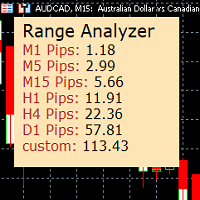
Range Analyzer calculates the Average True Range (ATR) values for different timeframes in pips to give a fast and simple overview about the volatility of the chosen symbol.
Settings are very easy:
bars for calculation: Choose the number of bars for calculation or use the default value (14 periods).
from bar: Choose the youngest bar to start the calculation or use the default setting (0 = current bar). custon timeframe: Choose another timeframe.
You can use it for forex, crypto, indices, comm
FREE

RTrade panel is easy trading panel use both (Stop Loss & Take Profit) based on pips with easy interface can be use by anyone
Panel Feature: -Open position based on (Lot) size
-Auto detect entry price -Use Stop Loss based on (pips) -Use Take Profit based on ( pips ) -Close all position in one button click
i will add more function in future update if you like it write your review
FREE

Proton Gold Risk Engine MT5
OVERVIEW Proton Gold Risk Engine MT5 is a utility for MetaTrader 5 that calculates position size based on user-defined risk parameters. The tool helps traders implement consistent position sizing by calculating required lot size based on account capital, risk percentage, and stop loss distance. This utility is designed for manual traders who manage position sizing themselves.
PRIMARY FUNCTION The utility provides a calculator interface for determining appropriate p
FREE

Change lot size, set TP / SL points and with one click place an order. Track current order count and total running profit. Instant Close all Buy trades, Close all Sell trades or Close All open trades buttons. Trailing SL feature Support for Manual orders. Utility types Risk management, Graphical objects, Panels. Main features
Take Profit and Stop Loss in points (10pip = 100 points) After the price reaches the Take Profit threshold, orders will be closed in profit After the price reaches the St
FREE

Limit Open Positions EA
"Limit Positions EA is a powerful utility tool designed to provide strict control over the number of open positions in your trading account. This Expert Advisor continuously monitors your trading activity and ensures that no new positions are opened once the specified limit is reached. Ideal for traders seeking to mitigate overexposure and manage risk effectively, Limit Positions EA works seamlessly across all symbols and timeframes. Whether you're managing a large port
FREE

BTD2 Market Data Exporter for MT5 BTD2 Market Data Exporter is a high-performance utility script designed to extract M1 historical bar data, symbol properties, and daily reset schedules from MetaTrader 5 into optimized binary files ( .btd ). Built specifically for quantitative research, backtesting engines, and custom analytics pipelines. Key Features UTC+0 Timestamp Standardization: Automatically normalizes server time candles to UTC+0 end-label timestamps, eliminating broker server timezone sh
FREE

Relentless News Guard — Free Economic Calendar and News Warning Panel for MetaTrader 5
Relentless News Guard is a free, on-chart economic calendar panel for MetaTrader 5. It shows the upcoming high-impact news events for the currencies you trade, with a live countdown and a clear on-chart status, so you know when to stay out of the market before you place a trade.
It is free. If it keeps you out of one bad news spike, an honest review helps other traders find it.
It reads the built-in MetaTra
FREE

Dynamic ATR TP Ratio The ATR Take Profit Manager Expert Advisor (EA) automatically calculates and adjusts the take profit (TP) level for your open trades, based on market volatility. This EA uses the Average True Range (ATR) indicator, which measures market volatility, to set your TP level, ensuring it adapts to the current market conditions. What is ATR? The Average True Range (ATR) is a technical indicator that shows the volatility of an asset over a specific period. It measures how much the
FREE

本产品已更名为 PositionRelay TV Slave Subscriber。
请从 MQL5 Market 安装 PositionRelay TV Slave Subscriber。此 TradeEcho 列表已被取代并将隐藏。Market 产品标题无法重命名。
同一 User ID 与云端 API。请卸载 TradeEcho TV Slave Subscriber,然后在每个跟随账户上附加 PositionRelay TV Slave Subscriber。
配套产品:PositionRelay Master Publisher。
关键词:复制交易, 跟单, PositionRelay, 品牌迁移, slave
PositionRelay TV Slave Subscriber 将 PositionRelay 云端的 TradingView 网络钩子信号镜像到您的 MetaTrader 5 跟随账户。它轮询虚拟 TradingView 源账户(非 MT5 主账户),并以 TV_ 票注复制开仓、平仓和修改操作。
配套产品:PositionRelay Master P
FREE

# The Position Monitor — 实时交易信息显示工具(MT5)
---
### 产品简介
**The Position Monitor** 是一款为 MetaTrader 5 平台开发的轻量级实用脚本,可在图表上实时显示当前持仓信息,提供清晰、简洁的 HUD(抬头显示界面)。
它以每 **100 毫秒** 的频率更新当前交易数据,包括:交易方向、开仓价格、止损止盈、持仓量和浮动盈亏 —— 全部可视化显示,无需打开终端窗口。
> 开发者:@TrapFrogBubblez
> 官网:www.trapfrogbubblez.com
---
### 功能亮点
- **实时 100ms 刷新速度** — 快于普通 Tick 更新
- **浮动盈亏颜色区分** — 盈利为绿色,亏损为红色
- **可选图表标线** — 显示入场价、止损、止盈
- ️ **完全可自定义** — 字体、颜色、大小、位置等自由设置
- **自动清理图表对象** — 无残留,无污染
- **超轻运行负
FREE

适用于 MetaTrader 5 的专业仓位规划与交易量控制面板 Position Control Suite 是一款用于 MetaTrader 5 的专业可视化交易规划面板。 它适合希望直接在图表上准备订单、设定精确 Stop Loss 水平,并根据账户货币风险金额自动计算交易手数的交易者。 该工具的核心逻辑非常直接:输入你愿意承担的风险金额,设置 Stop Loss 距离,面板会自动计算当前交易计划所需的仓位大小。 这可以让下单准备流程更清晰、更稳定,并减少开仓前的手动计算。 主要功能 账户货币风险输入: 输入本次交易希望承担的具体风险金额。 自动手数计算: 根据风险金额和 Stop Loss 距离计算交易量。 图表可视化水平: Entry、Stop Loss 和 Take Profit 直接显示在图表上。 市价订单模式: 根据 BUY 或 SELL 自动使用正确的 Bid 或 Ask 执行价格。 挂单模式: 可手动输入或拖动入场价格,准备 Buy Limit、Buy Stop、Sell Limit 或 Sell Stop。 可编辑价格字段: Entry、SL 和 TP 可直接在面
FREE

Great dashboard for market analytics. Help you to analyze the values of the Moving Average indicator and prices.
Using this dashboard you can: find signals from the Moving Average from all timeframes; find signals from the Moving Average from all symbols; check - how far the Moving Average is from the price; check - the Moving Average value has changed; 2 types of signal.
Modes of operation (switched by a button on the graph): current value of Moving Average; the difference between the curr
FREE

Simply deletes all objects from a chart, at once.
Q: Shouldn't I remove the indicator(s) from the chart instead, if I want to get rid of those objects? A: Absolutely. There are rare cases though, when you might end up with residual objects that don't programatically get removed from your chart, due to bugs or some other reason.
Q: Why use this script, when I can press Ctrl+B, list all objects, then manually select and delete each one? A: To save time, really. Maybe you have too many unwanted o
FREE

Обычная трейдец-сетка, но не имеет явного диапазона. Вместо диапазона, в настройках устанавливаются стоп-лоссы. Закрытие происходит по тейк-профиту, так же устанавливаются в настройках. Робот может торговать в любом направлении, как вверх или вниз, так и в обоих направлениях. Робот не проверяет баланс счета, а потому имеет очень высокий риск. По умолчанию стоят настройки для EURUSD пары (не самые лучшие). Рекомендуемый минимальный депозит $200. Имеется вторая версия в которой добавлены дополните
FREE

SmartGuard Trading Journal helps MetaTrader 5 traders build an automatic local trading journal without manual input, external servers or trading actions.
The utility records account snapshots, risk metrics, open positions, pending orders, deal history and real-time trade transactions into local CSV files. These records help traders review equity changes, margin pressure, floating exposure, broker costs and real trading behavior over time.
SmartGuard Trading Journal does not open, close or modi
FREE

Noetrix Lens
Read-only portfolio and performance analytics for MetaTrader 5.
Noetrix Lens turns native MT5 account history into clear portfolio intelligence from a single chart. It is designed for traders who want to understand where results come from without giving an analytics tool control over their trading.
Lens never places, modifies or closes trades. Algo Trading is not required.
## Main features
- Portfolio overview with net P/L, return, trade count, Profit Factor, win rate, average
FREE
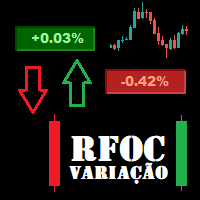
O Produto RFOC Variação Diária apresenta a função de indicar no gráfico a variação, em porcentagem, do preço em relação ao preço de fechamento do dia anterior.
O indicador permite configurar 100% da coloração para variações de alta, baixa e neutra (0.00%).
O painel com a apresentação da variação diária do preço fica fixada na parte superior do gráfico, e se ajusta automaticamente no centro da janela.
FREE

使用此EA可以通过币安交易所的API连接到MT5交易端,利用MT5强大的量化功能实现交易策略的回测。 操作方法: 1、首先 必须 把( http://api2.0.mt5.vip 、 https://fapi.binance.com )这两个 地址 填写到:mt5——工具——选项——EA交易下的WebRequest列表中,否则所有数据无法同步。 2、在导航栏找到EA,双击之后添加币安的API KEY ,保存后KEY自动保存; 3、KEY保存后会出现交易面板,通过MT5下的订单可以实时展现在面板,同事也可以监控币安交易所是否有同样的订单; 4、交易面板只展示订单的总持仓,请仔细核对,以防止漏单; 5、API KEY会自动保存在本地,第二次打开后无需重复输入; 6、目前只能支持BTCUSDT、ETHUSDT、LTCUSDT合约产品 7、最小交易量以币安的最小交易量为准; 8、币安KEY是存储在本地,不会上传到任何第三方,请放心使用; 9、如果想更换KEY ,请直接在EA内修改即可。
FREE

VYXAXIS Dispatcher is a free companion utility for Vyxaxis Tick. It processes WebRequest and supported Push notifications independently from the main Vyxaxis Tick chart workflow. Requires Vyxaxis Tick. VYXAXIS Dispatcher does not generate trading signals, execute trades, or provide a trading strategy. It is designed to separate notification delivery from the main tick-chart processing workflow, helping reduce the possibility of network-related delays affecting Vyxaxis Tick during periods of high
FREE

BS Trade Panel: Revolutionize Your Trading Approach Introducing the BS Trade Panel , the ultimate solution for traders seeking efficiency, speed, and accuracy in their market operations. Crafted with cutting-edge technology, our panel is designed to simplify your trading, making it more intuitive, swift, and effective. Innovative Features: Quick Orders with Shortcut Keys: Execute market orders or pending orders swiftly using configurable shortcut keys. Perfect for traders who need speed when ent
FREE

Close Trade A simple, fast, and practical tool for managing and closing trades in MetaTrader
In the trading world, there are countless methods and strategies for opening and closing positions. Sometimes, due to volatile market conditions or multiple open trades, you need a tool that allows you to close all or specific trades instantly and efficiently. Close Trade is designed precisely for that, a lightweight, reliable, and easy-to-use tool for complete trade and order management in MetaTrader.
FREE

After downloading, message me via MQL5 inbox to receive your FREE User Kit - setup guide, practical checklist, and workflow resources built specifically for XAUUSD traders. After years of trading Gold, one thing becomes clear fast: the P/L number alone does not tell you whether your position structure is clean or quietly building pressure. You can have a positive float while simultaneously carrying too many layered positions, a one-sided exposure that is not hedged, a margin level that is slowl
FREE

ProTrader Command Professional Trading Analytics & Risk Management System Transform your MetaTrader 5 into a professional trading platform with real-time analytics, automated risk management, and performance tracking. Core Features Real-Time Trading Dashboard Professional MT5 Interface Enhancement Live account metrics displayed directly on your chart Performance indicators with color-coded status alerts Position overview showing all trades at a glance Risk status monitoring with visual warnings
FREE

Exaado Capital care If you've been searching for ways to manage Drawdown control, Drawdown Control, Balance protection, or Daily Drawdown Limit related to trading with Prop Firms, FTMO, My Forex Fund, or Funded accounts, then you've come to the right place. Additionally, if you're looking to safeguard your trading account, we can help. Do you struggle with managing your drawdown while trading funded accounts? Our EA is designed specifically for those in your position. Many prop firms have a "Tra
FREE

The utility draws reversal levels using the formulas for each of the selected number of candles:
Pivot = (high + close + low) / 3 R1 = ( 2 * Pivot) - low S1 = ( 2 * Pivot) - high R2 = Pivot + (R1 -S1) R3 = high + ( 2 * (Pivot - low)) S2 = Pivot - (R1 - S1) S3 = low - ( 2 * (high - Pivot)) H = high L = low U = if the candle is bullish, then close. Otherwise - open D = if the candle is bullish, then open. Otherwise - close
On any timeframe.
After a new candle closes on the calculated timeframe
FREE

A fast, clean on-chart trading panel for manual traders. Open market or pending grid orders directly from your chart, manage SL/TP, lot size, trailing, spread and margin — without using the order window. Technical Features One-click BUY / SELL Live Bid / Ask inside buttons SL / TP input (Pips & Points) + quick +/- adjustment Trailing Stop control Pending Grid (Buy/Sell Limit & Stop) Step distance (Pips/Points) Order count Lot multiplier Real-time margin estimate (uses account currency) Live spre
FREE

Position Closer is advisor used to close all orders when the profit will cross specified value either above or below. You can close all orders with one button click.
On panel on chart you have options: Deactivate after close - If Deactivate after close is checked the advisor will disable Close above profit and Close below profit options after orders are closed either on crossing the profit or on hitting the CLOSE ALL button. Close above profit - If Close above profit is checked, the advisor wil
FREE
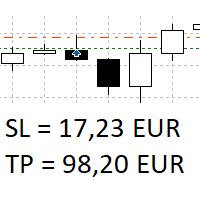
The panel shows all positions and all orders in a small movable window in the chart. Stop loss and take profit are converted into account currency. With the tool you can immediately see the maximum loss in the case of stop loss and the profit in the case of take profit. If there are several positions, a sum is formed. The panel shows either all positions/orders of the current symbol or all existing ones. The data is recalculated for each tick, and moving Stop Loss or Take Profit is immediately v
FREE

中文(简体)
说明 该风险管理工具仅适用于账户余额百分比(%)以及市价订单(buy market 和 sell market)。它不适用于限价订单。 您可以使用账户余额的任意百分比,只需点击设置图标并输入您的百分比值。 使用方法 在您希望设置止损的价格处用鼠标左键点击。将会出现一条黄色线。这条黄色线就是您的止损。然后点击 ''BUY MARKET'' 或 ''SELL MARKET'' 按钮。 如果您不想在图表上创建黄色线,请点击 ''DELETE STOP'' 按钮,然后点击 ''LOCK STOP'' 按钮。要撤销此操作,只需点击 ''UNLOCK STOP'' 按钮(该按钮仅在点击 ''LOCK STOP'' 后才会出现)。 非常重要的说明(必须阅读) 您的订单很可能会因“保证金不足”而被拒绝。这是因为您的风险百分比设置过高,或止损过于接近(离入场价格太近)。因此,该工具会计算出一个较大的手数,从而超过账户可用保证金。 这不是工具错误。这是该工具为您自动计算的风险管理公式的结果: 手数 =(账户余额 × 账户风险百分比)/(止损距离 × 点值) 如何解决: 降低风险百
FREE

The "Takeandstop" script is a powerful tool designed to streamline your trading workflow by automatically setting Take Profit (TP) and Stop Loss (SL) levels on your MetaTrader 5 chart. This script is particularly useful for traders who want to efficiently manage their risk and reward without the hassle of manually calculating and entering these levels. Key Features: Effortless TP and SL Placement: With a few clicks, the script allows you to set predefined Take Profit and Stop Loss levels for you
FREE

Your limits, enforced — not just displayed. Most funded accounts are not lost to a bad strategy. They are lost to one bad session. A bad hour, after a bad morning, when the daily limit was already half gone and nobody was counting. This counts. It sits on your chart, watches the two limits that end most evaluations, and refuses to send an order that would break one. In 30 seconds It is free, and it is not a trial. No expiry, no account limit, no countdown, no pop-up, nothing that switches off a
FREE
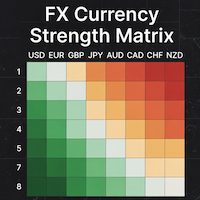
### MQL5 Marketplace Product Description FX Currency Strength Matrix – Professional MT5 Indicator
#### Overview The FX Currency Strength Matrix is a powerful, real-time visual tool that instantly reveals the true strength and weakness of all 8 major currencies in a clean, color-coded matrix format. No more guessing which currency is driving the pair – see the complete strength hierarchy at a glance and trade with institutional-level clarity.
#### Key Features - True 8×8 Currency
FREE

ProTrade Panel —— 极速、精准、专业的 MT5 交易面板 让交易不再繁琐,让执行快人一步。 您是否厌倦了 MT5 原生下单窗口的繁琐步骤?
您是否在剧烈波动行情中因操作缓慢而错失良机?
ProTrade Panel (专业版) 专为手动交易者设计,集成了 一键下单、突破挂单、快速平仓、可视化风控 等核心功能,助您在该出手时绝不犹豫! 核心亮点 自由拖拽,随心所欲 : 独创的 图表锁定技术 。长按标题栏即可拖拽面板到屏幕任意位置,拖拽时K线图表不会乱跑,松手即停。 极速突破挂单 (Breakout Trading) : 专为突破行情设计。只需设置点数距离,一键生成 Buy Stop (突破多) 或 Sell Stop (突破空) 挂单,自动带好止损止盈。 精细化风控管理 : 所有数值(手数、止盈、止损、挂单距离)均支持 + - 按钮微调,告别键盘输入的繁琐。 全方位平仓策略 : 不仅能平多、平空,更能 一键平盈利单 、 一键平亏损单 或 一键全平 ,风险控制尽在掌握。 极致的交互体验 : 双语切换
FREE
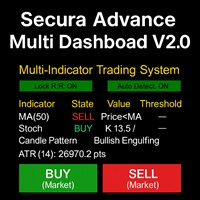
# Secura Multi Dashboard - Advanced Trading Assistant ## **Professional Multi-Indicator Analysis Platform** Secura Multi Dashboard is a comprehensive trading assistant designed for traders who demand clarity, precision, and efficiency. This powerful EA integrates multiple technical analysis tools into a single, intuitive interface, helping you make informed trading decisions without overwhelming complexity.
### ** Key Features:**
** Multi-Indicator Consensus System** - Simultaneous anal
FREE

The utility opens copies of open trades. It is very convenient if you use the Signals service and want to increase the volume of transactions.
Settings: Symbols: all symbols only current symbol Orders: Buy Sell Magic Any Magic Input Magic Lot size Original - lot size from original order; Fix Lot - fix lot size (input); Lot X Mult - lot size X koef; Stop Loss From sender - Stop Loss from original; Without - without Stop Loss; Plus Fix - Stop Loss from original order + fix points; Fix Point -
FREE

MTM Manual Trade Manager is a professional trading dashboard designed for manual traders who want better control over risk and trade management.
This Expert Advisor does NOT open trades automatically. All trading decisions and order executions are fully controlled by the trader.
Main Features: - Manual Buy and Sell execution from the dashboard - Visual Stop Loss and Take Profit using drag & drop lines - Fixed Lot and Risk Percentage position sizing - Automatic Break Even management - Multiple
FREE

OnBoard stats is a panel that show in a single view a lot of usefull information about working orders and trading account. It has 4 different sub-panels (from left to right): Symbols order statistics : it can be found symbols for which there are orders (market or pendings). Symbol with pendings are colored with "Pendings color". Clicking on a specific symbol row, chart will be changed to that symbol. Current symbol statistics : informations about the "current" symbol, the one which is opened in
FREE

G2 DASHBOARD PRO by Ida Bagus Putu Mahardika PROFESSIONAL TRADE EXECUTION & MANAGEMENT DASHBOARD G2 Dashboard Pro is a comprehensive trading management tool that revolutionizes how you place and manage orders. No more manual calculations or switching between windows – everything you need is in one interactive, draggable dashboard directly on your chart. KEY ADVANTAGES 1. CHART-BASED PENDING ORDER PLACEMENT Click on the chart to set your entry price visually Support for all order types: Bu
FREE

Visualize your floating profits and losses in real-time directly above your open order line. Order PnL is a minimalist indicator that calculates and renders the current floating (Profit + Swap) right above the entry price, allowing you to maintain 100% focus on the chart.
Key Points: Dynamic Positioning: The text follows the entry price when scrolling or zooming. Zero Lag Visual: Optimized using a millisecond timer; it does not freeze the interface or overload tick processing. Clean Design: Au
FREE

Bid Ask Spread Display - Real-Time Price Monitor Instantly visualize crucial market pricing information directly on your chart with this lightweight, efficient script. Perfect for all trading styles, this tool provides: Key Features: Real-Time ASK Price (Red) Real-Time BID Price (Green) Spread Display in Points (Blue) ️ Fully Customizable : Position, fonts, colors High Performance : Updates 10x/second Clean Layout : Professional three-line display Self-Cleaning : Automatically
FREE

Red Hot Volume By ZeeAM Khan Contact for Set files or see the Screen Shots
WhatsApp: Text only +447716409196
Best for XAUUSD on All Brokers
Minimum and Safest Balance is 1100$ at medium Risk Advanced Volume Spread Analysis (VSA) Trading Indicator Red Hot Volume By ZeeAM Khan is a professional Volume Spread Analysis (VSA) indicator designed to identify institutional activity, potential market reversals, stopping volume, climactic volume, and high-probability trading opportunities through advance
FREE

AlgoForex Smart Trade Panel Title: AlgoForex Smart Trade Panel - Visual Risk Management & Trading Category: Experts / Trading Utilities Price: Free Overview Take full control of your trading with the AlgoForex Smart Trade Panel — a lightweight, professional, and visually interactive trading assistant designed for both beginners and advanced traders. Tired of manually calculating lot sizes or struggling to place precise Stop Loss and Take Profit levels? This utility empowers you to
FREE

SmartRescuer 是一款机构级的先进交易辅助工具,旨在自动解套手动仓位、管理浮动回撤并锁定组合利润。 核心功能 防虚假突破引擎: 利用唐奇安通道 (Donchian Channels) 与 ATR 回调测试,有效避免假突破。 智能恢复策略: 支持区域对冲、回调加仓及智能混合执行模式。 分批损耗剥离: 利用浮动恢复利润,逐步平掉表现最差的亏损订单。 全自动利润管理: 内置自动止盈 (Auto-TP)、保本保护 (Break-Even) 及美元追踪止损。 一键 SOS 大师模式: 瞬间接管并解救图表上的所有仓位。 多资产通用: 完美适配黄金 (XAUUSD)、外汇、加密货币及股指,适用于任何时间周期。 高级黑曜石黄金仪表盘: 提供实时视觉指标、点差监控及交互式控制按钮。 风险提示 外汇、黄金及差价合约 (CFD) 交易具有高风险,可能并不适合所有投资者。SmartRescuer 是一款旨在协助仓位管理与风险控制的辅助工具,无法保证盈利。在实盘使用前,请务必在模拟账户中进行充分测试,并确保根据账户余额设置合理的仓位大小。
FREE

SIMPLE AND QUICK CHART CLEANUP SCRIPT - FREE FOR ALL - EASY TO DRAG AND DROP ONTO THE CHART - A MUST HAVE IN MY EYES
Everybody loves to draw on a chart! But cleaning is nobodies favor. Most of the time it will be faster to dump all and redraw the important part. Repetition makes you good! ALWAYS think about that! KEEP IT GROWING, ;-) I wish you a good day, Traders!
If you need something, send me a message. Best wishes to you from Vienna!
FREE

Relentless Trade Journal — Free Trade Statistics for MetaTrader 5
Most trade journals flatter you. They add up your closing profits and skip the commission you paid on entry, so they show a rosier number than the truth. You think you are breaking even when you are actually losing to costs.
Relentless Trade Journal shows you the honest picture, right on your chart.
It is free. If it shows you one cost you were missing, an honest review helps other traders find it.
It is a non-trading utility.
FREE

Try turning dust to gold with Reverse copier! Unprofitable EA or strategy can become profitable with reversing the direction of it's trades. As of now only MT5 → MT4 bridge is available, new functions will be added accordingly. EA's that work best with Reverse trade system is single-shot or scalping EA's.
How it works:
When a trade is executed on Master account, Reverse copier sends special log to the common txt file with a command to "open/close, buy/sell, symbol, volume...etc". Reverse slave
FREE

The AllClosedMT5 utility in the form of an expert. The utility is designed for closing all open positions simultaneously based on the total profit (in the deposit currency) of all open positions. The utility can be attached to any chart with any trading instrument.
Parameters Profit - the total positive profit in the deposit currency, at which all open positions are closed (profit). Stop - the total negative profit in the deposit currency, at which all open positions are closed (loss). The valu
FREE
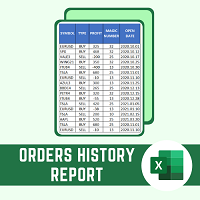
This script will create a report with all history orders in CSV format. The report is useful for those who run multiple EA's with different magic numbers in the same account. You can define some filters to generate your orders history report: 1) Initial date for assets in orders history. 2) Final date for assets in orders history. 3) Asset name. 4) Orders magic number. 5) Add balance/costs.
QUESTIONS ABOUT THE INSTALLATION OF PRODUCTS AT META TRADER You can also find some instructions on how
FREE

Short description :
TheTrendHunterMax is a LIMITED VERSION tool that can be used either as a trading robot for automated trading or just a signal provider for manual trading.
As an EA, it uses the techniques we usually employ in trading like determining the highs and lows on the trading chart. With this, it determines the trend convergence and divergence in the chart. Combined with the volatility, price movements, it analyzes the possible order type that can be most profitable. By default,
FREE

手动交易助手 TP (Manual Helper TP) 此工具旨在帮助您保护利润并降低风险。 它会为您的交易设置止损 (Stop Loss),并管理追踪止损 (Trailing Stop)。 如何使用 将其附加到您交易品种的图表上,它将根据您的规则处理您的头寸。 所有设置均以点数 (points) 为单位。根据您的交易品种和策略进行调整非常重要。默认设置适用于黄金 (XAUUSD)。对于剥头皮交易 (scalping),最好使用较小的止损 (SL)、保本 (BE) 和止盈 (TP)。 此智能交易系统 (EA) 绝不会自行开设任何交易。 它唯一的工作是根据您的个性化设置来管理您现有交易的止损。它是您手动交易或管理其他 EA 所开交易的强大助手。 主要功能 初始止损: 如果开仓时没有设置止损,该工具将根据您的设置自动添加一个。 保本止损 (Secure Breakeven): 一旦交易朝对您有利的方向移动,它会自动移动您的止损以锁定少量利润。 高级双层追踪止损: 使用两个级别的追踪止损。开始时使用较宽的追踪距离让利润奔跑,之后随着趋势的增强使用较窄的追踪距离来保护您的收益。 适用于任何交
FREE

OB FVG Trade Copier: Unified Master & Slave EA Version: 2.00 Type: Trade Copier / Risk Management Utility Compatibility: MetaTrader 4 & MetaTrader 5 (Cross-compatible codebase)
Overview The OB FVG Trade Copier is a professional-grade, unified trade copying system designed to mirror trades between Master and Slave accounts seamlessly. Built with a unified architecture, a single EA file serves as both the sender (Master) and receiver (Slave) simply by toggling the EA Mode in the settings. It uti
FREE

MT5 Tick History Sync – Real Tick Downloader, History Verification & Data Export Download. Synchronize. Verify. Export. Make Every Backtest Count. Are you confident that your MetaTrader 5 backtests are using complete real tick history? Missing historical ticks can compromise the reliability of your backtesting results, especially when testing scalping strategies, high-frequency trading systems, and Expert Advisors that depend on precise price movements. MT5 Tick History Sync by Zistilo is a prof
FREE

JVH Trading Information Panel – Professional Account Dashboard (MT5) The JVH Trading Information Panel is a clean, accurate, and professional account monitoring dashboard for MetaTrader 5.
It gives traders full control and insight into account performance, risk, drawdown, and trading statistics — all in real time , directly on the chart. Designed for manual traders, funded traders, scalpers, and algorithmic traders , this panel focuses on clarity, correctness, and stability . What This Indic
FREE

Overview Sessions Duck is a highly optimised, resource-efficient MetaTrader 5 indicator designed to automatically visualise the core global trading sessions (Asian, London, and New York) and display live, synchronised timezone data directly on your chart. Built specifically for performance, zero lag, and clean chart aesthetics, Sessions Duck provides day traders, scalpers, and session breakout traders with immediate market liquidity context without compromising terminal responsiveness—even when
FREE

Strangely enough, everyone seems to have their own idea of how you should measure support and resistance. Not every support and resistance zone is strong. The strongest support or resistance levels will more often than not be with trend . What this means is, if we are in a bull trend, pullback levels to support will more often than not be ‘stronger‘ than resistance levels above. These expert advisors use several mathematical models and statistical models to determine the strongest support and r
FREE

Pulse Trade Dashboard is an interactive trade management panel for MetaTrader 5, built for traders who want full control of their account without leaving the chart. Attach it to any chart and get a real-time overview of your balance, equity, open positions, and floating P&L — all updating live. Place market orders instantly with the one-click BUY and SELL buttons, adjusting your lot size, stop loss, and take profit directly on the dashboard without opening a single settings menu. What's included
FREE

Setting a chart up exactly the way you like it takes a few minutes. Doing it twenty times takes an afternoon. Chart Cloner opens exact copies of the chart you drop it on. Symbol, timeframe, colours, scale and chart mode always carry across, because that is what makes a copy a copy. You decide whether the attached Expert Advisor, the indicators and the drawn objects come with them. Point it at your Market Watch instead of a copy count and it opens one chart per symbol, every pair wearing the same
FREE
MetaTrader市场是 出售自动交易和技术指标的最好地方。
您只需要以一个有吸引力的设计和良好的描述为MetaTrader平台开发应用程序。我们将为您解释如何在市场发布您的产品将它提供给数以百万计的MetaTrader用户。
