 MetaTrader 5
 エキスパート
 インディケータ
 ライブラリ
ライブラリ
 ユーティリティ
 ウィジェット
 ルール
ルール
YouTubeにあるマーケットチュートリアルビデオをご覧ください
ロボットや指標を購入する
仮想ホスティングで
EAを実行
EAを実行
ロボットや指標を購入前にテストする
マーケットで収入を得る
販売のためにプロダクトをプレゼンテーションする方法
MetaTrader 5版無料取引ユーティリティ - 16
 以下はMetaTrader5での取引を簡素化する取引プログラムです。ユーティリティにカーソルを合わせると、その説明と目的が表示されます。
同じ口座で複数のEAを稼働させていると、どの戦略が実際に資産の増加に寄与しているのか、あるいは減少を招いているのかを一目で把握するのが難しくなります。
Phoenix Magic Number Dashboardは、オープンおよびクローズ済みの取引をマジックナンバーごとに自動的にグループ化するため、各EAのリアルタイムのパフォーマンスとクローズ済みのパフォーマンスを並べて確認できるほか、口座全体の合計も確認できます。
マルチEA口座を明確に管理する方法
- アクティブなマジックナンバーを自動検出、または手動リストを追跡
- EAごとの建玉、建玉利益、決済済み取引、決済済み利益
- オプションの銘柄数列:各EAが取引している銘柄数を表示
- 口座全体の集計値と最終更新時刻を表示するサマリー行
- 色分けされた損益の閾値
アラート
EAのパフォーマンスが、設定した損益の閾値を超えた際に、サウンドおよびプッシュ通知が送信されます。
Phoenix Magic Number Dashboardの活用方法:
- 現時点で実際に口座のパフォーマンスを
FREE
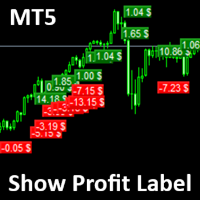
Show Label
Show your profit or loss next to the candle. This is a helpful tool if an EA don't have this feature build in. Support and questions via MQL5 product comments. For questions, updates, and to connect with other traders, join my official MQL5 group ForexEAandMore
Settings: Font color Background color for profits Background color for losses Font size Horizontal shift from candle (pixels) Vertical shift from candle high/low (pixels) Magic number filter (0 = all trades) Comment filter
FREE

SmartT AI Levels (MT5) is a professional utility that displays trading levels generated by SmartT’s autonomous AI Traders - fully independent algorithmic models, each with its own unique trading behavior, logic, and risk pattern.
Every AI Trader evaluates the market separately and produces its own Entry, SL, and TP levels.
This tool does not merge or combine models. It simply retrieves the selected AI Trader’s output and displays its exact levels on your MT5 chart.
This tool is not free and re
FREE

Enhance Your Trading with the Support and Resistance Alert! Ready to take your trading to the next level? Introducing the Support and Resistance Alert—the ultimate tool to precisely identify market turning points! Key Features: Dynamic Support and Resistance Lines: The indicator automatically draws support and resistance levels based on local lows and highs, giving you clear guidance on where the market is likely to reverse. Real-Time Alerts: Stay ahead of the market with customizable alerts. G
FREE

ティックレベルの価格追跡とチャートの遅延ゼロを実現した、軽量でリアルタイムなトレーディングセッション・ビジュアライザー。 Session Overlays Mastery Core は、チャートを雑多にすることなく、またターミナルを重くすることなく、アジア、ロンドン、ニューヨークのトレーディングセッションをクリーンかつ機関投資家レベルのビューで表示します。 ローソク足が確定するたびに削除、再描画、チラつきを繰り返す従来のセッションインジケーターとは異なり、Session Overlays Mastery Core は過去のセッションを一度だけ処理し、アクティブなセッションを毎ティックリアルタイムで追跡します。激しい市場のボラティリティやインパクトの大きいニュースによるスパイクが発生した場合でも、価格がアクティブなオーバーレイの境界線を突き破って外に漏れ出すことはありません。 主な機能 リアルタイム・ティックレベルの価格収容機能: アクティブなセッションボックスが、リアルタイムの価格スパイクに合わせて瞬時に動的に伸縮します。ローソク足がオーバーレイの境界外に漏れ出ることはありません。 チ
FREE

A2 Trade Manager Finale EA is an EA that made for you that like SCALPING, HEDGING, or LONG TIME TRADING. FREE FOR DEMO ACCOUNT ONLY!!!!
Features : TRADING INFORMATION Total Equity information Running Total Profit / Loss information Margin Level information Running Profit / Loss each trade BUY and SELL (if Hedging) Total Lots information Current timeframe remaining Daily Profit / Loss information All time Profit / Loss information Local Currency conversion
TRADE MANAGER BUTTON Order Sell / Buy
FREE

QuantumFX Trade Manager Advanced Order & Risk Control Utility for MT5 QuantumFX Trade Manager is a powerful, professional-grade trade management utility designed for traders who want absolute control over execution, risk, and position handling — directly from an intuitive on-chart panel. Built for manual, semi-automated, and discretionary traders , QuantumFX transforms MetaTrader 5 into a precision trading workstation , allowing you to manage trades faster, safer, and smarter. What
FREE

Middle Line — ポジション管理の鍵! このユニークなMetaTrader 5用スクリプトは、2つの重要な平均価格レベルを自動で計算し、簡単かつ効率的にポジションを管理できるようにします: 総平均価格 :すべての未決済ポジションを考慮し、取引全体のバランスポイントを表示します。 最も有利なポジションを除いた平均価格 :リスクを最小限に抑えるため、どこでボリュームを調整するべきか判断できます。 平均価格レベルは即座にチャート上に表示されます: 実線 :総平均価格を表します。 破線 :最も有利なポジションを除いた平均価格を表します。 Middle Line を使えば、ボリュームを減らすべきポイントや最良のポジションを自信を持って保有する方法をすぐに見つけることができます。 なぜトレーダーはMiddle Lineを選ぶのか? 時間を節約 :瞬時に計算され、チャート上に重要なレベルが表示されます。 正確な分析 :各ポジションのボリュームを考慮し、最大限の精度を実現します。 汎用性 :どんな金融商品や取引スタイルにも対応します。 簡単操作 :結果はチャートとターミナルウィンドウの両方に
FREE

Z TradeInfo — торговая панель с виртуальными TP/SL и линией безубытка Z TradeInfo — удобная торговая панель, которая совмещает контроль позиций, быструю торговлю одной кнопкой и наглядное управление рисками прямо на графике. Информационная панель Баланс и прибыль дня (рассчитывается по истории сделок за текущий день, включая комиссию и своп); Текущий спред и цена символа (цена окрашивается в зелёный/красный в зависимости от направления движения); Настраиваемые цвета, шрифт и прозрачность; Панель
FREE

Advanced History Collector Panel (MT5 履歴統計ツール) Advanced History Collector Panel は、MetaTrader 5 (MT5) 専用に開発された、高度な口座分析および可視化ツールです。膨大な取引履歴を瞬時に解析し、直感的なグラフと詳細なレポートで表示します。 主な機能: 多角的なデータ分析 : 日次・週次ごとの損益、ロング・ショートの比率、ロット数、入出金履歴などを正確に集計。 ダイナミック・チャート : 損益曲線(ラインチャート)、資産推移、注文数分布(ヒストグラム)など、多彩なグラフ表示に対応。 リスク管理の強化 : 最大含み益や最大含み損を自動算出し、トレードの「質」を客観的に評価。 自由度の高いカスタマイズ : フォントサイズ、カラー設定、パネルの大きさなどを自由に調整可能。高解像度モニターにも完全対応。 データの自動保存 : 履歴データをファイルに保存・読み込みが可能で、継続的なパフォーマンス管理を実現。 トレード手法の改善や資金管理の最適化を目指すトレーダーにとって、最も信頼できる分析パートナーとなる
FREE

This utility keeps a watchful eye on your trading terminals and ensures that you are notified if any of them are disconnected. Simply attach the utility to a chart and connect to a monitoring service who can notify you.
We use UptimeRobot for both VPS and terminal monitoring; however, any service supporting heartbeat monitoring can be employed.
Many such services offer free plans and various notification methods, such as Cronitor.io
FREE

Proton Trade Assistant MT5
OVERVIEW Proton Trade Assistant MT5 is a utility for MetaTrader 5 that provides streamlined position management functions accessible directly from the chart. This tool is designed for traders who manage positions manually and require faster execution of closing and risk management operations.
PRIMARY FUNCTION The utility provides one-click access to commonly used position management operations that normally require menu navigation in MetaTrader 5. All operations exe
FREE

The utility is a checklist where you can write all the rules of your trading system and keep it on the chart in front of your eyes. As a rule is executed, mark it with a tick. To the right of each rule, you can write the "strength" (percentage) of the rule. And if there is a tick next to the rule, then all "forces" are summed up in the "Total" line.
For the convenience of visual perception, you can set the color for displaying the “Total” value.
Panel options: Title - The title of the panel N
FREE

Free Slave Version – Remote Trade Receiver MT5.
This is the FREE Slave version of our professional Remote Trade Copier system. It allows you to receive trades from a Master account running our full Copy Trade solution. Designed for simplicity and reliability, this version is read-only and cannot send trades or operate independently.
Key Features: One-click setup – simply connect to the Master. Fast and accurate order copying. Supports all symbols, order types, and brokers. Minimal resource us
FREE

Quantum Simulator – Discover the Power of Quantum Dynamic Risk Quantum Simulator is an Expert Advisor designed to demonstrate the effectiveness of the Quantum function, fully integrated into the RiskGuard Management system. Through a simple interface, you can simulate an equity curve starting from a fixed balance of €100,000 , using your own custom statistics: Win Rate (%) Average Risk/Reward Ratio Number of Trades Maximum Allowed Drawdown (Optional) Minimum Accepted Drawdown The EA performs a
FREE

Minimalist Manager is a manual trade-management panel for traders who place their own entries and want precise, fast control over risk, stops, and targets directly on the chart.
It is a discretionary tool. You decide when to enter; Minimalist Manager handles the sizing, stop-loss, take-profit, break-even and trailing mechanics around your decision. Trading several accounts? Its Trade Copier places the same trade on all of them, each at its own risk.
Key features
Risk-based position sizing. Se
FREE

Look Back My Trading History Look Back My Trading Historyは、MT5の取引履歴を強調表示することにより、これまでのエントリーポイントをトレーダーが簡単に振り返ることを可能にするためのツールです。 トレーディングを学び始めたばかりの人にとって、トレーディングスキルを向上させるための最も効率的な方法の1つは、自分の取引履歴を振り返ることです。 ただし、MT5チャートに表示される標準の取引履歴の矢印は小さすぎて即座に見つけることが難しく、トレーダーは自分が行った取引、とりわけ過剰取引などの愚かな間違いについて再認識する機会を失いがちです。 トレードの良し悪しに関係なく取引履歴を明確にして、それらを直視した上で深い考察を繰り返すことで、長期的な目線で見た場合にトレーディングに対する正しい姿勢を養う事ができます。
Look Back My Trading Historyの利点 取引履歴を振り返る最も簡単な方法であること 自らの取引履歴を振り返り、過去から学ぶ、そのためのルーティン構築のきっかけを提供します。 最小限かつ重要な情報を提供
FREE

Multi-TF Alert System - プロフェッショナル・マルチタイムフレーム・アラートパネル 説明 MetaTrader 5用プロフェッショナル・マルチタイムフレーム・アラートパネル Multi-TF Alert Systemは、常にチャートを切り替えることなく、異なるタイムフレームで複数の市場を追跡する必要があるトレーダーのために設計された包括的なモニタリングツールです。外国為替、ゴールド、インデックス、または暗号通貨を取引する場合でも、このパネルは価格が最近の高値と安値に対してどこに位置しているかの明確で整理されたビューを提供します。 システムは5つのタイムフレーム(M15、M30、H1、H4、日足)で最大10のシンボルを同時に監視します。各組み合わせについて、設定可能なルックバック期間における最高価格と最低価格を計算し、現在の価格がこれらのレベルにどれだけ近いかを追跡します。価格がこれらの重要なレベルに到達または接近すると、サウンドアラート、ポップアップメッセージ、またはモバイルデバイスへのプッシュ通知から選択した方法で即座に通知を受け取ります。 コア機能 マルチマー
FREE

TimeBar TimeBar は、バーが閉じるまでの残り時間、バーが開いてからの経過時間と現在時刻を表示するシンプルな情報インジケーターです。 見やすくするために、グラフの左上隅にコメントの形で表示する方法と、グラフィック オブジェクトの形で表示する 2 種類の表示モードが追加されました。
利点 フォントの選択 フォントサイズ。 どれでも設定できます。 コメントすると小さすぎるので オブジェクトを移動できます。 マウスをダブルクリックして任意の時間を選択し、チャート上の任意の場所に移動すると、通常どおり更新され続けます 視覚的な警告。 現在のバーが閉じるまでの指定秒数を設定でき、その秒数に達すると、設定で指定した警告色に変わります 設定 表示する時間を選択します 各時刻の色 (グラフィック オブジェクトの場合) バーがまもなく閉店することを通知するアラート 取引システムへの追加として TimeBar インジケーターを使用する
市場にある他の製品もお試しください https://www.mql5.com/ru/users/capitalplus/seller
FREE

Risk Rule Sentinel is a risk-management utility. It does not open trades and it does not predict anything. It watches the positions that are already open on your account and enforces four rules on them, so one careless click cannot turn into an account-sized loss.
WHAT IT ENFORCES
1. Maximum lot size. Any position larger than your limit is reported, or closed. 2. Maximum risk per position. Computed from the position's real stop loss, as a percentage of your account balance. 3. Mandatory st
FREE

Mentoria Individual — Manual Trade Execution and Risk Management Mentoria Individual is a free manual trade execution and risk management tool for MetaTrader 5, developed by Gean Patrick. It combines lot size calculation, order preparation, visual Stop Loss and Take Profit adjustment, and position management in an interactive panel directly on the chart. The tool is designed for traders who want to maintain full control over their trading decisions. It does not provide trading signals or execut
FREE

This tool is designed to quickly calculate the lot depending on the Stop Loss.
The control is done by hot keys
By default:
1 - Limit order price level
2 - Stop Loss Level
3 - Take Profit Level
Space Bar - Open an order
Escape - Cancel All 9 - Open 2 orders
Market Order
To open a Market order, click (2) and set up Stop Loss with the mouse If you want to put Take Profit - click (3) and set up Take Profit with the mouse
FREE

Easy and simple tool which close all trades in defined point of time. It can also close all open trades when opened positions reach defined target profit or stop loss.
For all pairs, indexes etc. Works with all instruments.
All types of orders. All charts.
Users inputs:
- close time (hour,min,sec)
- take profit (in users currency)
- stop loss (in users currency)
Save & Load settings option.
Fast, simple and reliable.
Check out other tools provided by our team!
FREE

Rojeryo Trade Manager ATR is a MetaTrader 5 utility Expert Advisor designed to manage already opened trades.
The tool does not generate entry signals and does not open trades by itself. It is built for traders who prefer manual entries but want automatic trade management after the position is opened.
The EA can automatically set protective Stop Loss and Take Profit levels, move the Stop Loss to breakeven, close part of the position, and apply trailing stop management according to the selected
FREE

RealCost Gold Session Zones MT5 is an entry-level session map utility for gold traders using MetaTrader 5. It draws Asia, London and New York session zones on the chart and shows a compact live dashboard for current-session context.
The utility is designed for visual market timing, manual preparation and quick broker-condition checks. It does not trade, does not open or close positions, and does not provide buy or sell signals.
Main features: - Asia, London and New York session zones. - Config
FREE

RiskCompass Panel MT5 1. The Problem and the Approach You have a position idea, and the first real question is always the same: how much of this account am I about to put at risk, and can the account carry it. The information that answers that question is scattered across half a dozen windows. Balance is on one tab. Margin level is somewhere else. The spread you just paid is visible only if you look at the instrument row. The server day, which decides whether your daily loss limit has already be
FREE
コピー機->便利で高速なインターフェースインタラクション、ユーザーはすぐに使用できます ->>>> WindowsコンピュータまたはVPS Windowsでの使用を推奨 特徴: 多様でパーソナライズされたコピー取引設定:1. 異なるシグナルソースに異なるロットモードを設定できます。2. フォワードコピー取引とリバースコピー取引に異なるシグナルソースを設定できます。3. シグナルはコメントで設定できます。4. 契約ロットに応じてロットを調整するかどうか 多様でパーソナライズされたコピー注文設定2:1.品種ごとに異なるロットモードを設定できます2.順方向コピー注文と逆方向コピー注文に異なる品種を設定できます3.コメントでシグナルを設定できます4.契約ロットに応じてロットを調整するかどうか
コメントフィルタリング、MAGICフィルタリング、シグナルロットフィルタリング、ローカル製品フィルタリング 勤務時間設定 逆同期SLAVE終了 注文バインド機能: 任意の注文を設定されたシグナルソース注文にバインドできます (テーブルをダブルクリックして編集します) アカウントリスク管理 基本機
FREE
Introduction to Order Risk Management EA ORM EA is specially designed for fast and accurate market order execution to be used with our Price Action and Econometric Trading strategies listed below. ORM EA is fully automatic and ORM EA is also very easy to use. ORM EA is totally free of charge. You can also use this robust order execution feature of this ORM EA for any other your own trading strategy.
Trading Strategy Guide Order Risk Management EA provides the guide for the risk management for y
FREE

Backtesting PRO: Make a review of the market based on the available history of your broker. Practice your strategies and verify them in seconds. Remember to maintain excellent risk management, check your days and hours of operation. R emember to start it in the shortest period to operate. Any questions or suggestions can be sent to this email: autoeducacion0110@gmail.com
FREE

Free for a limited time, grab it now! Please, if you like this utility, leave a review, it helps us build more tools like this.
Many retail traders fail because they enter trades when a market session is already "exhausted." Session Monitor gives you the context you need by comparing current price movement against historical session averages.
The utility calculates the absolute range (the distance between the highest and lowest price reached) during the session. It is a MT5 utility that trac
FREE

GRInvest Breakeven Manager is an MT5 trade-management Expert Advisor designed to manage existing open positions after entry. Its purpose is to automate breakeven protection, staged partial closes, trailing stops and position management while still giving the trader full manual control over individual trades. The EA does not need to open trades itself . It can manage manual trades and trades opened by other Expert Advisors according to the selected symbol, direction and magic-number filters. The
FREE

LayerGuard Pro - Professional Trade Management EA for MetaTrader 5 Product Description LayerGuard Pro is a sophisticated Expert Advisor designed exclusively for MetaTrader 5 that provides professional-grade trade management automation for your existing positions. Unlike traditional EAs that generate signals or open trades, LayerGuard Pro focuses on one critical aspect of trading: intelligent, automated management of Take Profit and Stop Loss levels. Core Philosophy: Management, Not Generation La
FREE

One-Click Trade Manager for MetaTrader 5 The Close Manager Buttons EA is a powerful utility designed to give you full control of your open positions and pending orders with just one click.
Forget about manually closing trades one by one during fast market moves—this EA does it instantly, safely, and efficiently. Key Features Close All Trades – instantly close every open position Close Only Buy Trades – exit only BUY positions while keeping SELL trades running Close Only Sell Trades – exit only
FREE

TREND SCANNER Stay With the Trend. Trade With Confidence. Trend Scanner analyzes the market to determine trend direction and strength using a combination of technical indicators. The system combines EMA 150/365, EMA 9/21, RSI, MA to confirm market direction and filter out weak or sideways conditions. Key Features: Bullish and bearish trend detection; EMA 150/365 and EMA 9/21 analysis; RSI confirmation; MACD momentum analysis; ️ ADX ranging-market filter; Trend strength measur
FREE

TRADE PANEL MASTER — Know Your Risk Before You Click
Open your chart. See your panel. Trade with confidence.
Before you click Buy or Sell, Trade Panel Master shows you exactly what you risk, what you gain, and your R:R ratio — in real time. No mental math. No surprises.
FEATURES
- Lot sizing with real-time margin display - SL & TP in 3 modes: Points / Money / Price - Au
FREE

1秒が重要な場面での高速操作 このトレードパネルは、 秒足を含むカスタムチャート での使用を前提に設計されています。
カスタムチャートの背後にある 実際の取引シンボルを自動で正確に認識 し、
手動での紐付けや追加操作なしに 、そのシンボルへ直接取引を実行します。 このパネルが解決するのは、ただ一つの本質的な課題です。
「判断」と「実行」の間の距離を最小限にすること。 余分なウィンドウはありません。
確認ダイアログもありません。
画面を切り替える必要もありません。 素早いエントリー このパネルでは、主要なトレード操作を チャート上から直接 行えます。 Buy / Sell — ワンクリックでの成行エントリー LIMIT — ダイアログなしでの指値注文設定 ボタンを押せば、即座に実行されます。
メニューを探す必要もなく、チャートから意識を外すこともありません。 チャート上での SL / TP 設定 Stop Loss や Take Profit の設定は非常に直感的です。 ポジションのエントリーラインをクリックし、表示される補助ラインを目的の価格レベルまでドラッグするだけで設定できます。
FREE

手動ヘルパーTP (Manual Helper TP) このツールは、利益を保護し、リスクを低減するために設計されています。 取引のストップロスを設定し、トレーリングストップを管理します。 使用方法 取引するシンボルのチャートにアタッチ(適用)すると、あなたのルールに従ってポジションを処理します。 すべての設定はポイント単位です。お使いのシンボルと戦略に合わせて調整することが重要です。デフォルト設定はXAUUSDで動作します。スキャルピングの場合は、より小さなSL、BE、TPを使用することをお勧めします。 このエキスパートアドバイザー(EA)は、決して自動で新規取引を開始しません。 その唯一の仕事は、あなたの個人的な設定に基づいて既存の取引のストップロスを管理することです。手動取引や他のEAによって開かれた取引を管理するための強力なアシスタントです。 主な機能 初期ストップロス: ストップロスなしで取引が開始された場合、このユーティリティは設定に基づいて自動的にストップロスを追加します。 ブレークイーブン保護: 取引が有利な方向に動くと、自動的にストップロスを移動させて少額の利益を確定
FREE

The Quick Style utility is designed for facilitation and acceleration of working with the properties of graphical objects. Left-click a graphical object while holding the Shift key to open the quick access window for configuring the object properties. In the window, you can change the color, style and line width with one click, including those of other graphical objects. All changes are displayed immediately. To close the Quick Style , simply click the free space on the chart. The utility is eas
FREE
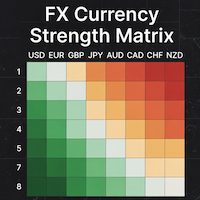
### MQL5 Marketplace Product Description FX Currency Strength Matrix – Professional MT5 Indicator
#### Overview The FX Currency Strength Matrix is a powerful, real-time visual tool that instantly reveals the true strength and weakness of all 8 major currencies in a clean, color-coded matrix format. No more guessing which currency is driving the pair – see the complete strength hierarchy at a glance and trade with institutional-level clarity.
#### Key Features - True 8×8 Currency
FREE

One Click Close Lite 是一款專為 MT5 手動交易者與多持倉使用者設計的簡易平倉工具。
當帳戶中同時存在多張交易持倉時,不需要再逐張點擊關閉,只需要透過圖表上的按鈕,即可快速執行批量平倉。
工具提供三個主要功能:
CLOSE ALL
一鍵關閉帳戶目前所有持倉。
例如帳戶中同時存在:
XAUUSD BUY EURUSD BUY GBPUSD SELL USDJPY BUY 按下:
CLOSE ALL
工具會依序嘗試關閉目前帳戶中的全部持倉。
---
CLOSE BUY
只關閉帳戶目前所有 BUY 持倉。
例如:
XAUUSD BUY EURUSD BUY GBPUSD SELL USDJPY BUY
按下:
CLOSE BUY
則會關閉:
XAUUSD BUY EURUSD BUY USDJPY BUY
而:
GBPUSD SELL
會保持不變。
CLOSE SELL
只關閉帳戶目前所有 SELL 持倉。
BUY 持倉不會受到影響。
---
即時持倉資訊
工具面板會顯示目前帳戶的基本持倉資訊,包括:
* 總持倉
FREE

Profit & Loss Display - MT5 Panel
On chart panel to display profit and loss per product over specified time period View P/L for EA trades only or also with manual trades Note this is a panel, not an indicator or algorithm, it simply displays profit and loss from account history
//---- Install ----// After download, attach indicator to chart from the markets folder which is in navigator window (Cntrl N)
//---- Study ----//
Set target profit for product per week/specified period Set loss limi
FREE

Customize your charts with this simple utility. Choose in the 24 pre-built color sets, or use your own colors, save them to re-use them later. You can also add a text label on your chart.
--- Chart Colors-- Color Set : 24 prebuilt color sets (select "Custom" to use colors below) Background color Foreground color Grid color Chart Up color Chart Down color Candle Bull color Candle Bear color Line color Volumes color --- Label--- Text Label : Type the text you want to appear on the chart Label P
FREE

TRADE WITH MAGIC – Professional One-Click Trading Panel
| Crystal AI Systems
Trade With Magic is a fast, lightweight, and highly efficient one-click trading panel designed for traders who require precise manual execution and full control over magic numbers, comments, and risk parameters. It is suitable for both manual trading and advanced EA testing environments where ac
FREE

visual trade planner for MetaTrader 5. It draws multi-timeframe ATR reward and stop zones on the chart so you can judge distance and payoff before you place the trade yourself. It does not send, modify, or close orders. Motive A single ATR on the chart timeframe often hides the larger and smaller ranges a trade is actually working against. This EA stacks three take-profit slices, each from its own timeframe, period, and multiplier, then places an ATR stop and an optional fixed stop beside them.
FREE

All in one Multipurpose Telegram Trade Management , Manage and Copy Trades on the go From Telegram Pro Version MT5: www.mql5.com/en/market/product/95742 Pro Version MT4: www.mql5.com/en/market/product/85691
Execute Trades on mobile with fast execution When away from desktop MT5, or scalping the market with mobile device, or needed to copy trades from telegram groups while away, or doing some other activities, Telegram EA Manager is an effective tool to perform any trade operation with swift
FREE

Unlock lightning-fast trade replication across multiple MetaTrader 5 accounts on the same PC or VPS. The AW Local Trade Copier is designed for speed, reliability, and ease of use. Using an advanced shared-file architecture, it achieves near-zero latency (under 100ms) without locking your terminal or overloading your CPU. ️ IMPORTANT NOTICE: This system requires TWO files to work together (Master and Slave).
Get the FREE Slave version here: AW Trade Copier Slave KEY FEATURES Ultra-Fast Ex
FREE

Precision Pro Trading Assist - Ultimate MT5 Execution Tool Elevate your trading with the Precision Pro Trading Assist, a high-end MetaTrader 5 Expert Advisor designed for professional traders who demand speed, discipline, and flawless risk management. This all-in-one execution panel streamlines your workflow, allowing you to focus on the charts w hile the EA handles the math and protection. Key Features Advanced One-Click Execution Execute trades instantly w ith pre-calculated Risk, Stop Loss,
FREE

Binanceは世界的に有名な暗号通貨取引所です!暗号化されたデジタル通貨市場のリアルタイムデータ分析を容易にするために、プログラムは分析のためにBinanceFuturesのリアルタイムトランザクションデータをMT5に自動的にインポートできます。主な機能は次のとおりです。
1.通貨セキュリティ省のUSD-M先物取引ペアの自動作成をサポートし、基本通貨を個別に設定することもできます。基本通貨BaseCurrencyは空で、すべての通貨を示します。BNBやETCなど、Binanceでサポートされている暗号通貨も個別に設定できます。
2. Binanceの各通貨の価格精度、取引量の精度、および最大取引量を同期します。
3. WebSocketを介してBinanceをリンクすると、すべての先物取引をMt5にプッシュして市場を更新できます。
4.同時に更新されるすべての先物の種類をサポートします。リアルタイムのデータ効率を向上させるために、最大更新グループをカスタマイズできます(更新するには対応するウィンドウを開く必要があります)。ツールのデフォルトは最大数です。グループは4つのグル
FREE
Expert Advisor that tracks assets listed in the Market Watch window by checking which assets are needled (crossing the 3, 8, and 20 moving averages) or are close to crossing. It does not track when there is no crossing of the averages. The EA allows you to choose the timeframe for analyzing the crossings. There is no maximum limit for assets or EAs running simultaneously, but a very large number can lead to system slowdown and freezing. Users should be mindful of their device's capabilities. Th
FREE

This program is designed to download economic calendar news events for a specified country over a selected date range, allowing traders to analyze and incorporate important economic data into their trading strategies. By specifying both a start and end date, as well as a country code, the program retrieves relevant news events within the defined period and exports them to a CSV file for easy review and analysis. This tool helps traders stay informed about scheduled economic events that may impac
FREE

Hard Scalping Assistant is a semi-automatic Expert Advisor for MetaTrader 5 created for traders who want to keep making their own decisions, but with a much more advanced, organized and professional execution. It does not enter the market on its own: you choose the direction, define the trade idea and adjust the zone directly on the chart, while the assistant automatically calculates the risk, lot size and the full execution structure.
With just a few clicks, you can prepare BUY or SELL trades
FREE

️ Instant Close All Charts – MT5 Utility Script One-Click Solution to Instantly Close Every Chart Window in MetaTrader 5 Managing too many open chart windows in MetaTrader 5 can slow down your platform, clutter your workspace, and reduce productivity. Instant Close All Charts is a lightweight, ultra-fast MT5 utility script designed to close all open chart windows with a single click — clean, safe, and efficient. Download MT5 EA Products Whether you're a trader working with dozens of charts or
FREE

Dynamic ATR TP Ratio The ATR Take Profit Manager Expert Advisor (EA) automatically calculates and adjusts the take profit (TP) level for your open trades, based on market volatility. This EA uses the Average True Range (ATR) indicator, which measures market volatility, to set your TP level, ensuring it adapts to the current market conditions. What is ATR? The Average True Range (ATR) is a technical indicator that shows the volatility of an asset over a specific period. It measures how much the
FREE

This indicator creates a watermark with the asset symbol (e.g., BTCUSD) in the center of the MetaTrader 5 chart. The text is displayed in Arial Black sans-serif font, with customizable size, color, and opacity through indicator settings. The watermark stays centered both horizontally and vertically on the chart, remaining behind candles and other elements to avoid interfering with visualization. By default, it uses light gray color with 30% opacity, creating a subtle effect that helps quickly id
FREE

PulsePanel FREE – The exact same clean, professional and powerful dashboard as the Pro, completely free so you can test it thoroughly before upgrading. Limited to USDCHF and GBPNZD , this free edition gives you full, unrestricted access to every core feature: What You Get in the FREE Version One-click instant execution (buy/sell) Real-time currency strength meter Precise momentum scanner Watchlist with trend, momentum and conviction Live position tracking: net P&L, dynamic risk/reward ratio, sto
FREE

ENGLISH DESCRIPTION (MQL5 Standard Optimized) Product Name: TWolf Receiver MultiStation V2.29B (MT5) [Subtitle: Zero Orphan Code | Auto-Retry Engine | Emergency Equity Protector] TWolf Receiver MultiStation V2.29B is an elite Client-Side Execution Bridge . It is explicitly designed to function as a "Receiver Station" for signals broadcasted via the official Astracodewolf Bridge Channel . Important: This EA does not generate trading signals independently. It is a high-speed execution protocol tha
FREE
Close all open orders, delete all pending orders, and clear the entire account's orders. Please use caution! After clicking the button, the account order will be 0! Help us quickly clear account orders! As it is a free version, only the function of closing all orders is available. If other functions are needed, customization is required! The paid version has more features!
FREE

Arixis Spread Monitor — Understand the Real Cost of Trading
Arixis Spread Monitor is a lightweight real-time MetaTrader 5 utility designed to measure, record and analyze the spread of your trading instruments. Instead of showing only the current spread, it builds a historical profile that helps you understand how transaction costs change throughout the trading day. The system records Bid and Ask information and calculates spread statistics including current spread, mean, median, P75, P90, P95,
FREE

Chart Reset – Free MT5 Utility
Reset your MT5 chart settings with one click.
Chart Reset is a simple and lightweight utility designed to quickly restore your chart to a clean, professional setup.
Key Features
- One-click chart reset - Restore white chart background - Restore green bullish candles and red bearish candles - Reset Bid and Ask line colors - Restore candlestick chart mode - Reset grid and chart display settings - Restore Auto Scroll and Chart Shift - Reset chart zoom and view -
FREE
PANEL OF TOPOS AND HISTORICAL BACKGROUNDS This is a panel that does not open orders only manages all Symbols and calculates the tops and bottoms and presents the calculation in relation to the top and bottom in 5 Years, 2 Months and 1 Week.
It is ideal for filtering the pairs that are in the good regions to operate. You can filter the range and choose whether to consider the body or shadow of the candle in the monthly. Good luck...
FREE

The CandleStick Factory is a tool that allow you to perform a market scan and search any candlestick pattern that you already created. The lite version can be downloaded here : https://www.mql5.com/en/market/product/75568 You can perform a quick search in the current chart (500 bars will be scanned), or save your custom candlestick patterns, and search in different Symbols/Timeframes that you can select in the settings tab, the scan can be scheduled every 1, 5 or 10 minutes by updating the Ref
FREE

AutoFindBestTrendLine — Detector Automático de Líneas de Tendencia Descripción general: AutoFindBestTrendLine es una utilidad para MetaTrader 5 que analiza el historial del gráfico y detecta automáticamente la mejor línea de tendencia posible, ya sea de máximos (resistencias), mínimos (soportes) o ambos. El script identifica los dos puntos más relevantes y dibuja una línea óptima basada en el número de toques reales sobre el precio. Ventajas principales: Detección automática de líneas de tendenc
FREE

TrendLinesFromFiboAndTrend2 — Proyección Dinámica de Tendencias en Niveles Fibonacci Descripción general: TrendLinesFromFiboAndTrend2 es una herramienta para MetaTrader 5 diseñada para clonar el ángulo y la velocidad de una línea de tendencia existente y proyectarla automáticamente a través de todos los niveles clave (retrocesos y extensiones) de un objeto Fibonacci dibujado en el gráfico. Ventajas principales: Proyección geométrica exacta: Mantiene la inclinación y duración exacta de la línea d
FREE

Gold Precision Execution Panel V5.3 The Ultimate Risk-Controlled Trading Dashboard for XAUUSD Gold Precision Execution Panel is a professional-grade trading tool specifically engineered for gold traders who prioritize speed, accuracy, and rigorous risk management. In the fast-moving XAUUSD market, one mistake can be costly; this panel eliminates human error by automating complex lot calculations and providing a clear visual preview of every trade before execution. Key Features Fixed Risk Managem
FREE

MT5 History Checker Can you trust the historical data behind your MT5 backtest? MT5 History Checker is a diagnostic utility designed to identify missing periods and coverage problems in the historical data supplied by your MetaTrader 5 broker. Select the symbol and date range you want to examine and run the checker. The utility analyses the available history and provides a clear PASS, WARNING or FAIL result. What it checks Historical tick-hour coverage M1 historical-data coverage Missing periods
FREE

Ritz_BUYnSELL_Detection
The Ritz_BUYnSELL_Detection is a custom MetaTrader 5 (MT5) indicator that detects BUY and SELL trading signals based on trend detection and ATR-based volatility filtering. It provides visual arrows , entry alerts , and mobile push notifications , making it suitable for traders using a VPS setup for 24/7 signal monitoring. How to Use the Indicator Install on MT5 : Place the .mq5 file in the MQL5/Indicators folder. Compile it in MetaEditor, then apply it to any chart. A
FREE

VisualRiskTool VisualRiskTool is a professional trade execution panel and risk management utility designed for MetaTrader. It streamlines the process of opening and managing positions by automating complex lot size calculations and providing a visual interface for setting stop-loss and take-profit levels directly on the chart. Core Functionality: Precision Risk Management The primary goal of VisualRiskTool is to eliminate manual calculation errors. By defining a fixed risk percentage (e.g., 0.5%
FREE

AUTOTRAIL LM PRO MANAGER v3.30 Professional management of manual trades across all symbols Autotrail LM Pro Manager is a MetaTrader 5 Expert Advisor designed to automatically manage all manually opened positions, including trades on symbols other than the chart where the EA is installed. You do not need to attach the manager to every chart. For example, you can install it on a single XAUUSD chart and manage manual trades opened on: XAUUSD Forex pairs Indices Cryptocurrencies Metals Energies Othe
FREE

Trendline Toolbox (MT5) Trendline Toolbox is a utility indicator for MetaTrader 5 that helps manage trendlines and common chart objects. It is a charting tool; it does not provide trading signals and does not guarantee any profit. Main functions Clone the selected trendline (keeps style, angle, and price levels). Toggle the Extend/Ray property for the selected trendline. Delete the selected trendline. Purge all objects on the current chart. Draggable panel: double-click the hand icon and drag t
FREE

================================================================ MATRIX CONDITION MONITOR Live Trade Condition Panel for MetaTrader 5 Fully Automatic -- Works with ALL Matrix EAs ================================================================
NEVER MISS A TRADE SETUP AGAIN
Matrix Condition Monitor is a free utility that attaches to any chart and automatically checks all 10 trade conditions in real time -- showing you exactly why a trade will or will not open, and alerting you the moment ever
FREE
MetaTraderマーケットはMetaTraderプラットフォームのためのアプリを購入するための便利で安全な場所を提供します。エキスパートアドバイザーとインディケータをストラテジーテスターの中でテストするためにターミナルから無料のデモバージョンをダウンロードしてください。
パフォーマンスをモニターするためにいろいろなモードでアプリをテストし、MQL5.community支払いシステムを使ってお望みのプロダクトの支払いをしてください。

取引の機会を逃しています。
- 無料取引アプリ
- 8千を超えるシグナルをコピー
- 金融ニュースで金融マーケットを探索