 MetaTrader 5
 专家
专家
 指标
指标
 程序库
程序库
 实用工具
实用工具
 窗口小部件
窗口小部件
 规则
规则
免费的MetaTrader 5 交易实用工具 - 13
 以下是可在MetaTrader 5中简化交易的交易程序。将鼠标悬停在一个工具上,阅读它的描述和用途。
Overview Sessions Duck is a highly optimised, resource-efficient MetaTrader 5 indicator designed to automatically visualise the core global trading sessions (Asian, London, and New York) and display live, synchronised timezone data directly on your chart. Built specifically for performance, zero lag, and clean chart aesthetics, Sessions Duck provides day traders, scalpers, and session breakout traders with immediate market liquidity context without compromising terminal responsiveness—even when
FREE

️ SMART PANEL TESTER — 测试策略,控制风险。 SMART PANEL TESTER 是主版本 SMART PANEL 的精简版,专为在 Strategy Tester 中方便、高效地测试交易策略而设计。 该面板的核心功能是 风险管理 。交易策略不仅仅取决于入场信号,其长期表现同样取决于您如何控制每一笔交易的风险。 ️ 内置风险管理器 您可以将风险设置为 账户余额的百分比 ,确定 Stop Loss ,并按照明确的资金管理规则测试您的交易策略。 面板支持快速使用自动 Risk/Reward 比例: 1:1 • 1:2 • 1:3 选择所需的风险回报比,系统将帮助您自动确定相应的 Take Profit 目标。 回测所需的一切功能 BUY / SELL — 快速执行市价交易; STOP / LIMIT ORDERS — 测试不同的入场场景; 灵活调整 Stop Loss 和 Take Profit ; 根据账户余额设置 风险百分比 ; 内置 Risk Manager ; 自动 Risk/Reward:1:1、1:2、1:3 ; 在测试过程中方便地管理交易。
FREE

ChartControl 是一款轻量级的实用型指标,用于快速手动切换图表。它允许你通过键盘快捷键在当前图表上切换 交易品种 和 周期 —— 非常适合快速扫盘,无需鼠标点击。 本产品仅以 EX5(已编译) 形式发布。 主要功能 通过 Market Watch(市场报价) 列表快速切换品种 按预设周期集合快速切换周期(M1…MN1) 占用资源极低(无计算、无绘图) 当你用鼠标/菜单手动切换品种或周期时自动同步 快捷键 A — 上一个品种(Market Watch) D — 下一个品种(Market Watch) W — 下一个周期(更大) S — 上一个周期(更小) 周期顺序:
M1 → M5 → M15 → M30 → H1 → H4 → D1 → W1 → MN1 使用方法 将指标加载到任意图表 点击一次图表以确保图表处于焦点 使用 A / D / W / S 切换品种/周期 说明 品种切换仅基于当前 Market Watch 中可见的品种。 若 Market Watch 为空,指标将使用当前图表品种。 兼容性
MetaTrader 5,所有经纪商,任意图表。
FREE

History Pre-loader — MT5 History Pre-loader is a utility script for traders who want to prepare and inspect MetaTrader price history before running a Strategy Tester, reviewing an older market period or using tools that depend on a deeper historical range. The script works from the symbol of the chart where it is attached . Open a chart for the exact broker symbol you want to prepare, attach the script, select the target oldest date and let the terminal request the available history. What the sc
FREE

*Display all text information you need on your charts.*
This will help you on displaying text on the chart, to note everything , for example: strategy.
* BUY SIGNAL
- rule 1 - rule 2 - rule 3 - etc * SELL SIGNAL
- rule 1 - rule 2 - rule 3 - etc
This will remind you to follow the discipline and trading strategy set by you.
The Discipline to Follow Rules is the Mark of a Top Trader
Safety first, then profit will come.
FREE

Swift Symbol Switch adds a clean, convenient symbol-switching panel directly to your chart, allowing you to move between Forex pairs, cryptocurrencies, commodities, metals, and other broker-supported instruments with a single click. There is no need to type symbol names, search through Market Watch, or repeatedly open MetaTrader menus. Simply select a symbol from the on-chart panel and the current chart updates instantly. The utility is designed for traders who monitor multiple markets and want
FREE

# Trade Assistant Manager
Stop calculating lot sizes by hand. Trade Assistant Manager is an on-chart panel that turns your risk settings and chart lines into a precise, ready-to-fire order — automatically.
## Key Features
**Automatic Lot Sizing** Set your risk as a percentage of account balance or a fixed dollar amount. The panel reads the distance between your Entry and Stop Loss lines and instantly calculates the exact lot size for that risk — accounting for your broker's commission per lo
FREE

天机账户统计分析是一款账户交易统计面板 EA。它在图表内嵌悬浮窗口,将账户历史交易记录按日、周、月、季、年、品种、幻数(Magic)、注释八大维度自动汇总成可视化报表,一键切换查看。
每个维度展示总手数、最大手数、交易次数、连亏、连赢、最大亏损、最大盈利、胜率、百分比、利润、余额、出入金、最大浮亏、最大浮盈等十五项统计指标,列可按需开关显示。内置账户实时面板,三列布局呈现账户信息、资金状况(余额、净值、保证金、浮动盈亏等)与持仓明细(多空单数、总/最大/最小/平均手数、持仓盈亏等)。
性能方面,采用历史记录缓存与增量更新、统计指纹校验、浮盈浮亏独立跟踪,配合防抖节流与定时刷新,兼顾实时性与流畅度。界面支持拖拽、滚动条、DPI 自适应,颜色、语言、字体、缩放均可配置,。
该工具适合交易复盘、多策略账户监控与实时风险查看,当前版本 v6.9,由天机(官网 tianjigendan.cn)提供,专注跟单系统、量化系统与定制服务。
FREE

A manual trading tool that places buy, sell, stop, and limit orders. Easily configure your settings for risk, take profit, stop loss, break-even, and trailing stops. It works in any timeframe and serves as a highly reliable tool for manual trading. Settings can be changed easily right on the panel—no more clicking the small Expert Advisor icon in the corner of the screen.
FREE

Helm Trade Manager Helm Trade Manager brings a clean, TradingView-style workflow to MetaTrader 5. Instead of typing prices into order windows, you drag three lines directly on the chart — Entry, Stop Loss and Take Profit — and the panel instantly shows you everything you need to make the decision. What it does Draggable Entry, Stop Loss and Take Profit lines on the chart. Automatic lot sizing based on your risk: choose a percentage of your balance or a fixed money amount, and the panel calculate
FREE

产品名称:Dingji Risk Manager MT5
版本:正式版 V1.90
作者:鼎基 【获取与安装】
请通过本商品的 MQL5 市场页面或 MetaTrader 5 客户端下载并安装当前版本。市场下载暂不可用时,请稍后在终端内重试;不要从非官方链接获取可执行文件。 【产品用途】
MT5以损定仓是一款用于交易规划、风险定仓、订单管理和可视化交易辅助的MetaTrader 5 EA。用户输入风险金额并设置Entry、SL和盈亏比(R),EA根据当前交易品种的合约规格计算理论手数。本产品适用于外汇、黄金、指数、加密货币及其他经纪商提供的品种。EA不预测行情、不提供投资建议,也不承诺盈利。实际成交可能受点差、滑点、手续费、隔夜费、跳空、流动性和经纪商规则影响。 【主要功能】 按账户货币风险金额和Entry至SL距离计算理论手数,并考虑品种合约规格、Tick价值、最小/最大手数及手数步进。 下单前检查手数、止损/冻结/挂单距离和保证金条件;Entry、SL、TP和RR可联动,拖动TP或TP控制点时反算RR。 提供市价/限价模式、做多/做空切换、两种交易方案及不同的计划下单、风险市
FREE
Trade Table EP:全能智能交易平台 该交易工具是为活跃交易者提供的一站式解决方案,能够最大限度地简化和自动化图表工作流程。其主要功能包括: 预先设置 TP 和 SL: 在将交易放置于图表之前,您可以提前设定获利平仓(Take Profit)和止损(Stop Loss)参数,从而预先确定退出点,保护您的资金免受市场意外波动的影响. 双向开仓: 该工具支持同时开设多头(买入)和空头(卖出)仓位,为交易者在不同市场环境下提供灵活的操作空间. 一键平仓: 无论何时,您都可以通过单一操作关闭所有活跃交易,便于在突发情况下迅速锁定利润或限制损失. 该平台经过优化,专注于高效交易管理,使您能够将更多精力投入到市场分析,而无需在繁琐的日常操作上浪费时间.
FREE

Demo Version Notice This is the demo version of Aurum.
Some features may be limited in order to allow users to test the interface and core functionality before purchasing the full version. Aurum – Professional Trading Panel for MT5 Aurum is a professional trading panel for MetaTrader 5 designed to provide fast execution, precise risk control, and a clean visual workflow directly on the chart. Built for discretionary traders who value clarity, efficiency, and full control over their positions. Vi
FREE

Haunted Risk Calculator is a visual risk management panel for MT5 that calculates the correct lot size in real time based on your account balance, risk percentage, and stop-loss distance. HOW IT WORKS
Set your risk percentage or dollar amount, drag the SL and TP lines to your desired levels on the chart, and the panel instantly shows the calculated lot size, risk in dollars, reward-to-risk ratio, and expected profit. Execute with one click or a keyboard shortcut. FEATURES Draggable panel — grab
FREE

First 10 Copies is Free
BuntuFx Copier Pro is a fast and reliable trade copier for synchronizing orders between Master and Slave accounts on MetaTrader 4 and MetaTrader 5. Main Features MT4 and MT5 cross-platform copying Market and pending order synchronization Automatic SL, TP, partial close, and order close copying Multiple lot modes: multiplier, fixed lot, risk percentage, and lot sequence Symbol mapping and suffix support Magic number, symbol, direction, and comment filters Reverse trading
FREE

Sharing-Is-Caring Trade Copier
Features Local & Remote copy One tool can act as provider or receiver of trades Co-exist with other positions opened manually or from other expert advisors Can be stopped and restarted at any time without any issues such as deals getting closed mysteriously Copy same lot or adjust according to your balance and leverage Partial close/open Manage max funds to use One provider can copy to unlimited number of receivers One receiver can copy from unlimited number of p
FREE

Multi-Symbol Layered Take Profit Manager PRO Professional Trade Management Utility for MetaTrader 5 Copyright YUNZUH TRADING SYSTEMS WHAT THIS EA DOES The Multi-Symbol Layered Take Profit Manager PRO is a sophisticated trade management utility designed exclusively for closing existing positions. This Expert Advisor does NOT open any trades. It is specifically engineered to manage your take profit targets across multiple symbols simultaneously using an intelligent layered system. KEY CONCEPT: L
FREE
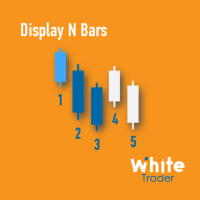
The Display N Bars utility is a simple tool designed to help identify candles.
If a trader tries to share knowledge with a colleague but it is difficult to pinpoint exactly the desired candle, just say the corresponding candle number.
The candle count is reset every day.
Seeking to offer a good customization the inputs are:
Display type -> Display only odd, only odd, or both candles?
Direction -> Horizontal or Vertical?
Display multiples of: (display frequency) -> Display all number
FREE

A fast, clean on-chart trading panel for manual traders. Open market or pending grid orders directly from your chart, manage SL/TP, lot size, trailing, spread and margin — without using the order window. Technical Features One-click BUY / SELL Live Bid / Ask inside buttons SL / TP input (Pips & Points) + quick +/- adjustment Trailing Stop control Pending Grid (Buy/Sell Limit & Stop) Step distance (Pips/Points) Order count Lot multiplier Real-time margin estimate (uses account currency) Live spre
FREE

安装之前:先了解本工具不做什么。请先阅读这一部分。如果以下某一项正是您想要的功能,那么这个工具并不适合您,最好在把它挂到图表之前就知道这一点。
- 绝不使用虚拟或隐藏止损。每一个止损都是真实的服务器端止损,您的经纪商和自营交易公司(prop firm)都能看到。设计上不向任何一方隐瞒任何东西。 - 每个图表只交易一个品种。免费版只交易其所挂图表的品种。其剩余风险额度预测只覆盖本面板在该品种上的交易。如果您同时交易多个品种,预测无法看到整个账户——这是单图表工具的真实能力边界,不是被关闭的功能。 - 不支持在策略测试器中交易。点击面板在测试器中无法被有意义地点击;面板只会在那里绘制出来,仅此而已。 - 不要与 Risk Sentinel 或 Prop Guardian 挂在同一图表。MetaTrader 5 每个图表只能运行一个 EA。请把账户级管理工具放在单独的图表上;Order Gatehouse 留在您实际交易的图表上。 - 不对 Mac ARM 模拟环境或内存低于 8 GB 的机器作任何承诺。本工具是免费的:请先在您自己的环境中挂载并验证,再依赖它。 - 迁移到 MQL5 V
FREE

播放过去的图表,并可瞬间聚焦到特定时间点。 将图表移动到创建的焦点线,可高效观察和分析重要时间点。
如果您喜欢,也请考虑使用 “Chart Auto Flow Focus Edition”: https://www.mql5.com/zh/market/product/154905
它支持通过快速滚动进行图表检索、通过慢速滚动进行模拟,并在多个图表上进行多周期(MTF)同一时间同步,让多周期分析变得更加轻松。 功能 瞬间将图表移动到关注时间点 自动播放可用于掌握图表走势、动态并进行模式搜索 播放规格 播放方向:过去 → 未来 每次移动的K线数:1 播放速度:固定 播放中可暂停 / 恢复 END按钮结束程序 操作 Crt FocusLine:创建焦点线 Position:切换显示位置(右 / 中 / 左) Focus:瞬间将图表移动到创建的焦点线 Pause / Restart:暂停 / 恢复播放 END:退出程序 版本比较 下表显示了本产品(Player版)与高端型号(Full Version)之间的功能差异。虽然用户界面(控制面板)的布局完全相同,但可用的模式和设置范围有所不
FREE
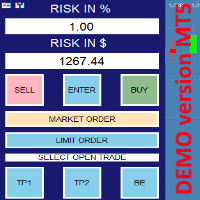
this is DEMO VERISON (for demo acc.) of TRADING OVERLAY with PARTIAL take profit ("virtual TP") and % risk lot size
--- full version available on my 'seller page' as well as version for MT4 Take better control of your trades with ease ! Easy lot size calculation with easy SL/TP setting. Your trading will be much more comfortable with this tool!
Main goal with this tool is very SIMPLE and FAST operation! Works like any EA, add it to selected chart and trade !
Features: start tra
FREE

URGENT: PLEASE READ BEFORE DOWNLOADING This EA is ONLY the "Receiver" (Slave) part of the copy trade system. IT WILL NOT WORK ON ITS OWN! To successfully copy trades, you MUST have the "Master" (Sender) EA installed on your provider account. GET THE REQUIRED "MASTER" EA HERE: AW Trade Copier Master
Unlock lightning-fast trade replication across multiple MetaTrader 5 accounts on the same PC or VPS. The AW Local Trade Copier is designed for speed, reliability, and ease of use
FREE

Tick Database — export of tick database from MT5 terminal to MT4. The utility provides access to the tick database in real time. This is necessary to generate synthetic charts in the MT4 terminal, which initially does not provide for loading a tick database. For example, you can organize permanent access to the tick database for the Seconds Chart utility. If the opening time of the current candle in the terminals is different, then you need to specify the time offset in hours. Example We open M1
FREE

KChrono Timer is a four-mode timing utility for MetaTrader 5. It keeps candle, countdown and trading-session time information visible directly on the chart.
Timer modes
1. Candle Close Timer
Displays the remaining time and progress of the active candle. The current chart timeframe or another candle timeframe can be selected.
2. Custom Countdown
Runs a user-defined countdown with optional automatic restart or reset when a new candle begins. Pause, Resume and Reset controls are available dire
FREE

ApexForge One Click Close EA 概述 ApexForge One Click Close EA 是一款輕量級交易輔助工具,讓您只需點擊一下,就能立即關閉所有符合條件的持倉,並可選擇同時刪除掛單。 在市場劇烈波動時,手動一筆一筆平倉既耗時又容易錯失良機。這款 EA 為您提供快速、可靠且視覺清晰的一鍵清倉解決方案。 ️ 本工具不會自動開單或產生交易訊號,僅用於 持倉管理 和 風險控制 。 主要功能 一鍵平倉 – 瞬間關閉所有持倉 顯示總手數 – 按鈕上即時顯示當前總持倉量 平倉範圍選擇 – 可選擇「全部帳戶」或「當前品種」 魔術數字過濾 – 只平倉特定 EA 的訂單 刪除掛單 – 可選擇同時刪除掛單(限價單/止損單) 非同步佇列處理 – 不卡頓,逐筆獨立重試 視覺回饋 – 按鈕顏色變化顯示目前狀態(就緒/平倉中/無持倉) 高度可自訂 – 位置、大小、顏色、字型、文字皆可調整 輕量設計 – CPU 佔用極低,50ms 定時器高效運作 輸入參數 平倉設定 參數 說明 平倉範圍 全部帳戶持倉 / 僅當前品種 啟用魔術數字過濾 開啟/關閉魔術數字過濾 魔術數字 指定要過
FREE
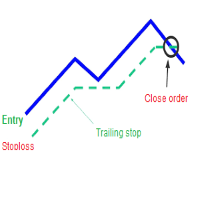
A trailing stop loss is a type of day-trading order that lets you set a maximum value or percentage of loss you can incur on a trade . If the security price rises or falls in your favor, the stop price moves with it. If the security price rises or falls against you, the stop stays in place. With this version, you can run trailing stoploss with currencies (ex start when profit more 1$, trailing stop with 2$...)
FREE


Visual Trade Info is designed to give traders a clear, visual understanding of their trading activity in real time. Instead of relying on scattered data or manually calculating key metrics, the tool presents all essential information directly on the chart in a clean and intuitive format. It enables traders to monitor every transaction with precision, including entry and exit points, active positions, and overall trade performance. Profit and loss are displayed dynamically, allowing users to inst
FREE

Ritz Conspiracy 16 – Multi-Layer Market Intelligence System Ritz Conspiracy 16 adalah indikator analisis pasar multi-layer yang menggabungkan 16 indikator teknikal utama ke dalam satu panel visual terpadu.
Dirancang dengan konsep market intelligence , indikator ini bekerja seperti pusat komando yang membaca perilaku pasar dari berbagai sudut: trend, volatilitas, momentum, volume, hingga struktur harga. Dengan pendekatan “konspiratif”, indikator ini menghubungkan jejak kecil dari 16 algoritma unt
FREE

PulsePanel FREE – The exact same clean, professional and powerful dashboard as the Pro, completely free so you can test it thoroughly before upgrading. Limited to USDCHF and GBPNZD , this free edition gives you full, unrestricted access to every core feature: What You Get in the FREE Version One-click instant execution (buy/sell) Real-time currency strength meter Precise momentum scanner Watchlist with trend, momentum and conviction Live position tracking: net P&L, dynamic risk/reward ratio, sto
FREE

Optimize your trading management with Breakeven Bot, the essential tool for active traders managing multiple positions at once. No more wasting time manually adjusting your stops—one click is all it takes to secure your profits! Main Feature:
️ "BREAKEVEN" Button – Instantly set all profitable positions to breakeven and protect your gains quickly. ️ Customization Options:
Set breakeven in pips or currency, depending on your preference.
Choose whether breakeven should be at the entr
FREE

PEAK MASTER LITE – PRECISION RESISTANCE NAVIGATOR
Peak Master Navigator is a non-repainting technical indicator designed to accurately identify and visualize structurally confirmed resistance levels in real time.
It detects valid swing highs based on market structure confirmation rules, ensuring that only meaningful and reliable resistance points are displayed on the chart. By filtering out weak or premature highs, Peak Master Navigator helps traders focus on true price reaction zones , improvi
FREE

AJUSTAR TP SEGÚN LÍNEA DE TENDENCIA — Modificación Dinámica de Take Profit en MT5 Este script para MetaTrader 5 permite proyectar el precio actual de cualquier línea de tendencia presente en el gráfico y asignarlo automáticamente como Take Profit (TP) a las posiciones abiertas que cumplan con los criterios de filtrado seleccionados. Es una herramienta imprescindible para traders que proyectan sus objetivos de salida basándose en estructuras diagonales, canales de precio, directrices de tendencia
FREE

TRADE WITH MAGIC – Professional One-Click Trading Panel
| Crystal AI Systems
Trade With Magic is a fast, lightweight, and highly efficient one-click trading panel designed for traders who require precise manual execution and full control over magic numbers, comments, and risk parameters. It is suitable for both manual trading and advanced EA testing environments where ac
FREE

TerminalBridge Trade Copier TerminalBridge Trade Copier 是一款本地 MetaTrader 5 仓位跟单工具,用于在同一台 Windows 电脑或 VPS 上运行的两个 MT5 终端之间同步交易操作。 一个终端设置为 MASTER,负责监控并发布仓位变化;另一个终端设置为 SLAVE,通过 MetaTrader 公共文件夹接收和处理事件。MASTER 和 SLAVE 两种角色包含在同一个 EX5 文件中。 主要功能 本地 MT5 到 MT5 仓位跟单 单一 EX5 文件内可选择 MASTER 或 SLAVE 角色 支持复制手动开立的仓位 支持复制由 EA、脚本和交易面板开立的仓位 监控 MASTER 账户中的仓位,不以 Magic Number 或注释作为排除条件 同步 OPEN 开仓事件 同步止损和止盈修改 同步部分平仓 同步全部平仓 固定 1:1 手数比例 单笔最大交易量保护 最大点差和价格偏差控制 信号有效期检查 可选 MASTER 与 SLAVE 品种后缀映射 自动检测账户持仓模式 心跳连接状态监控 持久化仓位映射 终端重启
FREE

The simplest and most useful trading panel for every manual trader!
Are you tired of closing trades one by one during news? Do you want to protect your profit with one click?
This panel does exactly that:
CLOSE ALL - Instantly closes ALL open positions with one click. You can choose to close all symbols or only current symbol. Essential for scalpers and news traders.
BREAKEVEN ALL - Instantly moves Stop Loss to entry price (breakeven) for all profitable trades. Protect your profits and
FREE

This MQL5 indicator creates a customizable grid of horizontal lines on your trading chart. Here's what it does:
**Main Functions:** - Draws equally spaced horizontal lines across the visible price range - Supports two line types: horizontal lines or trend lines with forward projection - Automatically adjusts to price scale changes
**Key Features:** 1. **Customizable Spacing**: Set grid distance in pips (20 pips by default) 2. **Flexible Starting Point**: Auto-calculates starting price or lets
FREE

Export Deals to CSV - Excell File location: HistoryDeals/<SERVER>/<LOGIN>.<DATETIME>.csv Works as an Script, reading all DEALS in history and exporting it as a plain text CSV file There's no option to change. There's no WebRequest. There's no DLL use. I need to write 300 characters to allow this product being exposed at MQL5 market place. It's simple to use, plug it in graph and wait completion.
FREE

RADAH Dashboard is an advanced performance analytics utility for MetaTrader 5, designed to transform your account history into a clear, organized and interactive trading performance overview.
It does not open, modify or close trades. Its purpose is exclusively analytical, allowing you to review the performance of the entire account, a specific symbol, or a strategy identified by its Magic Number.
Chart View
Visualize your trading performance through an integrated balance/equity performance c
FREE

图表链接辅助工具: 该工具充当MetaTrader中打开的图表与主图表上的专家之间的接口。许多多时间框架专家需要此文件与屏幕上的打开图表进行通信。您可以通过在图表上运行该工具,轻松将图表连接到主图表上的专家。 此文件的主要功能是将发生在打开图表上的所有事件发送到主图表上的专家。例如,如果主图表上放置了一个指导线,可能不会将这些指导线的更改反映在主面板中专家的参数上。通过拖放或运行此工具到图表上,您可以将它们连接在一起,确保图表上的更改会传达给主图表上的专家。 该工具还具有调试器和主图表专家的活动状态检查功能。如果与主图表上的专家的连接丢失,该工具将执行以下操作:首先,它会向MetaQuotes ID发送通知,然后通过Telegram提醒交易员,最后在当前图表上显示主面板上的专家已断开的警告。 要运行此专家,您需要在图表上执行或拖放它。在输入部分,您可以输入主图表ID号;如果您输入0,工具将自动处理,并且通常会在屏幕上显示。下一个参数允许您输入将警报发送到Telegram所需的信息。 如果在设置中定义了MetaQuotes ID,通知将发送到该ID
FREE

核心定位 专为 MT5 平台打造的轻量化风险测算工具,聚焦交易员日常风控测算核心需求,深度优化操作体验与数据展示效果,适配日内交易、波段交易等各类看盘交易场景,是交易员日常风控操作的高实用性辅助工具。 核心功能 手数便捷编辑:点击输入框可直接录入数值,无需提前选中,一步到位告别传统繁琐的编辑流程,提升操作效率。 实时动态测算:支持自由拖拽入场 / 止损线,系统即时精准计算价差、对应风险金额,测算结果实时同步更新,精准反馈每笔交易的实际风险敞口。 数据清晰展示:针对性修复换行乱码漏洞,将价差、风险金额等关键风控数据分行清晰呈现,让核心数据阅读更直观,避免信息混乱影响交易判断。 面板自定义布局:配备可拖拽面板,支持交易员根据自身看盘习惯、屏幕尺寸自由调整面板位置与布局,兼顾操作灵活性与使用舒适度。 核心价值 全方位提升风险测算效率,为交易决策提供精准、高效、实时的风险数据支撑,可无缝衔接各类交易策略的风控测算需求,助力交易员做好事前风险把控。
FREE

Elsna Alert (MT5 EA) is a lightweight Expert Advisor that monitors your trading account in real time and alerts you whenever a trade is opened or closed . It uses MetaTrader 5’s built-in OnTradeTransaction event to instantly detect any new executed deals—manual or automated—and plays a custom sound for each event.
You can choose whether it tracks all symbols or only the chart’s symbol . Key features: Instant audio alert when a trade opens or closes. Works with both manual and EA-driven trades. O
FREE

Mobile-EA is an Android-first trading companion for MetaTrader 5 , bringing market tools and connected account management together on your phone. This product is the companion MT5 Expert Advisor that links your terminal to the Mobile-EA Android app. The mobile app is available for Android; iPhone/iOS is not currently supported. The Android app is now available on Google Play , and new users receive a free 14-day Ultimate trial starting at registration . Watch the app introduction here: https://y
FREE

NINJA SYMBOL PASSPORT MT5 概述 NINJA Symbol Passport MT5是一款免费的只读实用工具,用于查看经纪商提供的交易品种规格和当前交易条件。它可以扫描市场报价(Market Watch)中的品种或服务器上的可用品种,有效上限为200个品种。面板和输入参数名称使用英语。 检查的数据 面板显示交易时段、到期日、交易模式、预估点差成本、参考交易量对应的预估保证金,以及点差与ATR的比率。每个品种都会显示PENDING、PASS、WARN或BLOCK结果及相应原因。PASS仅表示已实现的检查未发现当前警告或阻止条件。 附加功能 结果可以导出为CSV。保存的基准数据可用于检测所监控固定品种规格的变化。面板支持拖动和折叠,后台扫描会继续运行。 重要说明 本实用工具不是信号、交易机会或品种排名系统,也不提供BUY或SELL入场提示。PASS不表示盈利、安全或推荐。数值取决于经纪商、账户类型和当前市场数据。点差成本和保证金为即时估算,不会完整计入佣金或未来滑点。请先在模拟账户上测试。 运行方式 本工具不会发送订单或修改持仓,也不使用DLL或调用WebReque
FREE

TPS Risk Manager MT5 — Trader Protection System Proteja sua conta de trading com um sistema completo de gerenciamento de risco para MetaTrader 5. O TPS Risk Manager foi desenvolvido para ajudar traders a controlar automaticamente os principais limites operacionais da conta, evitando que decisões emocionais ou excesso de operações comprometam o gerenciamento de risco. ️ Principais recursos • Limite de perda diária
• Limite de perda semanal
• Limite de perda mensal
• Meta de lucro diária
• L
FREE

EA交易快捷助手 —— 专为 MetaTrader 5 打造的硬件交易利器 本工具专为配合实体快捷键盘设计,将 MT5 的核心交易指令集中映射至硬件实体按键。无需频繁移动鼠标找寻按钮,助你在行情剧烈波动时实现毫秒级订单执行与快速风险规避。 核心功能与优势 毫秒级极速响应 :实体按键物理触发,极大缩短交易决策与订单送达服务器之间的时间差。 一键快捷交易 :支持一键市价买入、卖出、一键平仓、持仓锁仓及手数快速微调。 防误触安全锁 :内置安全锁定机制,有效规避手滑或误触造成的非预期建仓。 完全合规无 DLL :采用纯正 MQL5 原生逻辑编写, 不依赖任何第三方 DLL 文件 ,确保账户资金与平台安全。 快捷键默认映射 (Key Mapping) Key A / F1 :按预设手数一键买入 (Buy) Key B / F2 :按预设手数一键卖出 (Sell) Key C / F3 :一键平仓当前图表品种的所有持仓 (Close Current) Key D / F4 :一键平仓账户内所有品种持仓 (Close All) Key Up / Down :快速增减下一次下单的手数步长 输入参数
FREE

MANAGER – Position Taker 是一款轻量级但功能强大的交易管理工具,专为已经手动入场的交易者设计,帮助用户高效管理持仓并优化风险控制。 我很快会将这款资金管理工具整合到 LotMind 交易面板中,以打造一个更强大、更全面、更高效的交易工具。 查看该工具:
https://www.mql5.com/en/market/product/172147?source=Unknown 该工具专注于交易执行后的管理阶段,使交易者无需频繁手动操作,即可实现更精准、更有纪律的交易管理。通过自动化关键功能,用户可以专注于市场分析,而不是不断调整仓位。 该面板提供直观且易于使用的界面,适用于需要快速决策的交易环境,例如日内交易和剥头皮交易。其设计目标是提高执行效率、减少人为错误,并保持一致的交易逻辑。 主要功能 自动部分平仓(Partial Close),可根据设定比例执行 自动 Break Even(保本止损)功能 Trailing Stop(移动止损)自动管理 一键全部平仓功能 实时交易信息显示(持仓、盈亏等) 支持市价单管理 附加特性 简洁直观的用户界面 支持拖拽与快速操作 支
FREE

OB FVG Trade Copier: Unified Master & Slave EA Version: 2.00 Type: Trade Copier / Risk Management Utility Compatibility: MetaTrader 4 & MetaTrader 5 (Cross-compatible codebase)
Overview The OB FVG Trade Copier is a professional-grade, unified trade copying system designed to mirror trades between Master and Slave accounts seamlessly. Built with a unified architecture, a single EA file serves as both the sender (Master) and receiver (Slave) simply by toggling the EA Mode in the settings. It uti
FREE

The Quick Style utility is designed for facilitation and acceleration of working with the properties of graphical objects. Left-click a graphical object while holding the Shift key to open the quick access window for configuring the object properties. In the window, you can change the color, style and line width with one click, including those of other graphical objects. All changes are displayed immediately. To close the Quick Style , simply click the free space on the chart. The utility is eas
FREE

Reverse TradeCopier for Followers can copy trades from an account that is running Reverse TradeCopier for Source . Features: Copies trades from one source (master) account to multiple following (slave) accounts. Allow investor (read only) password for source (master) account. There are no complicated settings and input parameters, everything is easy. Works with different brokers. Works with different quotes symbols (EURUSD_FX, eurusd_m, etc.). Can copy orders from 4-digit quotes platform to 5-
FREE

Spread Tracker is a lightweight utility that records and analyzes the real spread behavior of any symbol in real market conditions.
Instead of trusting broker marketing numbers, you get hard data from your own terminal. Every tick is sampled and written to file so you can later evaluate how a symbol actually behaves during different sessions, news events, rollovers, and low-liquidity phases. This tool is made for traders and EA developers who care about execution quality and realistic backtests.
FREE

按您的止损算手数。免费。 凭感觉选手数,就是一笔普通亏损变成糟糕一天的原因。ATS Lot Sizer 在您的图表上放两条线:止损和目标。拖动它们,面板就会告诉您符合风险的手数,以及这个手数实际押上的金额。一键下单,止损和目标一并附上。 工作方式 选择 LONG 或 SHORT。图表上会出现止损线和目标线,拖动它们即可。 手数 = 您的风险(余额百分比、净值百分比或固定金额)除以止损距离,向下取整到手数步长,绝不向上取整。 面板显示该手数实际会亏损多少,而不是您设定的预算。 在您亲自拖动之前,目标会按您设定的 R 跟随止损。 右侧边缘的方框标签显示 STOP 和 TARGET 以及涉及的金额。 SEND 第一次点击为待发,第二次点击才确认,因此手滑不会发送任何订单(可关闭)。 计划 入场、止损和目标及其距离、手数、以金额和百分比表示的风险、回报和 R:R,以及点差吃掉了多少止损。如果计划无法执行(止损方向错误、小于经纪商最小距离、手数低于最小值、保证金不足),按钮会显示 NOT READY,面板会说明原因。 面板 标题栏显示品种、周期和点差。R 按钮可在 0.25、0.5、1、1.5
FREE

Looking for a way to manage account drawdown for Prop Firms or general risk management purposes? Look no further; this simple expert advisor does exactly that!
Account Balance Percentage Limit If your current account balance is $5000 and you set a 10% limit ($500), Equity Sentinel will close all trades when the account equity reaches equal or less than $4500 and close all charts.
Floating Drawdown Percentage Limit If your current account balance is $5000 and you set a 5% limit ($250), Equity S
FREE

DF Fib Trader Pro DF Fib Trader Pro 是一款專為 MetaTrader 5 設計的自動交易系統。 它使用基於斐波那契的價格水平,結合趨勢和結構分析來定義入場點和出場點。此 EA 支援多頭和空頭部位,並內建風險管理參數。
核心功能: • 使用斐波那契回檔和擴展邏輯來繪製入場點、停損點和獲利點。 • 可設定交易手數和停損/獲利水平 • 可選擇 1 或 2 個入場點 • 根據市場情況支持固定或動態停損和獲利 • 適用於多種時間範圍和貨幣對 • 包含最大點差、滑點和交易頻率控制選項 • 自動交易管理:損益兩平、追蹤停損與部分平倉選項 • 如有需要,支持市價單。 輸入概覽: • 風險管理:交易手數、單筆交易風險、最大交易數量 • 入場條件:斐波那契水平選擇、趨勢過濾選項 • 出場管理:停損/停盈類型、追蹤停損設定、損益平衡參數 • 交易過濾:價差限制、滑點容忍度 基本規則 • 點擊“繪製斐波那契”,並根據您的需求繪製斐波那契框。 • 您選擇的斐波那契程度會顯示出來(完全可設定) • 點擊“執行斐波那契”,即可立即建立掛單以及停損和止盈 • 設定完畢後,讓PA
FREE

Ghost Trail Pro is an intelligent Expert Advisor for MetaTrader 5 that manages the complete lifecycle of a gold (XAUUSD) trade. From detecting the setup and alerting your phone, to opening the trade, protecting profits and closing positions in stages, Ghost Trail Pro does the heavy lifting so you don't have to.
Built for gold traders and scalpers who want disciplined trade management, partial closes and profit protection, whether you are at your screen or away from it. Let it enter automaticall
FREE

T his is an ON CHART trade management panel. In other words, ON CHART Lot Size, Buy, Sell, Stop Loss, Take Profit, Close Buy, Close Sell and Close All buttons! *IMPORTANT NOTE: Input settings are NOT usable. You can change or insert Stop Loss and Take Profit values only on the chart panel. (See the below video!) This one is MT5 version!
BUTTONS List: 1. Lot Size - (0.01) is default click on it and insert the lot size with which you want to open a trade. 2. Stop Loss - (0.0) is default click on
FREE

U sing keyboard shortcuts to draw Fibonacci levels and rectangles quickly and efficiently.
Press F to create a Fibonacci retracement. Click with mouse (2x): -once on the chart to set the starting point and - again to set the ending point. The Fibonacci levels are drawn automatically using the configured ratios, colors, and styles.
Press T to instantly draw a pre defined rectangle at the closest highest or lowest price (based on trend).
All levels, colors, sizes, and styles ca
FREE

Trade Receiver Free is a free tool to copy trades/signals from multiple MT4/MT5 accounts. The provider account must use copier EA to send the signal. This version can be used on MT5 accounts only. For MT4 accounts, you must use Trade Receiver Free . Reference: - For MT4 receiver, please download Trade Receiver Free .
- For MT5 receiver, please download Trade Receiver Free MT5 .
- For cTrader receiver, please download Trade Receiver Free cTrader .
- If you only need copy from MT4 account to u
FREE

A simple and useful Current Price Panel, which displays magnified current Bid, Ask prices and spread, movable anywhere on chart window using the mouse. Also provides an option to have as text at a static location showing bid or ask price along with spread, shown at any location on the chart. Allows display as pips or points along with spread highlighted in distinct color if it crosses the threshold point for the previous 100 ticks. Includes an option to show or hide the last digit (pipette) of t
FREE

产品名称: QuickStep Trader – 可自定义界面手动交易面板
版本: 2.0
兼容性: MetaTrader 5
产品类型: 实用工具 描述:
QuickStep Trader 是一款专为手动交易者设计的高效交易面板。它通过直观的图形界面,帮助您快速执行开仓、平仓操作,并允许您根据个人偏好自由调整外观,打造专属的交易工作区。 核心功能: 一键开仓 :三个预设手数按钮(数值可自定义),点击即可快速设置手数,避免手动输入错误。 止损/止盈设置 :独立的止损、止盈点数输入框,下单时自动附加,精确控制风险。 比例平仓 :通过 1/4、1/3、1/2 比例按钮,快速平掉部分持仓;同时设有“平多”、“平空”、“全平”按钮,满足多种平仓需求。 面板移动 :通过输入坐标并点击“MOVE”按钮,可将面板整体移动到图表任意位置,方便您调整界面布局。 完全自定义外观 :所有背景色、边框色、按钮色、标签色以及字体大小均可通过输入参数调整,让您随心定制面板风格。 适用场景:
适合手动交易者、日内交易员以及对界面有个性化需求的用户。支持任何品种(外汇、贵金属、指数、商品等)
FREE
Demo version of the Virtual SL TP Trailing product for testing all functions https://www.mql5.com/ru/market/product/75210
ВНИМАНИЕ: ТОЛЬКО ДЛЯ ДЕМО-СЧЕТОВ !!!
Make Trailing Stop, Take Profit, Breakeven, Stop Loss levels invisible to the broker!
HIDDEN MODE (STEALTH MODE) Virtual Trailing Stop (Virtual Trailing Stop) Virtual Take Profit (Virtual Take Profit) Virtual Breakeven (Virtual Breakeven) Virtual Stop Loss (Virtual Stop Loss) Виртуальный 2-уровневый Трейлинг-стоп Virtual Tr
FREE
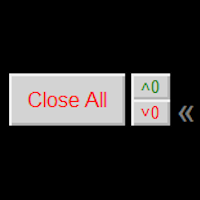
Close ALL button for simply closing your trades. +Close all BUYS in profit button, for closing your trades that are in profit. Leaving the trades in a loss untouched. +Close all SELLS in profit button, for closing your trades that are in profit. Leaving the trades in a loss untouched. +Hide and unhide buttons. Easy for when you don't need them
Configurable options Option: Close All trades OR for current Symbol/Pair only Option: close pending orders Option: Edit button text Option: Locate button
FREE

Assistant Trader MT5 Check Pro version with OCO feature and fluid drawings : Assistant Trader Pro MT5 | Buy Trading Utility for MetaTrader 5 Assistant Trader MT5 is a MetaTrader 5 manual trading assistant for fast multi-leg order execution. It is built for traders who need to copy signal levels, split entries into legs, and manage trades with less delay.
Detailed Introduction
Assistant Trader MT5 provides a compact chart dashboard for placing and managing multi-leg trades in MT5. It is intende
FREE

Advanced Trade Mirror is a powerful Forex tool designed for traders who need instant, seamless trade replication across multiple terminals on the same machine. With lightning-fast execution, it ensures zero lag in copying trades, maintaining precision and efficiency in high-speed trading environments.
Get the Trade Mirror Follower here: https://www.mql5.com/en/market/product/133890 Specification:
Master ID: Identity value of master terminal, please use a unique value to prevent duplicated mas
FREE

Description: Protect your live or evaluation accounts by not letting it hit the maximum daily draw down! This utility is best for prop firms such as FTMO and MFF(MyForexFunds) and etc. Guide: Apply to EURUSD 1m Chart.
Default Settings: Maximum Draw Down Balance: 4% Account Balance. Maximum Draw Down Equity: 4% Account Balance Target Profit Balance: 1% Account Balance. Target Profit Equity: 1% Account Balance. Time To Reset: 16:57 to 16:58 GMT
Behavior: Setting starting_balance to 0 will auto
FREE
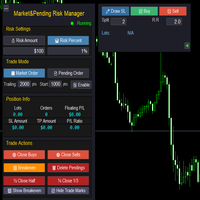
Market & Pending Risk Manager EA 操作说明书 Market & Pending Risk Manager 是一款专业的 MT5 交易面板 EA ,集成了市价交易、挂单交易、风险管理、移动止损等多项功能,为交易者提供完整的交易解决方案。 核心优势 智能双模式交易 市价交易模式 :一键买卖,快速执行 挂单交易模式 :精准入场,等待最佳时机 无缝切换 :点击即可在两种模式间自由切换 ️ 专业风险管理 固定金额风险 :设定每笔交易的最大亏损金额 百分比风险 :基于账户余额的风险比例控制 自动计算手数 :根据止损距离智能计算最优交易量 可视化交易线条 拖拽式操作 :直接在图表上拖动调整止损、止盈价格 实时计算 :动态显示盈亏比、手数、风险金额 彩色区域 :直观显示风险区域(红色)和盈利区域(绿色) 智能移动止损 自定义启动条件 :设定盈利多少点后启动移动止损 灵活止损距离 :可调整移动止损的跟踪距离 自动跟踪 :无需人工干预,自动保护利润 完整持仓管理 实时信息显示 :持仓手数、订单数量、浮动盈亏 一键
FREE

Position Size Tool – Smart Risk Management & Trade Execution Panel The Position Size Tool is a powerful and intuitive MT5 panel that simplifies your trading by combining position sizing , risk calculation , risk/reward visualization , and order placement —all in one place. ️ Clean & Functional Interface The tool features a compact, real-time panel with the following: Balance & Equity display Live Price tracking Customizable Risk % input Auto-calculated Lot Size based on SL and Risk Input for S
FREE

Your chart. One glance. Total clarity. Built by @Ash_TheTrader for traders who are tired of guessing, Extreme Trading Dashboard is a professional-grade heads-up display that sits quietly in the corner of your chart — dark charcoal, rounded, semi-transparent, and genuinely easy on the eyes — until the moment it matters. Dual Session Highlighter Shade up to two independent time windows directly on your chart — London, New York, or your own custom kill-zone. Each gets its own color, so overlapp
FREE

FUNDING EA 已经完全过时,而 PROP FIRM SAVER EA 是在其基础上开发的升级版本,功能更加强大。我们现免费提供,让您实时了解新版的运行效果。 是否厌倦了购买 Prop Firm 挑战账户却最终亏损?FUNDING EA 将为您改变这一切。 此 EA 不仅能够顺利帮助您通过挑战,还保证在挑战失败时退还费用。
使用 FUNDING EA,您可以无限次尝试挑战,而无需担心额外支出。 它是如何运作的?FUNDING EA 采用先进的对冲策略:要么帮助您通过挑战,要么在失败时弥补挑战费用。
这意味着,即使第一次失败,您也无需再为新的挑战支付费用。 为简单起见,建议将此 EA 用于一步挑战账户。 使用 FUNDING EA,您需要两个账户:一个 Prop Firm 挑战账户和一个真实交易账户。 您需要在真实账户中存入挑战费用的两倍。例如,如果挑战费用为 100 美元,则真实账户需存入 200 美元。 EA 会在两个账户中同时开仓。如果挑战失败,EA 会在真实账户中弥补费用,从而可以不断尝试挑战。 在成功通过挑战后,您可以继续在 Prop Firm 账户中使用 FUNDIN
FREE
MetaTrader 市场 - 在您的交易程序端可以直接使用为交易者提供的自动交易和技术指标。
MQL5.community 支付系统 提供给MQL5.com 网站所有已注册用户用于MetaTrade服务方面的事务。您可以使用WebMoney,PayPal 或银行卡进行存取款。
