 MetaTrader 5
 专家
专家
 指标
指标
 程序库
程序库
 实用工具
实用工具
 窗口小部件
窗口小部件
 规则
规则
适用于MetaTrader 5的EA交易和指标 - 132
 使用EA交易和指标,使外汇交易获得更多盈利。EA交易可使您自动开启和关闭交易,而指标将帮助您更准确地预测市场行为。
该页面提供MetaTrader 5应用程序的目录。
使用EA交易和指标,使外汇交易获得更多盈利。EA交易可使您自动开启和关闭交易,而指标将帮助您更准确地预测市场行为。
该页面提供MetaTrader 5应用程序的目录。 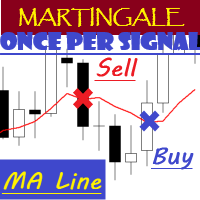
EA "MA Line" with martingale feature
EA will open position once per signal
To see how EA works, please watch the video below. In the video, I perform parameter optimization and do a backtest. The parameters that are optimized are: - MA Period - Stop Loss - Take Profit
For the future, I will try to optimize and test EA, especially the expert advisors in the mql5 community. hopefully it can be useful for colleagues in the mql5 community.
FREE

This indicator emulates volume delta (buy trades vs sell trades) based on per candle volume and candle shape (direction, size of body and wicks). Artificially separated buy and sell volumes then accumulated for specified number of bars. The indicator shows a histogram of volume delta per bar, as well as a sum of the delta for the given period. What is more important, the indicator allows you to combine current symbol quotes/volumes with quotes/volumes of other related symbols (futures, indices,
FREE

TimeView Pro – 可自定义的本地时间显示指标 (MetaTrader 5) 概述
TimeView Pro 是一款完全可自定义的时间显示指标,可根据用户的电脑时间或所在国家的时间自动调整。与其他类似指标不同,TimeView Pro 提供更高级的自定义功能,让交易者在不影响图表清晰度的情况下精准查看时间。 主要功能 烛台对齐 (默认启用) – 时间标签自动对齐至最近的K线。 快捷显示/隐藏 – 使用 Click Chart + H 快捷键快速开关时间显示。 可调节线条 – 可选择显示或隐藏 水平线 (默认关闭) 和 垂直线 (默认开启)。 自定义外观 – 支持 字体大小、背景颜色 及其他外观调整。 边界保护 – 避免时间标签在图表边缘重叠或被遮挡。 灵活定位 – 可选择 顶部、中间、底部或自定义位置 。 额外信息显示 – 选项包括 服务器时间、本地时间和价格显示 ,用户可自由选择是否开启。 适用场景 适合需要追踪不同时区交易的交易者。 帮助交易者清晰查看市场交易时间。 提供直观、整洁的时间显示,提升图表可读性。 为什么选择 TimeView Pro? 完全可自定义 – 可

每个交易者都熟悉这套流程:打开指标设置、改一个数字、点击 OK、盯着图表看、觉得不对、再打开设置。DeMarker 是一个安静的超买/超卖指标,大多数交易者从来不去动它——它永远停留在默认的 0.30/0.70,因为每试一个新数值都要来回打开一次对话框。DeMarker Live Tuner 结束了这一切。 这是一个可以 直接在图表上实时调节 的 DeMarker。图表上有一个小面板,带有 DeM 周期和两条水平线(0..1 刻度)的滑块。拖动滑块,指标立刻重新计算并重绘,就在您眼前完成。0.25/0.75 还是 0.35/0.65 比默认值更适合过滤您的市场——几秒钟内就能在自己的图表上得到答案,而不用去论坛里翻帖子。 可选的 MA 信号线。 直接在面板上开启或关闭 DeMarker 的移动平均线,用独立滑块设置其周期,一个按钮循环切换计算方法——SMA、EMA、SMMA、LWMA。每一次改动都会立即反映在图表上。 真正的 DeMarker,而不是套壳。 指标采用自己干净的经典公式实现:DeMax = max(High - 前一根 High, 0),DeMin = max(前一根 L
FREE

Cobalt 高级支撑与阻力 (S&R) 指标 您的专业支撑/阻力位与突破辅助工具,在不干扰图表的情况下精准捕捉最佳价格走势。 您是否厌倦了那些在图表上充斥着凌乱垂直线的复杂指标? Cobalt Advanced S&R 采用 Bill Williams 经典的碎形 (Fractal) 逻辑,自动识别最关键的支撑位和阻力位。其“经典点状”设计让您在参考历史价位时不会感到视觉疲劳,并能与其他指标完美协同工作。 与普通 S&R 工具不同,这款由 Cobaltsw 研发的指标拥有经过优化的系统架构,不仅不会过度占用 CPU,还内置了“交易量过滤器” (Volume Filter) 以防止虚假突破 (Whipsaws)。 核心功能 清爽经典的视觉效果: 将支撑和阻力位显示为优雅的点(菱形),而不是切开屏幕的连续线。让您在实时行情中更清晰地观察历史 S&R 密集区,告别视觉噪声。 高性能引擎: 不同于每个 Tick 都要扫描完整历史记录的冗余代码,本指标的优化架构仅计算新进入的数据。这确保了零 CPU 过载,即使同时开启多个图表也能流畅运行。 智能交易量过滤器 (Smart Volu
FREE
In the world of finance, correlation is a statistical measure of how two securities move in relation to each other. Correlations are used in advanced portfolio management. This indicator measures how different securities move in relation to a reference one, thus making portfolio management easier. [ Installation Guide | Update Guide | Troubleshooting | FAQ | All Products | Get Help ] Avoid concurrent trades in highly correlated instruments Find trading opportunities among highly correlated
FREE

Overview SMC Algo Trading EA is a professional automated trading system based on Smart Money Concepts (SMC). It identifies institutional order flow by detecting Order Blocks, Fair Value Gaps, Liquidity Levels, and Market Structure Breaks. The EA combines multi-timeframe analysis, price action confirmation, and advanced risk management to deliver high-probability trade setups. Key Features Smart Money Concepts Trading Order Blocks : Identifies bullish and bearish order blocks where institutions p

Gravity Pro EA is a professional automated trading system built for MetaTrader 5, specially optimized for Gold (XAUUSD) trading. It combines: Artificial Intelligence logic Trend analysis Momentum filtering Volatility detection Smart risk management Institutional-style confirmations to deliver high-probability trades in all market conditions. Unlike basic robots that rely on a single indicator, Gravity Pro EA analyzes multiple market factors simultaneously , allowing it to adapt dynamically to ch
FREE

Correlation Nexus Correlation Nexus: 精通正向或反向的货币对关系 Correlation Nexus 是一款专为 MetaTrader 5 设计的高级技术指标,它通过检测两种金融工具之间的 统计相关性 来发现交易机会。这个系统让交易者能够从**正相关(同向) 和 负相关(反向)**中获益,动态适应不同的货币对、指数或大宗商品。 与传统工具不同,此指标 并非独立运作 。其逻辑结合了 真实的统计相关性 、 确认性技术分析 以及一个清晰的视觉信号系统,并配有控制面板,使您能够以更高的精确度和信心进行操作。 工作原理 选择一个 主货币对 ( symbol_to_analyze )并将其输入到指标设置中。 打开一个包含 次货币对 (您将应用指标的图表)的图表。 选择您想要交易的相关性类型: 负相关(反向) :两个货币对之间发出相反的信号。 正相关(同向) :两个货币对之间发出同步的信号。 该指标会持续评估两种资产之间的关系。只有当主货币对的技术分析足够强劲 并且 满足所选的相关性阈值时,才会生成信号。 相关性类型及示例 相关性类型 推荐货币对 信号逻辑 示例
FREE

Sniper Trend System - Advanced Algorithmic Following Sniper Trend System is an institutional-grade Expert Advisor (EA) specifically designed to capture and ride the cleanest market trends. Instead of trying to guess tops and bottoms, this algorithm waits patiently in the shadows until the main trend is mathematically confirmed, executing entries with pinpoint engine and rigorously backtested with high-quality tick data (Dukascopy), this system has passed comprehensive stress tests to prove a
FREE
If you like this product, please give it a 5 star rating as a token of appreciation.
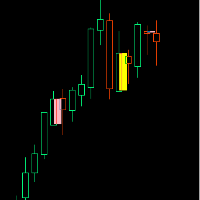
Inside Bar: A candle that is completely contained within the high-low range of the previous candle
Outside Bar: A candle that completely engulfs the high-low range of the previous candle (also called an "Engulfing Bar")
Inside Bars Consolidation Signals : Indicates market indecision/compression Breakout Setup : Often precedes significant price moves Continuation Patterns : Can signal pause in trend before con
FREE

Daily PnL Dashboard is a clean, draggable on-chart panel that shows your real trading results at a glance — no more digging through the account history tab.
What it shows: - Today's result — big and clear, with the number of closed trades. - Daily breakdown for the week: each of the last 7 days (or the current week from Monday) with a proportional bar per day, so you instantly see your best and worst days. - Weekly and all-time totals, including the all-time result as a percentage of your net d
FREE

Indicador baseado no ATR (Avarage True Range) que exibe o tamanho em pips ou pontos do ativo. O indicador ATR SIZE ALERT dispara um alerta caso o preço atinja o numero de pips pre definido pelo usuário: Input: Periodo (periodo do indicador ATR) Pips (tamanho do movimento esperado) Alert (alerta sonoro) Além do alerta sonoro, o indicador também possui alerta visual.
FREE
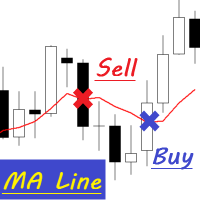
A cross between the candlestick and the moving average line.
MA Line is Expert Advisor which is very simple by working as below: Buy Condition 1. Perivious open candle bellow MA Line 2. Previous close candle above MA Line Sell Condition 1. Perivious open candle above MA Line 2. Previous close candle below MA Line
EA Parameter - Time Filter - Lot - MA Period - MA Method - Stop Loss - Take Profit - Trailing Start - Trailing Step - Trailing Stop - Magic Number
FREE

Proton Trade Assistant MT5
OVERVIEW Proton Trade Assistant MT5 is a utility for MetaTrader 5 that provides streamlined position management functions accessible directly from the chart. This tool is designed for traders who manage positions manually and require faster execution of closing and risk management operations.
PRIMARY FUNCTION The utility provides one-click access to commonly used position management operations that normally require menu navigation in MetaTrader 5. All operations exe
FREE

This Expert trades macd crosses , using ADX and AC. Designed for 4hr EURUSD trading but able to trade major pairs. Code is designed for speedy metatrader optimisation using open price testing as ea uses open prices on indicators used. EA identifies trends with specific momentum and exits using the ADX or stop loss. Please optimise using out of sample data. preset at 0.1 lots best to start with 0.01 lots.
FREE
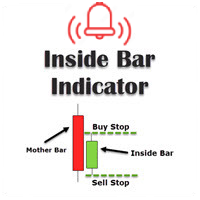
This inside bar indicator MT5 is suitable if you are doing inside bar trading. So what this MT5 inside bar indicator does is identifies inside bars for you as they form on your charts. Inside bar is a famous trading pattern in which the bar carry higher low and lower high compared with the previous bar, also known as mother bar. With, a lesser time frame like the 1 hour chart, daily inside bar chart will sometimes appears to be similar to a triangle pattern.
Inputs Settings for MA; AlertOn
FREE

Most candles say very little. A few say a great deal. Candle Strength makes the difference visible without you measuring anything. It colours every candle by how much of its move is body relative to current volatility: strength = |close - open| / ATR A candle with a large body relative to ATR is a committed move: one side took control and held it into the close. A candle with a small body is indecision, no matter how far the wicks travelled. How to read it Blue - strong bullish candle, body at
FREE

Detection modes Confirmed (default): It classifies the last closed D1 candle against the one before it and alerts once when the new day opens. This is the reliable mode, because a sweep-and-reject or an outside bar isn't final until the close. Live: It classifies today's developing candle against yesterday's and alerts the first time each state appears that day. Live states can change before the close. Inside bar is not alerted in live mode, since it's the starting state every day. Inputs A sepa
FREE

XAU ATR Expansion H4 Expert Advisor for MetaTrader 5 — Gold / XAUUSD focus
Version: 1.00 What it is XAU ATR Expansion H4 is an Expert Advisor for gold on the H4 chart. ATR expansion breakout with trail-style risk on gold H4. Built for structured automated participation — not grid , not martingale . Evaluate on your broker and risk profile before any live use. This product is a technical system . Exact thresholds and entry equations remain internal product design and are not published here. Adva
FREE

AurumPrime EA
Version: 1.2
Updated: —
Activations: 10 Limited-Time Offer
After purchase, send a private message to receive:
Installation guide
Recommended setup
Risk templates for varying volatility Launch Discount Active
Price increases by $50 every 10 sales.
How I Operate Plug-and-play simplicity
Multi-timeframe awareness (M15–H1)
Adaptive volatility logic
24/5 precision monitoring I do not trade often.
I trade correctly. Minimum Requirements
Broker: ECN / RAW spre
FREE

OVERVIEW Sierra Capital Multi-Timeframe EMA draws the moving averages of the timeframes you choose as horizontal levels on your chart. Each timeframe gets two lines in one color, a fast one (solid) and a slow one (dashed), 55 and 200 by default. On an M15 chart you can see at a glance where the H4, daily, weekly and monthly averages sit. It is a display tool. It gives no signals or alerts and does not open or manage trades.
WHAT YOU SEE Two horizontal lines per timeframe, in the same color: fas
FREE

星际反转 - MT5 算法
这个EA是单一交易、反转类型的系统——不是马丁格尔,不是网格,也不是加仓。 许多出色的功能使这个EA易于使用且安全。 ATR 根据风险输入管理交易规模和目标/止损。 EA还包括一个恢复系统,调整交易规模和目标,并设置无交易时间以避免市场开盘和新闻事件。
//---- 安装 ----//
下载后,在市场文件夹中找到产品。 将文件拖到图表上 - 每个产品每个图表一个EA
调整一般和交易设置。 最好在每个经纪商那里测试演示账户,因为交易规模和每点价值可能不同。
//---- 学习 ----//
更改输入,回测 >> 研究EA的表现,有几个输入可以改变性能。 这是一个带有内置恢复功能的反转系统,找到适合您目标的设置和风险模型。 在实际环境交易中,有时EA接近全TP水平,价格会回撤,此类事件中用户手动平仓将会改善结果。
比较和研究与其他指标的互动以寻找潜在改进,添加交易事件以协助恢复或使用类似产品来协助恢复。 当us100产品出现亏损时,可能在恢复期间us30也处于盈利交易中,然后提前关闭us30以帮助恢复合作产品。
理想情况下,整周都保持E
FREE

Fractals TrueFalse — это модифицированный индикатор фракталов, который расширяет классическую концепцию Билла Вильямса с помощью структурного анализа Price Action. Индикатор автоматически классифицирует каждый найденный экстремум на Истинный (True) и Ложный (False) .
——————————
• Фильтрация ложных сигналов: Анализирует внутреннюю структуру свечной формации по крайним барам паттерна.
• Наглядная визуализация:
• Голубые стрелки: Истинные фракталы (сильные уровни с подтвержденной структурой
FREE

XAUUSD Momentum Hunter PRO is a premium, fully automated trading algorithm engineered specifically for Gold (XAUUSD) on the 5-Minute (M5) timeframe. Unlike standard high-frequency scalpers that suffer from severe broker slippage, or dangerous Grid/Martingale systems that pose a high risk of blowing accounts, this Expert Advisor (EA) strictly operates on a pure Momentum & Trend Following strategy. By utilizing a large-period MACD setup, the EA filters out short-term market noise to capture valid

Aurum SMC EA is a MetaTrader 5 Expert Advisor specialized on Gold (XAUUSD) on the H1 timeframe. It exploits market structure based on Smart Money Concept principles: Break of Structure (BOS) detection, Change of Character (CHoCH) and valid Order Block zones, to place limit pullback orders with a minimum risk/reward ratio of 3:1. The bot has been optimized and walk-forward validated on 36 months of Real Ticks data (May 2023 - April 2026), with a profit factor of 1.64, a maximum balance drawdown o

LunaX FX - Professional Forex EA LIMITED TIME: Get It FREE - Full Version! Limited-Time Opportunity!
Download LunaX FX NOW - 100% FREE!
Unlocked Full Version - All features included
For Early Users Only - Limited time offer
No Restrictions - Complete trading system
Perfect for testing - Try before any commitment We Need YOUR Honest Review! After testing LunaX FX, please share your experience: How long did you test it? What results did you
FREE

Unlock lightning-fast trade replication across multiple MetaTrader 5 accounts on the same PC or VPS. The AW Local Trade Copier is designed for speed, reliability, and ease of use. Using an advanced shared-file architecture, it achieves near-zero latency (under 100ms) without locking your terminal or overloading your CPU. ️ IMPORTANT NOTICE: This system requires TWO files to work together (Master and Slave).
Get the FREE Slave version here: AW Trade Copier Slave KEY FEATURES Ultra-Fast Ex
FREE

IRush 指标使用流行指标 RSI(相对强度指数)的修改版本来寻找日线图或更低的条目。 该指标已使用以下主要交易品种进行设置和测试:AUDUSD、EURUSD、GBPUSD、USDCAD、USDCHF、 USDJPY。
使用该指标的自动交易是在专家顾问 Intraday Rush 中实现的。 该专家顾问可以打开、追踪和关闭其交易。 看看吧,它可能正是您正在寻找的!
IRush 的正确阅读
前一个柱的颜色表示当前柱的订单类型。 绿色 - 买入,红色 - 卖出,灰色 - 不确定性。 当前柱正在改变。 不建议根据当前柱线做出决定。
指标线显示超买和超卖区域。 接近70或更高,你不应该买。 接近30或更低,你不应该卖。
建议
在日线图上进行交易。 在一天开始时做出交易决定。
同一交易品种上类似信号的交易次数不得超过 2 次。
寻找不同交易品种的入场点并在不同交易品种上开仓交易。
每 1 笔交易的交易量为 250 美元存款的 0.01(更安全的水平是 1000 美元存款的 0.01)。
获取 300 (3000) 点,追踪 100 (1000) 点。
让您的交易“喘息”至
FREE

JournalLens Lite - Trading Results on the Chart for MT5
The free version of JournalLens: your trading results of today, this week and this month in a small panel on the chart.
- Today / Week / Month tabs. - Net profit/loss in money and % of the starting balance of the period. - Number of trades and win rate. - Partial closes counted as one trade, swap and commission included. - Filter by symbol and magic number. - Light and dark theme, high-resolution screens supported, minimize button.
Want
FREE
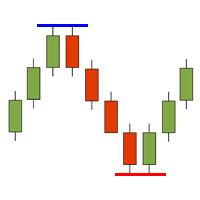
The HighsAndLowsPro indicator for MetaTrader 5 marks local highs and lows in the chart. It distinguishes between weak and strong highs and lows. The line thicknesses and colours can be individually adjusted. In the default setting, the weak highs and lows are displayed thinner, the strong ones thicker. Weak highs and lows have 3 candles in front of and behind them whose highs are lower and lows are higher. The strong highs and lows have 5 candles each.
FREE

HotkeyTrader Pro — Expert Advisor for MetaTrader 5 HotkeyTrader Pro is an Expert Advisor that allows executing and managing trades through configurable keyboard shortcuts, with integrated risk management tools and position tracking. Keyboard execution The EA includes 11 predefined keyboard shortcuts for opening buy and sell orders, managing open positions, and executing partial or full closes. It is compatible with external macro software such as AutoHotKey and with programmable input devices. R
FREE

Know your lot size before you click Buy or Sell.
The Chart Mechanics Risk and Position Size is a free panel for MetaTrader 5. Set how much you want to risk and where your stop goes, and it shows the lot size to use and the money actually at risk in your account currency. It is an indicator, so it never opens, changes or closes trades.
WHAT IT SHOWS - Lot size, rounded DOWN to your broker's lot step, so you never risk more than you set - Money at risk after rounding, in your account currency -
FREE

**MTF Confluence Dashboard** is a free, self-contained indicator: a compact on-chart panel that classifies trend direction (Bullish / Bearish / Neutral) across up to six timeframes (M15, M30, H1, H4, D1, W1) and shows a one-line bias summary.
Trend per timeframe is based on a fast/slow EMA relationship, confirmed by price position relative to the fast EMA (not a raw EMA cross) to cut down on whipsaw:
- **Bullish** — fast EMA above slow EMA, and price above the fast EMA - **Bearish** — fast E
FREE

MYTabogFX Pivot HILO MTF is a clean and powerful multi-timeframe support and resistance indicator designed for price action traders. This tool automatically detects and plots the latest pivot highs and pivot lows from a selected higher timeframe and displays them directly on your current chart. It is built for traders who focus on market structure, liquidity, and precision entries.
Key Features: • Multi-Timeframe Pivot Detection (M5, M15, H1, H4, etc.) • Displays Latest 3 Pivot Highs and 3 Piv
FREE
Simple SuperTrend indicator, similar to that of TradingView's.
It has buffers for buy and sell signal, if you want to integrate this into an EA.
It helps traders easily identify trends by providing clear buy and sell signals based on price movements. Designed for simplicity, it’s easy to use and integrates well with various trading strategies, making it a great option for traders of all levels.
Happy trading!
FREE

the AK CAP toolbox free to use;
it includes the same indicators we use for our daily trading and we think the simpler the better. Lightweight indicator for use on all timeframes. that includes VWAP with vwap value indicator on top right. 3 EMA: FAST, MEDIUM, SLOW the candle timer to show how much time left in a candle.
colors and positions are fully customizable.
enjoy
FREE

MUD Dynamic Reversal Bands MT5
Professional Multi-Timeframe Dynamic Reversal Zone Indicator
MUD Dynamic Reversal Bands MT5is a professional trading indicator designed to identify high-probability reversal zones directly on the price chart. Using adaptive dynamic bands, it highlights potential support and resistance areas where price is statistically more likely to react, helping traders spot buying and selling opportunities with greater confidence.
Unlike traditional static support and resis
FREE

POSITION EXIT MANAGER DEMO is the free demo of the Position Exit Manager, and it is the real thing with one difference. It is a trailing stop, a break-even stop, a take profit and a stop loss manager for MetaTrader 5: a panel over every open position where you can set a trailing stop, move every stop to break-even, set a take profit and stop loss on all of them at once, and close every position, the losers or the winners together. It shows the risk per trade and the R multiple of each position w
FREE

由于无法确切知道当前K线何时收盘,很容易错过预定的操作(移动止损、执行预定入场、在收盘时检查交易机会),尤其是在几秒钟都至关重要的较低时间周期上。
Phoenix Candle Timer Panel 会实时显示距离下一根K线收盘的秒级倒计时,并同时显示当前交易品种和时间周期,因此您始终能准确掌握当前K线剩余的时间。
如何提升您的时机把握能力
- 实时倒计时至下一根K线收盘,每秒更新一次
- 两种颜色模式:K线方向(看涨/看跌)或时间紧迫度(随着收盘临近,依次显示安全/警告/紧急)
- 可选12小时制时间格式
- 可配置在收盘前设定秒数时触发提醒,通过弹窗、声音或推送通知发送
自定义设置
面板位置(自动居中或手动调整 X/Y 坐标)、各紧急程度阶段的颜色阈值,以及用于即时隐藏或显示面板的热键。
使用 Phoenix K线计时器面板可:
- 精准把握 K线收盘时的入场、出场或止损调整时机
- 在低时间周期 K线快速收盘前获得早期预警
- 无需将视线从价格上移开,即可随时掌握距收盘剩余时间
使用方法
1. 将其附加到任何图表上,
FREE

使用此辅助工具的优势 1 - 达到预期的美元利润金额时,自动平掉所有仓位。 2 - 以极快的速度为仓位设定预期的止盈价格。 3 - 移动保本止损(Trailing Break-Even)。 4 - 一键清除所有止盈设置。 5 - 一键清除所有止损订单。 6 - 一键将所有仓位设置为保本状态(止损移至开仓价)。 7 - 一键平掉所有仓位。 8 - 该辅助工具占用极少的屏幕空间。 9 – 自动计算并在图表上显示保本价格。 10 – 在辅助工具面板中显示关键且实用的信息。 在面板中显示账户利润 在面板中显示卖出(空头)仓位的总手数 在面板中显示买入(多头)仓位的总手数
各项功能的详细说明
1 - 达到预期的美元利润金额时,自动平掉所有仓位。 (更多详情请参阅截图部分。)
在市场价格剧烈波动时进行交易,您需要一个能快速处理任务的助手。该辅助工具能在不到一秒的时间内为您完成一系列惊人甚至近乎“神奇”的操作——这些任务原本会耗费您大量时间,并分散您对市场的注意力。它能以极快的速度、高质量且高精度地处理您的各项任务。 提示:此功能对于在市场波动和快节奏行情中进行快速交易非常有用。 有了这
FREE

ForexFanclub(FFC) : For detailed instructions and our official website, please visit my profile !
PidPro is a fully-featured, professional bulk order closing tool provided by Forex Fanclub, designed to maximize the efficiency of position management. Whether you are a scalper needing lightning-fast exits or managing a basket of positions from an Expert Advisor, PidPro provides the ultimate control. [Key Features] 1. Flexible Target Selection:
Choose between "All Charts" to manage your entire acc
FREE

Propfirm Metrics 是一款简单易用的只读账户监控工具,专为 Prop Firm 交易者设计,可直接在 MetaTrader 5 中查看重要的账户指标。
面板可以清晰显示当前账户状态,包括余额、净值、浮动盈亏、当日结果、剩余每日及总体回撤额度、一致性规则、交易天数以及利润目标进度。
只需输入你的 Prop Firm 账户规则,Propfirm Metrics 就会自动计算并在一个清晰的面板中显示相关数据。
主要功能:
• 每日和总体回撤监控 • 实时显示剩余回撤额度 • 当日利润和浮动盈亏 • 一致性规则监控 • 最佳交易日及满足一致性规则所需的利润 • 交易日、盈利日和合格交易日统计 • 利润目标进度 • 可自定义每日重置时间 • 可自定义 Prop Firm 限制 • 监控整个 MT5 账户,包括所有交易品种和 EA
Propfirm Metrics 为只读工具,不会开仓、平仓或修改任何交易。
它的目的是帮助交易者更容易理解和遵守 Prop Firm 的规则,无需手动计算所有数据。
重要提示:请始终根据你所使用的 Prop Firm 最新规则设置参数。所
FREE

This indicator displays the current SWAP values (for both buy and sell positions) of individual trading instruments directly in the chart.
It allows traders to quickly identify which symbols have positive or negative swaps, helping them make better decisions when choosing positions that may be more advantageous for long-term holding. ️ Indicator Settings Selection of Displayed Symbols The user can choose which instruments are displayed in the table:
• only currency pairs,
• all symbols from the
FREE

实时交易与历史可视化工具是一款强大的MetaTrader 5指标,旨在通过清晰直观的视觉提示帮助交易者追踪持仓与平仓记录。无论您正在监控实时交易还是分析历史表现,该工具都能在图表上直接呈现直观可定制的入场/离场点位、盈亏状况及交易统计数据。
核心功能:
动态连线直观呈现活跃交易:连接入场点与当前价格
实时更新盈亏数据
历史交易可视化:带入场/出场标记及趋势线
一键查看交易详情(盈亏、盈亏点数、仓位规模)
按交易类型(买/卖)筛选并限定历史数据展示
可选摘要表:展示近期交易盈亏概览
简洁有序的布局,快速评估交易表现 智能刷新率控制,低CPU占用率
适用人群: 日内交易者与短线交易者——快速评估持仓与近期交易 波段交易者——回顾历史交易进行形态分析 所有策略类型——兼容任何交易风格
立即获取实时交易与历史可视化工具,让您的交易清晰明了!
FREE

Place trades in one click with the lot size calculated from your risk. How it works Type your risk percent, stop loss in points and take profit as a multiple of the stop. The panel shows the lot size and the money at risk before you click. BUY and SELL open the order with SL and TP already attached. Management buttons move stops to break-even, close half or close all positions on the chart symbol. Key features Risk based lot size from balance, tick value and stop distance SL and TP attached to e
FREE

Close all your positions together when the basket reaches a profit goal or a loss limit. How it works The utility adds the floating profit and swap of the selected positions (all symbols or the chart symbol, with an optional magic filter). When the total reaches the profit goal or the loss limit (money or percent of balance), every position in the basket is closed. A trailing lock can also close the basket if profit falls back by a set amount. Pending orders can be deleted too, and the utility c
FREE

Quick start Drag Broker Execution Inspector Lite onto any chart. Read the live spread and the gauge in the mini HUD. Click Open , then News , to see the next USD release. Details › HTML report : your session on one page. Click "?" for plain-language help on every view. A small, movable spread HUD for any MT5 chart The utility is passive: it never places, modifies or closes orders. Current spread with a gauge comparing it with recent quotes (low / typical / elevated). Median, maximum and P95
FREE

Automatically cycles through every symbol in your Market Watch at a user-defined interval, letting you scan multiple pairs hands-free without manually changing charts. Benefits Hands-free multi-pair scanning with adjustable speed and optional reverse direction Reliable play/pause button that stays on-chart and can be placed in any corner with custom colors Optional large centered Symbol + Timeframe labels (stacked, with adjustable spacing) that can sit behind or in front of price Remembers its p
FREE

每位交易者都熟悉这个流程:打开指标设置,改一个数字,点击确定,盯着图表看,觉得不对,再打开设置。WPR Live Tuner 让这一切到此为止。 这是一款可以 直接在图表上实时调节 的 Williams %R。图表上有一个小面板,带有 %R 周期和两条水平线的滑块。拖动滑块,指标立刻重算并重绘,就在你眼前完成。看着合适了,就调好了,不需要对话框,也不用点确定。 可选的 MA 信号线。 在面板上直接开启或关闭 %R 的移动平均线,并用一个按钮循环切换它的计算方法:SMA、EMA、SMMA、LWMA。四种方法,各一次点击,改动立刻反映在图表上。想知道 EMA(5) 还是 SMMA(9) 对你的 %R 平滑效果更好,只要几秒钟,而不必四次进出设置窗口。 还有实时样式编辑器。 用 16 色调色板和 RGB 滑块调整 %R 线、MA 线和水平线的颜色与粗细。三套内置主题(Night Cyan、Graphite Gold、Clean Light)任选,让面板与你的图表风格一致。 你的设置会 按图表分别保存 :周期、水平线、MA 的开关与方法、颜色和线宽,重启后都会原样恢复。 它的过人之处 即时反馈
FREE

MGD Prop Risk Guard MT5 Professional Account Risk Monitoring for MetaTrader 5 — FREE MGD Prop Risk Guard MT5 is a free account risk monitoring utility designed to help traders stay informed about their daily loss limits, maximum drawdown, and available risk. Whether you trade manually, use Expert Advisors, or participate in proprietary trading firm challenges, MGD Prop Risk Guard provides a clear, real-time overview of your account's risk exposure. Monitor your trading risk directly from your MT
FREE

Chameleon Hybrid Pro v2.14 - Professional Gold Trading Solution English Description Chameleon Hybrid Pro v2.14 is a professional-grade Expert Advisor (EA) specifically engineered for the Gold (XAUUSD) market. It features a proprietary "Hybrid Intelligence" strategy that merges long-term trend analysis with precision short-term execution. The "Hybrid Pro" Advantage Unlike standard EAs, Chameleon Hybrid Pro utilizes a dual-layer filtering system: Trend Guard (H1): Analyzes the primary mar
FREE

Free for a limited time... BDB EA is a structured mean reversion trading system designed for the 1H timeframe, combining market conditions with a controlled grid approach to capture price retracements efficiently. Built for stability and consistency, the EA opens positions based on market conditions and manages them as a basket, targeting a unified take profit across all trades.
Results Verified live results available here:
https://www.mql5.com/en/signals/2366129 Running on EURUSD and EURGBP
FREE

Price Compression Indicator Based on Financial Volume Levels This indicator was developed to identify price compression regions associated with relevant financial volume levels , using horizontal lines on the chart to highlight areas that may present greater market interest. The system monitors price behavior within these regions, considering different possibilities such as continuation, breakouts, rejections, and potential false breakouts . Therefore, the horizontal lines represent areas for st
FREE
What It Does This indicator shows up to 5 moving averages from any higher timeframe on your current chart. Instead of switching timeframes to see the bigger picture, you get the trend information in one place. Example: Trading on 1-hour chart while displaying Daily moving averages to see the longer-term trend. Key Features Flexible Configuration Display up to 5 moving averages with individual enable/disable options Choose any higher timeframe as your source (4-hour, Daily, Weekly, Monthly, etc.)
FREE

How to Read My Trends My Trends is designed to help you quickly compare market direction across several symbols and timeframes from one dashboard. Each symbol can display one of three directional states on the selected timeframes:
↑ Bullish – The current trend conditions are bullish ↓ Bearish – The current trend conditions are bearish → Mixed – The selected timeframes are not clearly aligned
The Trend Strength score then provides an additional summary of how strong the current multi-timeframe
FREE

MT5历史记录显示的是交易,而不是策略。如果您在一个账户上运行多个EA,很难看出哪个在为账户贡献,哪个在让您付出代价。 VRD Insight 按魔术号(magic number)对账户进行分组,加载后立即在图表上显示每个策略。 您将看到 每个EA(魔术号)一行,名称取自交易注释,或显示为"Magic N" 每个EA的已平仓结果,根据账户的出场成交计算 每个EA的持仓敞口:浮动结果和持仓数量 账户最大回撤,从余额曲线的累计高点开始计算 手动交易(魔术号0)单独归入"Manual"一行 每个EA的活跃度条:绿色为活跃,琥珀色为安静,红色为停滞,并显示距上次交易的时间 终端健康评分卡,以绿、琥珀、红色圆点显示可用内存、CPU核心与负载、延迟与连接、报价时效、可用磁盘和运行时间 适合谁 在一个账户上运行多个EA、希望在MT5内查看按EA划分的结果面板的交易者。 如何开始 将 VRD Insight 加载到任意图表。 面板读取您的历史记录,并按魔术号列出您的策略。 保持运行:默认情况下,面板每秒刷新一次,每15秒重建一次历史。 须知 只读。Insight 不包含任何下单代码,因此从不开仓、修改
FREE

CHRONOTRAP AI LIMITED LAUNCH OFFER Secure the indicator at the lowest available price before the next pricing tier begins. FIRST 4 BUYERS: $43 NEXT 5 BUYERS: $55 NEXT PRICE: $65 FINAL LAUNCH PRICE: $95 Actual Planned Price: $245 Once a pricing tier is completed, the price moves to the next level and will not return to the previous tier. CHRONOTRAP AI Professional Session Liquidity & Trap Intelligence for MetaTrader 5 Most session indicators only place colored boxes on the chart. ChronoTrap

FiboNY is an institutional-grade Expert Advisor (EA) for MetaTrader 5, designed exclusively for Gold (XAUUSD). Built on advanced technical analysis principles and strict capital management, FiboNY does not try to predict the market; instead, it reacts with discipline to the real volatility of the New York Open. Ideal for personal accounts and Prop Firm evaluations. Why is FiboNY different? Unlike most gold bots, you won't find high-risk systems here. ZERO Martingale. ZERO Grid. ZERO Cost Averagi
FREE

— 与专用图表指标 Super Fast Second Chart 完全联动的超短线AI判定系统 — 本产品是一套 与专用图表指标深度整合的自动AI判定系统 。 只需保存图表截图,AI即可在数秒内返回 多周期综合分析、方向判断、置信度、反转条件、下一机会 。 与专用图表指标配合使用时,AI还能读取 CSV数值数据(10–20根K线) , 获得图像无法提供的精确信息,使判定精度提升到“完全不同的层级”。 与专用图表指标的完全联动 指标向AI提供以下数据: 15秒~30分钟的多周期结构 ALMA(短期/长期) 自定义CCI MACD直方图 回归通道(reg_upper / reg_lower) 多项式回归(polyreg) ATR TrueTL趋势线 最近10根K线的统计(阳线/阴线/同值) CSV提供的精确OHLC、区间、实体大小、波动率 秒级波动与细微价格变化 AI整合所有数据后,将高精度返回 “当前5分钟K线剩余方向(阳/阴)” 。 与专用指标配合使用,可达到图像分析永远无法实现的精度。 AI输出示例 各周期的当前状态 趋势 / 位置结构 / 动能 最终方向判断(阳/阴)
FREE

VWAP FanMaster:精准掌握回调策略!
VWAP FanMaster 是专为追求 精准入场点 和 高效回调交易 的交易者打造的终极指标。 它结合了 VWAP(加权平均成交价) 与 斐波那契扇形线 ,清晰标绘出市场中的重要价格区域。 主要特点 简单而强大 :只需移动垂直线,指标将自动绘制 VWAP 和 斐波那契扇形线 。
智能交易策略 :等待价格回到绘制的区域,以捕捉 完美回调 的支撑和阻力点。
高级可视化工具 :快速识别 价格共振区域 ,做出果断的交易决策。 为什么选择 VWAP FanMaster? 易于使用 ,适合新手和资深交易者。
提升交易精度 ,通过结合两种强大的分析工具。
改善风险管理 ,提供清晰一致的价格预测。 优化您的交易策略,用 VWAP FanMaster 轻松掌控市场!
FREE

GOLD SecScope AI is an ultra‑lightweight, real‑time micro‑analysis tool designed exclusively for GOLD (XAUUSD). It internally generates 1‑second candles and displays an AI‑calculated micro‑momentum score inside a compact floating window.
The window can be freely dragged by double‑clicking, allowing you to place it anywhere on your chart.
This tool does not perform automated trading or generate signals. It is a visual assistant designed for scalpers.
--------------------------------------
FREE
GoldStorm - Advanced Gold Trading Algorithm (XAU/USD) After intensive research, programming, and testing, GoldStorm was created – an innovative Expert Advisor (EA) developed in MQL5. This advanced trading algorithm is designed specifically for trading gold (XAU/USD) and fully utilizes market dynamics and price volatility. How Does GoldStorm Work? GoldStorm uses a strategy based on precise pending orders. After a position is activated, one of two actions occurs: Pyramiding Positions – If the mark

Forex Pulse Matrix is a professional multi-currency strength dashboard for MetaTrader 5. It scans the 8 major currencies and monitors up to 28 forex pairs from a single chart, displaying a clear real-time strength matrix directly on your screen. The indicator helps traders identify the strongest and weakest currencies in the market, making it easier to spot high-probability momentum pairs and avoid single-pair noise. Main Features Multi-currency strength matrix for USD, EUR, GBP, JPY, CHF, CAD,
FREE

Script to load history of a symbol on determined timeframe (default M1).
It is extracted from the MQL5 documentation:
https://www.mql5.com/en/docs/series/timeseries_access
Adapted by Renato Fiche Junior #melhoresferramentas #renato #larissasihle #aguiatraders
Parâmetros de Entrada
- Start datetime : the initial datetime from the history will be loaded - Timeframe to be loaded: period that will be loaded
FREE
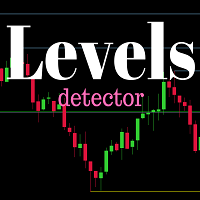
Do you want to see the most relevant supports and resistances at a glance? Tired of tracing the levels by hand? Multi Levels Detector is an indicator for MetaTrader that will draw supports and resistances according to the parameters entered, and also offers the possibility of executing an alert every time the price reaches any of its levels.
SETTINGS UsePercentage: Allows you to configure whether the distances between levels will be measured in points, or by a percentage of the asset.
TimeFram
FREE

Phoenix Range Indicator v6 is a multi-timeframe tool designed to track and display price ranges for XAUUSD (Gold). Core Functionality Range Detection: It identifies the highest and lowest price points over specific time intervals (e.g., 1-minute, 1-hour, or 4-hour ranges). Timeframe-Specific Toggles: It uses a dashboard with checkboxes (like the chk_1 for 1m and chk_4H for 4-hour) to allow you to turn the visibility of different range levels on or off. Visual Levels: The indicator plots horizo
FREE

The "Deviation Scaled Moving Average Crosses" indicator is a powerful technical analysis tool designed for the MetaTrader 5 trading platform. It facilitates informed trading decisions by visually presenting the interaction between two moving averages, both of which are smoothed and scaled to offer enhanced insights into market trends. This custom indicator is developed by mladen and is copyright-protected for the year 2023.
Using a unique approach, the indicator displays two types of deviation
FREE
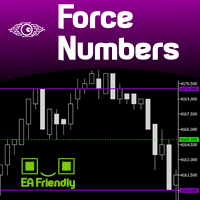
Several assets in several markets have the behavior of using specific numbers as Force Numbers, where support, resistance and price thrust is created. Let this indicator draw those levels of support and resistance for you. You can also stack it to show different level of Prices! This technique is being used by Tape Readers and Order Flow traders all over the world for a long time. Give it a try. Challenge yourself to study new ways of Price Action!
SETTINGS
What Price reference to use in the c
FREE

Setting a chart up exactly the way you like it takes a few minutes. Doing it twenty times takes an afternoon. Chart Cloner opens exact copies of the chart you drop it on. Symbol, timeframe, colours, scale and chart mode always carry across, because that is what makes a copy a copy. You decide whether the attached Expert Advisor, the indicators and the drawn objects come with them. Point it at your Market Watch instead of a copy count and it opens one chart per symbol, every pair wearing the same
FREE
MetaTrader市场是 出售自动交易和技术指标的最好地方。
您只需要以一个有吸引力的设计和良好的描述为MetaTrader平台开发应用程序。我们将为您解释如何在市场发布您的产品将它提供给数以百万计的MetaTrader用户。
