 MetaTrader 5
 专家
专家 指标
指标 程序库
程序库 实用工具
实用工具 窗口小部件
窗口小部件 规则
规则适用于MetaTrader 5的EA交易和指标 - 126
 使用EA交易和指标,使外汇交易获得更多盈利。EA交易可使您自动开启和关闭交易,而指标将帮助您更准确地预测市场行为。
该页面提供MetaTrader 5应用程序的目录。
使用EA交易和指标,使外汇交易获得更多盈利。EA交易可使您自动开启和关闭交易,而指标将帮助您更准确地预测市场行为。
该页面提供MetaTrader 5应用程序的目录。 
Market Trading Sessions is an indicator that identifies major market sessions such as:
London (09:00 - 18:00 UTC+2) New York (15:00 - 00:00 UTC+2) Sydney (23:00 - 8:00 UTC+2) Tokyo (02:00 - 11:00 UTC+2)
It displays each session’s start and end times, along with its high and low, providing traders with a clearer view of price volatility throughout the day. The indicator offers high customizability, allowing you to adjust session times and modify the plotting style to match your preference.
If yo
FREE

Candle Timer Essential MT5 displays a countdown showing the time remaining until the current candle closes. Features:
Countdown timer for all standard MT5 timeframes (M1–MN1) Separate color settings for header, timer text, and description text Display size adjusts automatically to the chart window Timer is implemented using chart objects
Input parameters:
Header color Timer text color Description text color

The Trend Strength Meter Core is a powerful on-chart dashboard designed to give you an instant, clear reading of the current market momentum . By combining the data from Moving Averages, RSI, and MACD, it calculates a highly accurate Trend Score (0 to 100), ensuring you always trade on the right side of the market . Key Features Advanced Confluence Algorithm: Calculates a dynamic score by analyzing price position relative to MA, RSI overbought/oversold zones, and MACD signal crossovers . Enhanc
FREE

Anchored Volume Profile Pro — Heatmap & Delta Edition The most complete Anchored Volume Profile indicator for MetaTrader 5. Drag two vertical lines to define any time range — the indicator instantly renders a full volume profile with heatmap coloring, delta analysis, POC/VAH/VAL levels, HVN/LVN detection, and a live statistics panel. Key Features Fully Anchored & Interactive Simply drag the Start and End vertical lines to any position on the chart. The profile redraws automatically in real ti
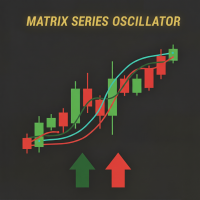
Matrix Series – 支撑、阻力及动量指标 在一个指标中显示关键支撑/阻力区域、超买/超卖水平以及市场强度。 Matrix Series 结合了 动态CCI 、平滑移动平均和标准差通道,为市场方向和关键水平提供清晰视图。蜡烛根据多空压力着色,并显示动态支撑/阻力区及超买/超卖可视化警报。 主要特征 趋势蜡烛颜色: 绿色=多头, 红色=空头 支撑与阻力区域: 根据可配置CCI周期动态计算 超买/超卖指标: 可视化警报提示极端状态 易于理解: 蜡烛方向与区域交互显示市场强度 完全可配置: 周期、平滑、OB/OS水平及区域显示 使用方法 趋势识别: 绿色蜡烛 → 多头; 红色蜡烛 → 空头 支撑/阻力交易: 观察价格与动态区域的交互以进行入场和出场 OB/OS确认: 信号穿越OB/OS水平增强交易决策 实际示例 绿色蜡烛,CCI高于阻力 → 强劲上升趋势,可能继续 红色蜡烛,CCI接近支撑 → 下跌趋势,可能出现新低 可视化OB/OS警报 → 显示潜在趋势反转 竞争优势 将多个工具整合到一个指标中:趋势蜡烛、CCI、支撑/阻力及OB/OS警报 在图表显示之前捕捉市场强度变化 过滤噪
FREE

Blitz Trade Scalper - Precision Scalping Made Effortless Experience the next level of precision scalping with Blitz Trade Scalper, is a robust MetaTrader 5 Expert Advisor designed for the 15-minute timeframe. Embrace the world of high-frequency trading with an EA that requires no adjustments – simply activate, and watch as it navigates the markets with surgical precision.
IMPORTANT!! Bot works best on the EURUSD and GBPUSD chart. For other pairs you can back test to test the performance in
FREE

ALFA REVERSAL PRO I built ALFA REVERSAL PRO for traders who want clean reversal signals without filling the chart with unnecessary tools. The indicator displays BUY and SELL arrows when valid reversal conditions are confirmed. It can also show possible exit signals, send alerts, and calculate optional Stop Loss and Take Profit guides. ALFA REVERSAL PRO does not trade automatically. It is designed to support your own analysis and trading decisions. Download the user manual here , contact me for a
Adaptive Grid Elite Pro Indicator - Professional Trading Signal Indicator Transform Your Trading with Intelligent Divergence Detection and Grid Strategy Guidance AGE Pro MT5 EA https://www.mql5.com/en/market/product/144042 Adaptive Grid Elite Pro Indicator is a sophisticated technical analysis indicator that combines advanced divergence detection with intelligent grid trading guidance. This indicator provides professional-grade signal generation with complete visual guidance for grid trading st
FREE

RaysFX Elastic Order Flow Matrix (EOFM) L'indicatore definitivo per gli Scalper e i Day Trader che operano su timeframe rapidi (M1). Il RaysFX Elastic Order Flow Matrix non è un semplice oscillatore. È un motore analitico avanzato progettato per decodificare la vera pressione compratrice o venditrice del mercato, filtrando il "rumore" tipico dei grafici a 1 minuto. Se sei stanco di farti fermare dai falsi segnali generati dalle candele di basso volume o dalla congestione, questo strumento ti
FREE

LEGACY LANCELOT INDI — Adaptive Trend & Confluence Indicator
( MQL5 LEGACY CHANNEL ) A modern take on the classic SuperTrend. Instead of a fixed band, it adapts to market volatility and rates every signal by CONVICTION — combining trend strength and volume so you instantly see which moves are worth your attention. All wrapped in a clean on-chart HUD panel.
KEY FEATURES
Adaptive SuperTrend Engine
FREE

TEMA Trend Matrix PRO Elite Multi-Timeframe Trend Intelligence System
Trade With Clarity. Execute With Confidence. Stop guessing the market direction. TEMA Trend Matrix PRO is a high-performance trend intelligence dashboard built for traders who demand precision, speed, and clarity. Powered by advanced Triple Exponential Moving Average (TEMA) logic, it delivers a real-time, multi-timeframe view of market structure — all in one clean interface. No more chart switching. No more conflicting
FREE

"Elder Ray" or "Ray" indicator is based on the Dr. Alexander Elder's oscillators: Bulls & Bears Power. Both of them works with an EMA. This indicator is used by traders to identify divergence, market directions and more... Dr. Elder's method generally uses a 13-day EMA Period but this can be modified based on your personal demand. The calculations are: Bulls Power= high candle - EMA close Bears Poder= low candle - EMA close Lime line represents Bulls Power and OrangeRed line, shows Bears Power
FREE

The Prospector Scalper EA is a fully automated Expert Advisor that scalps during high volatility periods using a hybrid lot multiplication algorithm. The EA trades using market orders and hides its decision making from the broker. This EA will work on any pair but works best on EURUSD and USDJPY on the M5 timeframe. A VPS is advisable when trading this system. Check the comments for back test results and optimized settings. Please note: I have made the decision to give this EA away and many more
FREE
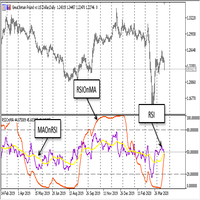
The EA trades on two indicators iMA (Moving Average, MA) and one iRSI (Relative Strength Index, RSI). Decision on trade signals is only made when a new bar appears, while positions are trailed and closed (in case of profit) at every tick. An unconventional solution was applied: The Slow indicator averaging period is calculated as the Fast averaging period multiplied by two, while the RSI averaging period is always equal to the Fast averaging period. This reduces the number of par
FREE
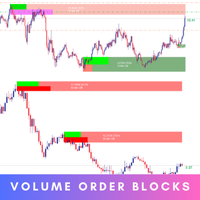
Introducing the Volume Order Blocks indicator, a game-changing tool designed for traders who demand precision and clarity in their market analysis. This advanced indicator not only identifies order blocks but also integrates crucial volumetric data, allowing you to gauge the strength of these blocks with unparalleled accuracy. MT4 version - https://www.mql5.com/en/market/product/121237/ Key Features of the Volume Order Blocks: Bullish & Bearish Order Blocks: Easily visualize and differentiat

Shadow System Candles - AI Trend Visualization
Concept "Stop trading in the dark. Equip your chart with Night Vision."
Shadow System Candles is the visual core of the "Shadow Operation" project. It eliminates market noise and visualizes the true direction of the trend using AI-based logic (ADX + MA integration).
Note: This tool does not generate buy/sell arrows. It is designed to train your eyes to recognize "Active Trends" and "Dangerous Ranges.
Key Features ・AI Logic Coloring[/b]: Automat
FREE

Hyper DM, Moving Distance from Moving Averages is an indicator that allows you to define the distance in points of the upper and lower bands in relation to the moving average in the middle.
Its operation is simple, it has configuration parameters of the moving average of the middle and based on it and the defined distance parameters of the upper and lower bands, it is plotted in the graph.
FREE

Volume Calculator
This indicator shows the volume to be used in an operation based on the maximum acceptable stop value and the size of the stop. That way you will not use a calculator to calculate the volume you are going to use every time. This indicator makes your life much easier and faster. Suitable for any type of trader: Scalper, DayTrader, SwingTrader.
FREE

Preferred pair for USDCAD trading
Conditions for purchases of the trading system "Ozy_M15":
1) The price is above the moving average SMA 48. 2) Price correction starts down, but the moving average within this correction should not be crossed by the candle body. 3) At the same time, the correction itself should be at least as deep as the bottom line of the Ozymandias indicator. 4) After this, as soon as the closing price of the next candle is higher than the upper line of the Ozymandias indicat
FREE

The Quick Style utility is designed for facilitation and acceleration of working with the properties of graphical objects. Left-click a graphical object while holding the Shift key to open the quick access window for configuring the object properties. In the window, you can change the color, style and line width with one click, including those of other graphical objects. All changes are displayed immediately. To close the Quick Style , simply click the free space on the chart. The utility is eas
FREE

Un indicador técnico de múltiples osciladores es una herramienta de análisis que combina varios osciladores para proporcionar una visión más completa de la dinámica del mercado. Los osciladores son fórmulas matemáticas que se calculan a partir de los datos de los precios y se representan gráficamente para ayudar a identificar la tendencia actual, el sentimiento del mercado y posibles puntos de giro.
**¿Para qué sirve?** Este indicador sirve para identificar condiciones de sobrecompra y sobreve
FREE

You may have found after a carefully planned trade something happened. An unexpected event... You forgot to look the web calender or use any kind of program. This fills this gap in its own way. Features: - show all events as vertical lines - low, medium or high events... with different colors. -name of the events and numbers associated with the event are also shown such actual value, forecast value and previous value.
The calendar information is obtained from your broker. It is a built-in serv
FREE

AlsoSell Cockpit 把你完整的交易流程装进图表上一个精致的面板:分析、定量、执行、管理、复盘 —— 全程不用离开图表。
下单与执行 - 一键市价买入 / 卖出,按风险自动计算手数。 - 拖拽式图表下单:在图表上直接拖动入场、止损、止盈三条线。手数根据止损距离和风险百分比实时计算,盈亏比与到价的精确盈亏金额($)在拖动时实时显示。 - 智能执行:执行按钮根据你设定的入场位置,自动选择市价单或挂单(限价 / 突破)。 - 价格验证(止损/止盈方向正确 + 不小于 broker 最小止损距离),在下单前拦截无效订单。 - 反手:一键平掉净持仓并反向开仓。 - 灵活手数:按风险百分比自动算,或用面板上的手数步进器手动调。 - 每个订单都带 magic 编号和注释,方便追踪对账。
持仓管理 - 一键平仓:全部 / 盈利 / 亏损 / 多头 / 空头。 - 批量止损 / 止盈(按 ATR 或固定点数)以及一键保本。 - 持仓明细大表,按单列出,并支持按筛选条件一键平掉一组。
行情看板 - 多周期趋势(M1–D1)、波动率状态、当前交易时段。 - 整数关口、当日枢轴、前一日高低,
FREE

MTForge SuperTrend — Adaptive Trend Following for MT5 A professional-grade SuperTrend indicator built for serious traders. Unlike basic SuperTrend tools, MTForge SuperTrend gives you two trend detection modes and six moving average types, letting you fine-tune the indicator to match any market condition. What It Does The indicator plots a single colored line on your chart that flips between support (green) and resistance (red). When price is trending up, the line sits below price as dynamic supp
FREE

Advanced Trend Builder is a trend indicator using the original calculation algorithm. ATB can be used on any data and timeframe. My recommendation use for calculation numbers 4 - 16 - 64 - 256 and so on ..., but this is only recommendation. The middle of the trend wave is a special place where market behavior is different, when developed ATB was main idea to find the middle of the wave trend. Input parameters: Bars will be used for calculation - number of bars used for a trend line calculation.
FREE

CandleAvg Pro: Advanced MT5 Indicator for Smarter Trading Visualize dynamic moving averages directly overlaid on candlesticks with precision. Key Features: Customizable MA periods (SMA/EMA) for trend spotting. Color-coded signals: Green for bullish, red for bearish crossovers. Real-time alerts on breakouts and reversals. Compatible with all timeframes and pairs. Boost your edge – spot entries/exits faster. Only $49!
FREE

Indigo Indicator by Quant Atlas Creator: https://www.quant-atlas.com/ Indigo Indicator is a clean reversal focused trading tool designed to identify potential turning points through a price sequence framework. The indicator studies how price has behaved across multiple prior reference points and highlights moments where that sequence may be shifting. When conditions align, it plots indigo triangle signals directly on the chart. Both bullish and bearish signals use the same indigo visual identit
FREE

This is a utility panel to assist closing of open Deals. The panel has input filters to assist one select the right trades. The tool displays the number of trades to be closed as well as profits to be realized. One click close, Filter trades to be closed by: symbol, (Filter by a particular symbol in the trade terminal). magic number (If your orders are from particular EA with unique magic numbers). whether in profit, loss or All. (P/L=all trades, profiting = trades in profit, loosing = trades
FREE

OrderFlow Structure SMC Indicator
A market structure indicator that doesn't just tell you where structure broke. It tells you whether to trust the break. Built for MetaTrader 5. The first SMC indicator to combine dual-track structure detection, two-stage liquidity sweep confirmation, and academic-grade order flow analysis on a single chart.
Who this is for Discretionary SMC traders who are tired of false BoS breaks and painted sweeps. Quant-minded traders who want order flow context that isn't

MA Cross Histogram Oscillator (MT5) The MA Cross Histogram Oscillator is a custom indicator designed to visualize the relationship between two moving averages in the form of a color-coded histogram. Instead of drawing standard MA lines on the chart, it highlights the strength and direction of the trend by comparing the difference between a fast and a slow moving average. Green bars – bullish momentum (fast MA is above slow MA and rising). Red bars – bearish momentum (fast MA is below slow MA and
FREE

Индикатор Color служит помощником для начинающего или опытного трейдера для выявления краткосрочного тренда или глобального в зависимости выбранного тайм фрейма, а так же для выявления флетовой зоны, которая очень хорошо видна в местах длинной проторговки в одной зоне индикатора Color. Индикатор не перерисовывается на завершённой свечи , но в моменте появления свечи и образования сигнала, может быть отклонён в прорисовке. Особенности работы индикатора Хорошо определяет тренд на волатильных инстр
FREE

The Carry Trade Monitor is a chart indicator for MetaTrader 5 that automatically scans all symbols in the Market Watch and ranks every swap-paying pair by annualised carry yield, displayed as a live on-chart panel. No configuration is required — attach to any chart and it runs immediately. Carry yield calculations read directly from the broker's own swap specifications via the MT5 symbol feed. There is no external data source, no URL permission required, and no dependency on third-party rate dat
FREE

Mobile-EA is an Android-first trading companion for MetaTrader 5. This product is the MT5 Expert Advisor that links your MetaTrader 5 terminal to the Mobile-EA Android app, so please note from the start: the mobile app is for Android, not iPhone/iOS . The Android mobile app is currently in testing / early access . You can see a full intro of the app here: https://youtu.be/jEDAZ68UpWs FREE access during the testing phase to the Ultimate subscription plan! You can learn more, check the cur
FREE

Session MA Created by Denis Kislitsyn | denis@kislitsyn.me | [ kislitsyn.me ]( https://kislitsyn.me/personal/algo ) Version: 1.0
SessionMA is a specialized Moving Average (MA) indicator for MetaTrader 5 that calculates the MA only on bars that fall within a specified session time window. Unlike standard MA indicators that calculate across all available bars, SessionMA filters calculations to include only the data points that occur during your defined trading session.
This indicator is particu
FREE
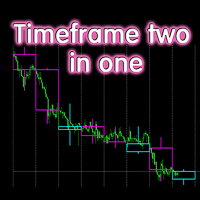
The indicator displays candlesticks of a given senior timeframe, on smaller timeframes
TF_Bar - selection of the senior timeframe, based on which candlesticks on the current one will be displayed.;
Number_of_Bars - the maximum number of bars up to which the indicator will be calculated.;
Color_Up - color display of bullish candlesticks;
Color_Down - color display of bearish candlesticks;
Widht_lines - the thickness of the indicator lines.
Other useful free and paid products can be viewed
FREE

NHS Risk Manager NHS Risk Manager is a streamlined trade-management and risk-control Expert Advisor for MetaTrader 5. It is built for traders who want a cleaner and faster execution workflow with practical protection tools directly on the chart. The EA focuses on the core elements of disciplined manual trading: planning the trade visually, sizing the position correctly, protecting the account with hard rules, and managing open exposure with more structure and consistency. It is suitable for trad
FREE

Ultima Breakout Pro – Advanced Range Breakout EA with Multi-TP & Trend Filter Account Type: Recommended: ECN/Raw Spread Accounts (low spreads preferred) Minimum Balance: $200 (for 0.01 lots) Leverage: 1:30 or higher Not Recommended: High-spread accounts (avoid brokers with >20 pips spread) Micro accounts with high commission
Expert Advisor Type: Type: Breakout Trading System
Category: Trend & Range Trading
Timeframes: M5 (Best Performance), Any Timeframes
Symbols: EURUS
FREE

Multi-Timeframe Range Trading is a MetaTrader 5 indicator for range trading. It identifies the price oscillation zone and marks the top (resistance) and bottom (support) so you can trade swings inside the range, with higher-timeframe context. Features Automatic range detection: defines the range from recent highs and lows and draws the top and bottom bands. Built-in range bias: price tends to be pushed down from the top and up from the bottom while the range holds. Multi-timeframe context: confi
FREE

DailyBox2 is an advanced automated trading system designed based on trend-following and hedging strategies. This EA executes up to two trades per day and utilizes a smart recovery feature to minimize losses and maximize profits. Its risk management feature ensures safe trading by aligning with the user’s specified risk levels. When used in conjunction with IAMFX-Agent , it can achieve both risk management and profit maximization. Additionally, when used alongside our BandPulse , it can lead to
FREE

[ Overview ] Protect your capital. Simplify your trading. In fast-moving markets, calculating the correct lot size manually is slow, stressful, and prone to error. A miscalculation can mean risking far more than you intended. The Mini Risk Calculator is an on-chart utility designed for speed, precision, and visual clarity. Forget external websites or clunky calculators. Simply drag visual lines on your chart to define your Entry, Stop Loss, and Take Profit levels, and the dashboard instantly tel
FREE

Directional Impulse
一个公式。每根K线。瞬间可读。 大多数指标告诉你价格在哪里或移动速度有多快。Directional Impulse 告诉你的是另一回事:这根K线谁赢了,赢了多少。 基于原创公式 — X = (2C − H − L) × (H − L) 与 X = (C − O) × (H − L) — 它将方向性偏差乘以K线的完整波幅,而不是像该谱系中所有先前指标那样将其归一化消除。结果是每根K线的有符号能量度量,同时捕捉了信念与波动性。有符号平方根变换将输出缩放到线性价格单位,使K线的完整分布变得可读,而非被一两个异常走势主导。 Combo 版本同时绘制两层: 中点锚定(宽柱)—— 当内部压力转变时最先翻转。最先发现看涨或看跌K线内部正在形成的拉锯。
开盘锚定(窄柱)—— 仅当K线实体反转时才翻转。确认完全接管。
共识模式 —— 将两个锚定叠加为单柱,在一致时放大,在 contested K线时压缩至接近零。 你以前看不到、现在能看到的: 一根带有长上影线的看涨K线显示为看跌 —— 因为卖方在收盘前将价格推回至波幅中点下方
衰减的脉冲柱(同方向、缩小尺寸
FREE

SPL102 SpikeCatcher Pro v3.0 Institutional Spike Reversal Trading System Built for XAUUSD, Volatile Markets & Fast Reversal Opportunities SPL102 SpikeCatcher Pro v3.0 is a professional spike-reversal Expert Advisor developed to capture high-probability reversal setups after aggressive market spikes, liquidity grabs, and wick rejection movements. The EA intelligently identifies abnormal candle expansions, stop-hunt liquidity sweeps, and sharp rejection zones where the market often reverses with m

https://www.mql5.com/en/market/product/174770
Destek ve Direnç Göstergesi Pro - Kullanım Kılavuzu Bu araç, MetaTrader 5 üzerinde çalışan, fiyatın destek ve direnç seviyelerine yakınlığını anında takip eden, trend yönünü (EMA) gösteren ve bir fırsat ortaya çıktığında hem bilgisayarınıza hem de cep telefonunuza bildirim gönderen gelişmiş bir analiz panelidir. 1. MetaTrader 5'e Ekleme (Kurulum) Sol taraftaki Gezgin penceresini açın (Ctrl + N). Göstergeyi Göstergeler sekmesi altında bulabilirsini
FREE

Line Master – Trend Lines & Direction Arrows Line Master is a professional trend indicator for MetaTrader 5. It helps traders identify market direction by combining fast and slow trend lines and generating arrows at trend change points. Features: Slow Trend Line: Represents the overall market trend. Fast Trend Line: Responds quickly to short-term price changes. Color-Coded Lines: Uptrend: DodgerBlue Downtrend: Crimson Trend Arrows: Signals appear when the trend changes. Adjustable Inputs: Fast l
FREE

Triple Crox Strategy v4.10 Triple Crox Strategy v4.10 专业MT5指标 | 13形态 | 斐波那契 | CLUSTER ML | 13过滤 概述 专业MT5指标,融合 13种形态检测 、 斐波那契分析 、 CLUSTER机器学习 及 13种多重过滤 ,多层验证降低虚假信号。 交易设置 改良 Heikin-Ashi :绿=上升,红=下降。信号确认显示 买入 / 卖出 箭头,附带 Entry 入场、 TP1/TP2/TP3 止盈、 SL 止损水平线。13种过滤可选。 视觉组件 箭头: 绿买/红卖+Entry/TP/SL线 EMA云(3层): EMA(8/21/50),绿云=上升,红云=下降 趋势带: 绿色=上升,品红=下降 DEMA-ATR线: 绿线=上升,红线=下降 斐波那契: 回撤/扩展水平,黄金区高亮 形态+突破区: 轮廓标注+突破箭头 仪表板: 5主题4位置实时统计 风险管理 ATR止损: 倍数自适应波动环境 移动止损: 自动跟踪锁定利润 利润因子: 风险回报≥1:2才发信号 止损因子: ATR倍数1.0x

BARAK MEGA EA is a fully automated trading Expert Advisor designed for traders who demand total control, strategic flexibility, and advanced risk management within a single system. This EA functions as a true strategy builder , allowing you to combine multiple technical indicators and custom rules to adapt to any market, asset, or timeframe. Unlike traditional robots with fixed logic, BARAK MEGA EA features a modular architecture where every component can be independently enabled, disabled, and
FREE

Moving Average ******************* Moving Average для платформы секундных графиков Micro . ********************* Секундный график на порядок увеличит точность ваших входов и выходов. Секундный период , в привычном формате, позволит увидеть то, что ранее было скрыто. Бесплатные индикаторы, дополнят визуальную картину, что, в совокупности выведет вашу торговлю на новый уровень. Идеально подходит как скальперам, так и трейдерам торгующим внутри дня. Индикатор Moving Average для платформы Micr
FREE

FREE

描述: VPS Health Check EA 是一款 MetaTrader 5 实用程序,旨在监控与经纪商的连接并及时提供有关连接状态的通知。此工具可确保您立即获悉任何连接问题,从而帮助维持交易活动的稳定性和可靠性。 特征: 连接检查模式: 选择检查每根新蜡烛的连接或一天中的特定时间的连接。 可自定义的时间: 设置计划连接检查的精确小时和分钟(24 小时格式)。 实时通知: 通过 MetaTrader 5 应用程序接收有关连接状态的即时通知。 信息显示: 直接在图表上查看最后的通知时间和消息,以便于参考。 输入: 模式: 选择连接检查的模式 Check_On_Each_Candle - 当图表上出现新蜡烛时将触发通知。 Check_At_Particular_Time- 默认选项,将在指定的经纪商时间(默认为 14:00)每天检查。 检查时间: 设置定期检查的时间(24 小时制)。 检查分钟: 设置定期检查的分钟数。 使用说明: 将 EA 附加到图表: 将 VPS 健康检查 EA 添加到 MetaTrader 5 中的任何图表。 如果您使用加密货币进行交易并且需要周末的 V
FREE

This Tool is designed to automate one of the most critical aspects of trade management — setting and managing Stop Loss, Take Profit , and Trailing Stop levels — directly on your MetaTrader 5 platform.
Key Features:
Automatic SL, TSL and TP Placement: Instantly sets initial Stop Loss and Take Profit levels on any new position based on customizable parameters, helping to enforce disciplined risk and reward management.
Dynamic Trailing Stop: Automatically moves the Stop Loss to lock in profits
FREE

VeloTicker PRO is a professional trading indicator designed to reveal hidden market pressure at key institutional price levels.
At these levels, the market often experiences: - Liquidity concentration - Institutional participation - Price reactions (reversals or breakouts)
The indicator displays two real-time gauges:
BUY Pressure Gauge SELL Pressure Gauge
Each gauge measures the strength of buying and selling activity based on tick volume flow.
This allows traders to instantly iden
FREE
O Chart Control é um indicador que permite de forma rapida e pratica alterar o timeframe e ativo do grafico, possibilitando que voce possa fazer todas as suas analises em apenas um grafico sem precisar abrir vários, além disso voce pode escolher o entre os temas claro e escuro para o qual melhor se adapta a sua preferencia.
MT4: https://www.mql5.com/pt/market/product/112155
FREE

Here is the full technical and strategic description for the Gann Square of 9 indicator. Full Name Gann Square of 9 - Intraday Levels (v2.0) Overview This is a mathematical Support & Resistance indicator based on W.D. Gann's "Square of 9" theory. Unlike moving averages which lag behind price, this indicator is predictive . It calculates static price levels at the very beginning of the trading day (based on the Daily Open) and projects them forward. These levels act as a "road map" for the day,
FREE

This Expert advisor trades any Asset class, Try it on any market, When you download PM so you can be added to my channel for all support related issues. There are three trading strategies available * The Wyckoff trading strategy, Channel trading and trend trading. Input Parameters Lots - the volume of position to open; Stop Loss BUY (in points) - the stop loss of BUY positions; Stop Loss SELL (in points) - the stop loss of SELL positions; Take Profit BUY (in points) - the take profit o
FREE
Recommended broker to use the indicator: https://tinyurl.com/5ftaha7c Indicator developed by Diogo Sawitzki Cansi to show possible trade points. Do not repaint. The results displayed in the past are exactly what happened. We also use it to hold trades longer and not get out on false reversal signals which are actually just a profit taking of trades and no one is trying to reverse the direction of the trend. Indicator Parameters: PERIOD: Period for analyzing the buying or selling force to fin
FREE

Ultra Momentum Advanced Directional-Force Market Analyzer Ultra Momentum is a professional momentum indicator engineered to detect the market’s true speed and directional dominance . It combines the classic Momentum calculation with an adaptive multi-period structure and high-quality algorithmic smoothing to deliver a noise-resistant, market-contextual view of momentum. Unlike standard oscillators, Ultra Momentum does more than measure a simple price difference: it analyzes the coherence of m
FREE
An indicator for analyzing different currency pairs simultaneously Forex is a complex market that requires several currency pairs to be analyzed simultaneously Determine the number of currency pairs yourself Determine the currency pair you want to analyze to analyze 4 of the most important and similar currency pairs at the same time. For direct and simple analysis, some currency pairs have changed (EURUSD>>>USDEUR) Do not doubt that to succeed in this market, you must analyze several currency pa
FREE

SMC Order Blocks + FVG — Professional Smart Money Concept Indicator
Unlock institutional trading insights with this professional-grade Smart Money Concept indicator. Automatically detect Order Blocks and Fair Value Gaps used by banks and hedge funds.
KEY FEATURES:
ORDER BLOCKS DETECTION • Automatic bullish and bearish Order Block identification • Based on price action and impulse strength analysis • Real-time mitigation tracking • Customizable imp

“ChronoTrigger EA”是一款结合了详细交易策略和自动化风险管理功能的专家顾问。 该EA利用RSI指标来判断市场超买和超卖的时机,并计算出最佳的入场点和出场点,让投资者在不受市场波动影响的情况下获得稳定的利润提供强有力的支持。
用户可以自由设置手数、止损和止盈设置,以及调整内部参数(x0 至 x7)以完美匹配他们的交易风格和市场条件。 该 EA 自动调整为 3 位数或 5 位数定价,灵活响应任何市场环境并适应多种货币对。
我们推荐以下货币对和时间范围的组合。
EURUSD on the 5-minute GBPUSD on the 5-minute 这是一款专门针对MetaTrader 4的专家顾问,旨在帮助投资者充分利用先进的交易逻辑,利用市场波动赚取稳定的利润。 该 EA 将实时市场数据与独特设计的算法相结合,显着提高交易准确性和效率。
FREE

Matsukaze Prop Shield 是一款专为自营交易公司交易员打造的回撤保护和分析工具。无论您正在参加FTMO挑战赛、管理资金账户,还是进行任何自营公司评估,此工具都能实时监控您的账户,防止突破每日和总回撤限制,并提供完整的分析套件来审查您的交易表现——所有功能集成在图表上的一个面板中。
经FTMO挑战赛实盘账户验证($50,000 两步挑战)。所有回撤数值、剩余金额和统计数据与FTMO仪表板完全一致。适用于任何自营公司资金账户或个人交易账户。
功能介绍
Prop Shield与您的交易(手动或EA)同步运行,监控账户权益。当回撤接近限制时,信号灯变黄,然后变红。如果突破限制,所有仓位将自动平仓,新交易将被阻止一段可配置的冷却时间。
除了保护功能外,Prop Shield还包含完整的分析面板和日历热力图,这些通常只能在自营公司网站上查看。现在您可以直接在MT4/MT5图表上查看所有内容,无需切换标签页。
Shield标签 — 回撤保护
- 每日和总回撤监控,显示百分比和剩余美元金额 - 信号灯系统(绿、黄、红)即时视觉状态 - FTMO预设:选择FTMO即可
FREE

凤凰回撤监测器(MT5)
专为MetaTrader 5设计的实时回撤监控工具。在图表上实时显示真实账户回撤百分比,帮助交易者管理风险并避免突破账户限额。
功能定位
回撤是管理自营账户或严格风险管理型投资组合的交易者最关键的风险指标。超过回撤限额可能导致账户失效或数周盈利化为乌有。
凤凰回撤监测器基于经纪商服务器权益与余额数据,实时呈现当前回撤状态。当价格与持仓波动时,监测器自动更新数据,使交易者能在触及限额前及时采取行动降低风险敞口。
安装说明
从MQL5市场下载后附加至任意图表。监测器即时显示且无需配置。
系统要求
MetaTrader 5 3280版或更高版本。本工具为专家顾问,需在图表上运行。仅基于实时权益数据显示当前账户回撤数据。
反馈与评价
若您认为本工具实用,敬请在MQL5平台给予五星好评。您的反馈将直接影响凤凰团队的后续更新、优化及新工具开发——我们致力于打造交易者真正重视的功能。
技术支持
通过MQL5私信提供终身支持,24小时内响应。
开发方:凤凰环球投资有限公司 2025 凤凰环球投资有限公司。保留所有权利。
FREE
如果你象这个项目一样,就有5个饥饿审查。 由于机构贸易量很大,因此它们不愿意努力设法争取。
在特定百分比上捍卫立场。 这些级别将成为你可以利用的自然支持和抵抗力。
进入贸易或了解对你立场的可能危险。 提名人将显示: 日。 周。 Month. 资格。 年。 在你追踪你们的支持和抵抗的温床。
FREE

无论如何移动图表,都可以瞬间聚焦到您选择的时间点,轻松查看目标时刻的数据,非常方便分析和操作。 Focus Time Line Player 操作简便,可以快速关注任意时间点,提升分析效率。
如果您喜欢,也请考虑使用 “Focus Time Line”: https://www.mql5.com/zh/market/product/154363 除此功能外,它还能在多个图表上进行多周期(MTF)同一时间同步,让多周期分析变得更加轻松。
【功能】 ・Focus Mode: SingleLine(默认显示) ・Crt FocusLine: 在任意时间创建一条焦点线 ・Position: 切换显示位置 ・Focus: 将图表视图移动到创建的焦点线上 ・X按钮: 退出程序
【操作步骤】 ・Focus Mode 保持默认 SingleLine 使用 ・点击 Crt FocusLine 创建一条 FocusTimeLine ・使用 Position 按钮选择显示位置 ・点击 Focus 将图表移动到选定的焦点 ・点击 X 按钮退出程序 版本比较 下表显示了本产品(Player版)与高
FREE

Protectron — 账户保护系统 一款实时监控账户净值的工具,当净值达到设定的上限或下限阈值时,自动平掉所有持仓。可与任何 EA(智能交易系统)或手动交易策略并行运行,且不干扰其自身逻辑。 概述 Protectron 加载到图表后,会持续监控账户总净值,其中包含浮动盈亏。当净值在任一方向达到设定的阈值时,所有持仓将被立即平仓,挂单亦可选择一并删除。整个过程无需人工干预。 该工具以被动方式与其他智能交易系统及手动交易共存运行。对于需要自动执行每日回撤限制与盈利目标的自营交易公司(prop firm)交易者而言,它尤为实用。 计算方式 上限与下限阈值均支持五种计算模式:固定净值水平、相对初始入金的美元金额、入金百分比、当前余额百分比,或关闭。两个阈值可以各自独立关闭。 图表显示 实时面板显示当前净值、距离各阈值的差距以及当前的保护状态。所有指标均在每个报价跳动时更新。 功能特性 自动或手动检测初始入金 触发时可选删除挂单 触发时发出提醒通知 单次执行逻辑,防止重复操作 同时提供 MetaTrader 4 与 MetaTrader 5 版本 文档 完整的参数说明与配置示例请参见产品文档
FREE

Flexible receiver with lot scaling, symbol mapping and filters. Ideal receiver for MT4 → MT5 trade copying. Receive trades automatically from MT4 or MT5 master accounts. Designed for fast, flexible and reliable multi-account copying. Main Features • MT4 Master → MT5 Slave
• MT5 Master → MT5 Slave
• Lot size management: Same Lot Fixed Lot Multiply Lot Balance Based Lot • Symbol Mapping
Example:
XAUUSD = GOLD
EURUSD = EURUSD.a • Include Symbols filter
• Include Magics filter
• Reverse Trades mode

Heikin Ashi Candlestick Indicator for MT5 This custom Heikin Ashi indicator provides a smooth visual representation of market trends by filtering out short-term noise, making it easier to identify potential reversals and trend continuations. Unlike regular candlesticks, Heikin Ashi candles are calculated using averages, resulting in more stable and readable chart patterns. Key Features: Clear and smoothed visualization of price action. Compatible with all timeframes and instruments. Lightwe
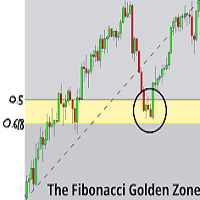
Overview
Fibonacci Optimal Entry Zone [OTE] is a high-precision market structure tool designed to help traders identify ideal entry zones during trending markets. Built on the principles of Smart Money Concepts (SMC) and Fibonacci retracements, this indicator highlights key areas where price is most likely to react — specifically within the "Golden Zone" (between the 50% and 61.8% retracement). Figure 1 It tracks structural pivot shifts (CHoCH) and dynamically adjusts Fibonacci levels bas

NINJA SYMBOL PASSPORT MT5 概述 NINJA Symbol Passport MT5是一款免费的只读实用工具,用于查看经纪商提供的交易品种规格和当前交易条件。它可以扫描市场报价(Market Watch)中的品种或服务器上的可用品种,有效上限为200个品种。面板和输入参数名称使用英语。 检查的数据 面板显示交易时段、到期日、交易模式、预估点差成本、参考交易量对应的预估保证金,以及点差与ATR的比率。每个品种都会显示PENDING、PASS、WARN或BLOCK结果及相应原因。PASS仅表示已实现的检查未发现当前警告或阻止条件。 附加功能 结果可以导出为CSV。保存的基准数据可用于检测所监控固定品种规格的变化。面板支持拖动和折叠,后台扫描会继续运行。 重要说明 本实用工具不是信号、交易机会或品种排名系统,也不提供BUY或SELL入场提示。PASS不表示盈利、安全或推荐。数值取决于经纪商、账户类型和当前市场数据。点差成本和保证金为即时估算,不会完整计入佣金或未来滑点。请先在模拟账户上测试。 运行方式 本工具不会发送订单或修改持仓,也不使用DLL或调用WebReque
FREE

Fast copier for sending trades to multiple MT4 / MT5 accounts. MT5 Trade Copier Master EA sends trades instantly from your master account to one or multiple slave accounts. Supports copying to:
• MT5 accounts
• MT4 accounts Perfect for:
• Multi-account traders
• Signal providers
• Account managers
• Personal account mirroring Main Features • Fast local trade copying
• Low latency execution
• Multiple slave accounts support
• Copy open positions on startup
• Stable file-based communication
• Easy

Introduction:
The RosMaFin Trading Panel is not just a standard order execution tool. It is a comprehensive, professional assistant designed for manual and price-action traders who want to save time, manage risk with mathematical precision, and maintain full market awareness. Say goodbye to manual lot size calculations and tedious Stop Loss adjustments. This panel streamlines your entire trading workflow from analysis to trade exit. KEY FEATURES & BENEFITS: Advanced Risk Management & Exec
FREE
MetaTrader市场是您可以下载免费模拟自动交易,用历史数据进行测试和优化的唯一商店。
阅读应用程序的概述和其他客户的评论,直接下载程序到您的程序端并且在购买之前测试一个自动交易。只有在MetaTrader市场可以完全免费测试应用程序。
