

基于平均K线(Heikin Ashi)搭建专业交易系统(第一部分):自定义指标开发
 113
113
 0
0

引言
技术指标是算法交易的核心,掌握指标开发是每一位MQL5开发者成长路上的关键一步。在本文中,我们采用实操方式讲解自定义指标开发,我们将实现一款非常热门的趋势平滑工具:平均K线图。
本文是系列文章的第一部分。我们会讲解平均K线的原理、计算公式,并逐步演示如何用MQL5从零编写平均K线指标。目标不是简单复制粘贴源码,而是真正理解每一行代码背后的设计逻辑,这样您在开发自己的自定义指标时,也能复用这些最佳实践。
在第二部分中,我们将开发一款EA ,以平均K线指标作为开仓和平仓的判断基础。让我们先来理解平均K线图和传统K线图有何区别。
在开始之前,您需要具备一些前置基础。本文默认读者满足以下条件:
- 扎实掌握MQL5编程语言;
- 会使用MetaTrader 5以及MetaEditor 5;
- 能够在图表上挂载指标与EA。
平均K线和传统K线有什么区别?
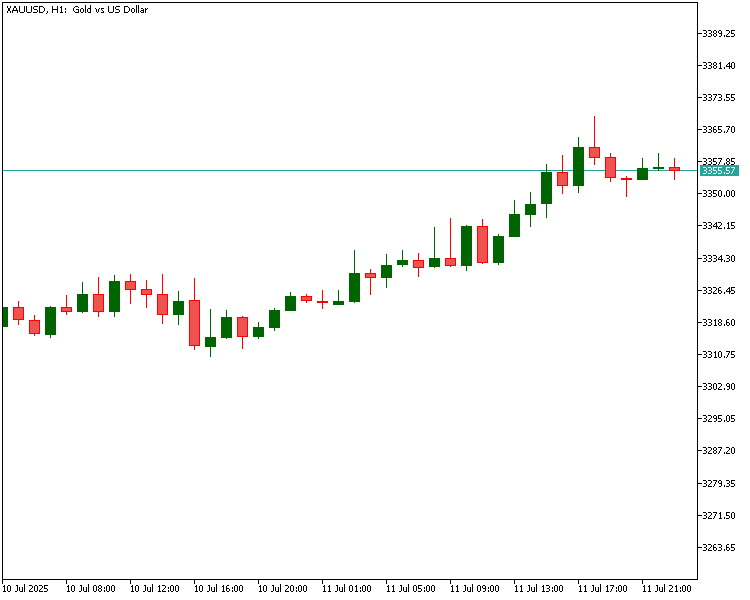
首先,我们对比两张并列的图表。
传统K线图:
由同一组价格数据生成的平均K线图:
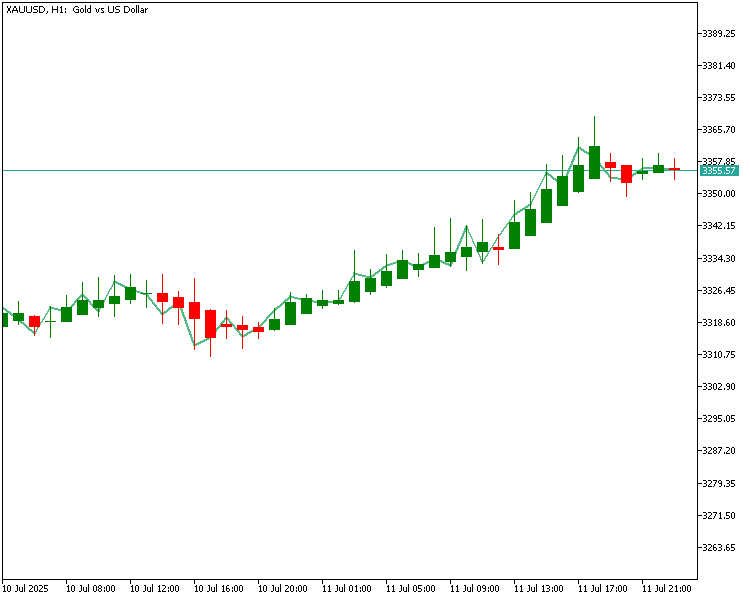
两张图表均采用黄金近期行情数据。对比两张图时,请留意K线在趋势行情中的表现。传统K线图随每一根新K线实时更新,但走势常常参差不齐;即便大趋势并未改变,K线颜色也会频繁切换。这会产生视觉干扰,难以一眼判断行情动能强弱。与之不同,平均K线通过平滑后的数值计算得出,图表观感更加简洁干净。处于趋势行情时,平均K线往往会连续输出同色K线,便于肉眼直接识别上涨、下跌趋势。
简言之,上涨趋势中平均K线大多保持绿色,下跌趋势中大多保持红色;它会过滤传统图表上看似反转的小幅回调。这对于想要追随大趋势、忽略短期震荡的交易者来说,平均K线是十分实用的工具。
接下来,我们详细拆解平均K线的具体计算公式。
平均K线的计算方式
在讲解计算逻辑前,让我们先搞清楚它与普通K线的差异。在传统的K线图中,每一根K线由市场的四项核心价格构成。
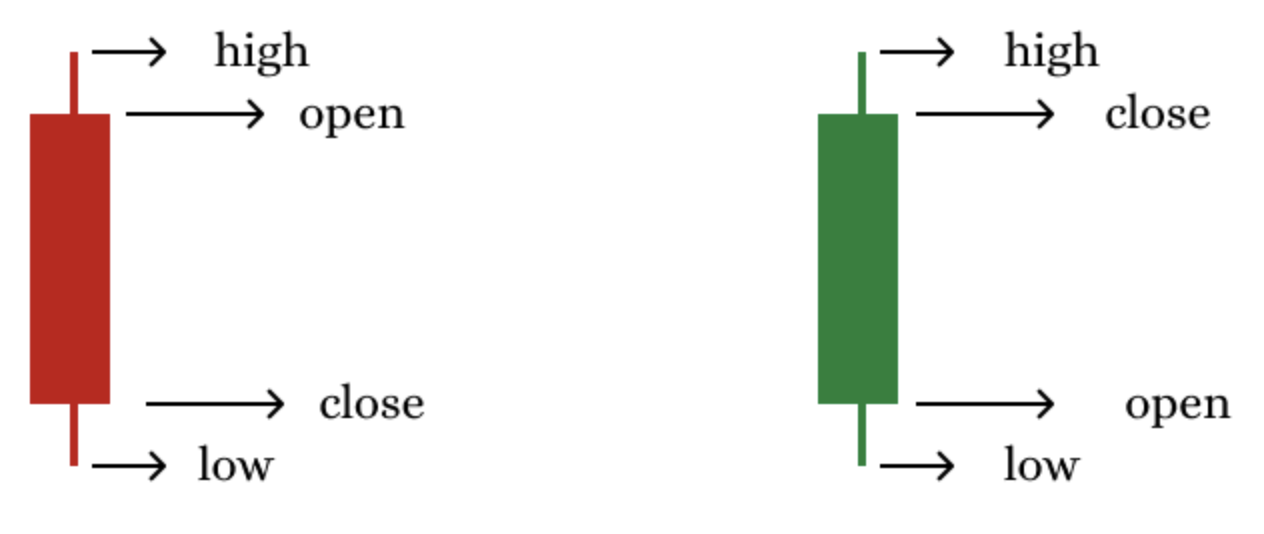
- 开盘价(Open):一根K线形成之初的价格;
- 最高价(High):该K线周期内行情到达的最高价格;
- 最低价(Low):该K线周期内行情到达的最低价格;
- 收盘价(Close):K线周期结束时的最终价格。
这四个数值直接反映一小时或一天等特定周期内发生的价格变化。然而,平均K线并不会直接使用这些原始价格,而是采用一组经过变换的数值,对图表做平滑处理,更清晰地凸显整体趋势。
平均K线由以下四个值构成:
- 平均开盘价(Heikin Ashi Open):经过平滑处理的K线开盘值;
- 平均最高价(Heikin Ashi High):取真实价格与平滑后的价格集合中的最大值;
- 平均最低价(Heikin Ashi Low):取同价格集合中的最小值;
- 平均收盘价(Heikin Ashi Close):当前原始K线的四价均值。
下面我们逐一来看平均K线各项数值的计算公式。
平均K线公式
平均收盘价 =(原始开盘价 + 原始最高价 + 原始最低价 + 原始收盘价)/ 4。
该值为当前一根K线的平均价格,用一个均衡数值体现本周期整体价格波动。
平均开盘价 =(上一根平均K线开盘价 + 上一根平均K线收盘价)/ 2。
也就是说,当前平均K线的开盘价并不是市场真实开盘价,而是上一根平均K线实体的中点。这样可以平滑相邻K线之间的过渡,形成连贯流畅的视觉效果。
平均最高价 = 真实最高价、平均开盘价、平均收盘价三者中的最大值。
平均最低价 = 真实最低价、平均开盘价、平均收盘价三者中的最小值。
以上两个数值结合了市场真实高低点与平滑后的开盘和收盘价格,让K线保留合理的影线,同时具备平滑效果。
简要总结:
平均收盘价是当前原始K线四价的平均值;平均开盘价依赖前一根K线的平滑结果;平均最高/最低价融合原始价格与平滑价格,记录价格极值。
这套计算方式造就了平均K线简洁、聚焦趋势的特点。上涨趋势中K线通常保持绿色,下跌趋势中保持红色,过滤掉容易干扰判断的短期杂波。
接下来我们将运用以上原理,用MQL5逐步开发自定义平均K线指标。
指标逻辑规划
开始编写代码之前,需要先梳理平均K线指标的逻辑。我们要开发一个自定义指标,在图表上直接绘制平均K线,外观和普通K线一致,但价格由平滑公式计算得到。
除基础展示外,我们还做增强:用三种颜色区分K线 —— 看涨K线、看跌K线、中性K线。
为实现这套可视化逻辑,指标一共使用五个指标缓冲区(buffer):
- 平均开盘缓冲:存储每根平均K线的开盘价格数组;
- 平均最高缓冲:存储每根平均K线的最高价格数组;
- 平均最低缓冲:存储每根平均K线的最低价格数组;
- 平均收盘缓冲:存储每根平均K线的收盘价格数组;
- 颜色缓冲:根据K线属于看涨、看跌还是中性,存储对应颜色索引。
所有指标缓冲区共同负责绘制平均K线,并动态赋予对应的颜色。
为了绘制这类K线,我们将使用DRAW_COLOR_CANDLES绘图类型,只需要一个绘图序列,并搭配独立的指标缓冲区来控制K线颜色。有一点必须谨慎处理,图表上的第一根K线,它没有前一根平均K线的值。我们会手动初始化第一根K线的数值,确保后续所有K线都能依据公式正确计算。
最后,为保持代码整洁且对新手友好,我们采用模块化编程风格,把核心逻辑拆分为简短、易于维护的函数。这样更方便理解和调试代码,也便于后续教程里继续扩展功能。
平均K线指标编码分步教程
我们将使用MQL5语言编写这款自定义平均K线指标。MQL5是MetaTrader 5平台开发自动化交易工具的原生语言。
本文默认读者已经熟悉MetaTrader 5、MetaEditor,以及指标挂载到图表的基础操作,因此跳过环境搭建部分,直接进入自定义平均K线指标的开发。
以下是初始模板代码,将作为我们开发指标的基础框架。我们会从这份基础代码开始,逐步实现核心计算逻辑。
//+------------------------------------------------------------------+
//|                                          heikinAshiIndicator.mq5 |
//|                                  Copyright 2025, MetaQuotes Ltd. |
//|                          https://www.mql5.com/en/users/chachaian |
//+------------------------------------------------------------------+
#property copyright "Copyright 2025, MetaQuotes Ltd."
#property link      "https://www.mql5.com/en/users/chachaian"
#property version   "1.00"

//+------------------------------------------------------------------+
//| Custom indicator initialization function                         |
//+------------------------------------------------------------------+
int OnInit()
{

   return INIT_SUCCEEDED;
}

//+------------------------------------------------------------------+
//| Custom indicator iteration function                              |
//+------------------------------------------------------------------+
int OnCalculate(const int32_t  rates_total,
                const int32_t  prev_calculated,
                const datetime &time       [],
                const double   &open       [],
                const double   &high       [],
                const double   &low        [],
                const double   &close      [],
                const long     &tick_volume[],
                const long     &volume     [],
                const int32_t  &spread     [])
{

   return(rates_total);
}
//+------------------------------------------------------------------+
我们把这段代码拆解成简单、逻辑清晰的若干部分,从而方便理解。
属性指令:
...
#property copyright "Copyright 2025, MetaQuotes Ltd. Developer is Chacha Ian"
#property link      "https://www.mql5.com/en/users/chachaian"
#property version   "1.00"

...
这些语句用于设置指标的元信息,相关内容会显示在MetaTrader 5的导航器与属性描述中。
- #property copyright. 用于声明版权归属方与开发者信息,便于标识品牌和代码所有权。
- #property link. 提供可点击的链接,指向项目文件或项目主页。
- #property version. 便于后续迭代更新时做版本管理。
...

//+------------------------------------------------------------------+
//| Custom indicator initialization function                         |
//+------------------------------------------------------------------+
int OnInit()
{
   return(INIT_SUCCEEDED);
}

...
初始化函数OnInit()仅在指标首次挂载到图表时执行一次。它用于完成初始化与配置相关工作。返回INIT_SUCCEEDED会向MetaTrader 5发送信号,表示指标加载成功。后续步骤中,我们会在OnInit()里注册指标缓冲区,并定义绘图的可视化属性。
计算函数:
...

//+------------------------------------------------------------------+
//| Custom indicator iteration function                              |
//+------------------------------------------------------------------+
int OnCalculate(const int32_t  rates_total,
                const int32_t  prev_calculated,
                const datetime &time[],
                const double   &open[],
                const double   &high[],
                const double   &low[],
                const double   &close[],
                const long     &tick_volume[],
                const long     &volume[],
                const int32_t  &spread[])
{

   return(rates_total);
}

...
这是指标的核心。只要有新行情数据到来,该函数就会被反复调用。其参数可以获取以下数据:
- Rates_total:代表当前可用的K线总数量。
- Prev_calculated:记录上一次调用OnCalculate函数时已经计算完成的K线数量(用于性能优化)。
- Time、open、high、low和close变量,也就是历史价格时间序列。
- Volume、tick_volume和spread,属于额外的交易数据。
需要注意的一点是,只要有新的tick数据抵达,或是历史数据发生更新,OnCalculate就会自动触发调用。例如历史数据存在缺口、随后被补全的情况。指标的绝大部分计算逻辑都写在这个函数里面。
在MetaTrader 5中,指标主要有两种展示形式:直接绘制在主图表窗口(叠加在价格K线上),或是在主图下方单独的副窗口展示。
我们通过预处理指令定义指标的展示位置:#property indicator_chart_window代表主图叠加,#property indicator_sub_window代表副窗口指标。我们开发的指标需要叠加在价格之上,因此要显示在主图表中。
搞清这一点之后,我们在已有的#property指令下方添加下面这一行代码:
#property copyright "Copyright 2025, MetaQuotes Ltd. Developer is Chacha Ian"
#property link      "https://www.mql5.com/en/users/chachaian"
#property version   "1.00"
#property indicator_chart_window

...
在MQL5中,自定义指标一般将计算结果存放在一类特殊的动态数组里,这类数组叫做指标缓冲区。缓冲区通过MQL5内置函数SetIndexBuffer()完成注册;想要在图表上可视化输出数据(画线、柱状图、箭头等),缓冲区是必不可少的。
在源码里使用缓冲区之前,需要先声明指标一共需要多少个缓冲区。通过预处理指令#property indicator_buffers N设置,其中,N代表缓冲区总数。在本示例中,我们一共使用5个缓冲区,声明如下:#property indicator_buffers 5。
接下来,我们把这一行添加到源码中其他 #property 指令的下方。
...

#property indicator_chart_window
#property indicator_buffers 5
...
指标通常会绘制图形元素,在图表上可视化展示计算结果。这类可视化元素(如线条、柱状图、箭头等)也被称为绘图序列(graphic plots),方便交易者一眼看懂指标信号。
指标的绘图序列数量由指令#property indicator_plots P指定,其中,P为绘图序列的数量。我们的例子只需要一个绘图序列。
我们继续在其他#property指令下方添加这一行代码。
...
#property indicator_chart_window
#property indicator_buffers 5
#property indicator_plots   1
...
接下来,我们声明用作指标缓冲区的数组。通常在全局作用域中完成声明。这类数组的数据类型均设置为double(双精度浮点型),因为指标计算值几乎都是浮点数。我们现在就在OnInit()函数上方完成数组声明,这样指标内所有代码都可以访问到这些数组。
...
#property indicator_plots   1

//Global variables
double haOpen [];
double haHigh [];
double haLow  [];
double haClose[];
double colorBuffer [];
...
声明数组后,下一步就是调用MQL5内置函数SetIndexBuffer(),将每一个数组注册为指标缓冲区。该函数的作用是把我们定义的数组和指标系统绑定,这样MetaTrader就可以使用这些数组完成绘图与计算。我们会在OnInit()函数内部依次完成全部数组的注册。
...

//+------------------------------------------------------------------+
//| Custom indicator initialization function                         |
//+------------------------------------------------------------------+
int OnInit()
{

   // Registration of indicator buffers
   if(!SetIndexBuffer(0, haOpen, INDICATOR_DATA)){
      Print("Error while registering an indicator buffer: ", GetLastError());
      return INIT_FAILED;
   }

   if(!SetIndexBuffer(1, haHigh, INDICATOR_DATA)){
      Print("Error while registering an indicator buffer: ", GetLastError());
      return INIT_FAILED;
   }

   if(!SetIndexBuffer(2, haLow,   INDICATOR_DATA)){
      Print("Error while registering an indicator buffer: ", GetLastError());
      return INIT_FAILED;
   }

   if(!SetIndexBuffer(3, haClose, INDICATOR_DATA)){
      Print("Error while registering an indicator buffer: ", GetLastError());
      return INIT_FAILED;
   }

   if(!SetIndexBuffer(4, colorBuffer, INDICATOR_COLOR_INDEX)){
      Print("Error while registering an indicator buffer: ", GetLastError());
      return INIT_FAILED;
   }

}

...
接下来,我们在OnCalculate()函数内部编写指标的核心逻辑。每当指标需要更新时,该函数就会被触发:无论是指标刚挂载到图表、新K线形成,还是有新的价格tick推送。
我们通常把这个函数分成三大条件分支,以此高效处理以上这几种场景:
- 当指标初次挂载到图表时,prev_calculated为0。我们在这个分支里执行初始化逻辑,例如填充历史数值或设置初始条件。
- 当一根新K线刚刚开盘时,prev_calculated不为rates_total且prev_calculated不为0。此处适合放置每根K线只需要执行一次的逻辑,以减少重复计算。
- 一旦当前K线收到新的价格tick时,prev_calculated为rates_total。在这个分支中,依托最新价格数据更新当前K线的实时数值。
我们将在OnCalculate()函数中使用的基础框架如下:
...

//+------------------------------------------------------------------+
//| Custom indicator iteration function                              |
//+------------------------------------------------------------------+
int OnCalculate(const int32_t  rates_total,
                const int32_t  prev_calculated,
                const datetime &time[],
                const double   &open[],
                const double   &high[],
                const double   &low[],
                const double   &close[],
                const long     &tick_volume[],
                const long     &volume[],
                const int32_t  &spread[])
{
   // This block is executed when the indicator is initially attached on a chart
   if(prev_calculated == 0){
   }

   // This block is executed on every new bar open
   if(prev_calculated != rates_total && prev_calculated != 0){
   }

   // This block is executed on arrival of new price (tick) data
   if(prev_calculated == rates_total){
   }

   return(rates_total);
}

...
接下来,我们使用#property indicator_color1指令为平均K线定义一套配色方案。该指令用于为前面定义好的绘图序列指定默认颜色。本指标使用三种颜色:
- clrDarkGreen:看涨平均K线;
- clrDarkRed:看跌平均K线;
- clrYellow:中性K线。
我们把这条颜色配置放在其余#property指令下方,指标初始化时就会加载该配置。需要添加的代码行如下:
...
#property indicator_plots   1
#property indicator_color1 clrDarkGreen, clrDarkRed, clrYellow
...
现在我们添加一条指令,为各个指标缓冲区设置说明名称。这有助于用户在MetaTrader的数据窗口中查看数据时,明白每条数值代表什么。请在现有的#property指令下方添加以下这行代码:
...
#property indicator_color1 clrDarkGreen, clrDarkRed, clrYellow
#property indicator_label1 "HeikinAshiOpen;HeikinAshiHigh;HeikinAshiLow;HeikinAshiClose"
...
在OnCalculate事件回调中实现完整逻辑之前,我们先定义几个辅助函数,用来处理平均K线的计算与可视化判定。这些工具函数的作用包括:
- 根据原始价格数据计算平均K线的OHLC值;
- 判断每一根平均K线的走势方向(显示颜色);
- 将历史数据批量计算和实时更新逻辑分离开,提升执行效率。
现在,我们把这些函数写在OnCalculate()函数的下方。定义好之后,再按需在OnCalculate中分步调用。
...

//+------------------------------------------------------------------+
//| Custom indicator iteration function                              |
//+------------------------------------------------------------------+
int OnCalculate(const int32_t  rates_total,
                const int32_t  prev_calculated,
                const datetime &time       [],
                const double   &open       [],
                const double   &high       [],
                const double   &low        [],
                const double   &close      [],
                const long     &tick_volume[],
                const long     &volume     [],
                const int32_t  &spread     [])
{
   ...

   return(rates_total);
}

// Utility functions

//+----------------------------------------------------------------------------------+
//| Calculates Heikin Ashi values for all historical candles using price data arrays.|
//+----------------------------------------------------------------------------------+
void GetHeikinAshiValues(const double &open[], const double &high[], const double &low[], const double &close[], const int32_t rates_total)
{

   if(ArraySize(open) < rates_total){
      return;
   }

   // Run a loop through all historical bars
   for(int i=0; i<rates_total; i++){
      if(i == 0){
         haOpen [i] = (open[i] + close[i]) / 2.0;
         haClose[i] = (open[i] + high[i] + low[i] + close[i]) / 4.0;
         haHigh [i] = MathMax(high[i], MathMax(open[i], close[i]));
         haLow  [i] = MathMin(low [i], MathMin(open[i], close[i]));
      }else{
         haOpen [i] = (haOpen[i-1] + haClose[i-1]) / 2.0;
         haClose[i] = (open[i] + high[i] + low[i] + close[i]) / 4.0;
         haHigh [i] = MathMax(high[i], MathMax(haOpen[i], haClose[i]));
         haLow  [i] = MathMin(low [i], MathMin(haOpen[i], haClose[i]));
      }
   }

}


//+---------------------------------------------------------------------------------------+
//| Calculates Heikin Ashi values for the most recent candle only (for real-time updates).|
//+---------------------------------------------------------------------------------------+
void GetCurrentHeikinAshiValue(const double &open[], const double &high[], const double &low[], const double &close[], const int32_t rates_total)
{
   haOpen [rates_total - 1] = (haOpen[rates_total-2] + haClose[rates_total-2]) / 2.0;
   haClose[rates_total - 1] = (open[rates_total - 1] + high[rates_total - 1] + low[rates_total - 1] + close[rates_total - 1]) / 4.0;
   haHigh [rates_total - 1] = MathMax(high[rates_total - 1], MathMax(haOpen[rates_total - 1], haClose[rates_total - 1]));
   haLow  [rates_total - 1] = MathMin(low [rates_total - 1], MathMin(haOpen[rates_total - 1], haClose[rates_total - 1]));
}


//+------------------------------------------------------------------------------------------------------------------+
//| Assigns a color code to each historical Heikin Ashi candle based on its direction (bullish, bearish, or neutral).|
//+------------------------------------------------------------------------------------------------------------------+
void GetHeikinAshiColors(const int32_t rates_total){

   for(int i=0; i<rates_total; i++){
      if(haOpen[i] < haClose[i]){
         colorBuffer[i] = 0;
      }

      else if(haOpen[i] > haClose[i]){
         colorBuffer[i] = 1;
      }

      else {
         colorBuffer[i] = 2;
      }
   }

}

//+-----------------------------------------------------------------------------------------------+
//| Assigns a color code to the latest Heikin Ashi candle only (used for real-time color updates).|
//+-----------------------------------------------------------------------------------------------+
void GetCurrentHeikinAshiColor(const int32_t rates_total){
      if(haOpen[rates_total - 1] < haClose[rates_total - 1]){
         colorBuffer[rates_total - 1] = 0;
      }

      else if(haOpen[rates_total - 1] > haClose[rates_total - 1]){
         colorBuffer[rates_total - 1] = 1;
      }

      else {
         colorBuffer[rates_total - 1] = 2;
      }
}

...
现在,我们在OnCalculate()事件回调中调用GetHeikinAshiValues()函数,触发条件如下:
- 当prev_calculated为0时,代表指标初次加载,需要处理全部历史K线;
- 当prev_calculated不等于rates_total且 prev_calculated不为0时,代表新增K线或者图表刷新,需要从上次计算结束的位置继续重算。
该函数基于原始价格数组,计算整组平均K线的开盘价、最高价、最低价和收盘价,确保指标缓冲区能从头完整填充,或在有新数据抵达时正确更新。
...

//+------------------------------------------------------------------+
//| Custom indicator iteration function                              |
//+------------------------------------------------------------------+
int OnCalculate(const int32_t  rates_total,
                const int32_t  prev_calculated,
                const datetime &time       [],
                const double   &open       [],
                const double   &high       [],
                const double   &low        [],
                const double   &close      [],
                const long     &tick_volume[],
                const long     &volume     [],
                const int32_t  &spread     [])
{
   // This block is executed when the indicator is initially attached on a chart
   if(prev_calculated == 0){
      GetHeikinAshiValues(open, high, low, close, rates_total);
   }

   // This block is executed on every new bar open
   if(prev_calculated != rates_total && prev_calculated != 0){
      GetHeikinAshiValues(open, high, low, close, rates_total);
   }

   // This block is executed on arrival of new price (tick) data
   if(prev_calculated == rates_total){
   }

   return(rates_total);
}

...
接下来,我们在OnCalculate()的同一组条件分支中调用GetHeikinAshiColors()函数。触发条件为:
- prev_calculated为0,初次加载时,为全部历史K线分配颜色;
- prev_calculated不等于rates_total且prev_calculated不等于0,数据集更新时,刷新对应K线的颜色。
该函数根据平均K线开盘价与收盘价的大小关系,为每一根K线分配数字颜色编码:
- 0为看涨K线;
- 1为看跌K线;
- 2为中性K线。
这些编码后续会映射为图表上实际显示的颜色,最终在指标界面直观区分看涨、看跌与中性行情。
...

//+------------------------------------------------------------------+
//| Custom indicator iteration function                              |
//+------------------------------------------------------------------+
int OnCalculate(const int32_t  rates_total,
                const int32_t  prev_calculated,
                const datetime &time       [],
                const double   &open       [],
                const double   &high       [],
                const double   &low        [],
                const double   &close      [],
                const long     &tick_volume[],
                const long     &volume     [],
                const int32_t  &spread     [])
{
   // This block is executed when the indicator is initially attached on a chart
   if(prev_calculated == 0){
      ...
      GetHeikinAshiColors(rates_total);
   }

   // This block is executed on every new bar open
   if(prev_calculated != rates_total && prev_calculated != 0){
      ...
      GetHeikinAshiColors(rates_total);
   }

   // This block is executed on arrival of new price (tick) data
   if(prev_calculated == rates_total){
   }

   return(rates_total);
}

...
最后,我们在if(prev_calculated == rates_total){}分支内调用GetCurrentHeikinAshiValue()和GetCurrentHeikinAshiColor()这两个函数。该分支在指标实时更新时执行,也就是有新tick到达,但还没有形成一根新K线的场景。
调用:
- GetCurrentHeikinAshiValue():基于最新tick数据,实时重算当前未完成K线的平均K线数值;
- GetCurrentHeikinAshiColor():立刻为最新的平均K线分配对应的颜色编码。
这套机制让指标保持实时响应,确保图表上正在形成的K线始终得到准确显示。
...

//+------------------------------------------------------------------+
//| Custom indicator iteration function                              |
//+------------------------------------------------------------------+
int OnCalculate(const int32_t  rates_total,
                const int32_t  prev_calculated,
                const datetime &time       [],
                const double   &open       [],
                const double   &high       [],
                const double   &low        [],
                const double   &close      [],
                const long     &tick_volume[],
                const long     &volume     [],
                const int32_t  &spread     [])
{
   ...

   // This block is executed on arrival of new price (tick) data
   if(prev_calculated == rates_total){
      GetCurrentHeikinAshiValue(open, high, low, close, rates_total);
      GetCurrentHeikinAshiColor(rates_total);
   }


   return(rates_total);
}

...
接下来,我们依次调用PlotIndexSetInteger()函数对绘图序列进行配置,保证平均K线指标加载后能够正常显示。我们逐项设置,定义各个指标缓冲区在图表上的渲染方式,其中就包括绘图类型。
这些配置必不可少,MetaTrader 5终端需要依靠它们识别如何绘制我们计算出来的数据。完成这一步之后,平均K线指标就具备可视化能力,挂载到图表上即可叠加显示。下面我们逐项来看这些配置。首先调用PlotIndexSetInteger()设置绘图类型。这一行配置用于告知MetaTrader,以彩色K线样式渲染当前绘图序列。代码写在OnInit()回调函数内,紧跟在SetIndexBuffer()调用语句之后。如果该项配置执行失败,会在“专家”日志中输出报错信息,便于调试。
...

//+------------------------------------------------------------------+
//| Custom indicator initialization function                         |
//+------------------------------------------------------------------+
int OnInit()
{
   ...

   if(!SetIndexBuffer(4, colorBuffer, INDICATOR_COLOR_INDEX)){
      Print("Error while registering an indicator buffer: ", GetLastError());
      return INIT_FAILED;
   }

   // Configuration of Graphic Plots
   if(!PlotIndexSetInteger(0, PLOT_DRAW_TYPE, DRAW_COLOR_CANDLES)){
      Print("Error while configuring graphic plots: ", GetLastError());
      return INIT_FAILED;
   }

}

...
现在我们进行配置,实现鼠标悬浮在图表上时,平均K线数据能够在数据窗口中展示。我们同样使用PlotIndexSetInteger()函数,将PLOT_SHOW_DATA参数设置为true。将这一行代码也放在OnInit()函数内,紧跟在上一条配置语句后面。如果配置失败,程序会输出报错信息。
...

//+------------------------------------------------------------------+
//| Custom indicator initialization function                         |
//+------------------------------------------------------------------+
int OnInit()
{
   ...

   // Configuration of Graphic Plots
   if(!PlotIndexSetInteger(0, PLOT_DRAW_TYPE, DRAW_COLOR_CANDLES)){
      Print("Error while configuring graphic plots: ", GetLastError());
      return INIT_FAILED;
   }

   if(!PlotIndexSetInteger(0, PLOT_SHOW_DATA, true)){
      Print("Error while configuring graphic plots: ", GetLastError());
      return INIT_FAILED;
   }

}

...
随后,我们配置指标的通用参数。第一项配置通过IndicatorSetInteger()配合INDICATOR_DIGITS,指定指标数值保留的小数位数。这样有助于确保指标数值和交易品种的精度一致。如果配置异常,将会输出报错信息,方便调试。
将以下这些代码添加到OnInit()段中,放在所有PlotIndexSetInteger()语句之后。
...

//+------------------------------------------------------------------+
//| Custom indicator initialization function                         |
//+------------------------------------------------------------------+
int OnInit()
{
   ...

   if(!PlotIndexSetInteger(0, PLOT_SHOW_DATA, true)){
      Print("Error while configuring graphic plots: ", GetLastError());
      return INIT_FAILED;
   }

   // Configure Indicator
   if(!IndicatorSetInteger(INDICATOR_DIGITS, Digits())){
      Print("Error while setting indicator values accuracy: ", GetLastError());
      return INIT_FAILED;
   }

}

...
接下来,我们使用IndicatorSetString()为指标设置简称。将名称设为"HeikinAshi",该名称会显示在数据窗口以及图表上,方便用户识别这个指标。如果名称设置失败,我们就会打印报错信息,便于定位问题。
...

//+------------------------------------------------------------------+
//| Custom indicator initialization function                         |
//+------------------------------------------------------------------+
int OnInit()
{
   ...

   // Configure Indicator
   if(!IndicatorSetInteger(INDICATOR_DIGITS, Digits())){
      Print("Error while setting indicator values accuracy: ", GetLastError());
      return INIT_FAILED;
   }

   if(!IndicatorSetString(INDICATOR_SHORTNAME, "HeikinAshi")){
      Print("Error while setting indicator shortname: ", GetLastError());
      return INIT_FAILED;
   }

   return INIT_SUCCEEDED;

}

...
至此,我们已经完成自定义平均K线指标全部核心代码的编写。现在,点击MetaEditor中的“编译”按钮。如果所有步骤无误,指标将顺利编译、无报错,随后就可以加载到图表上使用。如果您按照步骤完成,完整源码现在应当如下所示。倘若出现异常或者编译报错,可以对照以下这份源码查找并修正错误。
//+------------------------------------------------------------------+
//|                                          heikinAshiIndicator.mq5 |
//|                                  Copyright 2025, MetaQuotes Ltd. |
//|                          https://www.mql5.com/en/users/chachaian |
//+------------------------------------------------------------------+
#property copyright "Copyright 2025, MetaQuotes Ltd."
#property link      "https://www.mql5.com/en/users/chachaian"
#property version   "1.00"
#property indicator_chart_window
#property indicator_buffers 5
#property indicator_plots   1
#property indicator_color1 C'38,166,154', C'239,83,80', clrYellow
#property indicator_label1 "HeikinAshiOpen;HeikinAshiHigh;HeikinAshiLow;HeikinAshiClose"

//Global variables
double haOpen      [];
double haHigh      [];
double haLow       [];
double haClose     [];
double colorBuffer [];

//+------------------------------------------------------------------+
//| Custom indicator initialization function                         |
//+------------------------------------------------------------------+
int OnInit()
{
   //--- Registration of indicator buffers
   if(!SetIndexBuffer(0, haOpen, INDICATOR_DATA)){
      Print("Error while registering an indicator buffer: ", GetLastError());
      return INIT_FAILED;
   }

   if(!SetIndexBuffer(1, haHigh, INDICATOR_DATA)){
      Print("Error while registering an indicator buffer: ", GetLastError());
      return INIT_FAILED;
   }

   if(!SetIndexBuffer(2, haLow,   INDICATOR_DATA)){
      Print("Error while registering an indicator buffer: ", GetLastError());
      return INIT_FAILED;
   }

   if(!SetIndexBuffer(3, haClose, INDICATOR_DATA)){
      Print("Error while registering an indicator buffer: ", GetLastError());
      return INIT_FAILED;
   }

   if(!SetIndexBuffer(4, colorBuffer, INDICATOR_COLOR_INDEX)){
      Print("Error while registering an indicator buffer: ", GetLastError());
      return INIT_FAILED;
   }

   //--- Configuration of graphic plots
   if(!PlotIndexSetInteger(0, PLOT_DRAW_TYPE, DRAW_COLOR_CANDLES)){
      Print("Error while configuring graphic plots: ", GetLastError());
      return INIT_FAILED;
   }

   if(!PlotIndexSetInteger(0, PLOT_SHOW_DATA, true)){
      Print("Error while configuring graphic plots: ", GetLastError());
      return INIT_FAILED;
   }

   //--- General indicator configurations
   if(!IndicatorSetInteger(INDICATOR_DIGITS, Digits())){
      Print("Error while setting indicator values accuracy: ", GetLastError());
      return INIT_FAILED;
   }

   if(!IndicatorSetString(INDICATOR_SHORTNAME, "HeikinAshi")){
      Print("Error while setting indicator shortname: ", GetLastError());
      return INIT_FAILED;
   }

   return INIT_SUCCEEDED;
}

//+------------------------------------------------------------------+
//| Custom indicator iteration function                              |
//+------------------------------------------------------------------+
int OnCalculate(const int32_t  rates_total,
                const int32_t  prev_calculated,
                const datetime &time       [],
                const double   &open       [],
                const double   &high       [],
                const double   &low        [],
                const double   &close      [],
                const long     &tick_volume[],
                const long     &volume     [],
                const int32_t  &spread     [])
{
   //--- This block is executed when the indicator is initially attached on a chart
   if(prev_calculated == 0){
      GetHeikinAshiValues(open, high, low, close, rates_total);
      GetHeikinAshiColors(rates_total);
   }

   //--- This block is executed on every new bar open
   if(prev_calculated != rates_total && prev_calculated != 0){
      GetHeikinAshiValues(open, high, low, close, rates_total);
      GetHeikinAshiColors(rates_total);
   }

   //--- This block is executed on arrival of new price (tick) data
   if(prev_calculated == rates_total){
      GetCurrentHeikinAshiValue(open, high, low, close, rates_total);
      GetCurrentHeikinAshiColor(rates_total);
   }

   return(rates_total);
}

//--- Utility functions
//+----------------------------------------------------------------------------------+
//| Calculates Heikin Ashi values for all historical candles using price data arrays.|
//+----------------------------------------------------------------------------------+
void GetHeikinAshiValues(const double &open[], const double &high[], const double &low[], const double &close[], const int32_t rates_total)
{

   if(ArraySize(open) < rates_total){
      return;
   }

   //--- Run a loop through all historical bars
   for(int i=0; i<rates_total; i++){
      if(i == 0){
         haOpen [i] = (open[i] + close[i]) / 2.0;
         haClose[i] = (open[i] + high[i] + low[i] + close[i]) / 4.0;
         haHigh [i] = MathMax(high[i], MathMax(open[i], close[i]));
         haLow  [i] = MathMin(low [i], MathMin(open[i], close[i]));
      }else{
         haOpen [i] = (haOpen[i-1] + haClose[i-1]) / 2.0;
         haClose[i] = (open[i] + high[i] + low[i] + close[i]) / 4.0;
         haHigh [i] = MathMax(high[i], MathMax(haOpen[i], haClose[i]));
         haLow  [i] = MathMin(low [i], MathMin(haOpen[i], haClose[i]));
      }
   }

}

//+---------------------------------------------------------------------------------------+
//| Calculates Heikin Ashi values for the most recent candle only (for real-time updates).|
//+---------------------------------------------------------------------------------------+
void GetCurrentHeikinAshiValue(const double &open[], const double &high[], const double &low[], const double &close[], const int32_t rates_total)
{
   haOpen [rates_total - 1] = (haOpen[rates_total-2] + haClose[rates_total-2]) / 2.0;
   haClose[rates_total - 1] = (open[rates_total - 1] + high[rates_total - 1] + low[rates_total - 1] + close[rates_total - 1]) / 4.0;
   haHigh [rates_total - 1] = MathMax(high[rates_total - 1], MathMax(haOpen[rates_total - 1], haClose[rates_total - 1]));
   haLow  [rates_total - 1] = MathMin(low [rates_total - 1], MathMin(haOpen[rates_total - 1], haClose[rates_total - 1]));
}


//+------------------------------------------------------------------------------------------------------------------+
//| Assigns a color code to each historical Heikin Ashi candle based on its direction (bullish, bearish, or neutral).|
//+------------------------------------------------------------------------------------------------------------------+
void GetHeikinAshiColors(const int32_t rates_total)
{

   for(int i=0; i<rates_total; i++){
      if(haOpen[i] < haClose[i]){
         colorBuffer[i] = 0;
      }

      if(haOpen[i] > haClose[i]){
         colorBuffer[i] = 1;
      }

      if(haOpen[i] == haClose[i]){
         colorBuffer[i] = 2;
      }
   }

}

//+-----------------------------------------------------------------------------------------------+
//| Assigns a color code to the latest Heikin Ashi candle only (used for real-time color updates).|
//+-----------------------------------------------------------------------------------------------+
void GetCurrentHeikinAshiColor(const int32_t rates_total)
{
      if(haOpen[rates_total - 1] < haClose[rates_total - 1]){
         colorBuffer[rates_total - 1] = 0;
      }

      else if(haOpen[rates_total - 1] > haClose[rates_total - 1]){
         colorBuffer[rates_total - 1] = 1;
      }

      else {
         colorBuffer[rates_total - 1] = 2;
      }
}
//+------------------------------------------------------------------+
测试与可视化调优
在开始可视化测试平均K线指标之前,建议先清理图表界面,方便观察效果。我们将定义一个小型函数来完成这项工作。该函数用于调整图表背景、网格以及配色,使得界面整洁且K线清晰易辨。代码如下:
...

//+-----------------------------------------------------------------------------------------------+
//| Assigns a color code to the latest Heikin Ashi candle only (used for real-time color updates).|
//+-----------------------------------------------------------------------------------------------+
void GetCurrentHeikinAshiColor(const int32_t rates_total){
      if(haOpen[rates_total - 1] < haClose[rates_total - 1]){
         colorBuffer[rates_total - 1] = 0;
      }

      else if(haOpen[rates_total - 1] > haClose[rates_total - 1]){
         colorBuffer[rates_total - 1] = 1;
      }

      else {
         colorBuffer[rates_total - 1] = 2;
      }
}

//+-------------------------------------------------+
//| This function configures the chart's appearance.|
//+-------------------------------------------------+
bool ConfigureChartAppearance()
{
   if(!ChartSetInteger(0, CHART_COLOR_BACKGROUND, clrWhite)){
      Print("Error while setting chart background, ", GetLastError());
      return false;
   }

   if(!ChartSetInteger(0, CHART_SHOW_GRID, false)){
      Print("Error while setting chart grid, ", GetLastError());
      return false;
   }

   if(!ChartSetInteger(0, CHART_MODE, CHART_LINE)){
      Print("Error while setting chart mode, ", GetLastError());
      return false;
   }

   if(!ChartSetInteger(0, CHART_COLOR_FOREGROUND, clrBlack)){
      Print("Error while setting chart foreground, ", GetLastError());
      return false;
   }

   return true;
}
您可以把此函数理解成图表的专属样式工具。它会执行以下操作:
- 将图表背景设为白色,提升清晰度;
- 隐藏网格线,让界面更加简洁;
- 把图表类型切换为折线图,避免和自定义K线互相干扰;
- 将前景色设置为黑色,保证对比度良好。
如果其中任意一项操作执行失败,终端会输出报错信息,方便调试。接下来,我们在OnInit()回调函数里调用ConfigureChartAppearance(),这样指标加载时就会自动调整图表样式。实现方式如下:
...

//+------------------------------------------------------------------+
//| Custom indicator initialization function                         |
//+------------------------------------------------------------------+
int OnInit()
{

   if(!ConfigureChartAppearance()){
      Print("Error while configuring chart appearance: ", GetLastError());
      return INIT_FAILED;
   }

   // Registration of indicator buffers
   if(!SetIndexBuffer(0, haOpen, INDICATOR_DATA)){
      Print("Error while registering an indicator buffer: ", GetLastError());
      return INIT_FAILED;
   }

   ...

}

...
我们已经成功完成自定义平均K线指标的开发。从平均K线的计算逻辑,到在图表上干净地绘制K线、配套样式配置,所有环节都已经就绪。现在,可以把指标挂载到图表上,查看实际运行效果。
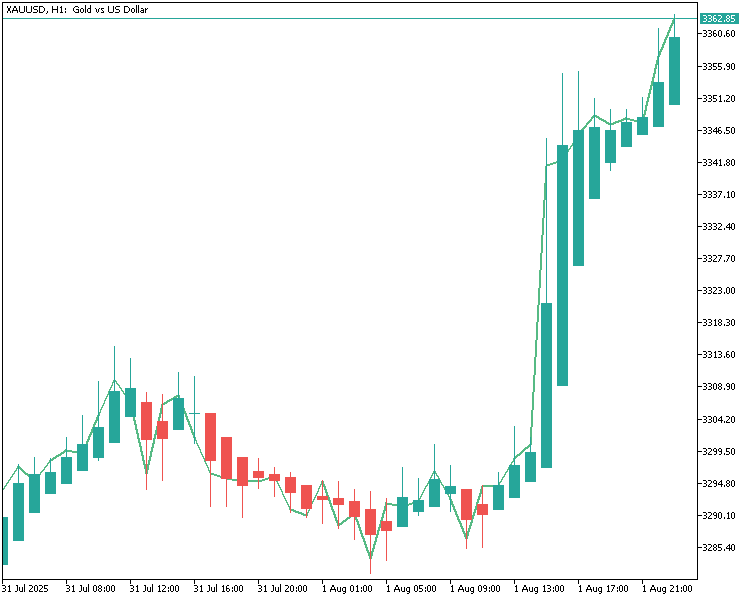
我们已经将自定义平均K线指标挂载到黄金H1周期图表上,指标运行正常。所有内容均按预期展示,说明代码逻辑执行无误,之后可以对图表做视觉优化以及进一步测试。
结论
在本文中,我们使用MQL5成功开发了一个功能完整的自定义平均K线指标。全程分步讲解,涵盖指标缓冲区配置、数值计算、图表样式自定义,最后将指标挂载到黄金1小时图表上验证效果。我们确认所有功能均符合预期。为方便大家跟着实操或是排查问题,本教程附带完整源码以及编译后的文件。
本系列的下一部分,我们将更进一步,开发一款EA,基于这套平均K线指标生成交易决策。请继续关注!
本文由MetaQuotes Ltd译自英文
原文地址: https://www.mql5.com/en/articles/19260
注意: MetaQuotes Ltd.将保留所有关于这些材料的权利。全部或部分复制或者转载这些材料将被禁止。
本文由网站的一位用户撰写,反映了他们的个人观点。MetaQuotes Ltd 不对所提供信息的准确性负责,也不对因使用所述解决方案、策略或建议而产生的任何后果负责。

 从基础到中级:FileSave 和 FileLoad
 交易中的神经网络:以分解替代模型规模扩张(SSCNN)
 交易中的神经网络:以分解替代规模化 —— 模块构建
 神经网络在交易中的应用:一种端到端多变量时间序列预测模型(结论)
