

精通日志记录(第五部分):通过缓存和轮转优化处理程序
 423
423
 0
0

引言
在本系列的第一篇文章《精通日志记录(第一部分):MQL5 中的基础概念与初步实践》中,我们开始为智能交易系统(EA)开发创建一个自定义日志库。在文章中,我们探讨了创建这样一个关键工具的动机:克服 MetaTrader 5 原生日志的局限性,为 MQL5 生态带来一个强大、可定制且功能丰富的解决方案。
回顾我们涵盖的主要内容,我们通过确立以下几个基本要求,为我们的库奠定了基础:
- 稳健结构采用单例模式,确保代码组件之间的一致性。
- 高级持久化用于将日志存储在数据库中,为深度审计和分析提供可追溯的历史记录。
- 输出灵活性,允许日志以方便的方式存储或显示,无论是在控制台、文件、终端还是数据库中。
- 按日志级别分类,区分信息性消息与关键警报和错误。
- 输出格式自定义,以满足每个开发者或项目的独特需求。
有了这样坚实的基础,显而易见,我们正在开发的日志框架将远不止是一个简单的事件记录器;它将成为一个战略工具,用于实时理解、监控和优化 EA 的行为。
到目前为止,我们已经探索了日志的基础知识,学习了如何格式化日志,并理解了处理器如何控制消息的目的地。在上一篇文章中,我们学习了如何将日志记录保存到文件(.txt、.log 或 .json)。现在,在第五篇文章中,我们将通过实现缓存和文件轮转来优化日志保存到文件的过程。让我们开始吧!
为每个处理器添加格式化器
到目前为止,我们的日志库通过一个 CFormatter 类的实例来管理消息格式化,该实例集中在库的基类(CLogify)中。这种方法在简单场景下运行良好,但限制了处理器的灵活性。
问题在于,使用单一的全局格式化器会导致所有处理器共享同一种格式,当不同的目标需要不同的格式时,这可能并不理想。例如,一个以 JSON 格式写入日志的处理器可能需要特定的结构,而一个将日志打印到控制台的处理器则可能需要一种更易于人类阅读的格式。解决方案就是将格式化器的职责移交给处理器基类(CLogifyHandler)。这样一来,每个处理器都可以拥有自己独立的格式化器,从而能更好地控制日志消息的格式化。让我们来实现这一改动,看看它如何提升库的灵活性。
直接来看代码,我们首先在 CLogifyHandler 内部添加一个 CFormatter 的实例。对于读过前几篇文章的您来说,这是一个简单的任务,因此我将直接添加最终代码,并高亮显示新增的部分:
//+------------------------------------------------------------------+
//|                                                LogifyHandler.mqh |
//|                                                     joaopedrodev |
//|                       https://www.mql5.com/en/users/joaopedrodev |
//+------------------------------------------------------------------+
#property copyright "joaopedrodev"
#property link      "https://www.mql5.com/en/users/joaopedrodev"
//+------------------------------------------------------------------+
//| Include files                                                    |
//+------------------------------------------------------------------+
#include "../LogifyModel.mqh"
#include "../Formatter/LogifyFormatter.mqh"
//+------------------------------------------------------------------+
//| class : CLogifyHandler                                           |
//|                                                                  |
//| [PROPERTY]                                                       |
//| Name        : CLogifyHandler                                     |
//| Heritage    : No heritage                                        |
//| Description : Base class for all log handlers.                   |
//|                                                                  |
//+------------------------------------------------------------------+
class CLogifyHandler
  {
protected:

   string            m_name;
   ENUM_LOG_LEVEL    m_level;
   CLogifyFormatter  *m_formatter;

public:
                     CLogifyHandler(void);
                    ~CLogifyHandler(void);

   //--- Handler methods
   virtual void      Emit(MqlLogifyModel &data);         // Processes a log message and sends it to the specified destination
   virtual void      Flush(void);                        // Clears or completes any pending operations
   virtual void      Close(void);                        // Closes the handler and releases any resources

   //--- Set/Get
   void              SetLevel(ENUM_LOG_LEVEL level);
   void              SetFormatter(CLogifyFormatter *format);
   string            GetName(void);
   ENUM_LOG_LEVEL    GetLevel(void);
   CLogifyFormatter *GetFormatter(void);
  };
//+------------------------------------------------------------------+
//| Constructor                                                      |
//+------------------------------------------------------------------+
CLogifyHandler::CLogifyHandler(void)
  {
  }
//+------------------------------------------------------------------+
//| Destructor                                                       |
//+------------------------------------------------------------------+
CLogifyHandler::~CLogifyHandler(void)
  {
   //--- Delete formatter
   if(m_formatter != NULL)
     {
      delete m_formatter ;
     }
  }
//+------------------------------------------------------------------+
//| Processes a log message and sends it to the specified destination|
//+------------------------------------------------------------------+
void CLogifyHandler::Emit(MqlLogifyModel &data)
  {
  }
//+------------------------------------------------------------------+
//| Clears or completes any pending operations                       |
//+------------------------------------------------------------------+
void CLogifyHandler::Flush(void)
  {
  }
//+------------------------------------------------------------------+
//| Closes the handler and releases any resources                    |
//+------------------------------------------------------------------+
void CLogifyHandler::Close(void)
  {
  }
//+------------------------------------------------------------------+
//| Set level                                                        |
//+------------------------------------------------------------------+
void CLogifyHandler::SetLevel(ENUM_LOG_LEVEL level)
  {
   m_level = level;
  }
//+------------------------------------------------------------------+
//| Set object formatter                                             |
//+------------------------------------------------------------------+
void CLogifyHandler::SetFormatter(CLogifyFormatter *format)
  {
   m_formatter = GetPointer(format);
  }
//+------------------------------------------------------------------+
//| Get name                                                         |
//+------------------------------------------------------------------+
string CLogifyHandler::GetName(void)
  {
   return(m_name);
  }
//+------------------------------------------------------------------+
//| Get level                                                        |
//+------------------------------------------------------------------+
ENUM_LOG_LEVEL CLogifyHandler::GetLevel(void)
  {
   return(m_level);
  }
//+------------------------------------------------------------------+
//| Get object formatter                                             |
//+------------------------------------------------------------------+
CLogifyFormatter *CLogifyHandler::GetFormatter(void)
  {
   return(m_formatter);
  }
//+------------------------------------------------------------------+
继续进行最简单的改动,我们移除了 CLogify 中的 CFormatter 实例。从类中移除的部分会用红色高亮显示,新增的部分则用绿色高亮显示:
//+------------------------------------------------------------------+
//|                                                       Logify.mqh |
//|                                                     joaopedrodev |
//|                       https://www.mql5.com/en/users/joaopedrodev |
//+------------------------------------------------------------------+
#property copyright "joaopedrodev"
#property link      "https://www.mql5.com/en/users/joaopedrodev"
#property version   "1.00"

#include "LogifyModel.mqh"
#include "Formatter/LogifyFormatter.mqh"
#include "Handlers/LogifyHandler.mqh"
#include "Handlers/LogifyHandlerConsole.mqh"
#include "Handlers/LogifyHandlerDatabase.mqh"
#include "Handlers/LogifyHandlerFile.mqh"
//+------------------------------------------------------------------+
//| class : CLogify                                                  |
//|                                                                  |
//| [PROPERTY]                                                       |
//| Name        : Logify                                             |
//| Heritage    : No heritage                                        |
//| Description : Core class for log management.                     |
//|                                                                  |
//+------------------------------------------------------------------+
class CLogify
  {
private:

   CLogifyFormatter  *m_formatter;
   CLogifyHandler    *m_handlers[];

public:
                     CLogify();
                    ~CLogify();

   //--- Handler
   void              AddHandler(CLogifyHandler *handler);
   bool              HasHandler(string name);
   CLogifyHandler    *GetHandler(string name);
   CLogifyHandler    *GetHandler(int index);
   int               SizeHandlers(void);

   //--- Generic method for adding logs
   bool              Append(ENUM_LOG_LEVEL level,string msg, string origin = "", string args = "",string filename="",string function="",int line=0);

   //--- Specific methods for each log level
   bool              Debug(string msg, string origin = "", string args = "",string filename="",string function="",int line=0);
   bool              Infor(string msg, string origin = "", string args = "",string filename="",string function="",int line=0);
   bool              Alert(string msg, string origin = "", string args = "",string filename="",string function="",int line=0);
   bool              Error(string msg, string origin = "", string args = "",string filename="",string function="",int line=0);
   bool              Fatal(string msg, string origin = "", string args = "",string filename="",string function="",int line=0);

   //--- Get/Set object formatter
   void              SetFormatter(CLogifyFormatter *format);
   CLogifyFormatter *GetFormatter(void);
  };
//+------------------------------------------------------------------+
//| Constructor                                                      |
//+------------------------------------------------------------------+
CLogify::CLogify()
  {
  }
//+------------------------------------------------------------------+
//| Destructor                                                       |
//+------------------------------------------------------------------+
CLogify::~CLogify()
  {
   //--- Delete formatter
   if(m_formatter != NULL)
     {
      delete m_formatter;
     }

   //--- Delete handlers
   int size_handlers = ArraySize(m_handlers);
   for(int i=0;i<size_handlers;i++)
     {
      delete m_handlers[i];
     }
  }
//+------------------------------------------------------------------+
//| Add handler to handlers array                                    |
//+------------------------------------------------------------------+
void CLogify::AddHandler(CLogifyHandler *handler)
  {
   int size = ArraySize(m_handlers);
   ArrayResize(m_handlers,size+1);
   m_handlers[size] = GetPointer(handler);
  }
//+------------------------------------------------------------------+
//| Checks if handler is already in the array by name                |
//+------------------------------------------------------------------+
bool CLogify::HasHandler(string name)
  {
   int size = ArraySize(m_handlers);
   for(int i=0;i<size;i++)
     {
      if(m_handlers[i].GetName() == name)
        {
         return(true);
        }
     }
   return(false);
  }
//+------------------------------------------------------------------+
//| Get handler by name                                              |
//+------------------------------------------------------------------+
CLogifyHandler *CLogify::GetHandler(string name)
  {
   int size = ArraySize(m_handlers);
   for(int i=0;i<size;i++)
     {
      if(m_handlers[i].GetName() == name)
        {
         return(m_handlers[i]);
        }
     }
   return(NULL);
  }
//+------------------------------------------------------------------+
//| Get handler by index                                             |
//+------------------------------------------------------------------+
CLogifyHandler *CLogify::GetHandler(int index)
  {
   return(m_handlers[index]);
  }
//+------------------------------------------------------------------+
//| Gets the total size of the handlers array                        |
//+------------------------------------------------------------------+
int CLogify::SizeHandlers(void)
  {
   return(ArraySize(m_handlers));
  }
//+------------------------------------------------------------------+
//| Generic method for adding logs                                   |
//+------------------------------------------------------------------+
bool CLogify::Append(ENUM_LOG_LEVEL level,string msg, string origin = "", string args = "",string filename="",string function="",int line=0)
  {
   //--- If the formatter is not configured, the log will not be recorded.
   if(m_formatter == NULL)
     {
      return(false);
     }

   //--- Textual name of the log level
   string levelStr = "";
   switch(level)
     {
      case LOG_LEVEL_DEBUG: levelStr = "DEBUG"; break;
      case LOG_LEVEL_INFOR: levelStr = "INFOR"; break;
      case LOG_LEVEL_ALERT: levelStr = "ALERT"; break;
      case LOG_LEVEL_ERROR: levelStr = "ERROR"; break;
      case LOG_LEVEL_FATAL: levelStr = "FATAL"; break;
     }

   //--- Creating a log template with detailed information
   datetime time_current = TimeCurrent();
   MqlLogifyModel data("",levelStr,msg,args,time_current,time_current,level,origin,filename,function,line);
   data.formated = m_formatter.FormatLog(data);

   //--- Call handlers
   int size = this.SizeHandlers();
   for(int i=0;i<size;i++)
     {
      data.formated = m_handlers[i].GetFormatter().FormatLog(data);
      m_handlers[i].Emit(data);
     }

   return(true);
  }
//+------------------------------------------------------------------+
//| Debug level message                                              |
//+------------------------------------------------------------------+
bool CLogify::Debug(string msg, string origin = "", string args = "",string filename="",string function="",int line=0)
  {
   return(this.Append(LOG_LEVEL_DEBUG,msg,origin,args,filename,function,line));
  }
//+------------------------------------------------------------------+
//| Infor level message                                              |
//+------------------------------------------------------------------+
bool CLogify::Infor(string msg, string origin = "", string args = "",string filename="",string function="",int line=0)
  {
   return(this.Append(LOG_LEVEL_INFOR,msg,origin,args,filename,function,line));
  }
//+------------------------------------------------------------------+
//| Alert level message                                              |
//+------------------------------------------------------------------+
bool CLogify::Alert(string msg, string origin = "", string args = "",string filename="",string function="",int line=0)
  {
   return(this.Append(LOG_LEVEL_ALERT,msg,origin,args,filename,function,line));
  }
//+------------------------------------------------------------------+
//| Error level message                                              |
//+------------------------------------------------------------------+
bool CLogify::Error(string msg, string origin = "", string args = "",string filename="",string function="",int line=0)
  {
   return(this.Append(LOG_LEVEL_ERROR,msg,origin,args,filename,function,line));
  }
//+------------------------------------------------------------------+
//| Fatal level message                                              |
//+------------------------------------------------------------------+
bool CLogify::Fatal(string msg, string origin = "", string args = "",string filename="",string function="",int line=0)
  {
   return(this.Append(LOG_LEVEL_FATAL,msg,origin,args,filename,function,line));
  }
//+------------------------------------------------------------------+
//| Set object formatter                                             |
//+------------------------------------------------------------------+
void CLogify::SetFormatter(CLogifyFormatter *format)
  {
   m_formatter = GetPointer(format);
  }
//+------------------------------------------------------------------+
//| Get object formatter                                             |
//+------------------------------------------------------------------+
CLogifyFormatter *CLogify::GetFormatter(void)
  {
   return(m_formatter);
  }
//+------------------------------------------------------------------+
唯一新增的部分是在格式化消息时。以前,我们使用类内部的格式化器。经过这些改动,在每个处理器中,我们都使用处理器自身提供的格式化器。通过将格式化器直接与每个处理器关联,我们消除了单一格式的限制,使该库更能适应不同的需求。现在,每个输出目标都可以拥有特定的日志风格,确保其输出格式更适合其将要被使用的上下文。在下一个主题中,我们将了解如何使用 CIntervalWatcher 类来管理日志在预定周期内的执行,该类将作为文件轮转的一个辅助类。
创建 CIntervalWatcher 类
CIntervalWatcher 的主要目标是检查自上次调用以来,是否已经过去了某个时间间隔。这对于需要按特定时间间隔进行检查的日志生成至关重要。无论是为了避免写入过载,还是为了更好地组织记录,一个周期控制机制都必不可少,它可以避免在每个价格变动(tick)进行不必要的处理。它允许您配置:
- 要监控的时间间隔(以秒为单位)。
- 时间源(当前时间、GMT、本地时间或交易服务器时间)。
- 是否在第一次执行时返回 true。
这样,该类就可以用来检查何时在库内执行一个周期性操作。让我们创建一个名为 Utils 的新文件夹,该文件夹将包含这个文件。最终,文件浏览器应该如下所示:
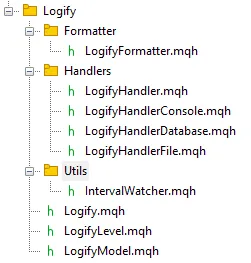
接下来开始构建这个类,我们首先创建一个枚举来支持不同的时间源,我们称之为 ENUM_TIME_ORIGIN。
//+------------------------------------------------------------------+
//| Enum for different time sources                                  |
//+------------------------------------------------------------------+
enum ENUM_TIME_ORIGIN
  {
   TIME_ORIGIN_CURRENT = 0, // [0] Current Time
   TIME_ORIGIN_GMT,         // [1] GMT Time
   TIME_ORIGIN_LOCAL,       // [2] Local Time
   TIME_ORIGIN_TRADE_SERVER // [3] Server Time
  };
//+------------------------------------------------------------------+
我们为类添加了私有变量,用于存储上次记录的时间点(m_last_time)、期望的时间间隔(m_interval)、时间源(m_time_origin)以及一个用于控制首次返回的标志(m_first_return)。相应地,我们为每个私有属性都创建了一个设置方法(Set)和一个获取方法(Get)。为了更方便地配置时间间隔、时间源和首次返回行为,我决定为该类创建一些额外的构造函数,以帮助您这位开发者。以下是包含构造函数以及用于访问和获取私有数据的方法的代码。
//+------------------------------------------------------------------+
//| class : CIntervalWatcher                                         |
//|                                                                  |
//| [PROPERTY]                                                       |
//| Name        : CIntervalWatcher                                   |
//| Type        : Report                                             |
//| Heritage    : No heredirary.                                     |
//| Description : Monitoring new time periods                        |
//|                                                                  |
//+------------------------------------------------------------------+
class CIntervalWatcher
  {
private:

   //--- Auxiliary attributes
   ulong             m_last_time;
   ulong             m_interval;
   ENUM_TIME_ORIGIN  m_time_origin;
   bool              m_first_return;

public:

                     CIntervalWatcher(ENUM_TIMEFRAMES interval, ENUM_TIME_ORIGIN time_origin = TIME_ORIGIN_CURRENT, bool first_return = true);
                     CIntervalWatcher(ulong interval, ENUM_TIME_ORIGIN time_origin = TIME_ORIGIN_CURRENT, bool first_return = true);
                     CIntervalWatcher(void);
                    ~CIntervalWatcher(void);

   //--- Setters
   void              SetInterval(ENUM_TIMEFRAMES interval);
   void              SetInterval(ulong interval);
   void              SetTimeOrigin(ENUM_TIME_ORIGIN time_origin);
   void              SetFirstReturn(bool first_return);

   //--- Getters
   ulong             GetInterval(void);
   ENUM_TIME_ORIGIN  GetTimeOrigin(void);
   bool              GetFirstReturn(void);
   ulong             GetLastTime(void);
  };
//+------------------------------------------------------------------+
//| Constructor                                                      |
//+------------------------------------------------------------------+
CIntervalWatcher::CIntervalWatcher(ENUM_TIMEFRAMES interval, ENUM_TIME_ORIGIN time_origin = TIME_ORIGIN_CURRENT, bool first_return = true)
  {
   m_interval = PeriodSeconds(interval);
   m_time_origin = time_origin;
   m_first_return = first_return;
   m_last_time = 0;
  }
//+------------------------------------------------------------------+
//| Constructor                                                      |
//+------------------------------------------------------------------+
CIntervalWatcher::CIntervalWatcher(ulong interval, ENUM_TIME_ORIGIN time_origin = TIME_ORIGIN_CURRENT, bool first_return = true)
  {
   m_interval = interval;
   m_time_origin = time_origin;
   m_first_return = first_return;
   m_last_time = 0;
  }
//+------------------------------------------------------------------+
//| Constructor                                                      |
//+------------------------------------------------------------------+
CIntervalWatcher::CIntervalWatcher(void)
  {
   m_interval = 10; // 10 seconds
   m_time_origin = TIME_ORIGIN_CURRENT;
   m_first_return = true;
   m_last_time = 0;
  }
//+------------------------------------------------------------------+
//| Destructor                                                       |
//+------------------------------------------------------------------+
CIntervalWatcher::~CIntervalWatcher(void)
  {
  }
//+------------------------------------------------------------------+
//| Set interval                                                     |
//+------------------------------------------------------------------+
void CIntervalWatcher::SetInterval(ENUM_TIMEFRAMES interval)
  {
   m_interval     = PeriodSeconds(interval);
  }
//+------------------------------------------------------------------+
//| Set interval                                                     |
//+------------------------------------------------------------------+
void CIntervalWatcher::SetInterval(ulong interval)
  {
   m_interval     = interval;
  }
//+------------------------------------------------------------------+
//| Set time origin                                                  |
//+------------------------------------------------------------------+
void CIntervalWatcher::SetTimeOrigin(ENUM_TIME_ORIGIN time_origin)
  {
   m_time_origin = time_origin;
  }
//+------------------------------------------------------------------+
//| Set initial return                                               |
//+------------------------------------------------------------------+
void CIntervalWatcher::SetFirstReturn(bool first_return)
  {
   m_first_return=first_return;
  }
//+------------------------------------------------------------------+
//| Get interval                                                     |
//+------------------------------------------------------------------+
ulong CIntervalWatcher::GetInterval(void)
  {
   return(m_interval);
  }
//+------------------------------------------------------------------+
//| Get time origin                                                  |
//+------------------------------------------------------------------+
ENUM_TIME_ORIGIN CIntervalWatcher::GetTimeOrigin(void)
  {
   return(m_time_origin);
  }
//+------------------------------------------------------------------+
//| Set initial return                                               |
//+------------------------------------------------------------------+
bool CIntervalWatcher::GetFirstReturn(void)
  {
   return(m_first_return);
  }
//+------------------------------------------------------------------+
//| Set last time                                                    |
//+------------------------------------------------------------------+
ulong CIntervalWatcher::GetLastTime(void)
  {
   return(m_last_time);
  }
//+------------------------------------------------------------------+
为了辅助主方法,我们来创建一个 GetTime 函数,该函数根据已定义的时间源返回时间:
//+------------------------------------------------------------------+
//| Get time in miliseconds                                          |
//+------------------------------------------------------------------+
ulong CIntervalWatcher::GetTime(ENUM_TIME_ORIGIN time_origin)
  {
   switch(time_origin)
     {
      case(TIME_ORIGIN_CURRENT):
        return(TimeCurrent());
      case(TIME_ORIGIN_GMT):
        return(TimeGMT());
      case(TIME_ORIGIN_LOCAL):
        return(TimeLocal());
      case(TIME_ORIGIN_TRADE_SERVER):
        return(TimeTradeServer());
     }
   return(0);
  }
//+------------------------------------------------------------------+
该类最重要的方法是 Inspect(),它用于检查是否已达到所定义的间隔。其逻辑如下:在首次调用时,它会检查 m_last_time 是否为零(代表新实例化的类),如果是,函数会存储当前时间并返回 m_first_return。如果存储的时间戳加上间隔后不等于当前时间戳,则意味着间隔已达到,因此更新 m_last_time 并让函数返回 true。如果时间戳相同,则意味着间隔尚未达到,因此函数返回 false。
//+------------------------------------------------------------------+
//| Check if there was an update                                     |
//+------------------------------------------------------------------+
bool CIntervalWatcher::Inspect(void)
  {
   //--- Get time
   ulong time_current = this.GetTime(m_time_origin);

   //--- First call, initial return
   if(m_last_time == 0)
     {
      m_last_time = time_current;
      return(m_first_return);
     }

   //--- Check interval
   if(time_current >= m_last_time + m_interval)
     {
      m_last_time = time_current;
      return(true);
     }
   return(false);
  }
//+------------------------------------------------------------------+
通过 CIntervalWatcher,我们能对日志的生成进行更精细的控制,从而实现可编程的周期并提高处理效率。对于需要周期性执行任务的日志库而言,这类方法至关重要。现在,日志操作的周期性执行已配置完毕,我们可以专注于优化记录过程并维持系统性能。
优化日志保存:缓存与文件轮转
尽管我们在上一篇文章中实现的将日志直接写入文件的方案是一个可行的解决方案,但随着日志量的增长,它可能会变得低效。为避免对性能产生负面影响,必须优化此过程。在本主题中,我们将探讨如何实现一个缓存和文件轮转系统,以确保日志被高效写入,同时避免存储过载并保持数据完整性。
在上一篇文章中,我们更详细地讨论了这些改进的工作原理及其优势:
设想这样一个场景:一个EA运行了数周或数月,将每个事件、错误或通知都记录在同一个文件中。很快,该日志就开始达到相当大的规模,使得读取和解释信息变得相当复杂。这时轮换就派上用场了。它允许我们将这些信息分割成更小、更有组织的部分,使一切更易于阅读和分析。
两种最常见的方式是:
- 按大小:您为日志文件设置一个大小限制,通常以兆字节(MB)为单位。当达到此限制时,系统会自动创建一个新文件,并重新开始这个循环。当重点在于控制日志增长,而不必遵循日历时,这种方法非常实用。一旦当前文件达到大小限制(以 MB 为单位),就会发生以下流程:当前的日志文件被重命名,并获得一个索引,例如 “log1.log”。目录中的现有文件也会被重新编号,例如 “log1.log” 变成 “log2.log”。如果文件数量达到最大允许值,最旧的文件将被删除。这种方法对于限制日志占用的空间和保存的文件数量都很有用。
- 按日期:在这种情况下,每天都会创建一个新的日志文件。每个文件的名称中都包含其创建日期,例如 log_2025-01-19.log,这已经解决了日志组织的大部分难题。当您需要查看特定某一天的情况,而不想迷失在一个巨大的文件中时,这种方法非常完美。这是我在保存智能交易系统日志时最常用的方法,一切都更整洁、更直接,也更易于浏览。
此外,您还可以限制存储的日志文件数量。这一控制非常重要,可以防止旧记录的不必要累积。假设您配置为保留最近 30 个文件。当第 31 个文件出现时,系统会自动丢弃最旧的那个,从而防止非常古老的日志在磁盘上累积,并确保保留最新的日志。
另一个关键细节是缓存的使用。它不是在每条消息到达时都直接写入文件,而是将消息临时存储在缓存中。当缓存达到定义的限制时,它会一次性将所有内容转储到文件中。这减少了对磁盘的读写操作,带来了更高的性能,并延长了您存储设备的使用寿命。
要实现日志文件轮转,我们首先需要一个名为 SearchForFilesInDirectory() 的辅助方法。该方法负责搜索特定目录中的所有文件,并以数组形式返回它们的名称。它使用 FileFindFirst() 函数开始搜索,每当找到一个文件,其名称就会被添加到这个数组中。整个过程完成后,该方法会使用 FileFindClose() 关闭搜索句柄。
但为什么这个方法如此重要呢?很简单!它允许我们列出现有的日志文件,从而确保管理日志的类能够在必要时删除较旧的文件。
class CLogifyHandlerFile : public CLogifyHandler
  {
private:
   bool              SearchForFilesInDirectory(string directory, string &file_names[]);
  };
//+------------------------------------------------------------------+
//| Returns an array with the names of all files in the directory    |
//+------------------------------------------------------------------+
bool CLogifyHandlerFile::SearchForFilesInDirectory(string directory,string &file_names[])
  {
   //--- Search for all log files in the specified directory with the given file extension
   string file_name;
   long search_handle = FileFindFirst(directory,file_name);
   ArrayFree(file_names);
   bool is_found = false;
   if(search_handle != INVALID_HANDLE)
     {
      do
        {
         //--- Add each file name found to the array of file names
         int size_file = ArraySize(file_names);
         ArrayResize(file_names,size_file+1);
         file_names[size_file] = file_name;
         is_found = true;
        }
      while(FileFindNext(search_handle,file_name));
      FileFindClose(search_handle);
     }

   return(is_found);
  }
//+------------------------------------------------------------------+
现在我们有了获取文件的函数,可以将其集成到负责发出日志的主方法 Emit() 中。根据所选的轮转配置,逻辑会进行相应调整。
如果日志轮转配置为基于文件大小触发,则该函数会:
- 检查文件大小是否已超过配置的限制 (m_config.max_file_size_mb)。
- 搜索目录中的所有日志文件。
- 删除超出最大允许数量 (m_config.max_file_count) 的旧文件。
- 重命名旧文件,以数字方式递增其索引(如 log1.txt, log2.txt 等)。
- 将当前日志文件重命名为“log1”以保持序列连续。
如果轮转是基于日期,则该函数会:
- 搜索目录中的所有日志文件。
- 删除超出最大允许数量 (m_config.max_file_count) 的最旧文件。
现在,让我们看看包含两种轮转逻辑的 Emit() 方法的实现:
//+------------------------------------------------------------------+
//| Processes a log message and sends it to the specified destination|
//+------------------------------------------------------------------+
void CLogifyHandlerFile::Emit(MqlLogifyModel &data)
  {
   //--- Checks if the configured level allows
   if(data.level >= this.GetLevel())
     {
      //--- Get the full path of the file
      string log_path = this.LogPath();

      //--- Open file
      ResetLastError();
      int handle_file = m_file.Open(log_path, FILE_READ | FILE_WRITE | FILE_ANSI);
      if(handle_file == INVALID_HANDLE)
        {
         Print("[ERROR] ["+TimeToString(TimeCurrent())+"] Log system error: Unable to open log file '"+log_path+"'. 确保文件路径存在并可写。(Code: "+IntegerToString(GetLastError())+")");
         return;
        }

      //--- Write
      m_file.Seek(0, SEEK_END);
      m_file.WriteString(data.formated + "\n");

      //--- Size in megabytes
      ulong size_mb = m_file.Size() / (1024 * 1024);

      //--- Close file
      m_file.Close();

      string file_extension = this.LogFileExtensionToStr(m_config.file_extension);

      //--- Check if the log rotation mode is based on file size
      if(m_config.rotation_mode == LOG_ROTATION_MODE_SIZE)
        {
         //--- Check if the current file size exceeds the maximum configured size
         if(size_mb >= m_config.max_file_size_mb)
           {
            //--- Search files
            string file_names[];
            if(this.SearchForFilesInDirectory(m_config.directory+"\\*"+file_extension,file_names))
              {
               //--- Delete files exceeding the configured maximum number of log files
               int size_file = ArraySize(file_names);
               for(int i=size_file-1;i>=0;i--)
                 {
                  //--- Extract the numeric part of the file index
                  string file_index = file_names[i];
                  StringReplace(file_index,file_extension,"");
                  StringReplace(file_index,m_config.base_filename,"");

                  //--- If the file index exceeds the maximum allowed count, delete the file
                  if(StringToInteger(file_index) >= m_config.max_file_count)
                    {
                     FileDelete(m_config.directory + "\\" + file_names[i]);
                    }
                 }

               //--- Rename existing log files by incrementing their indices
               for(int i=m_config.max_file_count-1;i>=0;i--)
                 {
                  string old_file = m_config.directory + "\\" + m_config.base_filename + (i == 0 ?"" : StringFormat("%d", i)) + file_extension;
                  string new_file = m_config.directory + "\\" + m_config.base_filename + StringFormat("%d", i + 1) + file_extension;
                  if(FileIsExist(old_file))
                    {
                     FileMove(old_file, 0, new_file, FILE_REWRITE);
                    }
                 }

               //--- Rename the primary log file to include the index "1"
               string new_primary = m_config.directory + "\\" + m_config.base_filename + "1" + file_extension;
               FileMove(log_path, 0, new_primary, FILE_REWRITE);
              }
           }
        }
      //--- Check if the log rotation mode is based on date
      else if(m_config.rotation_mode == LOG_ROTATION_MODE_DATE)
        {
         //--- Search files
         string file_names[];
         if(this.SearchForFilesInDirectory(m_config.directory+"\\*"+file_extension,file_names))
           {
            //--- Delete files exceeding the maximum configured number of log files
            int size_file = ArraySize(file_names);
            for(int i=size_file-1;i>=0;i--)
              {
               if(i < size_file - m_config.max_file_count)
                 {
                  FileDelete(m_config.directory + "\\" + file_names[i]);
                 }
              }
           }
        }
     }
  }
//+------------------------------------------------------------------+
通过分块保存以提升性能
接下来进行另一项改进,让我们创建本文中我认为最有趣的逻辑——分块保存记录。核心思想是实现一个缓存(临时内存),日志记录将先存储在此处,直到达到设定的限制。当达到此限制时,缓存中的所有记录将一次性保存到日志文件中。
我们将分步实现此逻辑。首先,我们将在 CLogifyHandlerFile 类中创建缓存结构。在类的私有部分,我们将添加一个 MqlLogifyModel 类型的数组,用于临时存储日志记录。我们还包含一个变量来控制缓存中最后保存值的当前索引。每当添加新记录时,该索引就会递增。我们还创建了一个 CIntervalWatcher 类的实例,并在构造函数中设置了一天的间隔。看看它的样子:
class CLogifyHandlerFile : public CLogifyHandler
  {
private:
   //--- Update utilities
   CIntervalWatcher  m_interval_watcher;

   //--- Cache data
   MqlLogifyModel    m_cache[];
   int               m_index_cache;
  };
//+------------------------------------------------------------------+
//| Constructor                                                      |
//+------------------------------------------------------------------+
CLogifyHandlerFile::CLogifyHandlerFile(void)
  {
   m_interval_watcher.SetInterval(PERIOD_D1);
   ArrayFree(m_cache);
   m_index_cache = 0;
  }
//+------------------------------------------------------------------+
在创建好缓存和更新结构后,我们进入下一步:修改 Emit() 方法以使用该缓存。
Emit() 方法负责处理一条日志消息并将其发送到配置的目标(在本例中是文件)。我们将对其进行调整,使其不再直接将数据保存到文件,而是临时存储在缓存中。当缓存达到其配置的限制,或达到定义的时间间隔(一天)时,该方法会调用 Flush() 函数,该函数会将累积的记录保存到文件中。这个时间间隔非常有用,因为如果数据已在缓存中存放超过一天,此机制能确保数据仍然每天被保存,同时也允许轮转例程每天执行。
以下是修改后的代码:
//+------------------------------------------------------------------+
//| Processes a log message and sends it to the specified destination|
//+------------------------------------------------------------------+
void CLogifyHandlerFile::Emit(MqlLogifyModel &data)
  {
   //--- Checks if the configured level allows
   if(data.level >= this.GetLevel())
     {
      //--- Resize cache if necessary
      int size = ArraySize(m_cache);
      if(size != m_config.messages_per_flush)
        {
         ArrayResize(m_cache, m_config.messages_per_flush);
         size = m_config.messages_per_flush;
        }

      //--- Add log to cache
      m_cache[m_index_cache++] = data;

      //--- Flush if cache limit is reached or update condition is met
      if(m_index_cache >= m_config.messages_per_flush || m_interval_watcher.Inspect())
        {
         //--- Save cache
         Flush();

         //--- Reset cache
         m_index_cache = 0;
         for(int i=0;i<size;i++)
           {
            m_cache[i].Reset();
           }
        }
     }
  }
//+------------------------------------------------------------------+
Flush() 函数负责将缓存数据保存到文件。这个过程包括打开文件,将指针定位到末尾,然后写入缓存中存储的所有记录。
//+------------------------------------------------------------------+
//| Clears or completes any pending operations                       |
//+------------------------------------------------------------------+
void CLogifyHandlerFile::Flush(void)
  {
   //--- Get the full path of the file
   string log_path = this.LogPath();

   //--- Open file
   ResetLastError();
   int handle_file = FileOpen(log_path, FILE_READ|FILE_WRITE|FILE_ANSI, '\t', m_config.codepage);
   if(handle_file == INVALID_HANDLE)
     {
      Print("[ERROR] ["+TimeToString(TimeCurrent())+"] Log system error: Unable to open log file '"+log_path+"'. 确保文件路径存在并可写。(Code: "+IntegerToString(GetLastError())+")");
      return;
     }

   //--- Loop through all cached messages
   int size = ArraySize(m_cache);
   for(int i=0;i<size;i++)
     {
      if(m_cache[i].timestamp > 0)
        {
         //--- Point to the end of the file and write the message
         FileSeek(handle_file, 0, SEEK_END);
         FileWrite(handle_file, m_cache[i].formated);
        }
     }

   //--- Size in megabytes
   ulong size_mb = FileSize(handle_file) / (1024 * 1024);

   //--- Close file
   FileClose(handle_file);

   string file_extension = this.LogFileExtensionToStr(m_config.file_extension);

   //--- Check if the log rotation mode is based on file size
   if(m_config.rotation_mode == LOG_ROTATION_MODE_SIZE)
     {
      //--- Check if the current file size exceeds the maximum configured size
      if(size_mb >= m_config.max_file_size_mb)
        {
         //--- Search files
         string file_names[];
         if(this.SearchForFilesInDirectory(m_config.directory+"\\*"+file_extension,file_names))
           {
            //--- Delete files exceeding the configured maximum number of log files
            int size_file = ArraySize(file_names);
            for(int i=size_file-1;i>=0;i--)
              {
               //--- Extract the numeric part of the file index
               string file_index = file_names[i];
               StringReplace(file_index,file_extension,"");
               StringReplace(file_index,m_config.base_filename,"");

               //--- If the file index exceeds the maximum allowed count, delete the file
               if(StringToInteger(file_index) >= m_config.max_file_count)
                 {
                  FileDelete(m_config.directory + "\\" + file_names[i]);
                 }
              }

            //--- Rename existing log files by incrementing their indices
            for(int i=m_config.max_file_count-1;i>=0;i--)
              {
               string old_file = m_config.directory + "\\" + m_config.base_filename + (i == 0 ?"" : StringFormat("%d", i)) + file_extension;
               string new_file = m_config.directory + "\\" + m_config.base_filename + StringFormat("%d", i + 1) + file_extension;
               if(FileIsExist(old_file))
                 {
                  FileMove(old_file, 0, new_file, FILE_REWRITE);
                 }
              }

            //--- Rename the primary log file to include the index "1"
            string new_primary = m_config.directory + "\\" + m_config.base_filename + "1" + file_extension;
            FileMove(log_path, 0, new_primary, FILE_REWRITE);
           }
        }
     }
   //--- Check if the log rotation mode is based on date
   else if(m_config.rotation_mode == LOG_ROTATION_MODE_DATE)
     {
      //--- Search files
      string file_names[];
      if(this.SearchForFilesInDirectory(m_config.directory+"\\*"+file_extension,file_names))
        {
         //--- Delete files exceeding the maximum configured number of log files
         int size_file = ArraySize(file_names);
         for(int i=size_file-1;i>=0;i--)
           {
            if(i < size_file - m_config.max_file_count)
              {
               FileDelete(m_config.directory + "\\" + file_names[i]);
              }
           }
        }
     }
  }
//+------------------------------------------------------------------+
通过此实现,我们创建了一个高效且可扩展的日志解决方案,它能够处理大量数据,同时不会影响您的智能交易系统的性能。最后,我们需要确保在程序关闭时,所有缓存中的数据都能被保存到文件中。为此,只需在 Close() 方法中调用 Flush() 方法即可,而 Close() 方法本身已在 CLogify 基类的析构函数中被调用。
//+------------------------------------------------------------------+
//| Destructor                                                       |
//+------------------------------------------------------------------+
CLogifyHandlerFile::~CLogifyHandlerFile(void)
  {
   this.Close();
  }
//+------------------------------------------------------------------+
//| Closes the handler and releases any resources                    |
//+------------------------------------------------------------------+
void CLogifyHandlerFile::Close(void)
  {
   //--- Save cache
   Flush();
  }
//+------------------------------------------------------------------+
通过实现缓存和文件轮转,我们减少了对磁盘的写入操作,并确保了日志的存储更为高效。这为我们的库带来了性能和可扩展性,使其在真实应用中更加健壮。但这些优化真的有区别吗?让我们来测试一下。
性能测试:衡量改进的效率
既然我们已经实现了优化,就需要衡量它们的实际影响。性能测试将帮助我们了解缓存是否减少了写入负载,以及文件轮转是否按预期工作。为此,我们将运行与上一篇文章中相同的测试,以比较库的原始版本和优化版本。
为了运行测试,我们将使用相同的文件,但对formatter进行了一些修改,因为现在每个 handler都有自己的formatter。变更内容高亮显示如下:
- 绿色:新增的代码
- 红色:删除的代码
- 黄色:定义缓存大小的参数。缓存越大,处理速度越快。
//+------------------------------------------------------------------+
//| Import CLogify                                                   |
//+------------------------------------------------------------------+
#include <Logify/Logify.mqh>
CLogify logify;
//+------------------------------------------------------------------+
//| Expert initialization function                                   |
//+------------------------------------------------------------------+
int OnInit()
  {
   //--- Configs
   MqlLogifyHandleFileConfig m_config;
   m_config.CreateSizeRotationConfig("expert","logs",LOG_FILE_EXTENSION_LOG,5,5,10);

   //--- Handler File
   CLogifyHandlerFile *handler_file = new CLogifyHandlerFile();
   handler_file.SetConfig(m_config);
   handler_file.SetLevel(LOG_LEVEL_DEBUG);
   handler_file.SetFormatter(new CLogifyFormatter("hh:mm:ss","{date_time} [{levelname}] {msg}"));

   //--- Add handler in base class
   logify.AddHandler(handler_file);
   logify.SetFormatter(new CLogifyFormatter("hh:mm:ss","{date_time} [{levelname}] {msg}"));

   //--- Using logs
   logify.Debug("RSI indicator value calculated: 72.56", "Indicators", "Period: 14");
   logify.Infor("Buy order sent successfully", "Order Management", "Symbol: EURUSD, Volume: 0.1");
   logify.Alert("Stop Loss adjusted to breakeven level", "Risk Management", "Order ID: 12345678");
   logify.Error("Failed to send sell order", "Order Management", "Reason: Insufficient balance");
   logify.Fatal("Failed to initialize EA: Invalid settings", "Initialization", "Missing or incorrect parameters");

   return(INIT_SUCCEEDED);
  }
//+------------------------------------------------------------------+
让我们在策略测试器中使用相同的日期和品种参数开始测试。
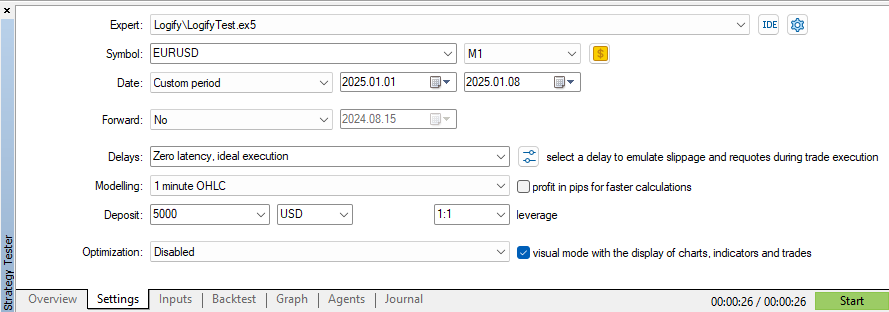
在 EURUSD 品种上使用“1分钟OHLC”模型,时间跨度为7天,执行时间为26秒。值得注意的是,每个tick都会生成一条新的日志记录,并且缓存被设置为存储10条消息。现在,让我们将缓存增加到100条消息,并观察性能上的差异:
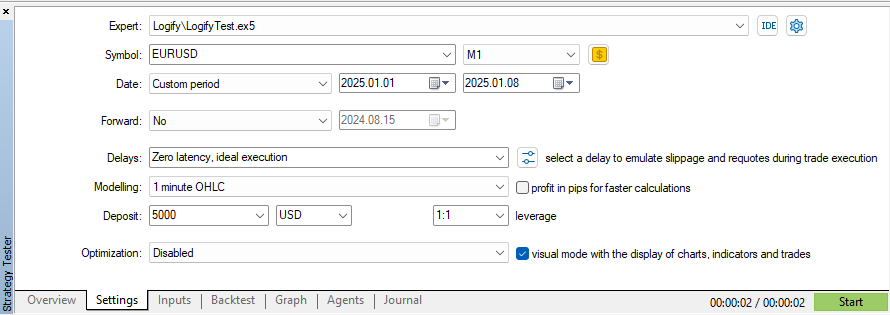
通过此项更改,在保持相同建模、日期和品种设置的情况下,我们能够将测试时间减少2秒。如果我们将其与上一篇文章中进行的首次测试(耗时5分11秒)相比,改进效果令人印象深刻!
结果表明,微小的优化可以带来显著的效率提升。缓存和文件轮转的结合使日志管理更加敏捷和可靠,验证了我们迄今为止所做的选择。但这些改进在实践中如何应用呢?让我们来探讨一些使用示例。
日志库使用示例
既然我们已经改进了日志库,现在是时候将其投入使用了!让我们来探讨一些实际示例,了解如何使用它来创建不同类型的日志文件,每种文件都有其自己的格式和严重性级别。
示例 1:将日志分别存入 .log 和 .json 文件
在第一个场景中,我们设置了两个日志文件:一个为 .log 格式,另一个为 .json 格式。每个文件都有特定的格式和不同的严重性级别,这使得日志的管理和分析更加容易。
//+------------------------------------------------------------------+
//| Expert initialization function                                   |
//+------------------------------------------------------------------+
int OnInit()
  {
   //--- Configs
   MqlLogifyHandleFileConfig m_config;
   m_config.CreateSizeRotationConfig("expert","logs",LOG_FILE_EXTENSION_LOG,5,5,1);

   //--- Handler File (.log)
   CLogifyHandlerFile *handler_file_log = new CLogifyHandlerFile();
   handler_file_log.SetConfig(m_config);
   handler_file_log.SetLevel(LOG_LEVEL_DEBUG);
   handler_file_log.SetFormatter(new CLogifyFormatter("hh:mm:ss","{date_time} [{levelname}] {msg}"));

   //--- Handler File (.json)
   m_config.CreateNoRotationConfig("expert","logs",LOG_FILE_EXTENSION_JSON,1);
   CLogifyHandlerFile *handler_file_json = new CLogifyHandlerFile();
   handler_file_json.SetConfig(m_config);
   handler_file_json.SetLevel(LOG_LEVEL_ALERT);
   handler_file_json.SetFormatter(new CLogifyFormatter("hh:mm:ss","{\"datetime\":\"{date_time}\", \"level\":\"{levelname}\", \"msg\":\"{msg}\"}"));

   //--- Add handler in base class
   logify.AddHandler(handler_file_log);
   logify.AddHandler(handler_file_json);

   //--- Using logs
   logify.Debug("RSI indicator value calculated: 72.56", "Indicators", "Period: 14");
   logify.Infor("Buy order sent successfully", "Order Management", "Symbol: EURUSD, Volume: 0.1");
   logify.Alert("Stop Loss adjusted to breakeven level", "Risk Management", "Order ID: 12345678");
   logify.Error("Failed to send sell order", "Order Management", "Reason: Insufficient balance");
   logify.Fatal("Failed to initialize EA: Invalid settings", "Initialization", "Missing or incorrect parameters");

   return(INIT_SUCCEEDED);
  }
//+------------------------------------------------------------------+
在这里,我们使用相同的 m_config 配置变量,只更改定义两种日志格式所需的值。这使得配置更简单且可复用。
示例 2:仅将错误存储在 JSON 文件中
现在,我们更进一步,配置一个特定的日志来仅存储错误消息。为此,我们创建一个单独的文件夹来保存这个 .json 文件。此外,我们还添加了一个控制台处理器,用于在终端中直接显示日志。
//+------------------------------------------------------------------+
//| Expert initialization function                                   |
//+------------------------------------------------------------------+
int OnInit()
  {
   //--- Configs
   MqlLogifyHandleFileConfig m_config;
   m_config.CreateSizeRotationConfig("expert","logs",LOG_FILE_EXTENSION_LOG,5,5,1);

   //--- Handler File (.log)
   CLogifyHandlerFile *handler_file_log = new CLogifyHandlerFile();
   handler_file_log.SetConfig(m_config);
   handler_file_log.SetLevel(LOG_LEVEL_DEBUG);
   handler_file_log.SetFormatter(new CLogifyFormatter("hh:mm:ss","{date_time} [{levelname}] {msg}"));

   //--- Handler File (.json)
   m_config.CreateNoRotationConfig("expert","logs\\error",LOG_FILE_EXTENSION_JSON,1);
   CLogifyHandlerFile *handler_file_json = new CLogifyHandlerFile();
   handler_file_json.SetConfig(m_config);
   handler_file_json.SetLevel(LOG_LEVEL_ERROR);
   handler_file_json.SetFormatter(new CLogifyFormatter("hh:mm:ss","{\"datetime\":\"{date_time}\", \"level\":\"{levelname}\", \"msg\":\"{msg}\"}"));

   //--- Handler Console
   CLogifyHandlerConsole *handler_console = new CLogifyHandlerConsole();
   handler_console.SetLevel(LOG_LEVEL_DEBUG);
   handler_console.SetFormatter(new CLogifyFormatter("hh:mm:ss","{date_time} [{levelname} | {origin}] {msg}"));

   //--- Add handler in base class
   logify.AddHandler(handler_file_log);
   logify.AddHandler(handler_file_json);
   logify.AddHandler(handler_console);

   //--- Using logs
   logify.Debug("RSI indicator value calculated: 72.56", "Indicators", "Period: 14");
   logify.Infor("Buy order sent successfully", "Order Management", "Symbol: EURUSD, Volume: 0.1");
   logify.Alert("Stop Loss adjusted to breakeven level", "Risk Management", "Order ID: 12345678");
   logify.Error("Failed to send sell order", "Order Management", "Reason: Insufficient balance");
   logify.Fatal("Failed to initialize EA: Invalid settings", "Initialization", "Missing or incorrect parameters");

   return(INIT_SUCCEEDED);
  }
//+------------------------------------------------------------------+
在这个示例中,我们使用了三个日志处理器:
- .log 文件 → 以传统格式存储日志。
- .json 文件 → 在一个单独的文件夹中仅存储错误消息。
- 控制台 → 以更便于用户阅读的方式显示日志。
在控制台中使用更“人性化”的格式化器有助于让输出更易于理解,而错误的JSON格式则便于后续分析。
通过这些示例,我们的日志库如何应用于实际项目已显而易见。创建不同格式和严重性级别的灵活性,使得日志管理更加得心应手,有助于更轻松地识别和排查问题。此外,其模块化结构使得根据需要扩展日志系统变得轻而易举。
现在,您要做的就是根据您的需求调整此实现,并确保您的日志始终保持良好的组织性和可访问性!
结论
在本文中,我们改进了我们的日志库,使其更高效、可扩展且适应性强。我们优化了格式化功能,允许每个处理器拥有自己的格式化器,使消息更有条理,并能灵活适应不同需求,例如本地调试和审计。
我们实现了 CIntervalWatcher 类,它控制着执行周期,确保日志在明确定义的时间间隔内被写入和轮转。我们还通过缓存优化了写入操作,减少了磁盘操作,并更好地管理了文件增长。我们通过性能测试验证了这些改进,进一步完善了解决方案以支持高负载。此外,我们还提供了实际示例以促进该库的采用。
如果说本文有一个核心要点,那就是将日志记录视为软件开发中至关重要的一环的重要性。一个设计良好的日志系统不仅便于调试和后续审计,还有助于提升智能交易系统的安全性、可追溯性和可靠性。在开发早期就实施良好的日志记录实践,可以为您省去后续的许多麻烦,使维护更轻松,故障排查更高效。在下一篇文章中,我们将探讨如何将日志存储在数据库中以进行高级分析。期待与您再见!
| 文件名 | 说明 |
|---|---|
| Experts/Logify/LogiftTest.mq5 | 用于测试库功能的文件,包含一个实际示例 |
| Include/Logify/Formatter/LogifyFormatter.mqh | 负责格式化日志记录的类,将占位符替换为具体值 |
| Include/Logify/Handlers/LogifyHandler.mqh | 用于管理日志处理器的基类,包括级别设置和日志发送 |
| Include/Logify/Handlers/LogifyHandlerConsole.mqh | 将格式化后的日志直接发送到 MetaTrader 终端控制台的日志处理器 |
| Include/Logify/Handlers/LogifyHandlerDatabase.mqh | 将格式化后的日志发送到数据库的日志处理器(目前仅包含打印输出,但很快我们会将其保存到真正的 sqlite 数据库中) |
| Include/Logify/Handlers/LogifyHandlerFile.mqh | 将格式化后的日志发送到文件的日志处理器 |
| Include/Logify/Utils/IntervalWatcher.mqh | 检查一个时间间隔是否已经过去,允许您在库内部创建定时执行的例程。 |
| Include/Logify/Logify.mqh | 日志管理的核心类,集成了级别、模型和格式化功能 |
| Include/Logify/LogifyLevel.mqh | 定义 Logify 库日志级别的文件,支持精细控制 |
| Include/Logify/LogifyModel.mqh | 用于建模日志记录的结构,包含级别、消息、时间戳和上下文等详细信息 |
本文由MetaQuotes Ltd译自英文
原文地址: https://www.mql5.com/en/articles/17137
注意: MetaQuotes Ltd.将保留所有关于这些材料的权利。全部或部分复制或者转载这些材料将被禁止。
本文由网站的一位用户撰写,反映了他们的个人观点。MetaQuotes Ltd 不对所提供信息的准确性负责,也不对因使用所述解决方案、策略或建议而产生的任何后果负责。

 在MQL5中构建自优化智能交易系统(EA)(第五部分):自适应交易规则
 创建MQL5交易管理员面板(第九部分):代码组织(1)
 交易中的神经网络:使用小波变换和多任务注意力的模型
 价格行为分析工具包开发(第10部分):外部资金流(二)VWAP
