

MQL5 简介(第 10 部分):MQL5 中使用内置指标的初学者指南
 1 050
1 050
 2
2

概述
欢迎回到我们的 MQL5 系列!我很高兴你们能参加第十部分,我们将探讨算法交易的另一个关键方面:使用内置指标。与往常一样,这部分承诺既吸引人又实用,因为我们将继续采用基于项目的方法,以确保您可以将所学知识直接应用于您的交易策略。
本文将开发一个相对强弱指数(RSI)EA。交易中最常用的技术指标之一是 RSI。我们将构建一个工具,通过在 EA 中包含此指标来跟踪市场状况并自动进行交易。尽管相对强弱指数(RSI)是本文的主题,但我们将讨论的想法适用于大多数内置指标,因为它们都基于类似的原理。由于本系列主要面向初学者,我的主要目标将是使解释和代码尽可能简单明了。我知道,对于新手来说,充分理解流程的每个阶段都是至关重要的,包括为什么编写某些代码、每个组件执行什么以及各个部分如何协同工作。
简洁且内存高效的代码在专业的 MQL5 开发中经常受到高度重视。虽然这种方法非常适合效率优化,但它偶尔会使代码更难理解,特别是对于不熟悉编程的人来说。因此,我在本系列中特意采用了一种更全面、更有条理的方法,以确保您在整个过程中感到放松。
在本文中,您将了解:
- 如何使用内置指标。
- 使用指标句柄与指标进行交互。
- 访问指标缓冲区以获取计算的指标值。
- 从图表中检索 RSI 值及其对应的烛形数据。
- 识别 RSI 高点和低点,以实现流动性清扫概念。
- 根据 RSI 值和烛形数据逐步创建 EA。
- 创建对象以直接在图表上标记重要的 RSI 高点和低点,以便更好地进行分析。
- 设置每笔交易的百分比风险,以解决使用内置指标时烛形大小不一致的问题。
在本文结束时,您将全面了解如何将内置指标集成到您的交易策略中,重点是风险管理、风险修改以及创建和完善基于 RSI 的 EA 的实用见解。
1.了解 MQL5 中的内置指标
1.1.什么是内置指标?
MetaTrader 5 内置指标是市场分析的有用快速切入点。它们为您提供有关市场状况、动量和价格走势的即时信息。例如,布林带指示市场波动量,移动平均线有助于识别趋势,RSI可以指示市场何时超买或超卖。这些工具大大简化了交易,节省了您的时间。
1.2.指标句柄
在 MQL5 中,指标句柄是在创建或初始化指标时分配给指标的唯一标识符。这些句柄充当指标的引用,允许您与它们交互并访问它们的数据。当您将指标添加到图表中时,您需要输入特定的属性,如周期数、价格类型和其他定义指标行为的设置。
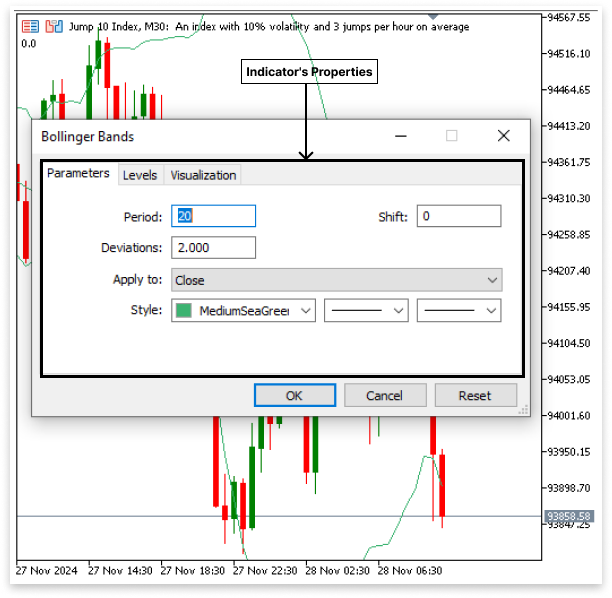
在代码中,句柄起着类似的作用:它允许您的程序“知道”它正在使用哪个指标并访问其属性。从本质上讲,指标句柄是一种在程序中输入和触发指标设置的方式,使您能够在交易策略中有效地使用它。
一旦使用 iRSI 或 iBands 等函数创建了指标句柄,它就会将您的代码“绑定”到该特定指标,因此您可以轻松检索和操作其数据。如果没有句柄,您的程序将无法区分不同的指标,也无法访问指标缓冲区的计算值。 例如,如果你想在代码中输入指标的设置,你可以使用像 iRSI 这样的函数来指定必要的参数(如周期数、应用价格和偏移),然后为 RSI 指标创建句柄。
语法:
iRSI(symbol, period, rsi_period, applied_price); 解释:
- symbol:此参数指定要计算 RSI 的交易品种(货币对、股票或资产)。
- period:这是计算 RSI 的周期(或时间框架)。它定义了 RSI 考虑数据点的时间。
- rsi_period :这是用于计算 RSI 的周期数。RSI 通常使用 14 个周期计算,但可以根据您的策略进行调整。
- applied_price:此参数定义计算 RSI 时使用哪种价格类型。RSI 可以基于不同的价格值,例如收盘价、开盘价或最高/最低价。
int rsi_handle = iRSI(_Symbol,PERIOD_CURRENT,14,PRICE_CLOSE);
解释:
int rsi_handle :
- 声明一个整数变量 rsi_handle 来存储 RSI 指标句柄(指标的唯一 ID)。
iRSI(...) :
- 该函数用于计算给定交易品种、时间框架和设置的相对强弱指数 (RSI)。
_Symbol:
- 指图表上的当前交易品种(例如,EUR/USD)。它会自动使用您正在使用的交易品种。
PERIOD_CURRENT:
- 指图表的时间框架(例如 1 小时、1 天)。它确保根据图表的活动时间框架计算 RSI。
14 :
- RSI 周期指定计算中使用的柱形/烛形的数量(通常为 14 个周期)。
PRICE_CLOSE:
- 指定使用每个柱形或烛形的收盘价来计算 RSI。
这就是您将指标详细信息直接输入代码的方式,类似于您在 MetaTrader 5 图表上设置它们的方式。通过使用 iRSI 等函数,您可以定义交易品种、时间框架、周期和价格类型,就像在图表上应用指标时一样。这允许您的代码访问和处理指标的数据,确保您的交易策略在指定设置下按预期运行。
同样的原则可以应用于 MetaTrader 5 中的其他内置指标。例如,您可以使用不同的函数来处理各种指标,每个指标都需要特定的参数。以下是五个常用的函数:
- iBands —— 用于布林带,允许您设置交易品种、时间框架、周期、偏差和应用价格。
- iMA —— 用于移动平均线,指定交易品种、时间框架、周期、转换、方法和应用价格。
- iMACD —— 用于 MACD,定义交易品种、时间框架、快速和慢速 EMA、信号周期和应用价格。
- iADX —— 用于平均方向指数,指定交易品种、时间框架和周期。
MQL5 提供一系列技术分析工具来提高您的交易技术,并提供更多内置指标函数。如果您知道如何使用一个指标,那么将同样的想法应用于其他指标就很简单了。通过深入了解 MQL5 文档,可以找到最符合您交易要求的指标。
1.2.指标缓冲区
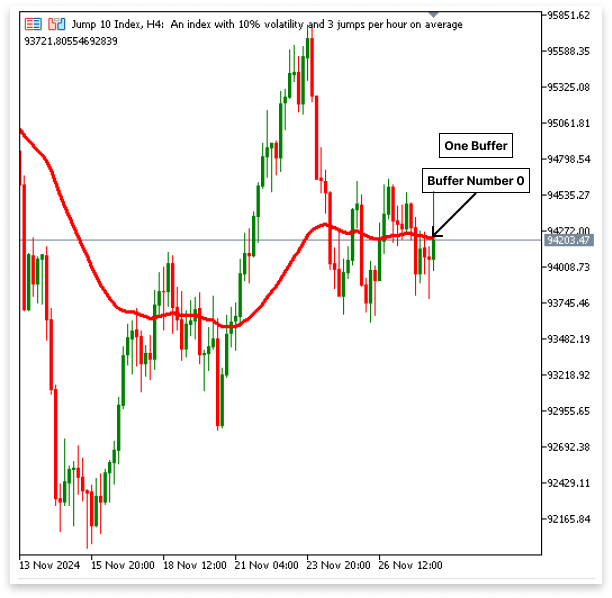
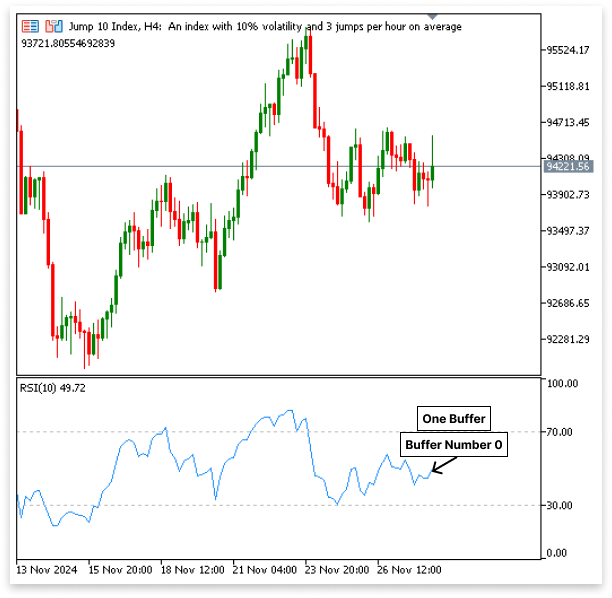
使用句柄定义指标后,下一步是检索其数据。这是通过指标缓冲区完成的,指标缓冲区存储了图表上每个价格点的指标计算值。每个指标都有特定数量的缓冲区,具体取决于它生成的数据类型:
移动平均线(MA)
该指标有 1 个缓冲区,用于存储每根烛形计算出的移动平均值。
相对强弱指数(RSI)
类似地,RSI 指标有 1 个缓冲区用于存储 RSI 值
布林带
该指标使用3 个缓冲区来存储数据。
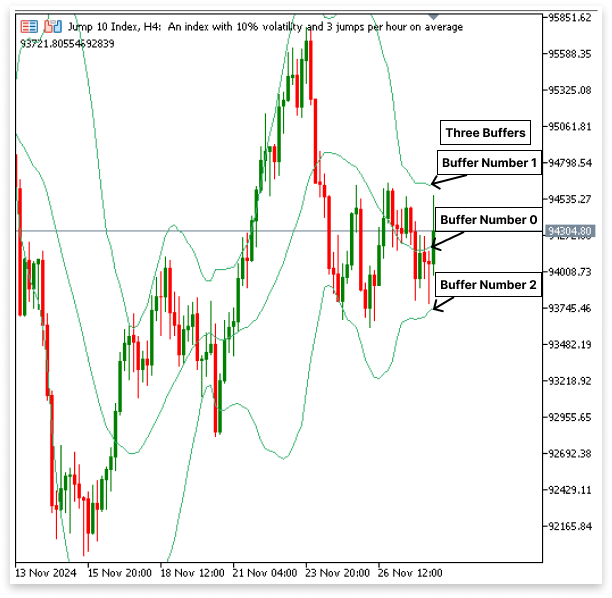
- 中间带(索引 0)是主要趋势线。
- 上轨(索引 1)代表潜在的超买水平。
- 下轨(索引 2)代表潜在的超卖水平。
可以使用 CopyBuffer() 函数以编程方式访问这些缓冲区。
MQL5 中的 CopyBuffer() 函数用于将数据从指标缓冲区读取到数组中,以供进一步分析或决策。当您使用 iRSI 或 iBands 等函数创建指标句柄之后,您就可以使用 CopyBuffer() 来访问计算出的指标值。
语法:int CopyBuffer(indicator_handle, buffer_number, start_position, count, buffer);
参数:
- indicator_handle:先前创建的指标的唯一标识符(句柄),例如来自 iRSI 或 iBands。
- buffer_number:从中读取数据的缓冲区的索引。例如,布林带,0 为中带,1 为上带,2 为下带。对于 RSI 或移动平均线,只有 0,因为它们只有一个缓冲区。
- start_pos:图表上的起始位置(0 = 最近的烛形)。
- count:您想要从缓冲区读取的值的数量。
- buffer[]:存储指标缓冲区数据的数组。
int band_handle;               // Bollinger Bands handle
double upper_band[], mid_band[], lower_band[]; // Buffers for the bands
void OnStart()
  {
// Create the Bollinger Bands indicator
   band_handle = iBands(_Symbol, PERIOD_CURRENT, 20, 0, 2.0, PRICE_CLOSE);
// Ensure arrays are series for correct indexing
   ArraySetAsSeries(upper_band, true);
   ArraySetAsSeries(mid_band, true);
   ArraySetAsSeries(lower_band, true);
// Copy data from buffers (Index 0 = Middle, 1 = Upper, 2 = Lower)
   CopyBuffer(band_handle, 0, 0, 10, mid_band);   // Middle band data
   CopyBuffer(band_handle, 1, 0, 10, upper_band); // Upper band data
   CopyBuffer(band_handle, 2, 0, 10, lower_band); // Lower band data
// Print the most recent values
   Print("Middle Band: ", mid_band[0]);
   Print("Upper Band: ", upper_band[0]);
   Print("Lower Band: ", lower_band[0]);
  }
解释:
在此示例中,我们演示如何使用 CopyBuffer() 函数从布林带指标中检索数据。首先,iBands 函数使用特定参数(例如交易品种(_Symbol)、时间框架(PERIOD_CURRENT)、周期数(20)、偏移(0)、偏差(2.0)和应用价格(PRICE_CLOSE))创建指标句柄。该句柄保存在 band_handle 中,充当我们的应用程序和布林带指标之间的通道,使我们能够访问计算出的数字。然后,上、中、下区带的数据将存储在我们声明的三个数组中:upper_band、mid_band 和 lower_band。如果使用 ArraySetAsSeries 将这些数组设置为序列,则最新值将位于索引 0 处。使用 ArraySetAsSeries 将这些数组设置为系列可确保最新值位于索引 0 处。
布林带指标的三个缓冲区(缓冲区 0 用于中间带,缓冲区 1 用于上带,缓冲区 2 用于下带)均调用 CopyBuffer() 函数。每次调用都会从相关缓冲区读取最后 11 个值并将其存储在相关数组中。最后,程序使用 Print() 打印中间、上部和下部区带的最新值。然后,可以利用价格和布林带之间的联系来识别可能的突破或趋势逆转,以及在交易系统内对这些数据进行额外分析或决策的其他用途。
2.开发基于 RSI 的 EA 交易
2.1.EA 的工作原理:
EA 认为超买和超卖水平是可能出现逆转的关键标志。
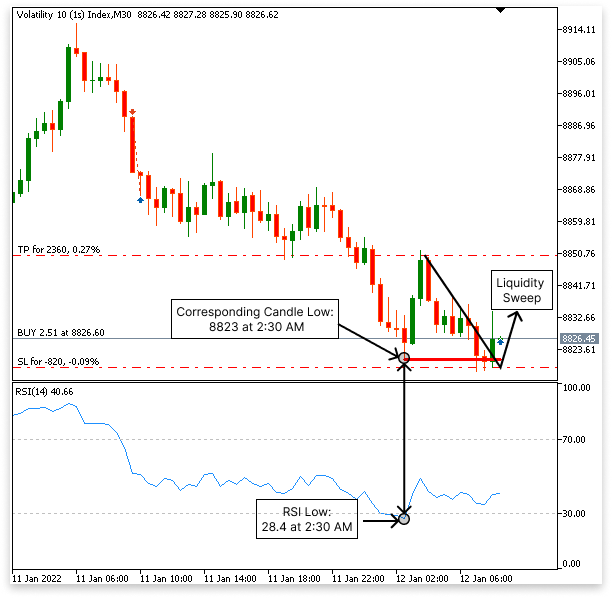
2.1.1.买入逻辑
- 检查 RSI 值是否低于 30。
- 它确定 RSI 是否已形成低点。
- EA 在正常图表上识别相应烛形的低点。
- 等待价格跌破指定烛形的低点,从而扫除流动性。
- 当价格突破低点后,第一根看涨烛形收于低点上方时,EA 会启动买入交易,预期价格会上涨。
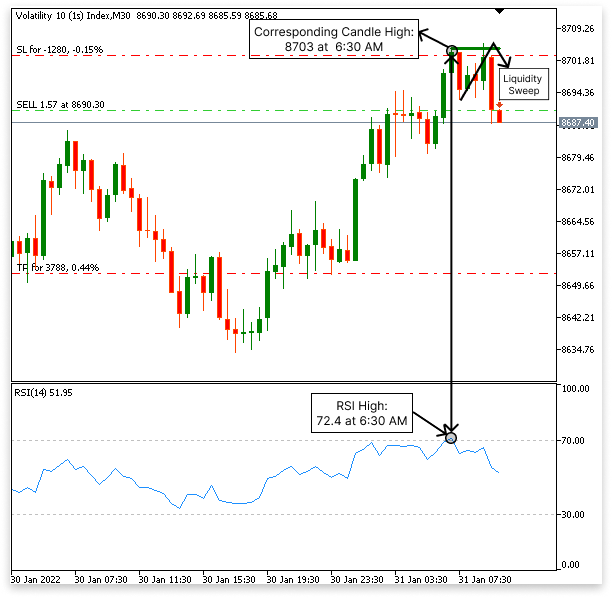
2.1.2.卖出逻辑
- 检查 RSI 值是否高于 70。
- 它确定 RSI 是否已形成高点。
- EA 在常规图表上识别相应烛形的最高点。
- 然后,它会监控价格走势,等待价格突破已识别蜡烛的高点,从而扫除流动性。
- 价格突破高点后,一旦第一根看跌蜡烛收于高点下方,EA 就会进行卖出交易,预期价格将下跌。
2.2. 添加 Trade 库
构建开仓、平仓或修改仓位的 EA 交易的第一步是包含 Trade 库。该库提供了以编程方式执行和管理交易的基本函数。
例子:#include <Trade/Trade.mqh> // Include the trade library for trading functions // Create an instance of the CTrade class for trading operations CTrade trade; //magic number input int MagicNumber = 1111; //+------------------------------------------------------------------+ //| Expert initialization function | //+------------------------------------------------------------------+ int OnInit() { // Set the magic number for the EA's trades trade.SetExpertMagicNumber(MagicNumber); // Return initialization success return(INIT_SUCCEEDED); }
解释:
包含 Trade 库
- 为了使用 CTrade 类,必须使用 #include <Trade/Trade.mqh> 声明导入 Trade 库。该类通过提供管理止盈、止损、市价单、挂单和其他交易相关职责的功能来简化交易流程。
创建 CTrade 实例
- CTrade trade; 行创建了 CTrade 类的一个实例,该实例将在整个 EA 中用于执行和管理交易。
- 使用 Input 关键字将 MagicNumber 声明为输入变量。这允许 EA 的用户为 EA 进行的交易定义唯一的标识符。
为什么这很重要?
- 这个幻数确保了 EA 进行的交易能够被识别,并且与其他交易分开管理。
- 它允许 EA 将其交易与手动交易或与其他 EA 的交易区分开来。
- 通过修改幻数,用户可以在不同的市场条件或时间框架内对不同的资产甚至相同的资产运行 EA。
int OnInit()
  {
// Set the magic number for the EA's trades
   trade.SetExpertMagicNumber(MagicNumber);

// Return initialization success
   return(INIT_SUCCEEDED);
  }
初始化函数:
OnInit() 函数在 EA 启动时执行。这里,SetExpertMagicNumber() 方法将指定的幻数分配给 EA,确保此 EA 实例打开的所有交易都带有此标识符。 这种方法提供了灵活性,因为用户可以根据不同的交易场景调整魔术数字,从而更容易管理各种工具或策略中的 EA 多个实例。
2.3.读取 RSI 值和烛形数据
读取准确的市场数据对于 EA 执行有效的交易操作至关重要。该 EA 的逻辑围绕理解烛形形态和 RSI 指标,因此可靠地收集这些值至关重要。这些数据允许 EA 分析 RSI 高点和低点是否对应于特定的烛形,这对于确定潜在的入场点和退出点至关重要。 通过将 RSI 值与烛形数据相结合,EA 可确保全面评估市场状况,并根据价格行为识别超买或超卖状况。这种方法增强了 EA 做出逻辑和精确交易决策的能力。
2.3.1.读取 RSI 值
如前所述,获取 RSI 值是 EA 评估市场状况的重要步骤。这分为两部分完成:使用 iRSI 句柄设置 RSI 指标属性并通过 CopyBuffer 函数读取实际 RSI 值。
示例:
#include <Trade/Trade.mqh>
CTrade trade;

// Magic number
input int MagicNumber = 1111;
//RSI handle
int       rsi_handle;
double    rsi_buffer[];

//+------------------------------------------------------------------+
//| Expert initialization function                                   |
//+------------------------------------------------------------------+
int OnInit()
  {
// Configure RSI buffer as a series for easier indexing
   ArraySetAsSeries(rsi_buffer, true);
// Initialize RSI handle for the current symbol, timeframe, and parameters
   rsi_handle = iRSI(_Symbol, PERIOD_CURRENT, 14, PRICE_CLOSE);
// Set the magic number (for trading, not relevant to RSI retrieval here)
   trade.SetExpertMagicNumber(MagicNumber);
   return (INIT_SUCCEEDED); // Indicate successful initialization
  }
//+------------------------------------------------------------------+
//| Expert tick function                                             |
//+------------------------------------------------------------------+

void OnTick()
  {
// Copy RSI values from the indicator into the buffer
   CopyBuffer(rsi_handle, 0, 1, 100, rsi_buffer);
// Display the most recent RSI value for verification
   Comment("rsi_buffer[0]: ", rsi_buffer[0]);
  }
解释:
安排 RSI 缓冲区
- 在 OnInit 函数中,ArraySetAsSeries 函数用于将 rsi_buffer 配置为序列数组,这意味着最新数据将位于索引 0 处。这简化了访问最新 RSI 值的过程。
创建 RSI 句柄
- 在 OnTick 函数内部,调用 iRSI 函数初始化 RSI 句柄(rsi_handle)。此函数设置 RSI 指标属性,例如交易品种(_Symbol)、时间框架(PERIOD_CURRENT)、周期数(14)和应用价格(PRICE_CLOSE)。
参数:
- _Symbol:计算 RSI 的交易工具。
- PERIOD_CURRENT:图表的当前时间框架
- 14:RSI 周期数(常用的默认值)。
- PRICE_CLOSE:RSI 是根据收盘价计算的。
复制 RSI 值
- CopyBuffer 函数获取指标的 RSI 值并填充 rsi_buffer 数组。它从最近的值(偏移量 1)开始复制并读取最多 100 个值。
参数:
- 0:指定 RSI 指标的缓冲区索引(0 表示主线)。
- 1:从第二新的 RSI 值开始复制,因为最新的 RSI 仍在形成并且其值不稳定。
- 100:读取最多 100 个值。
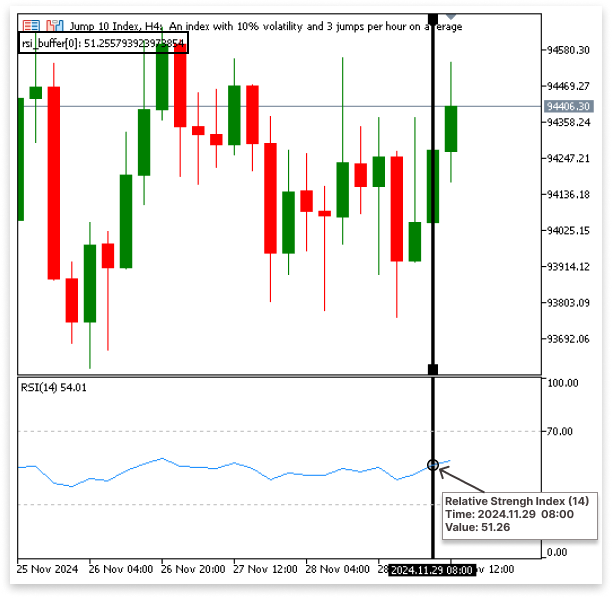
这种方法确保 EA 能够获得最新的 RSI 值,这对于分析超买和超卖情况以及推动交易决策至关重要。
显示 RSI 值
- 代码通过使用 Comment 函数在图表上显示最新的 RSI 值 (rsi_buffer[0]) 来验证数据检索过程。
- 这种方法确保 EA 能够获得最新的 RSI 值,这对于分析超买和超卖情况以及推动交易决策至关重要。
输出:
2.3.2.获取烛形数据
为了分析价格活动并将其与 RSI 读数相匹配,必须获取烛形数据。为了获取重要的烛形信息,例如开盘价、收盘价、最高价和最低价以及与它们相关的时间戳,EA 采用了特定的函数。为了评估市场状况并做出明智的交易决策,这些数据点至关重要。
示例:
#include <Trade/Trade.mqh>
CTrade trade;

// Magic number
input int MagicNumber = 1111;

int       rsi_handle;
double    rsi_buffer[];

double open[];
double close[];
double high[];
double low[];
datetime time[];

//+------------------------------------------------------------------+
//| Expert initialization function                                   |
//+------------------------------------------------------------------+
int OnInit()
  {
// Configure RSI buffer as a series for easier indexing
   ArraySetAsSeries(rsi_buffer, true);

// Initialize RSI handle for the current symbol, timeframe, and parameters
   rsi_handle = iRSI(_Symbol, PERIOD_CURRENT, 14, PRICE_CLOSE);

// Configure candlestick arrays as series
   ArraySetAsSeries(open, true);
   ArraySetAsSeries(close, true);
   ArraySetAsSeries(high, true);
   ArraySetAsSeries(low, true);
   ArraySetAsSeries(time, true);

// Set the magic number
   trade.SetExpertMagicNumber(MagicNumber);

   return (INIT_SUCCEEDED); // Indicate successful initialization
  }

//+------------------------------------------------------------------+
//| Expert tick function                                             |
//+------------------------------------------------------------------+
void OnTick()
  {
// Copy RSI values from the indicator into the buffer
   CopyBuffer(rsi_handle, 0, 1, 100, rsi_buffer);

// Copy candlestick data
   CopyOpen(_Symbol, PERIOD_CURRENT, 1, 100, open);
   CopyClose(_Symbol, PERIOD_CURRENT, 1, 100, close);
   CopyHigh(_Symbol, PERIOD_CURRENT, 1, 100, high);
   CopyLow(_Symbol, PERIOD_CURRENT, 1, 100, low);
   CopyTime(_Symbol, PERIOD_CURRENT, 1, 100, time);

// Display the most recent candlestick data for verification
   Comment("open[0]: ", open[0],
           "\nclose[0]: ", close[0],
           "\nhigh[0]: ", high[0],
           "\nlow[0]: ", low[0],
           "\ntime[0]: ", time[0]);
  }
解释:
安排烛形数组
- 在 OnInit 函数中,ArraySetAsSeries 函数用于将开盘价、收盘价、最高价、最低价和时间数组配置为序列。
- 这确保了最新的数据出现在索引 0 处,从而简化了最新完成的烛形数据的检索和分析。
复制烛形数据
- 在 OnTick 函数中,CopyOpen、CopyClose、CopyHigh、CopyLow 和 CopyTime 函数用于获取烛形的相应数据。
参数:
- _Symbol:当前交易工具。
- PERIOD_CURRENT:当前图表时间框架(例如,M1、H1)。
- 1:从第二新的烛形开始复制,因为最新的烛形(索引 0)仍在形成,并且其值不稳定。
- 100:读取最多 100 个烛形的值进行分析。
每个函数填充其各自的数组:
- open[]:包含指定烛形的开盘价。
- close[]:包含收盘价。
- high[]:包含最高价格。
- low[]:包含最低价格。
- time[]:存储开盘时间戳,以便与价格行为同步。
显示蜡烛图数据
Comment 函数用于在图表上显示最近完成的烛形数据(索引 0),以便进行验证:
- open[0]:开盘价。
- close[0]:收盘价。
- high[0]:最高价格。
- low[0]:最低价格。
- time[0]:指示烛形何时打开的时间戳。
2.3.3.确定 RSI 的高点和低点
当 RSI 跌破超卖水平 (30) 时,EA 必须识别 RSI 低点,而当 RSI 攀升至超买水平 (70) 以上时,EA 必须识别 RSI 高点。为了确定可能感兴趣的区域,这些 RSI 点随后被连接到图表上的特定烛形。此阶段是 EA 运行的基础,因为这些标记对于配置流动性清扫的逻辑至关重要。
确定 RSI 的高点和低点非常简单:
RSI 低点: 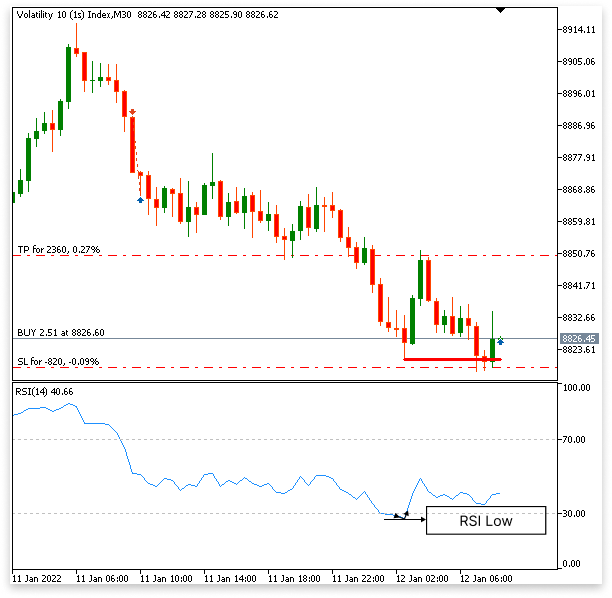
RSI 高点:
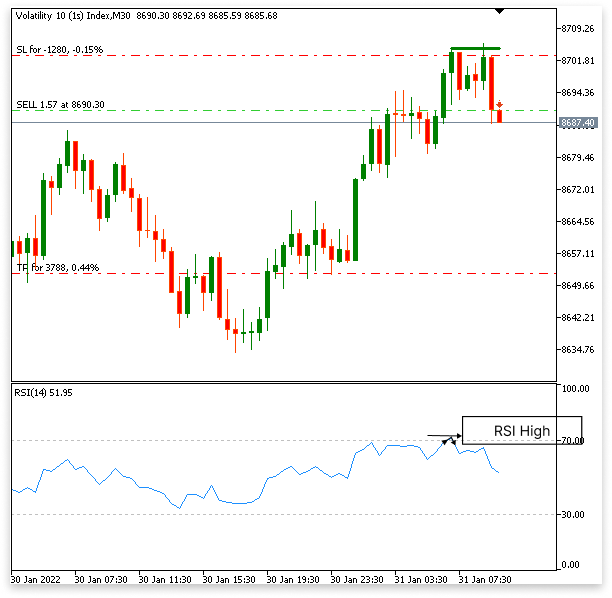
示例:
// Magic number
input int MagicNumber = 1111;

// RSI handle and buffer
int       rsi_handle;
double    rsi_buffer[];

// Candlestick data arrays
double open[];
double close[];
double high[];
double low[];
datetime time[];

// Variables to store high and low levels
double max_high = 0;        // Maximum high for the candlesticks
datetime min_time1 = 0;     // Time of the maximum high candlestick
double min_low = 0;         // Minimum low for the candlesticks
datetime min_time2 = 0;     // Time of the minimum low candlestick

// Variables to store RSI highs and lows
datetime time_low = 0;      // Time of the RSI low
datetime times_high = 0;    // Time of the RSI high

//+------------------------------------------------------------------+
//| Expert initialization function                                   |
//+------------------------------------------------------------------+
int OnInit()
  {
// Configure RSI buffer as a series for easier indexing
   ArraySetAsSeries(rsi_buffer, true);

// Initialize RSI handle for the current symbol, timeframe, and parameters
   rsi_handle = iRSI(_Symbol, PERIOD_CURRENT, 14, PRICE_CLOSE);

// Configure candlestick arrays as series
   ArraySetAsSeries(open, true);
   ArraySetAsSeries(close, true);
   ArraySetAsSeries(high, true);
   ArraySetAsSeries(low, true);
   ArraySetAsSeries(time, true);

// Set the magic number for the EA
   trade.SetExpertMagicNumber(MagicNumber);

   return (INIT_SUCCEEDED); // Indicate successful initialization
  }

//+------------------------------------------------------------------+
//| Expert tick function                                             |            |
//+------------------------------------------------------------------+
void OnTick()
  {
// Copy RSI values from the indicator into the buffer
   CopyBuffer(rsi_handle, 0, 1, 100, rsi_buffer);

// Copy candlestick data (open, close, high, low, time)
   CopyOpen(_Symbol, PERIOD_CURRENT, 1, 100, open);
   CopyClose(_Symbol, PERIOD_CURRENT, 1, 100, close);
   CopyHigh(_Symbol, PERIOD_CURRENT, 1, 100, high);
   CopyLow(_Symbol, PERIOD_CURRENT, 1, 100, low);
   CopyTime(_Symbol, PERIOD_CURRENT, 1, 100, time);

// Loop to find the maximum high from a bullish candlestick pattern
   for(int i = 0; i < 12; i++)
     {
      // Check for a bullish pattern: current close < open and previous close > open
      if(close[i] < open[i] && close[i+1] > open[i+1])
        {
         // Calculate the maximum high between the two candlesticks
         max_high = MathMax(high[i], high[i+1]);
         // Record the time of the corresponding candlestick
         min_time1 = MathMin(time[i], time[i+1]);
         break;
        }
     }

// Loop to find the minimum low from a bearish candlestick pattern
   for(int i = 0; i < 12; i++)
     {
      // Check for a bearish pattern: current close > open and previous close < open
      if(close[i] > open[i] && close[i+1] < open[i+1])
        {
         // Calculate the minimum low between the two candlesticks
         min_low = MathMin(low[i], low[i+1]);
         // Record the time of the corresponding candlestick
         min_time2 = MathMin(time[i], time[i+1]);
         break;
        }
     }

// Loop to find the RSI low point
   for(int i = 0; i < 12; i++)
     {
      // Check if the RSI is oversold and forms a low point
      if(rsi_buffer[i+1] < 30 && rsi_buffer[i] > rsi_buffer[i+1])
        {
         // Record the time of the RSI low
         time_low = time[i+1];
         break;
        }
     }

// Loop to find the RSI high point
   for(int i = 0; i < 12; i++)
     {
      // Check if the RSI is overbought and forms a high point
      if(rsi_buffer[i+1] > 70 && rsi_buffer[i] < rsi_buffer[i+1])
        {
         // Record the time of the RSI high
         times_high = time[i+1];
         break;
        }
     }
  }
解释:
RSI 低点(超卖条件)
- 循环查找 RSI 低于 30(rsi_buffer[i+1] < 30)并开始上升(rsi_buffer[i] > rsi_buffer[i+1])的点。
- 这些情况表明 RSI 已经达到低点,正在反转方向。
- 相应烛形的时间戳存储在 time_low 中。
RSI 高点(超买条件)
- 循环寻找 RSI 高于 70 (rsi_buffer[i+1] > 70) 并开始下降 (rsi_buffer[i] < rsi_buffer[i+1]) 的点。
- 这些情况表明 RSI 已经达到高点,正在反转方向。
- 相应烛形的时间戳存储在 times_high 中。
2.3.4.在图表上标记低点和高点
2.3.4.1.在图表上标记低点
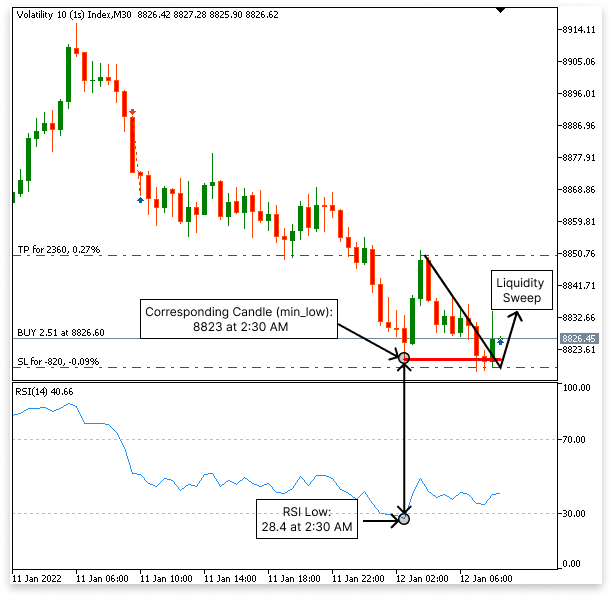
一旦满足识别 RSI 低点的逻辑,程序就会评估烛形数据,以确定图表上相应的最低点。由于需要两个 RSI 值来形成低点,因此 EA 使用两个匹配烛形的低点来确定精确的水平。
这个最低点至关重要,因为它确定了程序等待潜在流动性清扫的区域。
逻辑:
- RSI 在以下情况下形成低点:
- rsi_buffer[i+1] < 30:RSI 跌至超卖水平以下。
- rsi_buffer[i] > rsi_buffer[i+1]:RSI 达到最低点后开始上升。
- 一旦确认 RSI 低点,程序就会使用图表上两个相应烛形的低点数组来识别最低点。
- 此最低点设定了 EA 等待潜在流动性清扫的水平。
- 一旦确定了 RSI 低点,程序就会从低点数组中检索两个相应烛形的低点价格。
- 使用 MathMin() 函数,计算这两个低点之间的最小值,标记监控流动性清扫的水平。
- 这个最低点是 EA 预期可能出现逆转或流动性清扫的点,是交易决策的一个关键因素。
// Loop to find RSI and candlestick lows
for(int i = 0; i < 12; i++)
  {
// Check if the RSI is oversold and forms a low point
   if(rsi_buffer[i+1] < 30 && rsi_buffer[i] > rsi_buffer[i+1])
     {
      // Record the time of the RSI low
      time_low = time[i+1];

      // Find the minimum low from the two corresponding candlesticks
      min_low = (double)MathMin(low[i], low[i+1]);

      // Break the loop once the low is found
      break;
     }
  }
2.3.4.2.标记图表上的高点
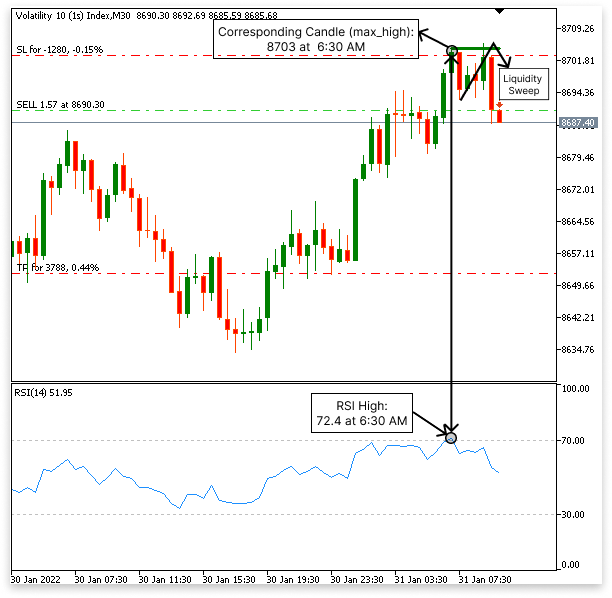
当满足识别 RSI 高点的逻辑时,程序会评估相应的烛形数据以确定图表上的最高点。由于需要两个 RSI 值才能形成高点,因此 EA 使用两个匹配烛台的高点来确定准确的水平。
该最高价成为设置 EA 等待潜在流动性清扫的区域的参考。该方法与低点的逻辑相反。
逻辑:
- 当出现以下情况时,RSI 会形成高点:
- rsi_buffer[i+1] > 70:RSI 升至超买水平之上。
- rsi_buffer[i] < rsi_buffer[i+1]:RSI 达到最高点后开始下降。
- 一旦确认了 RSI 高点,程序就会使用图表上两个相应烛形的高点数组来识别最高点。
- 此最高值设定了 EA 等待潜在流动性清扫的水平。
- 一旦识别出 RSI 高点,程序就会从高点数组中检索两个相应烛形的高价。
- 使用 MathMax() 函数,计算这两个高点之间的最高值,标记监控流动性清扫的水平。
// Loop to find RSI and candlestick highs
for(int i = 0; i < 12; i++)
  {
// Check if the RSI is overbought and forms a high point
   if(rsi_buffer[i+1] > 70 && rsi_buffer[i] < rsi_buffer[i+1])
     {
      // Record the time of the RSI high
      times_high = time[i+1];

      // Find the maximum high from the two corresponding candlesticks
      max_high = (double)MathMax(high[i], high[i+1]);

      // Break the loop once the high is found
      break;
     }
  }
2.3.5.通过 12 根烛形延迟控制 RSI 高点和低点
在短时间内出现多个 RSI 高点或低点的可能性是利用 RSI 识别高点和低点的困难之一,尤其是当 RSI 处于超买或超卖区域时。因此,可能会指定不同的水平来执行流动性清扫。该逻辑增加了 12 根烛形的等待来解决这个问题,确保在确定最高点或最低点后,直到形成 12 根烛形后才会更新。
示例:
// Magic number
input int MagicNumber = 1111;

int       rsi_handle;
double    rsi_buffer[];

double open[];
double close[];
double high[];
double low[];
datetime time[];

double max_high = 0;
datetime min_time1 = 0;
double min_low = 0;
datetime min_time2 = 0;

datetime time_low = 0;
datetime times_high = 0;


//+------------------------------------------------------------------+
//| Expert initialization function                                   |
//+------------------------------------------------------------------+
int OnInit()
  {
// Configure RSI buffer as a series for easier indexing
   ArraySetAsSeries(rsi_buffer, true);

// Initialize RSI handle for the current symbol, timeframe, and parameters
   rsi_handle = iRSI(_Symbol, PERIOD_CURRENT, 14, PRICE_CLOSE);

// Configure candlestick arrays as series
   ArraySetAsSeries(open, true);
   ArraySetAsSeries(close, true);
   ArraySetAsSeries(high, true);
   ArraySetAsSeries(low, true);
   ArraySetAsSeries(time, true);

// Set the magic number
   trade.SetExpertMagicNumber(MagicNumber);

   return (INIT_SUCCEEDED); // Indicate successful initialization
  }

//+------------------------------------------------------------------+
//| Expert tick function                                             |
//+------------------------------------------------------------------+
void OnTick()
  {
// Copy RSI values from the indicator into the buffer
   CopyBuffer(rsi_handle, 0, 1, 100, rsi_buffer);

// Copy candlestick data
   CopyOpen(_Symbol, PERIOD_CURRENT, 1, 100, open);
   CopyClose(_Symbol, PERIOD_CURRENT, 1, 100, close);
   CopyHigh(_Symbol, PERIOD_CURRENT, 1, 100, high);
   CopyLow(_Symbol, PERIOD_CURRENT, 1, 100, low);
   CopyTime(_Symbol, PERIOD_CURRENT, 1, 100, time);

   static double max_high_static = max_high;
   static datetime min_time1_static = min_time1;

   static double min_low_static = min_low;
   static datetime min_time2_static = min_time2;


   int total_bar_high = Bars(_Symbol,PERIOD_CURRENT,min_time1_static,TimeCurrent());

   for(int i = 0; i < 12; i++)
     {

      if(close[i] < open[i] && close[i+1] > open[i+1])
        {

         max_high = (double)MathMax(high[i],high[i+1]);
         min_time1 = (datetime)MathMin(time[i],time[i+1]);

         break;


        }
     }

   int total_bar_low = Bars(_Symbol,PERIOD_CURRENT,min_time2_static,TimeCurrent());
   for(int i = 0; i < 12; i++)
     {

      if(close[i] > open[i] && close[i+1] < open[i+1])
        {

         min_low = (double)MathMin(low[i],low[i+1]);

         min_time2 = (datetime)MathMin(time[i],time[i+1]);
         break;

        }

     }

   for(int i = 0; i < 12; i++)
     {

      if(rsi_buffer[i+1] < 30 && rsi_buffer[i] > rsi_buffer[i+1])
        {

         time_low = time[i+1];
         break;

        }

     }

   for(int i = 0; i < 12; i++)
     {

      if(rsi_buffer[i+1] > 70 && rsi_buffer[i] < rsi_buffer[i+1])
        {

         times_high = time[i+1];
         break;

        }

     }

   if((total_bar_high == 0 || total_bar_high > 12) && (min_time1 == times_high))
     {

      max_high_static = max_high;
      min_time1_static = min_time1;

     }
   else
      if(min_time1 != times_high && total_bar_high > 13)
        {
         max_high_static = 0;
         min_time1_static = 0;
        }

   if((total_bar_low == 0 || total_bar_low > 12) && (min_time2 == time_low))
     {

      min_low_static = min_low;
      min_time2_static = min_time2;

     }

   else
      if(min_time2 != time_low && total_bar_low > 13)
        {
         min_low_static = 0;
         min_time2_static = 0;
        }
  }
解释:
RSI 和烛形高点/低点识别:
- RSI 逻辑使用该指标相对于超买或超卖水平的活动来评估是形成高点还是低点。
- 如果是这样的话,程序会从相关的烛形中确定最高点或最低点。
- 程序使用 Bars() 计算自上次最高点或最低点以来形成了多少根烛形。
- 仅当至少 12 根蜡烛过去后才会更新高值或低值,以防止频繁更改。
- 如果形成超过 13 根烛形,并且前一个高点或低点的 RSI 条件不再有效,则存储的值将被清除。
- 这确保了 EA 不会依赖过时的信息来做出交易决策。
在本节中,我们通过直接在图表上绘制线条来增强 EA,以直观地表示识别的 RSI 高点和低点。这不仅允许 EA 使用这些线对象以编程方式识别高点和低点,还使交易者能够手动监控关键水平以做出更好的决策。
#include <Trade/Trade.mqh>
CTrade trade;

// Magic number
input int MagicNumber = 1111;

int rsi_handle;
double rsi_buffer[];

double open[];
double close[];
double high[];
double low[];
datetime time[];

double max_high = 0;
datetime min_time1 = 0;
double min_low = 0;
datetime min_time2 = 0;

datetime time_low = 0;
datetime times_high = 0;

string high_obj_name = "High_Line";
string low_obj_name = "Low_Line";

long chart_id;

//+------------------------------------------------------------------+
//| Expert initialization function                                   |
//+------------------------------------------------------------------+
int OnInit()
  {
// Configure RSI buffer as a series for easier indexing
   ArraySetAsSeries(rsi_buffer, true);

// Initialize RSI handle for the current symbol, timeframe, and parameters
   rsi_handle = iRSI(_Symbol, PERIOD_CURRENT, 14, PRICE_CLOSE);

// Configure candlestick arrays as series
   ArraySetAsSeries(open, true);
   ArraySetAsSeries(close, true);
   ArraySetAsSeries(high, true);
   ArraySetAsSeries(low, true);
   ArraySetAsSeries(time, true);

// Set the magic number
   trade.SetExpertMagicNumber(MagicNumber);

   return (INIT_SUCCEEDED); // Indicate successful initialization
  }

//+------------------------------------------------------------------+
//| Expert tick function                                             |
//+------------------------------------------------------------------+
void OnTick()
  {
// Copy RSI values from the indicator into the buffer
   CopyBuffer(rsi_handle, 0, 1, 100, rsi_buffer);

// Copy candlestick data
   CopyOpen(_Symbol, PERIOD_CURRENT, 1, 100, open);
   CopyClose(_Symbol, PERIOD_CURRENT, 1, 100, close);
   CopyHigh(_Symbol, PERIOD_CURRENT, 1, 100, high);
   CopyLow(_Symbol, PERIOD_CURRENT, 1, 100, low);
   CopyTime(_Symbol, PERIOD_CURRENT, 1, 100, time);

   static double max_high_static = max_high;
   static datetime min_time1_static = min_time1;

   static double min_low_static = min_low;
   static datetime min_time2_static = min_time2;

//CHART ID
   chart_id = ChartID();

   int total_bar_high = Bars(_Symbol,PERIOD_CURRENT,min_time1_static,TimeCurrent());

   for(int i = 0; i < 12; i++)
     {

      if(close[i] < open[i] && close[i+1] > open[i+1])
        {

         max_high = (double)MathMax(high[i],high[i+1]);
         min_time1 = (datetime)MathMin(time[i],time[i+1]);

         break;

        }
     }

   int total_bar_low = Bars(_Symbol,PERIOD_CURRENT,min_time2_static,TimeCurrent());
   for(int i = 0; i < 12; i++)
     {

      if(close[i] > open[i] && close[i+1] < open[i+1])
        {

         min_low = (double)MathMin(low[i],low[i+1]);

         min_time2 = (datetime)MathMin(time[i],time[i+1]);
         break;

        }

     }

   for(int i = 0; i < 12; i++)
     {

      if(rsi_buffer[i+1] < 30 && rsi_buffer[i] > rsi_buffer[i+1])
        {

         time_low = time[i+1];
         break;

        }

     }

   for(int i = 0; i < 12; i++)
     {

      if(rsi_buffer[i+1] > 70 && rsi_buffer[i] < rsi_buffer[i+1])
        {

         times_high = time[i+1];
         break;

        }

     }

   if((total_bar_high == 0 || total_bar_high > 12) && (min_time1 == times_high))
     {

      max_high_static = max_high;
      min_time1_static = min_time1;

     }
   else
      if(min_time1 != times_high && total_bar_high > 13)
        {
         max_high_static = 0;
         min_time1_static = 0;
        }

   if((total_bar_low == 0 || total_bar_low > 12) && (min_time2 == time_low))
     {

      min_low_static = min_low;
      min_time2_static = min_time2;

     }

   else
      if(min_time2 != time_low && total_bar_low > 13)
        {
         min_low_static = 0;
         min_time2_static = 0;
        }

   ObjectCreate(ChartID(),high_obj_name,OBJ_TREND,0,min_time1_static,max_high_static,TimeCurrent(),max_high_static);
   ObjectSetInteger(chart_id,high_obj_name,OBJPROP_COLOR,clrGreen);
   ObjectSetInteger(chart_id,high_obj_name,OBJPROP_WIDTH,3);

   ObjectCreate(ChartID(),low_obj_name,OBJ_TREND,0,min_time2_static,min_low_static,TimeCurrent(),min_low_static);
   ObjectSetInteger(chart_id,low_obj_name,OBJPROP_COLOR,clrRed);
   ObjectSetInteger(chart_id,low_obj_name,OBJPROP_WIDTH,3);
  }
解释:
该代码使用 ObjectCreate() 函数在图表上创建两条趋势线:high_obj_name(标记最高点)和 low_obj_name(标记最低点)。这些趋势线延伸至当前时间(TimeCurrent())并且源自相应时间(min_time1_static 和 min_time2_static)计算出的最高和最低价格水平(max_high_static 和 min_low_static)。这使交易者能够直观地监控图表的高点和低点。
您可以使用 ObjectSetInteger() 函数改变这些趋势线的外观。高趋势线设置为绿色,低趋势线设置为红色。为了使图表上的两条线都易于读取,它们的宽度设置为 3。使用此可视化工具,交易者和 EA 都可以更轻松地关注关键价格水平并评估可能的市场走势,例如流动性清扫。
2.3.7.指定流动性清扫的买入和卖出条件
交易条件必须确保精确度并遵守特定的市场情景,以符合已确定的高点和低点的流动性清扫。本节建立了围绕这些关键水平执行买卖交易的逻辑。
// Magic number
input int MagicNumber = 1111;

int       rsi_handle;
double    rsi_buffer[];

double open[];
double close[];
double high[];
double low[];
datetime time[];

double max_high = 0;
datetime min_time1 = 0;
double min_low = 0;
datetime min_time2 = 0;

datetime time_low = 0;
datetime times_high = 0;

string high_obj_name = "High_Line";
string low_obj_name = "Low_Line";

long chart_id;
double take_profit;
double  ask_price = 0;

//+------------------------------------------------------------------+
//| Expert initialization function                                   |
//+------------------------------------------------------------------+
int OnInit()
  {
// Configure RSI buffer as a series for easier indexing
   ArraySetAsSeries(rsi_buffer, true);

// Initialize RSI handle for the current symbol, timeframe, and parameters
   rsi_handle = iRSI(_Symbol, PERIOD_CURRENT, 14, PRICE_CLOSE);

// Configure candlestick arrays as series
   ArraySetAsSeries(open, true);
   ArraySetAsSeries(close, true);
   ArraySetAsSeries(high, true);
   ArraySetAsSeries(low, true);
   ArraySetAsSeries(time, true);

// Set the magic number
   trade.SetExpertMagicNumber(MagicNumber);

   return (INIT_SUCCEEDED); // Indicate successful initialization
  }

//+------------------------------------------------------------------+
//| Expert tick function                                             |
//+------------------------------------------------------------------+
void OnTick()
  {
// Copy RSI values from the indicator into the buffer
   CopyBuffer(rsi_handle, 0, 1, 100, rsi_buffer);

// Copy candlestick data
   CopyOpen(_Symbol, PERIOD_CURRENT, 1, 100, open);
   CopyClose(_Symbol, PERIOD_CURRENT, 1, 100, close);
   CopyHigh(_Symbol, PERIOD_CURRENT, 1, 100, high);
   CopyLow(_Symbol, PERIOD_CURRENT, 1, 100, low);
   CopyTime(_Symbol, PERIOD_CURRENT, 1, 100, time);

   static double max_high_static = max_high;
   static datetime min_time1_static = min_time1;

   static double min_low_static = min_low;
   static datetime min_time2_static = min_time2;


//GETTING TOTAL POSITIONS

   int totalPositions = 0;

   for(int i = 0; i < PositionsTotal(); i++)
     {
      ulong ticket = PositionGetTicket(i);

      if(PositionSelectByTicket(ticket))
        {

         if(PositionGetInteger(POSITION_MAGIC) == MagicNumber && PositionGetString(POSITION_SYMBOL) == ChartSymbol(chart_id))
           {

            totalPositions++;

           }
        }
     }

   ask_price = SymbolInfoDouble(_Symbol,SYMBOL_ASK);

   if(totalPositions < 1)
     {

      if(((low[0] < min_low_static && close[0] > min_low_static && close[0] > open[0]) || (low[1] < min_low_static && close[0] > min_low_static
            && close[0] > open[0]) || (low[2] < min_low_static && close[0] > min_low_static
                                       && close[0] > open[0] && close[1] < open[1])))
        {

         take_profit = (close[0] - low[0]) * 3 + close[0];

         trade.Buy(0.5,_Symbol,ask_price, low[0], take_profit);

        }

      else
         if(((high[0] > max_high_static && close[0] < max_high_static && close[0] < open[0]) || (high[1] > max_high_static && close[0] < max_high_static
               && close[0] < open[0]) || (high[2] > max_high_static && close[0] < max_high_static
                                          && close[0] < open[0] && close[1] > open[1])))
           {

            take_profit = MathAbs((high[0] - close[0]) * 3 - close[0]); // Adjusted take-profit calculation

            trade.Sell(0.5,_Symbol,ask_price, high[0], take_profit);
           }
     }

//CHART ID
   chart_id = ChartID();

   int total_bar_high = Bars(_Symbol,PERIOD_CURRENT,min_time1_static,TimeCurrent());

   for(int i = 0; i < 12; i++)
     {

      if(close[i] < open[i] && close[i+1] > open[i+1])
        {

         max_high = (double)MathMax(high[i],high[i+1]);
         min_time1 = (datetime)MathMin(time[i],time[i+1]);

         break;

        }
     }

   int total_bar_low = Bars(_Symbol,PERIOD_CURRENT,min_time2_static,TimeCurrent());
   for(int i = 0; i < 12; i++)
     {

      if(close[i] > open[i] && close[i+1] < open[i+1])
        {

         min_low = (double)MathMin(low[i],low[i+1]);

         min_time2 = (datetime)MathMin(time[i],time[i+1]);
         break;

        }

     }

   for(int i = 0; i < 12; i++)
     {

      if(rsi_buffer[i+1] < 30 && rsi_buffer[i] > rsi_buffer[i+1])
        {

         time_low = time[i+1];
         break;

        }

     }

   for(int i = 0; i < 12; i++)
     {

      if(rsi_buffer[i+1] > 70 && rsi_buffer[i] < rsi_buffer[i+1])
        {

         times_high = time[i+1];
         break;

        }

     }

   if((total_bar_high == 0 || total_bar_high > 12) && (min_time1 == times_high))
     {

      max_high_static = max_high;
      min_time1_static = min_time1;

     }
   else
      if(min_time1 != times_high && total_bar_high > 13)
        {
         max_high_static = 0;
         min_time1_static = 0;
        }

   if((total_bar_low == 0 || total_bar_low > 12) && (min_time2 == time_low))
     {

      min_low_static = min_low;
      min_time2_static = min_time2;

     }

   else
      if(min_time2 != time_low && total_bar_low > 13)
        {
         min_low_static = 0;
         min_time2_static = 0;
        }

   ObjectCreate(ChartID(),high_obj_name,OBJ_TREND,0,min_time1_static,max_high_static,TimeCurrent(),max_high_static);
   ObjectSetInteger(chart_id,high_obj_name,OBJPROP_COLOR,clrGreen);
   ObjectSetInteger(chart_id,high_obj_name,OBJPROP_WIDTH,3);

   ObjectCreate(ChartID(),low_obj_name,OBJ_TREND,0,min_time2_static,min_low_static,TimeCurrent(),min_low_static);
   ObjectSetInteger(chart_id,low_obj_name,OBJPROP_COLOR,clrRed);
   ObjectSetInteger(chart_id,low_obj_name,OBJPROP_WIDTH,3);
  }
解释:
使用 totalPositions 防止出现多个头寸
totalPositions 变量确保 EA 交易一次只维持一个活动头寸。该机制通过检查所有未平仓头寸并验证幻数(EA 交易的标识符)和交易品种是否与当前图表匹配来防止过度交易。如果不存在匹配的头寸(totalPositions < 1),EA 将评估条件以进行新的交易。
这种安全机制确保了交易的严格执行,避免了头寸重叠,从而使策略更易于管理,且不易受到复合风险的影响。
买入交易条件(低位流动性清扫)
买入交易逻辑的核心是检测先前确定的低水平(min_low_static)的流动性清扫并确保看涨确认。
条件
跌破低点:
- 最近的三根烛形(low[0]、low[1] 或 low[2])中的任何一根都必须跌破确定的最低低点,这表明流动性已被扫过关键水平以下。
看涨复苏:
- 当前收盘价(close[0])必须恢复到最低点(min_low_static)以上,以发出清扫后的看涨意图。
- 此外,烛形必须是看涨的 (close[0] > open[0]),反映出上升势头。
- 如果当前烛形之前的两个烛形(close[1] < open[1])是看跌的,它会增加一个反转成分,从而增强清扫的合理性。
交易执行
一旦满足条件,就会执行买入订单:- 止盈:收盘价与最低价之间范围的三倍(take_profit = (close[0] - low[0]) * 3 + close[0])。
- 止损:已识别的最低水平 (low[0])。
卖出交易条件(高位流动性清扫)
卖出交易逻辑与买入逻辑相似,但侧重于识别先前建立的高水平(max_high_static)的流动性清扫,并通过看跌确认。
条件
突破高点:
- 最近的三根烛形 (high[0]、high[1] 或 high[2]) 中的任何一根都必须超过确定的最大最高点,表明流动性超过了该关键水平。
看跌逆转:
- 当前收盘价(close[0])必须跌破最高价(max_high_static),表明无法维持突破。
- 此外,蜡烛必须是看跌的 (close[0] < open[0]),表明有下行的势头。
- 如果当前烛形之前的两根烛形(close[1] > open[1]) 为看涨,则表明可能出现逆转
交易执行
一旦满足条件,就会下达卖单:
- 止盈:最高价与收盘价之间范围的三倍 (take_profit = MathAbs((high[0] - close[0]) * 3 - close[0]))。
- 止损:已识别的最高点 (high[0])。
总结
通过将 totalPositions 机制与明确的买卖条件相结合,该策略可确保交易决策的准确性并限制风险:
- 在跌破关键低位并出现看涨复苏后,将触发买入交易。
- 在突破关键高点并出现看跌逆转后,开始卖出交易。
这种结构化方法利用流动性清扫作为核心概念,同时确保交易仅在有利条件下执行。 该方法的一个限制是,止损是根据烛形的 low[0] 或 high[0] 动态设置的。这意味着每笔交易的风险根据烛形的大小而变化,从而导致风险敞口不一致。 为了解决这个问题,该策略应该允许指定每笔交易的账户余额的固定百分比作为风险(例如 2%)。通过根据入场价和止损之间的距离计算头寸规模并与指定的风险百分比保持一致,可以确保一致的风险管理。
2.3.8.风险管理和盈亏平衡修改
在使用内置指标时,有效的风险管理对于确保一致的绩效至关重要。烛形的大小可能会有很大差异,因此指定每次交易您愿意承担风险的账户余额百分比至关重要。这种一致性使您的风险回报率(RRR)能够弥补获胜交易中的损失。此外,盈亏平衡修改确保了当交易朝着有利于该策略的方向发展时,利润是安全的。当交易对你有利时,纳入盈亏平衡修改可以确保利润,增强整体战略的稳健性。
示例:
//+------------------------------------------------------------------+
//|                                      MQL5INDICATORS_PROJECT4.mq5 |
//|                                  Copyright 2024, MetaQuotes Ltd. |
//|                                             https://www.mql5.com |
//+------------------------------------------------------------------+
#property copyright "ForexYMN"
#property link      "crownsoyin@gmail.com"
#property version   "1.00"

#include <Trade/Trade.mqh>
CTrade trade;

// Magic number
input int    MagicNumber = 1111;
input double account_balance          = 1000;  // Account Balance
input double percentage_risk = 2.0;   //     How many percent of the account do you want to risk per trade?
input bool   allow_modify  = false; // Do you allow break even modifications?
input int    rrr           = 3;      // Choose Risk Reward Ratio

int       rsi_handle;
double    rsi_buffer[];

double open[];
double close[];
double high[];
double low[];
datetime time[];

double max_high = 0;
datetime min_time1 = 0;
double min_low = 0;
datetime min_time2 = 0;

datetime time_low = 0;
datetime times_high = 0;

string high_obj_name = "High_Line";
string low_obj_name = "Low_Line";

long chart_id;
double take_profit;
double  ask_price = 0;
double lot_size;
double risk_Amount;
double points_risk;

// Risk modification
double positionProfit = 0;
double positionopen = 0;
double positionTP = 0;
double positionSL = 0;
double modifyLevel = 0.0;
//+------------------------------------------------------------------+
//| Expert initialization function                                   |
//+------------------------------------------------------------------+
int OnInit()
  {
// Configure RSI buffer as a series for easier indexing
   ArraySetAsSeries(rsi_buffer, true);

// Initialize RSI handle for the current symbol, timeframe, and parameters
   rsi_handle = iRSI(_Symbol, PERIOD_CURRENT, 14, PRICE_CLOSE);

// Configure candlestick arrays as series
   ArraySetAsSeries(open, true);
   ArraySetAsSeries(close, true);
   ArraySetAsSeries(high, true);
   ArraySetAsSeries(low, true);
   ArraySetAsSeries(time, true);

// Set the magic number
   trade.SetExpertMagicNumber(MagicNumber);

   return (INIT_SUCCEEDED); // Indicate successful initialization
  }

//+------------------------------------------------------------------+
//| Expert tick function                                             |
//+------------------------------------------------------------------+
void OnTick()
  {

   int currBars = iBars(_Symbol,_Period);
   static int prevBars = currBars;
   if(prevBars == currBars)
      return;
   prevBars = currBars;
// Copy RSI values from the indicator into the buffer
   CopyBuffer(rsi_handle, 0, 1, 100, rsi_buffer);

// Copy candlestick data
   CopyOpen(_Symbol, PERIOD_CURRENT, 1, 100, open);
   CopyClose(_Symbol, PERIOD_CURRENT, 1, 100, close);
   CopyHigh(_Symbol, PERIOD_CURRENT, 1, 100, high);
   CopyLow(_Symbol, PERIOD_CURRENT, 1, 100, low);
   CopyTime(_Symbol, PERIOD_CURRENT, 1, 100, time);

   static double max_high_static = max_high;
   static datetime min_time1_static = min_time1;

   static double min_low_static = min_low;
   static datetime min_time2_static = min_time2;

//GETTING TOTAL POSITIONS

   int totalPositions = 0;

   for(int i = 0; i < PositionsTotal(); i++)
     {
      ulong ticket = PositionGetTicket(i);

      if(PositionSelectByTicket(ticket))
        {

         if(PositionGetInteger(POSITION_MAGIC) == MagicNumber && PositionGetString(POSITION_SYMBOL) == ChartSymbol(chart_id))
           {


            totalPositions++;

           }
        }
     }

   ask_price = SymbolInfoDouble(_Symbol,SYMBOL_ASK);

   if(totalPositions < 1)
     {

      if(((low[0] < min_low_static && close[0] > min_low_static && close[0] > open[0]) || (low[1] < min_low_static && close[0] > min_low_static
            && close[0] > open[0]) || (low[2] < min_low_static && close[0] > min_low_static
                                       && close[0] > open[0] && close[1] < open[1])))
        {

         take_profit = (close[0] - low[0]) * rrr + close[0];
         points_risk = close[0] - low[0];

         double riskAmount = account_balance * (percentage_risk / 100.0);
         double minus = NormalizeDouble(close[0] - low[0],5);
         lot_size = CalculateLotSize(_Symbol, riskAmount, minus);

         trade.Buy(lot_size,_Symbol,ask_price, low[0], take_profit);

        }

      else
         if(((high[0] > max_high_static && close[0] < max_high_static && close[0] < open[0]) || (high[1] > max_high_static && close[0] < max_high_static
               && close[0] < open[0]) || (high[2] > max_high_static && close[0] < max_high_static
                                          && close[0] < open[0] && close[1] > open[1])))
           {

            take_profit = MathAbs((high[0] - close[0]) * rrr - close[0]); // Adjusted take-profit calculation
            points_risk = MathAbs(high[0] - close[0]);

            double riskAmount = account_balance * (percentage_risk / 100.0);
            double minus = NormalizeDouble(high[0] - close[0],5);
            lot_size = CalculateLotSize(_Symbol, riskAmount, minus);

            trade.Sell(lot_size,_Symbol,ask_price, high[0], take_profit);
           }

     }

//CHART ID
   chart_id = ChartID();

   int total_bar_high = Bars(_Symbol,PERIOD_CURRENT,min_time1_static,TimeCurrent());

   for(int i = 0; i < 12; i++)
     {

      if(close[i] < open[i] && close[i+1] > open[i+1])
        {

         max_high = (double)MathMax(high[i],high[i+1]);
         min_time1 = (datetime)MathMin(time[i],time[i+1]);

         break;

        }
     }

   int total_bar_low = Bars(_Symbol,PERIOD_CURRENT,min_time2_static,TimeCurrent());
   for(int i = 0; i < 12; i++)
     {

      if(close[i] > open[i] && close[i+1] < open[i+1])
        {

         min_low = (double)MathMin(low[i],low[i+1]);

         min_time2 = (datetime)MathMin(time[i],time[i+1]);
         break;

        }

     }

   for(int i = 0; i < 12; i++)
     {

      if(rsi_buffer[i+1] < 30 && rsi_buffer[i] > rsi_buffer[i+1])
        {

         time_low = time[i+1];
         break;

        }

     }

   for(int i = 0; i < 12; i++)
     {

      if(rsi_buffer[i+1] > 70 && rsi_buffer[i] < rsi_buffer[i+1])
        {

         times_high = time[i+1];
         break;

        }

     }

   if((total_bar_high == 0 || total_bar_high > 12) && (min_time1 == times_high))
     {
      max_high_static = max_high;
      min_time1_static = min_time1;
     }
   else
      if(min_time1 != times_high && total_bar_high > 13)
        {
         max_high_static = 0;
         min_time1_static = 0;
        }
   if((total_bar_low == 0 || total_bar_low > 12) && (min_time2 == time_low))
     {
      min_low_static = min_low;
      min_time2_static = min_time2;
     }
   else
      if(min_time2 != time_low && total_bar_low > 13)
        {
         min_low_static = 0;
         min_time2_static = 0;
        }

   ObjectCreate(ChartID(),high_obj_name,OBJ_TREND,0,min_time1_static,max_high_static,TimeCurrent(),max_high_static);
   ObjectSetInteger(chart_id,high_obj_name,OBJPROP_COLOR,clrGreen);
   ObjectSetInteger(chart_id,high_obj_name,OBJPROP_WIDTH,3);


   ObjectCreate(ChartID(),low_obj_name,OBJ_TREND,0,min_time2_static,min_low_static,TimeCurrent(),min_low_static);
   ObjectSetInteger(chart_id,low_obj_name,OBJPROP_COLOR,clrRed);
   ObjectSetInteger(chart_id,low_obj_name,OBJPROP_WIDTH,3);

   if(allow_modify)
     {
      for(int i = 0; i < PositionsTotal(); i++)
        {
         ulong ticket = PositionGetTicket(i);

         if(PositionSelectByTicket(ticket))
           {
            positionopen = PositionGetDouble(POSITION_PRICE_OPEN);
            positionTP = PositionGetDouble(POSITION_TP);
            positionSL = PositionGetDouble(POSITION_SL);
            positionProfit = PositionGetDouble(POSITION_PROFIT);


            if(PositionGetInteger(POSITION_TYPE) == POSITION_TYPE_SELL && PositionGetInteger(POSITION_MAGIC) == MagicNumber && PositionGetString(POSITION_SYMBOL) == ChartSymbol(chart_id))
              {

               modifyLevel = MathAbs(NormalizeDouble((positionSL - positionopen) - positionopen,4));

               if(ask_price <= modifyLevel)
                 {

                  trade.PositionModify(ticket, positionopen, positionTP);
                 }
              }

            if(PositionGetInteger(POSITION_TYPE) == POSITION_TYPE_BUY && PositionGetInteger(POSITION_MAGIC) == MagicNumber && PositionGetString(POSITION_SYMBOL) == ChartSymbol(chart_id))
              {

               modifyLevel = MathAbs(NormalizeDouble((positionopen - positionSL) + positionopen,4));

               if(ask_price >= modifyLevel)
                 {
                  trade.PositionModify(ticket, positionopen, positionTP);
                 }
              }

           }
        }

     }

  }

//+------------------------------------------------------------------+
//| Function to calculate the lot size based on risk amount and stop loss
//+------------------------------------------------------------------+
double CalculateLotSize(string symbol, double riskAmount, double stopLossPips)
  {
// Get symbol information
   double point = SymbolInfoDouble(symbol, SYMBOL_POINT);
   double tickValue = SymbolInfoDouble(symbol, SYMBOL_TRADE_TICK_VALUE);

// Calculate pip value per lot
   double pipValuePerLot = tickValue / point;

// Calculate the stop loss value in currency
   double stopLossValue = stopLossPips * pipValuePerLot;

// Calculate the lot size
   double lotSize = riskAmount / stopLossValue;

// Round the lot size to the nearest acceptable lot step
   double lotStep = SymbolInfoDouble(symbol, SYMBOL_VOLUME_STEP);
   lotSize = MathFloor(lotSize / lotStep) * lotStep;

// Ensure the lot size is within the allowed range
   double minLot = SymbolInfoDouble(symbol, SYMBOL_VOLUME_MIN);
   double maxLot = SymbolInfoDouble(symbol, SYMBOL_VOLUME_MAX);
   if(lotSize < minLot)
      lotSize = minLot;
   if(lotSize > maxLot)
      lotSize = maxLot;

   return lotSize;
  }
解释:
input double account_balance   = 1000;  // Account Balance
input double percentage_risk   = 2.0;   // How many percent of the account do you want to risk per trade?
input bool   allow_modify      = false; // Do you allow break even modifications?
input int    rrr               = 3;     // Choose Risk Reward Ratio
输入参数定义了交易策略中管理风险的关键参数。account_balance 指定固定账户余额,用于计算每笔交易的风险金额,以确保一致性。percentage_risk 确定每笔交易的账户余额与风险的百分比,帮助控制风险敞口并维持稳定的风险水平。rrr (风险回报率)设定相对于风险的期望回报,确保该策略旨在实现大于损失的利润。 allow_modify 输入参数控制一旦交易有利于策略,是否应将止损移至盈亏平衡点。如果启用,它可以确保利润并降低赢得交易的风险。这些输入参数共同创建了一种有纪律的交易方法,确保每笔交易的风险一致,并在交易成功时保护利润。
take_profit = (close[0] - low[0]) * rrr + close[0];
points_risk = close[0] - low[0];

double riskAmount = account_balance * (percentage_risk / 100.0);
double minus = NormalizeDouble(close[0] - low[0],5);
lot_size = CalculateLotSize(_Symbol, riskAmount, minus);

trade.Buy(lot_size,_Symbol,ask_price, low[0], take_profit);
- take_profit = (close[0] - low[0]) * rrr + close[0]; 通过将当前收盘价与烛形最低价之间的距离乘以风险回报率 (rrr) 来计算止盈水平。将结果添加到收盘价中,以设定入场点上方的利润目标。
- points_risk = close[0] - low[0]; 计算从入场价(收盘价)到烛形的止损价(低点)的风险距离。
- RiskAmount = account_balance * (percentage_risk / 100.0); 根据账户余额和风险百分比计算每笔交易的风险金额。
- lot_size = CalculateLotSize(_Symbol,riskAmount,minus); 根据风险金额和止损距离(minus)计算手数,确保交易符合定义的风险。
对于卖出交易:
- take_profit = MathAbs((high[0] - close[0]) * rrr - close[0]); 使用当前收盘价与烛形最高价之间的距离来调整止盈计算,同时考虑风险回报率。
- points_risk = MathAbs(high[0] - close[0]); 计算从入场点到止损水平(烛形的最高点)的卖出交易风险距离。
- 其余逻辑(风险金额和手数计算)与买入交易相同,确保两种交易类型的风险管理一致。
if(allow_modify)
  {
   for(int i = 0; i < PositionsTotal(); i++)
     {
      ulong ticket = PositionGetTicket(i);


      if(PositionSelectByTicket(ticket))
        {
         positionopen = PositionGetDouble(POSITION_PRICE_OPEN);
         positionTP = PositionGetDouble(POSITION_TP);
         positionSL = PositionGetDouble(POSITION_SL);
         positionProfit = PositionGetDouble(POSITION_PROFIT);

         if(PositionGetInteger(POSITION_TYPE) == POSITION_TYPE_SELL && PositionGetInteger(POSITION_MAGIC) == MagicNumber && PositionGetString(POSITION_SYMBOL) == ChartSymbol(chart_id))
           {

            modifyLevel = MathAbs(NormalizeDouble((positionSL - positionopen) - positionopen,4));

            if(ask_price <= modifyLevel)
              {

               trade.PositionModify(ticket, positionopen, positionTP);
              }
           }

         if(PositionGetInteger(POSITION_TYPE) == POSITION_TYPE_BUY && PositionGetInteger(POSITION_MAGIC) == MagicNumber && PositionGetString(POSITION_SYMBOL) == ChartSymbol(chart_id))
           {

            modifyLevel = MathAbs(NormalizeDouble((positionopen - positionSL) + positionopen,4));

            if(ask_price >= modifyLevel)
              {
               trade.PositionModify(ticket, positionopen, positionTP);
              }
           }
        }
     }
  }
所提供的代码处理根据特定条件修改活跃头寸的逻辑,特别侧重于实施买入和卖出头寸的盈亏平衡调整。以下是代码功能的具体分解:
检查修改权限(allow_modify) :
- “if(allow_modify)”块确保修改逻辑仅在允许用户定义的盈亏平衡修改时运行。
- for 循环遍历所有当前未平仓头寸(PositionsTotal())。检查每个头寸是否满足修改条件。
选择头寸:
- 代码检索每个头寸的编号(PositionGetTicket(i))并使用它来选择头寸(PositionSelectByTicket(ticket))。
获取头寸详情:
对于每个选定的头寸,将检索以下详细信息:
- positionopen:开仓价格。
- positionTP:仓位的止盈水平。
- positionSL:仓位的止损水平。
- positionProfit:该仓位的当前利润。
卖出仓位修改:
- 代码检查该仓位是否为卖出仓位(POSITION_TYPE_SELL)。
- 它将 modifyLevel 计算为止损价 (positionSL) 和开盘价 (positionopen) 之间的绝对差值,然后检查当前卖价 (ask_price) 是否已达到或超过该级别。
- 如果满足条件,则止损修改为开仓价(盈亏平衡),止盈保持不变(trade.PositionModify(ticket,positionopen,positionTP))。
- 类似地,对于买入仓位(POSITION_TYPE_BUY),它将修改水平计算为开盘价和止损价之间的绝对差额,并检查卖价是否已经超过该水平。
- 如果满足条件,则将止损修改为开仓价(盈亏平衡),并保持止盈不变。
结论
在本文中,我们使用一种实用的、基于项目的方法探讨了 MQL5 中内置指标的使用。我们以 RSI 为例开发了一个用于自动交易的 EA 交易,专注于超买和超卖信号带来的交易入场和退出。我们强调了整个过程中的要点,例如采用风险回报率 (RRR) 将利润目标与计算风险相匹配,并为每笔交易建立恒定的 % 风险以管理不同的烛形大小。为了使该策略更加可靠和成功,我们还解决了流动性清扫问题,并增加了盈亏平衡调整,以便在交易发展过程中锁定利润。这使得 EA 能够适应市场的突然变化。
本文由MetaQuotes Ltd译自英文
原文地址: https://www.mql5.com/en/articles/16514
注意: MetaQuotes Ltd.将保留所有关于这些材料的权利。全部或部分复制或者转载这些材料将被禁止。
本文由网站的一位用户撰写,反映了他们的个人观点。MetaQuotes Ltd 不对所提供信息的准确性负责,也不对因使用所述解决方案、策略或建议而产生的任何后果负责。

 基于LSTM的趋势预测在趋势跟踪策略中的应用
 在MQL5中自动化交易策略(第5部分):开发自适应交叉RSI交易套件策略


你好,Oluwatosin、
我已注意到您的请求。