Awesome Account Manager

The account manager has a set of functions necessary for trading, which take into account the results of the entire account in total, and not for each individual open position:

  1. Trailing stop loss.
  2. Take profit.
  3. Break-even on the amount of profit.
  4. Breakeven by time.
  5. Stop Loss

Typically, each of these options can be applied to each individual trade. As a result, the total profit on the account may continue to increase, and individual positions will be closed. This does not allow you to get the maximum profit and closes positions that are temporarily in the red, but in the future could also bring profit. In addition, the standard Stop Loss, Take Profit and Break Even Point are set in points, and in this Account Manager they are set in the account currency (dollars) or as a percentage of the starting value, which is much more convenient and clearer.

By and large, this utility is necessary for everyone who uses any trading system on the Metatrader. It can be reset, for example, every month - at the beginning of the month, in order to set the desired limits for the trading account in terms of profit and loss. For example, set Trailing Stop Loss - 10%, Take Profit - 10%. Then, if a monthly profit of 10% is reached, the program will close all positions and this month you can no longer trade, fixing this profit. If the Trailing Stop Loss is triggered, then trading will also be stopped, with the preliminary closing of all open positions. In this case, even if the number of profitable and unprofitable months is the same, you will still remain in profit, since the loss received when the Trailing Stop Loss is triggered will always be no more than 10%, and the profit when Take Profit is triggered will always be at least 10 %.

This version of Account Manager only closes open positions, but I also have an another version of the program that uses the DLL, which also disables the Auto-Trade of the terminal, which allows you to use this Account Manager even when using automatic programs that manage the opening and closing of trades.

Account Manager is linked to the current trading account and saves all settings even when changing the Timeframe, rebooting the Terminal or turning off the computer. You can install only one Account Manager per trading account. If you place it on a VPS server, then the control over the trading account will be carried out around the clock. Account information is checked every second.

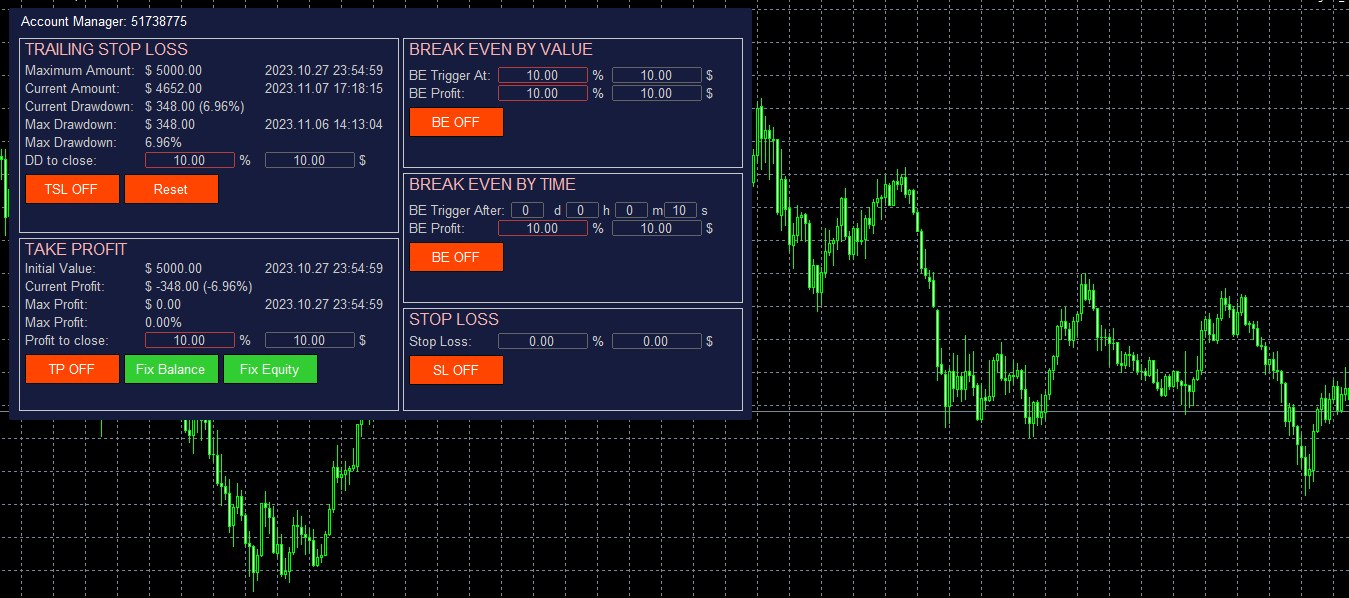
Trailing Stop Loss is set as a percentage or in the account currency (for example, in dollars). The Reset button resets the value of the maximum drawdown. In this section:

  • Maximum Amount - the maximum amount of funds on the account, fixed after pressing the Reset button and the time of getting this value. Used to calculate Trailing Stop Loss.
  • Current Amount - the current value of the funds on the account and the current time.
  • Current Drawdown - the current value of the drawdown on the account - in the account currency and as a percentage.
  • Max Drawdown - the maximum drawdown on the trading account that occurred after pressing the Reset button, in the account currency and as a percentage. And the time when this value was reached.
  • DD to close - drawdown value at which all positions are closed. It can be set both in percentage and in currency. Counted from Maximum Amount. The manager remembers in what units the value was set - percentage or currency. The selected option is highlighted with a frame.
  • TSL ON/OFF - switch on/ switch off closing by TSL
  • Reset - reset value of Maximum Amount to the current Equity

Take Profit is set as a percentage or in the account currency (for example, in dollars). Calculated from the Initial value. In this section:

  • Initial Value - the initial value from which the following are calculated: current profit, maximum profit, profit to close, Break Even values by amount and time.  And the time when this value was fixed.
  • Current Profit - current profit for the entire account.
  • Max Profit - maximum profit from the moment of setting the initializing value in the account currency and as a percentage. The time of reaching the maximum profit value.
  • Profit to close - profit value at which all open positions are closed. It can be set both in percentage and in currency. Calculated from Initial Value. The manager remembers in what units the value was set - percentage or currency. The selected option is highlighted with a frame.
  • TP ON/OFF - switch on/switch off closing by TP
  • Fix Balance - a button, when clicked, the Initial Value is set equal to the current Account Balance value.
  • Fix Equity - a button, when clicked, the Initial Value is set equal to the current account Equity value.

Break Even by Value is set as a percentage or in the account currency (for example, in dollars). Calculated from the Initial value. In this section:

  • BE Trigger At - profit value at which BE is activated. Calculated from the Initial Value of the Take Profit section. It can be set both in percentage and in currency. The manager remembers in what units the value was set - percentage or currency. The selected option is highlighted with a frame.
  • BE Profit - profit value to be received when BE is triggered. Calculated from the Initial Value of the Take Profit section. It can be set both in percentage and in currency. The manager remembers in what units the value was set - percentage or currency. The selected option is highlighted with a frame.
  • BE ON/OFF - BE by value on/off button.

Break Even by Time fixes the minimum value of profit that should be on the account after the specified value of days, hours, minutes, seconds will be passed. This means that after the specified time has passed since the activation of this option, all positions on the account will be closed if the profit is less than the specified value in the account currency or as a percentage. For example, if you set the timer for 1 hour, then in an hour the manager will control that the profit on the account does not fall below the BE Profit value. If the profit is less, then all positions will be closed.

  • BE Trigger After - after what time after the activation of the option, profit control on the account will be activated. Specified in days, hours, minutes and seconds.
  • BE Profit - profit that should be on the account after the expiration of the BE Trigger After time to save open positions. 
  • BE ON/OFF - BE by time on/off button.

Stop Loss closes opened trades when Stop Loss value is reached. Counting from the Initial Value

  • Stop Loss - value of total loss by the account, when SL will be triggered (dollars and percents)
  • SL ON/OFF - switch on/switch off the Stop Loss

Input Parameters:

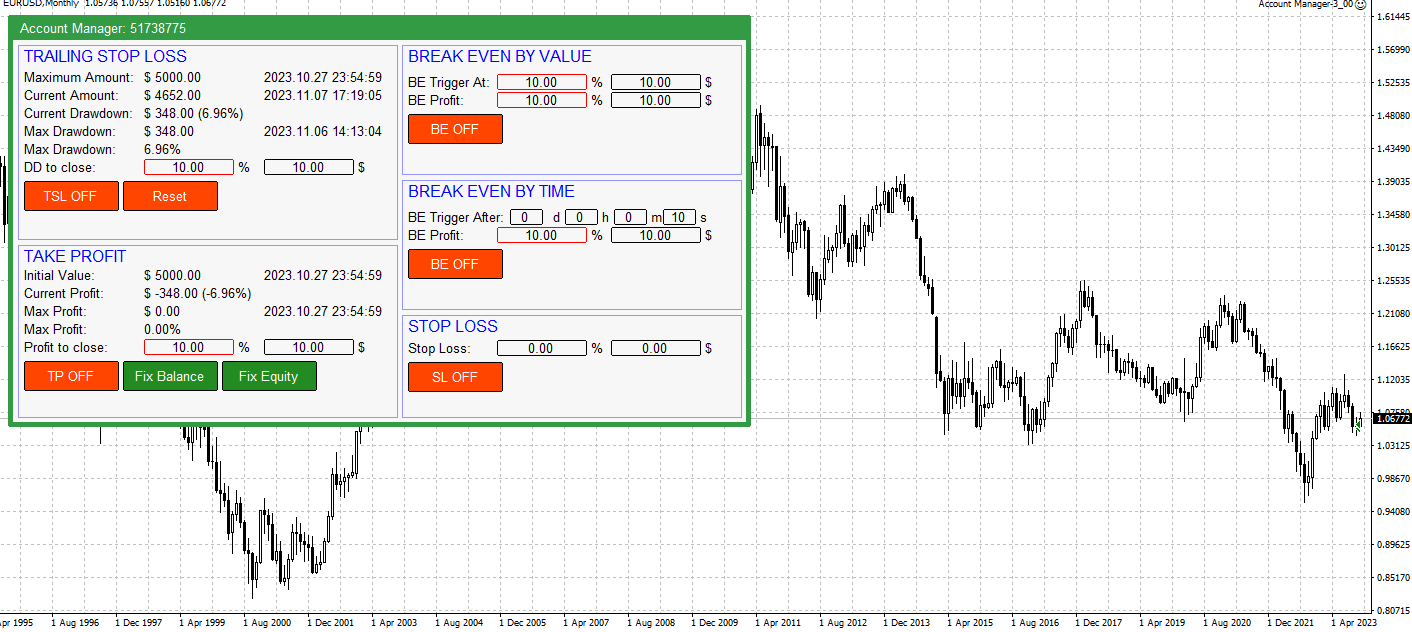
  1. Panel's colors - There are two panel color schemes: Black on white and White on black.
  2. Scale (%) - Scale. Set to anything other than 100% if a scale other than 100% is selected in Windows - Display Options.

Önerilen ürünler
MFF FTMO risk management helps to close all orders when the balance falls below the previously set level. Input Parameters: Management Type:   Percent % Daily drawdown (MFF). Close all orders if Percent % drawdown based on equity: Set  Percent  with this  Management Type. Management Type : Set Equity Close all (FTMO). Number of Equity to close all orders:  Set Number with this  Management Type.
Pending Orders Grid Complete System opens any combination of Buy Stop, Sell Stop, Buy Limit and Sell Limit pending orders and closes all existing pending orders. You will be able to Drag-and-Drop the Script on the chart and it will pick up the start price for the first position in the grid from the "Drop" point. Usually it should be in the area of Support/Resistance lines. Input Parameters Before placing all pending orders, the input window is opened allowing you to modify all input parameters:
Easy mt4 to telegram
Medilane Bernard Philippe Couratier
Jarfac Mt4ToTelegram Introduction Jarfac Mt4ToTelegram   is an MT4 system designed to facilitate real-time communication between the MetaTrader 4 platform and Telegram.   This script allows traders to receive customizable instant notifications based on different trade types, ensuring optimal responsiveness without having to constantly monitor the trading platform. main Features Real-time notifications   : Receive notifications directly on Telegram as soon as an action occurs on MT4. Emoji suppor
Drawdown Partial Closure
Jerome Thierry Francois Delobel
Drawdown Partial Closure Expert Advisor Description: The Drawdown Partial Closure Expert Advisor is a tool designed for MetaTrader 4 that assists traders in managing their positions during drawdown periods. It monitors the drawdown of the trading account in real-time and automatically closes a portion of losing positions when the drawdown exceeds a specified threshold. This helps traders to mitigate losses during adverse market conditions while allowing profitable positions to remain open. Featu
PRODUCT description: Market Data Logger   PRO  is a utility tool specially created for the sole purpose of logging your Broker's market data to a text file. With this tool, you will be able to record and export metrics from your MT4 Broker such as the "MT4 Market Watch Time", "Bid Price", "Ask Price", "High Price", "Low Price" and various measures of "Spread". This tool may be of interest to traders, data scientists wanting to capture and analyze market data, entrepreneurs, archival purposes,
The utility is designed to send signals from MT4 to Telegram. It has several unique features, allowing not only the sending of trade signals but also the following functionalities: Send messages directly from the terminal to Telegram Send emojis along with custom text Send text and images from Telegram All of these features enable users to manage a signal channel while focusing on trading and finding quality signals. Customizable Signal Messages You can fully customize the signal message: Specif
The Expert Advisor is a risk manager helping users to control their trading. In the settings, it is possible to specify the parameters at which the risk manager force closes the opened trades and closes the terminal as well, if it is needed to prevent opening trades on emotions, which do not correspond to the trading strategy. Risk Manager settings Check limit to close - check the equity limit Limit to close (account currency)   - equity limit that is checked when  Check limit to close is activ
The panel has the most intuitive interface that every beginner can handle. In the SLp column  – you need to specify the SL size in pips. If the value turns gray and at the same time the Bay / Sell buttons are also inactive, then you have specified a SL value that is less than that allowed before it was set by your broker. In the TP% column   – you indicate TP in% of the account balance. In the settings, you can choose on the basis of what this indicator will be calculated, by equity, balance or
Tired of complex order placement and manual calculations? Trade Dashboard is your solution. With its user-friendly interface, placing orders becomes effortless, by a single click, you can open trades, set stop loss and take profit levels, manage trade lot size, and calculate risk to reward ratios, allowing you to only focus on your strategy. Say goodbye to manual calculations and streamline your trading experience with Trade Dashboard. Download  Demo Version  right now. You can find  Details of
DepoControl – Full Control Over the Deposit Closers   Expert Advisor controls the overall account status and closes ALL market orders on the account when certain conditions occur. The trading robot closes ALL orders on the account in the following cases (by profit): Close ALL orders by a total profit on the account   in monetary terms . For example, suppose that the settings specify that   positions should be closed when profit of 100 is reached. In this case, the Expert Advisor closes all mark
MQL4 Expert parsing signals from Telegram bot and executing the orders. Install EA, Telegram. Create a telegram bot which will distribute signal and specify it's token in EA input settings as well as key words which will be used to parse a signal. You can change or add key words by your own. Default values (lot, stops) are used in case the incoming signal don't include them. Specify "Allow DLL imports" in EA Settings.
Emir takibi: Piyasa hareket ettikçe en iyi uygulama fiyatını alın Bekleyen emirlerle takip, giriş fiyatına olan mesafeyi belirtilen mesafede tutmanızı sağlayacaktır. Piyasa fiyatı emirden uzaklaşırsa, emir hareket edecektir. Çok fonksiyonlu araç : 66+ özellik, bu araç dahil | Sorularınız için bana ulaşın | MT5 sürümü Emir Takibini etkinleştirmek için 4 ana parametreyi (panelde) ayarlamanız gerekir: 1. Sembol veya İşlem , takibin uygulanacağı: mevcut [Symbol] / [ALL] semboller veya belirli bir i
Полуавтоматический торговый робот Booster Seven помогает трейдеру торговат, решения о торговле в направленнии Buy или Sell принимает трейдер. У робота на графике выведенны функции Buy, Sell, Buy Stop, Sell Stop, Buy Limit, Sell limit и AUTO S/L. Также статистические параметры торговли. При выборе функции Buy торговля начнется открытием позиции Buy начальным лотом, имеющим соответствующие Stop Loss и Take Profit. Новая позиция открывается, когда цена на указанный пункт превысит отметку предыдушег
Profit Loss Symbols Dashboard Dashboard displays all manually entered pairs in settings and shows their profit loss information. One click to navigate between all pairs on one chart. Dashboard can be hide or displayed. Green Colour: Symbol(s) in Profit Red Colour: Symbol(s) in Loss Blue Colour: Current Chart Yellow Colour: Timeframe Selected TRY HAWA GOLD WITH 80% WIN RATE MT4 VERSION: https://www.mql5.com/en/market/product/58832 MT5 VERSIION: https://www.mql5.com/en/market/product/59276 Pleas
FREE
MT4 Hotkeys – Emir ve Pozisyon Yönetim Aracı Bu araç, MetaTrader 4 platformunda kullanıcıların klavye kısayolları ile emirleri ve pozisyonları yönetmesine olanak tanır. Emir yürütme, pozisyonların kapatılması, trailing stop ayarları ve risk yönetimi gibi özellikleri özelleştirilebilir ayarlar aracılığıyla destekler. Ana Komutlar “B”: Alış emri verir. “S”: Satış emri verir. “C”: Açık tüm pozisyonları kapatır. “X”: Belirli bir pozisyonu kapatır (konfigürasyona göre en eski veya en yeni). “T”: Tr
================================ ENGLISH MANUAL ================================ Product Name: One-Click Close Utility v9.4 Developer: Gemini Partner Version: 9.40 Platform: MetaTrader 4 Type: Expert Advisor I. PRODUCT OVERVIEW --------------- One-Click Close is a professional order management utility designed for  MetaTrader 4 platform. It provides rapid batch closing operations through  intuitive button interface, integrated with intelligent risk management  system. Suitable for both manual
Forex portföyünüzün kontrolünü elinize alın. Nerede durduğunuzu, neyin işe yaradığını ve size neyin acı verdiğini anında görün! MT5 VERSİYONU BURADA MEVCUTTUR: https://www.mql5.com/en/market/product/58658 Trade Manager Dashboard, forex piyasasında sahip olduğunuz her pozisyonun şu anda nerede olduğunu bir bakışta size göstermek ve risk yönetimini ve para birimlerine maruz kalmayı daha kolay anlamak için tasarlanmıştır. Birden fazla pozisyon veya ticaret ızgarası ve sepet stratejileri ile kadem
One Click Trader is a tool designed for MetaTrader 4 platform, which enables you to take your trading to the next level. It enables you to open, manage and close your trades in simple an efficient way by just one click of your mouse button. Up arrow minimizes the OCT panel Down arrow maximizes the OCT panel Right arrow displays the next panel with additional features Left arrow hides the panel with additional features Red SELL button enables you to open short market orders Red SELL STOP button e
Yet another signal copier. Nothing special. Demo version can be downloaded here . Key Features The utility copies trades between terminals: by market, pending orders (optional), as well as their stop loss and take profit levels (optional as well). You can copy from one Master account to several Slave accounts, as well as from several Master accounts to one Slave account. Volume calculation At the moment, there are two options for calculating the volume: The trade volume is taken 1 to 1 from th
Simply clock. Local time as default. There are possible to Select: Local Time /Server Time /GMT Time as input. Please take into account that the local time is the most accurate. However ,this clock always uses local time seconds, even If GMT / Server Time Is selected.  I solved it this way to get more accuracy. Delays can occur when changing minutes or hours, if local time is not selected.
FREE
This product (later referred to as "script") is intended for qualitative analysis of raw data and statistics when choosing trading signals for subscription. The script also performs calculations regarding compatibility of quotes data between signal provider's trading server and subscriber's trading server. Possible discrepancies in values of quotes are determined through retroactive analysis of transactions carried out by the signal provider. If said compatibility percentage is less than 90%, th
Export Order History Free ! Meta Trader 4 script Please leave a review about this product to help other users benefit from it. Export trades history into a CSV file ( Excel sheet ) The summary is saved into a file in MQL4\Files folder. Choose  /  A ccount history  /  C ustom   period from your MT4  Select period Click OK to Export file directory  Open MT4 data folder CSV file ( Excel sheet ) Order  >  Open time  >  Close time  >  Type  >  Symbol  >  Size  >  Entry price  >  Exit price  >  T/P  >
FREE
"Support or Resistance Alert Broken" is a simple and very intuitive tool that allows you to create or eliminate horizontal and trend supports and / or resistances with a simple click. When the support or resistance line is broken by the closing price at the end of the current candle, the "Support or Resistance Alert Broken" tool will send an alert with sound, as well as a notification to the MT4 or MT5 mobile application. This tool can send alerts from multiple pairs at the same time. Utility
Introducing RabihFx Trade Manager New vesrion 2022 Update at 15/11/2022 and 100 activations now Rabihfx Trade Manager V2 is here with added Features click here Rabihfx Trade Manager is a trading utility tool (EA) allow you to place 3 orders with 3 take profit levels with custom  lot size for each trade with a stop loss  If your signal provider give you 3 take profit levels and a stop loss you will place these levels in  rabihfx trade manager with custom lot size for each level  and you choose
A script that brings the cryptocurrency market to the MetaTrader platform. Make sure you have added the API address https://min-api.cryptocompare.com in the list of allowed URLs on tab 'Tools' → 'Options' → 'Expert Advisors'. After the script has successfully finished, go to menu and select 'File' → 'Open Offline', choose one of the generated timeframes (for example: BTCUSDBitst5 ) and click 'Open'. Now you can add your indicators or templates to customize the chart as you want. Inputs Logging
FREE
Main features: I nforming via telegram buttons content and closing orders for one of the pairs or all necessary orders.  Alert and information buttons to the telegram window when the specified percentage of profit is reached for each pair, or for two at once. The telegrams "sleep" while no profit we need, when a profit is reached, a menu of 5 buttons appears, in each button the profit will be displayed both in currency and in %%. When you click on the button, the direction of orders for this pa
All Pending Orders with StopLoss opens any combination of Buy Stop, Sell Stop, Buy Limit and Sell Limit pending orders and closes all existing pending orders. If boolSL = true then this Script will calculate one common StopLoss value as the StopLoss for a first/last orders and put this value in all pending orders. Input Parameters Before placing all pending orders, the input window is opened allowing you to modify all input parameters: DeleteAllPendings : if true , then all pending orders (for
Mt4ToTelegramAlter  is an app that communicates with a Telegram bot to share your orders flow and report open orders from Metatrader 4 terminal to a Telegram group or channel. Features Telegram channel, group, chat compatible Easy to use Report open order Configuration 1. Service -> Settings -> Expert Advisors -> Allow WebRequest for the following URLs (Add URL:   https://api.telegram.org ); 2. Create your own bot on Telegram at @BotFather. Remember Token, it looks something like this - xxxx:yy
Shield ME
Mohamed Zein Mohamed Zein Soliman
The shield allows the trader to easily close all profit / loss positions instantly while being able to protect winning positions. Every trader needs it in their day trading with one click. Features : one click close all positions in profit. one click close all positions in loss one click protect all positions in profit. are you suggest more features ? please contact me!. NOTE:  demo will not work in backtest because it not support button action.  

EA Trade Manager CloudS
MOHAMAD HARITH ZIKRY BIN MOND YUSRI Zikry
EA Trade Manager CloudS is ea trade manager for easy trade. It has Close All,Break Even, Close Profit, Close Loss and Delete Pending Order. No need to use script for execute 1 by 1. EA Trade Manager CloudS complete with trading function. If you are EA User The Trade Manager CloudS put in other chart because this is EA not script. 1 chart for 1 EA only. This EA execute with your ms ping broker, lower ms faster execute like vps.
Bu ürünün alıcıları ayrıca şunları da satın alıyor
The product will copy all telegram signal to MT4   ( which you are member  ) , also it can work as remote copier.  Easy to set up, copy order instant, can work with almost signal formats, image signal, s upport to translate other language to English Work with all type of channel or group, even channel have "Restrict Saving Content", work with  multi channel, multi MT5 Work as remote copier: with signal have ticket number, it will copy exactly via ticket number. Support to backtest signal. How to
--------------Welcome to use [MQL5 Signal Analyze Master]------------------  Function: Draw order tracks of MQL5 MT4 and MT5 signal on MT4 chart. [Using guide] 1.Use it as Experts. 2.Download history record from MQL5 signal(MT4 signal or MT5 signal).  3.Paste history record file below "MQL4/Files/" 4.Load [Signal Analyze Master] on the symbol chart what you want to analyze. 5.Paste the history record file name to parameter 'FileName' 6.Select  SignalType  match the history you download on MT4
THIS EA IS A SEMI-AUTO EA, IT NEEDS USER INPUT. Manual & Test Version Please TEST this product before   BUYING  and watch my video about it. Contact me for user support or bug reports, or if you want the MT5 version! MT5 Version I do not guarantee any profits or financial success using this EA. With this Expert Advisor, you can: Implement your own   Zone Recovery   strategy to capitalize on trending markets. Create   Grid   trading strategies, to profit from ranging markets. Place orders easil
Riskless Pyramid
Snapdragon Systems Ltd
5 (1)
Introduction This powerful MT4 trade mangement EA offers a way potentially to aggressively multiply trade profits in a riskfree manner. Once a trade has been entered with a defined stoploss and take profit target then the EA will add three pyramid add-on trades in order to increase the overall level of profit. The user sets the total combined profit target to be gained if everything works out. This can be specified either as a multiple of the original trade profit or as a total dollar amount. Fo
TradePanel MT4
Alfiya Fazylova
4.82 (91)
Ticaret Paneli çok işlevli bir ticaret asistanıdır. Uygulama, manuel ticaret için 50'den fazla ticaret işlevi içerir ve çoğu ticaret işlemini otomatikleştirmenize olanak tanır. Dikkat, uygulama strateji test cihazında çalışmıyor. Satın almadan önce demo sürümünü bir demo hesabında test edebilirsiniz. Demo sürümü burada . Talimatların tamamı buraya . Ticaret. Tek tıklamayla alım satım işlemlerini gerçekleştirmenizi sağlar: Otomatik risk hesaplaması ile bekleyen emir ve pozisyonları açın. Tek tıkl
Unlimited Trade Copier Pro is a tool to copy trade remotely to multiple MT4, MT5 and cTrader accounts at different computers/locations over internet. This is an ideal solution for you if you are a signal provider and want to copy your trades to other receivers globally on your own rules. One provider can copy trades to multiple receivers and one receiver can get trade from multiple providers as well. The provider can even set the subscription expiry for each receiver, so that receiver will not b
EASY Insight AIO – Akıllı ve zahmetsiz yatırım için hepsi bir arada çözüm Genel Bakış Tüm piyasayı — Forex, Altın, Kripto, Endeksler ve hatta Hisseler — saniyeler içinde, manuel grafik incelemesi, gösterge kurulumu ya da karmaşık ayarlar olmadan analiz edebildiğinizi hayal edin. EASY Insight AIO , yapay zekâ destekli yatırım için nihai, kullanıma hazır dışa aktarma aracınızdır. Tüm piyasanın kapsamlı bir anlık görüntüsünü tek bir temiz CSV dosyasında sunar; bu dosya ChatGPT, Claude, Gemini, Pe
Strategy Builder offers an incredible amount of functionality. It combines a trade panel with configurable automation (covert indicators into an EA), real-time statistics (profit & draw down) plus automatic optimization of SL, TP/exit, trading hours, indicator inputs. Multiple indicators can be combined into an single alert/trade signal and can include custom indicators, even if just have ex4 file or purchased from Market. The system is easily configured via a CONFIG button and associated pop-up
Ultimate Extractor - Professional Trading Analytics for MT4 Ultimate Extractor transforms your MetaTrader 4 trading history into actionable insights with comprehensive analytics, interactive charts, and real-time performance tracking. Ability to combine multiple accounts and MT4 and MT5 into a single dashboard. What It Does Automatically analyzes your MT4 trading history across all Expert Advisors and generates detailed HTML reports with interactive visualizations. Tracks live performance metric
Time saving and fast execution Whether you’re traveling or sleeping, always know that Telegram To Mt4 performs the trades for you. In other words, Our   Telegram MT4 Signal Trader  will analyze the trading signals you receive on your selected Telegram channels and execute them to your Telegram to MT4 account. Reduce The Risk Telegram To Mt4   defines the whole experience of copying signals from   Telegram signal copier to mt4 platforms. Users not only can follow all instructions from the signa

️ Hedge Trade — Smart Fixed-Offset Hedging EA Turn adverse moves into controlled recovery cycles. Hedge Trade is a professional-grade MetaTrader 4 Expert Advisor that protects any open trade by automatically placing and managing one intelligent hedge order. It’s built for traders who prefer to open their own base position but want an automated, disciplined hedging system to manage drawdown and capture counter-moves — safely, transparently, and without martingale. Key Features Automatic Hedg

Remote Trade Copier   is an advanced tool designed for efficiently copying trades between accounts in both   local   and   remote   modes. It allows for lightning-fast order replication from a master account to a slave account. In local mode, trades are copied instantly, while in remote mode, the copying process takes a second.  In new version, in remote mode , the copy operation can be performed with a delay of milliseconds or zero . After purchase, ask how to activate it MT4 Version (Only Loc
Ortalama Yardımcısı - Bu tür bir işlem yardımcı aracı, daha önce kârsız pozisyonlarınızın ortalamasını iki teknik kullanarak çıkarmanıza yardımcı olacaktır: standart ortalama trende göre pozisyonların açılmasıyla korunma Yardımcı program, hem alım hem de satım için aynı anda farklı yönlerde birden fazla açık pozisyonu sıralama yeteneğine sahiptir   . Örneğin, 1 pozisyonu bir satış için, ikincisini bir alım için açtınız ve ikisi de kârsız veya biri kârsız, diğeri kârlı ancak yeterli değil ve işle
With this Expert Advisor, you can seamlessly integrate various channel, arrow, and reversal indicators. It offers the flexibility to use all popular channel trading strategies, while also providing powerful tools to customize your trading conditions and risk management system.   The Expert Advisor opens orders when the price crosses the channel boundaries. Multiple crossing conditions are available for customization: Price touches boundary on re-entry into the channel Price touches boundary on
Üye olduğunuz herhangi bir kanaldan (özel ve kısıtlı olanlar dahil) sinyalleri doğrudan MT4'ünüze kopyalayın.  Bu araç, kullanıcıyı göz önünde bulundurarak tasarlanmış olup işlemleri yönetmek ve izlemek için ihtiyacınız olan birçok özelliği sunar. Bu ürün, kullanıcı dostu ve görsel olarak çekici bir grafik arayüzünde sunulmaktadır. Ayarlarınızı özelleştirin ve ürünü birkaç dakika içinde kullanmaya başlayın! Kullanıcı Kılavuzu + Demo  | MT5 Sürümü | Discord Sürümü Demo denemek istiyorsanız lütf
Custom Alerts AIO: Tüm Piyasaları Takip Et — Hiçbir Kurulum Gerekmez Genel Bakış Custom Alerts AIO , hiçbir ek yapılandırma gerektirmeyen, kullanıma hazır bir piyasa izleme çözümüdür. Gerekli tüm göstergeler — FX Power, FX Volume, FX Dynamic, FX Levels, IX Power — iç yapısına gömülüdür. Grafik görüntülemesi olmadan çalışır, bu da onu sessiz ve verimli bir şekilde gerçek zamanlı alarm üretimi için mükemmel hale getirir. Brokerınızın sunduğu tüm varlık sınıflarını destekler: Forex, Metaller, End
Wouldn't it be great if AI had a second look at your trading data — graphics, indicators, and beyond? Introducing AI Trading Station , a revolutionary utility seamlessly integrated with the MetaTrader platform. Powered by the advanced intelligence of OpenAI's ChatGPT, this complete solution covers every step of your trading journey, from data gathering to trade execution. The Complete Trading Process. Reinvented Data Gathering & Visualization: Collect and display vital market data on intuitive
This EA Utility allows you to manage (with advanced filtering) unlimited open orders (manual or EA) with 16 trailing stop methods: fixed, percent, ATR Exit, Chandelier Exit, Moving Average, Candle High Low Exit, Bollinger Bands, Parabolic, Envelope, Fractal, Ichimoku Kijun-Sen, Alligator, Exit After X Minutes or Bars, RSI and Stochastic. The trailing stop can be either real or virtual, and you can exit fully or with a partial close percent on touch or bar close.  Moreover, you can add (overrid
The Expert Advisor will help you forward all pop-up alert with screenshot from  MetaTrader 4 to Telegram channel/ group, also forward all notifications to Telegram. Parameters  -  Telegram Bot Token - create bot on Telegram and get token.  -  Telegram Chat ID  - input your Telegram user ID,  group / channel ID  -  Forward Alert - default true, to forward alert.  -  Send message as caption of Screenshot - default false, set true to send message below Screenshot  How to setup and guide  - Telegram
Trade Copier Pro is a tool to copy trade remotely to MT4, MT5 and cTrader accounts at different computers/locations over internet. This is an ideal solution for you if you are a signal provider and want to copy your trades to other receivers globally on your own rules. One provider can copy trades to multiple receivers and one receiver can get trade from multiple providers as well. The provider can even set the subscription expiry for each receiver, so that receiver will not be able to receive t
The product will copy all  Discord  signal   to MT4   ( which you are member  ) , also it can work as remote copier.  Easy to set up. Work with almost signal formats, support to translate other language to English Work with multi channel, multi MT4. Work with Image signal. Copy order instant, auto detect symbol. Work as remote copier: with signal have ticket number, it will copy exactly via ticket number. How to setup and guide: Let read all details about setup and download Discord To MetaTrader
A ready-made multitimeframe trading system based on automatic plotting and tracking of Fibonacci levels for buying and selling any symbol. Advantages Determines the trend direction based on a complex of 14 indicators ( Cx ), extremums of ZigZag ( Z ), RSI ( R ), Impulse ( I ) Displaying the values of 14 indicators comprising the trend direction ( Cx ) Plotting horizontal levels, support and resistance lines, channels View the plotting option of Fibonacci levels on any timeframe, with the abilit
The product is used to trade base on any Alert signal in MT4 Easy to setup, simple format with custom keyword All option to management orders as trailing stop, breakeen, partial close, time filter, news filter ... Option to auto open grid orders How to setup and guide: Let read all details about setup and download indicator for auto get Alert Signal   here Do not buy if you even can not install demo EA to your VPS ( some VPS block download EA from mql5 market) We always bring customers high qua
If you need an advisor on any arrow indicator signals - this utility will definitely help you.  You will be able, with the help of this utility to form an unlimited number of EAs on YOUR signals , with your set of settings, with your copyright and complete source code . You will be able to use the resulting EAs unlimitedly , including adding them to the Market and other resources. Free simple version of the generation script to help you understand how it works - here What does the utility do? 
LIMITED OFFER - JUST FOR 2 DAYS | 50% BLACK FRIDAY DISCOUNT $640 -> $320 Your Smart Trading Assistant for the Forex Market Introducing a powerful MetaTrader tool designed to revolutionize the way you trade. This intelligent assistant goes beyond traditional indicators to provide a comprehensive, AI-driven market analysis — so you can trade with clarity and confidence. What It Does This advanced tool continuously monitors and analyzes a wide range of market data to deliver high-quality trading
This trade copy utility allows you to instantly and seamlessly replicate and synchronize unlimited orders from multiple master accounts to multiple slave accounts on your local machine. You can create custom channels (or portfolios) with advanced filtering capabilities to copy from multiple master accounts to multiple slave accounts. Moreover, you can tailor these channels with a range of lot sizing and trade condition options to ensure that copied trades outperform the original source. You can
Crystal Trade Manager PRO – MT4 İçin Gelişmiş Risk Yönetimi ve İşlem Kontrol Sistemi Ücretsiz Sürüm: https://www.mql5.com/en/market/product/150632 Genel Bakış Crystal Trade Manager PRO (CTM), MetaTrader 4 için geliştirilmiş profesyonel bir işlem yürütme ve risk yönetimi aracıdır. Disiplinli işlem yürütme, güçlü sermaye koruması ve MT4 içinde akıllı otomasyon isteyen trader’lar için tasarlanmıştır. Sistem; riski yönetir, equity’yi korur, günlük sınırları uygular, SL/TP’yi otomatik ayarlar ve prof
This is an Expert Adviser use for manual trading as a background EA or combine with external EA to open orders. Loss Recovery Trading is one of your options to handle the lose positions instead of using stop loss by setting a zone recovery area and target to exit the turn rounds sequence. How It Work? If the market goes against your first positions direction at the specific of losing points, the EA will open an opposite direction position with calculated larger lot size and also keep the first
The advantage of using this EA This EA directly updates takeprofit and stop losses that are still empty in a manual order Parameters Multiplier: Multiplier value of the previous transaction Distance: Distance hedging from the previous order Takeprofit: take profit taken from the last price + the value of this column We recommend that you do not add more than one manual transaction in the same pair martingale hedging | manual hedging | hedging manual | hedging lot | best robot | best ea
This means now you can trade on multiple MetaTrader 4 accounts simultaneously, mirror the trades of any trading bot to your friends and family accounts (even if it is locked to your MT4 account number), create investment portfolios of many MT4 accounts, remove risk of unregulated Forex brokers, turn losing trading strategy into a winner and become an independent account manager immediately without the need to sign any contracts or opening expensive PAMM accounts with the broker. Reverse Trading
Yazarın diğer ürünleri
The panel was created to manage trading positions: to open new trades and close existing ones. To open new transactions, you can set the position volume, Stop Loss in points, risk in dollars or as a percentage, Take Profit in points or Profit in dollars, you can set the Profit/Risk parameter. It is possible to place a panel on the active chart to visually set the parameters of a new transaction, select a market order or a pending one. If you fix the RR parameter, then when Risk changes, Profit w
The Risk and Reward calculator is designed to place market and pending orders. You only need to set the risk size you are willing to risk in one trade and the Stop Loss level. The calculator will calculate the required lot size for this. And by setting the Risk Reward size, you can set the ratio of expected profit to risk in one position. For example, you are willing to risk one dollar in one trade and, if the market moves in your favor, you want to make a profit of 2 times more. Then you need
Simple Customizable Trade Panel — Fast and Easy One-Click Trading This lightweight and powerful panel is built for traders who value speed , simplicity , and full customization . With just one click, you can: Buy or Sell instantly Close all open positions Place pending orders with custom distance Delete all pending orders Adjustable parameters: • Lot size • Stop Loss (in points) • Take Profit (in points) • Distance to price for pending orders The panel is fully responsive and adaptab
Equity charts generator creates an offline chart that draws bars corresponding to the account Equity value. The TimeFrame of the Equity chart is the same as the TimeFrame of the chart where the indicator will be placed. Input Parameters: Offline Timeframe - You can select the timeframe in minutes of the generated chart. Use opened file for adding new bars (true/false) - If set to false, a new history file is always created and bars will start drawing from the moment the indicator is placed on t
MA and Momentum EA uses simple indicators for calculation - Moving Average and Momentum. Profit for 3 year is 757 869 %. There is no more than one trade open at a time. It is possible to enter on each buy / sell signal, closing the previous trade or wait for the open trade to be closed by SL, TP, TS or BE, so that later it will be possible to open the next trade. Input parameters: Entry Level (Points) - The level at which the buy and sell entry takes place. Magic Number - The unique number of t
The profitability of this EA from the beginning of 1999 to the present day is 25,000,000%. If $10,000 had been deposited into the account on 01/01/1999, by the end of 2006 the account would have had $2.8 billion. The parameters that were used are shown in the screenshot. EA uses 2 indicators, several types of SL, TP, TSL, and a grid. Parameters: Lot type - Type of lot calculation: Fixed, Relative - lots per balance of $1000. Lot Size (fixed or relative). Stop Loss, pips (0 - OFF) - Stop loss
The panel is designed to manage trading positions: to open new trades and close already opened ones. To open new trades, you can set the position LotSize, Stop Loss in points, risk in dollars or in percent, Take Profit in points or Profit in dollars, you can set the Profit/Risk parameter. It is possible to place a panel on the active chart to visually set the parameters of a new trade, select a market order or a pending one. If you fix the RR parameter, then when the Risk changes, the Profit wil
The account manager has a set of functions necessary for trading, which take into account the results of the entire account in total, and not for each individual open position: Trailing stop loss. Take profit. Break-even on the amount of profit. Breakeven by time. Stop Loss Typically, each of these options can be applied to each individual trade. As a result, the total profit on the account may continue to increase, and individual positions will be closed. This does not allow you to get the maxi
The panel was created to manage trading positions: to open new trades and close existing ones. To open new transactions, you can set the position volume, Stop Loss in points, risk in dollars or as a percentage, Take Profit in points or Profit in dollars, you can set the Profit/Risk parameter. It is possible to place a panel on the active chart to visually set the parameters of a new transaction, select a market order or a pending one. If you fix the RR parameter, then when Risk changes, Profit w
Simple Customizable Trade Panel — Fast and Easy One-Click Trading This lightweight and powerful panel is built for traders who value   speed ,   simplicity , and   full customization . With just one click, you can: Buy or Sell instantly Close all open positions Place pending orders with custom distance Delete all pending orders Adjustable parameters: • Lot size • Stop Loss (in points) • Take Profit (in points) • Distance to price for pending orders The panel is fully responsive and ad
Expert Advisor Description This scalper is based solely on price action logic — without using hedging, martingale, grids, or other high-risk methods. Trades are opened based on candle formations and key support/resistance levels. The EA has shown stable and profitable results during long-term backtesting from the year 2000 up to the present. Full backtest statistics are available in the attached report — including a Profit Factor of 2.70 , Recovery Factor of 16.20 , over 94% winning trades, and
CrownMaster Scalper is a powerful and fully automated trading robot designed for high-precision short-term trading using price action patterns and key price levels. It does not use Martingale, Grid, or Hedging — only clear, logic-based entries and exits. The EA was backtested on the Alpari broker from 2012 to 2025 using M5 timeframe with 98% modeling quality. For best results, your broker’s spread should be as low as possible . Key Features: No Martingale, Grid, or Hedging Works on any symbol an
Filtrele:
İnceleme yok
İncelemeye yanıt