Quick Panel Hedging

Not: Bu EA yalnızca risksiz hesaplarda çalışır. Metatrader sürüm 4   hızlı panel

Bu panel, bir müzakere panelini oluşturan altı uzman danışmandan oluşan bir gruptur.


özellikler

  • Çoğu alım satım görevi bu panellerdeki düğmelere tıklanarak hızlı bir şekilde tamamlanabilir.
  • Paneller arasında geçiş yapmak yeşil düğmeye tıklamak kadar kolaydır.
  • EA, Strateji Test Cihazının görsel grafikleri üzerinde çalıştırılabilir ve geçmiş verileri kullanarak ticaret pratiği yapmak için kolay bir yol sağlar.
  • Tek fare tıklamasıyla zararı durdurmayı hızla değiştirin ve kârı alın (geriye dönük test için mevcut değildir)
  • Arka planda ortalama fiyat sarı bir panelde gösterilir ve ortalama fiyat çizgisi çizilir.   buraya tıklayın


imza

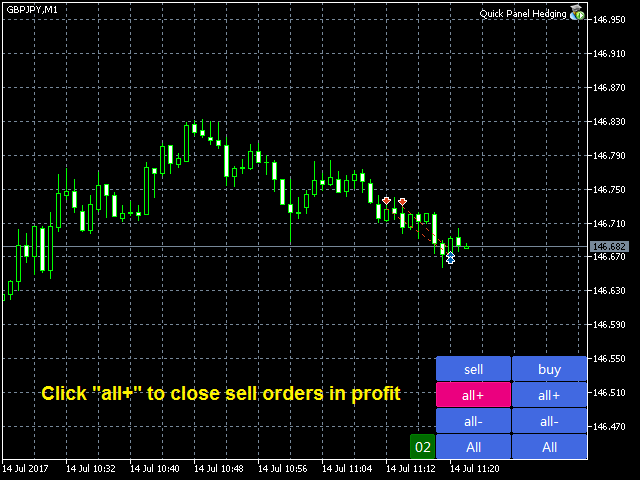
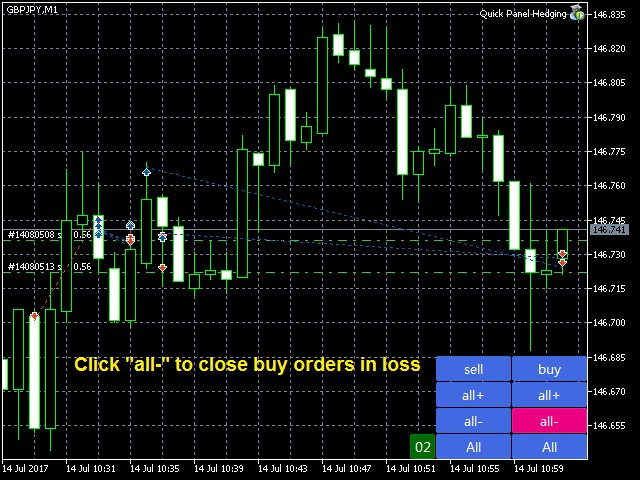
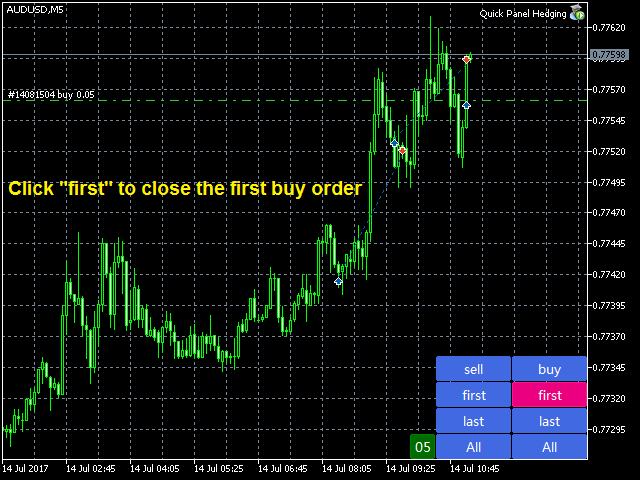
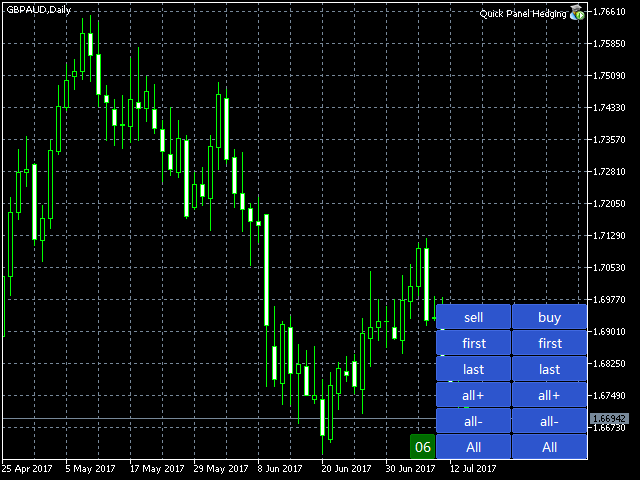
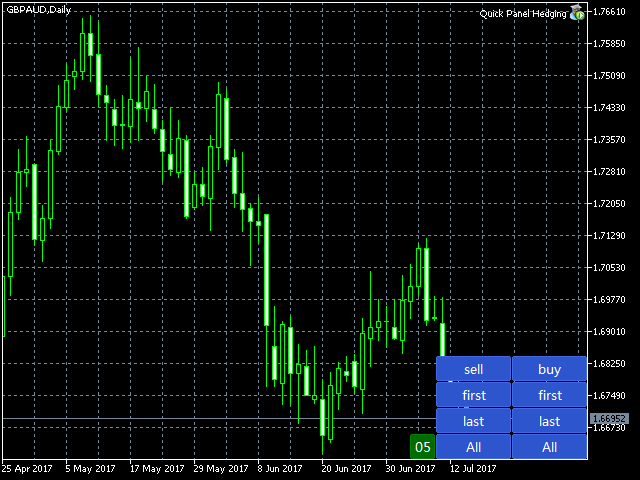
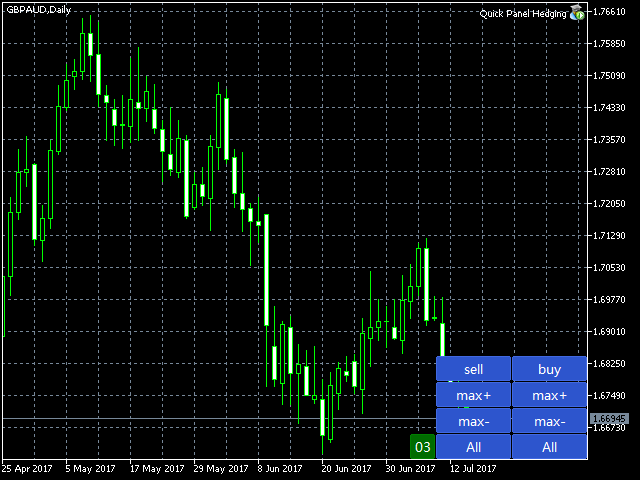
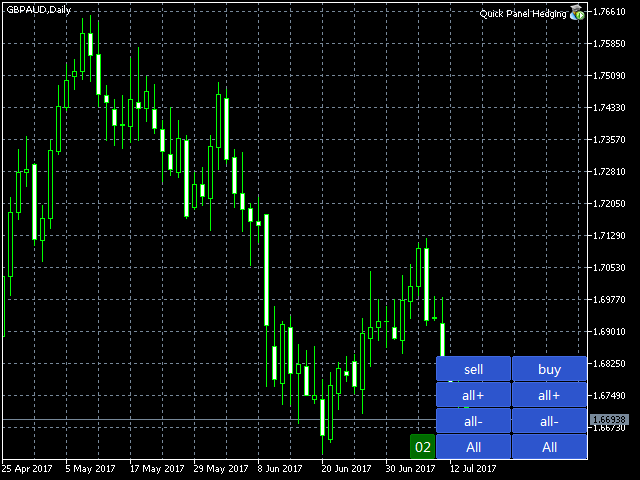
Kontrol panelinde iki sütun bulunur. Sol sütun satışlar için, sağ sütun ise satın almalar içindir.

  • sell:   Bir satış siparişi açın.
  • first:   İlk satış siparişinizi kapatın. Bunlardan ilki açılış saatleriyle ilgili.
  • last:   Son satış siparişini kapatın. Sonuncusu açılış saatleriyle ilgilidir.
  • all+:   Satış siparişini karlı bir şekilde kapatın.
  • all-:   Satış siparişini zararına kapatın.
  • max+:   Satış emirlerini maksimum kârla kapatın.
  • max-:   Satış emrini maksimum zararla kapatın.
  • min+:   Satış emirlerini minimum karla kapatın.
  • min-:   Satış emrini minimum kayıpla kapatın.
  • all:   Tüm satış siparişlerini kapatın.
  • buy:   Sipariş formunu açın.
  • first:   İlk siparişinizi kapatın. Bunlardan ilki açılış saatleriyle ilgili.
  • last:   Son sipariş formunu kapatın. Sonuncusu açılış saatleriyle ilgilidir.
  • all+:   Karı alın ve satın alma emrini kapatın.
  • all-:   Siparişi zararla kapatın.
  • max+: Emri maksimum kârla kapatın.
  • max-:   Alım emrini maksimum zararla kapatın.
  • min+: Emri minimum karla kapatır.
  • min-:   Minimum kayıpla siparişi kapatın.
  • all:   Tüm siparişleri kapatın.


bilet

  • Magic Number:   Bu EA tarafından açılan büyülerin sihirli sayısı.
  • Stop Loss in Pips:   Zararı durdur (pip)
  • Take Profit in Pips:   pip ile avantajlar
  • Max Buy Orders:   Maksimum satınalma siparişi sayısı. 0 ise sınır yoktur.
  • Max Sell Orders:   Maksimum müşteri siparişi sayısı. 0 ise sınır yoktur.
  • Max Buy Lots:   Bir emir defterinin açılacağı maksimum lot sayısı. 0 ise sınır yoktur.
  • Max Sell Lots:   Müşteri siparişi açmak için maksimum lot sayısı. 0 ise sınır yoktur.
  • Lots Mode:   Bu iki seçeneğe sahip bir öğedir. Seçenekler şunlardır: Sabit_Lots, Thousand_Lots.
  • Fixed Lots:   LotsMode olarak Sabit_Lots'u seçerseniz, EA'nız sabit lotlarla işlem yapacaktır.
  • Lots Per Thousand:   Mille_Lotti'yi seçerseniz. LotsMode gibi EA da lotları bu orana göre hesaplar.
  • ShiftX:   Sağ alt köşedeki yatay boşluk.
  • ShiftY:   Sağ alt köşedeki dikey boşluk.


Kuralar nasıl belirleniyor?

LotsMode olarak OneThound_Lots'u seçerseniz, lotlar aşağıdaki formül kullanılarak hesaplanacaktır:

Diyelim ki 0,05, serbest marj = 3200.

Hesaplanan Lot = Serbest Marj /1000 * 3200/1000 * 0,05 = 0,16

MaxBuyLots (veya MaxSellLots) sıfırdan büyükse bu 0,16 lot, MaxBuylots (veya MaxSellLots) ile karşılaştırılır ve en küçüğü olur.

MaxBuyLots (veya MaxSellLots) 0'dan büyük değilse karşılaştırma yapılmaz.


QuickPanel Pro'nun diğer sürümleriyle karşılaştırın ( bağlantı ):

  1. Quick Dashboard Pro: Her siparişin bir SL/TP'si vardır; burada TP, SL* risk-ödül oranına eşittir.
  2. Hızlı Panel: Her emrin SL/TP'si StopLossInPips/TakeProfitInPips girişine bağlıdır, TP ise SL'den bağımsızdır.

Önerilen ürünler
Episode Health Monitor Episode Health Monitor is a trading utility for MetaTrader 5 designed to analyze the real-time condition of active trading positions directly on the chart. The tool evaluates the current “trading episode” - a group of open positions - and provides a structured view of risk, stability, and distance to potential failure. Instead of relying only on profit/loss or price movement, it helps identify whether the current position is stable, weakening, or approaching a critical st
Tool Auto Modify SLTP – Protect Your Trades, Optimize Your Strategy In trading, risk is always present. Just one forgotten SL/TP can turn a promising trade into a loss. Even experienced traders occasionally make mistakes. That’s why Tool Auto Modify SLTP was created – to keep you protected and let you focus on your strategy. Key Features: Manage Orders for All Symbols: Monitor and adjust SL/TP for all your trading pairs. Three Flexible Risk Modes: Point-Based: Set fixed SL/TP distances. Account
Smart TP SL Manager MT5 Smart TP SL Manager MT5 is a trade management utility for MetaTrader 5 designed to monitor and manage position protection directly from the chart through a compact panel. The tool focuses on a common problem in manual trading: loss of control over stop loss, take profit, and position risk when multiple trades are active. Instead of relying on manual checking or switching between terminal windows, the panel provides a structured view of protection status and risk conditio
Trading Utility for Forex Currency Pairs Only not for Gold  Functions Auto Lot Calculation based on Risk Auto stoploss  Auto TakeProfit Breakeven Auto Close Half % Close in percentage with respect to the PIPs Pending Orders BuyLimit Sell Limit with distances BuyStop Sell Stop    with distances Trading Informations Risk in percentage For Multiple trades Combine Takeprofit and Combine Stoplosses
Expert TP SL v04 - Professional Trading Assistant with AI Motivation System Advanced manual trading tool with automatic risk management, overtrading protection, and intelligent psychological support for disciplined trading. PRODUCT OVERVIEW Expert TP SL v04 is a comprehensive trading assistant designed for manual traders who want to maintain emotional discipline while automating risk calculations. This isn't just another order placement tool - it's a complete trading psychology system that pr
TradePilotmt5
Hossein Khalil Alishir
TradePilot Expert Advisor (EA) for MetaTrader 5 TradePilot is a professional and user-friendly Expert Advisor (EA) for MetaTrader 5 (MT5) . It simplifies automated trading , risk management , and trade execution with a smart trading panel . Perfect for beginners and experienced traders looking for a reliable trade manager EA with automated lot size calculation and smart position management. Key Advantages User-Friendly Trading Panel: Customizable panel with buttons and hotkeys for fast ex
Auto SLTP Maker MT5  is an assistant for all those who forget to set StopLoss and/or TakeProfit in deal parameters, or trade on a very fast market and fail to place them in time. This tool automatically tracks trades without StopLoss and/or TakeProfit and checks what level should be set in accordance with the settings. The tool works both with market and pending orders. The type of orders to work with can be set in the parameters. It can track either trades for the instrument it runs on, or all
The Multilevel PnL Calculator EA is an advanced trading tool designed for Forex and CFD traders who need precise position sizing and risk management calculations. This intuitive panel-based calculator allows you to simulate multiple entry positions with automatic profit and loss calculations in real-time USD values. Key Features Multi-Position Management Calculate Profit and Loss for up to 10 or more simultaneous positions (configurable) Support for both LONG and SHORT trading modes Real-time
SmartRAL
Jemy Yeferson Dimu Ludji
SmartRAL (Smart Risk Auto-Lot EA) SmartRAL: The Ultimate Risk & Lot Management Expert Advisor (EA) SmartRAL is an essential tool for traders who demand precise risk management and automated position sizing in MetaTrader 5. Stop guessing your lot size and let the algorithm handle the calculations. This EA allows you to trade with confidence by guaranteeing your risk exposure on every single trade, while offering absolute flexibility in setting your Stop Loss (SL). Key Features & Benefits Guarante
SwiftEdge Scalper Tam Manuel Kontrollü Profesyonel Tick Scalping EA Scalping, anlık kararlar, hassas risk yönetimi ve kusursuz emir yürütme gerektirir. Fiyat hareketini izlerken başabaş hesaplamalarını, takip eden stopları ve birden fazla pozisyonu yönetmek, doğru araçlar olmadan bunaltıcıdır. SwiftEdge Scalper, aktif scalper'lar ve günlük trader'lar için tasarlanmış profesyonel trading asistanınızdır. Tek tıklama veya klavye kısayolu ile işlem yapın, EA otomatik olarak başabaş, takip eden stop
ProTrade Panel EA Ürün Genel Bakışı ProTrade Panel EA, yalnızca MetaTrader 5 platformu için tasarlanmış profesyonel bir yardımcı uzman danışmandır. Kritik risk yönetimi hesaplamalarını otomatikleştirerek ve grafik üzerinde temiz, özelleştirilebilir bir arayüz sağlayarak manuel işlem yürütmeyi kolaylaştıran akıllı bir işlem asistanı olarak hizmet verir. Önemli Risk Açıklaması Bu EA otomatik bir işlem sistemi değildir ve bağımsız olarak kâr üretmez. Sizin yerinize işlem yapmaz. Deneyimli işlemcile
Close Buttons Utility, pozisyonların ve bekleyen emirlerin doğrudan grafikten manuel yönetimi için kompakt ve esnek bir MQL5 yardımcı programıdır. Panel, tek tıklamayla geçerli veya seçili semboller grubundaki emir ve pozisyon gruplarını kapatmanıza olanak tanır. Tüm emirlerle ve ayrıca belirli bir Sihirli sayılar listesi veya manuel emirlerle çalışabilir. Panel küçültülebilir veya ekran etrafında hareket ettirilebilir. Açık ve koyu temalar, özelleştirilebilir boyutlar, satır yüksekliği ve düğm

Risk-o-meter is a Risk calculator Panel designed to help people who are new to trading, better understand how much they are risking for potential profit or loss. Inputs: 1. Enter your Risk in % or currency 2. Enter your Return Ratio 3. Enter your Lot Size Results: 1. SL line 2. TP Line Features: 1. By moving the SL line, lot size will adjust to keep Risk fixed. 2. By moving the TP line, Risk Ration will adjust to keep Risk fixed.  
TRADEX EDGE MANAGER V1.00 – Configuration Overview  The Tradex Edge Manager V1.00 offers an intuitive and powerful set of customizable inputs, designed for precision trading and seamless automation with MT5. Below is a breakdown of its configuration categories and parameters: TELEGRAM SETTINGS Telegram Bot Token: Unique token to connect your EA to your Telegram bot. Telegram Chat ID: Destination group or channel where messages will be sent. Enable Telegram Notifications: Set to true to activ
Turbo Close All is a powerful and versatile script designed to help traders quickly and efficiently manage their trading positions and pending orders on MetaTrader 5. With its advanced features and customizable settings, this script is an essential tool for traders who want to streamline their trading process and maintain control over their positions and orders. Key Features: Comprehensive Closing Options: Turbo Close All allows you to close all market positions and/or delete pending orders bas
More stable MetaTrader 4 version is available here:  Lot Calculator Tool . This tool helps you to automatically calculate and manage risk, conveniently place orders visually, schedule orders, trail stops, move them to break-even and more. Features Place market or pending orders using draggable lines Schedule orders Calculate and limit risk using various methods See current spread See time till next candle Set custom order comments Trail stops Move stops to break-even See order profit/loss in p
Short Description: FTMO Protector PRO MT5 is an EA designed to protect your funded account by managing risk and ensuring compliance with the Prop Firm's trading rules. This EA automatically monitors equity levels, closes trades when profit targets or drawdown limits are reached, and provides a visual display of key account metrics.  EA w orks with all different Prop Firm service providers. Overview: FTMO Protector PRO MT5 is an Drawdown Safeguard Expert Advisor meticulously crafted for trade
CoPilot — Günlük Trading Panosu Sayılarınızı bilin. Netlikle işlem yapın. MT4 Sürümü CoPilot Nedir? CoPilot, tüm günlük performans istatistiklerinizi doğrudan grafik üzerinde gerçek zamanlı olarak görüntüleyen profesyonel düzeyde bir trading asistanıdır — her işlemde güncellenen bir canlı öz sermaye eğrisi ile birlikte. Grafikten ayrılmadan serinye anında görünürlük ihtiyacı duyan aktif yatırımcılar için tasarlanan CoPilot, tüm sembollerdeki günün her kapatılmış işlemini toplar ve temiz, renk ko
Prop Hesaplama Asistanı Kötü matematik yüzünden Prop Firma hesaplarınızı batırmayı bırakın. Riski Asistana bırakın. Prop Hesaplama Asistanı, özellikle fonlama zorluklarını (FTMO, vb.) geçmeye çalışan veya fonlanmış sermayeyi yöneten yatırımcılar için tasarlanmış nihai işlem yönetim panelidir. Zihinsel matematiği ve manuel emir sürüklemeyi, sizi kesinlikle kurallarınızın içinde tutan hassas bir görsel arayüzle değiştirir. Bu, piyasayı tahmin eden otomatik bir işlem botu değildir. Hassasiyet ta
The   Grid Builder MT5   utility is designed for placing a grid of pending orders of any complexity and will be an excellent tool in the hands of a trader who trades grid trading strategies. The tool has numerous settings that allow you to quickly and easily build a grid of orders with the specified parameters. All types of pending orders are supported: Buy Stop; Buy Limit; Sell Stop; Sell Limit. The script also allows you to delete a previously placed grid of orders in one click. If the "Delete
Trading Assistent is a multifunctional trading panel that combines all necessary tools for professional trading. The panel provides complete control over positions, in-depth risk analysis, and fast order execution. MAIN FUNCTIONAL BLOCKS Position Management: - Real-time viewing of all open positions - Sorting by symbol, profit, volume, and type - Visual indication of profitable and losing positions - Bulk closing operations - Breakeven function for profit protection Trading Operations: - I
Capital Management EA – Smart Risk Management & Profit Optimization for MT5 Take control of your trading capital with smart, automated strategies — fully optimized for MetaTrader 5 (MT5). Looking to protect your capital and maximize profits through automated money management strategies ? Capital Management EA is the all-in-one Expert Advisor for MetaTrader 5 (MT5) that helps you trade smarter, not harder. Core Features: 5-in-1 Capital Management Strategies – Built-in versatility Gr
Headline ShikaaTraders Gold Grid Pro is a high-performance trade management utility designed specifically for XAUUSD (Gold) and high-volatility pairs. It allows traders to execute complex grid-layering strategies with a single click, ensuring you never miss an entry during fast market moves. Why Choose Gold Grid Pro? Manual trading on Gold requires speed. Manually calculating distances and opening multiple positions takes too much time. This utility automates the "Scaling-In" process, allowing y
Trade Assistant Risk Calculator is the ultimate all-in-one floating trading panel designed for professional manual traders. It combines Visual Chart Trading , Automatic Risk Calculation , and Advanced Position Management into a single, sleek interface. Stop calculating lot sizes manually. Stop guessing your Risk:Reward ratio. With Trade Assistant Risk Calculator, you simply drag lines on the chart, and the EA calculates the exact lot size to match your risk percentage, equity, or money target.
This EA is there to take your trade closing stress away. Quickly close as many trades as you have opened at the click of a button, INCLUDING PENDING ORDERS. This works on the MT5 platform whether it be currencies, Indices, stocks or Deriv synthetic indices. I have saved it under utilities as it is a utility, however, to install this, you have to save the file in you "EA" folder. That is; Go to "File", then "Open Data Folder", "MQL5" and then "Experts". Paste this file there. Restart MT5 and you'
It's a trading dashboard appears on strategy tester, allows you to backtest your own strategies, testing them on multiple symbols and timeframes. It is equipped with useful features such as risk management, trailing stops, breakeven points, and more, enabling you to evaluate and refine your strategies effectively. Trading panels are typically designed to facilitate real-time trading and may not function properly on a strategy tester. However, this particular trading panel is specifically designe
Fonlu hesap. Yanlis hesaplanmis bir lot buyuklugu. Drawdown limiti asildi. Hesap kapatildi. Strateji basarisiz oldugu icin degil. Islem aninda risk kontrol edilmedigi icin. Trade Command Center , gorsel trade islem ve risk yonetimi panelidir. SL mesafesinden lot hesaplar. Pozisyonlari otomatik yonetir. Drawdown limitlerini gercek zamanli izler. Bes sekme. Bir grafik paneli. DLL yok. Harici baglanti yok. Hassas islem ve prop firm uyumlulugu gerektiren manuel traderlar icin tasarlandi. FTMO ve MFF
SLTPSetter
Raphael Djangmah Osro Agbo
SLTPSetter - StopLoss Take Profit Setter HOW DOES IT WORK? Risk and account management is a very critical aspect of trading. Before entering a position, you must be fully aware how much you will be willing to loss both in percentage and value. This is where SLTPSetter gets you covered.  All you need to do is attach the indicator on the chart and PRESS BUY OR SELL automatically, all parameters needed for placing the trades will be provided at the top left corner of the screen. Feel free to adjust
Noize Absorption Index - is the manual trading system that measures the difference of pressure between bears forces and bulls forces. Green line - is a noize free index that showing curent situation. Zero value of index shows totally choppy/flat market.Values above zero level shows how powerfull bullish wave is and values below zero measures bearish forces.Up arrow appears on bearish market when it's ready to reverse, dn arrow appears on weak bullish market, as a result of reverse expectation.
SmartTrail PRO MT5 — All-in-One Trade Management Panel Your all-in-one trade management companion for MetaTrader 5. SmartTrail PRO takes the stress out of position management. Whether you trade manually or use Expert Advisors, it protects your capital with intelligent, volatility-adaptive stop management — across all symbols, all account types, automatically. Why SmartTrail PRO? Most traders lose not because of bad entries, but because of poor exits. SmartTrail PRO solves this by providing a com
Bu ürünün alıcıları ayrıca şunları da satın alıyor
Trade Assistant MT5
Evgeniy Kravchenko
4.42 (207)
It helps to calculate the risk per trade, the easy installation of a new order, order management with partial closing functions, trailing stop of 7 types and other useful functions. Additional materials and instructions Installation instructions - Application instructions - Trial version of the application for a demo account Line function -   shows on the chart the Opening line, Stop Loss, Take Profit. With this function it is easy to set a new order and see its additional characteristics bef
Trade Manager EA’ye hoş geldiniz! Ticaretin daha sezgisel, hassas ve verimli hale gelmesi için tasarlanmış nihai risk yönetim aracı ile tanışın. Bu sadece bir emir verme aracı değil; ticaret planlaması, pozisyon yönetimi ve risk kontrolü için kapsamlı bir çözüm. İster yeni başlayan bir yatırımcı olun, ister deneyimli bir trader ya da hızlı emir gerektiren bir scalper, Trade Manager EA ihtiyaçlarınıza uyum sağlar ve forex, endeksler, emtialar ve kripto paralar dahil tüm piyasalarda esneklik sunar
Local Trade Copier EA MT5
Juvenille Emperor Limited
4.96 (134)
Local Trade Copier EA MT5   ile olağanüstü hızlı işlem kopyalama deneyimi yaşayın. Kolay 1 dakikalık kurulumuyla bu işlem kopyalayıcısı, aynı Windows bilgisayarda veya Windows VPS'te birden fazla MetaTrader terminali arasında işlemleri kopyalamanıza olanak tanır ve 0.5 saniyenin altındaki şimşek hızında kopyalama hızları sunar. Başlangıç seviyesinde veya profesyonel bir tüccar olsanız da,   Local Trade Copier EA MT5 , spesifik ihtiyaçlarınıza göre özelleştirmek için geniş bir seçenek yelpazesi s
TradePanel MT5
Alfiya Fazylova
4.87 (149)
Trade Panel, çok işlevli bir ticaret asistanıdır. Uygulama, manuel ticaret için 50'den fazla ticaret fonksiyonu içerir ve çoğu ticaret görevini otomatikleştirmeyi mümkün kılar. Dikkat! İndirimler sınırlı süreli olup, her salı fiyat 5$ artacaktır. (100$'a kadar). Satın almadan önce demo hesapta demo sürümü test edebilirsiniz. Demo hesap için uygulamanın deneme sürümünü indirin: https://www.mql5.com/en/blogs/post/750865 . Talimatların tamamı buraya . Ticaret. Tek tıklamayla ticaret işlemleri yapma
VERIFIED TRADING RESULTS - Farmed Hedge Yield Axi Copy:  https://www.mql5.com/en/signals/2356376 - Farmed Hedge Yield Exn Copy:   https://www.mql5.com/en/signals/2356404 - Farmed Hedge Yield V Copy:  https://www.mql5.com/en/signals/2357156 Contact me via private message to receive the User Manual and Setup Video. * Thai Lauguage Support Available Farmed Hedge Yield Farming - Professional Pair Trading Dashboard (Manual - Hybrid - Semi/Automated EA) VERSION 3 - WILD HARVEST UPDATE Trading A
Beta Sürümü Telegram to MT5 Signal Trader resmi alfa sürümüne neredeyse hazır. Bazı özellikler hâlâ geliştirilmekte olup küçük hatalarla karşılaşabilirsiniz. Sorun yaşarsanız lütfen bildirin, geri bildiriminiz yazılımın herkes için gelişmesine yardımcı olur. Telegram to MT5 Signal Trader , Telegram kanallarından veya gruplarından gelen işlem sinyallerini otomatik olarak MetaTrader 5 hesabınıza kopyalayan güçlü bir araçtır. Herkese açık ve özel kanalları destekler ve birden fazla sinyal sağlayıc
Tired of complex order placement and manual calculations? Trade Dashboard is your solution. With its user-friendly interface, placing orders becomes effortless, by a single click, you can open trades, set stop loss and take profit levels, manage trade lot size, and calculate risk to reward ratios, allowing you to only focus on your strategy. Say goodbye to manual calculations and streamline your trading experience with Trade Dashboard. Download  Demo Version  right now. You can find  Details of
Exp COPYLOT CLIENT for MT5
Vladislav Andruschenko
3.82 (34)
MT5 için ticari kopyalayıcı, МetaТrader 5 platformu için bir ticari kopyalayıcıdır   . arasındaki   forex işlemlerini kopyalar.       COPYLOT MT5 sürümü için   herhangi bir hesap   MT5   -   MT5, MT4   -   MT5 (veya COPYLOT MT4 sürümü için   MT4 -   MT4 MT5   -  MT4) Güvenilir fotokopi makinesi! MT4 sürümü Tam tanım   +DEMO +PDF Nasıl alınır Nasıl kurulur     Günlük Dosyaları nasıl alınır?     Nasıl Test Edilir ve Optimize Edilir     Expforex'in tüm ürünleri Ayrıca МТ4 terminali   (МТ4   -  
Timeless Charts
Samuel Manoel De Souza
5 (3)
Timeless Charts , saniye grafikleri / saniye zaman dilimleri, renko grafikleri / renko çubukları, küme grafikleri / footprint grafikleri ve popüler platformlarda bulunan gelişmiş araçlar dahil olmak üzere, özel grafikler / özel zaman dilimleri arayan profesyonel traderlar için tasarlanmış gelişmiş bir grafik çözümüdür. Geleneksel çevrimdışı grafikler veya basit özel göstergelerden farklı olarak, bu çözüm gerçek zaman damgası doğruluğuna (milisaniye düzeyine kadar) sahip tamamen özel çubuklar ol
Copy Cat More Trade Copier MT5 (Kopyalayıcı Kedi MT5) , günümüzün ticaret zorluklarına yönelik tasarlanmış yerel bir ticaret kopyalayıcısı ve eksiksiz risk yönetimi ve yürütme çerçevesidir. Prop firması zorluklarından kişisel portföy yönetimine kadar, sağlam yürütme, sermaye koruması, esnek yapılandırma ve gelişmiş ticaret işleme kombinasyonu ile her duruma uyum sağlar. Kopyalayıcı hem Master (gönderici) hem de Slave (alıcı) modunda çalışır, piyasa ve bekleyen emirlerin, ticaret değişikliklerini
AntiOverfit PRO: backtestler hakkındaki rahatsız edici gerçek O EA’yı satın almadan önce bir an dur. Az önce yıllık %250 vaat eden bir sistem buldun. Backtest mükemmel görünüyor. Satıcı 399 dolar, belki de 1.999 dolar istiyor. Kâğıt üzerinde her şey kusursuz görünüyor. Ama bir sorun var: o backtest senin düşündüğünü kanıtlamıyor. Geçmiş veriler tek başına pek bir şey kanıtlamaz. Kanıtladığı tek şey, o mantığın piyasadaki tek bir belirli fiyat dizisinde işe yaramış olmasıdır. Fiyat farklı bir yo
Footprint Chart Pro — Professional OrderFlow EA for MetaTrader 5 Version 6.34 | Professional tool for real traders | Institutional-Grade Visualization DEMO USERS - PLEASE SELECT EVERY TICK / REAL TICK WHEN TESTING AND YOU HAVE DOWNLOADED HISTORICAL DATA. IF YOU SEE A WAITING SCREEN AND IT IS NOT DOWNLOADING, IT MEANS YOU HAVE LOW HISTORICAL DATA. TRY 1 MIN AND 5 MIN FIRST ON 1 DAY DATA. ONE DAY DATA SHOULD BE THE NEWEST AND MOST CURRENT DATE. PLEASE WAIT UNTIL THE MARKET HAS ROLLED OVER PERIOD.
HINN MAGIC ENTRY – the ultimate tool for entry and position management! Place orders by selecting a level directly on the chart! full description   ::  demo-version  :: 60-sec-video-description Key features: - Market, limit, and pending orders - Automatic lot size calculation - Automatic spread and commission accounting - Unlimited partitial take-profits  - Breakeven and trailing stop-loss and take-profit  functions - Invalidation leves - Intuitive, adaptive, and customizable interface - Works
Trade Assistant 38 in 1
Makarii Gubaydullin
4.91 (23)
Çok Fonksiyonlu Araç: Lot Hesaplayıcı, Grid Emirleri, R/R Oranı, İşlem Yöneticisi, Arz ve Talep Bölgeleri, Fiyat Hareketi ve çok daha fazlası Demo Sürüm   |   Kullanım Kılavuzu İşlem Asistanı   strateji test cihazında çalışmaz :   Demo Sürümü BURADAN indirerek   aracı test edebilirsiniz. Herhangi bir sorunuz / iyileştirme fikriniz / bulunan bir hata için benimle iletişime geçin MT4 sürümüne ihtiyacınız varsa burada mevcuttur İşlem   sürecinizi basitleştirin, hızlandırın ve otomatikleştirin. Sta
MT5 to Telegram Signal Provider , hesabınızı bir sinyal sağlayıcı haline getirerek belirtilen sinyalleri Telegram'ın sohbetine, kanalına veya grubuna göndermeyi sağlayan kullanımı kolay, tamamen özelleştirilebilir bir araçtır. Rakip ürünlerin çoğunun aksine, DLL içe aktarması yapmaz. [ Demo ] [ Kılavuz ] [ MT4 Versiyonu ] [ Discord Versiyonu ] [ Telegram Kanalı ]  New: [ Telegram To MT5 ] Kurulum Adım adım bir kullanıcı kılavuzu mevcuttur. Telegram API'si hakkında bilgi gerekmemektedir; ihtiyac
Anchor: The EA Manager A coordination system for traders running multiple EAs. Anchor ensures only one EA can trade at a time, preventing conflicting positions and keeping your portfolio safer. Attach Anchor to any chart. Configure your EAs and their magic numbers. Anchor handles the rest. Built for portfolios. Built for discipline. Built for prop firms. The Problem Running multiple EAs on the same account creates risk. Two gold EAs can open opposite positions on the same candle. Three EA
The core idea: using the user interface, you configure the parameters the chart must meet before entering a position (or positions), choose which entry models to use, and set the rules for when trading and planning should end. Lazy Trader  handles the rest: it  takes over all the routine chart watching and execution! full description  :: 3 key videos [1] ->  [2]   ->  [3] What can it do? - Understands Larry Williams market structure - Understands swing market structure by Michael Huddleston
Riskinizi otomatik olarak hesaplarken işlemlere hızlı bir şekilde girip çıkmanıza yardımcı olacak Ticaret Yöneticisi. Aşırı Ticaret, İntikam Ticareti ve Duygusal Ticaretten korunmanıza yardımcı olacak özellikler içerir. İşlemler otomatik olarak yönetilebilir ve hesap performans ölçümleri bir grafikte görselleştirilebilir. Bu özellikler, bu paneli tüm manuel yatırımcılar için ideal kılar ve MetaTrader 5 platformunun geliştirilmesine yardımcı olur. Çoklu Dil desteği. MT4 Sürümü  |  Kullanım Kılavu
The product will copy all telegram signal to MT5 ( which you are member) , also it can work as remote copier.  Easy to set up, copy order instant, can work with almost signal formats, image signal,  s upport to translate other language to English Work with all type of channel or group, even channel have "Restrict Saving Content", work with  multi channel, multi MT5 Work as remote copier: with signal have ticket number, it will copy exactly via ticket number. Support to backtest signal. How to s
Entry In The Zone and SMC Multi Timeframe   is a real-time 2-in-1 market analysis tool that combines market structure analysis and a No Repaint BUY / SELL signal system into a single indicator, built on Smart Money Concepts (SMC) — a widely adopted framework used by professional traders to understand market structure. This indicator helps you see the market more clearly, make decisions based on structure rather than guesswork, and focus on high-probability zones where price is more likely to rea
1 tıklama ile ticaret için Ticaret Paneli.   Pozisyonlar ve emirlerle çalışmak!   Grafikten veya klavyeden alım satım. Alım satım panelimizi kullanarak, grafikten tek bir tıklamayla alım satım yapabilir ve alım satım işlemlerini standart MetaTrader kontrolünden 30 kat daha hızlı gerçekleştirebilirsiniz. Bir tüccar için hayatı kolaylaştıran ve bir tüccarın ticaret faaliyetlerini çok daha hızlı ve daha rahat gerçekleştirmesine yardımcı olan parametrelerin ve işlevlerin otomatik hesaplamaları. Graf
Seconds Chart - MetaTrader 5 için saniye bazlı grafikler oluşturmanıza olanak sağlayan eşsiz bir araçtır. Seconds Chart sayesinde saniye cinsinden zaman dilimleriyle grafik oluşturabilir, standart dakika veya saatlik grafiklerde mümkün olmayan esneklik ve analiz hassasiyetine ulaşabilirsiniz. Örneğin, S15 zaman dilimi 15 saniyelik mum çubuklarını ifade eder. Desteklenen özel sembollerle herhangi bir gösterge ve danışman kullanabilirsiniz. Onlarla çalışmak, standart grafiklerde işlem yapmak kadar
Crystal Trade Manager – Advanced MT5 Risk and Trade Control Utility Overview Crystal Trade Manager (CTM) is a professional MetaTrader 5 utility designed for risk management, trade automation, and instant execution control. It provides traders with an integrated system for protecting equity, managing daily drawdowns, controlling lot sizes, and applying automation features such as automatic SL/TP, break-even, and trailing stop. The tool is suitable for manual traders, prop-firm challenge particip
Üye olduğunuz herhangi bir kanaldan (özel ve kısıtlı olanlar dahil) sinyalleri doğrudan MT5'inize kopyalayın.  Bu araç, kullanıcıyı göz önünde bulundurarak tasarlanmış olup işlemleri yönetmek ve izlemek için ihtiyacınız olan birçok özelliği sunar. Bu ürün, kullanıcı dostu ve görsel olarak çekici bir arayüzde sunulmaktadır. Ayarlarınızı özelleştirin ve ürünü dakikalar içinde kullanmaya başlayın! Kullanıcı Kılavuzu + Demo  | MT4 Sürümü | Discord Sürümü Demo denemek isterseniz lütfen kullanıcı kı
Bu ürün, haber saatlerinde tüm uzman danışmanları ve manüel grafikleri filtreler, böylece manüel ticaret kurulumlarınızı veya diğer uzman danışmanlar tarafından girilen işlemleri yok edebilecek ani fiyat dalgalanmaları konusunda endişelenmenize gerek kalmaz. Bu ürün, herhangi bir haber yayınlanmadan önce açık pozisyonlarınızı ve bekleyen emirlerinizi yönetebilen tam bir sipariş yönetim sistemi ile birlikte gelir.   The News Filter'ı   satın aldığınızda, gelecekteki uzman danışmanlar için yerleşi
MT5 için Stats Dashboard & Journal ULTRA Tam Kapsamlı Ticaret Komuta Merkezi: Analitik, Otomasyon ve Haber İstihbaratı. Stats Dashboard ULTRA, Pro analiz aracının nihai evrimidir. MetaTrader 5'i, kurumsal düzeyde performans analizini otomatik haber koruması ve gelişmiş psikolojik metriklerle birleştiren profesyonel bir ticaret istasyonuna dönüştürür. Tam kontrol talep eden manuel işlemciler (traderlar) ve EA portföy yöneticileri için tasarlanmıştır. ULTRA VERSİYONDAKİ YENİLİKLER Haber İstihbarat
Emir Bileti, İşlem Paneli, Risk Yönetimi, Manuel İşlem, Trailing Stop, Emir Yönetimi, Hızlı Emir Gerçekleşmesi — JoOrderTrade Pro — MetaTrader 5 için yürütme paneli JoOrderTrade Pro, MetaTrader 5 üzerinde manuel işlem ve emir yönetimi için geliştirilmiş grafiksel bir paneldir. Hızlı emir gönderimi, Stop Loss ve Take Profit ayarlamaları yapmanıza olanak tanır ve Trailing Stop, Breakeven ve SP (Save Position) sistemi gibi risk yönetimi araçlarını içerir. Panel, MetaTrader 5 ortamında çalışır ve e
YuClusters
Yury Kulikov
4.93 (43)
Attention: You can view the program operation in the free version  YuClusters DEMO .  YuClusters is a professional market analysis system. The trader has unique opportunities to analyze the flow of orders, trade volumes, price movements using various charts, profiles, indicators, and graphical objects. YuClusters operates on data based on Time&Sales or ticks information, depending on what is available in the quotes of a financial instrument. YuClusters allows you to build graphs by combining da
EA AUDITOR - VERIFY EA'S BEFORE YOU BUY The Only Independent EA & Signal Verification Tool for MetaTrader 5 MAKE SMARTER EA PURCHASES. EVERY TIME. The MQL5 market is home to some genuinely outstanding Expert Advisors built by talented developers — strategies that can transform your trading. But it can also include EAs with history readers coded in to produce fake backtest results, curve-fitted strategies, manipulated signals, and EAs falsely marketed as "AI-powered" or "machine learning" when th
Easy Trade – Akıllı, Basit ve Güçlü İşlem Yönetimi Easy Trade, riski kontrol altında tutmak ve işlemleri sorunsuz gerçekleştirmek isteyen MetaTrader kullanıcıları için hepsi bir arada işlem yönetim çözümüdür. Gerçek kullanıcı geri bildirimleriyle sıfırdan tasarlanan Easy Trade, işlemleri birden fazla sembolde yürütmeyi, izlemeyi ve yönetmeyi kolaylaştırır – iş akışınızı karmaşıklaştırmadan. İster manuel olarak scalping yapın ister küçük bir işlem portföyü yönetin, Easy Trade dikkatinizi olması
Yazarın diğer ürünleri
Bu danışman aşağıdaki özellikleri sunar: Açık Pozisyon: Fiyat trend çizgisini geçtiğinde uzun veya kısa emir açın. Tasfiye: Fiyat trend çizgisini geçtiğinde uzun veya kısa pozisyonları tasfiye edin. İzleyen Zarar Durdurma – EA, trend çizgisini takip eder ve uzun vadeli emirler için zararı durdurmayı artırmaya veya kısa vadeli emirler için zararı durdurmayı azaltmaya devam eder. Çizgi bir trend çizgisi veya yatay bir çizgi olabilir.       Trend çizgileri radyal veya segmental olabilir. Bir hat an
Bu danışman, tek bir tıklamayla birden fazla çiftte işlem yapmanıza olanak tanıyan bir kontrol panelidir. Tıklamak       açık       Bu düğme seçilen çift için bir emir açar. Tıklamak       kapalı       Bu buton seçilen çiftin emrini kapatır. Sipariş lotu kullanıcı tarafından girilen sayıdır. Pozitif sayılar alış emirlerine, negatif sayılar ise satış emirlerine karşılık gelir. Siparişin yalnızca bir kısmını değil tamamını kapatmak için   Kapat düğmesini   tıklayın. Nihai işlem bilet numarasına b
Gösterge iki bölümden oluşur. Bölüm I: Renkli Mumlar Ana Trendi Gösteriyor Renkli mumlar, piyasa durumunu renkli mum çubuklarıyla tanımlamaktır. Ekran görüntülerinde görüldüğü gibi renk Aqua ise piyasa uzun emir vermeniz veya kısa emirlerden çıkmanız gereken bir durumda demektir. Renk Domates ise kısa sipariş verme veya uzun siparişlerden çıkma zamanı gelmiştir. Renk değişiyorsa tamamlanmasını beklemek daha iyidir (mevcut çubuk kapanana kadar). Bölüm II: Bantların çizilmesi İç bantlar güvenli al
This EA is designed to monitor the slippage of opening and closing orders, and save the records in csv file. It is useful to record the slippage and evaluate brokers. The record files are saved in the folder  MT5_Data_Folder\MQL5\Files.  Go to   "File " --> "Open Data Folder"   . Warning :   Do NOT open the files directly, otherwise it will affect the exectution of EA, just copy them to another folder and open them. Usage: Open a chart and load the EA on it, just need only one EA to run, it mo
FREE
This indicator shows the main trend on the current chart. Features This indicator includes two bands, one is the inner white bands, another is the outer blue bands. If the white dotted line crosses down the white solid line, this means that the trend has changed to be bearish. If the white dotted line crosses up the white solid line, this means that the trend has changed to be bullish. Once the crossing happened, it will not repaint. Settings ShowColorCandle: if 'true', it will show the color
This EA is designed to monitor the slippage of opening and closing orders, and save the records in files. It is useful to record the slippage and evaluate brokers. The record files are saved in the folder  MT4_Data_Folder\MQL4\Files.  Go to "File " --> "Open Data Folder" . Warning : Do NOT open the files directly, otherwise it will affect the exectution of EA, just copy them to another folder and open them. Usage: Open a chart and load the EA on it, just need only one EA to run, it monitors al
FREE
This is a MetaTrader 5 script. It helps to summarize all trades into every symbol. Input Select Period: This is 7-option input. It includes Last Month, This Month, Last Week, This Week, Today, All History, and Date Specified. Specify Starting Date: Enter a date if you selected Date Specified in "Select Period" input. Specify Ending Date: Enter a date if you selected Date Specified in "Select Period" input. The summary is saved into a file in MQL5\Files folder. MT4 Version:   https://www.mql5.co
FREE
This is a MetaTrader 4 script. It helps to summarize all trades into every symbol. Input Select Period: This is 7-option input. It includes Last Month, This Month, Last Week, This Week, Today, All History, and Date Specified. Specify Starting Date: Enter a date if you selected Date Specified in "Select Period" input. Specify Ending Date: Enter a date if you selected Date Specified in "Select Period" input. The summary is saved into a file in MQL4\Files folder. Also, there is pop-up window for a
FREE
This is a MetaTrader 4 script. It helps to export all trades into a CSV file as per Symbol and selected periods. Input Select Symbol: This is 2-option input. Select current symbol or all symbols to export its orders. Select Period: This is 7-option input. It includes Last Month, This Month, Last Week, This Week, Today, All History, and Date Specified. Specify Starting Date: Enter a date if you selected Date Specified in "Select Period" input. Specify Ending Date: Enter a date if you selected Da
FREE
Bu danışman aşağıdaki özellikleri sunar: Açık Pozisyon: Fiyat trend çizgisini geçtiğinde uzun veya kısa emir açın. Tasfiye: Fiyat trend çizgisini geçtiğinde uzun veya kısa pozisyonları tasfiye edin. İzleyen Zarar Durdurma – EA, trend çizgisini takip eder ve uzun vadeli emirler için zararı durdurmayı artırmaya veya kısa vadeli emirler için zararı durdurmayı azaltmaya devam eder. Çizgi bir trend çizgisi veya yatay bir çizgi olabilir.       Trend çizgileri radyal veya segmental olabilir. Bir hat an
Gösterge iki bölümden oluşur. Bölüm I: Renkli Mumlar Ana Trendi Gösteriyor Renkli mumlar, piyasa durumunu renkli mum çubuklarıyla tanımlamaktır. Ekran görüntülerinde görüldüğü gibi renk Aqua ise piyasa uzun emir vermeniz veya kısa emirlerden çıkmanız gereken bir durumda demektir. Renk Domates ise kısa sipariş verme veya uzun siparişlerden çıkma zamanı gelmiştir. Renk değişiyorsa tamamlanmasını beklemek daha iyidir (mevcut çubuk kapanana kadar). Bölüm II: Bantların çizilmesi İç bantlar güvenli al
Bu panel uzman danışmanlardan oluşur ve altı ticaret paneli grubu sunar. MT5 sürümü:   Hızlı panel kapsamı özellikler Çoğu alım satım işlemi bu paneldeki düğmelere tıklanarak hızlı bir şekilde gerçekleştirilebilir. Panelleri değiştirmek yeşil düğmeye tıklamak kadar kolaydır. EA, Strateji Test Cihazının görsel grafikleri üzerinde çalıştırılabilir ve geçmiş verilere dayalı ticaret pratiği yapmanın kolay bir yolunu sunar. Tek bir fare tıklamasıyla zararı durdurmayı değiştirin ve kar alın (geriye d
Bu EA, esnek risk yönetimini ve 6 set ticaret panelini birleştiren profesyonel bir ticaret aracıdır. MT5 sürümü:   Quick Panel Pro Hedging özellikler Toplu hesaplamalar hızlı ve basittir. Durdurma çizgisini hareket ettirdiğinizde hesaplamalar anında gerçekleştirilir. Çoğu ticari işlem bu panele tıklanarak hızlı bir şekilde tamamlanabilir. Yeşil düğmelere tıklayarak paneller arasında hızlı bir şekilde geçiş yapabilirsiniz. EA, Strateji Test Aracı'nda çalıştırılabilir. Bu özellik stratejilerinizi
Bu gösterge sekiz ana para biriminin (USD, EUR, GBP, AUD, NZD, CAD, CHF, JPY) göreceli gücünü gösterir. Kuvvet değerleri 0 ila 100 aralığında normalleştirilir. 60'tan büyük bir değer güçlü anlamına gelir. 40'ın altındaki bir sayı zayıflığı gösterir. Temel prensip Her iki çiftin birleştirilebildiği ve toplamda 28 çift elde edilen sekiz para birimi (USD,EUR,GBP,AUD,NZD,CAD,CHF,JPY) verildiğinde, sekiz para biriminin gücünü çıkarmak için ters bir algoritma kullanılır. bu 28 çiftten EURUSD,GBPUSD,A
Beta Bands
Ziheng Zhuang
5 (1)
This indicator shows main trend, entry zone and exit zone. This is a muti-timeframe indicator, so it is always repainting in the current period of the higher timeframe. Features Colorful Histogram: it indicates the main trend, the tomato means the market is bearish,and the sky blue means the market is bullish. Inner Blue Bands: it is entry zone for entry market, the market is relatively safe for entry. Outer Yellow Bands: it is exit zone for exit market, the market is oversold or overbought.
Bu danışman, tek bir tıklamayla birden fazla çiftte işlem yapmanıza olanak tanıyan bir kontrol panelidir. Tıklamak       açık       Bu düğme seçilen çift için bir emir açar. Tıklamak       kapalı       Bu buton seçilen çiftin emrini kapatır. Sipariş lotu kullanıcı tarafından girilen sayıdır. Pozitif sayılar alış emirlerine, negatif sayılar ise satış emirlerine karşılık gelir. Siparişin yalnızca bir kısmını değil tamamını kapatmak için   Kapat düğmesini   tıklayın. Nihai işlem bilet numarasına b
This indcator shows the trend with the color histogram. It is simple and easy to use. Usage: If the histogram changes from the aqua to the fuchsia, which means the trend is up. If the histogram changes from the fuchsia to the aqua,which means the trend is down. Inputs: MaPeriods: the periods of moving average. f1: the multiplier of inner bands f2: the multiplier of outer bands Popup Window Alert Email Alert Mobile Push Alert Alerts When the trend changes from the long trend to the short trend or
Pair Power Matrix
Ziheng Zhuang
3.67 (3)
This indicator is designed to show the pair power of the major 28 paris with RSI,Stochostic,and CCI. The power value is sorted from the weak to the strong. The weaker pairs: the pairs occurs at least 2 times in the top 3 rows The stronger pairs:   the pairs occurs at least 2 times in the bottom 3 rows Users can add another symbol, so it can calculate 28+1 symbols. My advice: https://www.mql5.com/en/blogs/post/729880 A free EA with Pair Power Matrix  ---  https://www.mql5.com/en/blogs/post/7328
The purpose of the inidcator is to identify the reversal point. The blue arrow is buy signal and the yellow star is its stop loss. The red arrow is sell signal and the yellow star is its stop loss. Alert feature: if there is a signal, the indicator will send alerts of  popup window,email or mobile push. Inputs: Popup Window Alert: it is false in default Email Alert : it is false in default Mobile Push Alert: it is false in default. MetaTrader 5 Version: Reversal Point Please note that the singal
saat. Bu ipucu yalnızca hesap kapsamı içindir. Meta Trader 4 sürümü       Quick Panel Pro özellikler Toplu hesaplamalar hızlı ve basittir. Durdurma çizgisini hareket ettirdiğinizde hesaplamalar anında gerçekleştirilir. Çoğu ticari işlem bu panele tıklanarak hızlı bir şekilde tamamlanabilir. Yeşil düğmelere tıklayarak paneller arasında hızlı bir şekilde geçiş yapabilirsiniz. Tek bir fare tıklamasıyla zararı durdurmayı değiştirin ve kar alın (geriye dönük test yok) Ortalama fiyatı sarı arka plana
Gamma Bands   This indcator shows the trend with the color histogram. It is simple and easy to use. Usage: If the histogram changes from the aqua to the fuchsia, which means the trend is up. If the histogram changes from the fuchsia to the aqua,which means the trend is down. Inputs: MaPeriods: the periods of moving average. f1: the multiplier of inner bands f2: the multiplier of outer bands   Popup Window Alert Email Alert Mobile Push Alert Alerts When the trend changes for the long trend to the
The purpose of the inidcator is to identify the reversal point. The blue arrow is buy signal and the yellow star is its stop loss. The red arrow is sell signal and the yellow star is its stop loss. Please note that the singal is against trend,it could be continual fail. Alert feature: if there is a signal, the indicator will send alerts of  popup window,email or mobile push. Inputs: Popup Window Alert: it is false in default Email Alert : it is false in default Mobile Push Alert: it is false in
Bu gösterge sekiz ana para biriminin (USD, EUR, GBP, AUD, NZD, CAD, CHF, JPY) göreceli gücünü gösterir. Kuvvet değerleri 0 ila 100 aralığında normalleştirilir. 60'tan büyük bir değer güçlü anlamına gelir. 40'ın altındaki bir sayı zayıflığı gösterir. bilet Only Show Current Pair   -       Doğruysa yalnızca geçerli kart çifti görüntülenir. Aksi takdirde sekiz eğrinin tümü görüntülenecektir. Bars To Show   – Kuvvet eğrisini görüntüleyecek çubuk sayısı. Ma Periods To Smooth Curves     : yoğunluk e
Filtrele:
Değerlendirme yok
Değerlendirmeye yanıt