Quick Panel Pro

5

Bu EA, esnek risk yönetimini ve 6 set ticaret panelini birleştiren profesyonel bir ticaret aracıdır.

MT5 sürümü: Quick Panel Pro Hedging

özellikler

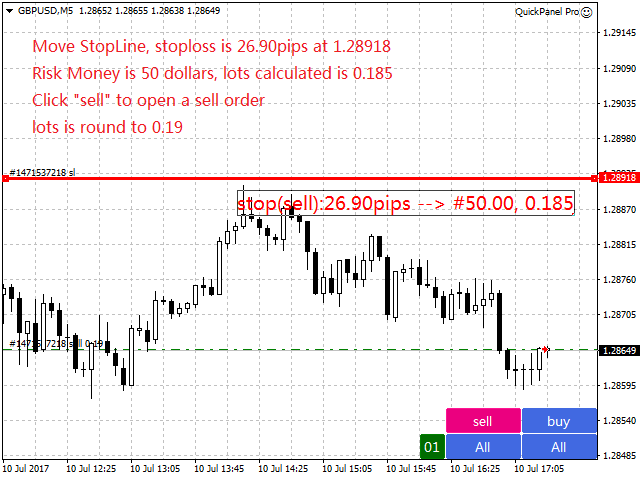
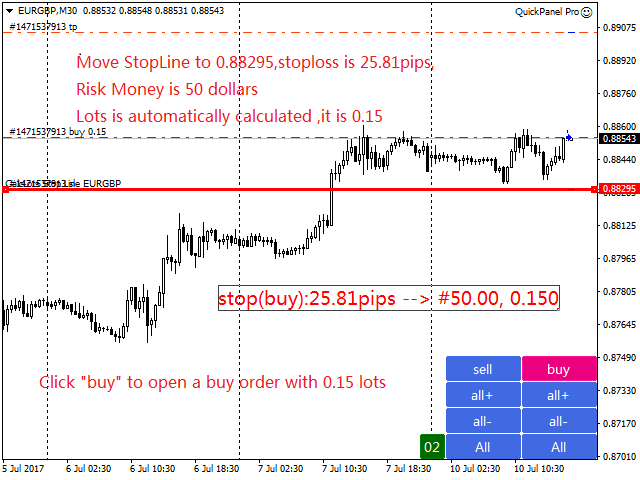
  • Toplu hesaplamalar hızlı ve basittir. Durdurma çizgisini hareket ettirdiğinizde hesaplamalar anında gerçekleştirilir.
  • Çoğu ticari işlem bu panele tıklanarak hızlı bir şekilde tamamlanabilir.
  • Yeşil düğmelere tıklayarak paneller arasında hızlı bir şekilde geçiş yapabilirsiniz.
  • EA, Strateji Test Aracı'nda çalıştırılabilir. Bu özellik stratejilerinizi uygulamanıza ve test etmenize olanak tanır. (Ücretsizdir, bu yüzden deneyin.)
  • Tek bir fare tıklamasıyla zararı durdurmayı değiştirin ve kar alın (geriye dönük test yok)
  • Ortalama fiyatı sarı arka plana sahip bir kutuda gösterir ve ortalama fiyatın içinden bir çizgi çizer.   buraya tıklayın
Kontrol Paneli

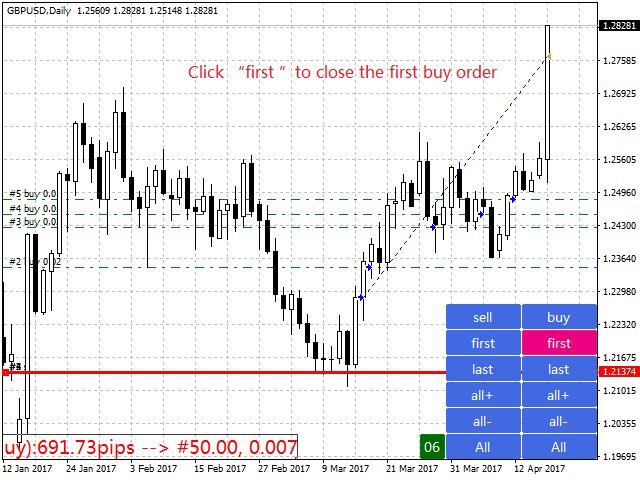
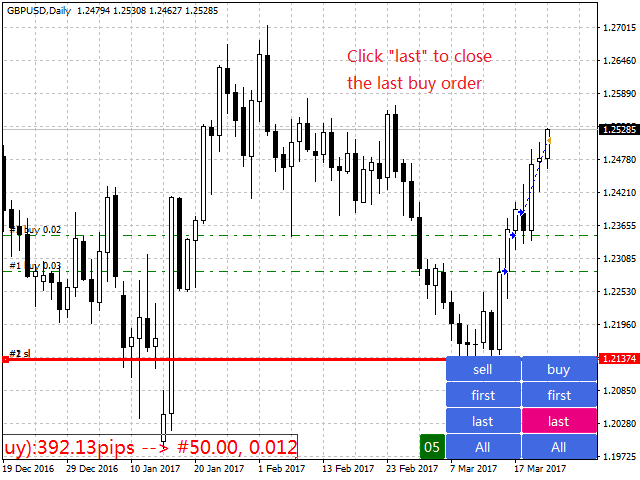
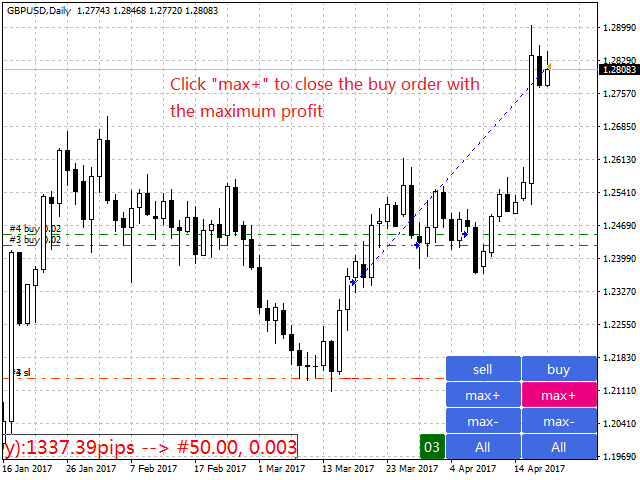
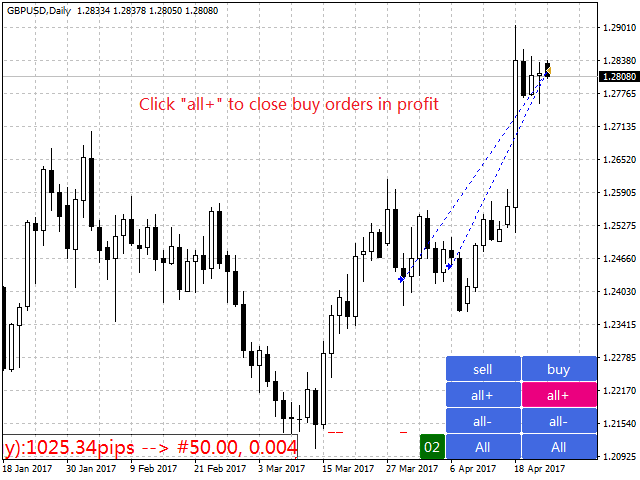
Kontrol paneli iki sütundan oluşur. Sol sütun satış, sağ sütun ise alım içindir.

  • Satış: Bir satış siparişi açın.
  • İlk olarak: İlk satış siparişinizi kapatın. Bunlardan ilki açılış saatleriyle ilgili.
  • Son olarak: Son satış emrini kapatın. Dikkate alınması gereken son şey ofis saatleridir.
  • hepsi+: kârlı bir pozisyonu kapatmak için satış emri.
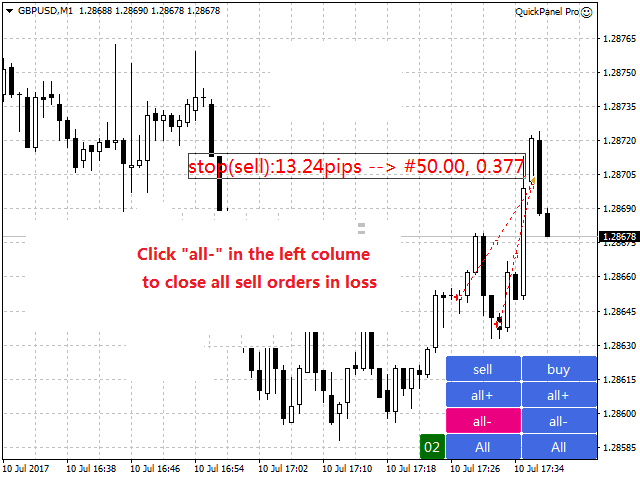
  • all-: Bir satış emrini zararla sonlandırır.
  • max+: Satış emrini maksimum kârla tamamlayın.
  • max-: satış emrini maksimum zararla kapatır.
  • min+: Satış emrini minimum kârla kapatır.
  • min-: satış emrini minimum zararla kapatır.
  • Hepsi: Tüm satış emirlerini kapatır.
  • Satın alma: bir sipariş açın.
  • İlk: İlk siparişinizi tamamlayın. Bunlardan ilki açılış saatleriyle ilgili.
  • Son: Son siparişinizi tamamlayın. Dikkate alınması gereken son şey ofis saatleridir.
  • hepsi+: Satın alma siparişini karlı bir şekilde kapatın.
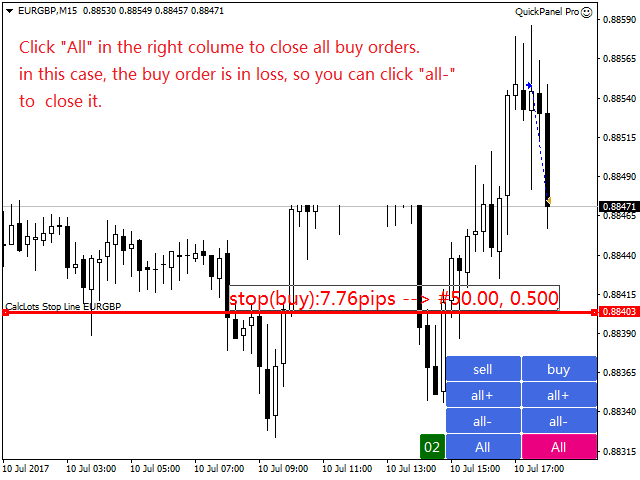
  • all-: kaybedilen bir pozisyonu tasfiye etmek için bir satın alma emri.
  • max+: siparişi maksimum kârla tamamlayın.
  • max-: emri maksimum kayıpla kapatır.
  • min+: Siparişi minimum karla tamamlayın.
  • min-: emri minimum kayıpla kapatır.
  • Hepsi: Tüm siparişler kapalı.


kapmak
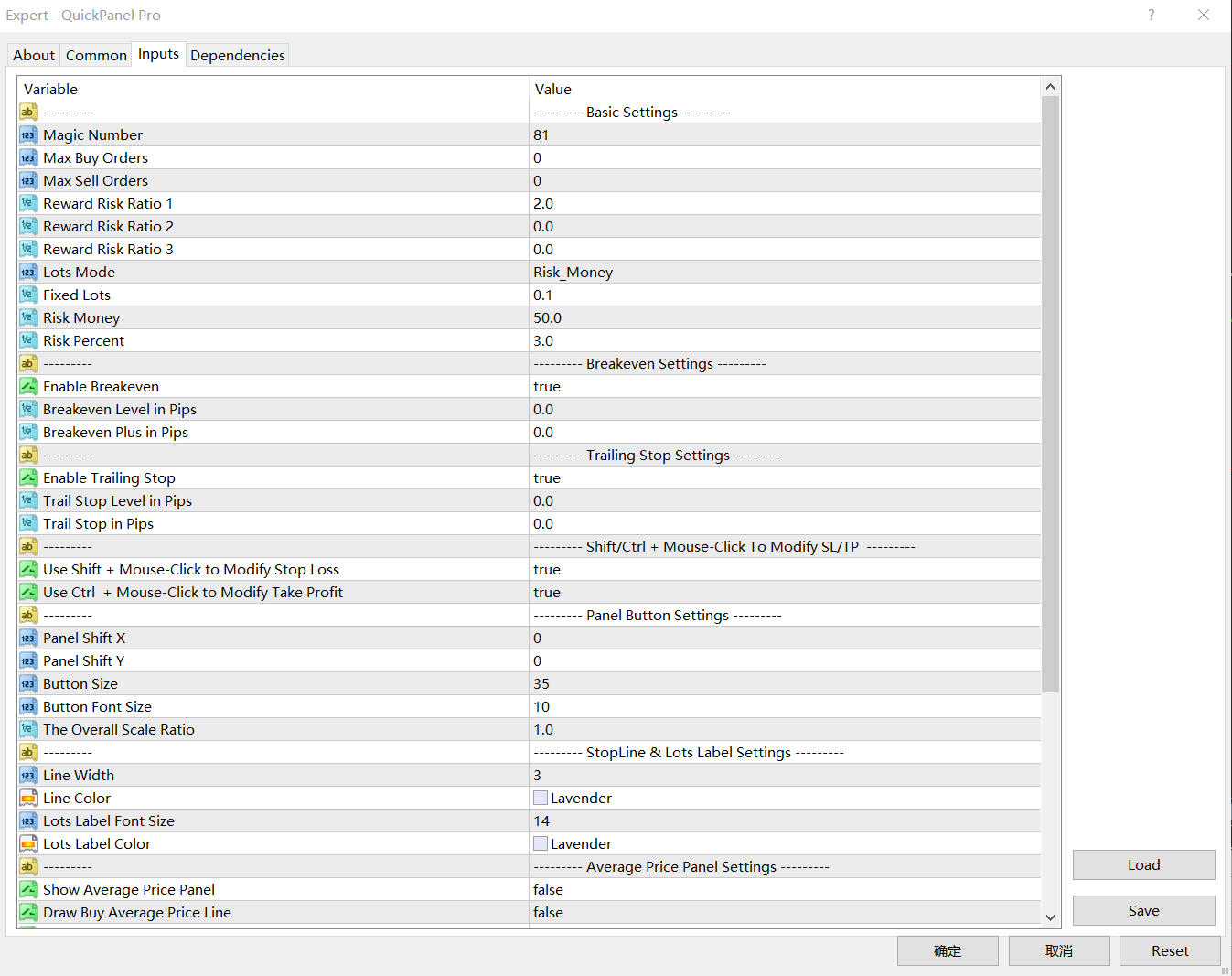
  • Sihirli Numara: Bu EA tarafından başlatılan siparişler için sihirli numara.
  • Maksimum Sipariş Miktarı: Maksimum sipariş miktarıdır. 0'da sınır yoktur.
  • Maksimum Müşteri Siparişi Miktarı: Müşteri siparişinin maksimum miktarıdır. 0'da sınır yoktur.
  • Risk-Ödül Oranı 1: Kar Al ve Zararı Durdur arasındaki başlangıç oranıdır. Değer 0 olarak ayarlanırsa EA komut vermez.
  • Risk-Ödül Endeksi 2 – Kar Al ve Zararı Durdur için ikinci bir endeks.   Değer 0 olarak ayarlanırsa EA komut vermez.
  • Risk-Ödül Endeksi 3: Kar Al ve Zararı Durdur için üçüncü endeks. Değer 0 olarak ayarlanırsa EA komut vermez.
  • Toplu mod: üç seçenekli giriş. Seçenekler Fix_Lots, Risk_Money veya Risk_Percentage'dır.
  • Sabit Lot Boyutu: LotsMode olarak "Fixed_Lots"u seçerseniz, EA ticaret için sabit bir lot boyutu kullanacaktır.
  • Risk Sermayesi: LotsMode olarak Risk_Money'i seçerseniz EA, risk sermayesi değerine göre lot büyüklüğünü hesaplayacaktır. RiskMoney, siparişinizden dolayı kaybedebileceğiniz para miktarıdır.
  • Risk Yüzdesi: LotsMode olarak Risk_Percent'i seçerseniz EA, lot boyutunu mevcut marjın yüzdesi olarak hesaplar.

Başabaş noktasını ayarlayın: BreakevenLevelPips>0 ve BreakevenPlusPips >=0. Aksi halde başabaş noktası işe yaramayacaktır.

  • Başabaş Noktası (Puan): Başabaş fonksiyonunun devreye girdiği kar (puan).
  • Başabaş Artı: Başabaş noktası artı bu giriş başabaş kaybına eşittir.

İz durdurma kaybını ayarlayın: TrailStopLevelPips>0 ve TrailStopPips>0; Aksi halde zararı durdurma çalışmaz

  • İz Durdurma Seviyesi (Puan): İz Durdurma özelliği etkinleştirildiğinde kar (puan cinsinden)
  • İzleyen Durdurma (puan): Zararı durdurma (puan) ile piyasa fiyatı arasındaki mesafe.
Panelin bileşimi:
  • ShiftX paneli: Sağ alt köşedeki yatay boşluk.
  • ShiftY paneli: Sağ alt köşeden dikey mesafe.
  • Düğme Boyutu - Düğmenin yüksekliğini ayarlayın. Genişlik yüksekliğin üç katıdır.
  • Düğme Yazı Tipi Boyutu - Düğmenin yazı tipi boyutunu ayarlayın.
  • Global Yeniden Boyutlandır: Panelin tamamını yeniden boyutlandırın.
Durdurma hattı ayarları
  • Çizgi Genişliği: StopLine'ın çizgi genişliği.
  • Çizgi Rengi: Durma çizgisinin rengi.
  • Toplu Etiket Yazı Tipi Boyutu: Toplu etiket yazı tipi boyutu.
  • Parti Etiket Rengi: Parti etiket metninin rengi.

Toplu hesaplama

Lot büyüklüğü risk sermayesi, zararı durdurma (pip cinsinden) ve pip değeri tarafından belirlenir.

Risk sermayesi, emrinizden dolayı kaybedebileceğiniz para miktarıdır.

Zararı durdur çizgisi, zararı durdurma çizgisi ile piyasa fiyatı arasındaki mesafedir.

LotMode olarak Risk_Money'yi seçtiğinizi, Risk_Money'i 50$'a, Risk Capital'i 50'ye ayarladığınızı ve StopLine'ı EURUSD grafiğindeki piyasa fiyatından 100 piplik bir konuma getirdiğinizi varsayalım. EURUSD için pip değeri 10 olduğundan lot büyüklüğü şu şekilde hesaplanır:

  • Parti Büyüklüğü = 50/(100*10) = 0,05.

Bu durumda sipariş başına kayıp nispeten 50$ olarak belirlenir.

Neden tamamen çözülmedi? Bunun nedeni çapraz kurların EURGBP, EURAUD ve AUDNZD gibi sabit değerlerinin olmamasıdır.

Risk_Percent'i seçip RiskPercent'i 3'e ayarlarsanız, hesap bakiyenizin 1.000 ABD doları olduğunu varsayarak hesaplama aşağıdaki gibi olur:

  • Risk sermayesi=1000*3%=30
  • Parti Büyüklüğü = 30/(100*10) = 0,03.

Bu durumda emir başına kayıp sabit değildir ve yüzdeye ve bakiyeye bağlıdır.


İncelemeler 4
shuanger0602
134
shuanger0602 2018.09.10 06:03 
 

使用了八个月来评价,仓位管理必不可少,又可以复盘练习,功能很强大

Önerilen ürünler
Expert candle finder for forex in MetaTrader 4 Expert candle finder is one of the practical trader assistant experts that is used in the forex financial market, this expert accurately identifies the candlestick patterns on the price chart as a signal, all the found candles. informs you. This expert is run on your Meta trader platform and in a very precise way, it examines all the currency pairs that are in your watch list and every currency pair that had a professional and good candlestick patt
Waddah Attar Easy Positions Risk Management This EA gives you a full ability to close one position or close all positions . Close buy or sell trades in any position . Close profit or loss position . by clicking on a command button on the chart with confirmation message . Show you  a full information about your positions like : count - lots - average price - points - profit -  profit % - used margin for this position and the risk percent . and also the scrolled table of trades that position has
Equity X è una utility che chiude tutte le posizioni ed eventuali ordini pendenti ad un importo prestabilito, è possibile fissare il bilancio del tuo conto quando il netto e uguale o superiore oppure uguale inferiore all'importo desiderato Ha integrato un sistema per la notifica mobile instantanea che genera il messaggio ad operazione avvenuta Uno strumento che permette di ottimizzare al massimo il rendimento del tuo investimento, è possibile utilizzarlo anche come gestore virtuale di take prof
Parameters Lots = 0.01 Stop loss= 50 Take Profit=50 Delay= 2 Buy = true Sell=true LotMultiplier=2 PointMultiplier=1.5 Magic=111 MaxSlippage=30 Start Time=00:00 Stop Time=23:00 GMT Offset=0 that is a utility for trade, you can aitomaticly trading whit vps. And your invest can growing up to 100% or 1000%. you can back test before you buy this for analisis how this utility traing for you.
Jet Punch
Didit Haryadi Saputra
Jet Punch is another best expert advisor for MT4,  can help you make money while you sleep by automatically entering and exiting trades. It trades by opening trades every day and closing them at the right time to ensure you always earn a profit. The software is very simple and can be used by both beginner and experienced traders.  Jet Punch was tested and has successfully passed the stress test with slippage and commission approximate to the real market condition. Recommendations: Currency pair:
The purpose   of this utility is to manage one or more subwindow in the same chart by opening and closing them through a button or the keyboard keys How it works: If you want to handle more than one subwindow you need to reinstall the indicator . In this case some setups has to be customized onlu in the last subwindow installed and others setups in the installed subwindow during the first time installation. They are denoted in the input rispectively as ' LW ' and ' IW '. First of all install
The FFx Hidden Manager panel will help you to manage easily your orders directly on the chart. Below all features described: TP, SL and TrailingStop are hidden Each order has its own lines on chart Drag & Drop any line to change the TP/SL as per your need Option to move automatically the SL line at breakeven when TP #1 is reached Option to choose the TP/SL type (by pips or price) Option to choose the TrailingStop type (by pips, MA, Fractals, PSAR or ATR) Define which order(s) you want to manage
Owl smart levels
Sergey Ermolov
4.24 (37)
MT5 versiyonu  |  FAQ Owl Smart Levels Indicator ,   Bill Williams'ın gelişmiş fraktalları , piyasanın doğru dalga yapısını oluşturan Valable ZigZag ve kesin giriş seviyelerini gösteren   Fibonacci seviyeleri   gibi popüler piyasa analiz araçlarını içeren tek gösterge içinde eksiksiz bir ticaret sistemidir. pazara ve kar elde edilecek yerlere. Stratejinin ayrıntılı açıklaması Gösterge ile çalışma talimatı Baykuş Yardımcısı ticaretinde Danışman Yardımcısı Kullanıcıların özel sohbeti -> Satın ald
Broker Analysis Utility
AL MOOSAWI ABDULLAH JAFFER BAQER
Broker Analysis Utility – Your Ultimate Broker Performance Monitor! Get Full Transparency on Your Broker's Execution Quality! Are you a trader who values precision, transparency, and performance? Broker Analysis Utility is an essential tool designed to monitor your broker's execution quality, connection stability, spreads, slippage, and trading costs in real-time. Whether you are a scalper, day trader, or long-term investor, understanding your broker's performance is crucial to optimizing your
VR Cub
Vladimir Pastushak
VR Cub , yüksek kaliteli giriş noktaları elde etmenin bir göstergesidir. Gösterge, matematiksel hesaplamaları kolaylaştırmak ve bir pozisyona giriş noktalarının aranmasını basitleştirmek için geliştirildi. Göstergenin yazıldığı ticaret stratejisi uzun yıllardan beri etkinliğini kanıtlamaktadır. Ticaret stratejisinin basitliği, acemi yatırımcıların bile başarılı bir şekilde ticaret yapmasına olanak tanıyan büyük avantajıdır. VR Cub, pozisyon açılış noktalarını ve Kâr Al ve Zararı Durdur hedef sev

Entry TP and SL Time Trader Manager Expert for MetaTrader 4 The Entry TP and SL Time Trader Manager is a powerful semi-automated trading tool for MetaTrader 4, designed to simplify trade setup, manage exits, and execute orders with precise timing. This expert advisor enables traders to optimize their trading strategy by defining key parameters such as entry levels, trade volume, and scheduled execution times for maximum efficiency.   Specification Table – Entry TP and SL Time Trader Manager for
Break Moment
Svyatoslav Kucher
5 (2)
Break Moment is a unique proprietary indicator with extensive capabilities and a variety of settings. It can be used as a signal generator or as an auxiliary tool. For the calculations, the price channel is determined. When it is broken, if all conditions of the additional filter are met, it displays a signal in the form of a histogram. Break Moment can be used to determine the main trend, as it has 2 filters for determining it in addition to everything else. If these filters are activated, the
HungrySpider
Aleksandr Hudilainen
2 (1)
Hungry Spider EA is a convenient trading panel and a useful assistant to manage your trades and to set a grid of orders ( not pending orders ) with a push notification option. Hungry Spider is a trading panel to help you save time while trading. The EA does not open orders, but it sets a grid. The grid then opens at actual prices without using pending orders. The grid can be turned on and off in a single click. The EA includes a Trailing Stop function, which can also be activated in a single cli
Easy Set Trade Panel Trade Smarter, Not Harder Take the stress out of trade setup and risk management with the Easy Set Trade Panel — a streamlined, drag-and-drop interface designed for speed, precision, and simplicity. Key Features: Effortless Trade Setup : Just drag your Entry, Stop, and Take Profit lines on the chart. The panel calculates the exact lot size for your trade based on your risk preferences. ️ Smart Risk Management : Choose how you want to control risk: % of Account (e.g., Ri
Vizzion is a fully automated scalping Expert Advisor that can be run successfully using GBPJPY currency pair at H1 timeframe. Very Important This Expert Advisor can not run with any EAs in the same account. As part of the money management plan, it calculates and monitors the Margin Level % and assumes that all open trades are created by it. If you want an Expert Advisor that trades in a daily basis, this EA is not for you because using this requires a patience to wait for a few days or weeks on
Gyroscope        professional forex expert   (for EURUSD, GBPUSD, USDJPY, AUDUSD, USDCHF, EURGBP, EURJPY, NZDUSD, USDCAD, EURCHF, AUDJPY, CADJPY pairs)   alyzing the market using the Elliot Wave Index. Elliott wave theory is the interpretation of processes in financial markets through a system of visual models (waves) on price charts. The author of the theory, Ralph Elliott, identified eight variants of alternating waves (of which five are in the trend and three are against the trend). The mov
A Utility used for accounts with multiple open positions with Magic numbers added via Expert Advisors or manually. The Utility closes specific Magic number open positions when a certain profit in currency $ has been reached. The Utility also closes specific Magic numbers open positions with a break-even feature when the Expert Advisors or manually a certain amount of open positions has been placed. The Utility also closes all buy stops and sell stops when the "Take profit sum $" has been reache
Modify BUY orders_v1.0 Managing Orders   During trading, you may need to modify   orders, i.e.   to change stop levels or  take profit. This can be done with one click with  THE SCRIPT Modify BUY orders v1.0 The script modifies all orders (market )  with specified Take Profit and Stop Loss.(pip or price) If the take profit or(and) stop loss is incorrect, then the value is not changed. Parameters SCRIPT; Take Profit (PIP) Stop Loss (PIP) Take Profit (price) Stop Loss (price)
For MT5: TP SL Calculator This tool helps you to automatically calculate profit at Take - Profit price and loss at Stop - Loss price. Feature: - Calculate profit at TP price. Apply to all operators (BUY / BUY LIMIT / BUY STOP / SELL / SELL LIMIT / SELL STOP), with TP price is greater than 0. Profit is expressed in money and points. - Calculate loss at SL price. Apply to all operators (BUY / BUY LIMIT / BUY STOP / SELL / SELL LIMIT / SELL STOP), with SL price is greater than 0. Loss is express
Trendiness Index
Libertas LLC
5 (3)
"The trend is your friend" is one of the best known sayings in investing, because capturing large trendy price movements can be extremely profitable. However, trading with the trend is often easier said than done, because many indicators are based on price reversals not trends. These aren't very effective at identifying trendy periods, or predicting whether trends will continue. We developed the Trendiness Index to help address this problem by indicating the strength and direction of price trend
Tradingscenes Trading Panel     How will Trading Panel work ? Trading Panel is created as an Expert Advisor, which will enable traders to set pending orders, or mass pending orders in different types Limit orders with additional functions for taking profit as partial, trailing stop and also taking profit with differences price levels; let’s explain in every single functions for you as following parts: Read the full description here:   https://drive.google.com/file/d/10O10dBLLUcdT3MdPvKqO7L3CIFR
"Auto FIBO Pro" Crypto_Forex göstergesi - ticarette harika bir yardımcı araçtır! - Gösterge, Fibo seviyelerini ve yerel trend çizgilerini (kırmızı renk) otomatik olarak hesaplar ve grafikte yerleştirir. - Fibonacci seviyeleri, fiyatın tersine dönebileceği önemli alanları gösterir. - En önemli seviyeler %23,6, %38,2, %50 ve %61,8'dir. - Ters scalping veya bölge ızgara ticareti için kullanabilirsiniz. - Auto FIBO Pro göstergesini kullanarak mevcut sisteminizi geliştirmek için birçok fırsat vardı
A simple script that closes all current orders. Terminate once close all positions, so please don't worry about constantly closing your order. How to use : Drag the script from the navigator to the chart to activate it. Do remember to enable algo trading to use this script. There are different versions of the script that can choose whether to close all buy/sell posiitons, if you need this, do contact me in MQL5.
Boom Coded News MT4
Muhammad Faiz Fathi Bin Mohd Marzuki
This EA does not make entry,you must setup first. After setup this EA will execute order based on input parameter. For MT5 version : CLICK HERE TO BUY MT5 VERSION EA BOOM CODED NEWS Time-Locked Entry System Executes one precise market order exactly at your predefined MT4 server time (HH:MM:SS). Single Trade Per News Designed to avoid overtrading — ideal for news. Recommended on high impact news like NFP,CPI,FOMC and other red high impact news Auto-Off After Entry EA can automatic
Trend Ray
Andriy Sydoruk
The indicator shows the potential trend direction by cyclical-wave dependence. Thus, all the rays of the intersection will be optimal rays, in the direction of which the price is expected to move, taking into account the indicator period. Rays can be used as a direction for potential market movement. But we must not forget that the approach must be comprehensive, the indicator signals require additional information to enter the market.
This utility tool help you to close all orders which is having loss immediatly with only ONE CLICK, its work is very fast. You can choose which symbol you want or close all symbols so it will helpful for you in your trading to manage trading faster. If you want it work on all symbols, you just need to leave symbol parameter blank (like in default setting). If you want it work on 1 symbol only (for example EURUSD orders) you need to put symbol =EURUSD (see screenshot below). This is a script, so
NFTrader Lite Displays Resistance / Support Lines Displays Take Profit and Stop Loss Easy adjust Take Profit/Stop Loss and Lot Size Open Buy/Sell with one click Displays Take Profit/Stop Loss in money value Easy to hide the panel when in trading Take your trading to the next step with easy to use panel display For more information please visit us at www.nextforce-ig.com
Smart Funded Hft
Barbaros Bulent Kortarla
4.82 (65)
Smart Funded HFT EA ile Ticaret Potansiyelinizi Açın! VPS GEREKTİRMEZ / AYAR DOSYALARI GEREKTİRMEZ / PRİZ VE OYNAT KEYFİNİ ÇIKARIN / kolay kurulum videosunu aşağıda kontrol edin SINIRLI SÜRE İÇİN TANITIM FİYATI Ticaret sırrımı paylaşmaktan heyecan duyuyorum – Smart Funded EA. Yüzlerce zorlukla mükemmel bir başarı oranıyla mücadele ettim ve şimdi sıra ticaret oyununuzu yükseltmeye geldi! BU EA, HFT KULLANIMINA İZİN VEREN PROP FİRMALARIN HFT ZORLUKLARINI GEÇMEK İÇİN TASARLANMIŞTIR. HFT KULLANIMINA
This utility can compare simultaneously time frames of different instruments and keep under control   the nine major time frames  of an instrument. It is composed by two changers, a crosshair and some additional components : the  multicharts time frames changer   is designed to  compare  simultaneously  up to thirty time frames  of different symbols with the  keyboard or the button the multicharts symbols changer can  link up to nine charts and control simultaneously the nine major time frame b
This utility provides the ability to use hot keys in manual trading instantly responding to the current market situation. You can assign hot keys to open/close positions by their type, close all positions on the current chart and remove all orders on the current chart. You can also assign hot keys for five predefined trade volumes and switch between them if necessary with no need to change the volume manually from time to time. It is also possible to set the auto calculation of a trade volume in
Bu ürünün alıcıları ayrıca şunları da satın alıyor
Local Trade Copier EA MT4
Juvenille Emperor Limited
4.96 (105)
Local Trade Copier EA MT4 ile olağanüstü hızlı işlem kopyalama deneyimi yaşayın. Kolay 1 dakikalık kurulumuyla bu işlem kopyalayıcısı, aynı Windows bilgisayarda veya Windows VPS'te birden fazla MetaTrader terminali arasında işlemleri kopyalamanıza olanak tanır ve 0.5 saniyenin altındaki şimşek hızında kopyalama hızları sunar. Başlangıç seviyesinde veya profesyonel bir tüccar olsanız da, Local Trade Copier EA MT4 , spesifik ihtiyaçlarınıza göre özelleştirmek için geniş bir seçenek yelpazesi sunar
Trade Assistant MT4
Evgeniy Kravchenko
4.42 (192)
It helps to calculate the risk per trade, the easy installation of a new order, order management with partial closing functions, trailing stop of 7 types and other useful functions. Additional materials and instructions Installation instructions   -   Application instructions   -   Trial version of the application for a demo account Line function -   shows on the chart the Opening line, Stop Loss, Take Profit. With this function it is easy to set a new order and see its additional characteris
Trade Manager EA’ye hoş geldiniz! Ticaretin daha sezgisel, hassas ve verimli hale gelmesi için tasarlanmış nihai risk yönetim aracı ile tanışın. Bu sadece bir emir verme aracı değil; ticaret planlaması, pozisyon yönetimi ve risk kontrolü için kapsamlı bir çözüm. İster yeni başlayan bir yatırımcı olun, ister deneyimli bir trader ya da hızlı emir gerektiren bir scalper, Trade Manager EA ihtiyaçlarınıza uyum sağlar ve forex, endeksler, emtialar ve kripto paralar dahil tüm piyasalarda esneklik sunar
The product will copy all telegram signal to MT4   ( which you are member  ) , also it can work as remote copier.  Easy to set up, copy order instant, can work with almost signal formats, image signal, s upport to translate other language to English Work with all type of channel or group, even channel have "Restrict Saving Content", work with  multi channel, multi MT5 Work as remote copier: with signal have ticket number, it will copy exactly via ticket number. Support to backtest signal. How to
Copy Cat More Trade Copier MT4 (Kopyacı MT4) sadece basit bir yerel trade kopyalayıcı değildir; günümüzün alım satım zorlukları için tasarlanmış eksiksiz bir risk yönetimi ve yürütme çerçevesidir. Prop firm sınavlarından kişisel hesap yönetimine kadar, güçlü yürütme, sermaye koruması, esnek yapılandırma ve gelişmiş işlem yönetimi ile her duruma uyum sağlar. Kopyalayıcı hem Master (gönderici) hem de Slave (alıcı) modlarında çalışır ve piyasa emirleri ile bekleyen emirlerin gerçek zamanlı senkroni
Exp COPYLOT CLIENT for MT4
Vladislav Andruschenko
4.69 (65)
MetaTrader 4 için ticaret fotokopisi.       Herhangi bir hesaptan forex işlemlerini, pozisyonlarını, emirlerini kopyalar. En iyi ticari fotokopi makinelerinden biridir.       MT4 - MT4, MT5 - MT4       için       KOPYLOT MT4       sürüm (veya       MT4 - MT5 MT5 - MT5       için       KOPYLOT MT5       sürüm). MT5 sürümü Tam tanım   +DEMO +PDF Nasıl alınır Nasıl kurulur     Günlük Dosyaları nasıl alınır?     Nasıl Test Edilir ve Optimize Edilir     Expforex'in tüm ürünleri için fotokopi   sür
Trade copier MT4
Alfiya Fazylova
4.58 (33)
Trade Copier, ticaret hesapları arasındaki işlemleri kopyalamak ve senkronize etmek için tasarlanmış profesyonel bir yardımcı programdır. Kopyalama, tedarikçinin hesabından/terminalinden alıcının aynı bilgisayarda veya vps'de kurulu olan hesabına/terminaline gerçekleşir. Satın almadan önce demo sürümünü bir demo hesabında test edebilirsiniz. Demo versiyonu burada . Tüm talimatlar burada . Ana işlevler ve avantajlar: Emirlerin kopyalanmasını destekler: МТ4> МТ4, МТ4> МТ5, МТ5> МТ4. Emirlerin kopy
MT4 to Telegram Signal Provider , Telegram'a sinyal göndermeyi sağlayan ve hesabınızı bir sinyal sağlayıcısına dönüştüren kullanımı kolay ve tamamen özelleştirilebilir bir araçtır. Mesajların formatı tamamen özelleştirilebilir! Ancak basit kullanım için, önceden tanımlanmış bir şablonu seçebilir ve mesajın belirli kısımlarını etkinleştirebilir veya devre dışı bırakabilirsiniz. [ Demo ]  [ Kullanım Kılavuzu ] [ MT5 Sürümü ] [ Discord Sürümü ] [ Telegram Kanalı ]  New: [ Telegram To MT5 ] Kurulum

TradePanel MT4
Alfiya Fazylova
4.84 (89)
Ticaret Paneli çok işlevli bir ticaret asistanıdır. Uygulama, manuel ticaret için 50'den fazla ticaret işlevi içerir ve çoğu ticaret işlemini otomatikleştirmenize olanak tanır. Dikkat, uygulama strateji test cihazında çalışmıyor. Satın almadan önce demo sürümünü bir demo hesabında test edebilirsiniz. Demo sürümü burada . Talimatların tamamı buraya . Ticaret. Tek tıklamayla alım satım işlemlerini gerçekleştirmenizi sağlar: Otomatik risk hesaplaması ile bekleyen emir ve pozisyonları açın. Tek tıkl

Tired of complex order placement and manual calculations? Trade Dashboard is your solution. With its user-friendly interface, placing orders becomes effortless, by a single click, you can open trades, set stop loss and take profit levels, manage trade lot size, and calculate risk to reward ratios, allowing you to only focus on your strategy. Say goodbye to manual calculations and streamline your trading experience with Trade Dashboard. Download  Demo Version  right now. You can find  Details of
EchoTrade Telegram to MT5 Copier Seamless, Instant, and Reliable Signal Copying - Direct from Telegram to MetaTrader 4! The product does not run in the strategy tester but you can get free trial version   here  for testing before purchase. Tired of manually executing trades from Telegram signals? EchoTrade automates the process, instantly copying trades from any Telegram channel or group directly into your MT5 account—accurately, efficiently, and without delay. Key Features: Universal Compatib
News Filter EA: Advanced Algo Trading Assistant News Filter EA is an advanced algo trading assistant designed to enhance your trading experience. By using the   News Filter EA , you can integrate a Forex economic news filter into your existing expert advisor, even if you do not have access to its source code. In addition to the news filter, you can also specify   trading days   and   hours   for your expert. The News Filter EA also includes   risk management   and   equity protection   features
Kar takip fonksiyonu ile toplam kar/zarara ulaşıldığında MetaTrader 4'te pozisyonları kapatmak. Sanal durakları (Ayrı Sipariş) etkinleştirebilirsiniz, AL ve SATIŞ pozisyonlarının ayrı ayrı hesaplanması ve kapatılması (Ayrı AL SATIŞ), Tüm sembollerin veya sadece mevcut sembolün kapatılması ve hesaplanması (Tüm Semboller), Kâr için takip etmeyi etkinleştir ( Sondaki Kâr ) Mevduat para birimi, puan, bakiyenin yüzdesi üzerinden toplam kâr ve zararı kapatın. Uygulama, diğer herhangi bir EA ile birli
Fotokopi->Kullanışlı ve hızlı arayüz etkileşimi, kullanıcılar hemen kullanabilir       ->>>> Windows bilgisayarlarda veya VPS Windows'ta kullanılması önerilir Temel işlevler: Kopyalama ticaretinin normal etkileşim hızı 0,5 saniyeden azdır Sinyal kaynaklarını otomatik olarak algıla ve sinyal kaynağı hesaplarının bir listesini görüntüle Sembolleri otomatik olarak eşleştirin, farklı platformlarda yaygın olarak kullanılan ticaret sembollerinin %95'i (farklı ekler gibi özel durumlar) otomatik olarak
MT4 için Expert Advisor Risk Manager çok önemli ve bence her yatırımcı için gerekli bir program. Bu Uzman Danışman ile ticaret hesabınızdaki riski kontrol edebileceksiniz. Risk ve kar kontrolü hem parasal hem de yüzdesel olarak yapılabilir. Danışman işlevleri Bu risk yöneticisi, riskleri kontrol etmenize yardımcı olacaktır: - bir anlaşma için - günlük - bir hafta için - Bir ay için Ayrıca kontrol edebilirsiniz 1) Ticaret yaparken izin verilen maksimum lot 2) günlük maksimum sipariş sayısı
Everything for chart Technical Analysis indicator MT4 in one tool Draw your supply demand zone with rectangle and support resistance with trendline and get alerts to mobile phone or email alert -  Risk reward indicator Video tutorials, manuals, DEMO download   here .  Find contacts on my   profile . 1.   Extended rectangles and trendlines Object will be extended to the right edge of the chart when price will draw new candles on chart. This is rectangle extender or trendline extender. 2. Price to
Ultimate Extractor - Professional Trading Analytics for MT4 Ultimate Extractor transforms your MetaTrader 4 trading history into actionable insights with comprehensive analytics, interactive charts, and real-time performance tracking. Ability to combine multiple accounts and MT4 and MT5 into a single dashboard. What It Does Automatically analyzes your MT4 trading history across all Expert Advisors and generates detailed HTML reports with interactive visualizations. Tracks live performance metric
Devrim niteliğindeki X2 Copy MT4 ile Anında Trade Kopyalamayı Keşfedin. Sadece 10 saniyelik bir kurulumla, tek bir Windows bilgisayarda veya VPS'te MetaTrader terminalleri arasında trades senkronizasyonu için güçlü bir araç elde edeceksiniz - benzeri görülmemiş bir hızla, 0.1 saniyenin altında. İster birden fazla hesap yönetin, ister sinyalleri takip edin, ister stratejinizi ölçeklendirin, X2 Copy MT4 eşsiz bir hassasiyet ve kontrolle iş akışınıza uyum sağlar. Beklemeyi bırakın — piyasa lideri h
Unlimited Trade Copier Pro is a tool to copy trade remotely to multiple MT4, MT5 and cTrader accounts at different computers/locations over internet. This is an ideal solution for you if you are a signal provider and want to copy your trades to other receivers globally on your own rules. One provider can copy trades to multiple receivers and one receiver can get trade from multiple providers as well. The provider can even set the subscription expiry for each receiver, so that receiver will not b
Bu, Trend Line PRO göstergesi için otomatik parametre iyileştiricisidir En sevdiğiniz Trend Line PRO göstergesi için en uygun parametreleri kolayca ve hızlı bir şekilde seçeceksiniz.  Optimizasyon sadece birkaç saniye sürer. İyileştirici, her bir çift ve periyot için en iyi parametreleri bulmanızı sağlar: Amplitude, TP1-TP3, StopLoss ve seçilen tarih bölümünde (Days) Time Filter ve HTF Filter için değerler  Farklı zaman dilimlerini optimize etmek için farklı geçmiş aralıklarına ihtiyacınız var
This is a simple utility which will put Automatic Stop Loss and Take Profit. It also has Trailing Stop Loss and Break Even features. The input value of the Stop Loss and Take Profit is in Pips. Whenever you open a trade it will put stop loss and take profit in pips automatically. *If you need a more practical stop loss and take profit for your trades then you may like this ATR based stop loss utility,  Here! Inputs: 1. SL and Trailing SL - This is the Stop Loss value in Pips. Also used as Traili
Riskinizi otomatik olarak hesaplarken işlemlere hızlı bir şekilde girip çıkmanıza yardımcı olacak Ticaret Yöneticisi. Aşırı Ticaret, İntikam Ticareti ve Duygusal Ticaretten korunmanıza yardımcı olacak özellikler içerir. İşlemler otomatik olarak yönetilebilir ve hesap performans ölçümleri bir grafikte görselleştirilebilir. Bu özellikler, bu paneli tüm manuel yatırımcılar için ideal kılar ve MetaTrader 4 platformunun geliştirilmesine yardımcı olur. Çoklu Dil desteği. MT5 Sürümü  |  Kullanım Kılavu
VirtualTradePad mt4 Extra
Vladislav Andruschenko
4.86 (59)
1 tıklama ile ticaret için Ticaret Paneli.   Pozisyonlar ve emirlerle çalışmak!   Grafikten veya klavyeden alım satım. Alım satım panelimizi kullanarak, grafikten tek bir tıklamayla alım satım yapabilir ve alım satım işlemlerini standart MetaTrader kontrolünden 30 kat daha hızlı gerçekleştirebilirsiniz. Bir tüccar için hayatı kolaylaştıran ve bir tüccarın ticaret faaliyetlerini çok daha hızlı ve daha rahat gerçekleştirmesine yardımcı olan parametrelerin ve işlevlerin otomatik hesaplamaları. Graf
Bu ürün, haber saatlerinde tüm uzman danışmanları ve manüel grafikleri filtreler, böylece manüel ticaret kurulumlarınızı veya diğer uzman danışmanlar tarafından girilen işlemleri yok edebilecek ani fiyat dalgalanmaları konusunda endişelenmenize gerek kalmaz. Bu ürün, herhangi bir haber yayınlanmadan önce açık pozisyonlarınızı ve bekleyen emirlerinizi yönetebilen tam bir sipariş yönetim sistemi ile birlikte gelir. The News Filter'ı satın aldığınızda, gelecekteki uzman danışmanlar için yerleşik ha
Riskless Pyramid
Snapdragon Systems Ltd
5 (1)
Introduction This powerful MT4 trade mangement EA offers a way potentially to aggressively multiply trade profits in a riskfree manner. Once a trade has been entered with a defined stoploss and take profit target then the EA will add three pyramid add-on trades in order to increase the overall level of profit. The user sets the total combined profit target to be gained if everything works out. This can be specified either as a multiple of the original trade profit or as a total dollar amount. Fo
Shepherd Safety EA
AW Trading Software Limited
4.92 (13)
The work of the utility is directed at opening new market orders, maintaining them, transferring the unprofitable orders into profit using an internal loss handling algorithm, trend filtering and various types of trailing stop and take profit. Suitable for any instruments and timeframes. The algorithm works separately for buys and sells, which allows simultaneously working in both directions as well. For the event when the additional orders opened by the utility do not become profitable, a StopO
Strategy Builder offers an incredible amount of functionality. It combines a trade panel with configurable automation (covert indicators into an EA), real-time statistics (profit & draw down) plus automatic optimization of SL, TP/exit, trading hours, indicator inputs. Multiple indicators can be combined into an single alert/trade signal and can include custom indicators, even if just have ex4 file or purchased from Market. The system is easily configured via a CONFIG button and associated pop-up
Effortlessly calculate lot sizes and manage trades to save time and avoid costly errors The Trade Pad Pro EA is a tool for the Metatrader Platform that aims to help traders manage their trades more efficiently and effectively. It has a user-friendly visual interface that allows users to easily place and manage an unlimited number of trades, helping to avoid human errors and enhance their trading activity. One of the key features of the Trade Pad Pro EA is its focus on risk and position manageme
The most advanced news filter on MQL market - free demo available Take a Break has transformed from a basic news filter into a comprehensive account protection solution. It seamlessly pauses any other Expert Advisors during news events or based on your custom filters, all while safeguarding your EA settings - restoring them automatically when trading resumes for complete peace of mind. Typical use cases: A single news filter for all your EAs. Stop trading during news/high volatility (+ close all
Fotokopi->Kullanışlı ve hızlı arayüz etkileşimi, kullanıcılar hemen kullanabilir       ->>>> Windows bilgisayarlarda veya VPS Windows'ta kullanılması önerilir Özellikler: Çeşitlendirilmiş ve kişiselleştirilmiş kopyalama ticareti ayarları: 1. Farklı sinyal kaynakları için farklı lot modları ayarlanabilir 2. İleri ve geri kopyalama ticareti için farklı sinyal kaynakları ayarlanabilir 3. Sinyaller yorumlarla ayarlanabilir 4. Lotun sözleşme lotuna göre kalibre edilip edilmeyeceği Çeşitlendirilmiş v
Yazarın diğer ürünleri
Bu gösterge sekiz ana para biriminin (USD, EUR, GBP, AUD, NZD, CAD, CHF, JPY) göreceli gücünü gösterir. Kuvvet değerleri 0 ila 100 aralığında normalleştirilir. 60'tan büyük bir değer güçlü anlamına gelir. 40'ın altındaki bir sayı zayıflığı gösterir. bilet Only Show Current Pair   -       Doğruysa yalnızca geçerli kart çifti görüntülenir. Aksi takdirde sekiz eğrinin tümü görüntülenecektir. Bars To Show   – Kuvvet eğrisini görüntüleyecek çubuk sayısı. Ma Periods To Smooth Curves     : yoğunluk e
This EA is designed to monitor the slippage of opening and closing orders, and save the records in csv file. It is useful to record the slippage and evaluate brokers. The record files are saved in the folder  MT5_Data_Folder\MQL5\Files.  Go to   "File " --> "Open Data Folder"   . Warning :   Do NOT open the files directly, otherwise it will affect the exectution of EA, just copy them to another folder and open them. Usage: Open a chart and load the EA on it, just need only one EA to run, it mo
FREE
Gösterge iki bölümden oluşur. Bölüm I: Renkli Mumlar Ana Trendi Gösteriyor Renkli mumlar, piyasa durumunu renkli mum çubuklarıyla tanımlamaktır. Ekran görüntülerinde görüldüğü gibi renk Aqua ise piyasa uzun emir vermeniz veya kısa emirlerden çıkmanız gereken bir durumda demektir. Renk Domates ise kısa sipariş verme veya uzun siparişlerden çıkma zamanı gelmiştir. Renk değişiyorsa tamamlanmasını beklemek daha iyidir (mevcut çubuk kapanana kadar). Bölüm II: Bantların çizilmesi İç bantlar güvenli al
Beta Bands
Ziheng Zhuang
5 (1)
This indicator shows main trend, entry zone and exit zone. This is a muti-timeframe indicator, so it is always repainting in the current period of the higher timeframe. Features Colorful Histogram: it indicates the main trend, the tomato means the market is bearish,and the sky blue means the market is bullish. Inner Blue Bands: it is entry zone for entry market, the market is relatively safe for entry. Outer Yellow Bands: it is exit zone for exit market, the market is oversold or overbought.
This EA is designed to monitor the slippage of opening and closing orders, and save the records in files. It is useful to record the slippage and evaluate brokers. The record files are saved in the folder  MT4_Data_Folder\MQL4\Files.  Go to "File " --> "Open Data Folder" . Warning : Do NOT open the files directly, otherwise it will affect the exectution of EA, just copy them to another folder and open them. Usage: Open a chart and load the EA on it, just need only one EA to run, it monitors al
FREE
This is a MetaTrader 4 script. It helps to summarize all trades into every symbol. Input Select Period: This is 7-option input. It includes Last Month, This Month, Last Week, This Week, Today, All History, and Date Specified. Specify Starting Date: Enter a date if you selected Date Specified in "Select Period" input. Specify Ending Date: Enter a date if you selected Date Specified in "Select Period" input. The summary is saved into a file in MQL4\Files folder. Also, there is pop-up window for a
FREE
This is a MetaTrader 5 script. It helps to summarize all trades into every symbol. Input Select Period: This is 7-option input. It includes Last Month, This Month, Last Week, This Week, Today, All History, and Date Specified. Specify Starting Date: Enter a date if you selected Date Specified in "Select Period" input. Specify Ending Date: Enter a date if you selected Date Specified in "Select Period" input. The summary is saved into a file in MQL5\Files folder. MT4 Version:   https://www.mql5.co
FREE
This is a MetaTrader 4 script. It helps to export all trades into a CSV file as per Symbol and selected periods. Input Select Symbol: This is 2-option input. Select current symbol or all symbols to export its orders. Select Period: This is 7-option input. It includes Last Month, This Month, Last Week, This Week, Today, All History, and Date Specified. Specify Starting Date: Enter a date if you selected Date Specified in "Select Period" input. Specify Ending Date: Enter a date if you selected Da
FREE
Bu danışman aşağıdaki özellikleri sunar: Açık Pozisyon: Fiyat trend çizgisini geçtiğinde uzun veya kısa emir açın. Tasfiye: Fiyat trend çizgisini geçtiğinde uzun veya kısa pozisyonları tasfiye edin. İzleyen Zarar Durdurma – EA, trend çizgisini takip eder ve uzun vadeli emirler için zararı durdurmayı artırmaya veya kısa vadeli emirler için zararı durdurmayı azaltmaya devam eder. Çizgi bir trend çizgisi veya yatay bir çizgi olabilir.       Trend çizgileri radyal veya segmental olabilir. Bir hat an
Bu panel uzman danışmanlardan oluşur ve altı ticaret paneli grubu sunar. MT5 sürümü:   Hızlı panel kapsamı özellikler Çoğu alım satım işlemi bu paneldeki düğmelere tıklanarak hızlı bir şekilde gerçekleştirilebilir. Panelleri değiştirmek yeşil düğmeye tıklamak kadar kolaydır. EA, Strateji Test Cihazının görsel grafikleri üzerinde çalıştırılabilir ve geçmiş verilere dayalı ticaret pratiği yapmanın kolay bir yolunu sunar. Tek bir fare tıklamasıyla zararı durdurmayı değiştirin ve kar alın (geriye d
Bu gösterge sekiz ana para biriminin (USD, EUR, GBP, AUD, NZD, CAD, CHF, JPY) göreceli gücünü gösterir. Kuvvet değerleri 0 ila 100 aralığında normalleştirilir. 60'tan büyük bir değer güçlü anlamına gelir. 40'ın altındaki bir sayı zayıflığı gösterir. Temel prensip Her iki çiftin birleştirilebildiği ve toplamda 28 çift elde edilen sekiz para birimi (USD,EUR,GBP,AUD,NZD,CAD,CHF,JPY) verildiğinde, sekiz para biriminin gücünü çıkarmak için ters bir algoritma kullanılır. bu 28 çiftten EURUSD,GBPUSD,A
This indicator shows the main trend on the current chart. Features This indicator includes two bands, one is the inner white bands, another is the outer blue bands. If the white dotted line crosses down the white solid line, this means that the trend has changed to be bearish. If the white dotted line crosses up the white solid line, this means that the trend has changed to be bullish. Once the crossing happened, it will not repaint. Settings ShowColorCandle: if 'true', it will show the color
Bu danışman, tek bir tıklamayla birden fazla çiftte işlem yapmanıza olanak tanıyan bir kontrol panelidir. Tıklamak       açık       Bu düğme seçilen çift için bir emir açar. Tıklamak       kapalı       Bu buton seçilen çiftin emrini kapatır. Sipariş lotu kullanıcı tarafından girilen sayıdır. Pozitif sayılar alış emirlerine, negatif sayılar ise satış emirlerine karşılık gelir. Siparişin yalnızca bir kısmını değil tamamını kapatmak için   Kapat düğmesini   tıklayın. Nihai işlem bilet numarasına b

This indcator shows the trend with the color histogram. It is simple and easy to use. Usage: If the histogram changes from the aqua to the fuchsia, which means the trend is up. If the histogram changes from the fuchsia to the aqua,which means the trend is down. Inputs: MaPeriods: the periods of moving average. f1: the multiplier of inner bands f2: the multiplier of outer bands Popup Window Alert Email Alert Mobile Push Alert Alerts When the trend changes from the long trend to the short trend or
Pair Power Matrix
Ziheng Zhuang
3.67 (3)
This indicator is designed to show the pair power of the major 28 paris with RSI,Stochostic,and CCI. The power value is sorted from the weak to the strong. The weaker pairs: the pairs occurs at least 2 times in the top 3 rows The stronger pairs:   the pairs occurs at least 2 times in the bottom 3 rows Users can add another symbol, so it can calculate 28+1 symbols. My advice: https://www.mql5.com/en/blogs/post/729880 A free EA with Pair Power Matrix  ---  https://www.mql5.com/en/blogs/post/7328
The purpose of the inidcator is to identify the reversal point. The blue arrow is buy signal and the yellow star is its stop loss. The red arrow is sell signal and the yellow star is its stop loss. Alert feature: if there is a signal, the indicator will send alerts of  popup window,email or mobile push. Inputs: Popup Window Alert: it is false in default Email Alert : it is false in default Mobile Push Alert: it is false in default. MetaTrader 5 Version: Reversal Point Please note that the singal
Gösterge iki bölümden oluşur. Bölüm I: Renkli Mumlar Ana Trendi Gösteriyor Renkli mumlar, piyasa durumunu renkli mum çubuklarıyla tanımlamaktır. Ekran görüntülerinde görüldüğü gibi renk Aqua ise piyasa uzun emir vermeniz veya kısa emirlerden çıkmanız gereken bir durumda demektir. Renk Domates ise kısa sipariş verme veya uzun siparişlerden çıkma zamanı gelmiştir. Renk değişiyorsa tamamlanmasını beklemek daha iyidir (mevcut çubuk kapanana kadar). Bölüm II: Bantların çizilmesi İç bantlar güvenli al
saat. Bu ipucu yalnızca hesap kapsamı içindir. Meta Trader 4 sürümü       Quick Panel Pro özellikler Toplu hesaplamalar hızlı ve basittir. Durdurma çizgisini hareket ettirdiğinizde hesaplamalar anında gerçekleştirilir. Çoğu ticari işlem bu panele tıklanarak hızlı bir şekilde tamamlanabilir. Yeşil düğmelere tıklayarak paneller arasında hızlı bir şekilde geçiş yapabilirsiniz. Tek bir fare tıklamasıyla zararı durdurmayı değiştirin ve kar alın (geriye dönük test yok) Ortalama fiyatı sarı arka plana
Not: Bu EA yalnızca risksiz hesaplarda çalışır. Metatrader sürüm 4       hızlı panel Bu panel, bir müzakere panelini oluşturan altı uzman danışmandan oluşan bir gruptur. özellikler Çoğu alım satım görevi bu panellerdeki düğmelere tıklanarak hızlı bir şekilde tamamlanabilir. Paneller arasında geçiş yapmak yeşil düğmeye tıklamak kadar kolaydır. EA, Strateji Test Cihazının görsel grafikleri üzerinde çalıştırılabilir ve geçmiş verileri kullanarak ticaret pratiği yapmak için kolay bir yol sağlar. T
Gamma Bands   This indcator shows the trend with the color histogram. It is simple and easy to use. Usage: If the histogram changes from the aqua to the fuchsia, which means the trend is up. If the histogram changes from the fuchsia to the aqua,which means the trend is down. Inputs: MaPeriods: the periods of moving average. f1: the multiplier of inner bands f2: the multiplier of outer bands   Popup Window Alert Email Alert Mobile Push Alert Alerts When the trend changes for the long trend to the
The purpose of the inidcator is to identify the reversal point. The blue arrow is buy signal and the yellow star is its stop loss. The red arrow is sell signal and the yellow star is its stop loss. Please note that the singal is against trend,it could be continual fail. Alert feature: if there is a signal, the indicator will send alerts of  popup window,email or mobile push. Inputs: Popup Window Alert: it is false in default Email Alert : it is false in default Mobile Push Alert: it is false in
Bu danışman aşağıdaki özellikleri sunar: Açık Pozisyon: Fiyat trend çizgisini geçtiğinde uzun veya kısa emir açın. Tasfiye: Fiyat trend çizgisini geçtiğinde uzun veya kısa pozisyonları tasfiye edin. İzleyen Zarar Durdurma – EA, trend çizgisini takip eder ve uzun vadeli emirler için zararı durdurmayı artırmaya veya kısa vadeli emirler için zararı durdurmayı azaltmaya devam eder. Çizgi bir trend çizgisi veya yatay bir çizgi olabilir.       Trend çizgileri radyal veya segmental olabilir. Bir hat an
Bu danışman, tek bir tıklamayla birden fazla çiftte işlem yapmanıza olanak tanıyan bir kontrol panelidir. Tıklamak       açık       Bu düğme seçilen çift için bir emir açar. Tıklamak       kapalı       Bu buton seçilen çiftin emrini kapatır. Sipariş lotu kullanıcı tarafından girilen sayıdır. Pozitif sayılar alış emirlerine, negatif sayılar ise satış emirlerine karşılık gelir. Siparişin yalnızca bir kısmını değil tamamını kapatmak için   Kapat düğmesini   tıklayın. Nihai işlem bilet numarasına b
Filtrele:
HAO LONG
37
HAO LONG 2023.02.22 16:52 
 

Kullanıcı incelemeye herhangi bir yorum bırakmadı

Ziheng Zhuang
40273
Geliştiriciden yanıt Ziheng Zhuang 2023.02.22 17:10
你好,谢谢5星好评.
我会提供一个参数供用户设置按钮大小,稍等.
Smoly94
16
Smoly94 2022.11.13 07:52 
 

Kullanıcı incelemeye herhangi bir yorum bırakmadı

Fredy Tello
409
Fredy Tello 2021.09.09 23:41 
 

Kullanıcı incelemeye herhangi bir yorum bırakmadı

shuanger0602
134
shuanger0602 2018.09.10 06:03 
 

使用了八个月来评价,仓位管理必不可少,又可以复盘练习,功能很强大

İncelemeye yanıt