Charts Synchronizer

4

The "Chart synchronization" utility (the SynchronizeCharts indicator) can help traders in simultaneous trading on multiple financial instruments, as it automatically scrolls all or selected charts of the terminal according to the position of the master chart. 

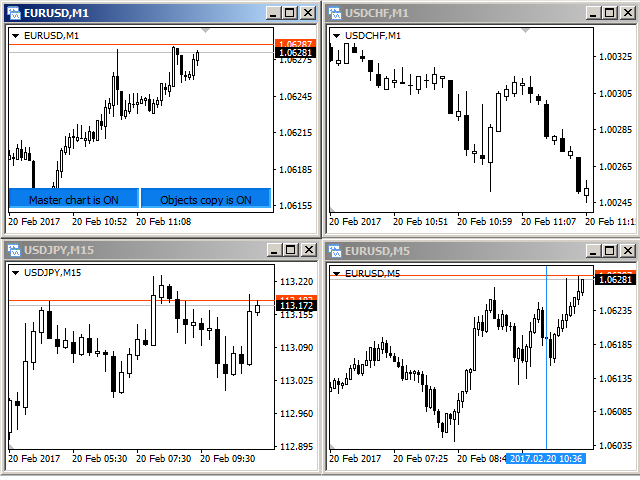
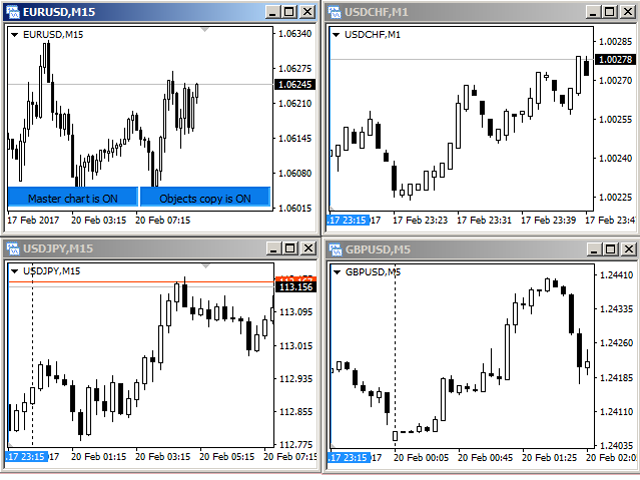
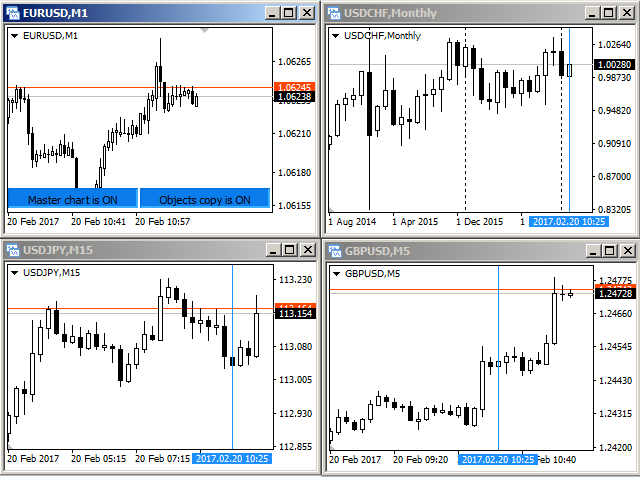
Four charts are shown in the screenshot 1. The EURUSD chart is the master chart, as the SynchronizeCharts indicator is attached to it. As a result, the other three charts are displayed on the timeline starting from 2017.02.17 23:15. Any further movement of the EURUSD chart along the timeline will cause a corresponding movement of the slave charts.


Corresponding bar line

A corresponding bar line - vertical blue line is displayed on the slave charts by default. It shows the exact time at which data display starts on the master chart. This indication is required for cases when the slave chart cannot be scrolled to the specified date and time. For example, if the timeframe of the master chart is set to M1, while the timeframe of a slave chart is MN, and the time of the master chart falls on the current bar of the slave chart (see screenshot 2).

If the line obstructs the view, it can be hidden by selecting "No" in the "Show the line" parameter (see the "Corresponding bar line" parameters block). 


Selecting slave charts

By default, the indicator selects all charts opened in the terminal as slave charts. However, it is also possible to configure the indicator so that it selects only the charts with the symbol matching that of the master chart, or the ones with the timeframe matching that of the master chart. This can be done using the "Synchronize the charts" parameter, which provides three synchronization options: "All" (default), "By symbol" and "By timeframe". If the "By timeframe" option is selected, then only the USDCHF M1 chart will be selected as slave (see screenshot 3).

Accordingly, if the "By symbol" option is selected, then only the EURUSD M5 chart will be selected as slave (see screenshot 4).


Copying graphical objects

The utility also provides the ability to copy graphical objects. Thus, is a graphical object supported by the indicator is displayed on the master chart, it will immediately appear on each of the slave charts (see screenshot 5). Deleting or changing the properties of an object leads to similar changes on the slave charts.

Supports graphical objects: vertical line, horizontal line, trendline, trendline by angle, cycle lines, equidistant channel, standard deviation channel, linear regression channel, Andrews' pitchfork, Gann line, Gann fan, Gann Grid, Fibonacci retracement, Fibonacci time zones, Fibonacci fan, Fibonacci arcs, Fibonacci channel, Fibonacci expansion, rectangle, triangle, ellipse, icons, arrows, text.

For each of the types of objects there is a parameter that allows or prohibits copying this type of object.


Buttons on the master chart

It is easy to find the master chart on the screenshots 1-5 by buttons located at the bottom right corner of the chart. If necessary, the display of these buttons can be disabled by selecting "No" in the "Show the control buttons?" parameter.

If the buttons are displayed, pressing the "Master chart is ON" button will transfer its status to "Master chart is off". From this moment on, the movement of the master chart on the time scale will not lead to the automatic movement of the slave charts.

Pressing the "Objects copy is ON" button toggles its state to "Objects copy is off", deleted the copies of graphical objects from the slave charts and stops monitoring the updates of the graphical objects on the master chart.


Crosshair

If the parameter "Using crosshair" is set to "YES", then the functionality of working with a crosshair becomes available. Display and hide the crosshair possible by pressing the "Tab" key. If the synchronization of graphical objects is enabled, the crosshair will be displayed on all slave charts. To fixing the crosshairs at any point click the left mouse button. A line appears with a hint containing such data relative to the fixation point: the number of bars, the number of points, the current price. The next click with the left mouse button moves the crosshair to the current point.
İncelemeler 5
Den Kim
123
Den Kim 2020.05.14 06:31 
 

Перепробовал все аналоги, лучше не нашел! Не хватает только возможности выбора графических элементов, которые нужно синхронизировать. Но все равно 5 звезд.

Fallet Willy
2716
Fallet Willy 2019.03.21 08:09 
 

nice

Trader mql5
1273
Trader mql5 2019.03.14 08:55 
 

Best sync utility. I have literally tried them all, and some start off ok and either lose their sync or kill the CPU after a while. This one is as good as it gets within MT4's limitations.

Önerilen ürünler
Candlestick Pattern Scanner is a multi-timeframe and multi-symbol dashboard and alert system that checks all timeframes and currency pairs for different candlestick patterns that are formed in them. Scanner is integrated with support and resistance zones so you can check the candlestick patterns in the most important areas of the chart to find breakout and reversal patterns in the price chart. Download demo version   (works on M30,D1,W1 timeframes and 20 symbols of Market Watch window) Read the
Inform Panel For ALL Symbols — Advanced Multi-Instrument Trading Management The Inform Panel For ALL Symbols is a sophisticated trading management tool designed to streamline control over all financial instruments in a trader’s portfolio, eliminating the need to attach it to specific charts. Its core innovation lies in using modifiable virtual levels for stop loss (SL) and take profit (TP), allowing discreet order closure hidden from brokers. The panel automatically detects and lists all active
Symbol Manager
Taras Slobodyanik
5 (4)
Symbol Manager or Grid Manager, designed to group orders into one position (by Symbol or by Magic Number). This utility will be useful to multi-currency traders (many EAs), who can have multiple orders on several pairs. You will be able to see the total number of lots, the total profit, and set virtual stop loss and virtual take profit. To set a real TP (or SL), you must first set the virtual value, and then enter the command in this cell: "set". If you want to set real TP/SL for all orders at
Easy Virtual Trader
Anoop Sivasankaran
4.89 (9)
Setup Easy Virtual Trader > Input your Rules > You are ready to trade from mobile or another EA or anywhere....Let robot manage your Trades !  This powerful EA will help you manage ALL or SPECIFIC trades automatically based on your PRE-SET rules and settings Once it is setup and running on just one chart, you don't need to monitor your orders anymore, the software will keep watching and control your orders with your predefined rules You can trade from your desktop MT4 or from your mobile appli
Now, you have your very own   PROP FIRM AUTO-CLOSER   program! Once your account target or drawdown hits, all open orders will close automatically. ========================================== INPUTS: Account target (exact amount):   Put the exact account target. Once the equity hits your specied account balance target, all open orders will close. Make sure to add some buffer to consider slippage. Use fixed value or dynamic value:   Choose whether you will need a fixed value or dynamic value for
"Auto FIBO Pro" Crypto_Forex göstergesi - ticarette harika bir yardımcı araçtır! - Gösterge, Fibo seviyelerini ve yerel trend çizgilerini (kırmızı renk) otomatik olarak hesaplar ve grafikte yerleştirir. - Fibonacci seviyeleri, fiyatın tersine dönebileceği önemli alanları gösterir. - En önemli seviyeler %23,6, %38,2, %50 ve %61,8'dir. - Ters scalping veya bölge ızgara ticareti için kullanabilirsiniz. - Auto FIBO Pro göstergesini kullanarak mevcut sisteminizi geliştirmek için birçok fırsat vardı
This utility is designed to help you with your Manual Trading. It allows different ways of closing trades. It can display total number of BUY and SELL orders individually and also their individual profits. It can enter trades without stopl loss and take profits. However upon selecting UseStopLossTakeProfit from the settings it can use best possible stop loss and take profits based on the market conditions. Upon selecting the CloseOppositeTrades  from the settings it can close opposite trades. Fo
Trade panel manual is a multifunctional trading assistant. It allows you to open market and pending orders in one click. Value is set via button menu edit or deleted by specific buttons pending orders and the value of take profit and stop loss in one click. Through the edit menu of the button, a value is set that can be easily changed by simply moving level_tp lines for take profit or stop loss levels and for pending orders. It is possible to select orders and determine for them and set the leve

Magic Balance
Daniil Evstratenko
The indicator shows which trading pairs, strategies, robots and signals that you use are profitable and which are not. The statistic of trades and balance graph are displayed in the account currency and pips - to switch simply click on the graph. button "$"(top left) - minimize/expand and move the indicator panel button ">"(bottom right) - stretching and resetting to the original size Statistic of trades 1 line - account balance, current profit and lot of open trades; 2 line - the number of all
Trend Ray
Andriy Sydoruk
The indicator shows the potential trend direction by cyclical-wave dependence. Thus, all the rays of the intersection will be optimal rays, in the direction of which the price is expected to move, taking into account the indicator period. Rays can be used as a direction for potential market movement. But we must not forget that the approach must be comprehensive, the indicator signals require additional information to enter the market.
Çok İşlevli Ticaret Aracı: Lot Hesaplayıcı, Grid Emirleri, R/R Oranı, Ticaret Yöneticisi, Arz ve Talep Bölgeleri, Fiyat Hareketi ve Daha Fazlası Demo Sürüm   |   Kullanım Kılavuzu Ticaret Asistanı strateji test cihazında çalışmaz: bu yardımcı programı test etmek için Demo Sürümünü BURADAN indirebilirsiniz. Herhangi bir soru /iyileştirme fikri/hatalar için benimle iletişime geçin MT5 sürümüne ihtiyacınız varsa, burada mevcuttur Ticaret sürecinizi basitleştirin, hızlandırın ve otomatikleştirin. St
TradePilot
Hossein Khalil Alishir
TradePilot Expert Advisor (EA) for MetaTrader 4 TradePilot is a professional and user-friendly Expert Advisor (EA) for MetaTrader 4 (MT4) . It simplifies automated trading , risk management , and trade execution using a smart trading panel . Perfect for beginners and experienced traders looking for a reliable trade manager EA with automated lot size calculation . Key Advantages User-Friendly Trading Panel: Customizable panel with buttons and hotkeys. Smart Risk Management: Supports percen
ForexGumpOopster - this indicator was developed to determine the trend direction and price pivot points on the H1, H4, D1 timeframes. The default settings are for the GBPUSD currency pair. For the EURUSD currency pair, the time frame H1, H4, D1 is recommended in the indicator settings to change the parameter "smooth = 5". This indicator is well suited for traders who trade on the scalping system. The arrows on the screen indicate the points of price reversal, and the lines indicate the directio
Utility, which draws buy or sell trendlines, which can also become support or resistances able to close any position on the screen Algorithm that calculates the gain of the position, at the touch closure of the line.   The benefits you get: Works on forex and CFD, timeframe from M1 to Weekly. Easy to use screen control panel. Audible warning messages at the touch of the line. Easy to use.
Riskinizi otomatik olarak hesaplarken işlemlere hızlı bir şekilde girip çıkmanıza yardımcı olacak Ticaret Yöneticisi. Aşırı Ticaret, İntikam Ticareti ve Duygusal Ticaretten korunmanıza yardımcı olacak özellikler içerir. İşlemler otomatik olarak yönetilebilir ve hesap performans ölçümleri bir grafikte görselleştirilebilir. Bu özellikler, bu paneli tüm manuel yatırımcılar için ideal kılar ve MetaTrader 4 platformunun geliştirilmesine yardımcı olur. Çoklu Dil desteği. MT5 Sürümü  |  Kullanım Kılavu
Product Name: Risk Commander: Trade Assistant & Strategy Simulator Risk Commander is more than just a trade panel—it is a complete Manual Trading Ecosystem . It serves two powerful purposes: Live Assistant: Helps you execute trades with speed, precision, and perfect risk management in real-time markets. Training Simulator: Fully compatible with the Strategy Tester (Visual Mode) , allowing you to practice manual trading on historical data without risking a cent. NEW! Built-in Simulator Mode S
Product Description: MT4 Trade Copier with Advanced Features MT4  Trade Copier is designed to streamline and enhance your trading experience by allowing seamless replication of trades across multiple accounts. It offers advanced features to cater to different trading needs and preferences. Features: Master/Slave Selection: Easily choose between master and slave modes to manage trades effectively. Multiplier for Slave Accounts: Set a multiplier to adjust the size of trades copied to slave a
We present you the indicator "Candle closing counter", which will become your indispensable assistant in the world of trading. That’s why knowing when the candle will close can help: If you like to trade using candle patterns, you will know when the candle will be closed. This indicator will allow you to check if a known pattern has formed and if there is a possibility of trading. The indicator will help you to prepare for market opening and market closure. You can set a timer to create a pre
Smart Backtest
Mr Chaiyaporn Boonsamorn
For those who are still not confident in their system or are testing new techniques to make it easier without wasting time to change the charts one by one, we recommend EA Smart Backtest to help you backtest your system efficiently. -The EA is intended to Backtest your system.   -Able to open buy or sell in visual mode and can modify values ​​for LOT, SL, TP.   -The chart also shows the Balance Equity Profit status. -Can choose to close, Buy, Close, Sell
Scalping Day Trading Support Utility Scalping One for MT4 setting faile (for white Chart)    http://www.emkyuradias.shop/indexenglish.html One position is displayed with one button. View P & L, Lot, and Point in real time. It is possible to switch the display of positions of only chart currencies and all currency pairs.   Supports automatic identification in Japanese and English   Account currency notation corresponds to dollar, euro, pound, yen (automatic identification) Lot, take profit and
Reversal Monster Mini
Abdulfattah Yahya Mohammed Alhazmi
The Most advanced and comprehensive EA to trade Trend Reversals/Pullbacks It is a very profitable EA, to trade trends breakout, and manage trades, takeprofit, stoploss, move to breakeven, and trailing stop. The   “Reversal Monster EA”   trades Reversal/Pullbacks when the current price of the pair pullback to a predefined horizontal level or trendline on the currency chart. The opening of the position can be immediate after pullback to the drawn trendline or after closing the candle below/above
FREE
This indicator is a simple and handy tool, the main tasks of which are: Remind the trader of the approaching closing of the current bar. Visually display the remaining time on the chart before the end of the current bars of the charts with periods M1, M5, M15, M30 and H1. Notify the trader of the breakdown of High and/or Low bar set in the indicator settings. Notify the trader of the breakdown of the specified trend lines. In addition, notify the trader about the server connection loss.  Setting
The Divergent Accuracy indicator is designed to identify discrepancies on the price chart of a currency pair. The Divergent Accuracy indicator recognizes bullish and bearish divergences, and can also output a signal that a divergence has been detected... In addition to identifying divergences, the indicator works with overbought and oversold levels, and also shows arrows to enter the market...
The indicator displays the data of the Stochastic oscillator from a higher timeframe on the chart. The main and signal lines are displayed in a separate window. The stepped response is not smoothed. The indicator is useful for practicing "manual" forex trading strategies, which use the data from several screens with different timeframes of a single symbol. The indicator uses the settings that are identical to the standard ones, and a drop-down list for selecting the timeframe. Indicator Paramet
BreakEven Line is a very useful and easy to use indicator. In case of multiple positions opened on the same instrument, the indicator shows the breakeven point where it is possible to close the positions. Its graphic simplicity makes it an unobtrusive and customizable tool. You can enable/disable a line on a chart, so you can make the indicator invisible. Inputs Show cumulative BE (line on/off) Breakeven line color (to change the line color) Breakeven line style Breakeven line width Show short B
Owl smart levels
Sergey Ermolov
4.24 (37)
MT5 versiyonu  |  FAQ Owl Smart Levels Indicator ,   Bill Williams'ın gelişmiş fraktalları , piyasanın doğru dalga yapısını oluşturan Valable ZigZag ve kesin giriş seviyelerini gösteren   Fibonacci seviyeleri   gibi popüler piyasa analiz araçlarını içeren tek gösterge içinde eksiksiz bir ticaret sistemidir. pazara ve kar elde edilecek yerlere. Stratejinin ayrıntılı açıklaması Gösterge ile çalışma talimatı Baykuş Yardımcısı ticaretinde Danışman Yardımcısı Kullanıcıların özel sohbeti -> Satın ald
Candle finder robot MT4 Candle finder robot is one of the trading assistant tools that helps the trader, this tool helps the trader to examine all the currency pairs that are in the Metatrader watch list in detail within a few seconds. Find the desired signals. According to the strategy that is defined for this robot, in your watch list, it carefully looks for trend change candles, there are many trend change candles that traders use in their trading decisions. This robot can simply check all t
News Scalping Executor Pro is an utility which helps to trade high impact and huge volatility   news . This utility helps to create two opposite orders with risk management and profit protection. It moves automatically stop loss level to avoid losses as much as possible by using many different algorithms. It helps to avoid trading the news if spread suddenly becomes very huge. It can lock profit by moving stop loss or partially closing of orders. To be profitable with this type of trading you
Risk-based position sizing utility (MT4 Script) that helps traders calculate position size and place pending orders directly from the chart.​ It let trader specifies entry price, stop loss price and a fixed cash risk; the script then calculates the appropriate lot size and sends the pending order with Stop Loss (SL) and Take Profit (TP) attached in a single step.​ This tool is designed for manual trading only: it does not run autonomously, does not use any built-in strategy, and executes one ope
Bu ürünün alıcıları ayrıca şunları da satın alıyor
Trade Manager EA’ye hoş geldiniz! Ticaretin daha sezgisel, hassas ve verimli hale gelmesi için tasarlanmış nihai risk yönetim aracı ile tanışın. Bu sadece bir emir verme aracı değil; ticaret planlaması, pozisyon yönetimi ve risk kontrolü için kapsamlı bir çözüm. İster yeni başlayan bir yatırımcı olun, ister deneyimli bir trader ya da hızlı emir gerektiren bir scalper, Trade Manager EA ihtiyaçlarınıza uyum sağlar ve forex, endeksler, emtialar ve kripto paralar dahil tüm piyasalarda esneklik sunar
Exp COPYLOT CLIENT for MT4
Vladislav Andruschenko
4.69 (65)
MetaTrader 4 için ticaret fotokopisi.       Herhangi bir hesaptan forex işlemlerini, pozisyonlarını, emirlerini kopyalar. En iyi ticari fotokopi makinelerinden biridir.       MT4 - MT4, MT5 - MT4       için       KOPYLOT MT4       sürüm (veya       MT4 - MT5 MT5 - MT5       için       KOPYLOT MT5       sürüm). MT5 sürümü Tam tanım   +DEMO +PDF Nasıl alınır Nasıl kurulur     Günlük Dosyaları nasıl alınır?     Nasıl Test Edilir ve Optimize Edilir     Expforex'in tüm ürünleri için fotokopi   sür
MT4 to Telegram Signal Provider , Telegram'a sinyal göndermeyi sağlayan ve hesabınızı bir sinyal sağlayıcısına dönüştüren kullanımı kolay ve tamamen özelleştirilebilir bir araçtır. Mesajların formatı tamamen özelleştirilebilir! Ancak basit kullanım için, önceden tanımlanmış bir şablonu seçebilir ve mesajın belirli kısımlarını etkinleştirebilir veya devre dışı bırakabilirsiniz. [ Demo ]  [ Kullanım Kılavuzu ] [ MT5 Sürümü ] [ Discord Sürümü ] [ Telegram Kanalı ]  New: [ Telegram To MT5 ] Kurulum
The product will copy all telegram signal to MT4   ( which you are member  ) , also it can work as remote copier.  Easy to set up, copy order instant, can work with almost signal formats, image signal, s upport to translate other language to English Work with all type of channel or group, even channel have "Restrict Saving Content", work with  multi channel, multi MT5 Work as remote copier: with signal have ticket number, it will copy exactly via ticket number. Support to backtest signal. How to
Ultimate Extractor - Professional Trading Analytics for MT4 Ultimate Extractor transforms your MetaTrader 4 trading history into actionable insights with comprehensive analytics, interactive charts, and real-time performance tracking. Ability to combine multiple accounts and MT4 and MT5 into a single dashboard. What It Does Automatically analyzes your MT4 trading history across all Expert Advisors and generates detailed HTML reports with interactive visualizations. Tracks live performance metric
TradePanel MT4
Alfiya Fazylova
4.84 (89)
Ticaret Paneli çok işlevli bir ticaret asistanıdır. Uygulama, manuel ticaret için 50'den fazla ticaret işlevi içerir ve çoğu ticaret işlemini otomatikleştirmenize olanak tanır. Dikkat, uygulama strateji test cihazında çalışmıyor. Satın almadan önce demo sürümünü bir demo hesabında test edebilirsiniz. Demo sürümü burada . Talimatların tamamı buraya . Ticaret. Tek tıklamayla alım satım işlemlerini gerçekleştirmenizi sağlar: Otomatik risk hesaplaması ile bekleyen emir ve pozisyonları açın. Tek tıkl
Bu ürün, haber saatlerinde tüm uzman danışmanları ve manüel grafikleri filtreler, böylece manüel ticaret kurulumlarınızı veya diğer uzman danışmanlar tarafından girilen işlemleri yok edebilecek ani fiyat dalgalanmaları konusunda endişelenmenize gerek kalmaz. Bu ürün, herhangi bir haber yayınlanmadan önce açık pozisyonlarınızı ve bekleyen emirlerinizi yönetebilen tam bir sipariş yönetim sistemi ile birlikte gelir. The News Filter'ı satın aldığınızda, gelecekteki uzman danışmanlar için yerleşik ha
VirtualTradePad mt4 Extra
Vladislav Andruschenko
4.86 (59)
1 tıklama ile ticaret için Ticaret Paneli.   Pozisyonlar ve emirlerle çalışmak!   Grafikten veya klavyeden alım satım. Alım satım panelimizi kullanarak, grafikten tek bir tıklamayla alım satım yapabilir ve alım satım işlemlerini standart MetaTrader kontrolünden 30 kat daha hızlı gerçekleştirebilirsiniz. Bir tüccar için hayatı kolaylaştıran ve bir tüccarın ticaret faaliyetlerini çok daha hızlı ve daha rahat gerçekleştirmesine yardımcı olan parametrelerin ve işlevlerin otomatik hesaplamaları. Graf
News Filter EA: Advanced Algo Trading Assistant News Filter EA is an advanced algo trading assistant designed to enhance your trading experience. By using the   News Filter EA , you can integrate a Forex economic news filter into your existing expert advisor, even if you do not have access to its source code. In addition to the news filter, you can also specify   trading days   and   hours   for your expert. The News Filter EA also includes   risk management   and   equity protection   features
Anında gün ve hafta bazında kapalı işlem geçmişinizi, mevcut açık işlemlerinizi ve döviz maruziyetinizi tek bir grafikte görün! Karlı işlemleri ve mevcut düşüşünüzün işlem portföyünüzde nerede olduğunu belirlemek için ısı haritasını kullanın. Hızlı Kapatma Düğmeleri Hızlı kapatma düğmelerini kullanarak tek bir semboldeki her işlemi kapatın, tek tek işlemleri tamamen kapatın veya bir düğmeye tıklayarak kısmi kar veya zarar elde edin. Artık bir listede işlem aramanıza ve işlemlerinizin bir kısmı
Copy Cat More Trade Copier MT4 (Kopyacı MT4) sadece basit bir yerel trade kopyalayıcı değildir; günümüzün alım satım zorlukları için tasarlanmış eksiksiz bir risk yönetimi ve yürütme çerçevesidir. Prop firm sınavlarından kişisel hesap yönetimine kadar, güçlü yürütme, sermaye koruması, esnek yapılandırma ve gelişmiş işlem yönetimi ile her duruma uyum sağlar. Kopyalayıcı hem Master (gönderici) hem de Slave (alıcı) modlarında çalışır ve piyasa emirleri ile bekleyen emirlerin gerçek zamanlı senkroni
EchoTrade Telegram to MT5 Copier Seamless, Instant, and Reliable Signal Copying - Direct from Telegram to MetaTrader 4! The product does not run in the strategy tester but you can get free trial version   here  for testing before purchase. Tired of manually executing trades from Telegram signals? EchoTrade automates the process, instantly copying trades from any Telegram channel or group directly into your MT5 account—accurately, efficiently, and without delay. Key Features: Universal Compatib
Everything for chart Technical Analysis indicator MT4 in one tool Draw your supply demand zone with rectangle and support resistance with trendline and get alerts to mobile phone or email alert -  Risk reward indicator Video tutorials, manuals, DEMO download   here .  Find contacts on my   profile . 1.   Extended rectangles and trendlines Object will be extended to the right edge of the chart when price will draw new candles on chart. This is rectangle extender or trendline extender. 2. Price to
What is it? Think about it, you can send all the orders/positions info to your telegram channel or group to create your community or VIP signals on telegram. Position info means this EA forward all of your new positions open details (Open price, Open time, Position Type, position Symbol and volume), positions changes ( SL or TP modifying or pending price changes) and position close (Close price, profit or loss, position duration time) and also EA Send NEWS alert (Economic calendar event) on you
Bu 2'si 1 arada ticaret yöneticisi, mum kırılmaları ticareti için idealdir. Geri çekilmelere ek limit emirleri vererek ortalama bir ticarete mal olabilir. Bu, tüm pozisyonlarınızda en iyi fiyatı ve kazançlarınızda daha yüksek bir RR almanızı sağlar. Risk, en son kapatılan mum yüksekliğine göre hesaplanır. İşlem asistanı düğmeleri, manuel olarak verilen tüm siparişlerin yönetilmesine yardımcı olur. Herhangi bir giriş yöntemiyle kullanın; fiyat hareketi veya göstergeleri ve herhangi bir ticaret
️ Hedge Trade — Smart Fixed-Offset Hedging EA Turn adverse moves into controlled recovery cycles. Hedge Trade is a professional-grade MetaTrader 4 Expert Advisor that protects any open trade by automatically placing and managing one intelligent hedge order. It’s built for traders who prefer to open their own base position but want an automated, disciplined hedging system to manage drawdown and capture counter-moves — safely, transparently, and without martingale. Key Features Automatic Hedg
Trade Reverse Copie4
Chukwuemeka Kingsley Anyanwu
Feel free to contact me for any extra features :) [SEE MT5 VERSION  https://www.mql5.com/en/market/product/128846 The Local Reverse Copier is an Expert Advisor designed to synchronize positions between a Master account and a Slave account with a twist: it reverses the trades. When a buy position is opened on the Master account, the EA opens a sell position on the Slave account, and vice versa. This allows for a unique form of trade copying where positions are mirrored in opposite directions bet
Fotokopi->Kullanışlı ve hızlı arayüz etkileşimi, kullanıcılar hemen kullanabilir       ->>>> Windows bilgisayarlarda veya VPS Windows'ta kullanılması önerilir Özellikler: Çeşitlendirilmiş ve kişiselleştirilmiş kopyalama ticareti ayarları: 1. Farklı sinyal kaynakları için farklı lot modları ayarlanabilir 2. İleri ve geri kopyalama ticareti için farklı sinyal kaynakları ayarlanabilir 3. Sinyaller yorumlarla ayarlanabilir 4. Lotun sözleşme lotuna göre kalibre edilip edilmeyeceği Çeşitlendirilmiş v
Telegram'dan MT4'e:   Nihai Sinyal Kopyalama Çözümü Telegram ile MT4'e   işlemlerinizi kolaylaştırın, DLL'lere ihtiyaç duymadan doğrudan Telegram kanallarından ve sohbetlerinden MetaTrader 4 platformunuza işlem sinyallerini kopyalamak için tasarlanmış son teknoloji yardımcı program. Bu sağlam çözüm, sinyallerin benzersiz hassasiyet ve özelleştirme seçenekleriyle sorunsuz bir şekilde yürütülmesini sağlayarak size zaman kazandırır ve verimliliğinizi artırır. [ Instructions and DEMO ] Temel Özellik
Custom Alerts AIO: Tüm Piyasaları Takip Et — Hiçbir Kurulum Gerekmez Genel Bakış Custom Alerts AIO , hiçbir ek yapılandırma gerektirmeyen, kullanıma hazır bir piyasa izleme çözümüdür. Gerekli tüm göstergeler — FX Power, FX Volume, FX Dynamic, FX Levels, IX Power — iç yapısına gömülüdür. Grafik görüntülemesi olmadan çalışır, bu da onu sessiz ve verimli bir şekilde gerçek zamanlı alarm üretimi için mükemmel hale getirir. Brokerınızın sunduğu tüm varlık sınıflarını destekler: Forex, Metaller, End
Ticaret yapmak istediğiniz temel alanları belirledikten sonra otomatik olarak destek ve direnç veya arz ve talep bölgelerini değiştirin. Bu EA, tek bir tıklamayla alım ve satım bölgeleri çizmenize ve ardından bunları fiyatın dönmesini beklediğiniz yere tam olarak yerleştirmenize olanak tanır. EA daha sonra bu bölgeleri izler ve bölgeler için belirttiğiniz fiyat hareketine göre otomatik olarak işlemler gerçekleştirir. İlk işlem gerçekleştirildikten sonra EA, hedef bölge haline gelen yerleştirdiğ
Üye olduğunuz herhangi bir kanaldan Sinyal Kopyalayın (   Bot Token veya Yönetici İzinleri gerekmiyor  düz MT4'ünüze. Kullanıcıyı düşünerek tasarlanmış ve ihtiyacınız olan birçok özellik sunmaktadır Bu ürün, kullanımı kolay ve görsel olarak çekici bir arayüzde sunulmaktadır. Ayarlarınızı özelleştirin ve ürünü dakikalar içinde kullanmaya başlayın! Kullanıcı Kılavuzu + Demo  | MT5 Sürümü | Telegram Sürümü Demo versiyonunu denemek istiyorsanız, Kullanıcı Kılavuzuna bakın. Discord'tan MT4'e gönder
Effortlessly calculate lot sizes and manage trades to save time and avoid costly errors The Trade Pad Pro EA is a tool for the Metatrader Platform that aims to help traders manage their trades more efficiently and effectively. It has a user-friendly visual interface that allows users to easily place and manage an unlimited number of trades, helping to avoid human errors and enhance their trading activity. One of the key features of the Trade Pad Pro EA is its focus on risk and position manageme
Custom Alerts: Birden Fazla Piyasayı Takip Edin ve Hiçbir Önemli Sinyali Kaçırmayın Genel Bakış Custom Alerts , birden fazla enstrümanı tek bir yerden takip etmek isteyen yatırımcılar için dinamik bir çözümdür. FX Power, FX Volume, FX Dynamic, FX Levels ve IX Power gibi önde gelen araçlarımızdan gelen verileri entegre ederek, Custom Alerts sizi grafikler arasında geçiş yapmak zorunda kalmadan önemli piyasa gelişmeleri hakkında otomatik olarak bilgilendirir. Artık broker’ınızın sunduğu tüm varl
This EA Utility allows you to manage (with advanced filtering) unlimited open orders (manual or EA) with 16 trailing stop methods: fixed, percent, ATR Exit, Chandelier Exit, Moving Average, Candle High Low Exit, Bollinger Bands, Parabolic, Envelope, Fractal, Ichimoku Kijun-Sen, Alligator, Exit After X Minutes or Bars, RSI and Stochastic. The trailing stop can be either real or virtual, and you can exit fully or with a partial close percent on touch or bar close.  Moreover, you can add (overrid
Smart Trade Copier is a high-performance trade copying solution designed for fast, accurate, and reliable synchronization between multiple MT4/5 platforms. It supports both local terminal copying and VPS/cloud-based trade replication, making it suitable for professional traders, prop firms, money managers, and signal providers. The system delivers near-instant execution with advanced filtering, risk control, and flexible lot management, while maintaining stability across different environments.
The most advanced news filter on MQL market - free demo available Take a Break has transformed from a basic news filter into a comprehensive account protection solution. It seamlessly pauses any other Expert Advisors during news events or based on your custom filters, all while safeguarding your EA settings - restoring them automatically when trading resumes for complete peace of mind. Typical use cases: A single news filter for all your EAs. Stop trading during news/high volatility (+ close all
If you need an advisor on any arrow indicator signals - this utility will definitely help you.  You will be able, with the help of this utility to form an unlimited number of EAs on YOUR signals , with your set of settings, with your copyright and complete source code . You will be able to use the resulting EAs unlimitedly , including adding them to the Market and other resources. Free simple version of the generation script to help you understand how it works - here What does the utility do? 
DFGX Dashboard
Tsvetan Tsvetanov
5 (2)
Take your trading to the next level with DFGX - our second generation Dynamic Fibonacci Grid. This new, powerful and easy to use application is specially designed and optimized for contrarian intraday trading, scalping and news trading on the Forex market. This system is the ideal solution for active professional traders and scalpers who are looking for innovative ways to optimize their strategy. The system also provides excellent opportunity for new traders who want to learn to trade in a syste
Time saving and fast execution Whether you’re traveling or sleeping, always know that Telegram To Mt4 performs the trades for you. In other words, Our   Telegram MT4 Signal Trader  will analyze the trading signals you receive on your selected Telegram channels and execute them to your Telegram to MT4 account. Reduce The Risk Telegram To Mt4   defines the whole experience of copying signals from   Telegram signal copier to mt4 platforms. Users not only can follow all instructions from the signa
Yazarın diğer ürünleri
A fractal divergence is a hidden divergence , based on Bill Williams' fractals. A bullish fractal divergence is a combination of two lower fractals, the last of which is located below the previous one, and, at the same time, two candles to the right of the Low of the last fractal have Lows higher than the previous fractal level (see screenshot 1). A bearish fractal divergence is a combination of two adjacent upper fractals, the last of which is located above the previous one, but, at the same ti
FREE
Фрактальная дивергенция - это   скрытая дивергенция, построенная на фракталах Билла Вильямса. Бычья фрактальная дивергенция представляет собой комбинацию из двух нижних фракталов, последний из которых расположен ниже предыдущего, и при этом две свечи справа от минимума последнего фрактала имеют минимумы выше уровня предыдущего фрактала (см. скриншот 1). Медвежья фрактальная дивергенция - это комбинация из двух соседних верхних фракталов, последний из которых расположен выше, чем предыдущий верхн
FREE
Канал фрактальной дивергенции базируется на   паттернах фрактальной дивергенции , представляя их в виде канала, границы которого изменяются в момент появления очередного паттерна. Верхняя граница канала соответствует верхней части последнего найденного медвежьего паттерна фрактальной дивергенции. Нижняя граница канала - это нижняя часть последнего найденного бычьего паттерна (см. скриншот 1). По отношению к индикатору   FractalDivergence_Patterns , канальная версия обладает теми же параметрами,
FREE
The indicator shows the number and ratio of ticks with the price growth and fall for each candle of the chart. The upper part of the histogram in the form of thin lines shows the number of price growth ticks (bullish strength), while the lower part shows the amount of price fall ticks (bearish strength). The thicker histogram bars is the difference between the strength of bulls and bears. A positive difference is displayed in green, and the negative one is red. The strength of bulls increases wh
FREE
Fractal Divergence Channel is based on the fractal divergence patterns , representing them in the form of a channel with the borders changing the moment the next pattern appears. The upper border of the channel corresponds to the upper part of the last found bearish fractal divergence pattern. The lower border of the channel is the lower part of the last found bullish pattern (see screenshot 1). Compared to the FractalDivergence_Patterns indicator, the channel version has the same parameters wit
FREE
The TemplateSwitcher utility allows automatically switching the set of indicators and objects used on the chart depending on the current timeframe and/or symbol. It often happens that an indicator with a certain period is used on a chart of a higher timeframe, while the same indicator with an increased calculation period is required for a smaller timeframe. Of course, it is possible to open two charts of different timeframes with the required indicator periods. But what if duplication of charts
The Expert Advisor generates trading signals based on the values of the FractalDivergence_Patterns indicator. A Buy signal is generated when the indicator detects a support level, and a Sell signal is generated when the resistance level is found (see Fig. 1: blue arrows show buying, red arrows show selling). The Expert Advisor does not require the indicator to be additionally used, and can display the appropriate support and resistance levels. Parameters The "Fractal divergence parameters" bloc
General information The indicator determines the areas of flat and trending market states by comparing the average and current volatilities. Flat areas are rectangles of a user-defined color. It is easy to determine the maximum and minimum of the flat area, as well as its height in points. The beginning of each trend area is marked with an arrow indicating the direction of the trend. Tuning parameters 1. Averaging period - period for calculating average volatility 2. Color of flat region -
The indicator identifies ordered trend structures. Each structure consists of at least three waves: the formation of the primary movement, a rollback, and a breakout of the primary movement. One wave in the structure is considered to be the market movement between opposite price extremes, which corresponded to different positions of the points of the classic Parabolic Support And Reverse (PSAR) indicator relative to the closing prices of the candles: a point below the price - searching for a m
Утилита TemplateSwitcher позволяет автоматически переключать набор используемых на графике индикаторов и объектов в зависимости от текущего таймфрейма графика и/или символа. Часто бывает так, что на графике старшего таймфрейма используется индикатор с одним периодом расчета, а для младшего таймфрейма этот же индикатор необходим с увеличенным периодом расчета. Можно, конечно же, открыть два графика разных таймфреймов с нужными периодами индикатора. Но что, если мы не можем позволить себе дублиров
Filtrele:
johnrupp
59
johnrupp 2022.09.09 13:47 
 

Locks up my MT4 platform. I reinstalled the platform, tried it without any other indicators running and it still locks up.

Ihor Herasko
31199
Geliştiriciden yanıt Ihor Herasko 2022.09.09 14:06
Send me your profile from MT4, please.
Den Kim
123
Den Kim 2020.05.14 06:31 
 

Перепробовал все аналоги, лучше не нашел! Не хватает только возможности выбора графических элементов, которые нужно синхронизировать. Но все равно 5 звезд.

Денис Москвин
23
Денис Москвин 2020.02.18 12:22 
 

Kullanıcı incelemeye herhangi bir yorum bırakmadı

Fallet Willy
2716
Fallet Willy 2019.03.21 08:09 
 

nice

Trader mql5
1273
Trader mql5 2019.03.14 08:55 
 

Best sync utility. I have literally tried them all, and some start off ok and either lose their sync or kill the CPU after a while. This one is as good as it gets within MT4's limitations.

İncelemeye yanıt