Hyperactivity Protector MT4

Hyperactivity Protector MT4

Prop firms and brokers limit how many messages an account may send to the trading server per day — typically 2,000 (MetaQuotes guideline). Grid EAs, EAs that constantly place and delete pending orders, or EAs that keep retrying when trading is blocked can exceed that limit and cost you a funded account.

Hyperactivity Protector watches your account activity, warns you as the limit approaches and switches your EAs off before the limit is reached. It also stops an EA from flooding the server when the broker or prop firm disables trading.

It works with any EA, including EAs you have no source code for.

What it does

  • Counts every order request on the account (all EAs, all symbols): new orders, modifications, deletions and closes.
  • Converts requests to estimated server messages with a per-firm multiplier.
  • Warning at a chosen percentage of the limit (push notification / alert).
  • Action at a chosen percentage: removes the target EAs from their charts (a backup template of every chart is saved), then deletes pending orders. Open positions are never touched — their SL/TP stay active on the server.
  • Loop breaker: if pending orders keep reappearing after the action (an EA is still running, e.g. because of wrong target settings), the protector stops deleting after 2 rounds and notifies you. It can never start a place/delete loop itself.
  • Trading-disabled fuse: if the server disables trading on the account for longer than a set time, your EAs are removed so they cannot send thousands of rejected requests.
  • Optional automatic restore of your EAs when the next trading day starts.
  • Day reset at server midnight, 00:00 CE(S)T or 00:00 UTC — match your firm.
  • On-chart status panel and a one-click reset button.
  • State survives a terminal restart within the day.

What it protects against — and what it does not

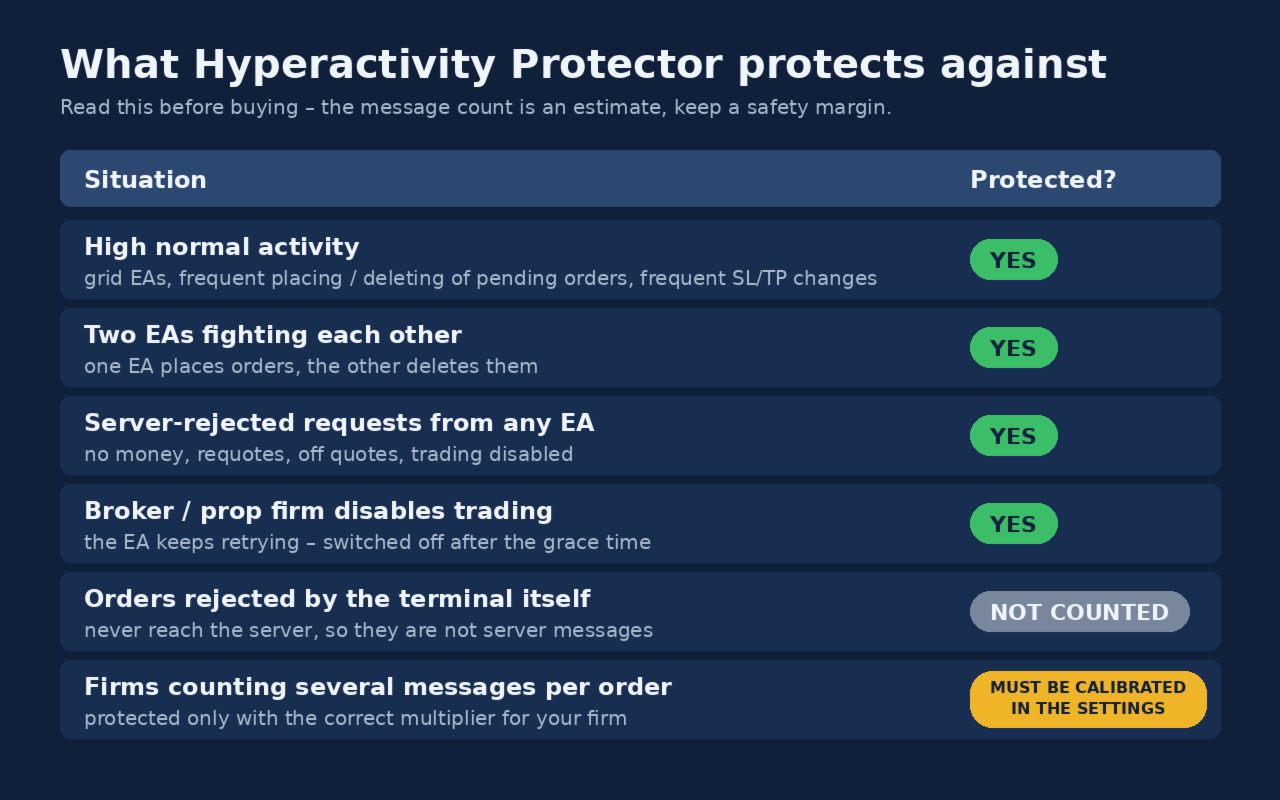
Please read this table before buying.

Situation Protected?
High normal activity (grid EAs, frequent placing/deleting of pending orders, frequent SL/TP changes) ✅ Yes — every order change is counted and the EAs are switched off before the limit
Two EAs fighting each other (one places orders, the other deletes them) ✅ Yes
Broker/firm disables trading and the EA keeps retrying ✅ Yes — the block is detected and the EAs are removed after the grace time
Requests rejected by the server (invalid price, stops too close, not enough money) ❌ No — rejected requests do not change the account state, so MetaTrader 4 gives no way to see them
Orders rejected by the terminal itself Not counted — they never reach the server, so they are not server messages
Firms that count several server messages per order ⚠️ Must be calibrated in the settings (see Calibration)

The message count is an estimate. The protector cannot read your firm's own counter. Keep a safety margin (the default action level is 85% of the limit).

Setup

  1. Attach the protector to its own chart (any symbol, any timeframe). Enable "Allow live trading" (needed to delete pending orders).
  2. Choose which EAs to switch off:
  3. All other charts (default): every EA on every other chart is removed.
  4. Symbol + timeframe (recommended): only charts matching the symbol fragment and timeframe, e.g. XAUUSD + H1 . MetaTrader 4 cannot read the EA name of a chart, so put the EA(s) to be switched off on one symbol + timeframe and keep every EA you want to keep running (trade managers, drawdown guards) on a different timeframe. Do not leave any other chart open on that symbol + timeframe.
  5. Set the limit, the multiplier for your firm and the day reset time.
  6. For push notifications: Tools > Options > Notifications (MetaQuotes ID).

Calibration (messages per request)

Firms count server messages, not order requests, and one request may produce several messages. To calibrate:

  1. Ask your firm's support how many server messages your account sent on a specific day.
  2. Count the order requests in the terminal journal of that day (or read "requests=" in the protector's end-of-day log line).
  3. Multiplier = firm's messages ÷ requests. Use an average of several days if possible.

Some firms count exactly one message per request — then use 1.0. Until you have a calibration, keep the conservative default of 4.4.

Free first calibration: every purchase includes one free calibration. Send me a private message on MQL5 with the protector's log of one trading day and the number of messages your firm or broker reported for that day, and I will send you back a set file calibrated for your account.

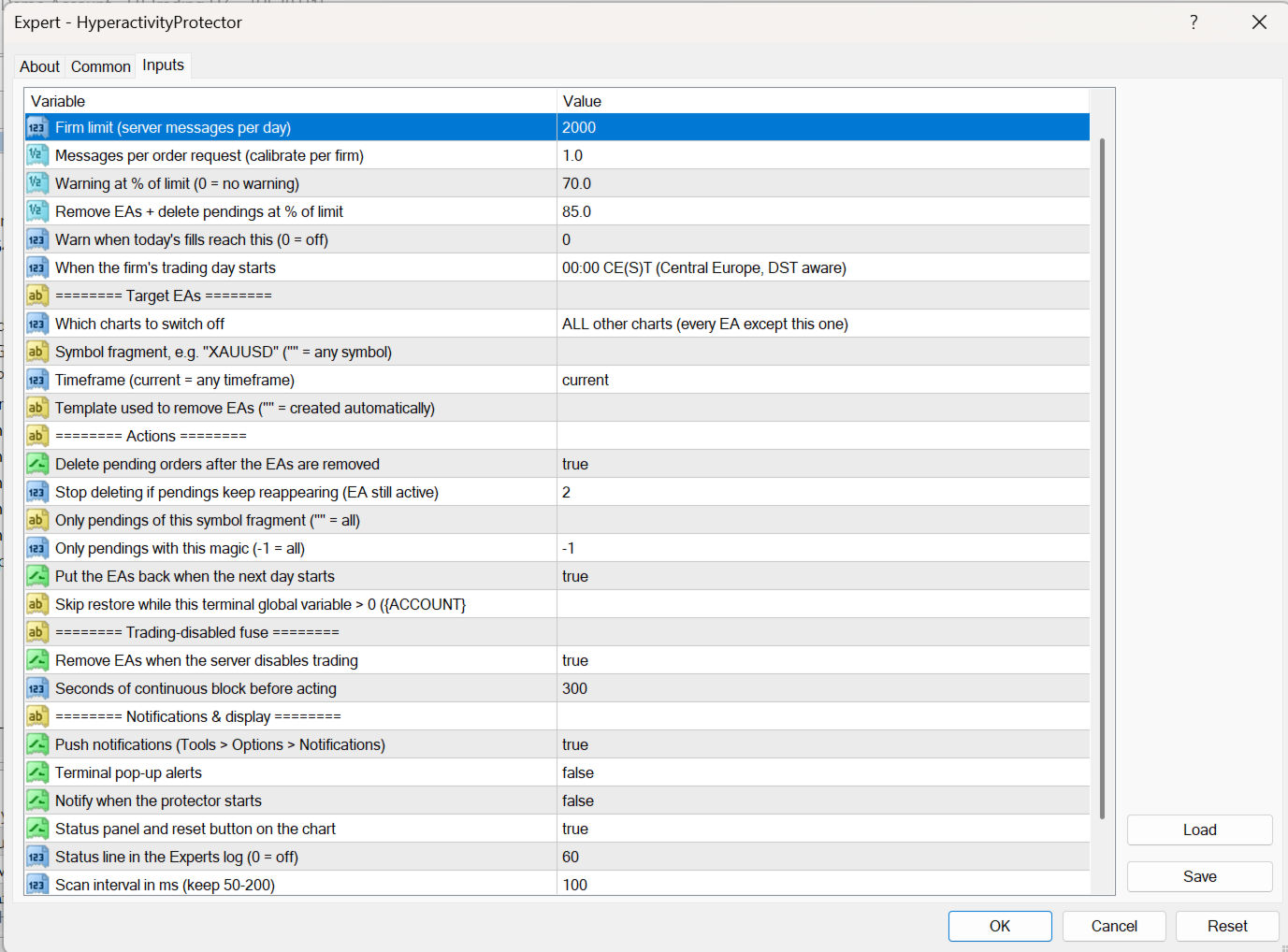
Inputs (summary)

Input Meaning
DailyMessageLimit Your firm's daily message limit
MessagesPerRequest Calibration multiplier (default 4.4, conservative)
WarnPercent / ActionPercent Warning and action levels in % of the limit
TradesPerDayWarn Optional warning on number of fills per day (0 = off)
DayReset Server midnight / 00:00 CE(S)T / 00:00 UTC
TargetMode, TargetSymbol, TargetTimeframe Which charts are switched off
DeletePendingOrders, PendingSymbolFilter, PendingMagicFilter Pending orders deleted after the action
MaxDeleteRounds Loop breaker: delete rounds allowed before the protector stops deleting (default 2)
AutoRestoreNextDay, RestoreBlockVariable Automatic restore next day; optionally postponed while a global variable is set (e.g. by your drawdown guard)
ActOnTradeDisabled, TradeDisabledGraceSec Trading-disabled fuse (default 300 s)

Notes

  • After the trading-disabled fuse fires, EAs are not restored automatically: check your account first, restore your EAs (chart > Templates > HP_backup_…) and press "Reset today's counter".
  • If the terminal is restarted after an action, automatic restore is not possible; you get a notification to restore manually.
  • The protector itself sends no requests to the server during normal operation. After an action it only sends the pending-order deletions (at most MaxDeleteRounds rounds).
Önerilen ürünler
Reverse copier is a tool that will open opposite buy/sell orders from your master account. It will help you with low profit EA's that lose consistenly and turn it to wins. Feel free to ask for new functions/features and I will add it. Now it's a simple MT5 to MT4 bridge with straightforward logic of one position open/close.  How to install: https://www.mql5.com/en/market/product/141604
FREE
This EA will help you to automatically put stop loss and take profit for all your orders. Stop loss point and take profit points can be selected in the tab of the input parameters. You can specify three symbols with SL and TP values (you can see symbol1 , symbol2 ... in the input tab below). The EA performs checks. If a new order with symbol1 appears, it puts SL and TP with stoploss1 and takeprofit1 values (in points). If a new order with symbol2 appears, it puts SL and TP with stoploss2 and tak
Trade Copier Local MT4 is a fast local trade copier for copying trades between multiple MT4 and MT5 accounts. One EA works in both Master and Slave modes. Simply select the required Copier Mode and use the same product on your MetaTrader terminals. Copy trades between: • MT5 → MT5 • MT5 → MT4 • MT4 → MT5 • MT4 → MT4 Perfect for: • Trading multiple accounts at once • Linking multiple trading accounts • Personal account mirroring • Signal providers • Account managers • Prop trading setups #
Local Account Monitor MT4 is a read-only local monitoring utility for traders who run multiple MetaTrader terminals on the same PC or the same Windows VPS . It combines Agent mode and Dashboard mode so you can monitor local accounts from one place, spot stale terminals quickly, review account health states, and inspect risk details without switching between many terminals. Public channel:   CLICK HERE What it is for Monitoring multiple local MT4 terminals from one dashboard Quickly identifying
FREE
This tool will perform Trailing stop loss and Break even management for orders. Helps you limit or reduce the time spend watching orders on the screen, especially when you need to go to sleep. Just add this EA to 1 chart, you can manage all pairs. You can filter orders by comment, magic number, symbol, and order ticket number. When Breakeven it can add shift/offset pips (to cover the commission...). You can try in strategy tester before purchase. The EA will add Buy and Sell alternately, so yo
Trading Control Pad is a useful tool for all traders. To send BUY/SELL, pending order, modify and automatic setting SL and TP in one click by the current symbol. The Trading Control Pad can help you being comfortable and quickly trading.  Pad can help you automatic and manual partially close some lot at the target, breakeven and trailing stop. The Trading Control Pad features / Functionality Showing the currency pair, the total positions, the number of buy and sell orders. Standard tools for op
Just $30 for six months!!!. This will draw Order Blocks just by clicking on a candle with different colors for different timeframes. It will use the body or the wicks. It can also draw the mean threshold of the candle open/close or high/low. As a drawing tool, it is not active all the time after adding it to the chart. Activate by pressing 'b' twice on the keyboard within a second. If activated but then decided not to draw, deactivate by pressing 'b' once.  Box color depends if candle is abov
MT4 to Discord Signal Provider , ticaret sinyallerini doğrudan Discord'a göndermek için tasarlanmış kullanıcı dostu ve tamamen özelleştirilebilir bir araçtır. Bu araç, ticaret hesabınızı etkili bir sinyal sağlayıcısına dönüştürür. Mesaj formatlarını tarzınıza uyacak şekilde özelleştirin! Kolay kullanım için önceden tasarlanmış şablonlardan seçim yapın ve hangi mesaj öğelerini dahil etmek veya çıkarmak istediğinize karar verin. [ Demo ] [ Kullanım Kılavuzu ] [ MT5 Versiyonu ] [ Telegram Versiyonu
from this moment, RSI traders will have 95% less time and health using this Robot Robot Instructions for using Robot RSI sent to Telegram 0 put the robot in MT4  >> ok 1 Create Telegram Robot " Rsi_Testbot " >> ok 2 Save Tokens   "1706277467:AAEntyiMli3ZN6uWrMch-uz704OGWO5snOM"   >> ok 3 Create Telegram Channel ,Get telegram id = -1001243242869  " RSI Test Bot "  + grant admin rights for bots https://api.telegram.org/&amp ;amp;amp;amp;amp;lt;token>/getUpdates 4 Create Telegram group nhóm     
Full Dashboard Trade Panel
Opengates Success International
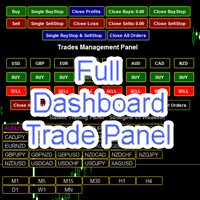
Full Dashboard Trade Panel Utility is built to perform overall task of trades and order managements to make trading an easy task for every trader that bought and using it. It comprises of three sections with each having a shift setting for a convenient placement as desired: 1.        Trades Managements Panel 2.        Basket Trades Panel 3.        Symbol and Time frame Changer Each of these three sections has its own unique functions and roles to perform for a complete enjoyable forex trading ex
The Arrow Scalper
Fawwaz Abdulmantaser Salim Albaker
1 (2)
Dear Friend..  I share with you this simple Expert Adviser .. it is full automatic  this Expert Adviser following the trend of the pair you install on or any stocks or indices , it is works like that: - when the trend on H4 chart show a start of up trend the expert will wait till the 15M & 1H charts show an up trend the EA will open a buy order directly , and do the same for down trend and open a sell order the buy or sell  order lot size and take profit and stop loss will measured manually  by
FREE
Gösterge, dünya borsalarının çalışma saatlerini gösterir. Hangi pazarların şu anda en aktif olduğunu görmenize yardımcı olur Benim  #1 Pro  Utility : 66+ özellik, bu araç dahil  |   Bana ulaşın  sorularınız varsa Şu anda en volatil enstrümanları seçmenize yardımcı olur; Özellikle gün içi traderlar için faydalıdır; 1) 1H ve altı zaman dilimlerinde kullanıldığında: çizgiler, grafikteki çubukların gerçek konumuna karşılık gelecek ve grafik hareket ettirildiğinde işlem seanslarının çizgileri grafik
SESSION PILOT MT4 – MARKET SESSION & NEWS FILTER Session Pilot is an intelligent filtering tool designed to focus trading activity on the most liquid market sessions and avoid trades during high-volatility news events. The system continuously monitors current time and upcoming economic announcements. MAIN FEATURES • Automatic detection of London, New Y
Quantum Falcon Signal Free is a smart visual trading indicator for MetaTrader 4 designed for Forex and Gold traders. The indicator combines: • Trend analysis • RSI momentum confirmation • MACD momentum filtering • ATR volatility filtering • Higher timeframe confirmation • Smart exit signal detection Main Features: • Smart Buy and Sell signals • Exit Buy / Exit Sell alerts • Real-time dashboard on chart • Professional candle arrows • Multi-timeframe trend confirmation • ATR market volatility filt
FREE
YPY Check Your Broker is a universal multifunctional software complex which uses primary tick data. It allows traders to perform comparative analysis of the trading conditions and execution quality, identify abnormal BID prices outside the indicative quotes. It also reflects the facts of redrawing bars in the terminal, spread extension, controls the leverage stop out level values, speed of execution and server connection breaks, maintains a detailed statistics on the slippages. The YPY Check You
Channels MT4
Kyra Nickaline Watson-gordon
5 (1)
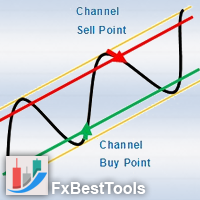
Channels Indicator is an All-In-One Indicator with a powerful calculation engine. The Indicator contains 4 different and usual methods for finding channels on the market. Indicator is powered by a visual interface and with various selections of alerts and notifications. Testing Indicator : Strategy Tester does not respond to your clicks on panels (This is metatrader tester limitation). Thus input your desired settings on the indicator pre-settings and test. Using Indicator : Display 4 Typ
SFG Grid Manager MT4 – Akıllı Grid ve Ayna Sistemi SFG Grid Manager MT4, mevcut bir pozisyonu (manuel veya başka bir EA tarafından açılmış) takip eden ve belirlenen adımlarda ( GridPips ) otomatik olarak ortalama alım-satım işlemleri açan profesyonel bir otomatik grid yöneticisidir. Ana pozisyon kapandığında veya kaybolduğunda, yönetici tarafından açılan tüm grid işlemleri otomatik olarak kapatılır. Netting ve Hedging hesap türlerini destekler ve manuel işlem veya harici Expert Advisor’larla
Fast and relible, low CPU usage, optimized code. Can copy from single master to few clients or from few masters to single client. Do not affect to other EAs or manual trading, just specific magics orders. Can use few methods of lots size for copying trades. And a lot of other features. Thanks for using! Installation: Master -> Client(s). Install copier for every terminal at a single chart. Few Masters -> Client. Install copier for every master terminal at a single chart. Install client copier
Manual Forex Trading with Enhanced Functionality "OneClickMagicTrader," a powerful tool designed to cater to the needs of forex traders by simplifying various trading actions. Drawing parallels with the familiar "One Click Trading" feature of the MT4 terminal, OneClickMagicTrader allows traders to swiftly execute BUY or SELL orders with a single click. This tool, a brainchild of an avid trader who identified room for improvement, has now been shared with the entire forex community. Taking a st
Trades Manager Buy and Sell Close The Close Buy and Sell Expert Advisor is a free EA given to help traders manage trades easily especially during volatile market environment. Features: It helps to quickly close trades either in profit or loss. Close for separate Buy Only  Close for separate Sell Only  Close for both Buy and Sell Only  Control Box can be minimized, closed or moved around from the chart. It works for all open trades opened on the terminal. Contact me for your specific coding
FREE
Litoral Trading tarafından geliştirilen LT Renko MT4 , gelişmiş bir görsel işlem paneliyle tamamen entegre edilmiş, kapsamlı ve profesyonel düzeyde bir Renko grafik oluşturma çözümüdür. Zaman odaklı grafiklerin (geleneksel mum grafikleri) piyasa gürültüsünü ortadan kaldırmak isteyen yatırımcılar için tasarlanan bu ürün, tamamen fiyata dayalı ( Price Action ) grafiklerin hassasiyetini, MetaTrader 4 üzerindeki yüksek performanslı profesyonel bir işlem panelinin emir iletim hızıyla birleştirir. İk
MRKD Vector — Smart Trade Management Utility MRKD Vector is a powerful and intuitive order execution tool designed for efficient manual trading in MetaTrader 5. Built with precision and speed in mind, MRKD Vector simplifies trade management by giving you full control over entries, stops, and targets — all from a sleek interface. Key Features: Quick Order Execution Place trades with ease using a clean, fast interface built for active traders. Intuitive SL, TP, and Lot Size Control Adjust sto
Arrow Micro Scalper , ölçeklendirme ve kısa vadeli ticaret için tasarlanmış, herhangi bir grafiğe ve finansal araca (Para birimleri, kripto, hisse senetleri, metaller) entegre edilmiş bir göstergedir. Çalışmasında dalga analizi ve trend yönü filtresini kullanıyor. M1'den H4'e kadar Zaman Çerçevelerinde kullanılması önerilir. Göstergeyle nasıl çalışılır. Gösterge, ayarları değiştirmek için 2 harici parametre içerir, geri kalanı zaten varsayılan olarak yapılandırılmıştır. Büyük oklar trend yönün
The new update makes this indicator a complete tool for studying, analyzing and operating probabilistic patterns. It includes: On-chart Multi-asset percentage monitor. Configurable martingales. Twenty-one pre-configured patterns , including Mhi patterns and C3. An advanced pattern editor to store up to 5 custom patterns. Backtest mode to test results with loss reports. Trend filter. Hit operational filter. Martingale Cycles option. Various types of strategies and alerts. Confluence between patte
Genesis Matrix Pro is a professional multi-timeframe trend detection indicator designed to help traders identify high-quality market alignment with clarity and structure. It combines 12 different technical indicators into one visual alignment matrix, allowing traders to quickly see when market conditions are bullish, bearish, or neutral. A signal is generated only when the selected strategies are aligned, helping reduce noise and improve decision-making. PLEASE CONTACT ME AFTER PURCHASE TO GET
Unlock the power of "Psychological Numbers" with RoundLevel . Large financial institutions, banks, and hedge funds don't place orders at random prices; they prefer round numbers (e.g., 1.1000, 105.00, 2000). These levels act as invisible magnets for price action, serving as high-probability support and resistance zones. Key Features: Universal Compatibility: Works perfectly on Forex, Gold (XAUUSD), Indices, and Stocks. Clean Visualization: Automatically draws horizontal levels without cluttering
Fast MT4 Copier
Hans Alexander Nolawon Djurberg
Fast / Reliable / Multi Functions / Simple To use local MT4 to MT4 | MT4 to MT5 platform copier , it will copy all your Master account orders into any Slave accounts very fast , no delay, Also it supports any kind of orders/ExpertAdvisors such as Buy / Sell / BuyStop / SellStop / BuyLimit / SellLimit / Smart Partial Closing / opened in Hedge mode / opened in Martingale mode / Modifying Pending orders / Modifying StopLoss-TakeProfit .using it is simple , Just drop the EA on Master account which y
Indicator for binary options arrow is easy to use and does not require configuration works on all currency pairs, cryptocurrencies buy signal blue up arrow sell signal red down arrow tips do not trade during news and 15-30 minutes before their release, as the market is too volatile and there is a lot of noise it is worth entering trades one or two candles from the current period (recommended for 1 candle) timeframe up to m 15 recommended money management fixed lot or fixed percentage of the depo
Crystal CopyCat Pro Trade Copier Ultra-Fast Master–Slave Copier with Zero-Delay Execution and Cross-Platform MT5 Compatibility Architecture:   MT4 → MT4 and MT4 → MT5 Full Compatibility MT5 Version Free :   https://www.mql5.com/en/market/product/144569 MT5 Version Pro :  https://www.mql5.com/en/market/product/165051 Complete User Setup Guide:-  https://www.mql5.com/en/blogs/post/764222   1. Overview Crystal CopyCat Ultimate 5.0 is a next-generation trade copy engine engineered for professi
MT4 SRP Smart Risk Panel
AMIRUL SHAFIQ BIN OTHMAN Shafiq
Smart Risk Panel Smart Risk Panel, manuel traderlara doğrudan MetaTrader grafiği üzerinde bir kontrol merkezi sunar. Piyasa veya bekleyen emirler açın, giriş sonrası pozisyonları yönetin, toplu işlemler uygulayın ve hesap korumasını grafik ile EA Inputs arasında sürekli geçiş yapmadan kontrol edin. Panel hız ve netlik için tasarlanmıştır: araçlar göreve göre gruplanır, mevcut durumlar görünür kalır ve aktif bir işlem seansında kullanılan aksiyonlar grafiğe yakın tutulur. Girişten korumaya — her
Bu ürünün alıcıları ayrıca şunları da satın alıyor
Trade Manager EA’ye hoş geldiniz! Ticaretin daha sezgisel, hassas ve verimli hale gelmesi için tasarlanmış nihai risk yönetim aracı ile tanışın. Bu sadece bir emir verme aracı değil; ticaret planlaması, pozisyon yönetimi ve risk kontrolü için kapsamlı bir çözüm. İster yeni başlayan bir yatırımcı olun, ister deneyimli bir trader ya da hızlı emir gerektiren bir scalper, Trade Manager EA ihtiyaçlarınıza uyum sağlar ve forex, endeksler, emtialar ve kripto paralar dahil tüm piyasalarda esneklik sunar
Effortlessly calculate lot sizes and manage trades to save time and avoid costly errors The Trade Pad Pro EA is a tool for the Metatrader Platform that aims to help traders manage their trades more efficiently and effectively. It has a user-friendly visual interface that allows users to easily place and manage an unlimited number of trades, helping to avoid human errors and enhance their trading activity. [ Installation Guide | Update Guide | Troubleshooting | FAQ | All Products ] One of the k
Bu, emir yönetimi ve risk yönetimi gibi zaman alan görevleri tek bir tıklamayla veya birkaç tıklamayla gerçekleştirerek ticaretinizi kolaylaştıran bir Yardımcı Programdır. Özellikler Risk Yönetimi  Risk alanında % veya $ olarak belirtilen riske göre lotları otomatik olarak hesaplar ve sadece SL TP vb. için çizgiler yerleştirerek girmenize ve gerçek zamanlı Risk Ödülünü görüntülemenize izin verir. TrueRisk, yalnızca FX çiftlerinde lot büyüklüğünü hesaplarken komisyonları içerir, böylece örne
Çok İşlevli Ticaret Aracı: Lot Hesaplayıcı, Grid Emirleri, R/R Oranı, Ticaret Yöneticisi, Arz ve Talep Bölgeleri, Fiyat Hareketi ve Daha Fazlası Demo Sürüm   |   Kullanım Kılavuzu Ticaret Asistanı strateji test cihazında çalışmaz: bu yardımcı programı test etmek için Demo Sürümünü BURADAN indirebilirsiniz. Herhangi bir soru /iyileştirme fikri/hatalar için benimle iletişime geçin MT5 sürümüne ihtiyacınız varsa, burada mevcuttur Ticaret sürecinizi basitleştirin, hızlandırın ve otomatikleştirin. St
Telegram to MT4 Multi-Channel Copier   , Telegram ve Discord kanallarınızdaki alım-satım sinyallerini doğrudan MetaTrader 4'e otomatik kopyalar. Bot yok, tarayıcı uzantısı yok, elle kopyalama yok. Sinyal Telegram'a veya Discord'a düşer ve EA birkaç saniye içinde terminalinizde işlemi açar. Ve bir kanalı kopyalamadan önce, yerleşik backtester o kanalın hesabınızda ne yapmış olacağını gösterir. Ürün iki bileşenden oluşur: Telegram kanallarınızı dinleyen bir Windows uygulaması ve sinyalleri MT4 ter
TradePanel MT4
Alfiya Fazylova
4.84 (95)
Trade Panel, çok işlevli bir ticaret asistanıdır. Uygulama, manuel ticaret için 50'den fazla ticaret fonksiyonu içerir ve çoğu ticaret görevini otomatikleştirmeyi mümkün kılar. Uygulama talimatları : https://www.mql5.com/en/blogs/post/756482 Demo hesabı için uygulamanın deneme sürümü: https://www.mql5.com/en/blogs/post/750865 Uygulamayı nasıl kurulur: https://www.mql5.com/en/blogs/post/756239 Uygulamayı görsel modda nasıl test edilir: https://www.mql5.com/en/blogs/post/770277 Uygulamayı VPS Meta
Trade Indicator Assistant is a powerful MT4 utility designed to turn indicators into automated trading systems. Its main feature is the ability to automatically detect an indicator’s   BUY and SELL signal buffers , without requiring you to know the buffer numbers, search through indicator settings, or modify the indicator source code. Bonus Indicator: After purchasing Trade Indicator Assistant, contact me to receive Trade Signal Pro completely free as a bonus indicator. [Download Demo Version]
Fotokopi->Kullanışlı ve hızlı arayüz etkileşimi, kullanıcılar hemen kullanabilir       ->>>> Windows bilgisayarlarda veya VPS Windows'ta kullanılması önerilir Özellikler: Çeşitlendirilmiş ve kişiselleştirilmiş kopyalama ticareti ayarları: 1. Farklı sinyal kaynakları için farklı lot modları ayarlanabilir 2. İleri ve geri kopyalama ticareti için farklı sinyal kaynakları ayarlanabilir 3. Sinyaller yorumlarla ayarlanabilir 4. Lotun sözleşme lotuna göre kalibre edilip edilmeyeceği Çeşitlendirilmiş v
Riskinizi otomatik olarak hesaplarken işlemlere hızlı bir şekilde girip çıkmanıza yardımcı olacak Ticaret Yöneticisi. Aşırı Ticaret, İntikam Ticareti ve Duygusal Ticaretten korunmanıza yardımcı olacak özellikler içerir. İşlemler otomatik olarak yönetilebilir ve hesap performans ölçümleri bir grafikte görselleştirilebilir. Bu özellikler, bu paneli tüm manuel yatırımcılar için ideal kılar ve MetaTrader 4 platformunun geliştirilmesine yardımcı olur. Çoklu Dil desteği. MT5 Sürümü  |  Kullanım Kılavu
The product will copy all telegram signal to MT4   ( which you are member  ) , also it can work as remote copier.  Easy to set up, copy order instant, can work with almost signal formats, image signal, s upport to translate other language to English Work with all type of channel or group, even channel have "Restrict Saving Content", work with  multi channel, multi MT5 Work as remote copier: with signal have ticket number, it will copy exactly via ticket number. Support to backtest signal. How to
Take a Break pauses your Expert Advisors when trading is a bad idea: before news, after a daily loss, outside your trading hours, or when a rule you wrote yourself says so. When the pause is over, your EAs simply continue. Account protection for all your EAs in one tool: news filter, drawdown and equity protection, time filter and custom rules. One EA on one chart protects the whole account, the free indicator gives every chart its own rules on top. Free demo | What is new in 26.09 | Support Ass
FCK CurrencyStrength Pro
Patel Hitendrakumar Mahendrabhai
Hi Friends, " FCK Currency Strength Pro " is a auto & semi auto trading expert with direction of pair. Buy-Sell separate or multi currency in one click. The strategy of  FCK Currency Strength Pro  is a combination of custom indicator, Trendlines, Support & Resistance levels ( Price Action ) and most important secretive trading algorithm mentioned above. Download News Ex4 and csv file You need the following SDSnews.ex4 in MQL4/Libraries and the daylightsavings.csv in MQL4/Files. Only 4 of 5 copi
News Filter EA: Advanced Algo Trading Assistant News Filter EA is an advanced algo trading assistant designed to enhance your trading experience. By using the   News Filter EA , you can integrate a Forex economic news filter into your existing expert advisor, even if you do not have access to its source code. In addition to the news filter, you can also specify   trading days   and   hours   for your expert. The News Filter EA also includes   risk management   and   equity protection   features
KT Equity Protector MT4
KEENBASE SOFTWARE SOLUTIONS
3.75 (4)
An equity protection EA for MetaTrader that enforces your loss limits and profit target for you: when your account reaches a rule you set, it closes your trades on every symbol, before one bad day turns into a lost account. It suits prop firm challenges and personal accounts alike. Attach it to one chart, answer a few questions in the on-chart setup wizard, and it watches your whole account in the background while you trade by hand or with other EAs. What it protects Daily loss limit: a percenta
Trade Copier Global: The name speaks for itself. This copier allows you to copy orders between MT4 terminals even if they are not installed on the same computer. Features Copying trades between MT4 terminals around the world with a short delay. Automatically recognizes symbol prefixes. Can connect many Slaves to the same Master. Supports pending and market orders. Supports partial order close (with limitations, see below) Can send messages and notifications to the Slaves from the Master Several
Unlimited Trade Copier Pro is a tool to copy trade remotely to multiple MT4, MT5 and cTrader accounts at different computers/locations over internet. This is an ideal solution for you if you are a signal provider and want to copy your trades to other receivers globally on your own rules. One provider can copy trades to multiple receivers and one receiver can get trade from multiple providers as well. The provider can even set the subscription expiry for each receiver, so that receiver will not b
MT4 to Telegram Signal Provider , Telegram'a sinyal göndermeyi sağlayan ve hesabınızı bir sinyal sağlayıcısına dönüştüren kullanımı kolay ve tamamen özelleştirilebilir bir araçtır. Mesajların formatı tamamen özelleştirilebilir! Ancak basit kullanım için, önceden tanımlanmış bir şablonu seçebilir ve mesajın belirli kısımlarını etkinleştirebilir veya devre dışı bırakabilirsiniz. [ Demo ]  [ Kullanım Kılavuzu ] [ MT5 Sürümü ] [ Discord Sürümü ] [ Telegram Kanalı ]  New: [ Telegram To MT5 ] Kurulum
Strategy Builder offers an incredible amount of functionality. It combines a trade panel with configurable automation (covert indicators into an EA), real-time statistics (profit & draw down) plus automatic optimization of SL, TP/exit, trading hours, indicator inputs. Multiple indicators can be combined into an single alert/trade signal and can include custom indicators, even if just have ex4 file or purchased from Market. The system is easily configured via a CONFIG button and associated pop-up
Ticaret yapmak istediğiniz temel alanları belirledikten sonra otomatik olarak destek ve direnç veya arz ve talep bölgelerini değiştirin. Bu EA, tek bir tıklamayla alım ve satım bölgeleri çizmenize ve ardından bunları fiyatın dönmesini beklediğiniz yere tam olarak yerleştirmenize olanak tanır. EA daha sonra bu bölgeleri izler ve bölgeler için belirttiğiniz fiyat hareketine göre otomatik olarak işlemler gerçekleştirir. İlk işlem gerçekleştirildikten sonra EA, hedef bölge haline gelen yerleştirdiğ
Riskless Pyramid
Snapdragon Systems Ltd
5 (1)
Introduction This powerful MT4 trade mangement EA offers a way potentially to aggressively multiply trade profits in a riskfree manner. Once a trade has been entered with a defined stoploss and take profit target then the EA will add three pyramid add-on trades in order to increase the overall level of profit. The user sets the total combined profit target to be gained if everything works out. This can be specified either as a multiple of the original trade profit or as a total dollar amount. Fo
Bu ürün, haber saatlerinde tüm uzman danışmanları ve manüel grafikleri filtreler, böylece manüel ticaret kurulumlarınızı veya diğer uzman danışmanlar tarafından girilen işlemleri yok edebilecek ani fiyat dalgalanmaları konusunda endişelenmenize gerek kalmaz. Bu ürün, herhangi bir haber yayınlanmadan önce açık pozisyonlarınızı ve bekleyen emirlerinizi yönetebilen tam bir sipariş yönetim sistemi ile birlikte gelir. The News Filter'ı satın aldığınızda, gelecekteki uzman danışmanlar için yerleşik ha
Prop Guardian Risk Manager MT4 – Drawdown, Risk & Hedge Protection for Prop Firm and Managed Accounts Prop Guardian Risk Manager is a professional risk-control utility for MetaTrader 4, designed for prop firm traders, money managers and anyone who wants strict account-level risk protection. It does not generate trading signals, strategy entries or trading decisions. Instead, it runs in the background, monitors your account risk and can automatically block new exposure, close managed trades or ac
Grid Manual MT4
Alfiya Fazylova
4.71 (17)
Grid Manual, sipariş ızgarasıyla çalışmak için kullanılan bir ticaret yardımcı programıdır. Yardımcı program evrenseldir, esnek ayarlara ve sezgisel bir arayüze sahiptir. Sadece kayıpların ortalaması yönünde değil, aynı zamanda kazanç artışı yönünde de bir emir ızgarası ile çalışır. Tüccarın bir emir ızgarası oluşturmasına ve eşlik etmesine gerek yoktur, bu yardımcı programı yapacaktır. Emri açmanız yeterlidir ve Grid manual otomatik olarak ona bir emir ızgarası oluşturacak ve kapanana kadar ona
DrawDown Limiter MT4
Haidar Lionel Haj Ali
5 (8)
DrawDown Limiter v5.0 — Advanced Account Protection Controller DrawDown Limiter v5.0 is a client-side account protection controller designed to supervise your trading account and automatically react when configured risk, profit, news, schedule, rollover, or position limits are reached. It can monitor manual trades, automated strategies, multiple Expert Advisors, pending orders and floating positions from one dedicated chart. It can protect the complete account or be configured to supervise a spe
Risk manager Risk manager - it will simplify the tracking of drawdown and will notify you (alert) when the specified risk is reached, and close/lock orders when the critical DD risk level is reached. If the specified drawdown is exceeded, you can choose two options for actions: All orders will be closed that mean loss will be fixed on depo. The terminal also closes. Instead of fixing the loss on depo, the opposite order will be opened - orders locking will occure. Not a single order will be c
Auto Trade Copier is designed to copy trades to multiple MT4, MT5 and cTrader accounts/terminals with 100% accuracy. The provider and receiver accounts must be on the same PC/VPS. With this tool, you can copy trades to receiver accounts on the same PC/VPS. All trading actions will be copied from provider to receiver perfectly. This version can be used on MT4 accounts only. For MT5 accounts, you must use Auto Trade Copier for MT5 . Reference: - For MT4 receiver, please download Trade Receiver Fre
MACD Divergence Scanner is a multi-timeframe and multi-symbol dashboard and alert that checks all timeframes and symbols to find regular and hidden divergences between price chart and MACD indicator. This divergence scanner is integrated with support and resistance zones so you can check the MACD divergences in the most important areas of the chart to find trend reversals in the price chart. Download demo version   (works on M 1,M5,M30,W1   timeframes) Full description of scanner parameters ->  
Support and Resistance Dashboard for MT4 is a multi-timeframe and multi-symbol scanner and alert system that finds S/R zones and pivot points for all timeframes and symbols and alerts when price has interaction with them. If you are using support and resistance (or supply and demand) zones in your trading strategy, this dashboard and its alert and filtering system is a big time saver for you. Download demo version   (works on M 1,M5,M30,W1   timeframes) Full description of scanner parameters ->
VirtualTradePad PRO SE MT4 — MetaTrader 4 için gelişmiş işlem paneli ve grafik çalışma alanı VirtualTradePad PRO SE , MetaTrader 4 için profesyonel bir işlem paneli ve trade yönetim çalışma alanıdır. Traderların işlemleri tek bir grafik tabanlı arayüzden daha hızlı açmasına, yönetmesine, korumasına, kapatmasına ve analiz etmesine yardımcı olur. Ürün, basit bir buton setinden daha fazlasına ihtiyaç duyan aktif manuel traderlar için oluşturulmuştur. PRO SE; tek tıkla emir yürütme, bekleyen emirler
This EA Utility delivers a robust solution for managing an unlimited array of open orders, both manual and automated. It enables customizable partial profit levels utilizing metrics such as pips, ratios, ATR (Average True Range), and profit amounts for precise trade management. The utility features an advanced on-screen display, offering clear visualization of all orders and their profit levels to enhance strategic decision-making and control. To evaluate its performance and interface, the EA s
Yazarın diğer ürünleri
Has your broker or prop firm ever had a server outage - and when the connection came back, your EA started placing orders at completely wrong price levels? It happened to me. My trading terminals lost connection to the server for two hours, and after reconnecting my EA calculated its levels from incomplete price history. It placed a series of orders around 40 USD away from its normal levels, and they hit their stop losses one after another. The same EA running on an account on a different serv
Hyperactivity Protector MT5 – stop your EAs before they break the daily server-message limit. Prop firms and brokers limit how many messages an account may send to the trading server per day – typically 2,000 (MetaQuotes guideline). Busy EAs that constantly place, modify and delete pending orders, two EAs fighting over the same orders, or an EA that keeps retrying when trading is blocked can exceed that limit and cost you a funded account. Hyperactivity Protector watches the activity of every
Has your broker or prop firm ever had a server outage – and when the connection came back, your EA started placing orders at completely wrong price levels? It happened to me. My trading terminals lost connection to the server for two hours, and after reconnecting my EA calculated its levels from incomplete price history. It placed a series of orders around 40 USD away from its normal levels, and they hit their stop losses one after another. The same EA running on an account on a different serve
Filtrele:
Değerlendirme yok
Değerlendirmeye yanıt