Hyperactivity Protector MT4

Hyperactivity Protector MT4

Prop firms and brokers limit how many messages an account may send to the trading server per day — typically 2,000 (MetaQuotes guideline). Grid EAs, EAs that constantly place and delete pending orders, or EAs that keep retrying when trading is blocked can exceed that limit and cost you a funded account.

Hyperactivity Protector watches your account activity, warns you as the limit approaches and switches your EAs off before the limit is reached. It also stops an EA from flooding the server when the broker or prop firm disables trading.

It works with any EA, including EAs you have no source code for.

What it does

  • Counts every order request on the account (all EAs, all symbols): new orders, modifications, deletions and closes.
  • Converts requests to estimated server messages with a per-firm multiplier.
  • Warning at a chosen percentage of the limit (push notification / alert).
  • Action at a chosen percentage: removes the target EAs from their charts (a backup template of every chart is saved), then deletes pending orders. Open positions are never touched — their SL/TP stay active on the server.
  • Loop breaker: if pending orders keep reappearing after the action (an EA is still running, e.g. because of wrong target settings), the protector stops deleting after 2 rounds and notifies you. It can never start a place/delete loop itself.
  • Trading-disabled fuse: if the server disables trading on the account for longer than a set time, your EAs are removed so they cannot send thousands of rejected requests.
  • Optional automatic restore of your EAs when the next trading day starts.
  • Day reset at server midnight, 00:00 CE(S)T or 00:00 UTC — match your firm.
  • On-chart status panel and a one-click reset button.
  • State survives a terminal restart within the day.

What it protects against — and what it does not

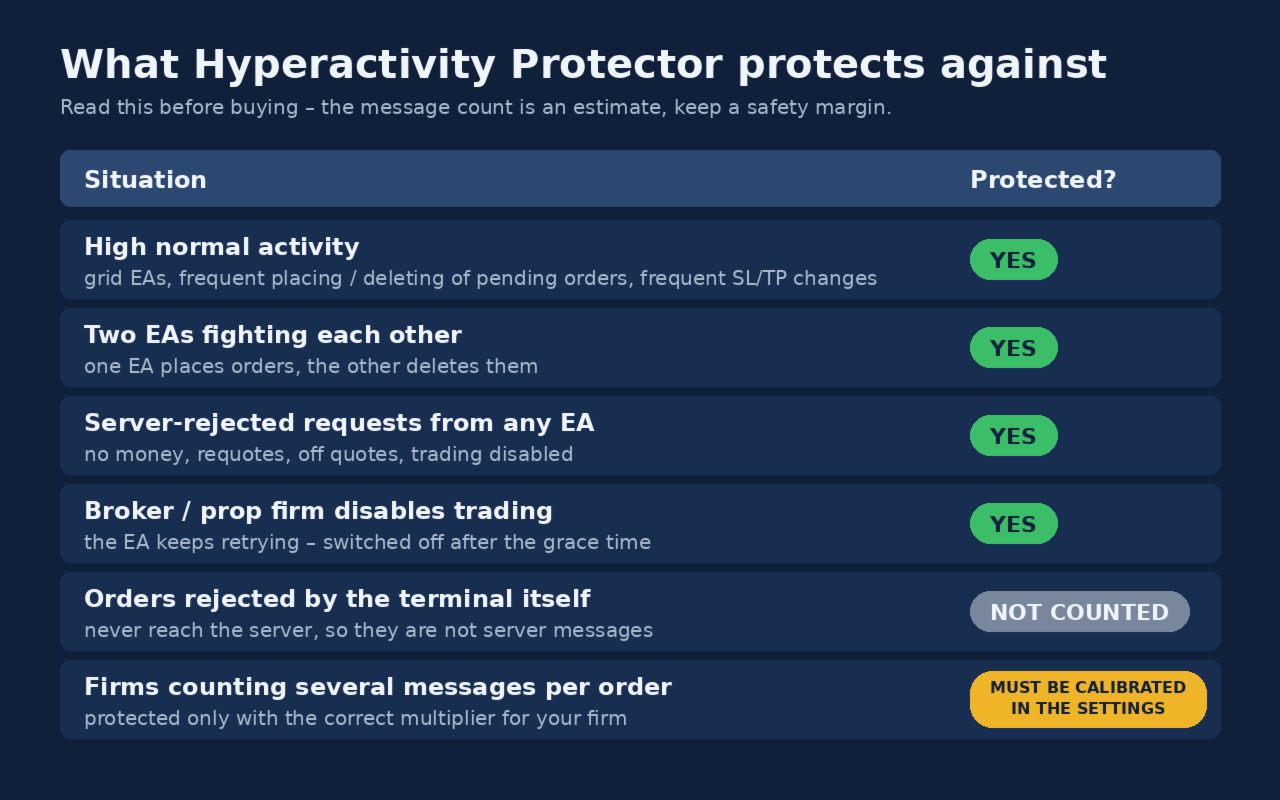
Please read this table before buying.

Situation Protected?
High normal activity (grid EAs, frequent placing/deleting of pending orders, frequent SL/TP changes) ✅ Yes — every order change is counted and the EAs are switched off before the limit
Two EAs fighting each other (one places orders, the other deletes them) ✅ Yes
Broker/firm disables trading and the EA keeps retrying ✅ Yes — the block is detected and the EAs are removed after the grace time
Requests rejected by the server (invalid price, stops too close, not enough money) ❌ No — rejected requests do not change the account state, so MetaTrader 4 gives no way to see them
Orders rejected by the terminal itself Not counted — they never reach the server, so they are not server messages
Firms that count several server messages per order ⚠️ Must be calibrated in the settings (see Calibration)

The message count is an estimate. The protector cannot read your firm's own counter. Keep a safety margin (the default action level is 85% of the limit).

Setup

  1. Attach the protector to its own chart (any symbol, any timeframe). Enable "Allow live trading" (needed to delete pending orders).
  2. Choose which EAs to switch off:
  3. All other charts (default): every EA on every other chart is removed.
  4. Symbol + timeframe (recommended): only charts matching the symbol fragment and timeframe, e.g. XAUUSD + H1 . MetaTrader 4 cannot read the EA name of a chart, so put the EA(s) to be switched off on one symbol + timeframe and keep every EA you want to keep running (trade managers, drawdown guards) on a different timeframe. Do not leave any other chart open on that symbol + timeframe.
  5. Set the limit, the multiplier for your firm and the day reset time.
  6. For push notifications: Tools > Options > Notifications (MetaQuotes ID).

Calibration (messages per request)

Firms count server messages, not order requests, and one request may produce several messages. To calibrate:

  1. Ask your firm's support how many server messages your account sent on a specific day.
  2. Count the order requests in the terminal journal of that day (or read "requests=" in the protector's end-of-day log line).
  3. Multiplier = firm's messages ÷ requests. Use an average of several days if possible.

Some firms count exactly one message per request — then use 1.0. Until you have a calibration, keep the conservative default of 4.4.

Free first calibration: every purchase includes one free calibration. Send me a private message on MQL5 with the protector's log of one trading day and the number of messages your firm or broker reported for that day, and I will send you back a set file calibrated for your account.

Inputs (summary)

Input Meaning
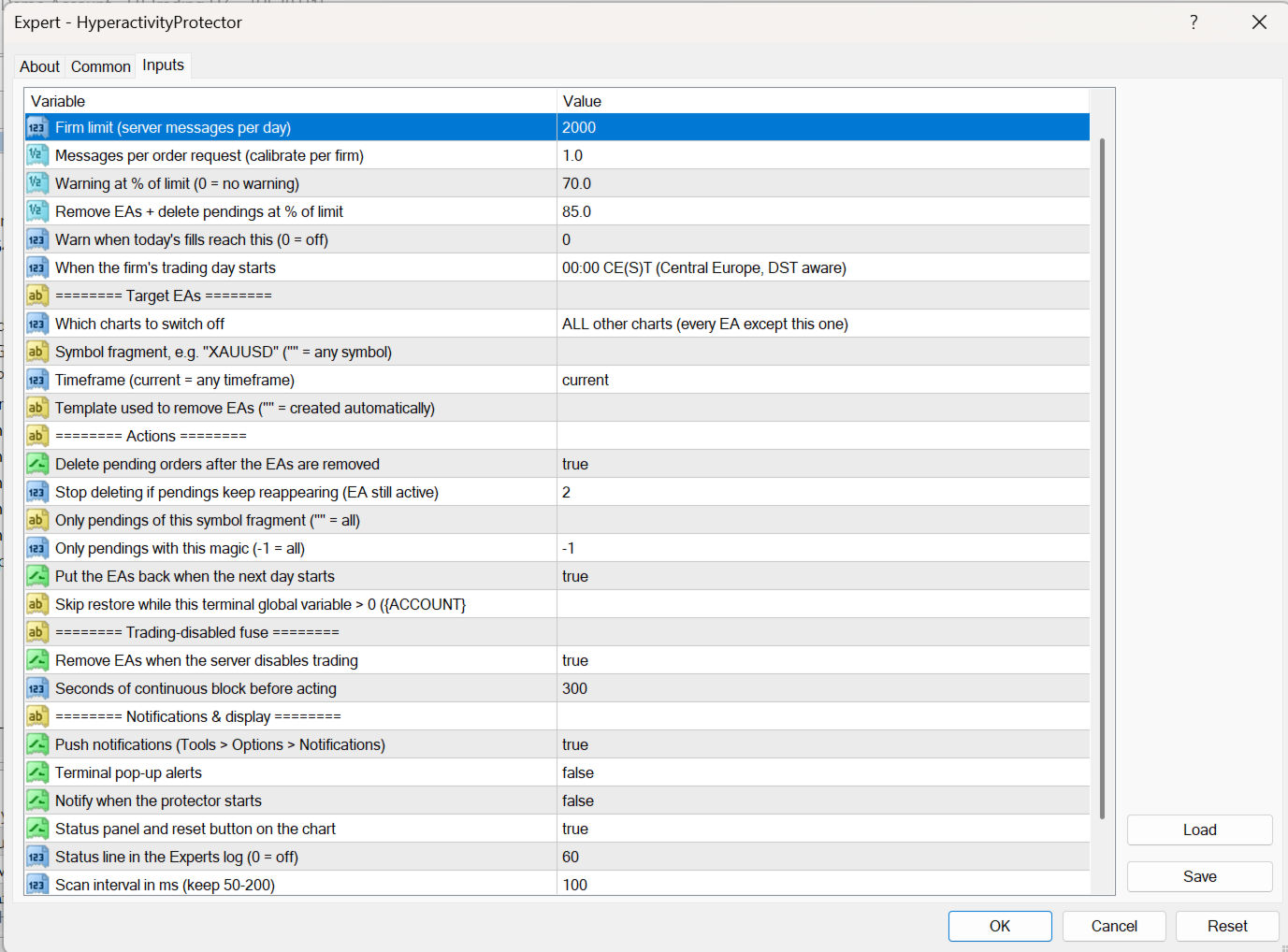
DailyMessageLimit Your firm's daily message limit
MessagesPerRequest Calibration multiplier (default 4.4, conservative)
WarnPercent / ActionPercent Warning and action levels in % of the limit
TradesPerDayWarn Optional warning on number of fills per day (0 = off)
DayReset Server midnight / 00:00 CE(S)T / 00:00 UTC
TargetMode, TargetSymbol, TargetTimeframe Which charts are switched off
DeletePendingOrders, PendingSymbolFilter, PendingMagicFilter Pending orders deleted after the action
MaxDeleteRounds Loop breaker: delete rounds allowed before the protector stops deleting (default 2)
AutoRestoreNextDay, RestoreBlockVariable Automatic restore next day; optionally postponed while a global variable is set (e.g. by your drawdown guard)
ActOnTradeDisabled, TradeDisabledGraceSec Trading-disabled fuse (default 300 s)

Notes

  • After the trading-disabled fuse fires, EAs are not restored automatically: check your account first, restore your EAs (chart > Templates > HP_backup_…) and press "Reset today's counter".
  • If the terminal is restarted after an action, automatic restore is not possible; you get a notification to restore manually.
  • The protector itself sends no requests to the server during normal operation. After an action it only sends the pending-order deletions (at most MaxDeleteRounds rounds).
Produits recommandés
Reverse copier is a tool that will open opposite buy/sell orders from your master account. It will help you with low profit EA's that lose consistenly and turn it to wins. Feel free to ask for new functions/features and I will add it. Now it's a simple MT5 to MT4 bridge with straightforward logic of one position open/close.  How to install: https://www.mql5.com/en/market/product/141604
FREE
This EA will help you to automatically put stop loss and take profit for all your orders. Stop loss point and take profit points can be selected in the tab of the input parameters. You can specify three symbols with SL and TP values (you can see symbol1 , symbol2 ... in the input tab below). The EA performs checks. If a new order with symbol1 appears, it puts SL and TP with stoploss1 and takeprofit1 values (in points). If a new order with symbol2 appears, it puts SL and TP with stoploss2 and tak
Trade Copier Local MT4 is a fast local trade copier for copying trades between multiple MT4 and MT5 accounts. One EA works in both Master and Slave modes. Simply select the required Copier Mode and use the same product on your MetaTrader terminals. Copy trades between: • MT5 → MT5 • MT5 → MT4 • MT4 → MT5 • MT4 → MT4 Perfect for: • Trading multiple accounts at once • Linking multiple trading accounts • Personal account mirroring • Signal providers • Account managers • Prop trading setups #
Local Account Monitor MT4 is a read-only local monitoring utility for traders who run multiple MetaTrader terminals on the same PC or the same Windows VPS . It combines Agent mode and Dashboard mode so you can monitor local accounts from one place, spot stale terminals quickly, review account health states, and inspect risk details without switching between many terminals. Public channel:   CLICK HERE What it is for Monitoring multiple local MT4 terminals from one dashboard Quickly identifying
FREE
This tool will perform Trailing stop loss and Break even management for orders. Helps you limit or reduce the time spend watching orders on the screen, especially when you need to go to sleep. Just add this EA to 1 chart, you can manage all pairs. You can filter orders by comment, magic number, symbol, and order ticket number. When Breakeven it can add shift/offset pips (to cover the commission...). You can try in strategy tester before purchase. The EA will add Buy and Sell alternately, so yo
Trading Control Pad
Sukunthakan Ngernbamrung
Trading Control Pad is a useful tool for all traders. To send BUY/SELL, pending order, modify and automatic setting SL and TP in one click by the current symbol. The Trading Control Pad can help you being comfortable and quickly trading.  Pad can help you automatic and manual partially close some lot at the target, breakeven and trailing stop. The Trading Control Pad features / Functionality Showing the currency pair, the total positions, the number of buy and sell orders. Standard tools for op
Order Block Draw MTF
Jorge Delgado Segura
4 (1)
Just $30 for six months!!!. This will draw Order Blocks just by clicking on a candle with different colors for different timeframes. It will use the body or the wicks. It can also draw the mean threshold of the candle open/close or high/low. As a drawing tool, it is not active all the time after adding it to the chart. Activate by pressing 'b' twice on the keyboard within a second. If activated but then decided not to draw, deactivate by pressing 'b' once.  Box color depends if candle is abov
Le MT4 to Discord Signal Provider est un outil convivial et entièrement personnalisable conçu pour envoyer directement des signaux de trading à Discord. Cet outil transforme votre compte de trading en un fournisseur de signaux efficace. Personnalisez les formats de messages pour qu'ils correspondent à votre style ! Pour plus de facilité, choisissez parmi des modèles pré-conçus et décidez quels éléments du message inclure ou exclure. [ Démo ] [ Manuel ] [ Version MT5 ] [ Version Telegram ]  New:
from this moment, RSI traders will have 95% less time and health using this Robot Robot Instructions for using Robot RSI sent to Telegram 0 put the robot in MT4  >> ok 1 Create Telegram Robot " Rsi_Testbot " >> ok 2 Save Tokens   "1706277467:AAEntyiMli3ZN6uWrMch-uz704OGWO5snOM"   >> ok 3 Create Telegram Channel ,Get telegram id = -1001243242869  " RSI Test Bot "  + grant admin rights for bots https://api.telegram.org/&amp ;amp;amp;amp;amp;lt;token>/getUpdates 4 Create Telegram group nhóm     
Full Dashboard Trade Panel
Opengates Success International
Full Dashboard Trade Panel Utility is built to perform overall task of trades and order managements to make trading an easy task for every trader that bought and using it. It comprises of three sections with each having a shift setting for a convenient placement as desired: 1.        Trades Managements Panel 2.        Basket Trades Panel 3.        Symbol and Time frame Changer Each of these three sections has its own unique functions and roles to perform for a complete enjoyable forex trading ex
The Arrow Scalper
Fawwaz Abdulmantaser Salim Albaker
1 (2)
Dear Friend..  I share with you this simple Expert Adviser .. it is full automatic  this Expert Adviser following the trend of the pair you install on or any stocks or indices , it is works like that: - when the trend on H4 chart show a start of up trend the expert will wait till the 15M & 1H charts show an up trend the EA will open a buy order directly , and do the same for down trend and open a sell order the buy or sell  order lot size and take profit and stop loss will measured manually  by
FREE
L'indicateur montre les heures d'ouverture des bourses mondiales. Vous aide à voir quels marchés sont actuellement les plus actifs Découvrez mon  #1 Pro  Utility : 66+ fonctionnalités, incluant cet outil  |   Contactez-moi  si vous avez des questions Aide à sélectionner les instruments les plus volatils en ce moment; Particulièrement utile pour les traders intraday; 1) Lors de l'utilisation sur des délais 1H et inférieurs: les lignes correspondront à la position réelle des barres sur le graphiq
SESSION PILOT MT4 – MARKET SESSION & NEWS FILTER Session Pilot is an intelligent filtering tool designed to focus trading activity on the most liquid market sessions and avoid trades during high-volatility news events. The system continuously monitors current time and upcoming economic announcements. MAIN FEATURES • Automatic detection of London, New Y
Quantum Falcon Signal Free is a smart visual trading indicator for MetaTrader 4 designed for Forex and Gold traders. The indicator combines: • Trend analysis • RSI momentum confirmation • MACD momentum filtering • ATR volatility filtering • Higher timeframe confirmation • Smart exit signal detection Main Features: • Smart Buy and Sell signals • Exit Buy / Exit Sell alerts • Real-time dashboard on chart • Professional candle arrows • Multi-timeframe trend confirmation • ATR market volatility filt
FREE
YPY Check Your Broker is a universal multifunctional software complex which uses primary tick data. It allows traders to perform comparative analysis of the trading conditions and execution quality, identify abnormal BID prices outside the indicative quotes. It also reflects the facts of redrawing bars in the terminal, spread extension, controls the leverage stop out level values, speed of execution and server connection breaks, maintains a detailed statistics on the slippages. The YPY Check You
Channels MT4
Kyra Nickaline Watson-gordon
5 (1)
Channels Indicator is an All-In-One Indicator with a powerful calculation engine. The Indicator contains 4 different and usual methods for finding channels on the market. Indicator is powered by a visual interface and with various selections of alerts and notifications. Testing Indicator : Strategy Tester does not respond to your clicks on panels (This is metatrader tester limitation). Thus input your desired settings on the indicator pre-settings and test. Using Indicator : Display 4 Typ
SFG Grid Manager MT4 – Système de Grille et de Miroir Intelligent SFG Grid Manager MT4 est un gestionnaire de grille automatique et professionnel qui suit une position existante (manuelle ou ouverte par un autre EA) et ouvre une opération de moyenne à chaque étape définie (GridPips). Lorsque la position principale se ferme ou disparaît, toutes les positions ouvertes par le gestionnaire sont automatiquement clôturées. Il fonctionne avec tout courtier prenant en charge les comptes Netting ou He
Fast and relible, low CPU usage, optimized code. Can copy from single master to few clients or from few masters to single client. Do not affect to other EAs or manual trading, just specific magics orders. Can use few methods of lots size for copying trades. And a lot of other features. Thanks for using! Installation: Master -> Client(s). Install copier for every terminal at a single chart. Few Masters -> Client. Install copier for every master terminal at a single chart. Install client copier
Manual Forex Trading with Enhanced Functionality "OneClickMagicTrader," a powerful tool designed to cater to the needs of forex traders by simplifying various trading actions. Drawing parallels with the familiar "One Click Trading" feature of the MT4 terminal, OneClickMagicTrader allows traders to swiftly execute BUY or SELL orders with a single click. This tool, a brainchild of an avid trader who identified room for improvement, has now been shared with the entire forex community. Taking a st
Trades Manager Buy and Sell Close The Close Buy and Sell Expert Advisor is a free EA given to help traders manage trades easily especially during volatile market environment. Features: It helps to quickly close trades either in profit or loss. Close for separate Buy Only  Close for separate Sell Only  Close for both Buy and Sell Only  Control Box can be minimized, closed or moved around from the chart. It works for all open trades opened on the terminal. Contact me for your specific coding
FREE
Le LT Renko MT4 de Litoral Trading est une solution professionnelle complète pour la génération de graphiques Renko, entièrement intégrée à un panneau de trading visuel avancé. Conçu pour les traders qui cherchent à éliminer le bruit des graphiques temporels (chandeliers traditionnels), ce produit associe la fidélité d'une représentation basée purement sur le prix ( Price Action ) à la vitesse d'exécution d'un carnet d'ordres professionnel à haute performance sur MetaTrader 4. Grâce à ses deux
MRKD Vector
Jay Benedict Alfaras
MRKD Vector — Smart Trade Management Utility MRKD Vector is a powerful and intuitive order execution tool designed for efficient manual trading in MetaTrader 5. Built with precision and speed in mind, MRKD Vector simplifies trade management by giving you full control over entries, stops, and targets — all from a sleek interface. Key Features: Quick Order Execution Place trades with ease using a clean, fast interface built for active traders. Intuitive SL, TP, and Lot Size Control Adjust sto
Arrow Micro Scalper est un indicateur conçu pour le scalping et le trading à court terme, intégré à tout graphique et instrument financier (Devises, crypto, actions, métaux). Dans son travail, elle utilise l'analyse des vagues et un filtre de direction de tendance. Recommandé pour une utilisation sur les périodes de M1 à H4. Comment travailler avec l'indicateur. L'indicateur contient 2 paramètres externes pour modifier les paramètres, les autres sont déjà configurés par défaut. Les grandes flè
The new update makes this indicator a complete tool for studying, analyzing and operating probabilistic patterns. It includes: On-chart Multi-asset percentage monitor. Configurable martingales. Twenty-one pre-configured patterns , including Mhi patterns and C3. An advanced pattern editor to store up to 5 custom patterns. Backtest mode to test results with loss reports. Trend filter. Hit operational filter. Martingale Cycles option. Various types of strategies and alerts. Confluence between patte
Genesis Matrix Pro is a professional multi-timeframe trend detection indicator designed to help traders identify high-quality market alignment with clarity and structure. It combines 12 different technical indicators into one visual alignment matrix, allowing traders to quickly see when market conditions are bullish, bearish, or neutral. A signal is generated only when the selected strategies are aligned, helping reduce noise and improve decision-making. PLEASE CONTACT ME AFTER PURCHASE TO GET
Unlock the power of "Psychological Numbers" with RoundLevel . Large financial institutions, banks, and hedge funds don't place orders at random prices; they prefer round numbers (e.g., 1.1000, 105.00, 2000). These levels act as invisible magnets for price action, serving as high-probability support and resistance zones. Key Features: Universal Compatibility: Works perfectly on Forex, Gold (XAUUSD), Indices, and Stocks. Clean Visualization: Automatically draws horizontal levels without cluttering
Fast MT4 Copier
Hans Alexander Nolawon Djurberg
Fast / Reliable / Multi Functions / Simple To use local MT4 to MT4 | MT4 to MT5 platform copier , it will copy all your Master account orders into any Slave accounts very fast , no delay, Also it supports any kind of orders/ExpertAdvisors such as Buy / Sell / BuyStop / SellStop / BuyLimit / SellLimit / Smart Partial Closing / opened in Hedge mode / opened in Martingale mode / Modifying Pending orders / Modifying StopLoss-TakeProfit .using it is simple , Just drop the EA on Master account which y
Indicator for binary options arrow is easy to use and does not require configuration works on all currency pairs, cryptocurrencies buy signal blue up arrow sell signal red down arrow tips do not trade during news and 15-30 minutes before their release, as the market is too volatile and there is a lot of noise it is worth entering trades one or two candles from the current period (recommended for 1 candle) timeframe up to m 15 recommended money management fixed lot or fixed percentage of the depo
Crystal CopyCat Pro Trade Copier Ultra-Fast Master–Slave Copier with Zero-Delay Execution and Cross-Platform MT5 Compatibility Architecture:   MT4 → MT4 and MT4 → MT5 Full Compatibility MT5 Version Free :   https://www.mql5.com/en/market/product/144569 MT5 Version Pro :  https://www.mql5.com/en/market/product/165051 Complete User Setup Guide:-  https://www.mql5.com/en/blogs/post/764222   1. Overview Crystal CopyCat Ultimate 5.0 is a next-generation trade copy engine engineered for professi
MT4 SRP Smart Risk Panel
AMIRUL SHAFIQ BIN OTHMAN Shafiq
Smart Risk Panel Smart Risk Panel offre aux traders manuels un véritable centre de commande directement sur le graphique MetaTrader. Placez des ordres au marché ou en attente, gérez les positions après l’entrée, lancez des actions groupées et contrôlez la protection du compte sans naviguer sans cesse entre le graphique et les Inputs de l’EA. Le panneau est conçu pour la rapidité et la clarté : les outils sont regroupés par tâche, les états actuels restent visibles et les actions utilisées pendan
Les acheteurs de ce produit ont également acheté
Bienvenue sur Trade Manager EA, l’outil ultime de gestion des risques conçu pour rendre le trading plus intuitif, précis et efficace. Ce n’est pas seulement un outil d’exécution d’ordres ; c’est une solution complète pour la planification des trades, la gestion des positions et le contrôle des risques. Que vous soyez débutant, trader expérimenté ou scalpeur ayant besoin d’une exécution rapide, Trade Manager EA s’adapte à vos besoins, offrant une flexibilité sur tous les marchés, des devises et i
PZ Trade Pad Pro MT4
PZ TRADING SLU
3.67 (3)
Effortlessly calculate lot sizes and manage trades to save time and avoid costly errors The Trade Pad Pro EA is a tool for the Metatrader Platform that aims to help traders manage their trades more efficiently and effectively. It has a user-friendly visual interface that allows users to easily place and manage an unlimited number of trades, helping to avoid human errors and enhance their trading activity. [ Installation Guide | Update Guide | Troubleshooting | FAQ | All Products ] One of the k
Trade Manager Pro MT4
Bryan Djoufack Nguessong
Il s'agit d'un utilitaire pour faciliter votre trading en mettant en un ou quelques clics des tâches fastidieuses comme la gestion des ordres et la gestion des risques. Caractéristiques Gestion du risque  Calcule automatiquement les lots en fonction du risque spécifié en % ou en $ (paramètre d'entrée MoneyBasedRisk) dans le champ risque et vous laisse entrer en plaçant des lignes pour SL TP etc. et affiche le Risk Reward en temps réel. TrueRisk inclut les commissions lors du calcul de la ta
Trade Assistant Pro 36 in 1
Makarii Gubaydullin
4.76 (21)
Outil Multifonction : Calculatrice de Lots, Ordres Grid, Ratio R/R, Gestionnaire de Trades, Zones d'Offre et de Demande, Price Action et bien plus Version Démo   |   Manuel d'utilisation L'Assistant de Trading ne fonctionne pas dans le testeur de stratégies : vous pouvez télécharger la Version Démo ICI pour tester l' utilitaire . Contactez-moi pour toute question / idées d'amélioration / en cas de bug trouvé Si vous avez besoin d'une version MT5, elle est disponible ici Simplifiez, accélérez et
Telegram to MT4 Multi-Channel Copier   copie automatiquement les signaux de trading de vos canaux Telegram et Discord directement vers MetaTrader 4. Pas de bots, pas d'extensions de navigateur, pas de copie manuelle. Un signal arrive sur Telegram ou Discord et l'EA ouvre le trade dans votre terminal en quelques secondes. Et avant de copier un canal, le backtester intégré vous montre ce que ce canal aurait fait sur votre compte. Le produit comprend deux composants : une application Windows qui éc
TradePanel MT4
Alfiya Fazylova
4.84 (95)
Trade Panel est un assistant commercial multifonction. L'application contient plus de 50 fonctions de trading pour le trading manuel et permet d'automatiser la plupart des tâches commerciales. Instructions d'utilisation : https://www.mql5.com/fr/blogs/post/762589 Version d'essai de l'application pour un compte démo : https://www.mql5.com/fr/blogs/post/762644 Comment installer l'application : https://www.mql5.com/fr/blogs/post/762645 Comment tester l'application en mode visuel : https://www.mql5.
Trade Indicator Assistant is a powerful MT4 utility designed to turn indicators into automated trading systems. Its main feature is the ability to automatically detect an indicator’s   BUY and SELL signal buffers , without requiring you to know the buffer numbers, search through indicator settings, or modify the indicator source code. Bonus Indicator: After purchasing Trade Indicator Assistant, contact me to receive Trade Signal Pro completely free as a bonus indicator. [Download Demo Version]
Copieur ->Interaction d'interface pratique et rapide, les utilisateurs peuvent l'utiliser immédiatement       ->>>> Recommandé pour une utilisation sur des ordinateurs Windows ou VPS Windows Caractéristiques: Paramètres de copy trading diversifiés et personnalisés : 1. Différents modes de lot peuvent être définis pour différentes sources de signaux 2. Différentes sources de signaux peuvent être définies pour le copy trading avant et arrière 3. Les signaux peuvent être définis avec des commentai
Trade Manager MT4 DaneTrades
Levi Dane Benjamin
4.09 (11)
Trade Manager pour vous aider à entrer et sortir rapidement des transactions tout en calculant automatiquement votre risque. Y compris des fonctionnalités pour vous aider à éviter le sur-trading, le trading de vengeance et le trading émotionnel. Les transactions peuvent être gérées automatiquement et les mesures de performances du compte peuvent être visualisées dans un graphique. Ces fonctionnalités rendent ce panneau idéal pour tous les traders manuels et contribuent à améliorer la plateforme
The product will copy all telegram signal to MT4   ( which you are member  ) , also it can work as remote copier.  Easy to set up, copy order instant, can work with almost signal formats, image signal, s upport to translate other language to English Work with all type of channel or group, even channel have "Restrict Saving Content", work with  multi channel, multi MT5 Work as remote copier: with signal have ticket number, it will copy exactly via ticket number. Support to backtest signal. How to
Take a Break
Eric Emmrich
5 (31)
Take a Break pauses your Expert Advisors when trading is a bad idea: before news, after a daily loss, outside your trading hours, or when a rule you wrote yourself says so. When the pause is over, your EAs simply continue. Account protection for all your EAs in one tool: news filter, drawdown and equity protection, time filter and custom rules. One EA on one chart protects the whole account, the free indicator gives every chart its own rules on top. Free demo | What is new in 26.09 | Support Ass
FCK CurrencyStrength Pro
Patel Hitendrakumar Mahendrabhai
Hi Friends, " FCK Currency Strength Pro " is a auto & semi auto trading expert with direction of pair. Buy-Sell separate or multi currency in one click. The strategy of  FCK Currency Strength Pro  is a combination of custom indicator, Trendlines, Support & Resistance levels ( Price Action ) and most important secretive trading algorithm mentioned above. Download News Ex4 and csv file You need the following SDSnews.ex4 in MQL4/Libraries and the daylightsavings.csv in MQL4/Files. Only 4 of 5 copi
News Filter EA MT4
Rashed Samir
5 (10)
News Filter EA: Advanced Algo Trading Assistant News Filter EA is an advanced algo trading assistant designed to enhance your trading experience. By using the   News Filter EA , you can integrate a Forex economic news filter into your existing expert advisor, even if you do not have access to its source code. In addition to the news filter, you can also specify   trading days   and   hours   for your expert. The News Filter EA also includes   risk management   and   equity protection   features
KT Equity Protector MT4
KEENBASE SOFTWARE SOLUTIONS
3.75 (4)
An equity protection EA for MetaTrader that enforces your loss limits and profit target for you: when your account reaches a rule you set, it closes your trades on every symbol, before one bad day turns into a lost account. It suits prop firm challenges and personal accounts alike. Attach it to one chart, answer a few questions in the on-chart setup wizard, and it watches your whole account in the background while you trade by hand or with other EAs. What it protects Daily loss limit: a percenta
Trade Copier Global
Laszlo Tormasi
5 (15)
Trade Copier Global: The name speaks for itself. This copier allows you to copy orders between MT4 terminals even if they are not installed on the same computer. Features Copying trades between MT4 terminals around the world with a short delay. Automatically recognizes symbol prefixes. Can connect many Slaves to the same Master. Supports pending and market orders. Supports partial order close (with limitations, see below) Can send messages and notifications to the Slaves from the Master Several
Unlimited Trade Copier Pro is a tool to copy trade remotely to multiple MT4, MT5 and cTrader accounts at different computers/locations over internet. This is an ideal solution for you if you are a signal provider and want to copy your trades to other receivers globally on your own rules. One provider can copy trades to multiple receivers and one receiver can get trade from multiple providers as well. The provider can even set the subscription expiry for each receiver, so that receiver will not b
Le MT4 to Telegram Signal Provider est un outil facile à utiliser et entièrement personnalisable qui permet d'envoyer des signaux à Telegram, transformant ainsi votre compte en fournisseur de signaux. Le format des messages est entièrement personnalisable ! Cependant, pour une utilisation simple, vous pouvez également opter pour un modèle prédéfini et activer ou désactiver des parties spécifiques du message. [ Démonstration ]   [ Manuel ] [ Version MT5 ] [ Version Discord ] [ Canal Telegram ]  N
Strategy Builder offers an incredible amount of functionality. It combines a trade panel with configurable automation (covert indicators into an EA), real-time statistics (profit & draw down) plus automatic optimization of SL, TP/exit, trading hours, indicator inputs. Multiple indicators can be combined into an single alert/trade signal and can include custom indicators, even if just have ex4 file or purchased from Market. The system is easily configured via a CONFIG button and associated pop-up
Négociez automatiquement les zones de support et de résistance ou d'offre et de demande une fois que vous avez identifié les zones clés à partir desquelles vous souhaitez négocier. Cet EA vous permet de dessiner des zones d'achat et de vente en un seul clic, puis de les placer exactement là où vous vous attendez à ce que le prix change. L'EA surveille ensuite ces zones et effectuera automatiquement des transactions en fonction de l'action des prix que vous spécifiez pour les zones. Une fois la
Riskless Pyramid
Snapdragon Systems Ltd
5 (1)
Introduction This powerful MT4 trade mangement EA offers a way potentially to aggressively multiply trade profits in a riskfree manner. Once a trade has been entered with a defined stoploss and take profit target then the EA will add three pyramid add-on trades in order to increase the overall level of profit. The user sets the total combined profit target to be gained if everything works out. This can be specified either as a multiple of the original trade profit or as a total dollar amount. Fo
The News Filter
Leolouiski Gan
5 (25)
Ce produit filtre tous les conseillers experts et les graphiques manuels pendant les heures de publication des actualités, de sorte que vous n'avez pas à vous soucier des pics de prix soudains qui pourraient détruire vos configurations de trading manuelles ou les transactions entrées par d'autres conseillers experts. Ce produit est également livré avec un système de gestion des ordres complet qui peut gérer vos positions ouvertes et vos ordres en attente avant la publication de toute actualité.
Prop Guardian Risk Manager MT4 – Drawdown, Risk & Hedge Protection for Prop Firm and Managed Accounts Prop Guardian Risk Manager is a professional risk-control utility for MetaTrader 4, designed for prop firm traders, money managers and anyone who wants strict account-level risk protection. It does not generate trading signals, strategy entries or trading decisions. Instead, it runs in the background, monitors your account risk and can automatically block new exposure, close managed trades or ac
Grid Manual MT4
Alfiya Fazylova
4.71 (17)
Grid Manual est un panneau de trading permettant de travailler avec une grille d'ordres. L'utilitaire est universel, possède des paramètres flexibles et une interface intuitive. Il fonctionne avec une grille d'ordres non seulement dans le sens des pertes, mais aussi dans le sens de l'augmentation des profits. Le commerçant n'a pas besoin de créer et de maintenir une grille d'ordres, l'utilitaire le fera. Il suffit d'ouvrir une ordre et "Grid Manual" créera automatiquement une grille de ordres po
DrawDown Limiter MT4
Haidar Lionel Haj Ali
5 (8)
Expert Advisor "Drawdown Limiter"  Vous êtes au bon endroit si vous recherchez un contrôle de drawdown, un limiteur de drawdown, une protection du solde, une protection de l'équité ou une limite quotidienne de drawdown en rapport avec les entreprises de gestion de capitaux (Prop Firm), FTMO, My Forex Fund, ou si vous souhaitez protéger votre compte de trading. Avez-vous déjà eu du mal à contrôler votre drawdown en tradant sur des comptes financés ? Cet EA est fait pour vous. Les entreprises de
Risk manager Risk manager - it will simplify the tracking of drawdown and will notify you (alert) when the specified risk is reached, and close/lock orders when the critical DD risk level is reached. If the specified drawdown is exceeded, you can choose two options for actions: All orders will be closed that mean loss will be fixed on depo. The terminal also closes. Instead of fixing the loss on depo, the opposite order will be opened - orders locking will occure. Not a single order will be c
Auto Trade Copier
Vu Trung Kien
4.77 (86)
Auto Trade Copier is designed to copy trades to multiple MT4, MT5 and cTrader accounts/terminals with 100% accuracy. The provider and receiver accounts must be on the same PC/VPS. With this tool, you can copy trades to receiver accounts on the same PC/VPS. All trading actions will be copied from provider to receiver perfectly. This version can be used on MT4 accounts only. For MT5 accounts, you must use Auto Trade Copier for MT5 . Reference: - For MT4 receiver, please download Trade Receiver Fre
MACD Divergence Scanner is a multi-timeframe and multi-symbol dashboard and alert that checks all timeframes and symbols to find regular and hidden divergences between price chart and MACD indicator. This divergence scanner is integrated with support and resistance zones so you can check the MACD divergences in the most important areas of the chart to find trend reversals in the price chart. Download demo version   (works on M 1,M5,M30,W1   timeframes) Full description of scanner parameters ->  
Support and Resistance Dashboard for MT4 is a multi-timeframe and multi-symbol scanner and alert system that finds S/R zones and pivot points for all timeframes and symbols and alerts when price has interaction with them. If you are using support and resistance (or supply and demand) zones in your trading strategy, this dashboard and its alert and filtering system is a big time saver for you. Download demo version   (works on M 1,M5,M30,W1   timeframes) Full description of scanner parameters ->
VirtualTradePad PRO SE MT4 — panneau de trading avancé et espace graphique pour MetaTrader 4 VirtualTradePad PRO SE est un panneau de trading professionnel et un espace de gestion des trades pour MetaTrader 4 . Il aide les traders à ouvrir, gérer, protéger, fermer et analyser leurs trades plus rapidement depuis une seule interface basée sur le graphique. Le produit a été créé pour les traders manuels actifs qui ont besoin de plus qu’un simple ensemble de boutons. PRO SE combine l’exécution en un
Ultimate Partial Profit EA
BLAKE STEVEN RODGER
4.67 (3)
This EA Utility delivers a robust solution for managing an unlimited array of open orders, both manual and automated. It enables customizable partial profit levels utilizing metrics such as pips, ratios, ATR (Average True Range), and profit amounts for precise trade management. The utility features an advanced on-screen display, offering clear visualization of all orders and their profit levels to enhance strategic decision-making and control. To evaluate its performance and interface, the EA s
Plus de l'auteur
Has your broker or prop firm ever had a server outage - and when the connection came back, your EA started placing orders at completely wrong price levels? It happened to me. My trading terminals lost connection to the server for two hours, and after reconnecting my EA calculated its levels from incomplete price history. It placed a series of orders around 40 USD away from its normal levels, and they hit their stop losses one after another. The same EA running on an account on a different serv
Hyperactivity Protector MT5 – stop your EAs before they break the daily server-message limit. Prop firms and brokers limit how many messages an account may send to the trading server per day – typically 2,000 (MetaQuotes guideline). Busy EAs that constantly place, modify and delete pending orders, two EAs fighting over the same orders, or an EA that keeps retrying when trading is blocked can exceed that limit and cost you a funded account. Hyperactivity Protector watches the activity of every
Has your broker or prop firm ever had a server outage – and when the connection came back, your EA started placing orders at completely wrong price levels? It happened to me. My trading terminals lost connection to the server for two hours, and after reconnecting my EA calculated its levels from incomplete price history. It placed a series of orders around 40 USD away from its normal levels, and they hit their stop losses one after another. The same EA running on an account on a different serve
Filtrer:
Aucun avis
Répondre à l'avis