Hyperactivity Protector MT4
- Утилиты
- Версия: 1.1
- Активации: 5

Prop firms and brokers limit how many messages an account may send to the trading server per day — typically 2,000 (MetaQuotes guideline). Grid EAs, EAs that constantly place and delete pending orders, or EAs that keep retrying when trading is blocked can exceed that limit and cost you a funded account.
Hyperactivity Protector watches your account activity, warns you as the limit approaches and switches your EAs off before the limit is reached. It also stops an EA from flooding the server when the broker or prop firm disables trading.
It works with any EA, including EAs you have no source code for.
What it does
- Counts every order request on the account (all EAs, all symbols): new orders, modifications, deletions and closes.
- Converts requests to estimated server messages with a per-firm multiplier.
- Warning at a chosen percentage of the limit (push notification / alert).
- Action at a chosen percentage: removes the target EAs from their charts (a backup template of every chart is saved), then deletes pending orders. Open positions are never touched — their SL/TP stay active on the server.
- Loop breaker: if pending orders keep reappearing after the action (an EA is still running, e.g. because of wrong target settings), the protector stops deleting after 2 rounds and notifies you. It can never start a place/delete loop itself.
- Trading-disabled fuse: if the server disables trading on the account for longer than a set time, your EAs are removed so they cannot send thousands of rejected requests.
- Optional automatic restore of your EAs when the next trading day starts.
- Day reset at server midnight, 00:00 CE(S)T or 00:00 UTC — match your firm.
- On-chart status panel and a one-click reset button.
- State survives a terminal restart within the day.
What it protects against — and what it does not
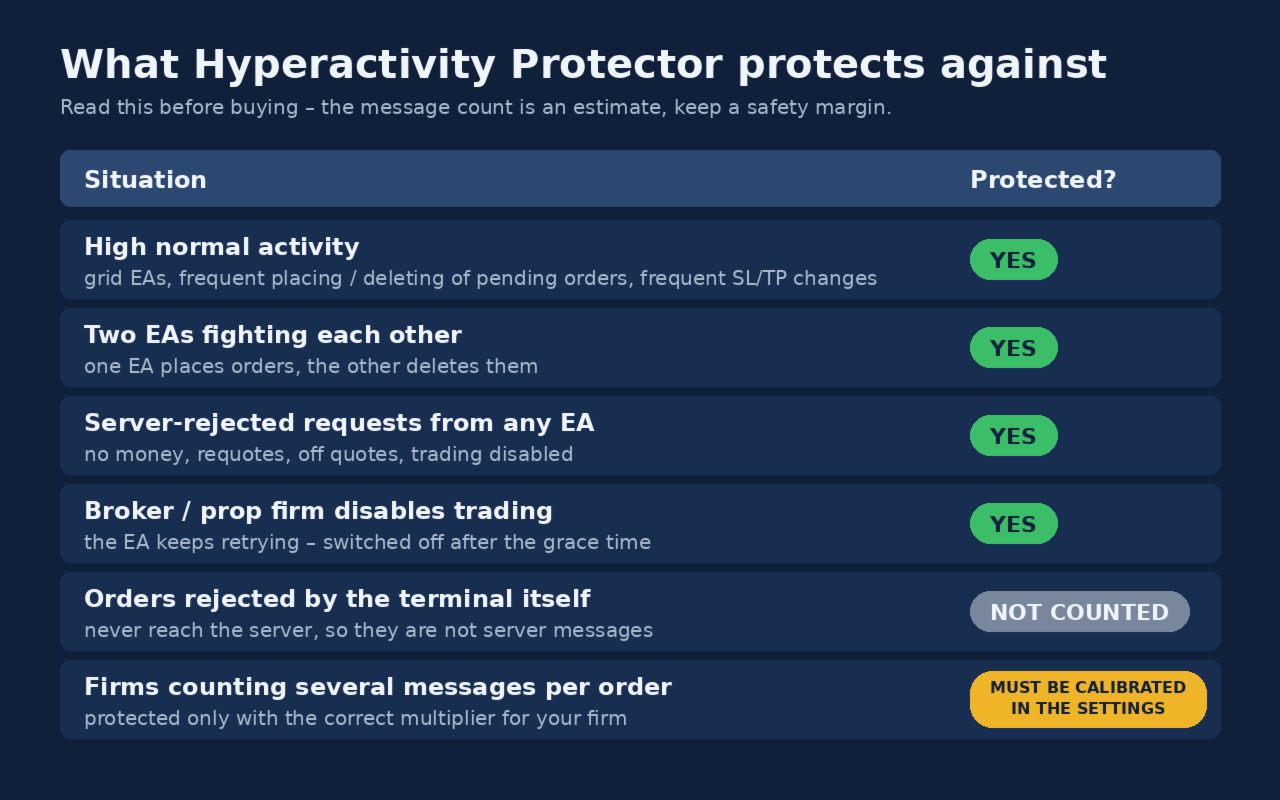
Please read this table before buying.
| Situation | Protected? |
|---|---|
| High normal activity (grid EAs, frequent placing/deleting of pending orders, frequent SL/TP changes) | ✅ Yes — every order change is counted and the EAs are switched off before the limit |
| Two EAs fighting each other (one places orders, the other deletes them) | ✅ Yes |
| Broker/firm disables trading and the EA keeps retrying | ✅ Yes — the block is detected and the EAs are removed after the grace time |
| Requests rejected by the server (invalid price, stops too close, not enough money) | ❌ No — rejected requests do not change the account state, so MetaTrader 4 gives no way to see them |
| Orders rejected by the terminal itself | Not counted — they never reach the server, so they are not server messages |
| Firms that count several server messages per order | ⚠️ Must be calibrated in the settings (see Calibration) |
The message count is an estimate. The protector cannot read your firm's own counter. Keep a safety margin (the default action level is 85% of the limit).
Setup
- Attach the protector to its own chart (any symbol, any timeframe). Enable "Allow live trading" (needed to delete pending orders).
- Choose which EAs to switch off:
- All other charts (default): every EA on every other chart is removed.
- Symbol + timeframe (recommended): only charts matching the symbol fragment and timeframe, e.g. XAUUSD + H1 . MetaTrader 4 cannot read the EA name of a chart, so put the EA(s) to be switched off on one symbol + timeframe and keep every EA you want to keep running (trade managers, drawdown guards) on a different timeframe. Do not leave any other chart open on that symbol + timeframe.
- Set the limit, the multiplier for your firm and the day reset time.
- For push notifications: Tools > Options > Notifications (MetaQuotes ID).
Calibration (messages per request)
Firms count server messages, not order requests, and one request may produce several messages. To calibrate:
- Ask your firm's support how many server messages your account sent on a specific day.
- Count the order requests in the terminal journal of that day (or read "requests=" in the protector's end-of-day log line).
- Multiplier = firm's messages ÷ requests. Use an average of several days if possible.
Some firms count exactly one message per request — then use 1.0. Until you have a calibration, keep the conservative default of 4.4.
Free first calibration: every purchase includes one free calibration. Send me a private message on MQL5 with the protector's log of one trading day and the number of messages your firm or broker reported for that day, and I will send you back a set file calibrated for your account.
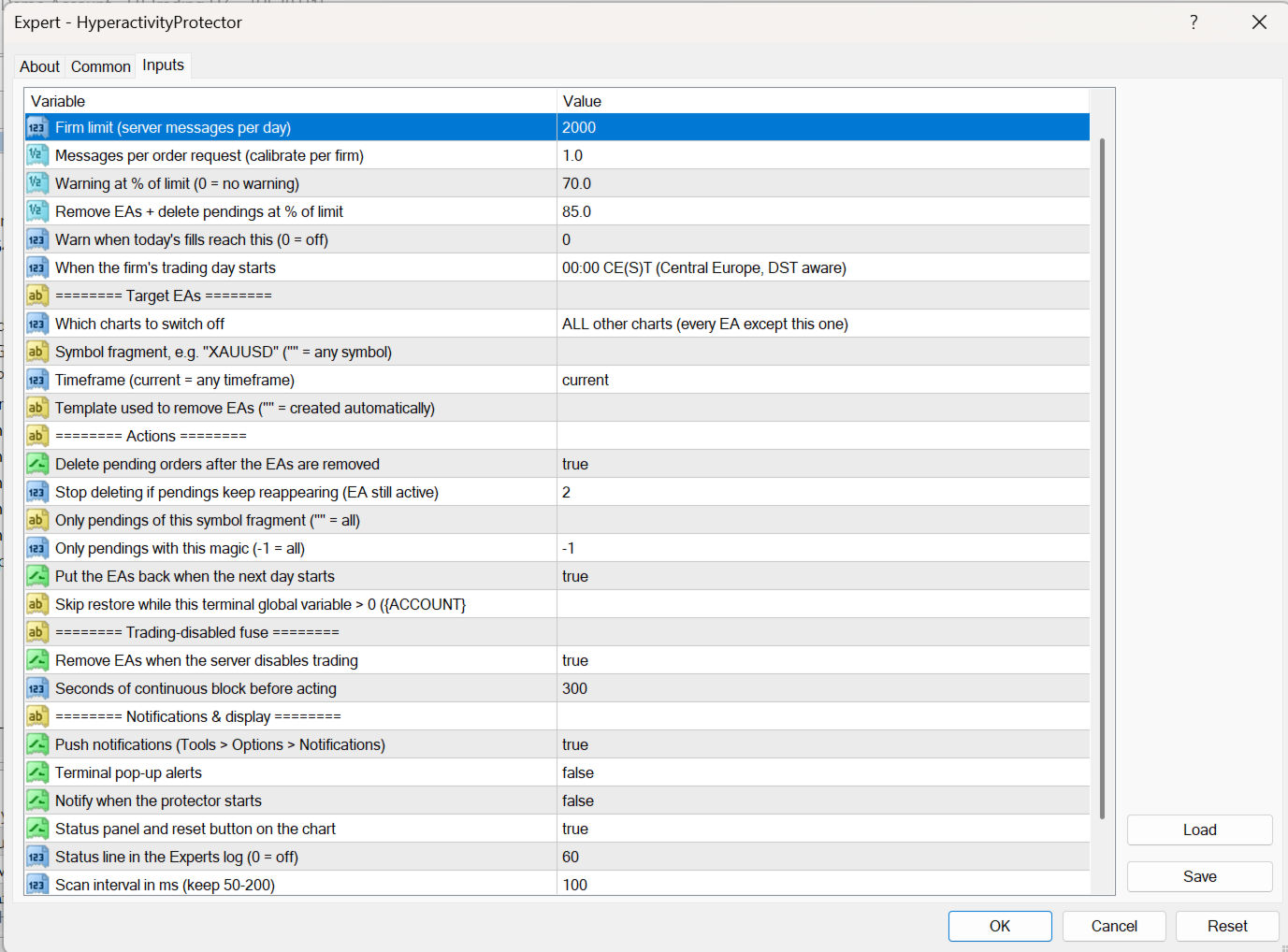
Inputs (summary)
| Input | Meaning |
|---|---|
| DailyMessageLimit | Your firm's daily message limit |
| MessagesPerRequest | Calibration multiplier (default 4.4, conservative) |
| WarnPercent / ActionPercent | Warning and action levels in % of the limit |
| TradesPerDayWarn | Optional warning on number of fills per day (0 = off) |
| DayReset | Server midnight / 00:00 CE(S)T / 00:00 UTC |
| TargetMode, TargetSymbol, TargetTimeframe | Which charts are switched off |
| DeletePendingOrders, PendingSymbolFilter, PendingMagicFilter | Pending orders deleted after the action |
| MaxDeleteRounds | Loop breaker: delete rounds allowed before the protector stops deleting (default 2) |
| AutoRestoreNextDay, RestoreBlockVariable | Automatic restore next day; optionally postponed while a global variable is set (e.g. by your drawdown guard) |
| ActOnTradeDisabled, TradeDisabledGraceSec | Trading-disabled fuse (default 300 s) |
Notes
- After the trading-disabled fuse fires, EAs are not restored automatically: check your account first, restore your EAs (chart > Templates > HP_backup_…) and press "Reset today's counter".
- If the terminal is restarted after an action, automatic restore is not possible; you get a notification to restore manually.
- The protector itself sends no requests to the server during normal operation. After an action it only sends the pending-order deletions (at most MaxDeleteRounds rounds).