MultiTimeframe ChartLauncher
- Yardımcı programlar
- Sürüm: 1.0

is a native chart-management script. When run on a chart, it opens separate charts for the same symbol at the enabled timeframes, from M1 through MN1.
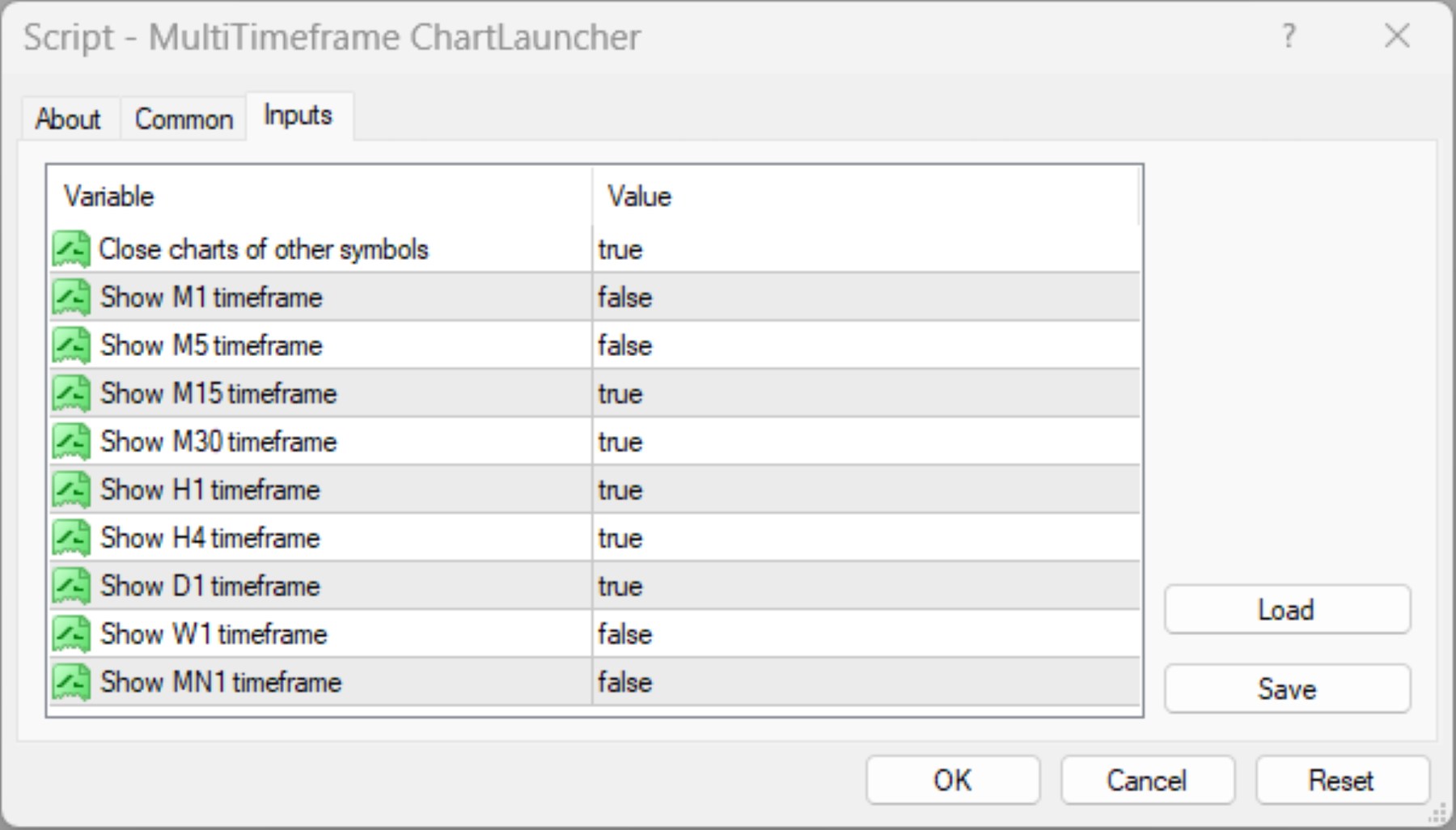
By default, it opens M15, M30, H1, H4, and D1. You can enable or disable each supported timeframe to create a workspace suited to your analysis.
Key Benefits
-
One-Click Multi-Timeframe Access: Open all selected timeframes without manually creating each chart.
-
Flexible Configuration: Enable or disable individual timeframes from M1 to MN1.
-
Cleaner Workspace: The optional CloseIrrelevantCharts setting closes charts belonging to other symbols, helping you focus on the current instrument.
-
Duplicate Prevention: Reuses existing charts for the same symbol and timeframe rather than deliberately opening duplicates.
-
Improved Analytical Workflow: Compare price action across multiple timeframes more efficiently when studying market structure, trend context, and potential trading opportunities.
Settings
| Input | Function |
|---|---|
| CloseIrrelevantCharts | Enables or disables closing charts for other symbols. Default: true. |
| ShowM1 | Opens the one-minute chart. Default: false. |
| ShowM5 | Opens the five-minute chart. Default: false. |
| ShowM15 | Opens the fifteen-minute chart. Default: true. |
| ShowM30 | Opens the thirty-minute chart. Default: true. |
| ShowH1 | Opens the one-hour chart. Default: true. |
| ShowH4 | Opens the four-hour chart. Default: true. |
| ShowD1 | Opens the daily chart. Default: true. |
| ShowW1 | Opens the weekly chart. Default: false. |
| ShowMN | Opens the monthly chart. Default: false. |
Limitations and Important Considerations
-
Chart Management Only: This script opens and manages charts. It does not generate trade signals, predict price movements, execute trades, or guarantee profitable decisions.
-
Symbol Selection: It operates on the symbol of the chart from which it is launched.
-
Optional Chart Closure: When CloseIrrelevantCharts is enabled, charts for other symbols may be closed. Disable this option if you need to retain charts for multiple instruments.
-
Market Data Availability: The availability and completeness of historical data depend on your broker, terminal, and selected instrument. Some charts may require time to load or download data.
-
Resource Usage: Opening multiple charts can increase terminal resource consumption, particularly when many indicators, Expert Advisors, or other chart objects are running.
-
Existing Charts: The script checks for an existing chart with the same symbol and timeframe to avoid intentionally creating a duplicate. Platform conditions and chart-opening failures may still affect execution.
-
No Continuous Monitoring: The script runs when manually executed. It does not automatically reopen closed charts or continuously maintain your chosen layout.
How to Use
-
Drag the script onto the chart of your chosen symbol.
-
Adjust the input settings and execute the script.
Designed for traders who value efficiency, organization, and multi-timeframe perspective, the Multi-Timeframe Chart Launcher simplifies chart preparation so you can spend less time managing windows and more time analyzing the market.
This utility is an analytical and chart-management aid, not financial advice or a substitute for independent trading judgment.