SG InfoBox

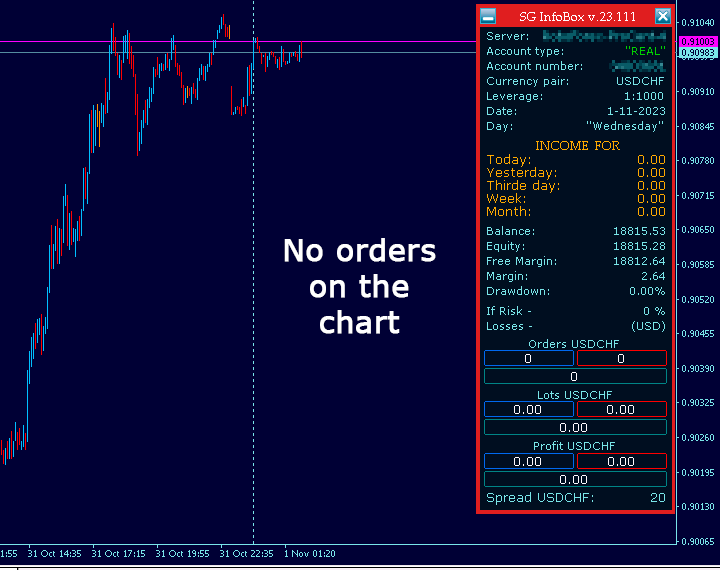
The "InfoBox" utility is designed to display the presence of open orders, the number of lots, current profit and much more in one window.

The version for the MT5 platform is here.

You've probably encountered a situation where you have an advisor that works on a currency pair, but information about its operation:

- orders and their number, the size of the spread for the instrument, the volume of lots on the market, drawdown and much more - are scattered in different places of the terminal and you do not have information on the market “here and now”!

So, this utility shows the trader:

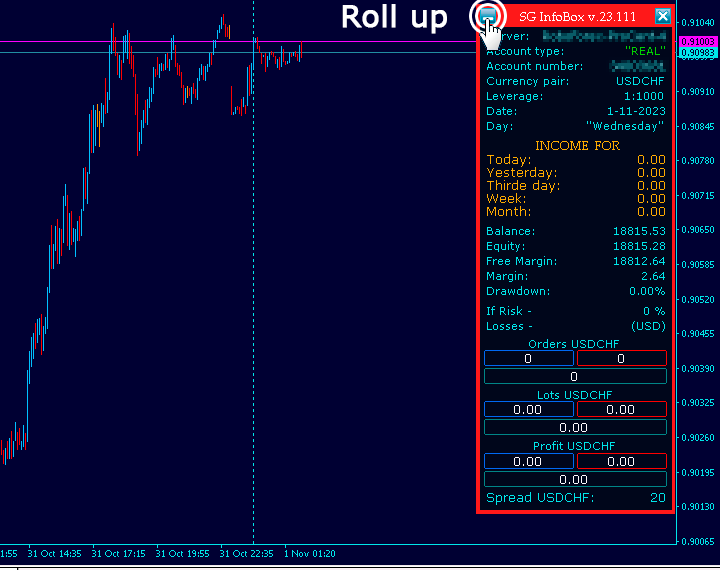
- Trading server, account type: Real/Demo/Contest, account number, currency pair, leverage, date, day of the week;

- Income for:  - month,  - week,  - day before yesterday,  - yesterday,  - today;

- Balance, funds, broker margin, drawdown as a percentage of the amount of Equity or Free Margin, risk, losses;

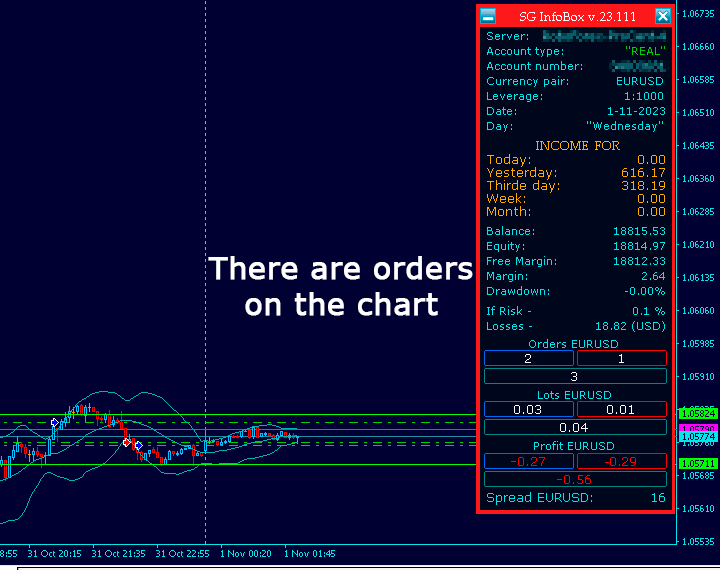
- Number of buy/sell orders on the market, size of lots on the market, current profit on buy/sell;

- Spread size.

It is important to note that the utility displays information on the instrument (currency pair) on the chart of which it is installed. If there are currently no open orders for an instrument, all columns except Balance will show zero (0).

Starting from version 23.129, a trader has the opportunity to “bind” the utility to each advisor separately. To do this, you need to enter the magic number of the desired advisor in the appropriate window of the utility, after which the utility will “pick up” the transactions of this advisor. That is, information about different advisors placed on the same instrument on different charts will not be summarized as it was before.

In addition, the trader will have the opportunity to choose which amount is included in the calculation of the drawdown - Equity or Free Margin.

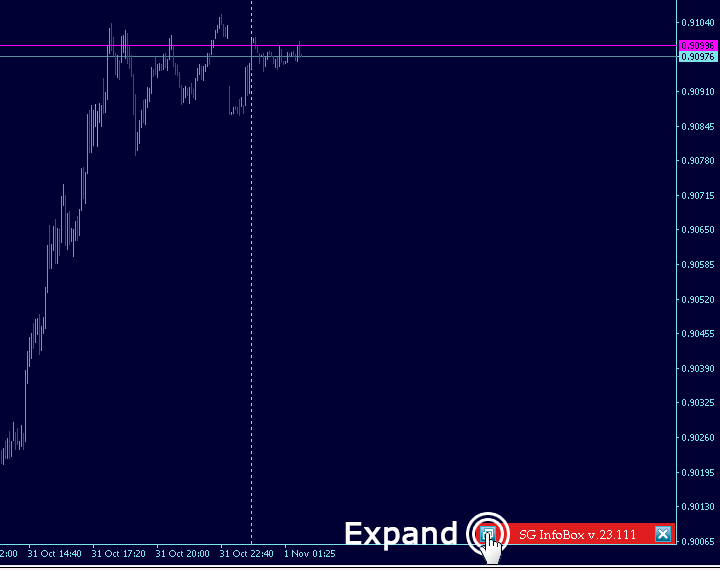
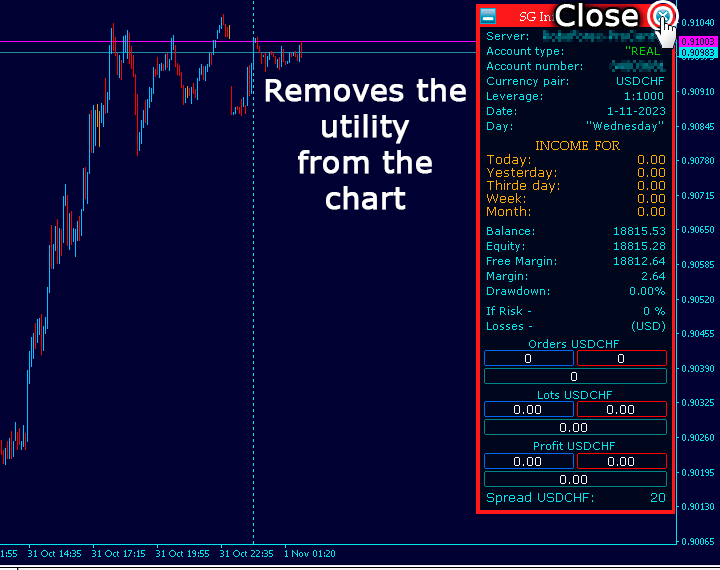
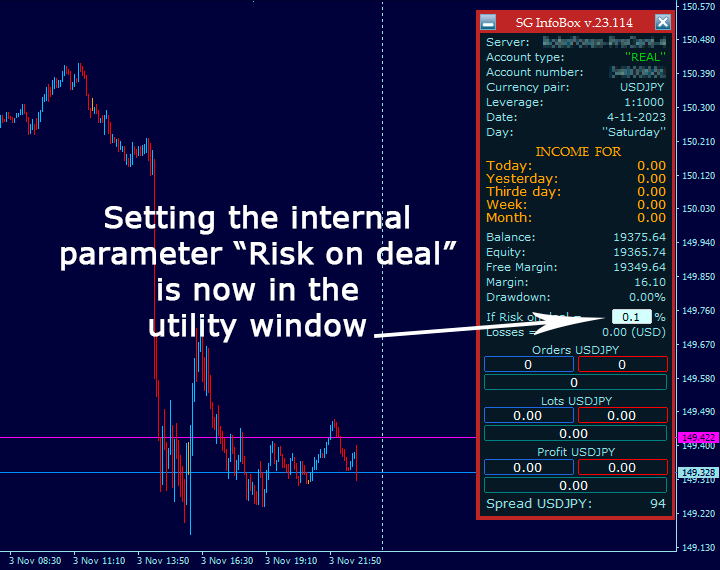
The window with the Risk percentage for the Transaction responds to a computer mouse click. Thus, a trader can change the risk numbers and see the size of Losses directly from the chart screen, without opening the “Input Parameters” of the utility.  If necessary, the trader can collapse/expand the utility or remove it from the chart with one click.

I was glad to share this utility with you. I hope you find this useful for trading and can share your observations in the comments and ratings of this product.

P.S.

If, after opening the Meta Trader 4 program, the “SG InfoBox” utility previously installed on the chart freezes - switch timeframes.
Önerilen ürünler
Session Shade (MT4) – Non-Trading Hours Background Shading Overview Session Shade is a lightweight MT4 chart utility indicator that visually highlights non-trading hours by shading the chart background. It is designed to help you confirm your daily time-filter window at a glance. This is a visualization tool only. It does not generate trading signals and it does not place, modify, or close any orders. Key features Shades non-trading hours (NG) on the chart background Keeps trading hours (OK) cl
FREE
Show Pips
Roman Podpora
4.26 (58)
Bu bilgi göstergesi her zaman hesaptaki güncel durumdan haberdar olmak isteyenler için faydalı olacaktır. Gösterge, puan cinsinden kâr, yüzde ve para birimi gibi verilerin yanı sıra mevcut çiftin spreadini ve mevcut zaman diliminde çubuğun kapanmasına kadar geçen süreyi görüntüler. VERSİYON MT5 -   Daha kullanışlı göstergeler Bilgi satırını grafiğe yerleştirmek için birkaç seçenek vardır: Fiyatın sağında (fiyatın arkasında); Yorum olarak (grafiğin sol üst köşesinde); Ekranın seçilen köşesinde.
FREE
Safety
Sergey Ermolov
5 (2)
Sanırım herkes böyle bir para yönetimi kuralını «Kasa» olarak biliyor. Bilmeyenler için kasa, işlemdeki kazançlar ayak büyüklüğüyle eşitlendikten sonra pozisyonun yarısını kapatmayı varsayar. Böylece, fiyat açılıp dursa bile, artık para kaybetmeyeceksiniz, çünkü pozisyonun bir kısmı daha önce kapandığında tam olarak aynı miktarda kar elde edildi. Güvenlik Danışmanının yalnızca bir ayarı vardır – kapanış lotu. Onu 0 konumunda bırakarak, danışman anlaşmanın tam yarısını kapatacaktır. Danışmanın
FREE
Account Info EA It is a tool that presents on the graph all the positions of the account, and specific information concerning the positions, but also the account. It enables the user to have an image of his account at a glance. Use like any expert advisor. You can't attach it in the same chart with other expert advisor. It does not have the ability to open or manage positions. You can attach it on any chart and any timeframe.
FREE
TradeMirror, MT4/MT5 platformları için geliştirilmiş, gerçek zamanlı işlem senkronizasyonu destekleyen yerel bir emir kopyalama aracıdır. Ürün Avantajları Finansal yazılımlar için güvenlik, istikrar ve gizlilik standartlarına uygun olarak üç temel alanda iyileştirme yapılmıştır: Kullanıcı dostu arayüz ile kolay kullanım Finansal senaryolarda hassas veri izolasyonu için gelişmiş gizlilik koruması Milisanlık emir senkronizasyonu ile gecikmesiz sinyal dağıtımı MT4/MT5 tam uyumluluğu ile farklı işle
FREE
MQLTA Show Magic Numbers
MQL4 Trading Automation
4.14 (7)
The panel displays the list of all orders (market and pending) along with their details, including magic numbers and commentaries. The panel can be moved around the chart. For market orders, the profit listed includes the associated commission and swaps. There aren't any important input parameters, but you can control the panel's initial location via them.
FREE
Position Selective Close MT4
Francisco Manuel Vicente Berardo
The Position Selective Close is a multi-symbol multi-timeframe script used to close simultaneously various positions.  General Description   The Position Selective Close   possesses   three operation modes (Intersection,   Union   and All) that control the way   as   four position features (symbol, magic number,   type   and profit) are used. The modes, available through the Selection Mode input parameter, relate to the features, available through the “Select by Feature” and “Feature” input pa
FREE
This simple but useful script calculates the lot in % of the deposit. It is indispensable for risk management. There is only one customizable parameter: MaxRisk - risk in % for lot calculation. The product works as a standard script. Launch it once on an appropriate chart and start trading using the calculated lot value. Genious is simplicity! Happy trading!
FREE
The utility opens copies of open trades. It is very convenient if you use the Signals service and want to increase the volume of transactions. Settings: Symbols: all symbols only current symbol Orders: Buy Sell Magic Any Magic Input Magic Lot size Original - lot size from original order; Fix Lot - fix lot size (input); Lot X Mult - lot size X koef; Stop Loss From sender - Stop Loss from original; Without - without Stop Loss; Plus Fix - Stop Loss from original order + fix points; Fix Point - fix
FREE
This indicator help to mark the high and low of the session Asian,London,Newyork , with custom hour setting This indicator is set to count from minute candle so it will move with the current market and stop at the designated hour and create a accurate line for the day. below is the customization that you can adjust : Input Descriptions EnableAsian Enables or disables the display of Asian session high and low levels. EnableLondon Enables or disables the display of London session high and
FREE
ZoomIN
Maxim Polishchuk
4.5 (2)
The ZoomIN indicator is designed for quickly viewing the selected bar on the smaller timeframes in a pop-up window. Once launched, the indicator works in the background, does not take up space on the chart and does not consume system resources. When the indicator is activated by the Shift + i combination (can be changed in the settings), a pop-up window with a chart of a smaller timeframe is created. The displayed timeframe can be changed by a left-click on the magnifying glass icon. To hide the
FREE
Account Cash Status This indicator shows actual account balance and equity. Can be placed in any position on chart even in subwindow. Account Balance is displayed in gray color. When there is no opened position the account equity is displayed in dark gray color. When there is opened position and equity value is lower than balance value the color is changed for red. When there is opened position and equity value outperforms balance value the color is changed for lime. Colors may be set freely by
FREE
MaSonic MT4
Tadanori Tsugaya
Quickly search for matching Moving Averages (MAs) at any point you click on the chart! By instantly displaying the MAs that pass through any selected point, it’s excellent for identifying trend peaks and supporting better trading decisions. Features: Simple Operation: Click on any point where you want to find the MA. Instant Results: Displays matching MAs if found. Sleep Function: Hide buttons when not in use for a cleaner interface. Manual Control: Adjust MAs manually with on-screen buttons. Fi
FREE
FFx Fractals
Eric Venturi-Bloxs
4.5 (2)
The purpose of this new version of the MT4 standard indicator provided in your platform is to display in a sub-window multiple timeframes of the same indicator. See the example shown in the picture below. But the display isn’t like a simple MTF indicator. This is the real display of the indicator on its timeframe. Here's the options available in the FFx indicator: Select the timeframes to be displayed (M1 to Monthly) Define the width (number of bars) for each timeframe box Alert pop up/sound/ema
FREE
Constructor is a convenient tool for creating, (building strategies) testing and applying trading strategies and ideas, as well as testing and using separate indicators and their groups. Constructor includes opening, closing, deal tracking, averaging and recovery modules, as well as various trading options with and without averaging and martingale. You are able to connect up to 10 different external indicators. Find the detailed instructions in the attached pdf file. Trading settings averaging
FREE
Fastest way to change the period. Suitable for traders who use many charts and timeframes. Size, shape and color can be customized. Inputs Parameters Corner — Choose corner placement Standart is "Right lower chart corner" Color — Background color of the button ColorText — Text color of the button ColorOn — Background color of the button for the current period ColorOnText — Text color of the button for the current period Font — Arial, Verdana... FontSize — Size of the font in pixels DistanceX —

FREE
IceFX’s TradeInfo is an utility indicator which displays the most important information of the current account and position. Displayed information: Information about the current account (Balance, Equity, Free Margin). Current spread, current drawdown (DD), planned profit, expected losses, etc. Number of open position(s), volume (LOT), profit. Today’s and yesterday’s range. Remaining time to the next candle. Last day profit information (with integrated IceFX ProfitInfo indicator). Risk-based LOT
FREE
The Candle Countdown Timer for MetaTrader 4 (also available for MT5) is a vital indicator designed to help you manage your trading time effectively. It keeps you updated about market open and close times by displaying the remaining time before the current candle closes and a new one forms. This powerful tool enables you to make well-informed trading decisions. Key Features: Asia Range: Comes with an option to extend the range. Broker Time, New York, London Time: Displays the current broker time
FREE
Auto Close is an expert advisor that can assist you with your money and risk management rules. The EA can monitor your Balance, Equity, Margin, Global Profit and Global Loss and alert you in case any of these reaches a specified threshold. This Demo Version has Notification and Close features disabled, full version can be found https://www.mql5.com/en/market/product/29141 How does it work? Load the Auto Close EA in the chart and set the parameters you want to keep monitored. If any of the risk
FREE
Round Number By Pips
Nguyen Thanh Sang
5 (2)
Indicator draws Round Number lines by distance of pips. 1. You can enable / disable indicator to show / hide the lines. 2. You can set distance of pips between the lines. 3. You can edit the number of lines.  4. You can edit properties of lines by inputs (style (DASH, DOT, SOLID, ...) , width (1 for DASH, DOT, 2 is not for DASH, DOT, it only SOLID), color). When indicator is deleted from the chart, the lines will be removed.


FREE
Scalping Day Trading Support Utility Scalping One MT4 free One position is displayed with one button. View P & L, Lot, and Point in real time. It is possible to switch the display of positions of only chart currencies and all currency pairs.  (The free version has only 3 positions) Supports automatic identification in Japanese and English   Account currency notation corresponds to dollar, euro, pound, yen (automatic identification) The timeline drawing function can be linked with the clock disp
FREE
FFx ParabolicSAR
Eric Venturi-Bloxs
4.67 (3)
The purpose of this new version of the MT4 standard indicator provided in your platform is to display in a sub-window multiple timeframes of the same indicator. See the example shown in the picture below. But the display isn’t like a simple MTF indicator. This is the real display of the indicator on its timeframe. Here's the options available in the FFx indicator: Select the timeframes to be displayed (M1 to Monthly) Define the width (number of bars) for each timeframe box Alert pop up/sound/ema
FREE
This indicator show the candle remaining time on the chart and/or in the corner of the window. It also display notificaton (popup and push) when a new candle is formed (optional). You configure the timer on candles and at chart corner. I don't need to explain the functions because are very simple. MT5 version:  https://www.mql5.com/pt/market/product/38470 Any doubt or suggestion to a new feature please comment. Enjoy!
FREE
You can manually open a trade (one click), and this EA will take care of setting the SL and TP. SL and TP are set based on the number of pips you specify in the input screen. You can also choose monetary SL and TP. SL and TP are determined based on the weighted average price (WAP), so if you open a new trade, SL and TP will be updated according to the new WAP. The WAP is not unique but differentiated between buy and sell trades (this is useful only if you open opposite trades on the same chart)
FREE
TradeSnap, bir SATIN AL/SAT emri yürütüldüğünde ekranı otomatik olarak yakalar ve kaydeder. Basitçe tablo üzerinde ayarlayın ve herhangi bir ekstra çalışma olmadan otomatik olarak kaydedilecektir. Grafikteki çizgiler, oklar vb. de görüntüde olduğu gibi kaydedilir. 10000x10000 piksel olabilen resim boyutu, böylece fiyat hareket geçmişini gösteren yatay bir resim kaydedebilirsiniz. Parametre bilgisi --Olay Parametresi-- Sihirli sayı (0=ALL): Herhangi bir EA'nız varsa, Mugic Number'ı ayarlay
FREE
This is a forex supporting tool for all manual traders. You can close positions immediately at once on the MT4 Terminal by a single click. CLOSE SELL: You can close SHORT positions of the target currency pair (same as the chart you’re using this EA). CLOSE BUY: Same as above but LONG positions will be closed. CLOSE ALL: All opened positions will be closed (no matter of currency pairs). You can select the closing method from CLOSE ALL or CLOSE ONE BY ONE. You can choose the positions to be closed
FREE
FFx Momentum
Eric Venturi-Bloxs
4 (1)
The purpose of this new version of the MT4 standard indicator provided in your platform is to display in a sub-window multiple timeframes of the same indicator. See the example shown in the picture below. But the display isn’t like a simple MTF indicator. This is the real display of the indicator on its timeframe. Here's the options available in the FFx indicator: Select the timeframes to be displayed (M1 to Monthly) Define the width (number of bars) for each timeframe box Alert pop up/sound/ema
FREE
PDHL – simply displays the highs and lows of previous days directly on your chart, providing a quick and visual reference of past key levels. The indicator is lightweight and easily customizable , allowing you to adjust the number of days displayed, the colors, as well as the style and thickness of the lines to suit your preferences. It is designed to be simple and practical, but may not work on all instruments or platforms . Only teste Tested only with CFDs
FREE
Информирование пользователя о величине текущего спрэда цветом, в зависимости от тренда. Простой и удобный информатор. Расположить можно в любом месте графика (настраивается во входных параметрах). При активном индикаторе наносим на график горизонтальную линию цветом, указанным во входных параметрах. Эта линия будет (по Вашему мнению) точкой разворота тренда. Если цена будет ниже линии - цвет величины спрэда будет окрашен в цвет "медвежьего" тренда, если цена буде выше линии - цвет величины спрэ
FREE
FFx Stochastic
Eric Venturi-Bloxs
4.6 (5)
The purpose of this new version of the MT4 standard indicator provided in your platform is to display in a sub-window multiple timeframes of the same indicator. See the example shown in the picture below. But the display isn’t like a simple MTF indicator. This is the real display of the indicator on its timeframe. Here's the options available in the FFx indicator: Select the timeframes to be displayed (M1 to Monthly) Define the width (number of bars) for each timeframe box Alert pop up/sound/ema
FREE
Bu ürünün alıcıları ayrıca şunları da satın alıyor
Local Trade Copier EA MT4
Juvenille Emperor Limited
4.96 (105)
Local Trade Copier EA MT4 ile olağanüstü hızlı işlem kopyalama deneyimi yaşayın. Kolay 1 dakikalık kurulumuyla bu işlem kopyalayıcısı, aynı Windows bilgisayarda veya Windows VPS'te birden fazla MetaTrader terminali arasında işlemleri kopyalamanıza olanak tanır ve 0.5 saniyenin altındaki şimşek hızında kopyalama hızları sunar. Başlangıç seviyesinde veya profesyonel bir tüccar olsanız da, Local Trade Copier EA MT4 , spesifik ihtiyaçlarınıza göre özelleştirmek için geniş bir seçenek yelpazesi sunar
Trade Assistant MT4
Evgeniy Kravchenko
4.42 (192)
It helps to calculate the risk per trade, the easy installation of a new order, order management with partial closing functions, trailing stop of 7 types and other useful functions. Additional materials and instructions Installation instructions   -   Application instructions   -   Trial version of the application for a demo account Line function -   shows on the chart the Opening line, Stop Loss, Take Profit. With this function it is easy to set a new order and see its additional characteris
Exp COPYLOT CLIENT for MT4
Vladislav Andruschenko
4.69 (65)
MetaTrader 4 için ticaret fotokopisi.       Herhangi bir hesaptan forex işlemlerini, pozisyonlarını, emirlerini kopyalar. En iyi ticari fotokopi makinelerinden biridir.       MT4 - MT4, MT5 - MT4       için       KOPYLOT MT4       sürüm (veya       MT4 - MT5 MT5 - MT5       için       KOPYLOT MT5       sürüm). MT5 sürümü Tam tanım   +DEMO +PDF Nasıl alınır Nasıl kurulur     Günlük Dosyaları nasıl alınır?     Nasıl Test Edilir ve Optimize Edilir     Expforex'in tüm ürünleri için fotokopi   sür
Trade Manager EA’ye hoş geldiniz! Ticaretin daha sezgisel, hassas ve verimli hale gelmesi için tasarlanmış nihai risk yönetim aracı ile tanışın. Bu sadece bir emir verme aracı değil; ticaret planlaması, pozisyon yönetimi ve risk kontrolü için kapsamlı bir çözüm. İster yeni başlayan bir yatırımcı olun, ister deneyimli bir trader ya da hızlı emir gerektiren bir scalper, Trade Manager EA ihtiyaçlarınıza uyum sağlar ve forex, endeksler, emtialar ve kripto paralar dahil tüm piyasalarda esneklik sunar
MT4 to Telegram Signal Provider , Telegram'a sinyal göndermeyi sağlayan ve hesabınızı bir sinyal sağlayıcısına dönüştüren kullanımı kolay ve tamamen özelleştirilebilir bir araçtır. Mesajların formatı tamamen özelleştirilebilir! Ancak basit kullanım için, önceden tanımlanmış bir şablonu seçebilir ve mesajın belirli kısımlarını etkinleştirebilir veya devre dışı bırakabilirsiniz. [ Demo ]  [ Kullanım Kılavuzu ] [ MT5 Sürümü ] [ Discord Sürümü ] [ Telegram Kanalı ]  New: [ Telegram To MT5 ] Kurulum
TradePanel MT4
Alfiya Fazylova
4.84 (89)
Ticaret Paneli çok işlevli bir ticaret asistanıdır. Uygulama, manuel ticaret için 50'den fazla ticaret işlevi içerir ve çoğu ticaret işlemini otomatikleştirmenize olanak tanır. Dikkat, uygulama strateji test cihazında çalışmıyor. Satın almadan önce demo sürümünü bir demo hesabında test edebilirsiniz. Demo sürümü burada . Talimatların tamamı buraya . Ticaret. Tek tıklamayla alım satım işlemlerini gerçekleştirmenizi sağlar: Otomatik risk hesaplaması ile bekleyen emir ve pozisyonları açın. Tek tıkl
Trade copier MT4
Alfiya Fazylova
4.56 (32)
Trade Copier, ticaret hesapları arasındaki işlemleri kopyalamak ve senkronize etmek için tasarlanmış profesyonel bir yardımcı programdır. Kopyalama, tedarikçinin hesabından/terminalinden alıcının aynı bilgisayarda veya vps'de kurulu olan hesabına/terminaline gerçekleşir. Satın almadan önce demo sürümünü bir demo hesabında test edebilirsiniz. Demo versiyonu burada . Tüm talimatlar burada . Ana işlevler ve avantajlar: Emirlerin kopyalanmasını destekler: МТ4> МТ4, МТ4> МТ5, МТ5> МТ4. Emirlerin kopy
Ultimate Extractor - Professional Trading Analytics for MT4 Ultimate Extractor transforms your MetaTrader 4 trading history into actionable insights with comprehensive analytics, interactive charts, and real-time performance tracking. Ability to combine multiple accounts and MT4 and MT5 into a single dashboard. What It Does Automatically analyzes your MT4 trading history across all Expert Advisors and generates detailed HTML reports with interactive visualizations. Tracks live performance metric
Üye olduğunuz herhangi bir kanaldan Sinyal Kopyalayın (   Bot Token veya Yönetici İzinleri gerekmiyor  düz MT4'ünüze. Kullanıcıyı düşünerek tasarlanmış ve ihtiyacınız olan birçok özellik sunmaktadır Bu ürün, kullanımı kolay ve görsel olarak çekici bir arayüzde sunulmaktadır. Ayarlarınızı özelleştirin ve ürünü dakikalar içinde kullanmaya başlayın! Kullanıcı Kılavuzu + Demo  | MT5 Sürümü | Telegram Sürümü Demo versiyonunu denemek istiyorsanız, Kullanıcı Kılavuzuna bakın. Discord'tan MT4'e gönder
The product will copy all telegram signal to MT4   ( which you are member  ) , also it can work as remote copier.  Easy to set up, copy order instant, can work with almost signal formats, image signal, s upport to translate other language to English Work with all type of channel or group, even channel have "Restrict Saving Content", work with  multi channel, multi MT5 Work as remote copier: with signal have ticket number, it will copy exactly via ticket number. Support to backtest signal. How to
Copy Cat More Trade Copier MT4 (Kopyacı MT4) sadece basit bir yerel trade kopyalayıcı değildir; günümüzün alım satım zorlukları için tasarlanmış eksiksiz bir risk yönetimi ve yürütme çerçevesidir. Prop firm sınavlarından kişisel hesap yönetimine kadar, güçlü yürütme, sermaye koruması, esnek yapılandırma ve gelişmiş işlem yönetimi ile her duruma uyum sağlar. Kopyalayıcı hem Master (gönderici) hem de Slave (alıcı) modlarında çalışır ve piyasa emirleri ile bekleyen emirlerin gerçek zamanlı senkroni
What is it? Think about it, you can send all the orders/positions info to your telegram channel or group to create your community or VIP signals on telegram. Position info means this EA forward all of your new positions open details (Open price, Open time, Position Type, position Symbol and volume), positions changes ( SL or TP modifying or pending price changes) and position close (Close price, profit or loss, position duration time) and also EA Send NEWS alert (Economic calendar event) on you
Bu ürün, haber saatlerinde tüm uzman danışmanları ve manüel grafikleri filtreler, böylece manüel ticaret kurulumlarınızı veya diğer uzman danışmanlar tarafından girilen işlemleri yok edebilecek ani fiyat dalgalanmaları konusunda endişelenmenize gerek kalmaz. Bu ürün, herhangi bir haber yayınlanmadan önce açık pozisyonlarınızı ve bekleyen emirlerinizi yönetebilen tam bir sipariş yönetim sistemi ile birlikte gelir. The News Filter'ı satın aldığınızda, gelecekteki uzman danışmanlar için yerleşik ha
Custom Alerts: Birden Fazla Piyasayı Takip Edin ve Hiçbir Önemli Sinyali Kaçırmayın Genel Bakış Custom Alerts , birden fazla enstrümanı tek bir yerden takip etmek isteyen yatırımcılar için dinamik bir çözümdür. FX Power, FX Volume, FX Dynamic, FX Levels ve IX Power gibi önde gelen araçlarımızdan gelen verileri entegre ederek, Custom Alerts sizi grafikler arasında geçiş yapmak zorunda kalmadan önemli piyasa gelişmeleri hakkında otomatik olarak bilgilendirir. Artık broker’ınızın sunduğu tüm varl
Riskinizi otomatik olarak hesaplarken işlemlere hızlı bir şekilde girip çıkmanıza yardımcı olacak Ticaret Yöneticisi. Aşırı Ticaret, İntikam Ticareti ve Duygusal Ticaretten korunmanıza yardımcı olacak özellikler içerir. İşlemler otomatik olarak yönetilebilir ve hesap performans ölçümleri bir grafikte görselleştirilebilir. Bu özellikler, bu paneli tüm manuel yatırımcılar için ideal kılar ve MetaTrader 4 platformunun geliştirilmesine yardımcı olur. Çoklu Dil desteği. MT5 Sürümü  |  Kullanım Kılavu
️ Hedge Trade — Smart Fixed-Offset Hedging EA Turn adverse moves into controlled recovery cycles. Hedge Trade is a professional-grade MetaTrader 4 Expert Advisor that protects any open trade by automatically placing and managing one intelligent hedge order. It’s built for traders who prefer to open their own base position but want an automated, disciplined hedging system to manage drawdown and capture counter-moves — safely, transparently, and without martingale. Key Features Automatic Hedg
This EA Utility allows you to manage (with advanced filtering) unlimited open orders (manual or EA) with 16 trailing stop methods: fixed, percent, ATR Exit, Chandelier Exit, Moving Average, Candle High Low Exit, Bollinger Bands, Parabolic, Envelope, Fractal, Ichimoku Kijun-Sen, Alligator, Exit After X Minutes or Bars, RSI and Stochastic. The trailing stop can be either real or virtual, and you can exit fully or with a partial close percent on touch or bar close.  Moreover, you can add (overrid
Risk/Reward Tool, MetaTrader 4'te işlem planlama, görselleştirme ve gerçekleştirme şeklinizi devrim niteliğinde değiştirmek için tasarlanmış profesyonel düzeyde bir Uzman Danışmandır. İster hassas risk yönetimine değer veren isteğe bağlı bir trader olun, ister işlem kurulumlarını görsel olarak test etmesi gereken bir strateji geliştiricisi olun, bu araç zarif ve sezgisel bir arayüzde ihtiyacınız olan her şeyi sağlar. Temel pozisyon hesaplayıcılarından farklı olarak, Risk/Reward Tool görsel işlem
Time saving and fast execution Whether you’re traveling or sleeping, always know that Telegram To Mt4 performs the trades for you. In other words, Our   Telegram MT4 Signal Trader  will analyze the trading signals you receive on your selected Telegram channels and execute them to your Telegram to MT4 account. Reduce The Risk Telegram To Mt4   defines the whole experience of copying signals from   Telegram signal copier to mt4 platforms. Users not only can follow all instructions from the signa
Kar takip fonksiyonu ile toplam kar/zarara ulaşıldığında MetaTrader 4'te pozisyonları kapatmak. Sanal durakları (Ayrı Sipariş) etkinleştirebilirsiniz, AL ve SATIŞ pozisyonlarının ayrı ayrı hesaplanması ve kapatılması (Ayrı AL SATIŞ), Tüm sembollerin veya sadece mevcut sembolün kapatılması ve hesaplanması (Tüm Semboller), Kâr için takip etmeyi etkinleştir ( Sondaki Kâr ) Mevduat para birimi, puan, bakiyenin yüzdesi üzerinden toplam kâr ve zararı kapatın. Uygulama, diğer herhangi bir EA ile birli
Bu 2'si 1 arada ticaret yöneticisi, mum kırılmaları ticareti için idealdir. Geri çekilmelere ek limit emirleri vererek ortalama bir ticarete mal olabilir. Bu, tüm pozisyonlarınızda en iyi fiyatı ve kazançlarınızda daha yüksek bir RR almanızı sağlar. Risk, en son kapatılan mum yüksekliğine göre hesaplanır. İşlem asistanı düğmeleri, manuel olarak verilen tüm siparişlerin yönetilmesine yardımcı olur. Herhangi bir giriş yöntemiyle kullanın; fiyat hareketi veya göstergeleri ve herhangi bir ticaret
Basket EA MT4
Juvenille Emperor Limited
5 (5)
Basket EA MT4 , güçlü bir kâr alma aracı ve kapsamlı bir hesap koruma sistemini basit ve kullanımı kolay bir çözümde birleştirir. Ana amacı, tüm açık pozisyonları tek tek değil, bir sepet (basket) olarak yöneterek, hesabınızın toplam kâr ve zararını tamamen kontrol altında tutmaktır. EA; sepet düzeyinde take profit, stop loss, break even ve trailing stop gibi özellikler sunar. Bunlar, bakiye yüzdesi, sabit bir para birimi değeri ya da yönetilen işlemlerin ortalama pip hedefi olarak ayarlanabili
Exp SafetyLock PRO
Vladislav Andruschenko
4.57 (28)
SAFETYLOCK , yatırımcıların mevcut açık pozisyonları için ters bir emir belirleyerek ani piyasa dönüşlerine karşı korunmalarını sağlar. Bir yatırımcı veya EA yeni bir pozisyon açtığında, SAFETYLOCK otomatik olarak bu pozisyona ters yönde bir bekleyen emir oluşturur. Pozisyon zarar etmeye başlarsa, bekleyen emir devreye girer ve pozisyonu kilitleyerek zararı sınırlamaya yardımcı olur. Bu EA, başlangıç pozisyonunu kapatma, takip eden durdurma (trailing stop) ile çalışarak kazançları maksimize etm
Grid Manual MT4
Alfiya Fazylova
4.71 (17)
Grid Manual, sipariş ızgarasıyla çalışmak için kullanılan bir ticaret yardımcı programıdır. Yardımcı program evrenseldir, esnek ayarlara ve sezgisel bir arayüze sahiptir. Sadece kayıpların ortalaması yönünde değil, aynı zamanda kazanç artışı yönünde de bir emir ızgarası ile çalışır. Tüccarın bir emir ızgarası oluşturmasına ve eşlik etmesine gerek yoktur, bu yardımcı programı yapacaktır. Emri açmanız yeterlidir ve Grid manual otomatik olarak ona bir emir ızgarası oluşturacak ve kapanana kadar ona
Ortalama Yardımcısı - Bu tür bir işlem yardımcı aracı, daha önce kârsız pozisyonlarınızın ortalamasını iki teknik kullanarak çıkarmanıza yardımcı olacaktır: standart ortalama trende göre pozisyonların açılmasıyla korunma Yardımcı program, hem alım hem de satım için aynı anda farklı yönlerde birden fazla açık pozisyonu sıralama yeteneğine sahiptir   . Örneğin, 1 pozisyonu bir satış için, ikincisini bir alım için açtınız ve ikisi de kârsız veya biri kârsız, diğeri kârlı ancak yeterli değil ve işle
News Filter EA: Advanced Algo Trading Assistant News Filter EA is an advanced algo trading assistant designed to enhance your trading experience. By using the   News Filter EA , you can integrate a Forex economic news filter into your existing expert advisor, even if you do not have access to its source code. In addition to the news filter, you can also specify   trading days   and   hours   for your expert. The News Filter EA also includes   risk management   and   equity protection   features
KT Equity Protector MT4
KEENBASE SOFTWARE SOLUTIONS
3.4 (5)
Yatırım Sermayenizi Zahmetsizce Koruyun Yatırım sermayenizi korumak, onu büyütmek kadar önemlidir. KT Equity Protector, kişisel risk yöneticiniz olarak hesabınızın öz sermayesini sürekli izler ve önceden belirlenmiş kar hedeflerine veya zarar durdur seviyelerine ulaşıldığında tüm açık ve bekleyen emirleri kapatarak kayıpları önler veya karları güvence altına alır. Duygusal kararlar yok, tahmin yürütmeye gerek yok — sadece sizin yerinize yorulmadan çalışan güvenilir bir sermaye koruma sistemi. KT
Equity Protect Pro: Endişesiz İşlem İçin Kapsamlı Hesap Koruma Uzmanınız Hesap koruması, öz sermaye koruması, portföy koruması, çoklu strateji koruması, kar koruması, kar toplama, işlem güvenliği, risk kontrol programları, otomatik risk kontrolü, otomatik tasfiye, koşullu tasfiye, planlı tasfiye, dinamik tasfiye, iz süren stop loss, tek tıklamayla kapatma, tek tıklamayla tasfiye ve tek tıklamayla geri yükleme gibi özellikler arıyorsanız, Equity Protect Pro ihtiyacınız olan programdır. Kurulumu
MT4 Local Trade Copier Pro , MetaTrader 4 için tasarlanmış bir Uzman Danışman olup, bir kaynak MT4 veya MT5 hesabından aynı bilgisayardaki birden fazla MT4 veya MT5 hesabına işlemleri kopyalamak için geliştirilmiştir. Bu araç, müşteri hesaplarına veya portföylere işlemleri çoğaltmak için idealdir ve lot büyüklükleri, stop-loss/take-profit ve ters kopyalama seçenekleri gibi özelleştirilebilir parametreler sunar. Piyasa mantığına dayalı işlem yürütmeden işlem yönetimini basitleştirir ve çeşitli tr
Telegram'dan MT4'e:   Nihai Sinyal Kopyalama Çözümü Telegram ile MT4'e   işlemlerinizi kolaylaştırın, DLL'lere ihtiyaç duymadan doğrudan Telegram kanallarından ve sohbetlerinden MetaTrader 4 platformunuza işlem sinyallerini kopyalamak için tasarlanmış son teknoloji yardımcı program. Bu sağlam çözüm, sinyallerin benzersiz hassasiyet ve özelleştirme seçenekleriyle sorunsuz bir şekilde yürütülmesini sağlayarak size zaman kazandırır ve verimliliğinizi artırır. [ Instructions and DEMO ] Temel Özellik
Yazarın diğer ürünleri
The   "InfoBox"   utility is designed to display the presence of open orders, the number of lots, current profit and much more in one window. The version for the MT4 platform is here . You've probably encountered a situation where you have an advisor that works on a currency pair, but information about its operation: - orders and their number, the size of the spread for the instrument, the volume of lots on the market, drawdown and much more - are scattered in different places of the terminal an
FREE
The “ SG Opposit Grid ” EA works with Virtual TakeProfit(or real) - at the trader's choice. The EA looks for signals to enter the market along the trend on D1 and H1 . If the signals coincide, the EA on the working period ( М1 - М30 depends on the trader's choice) looks for a confirming pattern and opens a position in the direction of the trend. If, after opening a position, the price moves in a profitable direction, the position is closed upon reaching the virtual TProfit with a profit. If the
Filtrele:
İnceleme yok
İncelemeye yanıt