MultiTimeframe ChartLauncher

is a native chart-management script. When run on a chart, it opens separate charts for the same symbol at the enabled timeframes, from M1 through MN1.

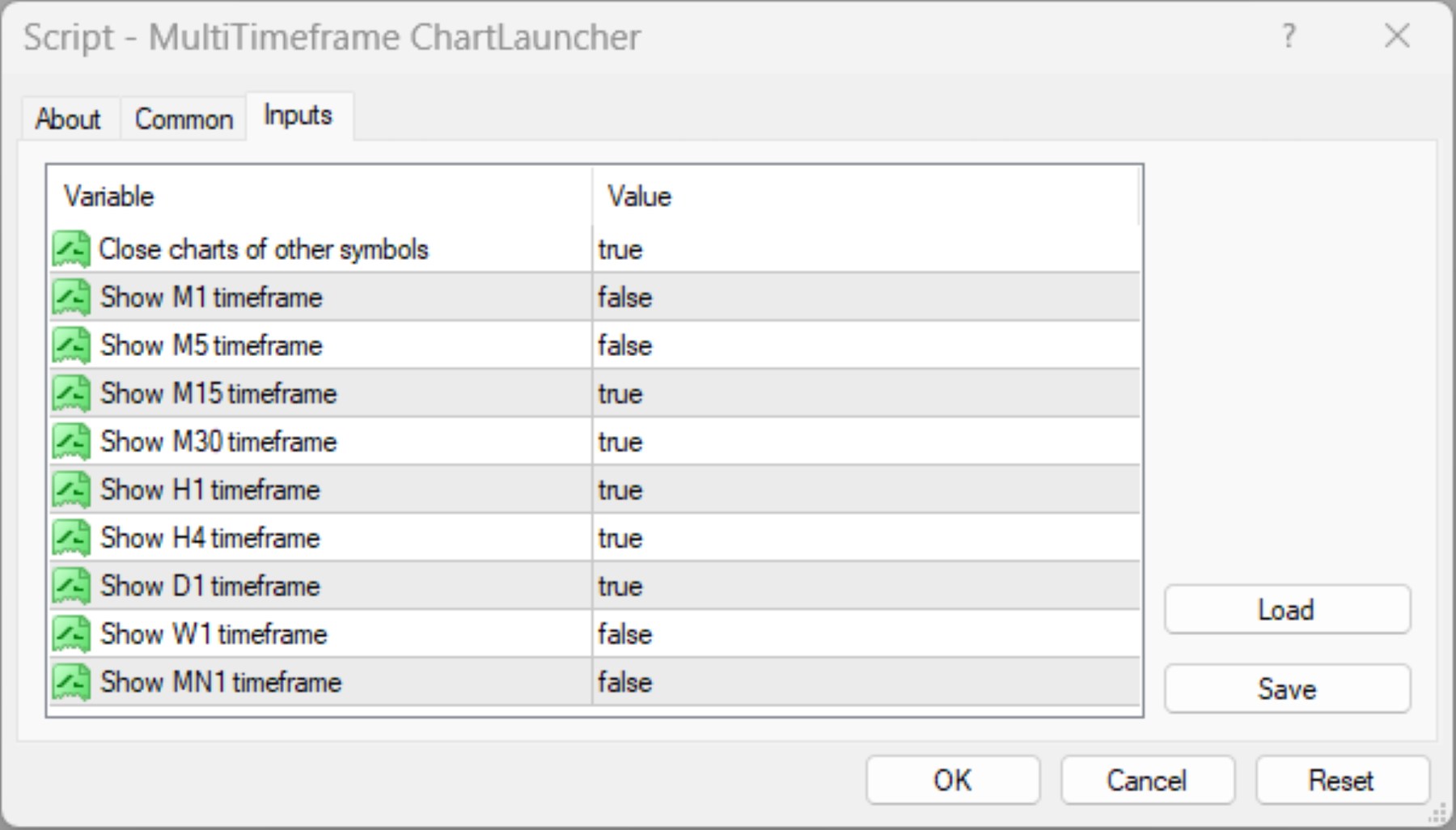
By default, it opens M15, M30, H1, H4, and D1. You can enable or disable each supported timeframe to create a workspace suited to your analysis.

Key Benefits

  • One-Click Multi-Timeframe Access: Open all selected timeframes without manually creating each chart.

  • Flexible Configuration: Enable or disable individual timeframes from M1 to MN1.

  • Cleaner Workspace: The optional CloseIrrelevantCharts setting closes charts belonging to other symbols, helping you focus on the current instrument.

  • Duplicate Prevention: Reuses existing charts for the same symbol and timeframe rather than deliberately opening duplicates.

  • Improved Analytical Workflow: Compare price action across multiple timeframes more efficiently when studying market structure, trend context, and potential trading opportunities.

Settings

Input Function
CloseIrrelevantCharts Enables or disables closing charts for other symbols. Default: true.
ShowM1 Opens the one-minute chart. Default: false.
ShowM5 Opens the five-minute chart. Default: false.
ShowM15 Opens the fifteen-minute chart. Default: true.
ShowM30 Opens the thirty-minute chart. Default: true.
ShowH1 Opens the one-hour chart. Default: true.
ShowH4 Opens the four-hour chart. Default: true.
ShowD1 Opens the daily chart. Default: true.
ShowW1 Opens the weekly chart. Default: false.
ShowMN Opens the monthly chart. Default: false.

Limitations and Important Considerations

  • Chart Management Only: This script opens and manages charts. It does not generate trade signals, predict price movements, execute trades, or guarantee profitable decisions.

  • Symbol Selection: It operates on the symbol of the chart from which it is launched.

  • Optional Chart Closure: When CloseIrrelevantCharts is enabled, charts for other symbols may be closed. Disable this option if you need to retain charts for multiple instruments.

  • Market Data Availability: The availability and completeness of historical data depend on your broker, terminal, and selected instrument. Some charts may require time to load or download data.

  • Resource Usage: Opening multiple charts can increase terminal resource consumption, particularly when many indicators, Expert Advisors, or other chart objects are running.

  • Existing Charts: The script checks for an existing chart with the same symbol and timeframe to avoid intentionally creating a duplicate. Platform conditions and chart-opening failures may still affect execution.

  • No Continuous Monitoring: The script runs when manually executed. It does not automatically reopen closed charts or continuously maintain your chosen layout.

How to Use

  1. Drag the script onto the chart of your chosen symbol.

  2. Adjust the input settings and execute the script.


Designed for traders who value efficiency, organization, and multi-timeframe perspective, the Multi-Timeframe Chart Launcher simplifies chart preparation so you can spend less time managing windows and more time analyzing the market.

This utility is an analytical and chart-management aid, not financial advice or a substitute for independent trading judgment.


Рекомендуем также
Ваши результаты — мастерство или удача? Этот бесплатный индикатор сравнивает ваши закрытые сделки с 1 000 случайных трейдеров, которые торгуют теми же символами, в том же направлении, тем же лотом и держат каждую сделку столько же — только открывают её в случайное время. Luck or Skill читает историю вашего счёта и выносит один понятный вердикт: скольких из этих случайных трейдеров вы обошли. Сам он никогда не торгует. Версия MT5 (бесплатно) | Версия Pro | Все мои инструменты Что вы видите Вердик
FREE
You can check out comment #1 how does it work This is a very useful tool, enter the currency charts you need to open, use the symbol "/" to distinguish them, and select the periodicity /TF of the chart, press the button and they will open the charts for you in batches without you having to manually open them each! Because some EA use multiple currency pairs strategy, but do not support one chart to support all currency pairs, so I developed this tool, hope you like it, if you are satisfied with
FREE
The "InfoBox" utility is designed to display the presence of open orders, the number of lots, current profit and much more in one window. The version for the MT5 platform   is here . You've probably encountered a situation where you have an advisor that works on a currency pair, but information about its operation: - orders and their number, the size of the spread for the instrument, the volume of lots on the market, drawdown and much more - are scattered in different places of the terminal and
FREE
Show Pips
Roman Podpora
4.27 (59)
Данный информационный индикатор будет полезен тем, кто всегда хочет быть в курсе текущей ситуации на счете. Индикатор отображает такие данные, как прибыль в пунктах, процентах и валюте, а также спред по текущей паре и время до закрытия бара на текущем таймфрейме.  VERSION MT5 -  Больше полезных индикаторов Существует несколько вариантов расположения информационной строки на графике: Справа от цены (бегает за ценой); Как комментарий (в левом верхнем углу графика); В выбранном углу экрана. Так же
FREE
Market Ticker Free
John Louis Fernando Diamante
5 (1)
A scrolling Market Ticker that displays price changes from all symbols in the Market Watch list. Provides an easy snapshot of symbol prices, and keeps scrolling automatically while you trade and analyse the chart. Options include: - MTF, eg choose to show price changes of the daily chart, or the hourly - use the live candle or the recently completed - font and background coloring
FREE
#property copyright "小天" #property link      " https://www.mql5.com " #property version   "2.01" #property strict #property description "test" input int hlength=85; input int vlength=25; input int DX=-340; input int DY=-80; input string InpDirectoryName="Data"; // directory name input double lots_default=1; input int    pc_times_default=2; input double deposit_minimal=1; input double floating_loss_percent=0.1; input double margin_occupied=0.2;   input int    tradingnumber=1;//控制买卖交易数量  input
FREE
Бесплатно. Знайте, в каком состоянии ваш счёт, прежде чем открыть следующую сделку. TrueRisk Account Dashboard показывает на графике, сколько вы заработали или потеряли сегодня, на этой неделе и в этом месяце, в деньгах и в %, и сколько сделок выиграли. Он подсчитывает, что останется от ваших открытых сделок, если сработает каждый стоп-лосс, предупреждает о сделках совсем без стопа и показывает, сколько запаса осталось до вашего собственного дневного лимита убытка. Он только читает счёт: никогда
FREE
IceFX TradeInfo
Norbert Mereg
4.77 (44)
TradeInfo от IceFX - утилита, отображающая наиболее важную информацию текущем счете и позициях на нем. Отображаемая информация: Информация о текущем счете (баланс, средства, свободная маржа). Текущий спред, текущая просадка (DD), планируемая прибыль, ожидаемый убыток и т.д. Количество открытых позиций, объем (LOT), прибыль. Диапазон за прошлый и текущий день. Оставшееся время до следующей свечи. Информация о прибыли за последний день (при помощи интегрированного индикатора IceFX ProfitInfo). Ло
FREE
Данная утилита привязывает каждый созданный графический объект к символу графика. Привязка осуществляется за счет добавления префикса символа к имени графического объекта. В дальнейшем при смене символа на графике обеспечивается отображение только объектов, связанных с текущим символом, все прочие объекты скрываются. Параметры Ignore objects with prefix - индикатор пропускает граф. объекты с заданным префиксом в имени. Примечание: демо-версия с маркета ограничена работой в тестере и не может бы
FREE
Welcome. This indicator is for alarming the trader by sound when Symbol's price goes above or below certain level(s). It doesn't do any trading. Setting the levels is very handy, you just drag them with the mouse on the chart. You can customize the sounds the Indicator alarms you by (may be useful for office with a number of the terminals running). Also, this product includes an auxiliary Windows application that makes the usage even more handy. This product includes 4 parts: Sounder_TopBottomLe
FREE
У вас есть возможность отвлечься от ежедневной рутинной торговли и не на долго погрузится в мир магии. Представляю вашему вниманию игру - карточный фокус. На языке mql можно делать не только советники, индикаторы, скрипты, но и такие вот небольшие игры. Я не только трейдер и программист, но и люблю в свободное время показывать карточные фокусы, раз уж так сложилось, я решил оцифровать один из своих любимых фокусов. Это было не так просто, учитывая что фокус содержит много ментализма. Фокус показ
FREE
Automated Timeframe cycling with Symbols centered.  Force every timeframe onto one clock window, so the story you see on Daily is the same story you are slicing on H4, H1, and M1.  Traders usually flip timeframes and lose the span. A Daily chart shows a few weeks, then M15 shows a few hours, and the eye treats them as different markets. This indicator locks the window to N bars of the highest enabled timeframe — default 10 Daily — and maps every lower timeframe to that same stretch. You stay ins
FREE
This program calculates the average opening price for sell and buy positions separately. Program allows you to modify the stop loss value to the calculated breakeven price, this value could also be modified by a user-defined integer value in points. All you have to do is press the button. You can also choose Logs_Display_Enable input value if you need to get some additional, useful informations. Enjoy using !!!
FREE
Save Template
Dominik Kaczorowski
A very fast way to save your chart template. Set the keyboard shortcut to further speed up the operation. The script allows you to save a template with a specific prefix, with the current date or with the chart timeframe. The symbol is saved automatically. Script parameters: Prefix - prefix for the template name. Can be empty. With date - true = template name will containt current date With timeframe - true = template name will containt timeframe of the current chart
FREE
AQ RiskOptimizer
HIT HYPERTECH INNOVATIONS LTD
5 (1)
Утилита Risk Optimizer предназначена для управления риском на счете. Плохое управление рисками является основной причиной потери денег. Risk Optimizer рассчитывает и предлагает оптимальный размер лота для каждой позиции в соответствии с вашими индивидуальными предпочтениями по уровню риска. Вы можете указать предпочитаемый уровень риска в виде % для каждой позиции либо довериться нашим алгоритмам для расчета и оптимизации в соответствии с выбранной вами категорией риска. Но это еще не всё! Выбер
FREE
ATC Alert Manager позволяет устанавливать ценовые оповещения прямо на графике и управлять ими из одной небольшой панели. Каждое оповещение отображается как линия на графике, которую можно перетащить на новую цену. Оповещение срабатывает один раз, в момент, когда цена пересекает ваш уровень, с всплывающим оповещением, звуком и опциональным push-уведомлением на ваш телефон. Цена, которая уже прошла уровень, не запускает его, поэтому вы никогда не получаете повторных оповещений на каждом тике. Это
FREE
Spread Data
Harry Gunadi Permana
4.5 (2)
Spread Data tool will display current spread and average spread. It will record spread for every hour (from 0 to 23) and can give better data about your broker spread. Run it for 2 days or more to get better spread data . Every spread smaller than MinSpread will be recorded as MinSpread Every spread larger than MaxSpread will be recorded as MaxSpread It help to decide what spread to be used when do backtest, EA spread settings, EA that trade in specific time interval, especially for scalping EA
FREE
Script to calculate equity and balance at a specific date and time.  This script makes up for a lack of MetaTrader account history, that does not show how the balance and equity changes in time. Balance calculation includes closed orders only. Equity calculation includes orders closed before and orders that are still open at the specified time. Example: date and time set to 2020/07/06 00:00. If I had a Buy 1 lot EURUSD position opened at price 1.12470 on the 2020/07/02, the program would ca
FREE
It can only be used in EURCHF / M15 . The Expert Advisor is a great tool that allows you to control your trade with ease and precision. The tool can be moved in the graphs and offers the following characteristics: Instant order entry with a single click. Entry of pending orders using price tags and trend lines. Instant order closure with a single click. Instant order closure using trend lines as output levels that the broker can not see. We can modify the way to enter and exit the market, allow
FREE
Простенький скрипт, в котором очень часто нуждаются трейдеры. Он калькулирует лот в процентах от депозита. Для соблюдения риск-менеджмента очень даже нужная вещь. В настройках присутствует только одна опция: MaxRisk - риск в процентах для вычисления лота. Даный помощник работает как стандартный скрипт, то есть запускается только один раз на соответствующем графике, после чего можно приступать к торговле с вычисленым лотом. Все гениальное просто! Успешной торговли!
FREE
Утилита TradeKeeper Lite (хранитель сделок, простая версия) умеет не только показывать прибыль за разные периоды, но и оповещать звуковым сигналом при достижении заданного значения прибыли. Щелкните рисунок тахометра, чтобы переключиться на следующий период подсчета прибыли. Всего их 5: текущий день (This Day), текущая неделя (This Week), текущий месяц (This Month), последние 90 дней (Last 90 Days) и за все время (All I Made). Утилита TradeKeeper Pro , доступная по этой ссылке , позволяет также
FREE
Risk Panel Pro v1
Saeed Hatam Mahmoudi
Risk Panel Pro (MT4) Risk Panel Pro is a Tool for MetaTrader 4 that automates placing Stop Loss and Take Profit based on a percentage of the account balance. It is a trade management utility; it does not provide trading signals and does not guarantee any profit. Main functions Auto-apply SL/TP on new orders using balance-based risk (default: SL 2%, TP 4%). Switch Automatic mode off to manage SL/TP manually. One-click buttons to apply SL or TP to existing positions at any time. Close Chart : clo
FREE
Position Selective Close MT4
Francisco Manuel Vicente Berardo
The Position Selective Close is a multi-symbol multi-timeframe script used to close simultaneously various positions.  General Description   The Position Selective Close   possesses   three operation modes (Intersection,   Union   and All) that control the way   as   four position features (symbol, magic number,   type   and profit) are used. The modes, available through the Selection Mode input parameter, relate to the features, available through the “Select by Feature” and “Feature” input pa
FREE
Free automatic fibonacci - это индикатор, который автоматически строит коррекции Фибоначчи, основываясь на количестве баров, выбранных в параметре BarsToScan. Линии Фибоначчи автоматически обновляются в реальном времени при появлении новых максимальных и минимальных значений среди выбранных баров. В настройках индикатора можно выбрать уровни, значения которых будут отображены. Также можно выбрать цвет уровней, что позволяет трейдеру прикреплять индикатор несколько раз с разными настройками и цве
FREE
This utility adds a customizable button to your MetaTrader 4 chart, allowing you to close all open orders with a single click. The button's position automatically adjusts based on the chart size, ensuring it remains visible and accessible. Customize the button's appearance, text, and tooltip to suit your preferences. Simplify your trading workflow and manage your open positions more efficiently with this convenient tool. The UPDATES Would be based on your feedback! Features: Single-click button
FREE
Safety
Sergey Ermolov
5 (2)
Думаю, всем известно такое правило управление капиталом, как «Сейф». Для тех, кто не в курсе, сейф предполагает закрытие половины позиции после того, как прибыль по сделке сровнялась с размером стопа. Таким образом, даже если цена разворачивается и цепляет стоп, Вы уже не потеряете деньги, т.к. точно такой же размер прибыли был получен при закрытии части позиции ранее. Советник Safety имеет всего одну настройку – лот закрытия. Оставив ее в положении 0, советник будет закрывать ровно половину сде
FREE
Самый быстрый способ поменять период. Подходит для трейдеров, использующих несколько графиков и таймфреймов. Размер форма и цвет настраиваются. Входные параметры Corner — выберите "Right lower chart corner" ("Нижний правый угол графика") в качестве угла размещения Color — цвет фона кнопки ColorText — цвет текста кнопки ColorOn — цвет фона кнопки для текущего периода ColorOnText — цвет текста кнопки для текущего периода Font — шрифт Arial, Verdana... FontSize — размер шрифта в пикселях DistanceX
FREE
Pin Bars
Yury Emeliyanov
4.83 (6)
Основное назначение: "Pin Bars" предназначен для автоматического обнаружения пин-баров на графиках финансовых рынках. Пин-бар – это свеча с характерным телом и длинным хвостом, которая может сигнализировать о развороте тренда или коррекции. Принцип работы: Индикатор анализирует каждую свечу на графике, определяя размер тела, хвоста и носа свечи. При обнаружении пин-бара, соответствующего заранее определенным параметрам, индикатор отмечает его на графике стрелкой вверх или вниз, в зависимости от
FREE
Индикатор отображает на графике сигналы согласно стратегии Билла Вильямса. Демо версия индикатора имеет такие же функции, как и платная, за исключением того, что может работать только на демо-счете. Сигнал "Первый мудрец" формируется, когда появляется разворотный бар с ангуляцией. Бычий разворотный бар - у которого более низкий минимум и цена закрытия в верхней его половине. Медвежий разворотный бар - более высокий максимум и цена закрытия в нижней его половине. Ангуляция образуется, когда все
FREE
Бесплатная версия. Работает только на EURUSD. Вы бы хотели, чтобы статистика по вашим сделкам отображалась во время работы? У вас есть четкое понимание символа, которым вы торгуете? Вы действительно знаете все необходимое о вашем торговом счете? Вам нужно следить за местным временем по всему миру? Advanced Info Displayer отвечает на все эти вопросы. Это отличный инструмент для получения различной информации и скрытых или труднодоступных данных. Это важно, если вы серьезно относитесь к торговле,
FREE
С этим продуктом покупают
Добро пожаловать в Trade Manager EA — лучший инструмент для управления рисками, предназначенный для упрощения, точности и эффективности торговли. Это не просто инструмент для размещения ордеров; это комплексное решение для удобного планирования торгов, управления позициями и усиленного контроля над рисками. Независимо от того, начинающий вы трейдер, опытный специалист или скальпер, нуждающийся в быстром исполнении, Trade Manager EA адаптируется к вашим потребностям и работает с любыми активами:
Local Trade Copier EA MT4
Juvenille Emperor Limited
4.96 (111)
Local Trade Copier EA MT4 — это быстрый и гибкий копировщик сделок для копирования и управления сделками между несколькими счетами MetaTrader 4 на одном компьютере с Windows или Windows VPS. Он сочетает локальную синхронизацию сделок с настройками на стороне Receiver для управления размером лота, рисками, фильтрацией сделок, сопоставлением символов, управлением сделками и защитой счета. Настройте терминалы Transmitter и Receiver примерно за 1 минуту и копируйте ручные сделки или сделки, открыты
Trade Assistant MT4
Evgeniy Kravchenko
4.43 (197)
Помогает рассчитать риск на сделку, простая установка нового ордера с помощью линий, управление ордерами с функциями частичного закрытия, 7 типов трейлинг-стопа и другие полезные функции. Дополнительные материалы и инструкции Инструкция по установке   -   Инструкция к приложению   Функция Линии   - отображает на графике линию открытия, стоп-лосс, тейк-профит. С помощью этой функции легко установить новый ордер и увидеть его дополнительные характеристики перед открытием. Управление риском   -
Exp COPYLOT CLIENT for MT4
Vladislav Andruschenko
4.69 (65)
Профессиональный копировщик сделок для MetaTrader 4 Быстрый, профессиональный и надежный копировщик сделок для MetaTrader 4 . COPYLOT позволяет копировать сделки Forex между терминалами MetaTrader 4 и MetaTrader 5 , обеспечивая гибкую синхронизацию для разных типов счетов и сценариев торговли. Версия COPYLOT MT4 поддерживает: MetaTrader 4 → MetaTrader 4 MetaTrader 5 Hedge → MetaTrader 4 MetaTrader 5 Netting → MetaTrader 4   Версия MT5 Полное описание + DEMO + PDF Как купить Как установить Как по
TradePanel MT4
Alfiya Fazylova
4.84 (95)
Trade Panel — это многофункциональный торговый помощник. Приложение содержит более 50 торговых функций для ручной торговли и позволяет автоматизировать большинство торговых операций. Инструкция к приложению: https://www.mql5.com/ru/blogs/post/756476 Пробная версия приложения для демо-счета: https://www.mql5.com/ru/blogs/post/750864 Как установить приложение: https://www.mql5.com/ru/blogs/post/750096 Как тестировать приложение в визуальном режиме: https://www.mql5.com/ru/blogs/post/770274 Как уст
Telegram to MT4 Coppy
Sergey Batudayev
4.09 (11)
Telegram to MT4: Идеальное решение для копирования сигналов Упростите свою торговлю с Telegram to MT4 — современным инструментом, который копирует торговые сигналы прямо из каналов и чатов Telegram на вашу платформу MetaTrader 4, без необходимости использования DLL. Это мощное решение обеспечивает точное исполнение сигналов, широкие возможности настройки, экономит время и повышает вашу эффективность. [ Instructions and DEMO ] [ FAQ ] [ How atach logs properly ] [ Settings descrition ] Ключевые
Trade Manager Pro MT4
Bryan Djoufack Nguessong
Это утилита для облегчения торговли, позволяющая в один клик или несколько кликов выполнять такие трудоемкие задачи, как управление ордерами и управление рисками. Особенности Управление рисками   Автоматически рассчитывает лоты на основе риска, указанного в % или $ в поле риска, и позволяет вам вводить ордера, просто размещая линии для SL TP и т.д., и отображает Risk Reward в реальном времени. TrueRisk включает комиссионные при расчете размера лота только на FX парах, так что вы рискуете 1%
Shepherd Safety EA
AW Trading Software Limited
4.92 (13)
AW Shepherd Safety EA - советник для сопровождения открытых позиций. Первый ордер открывает трейдер с панели, дальше советник ведёт корзину сам: доливает ордера восстановления с фильтром тренда, закрывает сторону по TakeProfit, трейлингу или стопу и показывает уровни закрытия на графике. Покупки и продажи ведутся отдельно, обе стороны могут быть открыты одновременно. Ордер восстановления открывается не просто по шагу цены, а после разворота в сторону позиции по Parabolic SAR, двум MA или цвету с
Rhino Chart Drawing Tools предоставляет рабочий процесс рисования в стиле TradingView для MetaTrader 4. Включает 54 инструмента рисования , настраиваемую панель инструментов, Избранное, быстрое форматирование, настройки объектов, шаблоны и менеджер объектов. Руководство пользователя: Как использовать продукт Бесплатная демо-версия: Скачать демо-версию Версия для MetaTrader 5: Rhino Drawing Tools для MT5 Инструменты рисования Группа Список объектов Линии Линия тренда, луч, продолженная линия, г
Trading History MT4
Siarhei Vashchylka
5 (9)
Trading History - Программа для торговли и управления капиталом на истории котировок в тестере стратегий. Может работать с отложенными и немедленными ордерами, оснащена функциями трейлинг стопа, безубытка и тейкпрофита. Очень хорошо подходит для тренировок и тестирования различных стратегий. Инструкция/Мануал ( Обязательно читайте перед приобретением ) Преимущества 1. В кратчайшие сроки позволяет протестировать любую торговую стратегию 2. Отличный тренажёр для тренировок трейдинга. Можно получи
Trade copier MT4
Alfiya Fazylova
4.62 (37)
Trade Copier — это профессиональная утилита, предназначенная для копирования и синхронизации сделок между торговыми счетами. Копирование происходит от счета/терминала поставщика к счету/терминалу получателя, которые установлены на одном компьютере или vps. Перед покупкой вы можете протестировать демо-версию на демо-счете. Демо-версия здесь . Полная инструкция здесь . Основной функционал и преимущества: Русифицированный интерфейс, поддержка на русском языке. Поддерживает копирование МТ4 > МТ4, МТ
Multi Account Local Trade Copier — быстрый локальный копировщик сделок для MetaTrader: копируйте сделки между терминалами MT4/MT5 на одном компьютере или VPS с Windows, с одного мастер-счёта на несколько счетов-приёмников — на ваши собственные реальные, демо- и проп-счета, у одного брокера или у разных. Работает по событиям : мастер публикует каждую сделку в момент её совершения, а приёмник измеряет и записывает реальную задержку копирования каждой сделки — обычно 50-150 мс . Без DLL, без интерн
Telegram to MT4 Multi-Channel Copier   автоматически копирует торговые сигналы из ваших Telegram- и Discord -каналов прямо в MetaTrader 4. Без ботов, без браузерных расширений, без ручного копирования. Сигнал приходит в Telegram или Discord — и советник открывает сделку в вашем терминале за считанные секунды. А перед тем как копировать канал, встроенный бэктестер покажет, что этот канал сделал бы на вашем счёте. Продукт состоит из двух компонентов: приложения для Windows, которое слушает ваши Te
Индикатор имеет три основных инструмента: шкалы Времени и Цены, Увеличитель (всплывающий чарт) и Пересечение. Вы можете перемещать всё это с помощью мышки и настраивать различные форматы отображения, размер и цвет каждого элемента. Увеличитель (всплывающий чарт) позволяет отображать свечи с любого таймфрейма и разным масштабом. Горячие клавиши по умолчанию:  'Q'-увеличить таймфрейм, 'A'-уменьшить таймфрейм, 'W'-уменьшить масштаб свечей, 'S'-увеличить масштаб свечей,'Z'-показать/скрыть всплываю
MT4 к Telegram Signal Provider - это простой в использовании и полностью настраиваемый инструмент, который позволяет отправлять сигналы в Telegram, превращая ваш аккаунт в поставщика сигналов. Формат сообщений полностью настраиваем! Однако для простого использования вы также можете выбрать предопределенный шаблон и включать или отключать определенные части сообщения. [ Демо ]  [ Руководство ] [ Версия для MT5 ] [ Версия для Discord ] [ Телеграм-канал ]  New: [ Telegram To MT5 ] Настройка Шаг за
Нужна поддержка? Как настроить? Есть вопросы? Спрашивайте здесь на своём языке, быстрый ответ: https://www.mql5.com/en/market/product/139089/comments Скачать рабочую пробную версию Copy Cat More (Копи Кэт Мор) — копировщик сделок (Trade Copier) MT4 — это не просто локальный копировщик сделок; это полноценная система управления рисками и исполнения (risk management and execution framework), созданная для современных торговых задач. От челленджей проп-фирм (prop firm) до управления личным портф
PZ Trade Pad Pro MT4
PZ TRADING SLU
3.67 (3)
Это визуальная торговая панель, которая помогает вам легко размещать сделки и управлять ими, избегая человеческих ошибок и повышая вашу торговую активность. Он сочетает в себе простой в использовании визуальный интерфейс с надежным подходом к управлению рисками и положением [ Руководство по установке | Руководство по обновлению | Устранение неполадок | FAQ | Все продукты ] Удивительно простой в использовании Торгуйте легко с графика Торгуйте с точным управлением рисками, без проблем Сохранение
Trade Manager FX – калькулятор риска, торговая панель и сопровождение сделок для MT4 Trade Manager FX — универсальная торговая панель для ручных трейдеров. Спланируйте сделку на графике, позвольте панели рассчитать правильный лот под ваш риск и отправьте ордер одним кликом. После входа панель сопровождает позицию: безубыток, трейлинг-стоп, частичное закрытие и защита эквити. Дополнительные материалы и инструкции Инструкция по установке - Руководство пользователя  - Версия MT5 Перетаскивайте
Trade Indicator Assistant is a powerful MT4 utility designed to turn indicators into automated trading systems. Its main feature is the ability to automatically detect an indicator’s   BUY and SELL signal buffers , without requiring you to know the buffer numbers, search through indicator settings, or modify the indicator source code. Bonus Indicator: After purchasing Trade Indicator Assistant, contact me to receive Trade Signal Pro completely free as a bonus indicator. [Download Demo Version]
Trade Manager MT4 DaneTrades
Levi Dane Benjamin
4.09 (11)
Trade Manager, который поможет вам быстро входить и выходить из сделок, автоматически рассчитывая риск. Включает функции, которые помогут предотвратить чрезмерную торговлю, торговлю из мести и эмоциональную торговлю. Сделками можно управлять автоматически, а показатели эффективности счета можно визуализировать в виде графика. Эти функции делают эту панель идеальной для всех трейдеров, занимающихся ручной торговлей, и помогают улучшить платформу MetaTrader 4. Многоязычная поддержка. Версия MT5  |
The product will copy all telegram signal to MT4   ( which you are member  ) , also it can work as remote copier.  Easy to set up, copy order instant, can work with almost signal formats, image signal, s upport to translate other language to English Work with all type of channel or group, even channel have "Restrict Saving Content", work with  multi channel, multi MT5 Work as remote copier: with signal have ticket number, it will copy exactly via ticket number. Support to backtest signal. How to
Take a Break
Eric Emmrich
5 (31)
Take a Break pauses your Expert Advisors when trading is a bad idea: before news, after a daily loss, outside your trading hours, or when a rule you wrote yourself says so. When the pause is over, your EAs simply continue. Account protection for all your EAs in one tool: news filter, drawdown and equity protection, time filter and custom rules. One EA on one chart protects the whole account, the free indicator gives every chart its own rules on top. Free demo | What is new in 26.09 | Support Ass
Копир->Удобное и быстрое взаимодействие с интерфейсом, пользователи могут использовать его сразу       ->>>> Рекомендуется использовать на компьютерах Windows или VPS Windows Функции: Разнообразные и персонализированные настройки копирования сделок: 1. Различные режимы лота могут быть установлены для различных источников сигналов. 2. Различные источники сигналов могут быть установлены для прямого и обратного копирования сделок. 3. Сигналы могут быть установлены с комментариями. 4. Следует ли ка
The AlgoKing Lightning Bolt Strategy is a trade manager and has multiple indicators built for a complete trading strategy.  Here is a list of indicators built in. Indicators Auto drawn Support and Resistance signals Auto drawn RSI Divergence signals Auto drawn Fibonacci Retracement signals with buy and sell entry lines. Lightning Bolt reversal signals. Auto drawn trend lines. Trade Management Auto take partials at simple moving average targets. Auto take partial and stop losses at Fibonacci ret
FCK CurrencyStrength Pro
Patel Hitendrakumar Mahendrabhai
Hi Friends, " FCK Currency Strength Pro " is a auto & semi auto trading expert with direction of pair. Buy-Sell separate or multi currency in one click. The strategy of  FCK Currency Strength Pro  is a combination of custom indicator, Trendlines, Support & Resistance levels ( Price Action ) and most important secretive trading algorithm mentioned above. Download News Ex4 and csv file You need the following SDSnews.ex4 in MQL4/Libraries and the daylightsavings.csv in MQL4/Files. Only 4 of 5 copi
News Filter EA: Advanced Algo Trading Assistant News Filter EA is an advanced algo trading assistant designed to enhance your trading experience. By using the   News Filter EA , you can integrate a Forex economic news filter into your existing expert advisor, even if you do not have access to its source code. In addition to the news filter, you can also specify   trading days   and   hours   for your expert. The News Filter EA also includes   risk management   and   equity protection   features
Trade Assistant Pro 36 in 1
Makarii Gubaydullin
4.76 (21)
Многофункциональная утилита: калькулятор лота, сеточные ордера, индикатор Price Action, управление сделками, рассчёт R/R, и многое другое Демо веpсия  | Инструкция  | Версия для MT5 Утилита не работает в тестере стратегий: вы можете скачать   демо версию ЗДЕСЬ , чтобы протестировать продукт перед покупкой. Напишите мне  если есть вопросы / идеи по улучшению / в случае найденного бага Упроситите и сделайте вашу торговлю быстрее, при этом расширяя стандартные возможности терминала. 1. Открытие
KT Equity Protector MT4
KEENBASE SOFTWARE SOLUTIONS
3.75 (4)
An equity protection EA for MetaTrader that enforces your loss limits and profit target for you: when your account reaches a rule you set, it closes your trades on every symbol, before one bad day turns into a lost account. It suits prop firm challenges and personal accounts alike. Attach it to one chart, answer a few questions in the on-chart setup wizard, and it watches your whole account in the background while you trade by hand or with other EAs. What it protects Daily loss limit: a percenta
Trade Dashboard MT4
Fatemeh Ameri
4.96 (55)
Trade Dashboard simplifies how you open, manage, and control your trades, with built-in lot size calculation. It allows you to execute trades, manage risk, and control positions directly on the chart, with tools such as partial close, breakeven, and trailing stop. Designed to reduce manual work and help you stay focused on your trading decisions. A demo version is available for testing. Detailed explanations of features are provided within the MQL5 platform. Installation instructions are include
Локальный копировщик сделок между терминалами MetaTrader на одном компьютере или VPS. Копируйте в любую сторону между MT5 и MT4, считайте объём в процентах от эквити, в валюте депозита или зеркалом чужого риска, отбирайте сделки фильтрами по символу, магику, комментарию и размеру. Сопровождение копии панель берёт на себя: виртуальные SL/TP, безубыток, трейлинг, корзина и закрытие по расписанию. Дневные, общие и объёмные лимиты защищают счёт и срабатывают заранее, не дожидаясь пробоя. Инструкци
Другие продукты этого автора
motive is to turn market volatility and selected time/session reference points into a visual price grid . Instead of claiming to predict price direction, it gives the trader a structured way to judge where current price sits relative to ATR-derived or fixed-distance ranges. Potential Volatility awareness: ATR-based spacing expands and contracts with measured price volatility. Price-range context: Multiple grid levels show how far price has traveled from a reference point. Session analysis: The f
FREE
designed to help traders monitor the long and short swap rates of available trading instruments through a clear, organized on-chart table. Its primary purpose is to make overnight financing costs and potential swap credits easier to observe across multiple symbols without repeatedly opening individual instrument specifications. By presenting swap information in a centralized display, the application helps traders incorporate holding costs into their market analysis and trade planning. Key Benef
FREE
Automated Timeframe cycling with Symbols centered.  Force every timeframe onto one clock window, so the story you see on Daily is the same story you are slicing on H4, H1, and M1.  Traders usually flip timeframes and lose the span. A Daily chart shows a few weeks, then M15 shows a few hours, and the eye treats them as different markets. This indicator locks the window to N bars of the highest enabled timeframe — default 10 Daily — and maps every lower timeframe to that same stretch. You stay ins
FREE
Displays broker-provided LONG and SHORT swap values for selected instruments in a full-chart, dynamically sized table. The Swaps Monitor Table provides a simple way to view the swap rates supplied by your broker for multiple trading instruments at once. The table can display instruments from Market Watch, all available instruments, or a manually selected list , allowing traders to monitor swap costs without opening each symbol individually. The indicator automatically adjusts the table cells an
FREE
is a native chart-management script. When run on a chart, it opens separate charts for the same symbol at the enabled timeframes, from M1 through MN1. By default, it opens M15, M30, H1, H4, and D1. You can enable or disable each supported timeframe to create a workspace suited to your analysis. Key Benefits One-Click Multi-Timeframe Access: Open all selected timeframes without manually creating each chart. Flexible Configuration: Enable or disable individual timeframes from M1 to MN1. Cleaner Wo
FREE
Synchronizes all open charts to the symbol of the chart this indicator is applied to. SyncAllCharts is a MetaTrader 5 indicator that lets one main chart control the trading symbol shown on all other open charts. Change the symbol on the main chart, and the other charts follow while keeping their own timeframes. It helps you review the same market across several timeframes without changing each chart manually. How to use it Attach the indicator to one chart that you want to use as the main contr
FREE
This indicator builds a live correlation matrix from the symbols currently selected in Market Watch . It calculates Pearson correlation on simple returns over a user-defined lookback and displays the results in a clean, auto-sized grid. Positive correlations appear in green, negative in red, and near-zero values stay neutral. An optional automatic timeframe scanner cycles through only the timeframes you enable (M1, M5, M15, M30, H1, H4, D1, W1, MN1), updating the entire matrix at a set interval.
FREE
Адаптируясь к волатильности, потенциальный риск для вознаграждения торговых позиций отображается на основе среднего истинного диапазона. Поля "Риск-вознаграждение" отображаются при нажатии кнопки "Купить или продать"! Полезность расчета ATR, радуйтесь вопросу, который не является частью сложного решения о том, когда закрывать сделку. Этот вопрос поможет вам принять решение по управлению рисками.  Технические характеристики Средний истинный диапазон - это обычно используемый индикатор, который и
FREE
Automatically cycles through every symbol in your Market Watch at a user-defined interval, letting you scan multiple pairs hands-free without manually changing charts. Benefits Hands-free multi-pair scanning with adjustable speed and optional reverse direction Reliable play/pause button that stays on-chart and can be placed in any corner with custom colors Optional large centered Symbol + Timeframe labels (stacked, with adjustable spacing) that can sit behind or in front of price Remembers its p
FREE
is a visual market-monitoring indicator that displays multiple trading instruments and timeframes within a single chart window. Developed using MQL5, the indicator transforms historical price data into a structured dashboard featuring custom candlesticks or price dots. Each row represents a symbol, while each column represents a selected timeframe. This arrangement allows traders to examine recent market behavior across several instruments and timeframes without continually opening and closing c
FREE
Quote Cost Parity is  a MetaTrader 5 chart panel for forex majors and minors that share a quote currency. Pairs with the same quote have the same pip cost for a given lot. The indicator uses that correspondence directly: it calculates the cost once for the group, then shows that cost for three lot sizes. It acknowledges only these quote groups. JPY: USDJPY, EURJPY, GBPJPY, AUDJPY, NZDJPY, CADJPY, CHFJPY. Source : USDJPY. CHF: USDCHF, EURCHF, GBPCHF, AUDCHF, NZDCHF, CADCHF. Source : USDCHF. CAD:
FREE
is a panel that groups FX Major & Minor quote currencies and shows the shared pip or point cost of a trade. View that cost for three fixed lot sizes or three account-balance risk percentages. Currency Cost Constellation is a MetaTrader 4 chart panel for forex majors and minors that share a quote currency. Pairs with the same quote have the same pip cost for a given lot. The indicator uses that correspondence directly: it calculates the cost once for the group, then shows that cost for three lo
FREE
This EA gives traders a clean, full-window view of how large a position each Market Watch symbol can support at different percentages of account balance used as margin. It helps you quickly compare sizing options across symbols and risk levels without ever placing or modifying orders. The goal is simple position-size awareness so you can decide exposure before you trade. Benefits Shows lot size potential across Market Watch symbols at up to three different % of balance margin levels side-by-sid
FREE
is an exit manager for trades you open yourself. It does not open positions and it does not send signals. After a manual buy or sell, it gives that trade a stop and up to six exit stages based on volatility. Three stages come from Average True Range, each with its own timeframe. Three come from completed range: daily (ADR), weekly (AWR), and monthly (AMR). Each stage can be switched on or off. Enabled stages are sorted by distance. Nearer stages trail the stop. The furthest is posted as the take
FREE
Automated Timeframe cycling with Symbols centered.  Force every timeframe onto one clock window, so the story you see on Daily is the same story you are slicing on H4, H1, and M1.  Traders usually flip timeframes and lose the span. A Daily chart shows a few weeks, then M15 shows a few hours, and the eye treats them as different markets. This indicator locks the window to N bars of the highest enabled timeframe — default 10 Daily — and maps every lower timeframe to that same stretch. You stay ins
FREE
An on-chart pre-trade planning panel that calculates and displays risk, lot size, and potential outcomes for three ATR-based targets (TP1 / TP2 / TP3) across ten risk-percentage profiles. It shows live spread, point or pip value, total cost (spread + commission + swap), stop-loss exposure, and the resulting dollar and percentage outcomes for each risk level. The panel is drawn entirely with chart objects, remains responsive to window size, and supports both points and pips mode. Benefits Gives a
FREE
is designed to simplify switching between trading instruments directly from the active chart. It allows traders to cycle through symbols listed in the broker's Market Watch using on-chart navigation buttons or keyboard arrow keys . The indicator's primary motive is to make multi-symbol market analysis faster, more convenient, and more organized by reducing the need to manually locate and open individual charts. Key Features Previous / Next Navigation: Switch between Market Watch symbols using t
FREE
is a user-friendly MetaTrader 4 indicator that creates a centralized dashboard for traders to oversee market symbols simultaneously across different timeframes, presenting price movements through simple dots or miniature candlestick charts, complemented by volume indicators to facilitate quick assessments of market trends and fluctuations. It automatically resizes grid cells according to the number of bars shown per timeframe for better use of screen space, features adjustable color schemes fo
FREE
Predetermination
Abraham Correa
5 (1)
Predetermination is an exit manager for trades you open yourself. It does not open positions and it does not send signals. After a manual buy or sell, it gives that trade a stop and up to six exit stages based on volatility. Three stages come from Average True Range, each with its own timeframe. Three come from completed range: daily (ADR), weekly (AWR), and monthly (AMR). Each stage can be switched on or off. Enabled stages are sorted by distance. Nearer stages trail the stop. The
FREE
visual trade planner for MetaTrader 5. It draws multi-timeframe ATR reward and stop zones on the chart so you can judge distance and payoff before you place the trade yourself. It does not send, modify, or close orders. Motive A single ATR on the chart timeframe often hides the larger and smaller ranges a trade is actually working against. This EA stacks three take-profit slices, each from its own timeframe, period, and multiplier, then places an ATR stop and an optional fixed stop beside them.
FREE
is designed to enhance the visual representation of financial charts in MetaTrader 4 by dynamically altering the colors of various chart elements, including candlesticks, bars, line charts, and volume bars. Its primary purpose is to improve trader intuition and engagement during market analysis by introducing smooth, cyclical color transitions that can highlight momentum shifts, trends, or volatility without overwhelming the display. This functionality is particularly beneficial for traders who
FREE
gives you the power to close every open chart window at once — no matter the symbol, timeframe, number of indicators, Expert Advisors, or objects on them. When you attach it, a confirmation dialog appears. Only after you explicitly grant permission does the script shut down all charts, leaving you on the clean gray screen with Market Watch still fully available. From there you can rebuild your layout from scratch exactly the way you want it. Ideal for: Quickly clearing a cluttered multi-chart wo
FREE
is a multi-timeframe visual matrix that tracks the relative linear progression (log-return strength) of the eight major currencies — EUR, GBP, AUD, NZD, USD, CAD, CHF, and JPY — across selected timeframes in a single responsive panel. Motive Traders often struggle to quickly see which currencies are gaining or losing strength relative to one another across multiple timeframes. This indicator condenses that information into color-coded progression lines so you can immediately identify strong vers
FREE
A Market Watch multi-timeframe ATR dashboard that turns a chart into a full-screen table showing each selected symbol’s recent volatility across multiple timeframes. It calculates ATR for the symbols visible in Market Watch, then displays the result in pips, points, or raw price units. Its practical use is volatility scanning, quickly finding instruments and timeframes that are moving enough—or quietly enough—for your trading style.                                Period that is worth using Sty
FREE
is a multi-timeframe visual matrix that tracks the relative linear progression (log-return strength) of the eight major currencies — EUR, GBP, AUD, NZD, USD, CAD, CHF, and JPY — across selected timeframes in a single responsive panel. Motive Traders often struggle to quickly see which currencies are gaining or losing strength relative to one another across multiple timeframes. This indicator condenses that information into color-coded progression lines so you can immediately identify strong vers
FREE
Symbol Cycler is a lightweight on-chart utility that lets you quickly switch between symbols in your Market Watch list using two simple arrow buttons (). With a single click, you can scroll forward or backward through your predefined symbols without leaving the chart. Key Features: One-click symbol switching from the chart Works with your Market Watch list order Buttons can be placed in any chart corner or even the center Timeframe remains locked while switching symbols Clean, responsive UI
FREE
Designed to mark a specific price and time point on an MT4 chart based on a single mouse click, synchronizing this data across all timeframes for the same symbol. Its primary purpose is to help traders pinpoint and track critical levels or events (e.g., support/resistance or entry points) with persistent visual markers. The indicator uses dashed lines for price and time crosshairs, accompanied by labels that dynamically adjust to stay within chart boundaries, ensuring clarity regardless of win
FREE
Grid MATR is designed to map price against dynamically measured or fixed ranges so traders can better visualize volatility, market extension, and session-based price behavior—while requiring independent analysis for direction and trade decisions.  The motive is to turn market volatility and selected time/session reference points into a visual price grid.  Instead of claiming to predict price direction, it gives the trader a structured way to judge where current price sits relative to ATR-deriv
FREE
Its primary motive is to overlay horizontal lines spaced according to multiples of the Average True Range (ATR), centered on a reference price from defined periods such as trading sessions, candlestick counts, or 12-hour intervals. This facilitates the identification of potential support and resistance levels or expected price ranges. Additionally, it marks major forex trading sessions (Sydney, Tokyo, London, and New York) with arrows to provide contextual awareness of market hours, enhancing d
FREE
Analyze volatility by clicking on a specific candlestick, which triggers the display of horizontal grid lines centered around the candlestick’s closing price, spaced by multiples of the calculated ATR. A vertical line highlights the selected candlestick, and an optional text label can display the ATR value in pips above the candlestick. The indicator is lightweight, using no buffers, and relies on chart objects for visualization. It includes error handling for invalid candlestick selections and
FREE
Фильтр:
Нет отзывов
Ответ на отзыв