Omnirange
- Yardımcı programlar
- Sürüm: 1.0

is an exit manager for trades you open yourself. It does not open positions and it does not send signals. After a manual buy or sell, it gives that trade a stop and up to six exit stages based on volatility.
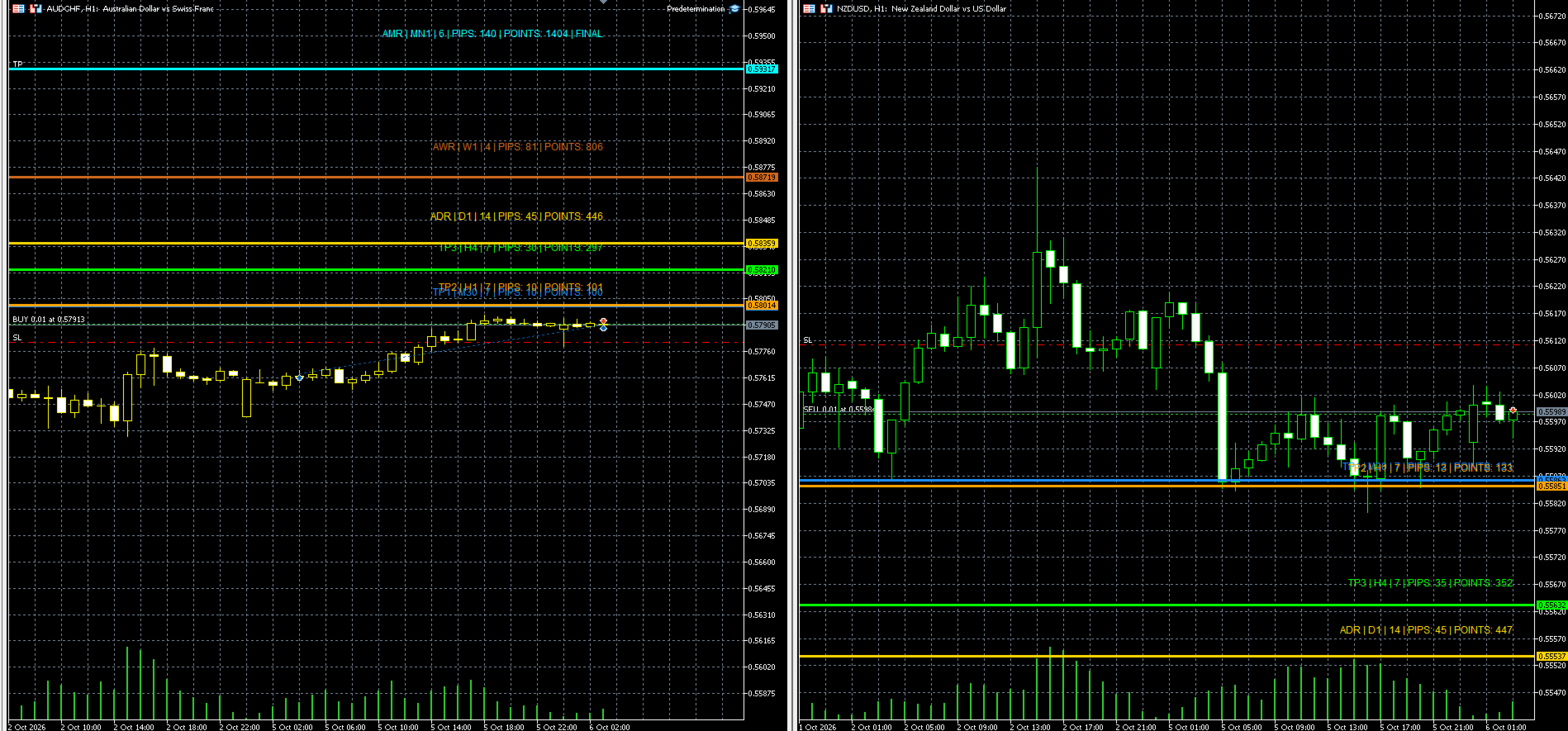
Three stages come from Average True Range, each with its own timeframe. Three come from completed range: daily (ADR), weekly (AWR), and monthly (AMR). Each stage can be switched on or off. Enabled stages are sorted by distance. Nearer stages trail the stop. The furthest is posted as the take profit and marked FINAL on the chart. One stop is used at a time: an ATR stop, a fixed pip stop, an ADR stop, or no stop.
Benefits
- The exit distance follows the symbol's range instead of one fixed pip count.
- A blank trade can be opened from a phone, and the stop and take profit are filled in afterward.
- The stages are visible as colored lines, labeled with timeframe, averaging unit, pips, and points.
- All-symbols mode draws those lines on every chart that is already open for a managed symbol.
- Buy and sell trades are both managed, with a magic-number filter.
- It can run on a VPS, and each modification is printed in the journal.
Limitations
- It does not choose position size. Size the trade yourself.
- It will not create a trade. It only manages one that is already open.
- A spike can reach a nearer stage before a wider one, so the stop may lock earlier than expected.
- A stop or take profit still has to pass the broker's stop level.
- No stop means another tool, or a manual close, has to handle a losing trade.
- Daily, weekly, and monthly stages need enough completed bars. A stage without history is skipped.
- Results can differ by broker, account type, and symbol digits.
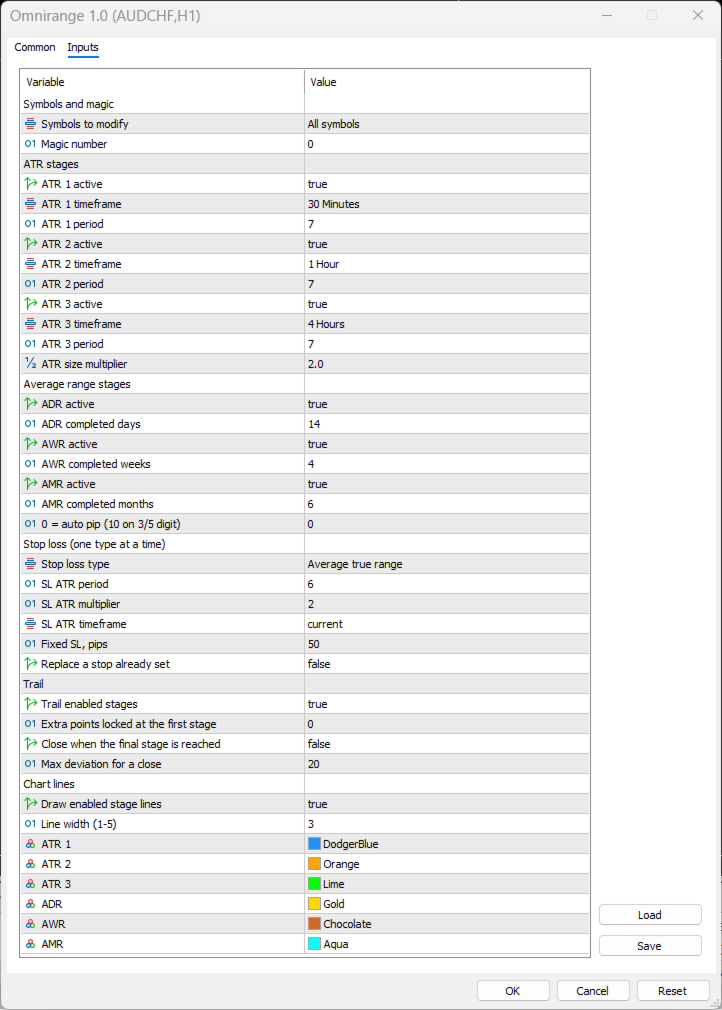
| Variable | Default | What it does |
|---|---|---|
| Symbols to modify | 2, All symbols | 1 manages the chart symbol only. 2 manages every open chart of a matching symbol. |
| Magic number | 0 | Only positions with this magic are managed. |
| ATR 1 active | true | Turns the first ATR stage on or off. |
| ATR 1 timeframe | M30 | Timeframe used for ATR 1. |
| ATR 1 period | 7 | Bars used in the ATR 1 calculation. |
| ATR 2 active | true | Turns the second ATR stage on or off. |
| ATR 2 timeframe | H1 | Timeframe used for ATR 2. |
| ATR 2 period | 7 | Bars used in the ATR 2 calculation. |
| ATR 3 active | true | Turns the third ATR stage on or off. |
| ATR 3 timeframe | H4 | Timeframe used for ATR 3. |
| ATR 3 period | 7 | Bars used in the ATR 3 calculation. |
| ATR size multiplier | 2.0 | Multiplies each ATR distance. Below 2 is closer. Above 2 is wider. |
| ADR active | true | Turns the daily-range stage on or off. |
| ADR completed days | 14 | Completed daily bars averaged for ADR. Minimum 2. |
| AWR active | true | Turns the weekly-range stage on or off. |
| AWR completed weeks | 4 | Completed weekly bars averaged for AWR. Minimum 2. |
| AMR active | true | Turns the monthly-range stage on or off. |
| AMR completed months | 6 | Completed monthly bars averaged for AMR. Minimum 2. |
| Pip in points | 0 | 0 uses 10 points on 3- and 5-digit symbols, otherwise 1 point. |
| Stop loss type | 1, Average true range | 1 ATR stop. 2 fixed pips. 3 ADR distance. 4 no stop. |
| SL ATR period | 6 | Bars used when the stop type is ATR. |
| SL ATR multiplier | 2 | Multiplies the ATR stop distance. |
| SL ATR timeframe | Current chart | Timeframe used for the ATR stop. |
| Fixed SL, pips | 50 | Pip distance used when the stop type is fixed. |
| Replace a stop already set | false | False plants a stop only if one is missing. True may replace a worse stop. |
| Trail enabled stages | true | Moves the stop as each nearer stage is reached. |
| Extra points at first stage | 0 | Points added beyond breakeven when the first stage is reached. |
| Close when final stage is reached | false | False lets the broker take profit close the trade. True sends a market close. |
| Max deviation for a close | 20 | Slippage allowed for that market close, in points. |
| Draw enabled stage lines | true | Draws one line per enabled stage. |
| Line width | 3 | Thickness of those lines, from 1 to 5. |
| ATR 1 color | Dodger blue | Color of the ATR 1 line and caption. |
| ATR 2 color | Orange | Color of the ATR 2 line and caption. |
| ATR 3 color | Lime | Color of the ATR 3 line and caption. |
| ADR color | Gold | Color of the ADR line and caption. |
| AWR color | Chocolate | Color of the AWR line and caption. |
| AMR color | Aqua | Color of the AMR line and caption. |