Trading Assistant MT

Core Purpose

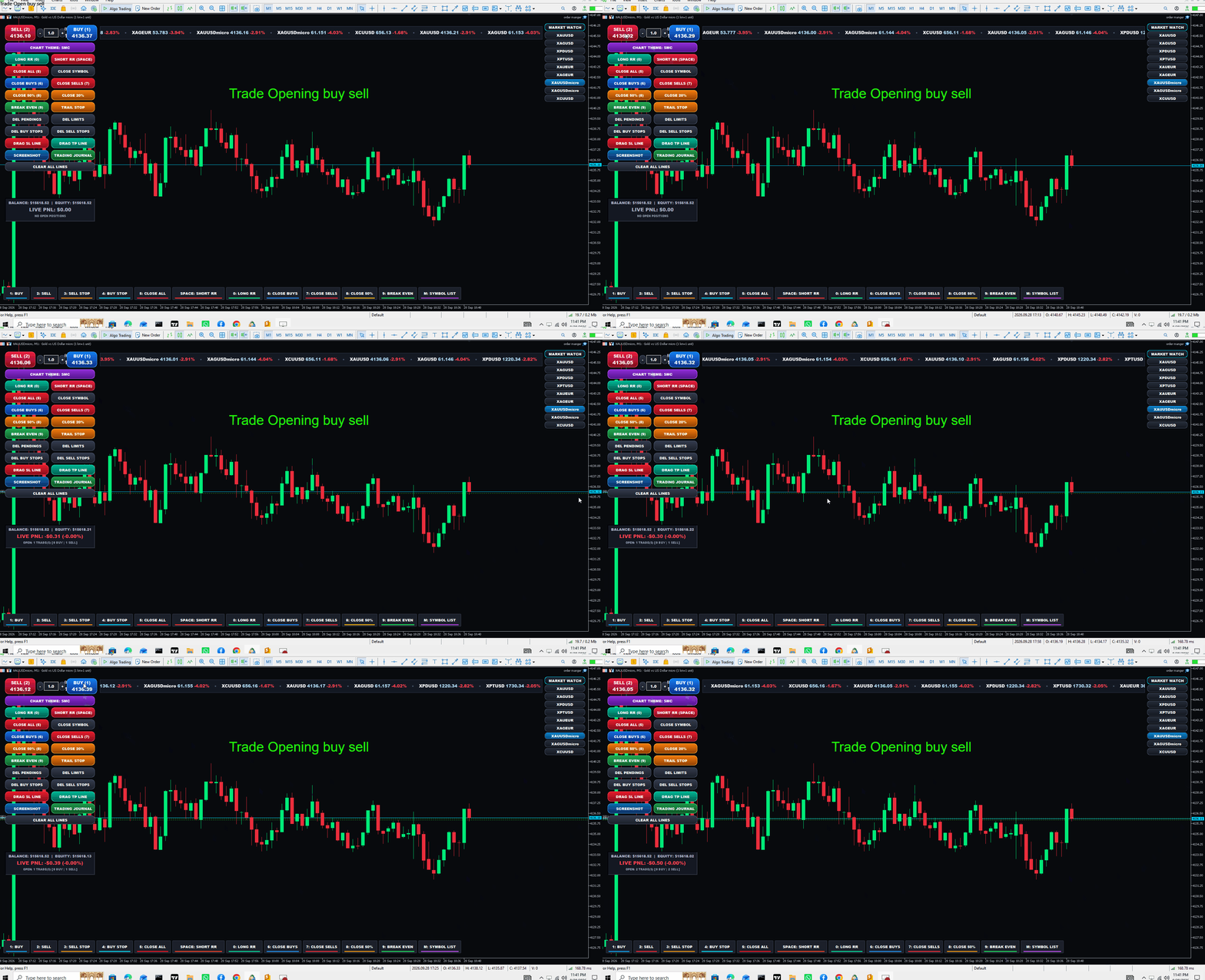
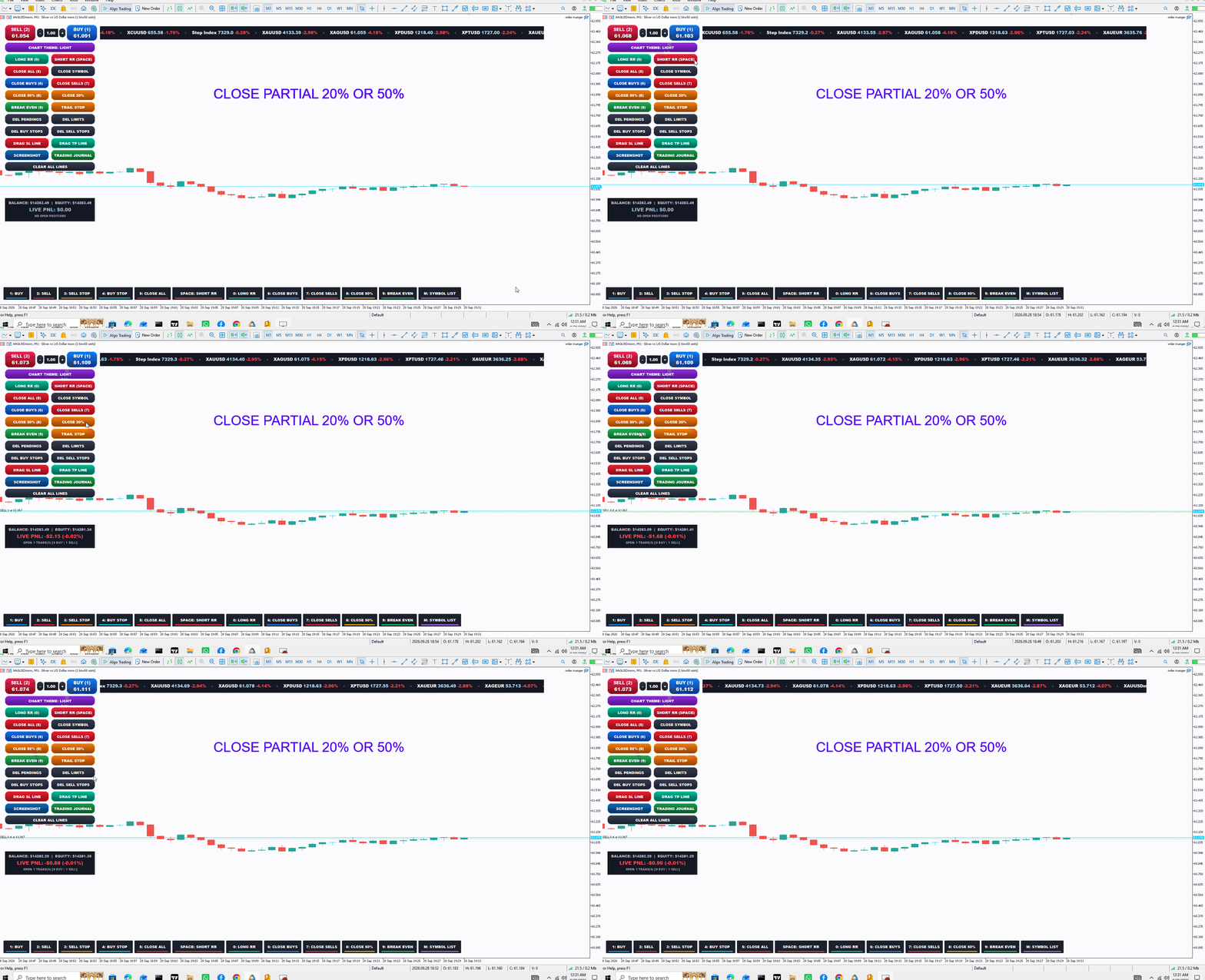
An advanced MetaTrader 5 (MT5) Trading Cockpit & Utility Expert Advisor that allows full manual chart trading via custom buttons and hotkeys, while routing all orders through MT5's algorithmic engine (OrderSend / CTrade). This ensures your broker and account history register every trade as an automated robot trade with a custom Magic Number and Order Comment.

Key Features & Capabilities

1. Execution & One-Click Trading

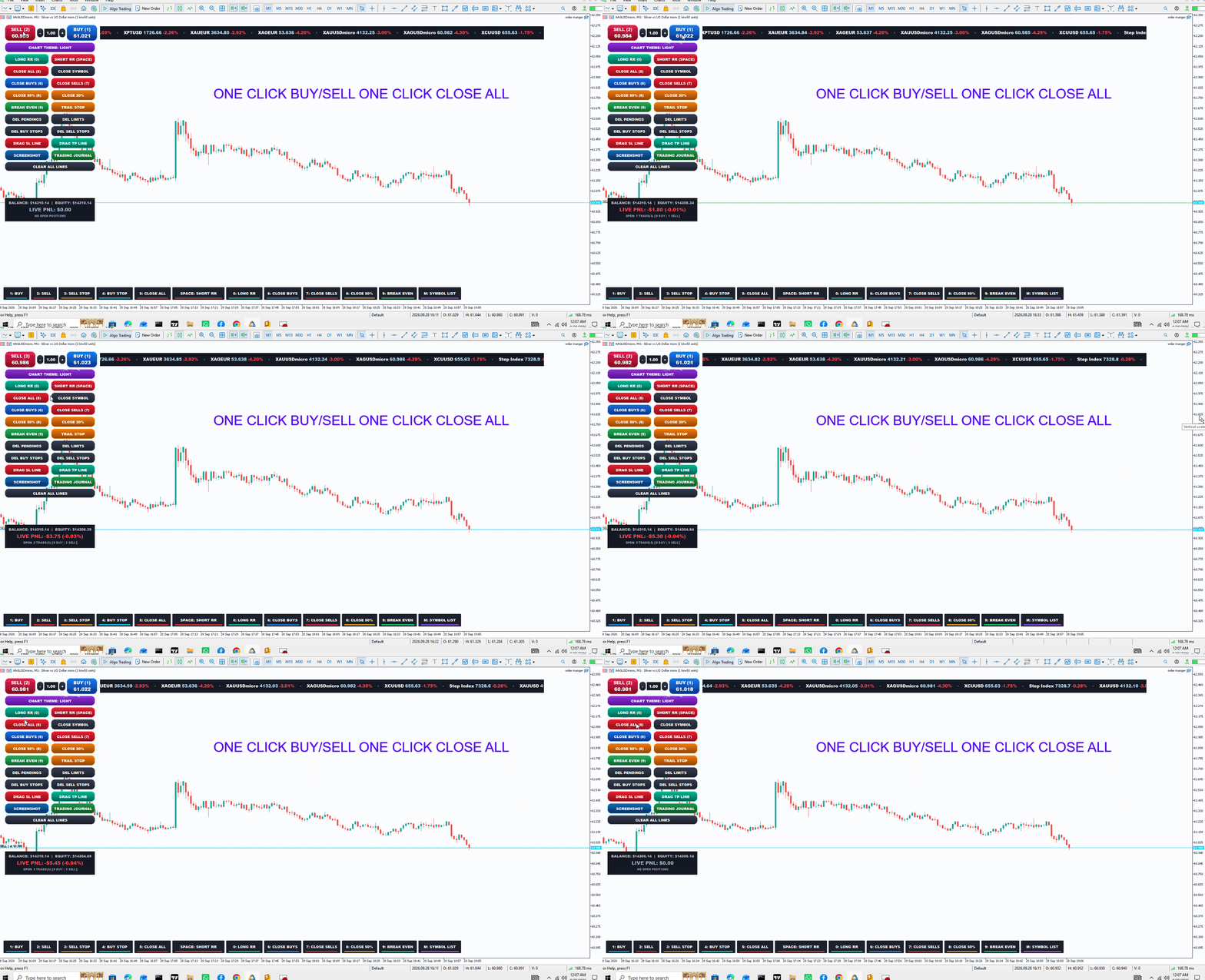
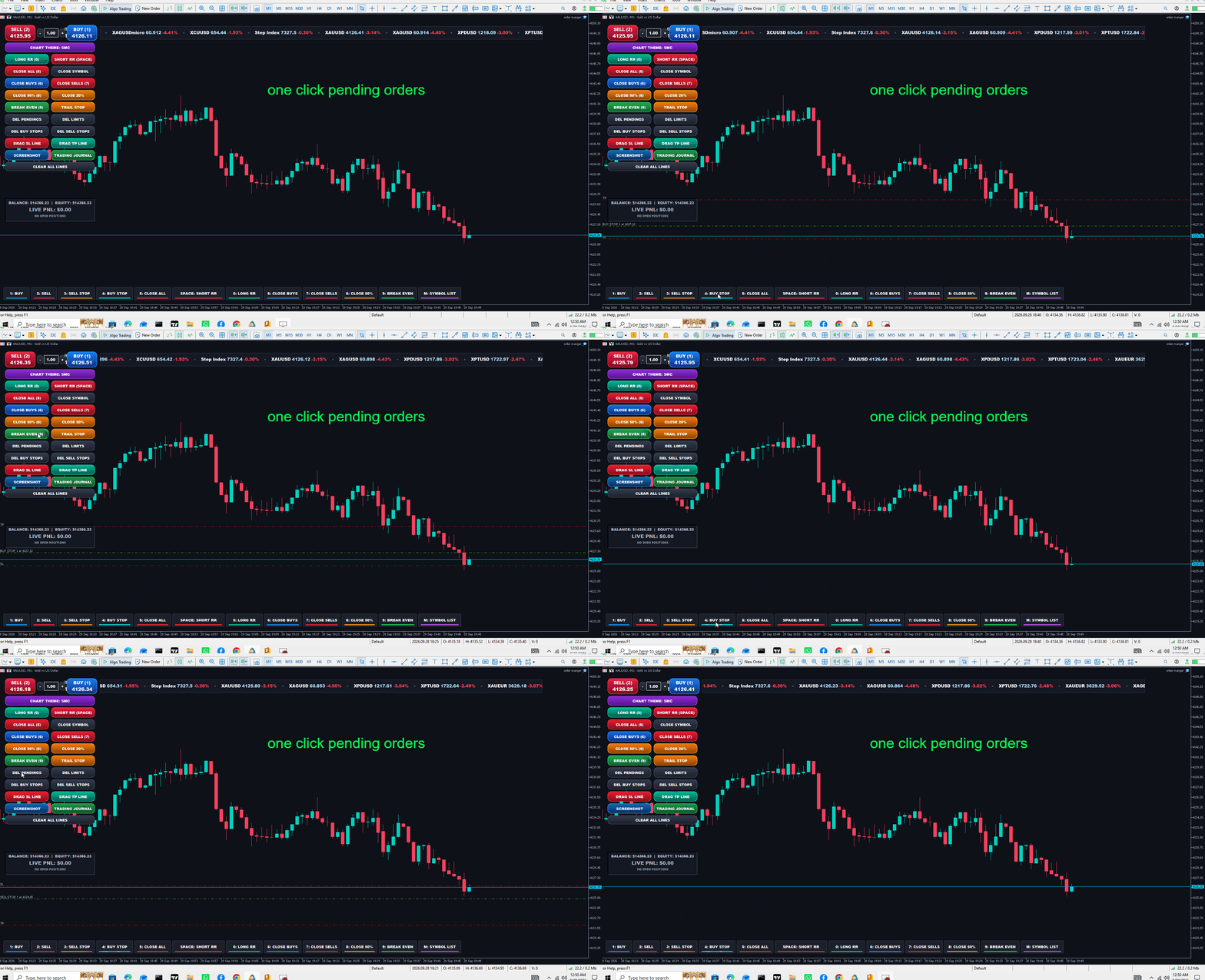
  • Instant Market Orders: Dual BUY and SELL squircle buttons displaying live, real-time Ask/Bid tick prices.

  • Inline Lot Selector: Dedicated lot size edit box with + and - steppers or direct keyboard typing.

  • Robot ID Tagging: Attaches your custom MagicNumber and Comment to every order, qualifying it as an EA execution.

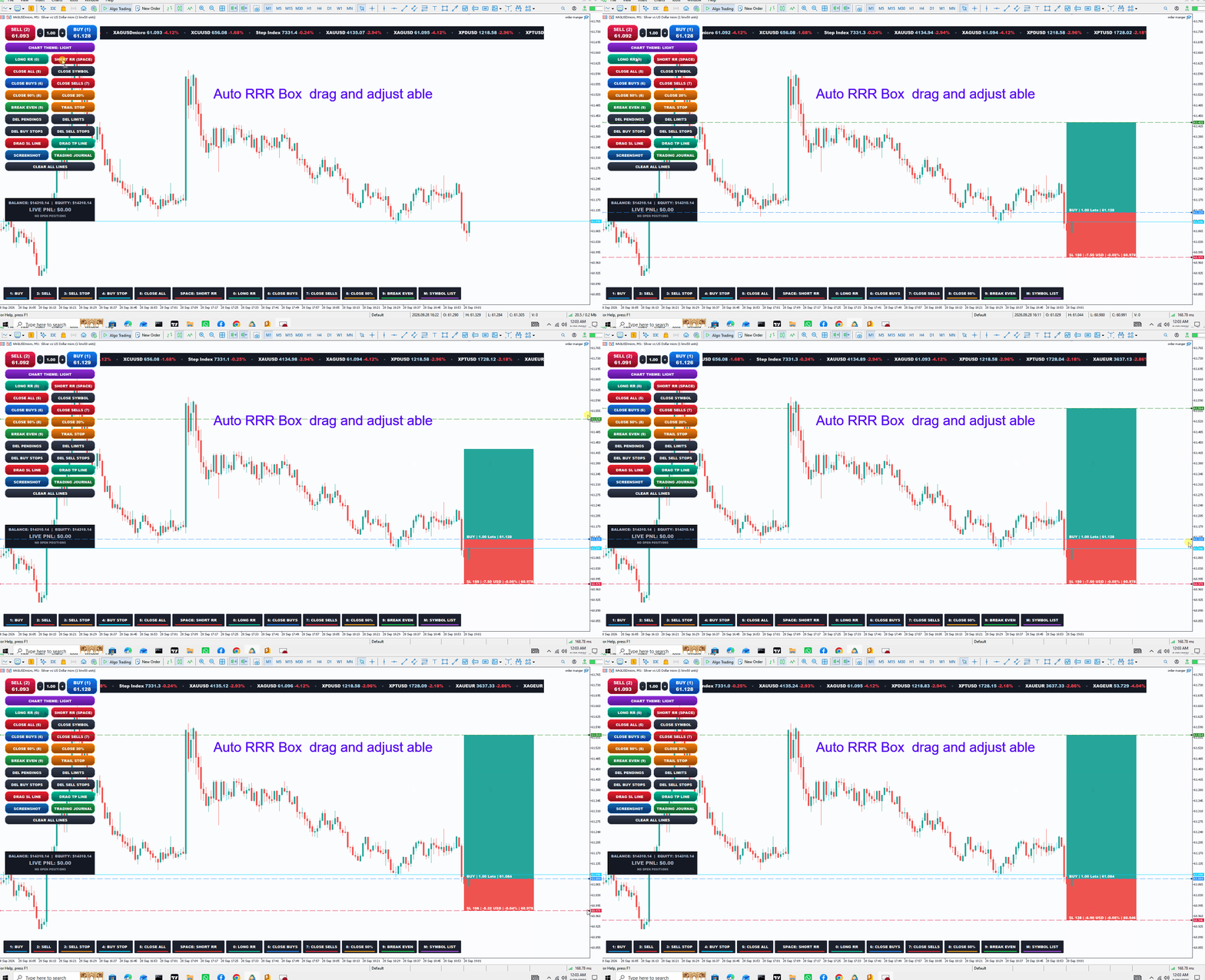
2. Auto 1:2 Risk/Reward Tool (TradingView-Style)

  • LONG RR & SHORT RR Boxes: Instantly generates an auto-calculated 1:2 R:R overlay with shaded profit (Bull) and loss (Bear) zones.

  • Live Telemetry Badges: Displays Points, Potential Profit/Loss in Account Currency ($), Account Risk Percentage (%), and Price levels.

  • Draggable & Auto-Linked: Drag the Entry, SL, or TP lines anywhere on the chart; pressing BUY or SELL automatically applies those exact SL/TP parameters to the live order.

3. Complete Trade & Position Management

  • Account & Symbol Closes: One-click options for CLOSE ALL (account-wide) and CLOSE SYMBOL (current chart only).

  • Directional Closes: Close BUY trades only or SELL trades only.

  • Partial Volume Closes: Instantly scale out with CLOSE 50% (half lot) or CLOSE 20%.

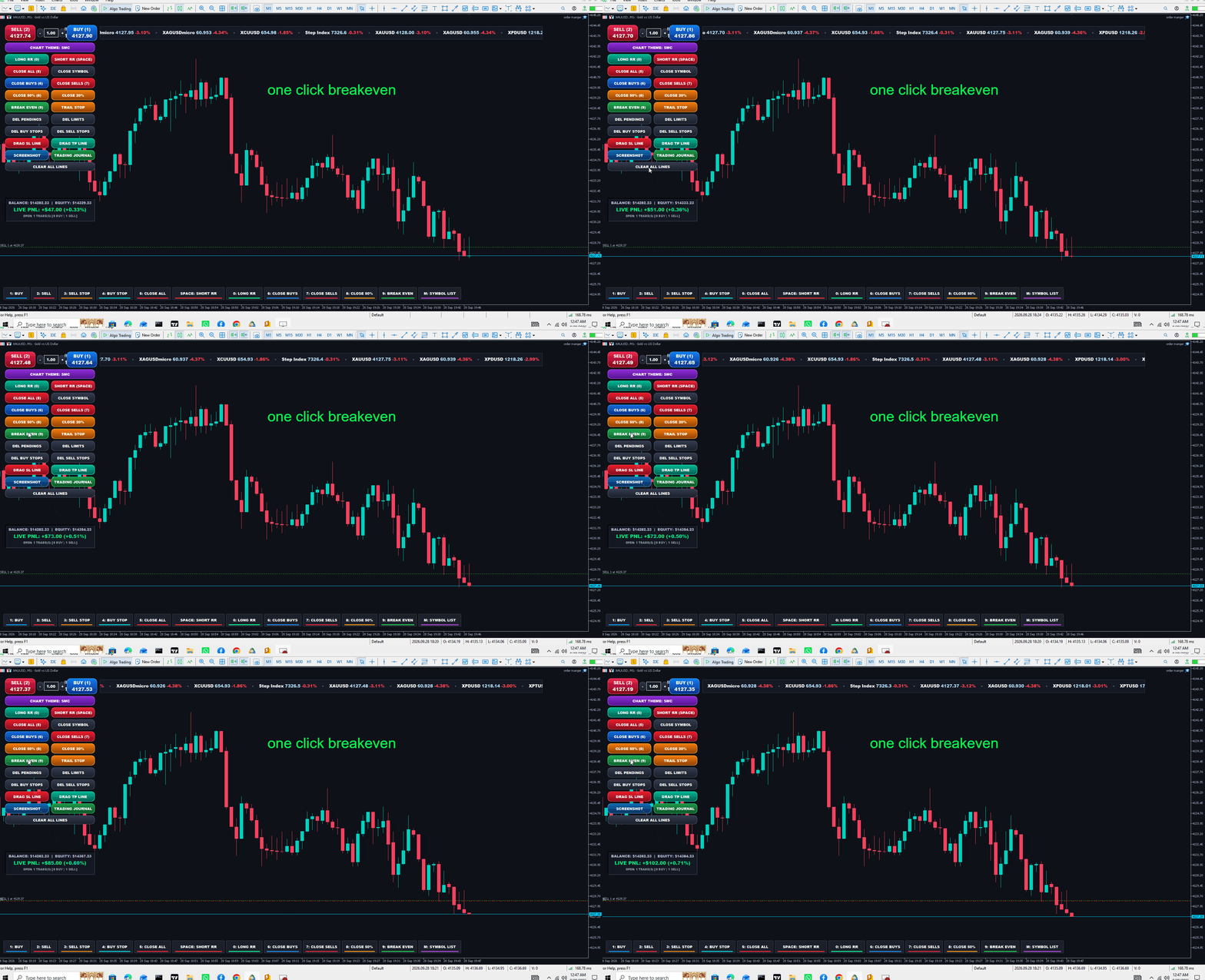
  • Break-Even (BE): Moves Stop Loss to the exact entry price plus a profit buffer while strictly respecting broker minimum STOPS_LEVEL.

  • Pending Orders Control: Mass delete All Pendings, Limit Orders (Buy/Sell Limits), Buy Stops, or Sell Stops.

4. Visual Draggable Levels & Trailing Stop

  • Interactive SL / TP Lines: Click DRAG SL or DRAG TP to spawn on-chart horizontal lines. Dragging and releasing them instantly modifies the open positions' SL/TP.

  • Live Trailing Stop: Spawns a trailing guide line and trails active trades tick-by-tick at your chosen point distance.

  • CLEAR ALL LINES: One-click cleanup to remove all lines, boxes, and trailing states.

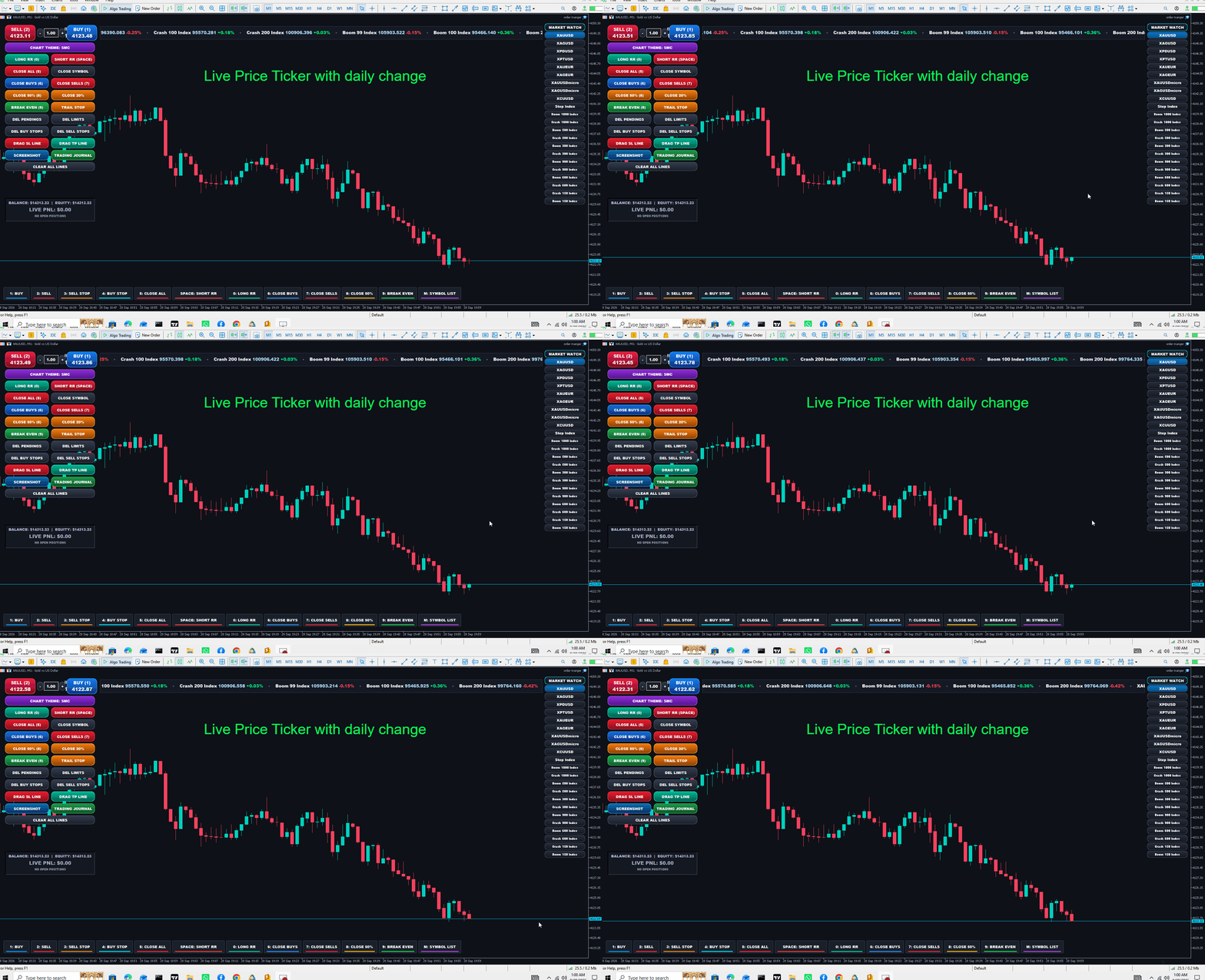
5. Top Market Marquee Ticker

  • Infinite Smooth Scrolling: Hardware-clipped, smooth top banner displaying all active Market Watch symbols.

  • Live Telemetry: Continuously loops Symbol Name, live Bid price, and 24-hour percentage change (+% in glowing green, -% in glowing red).

  • Auto-Resizing: Dynamically spans the available top space between panels.

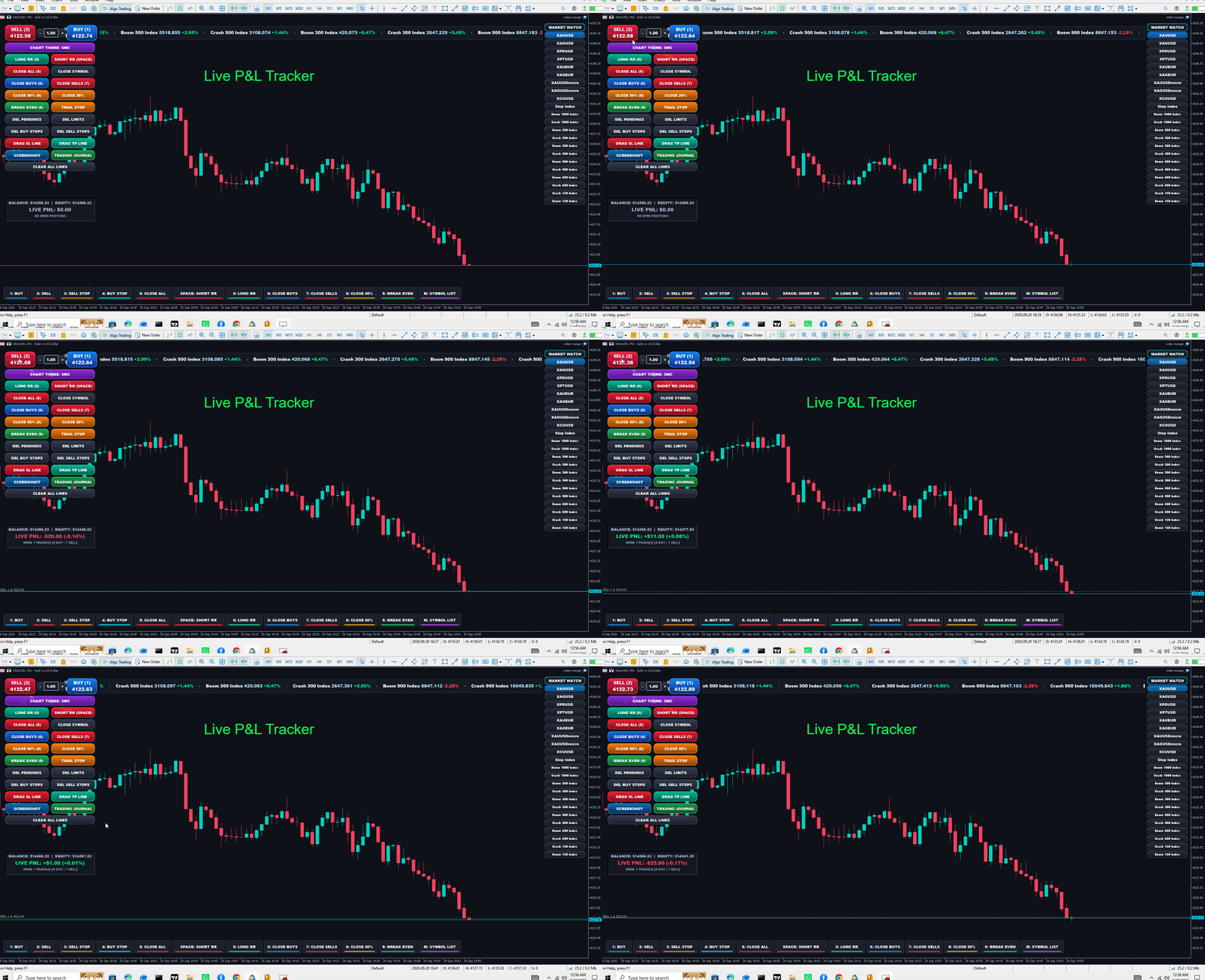
6. Live Account & Floating PnL Card

  • Located on the left panel below the trade controls.

  • Displays Live Balance, Equity, and real-time Floating PnL ($ and %).

  • Color-coded border that glows Green during profit and Red during drawdown, accompanied by an open trade counter.

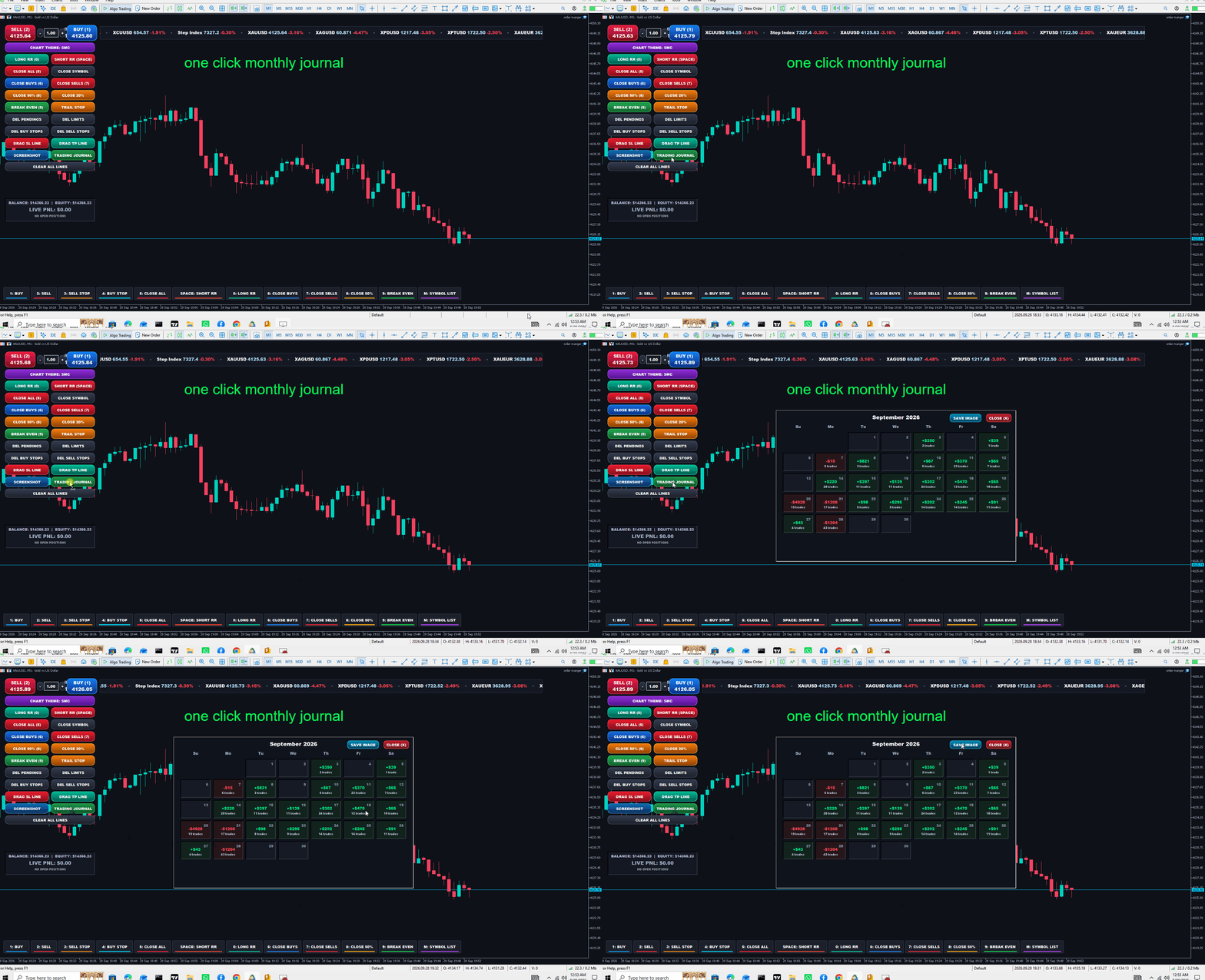
7. Full-Screen Monthly Trading Journal Calendar

  • Opens an interactive calendar overlay mapping the current month's performance directly from Account History Deals.

  • Green Cards: Display total daily profit (+$2,104) and trade count (2 trades).

  • Red Cards: Display total daily loss (-$500) and trade count (1 trade).

  • Built-in SAVE IMAGE (exports a PNG to MQL5\Files) and CLOSE (X) buttons.

  • 8. Keyboard Shortcuts & Stream Deck Bottom Console

    • Keys Supported:

      • 1 / B : Buy Market

      • 2 / S : Sell Market

      • 3 : Pending Sell Stop

      • 4 : Pending Buy Stop

      • 5 / C : Close All Trades

      • 6 : Close Buys Only

      • 7 : Close Sells Only

      • 8 : Close 50% Volume

      • 9 : Set Break-Even

      • 0 / L : Long 1:2 RR Box

      • SPACE : Short 1:2 RR Box (Represented by an extra-wide center Spacebar key)

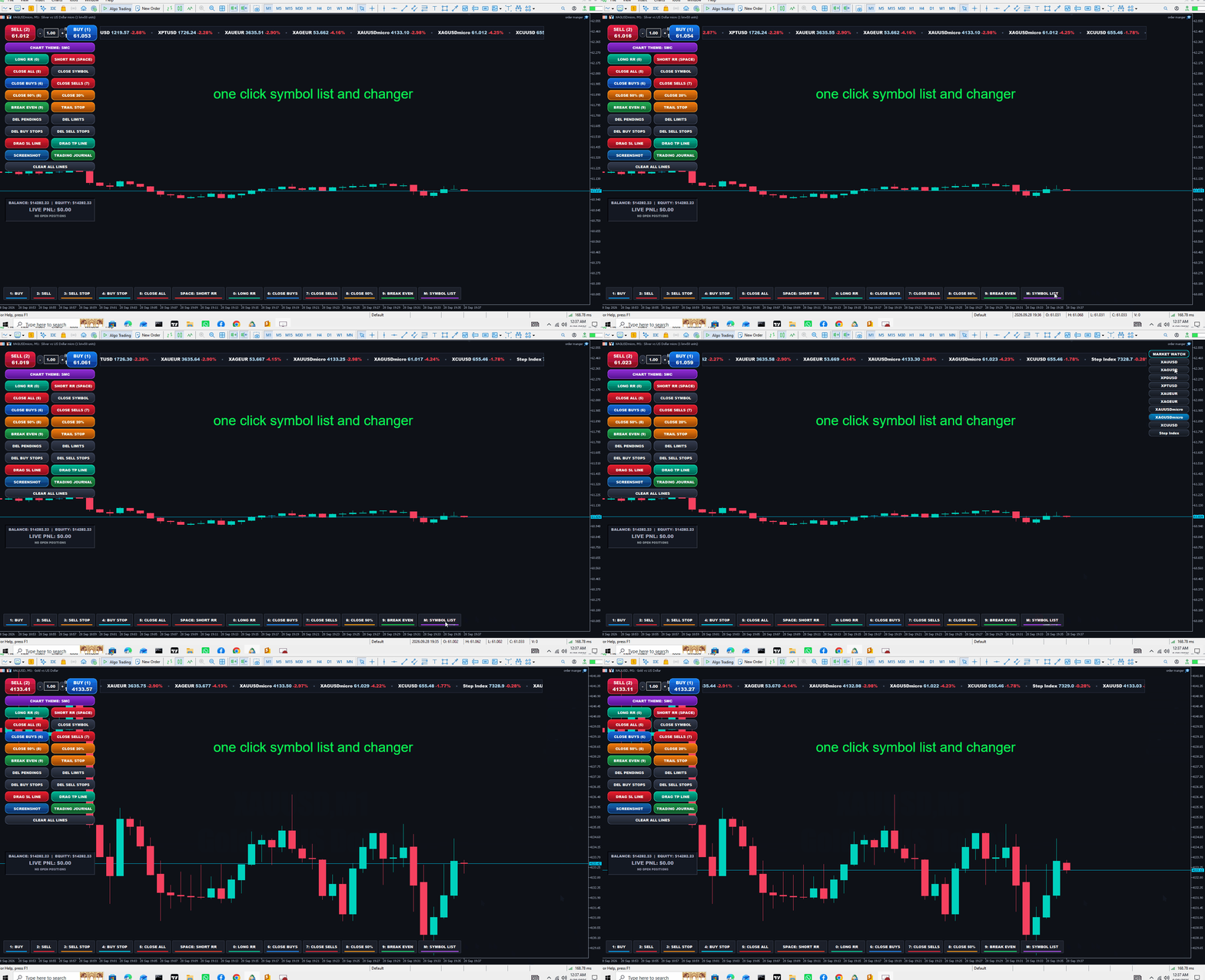
      • M : Toggle Right-Side Symbol List

    • Stream Deck Aesthetic: Matte dark keycaps with individual neon LED underline glow bars at the bottom of the chart. Clicking them with the mouse executes the exact same actions as pressing the keys.

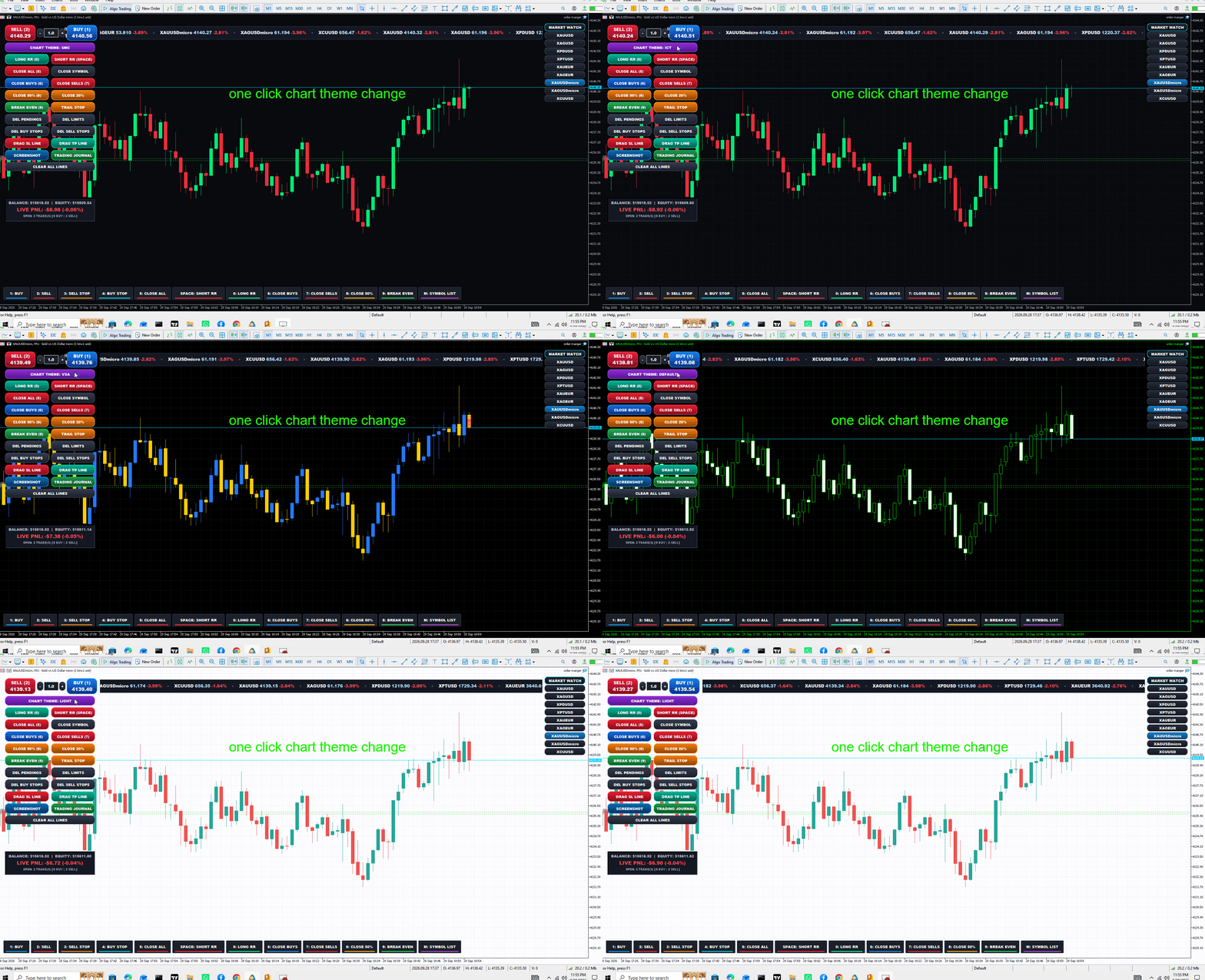
    9. Dynamic 1-Click Chart Themes

    • Dedicated button cycles through 7 complete visual templates:

      1. SMC (Smart Money Concepts — Dark Indigo, Teal/Coral)

      2. ICT (Inner Circle Trader — Deep Midnight, Mint/Crimson)

      3. VSA (Volume Spread Analysis — Black, Blue/Gold)

      4. PRICE ACTION (Minimalist White/Charcoal)

      5. MARKET DEFAULT (Classic Terminal Green/Black)

      6. DARK (TradingView Modern Dark)

      7. LIGHT (Crisp Institutional White)

    • Automatically adapts chart candles, grids, and Risk Box colors simultaneously.

    10. Right-Side Symbol Switcher

    • Hugs the right chart margin and lists up to 22 active Market Watch instruments.

    • Text is centered inside rounded squircle buttons; clicking any symbol immediately switches the active chart to that pair.

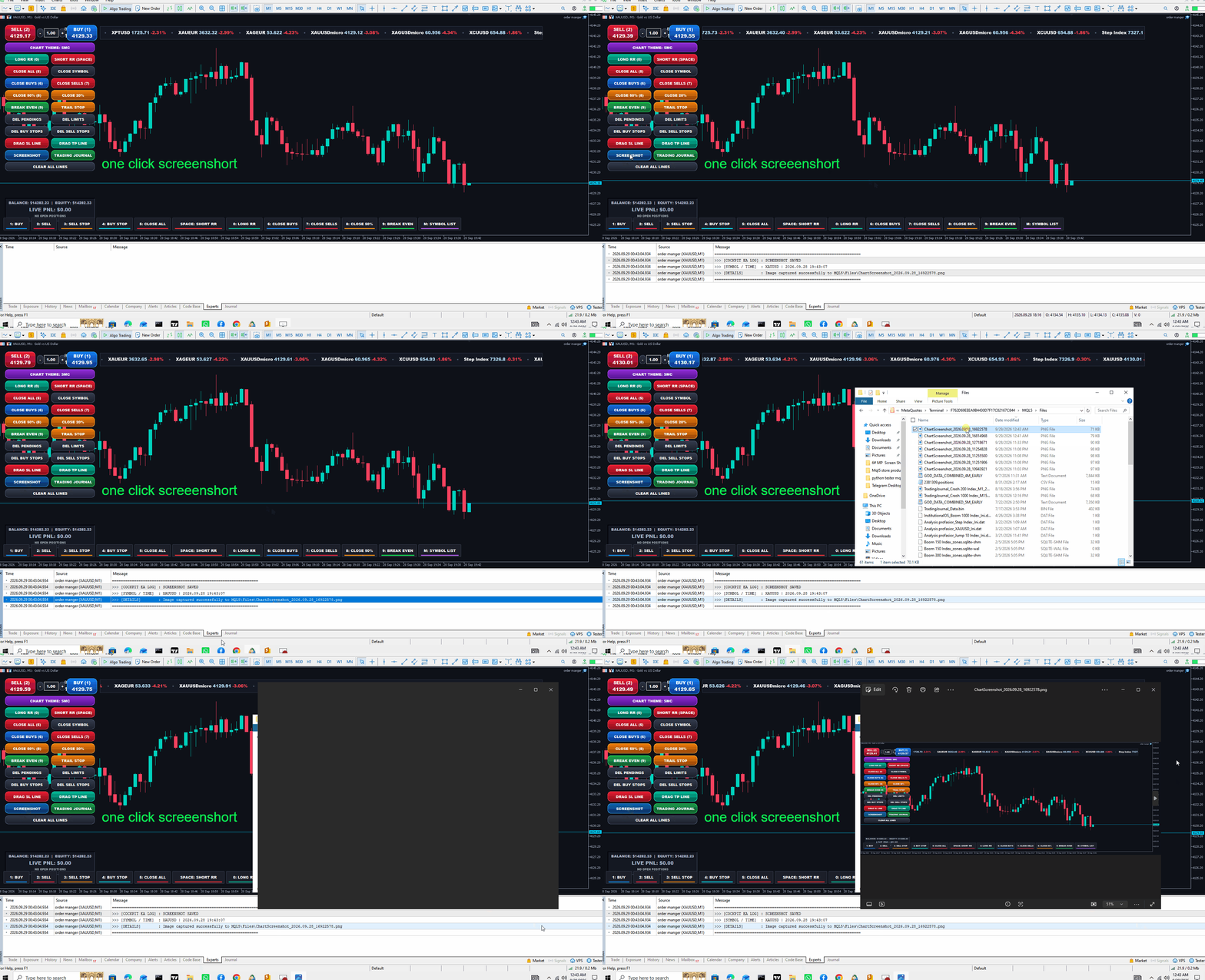
    11. Screenshot & Logging Utilities

    • SCREENSHOT Button: Instantly captures the chart and saves a high-res PNG file to MQL5\Files.

    • Verbose Expert Log: Every hotkey press, button click, order execution, and error code is logged with a multi-line diagnostic report in the MT5 Experts tab

Önerilen ürünler
## Operating Principle **Manual Order Manager PRO BTC** is an Expert Advisor for MetaTrader 5 designed to **automatically manage trades opened manually by the trader**. The EA does not decide when to buy or sell. The user analyzes the market, chooses the direction, sets the lot size, and opens the position manually. From that point on, the system monitors the trade and applies the configured protection and management rules. The goal is to help the trader maintain a more disciplined approach
Expert TP SL v04 - Professional Trading Assistant with AI Motivation System Advanced manual trading tool with automatic risk management, overtrading protection, and intelligent psychological support for disciplined trading. PRODUCT OVERVIEW Expert TP SL v04 is a comprehensive trading assistant designed for manual traders who want to maintain emotional discipline while automating risk calculations. This isn't just another order placement tool - it's a complete trading psychology system that pr
Trading tool combining a sophisticated equity stop-loss, dynamic take-profit management (Breakeven & Trailing), and symbol-group-based closing logic. It is a complete risk management and trade supervision tool. Features: All features of `Equity Master Stop v1` (floating profit/loss limits, exit protection, skip hours). Take-Profit Override: Can force a TP on any order to lock in a `MAX_FLOATING_PROFIT`. Step Breakeven: Locks in increasing amounts of profit as a trade moves favorably (e.g., aft
Barak Mega EA
Jorge Jovanny Hernandez Maldonado
BARAK MEGA EA  is a fully automated trading Expert Advisor designed for traders who demand total control, strategic flexibility, and advanced risk management within a single system. This EA functions as a true strategy builder , allowing you to combine multiple technical indicators and custom rules to adapt to any market, asset, or timeframe. Unlike traditional robots with fixed logic, BARAK MEGA EA features a modular architecture where every component can be independently enabled, disabled, and
FREE
PanelBuySell
Juan Camilo Meza Novoa
PanelBuySell + GameHub MetaTrader 5 için tek tıkla BUY/SELL paneli, tek bir tuşla açılan gizli bir mini oyun merkeziyle birleştirildi. İşlem araçları her zaman grafik üzerinde kalır ve G tuşuna basıldığında platform kapatılmadan 25'ten fazla mini oyundan oluşan bir kütüphane açılır. Emir Yürütme ve Pozisyon Yönetimi Ayarlanabilir lot büyüklüğü ve yorumla tek tıkla BUY ve SELL Close All, Break Even ve bakiye yüzdesine göre Stop Loss — her biri isteğe bağlı onay penceresiyle 1'den 9'a kadar rakam
Trading Utility for Forex Currency Pairs Only not for Gold  Functions Auto Lot Calculation based on Risk Auto stoploss  Auto TakeProfit Breakeven Auto Close Half % Close in percentage with respect to the PIPs Pending Orders BuyLimit Sell Limit with distances BuyStop Sell Stop    with distances Trading Informations Risk in percentage For Multiple trades Combine Takeprofit and Combine Stoplosses
Black Volume By ZeeAM Khan a Multi-Engine EA Professional Multi-Timeframe Volume & Breakout Trading System Black Volume Multi-Engine EA is an advanced automated trading system that combines volume analysis, spread analysis, liquidity sweeps, support/resistance breakouts, and multi-basket trade management into one powerful Expert Advisor. The EA continuously scans higher-timeframe candles to identify significant market activity, automatically draws key support and resistance zones, and executes
FREE
The purpose   of this utility is to manage one or more subwindow in the same chart by opening and closing them through a button or the keyboard keys How it works: If you want to handle more than one subwindow you need to reinstall the indicator . In this case some setups has to be customized onlu in the last subwindow installed and others setups in the installed subwindow during the first time installation. They are denoted in the input rispectively as ' LW ' and ' IW '. First of all install
RiskRider Pro
Stephane Paul Heritier
RiskRider Pro is a professional manual trading panel for MetaTrader 5. It puts every essential risk management tool at your fingertips without interrupting your chart analysis. KEY FEATURES One-click BUY / SELL Instant market execution with automatic stop-loss calculation. No confirmation dialogs, no delays. Risk:Reward Take Profit Define your R:R ratio once (default 2.0). The take-profit level is calculated automatically on every trade based on your stop-loss distance. Dynamic Lot Sizing W
Margin Call Shield – Defend Your Margin on Your Terms Margin Call Shield is a tool for MetaTrader 5 traders who want to decide for themselves which open positions are closed during margin call situations before the platform does so automatically based on its internal rules. By default, the broker or platform decides which positions to close, often using undisclosed algorithms. Margin Call Shield lets you set this order according to your own strategy. Why Was Margin Call Shield Created? In a mar
NHK Local Time Scale NHK Local Time Scale displays your PC/local time directly on the MT5 chart , alongside the broker's native chart time. The trader can easily compare both time zones for any candle. Benefits for Traders: Quickly convert Broker Time ↔ Local/PC Time . Helps accurately set News Stop/News Filter times. Makes London, New York, Asian and other trading sessions easier to identify in your local time. Helps verify that EA session and news time settings are correct. Reduces mistakes ca
FREE
Prop Hesaplama Asistanı Kötü matematik yüzünden Prop Firma hesaplarınızı batırmayı bırakın. Riski Asistana bırakın. Prop Hesaplama Asistanı, özellikle fonlama zorluklarını (FTMO, vb.) geçmeye çalışan veya fonlanmış sermayeyi yöneten yatırımcılar için tasarlanmış nihai işlem yönetim panelidir. Zihinsel matematiği ve manuel emir sürüklemeyi, sizi kesinlikle kurallarınızın içinde tutan hassas bir görsel arayüzle değiştirir. Bu, piyasayı tahmin eden otomatik bir işlem botu değildir. Hassasiyet ta
Pulse Trade Dashboard is an interactive trade management panel for MetaTrader 5, built for traders who want full control of their account without leaving the chart. Attach it to any chart and get a real-time overview of your balance, equity, open positions, and floating P&L — all updating live. Place market orders instantly with the one-click BUY and SELL buttons, adjusting your lot size, stop loss, and take profit directly on the dashboard without opening a single settings menu. What's included
FREE
Equity Target Stop is an automated utility designed to protect your profits and enforce strict capital management. It continuously monitors your account equity in real time and automatically closes all open positions as soon as your predefined profit target is reached. Key Features Automated Profit Securing: Automatically triggers a "Close All" command when equity reaches your specified target. Universal Account Protection: Works seamlessly across multiple open positions, pending orders, and dif
FREE
GridZone Alpha: The Ultimate Semi-Automated Grid & Zone Manager GridZone Alpha is an advanced, interactive trading panel designed for the modern manual trader. Stop staring at the charts waiting for the perfect entry, and stop relying on rigid, fully automated bots that cannot read market context. With GridZone Alpha, you provide the human analysis by identifying your support, resistance, or supply/demand zones. Once confirmed, the Limit Order Engine takes over, instantly deploying a precision,
Support & Setup | MetaTrader Trade Journal Support & Resources Everything you need to get your MetaTrader Trade Journal running perfectly. https://mt-trade-journal.com/free/download/install.mp4     Full Install Video here Official Support Page Documentation and free resources Visit Page Direct Contact Message Jack Ryland on Telegram Message Now Step 1 — Configure MetaTrader WebRequests To allow the EA to sync your data, you must authorize these URLs. In your MT4/MT5 terminal, go to Tools → Opt
The Expert Advisor is used to create Renko chart, realtime updates, easy for technical analysis. Backtest your strategy with all indicators with Renko chart in MetaTrader 5. Parameters Box Size : input the number of box size. Show Wicks : if true , draw a candle with high/low. History Start: input the date to creat first candle. Maximum Bars: limit number of bars on renko chart How to use Attach the Expert Advisor to a chart (timeframe M1), for which you want to create a renko. Input box size a
'Quick Close Panel' is an easy to use interface for managing orders. It has a button for closing all winning trades on the current chart, a button for closing all losing trades and another button for closing   all running trades (Losing and Winning)   on the current chart. It is very responsive and quick to execute operations due to the effective time complexity of the algorithm used in the  program.  Vist this link to download demo:  https://www.mql5.com/en/market/product/62901?source=Site+Mark
Prop Firm Smart Margin Calculator Know your lot size. Know your margin. Trade with precision. The Prop Firm Smart Margin Calculator is a practical MT5 trading tool designed to help you determine your position size and understand the estimated margin required before placing a trade . Simply enter your desired risk amount and stop-loss distance, and the calculator determines the appropriate trading volume based on your symbol's specifications. It also calculates the estimated margin required for
Apex Signal Stream – Trade Panel Version 2.43 | For MetaTrader 5 Overview Apex Trade Panel is a fully on-chart trading panel with two modes: Manual — precise control over every order, from lot sizing and SL/TP logic to trailing methods and batch close filters; and SignalStream auto-trade — the panel polls the Apex Signal Stream server over HTTPS and executes incoming signals behind 10 safety gates, reporting every outcome back. One panel, two ways to trade — and nothing enters your account that
Fast execution utility for manual traders. Drag-and-drop visual trading, split take-profits, and single-ticket management system. Speed, Precision, and Risk Control. KAB Trade Manager is built for traders who need to execute fast but keep risk tight. It integrates all essential tools into floating, collapsible windows. Core Functions: Instant Order Execution:   Market and Pending orders with automatic Lot sizing based on SL distance. Focus Ticket Manager:   A dedicated window to monitor and mana
DragPan — TradingView-Style Chart Navigation Take full control of your MetaTrader 5 chart with intuitive, mouse-driven navigation inspired by TradingView. DragPan replaces MetaTrader's default scroll-and-scale behavior with smooth, natural gestures — click and drag to pan, drag the axes to stretch, and scroll to zoom. Key Features: One-Click Toggle — A clean on/off button in the top-right corner lets you switch DragPan mode on or off instantly, without disabling the indicator. Drag-to-Pan — Clic
StrategyDeck — a cockpit for manual, discretionary trading. StrategyDeck draws and measures. It does not decide, and it never sends an order on its own. What it draws on the chart Opening range boxes for the Asia, Europe and US sessions, a linear regression channel, previous-day high and low with the day's open, and key candlestick patterns. Each drawing layer can be turned off, set to drawing only, or set to signal — and the signal position exists only where a measured scope is available.
Promotional offer for today 30 USD. Final price will be 100 USD.   FX Trade Manager Pro for MT5 – Fast One-Click Trading & Advanced Risk Management FX Trade Manager Pro is an all-in-one trade panel and risk management utility built for MetaTrader 5 (MT5) . Designed specifically for scalpers, day traders, and prop firm traders, it helps eliminate manual calculation errors, ensures disciplined risk management, and allows lightning-fast execution directly from your chart !  Key Features Overview:
Exp5 Duplicator
Vladislav Andruschenko
4.78 (9)
Duplicator for MetaTrader 5 — tek terminal içinde profesyonel pozisyon çoğaltıcı MetaTrader 5 içinde önceden açılmış pozisyonları otomatik olarak çoğaltmak, hacmi artırmak, özel lot ayarları uygulamak ve kopyaları hassas kurallarla yönetmek isteyen yatırımcılar için güvenilir bir Expert Advisor. Manuel işlem, algoritmik sistemler ve tek terminal içinde mevcut pozisyonların esnek yönetimi için pratik bir araçtır. Duplicator for MT5 kendi işlem stratejisine göre pozisyon açmaz. Görevi, MetaTrader
Tick Volume Chart - MetaTrader 5 için tick hacmine dayalı grafikler oluşturmaya yarayan benzersiz bir araçtır. Tick Volume Chart sayesinde, her bir mumun zamana göre değil, belirli sayıda tick'e göre oluştuğu grafikler inşa edebilirsiniz. Bu, standart zaman tabanlı grafiklerde bulunmayan, piyasa aktivitesini analiz etmede ideal bir hassasiyet sağlar. Özel sembolleri destekleyen tüm indikatörleri ve Expert Advisor'ları kullanabilirsiniz. Oluşturulan grafiklerle çalışmak, standart grafikler kadar
Easy Trade Executor, MT5 için hızlı pozisyon büyüklüğü hesaplama, emir yürütme ve işlem yönetimi aracıdır. Open Price, Stop Loss ve Take Profit seviyelerini doğrudan grafik üzerine yerleştirin, pozisyon büyüklüğünü otomatik olarak hesaplayın ve yalnızca birkaç tıklamayla kontrollü risk altında işlemler açın. Neden Easy Trade Executor? Easy Trade Executor, yalnızca risk hesaplamakla kalmayıp işlemlerini doğrudan grafik üzerinden hızlı ve verimli şekilde yönetmek isteyen yatırımcılar için tasarla
Gerçek para riskinden önce prop firm zorluklarında ustalaşın!   Gelişmiş simülatörümüz, özgün prop firm ticaret ortamlarını yeniden oluşturarak pratik yapmanıza, strateji geliştirmenize ve güvenle zorlukları geçmenize yardımcı olur. Simülatörümüzü kullanarak, demo veya gerçek hesaplar kullanarak herhangi bir prop firm zorluğunu simüle edebilir, hem manuel ticaret stratejilerini hem de EA'lar aracılığıyla otomatik ticareti destekleyebilir, özelleştirilmiş dönemler için kişiselleştirilmiş zorlukla
PropArmor — Varlık Koruma Kalkanı Tek bir tıklamayla alım satım hesabınızı feci düşüşlerden (drawdown) koruyun. PropArmor, hesabınızın varlığını (equity) gerçek zamanlı olarak izler ve varlık belirlediğiniz koruma seviyesine düştüğünde TÜM pozisyonları ve bekleyen emirleri otomatik olarak kapatır. Prop Firm yatırımcıları, fonlu hesap (funded account) sınavları ve hesabında güvenilir bir güvenlik ağı isteyen herkes için tasarlanmıştır. NASIL ÇALIŞIR
FREE
ForceCode Risk Assist Panel ForceCode Risk Assist Panel is a professional trading utility designed for strict risk management and Prop Firm compliance. It distinguishes itself with a unique Live Equity Preview that visually projects your future balance, and an innovative Rectangular Entry Zone system for weighted position sizing. This tool transforms risk management from complex manual calculations into an instant visual workflow, allowing traders to focus entirely on price action while the sof
Bu ürünün alıcıları ayrıca şunları da satın alıyor
Trade Assistant MT5
Evgeniy Kravchenko
4.43 (216)
It helps to calculate the risk per trade, the easy installation of a new order, order management with partial closing functions, trailing stop of 7 types and other useful functions. Additional materials and instructions Installation instructions - Application instructions - Trial version of the application for a demo account Line function -   shows on the chart the Opening line, Stop Loss, Take Profit. With this function it is easy to set a new order and see its additional characteristics bef
Trade Manager EA’ye hoş geldiniz! Ticaretin daha sezgisel, hassas ve verimli hale gelmesi için tasarlanmış nihai risk yönetim aracı ile tanışın. Bu sadece bir emir verme aracı değil; ticaret planlaması, pozisyon yönetimi ve risk kontrolü için kapsamlı bir çözüm. İster yeni başlayan bir yatırımcı olun, ister deneyimli bir trader ya da hızlı emir gerektiren bir scalper, Trade Manager EA ihtiyaçlarınıza uyum sağlar ve forex, endeksler, emtialar ve kripto paralar dahil tüm piyasalarda esneklik sunar
Telegram to MT5 Multi-Channel Copier   , Telegram kanallarınızdaki alım-satım sinyallerini doğrudan MetaTrader 5'e otomatik kopyalar. Bot yok, tarayıcı uzantısı yok, elle kopyalama yok. Sinyal Telegram'a düşer ve EA birkaç saniye içinde terminalinizde işlemi açar. Ve bir kanalı kopyalamadan önce, yerleşik backtester o kanalın hesabınızda ne yapmış olacağını gösterir. Ürün iki bileşenden oluşur: Telegram kanallarınızı dinleyen bir Windows uygulaması ve sinyalleri MT5 terminalinizde yürüten bu Exp
================================================================================ POC BREAKOUT - V20.72. Full Professional Grade Toolkit ================================================================================ POC Breakout is a full MetaTrader 5 trading dashboard for discretionary traders who want breakout signals, Point of Control (POC) context, volume profiles, order flow, market structure, news, alerts, and advanced trade planning in one professional workspace. Attached directly to you
TradePanel MT5
Alfiya Fazylova
4.88 (169)
Trade Panel, çok işlevli bir ticaret asistanıdır. Uygulama, manuel ticaret için 50'den fazla ticaret fonksiyonu içerir ve çoğu ticaret görevini otomatikleştirmeyi mümkün kılar. Uygulama talimatları: https://www.mql5.com/en/blogs/post/756482 Demo hesabı için uygulamanın deneme sürümü: https://www.mql5.com/en/blogs/post/750865 Uygulamayı nasıl kurulur: https://www.mql5.com/en/blogs/post/756239 Uygulamayı görsel modda nasıl test edilir: https://www.mql5.com/en/blogs/post/770277 Uygulamayı VPS MetaT
Telegram sinyallerini kendi işlem kurallarınızla kopyalayın Telegram to MT5 Signal Trader , herkese açık ve özel Telegram kanallarındaki ve gruplarındaki metin tabanlı işlem sinyallerini otomatik olarak MetaTrader 5'e kopyalar. Tek bir masaüstü uygulamasından birden fazla sinyal sağlayıcısını ve MT5 hesabını yönetin; her sağlayıcı için ayrı risk ve işlem ayarları belirleyin. Sinyal kopyalamak için Telegram botu veya API kurulumu gerekmez. Kendi Telegram hesabınızla telefon numarası veya QR kod k
Farmed Hedge Yield Farming | All Markets (Manual - Hybrid - Semi/Automated EA) VERIFIED TRADING RESULTS - Farmed Hedge Yield Axi Copy:  https://www.mql5.com/en/signals/2356376 - Farmed Hedge Yield Exn Copy:   https://www.mql5.com/en/signals/2356404 - Farmed Hedge Yield V Copy:  https://www.mql5.com/en/signals/2357156 IMPORTANT NOTICE: FarmedHedge is a MANUAL-FOCUSED TRADING UTILITY ,not a fully automated EA. Results shown on this Signal include manual trades and overall strategic management.
Exp COPYLOT CLIENT for MT5
Vladislav Andruschenko
3.97 (35)
MetaTrader 5 için profesyonel işlem kopyalayıcı MetaTrader için hızlı, profesyonel ve güvenilir bir işlem kopyalayıcı . COPYLOT , MT4 ve MT5 terminalleri arasında Forex işlemlerini kopyalamanıza olanak tanır ve Hedge ile Netting hesaplarını destekler. COPYLOT MT5 sürümü şunları destekler: - MT5 Hedge → MT5 Hedge - MT5 Hedge → MT5 Netting - MT5 Netting → MT5 Hedge - MT5 Netting → MT5 Netting - MT4 → MT5 Hedge - MT4 → MT5 Netting MT4 sürümü Tam açıklama + DEMO + PDF Nasıl satın alınır Nasıl kurul
Power Candles Strateji Tarayıcısı - Kendi Kendini Optimize Eden Çoklu Sembol Kurulum Bulucu Power Candles Strateji Tarayıcısı , Power Candles göstergesini çalıştıran aynı kendinden optimize edici motoru, Piyasa İzleyicinizdeki her sembol üzerinde yan yana çalıştırır. Tek bir panel, şu anda istatistiksel olarak hangi sembollerin işlem yapılabilir olduğunu, her birinde hangi stratejinin kazandığını, en uygun Stop Loss / Take Profit çiftini gösterir ve yeni bir sinyal geldiği anda size bildirim gön
Signal TradingView to MT5 Pro Automator TradingView ve MetaTrader 5 arasında anında profesyonel uygulama TradingView alarmları ile MT5'teki gerçek uygulama arasındaki en güçlü iletişim köprüsüyle ticaret stratejinizi otomatikleştirin. Hız, esneklik ve kusursuz risk yönetimi talep eden yatırımcılar için tasarlanan bu Uzman Danışman (Expert Advisor), herhangi bir alarm mesajını hassas bir piyasa (market) veya limit emrine dönüştürür. GÜÇLÜ YÖNLER VE AVANTAJLAR Evrensel Ayrıştırma Motoru (Tescilli)
Premium Trade Manager - İçine Koç Yerleştirilmiş İşlem Paneli Premium Trade Manager , grafiğinizin içine bir trading koçu yerleştirir; altında tam bir yürütme motoru çalışır. İşlemi her zamanki gibi kurun, ardından yapay zeka trading koçunuz Max, o kurulumu tam olarak okusun ve canlı hesabınıza göre taahhüt etmeden önce size net bir değerlendirme sunsun: stop disiplinli bir yaklaşıma uyuyor mu, risk büyüklüğü makul mü, yüksek etkili bir haber dakikalar sonra mı geliyor, prop firm limitinize yakl
MT5 to Telegram Signal Provider , hesabınızı bir sinyal sağlayıcı haline getirerek belirtilen sinyalleri Telegram'ın sohbetine, kanalına veya grubuna göndermeyi sağlayan kullanımı kolay, tamamen özelleştirilebilir bir araçtır. Rakip ürünlerin çoğunun aksine, DLL içe aktarması yapmaz. [ Demo ] [ Kılavuz ] [ MT4 Versiyonu ] [ Discord Versiyonu ] [ Telegram Kanalı ]  New: [ Telegram To MT5 ] Kurulum Adım adım bir kullanıcı kılavuzu mevcuttur. Telegram API'si hakkında bilgi gerekmemektedir; ihtiyac
HINN MAGIC ENTRY – the ultimate tool for entry and position management! SIMPLE. FASTEST. INTUITIVE. MAX AUTOMATED. Place orders by selecting a level directly on the chart! full description   ::  demo-version  :: 60-sec-video-description Key features: - Market, limit, and pending orders - Automatic lot size calculation - Automatic spread and commission accounting - Unlimited partitial take-profits  - Breakeven and trailing stop-loss and take-profit  functions - Invalidation leves - Intuitive, a
EA Overfitter
Stephen J Martret
5 (1)
That backtest looks great. But will it still be making money tomorrow, next week, next month? EA Overfitter re-runs your EA on 100 price histories it has never seen. One score tells you if the edge is real. A backtest tells you what an EA did on one price history — the one that happened to occur. What you cannot tell from it is how much of that result was the strategy and how much was the particular path. EA Overfitter answers that. It builds up to 100 synthetic price histories your EA has n
EA Slipstream
Stephen J Martret
5 (1)
Your backtest filled every order at the price it asked for. Your account does not. EA Slipstream measures what execution costs your EA, using your own fills, slippages and spreads to show you the true performance of your EA. A backtest prices every trade at the level the EA named. In live trading a pending order fills at whatever price is available when it triggers, a stop closes wherever the market is when it is hit, and the spread at that moment is whatever the account was quoting. The differ
Riskinizi otomatik olarak hesaplarken işlemlere hızlı bir şekilde girip çıkmanıza yardımcı olacak Ticaret Yöneticisi. Aşırı Ticaret, İntikam Ticareti ve Duygusal Ticaretten korunmanıza yardımcı olacak özellikler içerir. İşlemler otomatik olarak yönetilebilir ve hesap performans ölçümleri bir grafikte görselleştirilebilir. Bu özellikler, bu paneli tüm manuel yatırımcılar için ideal kılar ve MetaTrader 5 platformunun geliştirilmesine yardımcı olur. Çoklu Dil desteği. MT4 Sürümü  |  Kullanım Kılavu
Trade Dashboard simplifies how you open, manage, and control your trades, with built-in lot size calculation. It allows you to execute trades, manage risk, and control positions directly on the chart, with tools such as partial close, breakeven, and trailing stop. Designed to reduce manual work and help you stay focused on your trading decisions. A demo version is available for testing. Detailed explanations of features are provided within the MQL5 platform. Installation instructions are include
MT5 için Dynamic Fibonacci Grid Dashboard’un en son sürümünü tanıtıyoruz. Artık birçok yeni özellikle donatılmış olan bu yeni gösterge paneli, ticaret deneyiminizi tamamen değiştirir ve piyasayı ile fiyat hareketlerini tamamen farklı bir bakış açısıyla görmenizi sağlar. Birden fazla zaman dilimi ve sembolün eşzamanlı analizleriyle yeni fırsatları keşfedin. Manuel işlem ve pozisyon yönetimi için kullanıcı dostu arayüz ve önceden tanımlanmış otomatik stratejileri uygulama yeteneğinin genişletilmi
Welcome to ENTRY IN THE ZONE AND SMC MULTI TIMEFRAME Entry In The Zone and SMC Multi Timeframe is a real-time market analysis tool based on Smart Money Concepts (SMC), designed to analyze market structure, price direction, and key trading zones. It supports both Single-Timeframe Analysis and Multi-Timeframe Analysis, providing a clearer view of the overall market structure across multiple timeframes, with real-time BUY / SELL signals that do not repaint. It is designed to help filter trading opp
Grid Manual MT5
Alfiya Fazylova
4.73 (22)
Grid Manual, sipariş ızgarasıyla çalışmak için kullanılan bir ticaret yardımcı programıdır. Yardımcı program evrenseldir, esnek ayarlara ve sezgisel bir arayüze sahiptir. Sadece kayıpların ortalaması yönünde değil, aynı zamanda kazanç artışı yönünde de bir emir ızgarası ile çalışır. Tüccarın bir emir ızgarası oluşturmasına ve eşlik etmesine gerek yoktur, bu yardımcı programı yapacaktır. Emri açmanız yeterlidir ve Grid manual otomatik olarak ona bir emir ızgarası oluşturacak ve kapanana kadar ona
DrawDown Limiter
Haidar Lionel Haj Ali
5 (22)
DrawDown Limiter v5.0 — Gelişmiş Hesap Koruma Kontrolcüsü DrawDown Limiter v5.0, trading hesabınızı izlemek ve yapılandırılmış risk, kâr, haber, zamanlama, rollover veya pozisyon sayısı limitlerine ulaşıldığında otomatik olarak tepki vermek üzere tasarlanmış istemci taraflı bir hesap koruma kontrolcüsüdür. Tek bir özel grafik üzerinden manuel işlemleri, otomatik stratejileri, birden fazla Expert Advisor'ı, bekleyen emirleri ve açık pozisyonları izleyebilir. Tüm hesabı koruyabilir veya Magic Numb
Footprint Chart Pro — Professional OrderFlow EA for MetaTrader 5 Version 6.34 | Professional tool for real traders | Institutional-Grade Visualization DEMO USERS - PLEASE SELECT EVERY TICK / REAL TICK WHEN TESTING AND YOU HAVE DOWNLOADED HISTORICAL DATA. IF YOU SEE A WAITING SCREEN AND IT IS NOT DOWNLOADING, IT MEANS YOU HAVE LOW HISTORICAL DATA. TRY 1 MIN AND 5 MIN FIRST ON 1 DAY DATA. ONE DAY DATA SHOULD BE THE NEWEST AND MOST CURRENT DATE. PLEASE WAIT UNTIL THE MARKET HAS ROLLED OVER PERIOD.
YuClusters
Yury Kulikov
4.93 (43)
Attention: You can view the program operation in the free version  YuClusters DEMO .  YuClusters is a professional market analysis system. The trader has unique opportunities to analyze the flow of orders, trade volumes, price movements using various charts, profiles, indicators, and graphical objects. YuClusters operates on data based on Time&Sales or ticks information, depending on what is available in the quotes of a financial instrument. YuClusters allows you to build graphs by combining da
The product will copy all telegram signal to MT5 ( which you are member) , also it can work as remote copier.  Easy to set up, copy order instant, can work with almost signal formats, image signal,  s upport to translate other language to English Work with all type of channel or group, even channel have "Restrict Saving Content", work with  multi channel, multi MT5 Work as remote copier: with signal have ticket number, it will copy exactly via ticket number. Support to backtest signal. How to s
Your EAs cannot see each other, but Anchor can. Anchor gives you one place to coordinate your EAs, manage risk, and decide when trading is allowed. It works alongside the trading bots you already use without any changes to them. The Problem One EA opens a trade. Then another starts trading. The next thing you know, you wake up to multiple grids built across your account. Each EA may be doing exactly what it was designed to do, but together they can place far more risk on your account than you in
FUTURES ORDERFLOW FOOTPRINT CHART Professional OrderFlow EA for MetaTrader 5 Version 1.01| Professional tool for real traders | Institutional-Grade Visualization STRATEGY TESTER USERS - PLEASE SELECT EVERY REAL TICK WHEN TESTING AND YOU HAVE DOWNLOADED HISTORICAL DATA. IF YOU SEE A WAITING SCREEN AND IT IS NOT DOWNLOADING, IT MEANS YOU HAVE LOW HISTORICAL DATA. TRY 1 MIN AND 5 MIN FIRST ON 1 DAY DATA. ONE DAY DATA SHOULD BE THE NEWEST AND MOST CURRENT DATE. PLEASE WAIT UNTIL THE MARKET HAS ROL
Timeless Charts
Samuel Manoel De Souza
5 (8)
Timeless Charts, profesyonel yatırımcılar için hepsi bir arada bir trading aracıdır. Saniye Grafikleri ve Renko gibi özel grafik türlerini, Footprints , Clusters , Hacim Profilleri , VWAP çalışmaları ve gelişmiş piyasa analizi sağlayan sabitlenmiş analiz araçlarıyla gelişmiş emir akışı analiziyle birleştirir. İşlem ve pozisyon yönetimi, entegre işlem yönetim paneli aracılığıyla doğrudan grafik üzerinden gerçekleştirilirken, Market Replay ve Sanal Hesaplar trading becerileri ve stratejileri üzeri
Trade Copier Ultimate
Janitha Sandaruwan Amaradasa Wickramasingha Arachchilage
5 (5)
Trade Copier Ultimate - Telegram to MT5 Signal Copier Trade Copier Ultimate automatically copies Telegram trading signals into MetaTrader 5. The EA can read signal messages, detect the symbol, order type, entry price, Stop Loss, Take Profit levels and selected update commands, then execute or manage the trade in MT5 using your lot and risk settings. It is more than a basic Telegram to MT5 copier. TCU also supports Bot API and user-account Bridge workflows, Discord signal routing, local MT5 to MT
The Expert Advisor will help you forward all alert from  MetaTrader 5 to Telegram channel/ group.  All alert must save to folder <Data folder>MQL5\Files\Alerts\ , text file with format *.txt and screenshot with format *.gif or *.png. Parameters: - Telegram Bot Token: - create bot on Telegram and get token. - Telegram Chat ID:  - input your Telegram user ID,  group / channel ID - Forward Alert: - default true, to forward alert. - Send message as caption of Screenshot: - default false, set true t
The product is used to trade base on any Alert signal in MT5 Easy to setup, simple format with custom keyword All option to management orders as trailing stop, breakeen, partial close, time filter, news filter ... Option to auto open grid orders How to setup and guide: Let read all details about setup and download indicator for auto get   Alert Signal   here Do not buy if you even can not install demo EA to your VPS ( some VPS block download EA from mql5 market) We always bring customers high q
Yazarın diğer ürünleri
Key Feature Breakdown MT4 HERE A. Market Structure & Liquidity Mapping Break of Structure (BOS) : Detects trend-continuation breaks. Labels sit clearly offset (above the line for bullish, below for bearish) to prevent line slicing. Change of Character (CHoCH) : Detects early structural trend reversals across major swing pivots. Order Blocks (OB) : Automatically identifies institutional footprints at swing extremes. Labels are placed dead-center inside the box in high-contrast text ( BULLISH OB
Push Notifications & Terminal Alerts :MT5 HERE MT5 Mobile Push : Sends instant notifications directly to your phone via   SendNotification()   (make sure your MetaQuotes ID is configured in MT5:     Tools → Options → Notifications ). Terminal Pop-up & Sound : Displays the alert dialogue and plays customizable alert sounds. Alert Triggers : MSS Alert : Fires whenever a Market Structure Shift occurs (Trend change). BOS Alert : Fires whenever a Break of Structure occurs in the prevailing trend. Sc
The Reversal Probability Profile MT5 HERE is an advanced market structure and price-distribution indicator converted to MT5. It applies unsupervised machine learning (K-Means Clustering) to historical swing pivots to map out high-probability turning zones, project dynamic support/resistance levels with percentage confidence, track breakout volumes, and provide a real-time Multi-Timeframe (MTF) Reversal Dashboard on the left side of the chart. 2. Core Features (Short Explanation) Reversal Probab
The Reversal Probability MT4 HERE Profile is an advanced market structure and price-distribution indicator converted to MT5. It applies unsupervised machine learning (K-Means Clustering) to historical swing pivots to map out high-probability turning zones, project dynamic support/resistance levels with percentage confidence, track breakout volumes, and provide a real-time Multi-Timeframe (MTF) Reversal Dashboard on the left side of the chart. 2. Core Features (Short Explanation) Reversal Probab
AuraGold
Asma Batool
5 (1)
How to Trade with Aura Gold  Engine MT4 HERE Note; After 10 copies sell will increase the price 10$ final price 95$ INBOX TO GET YOUR TRADER KIT AFTER PURCHASE  Recommended Setup for Gold (XAUUSD) Primary Timeframe:   M5 or M15 (Intraday) / H1 (Trend Following). Active Mode:   Trend Trading (  or Scalping ). Confirmation Timeframes:   Check the MTF Panel for H1 & H4 direction. A. Long (Buy) Trade Rules Directional Bias:   Ensure the Direction Tile displays   BUY ONLY . MTF Confluence:   Veri
How to Trade with Aura Gold  Engine MT5  Here Note ; After 10 copies sell will increase the price 10$ final price 95$ INBOX TO GET YOUR TRADER KIT AFTER PURCHASE  Recommended Setup for Gold (XAUUSD) Primary Timeframe:   M5 or M15 (Intraday) / H1 (Trend Following). Active Mode:   Trend Trading (  or Scalping   ). Confirmation Timeframes:   Check the MTF Panel for H1 & H4 direction. A. Long (Buy) Trade Rules Directional Bias:   Ensure the Direction Tile displays     BUY ONLY . MTF Confluence:
On-Chart Full Weekly Volume Profile (WVP) MT4   HERE True Anchor to Week Open:   Histograms anchor precisely to the week’s first opening candle on the left and expand rightward proportional to traded volume. Direct Timeseries Engine:   Calculates volume directly from chart candles—no broker cache misses, no incomplete historical gaps, and zero delay. 70% Value Area (VA):   High-volume trading zones (70% standard deviation) are highlighted in vibrant Steel Blue, while external distribution tails
MT5 HERE Red Boxes & Discs (EQH) Equal Highs (Resistance) Buy-side liquidity. Retail stop-losses and breakout buy-stops cluster here. Green Boxes & Discs (EQL) Equal Lows (Support) Sell-side liquidity. Retail stop-losses and breakout sell-stops cluster here. Pivot Numbers (e.g. 115) Pivot Volume Volume traded specifically at that swing turning point. Tags (e.g. 2x EQH (461) ) Clustered Liquidity Multiple equal highs at the same price. Higher multiplier ( 2 × 2× ,3 × 3×) = stronger liquidity ma
MT5 version HERE A. Market Structure & Liquidity Mapping Break of Structure (BOS) : Detects trend-continuation breaks. Labels sit clearly offset (above the line for bullish, below for bearish) to prevent line slicing. Change of Character (CHoCH) : Detects early structural trend reversals across major swing pivots. Order Blocks (OB) : Automatically identifies institutional footprints at swing extremes. Labels are placed dead-center inside the box in high-contrast text ( BULLISH OB / BEARISH OB
Core Purpose An advanced MetaTrader 4 (MT4) Trading Cockpit & Utility Expert Advisor that allows full manual chart trading via custom buttons and hotkeys, while routing all orders through MT5's algorithmic engine ( OrderSend / CTrade ). This ensures your broker and account history register every trade as an automated robot trade with a custom Magic Number and Order Comment. Key Features & Capabilities 1. Execution & One-Click Trading Instant Market Orders : Dual BUY and SELL squircle buttons dis
On-Chart Full Weekly Volume Profile (WVP) MT4 HERE True Anchor to Week Open:   Histograms anchor precisely to the week’s first opening candle on the left and expand rightward proportional to traded volume. Direct Timeseries Engine:   Calculates volume directly from chart candles—no broker cache misses, no incomplete historical gaps, and zero delay. 70% Value Area (VA):   High-volume trading zones (70% standard deviation) are highlighted in vibrant Steel Blue, while external distribution tails ar
Push Notifications & Terminal Alerts :MT4 HERE MT5 Mobile Push : Sends instant notifications directly to your phone via   SendNotification()   (make sure your MetaQuotes ID is configured in MT5:   Tools → Options → Notifications ). Terminal Pop-up & Sound : Displays the alert dialogue and plays customizable alert sounds. Alert Triggers : MSS Alert : Fires whenever a Market Structure Shift occurs (Trend change). BOS Alert : Fires whenever a Break of Structure occurs in the prevailing trend. Scal
MT4 Version Here Red Boxes & Discs (EQH) Equal Highs (Resistance) Buy-side liquidity. Retail stop-losses and breakout buy-stops cluster here. Green Boxes & Discs (EQL) Equal Lows (Support) Sell-side liquidity. Retail stop-losses and breakout sell-stops cluster here. Pivot Numbers (e.g. 115) Pivot Volume Volume traded specifically at that swing turning point. Tags (e.g. 2x EQH (461) ) Clustered Liquidity Multiple equal highs at the same price. Higher multiplier ( 2 × 2× ,3 × 3× ) = stronger li
Name / Architecture: KingKong / Reaper Engine (Multi-Zone Breakout System). Asset: Exclusively engineered for Gold (XAUUSD / GOLD) . Style: High-Frequency Day Trading / Swing Breakout. Operating Chart Timeframe: M5 or M15 (the EA internally scans higher timeframes like H1 and D1 for key price levels). 2. Core Strategy (How It Enters Trades) Structural Fractal Breakouts: The EA does not enter on market impulses; it scans historical bars to identify local swing highs and swing lows (fractal pi
Filtrele:
Değerlendirme yok
Değerlendirmeye yanıt