Trading Assistant MT

Core Purpose

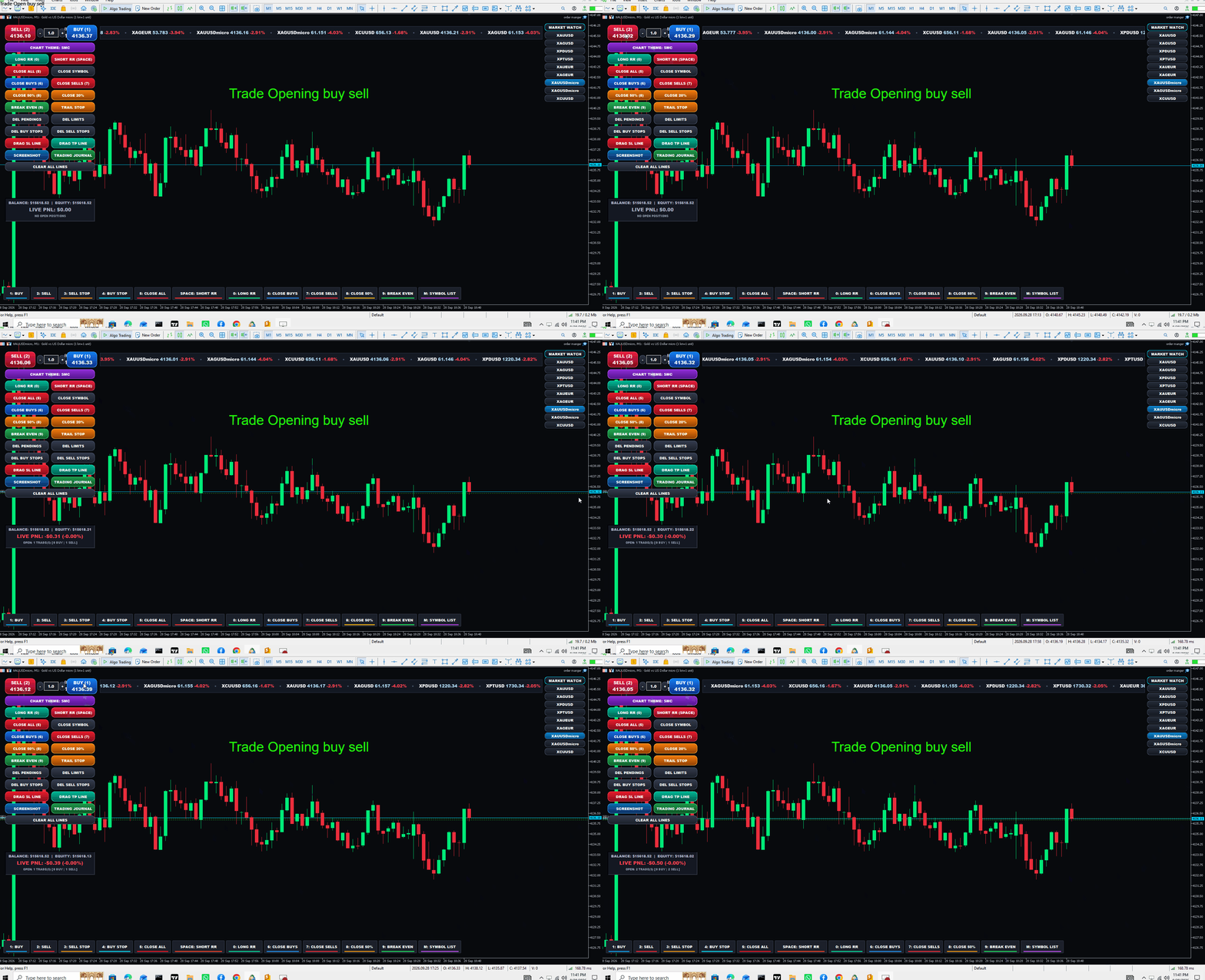
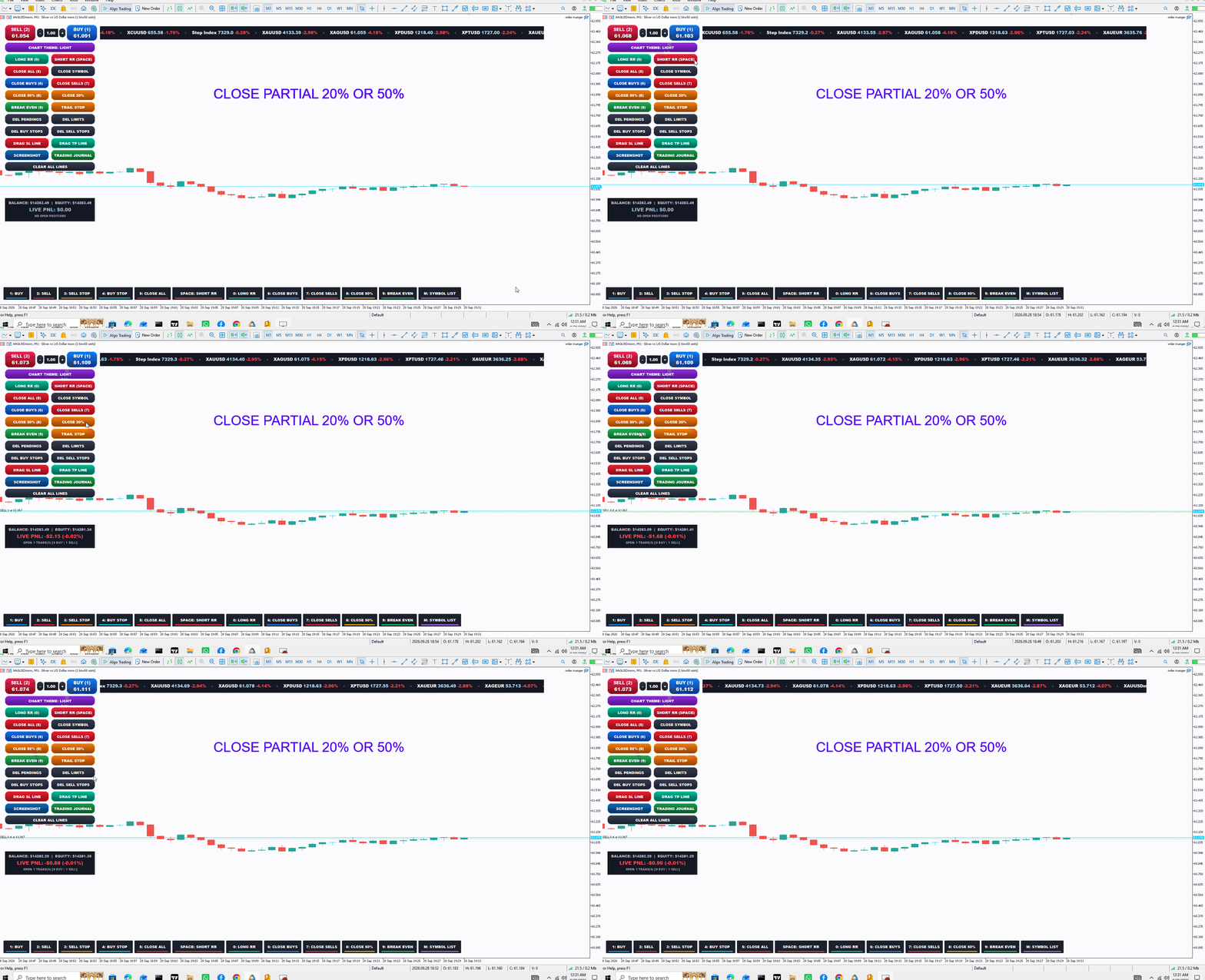
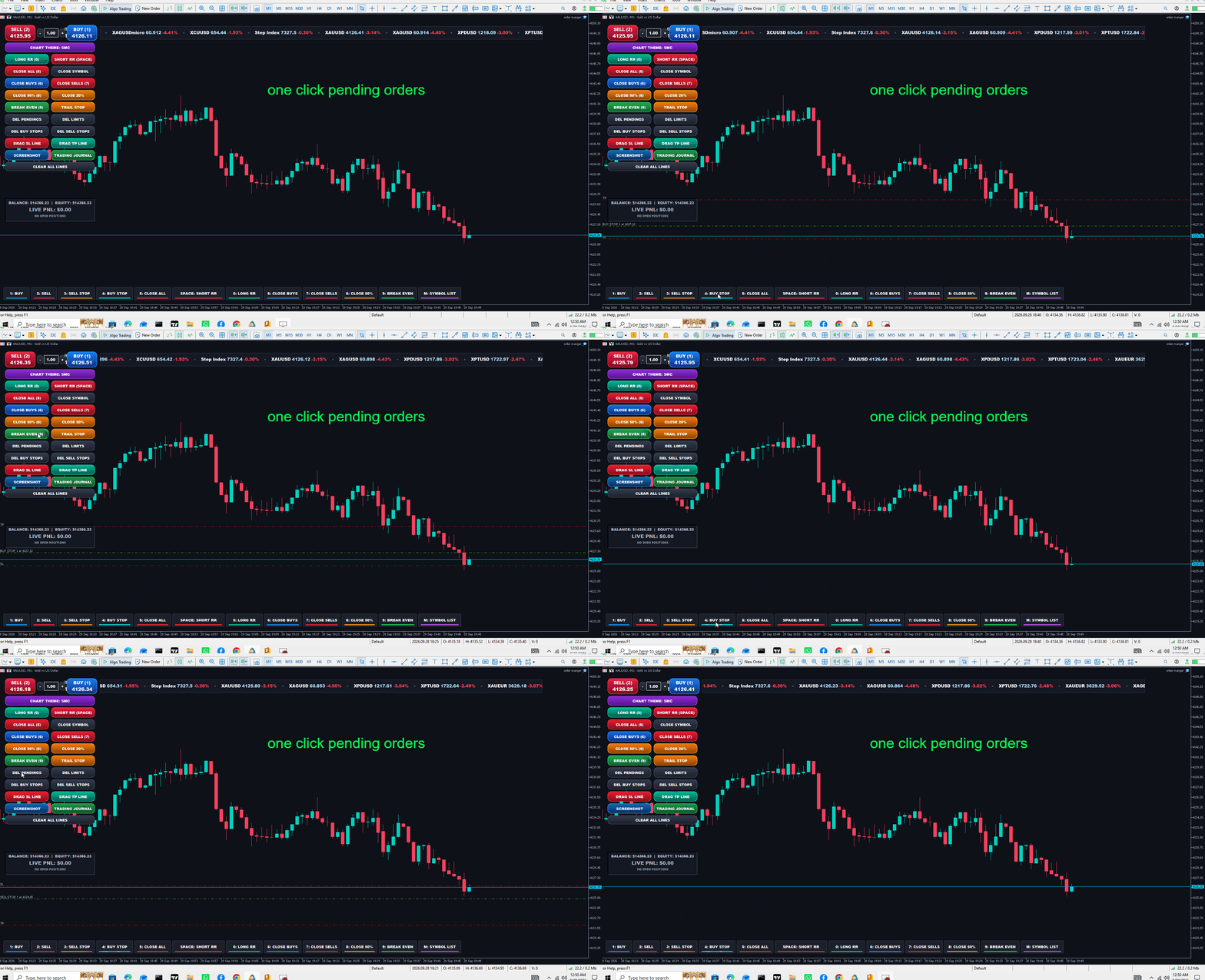
An advanced MetaTrader 5 (MT5) Trading Cockpit & Utility Expert Advisor that allows full manual chart trading via custom buttons and hotkeys, while routing all orders through MT5's algorithmic engine (OrderSend / CTrade). This ensures your broker and account history register every trade as an automated robot trade with a custom Magic Number and Order Comment.

Key Features & Capabilities

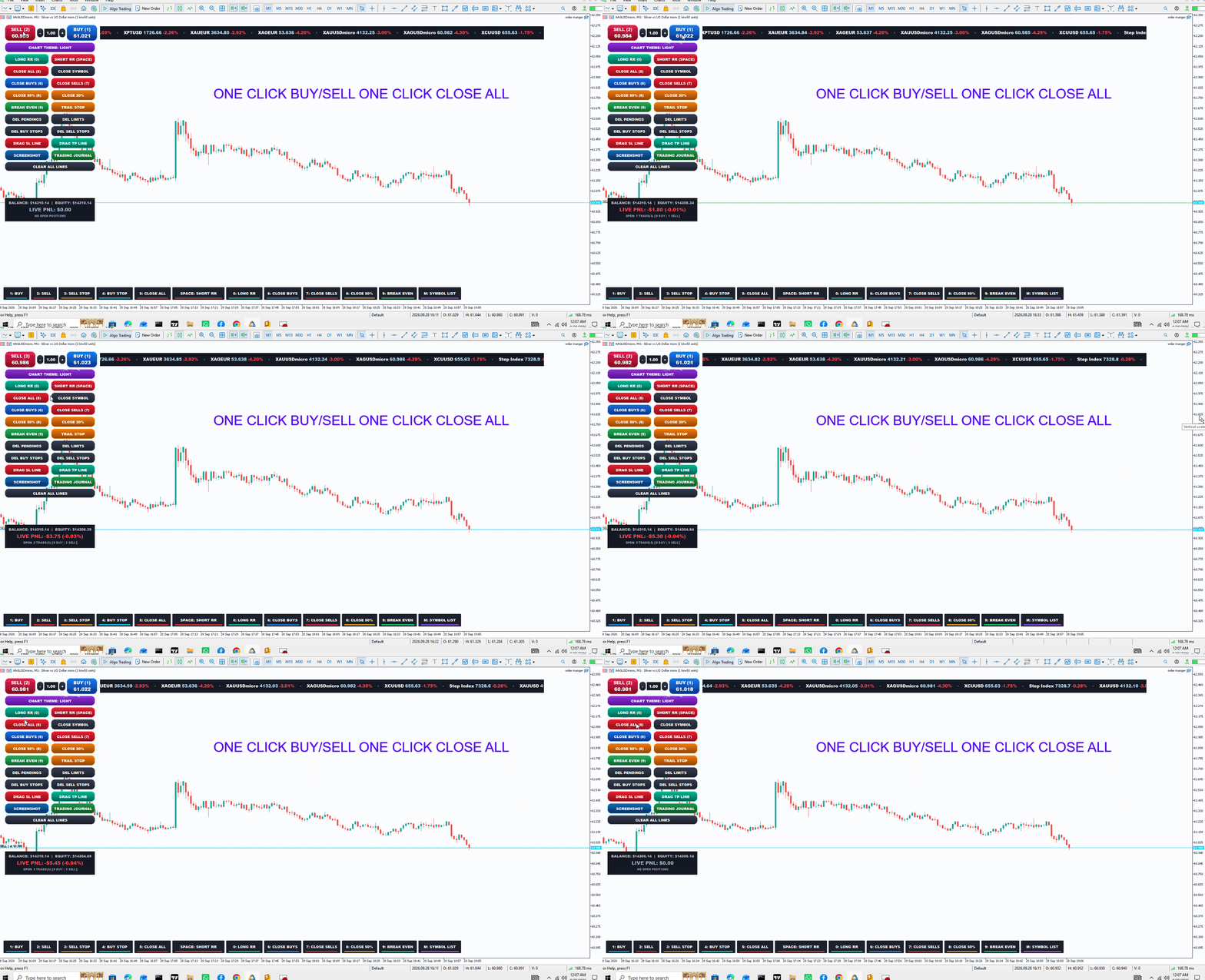
1. Execution & One-Click Trading

  • Instant Market Orders: Dual BUY and SELL squircle buttons displaying live, real-time Ask/Bid tick prices.

  • Inline Lot Selector: Dedicated lot size edit box with + and - steppers or direct keyboard typing.

  • Robot ID Tagging: Attaches your custom MagicNumber and Comment to every order, qualifying it as an EA execution.

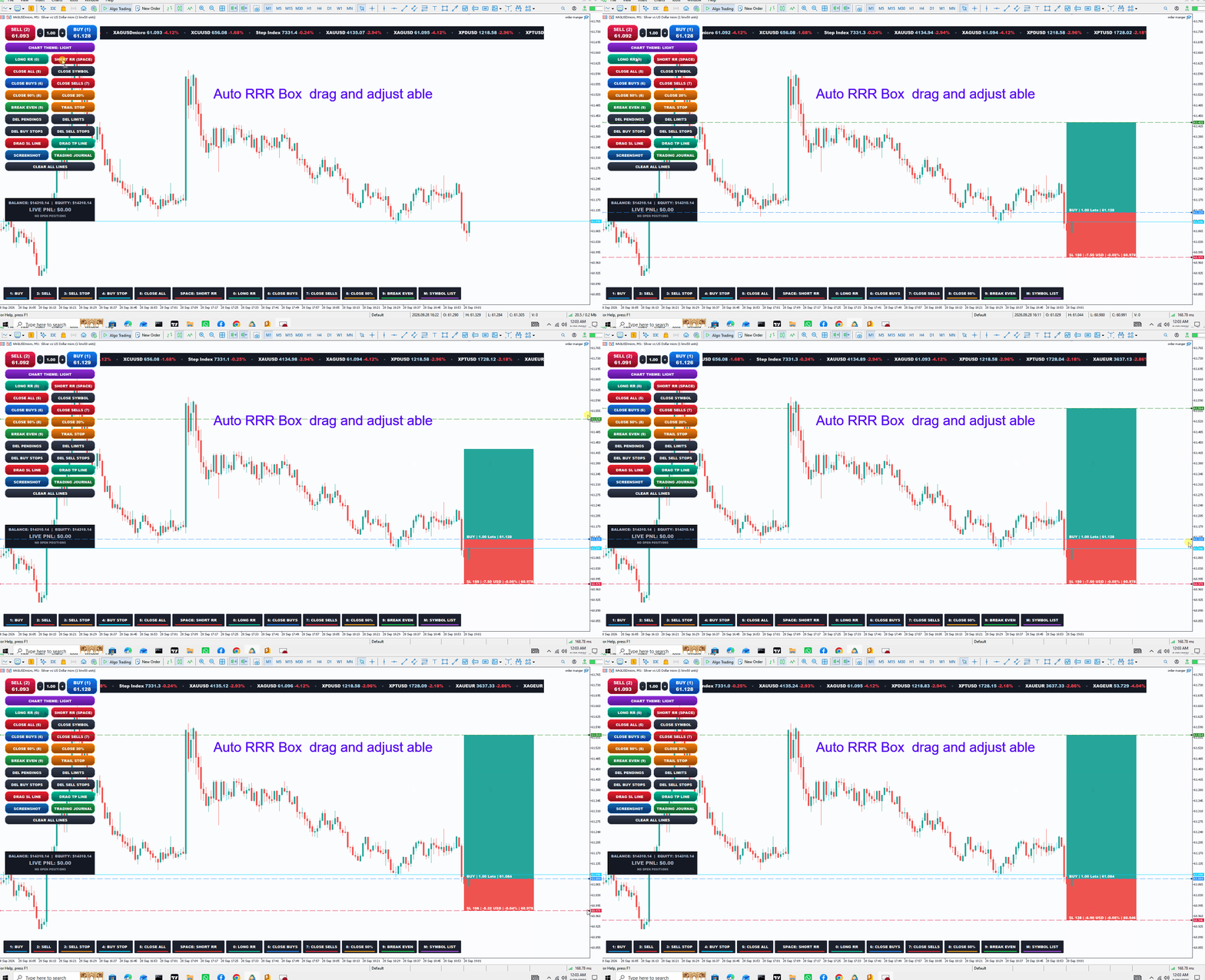
2. Auto 1:2 Risk/Reward Tool (TradingView-Style)

  • LONG RR & SHORT RR Boxes: Instantly generates an auto-calculated 1:2 R:R overlay with shaded profit (Bull) and loss (Bear) zones.

  • Live Telemetry Badges: Displays Points, Potential Profit/Loss in Account Currency ($), Account Risk Percentage (%), and Price levels.

  • Draggable & Auto-Linked: Drag the Entry, SL, or TP lines anywhere on the chart; pressing BUY or SELL automatically applies those exact SL/TP parameters to the live order.

3. Complete Trade & Position Management

  • Account & Symbol Closes: One-click options for CLOSE ALL (account-wide) and CLOSE SYMBOL (current chart only).

  • Directional Closes: Close BUY trades only or SELL trades only.

  • Partial Volume Closes: Instantly scale out with CLOSE 50% (half lot) or CLOSE 20%.

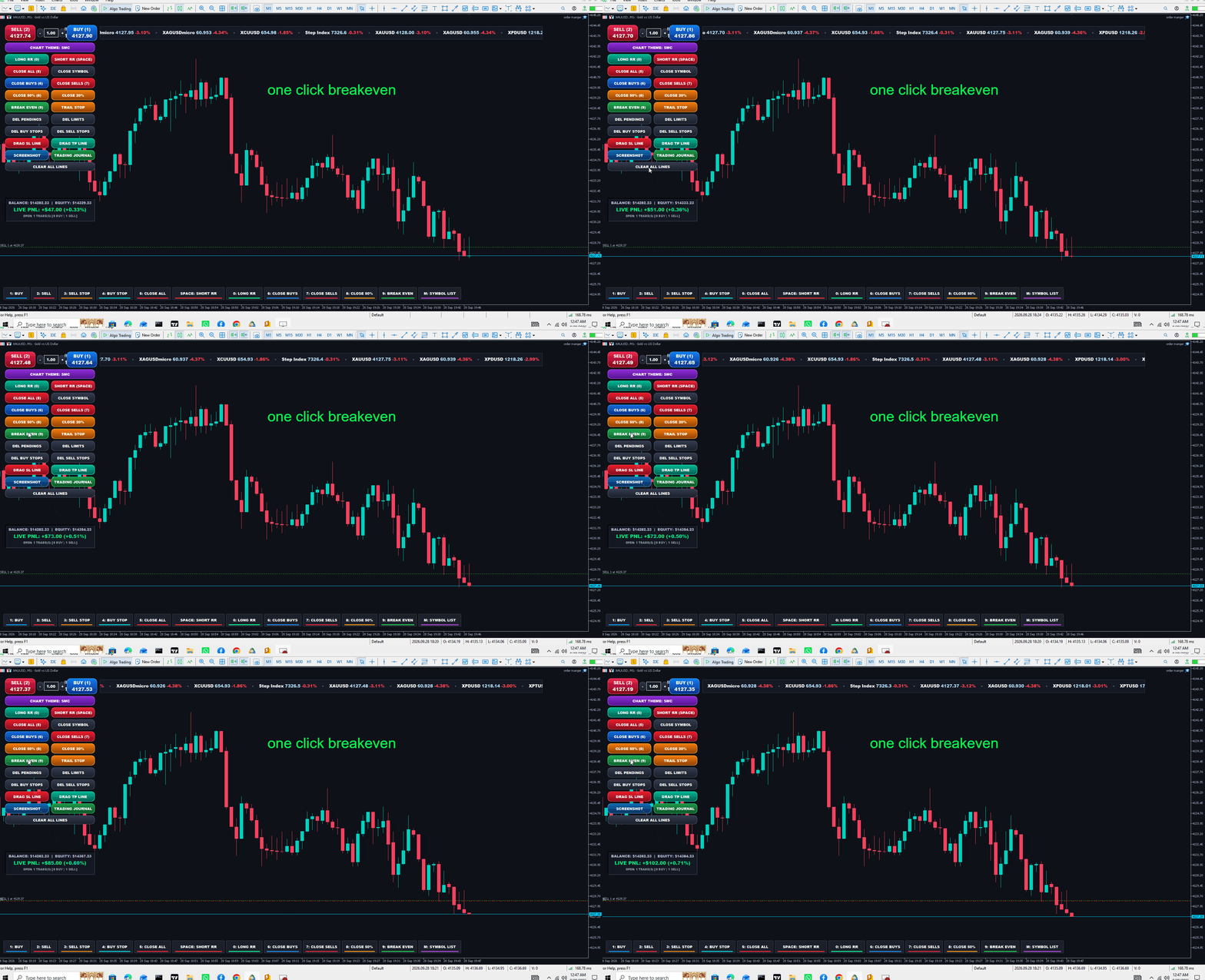
  • Break-Even (BE): Moves Stop Loss to the exact entry price plus a profit buffer while strictly respecting broker minimum STOPS_LEVEL.

  • Pending Orders Control: Mass delete All Pendings, Limit Orders (Buy/Sell Limits), Buy Stops, or Sell Stops.

4. Visual Draggable Levels & Trailing Stop

  • Interactive SL / TP Lines: Click DRAG SL or DRAG TP to spawn on-chart horizontal lines. Dragging and releasing them instantly modifies the open positions' SL/TP.

  • Live Trailing Stop: Spawns a trailing guide line and trails active trades tick-by-tick at your chosen point distance.

  • CLEAR ALL LINES: One-click cleanup to remove all lines, boxes, and trailing states.

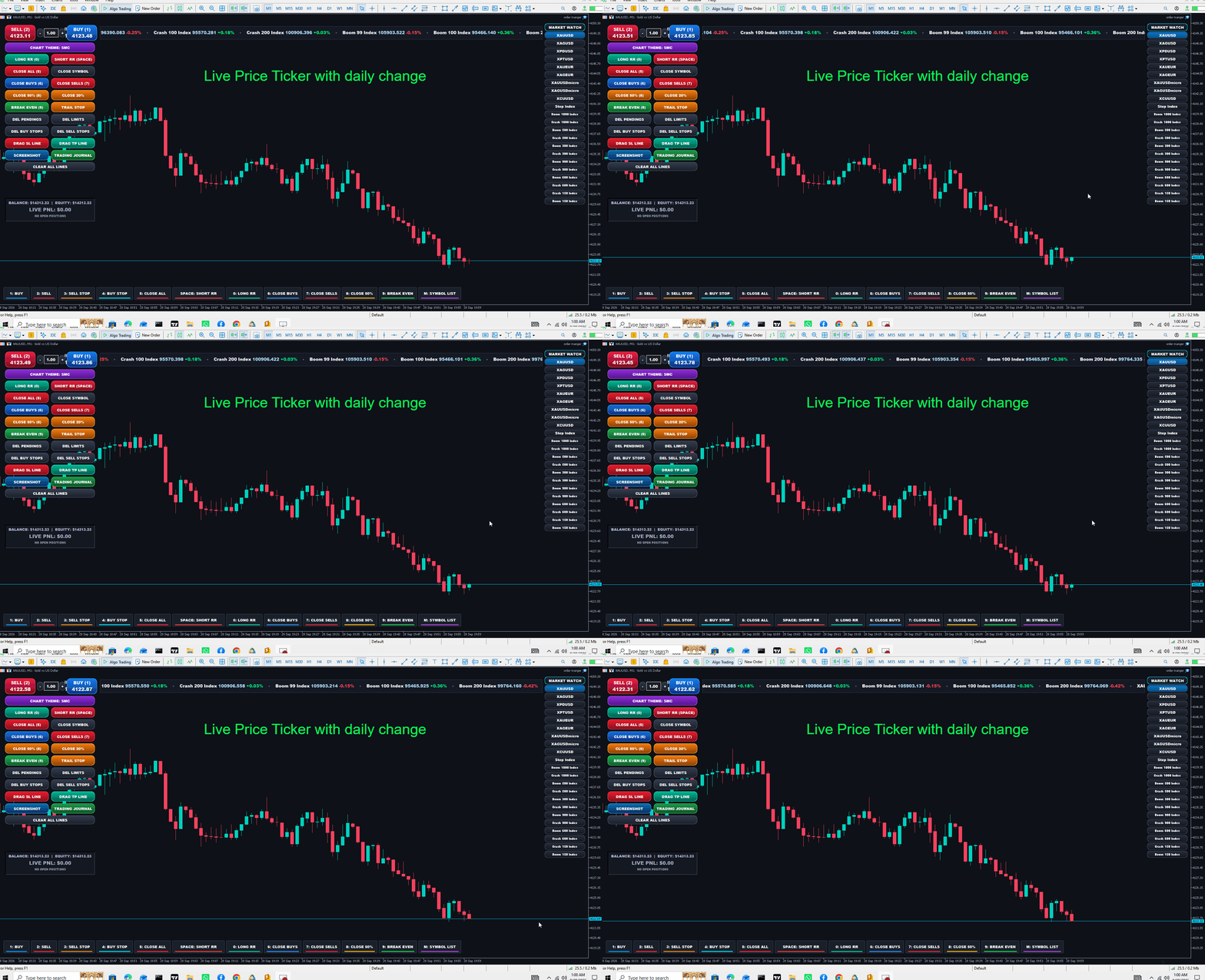
5. Top Market Marquee Ticker

  • Infinite Smooth Scrolling: Hardware-clipped, smooth top banner displaying all active Market Watch symbols.

  • Live Telemetry: Continuously loops Symbol Name, live Bid price, and 24-hour percentage change (+% in glowing green, -% in glowing red).

  • Auto-Resizing: Dynamically spans the available top space between panels.

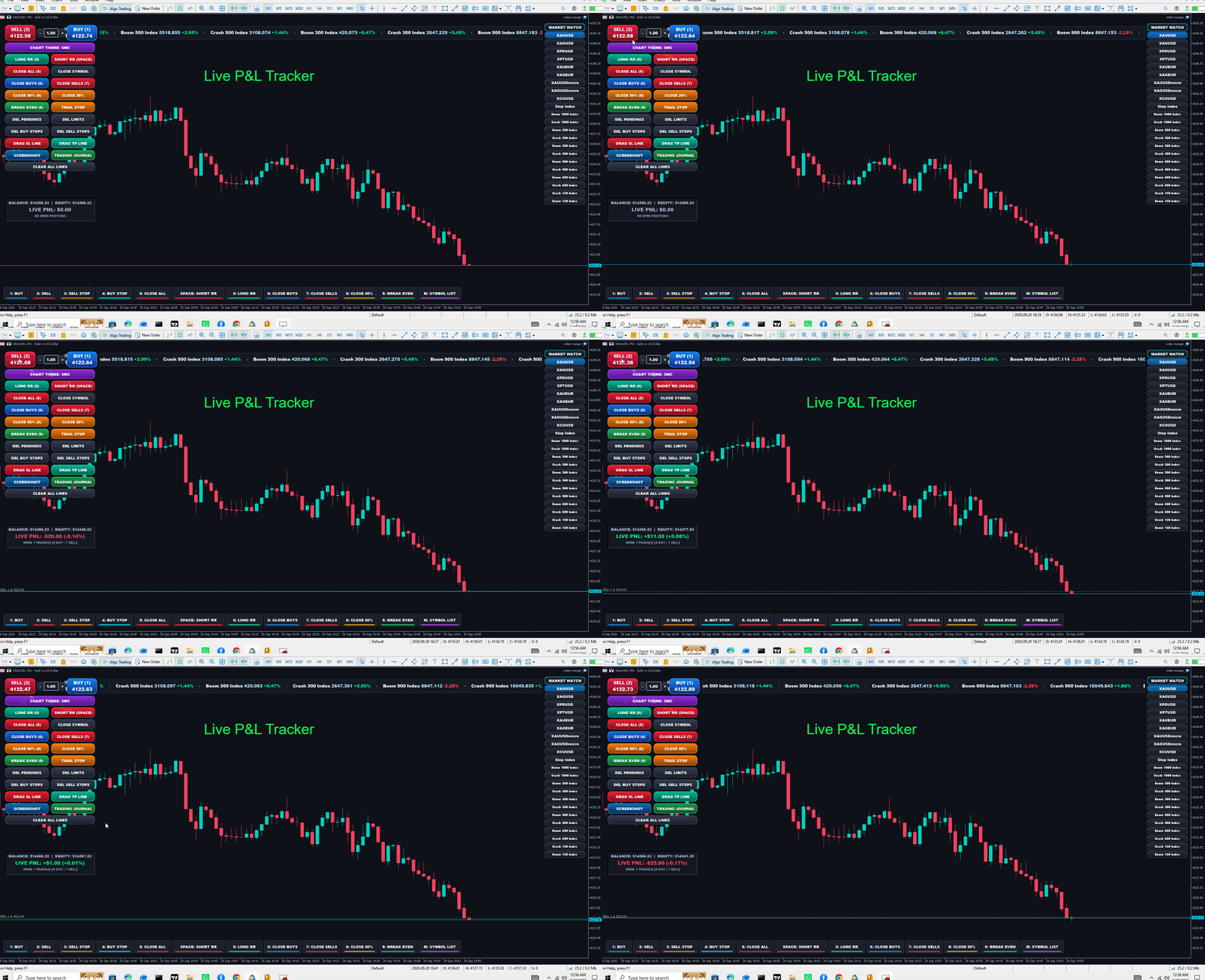
6. Live Account & Floating PnL Card

  • Located on the left panel below the trade controls.

  • Displays Live Balance, Equity, and real-time Floating PnL ($ and %).

  • Color-coded border that glows Green during profit and Red during drawdown, accompanied by an open trade counter.

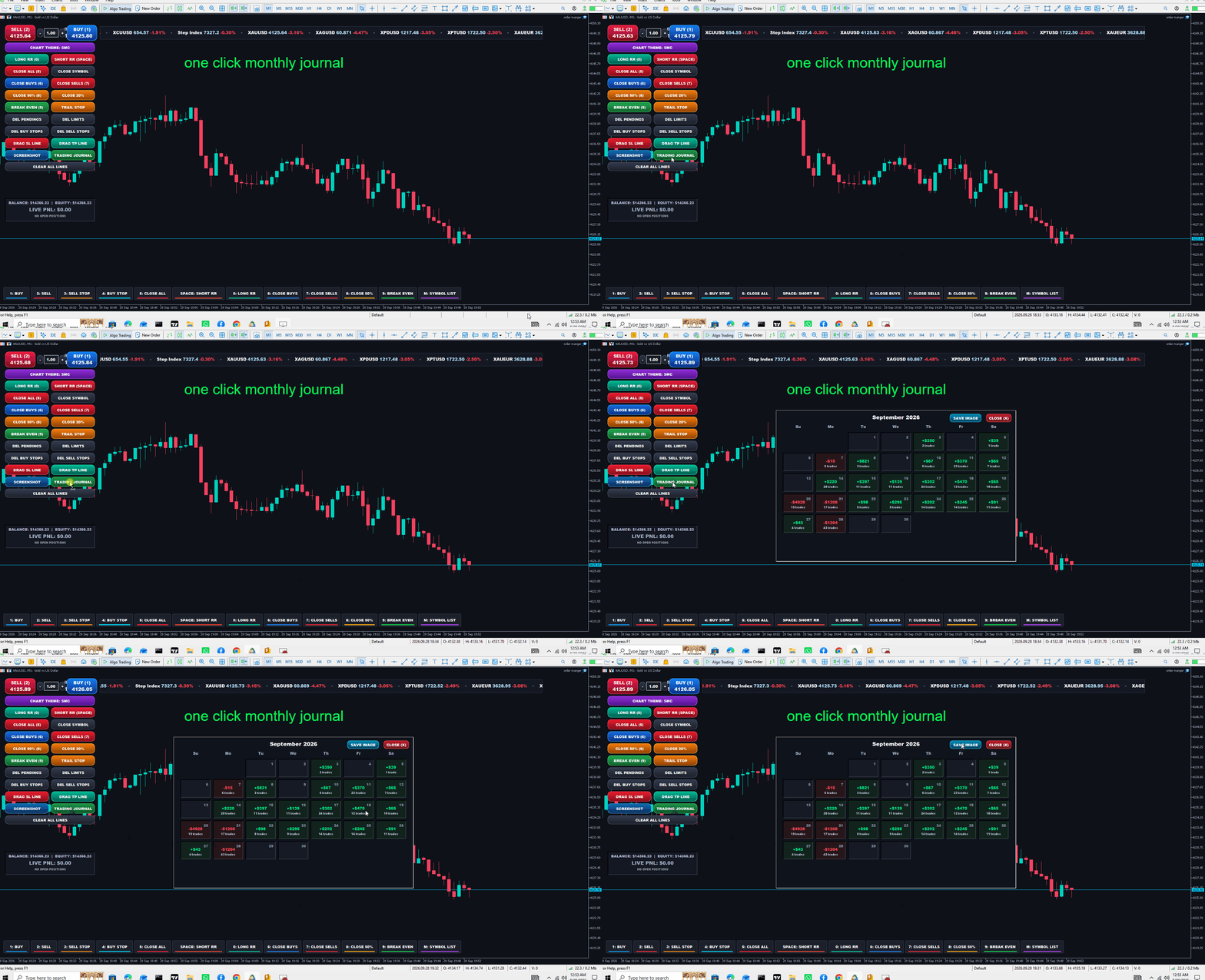
7. Full-Screen Monthly Trading Journal Calendar

  • Opens an interactive calendar overlay mapping the current month's performance directly from Account History Deals.

  • Green Cards: Display total daily profit (+$2,104) and trade count (2 trades).

  • Red Cards: Display total daily loss (-$500) and trade count (1 trade).

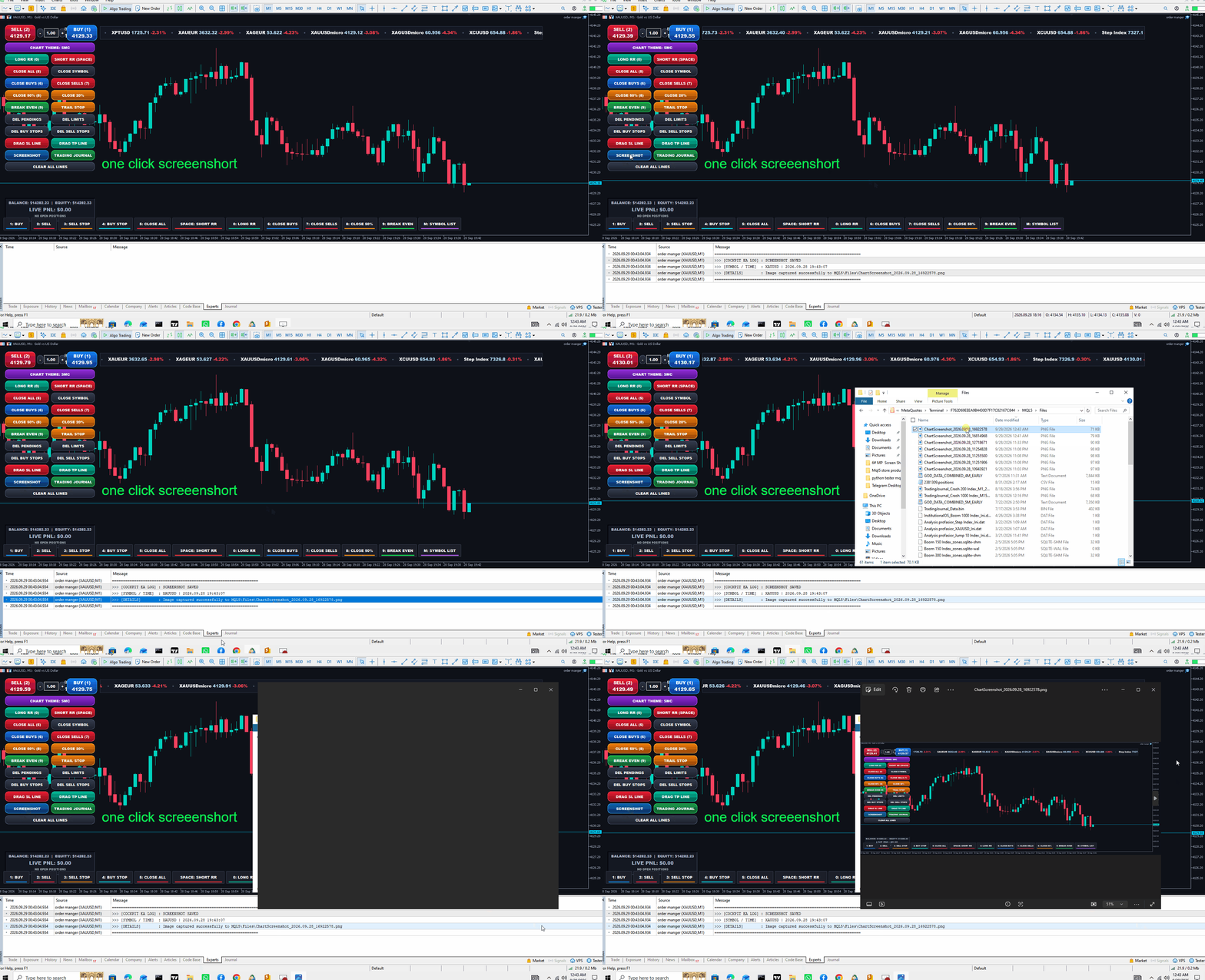
  • Built-in SAVE IMAGE (exports a PNG to MQL5\Files) and CLOSE (X) buttons.

  • 8. Keyboard Shortcuts & Stream Deck Bottom Console

    • Keys Supported:

      • 1 / B : Buy Market

      • 2 / S : Sell Market

      • 3 : Pending Sell Stop

      • 4 : Pending Buy Stop

      • 5 / C : Close All Trades

      • 6 : Close Buys Only

      • 7 : Close Sells Only

      • 8 : Close 50% Volume

      • 9 : Set Break-Even

      • 0 / L : Long 1:2 RR Box

      • SPACE : Short 1:2 RR Box (Represented by an extra-wide center Spacebar key)

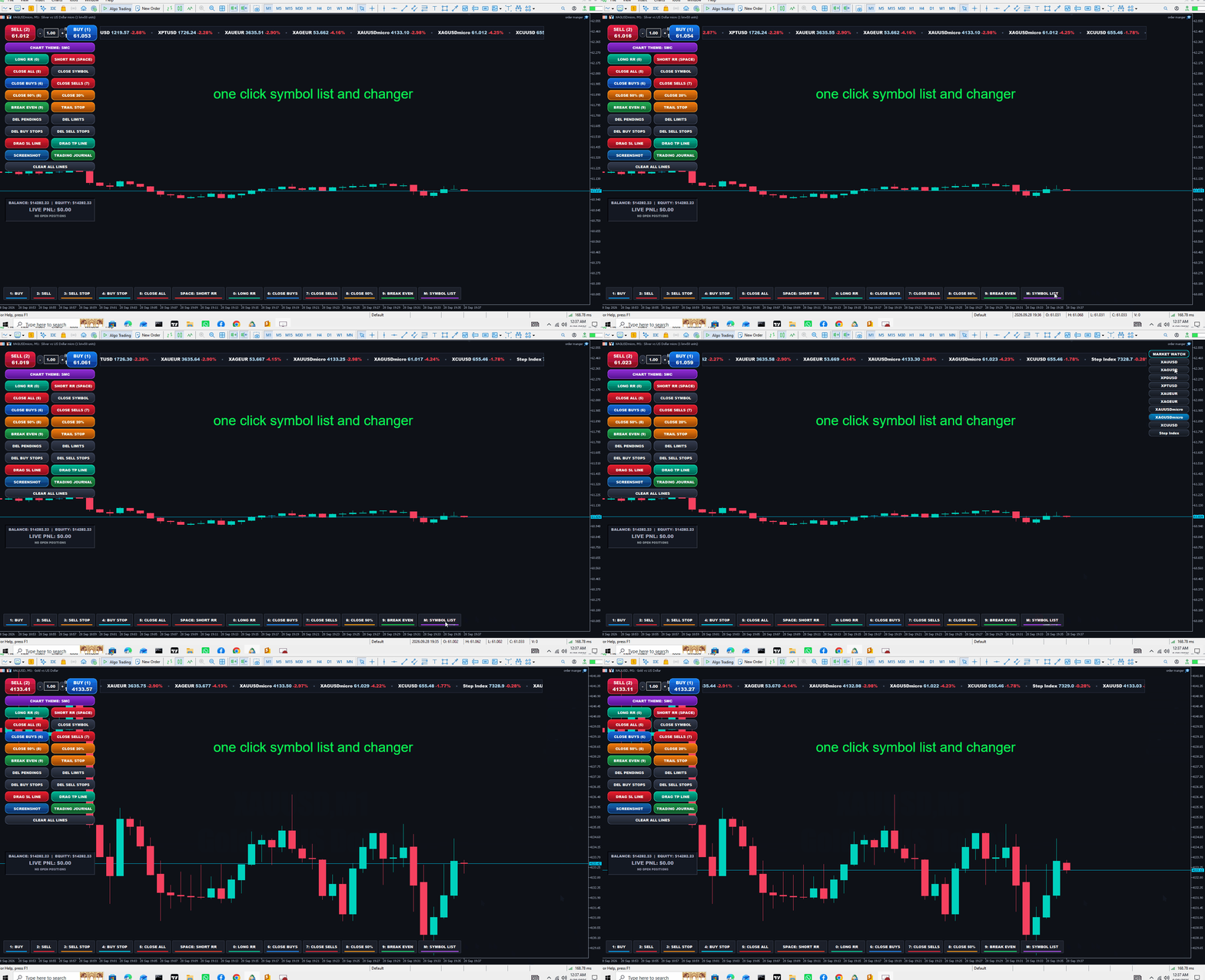
      • M : Toggle Right-Side Symbol List

    • Stream Deck Aesthetic: Matte dark keycaps with individual neon LED underline glow bars at the bottom of the chart. Clicking them with the mouse executes the exact same actions as pressing the keys.

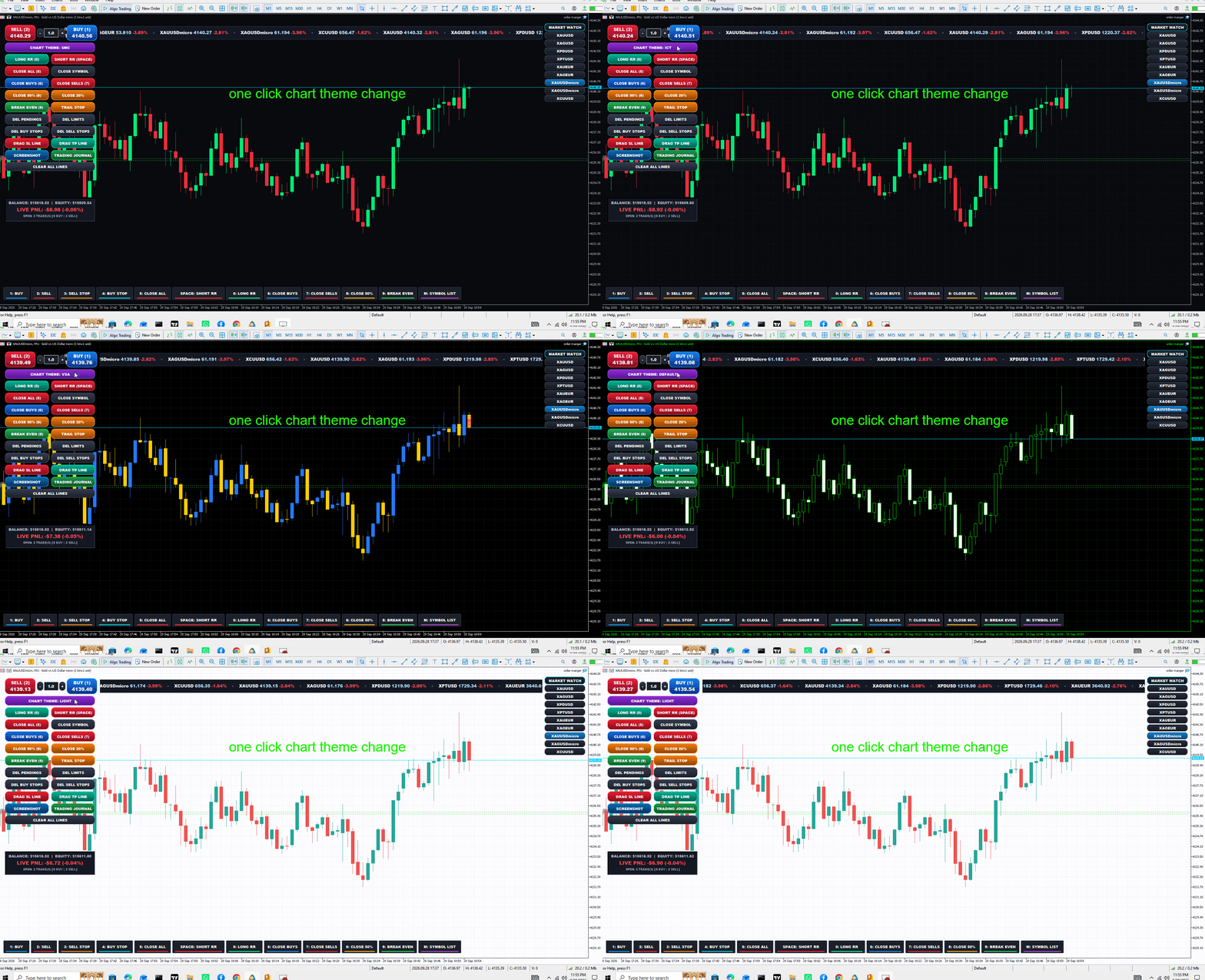
    9. Dynamic 1-Click Chart Themes

    • Dedicated button cycles through 7 complete visual templates:

      1. SMC (Smart Money Concepts — Dark Indigo, Teal/Coral)

      2. ICT (Inner Circle Trader — Deep Midnight, Mint/Crimson)

      3. VSA (Volume Spread Analysis — Black, Blue/Gold)

      4. PRICE ACTION (Minimalist White/Charcoal)

      5. MARKET DEFAULT (Classic Terminal Green/Black)

      6. DARK (TradingView Modern Dark)

      7. LIGHT (Crisp Institutional White)

    • Automatically adapts chart candles, grids, and Risk Box colors simultaneously.

    10. Right-Side Symbol Switcher

    • Hugs the right chart margin and lists up to 22 active Market Watch instruments.

    • Text is centered inside rounded squircle buttons; clicking any symbol immediately switches the active chart to that pair.

    11. Screenshot & Logging Utilities

    • SCREENSHOT Button: Instantly captures the chart and saves a high-res PNG file to MQL5\Files.

    • Verbose Expert Log: Every hotkey press, button click, order execution, and error code is logged with a multi-line diagnostic report in the MT5 Experts tab

Produtos recomendados
### Princípio de funcionamento **Manual Order Manager PRO BTC** é um Expert Advisor para MetaTrader 5 desenvolvido para **gerenciar automaticamente ordens abertas manualmente pelo trader**. O EA não escolhe quando comprar ou vender. O próprio usuário analisa o mercado, define a direção, o lote e abre a posição. Depois disso, o sistema passa a acompanhar a operação e executa as regras de proteção configuradas. O objetivo é ajudar o trader a manter uma gestão mais disciplinada, reduzindo a nec
Expert TP SL v04 - Professional Trading Assistant with AI Motivation System Advanced manual trading tool with automatic risk management, overtrading protection, and intelligent psychological support for disciplined trading. PRODUCT OVERVIEW Expert TP SL v04 is a comprehensive trading assistant designed for manual traders who want to maintain emotional discipline while automating risk calculations. This isn't just another order placement tool - it's a complete trading psychology system that pr
Equity Master Stop v2 MT5
Frank William Jr Colbert
Trading tool combining a sophisticated equity stop-loss, dynamic take-profit management (Breakeven & Trailing), and symbol-group-based closing logic. It is a complete risk management and trade supervision tool. Features: All features of `Equity Master Stop v1` (floating profit/loss limits, exit protection, skip hours). Take-Profit Override: Can force a TP on any order to lock in a `MAX_FLOATING_PROFIT`. Step Breakeven: Locks in increasing amounts of profit as a trade moves favorably (e.g., aft
Barak Mega EA
Jorge Jovanny Hernandez Maldonado
BARAK MEGA EA  is a fully automated trading Expert Advisor designed for traders who demand total control, strategic flexibility, and advanced risk management within a single system. This EA functions as a true strategy builder , allowing you to combine multiple technical indicators and custom rules to adapt to any market, asset, or timeframe. Unlike traditional robots with fixed logic, BARAK MEGA EA features a modular architecture where every component can be independently enabled, disabled, and
FREE
PanelBuySell
Juan Camilo Meza Novoa
PanelBuySell + GameHub Painel de compra/venda de um clique para o MetaTrader 5, combinado com um centro de minijogos oculto que se abre com uma única tecla. As ferramentas de trading permanecem sempre no gráfico, e pressionar a tecla G abre uma biblioteca com mais de 25 minijogos sem fechar a plataforma. Execução de ordens e gestão de posições BUY e SELL de um clique, com tamanho de lote e comentário configuráveis Close All, Break Even e Stop Loss por porcentagem do saldo, cada um com janela de
Trading Utility for Forex Currency Pairs Only not for Gold  Functions Auto Lot Calculation based on Risk Auto stoploss  Auto TakeProfit Breakeven Auto Close Half % Close in percentage with respect to the PIPs Pending Orders BuyLimit Sell Limit with distances BuyStop Sell Stop    with distances Trading Informations Risk in percentage For Multiple trades Combine Takeprofit and Combine Stoplosses
Black Volume By ZeeAM Khan a Multi-Engine EA Professional Multi-Timeframe Volume & Breakout Trading System Black Volume Multi-Engine EA is an advanced automated trading system that combines volume analysis, spread analysis, liquidity sweeps, support/resistance breakouts, and multi-basket trade management into one powerful Expert Advisor. The EA continuously scans higher-timeframe candles to identify significant market activity, automatically draws key support and resistance zones, and executes
FREE
The purpose   of this utility is to manage one or more subwindow in the same chart by opening and closing them through a button or the keyboard keys How it works: If you want to handle more than one subwindow you need to reinstall the indicator . In this case some setups has to be customized onlu in the last subwindow installed and others setups in the installed subwindow during the first time installation. They are denoted in the input rispectively as ' LW ' and ' IW '. First of all install
RiskRider Pro
Stephane Paul Heritier
RiskRider Pro is a professional manual trading panel for MetaTrader 5. It puts every essential risk management tool at your fingertips without interrupting your chart analysis. KEY FEATURES One-click BUY / SELL Instant market execution with automatic stop-loss calculation. No confirmation dialogs, no delays. Risk:Reward Take Profit Define your R:R ratio once (default 2.0). The take-profit level is calculated automatically on every trade based on your stop-loss distance. Dynamic Lot Sizing W
Margin Call Shield – Defend Your Margin on Your Terms Margin Call Shield is a tool for MetaTrader 5 traders who want to decide for themselves which open positions are closed during margin call situations before the platform does so automatically based on its internal rules. By default, the broker or platform decides which positions to close, often using undisclosed algorithms. Margin Call Shield lets you set this order according to your own strategy. Why Was Margin Call Shield Created? In a mar
NHK Local Time Scale NHK Local Time Scale displays your PC/local time directly on the MT5 chart , alongside the broker's native chart time. The trader can easily compare both time zones for any candle. Benefits for Traders: Quickly convert Broker Time ↔ Local/PC Time . Helps accurately set News Stop/News Filter times. Makes London, New York, Asian and other trading sessions easier to identify in your local time. Helps verify that EA session and news time settings are correct. Reduces mistakes ca
FREE
Aqui está a tradução para o português (Brasil), utilizando a terminologia padrão do mercado financeiro e de Prop Firms para garantir que o texto soe natural para um trader brasileiro. Prop Calculator Assistant Pare de quebrar contas de Prop Firm por erros de cálculo. Deixe que o Assistente cuide do risco para você. O Prop Calculator Assistant é o painel de gestão de ordens definitivo, projetado especificamente para traders que buscam aprovação em desafios (FTMO, etc.) ou que já gerenciam capital
Pulse Trade Dashboard is an interactive trade management panel for MetaTrader 5, built for traders who want full control of their account without leaving the chart. Attach it to any chart and get a real-time overview of your balance, equity, open positions, and floating P&L — all updating live. Place market orders instantly with the one-click BUY and SELL buttons, adjusting your lot size, stop loss, and take profit directly on the dashboard without opening a single settings menu. What's included
FREE
Equity Target Stop is an automated utility designed to protect your profits and enforce strict capital management. It continuously monitors your account equity in real time and automatically closes all open positions as soon as your predefined profit target is reached. Key Features Automated Profit Securing: Automatically triggers a "Close All" command when equity reaches your specified target. Universal Account Protection: Works seamlessly across multiple open positions, pending orders, and dif
FREE
GridZone Alpha: The Ultimate Semi-Automated Grid & Zone Manager GridZone Alpha is an advanced, interactive trading panel designed for the modern manual trader. Stop staring at the charts waiting for the perfect entry, and stop relying on rigid, fully automated bots that cannot read market context. With GridZone Alpha, you provide the human analysis by identifying your support, resistance, or supply/demand zones. Once confirmed, the Limit Order Engine takes over, instantly deploying a precision,
Support & Setup | MetaTrader Trade Journal Support & Resources Everything you need to get your MetaTrader Trade Journal running perfectly. https://mt-trade-journal.com/free/download/install.mp4     Full Install Video here Official Support Page Documentation and free resources Visit Page Direct Contact Message Jack Ryland on Telegram Message Now Step 1 — Configure MetaTrader WebRequests To allow the EA to sync your data, you must authorize these URLs. In your MT4/MT5 terminal, go to Tools → Opt
The Expert Advisor is used to create Renko chart, realtime updates, easy for technical analysis. Backtest your strategy with all indicators with Renko chart in MetaTrader 5. Parameters Box Size : input the number of box size. Show Wicks : if true , draw a candle with high/low. History Start: input the date to creat first candle. Maximum Bars: limit number of bars on renko chart How to use Attach the Expert Advisor to a chart (timeframe M1), for which you want to create a renko. Input box size a
Quick Close Panel
Boaz Nyagaka Moses
5 (1)
'Quick Close Panel' is an easy to use interface for managing orders. It has a button for closing all winning trades on the current chart, a button for closing all losing trades and another button for closing   all running trades (Losing and Winning)   on the current chart. It is very responsive and quick to execute operations due to the effective time complexity of the algorithm used in the  program.  Vist this link to download demo:  https://www.mql5.com/en/market/product/62901?source=Site+Mark
Prop Firm Smart Margin Calculator Know your lot size. Know your margin. Trade with precision. The Prop Firm Smart Margin Calculator is a practical MT5 trading tool designed to help you determine your position size and understand the estimated margin required before placing a trade . Simply enter your desired risk amount and stop-loss distance, and the calculator determines the appropriate trading volume based on your symbol's specifications. It also calculates the estimated margin required for
Apex Signal Stream – Trade Panel Version 2.43 | For MetaTrader 5 Overview Apex Trade Panel is a fully on-chart trading panel with two modes: Manual — precise control over every order, from lot sizing and SL/TP logic to trailing methods and batch close filters; and SignalStream auto-trade — the panel polls the Apex Signal Stream server over HTTPS and executes incoming signals behind 10 safety gates, reporting every outcome back. One panel, two ways to trade — and nothing enters your account that
Fast execution utility for manual traders. Drag-and-drop visual trading, split take-profits, and single-ticket management system. Speed, Precision, and Risk Control. KAB Trade Manager is built for traders who need to execute fast but keep risk tight. It integrates all essential tools into floating, collapsible windows. Core Functions: Instant Order Execution:   Market and Pending orders with automatic Lot sizing based on SL distance. Focus Ticket Manager:   A dedicated window to monitor and mana
DragPan
Lal Chand Sinha
DragPan — TradingView-Style Chart Navigation Take full control of your MetaTrader 5 chart with intuitive, mouse-driven navigation inspired by TradingView. DragPan replaces MetaTrader's default scroll-and-scale behavior with smooth, natural gestures — click and drag to pan, drag the axes to stretch, and scroll to zoom. Key Features: One-Click Toggle — A clean on/off button in the top-right corner lets you switch DragPan mode on or off instantly, without disabling the indicator. Drag-to-Pan — Clic
StrategyDeck — a cockpit for manual, discretionary trading. StrategyDeck draws and measures. It does not decide, and it never sends an order on its own. What it draws on the chart Opening range boxes for the Asia, Europe and US sessions, a linear regression channel, previous-day high and low with the day's open, and key candlestick patterns. Each drawing layer can be turned off, set to drawing only, or set to signal — and the signal position exists only where a measured scope is available.
FX Trade Manager Pro MT5
Abdul Jalil Mridah Jalil
Promotional offer for today 30 USD. Final price will be 100 USD.   FX Trade Manager Pro for MT5 – Fast One-Click Trading & Advanced Risk Management FX Trade Manager Pro is an all-in-one trade panel and risk management utility built for MetaTrader 5 (MT5) . Designed specifically for scalpers, day traders, and prop firm traders, it helps eliminate manual calculation errors, ensures disciplined risk management, and allows lightning-fast execution directly from your chart !  Key Features Overview:
Exp5 Duplicator
Vladislav Andruschenko
4.78 (9)
Duplicator para MetaTrader 5 — sistema profissional de duplicação de posições dentro de um único terminal Um Expert Advisor confiável para traders que desejam duplicar automaticamente posições já abertas no MetaTrader 5, aumentar o volume total, aplicar regras personalizadas de lote e gerenciar as duplicatas com lógica precisa. É uma ferramenta prática para trading manual, sistemas automatizados e uma gestão mais flexível de posições já existentes dentro do mesmo terminal. O Duplicator para MT5
Tick Volume Chart - uma ferramenta exclusiva para criar gráficos baseados no volume de ticks no MetaTrader 5 . Com o Tick Volume Chart , você pode construir gráficos onde cada candle é formado não por tempo, mas por uma quantidade definida de ticks. Isso oferece uma precisão ideal na análise da atividade do mercado, indisponível nos gráficos de tempo convencionais. Você pode utilizar quaisquer indicadores e robôs de negociação compatíveis com símbolos personalizados. Trabalhar com os gráficos ge
Easy Trade Executor é uma ferramenta para cálculo rápido do tamanho da posição, execução de operações e gerenciamento de trades no MT5. Posicione os níveis de Open Price, Stop Loss e Take Profit diretamente no gráfico, obtenha cálculos automáticos do tamanho da posição e abra operações com risco controlado em apenas alguns cliques. Por que escolher o Easy Trade Executor? O Easy Trade Executor foi desenvolvido para traders que desejam mais do que apenas calcular riscos — eles querem gerenciar op
Prop Firm Simulator
Abdeljalil El Kedmiri
Domine os desafios de prop firms antes de arriscar dinheiro real!   Nosso simulador avançado recria ambientes autênticos de trading de prop firms, ajudando você a praticar, elaborar estratégias e passar nos desafios com confiança. Usando nosso Simulador, você pode simular qualquer desafio de prop firm usando contas demo ou reais, suporta estratégias de trading manuais e automatizadas via EAs, criar desafios personalizados para períodos personalizados e desafiar a si mesmo para desenvolver a disc
PropArmor — Escudo de Proteção de Capital (Equity) Proteja sua conta de trading contra rebaixamentos (drawdowns) catastróficos com um único clique. O PropArmor monitora o capital da sua conta em tempo real e fecha automaticamente TODAS as posições e ordens pendentes quando o capital cai para o nível de proteção especificado. Projetado para traders de Mesas Proprietárias (Prop Firms), desafios de contas financiadas e qualquer pessoa que queira uma rede de segurança confiável em sua conta.
FREE
ForceCode Risk Assist Panel ForceCode Risk Assist Panel is a professional trading utility designed for strict risk management and Prop Firm compliance. It distinguishes itself with a unique Live Equity Preview that visually projects your future balance, and an innovative Rectangular Entry Zone system for weighted position sizing. This tool transforms risk management from complex manual calculations into an instant visual workflow, allowing traders to focus entirely on price action while the sof
Os compradores deste produto também adquirem
Trade Assistant MT5
Evgeniy Kravchenko
4.43 (216)
Ajuda a calcular o risco por comércio, a fácil instalação de uma nova encomenda, gestão de encomendas com funções de fecho parcial, trailing stop de 7 tipos e outras funções úteis. Materiais e instruções adicionais Instruções de instalação   -   Instruções para a aplicação   -   Versão de teste da aplicação para uma conta de demonstração Função de linha Mostra no gráfico a linha de Abertura, Stop Loss, Take Profit. Com esta função é fácil definir uma nova ordem e ver as suas características ad
Bem-vindo ao Trade Manager EA—uma ferramenta de gestão de risco criada para tornar o trading mais intuitivo, preciso e eficiente. Não é apenas uma ferramenta para executar ordens, mas uma solução abrangente para planejamento de operações, gerenciamento de posições e controle de risco. Seja você um iniciante, trader avançado ou scalper que precisa de execução rápida, o Trade Manager EA adapta-se às suas necessidades, oferecendo flexibilidade em todos os mercados, desde forex e índices até commodi
================================================================================ POC BREAKOUT - V20.72. Full Professional Grade Toolkit ================================================================================ POC Breakout is a full MetaTrader 5 trading dashboard for discretionary traders who want breakout signals, Point of Control (POC) context, volume profiles, order flow, market structure, news, alerts, and advanced trade planning in one professional workspace. Attached directly to you
O Telegram to MT5 Multi-Channel Copier copia automaticamente os sinais de trading dos seus canais de Telegram diretamente para o MetaTrader 5. Sem bots, sem extensões de navegador, sem copiar à mão. O sinal chega ao Telegram e o EA abre a operação no seu terminal em poucos segundos. E antes de copiar um canal, o backtester integrado mostra o que esse canal teria feito na sua conta. O produto inclui dois componentes: um aplicativo de Windows que escuta os seus canais de Telegram, e este Expert Ad
TradePanel MT5
Alfiya Fazylova
4.88 (170)
Trade Panel é um assistente de negociação multifuncional. O aplicativo contém mais de 50 funções de negociação para trading manual e permite automatizar a maioria das tarefas de negociação. Instruções para o aplicativo: https://www.mql5.com/pt/blogs/post/762435 Versão de teste do aplicativo para conta demo: https://www.mql5.com/pt/blogs/post/762547 Como instalar o aplicativo: https://www.mql5.com/pt/blogs/post/762548 Como testar o aplicativo no modo visual: https://www.mql5.com/pt/blogs/post/770
Copie sinais do Telegram com suas próprias regras de negociação Telegram to MT5 Signal Trader copia automaticamente sinais de negociação em texto de canais e grupos públicos e privados do Telegram para o MetaTrader 5. Gerencie vários provedores e contas MT5 em um único aplicativo para desktop, com configurações individuais de risco e de negociação para cada provedor . Você não precisa de um bot do Telegram nem configurar uma API para copiar sinais. Basta entrar com sua própria conta do Telegram
Farmed Hedge Yield Farming | All Markets (Manual - Hybrid - Semi/Automated EA) VERIFIED TRADING RESULTS - Farmed Hedge Yield Axi Copy:  https://www.mql5.com/en/signals/2356376 - Farmed Hedge Yield Exn Copy:   https://www.mql5.com/en/signals/2356404 - Farmed Hedge Yield V Copy:  https://www.mql5.com/en/signals/2357156 IMPORTANT NOTICE: FarmedHedge is a MANUAL-FOCUSED TRADING UTILITY ,not a fully automated EA. Results shown on this Signal include manual trades and overall strategic management.
Exp COPYLOT CLIENT for MT5
Vladislav Andruschenko
3.97 (35)
Copiador profissional de operações para MetaTrader 5 Um copiador de operações rápido, profissional e confiável para MetaTrader . COPYLOT permite copiar operações de Forex entre terminais MT4 e MT5 com suporte para contas Hedge e Netting . A versão MT5 do COPYLOT oferece suporte a: - MT5 Hedge → MT5 Hedge - MT5 Hedge → MT5 Netting - MT5 Netting → MT5 Hedge - MT5 Netting → MT5 Netting - MT4 → MT5 Hedge - MT4 → MT5 Netting Versão MT4 Descrição completa + DEMO + PDF Como comprar Como instalar Como
Power Candles Strategy Scanner - Localizador de configurações multissímbolo com auto-otimização O Power Candles Strategy Scanner utiliza o mesmo motor de auto-otimização que alimenta o indicador Power Candles — em todos os símbolos da sua lista de observação, lado a lado. Um painel indica-lhe quais os símbolos que são estatisticamente negociáveis neste momento, qual a estratégia vencedora para cada um, o par ideal de Stop Loss / Take Profit, e avisa-o assim que um novo sinal é emitido. Esta ferr
Signal TradingView to MT5 Pro Automator Execução profissional instantânea entre TradingView e MetaTrader 5 Automatize a sua estratégia de trading com a ponte de comunicação mais robusta entre os alertas do TradingView e a execução real no MT5. Concebido para traders que exigem velocidade, flexibilidade e uma gestão de risco impecável, este Expert Advisor transforma qualquer mensagem de alerta numa ordem de mercado ou de limite precisa. PONTOS FORTES E VANTAGENS Motor de Parsing Universal (Propri
MT5 to Telegram Signal Provider é uma utilidade fácil de usar e totalmente personalizável que permite o envio de sinais especificados para o chat, canal ou grupo do Telegram, tornando sua conta um fornecedor de sinais . Ao contrário da maioria dos produtos concorrentes, ele não usa importações de DLL. [ Demonstração ] [ Manual ] [ Versão MT4 ] [ Versão Discord ] [ Canal do Telegram ]  New: [ Telegram To MT5 ] Configuração Um guia do usuário passo a passo está disponível. Não é necessário conhec
Premium Trade Manager - O Painel de Operações com um Coach Integrado Premium Trade Manager coloca um coach de trading dentro do seu gráfico, com um motor de execução completo por baixo. Configure a operação da forma que sempre faz e deixe o Max, seu coach de trading com IA, ler exatamente esse setup em relação à sua conta ao vivo e dar um veredicto direto antes de confirmar: se o stop é disciplinado, se o risco faz sentido, se há um evento de alto impacto a minutos de distância, se você está pró
HINN MagicEntry Extra
ALGOFLOW OÜ
4.74 (19)
HINN MAGIC ENTRY – the ultimate tool for entry and position management! SIMPLE. FASTEST. INTUITIVE. MAX AUTOMATED. Place orders by selecting a level directly on the chart! full description   ::  demo-version  :: 60-sec-video-description Key features: - Market, limit, and pending orders - Automatic lot size calculation - Automatic spread and commission accounting - Unlimited partitial take-profits  - Breakeven and trailing stop-loss and take-profit  functions - Invalidation leves - Intuitive, a
EA Overfitter
Stephen J Martret
5 (1)
That backtest looks great. But will it still be making money tomorrow, next week, next month? EA Overfitter re-runs your EA on 100 price histories it has never seen. One score tells you if the edge is real. A backtest tells you what an EA did on one price history — the one that happened to occur. What you cannot tell from it is how much of that result was the strategy and how much was the particular path. EA Overfitter answers that. It builds up to 100 synthetic price histories your EA has n
Footprint Chart Pro — Professional OrderFlow EA for MetaTrader 5 Version 6.34 | Professional tool for real traders | Institutional-Grade Visualization DEMO USERS - PLEASE SELECT EVERY TICK / REAL TICK WHEN TESTING AND YOU HAVE DOWNLOADED HISTORICAL DATA. IF YOU SEE A WAITING SCREEN AND IT IS NOT DOWNLOADING, IT MEANS YOU HAVE LOW HISTORICAL DATA. TRY 1 MIN AND 5 MIN FIRST ON 1 DAY DATA. ONE DAY DATA SHOULD BE THE NEWEST AND MOST CURRENT DATE. PLEASE WAIT UNTIL THE MARKET HAS ROLLED OVER PERIOD.
EA Slipstream
Stephen J Martret
5 (1)
Your backtest filled every order at the price it asked for. Your account does not. EA Slipstream measures what execution costs your EA, using your own fills, slippages and spreads to show you the true performance of your EA. A backtest prices every trade at the level the EA named. In live trading a pending order fills at whatever price is available when it triggers, a stop closes wherever the market is when it is hit, and the spread at that moment is whatever the account was quoting. The differ
Trade Manager DaneTrades
Levi Dane Benjamin
4.23 (30)
Trade Manager para ajudá-lo a entrar e sair rapidamente de negociações enquanto calcula automaticamente seu risco. Incluindo recursos para ajudar a evitar negociações excessivas, negociações de vingança e negociações emocionais. As negociações podem ser gerenciadas automaticamente e as métricas de desempenho da conta podem ser visualizadas em um gráfico. Esses recursos tornam este painel ideal para todos os traders manuais e ajudam a aprimorar a plataforma MetaTrader 5. Suporte multilíngue. Vers
Dynamic Fibonacci Grid
Tsvetan Tsvetanov
5 (1)
Apresentando a versão mais recente do Dynamic Fibonacci Grid Dashboard para MT5. Agora repleto de muitos novos recursos, este novo painel transforma sua experiência de trading e permite que você veja o mercado e a ação do preço de uma perspectiva completamente diferente. Descubra novas possibilidades com a análise simultânea de múltiplos timeframes e múltiplos símbolos. Interface amigável para trading manual e gerenciamento de posições, além de uma capacidade ampliada para aplicar estratégias a
Trade Indicator Assistant   is a powerful MT5 utility designed to turn indicators into automated trading systems. Its main feature is the ability to automatically detect an indicator’s   BUY and SELL signal buffers , without requiring you to know the buffer numbers, search through indicator settings, or modify the indicator source code. Bonus Indicator:   After purchasing Trade Indicator Assistant, contact me to receive   Trade Signal Pro   completely free as a bonus indicator. [Download Demo V
Welcome to ENTRY IN THE ZONE AND SMC MULTI TIMEFRAME Entry In The Zone and SMC Multi Timeframe is a real-time market analysis tool based on Smart Money Concepts (SMC), designed to analyze market structure, price direction, and key trading zones. It supports both Single-Timeframe Analysis and Multi-Timeframe Analysis, providing a clearer view of the overall market structure across multiple timeframes, with real-time BUY / SELL signals that do not repaint. It is designed to help filter trading opp
Grid Manual MT5
Alfiya Fazylova
4.73 (22)
"Grid Manual" é um painel comercial para trabalhar com uma grade de ordens. O utilitário é universal, possui configurações flexíveis e uma interface intuitiva. Ele trabalha com uma grade de ordens não apenas na direção da média das perdas, mas também na direção do aumento dos lucros. O trader não precisa criar e manter uma grade de ordens, tudo será feito pelo ""Grid Manual". Basta abrir um orden e o "Grid manual" criará automaticamente uma grade de ordens para ele e trabalhará com ele até que s
DrawDown Limiter
Haidar Lionel Haj Ali
5 (22)
DrawDown Limiter v5.0 — Controlador Avançado de Proteção de Conta O DrawDown Limiter v5.0 é um controlador de proteção de conta executado no lado do cliente, desenvolvido para monitorar sua conta de trading e reagir automaticamente quando os limites configurados de risco, lucro, notícias, horário, rollover ou número de posições forem atingidos. Ele pode monitorar operações manuais, estratégias automatizadas, vários Expert Advisors, ordens pendentes e posições abertas a partir de um único gráfico
Trade Dashboard MT5
Fatemeh Ameri
4.94 (134)
Trade Dashboard simplifies how you open, manage, and control your trades, with built-in lot size calculation. It allows you to execute trades, manage risk, and control positions directly on the chart, with tools such as partial close, breakeven, and trailing stop. Designed to reduce manual work and help you stay focused on your trading decisions. A demo version is available for testing. Detailed explanations of features are provided within the MQL5 platform. Installation instructions are include
The product will copy all telegram signal to MT5 ( which you are member) , also it can work as remote copier.  Easy to set up, copy order instant, can work with almost signal formats, image signal,  s upport to translate other language to English Work with all type of channel or group, even channel have "Restrict Saving Content", work with  multi channel, multi MT5 Work as remote copier: with signal have ticket number, it will copy exactly via ticket number. Support to backtest signal. How to s
Anchor Trade Manager
Kalinskie Gilliam
5 (9)
Your EAs cannot see each other, but Anchor can. Anchor gives you one place to coordinate your EAs, manage risk, and decide when trading is allowed. It works alongside the trading bots you already use without any changes to them. The Problem One EA opens a trade. Then another starts trading. The next thing you know, you wake up to multiple grids built across your account. Each EA may be doing exactly what it was designed to do, but together they can place far more risk on your account than you in
FUTURES ORDERFLOW FOOTPRINT CHART Professional OrderFlow EA for MetaTrader 5 Version 1.01| Professional tool for real traders | Institutional-Grade Visualization STRATEGY TESTER USERS - PLEASE SELECT EVERY REAL TICK WHEN TESTING AND YOU HAVE DOWNLOADED HISTORICAL DATA. IF YOU SEE A WAITING SCREEN AND IT IS NOT DOWNLOADING, IT MEANS YOU HAVE LOW HISTORICAL DATA. TRY 1 MIN AND 5 MIN FIRST ON 1 DAY DATA. ONE DAY DATA SHOULD BE THE NEWEST AND MOST CURRENT DATE. PLEASE WAIT UNTIL THE MARKET HAS ROL
The Expert Advisor will help you forward all alert from  MetaTrader 5 to Telegram channel/ group.  All alert must save to folder <Data folder>MQL5\Files\Alerts\ , text file with format *.txt and screenshot with format *.gif or *.png. Parameters: - Telegram Bot Token: - create bot on Telegram and get token. - Telegram Chat ID:  - input your Telegram user ID,  group / channel ID - Forward Alert: - default true, to forward alert. - Send message as caption of Screenshot: - default false, set true t
The product is used to trade base on any Alert signal in MT5 Easy to setup, simple format with custom keyword All option to management orders as trailing stop, breakeen, partial close, time filter, news filter ... Option to auto open grid orders How to setup and guide: Let read all details about setup and download indicator for auto get   Alert Signal   here Do not buy if you even can not install demo EA to your VPS ( some VPS block download EA from mql5 market) We always bring customers high q
Timeless Charts
Samuel Manoel De Souza
5 (8)
Timeless Charts é um utilitário de trading tudo-em-um para traders profissionais. Ele combina tipos de gráficos personalizados, como Gráficos por Segundos e Renko , com análise avançada de fluxo de ordens utilizando Footprints , Clusters , Perfis de Volume , estudos VWAP e ferramentas de análise ancorada para uma visão mais profunda do mercado. O gerenciamento de ordens e posições é realizado diretamente no gráfico por meio de um painel integrado de gerenciamento de operações , enquanto o Market
Prop Guardian Risk Manager MT5 – Drawdown, Risk & Hedge Protection for Prop Firm and Managed Accounts Prop Guardian Risk Manager is a professional risk-control utility for MetaTrader 5, designed for prop firm traders, money managers and anyone who wants strict account-level risk protection. It does not generate trading signals, strategy entries or trading decisions. Instead, it runs in the background, monitors your account risk and can automatically block new exposure, close managed positions or
Filtro:
Sem comentários
Responder ao comentário