Trading Assistant MT 1

Core Purpose

An advanced MetaTrader 4 (MT4) Trading Cockpit & Utility Expert Advisor that allows full manual chart trading via custom buttons and hotkeys, while routing all orders through MT5's algorithmic engine (OrderSend / CTrade). This ensures your broker and account history register every trade as an automated robot trade with a custom Magic Number and Order Comment.

Key Features & Capabilities

1. Execution & One-Click Trading

  • Instant Market Orders: Dual BUY and SELL squircle buttons displaying live, real-time Ask/Bid tick prices.

  • Inline Lot Selector: Dedicated lot size edit box with + and - steppers or direct keyboard typing.

  • Robot ID Tagging: Attaches your custom MagicNumber and Comment to every order, qualifying it as an EA execution.

2. Auto 1:2 Risk/Reward Tool (TradingView-Style)

  • LONG RR & SHORT RR Boxes: Instantly generates an auto-calculated 1:2 R:R overlay with shaded profit (Bull) and loss (Bear) zones.

  • Live Telemetry Badges: Displays Points, Potential Profit/Loss in Account Currency ($), Account Risk Percentage (%), and Price levels.

  • Draggable & Auto-Linked: Drag the Entry, SL, or TP lines anywhere on the chart; pressing BUY or SELL automatically applies those exact SL/TP parameters to the live order.

3. Complete Trade & Position Management

  • Account & Symbol Closes: One-click options for CLOSE ALL (account-wide) and CLOSE SYMBOL (current chart only).

  • Directional Closes: Close BUY trades only or SELL trades only.

  • Partial Volume Closes: Instantly scale out with CLOSE 50% (half lot) or CLOSE 20%.

  • Break-Even (BE): Moves Stop Loss to the exact entry price plus a profit buffer while strictly respecting broker minimum STOPS_LEVEL.

  • Pending Orders Control: Mass delete All Pendings, Limit Orders (Buy/Sell Limits), Buy Stops, or Sell Stops.

4. Visual Draggable Levels & Trailing Stop

  • Interactive SL / TP Lines: Click DRAG SL or DRAG TP to spawn on-chart horizontal lines. Dragging and releasing them instantly modifies the open positions' SL/TP.

  • Live Trailing Stop: Spawns a trailing guide line and trails active trades tick-by-tick at your chosen point distance.

  • CLEAR ALL LINES: One-click cleanup to remove all lines, boxes, and trailing states.

5. Top Market Marquee Ticker

  • Infinite Smooth Scrolling: Hardware-clipped, smooth top banner displaying all active Market Watch symbols.

  • Live Telemetry: Continuously loops Symbol Name, live Bid price, and 24-hour percentage change (+% in glowing green, -% in glowing red).

  • Auto-Resizing: Dynamically spans the available top space between panels.

6. Live Account & Floating PnL Card

  • Located on the left panel below the trade controls.

  • Displays Live Balance, Equity, and real-time Floating PnL ($ and %).

  • Color-coded border that glows Green during profit and Red during drawdown, accompanied by an open trade counter.

7. Full-Screen Monthly Trading Journal Calendar

  • Opens an interactive calendar overlay mapping the current month's performance directly from Account History Deals.

  • Green Cards: Display total daily profit (+$2,104) and trade count (2 trades).

  • Red Cards: Display total daily loss (-$500) and trade count (1 trade).

  • Built-in SAVE IMAGE (exports a PNG to MQL5\Files) and CLOSE (X) buttons.

  • 8. Keyboard Shortcuts & Stream Deck Bottom Console

    • Keys Supported:

      • 1 / B : Buy Market

      • 2 / S : Sell Market

      • 3 : Pending Sell Stop

      • 4 : Pending Buy Stop

      • 5 / C : Close All Trades

      • 6 : Close Buys Only

      • 7 : Close Sells Only

      • 8 : Close 50% Volume

      • 9 : Set Break-Even

      • 0 / L : Long 1:2 RR Box

      • SPACE : Short 1:2 RR Box (Represented by an extra-wide center Spacebar key)

      • M : Toggle Right-Side Symbol List

    • Stream Deck Aesthetic: Matte dark keycaps with individual neon LED underline glow bars at the bottom of the chart. Clicking them with the mouse executes the exact same actions as pressing the keys.

    9. Dynamic 1-Click Chart Themes

    • Dedicated button cycles through 7 complete visual templates:

      1. SMC (Smart Money Concepts — Dark Indigo, Teal/Coral)

      2. ICT (Inner Circle Trader — Deep Midnight, Mint/Crimson)

      3. VSA (Volume Spread Analysis — Black, Blue/Gold)

      4. PRICE ACTION (Minimalist White/Charcoal)

      5. MARKET DEFAULT (Classic Terminal Green/Black)

      6. DARK (TradingView Modern Dark)

      7. LIGHT (Crisp Institutional White)

    • Automatically adapts chart candles, grids, and Risk Box colors simultaneously.

    10. Right-Side Symbol Switcher

    • Hugs the right chart margin and lists up to 22 active Market Watch instruments.

    • Text is centered inside rounded squircle buttons; clicking any symbol immediately switches the active chart to that pair.

    11. Screenshot & Logging Utilities

    • SCREENSHOT Button: Instantly captures the chart and saves a high-res PNG file to MQL5\Files.

    • Verbose Expert Log: Every hotkey press, button click, order execution, and error code is logged with a multi-line diagnostic report in the MT5 Experts tab


Önerilen ürünler
Salva System Free
Pavel Komarovsky
4 (3)
Salva EA Free is an advanced and fully automated system, which passes backtesting since 2005. The basis of this strategy is the price chart itself, trading is performed based on the price movement range. Dynamic algorithms and filters are used for taking profit or closing trades. Built-in reworked system for filtering market entries and exits: Checking the trading direction using integrated trend indicators. Checking the channel range for the minimum and maximum values. Checking for the price ex
FREE
Product Name: Risk Commander: Trade Assistant & Strategy Simulator Risk Commander is more than just a trade panel—it is a complete Manual Trading Ecosystem . It serves two powerful purposes: Live Assistant: Helps you execute trades with speed, precision, and perfect risk management in real-time markets. Training Simulator: Fully compatible with the Strategy Tester (Visual Mode) , allowing you to practice manual trading on historical data without risking a cent. NEW! Built-in Simulator Mode Stop
Trading tool combining a sophisticated equity stop-loss, dynamic take-profit management (Breakeven & Trailing), and symbol-group-based closing logic. It is a complete risk management and trade supervision tool. Features: All features of `Equity Master Stop v1` (floating profit/loss limits, exit protection, skip hours). Take-Profit Override: Can force a TP on any order to lock in a `MAX_FLOATING_PROFIT`. Step Breakeven: Locks in increasing amounts of profit as a trade moves favorably (e.g., aft
Bu aracı ticaret yönetimi için kullanabiliriz. Manuel ticaretin yanı sıra ticaret robotlarını da kullanan kişiler, seçilen bir çifti daha iyi bir fiyatla kapatmak için daha iyi bir çözümdür. Girdide belirli bir sembol çiftinin tüm ticaretini belirli bir fiyattan kapatacaktır. Hafiftir. Çok düşük hafıza kullanıyor. Hızlı yürütme. Fiyat sinyali almada gecikme yok. Bunu kullanarak tüccar rahatça uyuyabilir.
Expert Advisor to Automatically Trade Moving Averages price breakouts & retests .  ​ Complete trading solution with automated Entry , Take Profit , partial profit , Stoploss and also auto breakeven where SL is moved to Entry once tp1 / first target is reached , Moving averages are used to identify trends and confirm reversals ,  They are effective in all time frames . from 1 min scalping to 4hr or Daily charts swings ,  ​ With MA Trade Panel EA we can automatically buy / sell when price breaks
Terminator Close All Utility Slogan: "Unmatched Velocity—Clean Your Portfolio in a Flash. " Product Description: A high-performance utility engineered for professional traders who demand absolute speed in trade management. Developed to eliminate the friction of closing orders one-by-one, this tool is your ultimate weapon in volatile markets where every millisecond counts. Key Features: Instant Execution: Operates the very moment it hits the chart—no confirmations, no delays. Mass Liquidation: Ex
Margin Call Shield – Defend Your Margin on Your Terms Margin Call Shield   is a tool for MetaTrader 4 traders who want to decide for themselves which open positions are closed during margin call situations before the platform does so automatically based on its internal rules. By default, the broker or platform decides which positions to close, often using undisclosed algorithms. Margin Call Shield lets you set this order according to your own strategy. Why Was Margin Call Shield Created? In a  
The purpose   of this utility is to manage one or more subwindow in the same chart by opening and closing them through a button or the keyboard keys How it works: If you want to handle more than one subwindow you need to reinstall the indicator . In this case some setups has to be customized onlu in the last subwindow installed and others setups in the installed subwindow during the first time installation. They are denoted in the input rispectively as ' LW ' and ' IW '. First of all install
The Pipsurfer Trade Manager Is A high level software that will automatically analysis each trading asset and calculate its optimal take profit and stop loss levels for Each trade it is managing. Complete with an easy to use management panel that allows you to manage your risk parameters for each individual trade that you place on each pair. You will have access to trailing stops, break even, partial take profits and account risk percentage features as well
RBR Risk Guard watches the limits of a prop-firm challenge on your account equity, the way prop firms count them, and closes everything before a limit is reached. It does not trade for you: no strategy, no signals, no automatic entries. What it guards Daily loss limit: a percentage of the account size or of the balance at the daily reset, counted from the balance or from the higher of balance and equity at the reset. Reset hour in broker server time, UTC, Central European time or New York time,
Like you when I first started trading, It was overwhelming...learning about indicators, about lotsize, leverage and many more things. Its been almost 3 years. I am more knowledgeable in trading. My trading continues to improve as I work on my strategy, technical analysis, trading psychology and trade management. One thing I am not worried about though is being able to close my trades quicky if a trade goes against me or if the trade has reached my take profit level with the help of my Close Tra
Short Description: Prop Firm Protector EZ MT4 is an EA designed to protect your funded account by managing risk and ensuring compliance with the Prop Firm's trading rules. This EA automatically monitors equity levels, closes trades when profit targets or drawdown limits are reached, and provides a visual display of key account metrics. The EA features a Super Easy setup, is simple to use, and works with all different Prop Firm service providers. Overview: Prop Firm Protector EZ MT4 is an Draw
This utility is designed to help you with your Manual Trading. It allows different ways of closing trades. It can display total number of BUY and SELL orders individually and also their individual profits. It can enter trades without stopl loss and take profits. However upon selecting UseStopLossTakeProfit from the settings it can use best possible stop loss and take profits based on the market conditions. Upon selecting the CloseOppositeTrades  from the settings it can close opposite trades. Fo
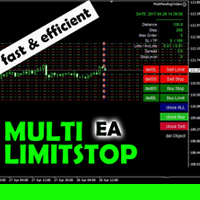
This EA is designed for automatic placing of pending orders (sell limit, buy limit, sell stop, buy stop) including Stop Loss & Take Profit levels (editable) with only one button click. This EA can make order multi pending level / pending orders grid. So, with this EA placing pending orders will be faster, more accurate and more efficient. Main Purposes Automation Pending orders grid style trading. Automation of the process of placing the Pending Orders: fast accurate efficient Automation of cl
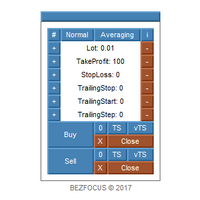
Trading panel for scalping. Features Two languages (English, Russian). Adjustable panel scale. Two color schemes. Virtual trailing stop. Trailing stop. Averaging. Parameters Lot - lot size. Lot Button Step - step for changing the lot size using buttons. Take Profit - take profit. Take Profit Button Step - step for changing the take profit using buttons. Stop Loss - stop loss. Stop Loss Button Step - step for changing the stop loss using buttons. Trailing Stop - trailing stop. Trailing Stop But
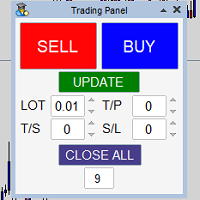
Panel that allows easy opening of orders with the option to establish Lots, Take Profit, Stop Loss and Trailing Stop at the time of opening the order, has the UPDATE button which updates parameters such as Take Profit, Stop Loss and Trailing Stop in the open orders with the panel, it only manages the orders in the chart in which it is used, to use in several charts it must be installed in each one of them.
This tool simplifies routine trading tasks (like opening market orders, setting up pending orders, closing of all orders and orders by parameter), helps to control losses by use of break even stop and trailing stop, and adds a little bit of cyber punk edge to your trading Control Elements Left side of the panel includes: order counter (shows the number of orders); connection status sign (notifies if connection is lost); trade permission sign (notifies if autotrading permisiion is turned off); m
Grid Trading EA is a semi-automated one-click trading EA for both Normal Trading and Grid/Martingale Trading . Normal Trading Simply click Buy or Sell directly from the chart. The EA will automatically manage trades by: Setting Stop Loss and Take Profit Managing Trailing Stop Grid / Martingale Trading When Grid Trading mode is enabled, the EA will automatically open additional grid orders at specified distances while increasing the lot size based on your settings. Inputs & Settings Lots — Initia
Here   our more valuable tools SMC Trend Trading   ,  Easy SMC Trading  ,  Institutional SMC Architect Volume Analysis Tools  ,  Volume flow Profile  ,  Market volume profile  , FVG with Volume  , Liquidity Heatmap Profile  ,  Volume Spread Analysis       MT5 VERSION   TRADE COPIER Select Role: On the account sending trades, choose Sender (Master Account) . On the account receiving trades, choose Copier (Receiver Account) . Lot Size Mode: Same Lot Size as Master: Ignores multipliers, copies ex
GGP Trade Copier  EA is an automatic trading bot that can help traders automatically replicate the trading strategies and operations from one trading terminal to others by experiencing exceptionally fast trade copying system. Its easy-to-use setup allows you to copy trades between multiple MetaTrader terminals on the same Windows computer or Windows VPS with lightning-fast copying speeds of under 0.5 seconds. The software supports multiple trading varieties, including Forex, commodities, stocks,
Riskinizi otomatik olarak hesaplarken işlemlere hızlı bir şekilde girip çıkmanıza yardımcı olacak Ticaret Yöneticisi. Aşırı Ticaret, İntikam Ticareti ve Duygusal Ticaretten korunmanıza yardımcı olacak özellikler içerir. İşlemler otomatik olarak yönetilebilir ve hesap performans ölçümleri bir grafikte görselleştirilebilir. Bu özellikler, bu paneli tüm manuel yatırımcılar için ideal kılar ve MetaTrader 4 platformunun geliştirilmesine yardımcı olur. Çoklu Dil desteği. MT5 Sürümü  |  Kullanım Kılavu
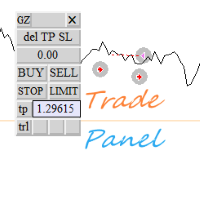
Trade panel manual is a multifunctional trading assistant. It allows you to open market and pending orders in one click. Value is set via button menu edit or deleted by specific buttons pending orders and the value of take profit and stop loss in one click. Through the edit menu of the button, a value is set that can be easily changed by simply moving level_tp lines for take profit or stop loss levels and for pending orders. It is possible to select orders and determine for them and set the leve
DG Trade Manager is a modern trade panel for MetaTrader 4. It sizes each position from the risk you choose, lets you set the entry, stop loss and take profit by dragging lines on the chart, and helps you manage the trade afterwards. It also keeps your rules in one place and automatically turns your closed trades into notes and insights you can learn from. Why use the trade manager? Many trading mistakes happen around the entry: a lot size worked out in a hurry, a stop loss moved “just this once”
Overview Money management is an all-important aspect of trading that many traders often overlook. It is very possible that even with a winning strategy, bad money management can often result in huge loses. Verdure Forex Calculators aims to help traders minimize risk and exposure in the Forex market. Verdure Forex Calculators implements 4 calculators in one single indicator. It is the first of it's kind on MT4 platform. Calculators implemented are: Lot (Trade or Contract Size) Calculator. Margin
Demo hesaplar için ücretsiz ve tam özellikli sürümü buradan indirin: [Blog linki] Line Trade Manager , emir yürütme (execution) ve risk yönetimi (risk management) üzerinde tam kontrole ihtiyaç duyan manuel yatırımcılar (manual traders) için geliştirilmiş gelişmiş bir görsel araçtır. Kullanışsız emir pencereleri (order windows) ve manuel hesaplamalarla uğraşmak yerine, karmaşık ticaret mantığınızı temiz ve etkileşimli çizgiler aracılığıyla doğrudan grafik (chart) üzerinden yönetirsiniz. 'Set & Fo
Bu ürün, birçok fonksiyonla siparişlerinizi ve hesabınızı kontrol etmenizi sağlayacaktır. 1- 1 lot büyüklüğü için hesap büyüklüğünüze/SL büyüklüğünüze/çift puan değerine bağlı olarak doğru lot büyüklüğünü hesaplayacaktır. 2- Satırların yerlerine bağlı olarak size mevcut sipariş durumunu verecektir (target sl tp ). 3- 1 butona basıldığında tüm emirleri hedef/sl'ye taşıyacaktır. 4- Size hesabınız ve emirlerinizi açmak için gereken teminat hakkında bilgi verecektir. 5- Tüm emirleri (sembol ve
Risk and Lot Size Calculator for MetaTrader 4, kaybetmeyi göze aldığınız tutar için lot büyüklüğünü hesaplar. Grafikte üç çizgiyi (giriş, zarar durdur, kâr al) sürükleyin; panel lot büyüklüğünü, riskteki tutarı, kâr al seviyesindeki kârı, risk:ödül oranını ve gereken teminatı (margin) gösterir; isteğe bağlı olarak prop (fonlu) hesapta kalan zarar payını da gösterir. Emri vermeden önce her pozisyonun büyüklüğünü stop mesafesinden belirlemek isteyen manuel yatırımcılar için tasarlanmıştır. Yalnız
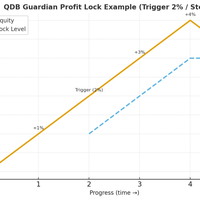
️ QDB Guardian EA — Intelligent Equity Protection for Serious Traders Protect your hard-earned profits with precision. QDB Guardian EA monitors your account’s total equity in real time and automatically secures gains once your target profit is reached. Built for traders who value capital preservation as much as growth, it acts as a global equity manager , ensuring your trading account never gives back more than you intend. Key Features Equity-Based Protection — QDB Guardian works at the ac
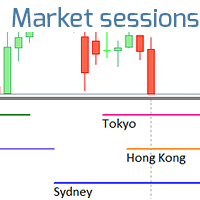
Gösterge, dünya borsalarının çalışma saatlerini gösterir. Hangi pazarların şu anda en aktif olduğunu görmenize yardımcı olur Benim  #1 Pro  Utility : 66+ özellik, bu araç dahil  |   Bana ulaşın  sorularınız varsa Şu anda en volatil enstrümanları seçmenize yardımcı olur; Özellikle gün içi traderlar için faydalıdır; 1) 1H ve altı zaman dilimlerinde kullanıldığında: çizgiler, grafikteki çubukların gerçek konumuna karşılık gelecek ve grafik hareket ettirildiğinde işlem seanslarının çizgileri grafik
İndikatör: Currency Strength Meter Pro Piyasa Genişliği Görselleştirmesi Artıları: Karmaşık grafikler yerine temiz bir "Panel" görünümü sunar. Hangi paritenin güçlü veya zayıf olduğu anında görülür. Faydaları: Zaman kazandırır ve karar vermeyi hızlandırır. Otomatik Sıralama Artıları: Pariteleri "En Güçlü"den "En Zayıf"a otomatik sıralar. Faydaları: Günün/Haftanın Kazananlarını ve Kaybedenlerini hemen gösterir. Akıllı Para Birimi Mantığı Artıları: Farklı baz dövizli pariteleri (örn. EURUSD ve USD
Bu ürünün alıcıları ayrıca şunları da satın alıyor
Trade Manager EA’ye hoş geldiniz! Ticaretin daha sezgisel, hassas ve verimli hale gelmesi için tasarlanmış nihai risk yönetim aracı ile tanışın. Bu sadece bir emir verme aracı değil; ticaret planlaması, pozisyon yönetimi ve risk kontrolü için kapsamlı bir çözüm. İster yeni başlayan bir yatırımcı olun, ister deneyimli bir trader ya da hızlı emir gerektiren bir scalper, Trade Manager EA ihtiyaçlarınıza uyum sağlar ve forex, endeksler, emtialar ve kripto paralar dahil tüm piyasalarda esneklik sunar
Exp COPYLOT CLIENT for MT4
Vladislav Andruschenko
4.69 (65)
MetaTrader 4 için profesyonel işlem kopyalayıcı MetaTrader 4 için hızlı, güvenilir ve profesyonel bir işlem kopyalayıcı. COPYLOT , MetaTrader 4 ve MetaTrader 5 terminalleri arasında Forex işlemlerinin kopyalanmasını sağlar ve farklı hesap türleri ile işlem senaryoları için esnek senkronizasyon sunar. COPYLOT MT4 sürümü şunları destekler: MetaTrader 4 → MetaTrader 4 MetaTrader 5 Hedge → MetaTrader 4 MetaTrader 5 Netting → MetaTrader 4   MT5 sürümü Tam açıklama + DEMO + PDF Nasıl satın alınır Nası
Trade Assistant MT4
Evgeniy Kravchenko
4.43 (197)
It helps to calculate the risk per trade, the easy installation of a new order, order management with partial closing functions, trailing stop of 7 types and other useful functions. Additional materials and instructions Installation instructions   -   Application instructions   Line function -   shows on the chart the Opening line, Stop Loss, Take Profit. With this function it is easy to set a new order and see its additional characteristics before opening.   Risk management  - The risk calcu
Local Trade Copier EA MT4
Juvenille Emperor Limited
4.96 (111)
Local Trade Copier EA MT4, aynı Windows bilgisayarı veya Windows VPS üzerinde çalışan birden fazla MetaTrader 4 hesabı arasında işlemleri kopyalamak ve yönetmek için hızlı ve esnek bir işlem kopyalayıcıdır. Yerel işlem senkronizasyonunu, Receiver tarafında lot büyüklüğü, risk yönetimi, işlem filtreleme, sembol eşleştirme, işlem yönetimi ve hesap koruması kontrolleriyle birleştirir. Transmitter ve Receiver terminallerinizi yaklaşık 1 dakika içinde ayarlayın ve aynı veya farklı brokerlardaki hesa
Trade Dashboard simplifies how you open, manage, and control your trades, with built-in lot size calculation. It allows you to execute trades, manage risk, and control positions directly on the chart, with tools such as partial close, breakeven, and trailing stop. Designed to reduce manual work and help you stay focused on your trading decisions. A demo version is available for testing. Detailed explanations of features are provided within the MQL5 platform. Installation instructions are include
Ultimate No Nonsense FX Backtester - You can Run Forward Test Simulation with this tool! Do Not Download the Demo Here, Please Read Below! Step by Step Manual Guide PDF for this backtester PDF List of Commands(Shortcuts) for this backtester Ultimate NNFX Backtester is a powerful utility tool that significantly reduces the length of backtesting process for NNFX followers.  As well as for Forex traders that operates their entries and exits at the close of a candle and manage the risk using ATR.
The product will copy all telegram signal to MT4   ( which you are member  ) , also it can work as remote copier.  Easy to set up, copy order instant, can work with almost signal formats, image signal, s upport to translate other language to English Work with all type of channel or group, even channel have "Restrict Saving Content", work with  multi channel, multi MT5 Work as remote copier: with signal have ticket number, it will copy exactly via ticket number. Support to backtest signal. How to
RS Trade Copier - gerçek grafik arayüze sahip, ultra hızlı yerel işlem kopyalayıcı. Hesap numaralarını elle girmeyi bırakın. Artık 200'den fazla anlaşılmaz giriş parametresiyle uğraşmak yok. Birden fazla MT4 ve MT5 terminali arasında işlem operasyonlarını kopyalamak için güvenilir ve esnek bir araçtır. Hem profesyonel yatırımcılar, sinyal hizmetleri hem de bireysel yatırımcılar için uygundur. Bir veya birden fazla Sağlayıcıdan bir veya birden fazla Alıcıya ticareti senkronize eder ve bunu yüksek
Simple button panel of trade on your chart with OneClick VZ . This trade panel will make it easier for you. Equipped with several functions that make it very easy for you. You can try Trial Version OneClick V1 in here . This version includes: Open Order Buy Open Order Sell Open Pending Order [Buy Limit - Buy Stop - Sell Limit-Sell Stop] Close ALL orders Close Order Buy Close Order Sell Delete Pending Order [Buy Limit - Buy Stop - Sell Limit-Sell Stop] Order Management: Stop Loss Take Profit Tra
Trade Indicator Assistant is a powerful MT4 utility designed to turn indicators into automated trading systems. Its main feature is the ability to automatically detect an indicator’s   BUY and SELL signal buffers , without requiring you to know the buffer numbers, search through indicator settings, or modify the indicator source code. Bonus Indicator: After purchasing Trade Indicator Assistant, contact me to receive Trade Signal Pro completely free as a bonus indicator. [Download Demo Version]
News Filter EA: Advanced Algo Trading Assistant News Filter EA is an advanced algo trading assistant designed to enhance your trading experience. By using the   News Filter EA , you can integrate a Forex economic news filter into your existing expert advisor, even if you do not have access to its source code. In addition to the news filter, you can also specify   trading days   and   hours   for your expert. The News Filter EA also includes   risk management   and   equity protection   features
TradePanel MT4
Alfiya Fazylova
4.84 (95)
Trade Panel, çok işlevli bir ticaret asistanıdır. Uygulama, manuel ticaret için 50'den fazla ticaret fonksiyonu içerir ve çoğu ticaret görevini otomatikleştirmeyi mümkün kılar. Uygulama talimatları : https://www.mql5.com/en/blogs/post/756482 Demo hesabı için uygulamanın deneme sürümü: https://www.mql5.com/en/blogs/post/750865 Uygulamayı nasıl kurulur: https://www.mql5.com/en/blogs/post/756239 Uygulamayı görsel modda nasıl test edilir: https://www.mql5.com/en/blogs/post/770277 Uygulamayı VPS Meta
Grid Manual MT4
Alfiya Fazylova
4.71 (17)
Grid Manual, sipariş ızgarasıyla çalışmak için kullanılan bir ticaret yardımcı programıdır. Yardımcı program evrenseldir, esnek ayarlara ve sezgisel bir arayüze sahiptir. Sadece kayıpların ortalaması yönünde değil, aynı zamanda kazanç artışı yönünde de bir emir ızgarası ile çalışır. Tüccarın bir emir ızgarası oluşturmasına ve eşlik etmesine gerek yoktur, bu yardımcı programı yapacaktır. Emri açmanız yeterlidir ve Grid manual otomatik olarak ona bir emir ızgarası oluşturacak ve kapanana kadar ona
DoIt Trade Manager - Risk Panel and EA Position Manager for MT4 Finding an entry is only half the job. Many execution mistakes happen in position sizing, partial exits, breakeven, trailing and account protection. DoIt Trade Manager puts the complete workflow on the chart. Plan the risk before entry, execute the order and apply consistent management rules to your manual trades and selected positions opened by other EAs. Full setup guide + how the free version works and where PRO starts :  https:/
Telegram to MT4 Multi-Channel Copier   , Telegram ve Discord kanallarınızdaki alım-satım sinyallerini doğrudan MetaTrader 4'e otomatik kopyalar. Bot yok, tarayıcı uzantısı yok, elle kopyalama yok. Sinyal Telegram'a veya Discord'a düşer ve EA birkaç saniye içinde terminalinizde işlemi açar. Ve bir kanalı kopyalamadan önce, yerleşik backtester o kanalın hesabınızda ne yapmış olacağını gösterir. Ürün iki bileşenden oluşur: Telegram kanallarınızı dinleyen bir Windows uygulaması ve sinyalleri MT4 ter
Trading History - A program for trading and money management on the history of quotes in stratagy tester. It can work with pending and immediate orders, and is equipped with trailing stop, breakeven and take profit functions. Very good for training and testing different strategies. Manual (Be sure to read before purchasing) Advantages 1. Allows you to test any trading strategy in the shortest possible time 2. An excellent simulator for trading training. You can gain months of trading experience
Exit Manager
Victor Christiaanse
5 (2)
Close every trade at the right moment, automatically. Most traders spend their energy on the entry and then close too early, too late, or on a feeling. Exit Manager takes the exit off your hands. Open a trade the way you always do, by hand or with any Expert Advisor, and Exit Manager watches it and closes it, fully or partly, when the indicator signal you chose appears. You can see it working on the chart. A clean panel on your chart shows, for every open trade, which rule will close it next, ho
I have created this  MT4 Tool EA to test if it is more profitable to trade in favor of the mass sentiment of traders or it is better to go against it. Remember to authorize Myfxbook url in WebRequest options in MT4 .  Features: Market Sentiment update every 30 minutes SL TP BreakEven Trail SL Daily Target Profit Max Daily DrawDown (Useful for prop firm) Max Spread Filter Time Filter Custom Trade Comments Protection in case a pair is not read correctly from the web (Prevents improper closing or o
ATTENTION: The Indicator cannot be backtested, as it is generated exclusively from live intraday calculations based on options flow. GEX Level Converter – Gamma Exposure Mapping for CFD Charts NASDAQ-100 edition — for US100 · NDX · NAS100 · USTECH and every Nasdaq-100 CFD equivalent Instantly see professional options-market levels directly on your MetaTrader Nasdaq-100 CFD chart. The GEX Level Converter translates the daily Gamma Exposure (GEX) zones of the NDX options market into precise pri
Risk Manager MT4   is an account protection Expert Advisor for traders who want strict risk control inside MetaTrader 4. The utility monitors your account equity, daily and weekly results, drawdown, open positions, trade count, consecutive losses, and trading hours. When a configured limit is reached, it can automatically close positions, cancel pending orders, stop other EAs, send notifications, or close the terminal. Instead of relying on discipline during a stressful trading session, you defi
Take a Break pauses your Expert Advisors when trading is a bad idea: before news, after a daily loss, outside your trading hours, or when a rule you wrote yourself says so. When the pause is over, your EAs simply continue. Account protection for all your EAs in one tool: news filter, drawdown and equity protection, time filter and custom rules. One EA on one chart protects the whole account, the free indicator gives every chart its own rules on top. Free demo | What is new in 26.09 | Support Ass
Fotokopi->Kullanışlı ve hızlı arayüz etkileşimi, kullanıcılar hemen kullanabilir       ->>>> Windows bilgisayarlarda veya VPS Windows'ta kullanılması önerilir Özellikler: Çeşitlendirilmiş ve kişiselleştirilmiş kopyalama ticareti ayarları: 1. Farklı sinyal kaynakları için farklı lot modları ayarlanabilir 2. İleri ve geri kopyalama ticareti için farklı sinyal kaynakları ayarlanabilir 3. Sinyaller yorumlarla ayarlanabilir 4. Lotun sözleşme lotuna göre kalibre edilip edilmeyeceği Çeşitlendirilmiş v
The Price Action Dashboard is an innovative tool to help the trader to control a large number of financial instruments. This tool is designed to automatically suggest signals and price conditions. The Dashboard analyzes all major Time Frame suggesting price action conditions with graphic elements. The Dashboard can suggest you the strength of the trend identifying directional movement, it is an indispensable tool for those who want to open position themselves using market trends identifiers. The
MT4 to Telegram Signal Provider , Telegram'a sinyal göndermeyi sağlayan ve hesabınızı bir sinyal sağlayıcısına dönüştüren kullanımı kolay ve tamamen özelleştirilebilir bir araçtır. Mesajların formatı tamamen özelleştirilebilir! Ancak basit kullanım için, önceden tanımlanmış bir şablonu seçebilir ve mesajın belirli kısımlarını etkinleştirebilir veya devre dışı bırakabilirsiniz. [ Demo ]  [ Kullanım Kılavuzu ] [ MT5 Sürümü ] [ Discord Sürümü ] [ Telegram Kanalı ]  New: [ Telegram To MT5 ] Kurulum
Effortlessly calculate lot sizes and manage trades to save time and avoid costly errors The Trade Pad Pro EA is a tool for the Metatrader Platform that aims to help traders manage their trades more efficiently and effectively. It has a user-friendly visual interface that allows users to easily place and manage an unlimited number of trades, helping to avoid human errors and enhance their trading activity. [ Installation Guide | Update Guide | Troubleshooting | FAQ | All Products ] One of the k
King Trade Copier MT4
Mohammed Maher Al-sayed Mohammed Ahmed Saleh
5 (1)
King Trade Copier, aynı bilgisayarda veya VPS'te çalışan MetaTrader terminallerini birbirine bağlar. Bir hesapta açılan işlemler diğerlerinde de görünür. Dosya her iki rolü de taşır, bu yüzden aynı indirme, Mode'u neye ayarladığınıza bağlı olarak gönderici ya da alıcı olur. Her grafikte panel, bu terminalin gönderip göndermediğini ya da alıp almadığını gösterir, karşı taraftaki hesabın adını verir, yanıt veren alıcıları sayar ve son sinyalin yaşını bildirir. Kopyalanmayan bir emir, kaybolmak ye
Shepherd Safety EA
AW Trading Software Limited
4.92 (13)
AW Shepherd Safety EA, açık pozisyonları yönetmek için tasarlanmış bir Uzman Danışmandır. İlk emri yatırımcı panelden açar, sepeti bundan sonra EA kendisi yönetir: trend filtresiyle kurtarma emirleri ekler, tarafı TakeProfit, trailing veya stop ile kapatır ve kapanış seviyelerini grafikte gösterir. Alımlar ve satımlar ayrı ayrı yönetilir, iki taraf aynı anda açık olabilir. Kurtarma emri yalnızca fiyat adımına göre değil, Parabolic SAR, iki MA veya mum rengine göre pozisyon yönünde bir dönüş gerç
MetaTrader 4 için para birimi gücü göstergesi Bu para birimi gücü göstergesi 28 kadar ana pariteyi okur ve 8 ana para birimi için birer değer üretir: USD, EUR, GBP, JPY, CHF, CAD, AUD ve NZD. Kimin önde olduğunu anlamak için grafik üstüne grafik açmak yerine, MetaTrader 4 grafiğinizdeki tek bir paneli okur ve hangi para biriminin alındığını, hangisinin satıldığını görürsünüz. Panelde ne görürsünüz 8 para biriminin her biri için sıralanmış güç çubuğu ve yüzdesi Çoklu zaman dilimi matrisi: para bi
KT Equity Protector MT4
KEENBASE SOFTWARE SOLUTIONS
3.75 (4)
An equity protection EA for MetaTrader that enforces your loss limits and profit target for you: when your account reaches a rule you set, it closes your trades on every symbol, before one bad day turns into a lost account. It suits prop firm challenges and personal accounts alike. Attach it to one chart, answer a few questions in the on-chart setup wizard, and it watches your whole account in the background while you trade by hand or with other EAs. What it protects Daily loss limit: a percenta
Bu, emir yönetimi ve risk yönetimi gibi zaman alan görevleri tek bir tıklamayla veya birkaç tıklamayla gerçekleştirerek ticaretinizi kolaylaştıran bir Yardımcı Programdır. Özellikler Risk Yönetimi  Risk alanında % veya $ olarak belirtilen riske göre lotları otomatik olarak hesaplar ve sadece SL TP vb. için çizgiler yerleştirerek girmenize ve gerçek zamanlı Risk Ödülünü görüntülemenize izin verir. TrueRisk, yalnızca FX çiftlerinde lot büyüklüğünü hesaplarken komisyonları içerir, böylece örne
Filtrele:
Değerlendirme yok
Değerlendirmeye yanıt