Prop Risk Guard

  • Yardımcı programlar
  • Mohamed-amine Baddir
    Mohamed-amine Baddir
    MetaTrader 5 için Expert Advisor'lar geliştiriyorum ve gerçek işlemlerde kullanmadan önce bunları düzgün şekilde test ediyorum.
    Yaptığım işler:
    - Stratejinizi, TradingView scriptinizi veya yazılı işlem kurallarınızı temiz ve profesyonel bir MT5 Expert Advisor'a dönüştürmek
  • Sürüm: 1.1
  • Etkinleştirmeler: 5

Prop Risk Guard, hesabınızın risk yönetimi kurallarını otomatik olarak uygular. Tek bir grafiğe eklemeniz yeterlidir; hesabınızdaki tüm pozisyonları izler. Bir limite ulaşıldığında pozisyonları kapatır, bekleyen emirleri siler ve işlemleri kilitler. Böylece tek bir kötü işlem veya kontrolden çıkan bir EA'nın değerlendirme hesabınızın ya da fonlanmış hesabınızın kurallarını ihlal etmesini önler.

Günlük zarar limiti

  • Yüzde, sabit tutar veya her ikisi birlikte kullanılarak ayarlanabilir (daha katı olan limit uygulanır).

  • Gün başındaki bakiye, gün başındaki öz sermaye (Equity) veya bu iki değerden yüksek olanı esas alınarak hesaplanır.

  • Günlük sıfırlama, seçtiğiniz sunucu saatinde gerçekleşir.

  • Kilit, bir sonraki sıfırlamaya kadar etkin kalır; ardından işlemler otomatik olarak yeniden başlar.

  • Para yatırma ve çekme işlemleri günlük zarar olarak hiçbir zaman sayılmaz.

Maksimum düşüş (Drawdown)

  • Sabit: Başlangıç bakiyesi üzerinden hesaplanır.

  • İz süren (Trailing): Öz sermayenin ulaştığı en yüksek seviye üzerinden hesaplanır.

  • Başlangıç bakiyesine kadar iz süren: Öz sermaye yükseldikçe limit de yükselir; başlangıç bakiyesi seviyesine ulaştığında sabit kalır.

  • Kilit, kontrol panelinden manuel olarak kaldırılana kadar devam eder (iki tıklama).

Kâr hedefi kilidi (isteğe bağlı)

  • Kâr hedefine ulaşıldığında tüm pozisyonları kapatır ve işlemleri kilitler. Böylece değerlendirmeyi geçmiş bir hesapta elde edilen kazanımların daha sonra kaybedilmesi önlenir.

Gerçek piyasa koşulları için tasarlandı

  • Güvenlik payı: Kayma (slippage) olasılığını hesaba katmak için her limit devreye girmeden önce belirlenen yüzde oranında müdahale eder.

  • Uyarı bildirimi: Bir limitin seçtiğiniz kullanım oranına ulaşıldığında bildirim gönderir.

  • Kilit sırasında manuel olarak veya herhangi bir EA tarafından açılan pozisyonlar derhâl kapatılır.

  • Yeniden fiyatlandırma (requote) veya kısmi gerçekleşme durumlarında kapatma işlemi yeniden denenir; piyasa kapalıysa yeniden açılması beklenir.

  • Açık pozisyon sayısı ve toplam lot hacmi için isteğe bağlı üst sınırlar belirlenebilir.

  • Kapsam: Tüm pozisyonlar veya yalnızca seçilen sihirli numaralara (Magic Numbers) sahip pozisyonlar izlenebilir.

  • Hem bir saniyelik zamanlayıcıyla hem de fiyat tikleriyle çalışır. Böylece grafik sembolünde hareketlilik az olsa bile koruma etkin kalır.

  • Terminal yeniden başlatıldığında gün başlangıcı değerlerini, öz sermaye zirvesini ve kilit durumunu korur.

  • Gün ortasında eklendiğinde, yeni bir terminalde çalıştırıldığında veya VPS üzerinde başlatıldığında, günün işlem kayıtlarından gün başlangıcı değerlerini yeniden oluşturur.

  • Aynı hesapta iki örneğin aynı anda çalışmasını engeller.

Kontrol paneli

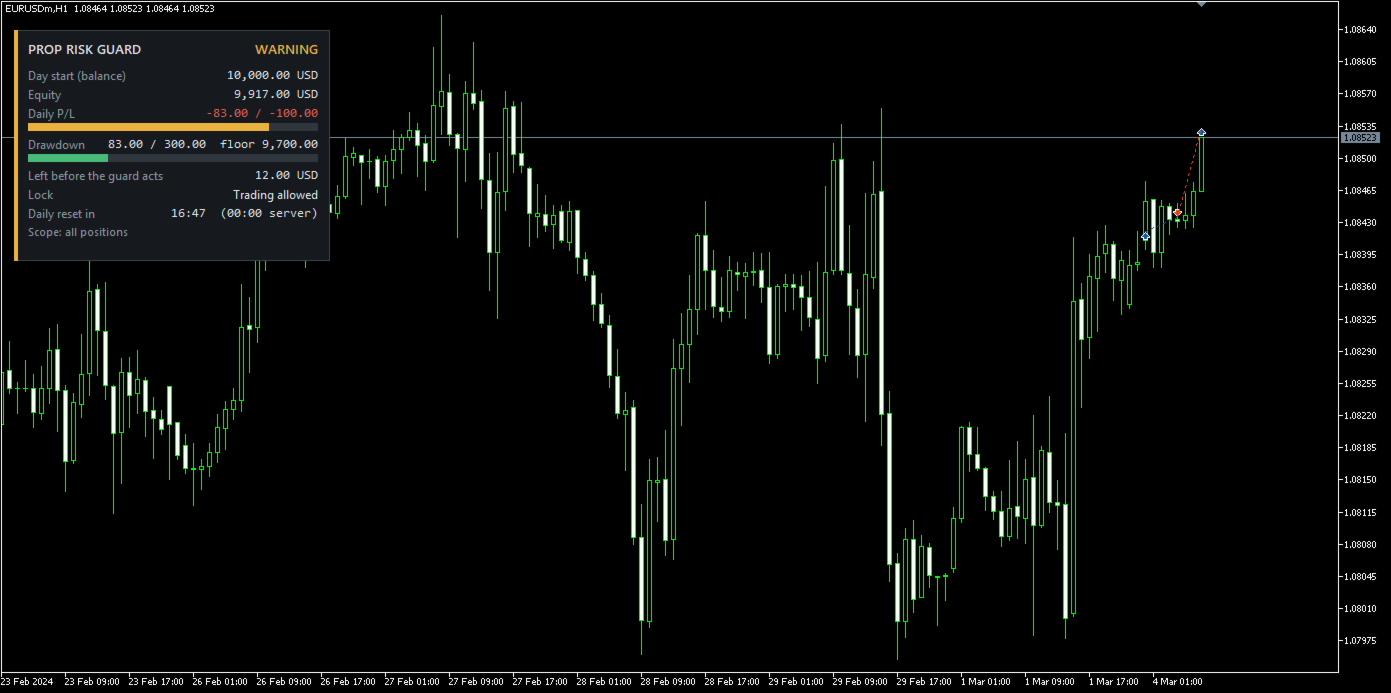
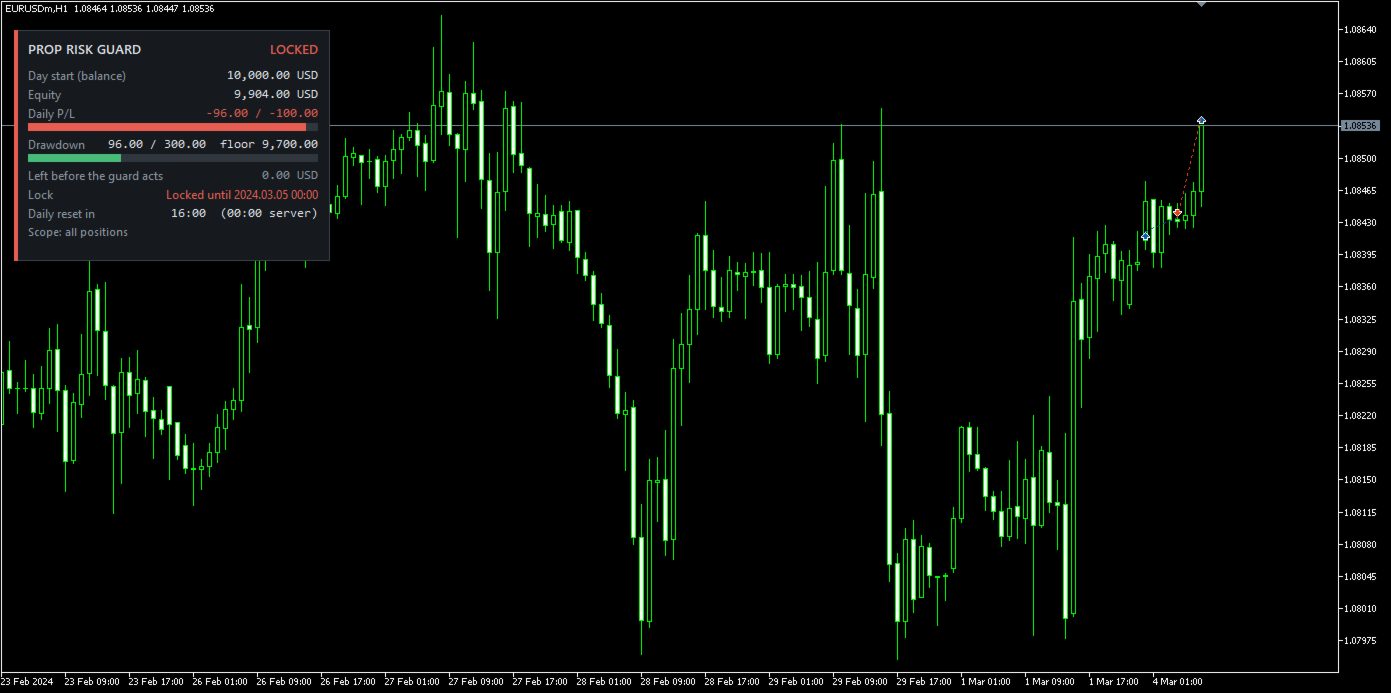
Gün başlangıcı referans değerini, öz sermayeyi, günlük kâr/zararı (P/L) ve ilgili limitlere göre düşüşü ilerleme çubuklarıyla gösterir. Ayrıca koruma devreye girmeden önce kalan tutarı, kâr hedefini, kilit durumunu ve bir sonraki günlük sıfırlamaya kalan süreyi görüntüler. Durumlar ACTIVE (ETKİN), WARNING (UYARI) ve LOCKED (KİLİTLİ) olarak gösterilir. Panel grafiğin herhangi bir köşesine yerleştirilebilir.

Bildirimler

Terminal uyarıları, anlık bildirimler (push) ve e-posta bildirimleri birbirinden bağımsız olarak açılıp kapatılabilir.

Temel ayarlar

Günlük zarar limiti (yüzde ve/veya tutar), gün başlangıcı referansı, sıfırlama saati; maksimum düşüş (yüzde ve/veya tutar), düşüş modu, başlangıç bakiyesi, öz sermaye zirvesi; kâr hedefi; güvenlik payı ve uyarı seviyesi; kapsam ve sihirli numaralar; maksimum pozisyon ve lot sayısı; panel köşesi; bildirimler.

Notlar

  • Limitler, gerçekleşmemiş kâr ve zararlar dâhil olmak üzere hesabın öz sermayesi (Equity) üzerinden hesaplanır.

  • MetaTrader 5, bir programın başka bir programın emir göndermesini engellemesine izin vermez. Bu nedenle kilit sırasında açılan yeni pozisyonlar tespit edilir edilmez kapatılır.

  • Hızlı piyasa hareketlerinde veya fiyat boşluklarında gerçekleşen zarar limiti aşabilir. Güvenlik payı bu riski azaltır ancak tamamen ortadan kaldıramaz.

  • Hesap sağlayıcılarının kuralları farklılık gösterebilir. Limitleri, hesaplama temelini ve sıfırlama saatini sağlayıcınızın koşullarına göre ayarlayın ve önce bir demo hesapta test edin.

  • Strateji Test Cihazı'nda koruma sistemi, çalışmasını gözlemleyebilmeniz için simülasyon işlemleri açar. Bu işlemler gerçek veya normal demo grafiklerinde gerçekleştirilmez.

  • Kaydedilen durum, koruma sisteminin çalıştığı terminalde tutulur. Yeni bir terminale veya MQL5 VPS'ye geçerken başlangıç bakiyesini ve iz süren modlarda öz sermaye zirvesini girin.

  • DLL gerekmez. Tüm sembollerle çalışır.

Önerilen ürünler
This tool can help you close all open orders with one click, just click "Close all". If you only want to close profitable orders, click the "Close profitable" button. After clicking, all floating orders will be closed; If you only want to close the orders with floating losses, click the "Close losable" button. After clicking, all orders with floating losses will be closed. This tool has been tested for a year. The one-click position closing function is very complete, the position closing is time
Neuron News Risk Manager MT5 Neuron News Risk Manager MT5 , MetaTrader 5 için ekonomik haber koruması, risk yönetimi ve Telegram uzaktan kontrol sistemidir. MT5 Ekonomik Takvimini izleyerek yaklaşan haberi, para birimini, zamanı, önem seviyesini, etkisini ve kalan süreyi panelde gösterir. Low, Medium ve High seviyesindeki haberler filtrelenebilir ve grafik üzerinde haber çizgileri görüntülenebilir. Global Algo Trading Guard , ekonomik haber öncesinde Algo Trading'i otomatik olarak devre dışı bır
AW Metatrader to Telegram MT5
AW Trading Software Limited
5 (1)
Hiçbir abonenizin alım satım terminalinizden alım satım etkinliklerinizi kaçırmaması için bildirim göndermek için otomatik bir sistem. Hesabınızdaki herhangi bir alım satım işlemi hakkında Telegram habercisine bildirim gönderen bir yardımcı program. Yardımcı programı Telegram'da bir kanala bağlamak için adım adım talimatlar ->   HERE   / MT4 ->   HERE Avantajlar: Kolay kurulum ve ayrıntılı talimatlar, Ayarlanabilir ekran görüntüleri gönderme imkanı, Emoji kullanarak özelleştirilebilir bildirim
T Manager, the ultimate trade management solution designed by traders for traders. If you are searching for a simple and efficient trade panel, trade manager, or trade assistant, you are at the right place.   The market contains a diverse number of those tools , but this one is designed by traders for traders . I designed this tool, and I am using it daily. Take my advice and stop buying tools blended with un-useful features that you will never use,   T Manager provides you with the essential y
Chart Date Jump Chart Date Jump is a lightweight MetaTrader 5 utility that helps you open historical chart context in seconds. Enter a target Day / Month / Year / Hour / Minute , press Go to datetime , and the chart scrolls to the matching bar and centers it in the window. A vertical marker is drawn on the located candle so you can instantly see the exact time you jumped to. Key features Jump to an exact date and time on the current symbol/period Center the found bar in the visible chart area Ma
One Click Trader  is a tool designed for MetaTrader 4 platform, which enables you to take your trading to the next level. It enables you to open, manage and close your trades in simple an efficient way by just one click of your mouse button. "-"   ,  "+"  change OCT window size  Up arrow minimizes the OCT panel Down arrow maximizes the OCT panel Right arrow displays the next panel with additional features Left arrow hides the panel with additional features Red  SELL  button enables you to open s
ApexForge Economic Calendar Safety Dashboard MT5 Ekonomik Takvim | Forex Ekonomik Takvim | News Filter | Önemli Ekonomik Veri Uyarıları | Ekonomik Etkinlik Geri Sayımı | Acil Pozisyon Kapatma | Close All | Piyasa Tatili Uyarısı | Erken Kapanış Uyarısı | KTimer | Mum Kapanış Geri Sayımı | Mobil Push Bildirimi | 12 Dil + Auto ApexForge Economic Calendar Safety Dashboard , MT5 Economic Calendar ekonomik takvim, Forex News Filter, önemli ekonomik veri uyarıları, ekonomik etkinlik geri sayımı, acil p
Position Prime
Mariana Cordeiro Neves Fernandes
Şimdi ücretsiz demo sürümünü indirin ve satın almadan önce Strateji Test Cihazınızdaki tüm risk yönetimi özelliklerini test edin! Position Prime , MetaTrader 5 için kurumsal düzeyde görsel bir işlem asistanı ve risk yöneticisidir. Hız ve hassasiyet arayan yatırımcılar için tasarlanmış olup, manuel lot hesaplama ihtiyacını ortadan kaldırır ve grafiğinizi gerçek bir işlem masasına dönüştürür. Saniyeler içinde işlemlerinizi planlayın, uygulayın ve koruyun. ️ Risk Yönetimi ve Otomatik Lot Hesapl
Instructions for Using Reverse Copier EA Attach EA to Charts Open MetaTrader and attach the EA to any chart on both accounts (master & slave). Make sure AutoTrading is enabled. Master Account (Signal Sender) Set Mode = Master in EA settings. This account will send trade signals. Slave Account (Signal Receiver) Set Mode = Slave in EA settings. This account will receive trades in reverse (opposite direction). Lot Multiplier In Slave EA settings, set Multiplier to control lot size. Example: 1.0
Superior MT5 To Telegram Signals Notifier OVERVIEW Superior MT5 To Telegram Signals Notifier is a smart bridge tool for MetaTrader 5 that instantly sends your trading activity directly to your Telegram phone app, channels, or group chats. It tracks your account in real time and broadcasts trade openings, closures, modifications, pending orders, and clear chart screenshots automatically using a simple Telegram Bot. Whether you run a VIP signal channel and want to share trades automatically wit
RealCost Auditor MT5 is an execution-cost monitor for MetaTrader 5. It does not open, close, or modify trades. It watches the chart symbol, samples live spread, records executed deals, estimates signed slippage when the terminal exposes the requested price, and saves a local CSV audit file. Many backtests use spread, slippage, commission, and swap assumptions that are cleaner than real trading conditions. This utility gives you broker and account data from your own terminal before you trust a s
This script analyzes all symbols in Market Watch for a set timeframe. The result is displayed on the Experts tab and in the specified file. For more convenient viewing and editing, the result is displayed in a csv file. For the calculation, the Pearson formula is used. The value of the correlation coefficient of pairs close to 1 means that the pairs move almost identically. A value close to -1 means that the pairs move in the same way. This tool will be useful to those who use hedging due to the
The indicator is intended for determining the spread and swap size, the distance for setting stop orders and stop losses from the current price allowed and the risk per 1 point in the deposit currency. The indicator informs a trader about possible additional expenses and profits connected with transferring a position to the next trade session of the financial instrument. It also informs about the spread size and the distance of pending orders, stop loss and trailing from the current price. In ad
ProBridger
Marius Ovidiu Sunzuiana
How Traders and Analysts Can Use the Data Export Bridge to Improve Their Analytics The MQL Data Export Bridge unlocks a new level of analytical power by transforming MetaTrader into a real‑time data provider for any external research environment. Here are the most impactful ways different users can apply the bridge to enhance their trading performance. Build Predictive Models with Machine Learning Who benefits: Quantitative traders, data scientists, algorithm developers How it helps: Export t
Manager Trader
Muhammad Firdaus Bin Zainun
Manual Trade Manager for MT5 This is not auto trade ea. It Manage your manually opened trades from one simple chart panel. Monitor your positions in real time and act on multiple layers with a single click. Features CLOSE ALL: Sends fast asynchronous close requests for managed manual positions. BE ALL: Checks each layer individually and sets its stop loss only when that layer has reached your chosen profit threshold. BE SET: Applies your current BE step setting to eligible layers. Optional Avera
This utility provides the ability to use hot keys in manual trading instantly responding to the current market situation. You can assign hot keys to open/close positions by their type, open/close all positions on the current chart and remove all orders on the current chart. You can also assign hot keys for five predefined trade volumes and switch between them if necessary with no need to change the volume manually from time to time. It is also possible to set the auto calculation of a trade volu
Crosshair Sync is a lightweight MetaTrader 5 utility that synchronizes your crosshair position across all open charts in real-time. When analyzing multiple timeframes or symbols, simply press Shift+X to activate the synchronized crosshair, and move your mouse to see the exact same time point highlighted on every chart simultaneously. Key Features: Multi-Chart Synchronization : Automatically syncs the vertical time line across all open charts, allowing you to analyze the same time point on differ
Spread Control , MetaTrader 5 için mevcut spread değerini ve spread değişimini doğrudan enstrüman grafiği üzerinde izlemenizi sağlayan kompakt bir indikatördür. Özellikler Gerçek zamanlı mevcut spread Son değerlerin geçmişini gösteren spread değişim grafiği Görüntülenen dönem için LOW / AVG / HIGH hesaplaması Spread durumunun renkli gösterimi: normal seviye; uyarı seviyesi; kritik seviye Mevcut spread değerinin görsel ölçeği Güncel Bid ve Ask değerlerinin gösterimi Piyasa aktivite göstergesi: LI
GS trade report
Aleksander Gladkov
5 (1)
3 in 1 : Report + monitoring + sending messages (Telegram, ...) to optimize trading and use of advisors. Monitoring: Panel on the chart Sending messages to Telegram Sending messages to Email Sending Notifications Sending pop-up messages Sound notifications when the established Profit/Loss levels are exceeded Monitoring is activated by pressing the Start button. Profit for the period by currency pairs, hours and Magic number for the current account. Forms four tables: by symbols, by magic number
Make your Take Profit, Stop Loss, and Trailing Stop levels invisible to the broker! Main option: STEALTH MODE Virtual Trailing Stop Virtual Take Profit Virtual Breakeven Virtual Stop Loss Virtual Orders Lifetime WARNING: The Expert Advisor does not place orders by itself. You must open orders yourself (including through the Expert panel) or use a third-party Expert on another chart of the same currency pair. Please specify the Magic number "-1" in the Expert settings for the Expert to process th
Telegram to MT5 Pro — Advanced Telegram Signal Copier with Auto-Fix, Multi-TP, Risk Control and Full Trade Management Telegram to MT5 Pro — Profesyonel Telegram Sinyal Kopyalayıcı Telegram to MT5 Pro, Telegram’dan gelen sinyalleri MetaTrader 5 hesabına otomatik olarak doğrudan uygulayan yüksek performanslı bir trade kopyalayıcıdır ve risk, işlem yürütme ve trade yönetimi üzerinde tam kontrol sağlar. Sistem iki bileşenden oluşur: • MetaTrader 5 içinde çalışan Expert Advisor (EA) • Telegram’a bağ
Orion Telegram Notifier Bot  allows the trader to receive trade notifications in his Telegram whenever a position is opened or closed. The EA sends notifications showing the Symbol, Magic Number, Direction, Lot (Volume), Entry Price, Exit Price, Take Profit, Stop-Loss and Profit of the position. How to setup Orion Telegram Notifier? Open Telegram and Search for “BotFather” Click or Type “/newbot” Create a nickname and username (Example: nickname: MT5trades   - username: MT5TelegramBot) *The use
Trade Panel HotKey – MT5 Scalping Utility Fast Trade Panel HotKey is a lightweight MT5 trading utility designed for traders who need to open, manage, and close positions as quickly as possible . The main purpose of this tool is to reduce the time between a trading decision and execution. Instead of moving the mouse, opening order windows, or manually modifying multiple positions, most important actions can be performed instantly through customizable keyboard hotkeys or directly from the compact
MQT AutoClose Expert MT5
Josue Fernando Servellon Fuentes
MQT AutoClose Expert closes your orders automatically once they reach the profit target you set — in real pips (with a separate target for gold) or in account money. Open your trades as you always do; the EA watches every position on every symbol and locks the profit in for you. It never opens trades. How it works (logic summary): Every tick and every 500 ms it scans all open market orders. Pending orders are never touched. Pips mode: profit distance is computed from prices — Bid for buys, Ask f
MQL Tool "Ofir Email to Telegram": Never Miss a Trading Alert Again! Tired of missing important alerts from your indicators and Expert Advisors (EAs)? Ofir Email to Telegram is the solution you've been waiting for! This revolutionary MQL tool automatically forwards all email alerts from your indicators and EAs directly to your Telegram account. Never again will you miss a trading opportunity or important notification! Here are just a few of the benefits of Ofir Email to Telegram: Quick and easy
GoT Hedge Manager MT5 This Tool is suitable for traders who use Hedging Strategy GoT Hedge Manager MT5 Hello Traders...!! This tool is to help you to manage your hedge order It will not take any order if you not trigger the order by placing the line order Updated on V2: - Add ADX and ATR Filter For ADX it will help you to detect the market is ranging or trending For ATR it will help you to decide the hedge distance - Detect and Takeover your manual order To make the EA takeover your manual ord
KS Hotkey Trading Panel Pro, hızlı klavye tabanlı işlem yapma imkanı ve grafik üzerinde tıklanabilir bir kontrol paneli sunan bir MetaTrader 5 Expert Advisor'ıdır. Temel Özellikler Kısayol tuşuyla işlem yapma — Şu işlemler için tek tuşla komut verme: Piyasa Fiyatından Alış / Satış (Market Buy / Sell) Buy Limit / Sell Limit Buy Stop / Sell Stop Tüm pozisyonları kapatma Sadece Alış (Buy) pozisyonlarını kapatma / Sadece Satış (Sell) pozisyonlarını kapatma Bekleyen tüm emirleri silme Lot bo
Session Panel for MT5 Session Panel is a free MT5 indicator that gives you a fast and convenient live overview of the major trading sessions directly from the chart. Monitor Tokyo, London, and New York session times, see which session is currently active, track countdowns to the next session, and view session overlap information in one compact dashboard. Built for traders who want better market timing, clearer session awareness, and a cleaner chart workflow in live market conditions. Session Pan
FREE
Trade HotKeys , klavye kısayolları kullanarak işlem emirlerini anında yürütmeyi sağlayan manuel trading aracıdır. MetaTrader 5 arayüz butonlarını kullanmadan hızlı emir kontrolüne ihtiyaç duyan discretionary trader’lar ve scalper’lar için tasarlanmıştır. Grafik üzerindeki butonlara tıklamak veya menüler arasında gezinmek yerine, işlemleri doğrudan klavyeden gerçekleştirirsiniz. Neler yapabilirsiniz Hotkey ile anında BUY / SELL açma BUY veya SELL pozisyonlarını ayrı ayrı kapatma Tek tuşla tüm po
FREE
TradeDesk EA — Semi-Automatic Trading and Account Discipline Panel for MT5 English Description Faster execution with rules that remain in force TradeDesk EA is a bilingual semi-automatic trading assistant for MetaTrader 5. It combines order execution, position sizing, trade management, conditional tasks, account statistics, and optional discipline controls in one compact panel. It can be used with Forex, metals, indices, energy products, stocks, and other CFD instruments made available by th
Bu ürünün alıcıları ayrıca şunları da satın alıyor
Trade Assistant MT5
Evgeniy Kravchenko
4.43 (216)
It helps to calculate the risk per trade, the easy installation of a new order, order management with partial closing functions, trailing stop of 7 types and other useful functions. Additional materials and instructions Installation instructions - Application instructions - Trial version of the application for a demo account Line function -   shows on the chart the Opening line, Stop Loss, Take Profit. With this function it is easy to set a new order and see its additional characteristics bef
Trade Manager EA’ye hoş geldiniz! Ticaretin daha sezgisel, hassas ve verimli hale gelmesi için tasarlanmış nihai risk yönetim aracı ile tanışın. Bu sadece bir emir verme aracı değil; ticaret planlaması, pozisyon yönetimi ve risk kontrolü için kapsamlı bir çözüm. İster yeni başlayan bir yatırımcı olun, ister deneyimli bir trader ya da hızlı emir gerektiren bir scalper, Trade Manager EA ihtiyaçlarınıza uyum sağlar ve forex, endeksler, emtialar ve kripto paralar dahil tüm piyasalarda esneklik sunar
Local Trade Copier EA MT5
Juvenille Emperor Limited
4.94 (149)
Local Trade Copier EA MT5, aynı Windows bilgisayarı veya Windows VPS üzerinde çalışan birden fazla MetaTrader 5 hesabı arasında işlemleri kopyalamak ve yönetmek için hızlı ve esnek bir işlem kopyalayıcıdır. Yerel işlem senkronizasyonunu, Receiver tarafında lot büyüklüğü, risk yönetimi, işlem filtreleme, sembol eşleştirme, işlem yönetimi ve hesap koruması kontrolleriyle birleştirir. Transmitter ve Receiver terminallerinizi yaklaşık 1 dakika içinde ayarlayın ve aynı veya farklı brokerlardaki hesa
Telegram to MT5 Multi-Channel Copier   , Telegram ve Discord kanallarınızdaki alım-satım sinyallerini doğrudan MetaTrader 5'e otomatik kopyalar. Bot yok, tarayıcı uzantısı yok, elle kopyalama yok. Sinyal Telegram'a veya Discord'a düşer ve EA birkaç saniye içinde terminalinizde işlemi açar. Ve bir kanalı kopyalamadan önce, yerleşik backtester o kanalın hesabınızda ne yapmış olacağını gösterir. Ürün iki bileşenden oluşur: Telegram kanallarınızı dinleyen bir Windows uygulaması ve sinyalleri MT5 ter
================================================================================ POC BREAKOUT - V20.72. Full Professional Grade Toolkit ================================================================================ POC Breakout is a full MetaTrader 5 trading dashboard for discretionary traders who want breakout signals, Point of Control (POC) context, volume profiles, order flow, market structure, news, alerts, and advanced trade planning in one professional workspace. Attached directly to you
TradePanel MT5
Alfiya Fazylova
4.88 (170)
Trade Panel, çok işlevli bir ticaret asistanıdır. Uygulama, manuel ticaret için 50'den fazla ticaret fonksiyonu içerir ve çoğu ticaret görevini otomatikleştirmeyi mümkün kılar. Uygulama talimatları: https://www.mql5.com/en/blogs/post/756482 Demo hesabı için uygulamanın deneme sürümü: https://www.mql5.com/en/blogs/post/750865 Uygulamayı nasıl kurulur: https://www.mql5.com/en/blogs/post/756239 Uygulamayı görsel modda nasıl test edilir: https://www.mql5.com/en/blogs/post/770277 Uygulamayı VPS MetaT
Telegram sinyallerini kendi işlem kurallarınızla kopyalayın Telegram to MT5 Signal Trader , herkese açık ve özel Telegram kanallarındaki ve gruplarındaki metin tabanlı işlem sinyallerini otomatik olarak MetaTrader 5'e kopyalar. Tek bir masaüstü uygulamasından birden fazla sinyal sağlayıcısını ve MT5 hesabını yönetin; her sağlayıcı için ayrı risk ve işlem ayarları belirleyin. Sinyal kopyalamak için Telegram botu veya API kurulumu gerekmez. Kendi Telegram hesabınızla telefon numarası veya QR kod k
Power Candles Strateji Tarayıcısı - Kendi Kendini Optimize Eden Çoklu Sembol Kurulum Bulucu Power Candles Strateji Tarayıcısı , Power Candles göstergesini çalıştıran aynı kendinden optimize edici motoru, Piyasa İzleyicinizdeki her sembol üzerinde yan yana çalıştırır. Tek bir panel, şu anda istatistiksel olarak hangi sembollerin işlem yapılabilir olduğunu, her birinde hangi stratejinin kazandığını, en uygun Stop Loss / Take Profit çiftini gösterir ve yeni bir sinyal geldiği anda size bildirim gön
Grid Manual MT5
Alfiya Fazylova
4.73 (22)
Grid Manual, sipariş ızgarasıyla çalışmak için kullanılan bir ticaret yardımcı programıdır. Yardımcı program evrenseldir, esnek ayarlara ve sezgisel bir arayüze sahiptir. Sadece kayıpların ortalaması yönünde değil, aynı zamanda kazanç artışı yönünde de bir emir ızgarası ile çalışır. Tüccarın bir emir ızgarası oluşturmasına ve eşlik etmesine gerek yoktur, bu yardımcı programı yapacaktır. Emri açmanız yeterlidir ve Grid manual otomatik olarak ona bir emir ızgarası oluşturacak ve kapanana kadar ona
MT5 to Telegram Signal Provider , hesabınızı bir sinyal sağlayıcı haline getirerek belirtilen sinyalleri Telegram'ın sohbetine, kanalına veya grubuna göndermeyi sağlayan kullanımı kolay, tamamen özelleştirilebilir bir araçtır. Rakip ürünlerin çoğunun aksine, DLL içe aktarması yapmaz. [ Demo ] [ Kılavuz ] [ MT4 Versiyonu ] [ Discord Versiyonu ] [ Telegram Kanalı ]  New: [ Telegram To MT5 ] Kurulum Adım adım bir kullanıcı kılavuzu mevcuttur. Telegram API'si hakkında bilgi gerekmemektedir; ihtiyac
Welcome to ENTRY IN THE ZONE AND SMC MULTI TIMEFRAME  SPECIAL BENEFIT / FOR OUR MQL5 CUSTOMERS FREE ACCESS TO THE NEW TOOL  — COMING SOON — Learn more on our official website  : https://www.fableedge.net Entry In The Zone and SMC Multi Timeframe is a real-time market analysis tool based on Smart Money Concepts (SMC), designed to analyze market structure, price direction, and key trading zones. It supports both Single-Timeframe Analysis and Multi-Timeframe Analysis, providing a clearer view of th
Footprint Chart Pro — Professional OrderFlow EA for MetaTrader 5 Version 6.34 | Professional tool for real traders | Institutional-Grade Visualization DEMO USERS - PLEASE SELECT EVERY TICK / REAL TICK WHEN TESTING AND YOU HAVE DOWNLOADED HISTORICAL DATA. IF YOU SEE A WAITING SCREEN AND IT IS NOT DOWNLOADING, IT MEANS YOU HAVE LOW HISTORICAL DATA. TRY 1 MIN AND 5 MIN FIRST ON 1 DAY DATA. ONE DAY DATA SHOULD BE THE NEWEST AND MOST CURRENT DATE. PLEASE WAIT UNTIL THE MARKET HAS ROLLED OVER PERIOD.
Signal TradingView to MT5 Pro Automator TradingView ve MetaTrader 5 arasında anında profesyonel uygulama TradingView alarmları ile MT5'teki gerçek uygulama arasındaki en güçlü iletişim köprüsüyle ticaret stratejinizi otomatikleştirin. Hız, esneklik ve kusursuz risk yönetimi talep eden yatırımcılar için tasarlanan bu Uzman Danışman (Expert Advisor), herhangi bir alarm mesajını hassas bir piyasa (market) veya limit emrine dönüştürür. GÜÇLÜ YÖNLER VE AVANTAJLAR Evrensel Ayrıştırma Motoru (Tescilli)
Copy your MT5 trades to Interactive Brokers You keep using MT5. Every order you open or close is sent to your IB account. In real time. No coding. No changes to your strategy or EA. Try it first Rent 1 month: $30. Test on a live or paper account. What it does Real-time copying: same direction, reverse, or one side only. Map any MT5 symbol to any IB symbol. Set a lot ratio for each. Forex, Futures, Stocks, CFDs, Metals and Crypto. Position sync: both accounts checked, any difference fixed. Optio
Exp COPYLOT CLIENT for MT5
Vladislav Andruschenko
3.97 (35)
MetaTrader 5 için profesyonel işlem kopyalayıcı MetaTrader için hızlı, profesyonel ve güvenilir bir işlem kopyalayıcı . COPYLOT , MT4 ve MT5 terminalleri arasında Forex işlemlerini kopyalamanıza olanak tanır ve Hedge ile Netting hesaplarını destekler. COPYLOT MT5 sürümü şunları destekler: - MT5 Hedge → MT5 Hedge - MT5 Hedge → MT5 Netting - MT5 Netting → MT5 Hedge - MT5 Netting → MT5 Netting - MT4 → MT5 Hedge - MT4 → MT5 Netting MT4 sürümü Tam açıklama + DEMO + PDF Nasıl satın alınır Nasıl kurul
Trading Chaos Expert
Hennadii Stanilevych
5 (11)
This software has no equals in the world and represents a universal trade "console" covering trading signals, automated market entry, setting of Stop Loss and Take Profit, as well as Trailing Profit for multiple trades at the same time in a single open window. Intuitive control of the Expert Advisor in "three clicks" ensures a comprehensive use of all its functions on different computers, including tablets PCs. Interacting with additional signal indicators that mark the chart to give a real mark
Your EAs cannot see each other, but Anchor can. Anchor gives you one place to coordinate your EAs, manage risk, and decide when trading is allowed. It works alongside the trading bots you already use without any changes to them. The Problem One EA opens a trade. Then another starts trading. The next thing you know, you wake up to multiple grids built across your account. Each EA may be doing exactly what it was designed to do, but together they can place far more risk on your account than you in
Farmed Hedge Yield Farming | All Markets (Manual - Hybrid - Semi/Automated EA) VERIFIED TRADING RESULTS - Farmed Hedge Yield Axi Copy:  https://www.mql5.com/en/signals/2356376 - Farmed Hedge Yield Exn Copy:   https://www.mql5.com/en/signals/2356404 - Farmed Hedge Yield V Copy:  https://www.mql5.com/en/signals/2357156 IMPORTANT NOTICE: FarmedHedge is a MANUAL-FOCUSED TRADING UTILITY ,not a fully automated EA. Results shown on this Signal include manual trades and overall strategic management.
Bu ürün, haber saatlerinde tüm uzman danışmanları ve manüel grafikleri filtreler, böylece manüel ticaret kurulumlarınızı veya diğer uzman danışmanlar tarafından girilen işlemleri yok edebilecek ani fiyat dalgalanmaları konusunda endişelenmenize gerek kalmaz. Bu ürün, herhangi bir haber yayınlanmadan önce açık pozisyonlarınızı ve bekleyen emirlerinizi yönetebilen tam bir sipariş yönetim sistemi ile birlikte gelir.   The News Filter'ı   satın aldığınızda, gelecekteki uzman danışmanlar için yerleşi
MetaTrader 5 için Trading Panel — grafik ve klavyeden profesyonel tek tıkla işlem kontrolü Aktif traderlar için geliştirilmiş güçlü bir Trading Panel; işlemleri standart MetaTrader arayüzüne göre çok daha hızlı açmanıza, yönetmenize ve kapatmanıza yardımcı olur. Bu çözüm; pozisyonları, bekleyen emirleri, toplam kârı ve işlem yürütmesini tek bir profesyonel çalışma alanında kontrol etmek isteyen kullanıcılar için tasarlanmıştır. Bu sadece sıradan bir yardımcı araç değildir. MetaTrader 5 için ger
HINN MAGIC ENTRY – the ultimate tool for entry and position management! SIMPLE. FASTEST. INTUITIVE. MAX AUTOMATED. Place orders by selecting a level directly on the chart! full description   ::  demo-version  :: 60-sec-video-description Key features: - Market, limit, and pending orders - Automatic lot size calculation - Automatic spread and commission accounting - Unlimited partitial take-profits  - Breakeven and trailing stop-loss and take-profit  functions - Invalidation leves - Intuitive, a
Güvendiğiniz indikatörü kullanmaya devam edin. Etrafındaki işlemleri otomatikleştirin. Güvendiğiniz bir MT5 indikatörünüz var ama hâlâ grafiği izlemeniz, sinyal beklemeniz, lot hesaplamanız, emir vermeniz ve her pozisyonu elle yönetmeniz mi gerekiyor? Stratiora Signal Engine MT5 bu adımları birleştirmek için geliştirildi. Uyumlu Buy ve Sell tampon sinyallerini giriş, hacim hesaplama, Stop Loss, Take Profit, filtreler, pozisyon yönetimi ve hesap korumasını kapsayan otomatik bir iş akışına dönüşt
Trade Copier Ultimate
Janitha Sandaruwan Amaradasa Wickramasingha Arachchilage
5 (5)
Trade Copier Ultimate - Telegram to MT5 Signal Copier Trade Copier Ultimate automatically copies Telegram trading signals into MetaTrader 5. The EA can read signal messages, detect the symbol, order type, entry price, Stop Loss, Take Profit levels and selected update commands, then execute or manage the trade in MT5 using your lot and risk settings. It is more than a basic Telegram to MT5 copier. TCU also supports Bot API and user-account Bridge workflows, Discord signal routing, local MT5 to MT
Trade Indicator Assistant   is a powerful MT5 utility designed to turn indicators into automated trading systems. Its main feature is the ability to automatically detect an indicator’s   BUY and SELL signal buffers , without requiring you to know the buffer numbers, search through indicator settings, or modify the indicator source code. Bonus Indicator:   After purchasing Trade Indicator Assistant, contact me to receive   Trade Signal Pro   completely free as a bonus indicator. [Download Demo V
EA Overfitter
Stephen J Martret
5 (1)
That backtest looks great. But will it still be making money tomorrow, next week, next month? EA Overfitter re-runs your EA on 100 price histories it has never seen. One score tells you if the edge is real. A backtest tells you what an EA did on one price history — the one that happened to occur. What you cannot tell from it is how much of that result was the strategy and how much was the particular path. EA Overfitter answers that. It builds up to 100 synthetic price histories your EA has n
Riskinizi otomatik olarak hesaplarken işlemlere hızlı bir şekilde girip çıkmanıza yardımcı olacak Ticaret Yöneticisi. Aşırı Ticaret, İntikam Ticareti ve Duygusal Ticaretten korunmanıza yardımcı olacak özellikler içerir. İşlemler otomatik olarak yönetilebilir ve hesap performans ölçümleri bir grafikte görselleştirilebilir. Bu özellikler, bu paneli tüm manuel yatırımcılar için ideal kılar ve MetaTrader 5 platformunun geliştirilmesine yardımcı olur. Çoklu Dil desteği. MT4 Sürümü  |  Kullanım Kılavu
Telegram To MT5 — Sinyal Kopyalayıcı Telegram kanallarınızdaki işlem çağrılarını gerçek MT5 emirlerine dönüştürün — otomatik olarak, istediğiniz kadar hesapta ve risk ile kurallar tamamen sizin kontrolünüzde. Telegram To MT5, Telegram'da zaten takip ettiğiniz VIP / sinyal kanallarını MetaTrader 5 terminalinize bağlar. Ücretsiz bir eşlik eden masaüstü uygulaması mesajları okur (botlara izin vermeyen kanallardan bile), ve bu Expert Advisor bunları hesabınızda yürütür — kendi risk ayarlarınızı, sem
Quant Panel
Kevin Craig E Gittins
QUANT PANEL Independent per-algo analytics, protected MT5 history and professional PDF reporting Quant Panel is built for traders who run several Expert Advisors or strategies on one MT5 account and need to know how each algo is actually performing. Instead of treating the terminal as one combined portfolio, Quant Panel groups closed positions by EA comment or magic number and calculates every strategy independently. It gives you one clear dashboard for comparing algos, finding weak systems and
Trade Manager Panel Pro MT5
VividMind Digital Solutions
5 (6)
Satın aldıktan sonra bana mesaj göndererek tam kullanım kılavuzu paketini + AI özelliklerini test etmek için 3 günlük OpenAI API denemesini + bir başka bonus hediyeyi alabilirsiniz Mevcut fiyat, Ağustos Yeniden Lansman Güncellemesi için sınırlı süreli indirimli fiyattır — fiyat artmadan önce sürümünüzü şimdi güvence altına alın. Sonraki fiyat: $340 Bu, piyasada şimdiye kadar denediğiniz veya gördüğünüz tüm trading panellerinden tamamen farklıdır. Şu anda perakende piyasasında bulunan en yenilik
YuClusters
Yury Kulikov
4.93 (43)
Attention: You can view the program operation in the free version  YuClusters DEMO .  YuClusters is a professional market analysis system. The trader has unique opportunities to analyze the flow of orders, trade volumes, price movements using various charts, profiles, indicators, and graphical objects. YuClusters operates on data based on Time&Sales or ticks information, depending on what is available in the quotes of a financial instrument. YuClusters allows you to build graphs by combining da
Filtrele:
Değerlendirme yok
Değerlendirmeye yanıt