Trade Lifecycle Forensics MT5

Flight Recorder for MT5 Trade Execution

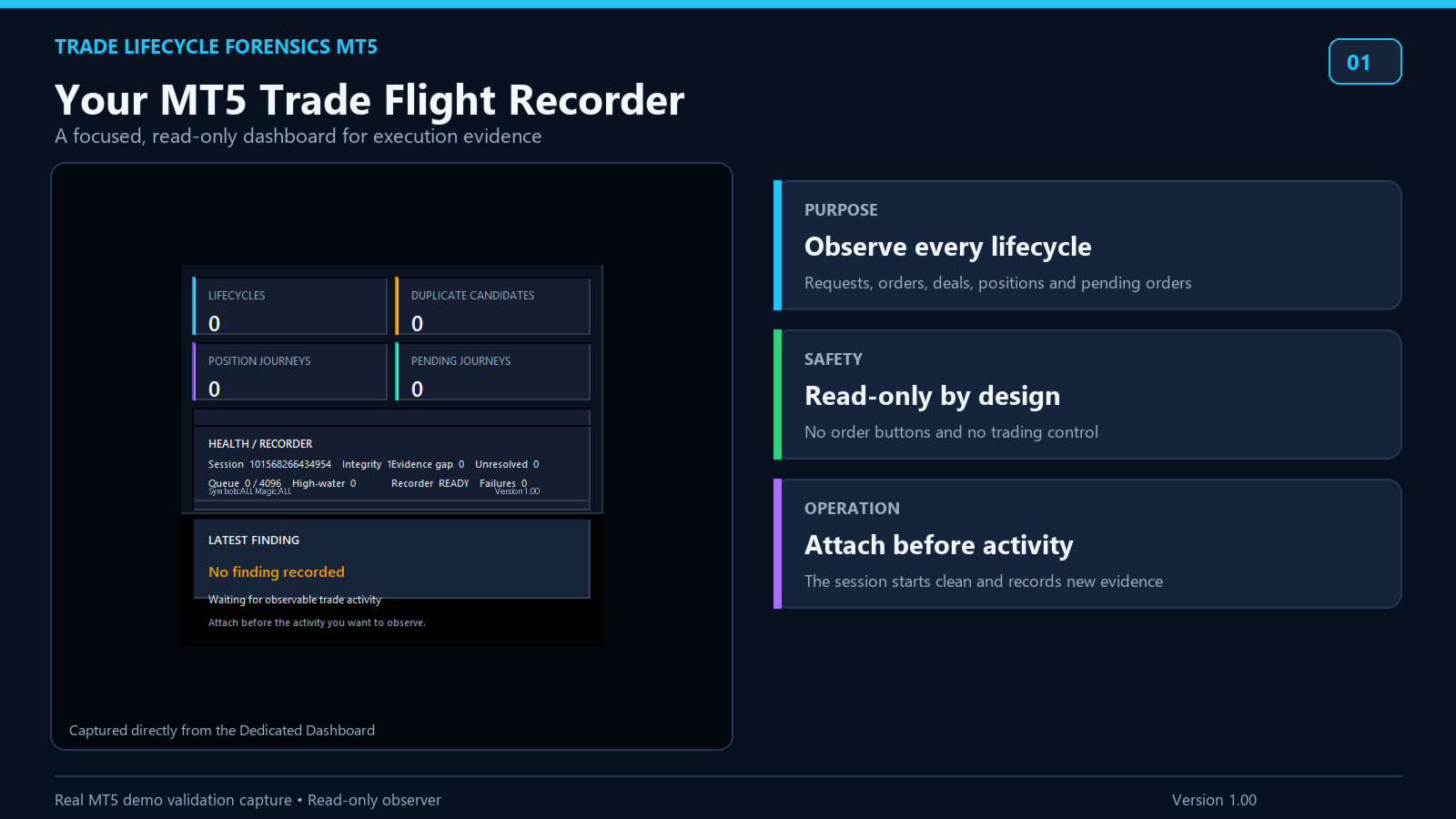
Trade Lifecycle Forensics is a read-only monitoring utility.

Attach one instance before the trading activity you want to observe. The utility watches account-wide trade transactions generated by manual trading and other Expert Advisors, then connects related request, order, deal, position, and pending-order evidence into reviewable records.

The utility does not open, modify, cancel, or close trades. It has no trading buttons and does not control other Expert Advisors.


What it shows

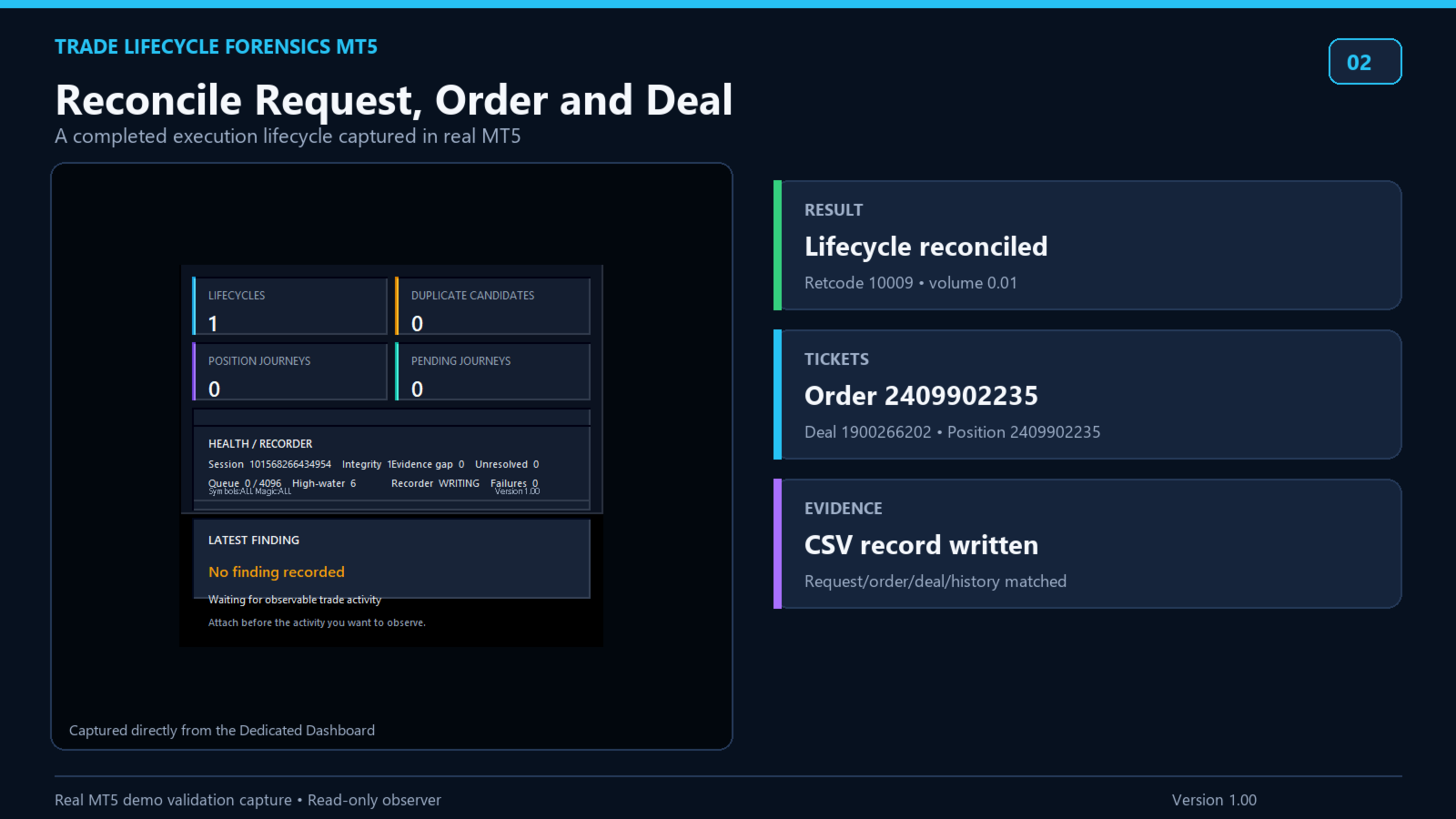
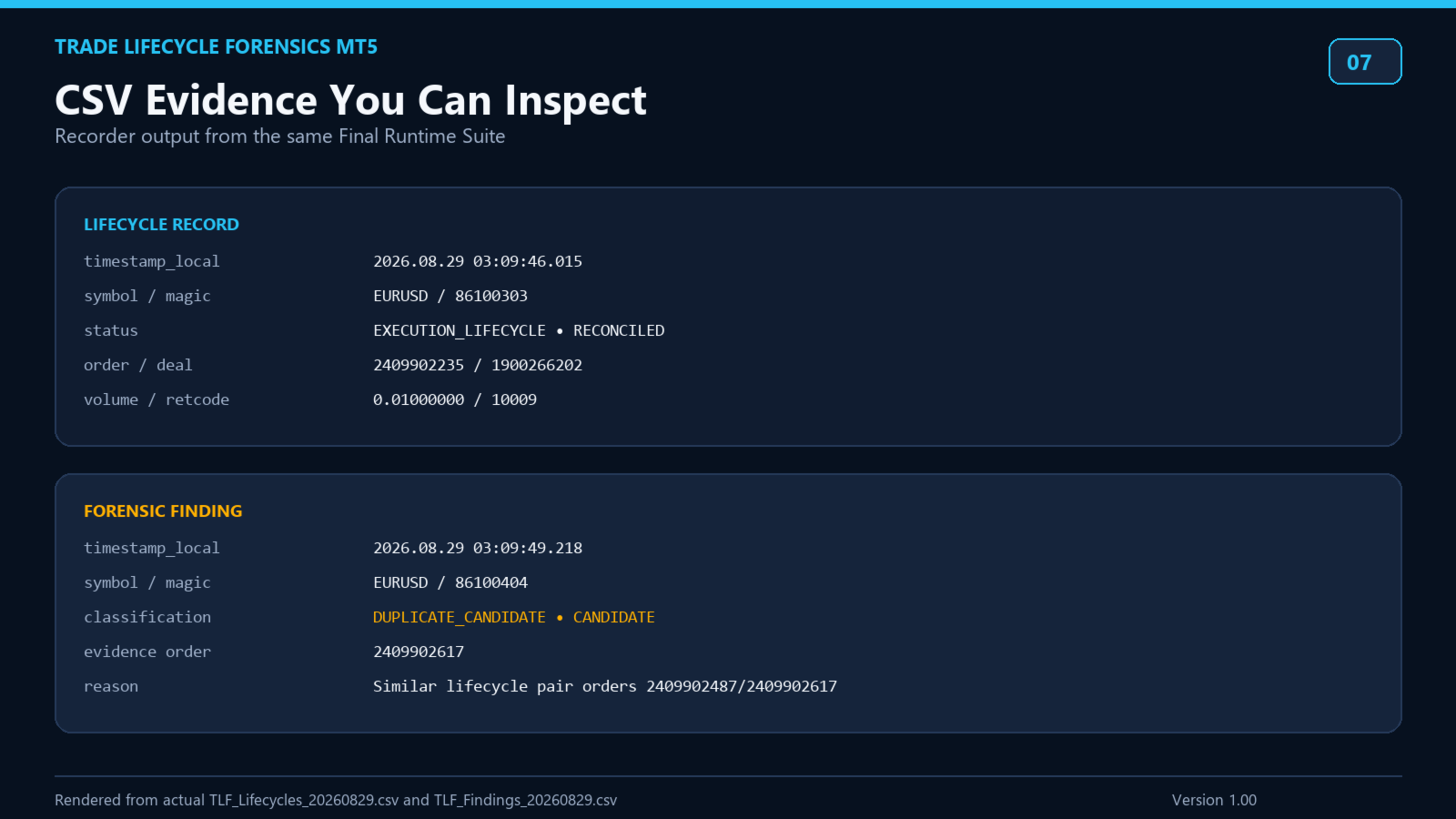
• Reconstructed execution lifecycles with related request, order, and deal tickets
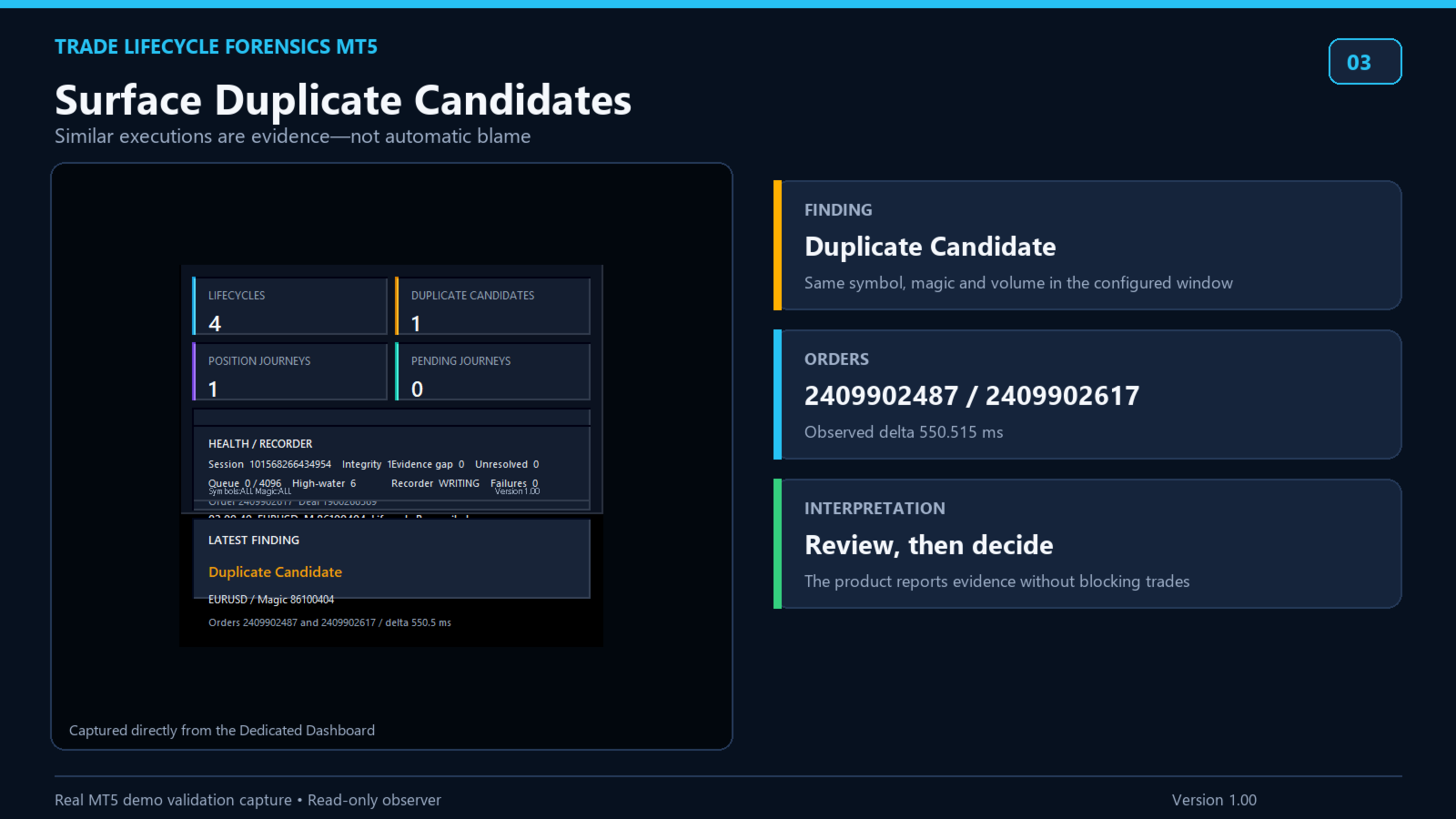
• Duplicate Candidates for similar independent lifecycles observed within the configured time window
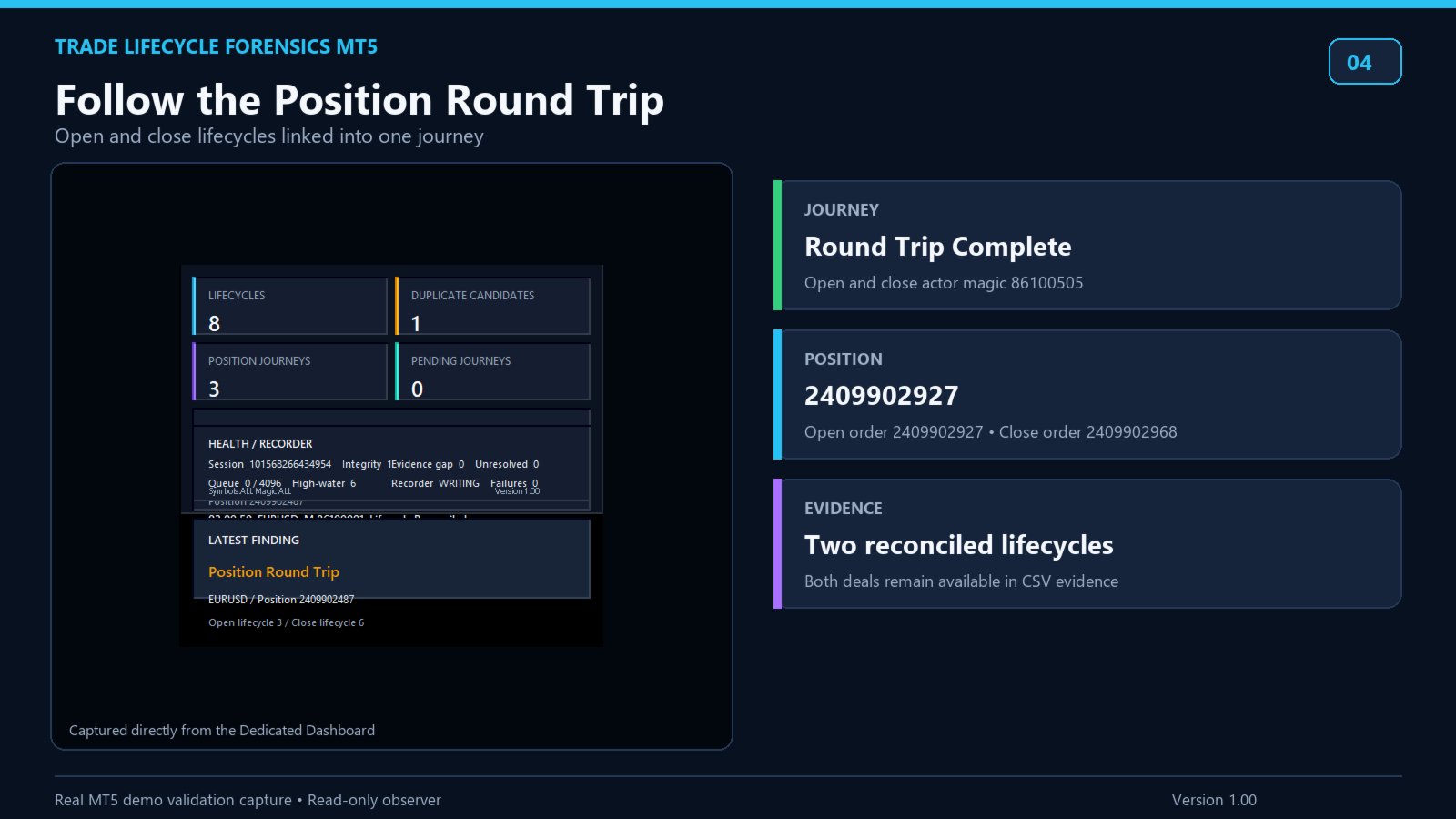
• Position Journeys for supported open-to-close relationships
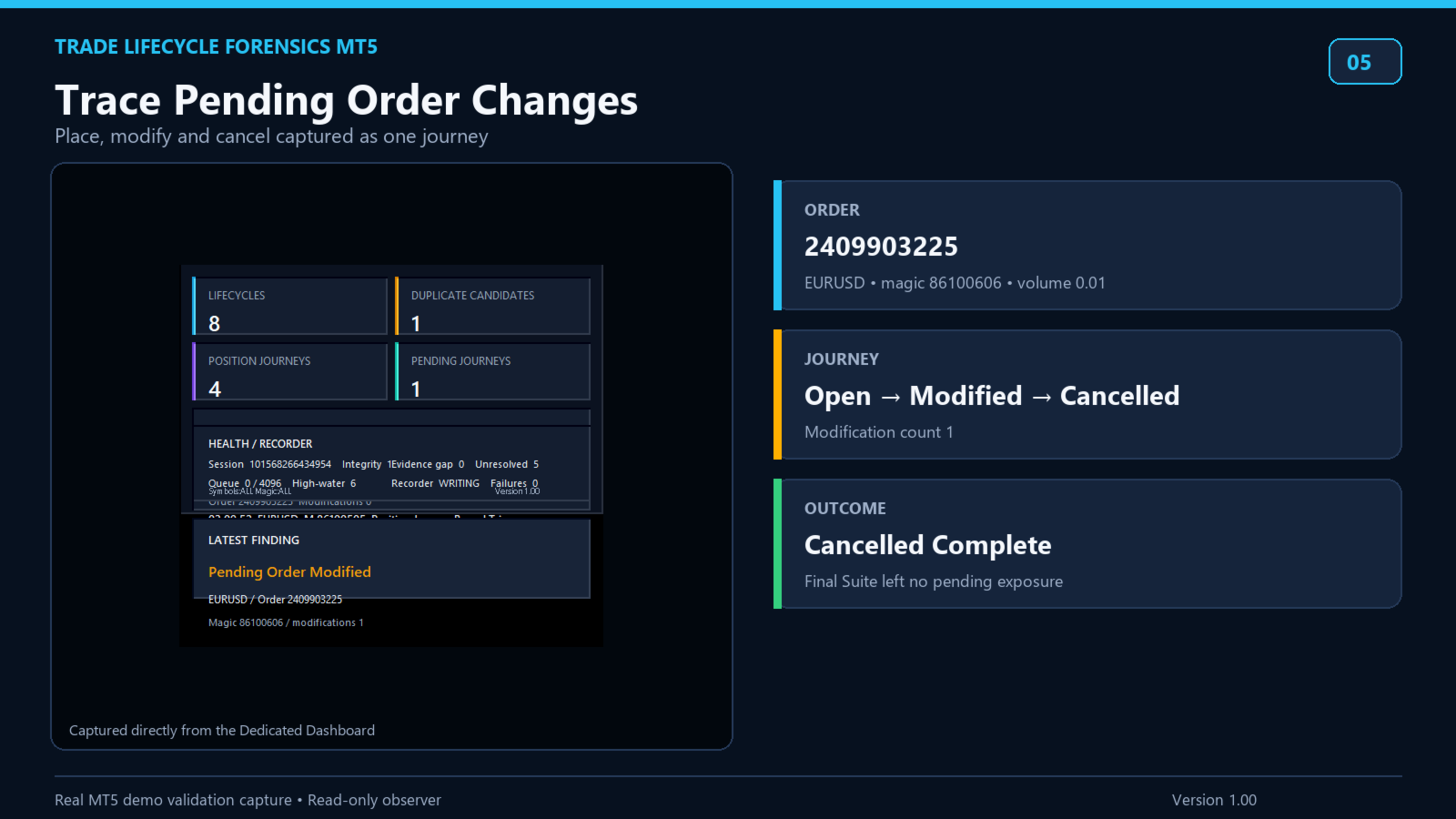
• Pending Order Journeys for placement, modification, cancellation, and observed trigger states
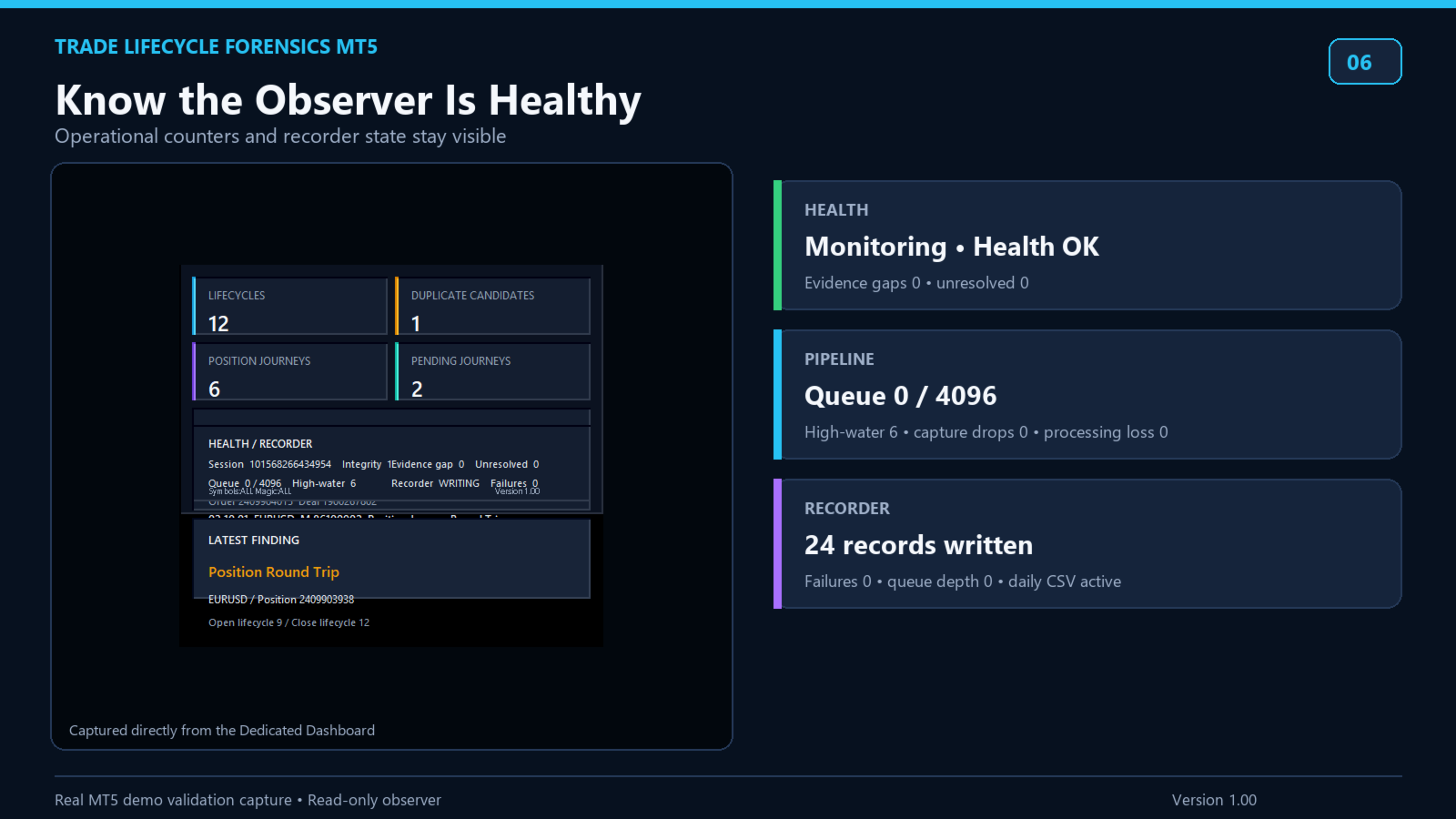
• Monitoring health, queue state, Evidence Gaps, and Recorder status
• A dedicated responsive read-only dashboard with summary cards, recent activity, latest finding, and Health / Recorder sections
• Two local daily CSV files: Lifecycles and Findings


Evidence-aware behavior

Trade Lifecycle Forensics reports only what can be supported by MT5 transaction and history evidence available after the utility has been attached.

If capture or processing evidence is lost, the integrity epoch advances and monitoring becomes DEGRADED. Affected objects are not silently classified as complete without sufficient evidence.

A Duplicate Candidate is a review prompt, not proof that a trade was accidental.

Partial fills, multiple-deal closes, reversals, and close-by structures are handled conservatively and may remain Complex or Incomplete.


Local and private

CSV data remains inside the terminal's MQL5 Files folder.

The utility uses no DLL, WebRequest, cloud service, or external network connection.

It does not record the raw account login, account holder name, computer name, or Windows user path.


Output filters

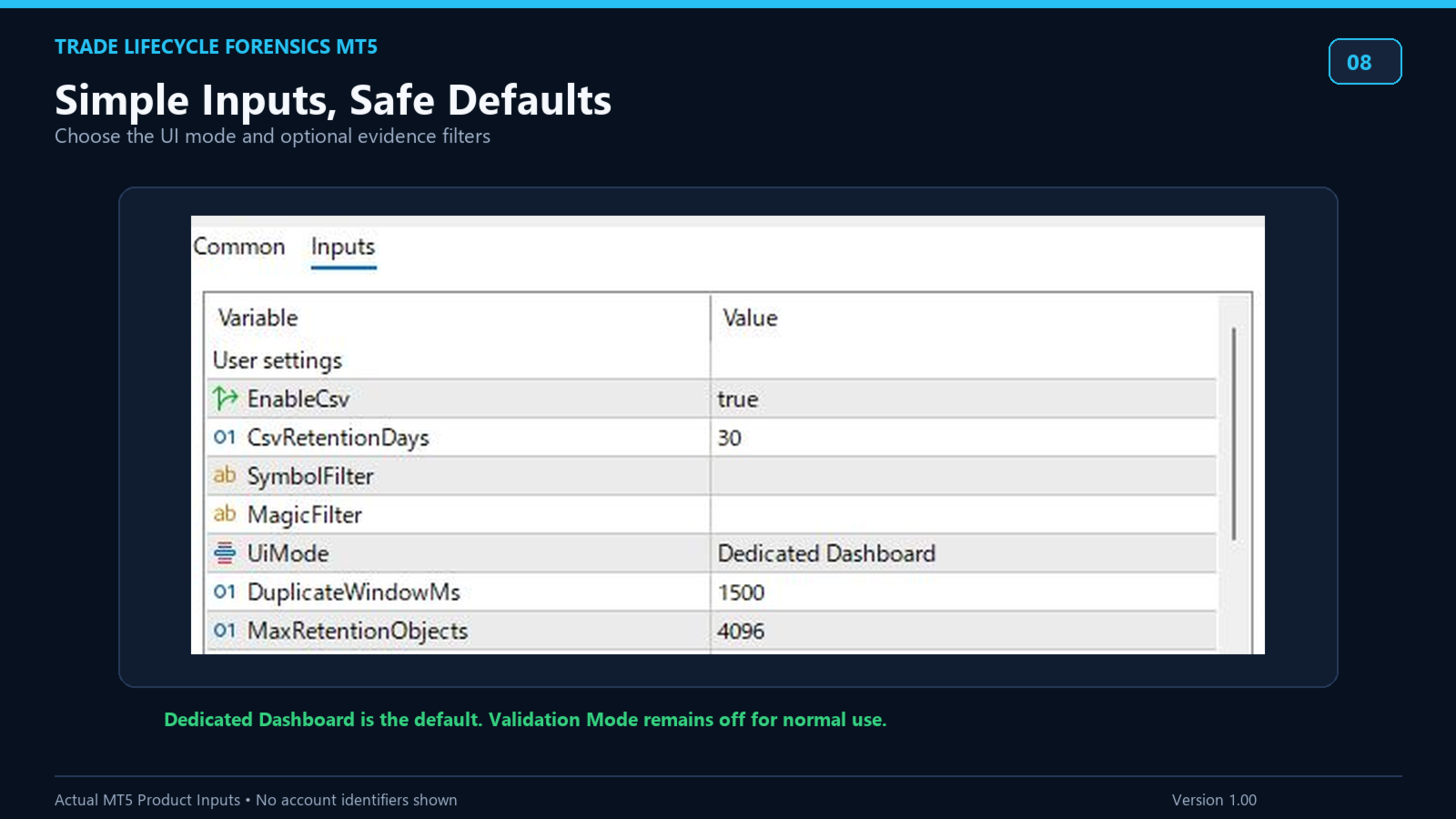
Optional comma-separated SymbolFilter and MagicFilter values limit what is displayed and written to CSV.

Capture and correlation remain account-wide, so an output filter does not remove the underlying observation path required for lifecycle reconstruction.


Getting started

1. Install the product from the MetaTrader 5 Market.
2. Attach one instance to a dedicated chart before the activity you want to observe.
3. Dedicated Dashboard is the default UI mode. Chart Overlay and Off are also available.
4. Keep EnableCsv enabled if you need local CSV files.
5. Leave SymbolFilter and MagicFilter empty to show all output.
6. Review the dashboard, Experts log, and CSV records after your trading activity occurs.


Important notes

The chart symbol and timeframe do not limit account-wide capture.

The utility can only reconstruct activity supported by evidence observed after attachment. Broker transaction behavior and available history may differ between environments.

Test the utility in your own account environment and review the documented limitations before operational use.
Önerilen ürünler
️ UMNi-CMND MT5 Remote Command & Trade Control System UMNi-CMND turns Telegram into a full remote control panel for your MetaTrader terminal. Send commands from your phone to open trades, manage positions, query account status, and receive complete trade telemetry — all without touching the platform. KEY FEATURES Full remote trade execution via Telegram Open, close, and manage positions by command Move SL/TP, set breakeven, partial close Live status, account, and position
Description:   -   Chart Time + Indicator is very simple and easy, but it can be very important to control the time before opening any manual trade. This indicator shows the time in a panel between 3 different options. Can be possible to move the panel with mouse or with fixed coordinates on the chart. Input Parameters:   -   Local Time : Enable Local Time if you want to show it (Personal Computer Time).   -   Server Time : Enable Server Time if you want to show it (Broker Time).   -   GMT Time


Devrim niteliğindeki İşlemler Zaman Yöneticisi ile işlem rutininizin kontrolünü zahmetsizce elinize alın. Bu güçlü araç, belirlenen zamanlarda emir gerçekleştirmeyi otomatikleştirerek alım satım yaklaşımınızı dönüştürür. Satın alma işleminden emir belirlemeye kadar çeşitli ticaret eylemleri için manuel müdahale olmadan kişiselleştirilmiş görev listeleri oluşturun. Trades Time Manager Kurulum ve Girdiler Kılavuzu EA hakkında bildirim almak istiyorsanız, URL'mizi MT4/MT5 terminaline ekleyin (ekran
Görsel trend okları, geçerli pivot işaretleri ve isteğe bağlı yapı alanları bulunan, MT5 için temiz ve piyasa yapısına dayalı bir trend tespit göstergesi. STS Structure Trend Detector, fiyat yapısına göre piyasa trend yönünü tespit etmek için geliştirilmiş temiz bir MetaTrader 5 göstergesidir. STS Structure Trend Detector, mevcut piyasa yapısını doğrudan grafik üzerinde takip etmek isteyen traderlar için tasarlanmıştır. Gösterge, geçerli yüksek ve düşük seviyeleri analiz eder, yapısal trend deği
ClickDesk Trader
Tommy De Jesus Rosario Santiago
ClickDesk Trader is a fast, manual trade-management desk for MetaTrader 5. Open, close and protect your trades in one click — or with keyboard hotkeys — while a clean HUD keeps your P&L, risk and market pressure in view. It does not decide for you; you stay in full control. One-click desk & hotkeys - Buy / Sell, Close All, Close Buys, Close Sells — buttons and hotkeys   (B, S, C, Q, W). - Lot stepping on the fly (L / K) with a hard lot cap. Glowing toggle tools (press again to undo) - SL/T
FREE
EasyOrder Risk Manager EasyOrder Risk Manager is a professional Risk-Based Entry panel for MetaTrader 5 designed for traders who prioritize structured execution and strict risk control. This tool allows you to define your risk as a percentage of account balance and automatically calculates the correct lot size based on your Stop Loss distance. No manual calculations. No emotional lot sizing. No risk mistakes. Key Features Risk-based position sizing (% of balance) Real-time lot calcu
Risk Manager - Equity and Trade Protection Risk Manager is a utility Expert Advisor for MetaTrader 5 that monitors open positions and account equity and closes trades when predefined risk limits are reached. The EA does not open trades. It can run alongside manual trading, signal services, or other Expert Advisors and manages risk by closing positions when defined thresholds are reached. The program operates using two independent modules. Per-trade profit and loss monitoring Account equity monit
FREE
"Manage multiple positions as a single unit with hidden targets." The Virtual Basket TP SL Manager is a professional MetaTrader 5 utility designed to automate the closing of positions based on the total profit or loss of a group of orders (a "basket"). By utilizing Virtual Levels , all Take Profit (TP) and Stop Loss (SL) targets are stored locally within the EA's memory and are not sent to the broker's server, keeping your strategy safe from stop-hunting and price manipulation. Key Features Virt
FREE
This EA automatically manages trailing stop-losses for all positions on the attached symbol using a visual control panel you interact with on the chart. Attaching the EA Load the EA onto the chart of the symbol you want it to manage (e.g., XAUUSD , EURUSD ). It only affects positions on that chart's symbol .   Using the Panel Controls When you attach the EA, a panel appears in the top-left corner: UI Element Functionality Trailing: ON/OFF  Click to enable or disable trailing logic Trailing Stop
Trade Control Center nedir Çoğu panel yalnızca kendi açtığı işlemleri ya da grafiğin sembolünü gösterir. Trade Control Center, kaynağı ne olursa olsun (elle, telefondan, başka bir terminalden, herhangi bir EA'dan) hesaptaki bütün pozisyonları ve bekleyen emirleri tek bir tabloda, bütün semboller boyunca toplar. Bir düğmeye basılana ya da bir limit ve eylem seçilene kadar hiçbir şey kapanmaz. Alım satım kararı vermez, sinyal üretmez; hesapta zaten var olanı düzenler. Panel görünümü = Trade Con
Trade on Binance in MT5! GRat_Crypto is a tool for manual and automated trading , including ANY available EA, ANY  cryptocurrency  on most popular crypto exchange Binance in the familiar MT5 environment 24/7. Features 1. ALL instruments of the most popular crypto exchange  Binance . 2. The ability to place ANY type of order available in MT5, both market and pending, to modify orders and positions, to delete orders and close positions (even partially), to set trailing stop and trailing profit. 3
Smart Risk Manager – Master Your Trades with Precision and Confidence Take complete control of your manual trading with Smart Risk Manager , a professional all-in-one trade and risk management Expert Advisor for MetaTrader 5 . Designed for traders who value speed, precision, and capital protection, it simplifies every step of trade execution while ensuring your risk remains under control. Whether you trade Forex, Gold, Indices, or Cryptocurrencies , Smart Risk Manager helps you execute trades w
Basket EA MT5
Juvenille Emperor Limited
5 (7)
Basket EA MT5 , güçlü bir kâr alma aracı ve kapsamlı bir hesap koruma sistemini basit ve kullanımı kolay bir çözümde birleştirir. Ana amacı, tüm açık pozisyonları tek tek değil, bir sepet (basket) olarak yöneterek, hesabınızın toplam kâr ve zararını tamamen kontrol altında tutmaktır. EA; sepet düzeyinde take profit, stop loss, break even ve trailing stop gibi özellikler sunar. Bunlar, bakiye yüzdesi, sabit bir para birimi değeri ya da yönetilen işlemlerin ortalama pip hedefi olarak ayarlanabilir
Overview QuantumEdge Oscillator is a professional-grade trading indicator that combines advanced momentum analysis with sophisticated trend detection algorithms. This 30-day trial version provides full access to all features, allowing you to thoroughly test its capabilities in live market conditions before making a purchase decision. Key Features Dual-Signal System : Combines RSI moving average with smoothed ATR-based volatility bands Multi-Timeframe Analysis : Built-in support for higher timefr
FREE
SwapSort
Dustin Ricardo Pierenz
Swap Sort is an MQL5 script designed for traders and investors to streamline their decision-making process by efficiently analyzing and organizing swap fees for financial instruments. This tool is ideal for professionals who want to optimize their trading strategies by minimizing costs and maximizing profits. Swap fees can significantly impact the success or failure of a trade, as high fees can erode profits over time, while favorable swaps can enhance returns for positions held overnigh. Wit
FVG Zone
Robby Suhendrawan
Fair Value Gap (FVG) Free Edition - Automated Smart Money Footprints In the ICT (Inner Circle Trader) and Smart Money Concepts (SMC) methodology, a Fair Value Gap (FVG)—also known as an Imbalance—occurs when the price moves with extreme momentum, leaving behind a void of liquidity. These unfilled gaps act as magnets for future price action, making them the most high-probability retracement and entry zones for professional traders. Pro Version Link :    https://www.mql5.com/en/market/product/1476
FREE
Time Candle with Sound Alert This indicator will be display the time left candle Features : 1. Multi Time Frames, Multi Pairs 2. Time Left 2. Position dynamic with Bid Price or Edge of Chart Screen 3. Font Size and Color 4. Display Current Spread, Maximum Spread and Minimum Spread Note: Maximum and Minimum Spread will be reset when you change TF Tested On MT5 Version 5 Build 5200 If you want the source code, just PM me
FREE
Control Trading Support And Resistance Es un indicador independiente del TimeFrame que permite proyectar niveles más relevantes del mercado en función del plazo de tiempo de la operativa. Los colores del indicador están escogidos para diferenciar entre los diferentes tipos de niveles y destacar a los más relevantes. Este indicador permite visualizar en un mismo gráfico los posibles objetivos relevantes que los diferentes traders pueden emplear siguiendo diferentes tipos de operativas en funció
Dynamic Pivot Zones
Vincent Jose Proenca
Dynamic Pivot Zones – Your Level Assistant on the Chart This indicator is a bit like a GPS for your trading . It shows you where the price likes to hang out, where it gets nervous, and where it flies through. No more calculating pivots by hand or guessing support and resistance levels. What it does: Automatically plots H1, H4, and D1 pivots . Shows support and resistance zones : R1, R2, S1, S2. Lines are colored and easy to read , so you can instantly see what’s hot or cold. Why you’ll love it:
FREE
TREND SCANNER Stay With the Trend. Trade With Confidence. Trend Scanner analyzes the market to determine trend direction and strength using a combination of technical indicators. The system combines EMA 150/365, EMA 9/21, RSI, MA to confirm market direction and filter out weak or sideways conditions. Key Features: Bullish and bearish trend detection; EMA 150/365 and EMA 9/21 analysis; RSI confirmation; MACD momentum analysis; ️ ADX ranging-market filter; Trend strength measur
FREE
An extended version of the indicator for visualizing the time ranges of key trading sessions: Asian, European and American. The main advantage of this indicator is the automatic construction of a price profile for a trading session. The indicator has the functionality to set the start and end time of each trading session, as well as automatically determine the time zone of the trading server. The indicators include the ability to work with minimal CPU usage and save RAM. In addition, the option
FREE
The   Close script   is a simple tool that allows traders to close their trades by three methods. Just run the script and choose the close method. Closing methods Symbol  - Allows closing all open trades for a specific symbol. All_Trades  - Allows closing all open trades. Magic_Number  - Allows closing all open trades according to their magic number. Recommendation AutoTrading functions must be activated.  If the AutoTrading function is disabled, the script will not work. EA should be stopped.
FREE
Session Time Monitor shows the Sydney, Tokyo, London and New York trading sessions directly on your chart. The GMT offset of your trade server is detected automatically, so there is no offset parameter to configure. Each region is handled with its own daylight saving rule: European, United States and Southern Hemisphere schedules all change on different dates, and the display follows each of them independently. The panel shows the server time, GMT, your local time, the detected server offset,
FREE
Burst Scalp - Professional Trading Assistant EA Transform Your Trading Workflow with AI-Powered Precision Burst Scalp is a comprehensive trading management tool designed for active traders who demand precision, speed, and control. Whether you're scalping indices, trading forex pairs, or managing swing positions, this EA streamlines your entire trading process from analysis to execution. Key Features Smart Position Sizing Visual Pip Measurement : Click two points on your chart to measure exact
This tool will assist all those who trade the forex market manually. It will help them in a sense that it will calculate the required margin in order to initiate a trade. This calculator is so simple to use that a  that the user only inputs only 2 pieces of information. which are   Price   and   Lot size   the trader wishes to take. All other information needed to calculate the calculator will work it out by itself. It will run or calculate  on the current opened chart. As the name suggest it's
Introducing a compact and handy panel for watching the market and estimating multicurrency price movements. It shows main parameters for a user defined group of symbols in the form of a table. Its functionality is checked on Forex and FORTS. The following information is displayed: Financial instrument name . Last price value - can be turned off for off-exchange markets. Ask price value . Bid price value . Spread size in pips. Stop level in pips - can be turned off for off-exchange markets. Chang
SnR Engine
Muhammad Tamimul Huda
SnR Engine Basically, this is a Support and Resistance indicator like most others that use fractals to determine support and resistance levels. The difference is that this indicator determines whether a support or resistance level has been broken based on ATR. Levels that have been broken will become “dead levels” and will be shown with dashed lines. Levels that have many rejections and fail to be broken will have increasingly thicker lines. For effective use, you need to understand the charac
FREE
MT5toTLGRM
Fernando Morales
4.2 (5)
Do not use Windows 7 with this EA MT5toTLGRM EA only sends text messages to a Telegram group or channel of your choice. The messages are customizable to show information about any trading activity in the account. Also it shows a daily PnL report. Several instances of this EA can be used simultaneously in the same MT5 terminal for sending messages to different Telegram group/channel but ensure that each one has a different number in [B13] setting. Following are the features of MT5toTLGRM EA send
FREE
Notify To Telegram MT5 Expert Advisor will send notifications via Telegram when orders are opened/modified/closed on your MetaTrader 5 account. Send message to person, channel or group chat.  Easy to customize message.  Support custom message for all languages Support full Emoji.  Parameters Telegram Bot Token - create bot on Telegram and get token. Telegram Chat ID    - input your Telegram   user ID,   group /   channel ID, use comma to input multi chat ID as chat_id_1, chat_id_1 Magic number f
Hard Scalping Assistant is a semi-automatic Expert Advisor for MetaTrader 5 created for traders who want to keep making their own decisions, but with a much more advanced, organized and professional execution. It does not enter the market on its own: you choose the direction, define the trade idea and adjust the zone directly on the chart, while the assistant automatically calculates the risk, lot size and the full execution structure. With just a few clicks, you can prepare BUY or SELL trades
FREE
Bu ürünün alıcıları ayrıca şunları da satın alıyor
Trade Assistant MT5
Evgeniy Kravchenko
4.41 (216)
It helps to calculate the risk per trade, the easy installation of a new order, order management with partial closing functions, trailing stop of 7 types and other useful functions. Additional materials and instructions Installation instructions - Application instructions - Trial version of the application for a demo account Line function -   shows on the chart the Opening line, Stop Loss, Take Profit. With this function it is easy to set a new order and see its additional characteristics bef
Trade Manager EA’ye hoş geldiniz! Ticaretin daha sezgisel, hassas ve verimli hale gelmesi için tasarlanmış nihai risk yönetim aracı ile tanışın. Bu sadece bir emir verme aracı değil; ticaret planlaması, pozisyon yönetimi ve risk kontrolü için kapsamlı bir çözüm. İster yeni başlayan bir yatırımcı olun, ister deneyimli bir trader ya da hızlı emir gerektiren bir scalper, Trade Manager EA ihtiyaçlarınıza uyum sağlar ve forex, endeksler, emtialar ve kripto paralar dahil tüm piyasalarda esneklik sunar
================================================================================ POC BREAKOUT - V20.72. Full Professional Grade Toolkit ================================================================================ POC Breakout is a full MetaTrader 5 trading dashboard for discretionary traders who want breakout signals, Point of Control (POC) context, volume profiles, order flow, market structure, news, alerts, and advanced trade planning in one professional workspace. Attached directly to you
TradePanel MT5
Alfiya Fazylova
4.88 (167)
Trade Panel, çok işlevli bir ticaret asistanıdır. Uygulama, manuel ticaret için 50'den fazla ticaret fonksiyonu içerir ve çoğu ticaret görevini otomatikleştirmeyi mümkün kılar. Uygulama talimatları + video talimatları: https://www.mql5.com/en/blogs/post/756482 Demo hesabı için uygulamanın deneme sürümü: https://www.mql5.com/en/blogs/post/750865 Uygulamayı nasıl kurulur: https://www.mql5.com/en/blogs/post/756239 Uygulamayı görsel modda nasıl test edilir: https://www.mql5.com/en/blogs/post/770277
Beta Sürümü Telegram to MT5 Signal Trader resmi alfa sürümüne neredeyse hazır. Bazı özellikler hâlâ geliştirilmekte olup küçük hatalarla karşılaşabilirsiniz. Sorun yaşarsanız lütfen bildirin, geri bildiriminiz yazılımın herkes için gelişmesine yardımcı olur. Telegram to MT5 Signal Trader , Telegram kanallarından veya gruplarından gelen işlem sinyallerini otomatik olarak MetaTrader 5 hesabınıza kopyalayan güçlü bir araçtır. Herkese açık ve özel kanalları destekler ve birden fazla sinyal sağlayıc
25% discount on the release of the tool: only for the next 3 buyers Send a message to receive a demo version. AstroTrade Trading Assistant AstroTrade is a comprehensive multi-functional trading utility developed for the MetaTrader 5 platform. It integrates essential tools for trade execution, risk management, and technical monitoring into a single unified interface. The application is designed to assist traders in managing their daily operations through a visual and structured environment. Vi
Telegram to MT5 Multi-Channel Copier , Telegram kanallarınızdaki alım-satım sinyallerini doğrudan MetaTrader 5'e otomatik kopyalar. Bot yok, tarayıcı uzantısı yok, elle kopyalama yok. Sinyal Telegram'a düşer ve EA birkaç saniye içinde terminalinizde işlemi açar. Ürün iki bileşenden oluşur: Telegram kanallarınızı dinleyen bir Windows uygulaması ve sinyalleri MT5 terminalinizde yürüten bu Expert Advisor. MT4 sürümü de mevcuttur   buradan . Kurulum kılavuzu ve uygulama indirme:   https://www.mql5.c
Anchor: The EA Manager Your EAs manage their own trades. Anchor manages the account around them. Anchor gives you one place to control your EAs, manage risk and decide when trading is allowed. Any EA, any vendor, any broker or symbol. No source-code changes required. The Problem Most EAs only know what they are doing. They cannot see when another EA is already trading, when several EAs open and are stacking risk or when the account has reached your loss limit. Even using just one EA, it may not
Signal TradingView to MT5 Pro Automator TradingView ve MetaTrader 5 arasında anında profesyonel uygulama TradingView alarmları ile MT5'teki gerçek uygulama arasındaki en güçlü iletişim köprüsüyle ticaret stratejinizi otomatikleştirin. Hız, esneklik ve kusursuz risk yönetimi talep eden yatırımcılar için tasarlanan bu Uzman Danışman (Expert Advisor), herhangi bir alarm mesajını hassas bir piyasa (market) veya limit emrine dönüştürür. GÜÇLÜ YÖNLER VE AVANTAJLAR Evrensel Ayrıştırma Motoru (Tescilli)
Exp COPYLOT CLIENT for MT5
Vladislav Andruschenko
3.97 (35)
MetaTrader 5 için profesyonel işlem kopyalayıcı MetaTrader için hızlı, profesyonel ve güvenilir bir işlem kopyalayıcı . COPYLOT , MT4 ve MT5 terminalleri arasında Forex işlemlerini kopyalamanıza olanak tanır ve Hedge ile Netting hesaplarını destekler. COPYLOT MT5 sürümü şunları destekler: - MT5 Hedge → MT5 Hedge - MT5 Hedge → MT5 Netting - MT5 Netting → MT5 Hedge - MT5 Netting → MT5 Netting - MT4 → MT5 Hedge - MT4 → MT5 Netting MT4 sürümü Tam açıklama + DEMO + PDF Nasıl satın alınır Nasıl kurul
The product will copy all telegram signal to MT5 ( which you are member) , also it can work as remote copier.  Easy to set up, copy order instant, can work with almost signal formats, image signal,  s upport to translate other language to English Work with all type of channel or group, even channel have "Restrict Saving Content", work with  multi channel, multi MT5 Work as remote copier: with signal have ticket number, it will copy exactly via ticket number. Support to backtest signal. How to s
HINN MAGIC ENTRY – the ultimate tool for entry and position management! SIMPLE. FASTEST. INTUITIVE. MAX AUTOMATED. Place orders by selecting a level directly on the chart! full description   ::  demo-version  :: 60-sec-video-description Key features: - Market, limit, and pending orders - Automatic lot size calculation - Automatic spread and commission accounting - Unlimited partitial take-profits  - Breakeven and trailing stop-loss and take-profit  functions - Invalidation leves - Intuitive, a
Power Candles Strateji Tarayıcısı - Kendi Kendini Optimize Eden Çoklu Sembol Kurulum Bulucu Power Candles Strateji Tarayıcısı , Power Candles göstergesini çalıştıran aynı kendinden optimize edici motoru, Piyasa İzleyicinizdeki her sembol üzerinde yan yana çalıştırır. Tek bir panel, şu anda istatistiksel olarak hangi sembollerin işlem yapılabilir olduğunu, her birinde hangi stratejinin kazandığını, en uygun Stop Loss / Take Profit çiftini gösterir ve yeni bir sinyal geldiği anda size bildirim gön
Farmed Hedge Yield Farming | All Markets (Manual - Hybrid - Semi/Automated EA) VERIFIED TRADING RESULTS - Farmed Hedge Yield Axi Copy:  https://www.mql5.com/en/signals/2356376 - Farmed Hedge Yield Exn Copy:   https://www.mql5.com/en/signals/2356404 - Farmed Hedge Yield V Copy:  https://www.mql5.com/en/signals/2357156 * Before purchasing, please feel free to send me a message if you have any questions about the product or setup. ** After purchase,  Contact me via private message to receive t
Trade Assistant 38 in 1
Makarii Gubaydullin
4.91 (23)
Çok Fonksiyonlu Araç: Lot Hesaplayıcı, Grid Emirleri, R/R Oranı, İşlem Yöneticisi, Arz ve Talep Bölgeleri, Fiyat Hareketi ve çok daha fazlası Demo Sürüm   |   Kullanım Kılavuzu İşlem Asistanı   strateji test cihazında çalışmaz :   Demo Sürümü BURADAN indirerek   aracı test edebilirsiniz. Herhangi bir sorunuz / iyileştirme fikriniz / bulunan bir hata için benimle iletişime geçin MT4 sürümüne ihtiyacınız varsa burada mevcuttur İşlem   sürecinizi basitleştirin, hızlandırın ve otomatikleştirin. Sta
Premium Trade Manager - İçine Koç Yerleştirilmiş İşlem Paneli Premium Trade Manager , grafiğinizin içine bir trading koçu yerleştirir; altında tam bir yürütme motoru çalışır. İşlemi her zamanki gibi kurun, ardından yapay zeka trading koçunuz Max, o kurulumu tam olarak okusun ve canlı hesabınıza göre taahhüt etmeden önce size net bir değerlendirme sunsun: stop disiplinli bir yaklaşıma uyuyor mu, risk büyüklüğü makul mü, yüksek etkili bir haber dakikalar sonra mı geliyor, prop firm limitinize yakl
Timeless Charts
Samuel Manoel De Souza
5 (8)
Timeless Charts, profesyonel yatırımcılar için hepsi bir arada bir trading aracıdır. Saniye Grafikleri ve Renko gibi özel grafik türlerini, Footprints , Clusters , Hacim Profilleri , VWAP çalışmaları ve gelişmiş piyasa analizi sağlayan sabitlenmiş analiz araçlarıyla gelişmiş emir akışı analiziyle birleştirir. İşlem ve pozisyon yönetimi, entegre işlem yönetim paneli aracılığıyla doğrudan grafik üzerinden gerçekleştirilirken, Market Replay ve Sanal Hesaplar trading becerileri ve stratejileri üzeri
News Filter EA: Advanced Algo Trading Assistant News Filter EA is an advanced algo trading assistant designed to enhance your trading experience. By using the News Filter EA , you can integrate a Forex economic news filter into your existing expert advisor, even if you do not have access to its source code. In addition to the news filter, you can also specify trading days and hours for your expert. The News Filter EA also includes risk management  and equity protection features. MT4 Version Ma
Quant AI Agents are independent trading Expert Advisors. Instead of trading using a fixed strategy like other conventional EAs, Quant AI Agents   is a   multi-agent AI trading framework   that turns natural-language strategy prompts into live.  WANT THE SAME RESULTS AS MY LIVE SIGNAL?   Use the exact same brokers I do:   IC MARKETS , IC TRADING   .  Unlike the centralized stock market, Forex has no single, unified price feed.  Every broker sources liquidity from different providers, creating un
Footprint Chart Pro — Professional OrderFlow EA for MetaTrader 5 Version 6.34 | Professional tool for real traders | Institutional-Grade Visualization DEMO USERS - PLEASE SELECT EVERY TICK / REAL TICK WHEN TESTING AND YOU HAVE DOWNLOADED HISTORICAL DATA. IF YOU SEE A WAITING SCREEN AND IT IS NOT DOWNLOADING, IT MEANS YOU HAVE LOW HISTORICAL DATA. TRY 1 MIN AND 5 MIN FIRST ON 1 DAY DATA. ONE DAY DATA SHOULD BE THE NEWEST AND MOST CURRENT DATE. PLEASE WAIT UNTIL THE MARKET HAS ROLLED OVER PERIOD.
Trade Copier Ultimate
Janitha Sandaruwan Amaradasa Wickramasingha Arachchilage
5 (5)
Trade Copier Ultimate - Telegram to MT5 Signal Copier Trade Copier Ultimate automatically copies Telegram trading signals into MetaTrader 5. The EA can read signal messages, detect the symbol, order type, entry price, Stop Loss, Take Profit levels and selected update commands, then execute or manage the trade in MT5 using your lot and risk settings. It is more than a basic Telegram to MT5 copier. TCU also supports Bot API and user-account Bridge workflows, Discord signal routing, local MT5 to MT
Bu ürün, haber saatlerinde tüm uzman danışmanları ve manüel grafikleri filtreler, böylece manüel ticaret kurulumlarınızı veya diğer uzman danışmanlar tarafından girilen işlemleri yok edebilecek ani fiyat dalgalanmaları konusunda endişelenmenize gerek kalmaz. Bu ürün, herhangi bir haber yayınlanmadan önce açık pozisyonlarınızı ve bekleyen emirlerinizi yönetebilen tam bir sipariş yönetim sistemi ile birlikte gelir.   The News Filter'ı   satın aldığınızda, gelecekteki uzman danışmanlar için yerleşi
YuClusters
Yury Kulikov
4.93 (43)
Attention: You can view the program operation in the free version  YuClusters DEMO .  YuClusters is a professional market analysis system. The trader has unique opportunities to analyze the flow of orders, trade volumes, price movements using various charts, profiles, indicators, and graphical objects. YuClusters operates on data based on Time&Sales or ticks information, depending on what is available in the quotes of a financial instrument. YuClusters allows you to build graphs by combining da
MetaTrader 5 için Trading Panel — grafik ve klavyeden profesyonel tek tıkla işlem kontrolü Aktif traderlar için geliştirilmiş güçlü bir Trading Panel; işlemleri standart MetaTrader arayüzüne göre çok daha hızlı açmanıza, yönetmenize ve kapatmanıza yardımcı olur. Bu çözüm; pozisyonları, bekleyen emirleri, toplam kârı ve işlem yürütmesini tek bir profesyonel çalışma alanında kontrol etmek isteyen kullanıcılar için tasarlanmıştır. Bu sadece sıradan bir yardımcı araç değildir. MetaTrader 5 için ger
Ultimate Extractor - Professional Trading Analytics for MT5 *****this is the local HTML version of Ultimate Extractor. !!!!!it is not compatible with Cloud!!!! For the online version please reach out to me directly****** Ultimate EA manager also now available when you use cloud pro and above for free!! Ultimate Extractor transforms your MetaTrader 5 trading history into actionable insights with comprehensive analytics, interactive charts, and real-time performance tracking. What It Does Automa
SMC Trade Pilot MT5 Smart Money Concepts trader'ları için yarı otomatik trading asistanı. Grafik ekran görüntüsü içeren sinyalleri doğrudan Telegram üzerinden alın, ardından tek dokunuşla işlemi yerleştirin. Bilgisayardan uzakta olsanız bile pozisyonlarınızı telefonunuzdan yönetin. Çözdüğü sorun Smart Money setup'ları sizi beklemez. Order Blocks ve Liquidity Sweeps, Londra açılışında, New York açılışında veya Asya seansının ortasında oluşur ve genellikle siz iş yerinde, toplantıda veya ekrandan
Grid Manual MT5
Alfiya Fazylova
4.73 (22)
Grid Manual, sipariş ızgarasıyla çalışmak için kullanılan bir ticaret yardımcı programıdır. Yardımcı program evrenseldir, esnek ayarlara ve sezgisel bir arayüze sahiptir. Sadece kayıpların ortalaması yönünde değil, aynı zamanda kazanç artışı yönünde de bir emir ızgarası ile çalışır. Tüccarın bir emir ızgarası oluşturmasına ve eşlik etmesine gerek yoktur, bu yardımcı programı yapacaktır. Emri açmanız yeterlidir ve Grid manual otomatik olarak ona bir emir ızgarası oluşturacak ve kapanana kadar ona
Riskinizi otomatik olarak hesaplarken işlemlere hızlı bir şekilde girip çıkmanıza yardımcı olacak Ticaret Yöneticisi. Aşırı Ticaret, İntikam Ticareti ve Duygusal Ticaretten korunmanıza yardımcı olacak özellikler içerir. İşlemler otomatik olarak yönetilebilir ve hesap performans ölçümleri bir grafikte görselleştirilebilir. Bu özellikler, bu paneli tüm manuel yatırımcılar için ideal kılar ve MetaTrader 5 platformunun geliştirilmesine yardımcı olur. Çoklu Dil desteği. MT4 Sürümü  |  Kullanım Kılavu
Risk Manager Pro MT5 is an account protection Expert Advisor for traders who want strict risk control inside MetaTrader 5. The utility monitors your account equity, daily and weekly results, drawdown, open positions, trade count, consecutive losses, and trading hours. When a configured limit is reached, it can automatically close positions, cancel pending orders, stop other EAs, send notifications, or close the terminal. Instead of relying on discipline during a stressful trading session, you de
News filter, equity guard & session control for all your EAs — one tool, full protection — Free Demo | Latest Updates v26 (August 2026) is the biggest update ever: the EA now protects your entire account — every chart, no helper needed — and the indicator gives any chart its own protection rules (news, loss limits, trading times and more). Existing setups keep working unchanged until you switch; the legacy Chart-Group mode is removed with v27. Versions are now year.month (26.08 = August 2026). U
Yazarın diğer ürünleri
Local Trade Sync Copier is a local trade synchronization utility for copying trading activity between MetaTrader 5 accounts running on the same computer or VPS. It supports both one-to-one synchronization and one-to-many synchronization, allowing one Source account to distribute its trading activity to multiple independent Receiver accounts. This product does not generate trading signals or trading strategies. Account A acts as the Source, while one or more Account B terminals act as Receiver
History Integrity Scanner MT5 See what closed-bar history your current MT5 terminal actually has available before you rely on it for analysis or development. History Integrity Scanner MT5 is a read-only utility that scans a configurable symbol and timeframe matrix directly inside the terminal. Its primary purpose is terminal-native, direct, read-only, multi-symbol/timeframe closed-bar history inspection. It summarizes synchronization, requested versus copied bars, coverage dates, timestamp
Chart Context Keeper MT5 Change timeframe without losing the historical moment you were studying. MT5's fixed chart position helps with zooming, but a timeframe change can move the chart away from the date under review. Chart Context Keeper adds the missing continuity: attach it once, then keep using MT5's normal timeframe controls. Why it is useful • Keeps the captured historical time visible after a timeframe change • Adds no dashboard, recurring button, modal, or confirmation • Runs as
Chart View Slots MT5 Chart View Slots MT5 adds a compact visual-view dock directly to an MT5 chart. Switch among Focus, Trade and Review appearances without opening Chart Properties, loading a template or moving to a separate dashboard. Capture your own appearance into any slot, apply it to the active chart or all open charts, and use Undo to restore the appearance that existed immediately before the last apply. Main workflow 1. Attach the Indicator to one chart. 2. Click Focus, Trade or
Filtrele:
Değerlendirme yok
Değerlendirmeye yanıt