
Virtual Basket TP SL Manager
- Yardımcı programlar
- Sürüm: 1.0

"Manage multiple positions as a single unit with hidden targets."
The Virtual Basket TP SL Manager is a professional MetaTrader 5 utility designed to automate the closing of positions based on the total profit or loss of a group of orders (a "basket"). By utilizing Virtual Levels, all Take Profit (TP) and Stop Loss (SL) targets are stored locally within the EA's memory and are not sent to the broker's server, keeping your strategy safe from stop-hunting and price manipulation.
Key Features
-
Virtual Take Profit & Stop Loss: Hide your exit points from the broker. This is essential for accounts with dynamic spreads or brokers with restrictive stop-level policies.
-
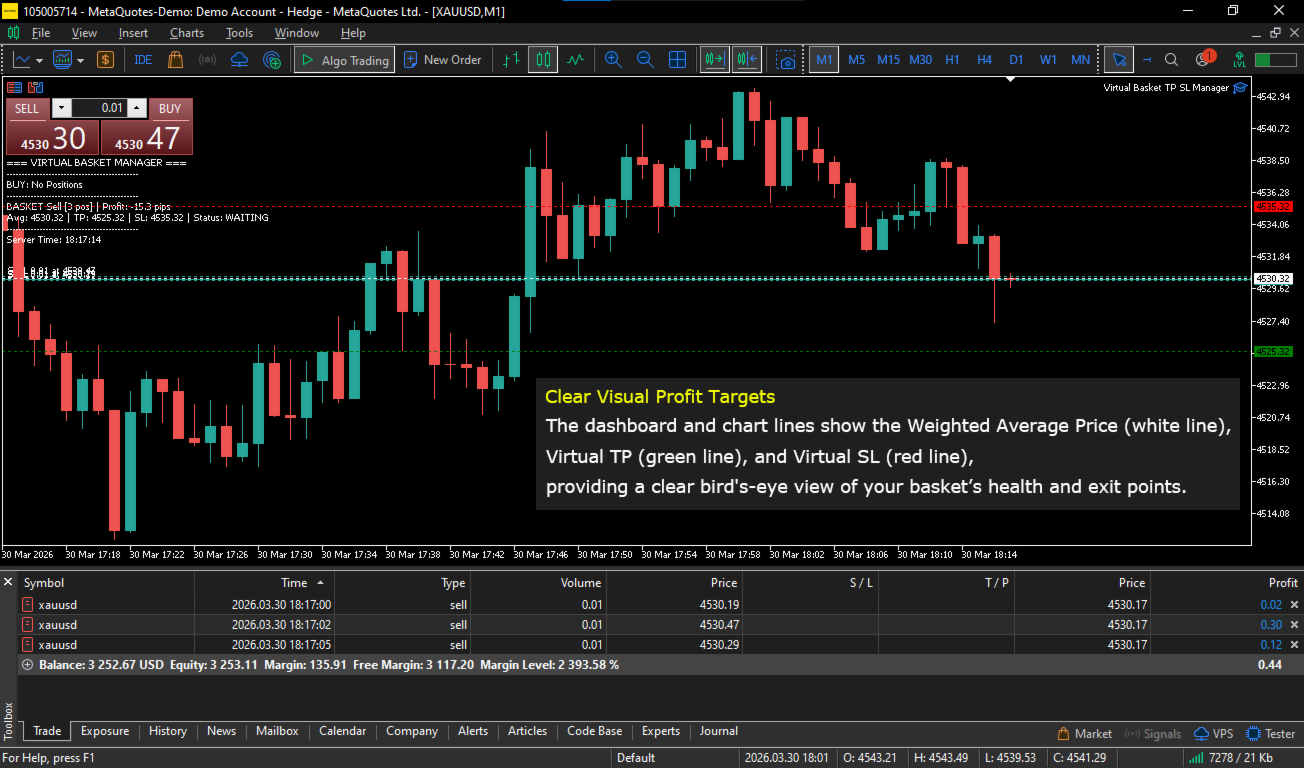
Weighted Average Calculation: The EA automatically calculates the volume-weighted average price of all positions (BUY and SELL baskets are managed separately). This ensures 100% accuracy even when using different lot sizes (layering/averaging).
-
Independent Basket Management: Manages BUY baskets and SELL baskets independently without interference.
-
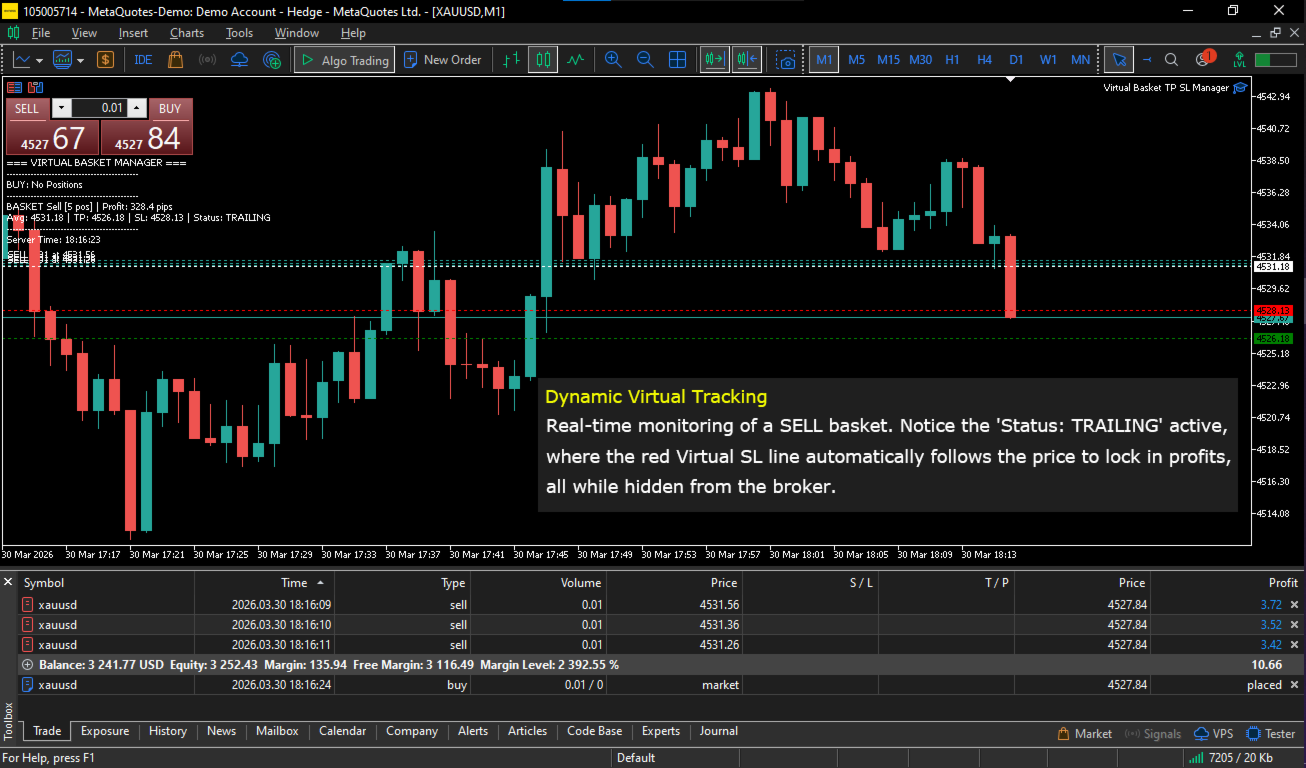
Advanced Trailing Stop: A smart trailing mechanism to lock in gains. Once profit reaches a user-defined threshold, a virtual SL begins to shadow the price.
-
Breakeven Lock: An optional feature to move the virtual SL to the average entry price (Breakeven) as soon as the trailing is activated, ensuring a profitable basket doesn't turn into a loss.
-
Real-time Dashboard: A clean on-chart information panel displaying the number of positions, average price, profit in pips, and current target status.
-
Magic Number Support: Can be configured to manage all manual trades, or only trades generated by a specific Expert Advisor.
Input Parameters
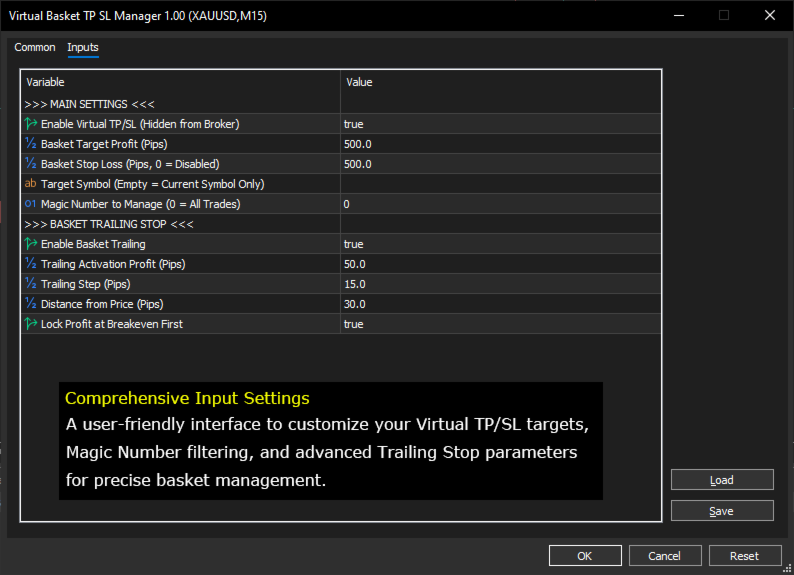
>>> MAIN SETTINGS <<<
-
UseVirtualTPSL: Enable to use internal automated closing (Virtual mode).
-
TargetProfitPips: Desired profit target (in Pips) for the entire basket.
-
StopLossPips: Maximum loss limit (in Pips). Set to 0 to disable.
-
TargetSymbol: Leave empty to manage only the current chart's symbol, or enter a specific symbol name (e.g., "EURUSD").
-
MagicNumber: Set to 0 to manage all positions (including manual). Set to a specific number to manage positions from a particular EA.
>>> BASKET TRAILING STOP <<<
-
UseTrailingStop: Enable the profit-shadowing feature.
-
TrailingStart: Minimum profit (in pips) required to activate the trailing stop.
-
TrailingStep: The minimum price movement required to update the virtual SL (reduces server overhead).
-
TrailingDistance: The distance maintained between the current price and the virtual SL.
-
TrailingUseBreakeven: If set to true , the first SL update will be placed exactly at the average entry price.
How to Use
-
Installation: Place the .mq5 file into your MQL5/Experts folder. Refresh the Experts folder in your terminal, then drag the EA onto one chart only (low timeframes like M1 or M5 are recommended for faster price updates).
-
Input Configuration: Define your profit target in Pips. For example, if you want a $50$-pip total profit from all BUY layers, set TargetProfitPips = 50 .
-
Execution: The EA will automatically detect open positions. You can open trades manually or let another EA handle the entries.
-
Monitoring: Monitor the text in the top-left corner of the chart. The EA displays:
-
Avg Price: Your basket's weighted average price.
-
Profit: Current profit/loss in pips.
-
Virtual TP/SL: The specific price levels where the EA will trigger an automatic close.
-
-
Automation: As soon as the price hits a Virtual TP or Virtual SL level, the EA will instantly send "Close" commands to every order ticket within that basket.
Important Notes
-
Algo Trading: Ensure the "Algo Trading" button at the top of your MetaTrader 5 terminal is Green.
-
VPS: It is highly recommended to run this EA on a VPS (Virtual Private Server) to ensure a 24/7 stable connection for real-time price monitoring.
Technical Specification
-
Platform: MetaTrader 5
-
Account Type: Hedging or Netting
-
Currency: Any
-
Timeframe: Any (M1/M5 recommended)








































Obrigado pela sua generosidade, mas poderíamos melhorar ainda mais, tornando as linhas de SL e TP deslizáveis e com os valores os valores descritos em cima de cada linha. obrigado!