Symbol Spec Auditor
- Yardımcı programlar
-
Quoc Dat Quach
 Software engineer with 8 years in fintech and mobile, writing MQL4/MQL5 since 2017. I build Expert Advisors, indicators, trade and risk-management panels and utilities for MT4/MT5, and I trade forex and gold on MT5 myself.
 - Sürüm: 1.0
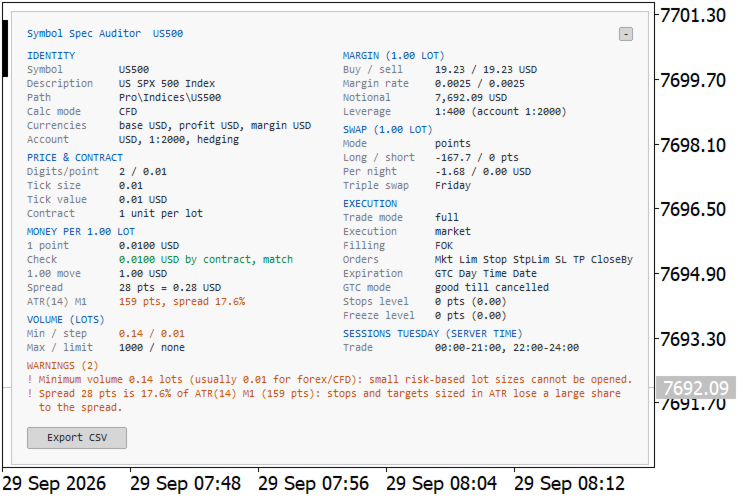
Symbol Spec Auditor puts the part of a symbol's contract specification that decides position size and trading cost into one panel on the chart: point value, spread cost, margin, swap, execution rules and trading sessions. Raw specification values are converted into money per 1.00 lot in the account currency, and the broker settings that quietly break lot-size code are listed as warnings. One button exports the same audit for every Market Watch symbol to a CSV file.
It is a checking tool. It places no orders, uses no DLL and no WebRequest, and writes no file except the CSV export you ask for.
Why it exists: code that works on one broker often misbehaves on the next because of a specification detail nobody checked. Gold with a contract of 1 oz instead of 100 oz, a cent account where balance and tick value are in cents, a stops level that rejects a close stop loss, a tick size that differs from the point, pending orders deleted at the end of the day. The terminal shows all of it, spread over several tabs and in raw units, so a difference between two brokers or two account types is easy to miss. A position-sizing formula that assumes the usual contract size is then wrong by a factor of 10 or 100 without any error in the journal.
What the panel shows for the chart symbol, refreshed once per second and rebuilt when you change the symbol or the timeframe:
- Identity: symbol, description, path, calculation mode, base, profit and margin currency, account currency, account leverage and margin mode.
- Price and contract: digits, point, tick size, tick value for profit and for loss, contract size and the expiry date of contracts that expire.
- Money per 1.00 lot: the value of one point from the tick value, cross-checked against contract size times point times the conversion rate; the value of a 1.00 price move; the spread in points and in money; ATR(14) of the chart timeframe and the spread as a percentage of it.
- Volume: minimum, step, maximum and limit.
- Margin for 1.00 lot: buy and sell margin, initial margin rates, notional value and the effective leverage next to the account leverage.
- Swap for 1.00 lot: swap mode, long and short values, money per night and the triple-swap day.
- Execution: trade mode, execution mode, filling policies, allowed order types, expiration modes, GTC mode and the stops and freeze levels in points and in price.
- Sessions: today's trading sessions in server time.
A value that cannot be determined is shown as n/a instead of a plausible number. The tick value, the point-value check, the spread, the ATR and the margin rows also name the reason, for example a missing conversion pair or a margin rate of 0.
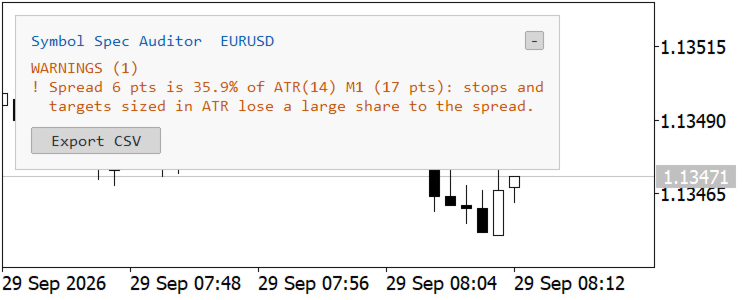
The Warnings block lists the settings that deserve a second look, in order of severity, each with its consequence for trading code: unusual contract size for the asset class, tick value or tick size of 0, a point value from the tick value that disagrees with the one from the contract size, cent account currency, restricted trade mode, expiring contract, no current quotes, tick size different from the point, stops or freeze level above 0, daily GTC mode, minimum volume or volume step above 0.01 on forex and CFD symbols, spread above a chosen percentage of ATR(14), and a triple-swap day that is unusual for the asset class. When nothing applies, the panel says that no traps were detected. A warning is not necessarily a broker error; it marks a value that your code has to read from the specification instead of assuming it.
The Export CSV button writes MQL5\Files\SymbolSpecAudit_<server>_<date_time>.csv, one row per Market Watch symbol, with 55 columns, including a Warnings column and a Notes column that explains a missing tick value, point-value check, margin or ATR. Two exports, taken on two brokers or two account types, can be compared line by line before an Expert Advisor is moved from one to the other.
Panel handling: any chart corner, one or two columns (automatic by default), a compact warnings-only mode, and a collapse button that survives symbol and timeframe changes. Colours follow the chart by default, light panel on a light background and dark panel on a dark one, and each colour can also be set by hand. The layout is measured from the real font metrics, so it stays aligned on high-DPI screens and with other fonts.
Inputs: panel corner, X and Y offset, layout, font name and size, warnings-only mode, five colours, the spread warning threshold as a percentage of ATR(14), and an option to export the CSV at start. Every input is documented in the terminal by its own comment.
Notes and limits. MetaTrader 5 does not allow an indicator to call OrderCalcMargin or OrderCalcProfit, so margin and the point-value cross-check use the documented formulas for each calculation mode. On the forex and CFD symbols of the broker used for testing, the results matched OrderCalcMargin, called from an Expert Advisor at the same prices, to within cent rounding. Margin is shown as n/a for bond and collateral symbols, for futures without an initial margin, and for index CFDs whose currencies differ from the account currency. Currency conversion uses Market Watch symbols with live quotes, directly or through USD; without one, the affected values show n/a and name the missing pair. Cent accounts are recognised by the account currency code, such as USC or EUC. ATR is ATR(14) of the last closed bar of the chart timeframe. The panel uses a one-second timer rather than every tick, and one instance per chart is intended.