EA Performance Hub MT4

EA Performance Hub (MT4)

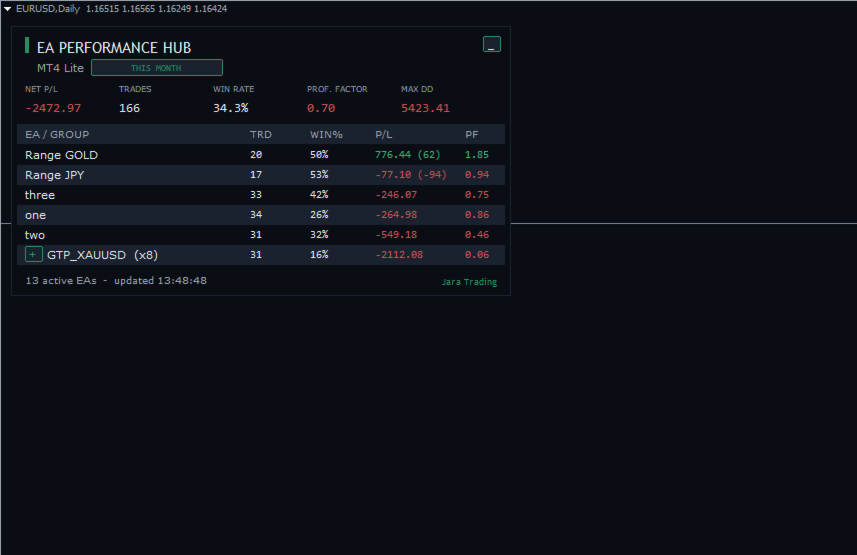
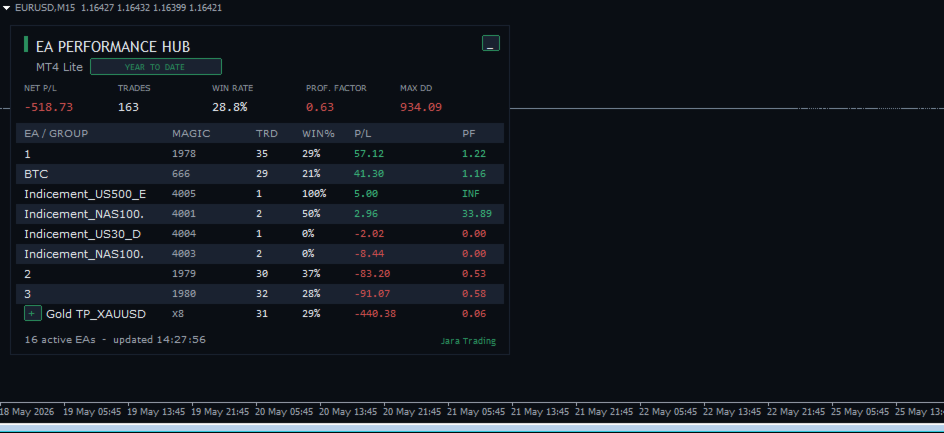
EA Performance Hub is a passive dashboard indicator that monitors the performance of every Expert Advisor running in your MT4 terminal. It automatically detects all magic numbers, reads EA names from order comments, groups multi-strategy robots, and shows core metrics in a single clean panel.

This is a read-only utility. It does not trade, does not modify orders, and does not touch your positions. It only reads your account history and open trades to display statistics.

What it shows

  • Portfolio KPIs — Net P/L, total Trades, Win Rate, Profit Factor and Max Drawdown across all detected EAs.
  • Per-EA table — for each EA or group: Trades, Win %, P/L (with floating P/L of open trades in brackets) and Profit Factor.
  • Active EA count and last-update time in the footer.

Automatic magic grouping

Robots that run several strategies under different magic numbers are detected and merged into one aggregated row, so your panel stays readable.

  • Auto-grouping by name — EAs sharing the same order comment are grouped together.
  • Name-root grouping — a numeric suffix is stripped so that MyEA_1 , MyEA_2 , MyEA_3 collapse into a single MyEA (x3) row, while different names stay separate.
  • Manual groups — define your own groups by magic number, for example Scalper:1001-1010;Swing:2001,2002 .
  • Expandable rows — click the + / - button to expand a group and inspect each individual magic, then collapse it again.

Period and filters

  • Period selector — Today, Last 7 days, This month, Year to date, All time, or a custom number of days. The period chip on the panel is clickable to cycle through periods on the fly.
  • Symbol filter — restrict statistics to the current chart symbol only.
  • Manual trades — optionally include or exclude trades placed by hand (magic 0).

Clean, scalable interface

  • 4K / high-DPI ready — the panel scales automatically to your screen DPI, with independent manual overrides for panel size and font size.
  • Clean chart mode — optionally hides grid, volumes, period separators and the price series so the chart becomes a dedicated dashboard. The original chart settings are saved and restored when the indicator is removed.
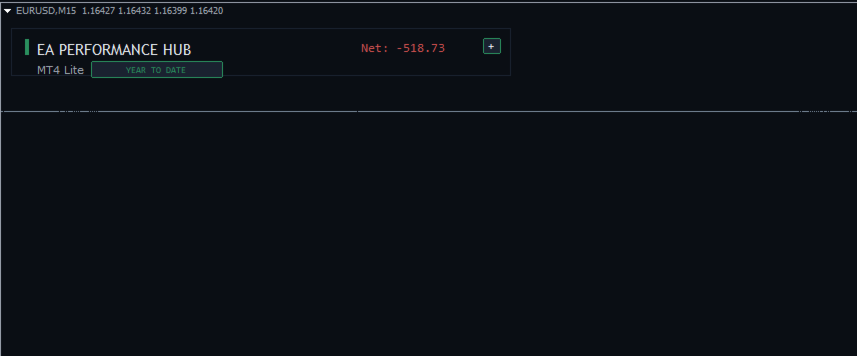
  • Minimize button — collapse the panel to a compact header to free up chart space.
  • Anchor corner, offsets, row height and full colour customisation.

How it works

The indicator reads closed trades from your account history and combines them with currently open trades for the selected period. Drawdown is computed per EA from the realised equity sequence. All calculations run on a refresh timer (default 5 seconds) and are processed in a single history pass, so the panel stays responsive even on accounts with a long trade history.

Notes

  • Designed for MetaTrader 4. Attach to any one chart — it reads the whole terminal, not just that symbol.
  • Statistics are based on the account history available in your terminal. Set the history depth in the terminal if you want longer periods.
  • No DLLs, single-file indicator.

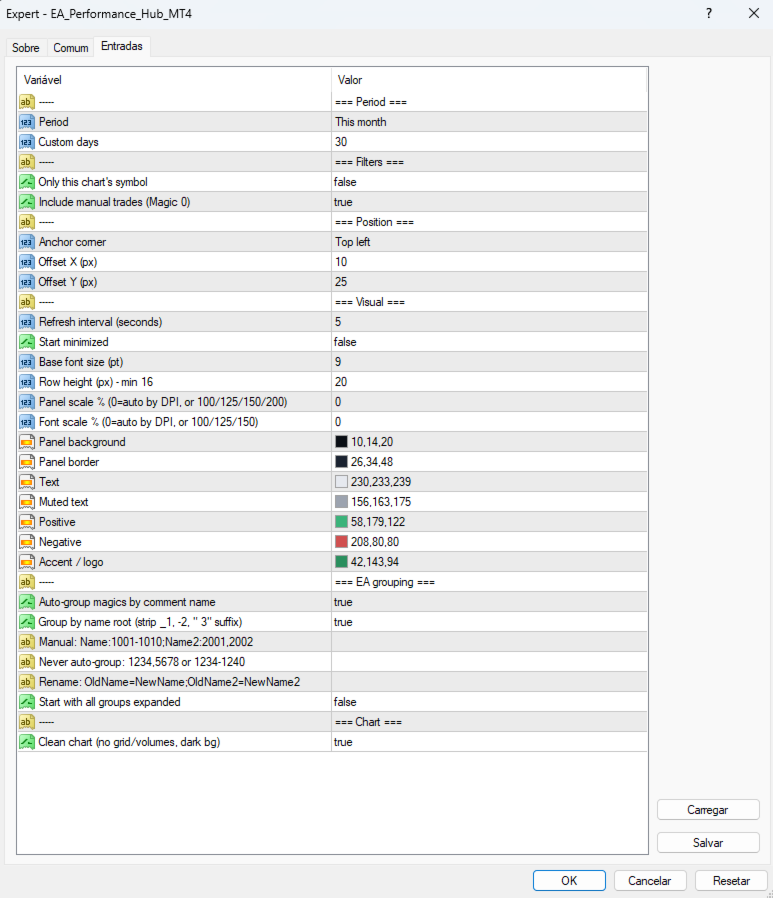
Inputs overview

  • Period — reporting period and custom days.
  • Filters — current-symbol only, include manual trades.
  • Position — anchor corner and X/Y offset.
  • Visual — refresh interval, font size, row height, panel/font scale, colours.
  • EA grouping — auto-group, strip numeric suffix, manual groups, ungrouped list, rename groups.
  • Chart — clean chart mode.

Önerilen ürünler
VisualRiskTool VisualRiskTool is a professional trade execution panel and risk management utility designed for MetaTrader. It streamlines the process of opening and managing positions by automating complex lot size calculations and providing a visual interface for setting stop-loss and take-profit levels directly on the chart. Core Functionality: Precision Risk Management The primary goal of VisualRiskTool is to eliminate manual calculation errors. By defining a fixed risk percentage (e.g., 0.5%
OTRX Fimathe Backtest is a tool for the Trader or Enthusiast who uses the Fimathe technique created by Trader Marcelo Ferreira to carry out his training and validate if he can obtain profitability. In this tool you will be able to: 1. Define whether you are looking for a buy or sell entry. (Trend). 2. Define by clicking twice on the horizontal lines where your Reference Zone and your Neutral Zone will be. 3. Monitor the entry, subcycle and exit of the trade. 4. Trading Summary, Daily, Week
FREE
Trading panel for manual trading. Has a fairly wide functionality. Allows you to automatically calculate the order size, open both market and pending orders. It has a wide range of options for closing orders, it is possible to partially close orders, close orders after reaching a certain profit or loss, separately close profitable and unprofitable, buy and sell, as well as pending orders. The panel also contains a simple implementation of a grid of pending orders, reverse and lock functions, tr
FREE
PositionPilot — One-Click Trade Manager PositionPilot puts professional trade execution and position management directly on your chart. One click — and your trade is protected. Unlike most EAs that only handle their own orders, PositionPilot works with ALL positions — manual, from other EAs, or opened via its panel. One-Click Execution BUY/SELL buttons with auto lot by risk % Hotkeys F1–F6 for keyboard-only trading Auto SL/TP with configurable ratio ️ Smart Risk Management Balance or equity-
FREE
PZ Trade Pad EA
PZ TRADING SLU
4.29 (31)
This simple visual expert advisor allows you to trade easily from the chart. It handles risk management for you and can perform several useful tasks with your existing trades, saving time and making risk-management for each individual trade easier.  [ Installation Guide | Update Guide | Troubleshooting | FAQ | All Products   |  Get Help ] Trade easily from the chart Trade with precise risk management, hassle free Trade pending order with drag and drop price selection Set SL and TP levels with
FREE
MultiTP Trade Manager EA — Advanced Trade Management Made Effortless (MT4) Limited Offer – First 100 Downloads FREE! Be among the first 100 traders to download Trade Anchor Manager (MT4/MT5) completely free of charge. Hurry – once the limit is reached, the offer closes instantly! After trying it out, we’d love if you could leave a review and share your thoughts – your feedback helps us improve and lets other traders know what to expect. Need this Trade Anchor Manager for MT5?  http
FREE
EA Follower Version any Follow Copy Account  (Acc. Number)  need a open MT Terminal, download multiple times Step1:   Open Master MT5 Terminal    =  install master- Version   (on any Symbol just one Time) Step2:   Open Follower MT5 Terminal = install follower- Version  (on any Symbol just one Time) Step3:   all Trades from any Symbol or any Robot are copy now to follow- Terminal immediately for simple copy set on Chart and   Start   no optimization. This Robot is a Trade Copier for MT5 that auto
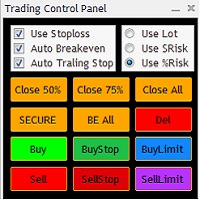
The Trading Control Panel EA let you: - Calculated lot size based on the (% or $ risk) - Place multiple (Market/Limit/Stop) trades at same time - Manage all open trades (move SL to BE, take partial profit, close all trades) This is a handy tool for those who wont to open multiple orders without spending time on lot calculations. When opening multiple orders the first order has the first TP and all other orders get the second TP.
A powerful assistant for manual trading. Execute a deal with one click and manage the trade volume, stop loss and take profit, according to your trading strategy, without being distracted from the chart. The product can also visually preview your levels of entry into the market, stop loss and take profit before placing an order. Advantages easy and intuitive interface the control panel in real time 3 modes of setting the order volume 6 stop loss setting modes 5 profit take setting modes calcula
SmartDash Trader EA This is MT4 Semi Automated EA which trade using BUY, SELL and CLOSE Buttons to executes trade actions. You can use Auto Set SL/TP/Lot of your choice since the EA comes with only 0.01 lot and 0 for TP/SL. Set 10 pips for TP to take advantage of trades. NOTE: THIS EA DOES NOT BACKTEST. ITS BUTTON TRADER EA HOW THE STRATEGIES TO USE THE DASHBOARD TRADER Wait for a weaker or stronger currency means the currency strength meter should show less than 15% for SELL and more than 88% f
Activation initiates the sequence from the initial symbol in the Market Watch roster, forming a perpetual loop that continues until deactivation. The system employs global terminal variables to sustain operational continuity amid symbol-induced reinitializations, thereby ensuring uninterrupted performance. This EA should not be checked off as 'Allowed live Trading' and is functional with that checkmark box, when uploading the EA. Principal advantages encompass augmented productivity in overseein
FREE
The Simple Lot Size Calculator can help you with risk management. Just type risk percentage, stop loss points and click calculate to get required lot size. The Simple Lot Size Calculator calculates a current chart's instrument. It's lightweight. Just load it to your chart then The Simple Lot Size Calculator will apper in the left upper corner of your chart.
Grid Assistant Pro – Utility for Managing Grid Strategies on MetaTrader 4 Grid Assistant Pro is a professional utility that helps traders manage and monitor unidirectional grid strategies directly from the MT4 chart. It provides a visual dashboard , clear controls, and automated risk protection features for precise and efficient grid operation. Key Features Visual Dashboard Real-time metrics: Balance, Equity, Floating P/L, Drawdown %, Free Margin Grid status: active and pending or
FREE
Hello, trading champs! I trust you are doing well. Have you experienced entering a position where the market initially moves in your favour or approach your takeprofit then suddenly the market reversed opposite your position? Well, it has happened to me numerous times and today I decide to fight back. I present to you a trade manager that help you protect your position(s). This project helps you set your position(s) to breakeven either when a certain amount of pips you specify is reached or a
FREE
Auto Risk Manager MT4
Mildry Yocasta Feliz Rodriguez
AutoRiskManage v2.3 — Documentation Expert Advisor — MetaTrader 4 & 5 AutoRisk Manage v2.3 Automated risk management EA with interactive graphical panel. Applies SL/TP, Break Even, Trailing Stop, and lot size calculation by risk percentage — for any instrument, any broker. MT4 / MT5 v2.3.0 MQL4 · MQL5 C2C + B2C Time Space Technology Overview AutoRiskManage is an Expert Advisor that acts as a risk management layer on top of any manually opened position. It does not generate trading signals — i
FREE
MT4 için NAS100 Auto SL ve TP Maker ile tanışın: MetaTrader 4'te Nasdaq 100 piyasasında gezinen yatırımcılar için vazgeçilmez bir yardımcı olan NAS100 Auto SL ve TP Maker ile StopLoss ve TakeProfit ayarlarını bir daha asla kaçırmayın. Bu araç, StopLoss ve TakeProfit seviyelerinin yönetimini otomatikleştirmek için sorunsuz bir çözüm arayanlar için tasarlanmıştır. Temel Özellikler: Zahmetsiz Otomasyon: StopLoss ve/veya TakeProfit olmadan Nasdaq 100 işlemlerini otomatik olarak izler. Kullanıcı tar
FREE
Tipu Trader is a part of Tipu Panel ecosystem that was developed out of need for quick and simple trading. Tipu Trader is an easy to use trade panel for commonly used trade functions. Create you own signals with Tipu Panel and trade along with Tipu Trader, a simple and easy to use trade panel. Features An easy to use trade panel for most commonly used trade functions. Create your own personal trade signals with Tipu Panel , and trade with Tipu Trader. Customizable Panel. The panel can be moved
FREE
You can manually open a trade (one click), and this EA will take care of setting the SL and TP. SL and TP are set based on the number of pips you specify in the input screen. You can also choose monetary SL and TP. SL and TP are determined based on the weighted average price (WAP), so if you open a new trade, SL and TP will be updated according to the new WAP. The WAP is not unique but differentiated between buy and sell trades (this is useful only if you open opposite trades on the same chart)
FREE
UR Control Panel
Krzysztof Jan Debski
5 (2)
UR Kontrol Paneli   UR Control Panel, sizinle ÜCRETSİZ olarak paylaşmak istediğim bir araçtır. Ticaretimde bana yardımcı olan ve her gün piyasa taramamı artıran etkileşimli bir Panel. Umarım ihtiyaçlarınıza da uygundur! UR Kontrol Paneli nasıl kullanılır? Hareket ettirilebilir, yeniden boyutlandırılabilir bir çift paneldir ve şunları içerir: - Bunlardan biri, verilen zaman dilimindeki para biriminin gücünü gösterir. - Diğeri, aynı grafiği kullanarak seçeneklerin semboller ve zaman dilimleri
FREE
If you are looking for an easy use EA that helps you managing the risk and moving SL without spending your time in front of the computer, this EA is your answer. 1. First of all you will decide if you want to go with a fixed lot or a lot that adjusts your risk to a certain percent based on the difference between the opening price and SL. The best way to earn money is with good use of risk management and the power of compounding. 2. Then choose if it is a market order or pending order. 3. Then se
FREE UNTIL FEBRUARY 14, 2023 SPEND MORE TIME WITH YOUR FAMILY. ENJOY LIFE… DO NOTHING. This version is only auto set of Takeprofit and StopLoss Main Version  of  TropangFX:   MT4 Version  |  MT5 Version Recommended timeframe:   H1 Supported currency pairs:  GBPUSD, EURUSD, EURCHF ,   USDCAD, USDCHF ,  AUDCAD, EURCAD, EURAUD and many more... Requirements The EA requires good brokerage conditions:   low spread   and   slippage   during the rollover time. I advise using a really   good ECN brok
FREE
Close_All_Trades_with_TP_SL is a reliable and efficient MQL4 Expert Advisor designed to simplify and automate trade management for all open positions on your MT4 account. This EA is especially useful for traders who open multiple trades quickly or use high-frequency strategies where manual TP/SL placement becomes difficult and time-consuming. The primary purpose of the EA is to ensure that every open trade—whether Buy or Sell—always has a predefined Take Profit (TP) and Stop Loss (SL) applied. M
FREE
Utility for informing in telegrams with a wide functionality -->>> English parameters menu version, Russian menu parameters version  here first 10 sales at $ 30, next 10 at $ 40 and so on Works correctly with Windows 10, Windows Server 2012 and above Can send notifications to channel or private messages : Signal name (it is convenient to send signals from several terminals to one channel) Opening an order (instrument, volume, order type, quote, take profit, stop loss, order number, opening time
Risk Management Panel is unique to tool calculate your risk quickly and place trades based on your account money. There are two options for the user  Account Equity Account Balance Tools like these is specially useful when you have to take a quickly decision about your trade but dont have the time to calculate the risk. It works with magic number. So the advantage is a trade placed by this panel could be manipulated by the other expert advisors as well
FREE
A "simple design" trading panel, which is characterized by small byte size, low CPU usage, simple steps, and quick operation, 1 to 2 clicks to complete a functional operation, saving time and increasing efficiency . The panel is easy to use, and it is not complicated to set parameters, which is in line with traders' habits. At the same time, its compact- design, clear at a glance, and comprehensive functions are a powerful tool for manual trading! Key features of the panel:   Click "Bid Price"
FREE
Rainbow MT4 is a technical indicator based on Moving average with period 34 and very easy to use. When price crosses above MA and MA changes color to green, it’s a signal to buy. When price crosses below MA and MA changes color to red, it’s a signal to sell. The Expert advisor ( Rainbow EA MT4) based on Rainbow MT4 indicator, as you can see in the short video below is now available here .
FREE
Riskinizi otomatik olarak hesaplarken işlemlere hızlı bir şekilde girip çıkmanıza yardımcı olacak Ticaret Yöneticisi. Aşırı Ticaret, İntikam Ticareti ve Duygusal Ticaretten korunmanıza yardımcı olacak özellikler içerir. İşlemler otomatik olarak yönetilebilir ve hesap performans ölçümleri bir grafikte görselleştirilebilir. Bu özellikler, bu paneli tüm manuel yatırımcılar için ideal kılar ve MetaTrader 4 platformunun geliştirilmesine yardımcı olur. Çoklu Dil desteği. MT5 Sürümü  |  Kullanım Kılavu
Ind4 Extra Report Pad
Vladislav Andruschenko
4.63 (40)
Tüccar Günlüğü: Bu, MetaTrader 4 için işlem hesabınızın analizini sağlayan bir istatistik panelidir. Analiz sonuçları grafikte gerçek zamanlı olarak görüntülenir. Çoklu para birimi ticareti günümüzde oldukça popülerdir. Ancak, işlem miktarı ne kadar büyük olursa, her birinin karlılığını analiz etmek o kadar zor olur. MT5 sürümü Tam tanım +PDF Nasıl alınır Nasıl kurulur     Günlük Dosyaları nasıl alınır?     Nasıl Test Edilir ve Optimize Edilir     Expforex'in tüm ürünleri İşlemleri aylara g
FREE
EA News
Konstantin Kotlov
3.4 (5)
EA News that includes multiple strategies for trading rapid price swings. It is designed to simplify the placement of pending orders at a specified distance from the price of price channel. The EA can trade both the price breakouts and rebounds. There are two trading modes: Automatic - the EA downloads the news from the site http://ec.forexprostools.com/. When it finds the symbol of the currency pair and the specified volatility of the news, it places pending orders several minutes before the re
FREE
Free automatic Fibonacci is an indicator that automatically plots a Fibonacci retracement based on the number of bars you select on the BarsToScan setting in the indicator. The Fibonacci is automatically updated in real time as new highest and lowest values appears amongst the selected bars. You can select which level values to be displayed in the indicator settings. You can also select the color of the levels thus enabling the trader to be able to attach the indicator several times with differe
FREE
Bu ürünün alıcıları ayrıca şunları da satın alıyor
Local Trade Copier EA MT4
Juvenille Emperor Limited
4.96 (110)
Local Trade Copier EA MT4 ile olağanüstü hızlı işlem kopyalama deneyimi yaşayın. Kolay 1 dakikalık kurulumuyla bu işlem kopyalayıcısı, aynı Windows bilgisayarda veya Windows VPS'te birden fazla MetaTrader terminali arasında işlemleri kopyalamanıza olanak tanır ve 0.5 saniyenin altındaki şimşek hızında kopyalama hızları sunar. Başlangıç seviyesinde veya profesyonel bir tüccar olsanız da, Local Trade Copier EA MT4 , spesifik ihtiyaçlarınıza göre özelleştirmek için geniş bir seçenek yelpazesi sunar
Trade Manager EA’ye hoş geldiniz! Ticaretin daha sezgisel, hassas ve verimli hale gelmesi için tasarlanmış nihai risk yönetim aracı ile tanışın. Bu sadece bir emir verme aracı değil; ticaret planlaması, pozisyon yönetimi ve risk kontrolü için kapsamlı bir çözüm. İster yeni başlayan bir yatırımcı olun, ister deneyimli bir trader ya da hızlı emir gerektiren bir scalper, Trade Manager EA ihtiyaçlarınıza uyum sağlar ve forex, endeksler, emtialar ve kripto paralar dahil tüm piyasalarda esneklik sunar
Trade Assistant MT4
Evgeniy Kravchenko
4.43 (197)
It helps to calculate the risk per trade, the easy installation of a new order, order management with partial closing functions, trailing stop of 7 types and other useful functions. Additional materials and instructions Installation instructions   -   Application instructions   -   Trial version of the application for a demo account Line function -   shows on the chart the Opening line, Stop Loss, Take Profit. With this function it is easy to set a new order and see its additional characteris
Exp COPYLOT CLIENT for MT4
Vladislav Andruschenko
4.69 (65)
MetaTrader 4 için profesyonel işlem kopyalayıcı MetaTrader 4 için hızlı, güvenilir ve profesyonel bir işlem kopyalayıcı. COPYLOT , MetaTrader 4 ve MetaTrader 5 terminalleri arasında Forex işlemlerinin kopyalanmasını sağlar ve farklı hesap türleri ile işlem senaryoları için esnek senkronizasyon sunar. COPYLOT MT4 sürümü şunları destekler: MetaTrader 4 → MetaTrader 4 MetaTrader 5 Hedge → MetaTrader 4 MetaTrader 5 Netting → MetaTrader 4   MT5 sürümü Tam açıklama + DEMO + PDF Nasıl satın alınır Nası
Telegram to MT4 Multi-Channel Copier , Telegram kanallarınızdaki trading sinyallerini otomatik olarak doğrudan MetaTrader 4'e kopyalar. Bot yok, tarayıcı uzantısı yok, manuel kopyalama yok. Telegram'da bir sinyal alırsınız ve EA birkaç saniye içinde terminalinizde işlem açar. Ürün iki bileşen içerir: Telegram kanallarınızı dinleyen bir Windows uygulaması ve sinyalleri MT4 terminalinizde yürüten bu Expert Advisor. Bir MT5 sürümü de mevcuttur. Kurulum kılavuzu ve uygulama indirme: https://www.mql5
The product will copy all telegram signal to MT4   ( which you are member  ) , also it can work as remote copier.  Easy to set up, copy order instant, can work with almost signal formats, image signal, s upport to translate other language to English Work with all type of channel or group, even channel have "Restrict Saving Content", work with  multi channel, multi MT5 Work as remote copier: with signal have ticket number, it will copy exactly via ticket number. Support to backtest signal. How to
Çalışan Deneme Sürümünü İndir Copy Cat More (Taklitçi Kedi) — İşlem Kopyalayıcı (Trade Copier) MT4 sadece basit bir yerel işlem kopyalayıcı değildir; bugünün ticaret zorlukları için tasarlanmış eksiksiz bir risk yönetimi ve yürütme çerçevesidir (risk management and execution framework). Prop firm challenge'larından kişisel portföy yönetimine kadar, sağlam yürütme, sermaye koruması, esnek yapılandırma ve gelişmiş işlem yönetimi karışımıyla her duruma uyum sağlar. Kopyalayıcı hem   Master (Mast
Auto Trade Copier is designed to copy trades to multiple MT4, MT5 and cTrader accounts/terminals with 100% accuracy. The provider and receiver accounts must be on the same PC/VPS. With this tool, you can copy trades to receiver accounts on the same PC/VPS. All trading actions will be copied from provider to receiver perfectly. This version can be used on MT4 accounts only. For MT5 accounts, you must use Auto Trade Copier for MT5 . Reference: - For MT4 receiver, please download Trade Receiver Fre
TradePanel MT4
Alfiya Fazylova
4.84 (95)
Trade Panel, çok işlevli bir ticaret asistanıdır. Uygulama, manuel ticaret için 50'den fazla ticaret fonksiyonu içerir ve çoğu ticaret görevini otomatikleştirmeyi mümkün kılar. Satın almadan önce demo hesapta demo sürümü test edebilirsiniz. Demo hesap için uygulamanın deneme sürümünü indirin: https://www.mql5.com/en/blogs/post/750865 . Talimatların tamamı buraya . Ticaret. Tek tıklamayla ticaret işlemleri yapmayı sağlar: Risk otomatik hesaplaması ile bekleyen emirleri ve pozisyonları açmak. Bird
MT4 to Telegram Signal Provider , Telegram'a sinyal göndermeyi sağlayan ve hesabınızı bir sinyal sağlayıcısına dönüştüren kullanımı kolay ve tamamen özelleştirilebilir bir araçtır. Mesajların formatı tamamen özelleştirilebilir! Ancak basit kullanım için, önceden tanımlanmış bir şablonu seçebilir ve mesajın belirli kısımlarını etkinleştirebilir veya devre dışı bırakabilirsiniz. [ Demo ]  [ Kullanım Kılavuzu ] [ MT5 Sürümü ] [ Discord Sürümü ] [ Telegram Kanalı ]  New: [ Telegram To MT5 ] Kurulum
TPSpro Risk Yöneticisi       her türlü eğitim ve sermayeye sahip yatırımcılar için benzersiz bir profesyonel risk kontrol sistemidir. Ticarette kayıplardan ve işlemlerde ciddi hatalardan kaçınmanızı sağlar. TPSpro Risk Yöneticisi, öncelikle scalper'lar ve günlük yatırımcılar için risk yönetimi için gereklidir, ancak her türlü alım satım tarzındaki yatırımcılar tarafından başarıyla kullanılır. Panelde her biri yararlı bilgiler içeren 3 sütun bulunur. İlk sütun, içinde bulunulan ayın başı itibar
Telegram to MT4 Pro nedir? Telegram to MT4 Pro , özel, açık ve kısıtlı Telegram kanalları ile gruplarından gelen sinyalleri doğrudan MetaTrader 4 hesabınıza otomatik olarak kopyalar. Telegram to MT4 Pro , herhangi bir Telegram kanalı veya grubundan gelen işlem sinyallerini gerçek zamanlı olarak doğrudan MetaTrader 4 hesabınıza otomatik kopyalayan profesyonel bir sinyal kopyalayıcıdır ve her işlem üzerinde tam kontrol sağlar. Sistem birlikte çalışan iki parçadan oluşur: Bu Expert Advisor — işleml
TP SL Bot - Yeni açılan emirlere, belirtilen talimatlarınıza göre otomatik olarak Stop Loss ve Take Profit ayarlayan bir araçtır. Ayrıca, istenen Stop Loss/Take Profit boyutunda istenen miktarı elde etmek için işlem açmak için gereken hacmi hesaplama özelliği de bulunmaktadır. Boyut ve parametre ayarlamaları için birkaç seçenek vardır: 1. Mevcut hesap bakiyesinin yüzdesi olarak kullanıcı tarafından belirtilen miktarlara göre ayarlama yapma. 2. Kullanıcı tarafından belirtilen Stop Loss veya Take
News Filter EA: Advanced Algo Trading Assistant News Filter EA is an advanced algo trading assistant designed to enhance your trading experience. By using the   News Filter EA , you can integrate a Forex economic news filter into your existing expert advisor, even if you do not have access to its source code. In addition to the news filter, you can also specify   trading days   and   hours   for your expert. The News Filter EA also includes   risk management   and   equity protection   features

VirtualTradePad mt4 Extra
Vladislav Andruschenko
4.85 (61)
1 tıklama ile ticaret için Ticaret Paneli.   Pozisyonlar ve emirlerle çalışmak!   Grafikten veya klavyeden alım satım. Alım satım panelimizi kullanarak, grafikten tek bir tıklamayla alım satım yapabilir ve alım satım işlemlerini standart MetaTrader kontrolünden 30 kat daha hızlı gerçekleştirebilirsiniz. Bir tüccar için hayatı kolaylaştıran ve bir tüccarın ticaret faaliyetlerini çok daha hızlı ve daha rahat gerçekleştirmesine yardımcı olan parametrelerin ve işlevlerin otomatik hesaplamaları. Graf
Multi Chart Sync MT5 is a tool that synchronizes the chart symbol it is placed on to other charts, it can also be customized to exclude/skip some pairs from being synchronized to other charts, It also supports prefixes and suffixes that can be set from the input parameters for brokers with none-standard symbol formats, Synchronisation can be done once or continuously where if a synchronized chart symbol changes it will be reverted to the original/master symbol. This tool comes in handy for multi
TradeMirror, MT4/MT5 platformları için geliştirilmiş, gerçek zamanlı işlem senkronizasyonu destekleyen yerel bir emir kopyalama aracıdır. Eğitim Daha fazla eğitim görmek için lütfen Trademirror Eğitimi bağlantısına tıklayın. Ürün Avantajları Finansal yazılımlar için güvenlik, istikrar ve gizlilik standartlarına uygun olarak üç temel alanda iyileştirme yapılmıştır: Kullanıcı dostu arayüz ile kolay kullanım Finansal senaryolarda hassas veri izolasyonu için gelişmiş gizlilik koruması Milisanlık emi
Trendline EA
Carlos Oliveira
4.5 (10)
Trendline EA MT4 Trendline EA MT4, kullanıcının çizdiği trend çizgilerine dayalı olarak işlem gerçekleştirmek veya uyarılar üretmek üzere tasarlanmış, MetaTrader 4 için yarı otomatik bir Expert Advisor’dır. MetaTrader 4, trend çizgilerinden doğrudan işlem açma veya yönetme konusunda yerel bir özellik sunmaz. Bu Expert Advisor, kullanıcının tanımladığı trend çizgilerini izleyerek ve fiyat bunlarla etkileşime girdiğinde önceden belirlenmiş eylemleri gerçekleştirerek platformun standart davranışını
The adviser has been withdrawn from sale  KopirMT4 (CopierMT4) - transaction copier for the MetaTrader 4 terminal, copies (synchronizes, duplicates) transactions from any accounts (copier, copy dealers).  Supports copying: MT4 <-> MT4, MT4 -> MT5 Hedge, MT5 Hedge -> MT4 Support:  https://www.mql5.com/ru/messages/01c3f341a058d901 Why exactly our product? The copier has a high speed and is not dependent on ticks. Copy speed - less than 0.5 sec. Transactions are copied with high accuracy, the sc
Close If Profit or Loss with Trailing for MetaTrader 4 — toplam kâr veya toplam zarar ile otomatik kapatma MetaTrader 4 için pratik bir işlem yönetimi aracıdır. Toplam kâr veya toplam zarar belirlediğiniz seviyeye ulaştığında, seçilen pozisyonları otomatik olarak kapatabilir. Expert Advisor açık işlemleri izler, değişken kâr/zarar sonucunu hesaplar, Trailing Profit kullanabilir ve pozisyonları manuel müdahaleden daha hızlı yönetmenize yardımcı olur. MetaTrader 4 hâlâ manuel trader’lar, scalper’
RS Trade Copier - gerçek grafik arayüze sahip, ultra hızlı yerel işlem kopyalayıcı. Hesap numaralarını elle girmeyi bırakın. Artık 200'den fazla anlaşılmaz giriş parametresiyle uğraşmak yok. Birden fazla MT4 ve MT5 terminali arasında işlem operasyonlarını kopyalamak için güvenilir ve esnek bir araçtır. Hem profesyonel yatırımcılar, sinyal hizmetleri hem de bireysel yatırımcılar için uygundur. Bir veya birden fazla Sağlayıcıdan bir veya birden fazla Alıcıya ticareti senkronize eder ve bunu yüksek
Trade Copier Global: The name speaks for itself. This copier allows you to copy orders between MT4 terminals even if they are not installed on the same computer. Features Copying trades between MT4 terminals around the world with a short delay. Automatically recognizes symbol prefixes. Can connect many Slaves to the same Master. Supports pending and market orders. Supports partial order close (with limitations, see below) Can send messages and notifications to the Slaves from the Master Several
Telegram'dan MT4'e:   Nihai Sinyal Kopyalama Çözümü Telegram ile MT4'e   işlemlerinizi kolaylaştırın, DLL'lere ihtiyaç duymadan doğrudan Telegram kanallarından ve sohbetlerinden MetaTrader 4 platformunuza işlem sinyallerini kopyalamak için tasarlanmış son teknoloji yardımcı program. Bu sağlam çözüm, sinyallerin benzersiz hassasiyet ve özelleştirme seçenekleriyle sorunsuz bir şekilde yürütülmesini sağlayarak size zaman kazandırır ve verimliliğinizi artırır. [ Instructions and DEMO ] Temel Özellik
Grid Manual MT4
Alfiya Fazylova
4.71 (17)
Grid Manual, sipariş ızgarasıyla çalışmak için kullanılan bir ticaret yardımcı programıdır. Yardımcı program evrenseldir, esnek ayarlara ve sezgisel bir arayüze sahiptir. Sadece kayıpların ortalaması yönünde değil, aynı zamanda kazanç artışı yönünde de bir emir ızgarası ile çalışır. Tüccarın bir emir ızgarası oluşturmasına ve eşlik etmesine gerek yoktur, bu yardımcı programı yapacaktır. Emri açmanız yeterlidir ve Grid manual otomatik olarak ona bir emir ızgarası oluşturacak ve kapanana kadar ona
The AlgoKing Lightning Bolt Strategy is a trade manager and has multiple indicators built for a complete trading strategy.  Here is a list of indicators built in. Indicators Auto drawn Support and Resistance signals Auto drawn RSI Divergence signals Auto drawn Fibonacci Retracement signals with buy and sell entry lines. Lightning Bolt reversal signals. Auto drawn trend lines. Trade Management Auto take partials at simple moving average targets. Auto take partial and stop losses at Fibonacci ret
Fotokopi->Kullanışlı ve hızlı arayüz etkileşimi, kullanıcılar hemen kullanabilir       ->>>> Windows bilgisayarlarda veya VPS Windows'ta kullanılması önerilir Özellikler: Çeşitlendirilmiş ve kişiselleştirilmiş kopyalama ticareti ayarları: 1. Farklı sinyal kaynakları için farklı lot modları ayarlanabilir 2. İleri ve geri kopyalama ticareti için farklı sinyal kaynakları ayarlanabilir 3. Sinyaller yorumlarla ayarlanabilir 4. Lotun sözleşme lotuna göre kalibre edilip edilmeyeceği Çeşitlendirilmiş v
Простая в управлении Торговая панель обеспечит безопасную торговлю. Вычислит объём сделки от заданного уровня Stop Loss и величины убытка. Поможет рассчитать сейф, и в ноль закрыть неверную сделку. Интуитивно понятный интерфейс делает панель удобной в управлении, освобождая внимание трейдера для принятия решения о входе в сделку. Программа сделает все расчёты за вас. Поэтому работа с помощью панели Снайпер - оптимальное решение для торговли с соблюдением Мани-менеджмента. А это главный ключ к по
" Trader Evolution " - A utility designed for traders who use wave and technical analysis in their work. One tab of the utility is capable of money management and opening orders, and the other can help in making Elliott wave and technical analysis. Manual (Be sure to read before purchasing) | Version for MT5 Advantages 1. Trading in a few clicks. Immediate and pending orders are available in the panel 2. Money management. The program automatically selects the appropriate lot size 3. Simplifies
Trade copier MT4
Alfiya Fazylova
4.56 (32)
Trade Copier, ticaret hesapları arasındaki işlemleri kopyalamak ve senkronize etmek için tasarlanmış profesyonel bir yardımcı programdır. Kopyalama, tedarikçinin hesabından/terminalinden alıcının aynı bilgisayarda veya vps'de kurulu olan hesabına/terminaline gerçekleşir. KAMPANYA - Eğer zaten "Trade copier MT5" aldıysanız, "Trade copier MT4"ü ücretsiz olarak alabilirsiniz (MT4 > MT5 ve MT4 < MT5 kopyalamalar için). Koşullar hakkında daha fazla bilgi almak için lütfen bizimle özel mesaj yoluyla i
Hello friends. I wrote this utility specifically for use in my profile with a large number of Expert Advisors and sets ("Joint_profiles_from_grid_sets" https://www.mql5.com/en/blogs/post/747929 ). Now, in order to limit losses on the account, there is no need to change the "Close_positions_at_percentage_of_loss" parameter on each chart. Just open one additional chart, attach this utility and set the desired percentage for closing all trades on the account. The utility has the following function
Yazarın diğer ürünleri
An Opening Range Breakout trend-following strategy, validated on more than 6 years of historical data across three uncorrelated assets: XAUUSD, USDJPY and BTCUSD. No martingale, no grid, no averaging down. One trade per day per symbol, with a fixed stop loss from the moment of execution. Setup guide . Blog . To understand my approach to trading, risk and portfolio construction, read the article Trading Is Not About Getting Rich Overnight . How it works Range Breakout Fusion implements the classi
Gold Breakout Fusion
Joao Jara Carvalho
See how Gold Breakout Fusion, combined with Gold Spectrum, produced +$70,986 with only 4.54% drawdown over more than 7 years, at a correlation of just 0.2. Read the full portfolio analysis on my blog . A breakout Expert Advisor for Gold (XAUUSD), built for serious traders, prop firm challenges and live accounts. Plug-and-play: drop the EA on a single XAUUSD chart, pick a risk level and let it work. No optimization needed, no parameters to tune, no charts to watch. The strategy is daily swing bre
New York Breaker
Joao Jara Carvalho
New York Breaker is an Opening Range Breakout strategy for US100, trading the open of the New York session, optimized for NAS100/US100. No martingale, no grid, no empty promises. Installation guide . Blog . To better understand my view on trading, risk management and portfolio construction, read the article Trading is not about getting rich overnight . My story I started trading 6 years ago. Like many people, I thought the fastest path to financial freedom was buying a miracle EA on the MQL5 Mar
Gold Spectrum EA
Joao Jara Carvalho
NEW: See how Gold Spectrum combined with Gold Breakout Fusion produced +$70,986 with only 4.54% drawdown over more than 7 years — at a correlation of just 0.2. Read the full portfolio analysis on my blog Gold Spectrum EA — Multi-Strategy for Gold A premium Expert Advisor designed exclusively for XAUUSD, combining multiple independent breakout strategies across different timeframes. Each strategy targets a different market behaviour, forming a diversified internal portfolio within a singl
An indicator for MetaTrader 5 that monitors the performance of every Expert Advisor on your account in a single panel. It automatically detects magic numbers from history and open positions, reads each deal's comment and shows the real EA name next to the magic number. EA detection and identification Automatic detection: identifies all magic numbers present in closed and open trades. New EAs appear as soon as they place their first trade. Readable names: reads the comment of each entry deal and
BROKER XRAY — Execution Quality Audit See what your broker hides. Score your broker A+ to F. Most traders never know if their broker is silently bleeding their edge: spread expansion at rollover, asymmetric slippage, hidden requotes, latency spikes during news. Broker XRay gives you a Bloomberg-style dashboard that monitors all of this in real-time, scores it from 0 to 100, and exports everything to CSV for deep analysis. Run it for 24 hours. Get the truth. What it measures (6 weighted dimension
Prop News Filter is a free Expert Advisor that helps traders on prop firm and funded accounts avoid violating the 2-minute news rule that most major prop firms enforce. It uses a precise two-stage protection model: pre-block new trades 15 minutes before the restricted window, then close everything 2 minutes before the news. Most news filter tools either block trading too aggressively and kill your edge, or rely on the MQL5 native calendar which is often disabled on prop firm terminals. This EA u
FREE
EA Performance Monitor is a MetaTrader 5 indicator that presents the performance of running Expert Advisors in a single table. The indicator automatically detects the magic numbers present in trade history and open positions, and shows for each one the EA name (read from order comments), symbol, number of trades, P/L and win rate. Features Automatic detection of magic numbers from deal history and open positions. The indicator groups operations by magic and shows one row per EA. Text identif
FREE
Clean Trade Pro Most trade managers bury you in tabs, toggles and forty inputs you will never touch. Clean Trade Pro does the opposite. Drop it on any chart, drag three lines, and trade. Your setup is ready in under a minute. Clean Trade Pro is a focused, visual trade panel for discretionary traders who want speed and clarity , not a Swiss-army knife. Every position is built the same way: drag your Entry , Stop Loss and Take Profit lines on the chart, watch the lot size and risk calculate in rea
FREE
Trade your funded account without worrying about news rules. Prop News Filter Pro is a compliance helper Expert Advisor for traders on funded and prop firm accounts. It automatically protects your trades from the strict 2-minute news rule, weekend close requirements, and holiday close requirements that most major prop firms enforce. Built specifically for the way professional funded traders manage news risk, the EA uses a precise   two-stage protection model : pre-block new trades 15 minutes bef
Filtrele:
Değerlendirme yok
Değerlendirmeye yanıt