Vladislav Andruschenko / Профиль
- Информация
|
14+ лет
опыт работы
|
44
продуктов
|
2326
демо-версий
|
|
93
работ
|
0
сигналов
|
0
подписчиков
|
Меня зовут Владислав. Я профессиональный разработчик MQL4/MQL5 и создаю инструменты для MetaTrader с 2007 года.
В Expforex я разрабатываю практические торговые решения для MetaTrader 4 и MetaTrader 5:
торговые советники, панели управления сделками, копировщики сделок, утилиты контроля риска, отчёты по счёту, инструменты для тестирования и системы автоматизации торговли.
✅ Разрабатываю для MetaTrader с 2007 года
✅ Создаю инструменты для MT4 и MT5
✅ Предоставляю документацию, видеоинструкции и поддержку продуктов
✅ Делаю профессиональные утилиты для трейдеров, разработчиков и управляющих счетами
━━━━━━━━━━━━━━━━━━━━
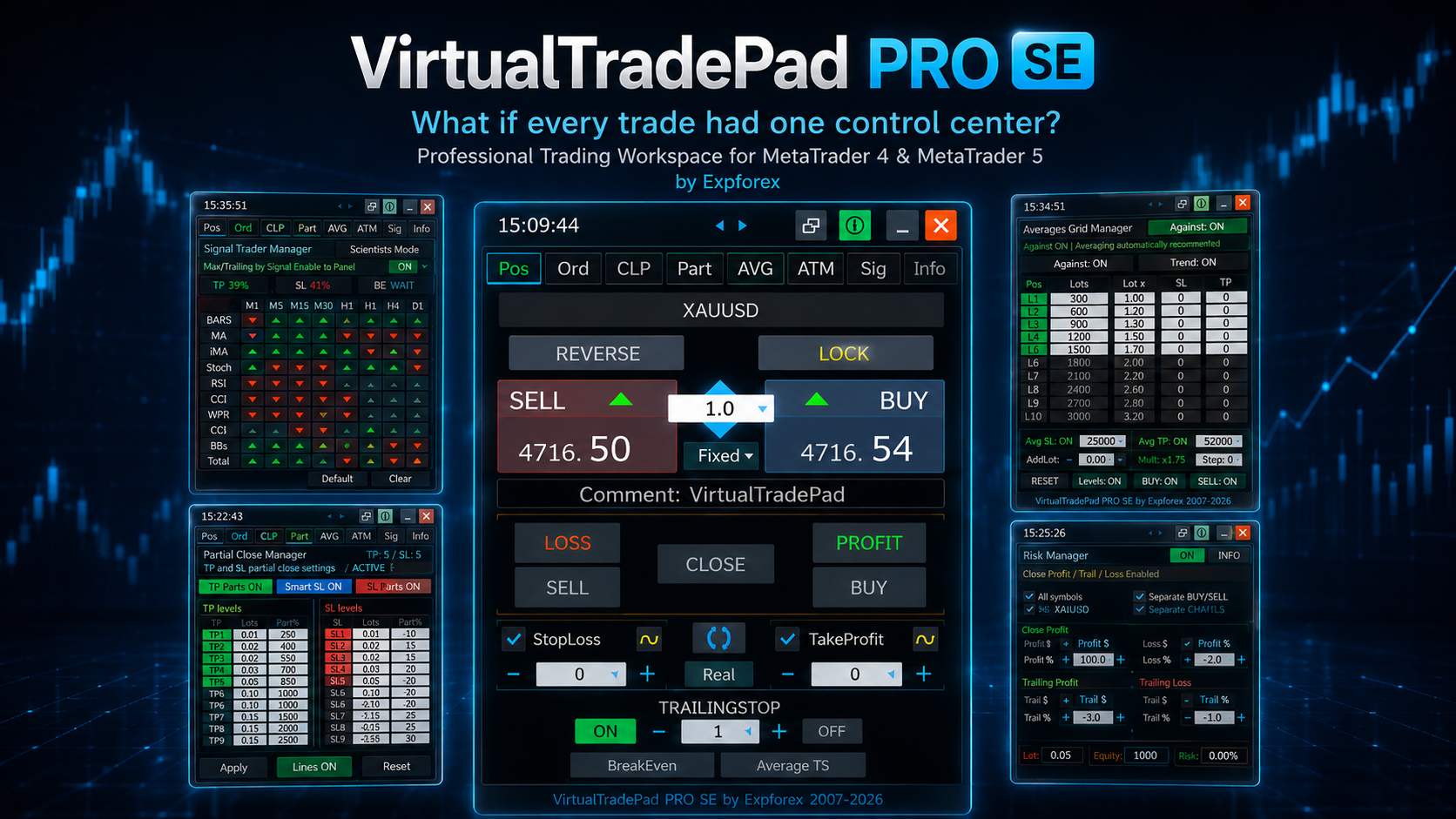
⭐ VirtualTradePad PRO SE — Премиальное рабочее пространство для торговли в MetaTrader
Профессиональная панель ручной торговли для MT4 и MT5 с управлением прямо с графика, контролем позиций, инструментами для ордеров, частичным закрытием, усреднением, рабочей областью сигналов, подготовкой к тестированию и расширенными торговыми модулями.
https://expforex.com/ru/vtpprosehero/
━━━━━━━━━━━━━━━━━━━━
🌐 Официальный сайт Expforex
https://www.expforex.com/
🚀 Полный каталог продуктов Expforex
https://www.mql5.com/ru/blogs/post/770191
🛒 Все продукты на MQL5 Market
https://www.mql5.com/ru/users/vladon/seller#products
📘 Все инструкции MQL5
https://www.mql5.com/ru/users/vladon/blog
━━━━━━━━━━━━━━━━━━━━
💬 Вопросы, идеи или нужна помощь?
Я всегда рекомендую начинать с полной инструкции и документации к продукту — там уже собраны основные ответы, примеры настройки и важные рекомендации.
Если вам нужна персональная помощь по продукту, напишите вопрос в Комментариях на странице именно того продукта, который вы используете.
Так проще проверить версию, настройки, скриншоты и логи, а ответ будет точнее.
Ваши отзывы, идеи и торговые сценарии помогают улучшать продукты Expforex.
━━━━━━━━━━━━━━━━━━━━
🔗 Социальные ссылки
📢 Канал MQL5
https://www.mql5.com/ru/channels/expforex
▶️ YouTube
https://www.youtube.com/Expforex
https://www.facebook.com/ExpForex/
𝕏 X / Twitter
https://x.com/expforex
🎵 TikTok
https://www.tiktok.com/@expforex
📧 Контакты
https://expforex.com/contacts/

🔹 ExtraReportPad MT4: https://www.mql5.com/en/market/product/15056
🔹 ExtraReportPad MT5: https://www.mql5.com/en/market/product/36730
📰↔️↔️↔️FULL GUIDE for ExtraReportPad: https://www.mql5.com/en/blogs/post/688893
🌐↔️↔️↔️FULL GUIDE for ExtraReportPad: https://www.expforex.com/?p=55
⚡ Filter engine optimized
Filter calculation at startup is now much faster.
On an account with 20,000+ deals, filters loaded in about 2.02 seconds instead of around 22 minutes in the previous version.
🧩 Added comment group filters
New option: FilterUseCommentGroups
Similar Expert Advisor comments can now be grouped into one filter.
Example:
VirtualTradePad, VirtualTradePad Avg, VirtualTradePad ADD, VirtualTradePad Sig, VirtualTradePad ATM
are grouped as:
VirtualTradePad *
📈 Balance graph improved
The graph now automatically adjusts its height to the chart window.
📊 Added new graph lines
Added separate display for:
Balance line, Equity Min, Equity Max, and Min/Max Equity zone.
🎛 Added graph controls
Users can enable or disable graph layers:
Balance, Max Equity, Min Equity, Equity Zone, Trade Markers, Balance Operations.
🔍 Added zoom and navigation
The balance graph now supports:
Zoom + / -, move left / right, and reset view with 1:1.
✅ Result
Extra Reports now loads faster, works better with large histories, and provides a clearer view of balance, equity range, and drawdown.
Every review, comment, and suggestion helps us improve Expforex tools and make them more practical, stable, and useful for traders.
Thank you for sharing your experience, reporting issues, and helping us build better trading solutions for MetaTrader.
Your opinion matters. Your feedback makes our tools better.
#Expforex #MetaTrader #ForexTools #TradingTools #ExpertAdvisor #MQL5 #ForexTrading #TradingSoftware #AlgoTrading #CustomerFeedback
CloseIfProfitorLoss Close on total profit or loss with profit trailing!
💎 CloseIfProfitorLoss MT4: https://www.mql5.com/en/market/product/2945
💎 CloseIfProfitorLoss MT5: https://www.mql5.com/en/market/product/872
📰↔️↔️↔️ FULL GUIDE for CloseIfProfitorLoss: https://www.mql5.com/en/blogs/post/689523
🌐↔️↔️↔️ FULL GUIDE for CloseIfProfitorLoss: https://www.expforex.com/?p=78
▶️YouTube: https://www.youtube.com/watch?v=MFTAO3DY9ZE
CLP is a professional MetaTrader utility designed to close positions by total profit or total loss, apply trailing profit, manage all symbols or current symbol only, separate BUY/SELL logic, separate deals, and virtual levels for smarter exit control. Built for traders who want discipline, precision, and risk-first trade management in MT4 and MT5.
COPYLOT Trade Copier between terminals
💎 COPYLOT MT4: https://www.mql5.com/en/market/product/6226
💎 COPYLOT MT5: https://www.mql5.com/en/market/product/11953
📰↔️↔️↔️ FULL GUIDE for COPYLOT: https://www.mql5.com/en/blogs/post/684303
🌐↔️↔️↔️ FULL GUIDE for COPYLOT: https://www.expforex.com/?p=44
▶️Youtube: https://www.youtube.com/watch?v=Is1GVvJhNFs
Version 26.420 2026.04.16
[MT5] Partial Close Function — Supported Modes
Currently supported on MT5 client:
+ MT5 Master → MT5 Client Hedging
Partial close works through PARTIAL.txt
Supports repeated partial closes on the same trade
Supports final full close after previous partial closes
Includes protection against duplicate close by standard old logic
+ MT5 Master → MT5 Client Netting
Partial close is supported through the new netting branch
Works with UseNewNettingModeMT5=true
Supports grouped logical tickets created from one source position
Includes safer synchronization between partial-close logic and standard close logic
+ MT4 Master → MT5 Client
Standard trade copying works
Standard open and full close work
Partial close synchronization is still under development
PARTIAL.txt export from MT4 master is being prepared for full MT5 client compatibility
Inputs related to this function:
+ UsePartialCloseFileMT5
Enables reading PARTIAL.txt and executing partial close on MT5 client
+ PartialCloseDebugMT5
Enables detailed debug output for partial-close processing
+ UseNewNettingModeMT5
false = old netting logic
true = new netting logic with improved partial-close synchronization
+ NettingDebugMT5
Enables detailed debug output for netting branch
Result:
+ Hedging mode on MT5 client is supported and stable
+ Netting mode on MT5 client is supported through the new logic branch
+ MT4 → MT5 partial close compatibility is the remaining area in progress
Премиальный помощник для частичного закрытия и трейлинг-стопа для MetaTrader 5. Автоматически закрывает часть прибыльной позиции во время отката и продолжает сопровождать оставшийся объем с помощью интеллектуальной логики трейлинга. Exp Trail Partial Close PRO for MT5 — это профессиональный Expert Advisor для сопровождения сделок, созданный для поэтапной защиты плавающей прибыли. Советник отслеживает открытую прибыльную позицию, фиксирует уровни прибыли по мере движения цены вперед, ожидает
The wait is over.
The long-awaited Exp Trail Partial Close PRO for MT5 is now available.
This premium trade management utility helps you protect floating profit step by step using partial close, rollback logic, breakeven, and smart trailing stop management.
When a position moves into profit, the EA fixes the control level, waits for a rollback, closes part of the volume automatically, and continues managing the remaining trade.
Perfect for trend trading, swing trading, and disciplined MT5 trade management.
🔗 Download on MQL5 Market:
https://www.mql5.com/en/market/product/171319?source=Site+Market+Product+Page
🔗 Full Description:
https://expforex.com/partialclose/
#MetaTrader5 #MT5 #ExpertAdvisor #PartialClose #TrailingStop #TradeManagement #ProfitProtection #Expforex
SAFETYLOCK for MetaTrader 5 — премиальная система защитного локирования и управления рисками SAFETYLOCK for MT5 — это профессиональная утилита для MetaTrader 5, которая автоматически создает противоположный защитный отложенный ордер для уже открытой позиции. Когда трейдер или другой Expert Advisor открывает сделку, SAFETYLOCK может разместить защитный Buy Stop или Sell Stop на заданной дистанции. Если рынок движется против исходной позиции, этот ордер активируется и формирует контролируемую
The wait is over. The highly anticipated SAFETYLOCK algorithm is now fully optimized and available for MetaTrader 5.
SAFETYLOCK for MT5 is a premium risk-management utility designed to protect your open positions from sudden market reversals by automatically deploying advanced hedging and locking mechanics.
🛡️ Core Mechanics: How It Protects Your Equity
When you or your Expert Advisor (EA) opens a position, SAFETYLOCK instantly creates a corresponding pending order (Buy Stop or Sell Stop) at a predefined distance.
If the market turns against you and the original position moves into drawdown, the pending order is activated. This forms a strict protective safety lock, immediately stopping further equity loss and stabilizing your account margin.
⚙️ Premium 2026 Features & Trading Logic
We have engineered this utility to provide flexible, professional-grade trade control:
Dynamic Order Trailing: The EA dynamically moves the pending order price in real-time, keeping the safety structure perfectly aligned with live market conditions and volatility.
Smart Recovery Scenarios: You can automatically close the original position, trail the activated safety position to capture counter-trend movement, or manage profits more efficiently.
Lot Multipliers: Apply lot scaling to the safety order to strengthen your recovery scenario and exit drawdowns faster.
Flawless Execution: Optimized for MT5 architecture, ensuring zero-latency order placement and robust handling of slippage during high-impact news.
Discover premium 2026-level protection, smarter recovery control, and advanced safety trading logic.
🔗 Download on MQL5 Market: SAFETYLOCK for MT5 https://www.mql5.com/en/market/product/171290?source=Site+Market+Product+Page 🔗 Full Manual & Settings: Expforex Official Site https://expforex.com/safetylock/
#MetaTrader5 #MT5 #ExpertAdvisor #RiskManagement #DrawdownProtection #Hedging #Expforex #TradingRecovery
A new **experimental Partial Close Copying** mode for **MT5** has been added, and I would be very grateful if you could help test it and share your feedback.
### Important
Please make sure you update in the correct order:
1. **First, update and install the new Master version**
https://www.mql5.com/en/market/product/11344?source=Site+Market+Product+Page
2. **After that, update the new Client version**
https://www.mql5.com/en/market/product/11953?source=Site+Market+Product+Page#description
### Current focus
At the moment, I am looking for testing specifically for:
* **MT5 Hedge Master → MT5 Hedge Client**
A new **debug mode** for partial close processing has also been added.
If you test this feature, please enable debug mode and send your logs if you notice any incorrect behavior.
I would really appreciate feedback on the following:
* Did partial close copying work correctly in your MT5 setup?
* Were the copied lot sizes correct?
* Were there any skipped actions, delays, or incorrect closes?
* Was the test done on demo or live account?
Please note that this is still an **experimental feature**, and it will be improved further based on your feedback, logs, and reported cases.
Thank you very much to everyone who helps with testing.
We’ve completely redefined the trading experience. The VirtualTradePad Premium 2026 update is not just an upgrade—it’s a massive leap in speed, precision, and professional UX for MetaTrader 4/5.
💎 What’s New in Premium 2026:
Interactive Magic Target: Manage your trades directly on the chart with surgical precision. Toggle SL/TP with a single click during preparation and let the system automatically detect BUY/SELL based on your price levels.
On-Screen NumPad: No more keyboard typing. Set lots, stops, and targets using the new integrated numeric keypad. Professional trading with just your mouse.
Smart Popup Menu: Instant access to Reverse, Lock, Breakeven, and Partial Close. View real-time profit in points, percentage, and currency—everything is at your fingertips.
Drag-and-Drop 2.0: Modify orders by simply dragging blocks on the chart. Missing an SL or TP? Just "pull" it out from the price block with a real-time visual preview.
Enhanced Commenting: Add custom comments to your positions directly from the panel before opening. Keep your trading journal perfectly organized.
🛠 Technical Excellence:
MT4 & MT5 Optimized: Fully compatible with the latest terminal builds.
Advanced Protection: Seamless synchronization between virtual and real protection modes.
High Performance: Re-engineered engine for zero-lag response and minimal CPU load.
Perfect Click Priority: Smart logic prevents accidental drags, ensuring your close buttons and menus respond instantly.
📈 Upgrade Your Trading Workflow Today!
VirtualTradePad 2026 is your professional mission control center, where every millisecond and every pixel works for your profit.
🔗 Explore the full changelog & Download: https://expforex.com/virtualtradepad/
#VirtualTradePad #MQL5 #TradingTools #Forex2026 #AlgorithmicTrading #MetaTrader #TradingUX #Expforex #SmartTrading
Stop flying blind with standard MT4/MT5 statistics. 🛑
As a professional trader or MQL developer, your data is your edge. Extra Report Pad upgrades your MetaTrader terminal with a premium analytics dashboard designed for serious algorithmic and manual trading.
🔥 What you get:
• Deep Filtering: Analyze performance by Magic Numbers, Custom Comments, and individual Symbols.
• Visual Clarity: Interactive Equity and Drawdown graphs.
• Time Analytics: Discover your most profitable hours and days.
• Investor Ready: One-click HTML and CSV export to share your success.
Turn raw data into actionable insights. 📊💻
👉 Download the ultimate reporting tool: https://expforex.com/extrareportpad/
Hashtags:
#expforex #metatrader #mt4 #mt5 #mql4 #mql5 #algotrading #forexanalytics #tradingtools #expertadvisor #forexbot #propfirm #tradingsoftware #fintech #tradingdata