PositionCalculatorMT5

4.49

Position Calculator calculates how many lots to trade based on:

  • Entry and stop-loss levels
  • Risk tolerance
  • Account size (balance, equity, or even your savings account)
  • Account currency
  • Currency exchange rates

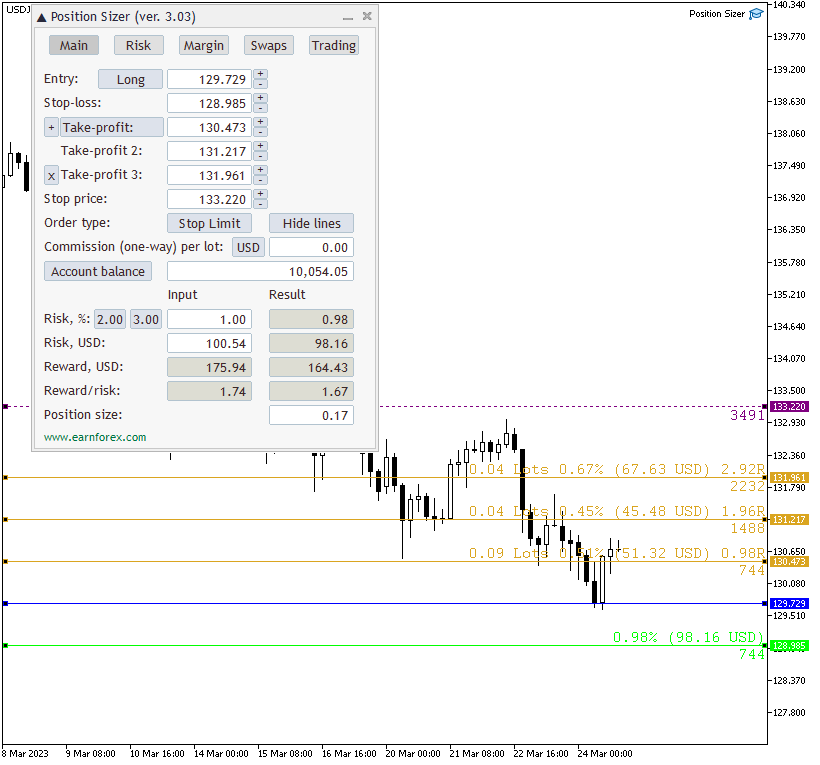
- The main tab of the panel provides the primary control over the EA's functions and serves to output the most important calculation results: the position size, risk, reward, and risk-to-reward ratio.

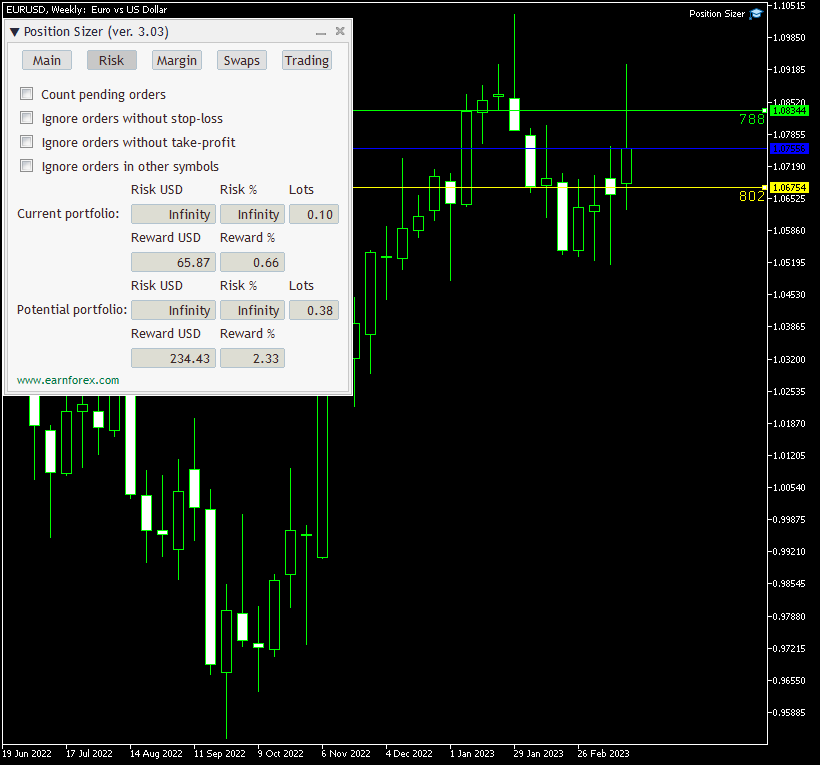
- The risk tab can help you assess current and potential risk and reward profile. Using a simple algorithm, the EA calculates the risk of the currently open positions and pending orders based on their stop-loss levels (or lack thereof). It also assesses the potential reward of already opened positions and the position calculated by the expert advisor based on take-profit levels. The employed risk analysis method does not account for complex situations involving hedged orders and positions.

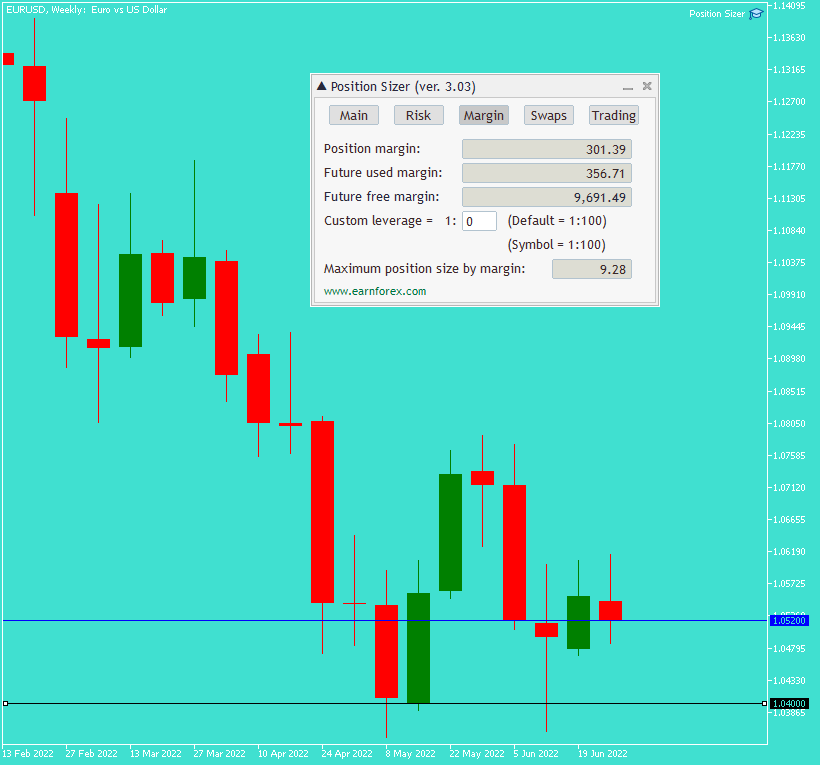
- The margin tab provides information about the calculated position's margin, amount of used and available margin after opening the calculated position, and the biggest possible position size considering the current available margin and leverage.

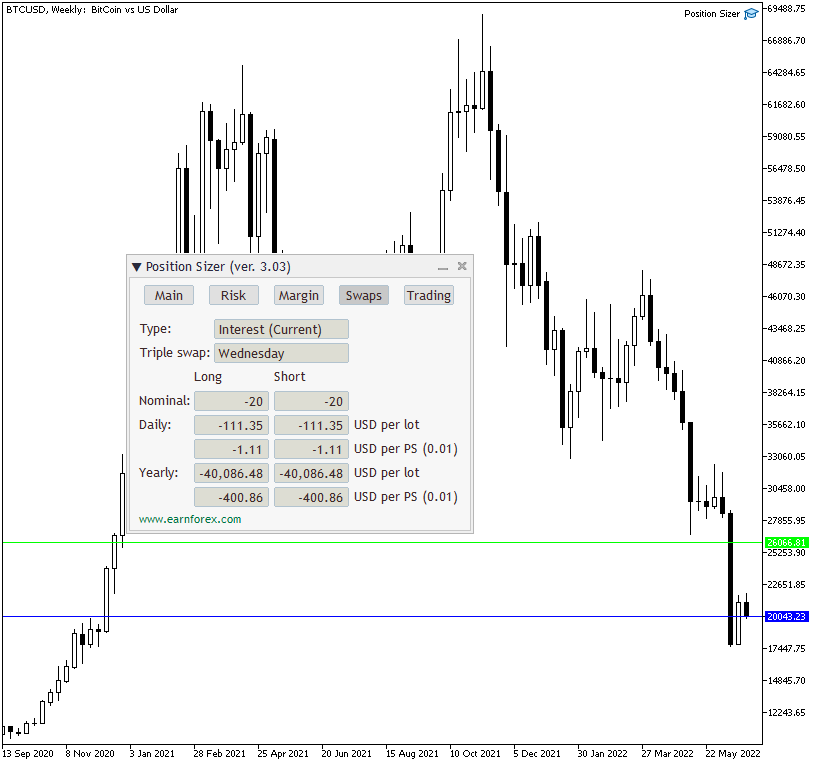
- The swaps tab displays details on the overnight interest payments associated with the current trading instrument and calculated position size. It shows swaps type, nominal swaps, daily, yearly, per lot, per calculated position size, and both for long and short positions

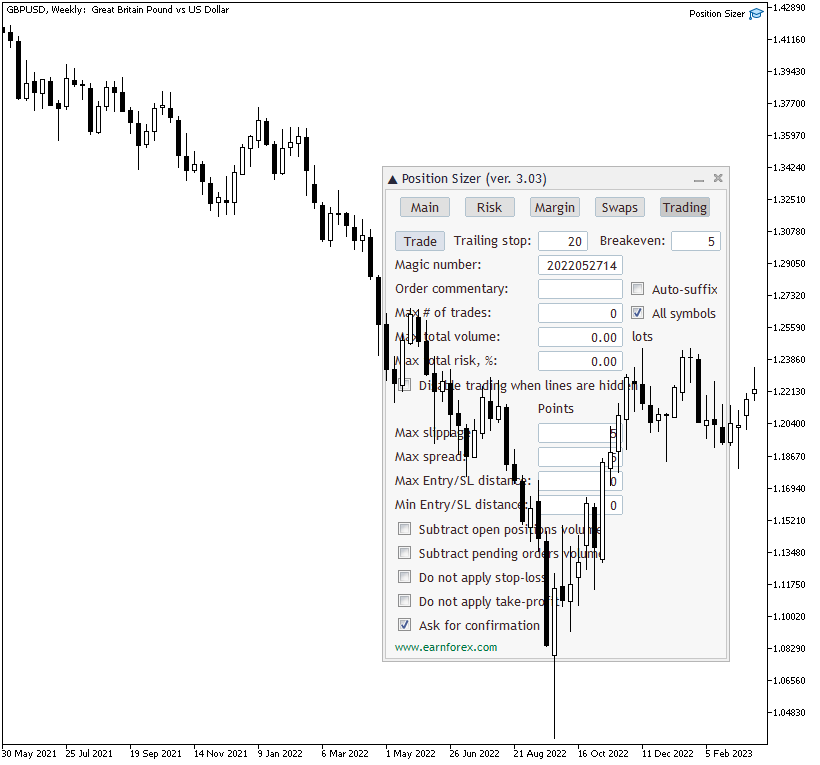
- The trading tab lets you trade based on the results of the calculation and also to control the trading process.

Using this expert advisor is very simple if your main aim is to calculate the position size based on your stop-loss and the current market parameters and then to execute the trade based on that calculated position size.

You can set a keyboard shortcut via the TradeHotKey input parameter. You can either use a single key (e.g., "T") or with a combination of Shift and Ctrl keys (e.g., "Ctrl+Shift+T").
Отзывы 55
Vinicius Smaniotto
18
Vinicius Smaniotto 2026.02.09 01:44 
 

Performance problems | Fixed

As Aydin Poladli says: For anyone experience performance issues with the Position Sizer after the recent MT5 update (builds 557x), please open input parameters and change the font from Courier to Arial. This will solve the problem.

Guillermo Rondón
18
Guillermo Rondón 2026.02.02 13:32 
 

Es una herramienta extremadamente util, aunque recientemente luego de una actualizacion de metatrader se congela por completo. Por favor, amigo, necesitamos una actualizacion urgente, un saludo.

Aydin Poladli
49
Aydin Poladli 2026.02.02 13:01 
 

For anyone experience performance issues with the Position Sizer after the recent MT5 update (builds 557x), please open input parameters and change the font from Courier to Arial. This will solve the problem.

Рекомендуем также
Торговая панель,Ручная торговля,Управление ордерами,Управление рисками,Торговый менеджер,Ассистент трейдера,Стоп лосс,Тейк профит,Трейлинг стоп,Скальпинг JoOrderTrade Plus – Продвинутая торговая панель для MT5 Два чрезвычайно важных уведомления Для корректной работы инструмента ОБЯЗАТЕЛЬНО необходимо включить опцию «Algo Trading» в настройках MetaTrader 5. Без этой активации панель работать не будет. Панель JoOrderTrade Plus может иметь некоторые небольшие баги на отдельных кнопках для определ
Trade Control Panel
Jerry Jilun Anak Liban
Trade Control Panel Function Normal One Click Function Close All Close All Profit Close All Loss Close All Pending Order Close All Sell Close All Buy Advance One Click Function 1.  Close Partial Lot Sell by Percent It will help you partial close for all open position by desire percent you wanted. No longer partial close one by one for every open position Manual input for desire percent 2. Close Partial Lot Buy by Percent It will help you partial close for all open position by desire percent
HotKey Trade
Juan Pablo Sanchez Correa
HotKey Trade is a fast-execution panel that lets you trade with just the press of a key. Open BUY (C), SELL (V), or close all (X) orders instantly, without menus or clicks. Additionally, you can adjust the lot size with the ↑↓ arrows and view P&L, margin, and lot size in real time. Ideal for scalpers, manual traders, and those who value speed. Key-based operation - P&L and margin display - Dynamic lot size control - Compatible with any symbol and timeframe Key to BUY (Default: C) Key to SELL (De
Quick Trade Panel Pro
Nicolas Olivier Menetrey
Панель торговли в один клик с автоматическим управлением лотом и риском Quick Trade Panel Pro — это интуитивно понятная торговая панель, разработанная для трейдеров, которые хотят быстро исполнять ордера, сохраняя полный контроль над рисками. Основные функции Автоматический расчёт размера лота на основе процента от доступной маржи Настраиваемый Stop Loss в пунктах, автоматически применяемый к каждой сделке Размер лота фиксируется во время серии сделок для обеспечения постоянного размера позиции
Ордерная форма, Торговая панель, Управление риском, Ручная торговля, Трейлинг-стоп, Управление ордерами, Быстрое исполнение — JoOrderTrade Pro — панель исполнения для MetaTrader 5 Краткое описание JoOrderTrade Pro — графическая ордерная форма и панель исполнения для ручного управления ордерами в MetaTrader 5. Упрощает выставление рыночных и отложенных ордеров, настройку Stop Loss/Take Profit и предоставляет инструменты управления риском (Trailing Stop, Breakeven, система SP), а также настраивае
Horizontal Line Trade Assistant EA  Semi-Automated Trading Assistant      IMPORTANT :     On the main/purchased program a user can click on the Horizontal line and change it to Buy or Sell, and drag by double clicking on it. Please keep in mind that this option is not available on demo version, due to some restrictions/limitations of Strategy Tester, some Object related operations are not available in the  Strategy Tester. But, it will not prevent you from Testing, please drop an Object to chart
️ Trade Manager oneclick  ( Reverse Trade,  Partial Close,  Breakeven, Close All Running Trade )   control – Smart Manual Trade Control for MT5 Trade Manager oneclick control is a powerful yet lightweight trade management utility built for manual traders who want precise control over their open positions — directly from the MT5 chart. This EA does not open or close trades automatically based on any strategy. It simply provides one-click management tools to handle your running trades efficient
FREE
Quick Trade Manager (QTM) — это удобный и интуитивно понятный инструмент для быстрой торговли на графике MT5. QTM расширяет возможности быстрой торговли непосредственно на графике, делая торговлю в один клик ещё удобнее. Доступен автоматический расчёт объёма позиции исходя из заданного процента риска на сделку. Полностью поддерживаются любые пользовательские (синтетические) символы. Например, QTM можно использовать для торговли на секундном графике, построенном при помощи Seconds Chart . Горячие
FREE
Slippage Auditor — это визуальный инструмент для платформы MetaTrader 5 , который анализирует качество исполнения сделок и выявляет проблемы проскальзывание прямо на графике. Slippage Auditor: User Guide Логика и функциональность Slippage Auditor — это визуальный инструмент, предназначенный для проверки качества исполнения закрытых сделок на графике. Он создан для трейдеров и разработчиков, которые хотят отслеживать значения проскальзывания и выявлять проблемы исполнения. Инструмент автоматическ
Powerful and beautiful trading panel helps you in scheduling or placing multiple trades based on your presets in a single click. It is designed to execute orders immediately or schedule trades in advance to be executed at certain time using multiple filters to avoid non favorable market conditions (wide spread, reduced leverage etc.). Additional functionality developed to sycnhronize two instances of the expert over the internet (Master - Slave Mode), which means trader can open the panel in loc
Отличная панель для аналитики рынка. Панель помогает анализировать значения индикатора  Ichimoku  и его сигналы. С помощью данной панели вы сможете: смотреть текущий сигнал с Ichimoku по всем таймфреймам; смотреть текущий сигнал с   Ichimoku   по разным символам; смотреть текущее значение   Ichimoku ; несколько типов сигналов для аналитики. Значения в ячейке таблицы: Значение Tenkan-Sen Значение Kijun-Sen Значение Senkou Span A Значение Senkou Span B Значение Chikou Span Span A - Span B. Тип

EAs Manager
Abdeljalil El Kedmiri
5 (1)
The   Ultimate EAs Manager   is a professional risk management and trade assistance tool designed to monitor, control, and optimize all trading activities on your MT5 account. It acts as a   central command center   that oversees every trade - whether opened by other Expert Advisors or manually by you. How it's work with other EAs : Blog post  MT4 version:  https://www.mql5.com/en/market/product/167007 Only 10 copies will be sold at the early-bird price. After 10 copies, the price jumps directly
Risk Control Utility MT5 designed for manual trading. It helps to calculate and control your risks, transfer transactions to breakeven and accompany positions with trailing stop. Easy to set up and use. It can be used for calculating a trading lot, calculating stop loss and take profit levels. Works with currency pairs, CFDs, stocks, indices, futures, cryptocurrencies Displays   volume,   potential loss and profit before   placing an order Ability to set the expiration time of a pending order Tr
EA utility to help you with your Discipline for New Traders. When Balance Drop below set Daily Max Percentage Draw Down Balance. Any new trades open after the DD Threshold reached, Bot will close any new trades instantly and will keep canceling any pending orders placed as well until the Next Daily Candle is formed or EA is removed. Note: 1. Please Attached EA Utility before start trading for the day.  2. Set Timeframe before attaching EA utility to the chart. If timeframe changed after taking a
FREE
A simple script that closes all current orders. Terminate once close all positions, so no worries about constantly closing your order. How to use : Drag the script from the navigator to the chart, and it will be activated. Do remember to enable algo trading to use this script. There are different version of the script that can choose whether to close all buy/sell posiitons, if you need this, do contact me in MQL5.
Утилита для ручной торговли с помощью "горячих клавиш". Позволяет моментально реагировать на текущую ситуацию на рынке. "Горячие клавиши" можно назначить на открытие/закрытие позиций по типу, открытие/закрытие всех позиций на текущем графике и удаление всех ордеров на текущем графике. Также можно задать "горячие клавиши" на пять предопределенных торговых объемов и переключаться между ними в зависимости от ситуации без необходимости периодически менять объем вручную. Также возможно задать автомат
Multi Symbol Trailing
Vladimir Karputov
5 (1)
The "   Multi Symbol Trailing   " utility moves Stop Loss for all positions that are currently open (multi-symbol trailing). It is intended primarily to assist in manual trading. There are no restrictions for the utility either by the name of the currency pair or by the individual identifier (Magic number) - the utility processes absolutely all positions that are currently open. The unit of measurement for the "   Trailing Stop   " and "   Trailing Step   " parameters is points (the difference
This EA puts simple, useful close buttons right on your chart—so you’re always one click away from managing your positions. Whether you want to clean up before the market closes or just take profits without hassle, Custom Close EA helps you do it fast, safely, and your way. What it does: Close All – Instantly closes every open trade. Close Profitable – Closes only trades that are in profit. Close Losing – Closes only trades that are in loss. Close Symbol Only – Closes trades only for t
Donation: USDT (TRC20) : TQJsYp64FgLLeQiyNnS6hhCNBjnz4ykbT1 USDT (BEP20, Polygon) : 0x5b50AaaE515452071D395D28BC3D78d16279D168 You can use this expert to execute Martingale orders for you open positions. This expert will add to your positions with a pre-defined loss step. For choosing open positions you can use Symbol Name or Magic Number . Also the loss step will be defined by currency or pips. All positions that refer to a certain order will be closed by entered Profit from input section. For
FREE
Broker Analysis Utility MT5
AL MOOSAWI ABDULLAH JAFFER BAQER
Broker Analysis Utility – Your Ultimate Broker Performance Monitor! Get Full Transparency on Your Broker's Execution Quality! Are you a trader who values precision, transparency, and performance? Broker Analysis Utility is an essential tool designed to monitor your broker's execution quality, connection stability, spreads, slippage, and trading costs in real-time. Whether you are a scalper, day trader, or long-term investor, understanding your broker's performance is crucial to optimizing your
EA SB8 Panel Trade
Juan Manuel Bernal Martin
SB-8 – Manual Trading Panel with Fixed Risk & TradingView-Style Visualization for MT5 SB-8 is an advanced manual trading panel for MetaTrader 5 , designed to execute trades visually, quickly and without calculations . It is especially built for traders coming from TradingView , who often find MT5 confusing when it comes to risk management and trade visualization. With SB-8, you don’t calculate lot size, percentages or risk . You simply move the Stop Loss line , and the panel handles everything a
Общие сведения Скрипт показывает информацию о торговом счете и текущем финансовом инструменте. Информация о торговом счете: Account - номер счета и тип (Real, Contest или Demo); Name - имя владельца счета; Company - название компании, предоставляющей доступ для торговли; Server - название торгового сервера; Connection State - состояние соединения; Trade Allowed - разрешена ли торговля на счете в данный момент; Experts Allowed - разрешена ли торговля советниками; Balance - баланс счета; Equity -
HYT utility
Sergey Batudayev
HYT (Help Your Trading) — это инструмент, который поможет вам усреднить ваши убыточные позиции, используя две основные техники: Стандартное усреднение. Хеджирование с последующим открытием позиций в направлении тренда. Этот инструмент позволяет разрулить несколько позиций, открытых в разных направлениях как на покупку, так и на продажу. HYT позволяет автоматически рассчитать размер следующей позиции, цену ордера, направление для усреднения и закрытия позиции с заданным уровнем тейк-профита. Этот
25R - WASD Order is a visual risk management EA for MetaTrader 5 that combines gaming-style WASD keyboard controls with interactive chart drawing for precise order placement. Designed for active traders who value speed and accuracy, it lets you visually plan trades by dragging entry and stop-loss lines directly on the chart, while automatically calculating position size based on your risk percentage. The tool displays color-coded profit/loss zones with real-time risk metrics, supports automatic
MMTrade
Alexander Martynov
5 (3)
Данный инструмент предназначен для быстрого расчета лота в зависимости от Stop Loss. Управление происходит за счет горячих клавиш По умолчанию: 1 - Уровень цены лимитного ордера 2 - Уровень   Stop Loss 3 - Уровень Take Profit Пробел - Открыть ордер Escape - Отменить все 9 - Отрыть 2 ордера  Маркет ордер Для открытия Маркет ордера нажимаем (2) и мышкой настраиваем  Stop Loss Если хотите поставить  Take Profit -  нажимаем (3) и мышкой настраиваем    Take Profit
FREE
Этот экспертный советник отслеживает все открытые позиции по всем символам в MetaTrader 5. Как только вручную устанавливается или изменяется уровень Stop Loss (SL) или Take Profit (TP) на любой позиции, советник автоматически применяет это значение ко всем другим открытым позициям , независимо от символа или типа ордера (Buy/Sell). Это обеспечивает синхронизацию уровней SL и TP по всему счёту. Идеально подходит для мобильного трейдинга с планшета или смартфона!
TradeMngrMT5
Edgar Enrique Retontali
TradeManager 1.0   is an Expert Advisor for MetaTrader 4 y 5 that streamlines real-time trade management. Through a graphical control panel, you can send market and pending orders, move stop losses to breakeven, and automatically calculate position size based on your risk settings. Below is a comprehensive overview of its features and input parameters. Key Features Market Orders & Pending Orders BUY/SELL Buttons : Instantly open long or short positions at market. BUY STOP / SELL STOP / BUY LIMI
Auto Trailing Stop MT5
Volodymyr Hrybachov
2 (1)
Утилита для автоматического закрытия сделок по уровням трейлинг-стоп. Позволяет взять максимум с прибыли. Создан профессиональным трейдером для трейдеров.   Утилита   работает с любыми рыночными ордерами, открытыми трейдером вручную или при помощи советников. Может фильтровать сделки по магическому номеру. Одновременно утилита может работать с любым количеством ордеров.  MT4 version  https://www.mql5.com/ru/market/product/56487 ЧТО МОЖЕТ УТИЛИТА: устанавливать виртульные уровни  трейлинг-стоп  
Product Name: Anchor auto TP and SL Trade Manager Pro MT5 The ultimate manual assistant. Turns trades into auto-grids with Hedging, Zero-Loss Breakeven & Spread Detection. Your manual trade will be managed automatically. Anchor Auto TP and SL Trade Manager MT5 Pro is the advanced edition of our popular trade assistant. It transforms simple manual trades into sophisticated, professional-grade recovery grids. Unlike the free version, this PRO edition fully supports Hedging (simultaneous Buy & Sell
This tool will perform Trailing stop loss and Break even management for orders. Helps you limit or reduce the time spend watching orders on the screen, especially when you need to go to sleep. Just add this EA to 1 chart, you can manage all pairs. You can filter orders by comment, magic number, symbol and order ticket number. When Breakeven it can add shift/offset pips (to cover the commission...). You can try in strategy tester before purchase. The EA will add Buy and Sell alternately, so you
С этим продуктом покупают
Trade Assistant MT5
Evgeniy Kravchenko
4.42 (208)
Помогает рассчитать риск на сделку, простая установка нового ордера с помощью линий, управление ордерами с функциями частичного закрытия, 7 типов трейлинг-стопа и другие полезные функции. Дополнительные материалы и инструкции Инструкция по установке - Инструкция к приложению - Пробная версия приложения для демо счета Функция Линии   - отображает на графике линию открытия, стоп-лосс, тейк-профит. С помощью этой функции легко установить новый ордер и увидеть его дополнительные характеристики пе
Добро пожаловать в Trade Manager EA — лучший инструмент для управления рисками, предназначенный для упрощения, точности и эффективности торговли. Это не просто инструмент для размещения ордеров; это комплексное решение для удобного планирования торгов, управления позициями и усиленного контроля над рисками. Независимо от того, начинающий вы трейдер, опытный специалист или скальпер, нуждающийся в быстром исполнении, Trade Manager EA адаптируется к вашим потребностям и работает с любыми активами:
Local Trade Copier EA MT5
Juvenille Emperor Limited
4.96 (129)
Опыт экстремально быстрого копирования сделок с помощью Local Trade Copier EA MT5 . Благодаря простой установке в течение 1 минуты этот копировщик сделок позволяет вам копировать сделки между несколькими терминалами MetaTrader на одном компьютере с Windows или на Windows VPS с крайне быстрыми скоростями копирования менее 0.5 секунды. Независимо от того, новичок вы или профессиональный трейдер, Local Trade Copier EA MT5 предлагает широкий спектр опций, чтобы настроить его под ваши конкретные по
TradePanel MT5
Alfiya Fazylova
4.86 (148)
Trade Panel — это многофункциональный торговый помощник. Приложение содержит более 50 торговых функций для ручной торговли и позволяет автоматизировать большинство торговых операций. Внимание приложение не работает в тестере стратегий. Перед покупкой вы можете протестировать демоверсию на демо-счете. Демоверсия здесь . Полная инструкция здесь . Торговля. Позволяет совершать торговые операции в один клик: Открыть отложенные ордера и позиции с автоматическим расчетом риска. Открыть несколько ордер
Бета-версия Telegram to MT5 Signal Trader почти готов к официальному альфа-релизу. Некоторые функции все еще находятся в разработке, и вы можете столкнуться с небольшими ошибками. Если вы заметите проблемы, пожалуйста, сообщите о них, ваша обратная связь помогает улучшать программное обеспечение для всех. Telegram to MT5 Signal Trader — мощный инструмент, который автоматически копирует торговые сигналы из каналов и групп Telegram прямо в ваш счёт MetaTrader 5 . Поддерживаются как публичные, так
Trade Dashboard MT5
Fatemeh Ameri
4.97 (117)
Tired of complex order placement and manual calculations? Trade Dashboard is your solution. With its user-friendly interface, placing orders becomes effortless, by a single click, you can open trades, set stop loss and take profit levels, manage trade lot size, and calculate risk to reward ratios, allowing you to only focus on your strategy. Say goodbye to manual calculations and streamline your trading experience with Trade Dashboard. Download  Demo Version  right now. You can find  Details of
Farmed Hedge Yield Farming - Professional Pair Trading Dashboard (Manual - Hybrid - Semi/Automated EA) VERSION 3 - WILD HARVEST UPDATE Trading Approach: - Manual Trading: Primary focus - Auto Pilot: Optional supplementary feature - Full Automation: Not the main purpose Recommended Timeframe: H1-H4 DEMO VERSION Download the free demo to test functionality. Use Strategy Tester with Visual Mode to see how it works. VERSION 3 - NEW FEATURES Summary Dashboard (SRA Panel) - Quick pair selection w
Copy Cat More Trade Copier MT5 (Копи-Кот MT5) — это локальный торговый копировщик и полная система управления рисками и исполнения, разработанная для современных торговых задач. От испытаний проп-фирм до управления личным портфелем, он адаптируется к любой ситуации с сочетанием надежного исполнения, защиты капитала, гибкой настройки и продвинутой обработки сделок. Копировщик работает как в режиме Мастер (отправитель), так и в режиме Слейв (получатель), с синхронизацией в реальном времени рыночны
HINN MAGIC ENTRY - лучший инструмент для входа и менеджмента позиций! Выставляет ордера через выбор уровня на графике! полное описание    ::    demo-версия    ::   60-sec-video-description Основные функции: - Рыночные, лимитные и отложенные ордера -  Автоматический подсчет лоттажа  -  Автоматический учет спреда и комиссий -  Неограниченное количество промежуточных тейков для позиций - Перевод в безубыток и трейл стоп-лосса и тейк-профита - Уровни инвалидаций - Интуитивно понятный,  адаптивный,
Exp COPYLOT CLIENT for MT5
Vladislav Andruschenko
3.82 (34)
Trade copier for MT5 - копировщик позиций/СДЕЛОК/ордеров для МetaТrader 5  из МТ4/МТ5) Для копирования на терминал MetaTrader 5 между терминалами МТ5 - МТ5, МТ4 - МТ5  для версии COPYLOT MT5 ( или МТ4 - МТ4 МТ5 - МТ4 для версии COPYLOT MT4). Версия МT4 Полное описание +DEMO +PDF Как купить Как установить    Как получить файлы журналов   Как тестировать и оптимизировать    Все продукты от Expforex Вы также можете копировать сделки в терминал МТ4 (МТ4 - МТ4, МТ5 - МТ4):    COPYLOT CLIENT for M
Smart Stop Manager – автоматизированное управление стоп-лоссами с профессиональной точностью Обзор Smart Stop Manager — это исполнительный модуль линейки Smart Stop, созданный для трейдеров, которым требуется структурированное, надежное и полностью автоматизированное управление стоп-лоссами по нескольким открытым позициям одновременно. Панель непрерывно отслеживает активные сделки, рассчитывает оптимальный уровень стоп-лосса на основе рыночной структуры Smart Stop и автоматически обновляет сто
Trade Manager DaneTrades
Levi Dane Benjamin
4.36 (28)
Trade Manager, который поможет вам быстро входить и выходить из сделок, автоматически рассчитывая риск. Включает функции, которые помогут предотвратить чрезмерную торговлю, торговлю из мести и эмоциональную торговлю. Сделками можно управлять автоматически, а показатели эффективности счета можно визуализировать в виде графика. Эти функции делают эту панель идеальной для всех трейдеров, занимающихся ручной торговлей, и помогают улучшить платформу MetaTrader 5. Многоязычная поддержка. Версия для МТ
MT5 to Telegram Signal Provider — это простой в использовании полностью настраиваемый инструмент, который позволяет отправлять определённые сигналы в чат, канал или группу Telegram, превращая вашу учётную запись в провайдера сигналов . В отличие от большинства конкурирующих продуктов, он не использует импорт DLL. [ Демо ]   [ Руководство ] [ Версия MT4 ] [ Версия для Discord ] [ Канал в Telegram ]  New: [ Telegram To MT5 ] Настройка Доступно пошаговое руководство пользователя . Никаких знаний A
YuClusters
Yury Kulikov
4.93 (43)
Внимание: Ознакомиться с работой программы можно с помощью бесплатной версии  YuClusters DEMO . YuClusters это профессиональная система анализа рынка. Для трейдера открываются уникальные возможности анализа потока ордеров, объемов торговли, движения цены используя различные графики, профили, индикаторы, графические объекты. YuClusters оперирует данными на основе ленты сделок или тиковой информации, в зависимости от того, что доступно в котировках финансового инструмента.  YuClusters позволяет с
Smart Stop Scanner – многоактивный интеллектуальный сканер стоп-лоссов Общее описание Smart Stop Scanner предоставляет профессиональный контроль стоп-лоссов на любом рынке. Он анализирует рыночную структуру, определяет значимые пробои и формирует ключевые защитные уровни по Forex, Золоту, Индексам, Металлам, Криптовалютам и другим инструментам. Все данные отображаются в одном чистом, информативном и DPI-адаптивном панели для максимальной ясности и скорости принятия решений. Как определяется с
Trade copier MT5
Alfiya Fazylova
4.63 (38)
Trade Copier — это профессиональная утилита, предназначенная для копирования и синхронизации сделок между торговыми счетами. Копирование происходит от счета/терминала поставщика к счету/терминалу получателя, которые установлены на одном компьютере или vps. Перед покупкой вы можете протестировать демо-версию на демо-счете. Демо-версия здесь . Полная инструкция здесь . Основной функционал и преимущества: Русифицированный интерфейс, поддержку на русском языке. Поддерживает копирование МТ5 > МТ5, МТ
Advanced Dashboard Ultra
Mirel Daniel Gheonu
5 (1)
Stats Dashboard & Journal ULTRA для MT5 Полный командный центр трейдинга: Аналитика, Автоматизация и Анализ Новостей. Stats Dashboard ULTRA — это высшая эволюция инструмента аналитики Pro. Он превращает MetaTrader 5 в профессиональную торговую станцию, сочетая анализ эффективности институционального уровня с автоматической защитой от новостей и продвинутыми психологическими метриками. Разработано для ручных трейдеров и управляющих портфелями EA, которым нужен полный контроль. НОВОЕ В ВЕРСИИ ULTR
Ultimate Extractor - Professional Trading Analytics for MT5 *****this is the local HTML version of Ultimate Extractor. Check out Ultimate Extractor Cloud on mql5 for the Cloud version****** Ultimate Extractor transforms your MetaTrader 5 trading history into actionable insights with comprehensive analytics, interactive charts, and real-time performance tracking. What It Does Automatically analyzes your MT5 trading history across all Expert Advisors and generates detailed HTML reports with inte
Equity Protect Pro: Ваш эксперт по комплексной защите счетов для спокойной торговли Если вы ищете такие функции, как защита счета, защита капитала, защита портфеля, защита мультистратегий, защита прибыли, сбор прибыли, безопасность торговли, программы контроля рисков, автоматический контроль рисков, автоматическая ликвидация, условная ликвидация, запланированная ликвидация, динамическая ликвидация, скользящий стоп-лосс, закрытие в один клик, ликвидация в один клик и восстановление в один клик,
Pulsar Terminal — продукт компании Pulsar Technologies, торговая марка Astralys LLC . Pulsar Terminal — это утилита-дополнение для MetaTrader 5. Это визуальный интерфейс в сочетании с инструментами исполнения в сопутствующем приложении подключённом к вашему счёту MetaTrader 5 через Expert Advisor . Мы используем сопутствующее приложение для максимального расширения возможностей инструмента и предоставления более продвинутого визуального интерфейса и рабочего процесса, чем стандартные панели MT5
Trade Manager DashPlus
Henry Lyubomir Wallace
5 (13)
DashPlus – это продвинутое средство для управления торговлей, разработанное для повышения эффективности и результативности торговли на платформе MetaTrader 5. Оно предлагает широкий набор функций, включая расчет рисков, управление ордерами, продвинутые системы сеток, инструменты на основе графиков и аналитику производительности. Основные функции Восстановительная Сетка Внедряет систему усреднения и гибкую сетку для управления сделками в неблагоприятных рыночных условиях. Позволяет стратегически
The product will copy all telegram signal to MT5 ( which you are member) , also it can work as remote copier.  Easy to set up, copy order instant, can work with almost signal formats, image signal,  s upport to translate other language to English Work with all type of channel or group, even channel have "Restrict Saving Content", work with  multi channel, multi MT5 Work as remote copier: with signal have ticket number, it will copy exactly via ticket number. Support to backtest signal. How to s
Telegram to MT5: Идеальное решение для копирования сигналов Упростите свою торговлю с Telegram to MT5 — современным инструментом, который копирует торговые сигналы прямо из каналов и чатов Telegram на вашу платформу MetaTrader 5, без необходимости использования DLL. Это мощное решение обеспечивает точное исполнение сигналов, широкие возможности настройки, экономит время и повышает вашу эффективность. [ Instructions and DEMO ] [ FAQ ] Ключевые возможности Прямая интеграция с Telegram API Аутенти
Инструкция по установке:    Нажмите здесь! Анализ нескольких экспертных советников одновременно. Сравните результаты работы советников по «магическому числу». Отслеживание прибыльности и просадок Фильтрация результатов по диапазону дат Кривая визуальной привлекательности и подробные метрики Готов к использованию менее чем за минуту. EA Portfolio Analyzer EA Portfolio Analyzer — это   профессиональный аналитический инструмент   , предназначенный для мониторинга   текущей эффективности работы нес
Custom Alerts AIO: Универсальный сканер рынка — Без настройки Обзор Custom Alerts AIO — это самый быстрый и простой способ отслеживать рыночные сигналы в реальном времени на множестве инструментов без дополнительной настройки и без необходимости покупать другие продукты. В состав входят все необходимые индикаторы от Stein Investments, что делает этот инструмент идеальным решением «всё в одном» для трейдеров, ценящих простоту и эффективность. Просто установите на график и сразу получайте сигнал
Anchor: The EA Manager A coordination system for traders running multiple EAs. Anchor ensures only one EA can trade at a time, preventing conflicting positions and keeping your portfolio safer. Attach Anchor to any chart. Configure your EAs and their magic numbers. Anchor handles the rest. Built for portfolios. Built for discipline. Built for prop firms. The Problem Running multiple EAs on the same account creates risk. Two gold EAs can open opposite positions on the same candle. Three EA
Telegram To MT5 Receiver
Levi Dane Benjamin
4.53 (15)
Копируйте сигналы из любого канала, участником которого вы являетесь (в том числе частного и ограниченного), прямо на свой MT5. Этот инструмент был разработан с учетом потребностей пользователей и предлагает множество функций, необходимых для управления и мониторинга сделок. Этот продукт представлен в простом в использовании и визуально привлекательном графическом интерфейсе. Настройте свои параметры и начните использовать продукт в течение нескольких минут! Руководство пользователя + Демо  |
Timeless Charts
Samuel Manoel De Souza
5 (3)
Timeless Charts is an advanced charting solution designed for professional traders seeking for custom charts / custom timeframes , including seconds charts / seconds timeframe, renko charts / renko bars, cluster charts / footprint charts and advanced tools present in most of the popular platforms. Unlike traditional offline charts or simplistic custom indicators, this solution constructs fully custom bars with true timestamp accuracy , down to miliseconds, allowing for a powerful and precise tr
Take a Break MT5
Eric Emmrich
4.75 (24)
One tool to protect all your EAs — news filter, equity protection, time filter and more — free demo available Take a Break has evolved from a basic news filter into a comprehensive account protection solution. It pauses your other Expert Advisors during news events or based on custom filters. When trading resumes, it automatically restores your entire chart setup , including all EA settings. Typical use cases: One news filter for all your EAs. Pause trading during news or high volatility — and c
The News Filter MT5
Leolouiski Gan
4.74 (19)
Этот продукт фильтрует всех экспертных советников и ручные графики во время новостей, так что вам не нужно беспокоиться о внезапных скачках цены, которые могут разрушить ваши ручные торговые настройки или сделки, введенные другими экспертными советниками. Этот продукт также поставляется с полной системой управления ордерами, которая может обрабатывать ваши открытые позиции и ордера на ожидание перед выпуском новостей. После покупки   The News Filter   вам больше не придется полагаться на встроен
Другие продукты этого автора
Position Calculator calculates how many lots to trade based on: Entry and stop-loss levels Risk tolerance Account size (balance, equity, or even your savings account) Account currency Currency exchange rates - The main tab of the panel provides the primary control over the EA's functions and serves to output the most important calculation results: the position size, risk, reward, and risk-to-reward ratio. - The risk tab can help you assess current and potential risk and reward profile. Using a s
FREE
This indicator show Gann Swing Chart (One Bar) with multi layer wave. 1. Wave layer   F1: Gann waves are drawn based on candles. SGann wave(Swing of Gann) is drawn based on Gann wave of wave layer   F1. 2. Wave layer F2: Is a Gann wave drawn based on the SGann wave of wave layer F1. SGann waves are drawn based on Gann waves of wave layer   F2. 3. Wave layer F3: Is a Gann wave drawn based on the SGann wave of wave layer F2. SGann waves are drawn based on Gann waves of wave layer   F3. ---------Vi
FREE
Фильтр:
Vinicius Smaniotto
18
Vinicius Smaniotto 2026.02.09 01:44 
 

Performance problems | Fixed

As Aydin Poladli says: For anyone experience performance issues with the Position Sizer after the recent MT5 update (builds 557x), please open input parameters and change the font from Courier to Arial. This will solve the problem.

Samuel96
14
Samuel96 2026.02.04 13:45 
 

Пользователь не оставил комментарий к оценке

Voyagera
14
Voyagera 2026.02.04 02:16 
 

Está travando muito o mt5 depois dá ultima atualização, eu tive que reinstalar, e quando fui instalar o position, está travando muito.

vetal17
14
vetal17 2026.02.03 23:18 
 

Despues de una actualizacion de MT5 se congela por completo. Si se pueden solucionar esta problema? Antes funcionaba bien.

Frank Joseph
18
Frank Joseph 2026.02.03 14:55 
 

ANTES TODO BIEN desde que se actualizo el MT5 esta fallando mi PC explota cuando la uso, por favor arréglalo :)

Freddy BT
19
Freddy BT 2026.02.03 05:14 
 

A raiz de una actualizacion de MT5 la calculadora ya no esta funcionando o esta consumiendo una enorme cantidad de recursos de la PC. Actualizacion Urgente¡¡ Please¡¡

mM0gty41aP
14
mM0gty41aP 2026.02.02 16:50 
 

If it was usable it would be great. Takes up to a minute for a response. So slow it is not usable. From previous comments, it used to work. Fix it so it is usable

Guillermo Rondón
18
Guillermo Rondón 2026.02.02 13:32 
 

Es una herramienta extremadamente util, aunque recientemente luego de una actualizacion de metatrader se congela por completo. Por favor, amigo, necesitamos una actualizacion urgente, un saludo.

Leonid
17
Leonid 2026.02.02 13:20 
 

Пользователь не оставил комментарий к оценке

Aydin Poladli
49
Aydin Poladli 2026.02.02 13:01 
 

For anyone experience performance issues with the Position Sizer after the recent MT5 update (builds 557x), please open input parameters and change the font from Courier to Arial. This will solve the problem.

s.alimohammady
14
s.alimohammady 2026.02.02 09:26 
 

Major performance issues after recent update

TradiusPro
14
TradiusPro 2026.02.02 07:43 
 

Major performance issues after recent update This was an excellent product, but the latest update has made it nearly unusable. The utility frequently hangs and stops responding. More importantly, it is now causing MT5 to lag significantly or freeze entirely, which is a huge risk during live trades. It used to work perfectly—I hope the developers fix these stability issues soon.

Andreivrn Родченков
64
Andreivrn Родченков 2026.01.18 10:12 
 

Отличный продукт. Перед сделкой важно оценить риски и эта утилита очень помогает.

rafamanero2025
14
rafamanero2025 2026.01.10 13:06 
 

Me parece sencilla de usar y de mucha utilidad para realizar las operaciones con rapidez y seguridad.

Ar.Brain Arniyazov
16
Ar.Brain Arniyazov 2025.12.11 15:26 
 

PositionCalculatorMT5 — просто находка. Наконец-то можно быстро и безошибочно устанавливать объем лота в соответствии с риском. Значительно облегчает торговлю.

Andreas Finger
28
Andreas Finger 2025.11.27 15:17 
 

Das Tool ist wirklich sehr gut aber was ich vermisse ist, den BE +X PIP ins plus einstellen zu können. Vielleicht kann man das auch und ich weiß nur nicht wie. Was noch gut wäre, wenn man Trailing einstellen könnte, ab wann der Trail beginnt zu arbeiten. Ab entry wäre gut.

99046362 Spadoni
20
99046362 Spadoni 2025.11.19 20:56 
 

Interesante. Podrian mejorar dejanto el TP libre como SL y que el usuario asuma su riego libremente

Adib Mia
26
Adib Mia 2025.11.04 15:37 
 

Best app ever used

Prosperidade08
14
Prosperidade08 2025.10.29 08:30 
 

Great app, congratulations to the developer!

Michael Omukholo Keya
118
Michael Omukholo Keya 2025.10.07 16:43 
 

one of the best indicators that i have stumble upon

123
Ответ на отзыв