
RedHotChiliEA
- Эксперты
-
Dragan Drenjanin
 🔴 Мои продукты на MQL5 → https://www.mql5.com/en/users/drgandra/seller
 - Версия: 1.10
- Обновлено: 2 апреля 2026
- Активации: 5
RHC EA - Advanced Multi-Strategy Trading Expert Advisor
Overview
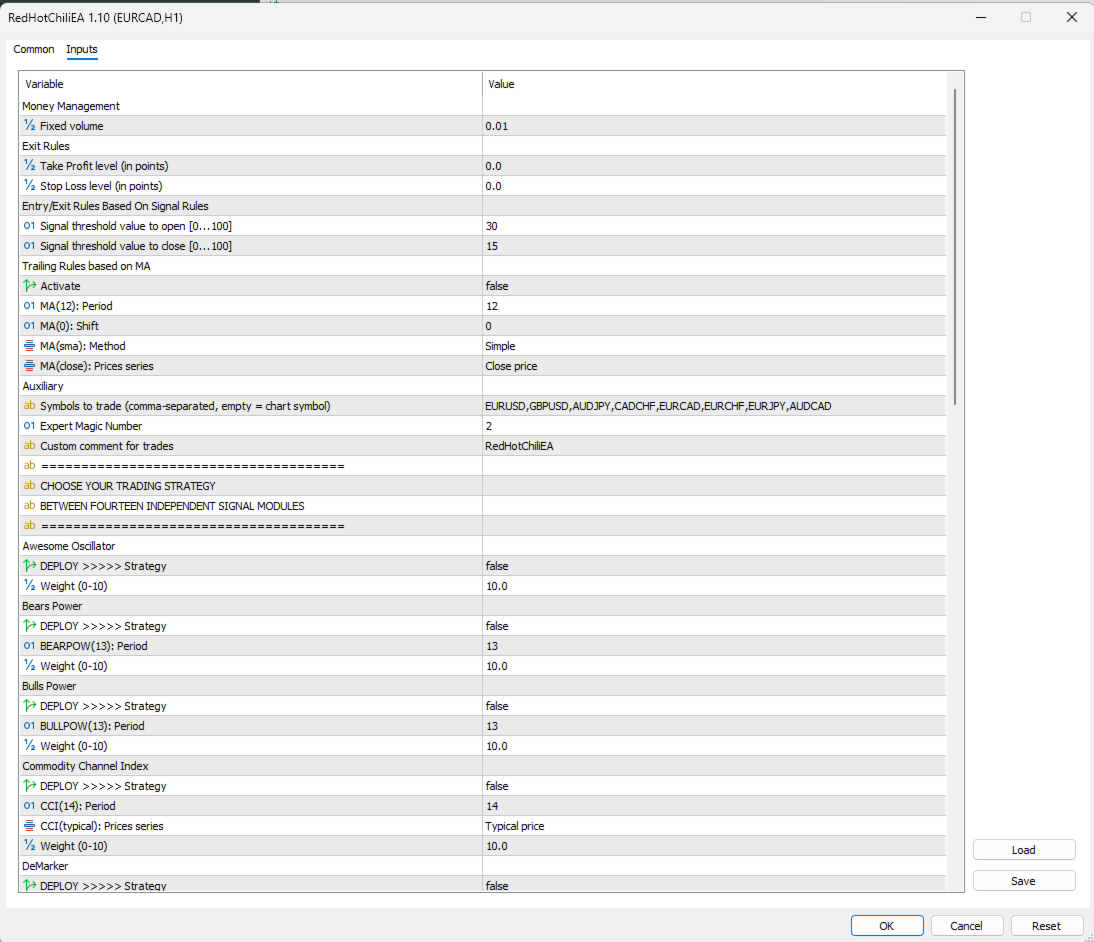
The RHC EA is a highly customizable Expert Advisor (EA) for MetaTrader 5, designed to empower traders with flexible and precise trading strategies. Built on the robust framework, RHC EA offers a versatile platform for both novice and experienced traders. Featuring 14 independent signal modules based on popular technical indicators, RHC EA allows users to deploy a single strategy or combine multiple signals for enhanced decision-making. With intuitive entry/exit rules, diverse order types, and optional trailing stops, this EA adapts seamlessly to various market conditions.
Key Features
- Multi-symbol trading (separated by comma).
- 14 Independent Signal Modules: Choose from indicators like Awesome Oscillator, Bears Power, Bulls Power, Commodity Channel Index (CCI), DeMarker, Envelopes, Fractal Adaptive Moving Average (FRAMA), MACD, Moving Average (MA), Parabolic SAR, RSI, Stochastic, TEMA, and Williams Percent Range (WPR).
- Single or Multi-Signal Strategies: Deploy a single signal module for a focused approach or combine multiple modules for a composite strategy. The weight parameter (ranging from 0 to 10) determines the priority of each signal in multi-signal setups while also influencing signal strength in single-signal configurations.
- Customizable Entry and Exit Rules: Fine-tune signal thresholds to control trade initiation and closure, ensuring alignment with your market outlook.
- Order Types: Support market orders.
- Trailing Stop Based on Moving Average: Optionally enable a trailing stop using a customizable Moving Average to dynamically protect profits.
- Risk Management: Define a fixed volume for consistent position sizing, complemented by Stop Loss and Take Profit settings for risk control.
Exit Rules
- Take Profit level (in points): Specify the profit target for closing positions, measured in points (e.g., 0 to disable).
- Stop Loss level (in points): Define the maximum loss per trade, measured in points (e.g., 0 to disable).
Entry/Exit Rules Based on Signal Rules
- Signal threshold value to open [0...100]: Set the signal strength required to initiate a trade (e.g., -30). A higher absolute value indicates a stricter condition for opening positions, ensuring trades are triggered only when the signal is sufficiently strong.
- Signal threshold value to close [0...100]: Define the signal strength required to close an existing position (e.g., -80). A higher absolute value enforces more stringent exit conditions, helping to lock in profits or limit losses.
Trailing Rules based on MA
- Activate: Enable or disable the trailing stop feature (e.g., false to disable).
- MA(12): Period: Set the period for the Moving Average used in trailing (e.g., 12).
- MA(0): Shift: Define the time shift for the Moving Average (e.g., 0).
- MA(sma): Method: Choose the Moving Average method (e.g., Simple Moving Average).
- MA(close): Prices series: Select the price type for the Moving Average (e.g., Close price).
Signal Modules
RHC EA includes 14 independent signal modules, each based on a popular technical indicator: Awesome Oscillator, Bears Power, Bulls Power, Commodity Channel Index (CCI), DeMarker, Envelopes, Fractal Adaptive Moving Average (FRAMA), MACD, Moving Average (MA), Parabolic SAR, RSI, Stochastic, TEMA, and Williams Percent Range (WPR). Each module can be enabled or disabled, with customizable parameters such as period, price series, and method.
- DEPLOY >>>>> Strategy: Enable or disable the signal module (e.g., true to activate).
- Weight(0-10): Adjust the influence of the signal, ranging from 0 (no influence) to 10 (maximum influence). In multi-signal strategies, the Weight determines the priority of each signal’s contribution to the trading decision. In single-signal setups, it influences the signal’s strength, allowing fine-tuned control over trade execution.
How to Use RHC EA
-
Choose Your Strategy: Enable one or more signal modules by setting their "DEPLOY >>>>> Strategy" parameter to true. Adjust the Weight and other settings to match your trading objectives.
-
Set Money Management: Configure the "Fixed volume" to your preferred lot size for consistent risk management.
-
Define Entry/Exit Rules: Use the "Signal threshold value to open" and "Signal threshold value to close" to control trade initiation and closure based on signal strength.
-
Configure Order Types: Select market, stop, or limit orders, and set the price level and expiration as needed.
-
Enable Trailing Stop (Optional): Activate the Moving Average-based trailing stop and customize its parameters for dynamic profit protection.
-
Test Thoroughly: Test the EA in the MetaTrader 5 Strategy Tester across multiple timeframes, starting from H1 and above, to identify the most profitable currency pairs. Evaluate performance based on key metrics such as recovery factor, Sharpe ratio, and drawdown (DD) to optimize your settings before live trading.
-
Monitor and Adjust: Regularly review the EA’s performance and tweak parameters as market conditions evolve.
Why Choose RHC EA?
- Flexibility: Use a single signal for simplicity or combine multiple signals for a sophisticated, weighted strategy.
- Precision: Fine-tune signal weights and thresholds to align trades with your market analysis.
- Reliability: Built on a proven framework, ensuring stability and performance.
- User-Friendly: Intuitive parameters make it accessible for traders of all experience levels.
Support and Resources
- Platform: MetaTrader 5 (MT5)
- Account Type: Hedge
- Updates: Lifetime access to new upgraded versions, released periodically.
- Support: Send me a DM: Link
- My Link: Link
- All my apps: Link
- Installation Guide: For detailed instructions on purchasing and installing a trading robot from the MQL5 Market, please refer to: https://www.mql5.com/en/articles/498
- Testing Guide: Learn how to test a trading robot before buying: https://www.mql5.com/en/articles/586





























































comprei robo nao consigo fazer operaçoes na b3 ?