AlgoTrade Candle Timer

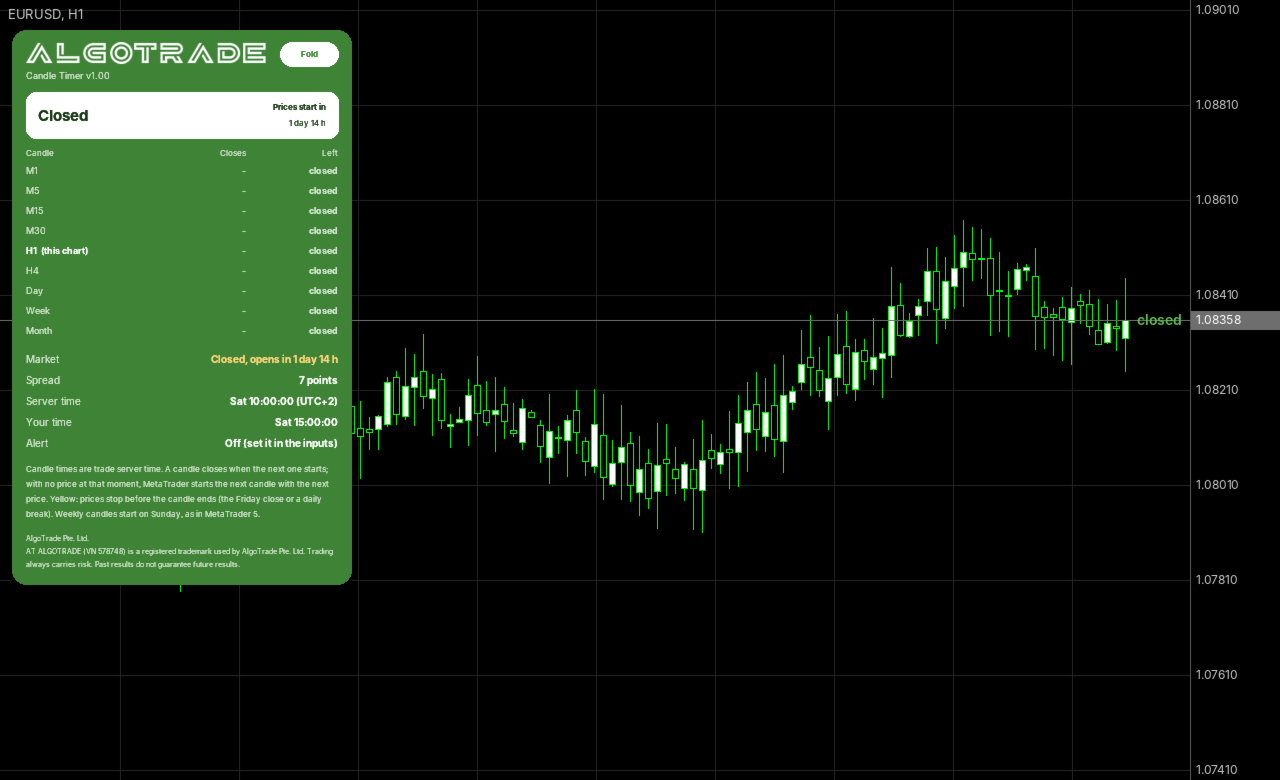
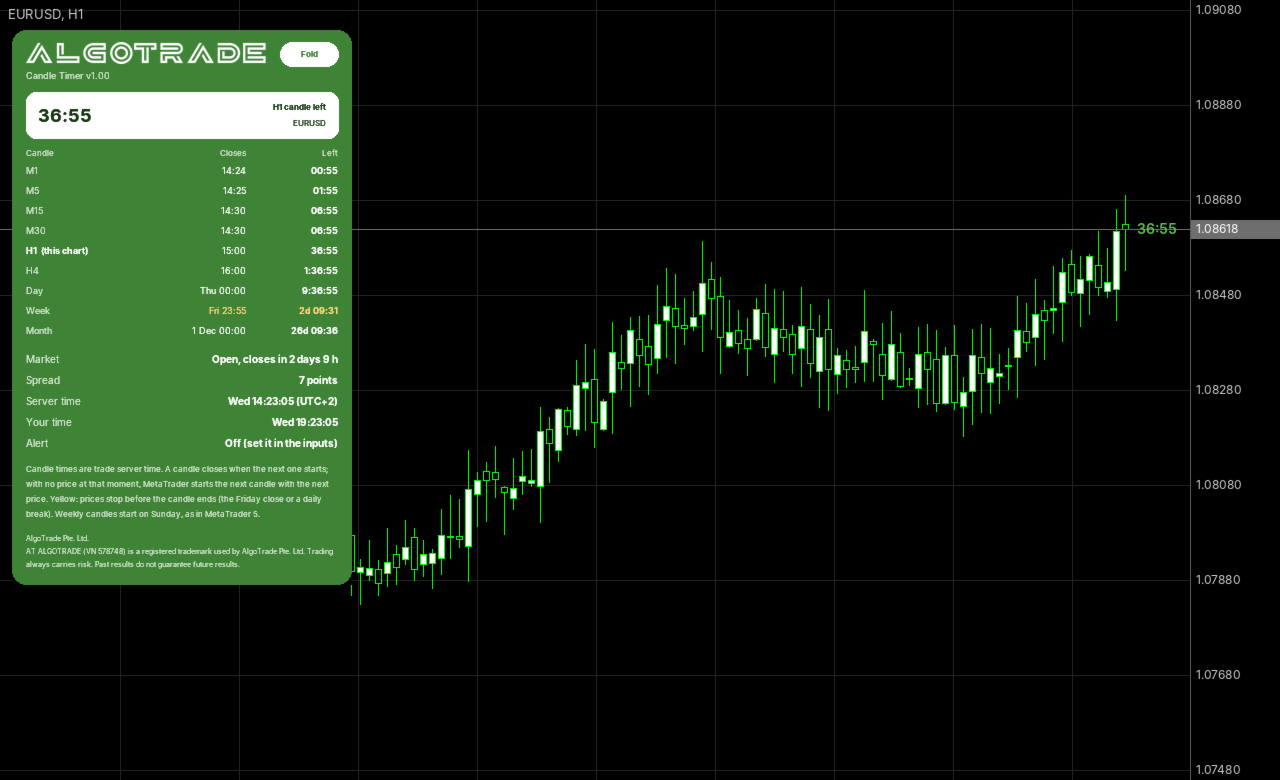
AlgoTrade Candle Timer displays the time remaining for the current candle next to the price, and on a card showing candles from M1 to monthly, the spread, server time, and when the symbol's market opens or closes. It reads data only.

What it does

  • Displays the time remaining for this chart's candle next to the latest candle in your chosen color and size. Shows "closed" when the market is closed.
  • A card displaying the time remaining for M1, M5, M15, M30, H1, H4, daily, weekly, and monthly candles, and the server time when each closes.
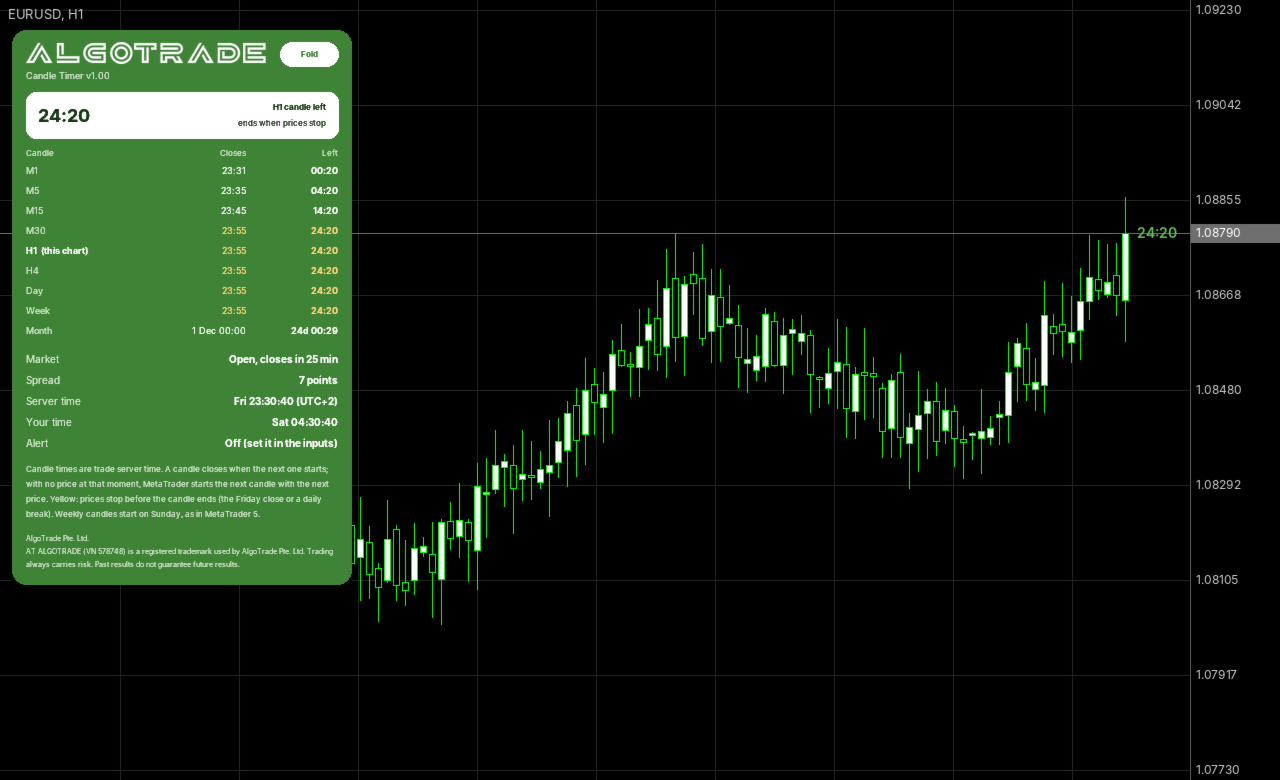
  • Tracks when prices stop: if the market closes before a candle ends (such as the Friday close or a daily break), the card highlights that candle in yellow with the time until prices stop.
  • Indicates whether trading is open and the time until it closes or opens, based on the symbol's trading sessions.
  • Displays the spread in points, trade server time with its UTC offset, and your computer's time.
  • Provides an optional alert a specified number of seconds before this chart's candle closes, with an optional push notification to your phone.

How to use

  • Attach the indicator to any chart. The timer runs every second, including between price ticks.
  • Candle times use trade server time as built by MetaTrader 5. Weekly candles start on Sunday.
  • Click "Fold" to display a single line, or "Show" to display the full card. You can change the card corner in the inputs.

Inputs: show time next to the price, color and font size, alert seconds before close (0 = off), push notification, card corner.

Please read

  • This indicator reads data only and does not open, modify, or close trades.
  • Market hours are based on the trading sessions set by your broker for the symbol. Holidays are not included in those sessions; if no price arrives for 15 minutes, the card indicates this and no alert is given.
  • Alerts trigger once per candle and do not trigger for a candle already inside the alert window when the indicator starts.
  • For questions or feature requests, please post in the comments section on this page. Your reviews help us plan updates.

Made by AlgoTrade Pte. Ltd. Trading always carries risk. Past results do not guarantee future results.
Рекомендуем также
RiskCompass Panel MT5 1. The Problem and the Approach You have a position idea, and the first real question is always the same: how much of this account am I about to put at risk, and can the account carry it. The information that answers that question is scattered across half a dozen windows. Balance is on one tab. Margin level is somewhere else. The spread you just paid is visible only if you look at the instrument row. The server day, which decides whether your daily loss limit has already be
FREE
Общее описание Этот индикатор — усовершенствованная версия классического канала Дончия с добавлением практических функций для реальной торговли. Помимо стандартных трёх линий (верхняя, нижняя и средняя), система определяет пробои и отображает их на графике стрелками, показывая только линию, противоположную текущему направлению тренда для более чистого восприятия. Индикатор включает: Визуальные сигналы : цветные стрелки при пробое Автоматические уведомления : всплывающие окна, push и email Фильтр
FREE
The Expert Advisor "TimeLeft Display" shows the remaining time until the close  of the current candle in a digital display. The time is displayed in days, hours, minutes, and  seconds.      Features: Time Calculation:  Calculates the remaining time until the close of the current candle based on the  current timeframe of the chart. Digital Display:  Shows the remaining time in a digital format. Customizable Font and Size:  Allows selection of the font (Arial, Arial Black, Aptos Display, Tahoma, 
FREE
Утилита отображает экономические новости прямо на графике. Она показывает ближайшие события, время до их выхода, важность и отправляет уведомления. Для кого: Для трейдеров, которые следят за экономическими новостями Для тех, кто торгует на новостях Для трейдеров, которые хотят получать своевременные оповещения Для пользователей, которым нужен простой и понятный календарь прямо на графике Основные функции Панель с новостями   - Показывает ближайшее экономическое событие на графике Фильтр по валют
FREE
This tool allows you to export Ticks for any financial instrument available in MetaTrader 5. You can download multiple symbols into the same CSV file. You can also schedule the download frequency (every 5 minutes, 60 minutes, etc.). There is no need to open multiple charts to get the latest data—the tool downloads the data directly. The CSV file will be stored in the following folder: \MQL5\Files . How it works Select the symbols to download: Click an item to select or deselect it. Enter the CSV
FREE
Основное назначение:   "Pin Bars"   предназначен для автоматического обнаружения пин-баров на графиках финансовых рынках. Пин-бар – это свеча с характерным телом и длинным хвостом, которая может сигнализировать о развороте тренда или коррекции. Принцип работы:   Индикатор анализирует каждую свечу на графике, определяя размер тела, хвоста и носа свечи. При обнаружении пин-бара, соответствующего заранее определенным параметрам, индикатор отмечает его на графике стрелкой вверх или вниз, в зависимос
FREE
TradeInfo MT5
Manuraj Dhanda
4.44 (16)
TradeInfo is a utility indicator which displays the most important information of the current account and position. Displayed information: Information about the current account (Balance, Equity, Free Margin). Current spread, current drawdown (DD), planned profit, expected losses, etc. Number of open position(s), volume (LOT), profit. Today’s and yesterday’s range. Remaining time to the next candle. Last day profit information. MagicNumber filter. Comment filter. Indicator parameters: ShowPro
FREE
Algorion ScanMaster – Fusion Horizon Professional Multi-Symbol Confluence Scanner for MetaTrader 5 Algorion ScanMaster – Fusion Horizon is a professional multi-symbol market scanner for MetaTrader 5 that continuously monitors your watchlist and identifies the strongest trading opportunities using a proprietary 4-Factor Fusion Engine . Instead of manually switching between dozens of charts, ScanMaster analyzes multiple symbols and multiple timeframes simultaneously, ranks them by overall confluen
FREE
Воспроизведение ранее сохранённых данных с биржевого стакана. Основные возможности: Навигация по историческим данным Регулировка скорости проигрывания кнопками "---" и "+++", также и мышкой можно путём прокруткой колёсика над областью этик кнопок и между ними Включение и отключение центрирования цен Отображение времени с точностью до тысячных секунды Внимание: Для данного продукта ещё необходима утилита для сохранения данных: https://www.mql5.com/ru/market/product/71642
FREE
Утилита рисует pivot уровни на основании выбора из day week month Берется предыдущая свеча выбранного таймфрейма и расчитываются значения для уровней по следующим формулам: Pivot = (high + close + low)/ 3 R1 = ( 2 * Pivot) - low S1 = ( 2 * Pivot) - high R2 = Pivot + (R1 -S1) R3 = high + ( 2 * (Pivot - low)) S2 = Pivot - (R1 - S1) S3 = low - ( 2 *(high - Pivot)); Настраиваются стиль и толщина для всех линий. Цвета для линий R, Pivot и S настраиваются по отдельности. При удалении утилиты с графика
FREE
RSI back arrows
Smaylle Rafael Coelho Mariano
The   RSI Back Arrows   indicator is a powerful tool designed for traders who rely on the Relative Strength Index (RSI) to identify potential market reversals. This indicator specifically highlights when the RSI has exited the   oversold   or   overbought   zones, providing clear visual signals to inform trading decisions. Key Features: Visual Cues : The indicator marks arrows on the chart when the RSI crosses back into a neutral zone, making it easy to spot potential entry and exit points. Over
FREE
TrendVision AI
Murtadha Majid Jeyad Al-Khuzaie
TrendVision AI – Smart Trend Channels & Price Forecasting for MetaTrader 5 Discover market structure and explore potential future price direction with TrendVision AI, an advanced technical indicator for MetaTrader 5 that combines automatic trendline analysis with a machine-learning-based price forecasting model. How Does TrendVision AI Work? TrendVision AI analyzes historical candlestick data within a configurable lookback window. It automatically draws two trendlines directly on the chart:
FREE
Automated Timeframe cycling with Symbols centered.  Force every timeframe onto one clock window, so the story you see on Daily is the same story you are slicing on H4, H1, and M1.  Traders usually flip timeframes and lose the span. A Daily chart shows a few weeks, then M15 shows a few hours, and the eye treats them as different markets. This indicator locks the window to N bars of the highest enabled timeframe — default 10 Daily — and maps every lower timeframe to that same stretch. You stay ins

FREE
See how your account is really doing at a glance, right on the chart. The dashboard reads your account and trade history and never opens, modifies or closes a trade. How it works Every second the dashboard reads balance, equity, margin and open positions. Closed results come from the deal history: for each closing deal the profit, swap, commission and fee are added together. From these deals it calculates closed profit for today, this week and this month, plus statistics for the period you choos
FREE
Position Selective Close MT5
Francisco Manuel Vicente Berardo
The Position Selective Close is a multi-symbol multi-timeframe script used to close simultaneously various positions.  General Description   The Position Selective Close   possesses   three operation modes (Intersection,   Union   and All) that control the way   as   four position features (symbol, magic number,   type   and profit) are used. The modes, available through the Selection Mode input parameter, relate to the features, available through the “Select by Feature” and “Feature” input pa
FREE
ConsistencyGuard
Vanessa Cristina Ribeiro Dos Anjos
Version 7.04 Крупное обновление, направленное на усиление дисциплины внутридневной торговли и защиту торгового счета. • Режим Post-Session Review с настраиваемым временем от 0 до 60 минут. • После завершения разрешенного количества сделок трейдер может оставить MetaTrader 5 открытым для анализа графиков, создания скриншотов и заполнения торгового журнала. • Попытка открыть новую сделку после достижения дневного лимита активирует защиту Emergency Close. • Emergency Close закрывает открытые позици
FREE
This spread indicator displays the actual spread of each candle. It highlights the maximum spread and the minimum spread of the chosen symbol. This indicator is very helpful to see in real time the spread evolution helping to avoid taking a trade when the spread is too high. Inputs: Print value in Points: if true displays the spread as a whole number D isplay minimum and maximum spread of the past N days: select the number of days to consider the maximum and minimum spread Automatically adj
FREE
Server Clock
Flavio Javier Jarabeck
5 (5)
Many friends asked me for a simple, non-obtrusive, resource-friendly clock to track the time during their trades. It seems pretty obvious, but it is a must-have for those trading the market manually, waiting for the Market News, or just to visually know what time it is... Trading is an absorbing endeavor! So, here it is... Totally configurable, including Font Type, Font Size and Chart Location: Upper Left/Center/Right OR Lower Left/Center/Right, with a little twist of adjusting the Offset, just
FREE
Ninja Trend Matrix MT5 Ninja Trend Matrix MT5 — индикатор для MetaTrader 5, который объединяет направление тренда на нескольких таймфреймах, относительную силу и волатильность на основе ATR в одной панели. Он помогает быстро оценить рыночную среду перед самостоятельным решением или использованием другой торговой системы. Индикатор не открывает, не изменяет и не закрывает сделки. Он не показывает стрелки входа, уровни TP/SL, процент выигрышных сделок или прогноз прибыли. Основные функции Классифи
FREE
Are you tired of drawing trendlines every time you're analyzing charts? Or perhaps you would like more consistency in your technical analysis. Then this is for you. This indicator will draw trend lines automatically when dropped on a chart. How it works Works similar to standard deviation channel found on mt4 and mt5. It has 2 parameters: 1. Starting Bar 2. Number of bars for calculation The   starting bar   is the bar which drawing of the trend lines will begin, while the   number of bars for c
FREE
This indicator show the candle remaining time on the chart and/or in the corner of the window. It also display notificaton (popup and push) when a new candle is formed (optional). You configure the timer on candles and at chart corner. I don't need to explain the functions because are very simple. MT4 version:  https://www.mql5.com/en/market/product/38677 Any doubt or suggestion please contact us. Enjoy! This is a free indicator, but it took hours to develop. If you want to pay me a coffee, I a
FREE
The Rayol Code Hour Interval Lines indicator was  designed to assist your trading experience.  It  draws the range of hours chosen by the user directly on the chart, so that it enables traders to visualize price movements during their preferred trading hours, providing  traders a more comprehensive view of price movements and market dynamics. This indicator allows the user to choose not only the Broker's time, but also the Local time. This way, the user no longer needs to calculate local time in
FREE
Использует цену открытия недели как линию направленности и торгует отбои от этой линии в направлении недельной направленности. Как это работает Советник проверяет свои правила один раз на каждом закрытом баре сигнального таймфрейма (по умолчанию H1), поэтому сигналы не перерисовываются, а логика одинакова в тестере и на реальном графике. Когда появляется сетап и на символе нет открытой позиции этого советника, он открывает один рыночный ордер со стоп-лоссом и целью. Ключевые особенности Размер л
FREE
Перестаньте гадать, какие зоны поддержки и сопротивления важны: каждая показывает, сколько раз цена её тестировала. No repaint. Любая пара, любой timeframe. На вашем графике за 2 минуты. Тест в Strategy Tester бесплатный. Get more indicators here Baselines, volatility filters and oscillators. No repaint. Зачем это нужно Вы рисуете поддержку и сопротивление вручную, и два трейдера никогда не рисуют одинаковые уровни на одном графике. Вы не знаете, какие уровни заслуживают внимания. Вы ставите
FREE
TradeVisonPro Forex Analyzer Pro Панель аналитики и мониторинга торгового счета MT5 TradeVisonPro Forex Analyzer Pro — это решение для анализа торговли и мониторинга счетов, разработанное для пользователей MetaTrader 5. Продукт организует торговые данные MT5 в структурированной веб-панели, позволяя трейдерам просматривать информацию о счете, контролировать открытые позиции, анализировать историю торговли, отслеживать стратегии, вести торговый журнал и изучать статистику эффективности. TradeVison
FREE
Candle Status Pro – Multi-Timeframe Candle Status for MetaTrader 5 Candle Status Pro is a professional multi-timeframe indicator for MetaTrader 5 that displays the status of both the last closed candle and the current active candle across multiple timeframes in a clean and easy-to-read panel. Instead of displaying a countdown timer, the indicator visualizes the direction of each candle using colored candle icons. This allows you to instantly see whether the last or current candle of any selected
FREE
Girassol Sunflower MT5 Indicator
Saullo De Oliveira Pacheco
3.86 (7)
This is the famous Sunflower indicator for Metatrader5. This indicator marks possible tops and bottoms on price charts. The indicator identifies tops and bottoms in the asset's price history, keep in mind that the current sunflower of the last candle repaints, as it is not possible to identify a top until the market reverses and it is also not possible to identify a bottom without the market stop falling and start rising. If you are looking for a professional programmer for Metatrader5, please
FREE
TimeBar
Ivan Butko
5 (1)
TimeBar TimeBar - это простой информационный индикатор, который показывает оставшееся время до закрытия бара, а также время, прошедшее с открытия бара и текущее время. Для удобства восприятия были добавлены два вида режима отображения: в виде комментария в левом верхнем углу графика, либо в виде графического объекта.  Преимущества Выбор шрифта Размер шрифта. Можно задать любой. При комментировании он слишком маленький Можно передвигать объекты. Любое время можно выделить двойным нажатием мыши
FREE
Trade Behavior Mirror читает только уже закрытую историю сделок вашего собственного счёта и считает один конкретный паттерн: открытие новой позиции вскоре после зафиксированного убытка, с лотом больше вашего обычного объёма. Инструмент ничего не прогнозирует и не даёт советов. Каждая цифра на панели - это то, что уже произошло на этом счёте. Как строятся цифры: инструмент читает до 31 дня закрытых сделок по всем символам и всем магическим номерам - это картина всего счёта, а не только символа,
FREE
️ FWS Storm Watch — Economic News Radar & Storm Warning System Never get blindsided by news again. Storm Watch monitors the MT5 Economic Calendar in real time, filters upcoming events by currency and impact level, calculates a weather-style severity rating, and alerts you before high-impact releases. All from a compact on-chart panel with a stunning browser-based web dashboard. Part of the Forex Weather Station suite. Uses MT5's built-in calendar. What It Shows Severity Rating — Weather-styl
FREE
С этим продуктом покупают
Trade Assistant MT5
Evgeniy Kravchenko
4.43 (216)
Помогает рассчитать риск на сделку, простая установка нового ордера с помощью линий, управление ордерами с функциями частичного закрытия, 7 типов трейлинг-стопа и другие полезные функции. Дополнительные материалы и инструкции Инструкция по установке - Инструкция к приложению Функция Линии   - отображает на графике линию открытия, стоп-лосс, тейк-профит. С помощью этой функции легко установить новый ордер и увидеть его дополнительные характеристики перед открытием. Управление риском   -   функ
Добро пожаловать в Trade Manager EA — лучший инструмент для управления рисками, предназначенный для упрощения, точности и эффективности торговли. Это не просто инструмент для размещения ордеров; это комплексное решение для удобного планирования торгов, управления позициями и усиленного контроля над рисками. Независимо от того, начинающий вы трейдер, опытный специалист или скальпер, нуждающийся в быстром исполнении, Trade Manager EA адаптируется к вашим потребностям и работает с любыми активами:
Farmed Hedge Yield Farming | All Markets (Manual - Hybrid - Semi/Automated EA) VERIFIED TRADING RESULTS - Farmed Hedge Yield Axi Copy:  https://www.mql5.com/en/signals/2356376 - Farmed Hedge Yield Exn Copy:   https://www.mql5.com/en/signals/2356404 - Farmed Hedge Yield V Copy:  https://www.mql5.com/en/signals/2357156 IMPORTANT NOTICE: FarmedHedge is a MANUAL-FOCUSED TRADING UTILITY ,not a fully automated EA. Results shown on this Signal include manual trades and overall strategic management.
Telegram to MT5 Multi-Channel Copier   автоматически копирует торговые сигналы из ваших Telegram- и Discord -каналов прямо в MetaTrader 5. Без ботов, без браузерных расширений, без ручного копирования. Сигнал приходит в Telegram или Discord — и советник открывает сделку в вашем терминале за считанные секунды. А перед тем как копировать канал, встроенный бэктестер покажет, что этот канал сделал бы на вашем счёте. Продукт состоит из двух компонентов: приложения для Windows, которое слушает ваши Te
Local Trade Copier EA MT5
Juvenille Emperor Limited
4.94 (149)
Local Trade Copier EA MT5 — это быстрый и гибкий копировщик сделок для копирования и управления сделками между несколькими счетами MetaTrader 5 на одном компьютере с Windows или Windows VPS. Он сочетает локальную синхронизацию сделок с настройками на стороне Receiver для управления размером лота, рисками, фильтрацией сделок, сопоставлением символов, управлением сделками и защитой счета. Настройте терминалы Transmitter и Receiver примерно за 1 минуту и копируйте ручные сделки или сделки, открыты
Strategy Ledger Pro
Abdullah Uygar Tuna
5 (14)
Теперь доступно на русском языке. Strategy Ledger Pro — панель анализа счёта для MetaTrader 5, работающая только на чтение. Она разделяет результаты счёта по советникам, стратегиям, символам и magic-номерам, чтобы было видно, что на самом деле вносит каждый из них. Панель доступна на 11 языках: English, Français, Deutsch, Español, Italiano, Português, Русский, Türkçe, 中文, 日本語 и 한국어. Перед загрузкой демоверсии. Маркет запускает демоверсию любого платного продукта только в тестере стратегий. Эта
Копируйте сигналы из Telegram по своим торговым правилам Telegram to MT5 Signal Trader автоматически копирует текстовые торговые сигналы из открытых и закрытых каналов и групп Telegram в MetaTrader 5. Управляйте несколькими поставщиками сигналов и счетами MT5 из одного приложения для компьютера, задавая индивидуальные параметры риска и торговли для каждого поставщика . Для копирования не нужны бот Telegram и настройка API. Просто войдите в свой аккаунт Telegram по номеру телефона или QR-коду и в
TradePanel MT5
Alfiya Fazylova
4.88 (170)
Trade Panel — это многофункциональный торговый помощник. Приложение содержит более 50 торговых функций для ручной торговли и позволяет автоматизировать большинство торговых операций. Инструкция к приложению: https://www.mql5.com/ru/blogs/post/756476 Пробная версия приложения для демо-счета: https://www.mql5.com/ru/blogs/post/750864 Как установить приложение: https://www.mql5.com/ru/blogs/post/750096 Как тестировать приложение в визуальном режиме: https://www.mql5.com/ru/blogs/post/770274 Как уст
VirtualTradePad PRO SE MT5 — профессиональный торговый центр управления для MetaTrader 5 VirtualTradePad PRO SE — это премиальная торговая панель и рабочая среда управления сделками на графике для MetaTrader 5 . Она создана для трейдеров, которым нужны более быстрое исполнение, более понятный контроль позиций, структурированное управление сделками, визуальное планирование уровней и профессиональный рабочий процесс прямо с графика. Это не просто панель BUY / SELL. PRO SE объединяет ручную торговл
================================================================================ POC BREAKOUT - V20.72. Full Professional Grade Toolkit ================================================================================ POC Breakout is a full MetaTrader 5 trading dashboard for discretionary traders who want breakout signals, Point of Control (POC) context, volume profiles, order flow, market structure, news, alerts, and advanced trade planning in one professional workspace. Attached directly to you
REVDEN AI Desk: ведите свою торговлю в одном разговоре с собственным ИИ на рыночном контексте REVDEN Представьте, что вся ваша торговля ведётся в одном разговоре. REVDEN AI Desk переносит это в MetaTrader 5: вы спрашиваете собственный ИИ, как он читает рынок, и он отвечает на основе полного контекста REVDEN по символам, которыми вы торгуете, с их состоянием, картиной риска и предстоящими релизами. Его предложения приходят с входом, стопом, целью и риском, и вы одобряете те, что вам подходят. Ваш
MT5 to Telegram Signal Provider — это простой в использовании полностью настраиваемый инструмент, который позволяет отправлять определённые сигналы в чат, канал или группу Telegram, превращая вашу учётную запись в провайдера сигналов . В отличие от большинства конкурирующих продуктов, он не использует импорт DLL. [ Демо ]   [ Руководство ] [ Версия MT4 ] [ Версия для Discord ] [ Канал в Telegram ]  New: [ Telegram To MT5 ] Настройка Доступно пошаговое руководство пользователя . Никаких знаний A
Exp COPYLOT CLIENT for MT5
Vladislav Andruschenko
3.97 (35)
Профессиональный копировщик сделок для MetaTrader 5 Быстрый, профессиональный и надежный копировщик сделок для MetaTrader . COPYLOT позволяет копировать сделки Forex между терминалами MT4 и MT5 с поддержкой счетов Hedge и Netting . Версия COPYLOT для MT5 поддерживает: - MT5 Hedge → MT5 Hedge - MT5 Hedge → MT5 Netting - MT5 Netting → MT5 Hedge - MT5 Netting → MT5 Netting - MT4 → MT5 Hedge - MT4 → MT5 Netting Версия MT4 Полное описание + DEMO + PDF Как купить Как установить Как получить файлы жур
News Trade EA MT5
Konstantin Kulikov
4.55 (11)
Представляю полезного робота, которым пользуюсь сам уже несколько лет. Может использоваться как в полуавтоматическом, так и в полностью автоматическом режиме. >>> Chat <<< Программа содержит гибкие настройки торговли на новостях экономического календаря. В тестере стратегий проверить нельзя. Только реальная работа. Скачайте последний архив настроек: https://www.mql5.com/en/blogs/post/747929 Мониторинг сигналов: https://www.mql5.com/ru/signals/author/test-standart При создании своих собственных
Trade copier MT5
Alfiya Fazylova
4.61 (57)
Trade Copier — это профессиональная утилита, предназначенная для копирования и синхронизации сделок между торговыми счетами. Копирование происходит от счета/терминала поставщика к счету/терминалу получателя, которые установлены на одном компьютере или vps. Перед покупкой вы можете протестировать демо-версию на демо-счете. Демо-версия здесь . Полная инструкция здесь . Основной функционал и преимущества: Русифицированный интерфейс, поддержка на русском языке. Поддерживает копирование МТ5 > МТ5, МТ
Seconds Chart MT5
Boris Sedov
4.61 (18)
Seconds Chart - уникальный инструмент для создания секундных графиков в MetaTrader 5 . С помощью Seconds Chart вы можете построить график с таймфреймом, заданным в секундах, получая идеальную гибкость и точность анализа, недоступную на стандартных минутных или часовых графиках. Например, таймфрейм S15 обозначает график со свечами продолжительностью 15 секунд. Вы можете использовать любые индикаторы и советники с поддержкой пользовательских символов. Работать с ними так же удобно, как и на станда
The Patch
Mian Rameez Ali
The Patch It never opens a trade. It walks behind the ones that did. Every open position, every pending order — checked twice a second for the one thing that's easy to forget: a stop, a target. Found bare, it doesn't ask. It writes the missing number in, measured in points from wherever the position began, and moves on to the next. No strategy, no opinion on direction. Just the quiet assumption that nothing should ever sit on the market unprotected — not because someone decided it shouldn't,
EA Overfitter
Stephen J Martret
5 (2)
Бэктест выглядит отлично. Но будет ли советник зарабатывать завтра, через неделю, через месяц? EA Overfitter прогоняет вашего советника по 100 историям цены, которых он никогда не видел. Одна оценка показывает, реально ли преимущество. Бэктест показывает, что советник сделал на одной истории цены — на той, которая случайно произошла. Из него невозможно понять, какая часть результата была заслугой стратегии, а какая — конкретного пути цены. EA Overfitter отвечает на этот вопрос. Он строит до 10
Следующее обновление — версия 2.52 уже скоро! [НОВОЕ] Приготовьтесь к 4 новым важным функциям, призванным улучшить ваш анализ рынка и торговый процесс. Мы выводим анализ рынка на новый уровень с помощью 4 новых функций, разработанных с учётом ваших потребностей в трейдинге. Представляем: 1. TRADE OVERVIEW DASHBOARD 2. CONFLUENCE AT ZONE 3. STRONG & WEAK HIGH/LOW 4. OTE 1. TRADE OVERVIEW DASHBOARD Панель, которая помогает легче понимать общую картину рынка, предоставляя рекомендации для поддержк
The product will copy all telegram signal to MT5 ( which you are member) , also it can work as remote copier.  Easy to set up, copy order instant, can work with almost signal formats, image signal,  s upport to translate other language to English Work with all type of channel or group, even channel have "Restrict Saving Content", work with  multi channel, multi MT5 Work as remote copier: with signal have ticket number, it will copy exactly via ticket number. Support to backtest signal. How to s
RETAILBERG FOOTPRINT CHART PRO — Order-Flow Workspace for MetaTrader 5 Version 7.00  |  Professional System  |  31 tools  |  One chart A full 150-page illustrated User Manual is included. Please read the full manual to understand this feature packed footprint chart elements and ui. https://www.mql5.com/en/blogs/post/777982 DEMO / STRATEGY TESTER — PLEASE READ FIRST
Astro Trade MT5
Indra Maulana
5 (8)
25% discount on the release of the tool: only for the next 3 buyers Send a message to receive a demo version. AstroTrade Trading Assistant AstroTrade is a comprehensive multi-functional trading utility developed for the MetaTrader 5 platform. It integrates essential tools for trade execution, risk management, and technical monitoring into a single unified interface. The application is designed to assist traders in managing their daily operations through a visual and structured environment. Vi
HINN MAGIC ENTRY - лучший инструмент для входа и менеджмента позиций! ПРОСТО. БЫСТРО. ИНТУИТИВНО. МАКСИМАЛЬНО АВТОМАТИЗИРОВАНО. Выставляет ордера через выбор уровня на графике! полное описание    ::    demo-версия    ::   60-sec-video-description Основные функции: - Рыночные, лимитные и отложенные ордера -  Автоматический подсчет лоттажа  -  Автоматический учет спреда и комиссий -  Неограниченное количество промежуточных тейков для позиций - Перевод в безубыток и трейл стоп-лосса и тейк-проф
Timeless Charts
Samuel Manoel De Souza
5 (9)
Timeless Charts is an all-in-one trading utility for professional traders. It combines custom chart types such as Seconds Charts and Renko with advanced order flow analysis using Footprints , Clusters , Volume Profiles , VWAP studies, and anchored analysis tools for deeper market insight. Trading and position management are handled directly from the chart through an integrated trade management panel , while Market Replay and Virtual Accounts provide environments for practicing trading skills and
Floor Watch
Syed Tauqeer Hussain Shah
Floor Watch One number, watched every thirty seconds: how far equity has fallen since the day began — or since its highest point, if it's told to trail the peak instead of the open. Cross the line and it doesn't argue. Every open position closes, every pending order vanishes, and anything that slips through afterward gets shut the moment it appears. Not asked. Removed. The floor holds until the clock turns 5 AM Pakistan time — then, and only then, does the day start over. One rule. No except
Telegram To MT5 Ultra
Mirel Daniel Gheonu
5 (5)
Telegram To MT5 — копировщик сигналов Превратите торговые сигналы из ваших Telegram-каналов в реальные ордера MT5 — автоматически, на любом количестве счетов, с полным контролем над риском и правилами. Telegram To MT5 связывает VIP / сигнальные каналы, на которые вы уже подписаны в Telegram, с вашим терминалом MetaTrader 5. Бесплатное приложение-компаньон для ПК читает сообщения (даже из каналов, которые не допускают ботов), а этот советник исполняет их на вашем счёте — применяя ваши настройки р
Power Candles Strategy Scanner — самооптимизирующийся инструмент для поиска настроек по нескольким инструментам Power Candles Strategy Scanner использует тот же самооптимизирующийся движок, что и индикатор Power Candles — для всех символов в вашем Market Watch, одновременно. На одной панели отображается информация о том, какие символы в данный момент являются статистически торгуемыми, какая стратегия выигрывает на каждом из них, оптимальная пара Stop Loss / Take Profit, а также отправляется увед
Equity Protect Pro: Ваш эксперт по комплексной защите счетов для спокойной торговли Если вы ищете такие функции, как защита счета, защита капитала, защита портфеля, защита мультистратегий, защита прибыли, сбор прибыли, безопасность торговли, программы контроля рисков, автоматический контроль рисков, автоматическая ликвидация, условная ликвидация, запланированная ликвидация, динамическая ликвидация, скользящий стоп-лосс, закрытие в один клик, ликвидация в один клик и восстановление в один клик,
Trader Evolution
Siarhei Vashchylka
5 (7)
"Trader Evolution" - Утилита, предназначенная для трейдеров, которые используют в своей работе волновой и технический анализ. Одна вкладка утилиты способна управлять капиталом и открывать ордера, а другая - помогать в построении волн Эллиотта, уровней поддержки и сопротивления, а также линий тренда. Инструкция/Мануал ( Обязательно читайте перед приобретением ) | Версия для МТ4 Преимущества 1. Торговля в несколько кликов. В панели доступны немедленные и отложенные ордера 2. Управление капиталом
MT5 Professional Copy Trading System (Версия MT5) MT5 Professional Copy Trading System — это промышленный сверхбыстрый LOCAL копировщик сделок , разработанный для профессиональных трейдеров, поставщиков сигналов и институционального управления несколькими счетами. В отличие от типичных розничных или облачных решений, данная система построена на LOCAL-архитектуре, оптимизированной для работы нескольких терминалов в одной среде Windows. Промышленная LOCAL-архитектура LOCAL-дизайн позволяет термин
Другие продукты этого автора
AlgoTrade Margin Call Levels shows the prices where your broker's margin call and stop out would start for open positions on the active chart symbol. It draws horizontal lines at each level and shows the distance to them. What it shows The current margin level, used margin and free margin. The margin call price and stop out price for the symbol, based on the account settings from your broker. The distance to each level in points, percentage and average daily ranges. The potential loss before rea
FREE
AlgoTrade Gold Range Meter shows how far the price has moved today compared with an average day. It is made for XAUUSD and works on any symbol. What it shows The average daily range of the last 20 closed days (high minus low; weekend bars and flat bars are left out). Today's range so far and the percentage of an average day it has reached, with a bar marked at 100% and 150%. Two dotted lines: today's low plus the average range, and today's high minus the average range. Today becomes an average-s
FREE
AlgoTrade Position Size Panel works out the lot size for the risk you choose. Drag three lines on the chart (entry, stop loss and take profit) and the panel shows the result at once. What it shows Lot size for a risk in percent of balance, percent of equity or a fixed amount in the account currency, rounded down to the broker lot step so the loss stays within your risk. Loss at the stop and profit at the target, in money and in percent of the balance. Reward to risk, margin needed and free margi
FREE
AlgoTrade News on Chart displays the MetaTrader 5 economic calendar directly on your chart. It draws vertical lines for events affecting the currencies of the chart symbol and lists upcoming events on a compact card, including forecast, previous, and actual values. What it shows A dotted vertical line at each event: red for high importance, orange for medium importance, and grey for low importance. Hover over a line to view the event name, time, and values. The next high-importance event with a
FREE
AlgoTrade ATR Stop Levels displays the average true range (ATR) of the chart symbol and the stop distance: ATR times a multiplier. It draws the stop for a buy and the stop for a sell on the chart, and shows the ATR on four timeframes on a card. It reads data only. What it does The ATR of the last closed bars (14 by default), on the chart timeframe or on M15, H1, H4 or D1. Stop distance equals ATR times the multiplier (1.5 by default), rounded up to whole ticks. Two dashed lines from the newest b
FREE
AlgoTrade News Impact Statistics shows how your closed trades performed around economic news. It runs on any chart and reads account data only. What it shows Trades opened near news: an event of the symbol's currencies within 30 minutes before or after entry (1 to 240 minutes). Trades held through news: an event occurring later while the trade was open. Trades away from news. For each group: the number of trades, the share of winning trades, the net result, and the average trade. The net result
FREE
AlgoTrade Basket Manager treats your open trades as one basket. It shows the net result of the basket and closes all of its trades at the net profit or the net loss you choose. It never opens a trade. What it shows The net result of the basket: floating profit, swaps and the commission paid when the trades were opened. The number of buy trades and sell trades and their lots. The break-even price of the trades on the chart symbol, drawn as a line on the chart. The prices where the basket would cl
FREE
AlgoTrade Round Number Levels draws round price levels around the price and shows on a card the levels just above and below, the distance to each, and how many times the price visited each one today. It reads data only. What it does Major levels: 100 pips on forex pairs, or a step of about 1% of the price on other symbols (for example 50 on gold). You can also set the step yourself. Minor levels: 50 pips on forex, or a smaller step such as 10 on gold. Quarter levels (25 and 75 pips) can be turne
FREE
AlgoTrade Currency Strength Meter shows the strength of each of the 8 major currencies (USD, EUR, GBP, JPY, CHF, CAD, AUD, NZD) against the other 7, ranked on a card with the strongest and the weakest. It reads data only. What it does Strength is the average move of each currency against the other 7 across the 28 pairs: since the open of today's, this week's, or this month's candle in server time, or over the last hours (4 by default). Displays a ranked list with a bar for each currency, stronge
FREE
AlgoTrade Previous Day High Low draws the previous day's high, low, and close, today's open, and the previous week's and month's high and low on the chart, displaying the price position relative to these levels on a card. It reads data only. What it does Lines for each level from the start of the current day, week, or month, showing the level's name and price. Colors adapt to dark or light charts or can be set in the inputs. A card showing the price position relative to yesterday's range (above
FREE
AlgoTrade Pivot Points draws the daily, weekly, or monthly pivot point, resistance, and support levels on the chart and shows the current price position on a card. It reads data only. What it does Five formulas: Classic, Fibonacci, Camarilla, Woodie and DeMark, based on the previous day's, week's or month's high, low and close (DeMark also uses the open). Levels from R1 and S1 up to R3 and S3, or up to R4 and S4 with Camarilla. Lines for the current period from its start, showing each level's na
FREE
AlgoTrade Line Alerts monitors the lines drawn on the chart and alerts you when the price crosses a line or when a vertical line's time is reached. A card lists each line with its level, distance from the price, and alert status. It reads data only and does not modify your lines. What it does Works with horizontal, trend, and vertical lines. Draw them as usual from Insert > Objects > Lines; each new line is watched immediately. Alerts when the chart price crosses or touches a horizontal or trend
FREE
AlgoTrade Spread and Slippage Monitor displays the chart symbol spread and fill slippage on the chart. It runs on any chart and reads account data only. What it shows Current spread in points, along with the average and widest spread since the indicator started, updated on every new tick. Today's average and widest spread based on 1-minute bars. Hourly spread over the last 7 days (1 to 60 days), showing the widest hour, narrowest hour, and usual spread for the current hour. Slippage in points: t
FREE
AlgoTrade Trading Sessions draws the Sydney, Tokyo, London and New York sessions as boxes on the chart from the high to the low of each session, and shows on a card which sessions are open, when the next one opens, and each session's range against its average. It reads data only. What it does Boxes for the sessions of recent days (5 by default) on charts up to H4, with the session name and its range in points. Colors fit a dark or a light chart, or can be set in the inputs. A card with each sess
FREE
AlgoTrade Swap and Commission Tracker shows what your trades paid in commission, swap and fees, and what the next rollover may cost your open positions. It runs on any chart and reads account data only. What it shows Four periods with one click: today (from 00:00 server time), the last 7 days, the last 30 days and all history. For the period: the price result of closed trades, commission, swap, fees and charges, the net result, the number of closing deals and lots, and the cost per closed lot. T
FREE
AlgoTrade Loss Streak Guard helps you take a break after losing trades. It monitors your closed trades and pauses trading according to your rules. A trade opened during a pause is closed immediately or only reported, depending on your settings. The rules A wait after every losing trade (5 minutes by default). A longer pause after a specified number of losing trades in a row (3 losses and 1 hour by default). Each subsequent loss restarts the pause until a winning trade occurs. An optional stop fo
FREE
AlgoTrade Prop Guard watches the loss limits of your prop firm account in real time and shows them in one table: the limit, where you are now, a bar and the result. It warns you near a limit (70% by default). At the level you choose (90% by default) it closes all positions, deletes pending orders and keeps trading paused. What it checks Daily loss: from the balance at the daily reset, or from the higher of balance and equity. The limit is a % of the account size or of the start-of-day value. Max
AlgoTrade Drawdown Recovery Planner shows how far your account is below its high-water mark and the gain needed to recover. It runs on any chart and reads account data only. What it shows The high-water mark: the highest balance in the account history or the highest equity seen while the indicator runs, adjusted for deposits and withdrawals. You can also enter a custom value. Current equity, the drawdown in money and percentage, and the gain needed to return to the mark. A plan based on your inp
FREE
AlgoTrade Trading Hours Heatmap shows how your closed trades performed by the weekday and hour they were opened. It runs on any chart and reads account data only. What it shows A grid of weekdays and hours (broker server time). Saturday and Sunday rows appear when they have trades. Three measures with one click: net result, share of winning trades, and number of trades. All symbols or only the chart symbol, for the last 30 days, 90 days, 1 year or all history. The number of closed trades, the sh
FREE
AlgoTrade Account Statistics displays closed trade statistics on the chart. It runs on any chart and reads account data only. What it shows The net result of closed trades and the gain as a percentage of the starting balance. The number of closed trades, trades per week, the share of winning trades, and the profit factor. The average win, average loss, average trade, best trade, and worst trade. The longest runs of winning and losing trades. The deepest drop in closed-trade results, in money and
FREE
AlgoTrade Trade Journal records your trades automatically without manual typing. It runs on any chart and reads account data only. What it does Writes one row to a CSV file for every trade open, addition, partial close, close, and reversal. Each row includes the time, symbol, side, volume, price, stop loss, take profit, deal result, total trade result on close, magic number, reason (manual, Expert Advisor, stop loss, take profit), and comment. Takes a screenshot of the trade's symbol chart when
FREE
AlgoTrade Multi-Account Monitor shows all your MT5 accounts on one panel. Run it in each MetaTrader 5 terminal on the same computer: every copy shares its own account and shows all of them. It reads account data only. What it does Shows each account's equity and currency, floating result, margin level, today's closed result, and number of open positions. A headline at the top states "All accounts OK" or indicates how many accounts need attention. Warns when the margin level is below your limit,
FREE
AlgoTrade Weekly Trading Review displays a weekly summary of your closed trades directly on the chart, comparing the current or previous week to the preceding one alongside notes on notable patterns. It also saves each week as an HTML report. It reads account data only. What it does Displays the week's net result, number of closed trades, winning share, average win, average loss, profit factor, best day, and worst day, alongside the same metrics for the prior week. Provides notes based on your t
FREE
AlgoTrade Correlation Matrix shows how the symbols of your list move together, as a colored matrix on a card, with the symbols that move most with and most against the chart symbol. It reads data only. What it does Up to 10 symbols from a comma separated list (by default EURUSD, GBPUSD, USDJPY, AUDUSD, USDCAD, USDCHF, NZDUSD, XAUUSD). The chart symbol is added when it is not in the list. Finds each symbol at your broker, with the chart symbol's prefix and suffix (for example EURUSD.pc). Tabs for
FREE
Фильтр:
Нет отзывов
Ответ на отзыв